ℹ️ Skipped - page is already crawled
| Filter | Status | Condition | Details |
|---|---|---|---|
| HTTP status | PASS | download_http_code = 200 | HTTP 200 |
| Age cutoff | PASS | download_stamp > now() - 6 MONTH | 0.3 months ago |
| History drop | PASS | isNull(history_drop_reason) | No drop reason |
| Spam/ban | PASS | fh_dont_index != 1 AND ml_spam_score = 0 | ml_spam_score=0 |
| Canonical | PASS | meta_canonical IS NULL OR = '' OR = src_unparsed | Not set |
| Property | Value |
|---|---|
| URL | https://www.tomshardware.com/how-to/take-screenshot-on-mac |
| Last Crawled | 2026-03-29 11:13:48 (9 days ago) |
| First Indexed | 2020-03-05 13:05:27 (6 years ago) |
| HTTP Status Code | 200 |
| Meta Title | How to Take a Screenshot on a Mac | Tom's Hardware |
| Meta Description | Screenshots are easy to take on a Mac with just a few different keyboard shortcuts or the built-in app. Here’s how to take a screenshot on a Mac. |
| Meta Canonical | null |
| Boilerpipe Text | When you want to share something on your Mac with others, one of the best ways to do so is by taking a screenshot, which produces an image of what you see on screen. It’s also a way to save what you’re looking at to check out later.
Here is how to take a screenshot on a Mac:
Take a Mac Screenshot With Keyboard Shortcuts
If you learn a few keyboard shortcuts, it becomes easy to take screenshots almost instantly:
To screenshot the entire screen
: Command (⌘) + Shift + 3
Article continues below
To screenshot a specific window or menu:
Command (⌘) + Shift + 4 + spacebar. This will turn the mouse into a small camera, which you can use to click on a window, menu, the dock your wallpaper or other elements on screen.
(Image credit: Apple / Tom's Hardware)
To screenshot a custom portion of the screen:
press Command (⌘) +Shift + 4, which will turn the pointer into a crosshair. Then click and drag to select the area to capture, and it will show the size in pixels next to the crosshair. Release to take the screenshot.
(Image credit: Apple / Tom's Hardware)
To screenshot the Touch Bar:
Command (⌘), + Shift + 6.
All of these will save to your desktop by default. If you want them to save to your clipboard,
press Control
along with the rest of the keyboard shortcut.
Get Tom's Hardware's best news and in-depth reviews, straight to your inbox.
Using the Mac Screenshot app
For those who prefer an app to take screenshots, macOS has one built in (if you have macOS Mojave or later). You can find it by going to
Applications > Utilities > Screenshot,
searching for “Screenshot” in Spotlight search or
pressing Command (⌘), Shift and 5.
(Image credit: Apple / Tom's Hardware)
From there, a rectangle will appear on screen. You can drag the edges to select more of the screen. A menu pops up that allows you to choose between a selection, full screen or specific window, or to record video. Either way,
press Capture
when you’re done.
How to change where you save Mac screenshots
In the Mac Screenshot app,
click on Options
and choose a location from under "
Save to.
"
You can also use these settings
(Image credit: Apple / Tom's Hardware)
Andrew E. Freedman is a senior editor at Tom's Hardware focusing on laptops, desktops and gaming. He also keeps up with the latest news. A lover of all things gaming and tech, his previous work has shown up in Tom's Guide, Laptop Mag, Kotaku, PCMag and Complex, among others. Follow him on Threads
@FreedmanAE
and BlueSky
@andrewfreedman.net
.
You can send him tips on Signal: andrewfreedman.01 |
| Markdown |  [Skip to main content](https://www.tomshardware.com/how-to/take-screenshot-on-mac#main)
Open menu
[ Tom's Hardware](https://www.tomshardware.com/uk)
UK Edition 
[UK](https://www.tomshardware.com/uk)
[US](https://www.tomshardware.com/how-to/take-screenshot-on-mac)
[Australia](https://www.tomshardware.com/how-to/take-screenshot-on-mac)
[Canada](https://www.tomshardware.com/how-to/take-screenshot-on-mac)
[RSS](https://www.tomshardware.com/uk/feeds.xml)
Subscribe
Sign in
- View Profile
- Sign out
Search
- [Best Picks](https://www.tomshardware.com/uk/best-picks)
- CPU Buying Advice
- [CPU Best Picks](https://www.tomshardware.com/uk/pc-components/cpus/best-picks)
- [CPU Reviews](https://www.tomshardware.com/uk/pc-components/cpus/reviews)
- GPU Buying Advice
- [GPU Best Picks](https://www.tomshardware.com/reviews/best-gpus,4380.html)
- [GPU Reviews](https://www.tomshardware.com/uk/pc-components/gpus/reviews)
- Laptop Buying Advice
- [Laptop Best Picks](https://www.tomshardware.com/uk/laptops/best-picks)
- [Laptop Reviews](https://www.tomshardware.com/uk/laptops/reviews)
- More Buying Advice
- [Keyboard Best Picks](https://www.tomshardware.com/uk/peripherals/keyboards/best-picks)
- [Gaming Monitor Best Picks](https://www.tomshardware.com/uk/monitors/gaming-monitors/best-picks)
- [Gaming Headset Best Picks](https://www.tomshardware.com/uk/peripherals/headphones-headsets/gaming-headsets/best-picks)
- [3D Printer Best Picks](https://www.tomshardware.com/uk/3d-printing/best-picks)
- [Webcam Best Picks](https://www.tomshardware.com/uk/peripherals/webcams/best-picks)
- [Mice Best Picks](https://www.tomshardware.com/uk/peripherals/mice/best-picks)
- [How We Test](https://www.tomshardware.com/news/how-we-test)
- [CPUs](https://www.tomshardware.com/uk/pc-components/cpus)
- CPU Brands
- [AMD Ryzen](https://www.tomshardware.com/uk/tag/ryzen)
- [Intel Lunar Lake](https://www.tomshardware.com/uk/tag/lunar-lake)
- [Nvidia](https://www.tomshardware.com/uk/tag/nvidia)
- [Qualcomm](https://www.tomshardware.com/uk/tag/qualcomm)
- [Apple](https://www.tomshardware.com/uk/tag/apple)
- [Benchmarking](https://www.tomshardware.com/uk/tag/benchmark)
- Platforms
- [X86](https://www.tomshardware.com/uk/tag/x86)
- [ARM](https://www.tomshardware.com/uk/tag/arm)
- [Panther Lake](https://www.tomshardware.com/uk/tag/panther-lake)
- [Zen 5](https://www.tomshardware.com/uk/tag/zen-5)
- [AM5](https://www.tomshardware.com/uk/tag/am5)
- [Chipmaking](https://www.tomshardware.com/uk/tag/chip)
- [DUV](https://www.tomshardware.com/uk/tag/duv)
- [EUV](https://www.tomshardware.com/uk/tag/euv)
- [Rare Earth Metals](https://www.tomshardware.com/uk/tag/rare-earth-metals)
- [GPUs](https://www.tomshardware.com/uk/pc-components/gpus)
- GPU Brands
- [Nvidia Blackwell](https://www.tomshardware.com/uk/tag/nvidia-blackwell)
- [Nvidia Geforce](https://www.tomshardware.com/uk/tag/geforce)
- [AMD Radeon](https://www.tomshardware.com/uk/tag/radeon)
- [Intel Arc](https://www.tomshardware.com/uk/tag/intel-arc)
- [Snapdragon X](https://www.tomshardware.com/uk/tag/snapdragon-x)
- [Benchmarking](https://www.tomshardware.com/uk/tag/benchmark)
- Memory Tech
- [GDDR7](https://www.tomshardware.com/uk/tag/gddr7)
- [GDDR8](https://www.tomshardware.com/uk/tag/gddr8)
- [HBM](https://www.tomshardware.com/uk/tag/hbm)
- AI Architecture
- [Nvidia Vera Rubin](https://www.tomshardware.com/uk/tag/vera-rubin)
- [Meta MTIA](https://www.tomshardware.com/uk/tag/mtia)
- [Google TPU](https://www.tomshardware.com/uk/tag/tpu)
- [AMD Instinct](https://www.tomshardware.com/uk/tag/instinct)
- [Microsoft Maia](https://www.tomshardware.com/uk/tag/maia)
- [Drivers](https://www.tomshardware.com/uk/pc-components/gpus/gpu-drivers)
- [PC Components](https://www.tomshardware.com/uk/pc-components)
- Memory
- [RAM](https://www.tomshardware.com/uk/pc-components/ram)
- [DRAM](https://www.tomshardware.com/uk/pc-components/ram/dram)
- [DDR5](https://www.tomshardware.com/uk/pc-components/ram/dram/ddr5)
- [Storage](https://www.tomshardware.com/uk/pc-components/storage)
- [HDDs](https://www.tomshardware.com/uk/pc-components/storage/hdds)
- [SSDs](https://www.tomshardware.com/uk/pc-components/storage/ssds)
- [Cooling](https://www.tomshardware.com/uk/pc-components/cooling)
- [Air Cooling](https://www.tomshardware.com/uk/pc-components/cooling/air-cooling)
- [Liquid Cooling](https://www.tomshardware.com/uk/pc-components/cooling/liquid-cooling)
- [Thermal Paste](https://www.tomshardware.com/uk/pc-components/cooling/thermal-paste)
- [Networking](https://www.tomshardware.com/uk/networking)
- [Routers](https://www.tomshardware.com/uk/networking/routers)
- [Motherboards](https://www.tomshardware.com/uk/pc-components/motherboards)
- [Overclocking](https://www.tomshardware.com/uk/pc-components/overclocking)
- [PC Cases](https://www.tomshardware.com/uk/pc-components/pc-cases)
- [PC Building](https://www.tomshardware.com/uk/desktops/pc-building)
- [Power Supplies](https://www.tomshardware.com/uk/pc-components/power-supplies)
- [News](https://www.tomshardware.com/uk/news)
- [Tech Industry News](https://www.tomshardware.com/uk/tech-industry)
- [CPU News](https://www.tomshardware.com/uk/pc-components/cpus/news)
- [GPU News](https://www.tomshardware.com/uk/pc-components/gpus/news)
- [Chips Act](https://www.tomshardware.com/uk/tag/chips-and-science-act)
- [Semiconductors](https://www.tomshardware.com/uk/tech-industry/manufacturing/semiconductors)
- [Cybersecurity](https://www.tomshardware.com/uk/tech-industry/cyber-security)
- [Supercomputers](https://www.tomshardware.com/uk/tech-industry/supercomputers)
- [Quantum Computing](https://www.tomshardware.com/uk/tech-industry/quantum-computing)
- Company News
- [AMD](https://www.tomshardware.com/uk/tag/amd)
- [Intel](https://www.tomshardware.com/uk/tag/intel)
- [Nvidia](https://www.tomshardware.com/uk/tag/nvidia)
- [Radeon](https://www.tomshardware.com/uk/tag/radeon)
- [Microsoft](https://www.tomshardware.com/uk/tag/microsoft)
- [TSMC](https://www.tomshardware.com/uk/tag/tsmc)
- [Ryzen](https://www.tomshardware.com/uk/tag/ryzen)
- [IBM](https://www.tomshardware.com/uk/tag/ibm)
- [Newsletter](https://www.tomshardware.com/how-to/sign-up-for-newsletter)
- [Laptops](https://www.tomshardware.com/uk/laptops)
- [Gaming Laptops](https://www.tomshardware.com/uk/laptops/gaming-laptops)
- [Ultrabooks](https://www.tomshardware.com/uk/laptops/ultrabooks-ultraportables)
- [MacBooks](https://www.tomshardware.com/uk/laptops/macbooks)
- Laptop Brands
- [Asus](https://www.tomshardware.com/uk/tag/asus)
- [Razer](https://www.tomshardware.com/uk/tag/razer)
- [HP](https://www.tomshardware.com/uk/tag/hp)
- [MSI](https://www.tomshardware.com/uk/tag/msi)
- [Desktops](https://www.tomshardware.com/uk/desktops)
- [PC Building](https://www.tomshardware.com/uk/desktops/pc-building)
- [PC Cases](https://www.tomshardware.com/uk/pc-components/pc-cases)
- [Gaming PCs](https://www.tomshardware.com/uk/desktops/gaming-pcs)
- [Monitors](https://www.tomshardware.com/uk/monitors)
- [Gaming Monitors](https://www.tomshardware.com/uk/monitors/gaming-monitors)
- [Peripherals](https://www.tomshardware.com/uk/peripherals)
- [Keyboards](https://www.tomshardware.com/uk/peripherals/keyboards)
- [Mice](https://www.tomshardware.com/uk/peripherals/mice)
- [3D Printers](https://www.tomshardware.com/uk/3d-printing)
- [Headphones](https://www.tomshardware.com/uk/peripherals/headphones-headsets)
- Desktop Brands
- [Alienware](https://www.tomshardware.com/uk/tag/alienware)
- [Corsair](https://www.tomshardware.com/uk/tag/corsair)
- [GeForce](https://www.tomshardware.com/uk/tag/geforce)
- [Intel Arc](https://www.tomshardware.com/uk/tag/intel-arc)
- [Gigabyte](https://www.tomshardware.com/uk/tag/gigabyte)
- [Acer](https://www.tomshardware.com/uk/tag/acer)
- [Software & AI](https://www.tomshardware.com/uk/software)
- [Artificial Intelligence](https://www.tomshardware.com/uk/tech-industry/artificial-intelligence)
- [Machine Learning](https://www.tomshardware.com/uk/tag/machine-learning)
- [R\&D](https://www.tomshardware.com/uk/tag/randd)
- [Intel Gaudi](https://www.tomshardware.com/uk/tag/gaudi)
- [Cerebras](https://www.tomshardware.com/uk/tag/cerebras)
- [xAI](https://www.tomshardware.com/uk/tag/xai)
- [LLMs](https://www.tomshardware.com/uk/tag/llm)
- [OpenAI](https://www.tomshardware.com/uk/tag/openai)
- [Anthropic](https://www.tomshardware.com/uk/tag/anthropic)
- [DeepSeek](https://www.tomshardware.com/uk/tag/deepseek)
- [Gemini](https://www.tomshardware.com/uk/tag/gemini)
- [Grok](https://www.tomshardware.com/uk/tag/grok)
- [Operating Systems](https://www.tomshardware.com/uk/software/operating-systems)
- [Windows](https://www.tomshardware.com/uk/software/operating-systems/windows)
- [MacOS](https://www.tomshardware.com/uk/software/operating-systems/macos)
- [iOS](https://www.tomshardware.com/uk/software/operating-systems/ios)
- [ChromeOS](https://www.tomshardware.com/uk/software/operating-systems/chromeos)
- [Linux](https://www.tomshardware.com/uk/software/operating-systems/linux)
- [Software](https://www.tomshardware.com/uk/software)
- [Programming](https://www.tomshardware.com/uk/software/programming)
- [Applications](https://www.tomshardware.com/uk/software/applications)
- [Microsoft Office](https://www.tomshardware.com/uk/software/applications/microsoft-office)
- [Web Browsers](https://www.tomshardware.com/uk/software/browsers)
- [Coupons](https://www.tomshardware.com/coupons)
- [Laptop and PC Coupons](https://www.tomshardware.com/coupons/category/laptops-and-computers)
- [Dell Coupon Codes](https://www.tomshardware.com/coupons/dell.com)
- [Asus Coupon Codes](https://www.tomshardware.com/coupons/ASUS)
- [Logitech Promo Codes](https://www.tomshardware.com/coupons/logitech.com)
- [Samsung Promo codes](https://www.tomshardware.com/coupons/samsung.com)
- [Hardware Coupons](https://www.tomshardware.com/coupons/category/ssds-motherboards-and-hardware)
- [Newegg Promo Codes](https://www.tomshardware.com/coupons/newegg.com)
- [Corsair Discount Codes](https://www.tomshardware.com/coupons/corsair.com)
- [Razer Promo Codes](https://www.tomshardware.com/coupons/razer.com)
- [Anycubic Discount codes](https://www.tomshardware.com/coupons/anycubic)
- [Software Coupons](https://www.tomshardware.com/coupons/category/online-software)
- [Bitdefender Coupons](https://www.tomshardware.com/coupons/bitdefender.com)
- [Simplisafe Coupons](https://www.tomshardware.com/coupons/simplisafe.com)
- [MacPaw Coupons](https://www.tomshardware.com/coupons/macpaw.com)
- [Squarespace Coupon Codes](https://www.tomshardware.com/coupons/squarespace)
- [Gaming Coupons](https://www.tomshardware.com/coupons/category/video-games)
- [Kinguin Discount Codes](https://www.tomshardware.com/coupons/kinguin.net)
- [Loaded Discount Codes](https://www.tomshardware.com/coupons/cdkeys.com)
- [Logitech G Promo Codes](https://www.tomshardware.com/coupons/logitechg.com)
- [SteelSeries Coupons](https://www.tomshardware.com/coupons/steelseries)
- More
[Premium](https://www.tomshardware.com/uk/premium) [Forums](https://forums.tomshardware.com/)
- [Home](https://www.tomshardware.com/uk)
- [Best Picks](https://www.tomshardware.com/uk/best-picks)
- [View Best Picks](https://www.tomshardware.com/uk/best-picks)
- CPU Buying Advice
- [CPU Best Picks](https://www.tomshardware.com/uk/pc-components/cpus/best-picks)
- [CPU Reviews](https://www.tomshardware.com/uk/pc-components/cpus/reviews)
- GPU Buying Advice
- [GPU Best Picks](https://www.tomshardware.com/reviews/best-gpus,4380.html)
- [GPU Reviews](https://www.tomshardware.com/uk/pc-components/gpus/reviews)
- Laptop Buying Advice
- [Laptop Best Picks](https://www.tomshardware.com/uk/laptops/best-picks)
- [Laptop Reviews](https://www.tomshardware.com/uk/laptops/reviews)
- More Buying Advice
- [Keyboard Best Picks](https://www.tomshardware.com/uk/peripherals/keyboards/best-picks)
- [Gaming Monitor Best Picks](https://www.tomshardware.com/uk/monitors/gaming-monitors/best-picks)
- [Gaming Headset Best Picks](https://www.tomshardware.com/uk/peripherals/headphones-headsets/gaming-headsets/best-picks)
- [3D Printer Best Picks](https://www.tomshardware.com/uk/3d-printing/best-picks)
- [Webcam Best Picks](https://www.tomshardware.com/uk/peripherals/webcams/best-picks)
- [Mice Best Picks](https://www.tomshardware.com/uk/peripherals/mice/best-picks)
- [How We Test](https://www.tomshardware.com/news/how-we-test)
- [CPUs](https://www.tomshardware.com/uk/pc-components/cpus)
- [View CPUs](https://www.tomshardware.com/uk/pc-components/cpus)
- CPU Brands
- [AMD Ryzen](https://www.tomshardware.com/uk/tag/ryzen)
- [Intel Lunar Lake](https://www.tomshardware.com/uk/tag/lunar-lake)
- [Nvidia](https://www.tomshardware.com/uk/tag/nvidia)
- [Qualcomm](https://www.tomshardware.com/uk/tag/qualcomm)
- [Apple](https://www.tomshardware.com/uk/tag/apple)
- [Benchmarking](https://www.tomshardware.com/uk/tag/benchmark)
- Platforms
- [X86](https://www.tomshardware.com/uk/tag/x86)
- [ARM](https://www.tomshardware.com/uk/tag/arm)
- [Panther Lake](https://www.tomshardware.com/uk/tag/panther-lake)
- [Zen 5](https://www.tomshardware.com/uk/tag/zen-5)
- [AM5](https://www.tomshardware.com/uk/tag/am5)
- [Chipmaking](https://www.tomshardware.com/uk/tag/chip)
- [View Chipmaking](https://www.tomshardware.com/uk/tag/chip)
- [DUV](https://www.tomshardware.com/uk/tag/duv)
- [EUV](https://www.tomshardware.com/uk/tag/euv)
- [Rare Earth Metals](https://www.tomshardware.com/uk/tag/rare-earth-metals)
- [GPUs](https://www.tomshardware.com/uk/pc-components/gpus)
- [View GPUs](https://www.tomshardware.com/uk/pc-components/gpus)
- GPU Brands
- [Nvidia Blackwell](https://www.tomshardware.com/uk/tag/nvidia-blackwell)
- [Nvidia Geforce](https://www.tomshardware.com/uk/tag/geforce)
- [AMD Radeon](https://www.tomshardware.com/uk/tag/radeon)
- [Intel Arc](https://www.tomshardware.com/uk/tag/intel-arc)
- [Snapdragon X](https://www.tomshardware.com/uk/tag/snapdragon-x)
- [Benchmarking](https://www.tomshardware.com/uk/tag/benchmark)
- Memory Tech
- [GDDR7](https://www.tomshardware.com/uk/tag/gddr7)
- [GDDR8](https://www.tomshardware.com/uk/tag/gddr8)
- [HBM](https://www.tomshardware.com/uk/tag/hbm)
- AI Architecture
- [Nvidia Vera Rubin](https://www.tomshardware.com/uk/tag/vera-rubin)
- [Meta MTIA](https://www.tomshardware.com/uk/tag/mtia)
- [Google TPU](https://www.tomshardware.com/uk/tag/tpu)
- [AMD Instinct](https://www.tomshardware.com/uk/tag/instinct)
- [Microsoft Maia](https://www.tomshardware.com/uk/tag/maia)
- [Drivers](https://www.tomshardware.com/uk/pc-components/gpus/gpu-drivers)
- [PC Components](https://www.tomshardware.com/uk/pc-components)
- [View PC Components](https://www.tomshardware.com/uk/pc-components)
- Memory
- [RAM](https://www.tomshardware.com/uk/pc-components/ram)
- [DRAM](https://www.tomshardware.com/uk/pc-components/ram/dram)
- [DDR5](https://www.tomshardware.com/uk/pc-components/ram/dram/ddr5)
- [Storage](https://www.tomshardware.com/uk/pc-components/storage)
- [View Storage](https://www.tomshardware.com/uk/pc-components/storage)
- [HDDs](https://www.tomshardware.com/uk/pc-components/storage/hdds)
- [SSDs](https://www.tomshardware.com/uk/pc-components/storage/ssds)
- [Cooling](https://www.tomshardware.com/uk/pc-components/cooling)
- [View Cooling](https://www.tomshardware.com/uk/pc-components/cooling)
- [Air Cooling](https://www.tomshardware.com/uk/pc-components/cooling/air-cooling)
- [Liquid Cooling](https://www.tomshardware.com/uk/pc-components/cooling/liquid-cooling)
- [Thermal Paste](https://www.tomshardware.com/uk/pc-components/cooling/thermal-paste)
- [Networking](https://www.tomshardware.com/uk/networking)
- [View Networking](https://www.tomshardware.com/uk/networking)
- [Routers](https://www.tomshardware.com/uk/networking/routers)
- [Motherboards](https://www.tomshardware.com/uk/pc-components/motherboards)
- [Overclocking](https://www.tomshardware.com/uk/pc-components/overclocking)
- [PC Cases](https://www.tomshardware.com/uk/pc-components/pc-cases)
- [PC Building](https://www.tomshardware.com/uk/desktops/pc-building)
- [Power Supplies](https://www.tomshardware.com/uk/pc-components/power-supplies)
- [News](https://www.tomshardware.com/uk/news)
- [View News](https://www.tomshardware.com/uk/news)
- [Tech Industry News](https://www.tomshardware.com/uk/tech-industry)
- [View Tech Industry News](https://www.tomshardware.com/uk/tech-industry)
- [CPU News](https://www.tomshardware.com/uk/pc-components/cpus/news)
- [GPU News](https://www.tomshardware.com/uk/pc-components/gpus/news)
- [Chips Act](https://www.tomshardware.com/uk/tag/chips-and-science-act)
- [Semiconductors](https://www.tomshardware.com/uk/tech-industry/manufacturing/semiconductors)
- [Cybersecurity](https://www.tomshardware.com/uk/tech-industry/cyber-security)
- [Supercomputers](https://www.tomshardware.com/uk/tech-industry/supercomputers)
- [Quantum Computing](https://www.tomshardware.com/uk/tech-industry/quantum-computing)
- Company News
- [AMD](https://www.tomshardware.com/uk/tag/amd)
- [Intel](https://www.tomshardware.com/uk/tag/intel)
- [Nvidia](https://www.tomshardware.com/uk/tag/nvidia)
- [Radeon](https://www.tomshardware.com/uk/tag/radeon)
- [Microsoft](https://www.tomshardware.com/uk/tag/microsoft)
- [TSMC](https://www.tomshardware.com/uk/tag/tsmc)
- [Ryzen](https://www.tomshardware.com/uk/tag/ryzen)
- [IBM](https://www.tomshardware.com/uk/tag/ibm)
- [Newsletter](https://www.tomshardware.com/how-to/sign-up-for-newsletter)
- [Laptops](https://www.tomshardware.com/uk/laptops)
- [View Laptops](https://www.tomshardware.com/uk/laptops)
- [Gaming Laptops](https://www.tomshardware.com/uk/laptops/gaming-laptops)
- [Ultrabooks](https://www.tomshardware.com/uk/laptops/ultrabooks-ultraportables)
- [MacBooks](https://www.tomshardware.com/uk/laptops/macbooks)
- Laptop Brands
- [Asus](https://www.tomshardware.com/uk/tag/asus)
- [Razer](https://www.tomshardware.com/uk/tag/razer)
- [HP](https://www.tomshardware.com/uk/tag/hp)
- [MSI](https://www.tomshardware.com/uk/tag/msi)
- [Desktops](https://www.tomshardware.com/uk/desktops)
- [View Desktops](https://www.tomshardware.com/uk/desktops)
- [PC Building](https://www.tomshardware.com/uk/desktops/pc-building)
- [View PC Building](https://www.tomshardware.com/uk/desktops/pc-building)
- [PC Cases](https://www.tomshardware.com/uk/pc-components/pc-cases)
- [Gaming PCs](https://www.tomshardware.com/uk/desktops/gaming-pcs)
- [Monitors](https://www.tomshardware.com/uk/monitors)
- [View Monitors](https://www.tomshardware.com/uk/monitors)
- [Gaming Monitors](https://www.tomshardware.com/uk/monitors/gaming-monitors)
- [Peripherals](https://www.tomshardware.com/uk/peripherals)
- [View Peripherals](https://www.tomshardware.com/uk/peripherals)
- [Keyboards](https://www.tomshardware.com/uk/peripherals/keyboards)
- [Mice](https://www.tomshardware.com/uk/peripherals/mice)
- [3D Printers](https://www.tomshardware.com/uk/3d-printing)
- [Headphones](https://www.tomshardware.com/uk/peripherals/headphones-headsets)
- Desktop Brands
- [Alienware](https://www.tomshardware.com/uk/tag/alienware)
- [Corsair](https://www.tomshardware.com/uk/tag/corsair)
- [GeForce](https://www.tomshardware.com/uk/tag/geforce)
- [Intel Arc](https://www.tomshardware.com/uk/tag/intel-arc)
- [Gigabyte](https://www.tomshardware.com/uk/tag/gigabyte)
- [Acer](https://www.tomshardware.com/uk/tag/acer)
- [Software & AI](https://www.tomshardware.com/uk/software)
- [View Software & AI](https://www.tomshardware.com/uk/software)
- [Artificial Intelligence](https://www.tomshardware.com/uk/tech-industry/artificial-intelligence)
- [View Artificial Intelligence](https://www.tomshardware.com/uk/tech-industry/artificial-intelligence)
- [Machine Learning](https://www.tomshardware.com/uk/tag/machine-learning)
- [R\&D](https://www.tomshardware.com/uk/tag/randd)
- [Intel Gaudi](https://www.tomshardware.com/uk/tag/gaudi)
- [Cerebras](https://www.tomshardware.com/uk/tag/cerebras)
- [xAI](https://www.tomshardware.com/uk/tag/xai)
- [LLMs](https://www.tomshardware.com/uk/tag/llm)
- [View LLMs](https://www.tomshardware.com/uk/tag/llm)
- [OpenAI](https://www.tomshardware.com/uk/tag/openai)
- [Anthropic](https://www.tomshardware.com/uk/tag/anthropic)
- [DeepSeek](https://www.tomshardware.com/uk/tag/deepseek)
- [Gemini](https://www.tomshardware.com/uk/tag/gemini)
- [Grok](https://www.tomshardware.com/uk/tag/grok)
- [Operating Systems](https://www.tomshardware.com/uk/software/operating-systems)
- [View Operating Systems](https://www.tomshardware.com/uk/software/operating-systems)
- [Windows](https://www.tomshardware.com/uk/software/operating-systems/windows)
- [MacOS](https://www.tomshardware.com/uk/software/operating-systems/macos)
- [iOS](https://www.tomshardware.com/uk/software/operating-systems/ios)
- [ChromeOS](https://www.tomshardware.com/uk/software/operating-systems/chromeos)
- [Linux](https://www.tomshardware.com/uk/software/operating-systems/linux)
- [Software](https://www.tomshardware.com/uk/software)
- [View Software](https://www.tomshardware.com/uk/software)
- [Programming](https://www.tomshardware.com/uk/software/programming)
- [Applications](https://www.tomshardware.com/uk/software/applications)
- [Microsoft Office](https://www.tomshardware.com/uk/software/applications/microsoft-office)
- [Web Browsers](https://www.tomshardware.com/uk/software/browsers)
- [Coupons](https://www.tomshardware.com/coupons)
- [View Coupons](https://www.tomshardware.com/coupons)
- [Laptop and PC Coupons](https://www.tomshardware.com/coupons/category/laptops-and-computers)
- [View Laptop and PC Coupons](https://www.tomshardware.com/coupons/category/laptops-and-computers)
- [Dell Coupon Codes](https://www.tomshardware.com/coupons/dell.com)
- [Asus Coupon Codes](https://www.tomshardware.com/coupons/ASUS)
- [Logitech Promo Codes](https://www.tomshardware.com/coupons/logitech.com)
- [Samsung Promo codes](https://www.tomshardware.com/coupons/samsung.com)
- [Hardware Coupons](https://www.tomshardware.com/coupons/category/ssds-motherboards-and-hardware)
- [View Hardware Coupons](https://www.tomshardware.com/coupons/category/ssds-motherboards-and-hardware)
- [Newegg Promo Codes](https://www.tomshardware.com/coupons/newegg.com)
- [Corsair Discount Codes](https://www.tomshardware.com/coupons/corsair.com)
- [Razer Promo Codes](https://www.tomshardware.com/coupons/razer.com)
- [Anycubic Discount codes](https://www.tomshardware.com/coupons/anycubic)
- [Software Coupons](https://www.tomshardware.com/coupons/category/online-software)
- [View Software Coupons](https://www.tomshardware.com/coupons/category/online-software)
- [Bitdefender Coupons](https://www.tomshardware.com/coupons/bitdefender.com)
- [Simplisafe Coupons](https://www.tomshardware.com/coupons/simplisafe.com)
- [MacPaw Coupons](https://www.tomshardware.com/coupons/macpaw.com)
- [Squarespace Coupon Codes](https://www.tomshardware.com/coupons/squarespace)
- [Gaming Coupons](https://www.tomshardware.com/coupons/category/video-games)
- [View Gaming Coupons](https://www.tomshardware.com/coupons/category/video-games)
- [Kinguin Discount Codes](https://www.tomshardware.com/coupons/kinguin.net)
- [Loaded Discount Codes](https://www.tomshardware.com/coupons/cdkeys.com)
- [Logitech G Promo Codes](https://www.tomshardware.com/coupons/logitechg.com)
- [SteelSeries Coupons](https://www.tomshardware.com/coupons/steelseries)
[Premium](https://www.tomshardware.com/uk/premium) [Forums](https://forums.tomshardware.com/)
[Tom's Hardware Subscription](https://www.tomshardware.com/uk/subscription?utm_source=brandsite&utm_medium=hawk&utm_campaign=BAU2026)
[](https://www.tomshardware.com/uk/subscription?utm_source=brandsite&utm_medium=hawk&utm_campaign=BAU2026)
Why subscribe?
- Get deeper insights with deeper News Analysis posts
- Read exclusive subscriber-only features and interviews
- Unlock access to Bench, our custom benchmark test visualizer, and compare products
[From£5 /mth](https://www.tomshardware.com/uk/subscription?utm_source=brandsite&utm_medium=hawk&utm_campaign=BAU2026)
[Subscribe now](https://www.tomshardware.com/uk/subscription?utm_source=brandsite&utm_medium=hawk&utm_campaign=BAU2026)
Don't miss these
[ MacOS The Apple Mac turned 42 this weekend](https://www.tomshardware.com/software/macos/the-apple-mac-turned-42-this-weekend-we-are-still-using-the-wimp-gui-wysiwyg-computing-paradigm-in-2026 "The Apple Mac turned 42 this weekend")
[ Macbooks Apple MacBook Pro (14-inch, M5 Max) review: Blazing-fast super cores](https://www.tomshardware.com/laptops/macbooks/apple-macbook-pro-14-inch-m5-max-2026-review "Apple MacBook Pro (14-inch, M5 Max) review: Blazing-fast super cores")
[ Macbooks MacBook Pro with OLED touch screen arriving in the fall, claims leaker](https://www.tomshardware.com/laptops/macbooks/macbook-pro-with-oled-touch-screen-arriving-in-the-fall-claims-leaker-new-laptops-to-feature-dynamic-island-and-revamped-ui-optimized-for-both-fingers-and-cursors "MacBook Pro with OLED touch screen arriving in the fall, claims leaker")
[ Macbooks Apple MacBook Air (13-inch, M5) review: Steady as it goes](https://www.tomshardware.com/laptops/macbooks/apple-macbook-air-13-inch-m5-review "Apple MacBook Air (13-inch, M5) review: Steady as it goes")
[ Macbooks Apple MacBook Neo review: a budget-priced game-changer](https://www.tomshardware.com/laptops/macbooks/apple-macbook-neo-a18-pro-review "Apple MacBook Neo review: a budget-priced game-changer")
[ Case Mods Computer History Museum unveils comically large-scale rendition of the 1986 Apple Macintosh Plus](https://www.tomshardware.com/pc-components/case-mods/computer-history-museum-unveils-comically-large-scale-rendition-of-the-1986-apple-macintosh-plus-towering-all-in-ones-keyboard-looks-disproportionately-huge-today "Computer History Museum unveils comically large-scale rendition of the 1986 Apple Macintosh Plus")
[ Case Mods Retro Apple Mac mod implements thermal printer floppy swap](https://www.tomshardware.com/pc-components/case-mods/retro-apple-mac-mod-implements-thermal-printer-floppy-swap-machine-also-benefits-from-a-mac-mini-brain-transplant "Retro Apple Mac mod implements thermal printer floppy swap")
[ Laptops Here are the tools you need to clean, maintain, and upgrade your laptop](https://www.tomshardware.com/laptops/here-are-the-tools-you-need-to-clean-up-and-upgrade-your-laptop-does-your-laptop-need-a-refresh "Here are the tools you need to clean, maintain, and upgrade your laptop")
[ Ultrabooks and Ultraportables Apple announces \$599 MacBook Neo running A18 Pro chip](https://www.tomshardware.com/laptops/ultrabooks-ultraportables/apple-announces-macbook-neo-running-a18-pro-chip-budget-laptop-starts-at-usd599-and-comes-in-fun-colors "Apple announces $599 MacBook Neo running A18 Pro chip")
[ Macbooks Tim Cook says Apple had its best launch week for first-time Mac customers with the MacBook Neo](https://www.tomshardware.com/laptops/macbooks/tim-cook-says-apple-had-its-best-launch-week-for-first-time-mac-customers-with-the-macbook-neo-entry-level-device-now-out-of-stock-with-orders-taking-two-to-three-weeks-to-ship "Tim Cook says Apple had its best launch week for first-time Mac customers with the MacBook Neo")
[ RAM How to save memory in Windows — RAM is expensive; here’s how to maximize the RAM that you already have\!](https://www.tomshardware.com/pc-components/ram/how-to-save-memory-in-windows-ram-is-expensive-heres-how-to-maximize-the-ram-that-you-already-have "How to save memory in Windows — RAM is expensive; here’s how to maximize the RAM that you already have!")
[ MacOS Retro Apple emulator ported to \$60 ESP32 microcontroller-powered touchscreen tablet](https://www.tomshardware.com/software/macos/retro-apple-emulator-ported-to-usd60-esp32-microcontroller-powered-touchscreen-tablet-supports-mac-os8-1-and-a-virtual-mc68040-cpu-in-major-emulation-leap "Retro Apple emulator ported to $60 ESP32 microcontroller-powered touchscreen tablet")
[ Raspberry Pi Projects Tiny Mac look-a-like alarm clock transformed to run real Mac software](https://www.tomshardware.com/raspberry-pi/raspberry-pi-projects/tiny-mac-look-a-like-alarm-clock-transformed-to-run-real-mac-software "Tiny Mac look-a-like alarm clock transformed to run real Mac software ")
[ Macbooks The \$599 MacBook Neo stunned the budget laptop market](https://www.tomshardware.com/laptops/macbooks/apple-macbook-neo-vs-windows-laptops-advantages "The $599 MacBook Neo stunned the budget laptop market")
[ Macbooks Act now and save £29 ahead of the Apple MacBook Neo release](https://www.tomshardware.com/laptops/macbooks/act-now-and-save-gbp29-ahead-of-the-apple-macbook-neo-release-gbp569-apple-neo-preorders-on-amazon-are-live-in-the-spring-deal-days-sale "Act now and save £29 ahead of the Apple MacBook Neo release")
Trending
- [🔥TH Premium Deal](https://www.tomshardware.com/tech-industry/toms-hardware-premium-3-month)
- [GTC 2026](https://www.tomshardware.com/uk/tag/gtc)
- [DLSS 5](https://www.tomshardware.com/tech-industry/artificial-intelligence/nvidia-debuts-dlss-5-for-increased-visual-fidelity-in-games-ai-infused-tech-transforms-pixels-with-photorealistic-lighting-and-materials)
- [RAM Shortage](https://www.tomshardware.com/uk/tag/ram-shortage)
- [Bartlett Lake](https://www.tomshardware.com/pc-components/cpus/intel-keeps-socket-lga-1700-alive-with-new-p-core-only-cpus-bartlett-lake-is-official-but-targets-embedded-applications-with-up-to-12-cores)
- [Intel Xeon 600](https://www.tomshardware.com/pc-components/cpus/intel-returns-to-boxed-workstation-cpus-with-xeon-600-granite-rapids-ws-delivers-up-to-86-cores-4tb-of-memory-and-128-pcie-5-lanes)
- [RAM Combo Deals](https://www.tomshardware.com/desktops/gaming-pcs/best-ram-combo-deals-2026-make-pc-builds-and-upgrades-more-affordable-with-the-best-ram-bundle-deals-available)
1. [Laptops](https://www.tomshardware.com/uk/laptops)
2. [Macbooks](https://www.tomshardware.com/uk/laptops/macbooks)
# How to Take a Screenshot on a Mac
[News](https://www.tomshardware.com/uk/news)
By [Andrew E. Freedman](https://www.tomshardware.com/uk/author/andrew-e-freedman)
published
5 March 2020
Screenshots on a Mac are easy to take.
When you purchase through links on our site, we may earn an affiliate commission. [Here’s how it works](https://www.tomshardware.com/reviews/about-us,4260.html#section-affiliate-advertising-disclosure).
- Copy link
- [Facebook](https://www.facebook.com/sharer/sharer.php?u=https%3A%2F%2Fwww.tomshardware.com%2Fhow-to%2Ftake-screenshot-on-mac)
- [X](https://twitter.com/intent/tweet?text=How+to+Take+a+Screenshot+on+a+Mac%0A&url=https%3A%2F%2Fwww.tomshardware.com%2Fhow-to%2Ftake-screenshot-on-mac)
- [Whatsapp](whatsapp://send?text=How+to+Take+a+Screenshot+on+a+Mac%0A+https%3A%2F%2Fwww.tomshardware.com%2Fhow-to%2Ftake-screenshot-on-mac?fwa)
- [Reddit](https://www.reddit.com/submit?url=https%3A%2F%2Fwww.tomshardware.com%2Fhow-to%2Ftake-screenshot-on-mac&title=How+to+Take+a+Screenshot+on+a+Mac%0A)
- [Pinterest](https://pinterest.com/pin/create/button/?url=https%3A%2F%2Fwww.tomshardware.com%2Fhow-to%2Ftake-screenshot-on-mac)
- [Flipboard](https://share.flipboard.com/bookmarklet/popout?title=How+to+Take+a+Screenshot+on+a+Mac%0A&url=https%3A%2F%2Fwww.tomshardware.com%2Fhow-to%2Ftake-screenshot-on-mac)
- [Email](mailto:?subject=I%20found%20this%20webpage&body=Hi,%20I%20found%20this%20webpage%20and%20thought%20you%20might%20like%20it%20https://www.tomshardware.com/how-to/take-screenshot-on-mac)
Share this article
[1](https://www.tomshardware.com/how-to/take-screenshot-on-mac#xenforo-comments-3579118)
Join the conversation
[Follow us](https://google.com/preferences/source?q=tomshardware.com)
Add us as a preferred source on Google
Newsletter
Stay On the Cutting Edge: Get the Tom's Hardware Newsletter
Get Tom's Hardware's best news and in-depth reviews, straight to your inbox.
***
By signing up, you agree to our [Terms of services](https://futureplc.com/terms-conditions/) and acknowledge that you have read our [Privacy Notice](https://futureplc.com/privacy-policy). You also agree to receive marketing emails from us that may include promotions from our trusted partners and sponsors, which you can unsubscribe from at any time.
You are now subscribed
Your newsletter sign-up was successful
***
An account already exists for this email address, please log in.
Subscribe to our newsletter
When you want to share something on your Mac with others, one of the best ways to do so is by taking a screenshot, which produces an image of what you see on screen. It’s also a way to save what you’re looking at to check out later.
Here is how to take a screenshot on a Mac:
## Take a Mac Screenshot With Keyboard Shortcuts
If you learn a few keyboard shortcuts, it becomes easy to take screenshots almost instantly:
**To screenshot the entire screen**: Command (⌘) + Shift + 3
Article continues below
You may like
- [ The Apple Mac turned 42 this weekend](https://www.tomshardware.com/software/macos/the-apple-mac-turned-42-this-weekend-we-are-still-using-the-wimp-gui-wysiwyg-computing-paradigm-in-2026)
- [ Apple MacBook Pro (14-inch, M5 Max) review: Blazing-fast super cores](https://www.tomshardware.com/laptops/macbooks/apple-macbook-pro-14-inch-m5-max-2026-review)
- [ MacBook Pro with OLED touch screen arriving in the fall, claims leaker](https://www.tomshardware.com/laptops/macbooks/macbook-pro-with-oled-touch-screen-arriving-in-the-fall-claims-leaker-new-laptops-to-feature-dynamic-island-and-revamped-ui-optimized-for-both-fingers-and-cursors)
**To screenshot a specific window or menu:** Command (⌘) + Shift + 4 + spacebar. This will turn the mouse into a small camera, which you can use to click on a window, menu, the dock your wallpaper or other elements on screen.

(Image credit: Apple / Tom's Hardware)
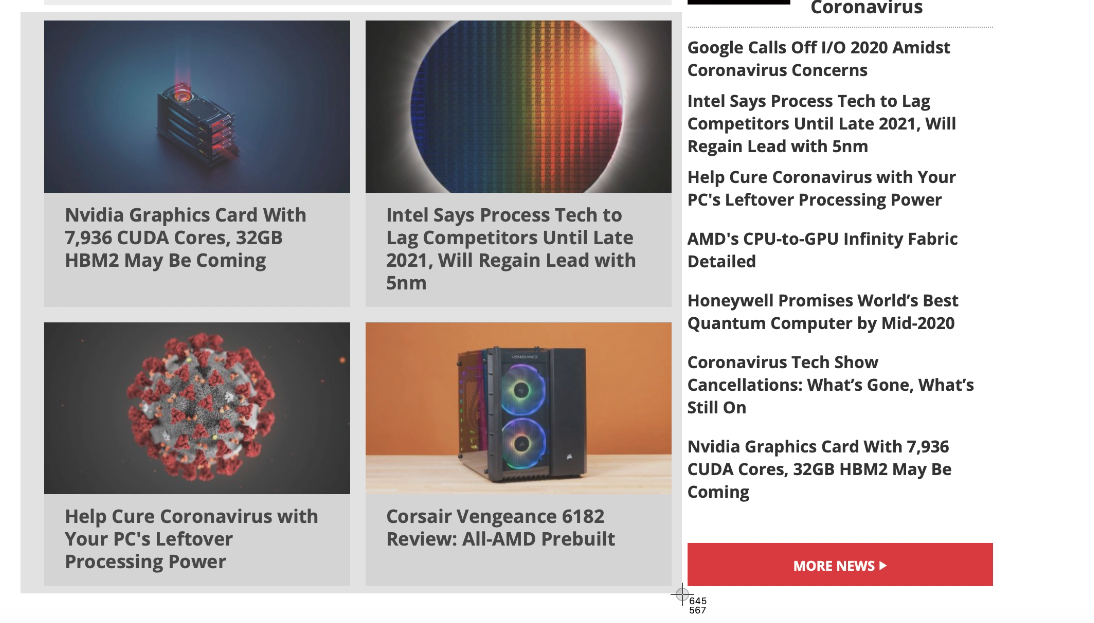
**To screenshot a custom portion of the screen:** press Command (⌘) +Shift + 4, which will turn the pointer into a crosshair. Then click and drag to select the area to capture, and it will show the size in pixels next to the crosshair. Release to take the screenshot.
(Image credit: Apple / Tom's Hardware)
**To screenshot the Touch Bar:** Command (⌘), + Shift + 6.
All of these will save to your desktop by default. If you want them to save to your clipboard, **press Control** along with the rest of the keyboard shortcut.
Stay On the Cutting Edge: Get the Tom's Hardware Newsletter
Get Tom's Hardware's best news and in-depth reviews, straight to your inbox.
By signing up, you agree to our [Terms of services](https://futureplc.com/terms-conditions/) and acknowledge that you have read our [Privacy Notice](https://futureplc.com/privacy-policy). You also agree to receive marketing emails from us that may include promotions from our trusted partners and sponsors, which you can unsubscribe from at any time.
## Using the Mac Screenshot app
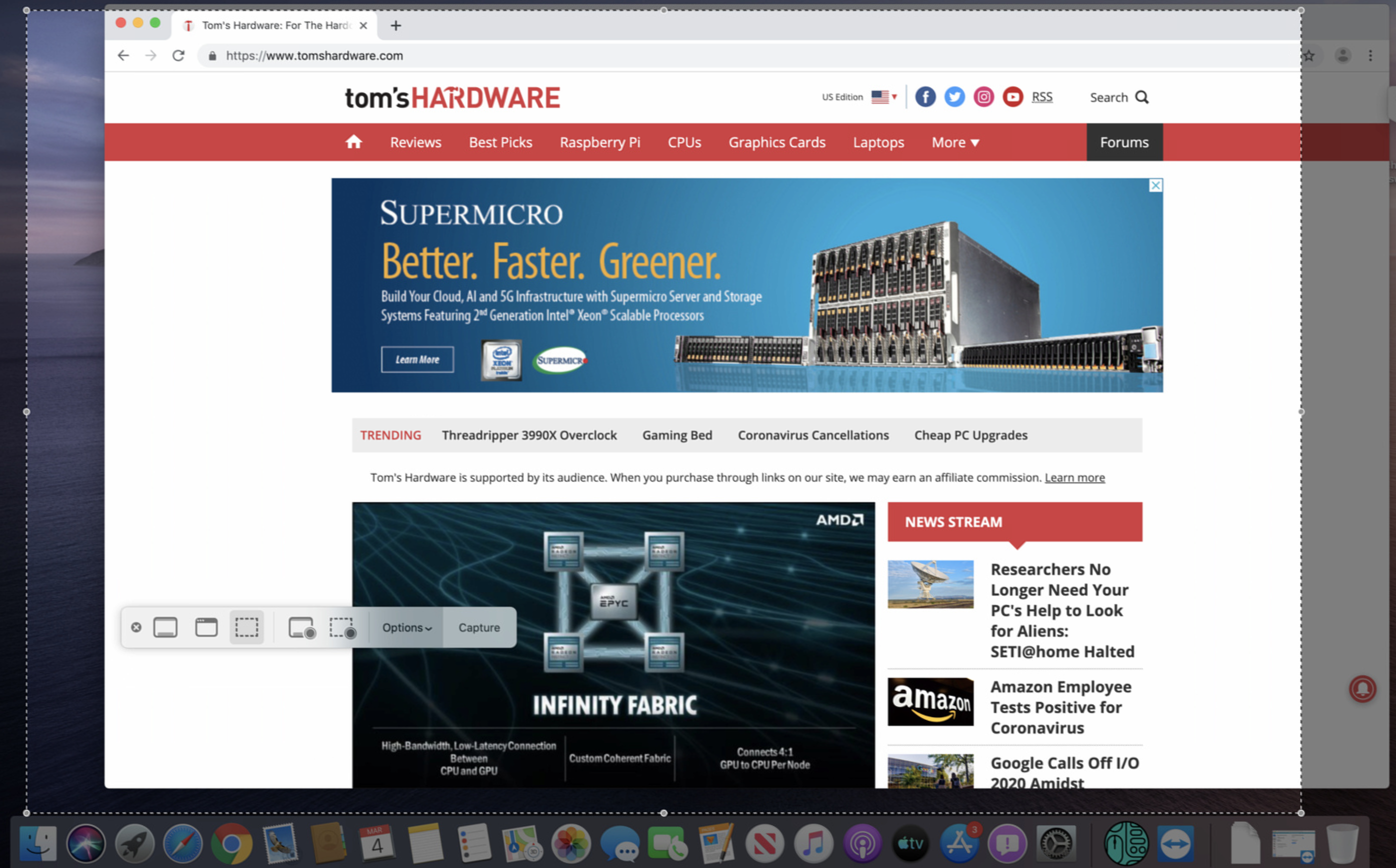
For those who prefer an app to take screenshots, macOS has one built in (if you have macOS Mojave or later). You can find it by going to **Applications \> Utilities \> Screenshot,** searching for “Screenshot” in Spotlight search or **pressing Command (⌘), Shift and 5.**
(Image credit: Apple / Tom's Hardware)
From there, a rectangle will appear on screen. You can drag the edges to select more of the screen. A menu pops up that allows you to choose between a selection, full screen or specific window, or to record video. Either way, **press Capture** when you’re done.
## How to change where you save Mac screenshots
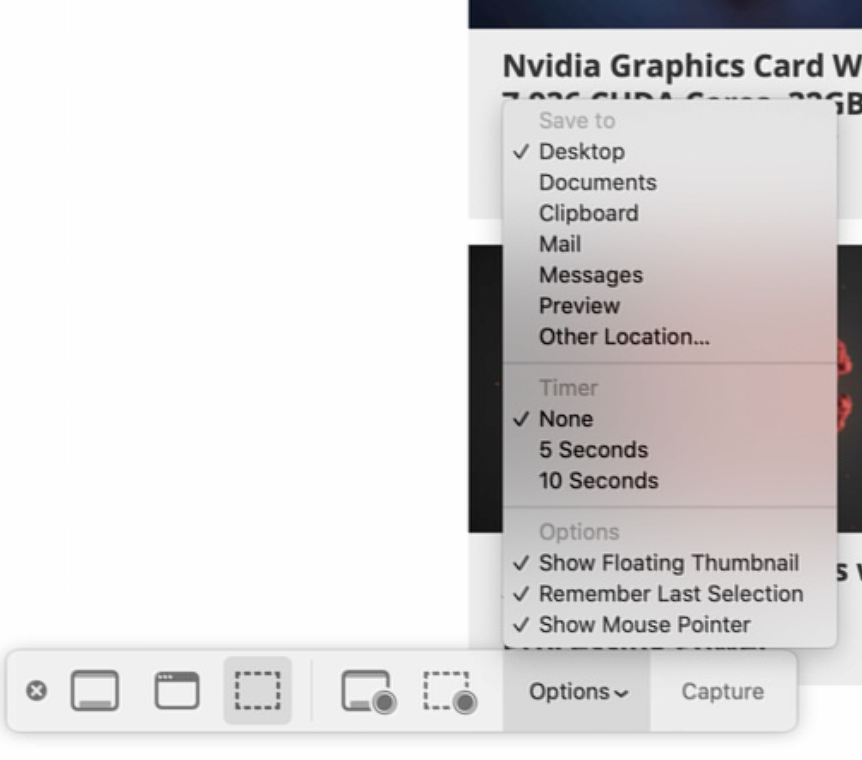
In the Mac Screenshot app, **click on Options** and choose a location from under "**Save to.**"You can also use these settings
(Image credit: Apple / Tom's Hardware)
TOPICS
[MacBook Pro](https://www.tomshardware.com/uk/tag/macbook-pro) [iMac](https://www.tomshardware.com/uk/tag/imac) [mac](https://www.tomshardware.com/uk/tag/mac) [Hardware](https://www.tomshardware.com/uk/tag/hardware)
[See all comments (1)](https://www.tomshardware.com/how-to/take-screenshot-on-mac#xenforo-comments-3579118)

[Andrew E. Freedman](https://www.tomshardware.com/uk/author/andrew-e-freedman)
Social Links Navigation
Andrew E. Freedman is a senior editor at Tom's Hardware focusing on laptops, desktops and gaming. He also keeps up with the latest news. A lover of all things gaming and tech, his previous work has shown up in Tom's Guide, Laptop Mag, Kotaku, PCMag and Complex, among others. Follow him on Threads [@FreedmanAE](https://www.threads.net/@freedmanae) and BlueSky [@andrewfreedman.net](https://bsky.app/profile/andrewfreedman.net).You can send him tips on Signal: andrewfreedman.01
Read more
[ MacOS The Apple Mac turned 42 this weekend](https://www.tomshardware.com/software/macos/the-apple-mac-turned-42-this-weekend-we-are-still-using-the-wimp-gui-wysiwyg-computing-paradigm-in-2026 "The Apple Mac turned 42 this weekend")
[ Macbooks Apple MacBook Pro (14-inch, M5 Max) review: Blazing-fast super cores](https://www.tomshardware.com/laptops/macbooks/apple-macbook-pro-14-inch-m5-max-2026-review "Apple MacBook Pro (14-inch, M5 Max) review: Blazing-fast super cores")
[ Macbooks MacBook Pro with OLED touch screen arriving in the fall, claims leaker](https://www.tomshardware.com/laptops/macbooks/macbook-pro-with-oled-touch-screen-arriving-in-the-fall-claims-leaker-new-laptops-to-feature-dynamic-island-and-revamped-ui-optimized-for-both-fingers-and-cursors "MacBook Pro with OLED touch screen arriving in the fall, claims leaker")
[ Macbooks Apple MacBook Air (13-inch, M5) review: Steady as it goes](https://www.tomshardware.com/laptops/macbooks/apple-macbook-air-13-inch-m5-review "Apple MacBook Air (13-inch, M5) review: Steady as it goes")
[ Macbooks Apple MacBook Neo review: a budget-priced game-changer](https://www.tomshardware.com/laptops/macbooks/apple-macbook-neo-a18-pro-review "Apple MacBook Neo review: a budget-priced game-changer")
[ Case Mods Computer History Museum unveils comically large-scale rendition of the 1986 Apple Macintosh Plus](https://www.tomshardware.com/pc-components/case-mods/computer-history-museum-unveils-comically-large-scale-rendition-of-the-1986-apple-macintosh-plus-towering-all-in-ones-keyboard-looks-disproportionately-huge-today "Computer History Museum unveils comically large-scale rendition of the 1986 Apple Macintosh Plus")
Latest in Macbooks
[ Macbooks Tim Cook says Apple had its best launch week for first-time Mac customers with the MacBook Neo](https://www.tomshardware.com/laptops/macbooks/tim-cook-says-apple-had-its-best-launch-week-for-first-time-mac-customers-with-the-macbook-neo-entry-level-device-now-out-of-stock-with-orders-taking-two-to-three-weeks-to-ship "Tim Cook says Apple had its best launch week for first-time Mac customers with the MacBook Neo")
[ Macbooks Cyberpunk 2077 runs on MacBook Neo at over 30 FPS](https://www.tomshardware.com/laptops/macbooks/cyberpunk-2077-runs-on-macbook-neo-at-over-30-fps-pc-gaming-is-possible-with-a18-pro-iphone-chip "Cyberpunk 2077 runs on MacBook Neo at over 30 FPS")
[ Macbooks The \$599 MacBook Neo stunned the budget laptop market](https://www.tomshardware.com/laptops/macbooks/apple-macbook-neo-vs-windows-laptops-advantages "The $599 MacBook Neo stunned the budget laptop market")
[ Macbooks Apple MacBook Air (13-inch, M5) review: Steady as it goes](https://www.tomshardware.com/laptops/macbooks/apple-macbook-air-13-inch-m5-review "Apple MacBook Air (13-inch, M5) review: Steady as it goes")
[ Macbooks Apple's MacBook Neo modded to a 1 TB SSD, breaking the firm's 512 GB barrier](https://www.tomshardware.com/laptops/macbooks/apples-macbook-neo-modded-to-a-1-tb-ssd-breaking-the-firms-512-gb-barrier-base-256-gb-model-gets-modded-in-expert-nand-swap-surgery "Apple's MacBook Neo modded to a 1 TB SSD, breaking the firm's 512 GB barrier ")
[ Macbooks Act now and save £29 ahead of the Apple MacBook Neo release](https://www.tomshardware.com/laptops/macbooks/act-now-and-save-gbp29-ahead-of-the-apple-macbook-neo-release-gbp569-apple-neo-preorders-on-amazon-are-live-in-the-spring-deal-days-sale "Act now and save £29 ahead of the Apple MacBook Neo release")
Latest in News
[ Artificial Intelligence Google's TurboQuant reduces AI LLM cache memory capacity requirements by at least six times](https://www.tomshardware.com/tech-industry/artificial-intelligence/googles-turboquant-compresses-llm-kv-caches-to-3-bits-with-no-accuracy-loss "Google's TurboQuant reduces AI LLM cache memory capacity requirements by at least six times")
[ Big Tech Kentucky farm family rejects \$26 million offer for 600 acres of land from unnamed AI data center suitor](https://www.tomshardware.com/tech-industry/big-tech/kentucky-farm-family-rejects-usd26-million-offer-for-600-acres-of-land-from-unnamed-ai-data-center-suitor-declines-7x-offer-wants-to-stay-and-hold-and-feed-a-nation "Kentucky farm family rejects $26 million offer for 600 acres of land from unnamed AI data center suitor")
[ Tech Industry Arm moves beyond IP with AGI CPU silicon](https://www.tomshardware.com/tech-industry/semiconductors/arm-launches-its-first-data-center-cpu "Arm moves beyond IP with AGI CPU silicon")
[ CPUs Intel officially releases Xeon 600 chips, announces new vPro Panther Lake CPUs](https://www.tomshardware.com/pc-components/cpus/intel-officially-releases-xeon-600-chips-announces-new-vpro-panther-lake-cpus-all-new-vpro-platform-goes-all-in-on-ai "Intel officially releases Xeon 600 chips, announces new vPro Panther Lake CPUs")
[ Artificial Intelligence HP's new AI workstation can expand horizontally to add 15% more internal volume](https://www.tomshardware.com/tech-industry/artificial-intelligence/hps-new-ai-workstation-can-expand-horizontally-to-add-15-percent-more-internal-volume-alternate-side-panel-also-includes-more-active-cooling "HP's new AI workstation can expand horizontally to add 15% more internal volume")
[ Tech Industry Microsoft and Nvidia launch AI-powered partnership to speed up nuclear permitting and construction](https://www.tomshardware.com/tech-industry/microsoft-and-nvidia-launch-ai-tools-to-speed-up-nuclear-power-plant-permitting-and-construction "Microsoft and Nvidia launch AI-powered partnership to speed up nuclear permitting and construction")
1 Comment [Comment from the forums](https://forums.tomshardware.com/threads/how-to-take-a-screenshot-on-a-mac.3579118/)
- Spaceghaze
How about a how to google article?
Ow yeah, because no one is googling how to google, but a lot of people google on how to take a screenshot on Mac.. i see what you did there..
Or is it really no better "news" then this?
[Reply](https://forums.tomshardware.com/threads/how-to-take-a-screenshot-on-a-mac.3579118/)
- [View All 1 Comment](https://forums.tomshardware.com/threads/how-to-take-a-screenshot-on-a-mac.3579118/)
Tom's Hardware is part of Future plc, an international media group and leading digital publisher. [Visit our corporate site](https://futureplc.com/).
[ Add as a preferred source on Google](https://google.com/preferences/source?q=tomshardware.com)
- [Terms and conditions](https://futureplc.com/terms-conditions/)
- [Contact Future's experts](https://futureplc.com/contact/)
- [Privacy policy](https://futureplc.com/privacy-policy/)
- [Cookies policy](https://futureplc.com/cookies-policy/)
- [Accessibility Statement](https://futureplc.com/accessibility-statement/)
- [Advertise with us](https://go.future-advertising.com/Toms-Hardware-Media-Kit.html)
- [About us](https://www.tomshardware.com/uk/reviews/about-us,4260.html#section-contact-info)
- [Coupons](https://www.tomshardware.com/coupons)
- [Careers](https://futureplc.com/careers/)
- [Do not sell or share my personal information](https://www.tomshardware.com/uk/privacy-portal)
© Future Publishing Limited Quay House, The Ambury, Bath BA1 1UA. All rights reserved. England and Wales company registration number 2008885.
![]()
× |
| Readable Markdown | When you want to share something on your Mac with others, one of the best ways to do so is by taking a screenshot, which produces an image of what you see on screen. It’s also a way to save what you’re looking at to check out later.
Here is how to take a screenshot on a Mac:
## Take a Mac Screenshot With Keyboard Shortcuts
If you learn a few keyboard shortcuts, it becomes easy to take screenshots almost instantly:
**To screenshot the entire screen**: Command (⌘) + Shift + 3
Article continues below
**To screenshot a specific window or menu:** Command (⌘) + Shift + 4 + spacebar. This will turn the mouse into a small camera, which you can use to click on a window, menu, the dock your wallpaper or other elements on screen.

(Image credit: Apple / Tom's Hardware)
**To screenshot a custom portion of the screen:** press Command (⌘) +Shift + 4, which will turn the pointer into a crosshair. Then click and drag to select the area to capture, and it will show the size in pixels next to the crosshair. Release to take the screenshot.

(Image credit: Apple / Tom's Hardware)
**To screenshot the Touch Bar:** Command (⌘), + Shift + 6.
All of these will save to your desktop by default. If you want them to save to your clipboard, **press Control** along with the rest of the keyboard shortcut.
Get Tom's Hardware's best news and in-depth reviews, straight to your inbox.
## Using the Mac Screenshot app
For those who prefer an app to take screenshots, macOS has one built in (if you have macOS Mojave or later). You can find it by going to **Applications \> Utilities \> Screenshot,** searching for “Screenshot” in Spotlight search or **pressing Command (⌘), Shift and 5.**

(Image credit: Apple / Tom's Hardware)
From there, a rectangle will appear on screen. You can drag the edges to select more of the screen. A menu pops up that allows you to choose between a selection, full screen or specific window, or to record video. Either way, **press Capture** when you’re done.
## How to change where you save Mac screenshots
In the Mac Screenshot app, **click on Options** and choose a location from under "**Save to.**"You can also use these settings

(Image credit: Apple / Tom's Hardware)
Andrew E. Freedman is a senior editor at Tom's Hardware focusing on laptops, desktops and gaming. He also keeps up with the latest news. A lover of all things gaming and tech, his previous work has shown up in Tom's Guide, Laptop Mag, Kotaku, PCMag and Complex, among others. Follow him on Threads [@FreedmanAE](https://www.threads.net/@freedmanae) and BlueSky [@andrewfreedman.net](https://bsky.app/profile/andrewfreedman.net).You can send him tips on Signal: andrewfreedman.01 |
| Shard | 139 (laksa) |
| Root Hash | 14957725849104319939 |
| Unparsed URL | com,tomshardware!www,/how-to/take-screenshot-on-mac s443 |