ℹ️ Skipped - page is already crawled
| Filter | Status | Condition | Details |
|---|---|---|---|
| HTTP status | PASS | download_http_code = 200 | HTTP 200 |
| Age cutoff | PASS | download_stamp > now() - 6 MONTH | 0.3 months ago |
| History drop | PASS | isNull(history_drop_reason) | No drop reason |
| Spam/ban | PASS | fh_dont_index != 1 AND ml_spam_score = 0 | ml_spam_score=0 |
| Canonical | PASS | meta_canonical IS NULL OR = '' OR = src_unparsed | Not set |
| Property | Value |
|---|---|
| URL | https://www.theguitarband.com/how-to-open-a-rar-file-on-windows-or-mac-computer/ |
| Last Crawled | 2026-04-14 19:27:25 (9 days ago) |
| First Indexed | 2020-09-15 11:17:40 (5 years ago) |
| HTTP Status Code | 200 |
| Content | |
| Meta Title | How To Open a RAR file on Windows or MAC Computer - |
| Meta Description | null |
| Meta Canonical | null |
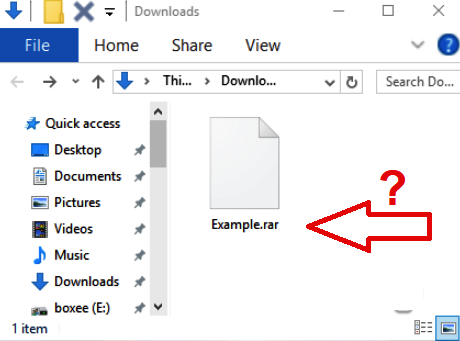
| Boilerpipe Text | RAR is basically a folder filled with documents/files. Folders that have a large number of files, such as backing tracks, require a compressed file to be able to transfer them between computers.
RAR is a compressed file format – similar to ZIP – that can hold many files in one place, and is especially useful for sending or downloading a large number of files. Than we use a compressed RAR file that contains them.
Computer Windows
The easiest method to open a RAR file is to install a program like
WinZip
or
WinRAR
.
Both of these software applications will allow you to open a RAR file.
To open the RAR file you download one of these applications:
https://www.win-rar.com/
https://www.7-zip.org/
The default choice is
WinRAR
by the developers of the .rar file format, it’s not free, but you can use it for a period of 40 days (trial) without paying.
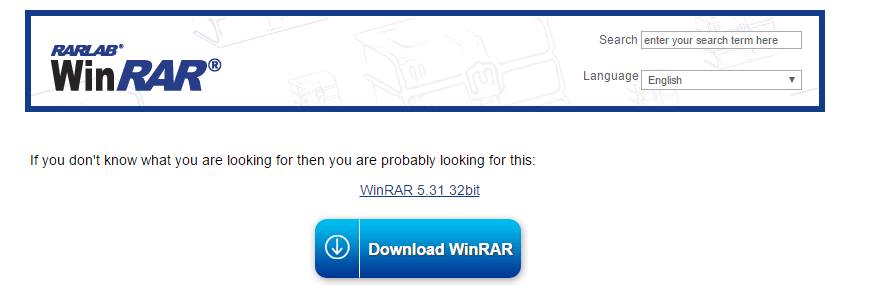
Download
WinRar and run the program
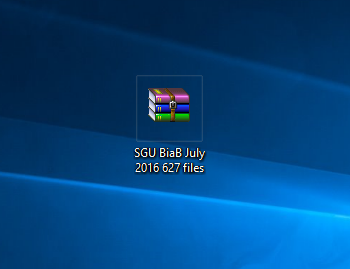
2. Double click on the file icon
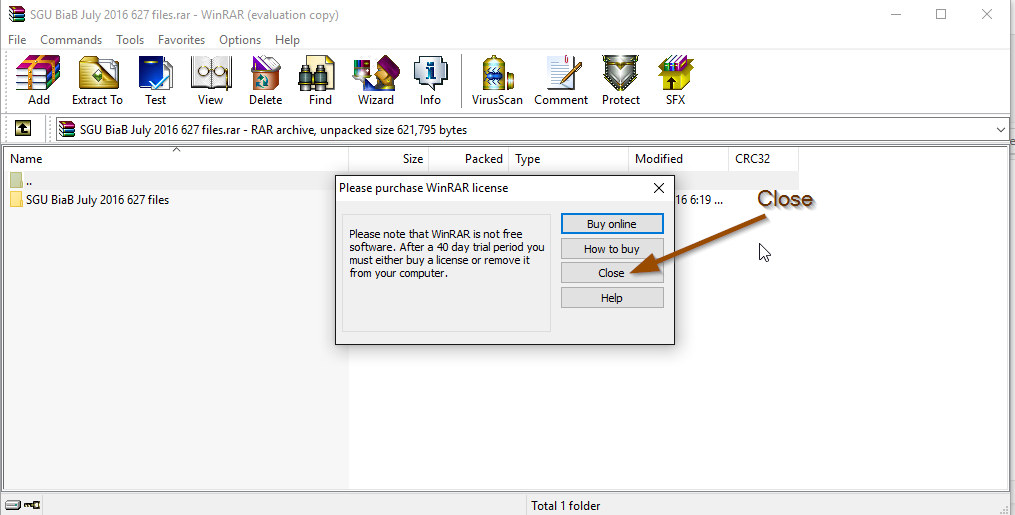
3. Click “CLOSE” on the alert window
4. Extract by clicking on the Menu
4. Done. Your file will be at the same location as the original RAR
In the alternative, you’ll want to use the
free and open source
7-Zip
application
instead.
After clicking on the RAR file, your preferred software application will open and expose the contents of the RAR file automatically.
How to open the file with the free 7-zip program
Downloaded 7-Zip ed install it on you computer
https://www.7-zip.org/download.html.
You can right-click on any .RAR file and easily choose to extract the files from the menu.
Computer MAC
When you open a RAR file on your Mac, it will turn into a folder where you can access all of the decompressed files.
The Unarchiver is the app you need to open RAR on Mac. It’s times more powerful than the native macOS utility and supports infinitely more archive formats. The Mac App “The UnArchiver” is free, works instantly, easily, and without issue:
https://theunarchiver.com/
Types of files
If you have unzipped the folder, the files inside can be show in this way (if you have downloaded the complete program you will also see the mp3 and LRC (lyrics) files:
Remember that to open a sgu file you need the Band in a Box program.
LRC file does not open directly. The content is shown automatically when you play an mp3 file, after you have installed a lyrics reader program such as MiniLyrics or similar.
Please, check out this video:
More questions? Write to Giancarlo:
contact@theguitarband.com |
| Markdown | [Skip to content](https://www.theguitarband.com/how-to-open-a-rar-file-on-windows-or-mac-computer/#content)
[](https://www.theguitarband.com/)
- [Tutorials](https://www.theguitarband.com/category/tutorial/)
- [SGU Free Download](https://www.theguitarband.com/sgu-files-2/)
- [Audio + Sgu Collection](https://www.theguitarband.com/biab-sgu-backing-tracks-download/)
- [About & Contact](https://www.theguitarband.com/contact/)
[](https://www.theguitarband.com/)
Navigation Menu
Navigation Menu
- [Tutorials](https://www.theguitarband.com/category/tutorial/)
- [SGU Free Download](https://www.theguitarband.com/sgu-files-2/)
- [Audio + Sgu Collection](https://www.theguitarband.com/biab-sgu-backing-tracks-download/)
- [About & Contact](https://www.theguitarband.com/contact/)
# 
# How To Open a RAR File (Windows or Mac)
RAR is basically a folder filled with documents/files. Folders that have a large number of files, such as backing tracks, require a compressed file to be able to transfer them between computers.
RAR is a compressed file format – similar to ZIP – that can hold many files in one place, and is especially useful for sending or downloading a large number of files. Than we use a compressed RAR file that contains them.
### Computer Windows
The easiest method to open a RAR file is to install a program like **WinZip** or **WinRAR**.
Both of these software applications will allow you to open a RAR file.
To open the RAR file you download one of these applications:
- <https://www.win-rar.com/>
- <https://www.7-zip.org/>
The default choice is ***WinRAR*** by the developers of the .rar file format, it’s not free, but you can use it for a period of 40 days (trial) without paying.
1. **[Download](http://www.win-rar.com/download.html?&L=0) WinRar and run the program**
[](http://www.win-rar.com/download.html?&L=0)
**2\. Double click on the file icon**
[](https://www.theguitarband.com/open-rar-file/your-rar-file/)
**3\. Click “CLOSE” on the alert window**
**[](https://www.theguitarband.com/open-rar-file/close/)**
**4\. Extract by clicking on the Menu**
[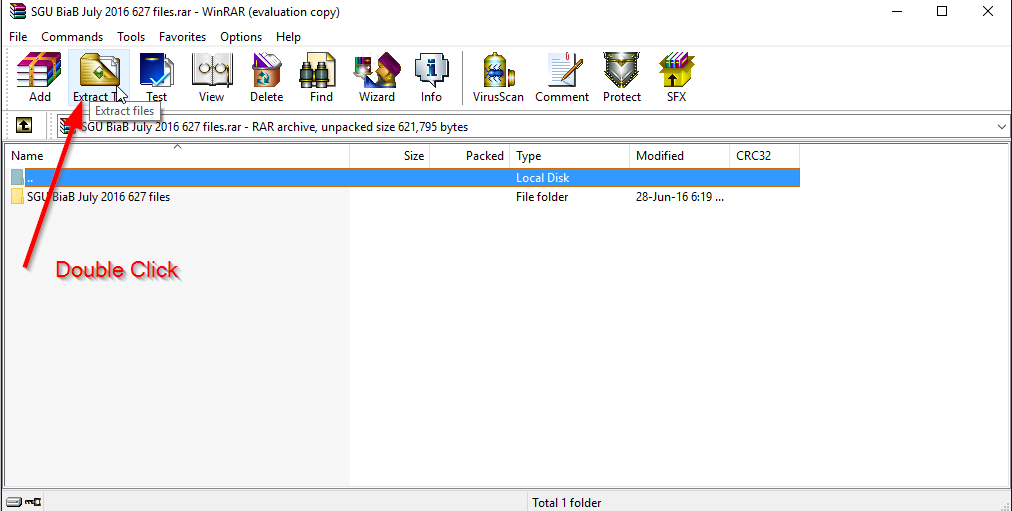](https://www.theguitarband.com/open-rar-file/double-click/)
**4\. Done. Your file will be at the same location as the original RAR**
[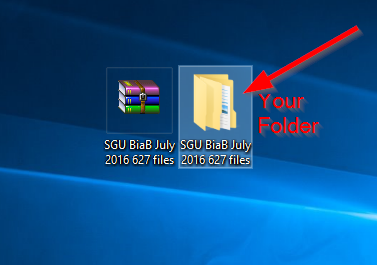](https://www.theguitarband.com/open-rar-file/your-folder/)
In the alternative, you’ll want to use the **free and open source** ***7-Zip* application** instead.
After clicking on the RAR file, your preferred software application will open and expose the contents of the RAR file automatically.
### How to open the file with the free 7-zip program
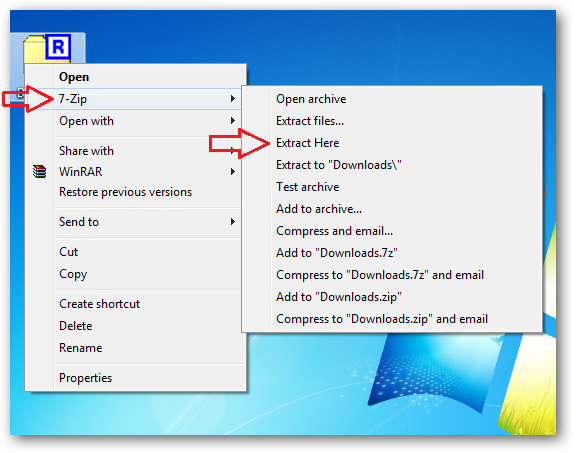
- Downloaded 7-Zip ed install it on you computer [https://www.7-zip.org/download.html.](https://www.7-zip.org/download.html)
- You can right-click on any .RAR file and easily choose to extract the files from the menu.
## Computer MAC
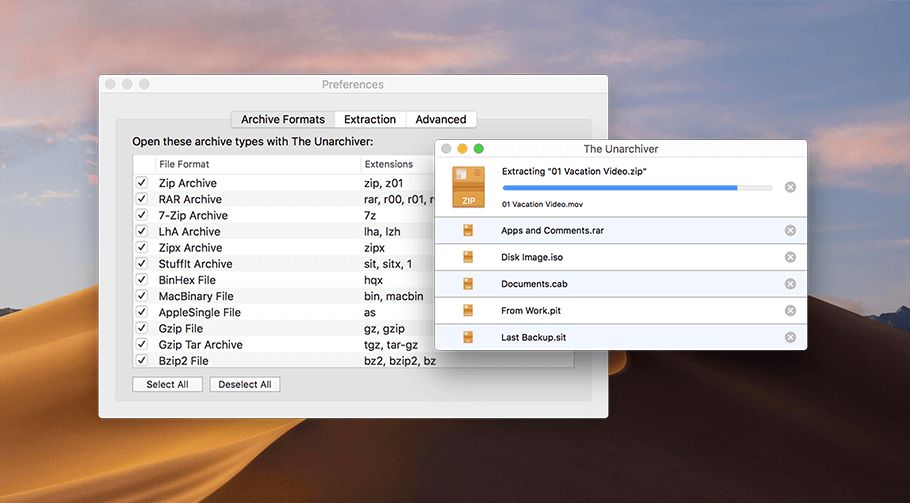
When you open a RAR file on your Mac, it will turn into a folder where you can access all of the decompressed files.
The Unarchiver is the app you need to open RAR on Mac. It’s times more powerful than the native macOS utility and supports infinitely more archive formats. The Mac App “The UnArchiver” is free, works instantly, easily, and without issue:
<https://theunarchiver.com/>
## Types of files
If you have unzipped the folder, the files inside can be show in this way (if you have downloaded the complete program you will also see the mp3 and LRC (lyrics) files:
# 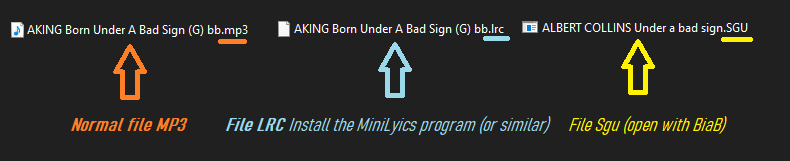
Remember that to open a sgu file you need the Band in a Box program.
LRC file does not open directly. The content is shown automatically when you play an mp3 file, after you have installed a lyrics reader program such as MiniLyrics or similar.
Please, check out this video:
More questions? Write to Giancarlo: *contact@theguitarband.com*
Tags:[How To Open a RAR file on Windows or MAC Computer](https://www.theguitarband.com/tag/how-to-open-a-rar-file-on-windows-or-mac-computer/ "How To Open a RAR file on Windows or MAC Computer")
Free Band-In-A-Box Easy PDF Tutorial
[](https://www.theguitarband.com/band-in-a-box-free-pdf-tutorial/)
Band-In-A-Box Full SGU Collection
[](https://www.theguitarband.com/biab-sgu-backing-tracks-download/)
Recent Posts
- [🎼 How to Change the Key of a Music Track Without Losing Quality](https://www.theguitarband.com/%F0%9F%8E%BC-how-to-change-the-key-of-a-music-track-without-losing-quality/)
- [Band in a Box vs. Artificial Intelligence: The Challenge for Backing Tracks](https://www.theguitarband.com/band-in-a-box-vs-artificial-intelligence-the-challenge-for-backing-tracks/)
- [Are you a Band in a Box user? Share or download your favorite SGU files](https://www.theguitarband.com/are-you-a-band-in-a-box-user-share-or-download-your-favorite-sgu-files/)
- [Creating Band in a Box Intros: 3 Methods for Start Your Song](https://www.theguitarband.com/creating-band-in-a-box-intros-3-methods-for-start-your-song/)
- [Share Your Backing Tracks with Us](https://www.theguitarband.com/share-your-backing-tracks-with-us/)
- [Unlocking Musical Success: Crafting Instrumental Parts for Hit Songs](https://www.theguitarband.com/unlocking-musical-success-crafting-instrumental-parts-for-hit-songs/)
- [Revolutionize Your Music Creation with Band-in-a-Box: Unleash the Power of RealTracks\!](https://www.theguitarband.com/revolutionize-your-music-creation-with-band-in-a-box-unleash-the-power-of-realtracks/)
- [Band-in-a-Box Vs. AI-Powered Vocal/Instrumental Remover: What’s better?](https://www.theguitarband.com/band-in-a-box-vs-ai-powered-vocal-instrumental-remover/)
- [Music Player for Musicians](https://www.theguitarband.com/music-player-for-musicians/)
- [Band in a Box Audio Songs List made with RealTracks only](https://www.theguitarband.com/audio-songs-made-with-band-in-a-box-with-realtracks-only/)
Categories
[Neve](https://themeisle.com/themes/neve/) \| Powered by [WordPress](https://wordpress.org/) |
| Readable Markdown | ## 
RAR is basically a folder filled with documents/files. Folders that have a large number of files, such as backing tracks, require a compressed file to be able to transfer them between computers.
RAR is a compressed file format – similar to ZIP – that can hold many files in one place, and is especially useful for sending or downloading a large number of files. Than we use a compressed RAR file that contains them.
### Computer Windows
The easiest method to open a RAR file is to install a program like **WinZip** or **WinRAR**.
Both of these software applications will allow you to open a RAR file.
To open the RAR file you download one of these applications:
- <https://www.win-rar.com/>
- <https://www.7-zip.org/>
The default choice is ***WinRAR*** by the developers of the .rar file format, it’s not free, but you can use it for a period of 40 days (trial) without paying.
1. **[Download](http://www.win-rar.com/download.html?&L=0) WinRar and run the program**
[](http://www.win-rar.com/download.html?&L=0)
**2\. Double click on the file icon**
[](https://www.theguitarband.com/open-rar-file/your-rar-file/)
**3\. Click “CLOSE” on the alert window**
**[](https://www.theguitarband.com/open-rar-file/close/)**
**4\. Extract by clicking on the Menu**
[](https://www.theguitarband.com/open-rar-file/double-click/)
**4\. Done. Your file will be at the same location as the original RAR**
[](https://www.theguitarband.com/open-rar-file/your-folder/)
In the alternative, you’ll want to use the **free and open source** ***7-Zip* application** instead.
After clicking on the RAR file, your preferred software application will open and expose the contents of the RAR file automatically.
### How to open the file with the free 7-zip program
- Downloaded 7-Zip ed install it on you computer [https://www.7-zip.org/download.html.](https://www.7-zip.org/download.html)
- You can right-click on any .RAR file and easily choose to extract the files from the menu.

## Computer MAC
When you open a RAR file on your Mac, it will turn into a folder where you can access all of the decompressed files.
The Unarchiver is the app you need to open RAR on Mac. It’s times more powerful than the native macOS utility and supports infinitely more archive formats. The Mac App “The UnArchiver” is free, works instantly, easily, and without issue:
<https://theunarchiver.com/>

## Types of files
If you have unzipped the folder, the files inside can be show in this way (if you have downloaded the complete program you will also see the mp3 and LRC (lyrics) files:
## 
Remember that to open a sgu file you need the Band in a Box program.
LRC file does not open directly. The content is shown automatically when you play an mp3 file, after you have installed a lyrics reader program such as MiniLyrics or similar.
Please, check out this video:
More questions? Write to Giancarlo: *contact@theguitarband.com* |
| ML Classification | |
| ML Categories | null |
| ML Page Types | null |
| ML Intent Types | null |
| Content Metadata | |
| Language | en-us |
| Author | null |
| Publish Time | 2020-09-15 05:58:49 (5 years ago) |
| Original Publish Time | 2020-09-15 05:58:49 (5 years ago) |
| Republished | No |
| Word Count (Total) | 617 |
| Word Count (Content) | 422 |
| Links | |
| External Links | 10 |
| Internal Links | 26 |
| Technical SEO | |
| Meta Nofollow | No |
| Meta Noarchive | No |
| JS Rendered | No |
| Redirect Target | null |
| Performance | |
| Download Time (ms) | 2,838 |
| TTFB (ms) | 1,761 |
| Download Size (bytes) | 61,980 |
| Shard | 57 (laksa) |
| Root Hash | 6592243921945401857 |
| Unparsed URL | com,theguitarband!www,/how-to-open-a-rar-file-on-windows-or-mac-computer/ s443 |