ℹ️ Skipped - page is already crawled
| Filter | Status | Condition | Details |
|---|---|---|---|
| HTTP status | PASS | download_http_code = 200 | HTTP 200 |
| Age cutoff | PASS | download_stamp > now() - 6 MONTH | 0.1 months ago |
| History drop | PASS | isNull(history_drop_reason) | No drop reason |
| Spam/ban | PASS | fh_dont_index != 1 AND ml_spam_score = 0 | ml_spam_score=0 |
| Canonical | PASS | meta_canonical IS NULL OR = '' OR = src_unparsed | Not set |
| Property | Value |
|---|---|
| URL | https://www.techrepublic.com/article/news-google-translate-android-widgets-update/ |
| Last Crawled | 2026-04-07 02:23:01 (2 days ago) |
| First Indexed | 2026-03-17 15:37:12 (22 days ago) |
| HTTP Status Code | 200 |
| Meta Title | New Google Translate Update Brings One-Tap Widgets for Faster Access on Android |
| Meta Description | Google Translate’s latest Android update adds one-tap widgets for camera, voice, live translation, and more, making key tools faster to open. |
| Meta Canonical | null |
| Boilerpipe Text | We may earn from vendors via affiliate links or sponsorships. This might affect product placement on our site, but not the content of our reviews. See our
Terms of Use
for details.
Google Translate’s latest Android update adds one-tap widgets for camera, voice, live translation, and more, making key tools faster to open.
Image generated with Google Gemini.
Google just rolled out a new update for Translate on Android, turning some of its most useful features into one-tap widgets that can be launched right from the home screen.
Months after AI-powered live translation and model pickers were introduced to Translate, the app is getting another update aimed at improving the overall user experience (UX). According to
9to5Google
, the update brings features like camera, voice, and
live translation
out of the main app and into the home screen, with each widget designed to instantly launch its specific task.
Instead of navigating through multiple menus in the app, users can now jump straight to the exact translation feature they need.
More smaller widgets, faster access
At the center of the update is a shift from a single multi-function widget to smaller, single-purpose widgets.
According to 9to5Google, these tools were previously grouped inside a Quick Actions widget. Now, each feature is a standalone widget. The Translate text widget, for instance, opens straight into the typing interface with the keyboard ready, while others launch camera translation, live conversation, or voice input with one tap.
Image: Screenshot via 9to5Google
For example, translating a book written in French to English would typically require opening the app and selecting the camera mode. However, with this new setup, users can simply tap the camera widget and begin translating immediately.
What the new widgets include
The update introduced widgets for five key Translate features:
Camera:
Instant visual translation using the device camera. It is useful for translating texts from signs, books, or documents.
Voice:
Translate texts through voice input.
Live Translate:
One of Translate’s most useful features. Enables two-way real-time conversation translation.
Clipboard:
Allows users to translate clipboard texts copied from other apps.
Practice:
Allows users to improve their foreign-language skills in the app.
Some of these shortcuts were already available through long-press actions on the app icon, another form of app shortcut, but placing them as widgets makes them more visible and easier to access.
Part of a broader Android shift
By reducing these UX obstacles, Google is ensuring that Translate fully serves its purpose as a quick go-to app for impromptu translations.
Just like the recent
camera update
on the Pixel 10 Pro and Pro XL, this update doesn’t introduce new capabilities. Rather, it focuses on speed of access, digging out tools that were previously buried a few taps within the app.
The update also reflects a broader trend across Android where widgets are increasingly being used to
surface key app functions
directly on the home screen. For Translate, that means everyday tasks — like reading foreign text or holding a conversation across languages — are now a tap away.
Also read:
Android 17 beta leaks suggest Google is pushing the platform toward faster AI
actions, deeper privacy controls, and a broader interface redesign.
Joseph Ofonagoro
Joseph is a Technical Writer with about 3 years of experience in the industry, also advancing a career in cyber threat intelligence. He is passionate about the responsible use of technology, a passion that led him into cybersecurity.
As an undergrad, he leads a novel community of technology enthusiasts at his school, NOUN, where he guides and shares resources for beginners in tech.
His writing experience includes writing on a diverse range of topics, from consumer tech to startups and tutorials.
Additionally, he periodically shares case studies and research reports on cybersecurity on his social media pages. |
| Markdown | [Skip to content](https://www.techrepublic.com/article/news-google-translate-android-widgets-update/#primary)
##
- [Top Products](https://www.techrepublic.com/topic/top-products/)
- [AI](https://www.techrepublic.com/topic/artificial-intelligence/)
- [Developer](https://www.techrepublic.com/topic/developer/)
- [Payroll](https://www.techrepublic.com/topic/payroll/)
- [Security](https://www.techrepublic.com/topic/security/)
- [Project Management](https://www.techrepublic.com/topic/project-management/)
- [Accounting](https://www.techrepublic.com/topic/accounting/)
- [CRM](https://www.techrepublic.com/topic/big-data/crm/)
- [Academy](https://academy.techrepublic.com/)
More
Resources
- [TechRepublic Premium](https://www.techrepublic.com/premium/)
- [TechRepublic Academy](https://academy.techrepublic.com/)
- [Newsletters](https://www.techrepublic.com/newsletters/)
- [Resource Library](https://www.techrepublic.com/resource-library/)
- [Forums](https://www.techrepublic.com/forums/)
- [Sponsored](https://www.techrepublic.com/sponsored/)
[Go Premium](https://www.techrepublic.com/premium/ "TechRepublic Premium")
Popular Topics
- [Top Products](https://www.techrepublic.com/topic/top-products/)
- [AI](https://www.techrepublic.com/topic/artificial-intelligence/)
- [Developer](https://www.techrepublic.com/topic/developer/)
- [Payroll](https://www.techrepublic.com/topic/payroll/)
- [Security](https://www.techrepublic.com/topic/security/)
- [Project Management](https://www.techrepublic.com/topic/project-management/)
- [Accounting](https://www.techrepublic.com/topic/accounting/)
- [CRM](https://www.techrepublic.com/topic/big-data/crm/)
- [Academy](https://academy.techrepublic.com/)
- [Project Management](https://www.techrepublic.com/topic/project-management/)
- [Innovation](https://www.techrepublic.com/topic/innovation/)
- [Cheat Sheets](https://www.techrepublic.com/topic/smart-persons-guides/)
- [Big Data](https://www.techrepublic.com/topic/big-data/)
- [Tech Jobs](https://jobs.techrepublic.com/?source=navbar&utm_source=navbar&utm_medium=partner_referral)
[View All Topics](https://www.techrepublic.com/topic/)
Sign In
Sign In / Sign Up
[Go Premium](https://www.techrepublic.com/premium/ "TechRepublic Premium")
## Account Information
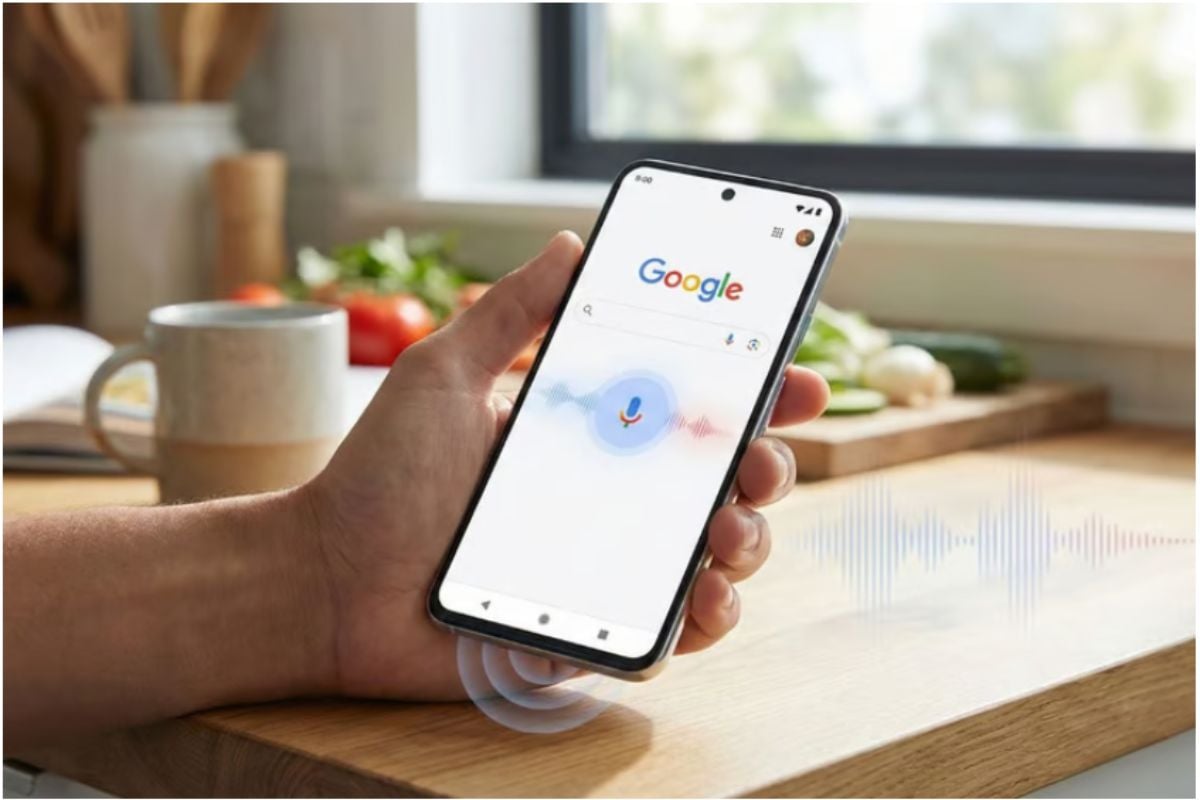
Image generated with Google Gemini.
[Topic](https://www.techrepublic.com/topic/google/) — Google
- ## Account Information
## Share with Your Friends
New Google Translate Update Brings One-Tap Widgets for Faster Access on Android
# New Google Translate Update Brings One-Tap Widgets for Faster Access on Android
Published
March 17, 2026
Written by
[](https://www.techrepublic.com/meet-the-team/us/joseph-ofonagoro/)
[Joseph Ofonagoro](https://www.techrepublic.com/meet-the-team/us/joseph-ofonagoro/)
We may earn from vendors via affiliate links or sponsorships. This might affect product placement on our site, but not the content of our reviews. See our [Terms of Use](https://www.techrepublic.com/terms-conditions/) for details.
Google Translate’s latest Android update adds one-tap widgets for camera, voice, live translation, and more, making key tools faster to open.

Image generated with Google Gemini.
Google just rolled out a new update for Translate on Android, turning some of its most useful features into one-tap widgets that can be launched right from the home screen.
Months after AI-powered live translation and model pickers were introduced to Translate, the app is getting another update aimed at improving the overall user experience (UX). According to [9to5Google](https://9to5google.com/2026/03/16/google-translate-new-widgets/), the update brings features like camera, voice, and [live translation](https://www.techrepublic.com/article/news-google-search-live-gemini/) out of the main app and into the home screen, with each widget designed to instantly launch its specific task.
Instead of navigating through multiple menus in the app, users can now jump straight to the exact translation feature they need.
## More smaller widgets, faster access
At the center of the update is a shift from a single multi-function widget to smaller, single-purpose widgets.
According to 9to5Google, these tools were previously grouped inside a Quick Actions widget. Now, each feature is a standalone widget. The Translate text widget, for instance, opens straight into the typing interface with the keyboard ready, while others launch camera translation, live conversation, or voice input with one tap.
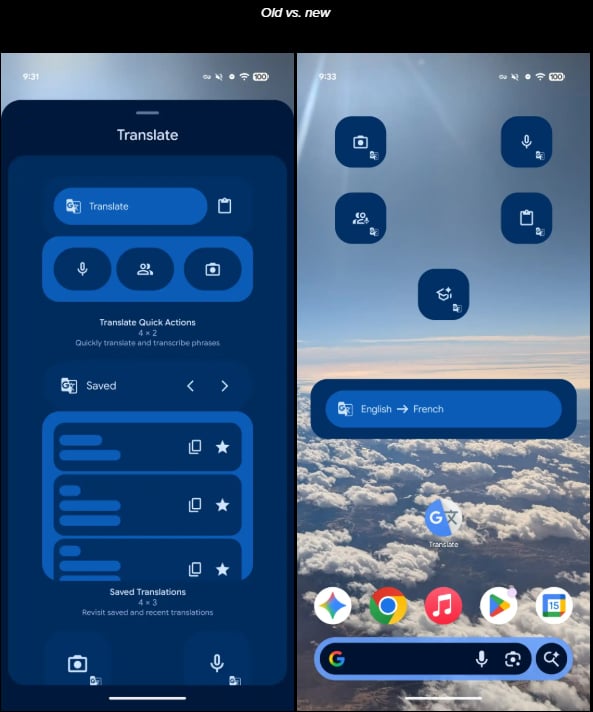
Image: Screenshot via 9to5Google
For example, translating a book written in French to English would typically require opening the app and selecting the camera mode. However, with this new setup, users can simply tap the camera widget and begin translating immediately.
## What the new widgets include
The update introduced widgets for five key Translate features:
- **Camera:** Instant visual translation using the device camera. It is useful for translating texts from signs, books, or documents.
- **Voice:** Translate texts through voice input.
- **Live Translate:** One of Translate’s most useful features. Enables two-way real-time conversation translation.
- **Clipboard:** Allows users to translate clipboard texts copied from other apps.
- **Practice:** Allows users to improve their foreign-language skills in the app.
Some of these shortcuts were already available through long-press actions on the app icon, another form of app shortcut, but placing them as widgets makes them more visible and easier to access.
### More Google coverage
- [New Google Search AI Mode is ‘Total Reimagining,’ Says CEO Sundar Pichai](https://www.techrepublic.com/article/news-google-io-2025-keynote-sundar-pichai/)
- [In Major Ruling, Judge Finds Google ‘Willfully Acquired and Maintained Monopoly Power’ Over Digital Ad Market](https://www.techrepublic.com/article/news-google-antitrust-ruling/)
- [Google’s Big Bet on Nuclear Energy: ‘The Race to Power AI-Driven Data Centers is Accelerating’](https://www.techrepublic.com/article/news-google-nuclear-energy-data-centers/)
- [Computer History Museum Releases Original AlexNet Code: Why It Matters](https://www.techrepublic.com/article/news-alexnet-github-ai/)
## Part of a broader Android shift
By reducing these UX obstacles, Google is ensuring that Translate fully serves its purpose as a quick go-to app for impromptu translations.
Just like the recent [camera update](https://www.techrepublic.com/article/google-pixel-10-pro-pro-zoom-name-change/) on the Pixel 10 Pro and Pro XL, this update doesn’t introduce new capabilities. Rather, it focuses on speed of access, digging out tools that were previously buried a few taps within the app.
The update also reflects a broader trend across Android where widgets are increasingly being used to [surface key app functions](https://www.techrepublic.com/article/news-6-android-tips-hidden-features-settings/) directly on the home screen. For Translate, that means everyday tasks — like reading foreign text or holding a conversation across languages — are now a tap away.
**Also read:** [**Android 17 beta leaks suggest Google is pushing the platform toward faster AI**](https://www.techrepublic.com/article/news-android-17-leaks-features-beta-release-rumors/) **actions, deeper privacy controls, and a broader interface redesign.**
### Subscribe to the Google Weekly Newsletter
Learn how to get the most out of Google Docs, Google Cloud Platform, Google Apps, Chrome OS, and all the other Google products used in business environments. Delivered Fridays
### Subscribe to the Google Weekly Newsletter
Learn how to get the most out of Google Docs, Google Cloud Platform, Google Apps, Chrome OS, and all the other Google products used in business environments. Delivered Fridays
Share Article
- ## Account Information
## Share with Your Friends
New Google Translate Update Brings One-Tap Widgets for Faster Access on Android
[](https://www.techrepublic.com/meet-the-team/us/joseph-ofonagoro/)
Joseph Ofonagoro
Joseph is a Technical Writer with about 3 years of experience in the industry, also advancing a career in cyber threat intelligence. He is passionate about the responsible use of technology, a passion that led him into cybersecurity. As an undergrad, he leads a novel community of technology enthusiasts at his school, NOUN, where he guides and shares resources for beginners in tech. His writing experience includes writing on a diverse range of topics, from consumer tech to startups and tutorials. Additionally, he periodically shares case studies and research reports on cybersecurity on his social media pages.
[See all of Joseph's content](https://www.techrepublic.com/meet-the-team/us/joseph-ofonagoro/)
[TechRepublic](https://www.techrepublic.com/)
Services
- [About Us](https://www.techrepublic.com/about/)
- [Newsletters](https://www.techrepublic.com/newsletters/)
- [RSS Feeds](https://www.techrepublic.com/rssfeeds/)
- [Site Map](https://www.techrepublic.com/site-map/)
- [Site Help & Feedback](https://support.techrepublic.com/)
- [FAQ](https://www.techrepublic.com/forums/faq/)
- [Advertise](https://solutions.technologyadvice.com/advertise-on-techrepublic/?utm_source=techrepublic&utm_medium=portfolio_footer&utm_campaign=advertise_contact-us)
- [Do Not Sell My Information](https://technologyadvice.com/privacy-policy/ccpa-opt-out-form/)
- [Careers](https://technologyadvice.com/careers/)
Explore
- [Downloads](https://www.techrepublic.com/resource-library/content-type/downloads/)
- [TechRepublic Forums](https://www.techrepublic.com/forums/)
- [Meet the Team](https://solutions.technologyadvice.com/meet-the-editorial-team/)
- [TechRepublic Academy](https://academy.techrepublic.com/)
- [TechRepublic Premium](https://www.techrepublic.com/premium/about/)
- [Resource Library](https://www.techrepublic.com/resource-library/)
- [Photos](https://www.techrepublic.com/pictures/)
- [Videos](https://www.techrepublic.com/videos/)
- [Editorial Policy](https://www.techrepublic.com/article/editorial-policy/)
- [Legal Terms](https://www.techrepublic.com/terms-conditions/)
- [Privacy Policy](https://www.techrepublic.com/privacy-policy-2/)
© 2026 TechnologyAdvice. All rights reserved.
CLOSE
CLOSE
CLOSE
1 Finish Profile
2 Newsletter Preferences
CLOSE
1 Finish Profile
2 Newsletter Preferences
CLOSE |
| Readable Markdown | We may earn from vendors via affiliate links or sponsorships. This might affect product placement on our site, but not the content of our reviews. See our [Terms of Use](https://www.techrepublic.com/terms-conditions/) for details.
Google Translate’s latest Android update adds one-tap widgets for camera, voice, live translation, and more, making key tools faster to open.

Image generated with Google Gemini.
Google just rolled out a new update for Translate on Android, turning some of its most useful features into one-tap widgets that can be launched right from the home screen.
Months after AI-powered live translation and model pickers were introduced to Translate, the app is getting another update aimed at improving the overall user experience (UX). According to [9to5Google](https://9to5google.com/2026/03/16/google-translate-new-widgets/), the update brings features like camera, voice, and [live translation](https://www.techrepublic.com/article/news-google-search-live-gemini/) out of the main app and into the home screen, with each widget designed to instantly launch its specific task.
Instead of navigating through multiple menus in the app, users can now jump straight to the exact translation feature they need.
## More smaller widgets, faster access
At the center of the update is a shift from a single multi-function widget to smaller, single-purpose widgets.
According to 9to5Google, these tools were previously grouped inside a Quick Actions widget. Now, each feature is a standalone widget. The Translate text widget, for instance, opens straight into the typing interface with the keyboard ready, while others launch camera translation, live conversation, or voice input with one tap.

Image: Screenshot via 9to5Google
For example, translating a book written in French to English would typically require opening the app and selecting the camera mode. However, with this new setup, users can simply tap the camera widget and begin translating immediately.
## What the new widgets include
The update introduced widgets for five key Translate features:
- **Camera:** Instant visual translation using the device camera. It is useful for translating texts from signs, books, or documents.
- **Voice:** Translate texts through voice input.
- **Live Translate:** One of Translate’s most useful features. Enables two-way real-time conversation translation.
- **Clipboard:** Allows users to translate clipboard texts copied from other apps.
- **Practice:** Allows users to improve their foreign-language skills in the app.
Some of these shortcuts were already available through long-press actions on the app icon, another form of app shortcut, but placing them as widgets makes them more visible and easier to access.
## Part of a broader Android shift
By reducing these UX obstacles, Google is ensuring that Translate fully serves its purpose as a quick go-to app for impromptu translations.
Just like the recent [camera update](https://www.techrepublic.com/article/google-pixel-10-pro-pro-zoom-name-change/) on the Pixel 10 Pro and Pro XL, this update doesn’t introduce new capabilities. Rather, it focuses on speed of access, digging out tools that were previously buried a few taps within the app.
The update also reflects a broader trend across Android where widgets are increasingly being used to [surface key app functions](https://www.techrepublic.com/article/news-6-android-tips-hidden-features-settings/) directly on the home screen. For Translate, that means everyday tasks — like reading foreign text or holding a conversation across languages — are now a tap away.
**Also read:** [**Android 17 beta leaks suggest Google is pushing the platform toward faster AI**](https://www.techrepublic.com/article/news-android-17-leaks-features-beta-release-rumors/) **actions, deeper privacy controls, and a broader interface redesign.**
[](https://www.techrepublic.com/meet-the-team/us/joseph-ofonagoro/)
Joseph Ofonagoro
Joseph is a Technical Writer with about 3 years of experience in the industry, also advancing a career in cyber threat intelligence. He is passionate about the responsible use of technology, a passion that led him into cybersecurity. As an undergrad, he leads a novel community of technology enthusiasts at his school, NOUN, where he guides and shares resources for beginners in tech. His writing experience includes writing on a diverse range of topics, from consumer tech to startups and tutorials. Additionally, he periodically shares case studies and research reports on cybersecurity on his social media pages. |
| Shard | 155 (laksa) |
| Root Hash | 13268074822952654955 |
| Unparsed URL | com,techrepublic!www,/article/news-google-translate-android-widgets-update/ s443 |