ℹ️ Skipped - page is already crawled
| Filter | Status | Condition | Details |
|---|---|---|---|
| HTTP status | PASS | download_http_code = 200 | HTTP 200 |
| Age cutoff | PASS | download_stamp > now() - 6 MONTH | 0.4 months ago |
| History drop | PASS | isNull(history_drop_reason) | No drop reason |
| Spam/ban | PASS | fh_dont_index != 1 AND ml_spam_score = 0 | ml_spam_score=0 |
| Canonical | PASS | meta_canonical IS NULL OR = '' OR = src_unparsed | Not set |
| Property | Value | |||||||||
|---|---|---|---|---|---|---|---|---|---|---|
| URL | https://www.techradar.com/how-to/how-to-find-your-ip-address | |||||||||
| Last Crawled | 2026-04-11 06:44:27 (12 days ago) | |||||||||
| First Indexed | 2019-09-03 15:49:47 (6 years ago) | |||||||||
| HTTP Status Code | 200 | |||||||||
| Content | ||||||||||
| Meta Title | What is my IP address? Here's how you can find out your IP address | TechRadar | |||||||||
| Meta Description | Need to know your IP? Whatever platform you’re running, we’ll show you how to discover both public and private IPs. | |||||||||
| Meta Canonical | null | |||||||||
| Boilerpipe Text | Image credit: Shutterstock
(Image credit: Shutterstock)
In this guide we'll show you how to find your
IP address
. From time to time, you might need to know your computer’s IP address, of which there are actually two forms. For the uninitiated, IP simply stands for Internet Protocol, and this is the address which represents the location of your device on the internet (or an internal network). Think of it as the digital equivalent of your postal address.
The two forms of IP address are public and private. Your public IP address is a string of four numbers (for most folks, anyway –
unless you’ve moved to IPv6
) and is the way in which your device can be located on the internet. Without such an address, it would be impossible for communications to be directed over the internet to your machine. The worldwide web functions on this basis, with web pages sent back to your browser via this address.
As for your private IP, this identifies your device on a local network as opposed to the internet. In other words, it’s the address which allows the other devices hooked up to your router to communicate with your machine.
Article continues below
Latest Videos From TechRadar
Every device which is online gets a public IP to identify it, and any device on a local network gets a private IP to the same end. For whatever reason, you might want to know either, or both, of these IP addresses, and that’s what this article is all about.
For the modern internet, what's the cost of privacy?
(Image credit: Whatismyip.com)
1. How to find your public IP address
The easiest way to do this is to simply fire up your web browser of choice, and navigate to the following website:
https://www.whatismyip.com
. As the name suggests, this tells you what your IP address is.
Just look at the top line in the small gray box that the website presents you with, where it says ‘Your Public IPv4 is: xxx.xxx.xxx.xxx’. Those four numbers interspersed with periods are your PC’s public IP address, simple as that. If you have a (cutting-edge)
IPv6 address
, which is a longer string of hexadecimal characters, this will be displayed in the relevant field below.
Sign up to the TechRadar Pro newsletter to get all the top news, opinion, features and guidance your business needs to succeed!
(Image credit: Google)
2. Alternative method of finding public IP
The above website is a conveniently simple method of discovering your public IP, but what if it’s down, or you have used up your five-time lookup limit (so you need to sign up for an account, and you don’t want to)? It never hurts to have a backup, and there are alternative sites which deliver essentially the same service – like
https://whatismyipaddress.com
, or indeed if you
Google
‘what is my IP’ the search engine will tell you.
(Image credit: TP-Link)
3. Public IP details are also in your router
Failing the above online methods, the other way to discover your public IP is to look in your router. Just log in to the device (usually via
http://192.168.0.1
in your web browser) and your public IP will generally be listed on the front details page of the router interface, or within the settings (obviously exactly whereabouts will depend on your model of router – in our TP-Link router,
it’s on the aforementioned front info page that’s presented to the user upon login).
Netgear router login
: how to log in and tweak your settings
(Image credit: Microsoft)
4. Private IP address on Windows
To find your private IP on a Windows system, simply open up the command prompt. To do that on
Windows 10
, type ‘cmd’ in the search box (next to the Start button on the taskbar), and you should see the relevant command prompt app pop up in the suggested results (best match). Click on it. (You can run the same search on older versions of Windows, by the way – just hit up the search box).
Once you have the command prompt open, simply type in the following and hit enter:
ipconfig
Your local IP address will be listed under ‘IPv4 Address’.
(Image credit: Apple)
5. How to find your IP address on macOS
If you’re a Mac user, click on the
Apple
logo, head to ‘System Preferences’, then click on ‘Network’.
Now select the network you are actively connected to (with the green light showing, marked as ‘Connected’), and look under ‘Status’, on the right, where you’ll see the private IP address listed underneath where it (also) says ‘Connected’.
(Image credit: Future)
6. How to find your IP address on Linux (Ubuntu)
If your favorite flavor of Linux is Ubuntu – as it is for many folks – it’s possible to find your private IP by going to the ‘Activities’ overview (top-left), where you can type in ‘network’, then click on ‘Network’. (We’re assuming you’re using Ubuntu 18.04.3 LTS here, but it should be much the same whatever version you’re running).
Now, depending on whether your connection is wired or wireless, you can click the ‘Settings’ button (which looks like a little sun) next to that connection. In the window that pops up, under the ‘Details’ tab, you will see your IP address displayed (‘IPv4 Address’).
7. How to find your IP address on other Linux distros
If you’re not running Ubuntu (although this method also works for that distro), then you’ll need to open a
Terminal
window: search for ‘terminal’ and click it, or you might find the keyboard shortcut is simply the Ctrl+Alt+T keys pressed together.
Once you’ve got the Terminal open, type in the following then press enter:
ip addr show
In the resulting information spewed out, you’re looking for the ‘inet’ line (with ‘scope global’ later in the line) – it’s just under ‘link/ether’. In this line, the first four-digit number directly following the word ‘inet’ is your IP.
(Image credit: Google)
8. How to find your IP address on Chrome OS
Click on Launcher (bottom-left of the desktop), type in ‘settings’ and click on the ‘Settings’ cog which pops up. Under where it says ‘Network’, your active network will be listed – click on it, and under ‘Known networks’ again click on the active network (which will say ‘Connected’ in green underneath it). Options relating to the network will now be listed, including your ‘IP address’ (this is your private IP).
The best browser 2019
: a faster, safer way to get online
Darren is a freelancer writing news and features for TechRadar (and occasionally T3) across a broad range of computing topics including CPUs, GPUs, various other hardware, VPNs, antivirus and more. He has written about tech for the best part of three decades, and writes books in his spare time (his debut novel - 'I Know What You Did Last Supper' - was published by Hachette UK in 2013). | |||||||||
| Markdown | 
[Skip to main content](https://www.techradar.com/how-to/how-to-find-your-ip-address#main)
Become a TechRadar Insider
\- Join our community
JOIN NOW
7
Exclusive perks
24/7
Access Available
44K+
Active Members

Weekly newsletters
Get daily news, weekly deals and the week’s top tech stories

Commenting access
Join the conversation, share your thoughts and get expert advice

Member badges
Earn badges as you explore news, deals, reviews, guides and more

Exclusive deals
Save on gadgets, subscriptions and accessories with handpicked discounts
Become a TechRadar Insider
Sign up with your email below to instantly access member features, newsletters and exclusive Insider perks
By submitting your information you agree to the [Terms & Conditions](https://futureplc.com/future-member-terms-and-conditions/) and [Privacy Policy](https://futureplc.com/privacy-policy/) and are aged 16 or over.
FIND OUT ABOUT OUR MAGAZINE
Want to subscribe to the magazine? Click the button below to find out more information.
[Find out more](https://www.techradar.com/how-to/how-to-find-your-ip-address)
Become a TechRadar Insider now
Sign up with your email below to instantly access member features, newsletters and exclusive Insider perks
By submitting your information you agree to the [Terms & Conditions](https://futureplc.com/future-member-terms-and-conditions/) and [Privacy Policy](https://futureplc.com/privacy-policy/) and are aged 16 or over.

Welcome to Tech Radar club \!
Hi ,
Your membership journey starts here.
Keep exploring and earning more as a member.
[MY ACCOUNT](https://www.techradar.com/uk/my-account)
***

Earn your first badge
Read 1 story to unlock your first badge
Keep earning badges
Explore ways to get more involved as a member.

Latest in phones
News, deals, reviews, guides and more on the newest smartphones
[Start reading](https://www.techradar.com/uk/phones)

Latest in computing
News, deals, reviews, guides and more on the newest computing gadgets
[Start reading](https://www.techradar.com/uk/computing)
***
Your membership perks
Start exploring exclusive deals, expert advice and more
[Explore now](https://www.techradar.com/uk/membership)
Member Exclusives
Member Rewards
Unlock and manage exclusive Techradar member rewards.
[See rewards](https://www.techradar.com/uk/my-account/rewards)
***
[Sign Out]()
Open menu
Close main menu
[ TechRadar the business technology experts](https://www.techradar.com/uk/pro)
UK Edition 
Asia
[Singapore](https://www.techradar.com/how-to/how-to-find-your-ip-address)
Europe
[Danmark](https://global.techradar.com/da-dk)
[Suomi](https://global.techradar.com/fi-fi)
[Norge](https://global.techradar.com/no-no)
[Sverige](https://global.techradar.com/sv-se)
[UK](https://www.techradar.com/how-to/how-to-find-your-ip-address)
[Italia](https://global.techradar.com/it-it)
[Nederland](https://global.techradar.com/nl-nl)
[België (Nederlands)](https://global.techradar.com/nl-be)
[France](https://global.techradar.com/fr-fr)
[Deutschland](https://global.techradar.com/de-de)
[España](https://global.techradar.com/es-es)
North America
[US (English)](https://www.techradar.com/how-to/how-to-find-your-ip-address)
[Canada](https://www.techradar.com/how-to/how-to-find-your-ip-address)
[México](https://global.techradar.com/es-mx)
Australasia
[Australia](https://www.techradar.com/how-to/how-to-find-your-ip-address)
[New Zealand](https://www.techradar.com/how-to/how-to-find-your-ip-address)
[RSS](https://www.techradar.com/how-to/techradar-rss)
Sign in
- View Profile
- Sign out
Search
Don't miss these
[ VPN Services The best VPN service 2026](https://www.techradar.com/vpn/best-vpn "The best VPN service 2026")
[ VPN Services The best free VPN in 2026](https://www.techradar.com/vpn/best-free-vpn "The best free VPN in 2026")
[ VPN Services The best VPNs for Android – our top picks based on expert testing](https://www.techradar.com/vpn/best-vpn-for-android-our-5-top-choices "The best VPNs for Android – our top picks based on expert testing")
[ VPN Services Best browsers with a built-in VPN](https://www.techradar.com/vpn/best-browsers-with-a-built-in-vpn "Best browsers with a built-in VPN")
[ VPN Services Google killed its dark web scanner, but NordVPN’s upgraded tool is here to fill the void](https://www.techradar.com/vpn/vpn-services/nordvpns-new-free-tool-reveals-exactly-what-the-internet-knows-about-your-location "Google killed its dark web scanner, but NordVPN’s upgraded tool is here to fill the void")
[ VPN Services PrivadoVPN Free review: the best of the no-cost bunch](https://www.techradar.com/reviews/privadovpn-free "PrivadoVPN Free review: the best of the no-cost bunch")
[ VPN Services The most secure VPN providers: safe options for the best security and encryption, tested by in-house experts](https://www.techradar.com/vpn/most-secure-vpns-best-encryption "The most secure VPN providers: safe options for the best security and encryption, tested by in-house experts")
[ Software & Services Best free proxies of 2026](https://www.techradar.com/best/best-free-proxies "Best free proxies of 2026")
[ VPN Services Best Chrome VPN extensions: secure your browser without opening your VPN with these expert choices](https://www.techradar.com/vpn/best-chrome-vpn "Best Chrome VPN extensions: secure your browser without opening your VPN with these expert choices")
[ How to Watch There's a sneaky way to watch YouTube ad-free without a Premium subscription](https://www.techradar.com/how-to-watch/theres-a-sneaky-way-to-watch-youtube-ad-free "There's a sneaky way to watch YouTube ad-free without a Premium subscription")
[ VPN Services Secure Browser: how to get anonymous browsing with IPVanish](https://www.techradar.com/vpn/vpn-services/secure-browser-how-to-get-anonymous-browsing-with-ipvanish "Secure Browser: how to get anonymous browsing with IPVanish")
[ Pro Best ad blocker of 2026](https://www.techradar.com/pro/best-ad-blockers "Best ad blocker of 2026")
[ VPN Services The best VPN deals this April – get the lowest price possible](https://www.techradar.com/deals/best-vpn-deals "The best VPN deals this April – get the lowest price possible")
[ VPN Services The best gaming VPNs: top choices that keep you secure with no unwanted latency or jitter across games such as Call of Duty, EAFC, and more](https://www.techradar.com/vpn/best-gaming-vpn "The best gaming VPNs: top choices that keep you secure with no unwanted latency or jitter across games such as Call of Duty, EAFC, and more")
[ VPN Services The best VPN for beginners: simple, secure VPNs that anyone can use easily](https://www.techradar.com/vpn/the-best-vpn-for-beginners-in-year "The best VPN for beginners: simple, secure VPNs that anyone can use easily")
Trending
- [Best office chairs](https://www.techradar.com/best/best-office-chairs)
- [Best 3D printers](https://www.techradar.com/best/best-3d-printers)
- [Best antivirus](https://www.techradar.com/best/best-antivirus)
- [Best web hosting](https://www.techradar.com/web-hosting/best-web-hosting-service-websites)
- [Best website builder](https://www.techradar.com/news/the-best-website-builder)
1. [Pro](https://www.techradar.com/uk/pro)
2. [Security](https://www.techradar.com/uk/pro/security)
# What is my IP address? Here's how you can find out your IP address
[How Tos](https://www.techradar.com/uk/how-to)
By [Darren Allan](https://www.techradar.com/uk/author/darren-allan)
published
3 September 2019
When you purchase through links on our site, we may earn an affiliate commission. [Here’s how it works](https://www.techradar.com/news/about-us#section-affiliate-advertising-disclosure).

Image credit: Shutterstock (Image credit: Shutterstock)
Share
- Copy link
- [Facebook](https://www.facebook.com/sharer/sharer.php?u=https%3A%2F%2Fwww.techradar.com%2Fhow-to%2Fhow-to-find-your-ip-address)
- [X](https://twitter.com/intent/tweet?text=What+is+my+IP+address%3F+Here%27s+how+you+can+find+out+your+IP+address&url=https%3A%2F%2Fwww.techradar.com%2Fhow-to%2Fhow-to-find-your-ip-address)
- [Whatsapp](whatsapp://send?text=What+is+my+IP+address%3F+Here%27s+how+you+can+find+out+your+IP+address+https%3A%2F%2Fwww.techradar.com%2Fhow-to%2Fhow-to-find-your-ip-address?fwa)
- [Reddit](https://www.reddit.com/submit?url=https%3A%2F%2Fwww.techradar.com%2Fhow-to%2Fhow-to-find-your-ip-address&title=What+is+my+IP+address%3F+Here%27s+how+you+can+find+out+your+IP+address)
- [Pinterest](https://pinterest.com/pin/create/button/?url=https%3A%2F%2Fwww.techradar.com%2Fhow-to%2Fhow-to-find-your-ip-address&media=https%3A%2F%2Fcdn.mos.cms.futurecdn.net%2FSn8ww3vnaHqi2Y4YxKdMoZ.jpg)
- [Flipboard](https://share.flipboard.com/bookmarklet/popout?title=What+is+my+IP+address%3F+Here%27s+how+you+can+find+out+your+IP+address&url=https%3A%2F%2Fwww.techradar.com%2Fhow-to%2Fhow-to-find-your-ip-address)
- [Threads](https://www.threads.net/intent/post?url=https%3A%2F%2Fwww.techradar.com%2Fhow-to%2Fhow-to-find-your-ip-address&text=What+is+my+IP+address%3F+Here%27s+how+you+can+find+out+your+IP+address)
- [Email](mailto:?subject=I%20found%20this%20webpage&body=Hi,%20I%20found%20this%20webpage%20and%20thought%20you%20might%20like%20it%20https://www.techradar.com/how-to/how-to-find-your-ip-address)
Share this article
Join the conversation
[Follow us](https://google.com/preferences/source?q=techradar.com)
Add us as a preferred source on Google
Newsletter
Get daily insight, inspiration and deals in your inbox
Sign up for breaking news, reviews, opinion, top tech deals, and more.
***
By signing up, you agree to our [Terms of services](https://futureplc.com/terms-conditions/) and acknowledge that you have read our [Privacy Notice](https://futureplc.com/privacy-policy). You also agree to receive marketing emails from us that may include promotions from our trusted partners and sponsors, which you can unsubscribe from at any time.
You are now subscribed
Your newsletter sign-up was successful
***
Join the club
Get full access to premium articles, exclusive features and a growing list of member rewards.
[Explore](https://www.techradar.com/uk/membership)
***
An account already exists for this email address, please log in.
Subscribe to our newsletter
In this guide we'll show you how to find your [IP address](https://www.techradar.com/best/best-ip-address-tools). From time to time, you might need to know your computer’s IP address, of which there are actually two forms. For the uninitiated, IP simply stands for Internet Protocol, and this is the address which represents the location of your device on the internet (or an internal network). Think of it as the digital equivalent of your postal address.
The two forms of IP address are public and private. Your public IP address is a string of four numbers (for most folks, anyway – [unless you’ve moved to IPv6](https://www.techradar.com/pro/what-is-an-ip-address)) and is the way in which your device can be located on the internet. Without such an address, it would be impossible for communications to be directed over the internet to your machine. The worldwide web functions on this basis, with web pages sent back to your browser via this address.
As for your private IP, this identifies your device on a local network as opposed to the internet. In other words, it’s the address which allows the other devices hooked up to your router to communicate with your machine.
Article continues below
Latest Videos From TechRadar
You may like
- [ What is a dedicated IP and how do I get one?](https://www.techradar.com/vpn/vpn-services/what-is-a-dedicated-ip-and-how-do-i-get-it)
- [ Google killed its dark web scanner, but NordVPN’s upgraded tool is here to fill the void](https://www.techradar.com/vpn/vpn-services/nordvpns-new-free-tool-reveals-exactly-what-the-internet-knows-about-your-location)
- [ Secure Browser: how to get anonymous browsing with IPVanish](https://www.techradar.com/vpn/vpn-services/secure-browser-how-to-get-anonymous-browsing-with-ipvanish)
Every device which is online gets a public IP to identify it, and any device on a local network gets a private IP to the same end. For whatever reason, you might want to know either, or both, of these IP addresses, and that’s what this article is all about.
The following steps will cover finding out both these forms of IP addresses across four platforms: [Windows](https://www.techradar.com/reviews/pc-mac/software/operating-systems/windows-10-1267364/review), macOS, Linux and Chrome OS (which powers [Chromebooks](https://www.techradar.com/news/best-chromebook)).
- [For the modern internet, what's the cost of privacy?](https://www.techradar.com/news/with-mozilla-introducing-a-premium-firefox-will-privacy-soon-be-an-in-app-purchase)
(Image credit: Whatismyip.com)
## 1\. How to find your public IP address
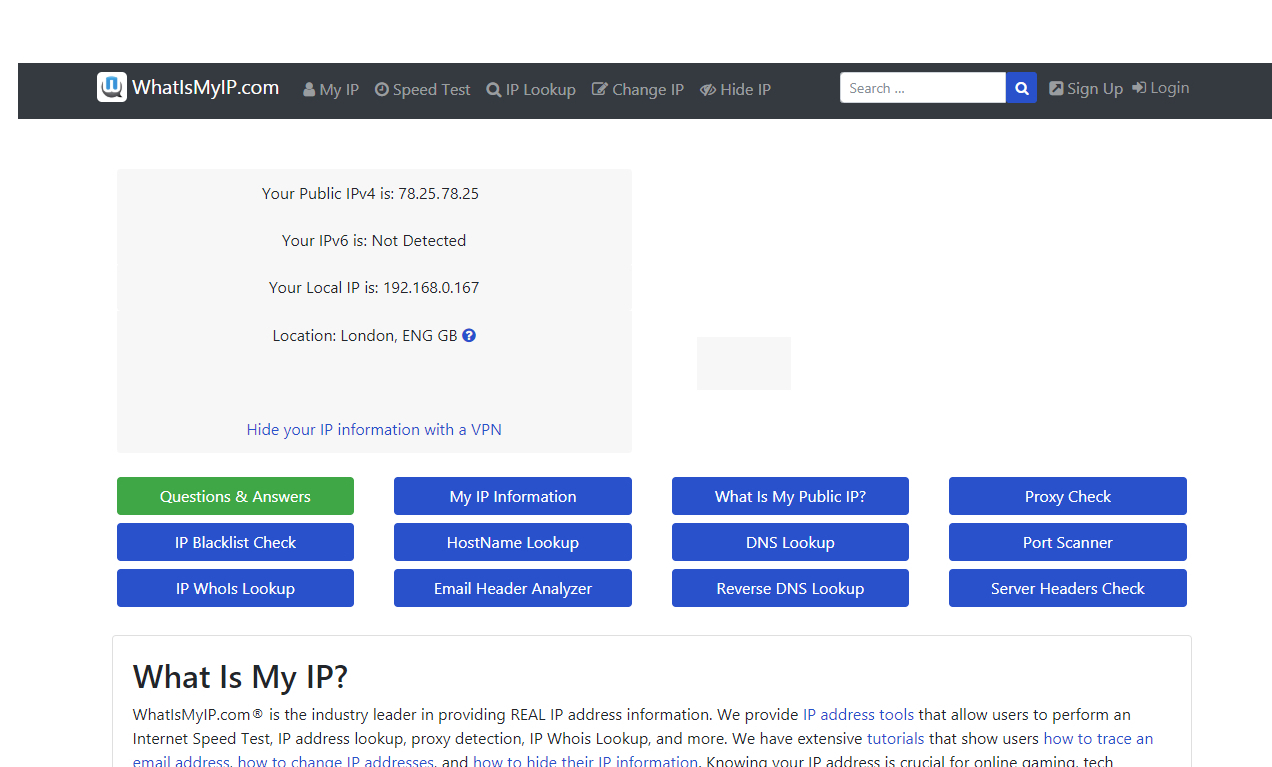
The easiest way to do this is to simply fire up your web browser of choice, and navigate to the following website: <https://www.whatismyip.com>. As the name suggests, this tells you what your IP address is.
Just look at the top line in the small gray box that the website presents you with, where it says ‘Your Public IPv4 is: xxx.xxx.xxx.xxx’. Those four numbers interspersed with periods are your PC’s public IP address, simple as that. If you have a (cutting-edge) [IPv6 address](https://www.techradar.com/news/internet/web/it-s-time-to-take-the-ipv6-transition-seriously-1171352), which is a longer string of hexadecimal characters, this will be displayed in the relevant field below.
Are you a pro? Subscribe to our newsletter
Sign up to the TechRadar Pro newsletter to get all the top news, opinion, features and guidance your business needs to succeed\!
By signing up, you agree to our [Terms of services](https://futureplc.com/terms-conditions/) and acknowledge that you have read our [Privacy Notice](https://futureplc.com/privacy-policy). You also agree to receive marketing emails from us that may include promotions from our trusted partners and sponsors, which you can unsubscribe from at any time.
(Image credit: Google)
## 2\. Alternative method of finding public IP
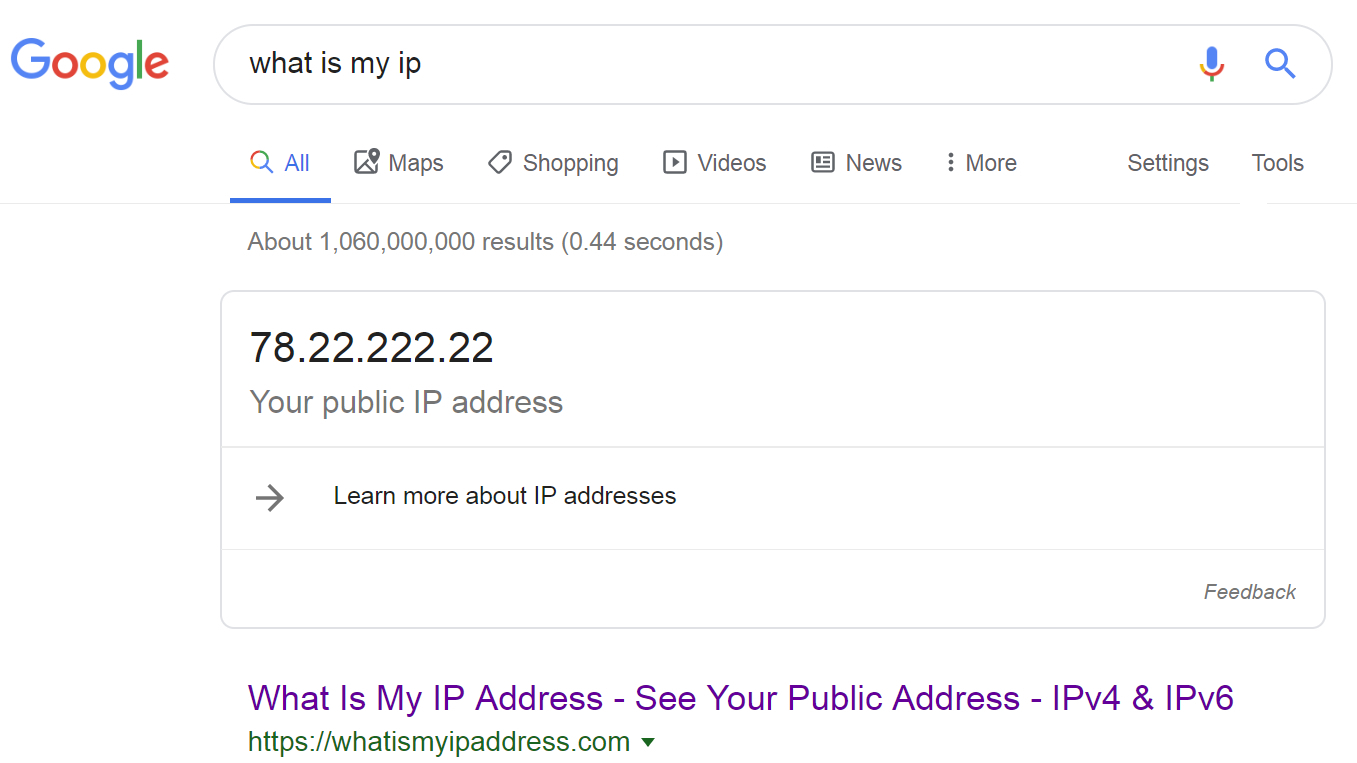
The above website is a conveniently simple method of discovering your public IP, but what if it’s down, or you have used up your five-time lookup limit (so you need to sign up for an account, and you don’t want to)? It never hurts to have a backup, and there are alternative sites which deliver essentially the same service – like <https://whatismyipaddress.com>, or indeed if you [Google](https://www.techradar.com/uk/tag/google) ‘what is my IP’ the search engine will tell you.
(Image credit: TP-Link)
## 3\. Public IP details are also in your router
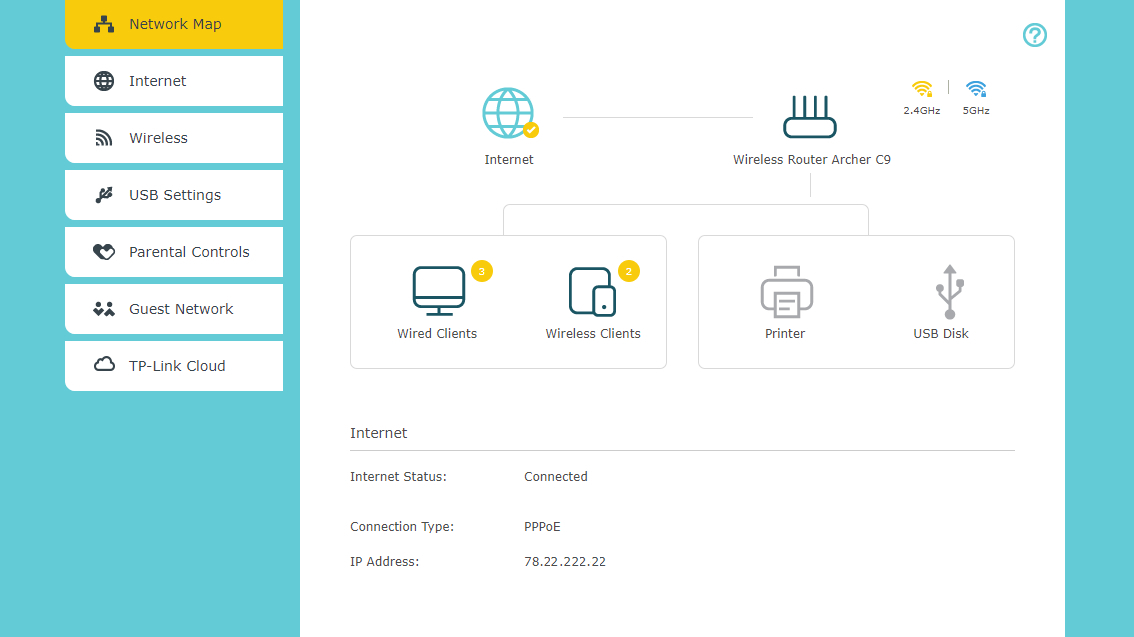
Failing the above online methods, the other way to discover your public IP is to look in your router. Just log in to the device (usually via <http://192.168.0.1> in your web browser) and your public IP will generally be listed on the front details page of the router interface, or within the settings (obviously exactly whereabouts will depend on your model of router – in our TP-Link router,
it’s on the aforementioned front info page that’s presented to the user upon login).
What to read next
- [ How secure is your home Wi-Fi, really?](https://www.techradar.com/vpn/how-secure-is-your-home-wi-fi-really)
- [ How to download and use the IPVanish VPN app on Fire TV Stick](https://www.techradar.com/vpn/vpn-services/how-to-download-and-use-the-ipvanish-vpn-app-on-fire-tv-stick)
- [ What is IPVanish's Trusted Networks feature and how does it work?](https://www.techradar.com/vpn/vpn-services/what-is-ipvanishs-trusted-networks-feature-and-how-does-it-work)
- [Netgear router login](https://www.techradar.com/how-to/netgear-router-login): how to log in and tweak your settings
(Image credit: Microsoft)
## 4\. Private IP address on Windows
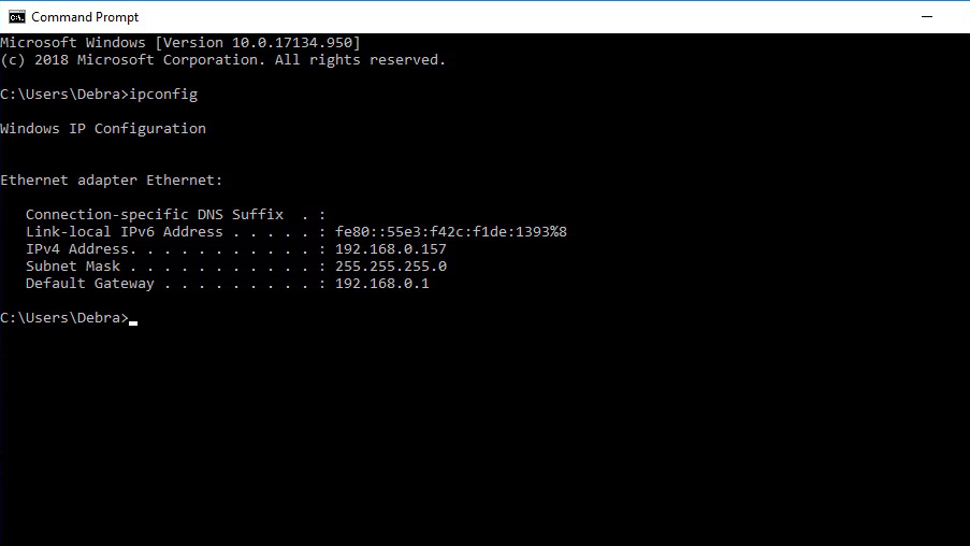
To find your private IP on a Windows system, simply open up the command prompt. To do that on [Windows 10](https://www.techradar.com/uk/tag/windows-10), type ‘cmd’ in the search box (next to the Start button on the taskbar), and you should see the relevant command prompt app pop up in the suggested results (best match). Click on it. (You can run the same search on older versions of Windows, by the way – just hit up the search box).
Once you have the command prompt open, simply type in the following and hit enter:
```
ipconfig
```
Your local IP address will be listed under ‘IPv4 Address’.
(Image credit: Apple)
## 5\. How to find your IP address on macOS
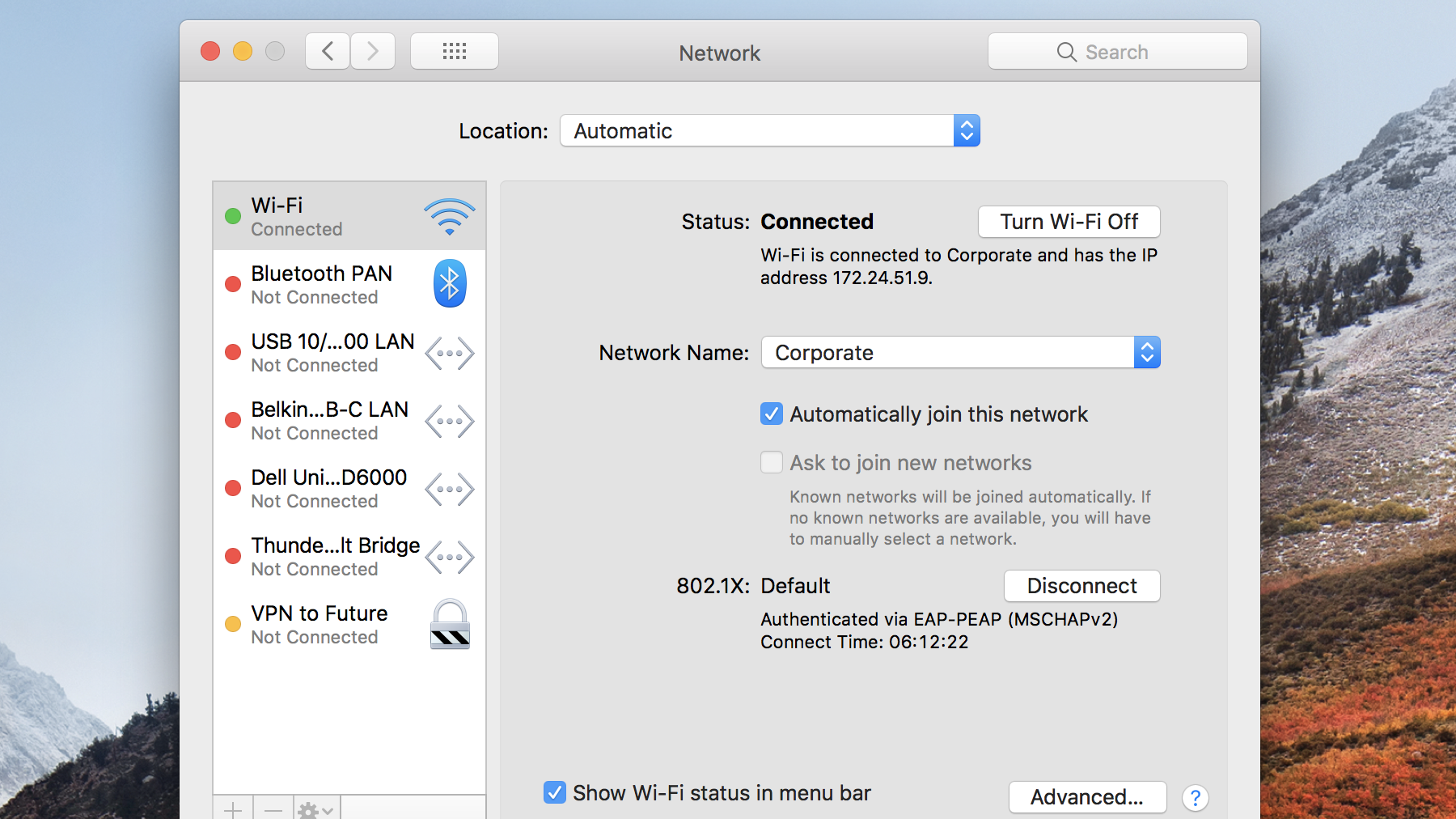
If you’re a Mac user, click on the [Apple](https://www.techradar.com/uk/tag/apple) logo, head to ‘System Preferences’, then click on ‘Network’.
Now select the network you are actively connected to (with the green light showing, marked as ‘Connected’), and look under ‘Status’, on the right, where you’ll see the private IP address listed underneath where it (also) says ‘Connected’.
(Image credit: Future)
## 6\. How to find your IP address on Linux (Ubuntu)
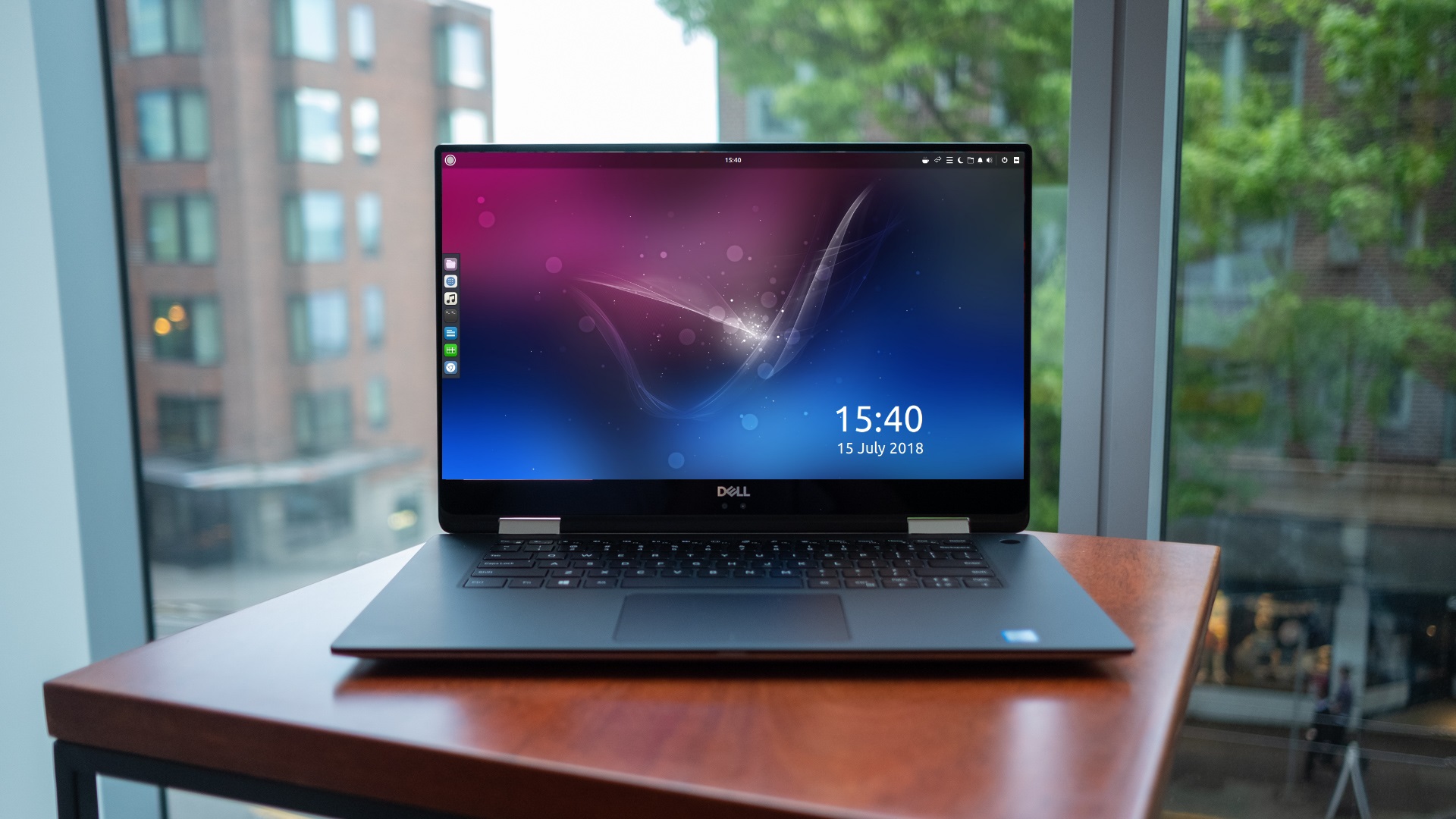
If your favorite flavor of Linux is Ubuntu – as it is for many folks – it’s possible to find your private IP by going to the ‘Activities’ overview (top-left), where you can type in ‘network’, then click on ‘Network’. (We’re assuming you’re using Ubuntu 18.04.3 LTS here, but it should be much the same whatever version you’re running).
Now, depending on whether your connection is wired or wireless, you can click the ‘Settings’ button (which looks like a little sun) next to that connection. In the window that pops up, under the ‘Details’ tab, you will see your IP address displayed (‘IPv4 Address’).
## 7\. How to find your IP address on other Linux distros
If you’re not running Ubuntu (although this method also works for that distro), then you’ll need to open a [Terminal](https://www.techradar.com/how-to/computing/everything-you-need-to-know-about-linux-commands-1321955) window: search for ‘terminal’ and click it, or you might find the keyboard shortcut is simply the Ctrl+Alt+T keys pressed together.
Once you’ve got the Terminal open, type in the following then press enter:
```
ip addr show
```
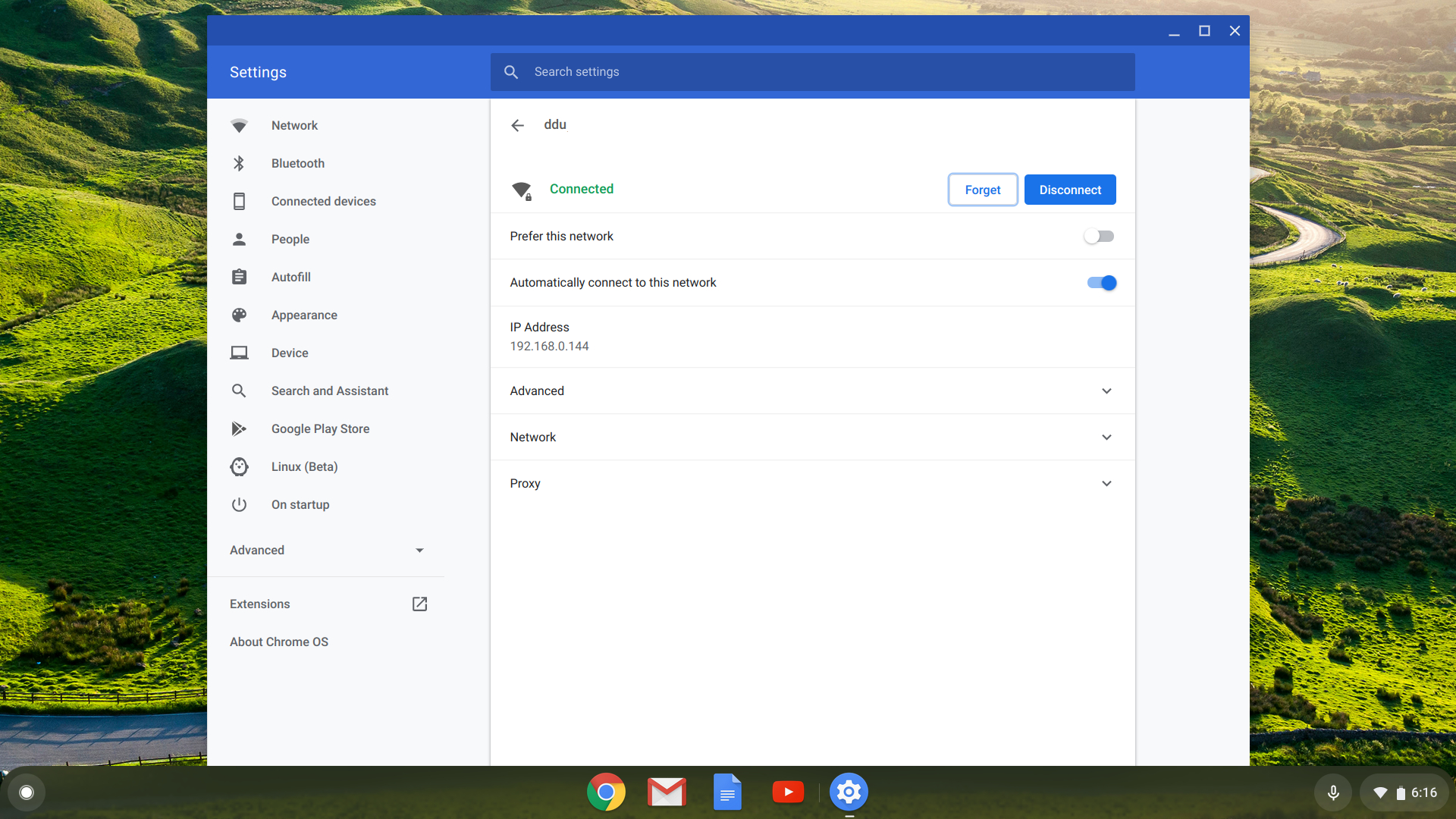
In the resulting information spewed out, you’re looking for the ‘inet’ line (with ‘scope global’ later in the line) – it’s just under ‘link/ether’. In this line, the first four-digit number directly following the word ‘inet’ is your IP.
(Image credit: Google)
## 8\. How to find your IP address on Chrome OS
Click on Launcher (bottom-left of the desktop), type in ‘settings’ and click on the ‘Settings’ cog which pops up. Under where it says ‘Network’, your active network will be listed – click on it, and under ‘Known networks’ again click on the active network (which will say ‘Connected’ in green underneath it). Options relating to the network will now be listed, including your ‘IP address’ (this is your private IP).
- [The best browser 2019](https://www.techradar.com/best/browser): a faster, safer way to get online
TOPICS
[Linux](https://www.techradar.com/uk/tag/linux)
[Darren Allan](https://www.techradar.com/uk/author/darren-allan)
Darren is a freelancer writing news and features for TechRadar (and occasionally T3) across a broad range of computing topics including CPUs, GPUs, various other hardware, VPNs, antivirus and more. He has written about tech for the best part of three decades, and writes books in his spare time (his debut novel - 'I Know What You Did Last Supper' - was published by Hachette UK in 2013).
Read more
[ VPN Services What is a dedicated IP and how do I get one?](https://www.techradar.com/vpn/vpn-services/what-is-a-dedicated-ip-and-how-do-i-get-it "What is a dedicated IP and how do I get one?")
[ VPN Services Google killed its dark web scanner, but NordVPN’s upgraded tool is here to fill the void](https://www.techradar.com/vpn/vpn-services/nordvpns-new-free-tool-reveals-exactly-what-the-internet-knows-about-your-location "Google killed its dark web scanner, but NordVPN’s upgraded tool is here to fill the void")
[ VPN Services Secure Browser: how to get anonymous browsing with IPVanish](https://www.techradar.com/vpn/vpn-services/secure-browser-how-to-get-anonymous-browsing-with-ipvanish "Secure Browser: how to get anonymous browsing with IPVanish")
[ VPN How secure is your home Wi-Fi, really?](https://www.techradar.com/vpn/how-secure-is-your-home-wi-fi-really "How secure is your home Wi-Fi, really?")
[ VPN Services How to download and use the IPVanish VPN app on Fire TV Stick](https://www.techradar.com/vpn/vpn-services/how-to-download-and-use-the-ipvanish-vpn-app-on-fire-tv-stick "How to download and use the IPVanish VPN app on Fire TV Stick")
[ VPN Services What is IPVanish's Trusted Networks feature and how does it work?](https://www.techradar.com/vpn/vpn-services/what-is-ipvanishs-trusted-networks-feature-and-how-does-it-work "What is IPVanish's Trusted Networks feature and how does it work?")
Latest in Security
[ Security No, Elon Musk doesn't want to give you a \$5,000 tax refund — it's a scam, here's what to look out for](https://www.techradar.com/pro/security/no-elon-musk-doesnt-want-to-give-you-a-usd5-000-tax-refund-its-a-scam-heres-what-to-look-out-for "No, Elon Musk doesn't want to give you a $5,000 tax refund — it's a scam, here's what to look out for")
[ Security Microsoft warns worrying security flaw exposed over 50 million Android users](https://www.techradar.com/pro/security/microsoft-warns-worrying-security-flaw-exposed-over-50-million-android-users-says-user-credentials-and-financial-data-were-exposed-to-risk "Microsoft warns worrying security flaw exposed over 50 million Android users")
[ Security ‘It’s a potential national security threat’: Proton study finds over 3,500 US legislators’ official emails leaked and exposed on the dark web](https://www.techradar.com/pro/security/its-a-potential-national-security-threat-proton-study-finds-over-3-500-us-legislators-official-emails-leaked-and-exposed-on-the-dark-web "‘It’s a potential national security threat’: Proton study finds over 3,500 US legislators’ official emails leaked and exposed on the dark web")
[ Security Top WordPress Slider plugin hijacked to spread malware — here's what to look out for](https://www.techradar.com/pro/security/top-wordpress-slider-plugin-hijacked-to-spread-malware-heres-what-to-look-out-for "Top WordPress Slider plugin hijacked to spread malware — here's what to look out for")
[ Security Google Chrome rolls out a new tool to try and stop infostealer malware in its tracks](https://www.techradar.com/pro/security/google-chrome-rolls-out-a-new-tool-to-try-and-stop-infostealer-malware-in-its-tracks "Google Chrome rolls out a new tool to try and stop infostealer malware in its tracks")
[ Security Adobe Reader users beware — experts flag months-old security flaw using booby-trapped PDFs to scope out victims](https://www.techradar.com/pro/security/adobe-reader-users-beware-experts-flag-months-old-security-flaw-using-booby-trapped-pdfs-to-scope-out-victims "Adobe Reader users beware — experts flag months-old security flaw using booby-trapped PDFs to scope out victims")
Latest in How Tos
[ Website Building How to pick a website template that complements your brand identity](https://www.techradar.com/pro/website-building/how-to-pick-a-website-template-that-complements-your-brand-identity "How to pick a website template that complements your brand identity")
[ Website Building How to write AI website builder prompts like a high-end design agency](https://www.techradar.com/pro/website-building/how-to-write-ai-website-builder-prompts-like-a-high-end-design-agency "How to write AI website builder prompts like a high-end design agency")
[ Website Building How to customize a website template: 5 tips](https://www.techradar.com/pro/website-building/how-to-customize-a-website-template-5-tips "How to customize a website template: 5 tips")
[ How to Watch Basketball How to watch UConn vs Michigan: Free Streams, TV Channels for 2026 March Madness Final](https://www.techradar.com/how-to-watch/basketball/march-madness-final-free-streams-2026-national-championship-game "How to watch UConn vs Michigan: Free Streams, TV Channels for 2026 March Madness Final")
[ How to Watch Basketball How to watch March Madness Final Four 2026: free NCAA basketball live streams, TV channels, schedule](https://www.techradar.com/how-to-watch/basketball/march-madness-final-four-2026-free-ncaa-basketball "How to watch March Madness Final Four 2026: free NCAA basketball live streams, TV channels, schedule")
[ How to Watch No F1 in April — Here are 5 sporting events I can’t wait to watch](https://www.techradar.com/how-to-watch/no-f1-in-april-here-are-5-other-sporting-events-for-you-to-watch "No F1 in April — Here are 5 sporting events I can’t wait to watch")
LATEST ARTICLES
1. 1
['There’s no one-size-fits-all office chair': Vari explains the design decisions behind its award-winning chairs and desks, and how it's bringing over 100 new products to market this year](https://www.techradar.com/pro/theres-no-one-size-fits-all-office-chair-vari-explains-the-design-decisions-behind-its-award-winning-chairs-and-desks-and-how-its-bringing-over-100-new-products-to-market-this-year)
2. 2
[I was a vacuum reviewer for two years — these are the 6 sub-£250 models I'd recommend in a heartbeat](https://www.techradar.com/home/vacuums/i-was-a-vacuum-reviewer-for-two-years-these-are-the-6-sub-gbp250-models-id-recommend-in-a-heartbeat)
3. 3
[I tested Turtle Beach's Mario-themed controller and headset for Nintendo Switch 2 — and they surprised me for 5 key reasons](https://www.techradar.com/gaming/gaming-accessories/i-tested-turtle-beachs-mario-themed-controller-and-headset-for-nintendo-switch-2-and-they-surprised-me-for-5-key-reasons)
4. 4
[I matched the upgraded Meta AI against ChatGPT, and you can really tell which AI has social media roots](https://www.techradar.com/ai-platforms-assistants/i-matched-the-upgraded-meta-ai-against-chatgpt-and-you-can-really-tell-which-ai-has-social-media-roots)
5. 5
[Quordle hints and answers for Saturday, April 11 (game \#1538)](https://www.techradar.com/computing/websites-apps/quordle-today-answers-clues-11-april-2026)
## Useful links
- [Best VPN](https://www.techradar.com/vpn/best-vpn)
- [Best Free VPN](https://www.techradar.com/vpn/best-free-vpn)
- [Best Web Hosting Service](https://www.techradar.com/web-hosting/best-web-hosting-service-websites)
- [Best Website Builder](https://www.techradar.com/news/the-best-website-builder)
- [Best Laptops](https://www.techradar.com/news/mobile-computing/laptops/best-laptops-1304361)
- [Best Gaming Laptops](https://www.techradar.com/news/mobile-computing/laptops/best-gaming-laptops-top-5-gaming-notebooks-reviewed-1258471)
- [Best Gaming PC](https://www.techradar.com/computing/gaming-pcs/best-gaming-pc)
- [Best PC Gaming Chair](https://www.techradar.com/gaming/best-gaming-chairs)
- [Best Phone](https://www.techradar.com/uk/news/best-phone)
- [Best TV](https://www.techradar.com/uk/news/best-tv)
- [Best Oled TVs](https://www.techradar.com/televisions/the-best-oled-tvs)
- [Best Smartwatch](https://www.techradar.com/news/wearables/best-smart-watches-what-s-the-best-wearable-tech-for-you-1154074)
- [Best Turntables](https://www.techradar.com/audio/turntables/the-best-turntables)
- [Best Noise Cancelling Headphones](https://www.techradar.com/audio/headphones/best-noise-cancelling-headphones)
- [Best Wireless Earbuds](https://www.techradar.com/audio/earbuds-airpods/best-wireless-earbuds)
- [Best Office Chairs](https://www.techradar.com/best/best-office-chairs)
- [Best Camera](https://www.techradar.com/cameras/the-best-camera-for-photography)
- [Best Dash Cam](https://www.techradar.com/vehicle-tech/dash-cams/the-best-dash-cams)
- [Best Drones](https://www.techradar.com/uk/drones/best-drone)
- [Best Robot Vacuums](https://www.techradar.com/home/robot-vacuums/best-robot-vacuum)
TechRadar is part of Future plc, an international media group and leading digital publisher. [Visit our corporate site](https://futureplc.com/).
[ Add as a preferred source on Google](https://google.com/preferences/source?q=techradar.com)
- [About Us](https://www.techradar.com/news/about-us)
- [Contact Future's experts](https://futureplc.com/contact/)
- [Contact Us](https://www.techradar.com/how-to/contact-us)
- [Terms and conditions](https://futureplc.com/terms-conditions/)
- [Privacy policy](https://futureplc.com/privacy-policy/)
- [Cookies policy](https://futureplc.com/cookies-policy/)
- [Advertise with us](https://go.future-advertising.com/TechRadar-Media-Kit.html)
- [Web notifications](https://www.techradar.com/how-to/how-to-turn-off-web-notifications-for-chrome-in-windows-macos-and-android)
- [Accessibility Statement](https://futureplc.com/accessibility-statement/)
- [Careers](https://futureplc.com/careers/)
- [Do not sell or share my personal information](https://www.techradar.com/uk/privacy-portal)
© Future Publishing Limited Quay House, The Ambury, Bath BA1 1UA. All rights reserved. England and Wales company registration number 2008885.
Close
Please login or signup to comment
Please wait...
Login
Sign Up | |||||||||
| Readable Markdown | 
Image credit: Shutterstock (Image credit: Shutterstock)
In this guide we'll show you how to find your [IP address](https://www.techradar.com/best/best-ip-address-tools). From time to time, you might need to know your computer’s IP address, of which there are actually two forms. For the uninitiated, IP simply stands for Internet Protocol, and this is the address which represents the location of your device on the internet (or an internal network). Think of it as the digital equivalent of your postal address.
The two forms of IP address are public and private. Your public IP address is a string of four numbers (for most folks, anyway – [unless you’ve moved to IPv6](https://www.techradar.com/pro/what-is-an-ip-address)) and is the way in which your device can be located on the internet. Without such an address, it would be impossible for communications to be directed over the internet to your machine. The worldwide web functions on this basis, with web pages sent back to your browser via this address.
As for your private IP, this identifies your device on a local network as opposed to the internet. In other words, it’s the address which allows the other devices hooked up to your router to communicate with your machine.
Article continues below
Latest Videos From TechRadar
Every device which is online gets a public IP to identify it, and any device on a local network gets a private IP to the same end. For whatever reason, you might want to know either, or both, of these IP addresses, and that’s what this article is all about.
- [For the modern internet, what's the cost of privacy?](https://www.techradar.com/news/with-mozilla-introducing-a-premium-firefox-will-privacy-soon-be-an-in-app-purchase)

(Image credit: Whatismyip.com)
## 1\. How to find your public IP address
The easiest way to do this is to simply fire up your web browser of choice, and navigate to the following website: [https://www.whatismyip.com](https://www.whatismyip.com/). As the name suggests, this tells you what your IP address is.
Just look at the top line in the small gray box that the website presents you with, where it says ‘Your Public IPv4 is: xxx.xxx.xxx.xxx’. Those four numbers interspersed with periods are your PC’s public IP address, simple as that. If you have a (cutting-edge) [IPv6 address](https://www.techradar.com/news/internet/web/it-s-time-to-take-the-ipv6-transition-seriously-1171352), which is a longer string of hexadecimal characters, this will be displayed in the relevant field below.
Sign up to the TechRadar Pro newsletter to get all the top news, opinion, features and guidance your business needs to succeed\!

(Image credit: Google)
## 2\. Alternative method of finding public IP
The above website is a conveniently simple method of discovering your public IP, but what if it’s down, or you have used up your five-time lookup limit (so you need to sign up for an account, and you don’t want to)? It never hurts to have a backup, and there are alternative sites which deliver essentially the same service – like [https://whatismyipaddress.com](https://whatismyipaddress.com/), or indeed if you [Google](https://www.techradar.com/uk/tag/google) ‘what is my IP’ the search engine will tell you.

(Image credit: TP-Link)
## 3\. Public IP details are also in your router
Failing the above online methods, the other way to discover your public IP is to look in your router. Just log in to the device (usually via [http://192.168.0.1](http://192.168.0.1/) in your web browser) and your public IP will generally be listed on the front details page of the router interface, or within the settings (obviously exactly whereabouts will depend on your model of router – in our TP-Link router,
it’s on the aforementioned front info page that’s presented to the user upon login).
- [Netgear router login](https://www.techradar.com/how-to/netgear-router-login): how to log in and tweak your settings

(Image credit: Microsoft)
## 4\. Private IP address on Windows
To find your private IP on a Windows system, simply open up the command prompt. To do that on [Windows 10](https://www.techradar.com/uk/tag/windows-10), type ‘cmd’ in the search box (next to the Start button on the taskbar), and you should see the relevant command prompt app pop up in the suggested results (best match). Click on it. (You can run the same search on older versions of Windows, by the way – just hit up the search box).
Once you have the command prompt open, simply type in the following and hit enter:
```
ipconfig
```
Your local IP address will be listed under ‘IPv4 Address’.

(Image credit: Apple)
## 5\. How to find your IP address on macOS
If you’re a Mac user, click on the [Apple](https://www.techradar.com/uk/tag/apple) logo, head to ‘System Preferences’, then click on ‘Network’.
Now select the network you are actively connected to (with the green light showing, marked as ‘Connected’), and look under ‘Status’, on the right, where you’ll see the private IP address listed underneath where it (also) says ‘Connected’.

(Image credit: Future)
## 6\. How to find your IP address on Linux (Ubuntu)
If your favorite flavor of Linux is Ubuntu – as it is for many folks – it’s possible to find your private IP by going to the ‘Activities’ overview (top-left), where you can type in ‘network’, then click on ‘Network’. (We’re assuming you’re using Ubuntu 18.04.3 LTS here, but it should be much the same whatever version you’re running).
Now, depending on whether your connection is wired or wireless, you can click the ‘Settings’ button (which looks like a little sun) next to that connection. In the window that pops up, under the ‘Details’ tab, you will see your IP address displayed (‘IPv4 Address’).
## 7\. How to find your IP address on other Linux distros
If you’re not running Ubuntu (although this method also works for that distro), then you’ll need to open a [Terminal](https://www.techradar.com/how-to/computing/everything-you-need-to-know-about-linux-commands-1321955) window: search for ‘terminal’ and click it, or you might find the keyboard shortcut is simply the Ctrl+Alt+T keys pressed together.
Once you’ve got the Terminal open, type in the following then press enter:
```
ip addr show
```
In the resulting information spewed out, you’re looking for the ‘inet’ line (with ‘scope global’ later in the line) – it’s just under ‘link/ether’. In this line, the first four-digit number directly following the word ‘inet’ is your IP.

(Image credit: Google)
## 8\. How to find your IP address on Chrome OS
Click on Launcher (bottom-left of the desktop), type in ‘settings’ and click on the ‘Settings’ cog which pops up. Under where it says ‘Network’, your active network will be listed – click on it, and under ‘Known networks’ again click on the active network (which will say ‘Connected’ in green underneath it). Options relating to the network will now be listed, including your ‘IP address’ (this is your private IP).
- [The best browser 2019](https://www.techradar.com/best/browser): a faster, safer way to get online
Darren is a freelancer writing news and features for TechRadar (and occasionally T3) across a broad range of computing topics including CPUs, GPUs, various other hardware, VPNs, antivirus and more. He has written about tech for the best part of three decades, and writes books in his spare time (his debut novel - 'I Know What You Did Last Supper' - was published by Hachette UK in 2013). | |||||||||
| ML Classification | ||||||||||
| ML Categories |
Raw JSON{
"/Internet_and_Telecom": 967,
"/Internet_and_Telecom/Communications_Equipment": 483,
"/Internet_and_Telecom/Communications_Equipment/Other": 426
} | |||||||||
| ML Page Types |
Raw JSON{
"/Article": 998,
"/Article/How_to": 702
} | |||||||||
| ML Intent Types |
Raw JSON{
"Informational": 999
} | |||||||||
| Content Metadata | ||||||||||
| Language | en | |||||||||
| Author | Darren Allan | |||||||||
| Publish Time | 2019-09-03 15:21:39 (6 years ago) | |||||||||
| Original Publish Time | 2019-09-03 15:21:39 (6 years ago) | |||||||||
| Republished | No | |||||||||
| Word Count (Total) | 2,721 | |||||||||
| Word Count (Content) | 1,160 | |||||||||
| Links | ||||||||||
| External Links | 21 | |||||||||
| Internal Links | 101 | |||||||||
| Technical SEO | ||||||||||
| Meta Nofollow | No | |||||||||
| Meta Noarchive | No | |||||||||
| JS Rendered | Yes | |||||||||
| Redirect Target | null | |||||||||
| Performance | ||||||||||
| Download Time (ms) | 7,732 | |||||||||
| TTFB (ms) | 7,597 | |||||||||
| Download Size (bytes) | 308,096 | |||||||||
| Shard | 70 (laksa) | |||||||||
| Root Hash | 16217831880745512870 | |||||||||
| Unparsed URL | com,techradar!www,/how-to/how-to-find-your-ip-address s443 | |||||||||