ℹ️ Skipped - page is already crawled
| Filter | Status | Condition | Details |
|---|---|---|---|
| HTTP status | PASS | download_http_code = 200 | HTTP 200 |
| Age cutoff | PASS | download_stamp > now() - 6 MONTH | 2.5 months ago |
| History drop | PASS | isNull(history_drop_reason) | No drop reason |
| Spam/ban | PASS | fh_dont_index != 1 AND ml_spam_score = 0 | ml_spam_score=0 |
| Canonical | PASS | meta_canonical IS NULL OR = '' OR = src_unparsed | Not set |
| Property | Value |
|---|---|
| URL | https://www.softsuave.com/blog/how-to-make-your-own-app/ |
| Last Crawled | 2026-01-26 00:27:58 (2 months ago) |
| First Indexed | 2025-01-21 11:40:26 (1 year ago) |
| HTTP Status Code | 200 |
| Meta Title | How to Make Your Own App: From ideation to deployment |
| Meta Description | How To Make Your Own App is a common question in this digital era. This guide outlines the complete process of making an app from start to finish., Learn how to determine check/uncheck checkbox events in Angular. Master implementation, use cases, and best practices for web apps. |
| Meta Canonical | null |
| Boilerpipe Text | A common question in the minds of entrepreneurs and business owners, even people in general, is “How to Make Your Own App?”. Having an application is crucial for businesses as it offers them immense benefits.
However, it is not a simple task. Developing an app means not just straightaway starting the development. There are different phases that must be completed before you start the development which will be covered in this article and they are really important while making your own mobile app.
This process is what we follow at Soft Suave to ensure that our
mobile app development services
are of premium quality.
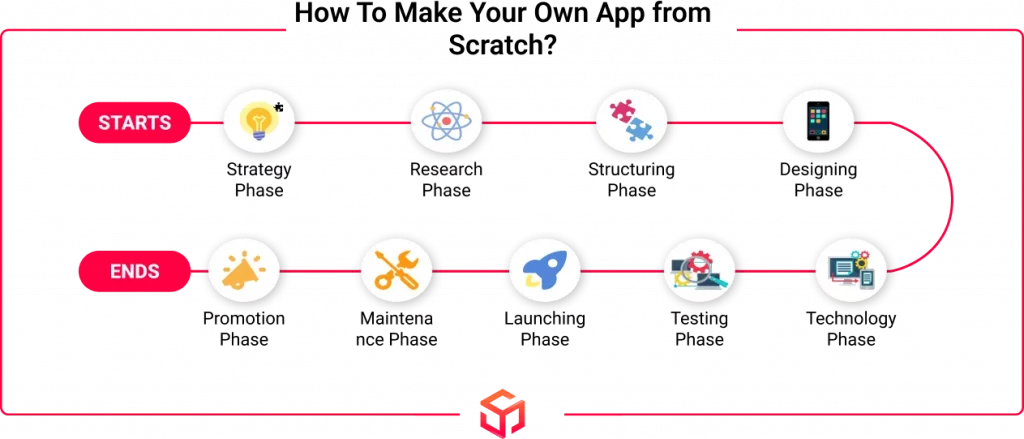
How To Make Your Own App from Scratch?
The steps given below are the basic procedures that can be followed to create a mobile app on your own. So without further delay, let’s start with how to make your own mobile app.
1.Strategy Phase: Ideation and Goals
This is the first step when deciding to make your own app where you outline the idea of your app. You must make sure to follow this step correctly as it can avoid any complications that may arise at the later stages of app development. Regardless of whether you’re learning
how to develop an iOS app
or an Android app.
Your app idea is what sets you apart from your competition. It must either solve a problem or achieve a goal. If you find that your app idea is already in the market, find out different ways in which you can distinguish your app, like adding new features or solving different problems. If you’re unsure where to begin or lack technical expertise, it’s wise to
choose a mobile app development company
that understands your vision and can help bring it to life.
There is no necessity for your app to be entirely original, but it should not be entirely common either. If you want to know whether your app idea is good, ask yourself, “Why should my app exist?”.
If not, try to list down the ideas or problems that you or others face. From that, start to outline a new app idea. After you are confident about your app ideas, make sure to outline the goals and objectives of your app. This will help you in the later stages of making your app.
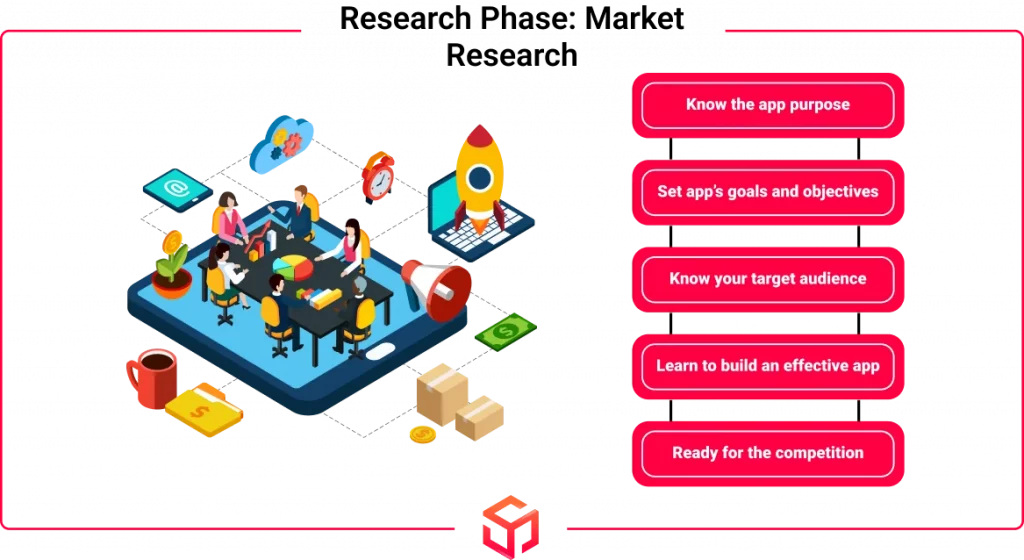
2.Research Phase: Market Research
This is the next step of mobile app development where market research is done. This step helps you refine and strengthen your app ideas.
Some important questions to ask yourself in this stage are:
Why should a person use your app rather than others?
What are the user’s expectations and what issues are they facing?
Can your app solve these issues? How?
Which feature or service is popular right now, and is it possible for your app to be an improved version of it?
These questions help you understand if you are meeting industry standards, solving user problems, and offering
cutting edge app development
solutions that are both advanced and flexible.
When conducting market research, various methodologies like interviews, surveys, and competitor analysis can be employed.
If you already have a customer base, you can engage them using the strategies outlined above to conduct the research. In the absence of an existing customer base, it is essential to reach out to your target audience for research purposes.
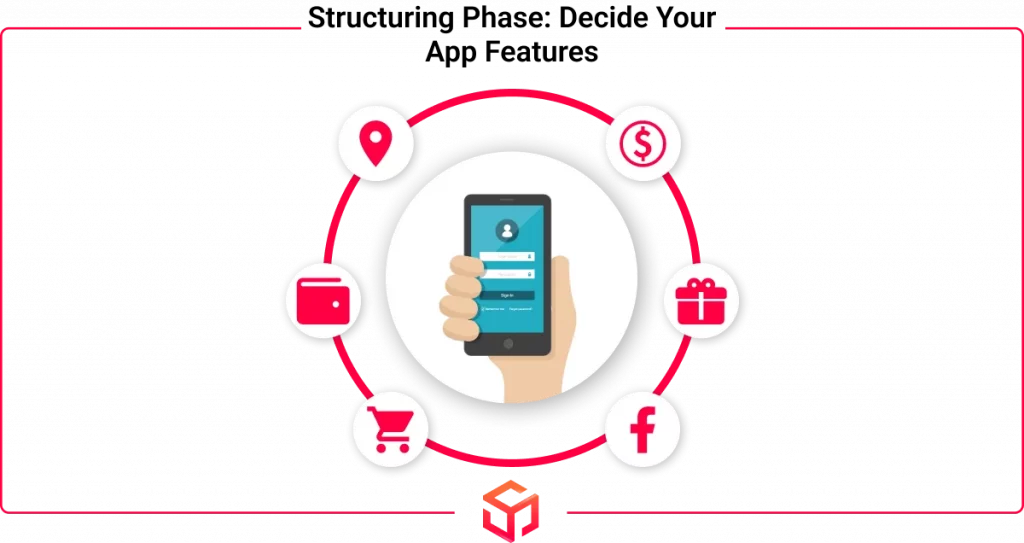
3.Structuring Phase: Decide Your App Features
After outlining the ideas and analyzing the market, you must now have a clear understanding of what your app aims to achieve or the problem it’s going to solve.
The next step is to provide proper structure to your app. In other words, User Experience (UX) and User Interface (UI) are going to be decided in this phase.
Apart from creating an amazing app, other aspects like its feasibility and practicality are also considered in this process. You must make sure that the app is helping the users and can be implemented successfully.
In addition to being pleasing and aesthetic, it must also be ensured that the app is easy to navigate and is not too confusing.
4.Design Phase: Making Ideas Into Reality
This is the next step of the mobile app development process where we turn the ideas from the previous steps into real designs.
This phase of the process can be compared to editing a movie or a video. Initially, we have a variety of videos and clips which in this case refer to the app ideas or features. So we take these different videos, cut out the unnecessary parts, keep what is needed, and create a movie to keep the audiences entertained.
Similar to that, there are a variety of ideas and features that you may have for your app. But you need to keep only what is needed or what will make the app unique, and discard other ideas. These remaining ideas must be designed in a way that can capture the attention of the users and be user-friendly.
We will see a basic overview of some of the important components in this phase but the
mobile app design process
is a much more comprehensive topic.
Workflows and Information Architecture
Information architecture is how the information is arranged and systematized within a website or application. It resembles a blueprint or map, aiding users in efficiently locating digital content. This is crucial as it improves user experience, and simplifies navigation in the platform.
Workflow is the stepwise method of predefined activities for achieving a definite goal. These steps are usually displayed as a visual map. It gives the stakeholders of the development project a clear insight into the tasks that needs to be done and the sequence in which they should be carried out.
Wireframes
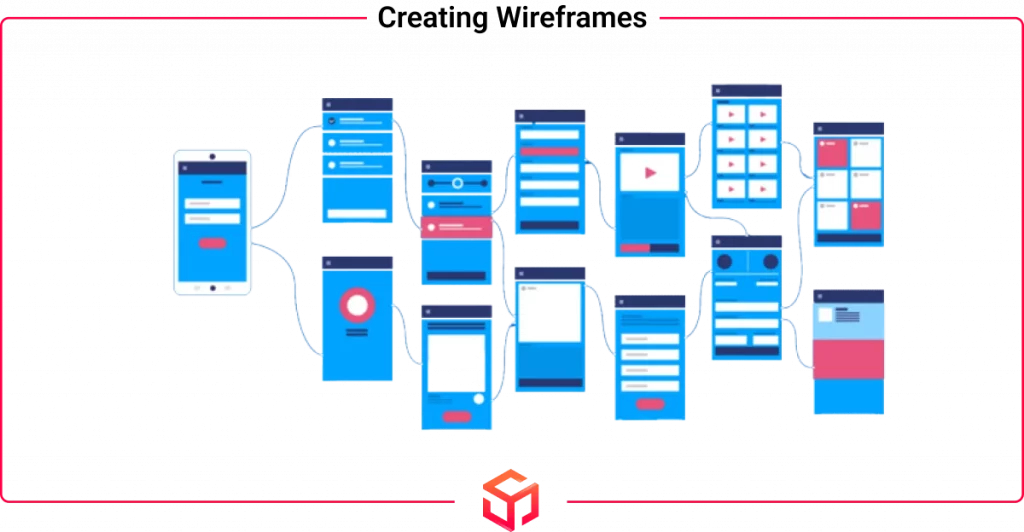
A wireframe is also known as a low-fidelity prototype. This is one of the
types of prototypes
that shows the basic outline of the mobile app.
It is mostly hand-drawn on paper or it can even be designed using some digital tools. Wireframes indicate the structure of your app and focus on user experience (UX). It does not include any design elements and styles.
Style Guide
Style guides for mobile apps detail your branding guidelines, such as color schemes, fonts, and graphics. Establishing a style guide early in the development process enhances the design strategy of your mobile application and increases efficiency while developing the app. Maintaining a style guide ensures that your application looks and feels consistent.
Mockups
Using the Wireframes as a base, mockups are the next stage of visual design for apps. Mockups are made by implementing your style guide onto the wireframes to create your app’s design. In this step, data structure, workflow, and aesthetics adjustments are carried out.
Leave it to the experts at Soft Suave.
Mobile App Prototype
A
mobile application prototype
is created from your mockups. It is done using
prototype tools
like Invision and Figma. It is valuable as it allows you to test your app’s design and features early on. Prototypes imitate user experience (UX) and show how the app will function after developing it.
They can also help find issues in the app’s planned features, saving time and money during mobile app development.
5.Development Phase: Architecting The Application
Now we have arrived at a major phase of our ‘how to make your own mobile app’ guide, deciding the technology that we are going to use to develop the app. Before you start the development, it is important to plan the process.
You must first decide the technical architecture of the app, then choose the appropriate technology stack, and also determine the milestones of the project.
Deciding these things earlier before starting the development will ensure a smooth development phase. You can decide on this information by comparing any other similar apps and competitors.
Another important detail that you need to consider is what platform are you developing your app for. Is it for iOS or Android or is it cross-platform? After deciding the above-mentioned details, you can move ahead in the process.
what are the requirements for developing an app
Any mobile application will have 3 important constituents: Front-end, Back-end or Server technology, and finally API(s). Now let’s learn about these components briefly.
Look and Feel (Front-End)
Front-end is the visual aspect of the app, the part that users can see and interact with. Programs like Figma can help you create the designs to see how your app will look and how users will interact with it. Be sure to check if your app looks good on all devices (phone and tablet). You can use frameworks like Materialize or Bootstrap to create responsive front-end designs.
App’s Brain (Back-End)
Server Language:
This is where things happen when a user taps a button. Some of the back-end languages are Python, NodeJS, Ruby, Java, etc. These are responsible for running the behind-the-scenes logic in your app.
Data Storage:
You must also choose a place to store all your app’s data. MySQL, PostgreSQL, and Firebase are popular options for this process.
Security:
Integrate authentication and encryption features for your app to keep user data private.
Cloud Power:
To ensure optimal performance and accessibility of your app, try to use online storage services such as Amazon Web Services (AWS) or Google Cloud.
API(s)
The Application Programming Interface (API) is another major component in a mobile app. It is like a translator between the front end and the back end. It enables the front-end design to talk to the back-end server and vice versa.
Product Roadmap and MVP Development
Product roadmap is the plan of action for the evolution of a product that is depicted visually. The document reveals upcoming features and their release timelines. It serves as a strategic roadmap depicting the product’s vision, direction, priorities, and evolution over time.
We need to research before creating an app to understand user requirements. Later we will create an initial draft of the product, usually called the ‘Minimum Viable Product’. This basic version of your app will have all fundamental features, from login to storage. We will thus be able to conduct tests to ensure a smooth functioning, and then share it with testers for feedback.
These are the fundamental elements to consider when building a mobile app. As you move forward to add advanced or app-specific features, the technical complexity can increase significantly. It’s at this point many business owners begin to realize
how hard is to make an app
that balances performance, design, and functionality across platforms.
Types of Mobile App
Another important detail that you need to know is the different types of apps that can be developed.
Native Apps
Native apps are apps built for a particular OS. It can be downloaded directly on the device itself. If you develop an app for a particular OS, then it will not work in any other OS. For instance, if you create an app for Android devices, it will not work on iOS devices and vice versa.
Hybrid Apps
These apps are a combination of native apps and front-end technologies like CSS, HTML, and JavaScript. With a single codebase, they can be used across multiple platforms. They offer good performance and provide users with an experience similar to native apps. Many businesses are adopting hybrid apps for faster development time, cost-effectiveness, cross-platform compatibility, and easier maintenance. Reaching out to a
hybrid app development company
can help you build your own hybrid app efficiently.
Cross-Platform Apps
These apps also can be used across different platforms with a single code. These apps have a slightly lower performance and do not have any front-end web technologies. Some of the commonly used languages for cross-platform development are React Native, Xamarin, and Flutter.
These are the fundamental elements to consider when building a mobile app. As you move forward to add
advanced or app-specific features
, the technical complexity can increase significantly.
If you ever feel stuck or want expert help, it’s worth considering
Offshore Cross-Platform App Making Services
. Offshore teams can help bring your app vision to life quickly and cost-effectively, without compromising on quality.
6.Testing Phase: Giving Out A Flawless Product
It is important to vigorously test the app before releasing it because end-users must receive a flawless product.
There are different types of
mobile app testing
strategies that you need to know before making your own app. Let’s see a small overview of some of the testing methods.
User Experience Testing
The team conducts User Experience Testing to check whether the final mobile app meets the designed user experience. This is really important because it gives the users a first-hand impression. The fonts, design styles, color scheme, and padding between data, icons, and navigation must be consistent. Maintaining the app’s original design standards will directly influence user adoption.
Functional Testing
Functional testing is important because it ensures the app’s functionality and allows multiple users to test it to gauge the core features and user flow. It identifies bugs and maintains a consistent app functioning even under various conditions. With more tests, we can uncover unexpected app behavior and correct it. By identifying these issues early, you can ensure a smooth user experience across all platforms
Performance Testing
It helps to test the performance of your mobile app including reliability, scalability, stability, and responsiveness of the system under a particular workload.
Simulate the highest number of users to test your app, API, and backend for load. Even if it meets primary performance standards, you should still do this. Your app should be capable of running the load and functioning well even when usage spikes.
Security Testing
We must take security testing extremely seriously when developing an app. Even a single vulnerability might cause a breach in your mobile app. Many companies employ third-party agencies to perform comprehensive security testing on their products.
This testing ensures that your app is free from any security flaws by uncovering the vulnerabilities in the system.
7.Launching Phase: Deployment & Platform Support
If you’ve made it to this section of the article, congratulations! You’ve successfully finished the vital process outlined in this guide on ‘How to make your own app?’ which is to develop a mobile app. Your app is prepared for deployment and to be used by the public.
Most Popular App Store Platforms
Now you have completed all the major phases and are ready to launch your app. Before launching, you must first know the popular App Stores.
According to
Statista.com
(August 2024), Google Play Store was the most popular app store with nearly 2.3 million apps. The next was the Apple Store with roughly 2.05 million apps.
Let our experts handle the development while you focus on growing your business!
Android: Uploading an App to the Google Play Store
The basic overview of publishing your app on the Google Play Store is described in the steps below.
1st Step:
First using your existing Google account open a Developer Account.
2nd Step
:
Next you need to open up a Payment Profile. This is done for receiving payments from the app.
3rd Step:
Next, create a profile for the app which needs to be launched.
4th Step:
Now configure the app using the app’s dashboard.
5th Step:
You can upload the APK files of the app and manage the files after the above steps.
6:
The next step is to add or update your store listing and settings.
6th Step:
The next step is to add or update your store listing and settings
Visit this official Google Play Console Help article to
Create and set up your app
.
iOS: Uploading an App to the Apple App Store
The basic overview of publishing your app on the Apple store is described below.
The basic overview of publishing your app on the Apple store is described in the steps below.
Step
1
: The first step is to create an Apple ID. You will use this to access all of Apple’s services.
Step
2
: Next using your Apple ID, sign up for the Apple Developer Program.
Step
3
: Using the Apple ID you should also log into App Store Connect. This is the platform where you can upload and manage your app and its access.
Step
4:
Now before publishing your app you need to create an app record. It allows you to edit the app details, developer details, etc.
Step
6
: After finishing all the above steps, you can now test your app and then send it for review.
Step
7
: If your app is approved after review, it will be made public for the users to download it.
Read the Apple Store Connect Help article on
submitting your app to the app store
before going further.
8.Maintenance Phase: Ensuring App’s Long-Term Success
You have launched your app and have done everything right till now. Now your work is over and you can relax, right? “Wrong”
Listen closely, because you still have work to do. After launching your app, you are now entering into the maintenance phase which is to regularly monitor and update your app.
You can Analyze the mobile app using Mobile Analytics Platforms and measure the success using KPIs or ‘Key Performance Indicators’.
The steps outlined above help ensure your app development process flows smoothly and avoids confusion or delays. However, if you find that you lack the necessary skills or bandwidth to handle this complex process, you have options. You can either build an in-house team or collaborate with an experienced outsourcing partner that offers
software development as a service
. This approach allows you to access skilled professionals who manage the entire development lifecycle efficiently, delivering your app on time and within budget—while you stay focused on growing your business.
what are the requirements for developing an app
The basic requirements include:
Idea and Concept
: A clear understanding of the app’s purpose, target audience, and features.
Platform
: Deciding whether the app will be built for iOS, Android, or both.
Technical Skills
: Knowledge of programming languages like Swift, Java, or React Native, depending on the platform.
Design
: A user-friendly, visually appealing design to ensure a smooth user experience (UX/UI design).
Development Tools
: tegrated development environments (IDEs) like Xcode for iOS or Android Studio for Android.
What tool is needed to make an app
often depends on the platform and the developer’s skill set, so choosing the right tool is essential for effective development.
Testing
: Ensuring the app works flawlessly across devices by conducting rigorous testing.
Deployment and Maintenance
: Once the app is ready, it needs to be deployed to app stores and maintained with regular updates and bug fixes.
Conclusion
At last, you have now completed this ‘how to make your own app’ guide. You must now have a complete understanding of the whole process of creating a mobile app. We have covered everything from getting started with ideas for an app to the maintenance phase of an app.
If you are still unsure about creating your own app, it is always best to get expert assistance.
Soft Suave
Technologies is your one-stop destination to create your dream app at affordable prices offering solutions for Android, iOS, and even cross-platform. |
| Markdown | [](https://www.softsuave.com/)
- [contact@softsuave.com](mailto:contact@softsuave.com)
- Soft Suave Contacts
For Business Inquiry
-  [\+1 (410) 220-6301](tel:+14102206301)
-  [\+44 7403 646450](tel:+447403646450)
-  [\+91 99527 32708](tel:+919952732708) (&)
- [contact@softsuave.com](mailto:contact@softsuave.com)
(If we don’t pick up, [drop inquiry.](https://www.softsuave.com/contact))
For HR Inquiry(Jobs)
Chennai -
- [\+91 8015159981](tel:8015159981)(&)
- [careers@softsuave.com](mailto:careers@softsuave.com)
(If we don’t pick up, [drop inquiry.](https://www.softsuave.com/contact))
Bangalore -
- [080 4216 1324](tel:08042161324)
- [teamhr.bangalore@softsuave.com](mailto:teamhr.bangalore@softsuave.com)
(If we don’t pick up, [drop inquiry.](https://www.softsuave.com/contact))
- [Industries](https://www.softsuave.com/industries)
Industries
Explore the diverse industries we serve with innovative, tech-driven solutions.
[See all Industries→](https://www.softsuave.com/industries)


[Aviation](https://www.softsuave.com/ai-in-aviation)
Enhancing Aviation with Tech

[Edu Tech](https://www.softsuave.com/ai-solutions-in-edutech)
Transforming Education

[Fin Tech](https://www.softsuave.com/fintech-ai-solutions)
Shaping Financial Futures

[Construction](https://www.softsuave.com/ai-solutions-for-construction)
Building Tomorrow's World

[Health Tech](https://www.softsuave.com/ai-solutions-in-healthtech)
Optimizing Health Solutions

[eCommerce](https://www.softsuave.com/ai-solutions-for-ecommerce)
Boosting Online Sales

[Logistics](https://www.softsuave.com/ai-in-logistics)
Streamlining Supply Chains

[Telecom](https://www.softsuave.com/ai-solutions-for-telecom)
Connecting Global Networks
- [Services](https://www.softsuave.com/services)
Services
Discover our range of services designed to drive business transformation.

 By Team Expertise
 Mobile App Development
 Web App Development
 Hire By Role
 Hire By Skill

[Global Capability Center](https://www.softsuave.com/global-capability-center)
Empowering Global Teams

[AI Solutions](https://www.softsuave.com/ai-development-service)
AI that Drives Progress

[Offshore Development](https://www.softsuave.com/offshore-software-development-company)
Cost-Effective Solutions

[IT Staff Augmentation](https://www.softsuave.com/it-staff-augmentation-services)
Scale Your Tech Team

[IT Outsourcing](https://www.softsuave.com/it-outsourcing-services)
Efficient IT Solutions

[Legacy Modernization](https://www.softsuave.com/legacy-modernization-services)
Modernizing Old Systems

[Product Engineering](https://www.softsuave.com/product-engineering-services)
Innovating Your Products

[Cloud Computing](https://www.softsuave.com/cloud-computing)
Scalable Cloud Services

[Mobile App Development](https://www.softsuave.com/mobile-application-development-company)
Tailored Mobile Solutions

[Android](https://www.softsuave.com/android-application-development-company)

[iOS](https://www.softsuave.com/ios-application-development-company)

[React Native](https://www.softsuave.com/react-native-app-development-company)

[Flutter](https://www.softsuave.com/flutter-application-development-company)

[Ionic](https://www.softsuave.com/ionic-app-development-company)

[Xamarin](https://www.softsuave.com/xamarin-app-development-company)

[Web App Development](https://www.softsuave.com/web-application-development-company)
Custom Web Solutions

[React](https://www.softsuave.com/reactjs-app-development-company)

[Angular](https://www.softsuave.com/angularjs-development-company)

[ROR](https://www.softsuave.com/ruby-on-rails-development-company)

[Node.js](https://www.softsuave.com/nodejs-development-company)

[Java](https://www.softsuave.com/java-application-development-company)

[Python](https://www.softsuave.com/python-application-development-company)

[PHP](https://www.softsuave.com/php-application-development-company)

[.Net](https://www.softsuave.com/dot-net-application-development-company)

Hire By Role
Specific Role Hiring

[Hire Software Developer](https://www.softsuave.com/hire-software-developers)

[Hire Web App Developer](https://www.softsuave.com/hire-web-app-developers)

[Hire Mobile App Developer](https://www.softsuave.com/hire-mobile-app-developers)

[Hire Frontend Developer](https://www.softsuave.com/hire-frontend-application-developer)

[Hire Backend Developer](https://www.softsuave.com/hire-backend-application-developer)

[Hire Dedicated Developer](https://www.softsuave.com/hire-dedicated-developers)

[Hire AI Developer](https://www.softsuave.com/hire-ai-developer)

[Hire QA Engineer](https://www.softsuave.com/hire-qa-testers-india)

[Hire Android Developer](https://www.softsuave.com/hire-android-developers)

[Hire iOS Developer](https://www.softsuave.com/hire-ios-developers)

[Hire DevOps Developer](https://www.softsuave.com/hire-devops-developers)

Hire By Skill
Skill-First Hiring

[React](https://www.softsuave.com/hire-reactjs-developers)

[Angular](https://www.softsuave.com/hire-angularjs-developers)

[ROR](https://www.softsuave.com/hire-ruby-on-rails-developer)

[Node.js](https://www.softsuave.com/hire-nodejs-developers)

[Java](https://www.softsuave.com/hire-java-developers)

[Python](https://www.softsuave.com/hire-python-developers)

[PHP](https://www.softsuave.com/hire-php-developers)

[.Net](https://www.softsuave.com/hire-dot-net-developers)

[Flutter](https://www.softsuave.com/hire-flutter-developers)

[Laravel](https://www.softsuave.com/hire-laravel-developer)

[React native](https://www.softsuave.com/hire-react-native-developers)

[NestJS](https://www.softsuave.com/hire-nestjs-developers)

[Django](https://www.softsuave.com/hire-django-developer)

[Ionic](https://www.softsuave.com/hire-ionic-developers)

[Kotlin](https://www.softsuave.com/hire-kotlin-developer)

[Magento](https://www.softsuave.com/hire-magento-developer)

[Swift](https://www.softsuave.com/hire-swift-developers)

[MERN](https://www.softsuave.com/hire-mern-stack-developers-india)

[Drupal](https://www.softsuave.com/hire-drupal-developer)

[MEAN](https://www.softsuave.com/hire-mern-stack-developers-india)
- [Company](https://www.softsuave.com/blog/how-to-make-your-own-app/)
Company
Learn more about our vision, values, and the team behind our success.


[About Us](https://www.softsuave.com/about)
Know Our Story & Vision

[Awards](https://www.softsuave.com/awards-recognition)
Recognized for Excellence

[Clients](https://www.softsuave.com/clients)
Trusted by Leading Brands

[Success Stories](https://www.softsuave.com/success-stories)
Real Client Wins, Real Impact

[Contact Us](https://www.softsuave.com/contact)
Let's Start a Conversation

[Life at Soft Suave](https://www.softsuave.com/life-at-softsuave)
Discover Our Work Culture

[Career](https://www.softsuave.com/career-overview)
Join Our Growing Team
- [Resources](https://www.softsuave.com/blog/how-to-make-your-own-app/)
Resources
Access valuable resources to stay informed and inspired


[Blog](https://www.softsuave.com/blog/)
Insights, Trends & Tips

[Case Study](https://www.softsuave.com/case-studies)
Our Solutions in Action
- [Blog](https://www.softsuave.com/blog/)
[Let's Connect](https://www.softsuave.com/contact)
[Home ](https://www.softsuave.com/) [Blog ](https://www.softsuave.com/blog/) How To Make Your Own App: A Detailed Guide
# How To Make Your Own App: A Detailed Guide

Written By [Ramesh Vayavuru](https://www.softsuave.com/blog/author/admin/ "Posts by Ramesh Vayavuru")
Published on
January 21, 2025
Table of Contents
- [How To Make Your Own App from Scratch?](https://www.softsuave.com/blog/how-to-make-your-own-app/#How_To_Make_Your_Own_App_from_Scratch)
- [1\.Strategy Phase: Ideation and Goals](https://www.softsuave.com/blog/how-to-make-your-own-app/#1Strategy_Phase_Ideation_and_Goals)
- [2\.Research Phase: Market Research](https://www.softsuave.com/blog/how-to-make-your-own-app/#2Research_Phase_Market_Research)
- [3\.Structuring Phase: Decide Your App Features](https://www.softsuave.com/blog/how-to-make-your-own-app/#3Structuring_Phase_Decide_Your_App_Features)
- [4\.Design Phase: Making Ideas Into Reality](https://www.softsuave.com/blog/how-to-make-your-own-app/#4Design_Phase_Making_Ideas_Into_Reality)
- [5\.Development Phase: Architecting The Application](https://www.softsuave.com/blog/how-to-make-your-own-app/#5Development_Phase_Architecting_The_Application)
- [6\.Testing Phase: Giving Out A Flawless Product](https://www.softsuave.com/blog/how-to-make-your-own-app/#6Testing_Phase_Giving_Out_A_Flawless_Product)
- [7\.Launching Phase: Deployment & Platform Support](https://www.softsuave.com/blog/how-to-make-your-own-app/#7Launching_Phase_Deployment_Platform_Support)
- [8\.Maintenance Phase: Ensuring App’s Long-Term Success](https://www.softsuave.com/blog/how-to-make-your-own-app/#8Maintenance_Phase_Ensuring_Apps_Long-Term_Success)
- [what are the requirements for developing an app](https://www.softsuave.com/blog/how-to-make-your-own-app/#what_are_the_requirements_for_developing_an_app)
- [Conclusion](https://www.softsuave.com/blog/how-to-make-your-own-app/#Conclusion)
- [Ramesh Vayavuru](https://www.softsuave.com/blog/how-to-make-your-own-app/#Ramesh_Vayavuru)
**Overview**:-
- Outlines all the necessary steps needed to make an app.
- Learn How To Make Your Own App from the first ideation phase till the maintenance phase.
- Furthermore, learn a brief overview of uploading your app to the popular app stores.
A common question in the minds of entrepreneurs and business owners, even people in general, is “How to Make Your Own App?”. Having an application is crucial for businesses as it offers them immense benefits.
However, it is not a simple task. Developing an app means not just straightaway starting the development. There are different phases that must be completed before you start the development which will be covered in this article and they are really important while making your own mobile app.
This process is what we follow at Soft Suave to ensure that our [mobile app development services](https://www.softsuave.com/mobile-application-development-company) are of premium quality.
## How To Make Your Own App from Scratch?
The steps given below are the basic procedures that can be followed to create a mobile app on your own. So without further delay, let’s start with how to make your own mobile app.
### 1\.Strategy Phase: Ideation and Goals
This is the first step when deciding to make your own app where you outline the idea of your app. You must make sure to follow this step correctly as it can avoid any complications that may arise at the later stages of app development. Regardless of whether you’re learning **[how to develop an iOS app](https://www.softsuave.com/blog/how-to-develop-an-ios-app/)** or an Android app.
Your app idea is what sets you apart from your competition. It must either solve a problem or achieve a goal. If you find that your app idea is already in the market, find out different ways in which you can distinguish your app, like adding new features or solving different problems. If you’re unsure where to begin or lack technical expertise, it’s wise to **[choose a mobile app development company](https://www.softsuave.com/blog/how-to-choose-a-mobile-app-development-company/)** that understands your vision and can help bring it to life.
There is no necessity for your app to be entirely original, but it should not be entirely common either. If you want to know whether your app idea is good, ask yourself, “Why should my app exist?”.
If not, try to list down the ideas or problems that you or others face. From that, start to outline a new app idea. After you are confident about your app ideas, make sure to outline the goals and objectives of your app. This will help you in the later stages of making your app.
### 2\.Research Phase: Market Research
This is the next step of mobile app development where market research is done. This step helps you refine and strengthen your app ideas.
Some important questions to ask yourself in this stage are:
- Why should a person use your app rather than others?
- What are the user’s expectations and what issues are they facing?
- Can your app solve these issues? How?
- Which feature or service is popular right now, and is it possible for your app to be an improved version of it?
These questions help you understand if you are meeting industry standards, solving user problems, and offering **[cutting edge app development](https://www.softsuave.com/blog/cutting-edge-app-development/)** solutions that are both advanced and flexible.
When conducting market research, various methodologies like interviews, surveys, and competitor analysis can be employed.
If you already have a customer base, you can engage them using the strategies outlined above to conduct the research. In the absence of an existing customer base, it is essential to reach out to your target audience for research purposes.
### 3\.Structuring Phase: Decide Your App Features
After outlining the ideas and analyzing the market, you must now have a clear understanding of what your app aims to achieve or the problem it’s going to solve.
The next step is to provide proper structure to your app. In other words, User Experience (UX) and User Interface (UI) are going to be decided in this phase.
Apart from creating an amazing app, other aspects like its feasibility and practicality are also considered in this process. You must make sure that the app is helping the users and can be implemented successfully.
In addition to being pleasing and aesthetic, it must also be ensured that the app is easy to navigate and is not too confusing.
### 4\.Design Phase: Making Ideas Into Reality
This is the next step of the mobile app development process where we turn the ideas from the previous steps into real designs.
This phase of the process can be compared to editing a movie or a video. Initially, we have a variety of videos and clips which in this case refer to the app ideas or features. So we take these different videos, cut out the unnecessary parts, keep what is needed, and create a movie to keep the audiences entertained.
Similar to that, there are a variety of ideas and features that you may have for your app. But you need to keep only what is needed or what will make the app unique, and discard other ideas. These remaining ideas must be designed in a way that can capture the attention of the users and be user-friendly.
We will see a basic overview of some of the important components in this phase but the [mobile app design process](https://www.softsuave.com/blog/mobile-app-design-process/) is a much more comprehensive topic.
#### Workflows and Information Architecture
Information architecture is how the information is arranged and systematized within a website or application. It resembles a blueprint or map, aiding users in efficiently locating digital content. This is crucial as it improves user experience, and simplifies navigation in the platform.
Workflow is the stepwise method of predefined activities for achieving a definite goal. These steps are usually displayed as a visual map. It gives the stakeholders of the development project a clear insight into the tasks that needs to be done and the sequence in which they should be carried out.
#### Wireframes
A wireframe is also known as a low-fidelity prototype. This is one of the [types of prototypes](https://www.softsuave.com/blog/types-of-prototypes/) that shows the basic outline of the mobile app.
It is mostly hand-drawn on paper or it can even be designed using some digital tools. Wireframes indicate the structure of your app and focus on user experience (UX). It does not include any design elements and styles.
#### Style Guide
Style guides for mobile apps detail your branding guidelines, such as color schemes, fonts, and graphics. Establishing a style guide early in the development process enhances the design strategy of your mobile application and increases efficiency while developing the app. Maintaining a style guide ensures that your application looks and feels consistent.
#### Mockups
Using the Wireframes as a base, mockups are the next stage of visual design for apps. Mockups are made by implementing your style guide onto the wireframes to create your app’s design. In this step, data structure, workflow, and aesthetics adjustments are carried out.
******Thinking about building your own app but don’t know where to start?******
Leave it to the experts at Soft Suave.
[Contact us](https://www.softsuave.com/contact)
#### Mobile App Prototype
A [**mobile application prototype**](https://www.softsuave.com/blog/mobile-app-prototype/) is created from your mockups. It is done using [prototype tools](https://www.softsuave.com/blog/best-prototyping-tools/) like Invision and Figma. It is valuable as it allows you to test your app’s design and features early on. Prototypes imitate user experience (UX) and show how the app will function after developing it.
They can also help find issues in the app’s planned features, saving time and money during mobile app development.
### 5\.Development Phase: Architecting The Application
Now we have arrived at a major phase of our ‘how to make your own mobile app’ guide, deciding the technology that we are going to use to develop the app. Before you start the development, it is important to plan the process.
You must first decide the technical architecture of the app, then choose the appropriate technology stack, and also determine the milestones of the project.
Deciding these things earlier before starting the development will ensure a smooth development phase. You can decide on this information by comparing any other similar apps and competitors.
Another important detail that you need to consider is what platform are you developing your app for. Is it for iOS or Android or is it cross-platform? After deciding the above-mentioned details, you can move ahead in the process.
#### what are the requirements for developing an app
Any mobile application will have 3 important constituents: Front-end, Back-end or Server technology, and finally API(s). Now let’s learn about these components briefly.
##### Look and Feel (Front-End)
Front-end is the visual aspect of the app, the part that users can see and interact with. Programs like Figma can help you create the designs to see how your app will look and how users will interact with it. Be sure to check if your app looks good on all devices (phone and tablet). You can use frameworks like Materialize or Bootstrap to create responsive front-end designs.
##### App’s Brain (Back-End)
**Server Language:** This is where things happen when a user taps a button. Some of the back-end languages are Python, NodeJS, Ruby, Java, etc. These are responsible for running the behind-the-scenes logic in your app.
**Data Storage:** You must also choose a place to store all your app’s data. MySQL, PostgreSQL, and Firebase are popular options for this process.
**Security:** Integrate authentication and encryption features for your app to keep user data private.
**Cloud Power:** To ensure optimal performance and accessibility of your app, try to use online storage services such as Amazon Web Services (AWS) or Google Cloud.
##### API(s)
The Application Programming Interface (API) is another major component in a mobile app. It is like a translator between the front end and the back end. It enables the front-end design to talk to the back-end server and vice versa.
#### Product Roadmap and MVP Development
Product roadmap is the plan of action for the evolution of a product that is depicted visually. The document reveals upcoming features and their release timelines. It serves as a strategic roadmap depicting the product’s vision, direction, priorities, and evolution over time.
We need to research before creating an app to understand user requirements. Later we will create an initial draft of the product, usually called the ‘Minimum Viable Product’. This basic version of your app will have all fundamental features, from login to storage. We will thus be able to conduct tests to ensure a smooth functioning, and then share it with testers for feedback.
These are the fundamental elements to consider when building a mobile app. As you move forward to add advanced or app-specific features, the technical complexity can increase significantly. It’s at this point many business owners begin to realize **[how hard is to make an app](https://www.softsuave.com/blog/how-hard-is-it-to-make-an-app/)** that balances performance, design, and functionality across platforms.
#### Types of Mobile App
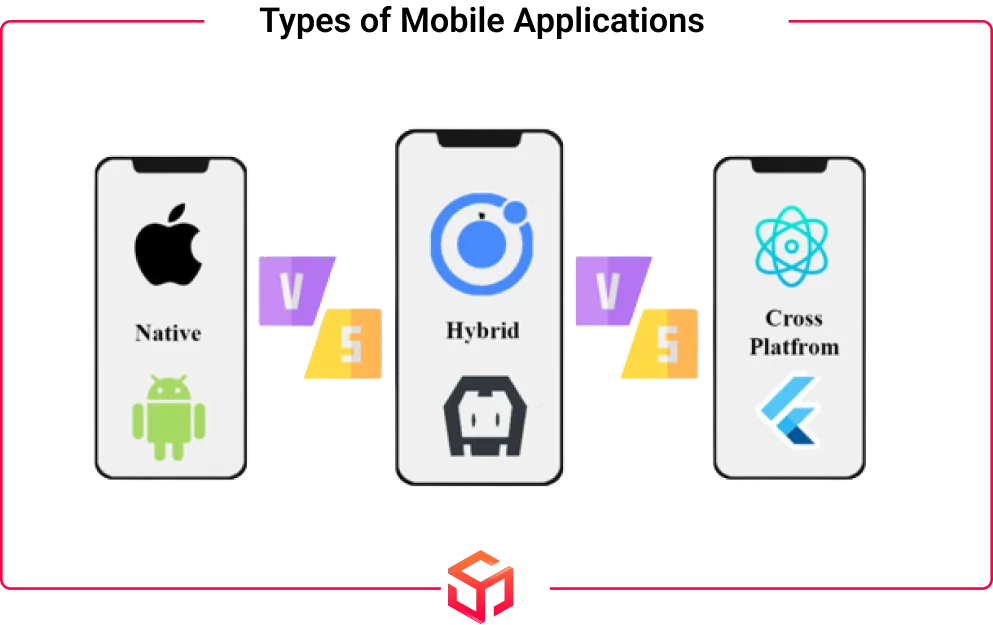
Another important detail that you need to know is the different types of apps that can be developed.
##### Native Apps
Native apps are apps built for a particular OS. It can be downloaded directly on the device itself. If you develop an app for a particular OS, then it will not work in any other OS. For instance, if you create an app for Android devices, it will not work on iOS devices and vice versa.
##### Hybrid Apps
These apps are a combination of native apps and front-end technologies like CSS, HTML, and JavaScript. With a single codebase, they can be used across multiple platforms. They offer good performance and provide users with an experience similar to native apps. Many businesses are adopting hybrid apps for faster development time, cost-effectiveness, cross-platform compatibility, and easier maintenance. Reaching out to a [**hybrid app development company**](https://www.softsuave.com/blog/hybrid-app-development-company/) can help you build your own hybrid app efficiently.
##### Cross-Platform Apps
These apps also can be used across different platforms with a single code. These apps have a slightly lower performance and do not have any front-end web technologies. Some of the commonly used languages for cross-platform development are React Native, Xamarin, and Flutter.
These are the fundamental elements to consider when building a mobile app. As you move forward to add **advanced or app-specific features**, the technical complexity can increase significantly.
If you ever feel stuck or want expert help, it’s worth considering **[Offshore Cross-Platform App Making Services](https://www.softsuave.com/blog/offshore-cross-platform-app-making-service/)**. Offshore teams can help bring your app vision to life quickly and cost-effectively, without compromising on quality.
### 6\.Testing Phase: Giving Out A Flawless Product
It is important to vigorously test the app before releasing it because end-users must receive a flawless product.
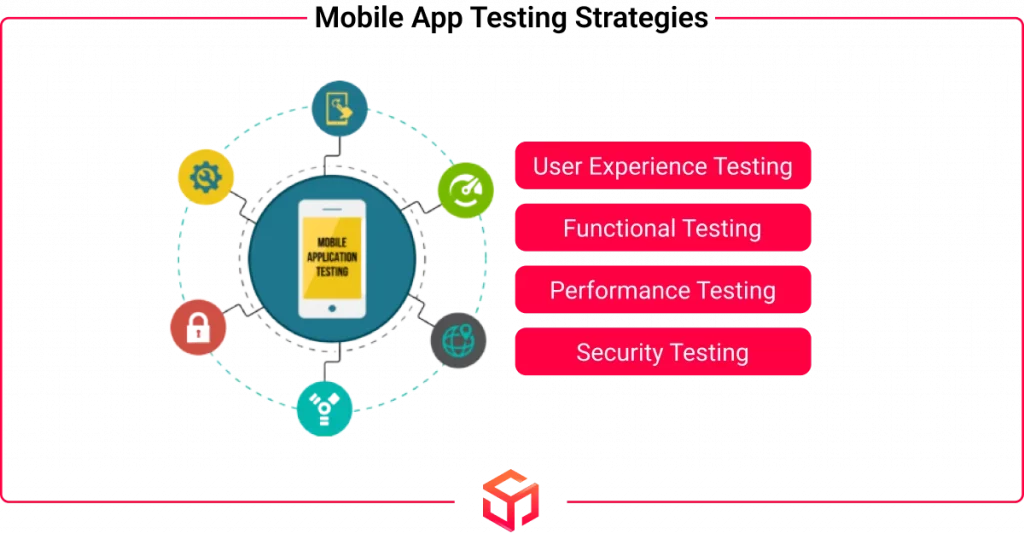
There are different types of [mobile app testing](https://www.softsuave.com/blog/mobile-app-testing/) strategies that you need to know before making your own app. Let’s see a small overview of some of the testing methods.
#### User Experience Testing
The team conducts User Experience Testing to check whether the final mobile app meets the designed user experience. This is really important because it gives the users a first-hand impression. The fonts, design styles, color scheme, and padding between data, icons, and navigation must be consistent. Maintaining the app’s original design standards will directly influence user adoption.
#### Functional Testing
Functional testing is important because it ensures the app’s functionality and allows multiple users to test it to gauge the core features and user flow. It identifies bugs and maintains a consistent app functioning even under various conditions. With more tests, we can uncover unexpected app behavior and correct it. By identifying these issues early, you can ensure a smooth user experience across all platforms
#### Performance Testing
It helps to test the performance of your mobile app including reliability, scalability, stability, and responsiveness of the system under a particular workload.
Simulate the highest number of users to test your app, API, and backend for load. Even if it meets primary performance standards, you should still do this. Your app should be capable of running the load and functioning well even when usage spikes.
#### Security Testing
We must take security testing extremely seriously when developing an app. Even a single vulnerability might cause a breach in your mobile app. Many companies employ third-party agencies to perform comprehensive security testing on their products.
This testing ensures that your app is free from any security flaws by uncovering the vulnerabilities in the system.
### 7\.Launching Phase: Deployment & Platform Support
If you’ve made it to this section of the article, congratulations! You’ve successfully finished the vital process outlined in this guide on ‘How to make your own app?’ which is to develop a mobile app. Your app is prepared for deployment and to be used by the public.
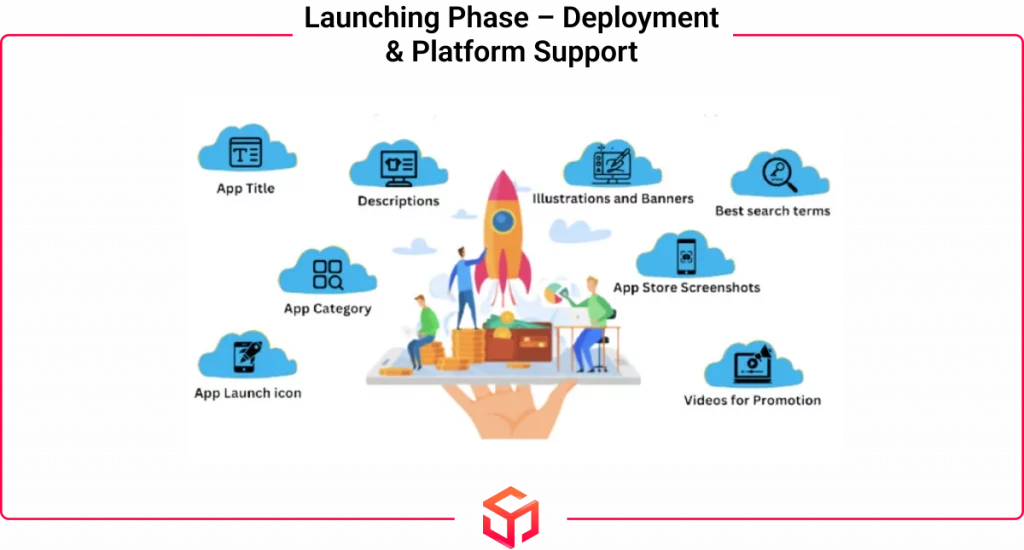
#### Most Popular App Store Platforms
Now you have completed all the major phases and are ready to launch your app. Before launching, you must first know the popular App Stores.
According to [Statista.com](https://www.statista.com/statistics/276623/number-of-apps-available-in-leading-app-stores/) (August 2024), Google Play Store was the most popular app store with nearly 2.3 million apps. The next was the Apple Store with roughly 2.05 million apps.
********Why struggle when Soft Suave can deliver your app hassle-free?********
Let our experts handle the development while you focus on growing your business\!
[Contact us](https://www.softsuave.com/contact)
#### Android: Uploading an App to the Google Play Store
The basic overview of publishing your app on the Google Play Store is described in the steps below.
**1st Step:** First using your existing Google account open a Developer Account.
****2nd Step**:** Next you need to open up a Payment Profile. This is done for receiving payments from the app.
**3rd Step:** Next, create a profile for the app which needs to be launched.
**4th Step:** Now configure the app using the app’s dashboard.
**5th Step:** You can upload the APK files of the app and manage the files after the above steps.**6:** The next step is to add or update your store listing and settings.
**6th Step:** The next step is to add or update your store listing and settings
Visit this official Google Play Console Help article to [Create and set up your app](https://support.google.com/googleplay/android-developer/answer/9859152?hl=en#zippy=).
#### iOS: Uploading an App to the Apple App Store
The basic overview of publishing your app on the Apple store is described below.
The basic overview of publishing your app on the Apple store is described in the steps below.
**Step** **1**: The first step is to create an Apple ID. You will use this to access all of Apple’s services.
**Step** **2**: Next using your Apple ID, sign up for the Apple Developer Program.
**Step** **3**: Using the Apple ID you should also log into App Store Connect. This is the platform where you can upload and manage your app and its access.
**Step** **4:** Now before publishing your app you need to create an app record. It allows you to edit the app details, developer details, etc.
**Step** **6**: After finishing all the above steps, you can now test your app and then send it for review.
**Step** **7**: If your app is approved after review, it will be made public for the users to download it.
Read the Apple Store Connect Help article on [submitting your app to the app store](https://developer.apple.com/help/app-store-connect/) before going further.
### 8\.Maintenance Phase: Ensuring App’s Long-Term Success
You have launched your app and have done everything right till now. Now your work is over and you can relax, right? “Wrong”
Listen closely, because you still have work to do. After launching your app, you are now entering into the maintenance phase which is to regularly monitor and update your app.
You can Analyze the mobile app using Mobile Analytics Platforms and measure the success using KPIs or ‘Key Performance Indicators’.
The steps outlined above help ensure your app development process flows smoothly and avoids confusion or delays. However, if you find that you lack the necessary skills or bandwidth to handle this complex process, you have options. You can either build an in-house team or collaborate with an experienced outsourcing partner that offers [**software development as a service**](https://www.softsuave.com/blog/software-development-as-a-service/). This approach allows you to access skilled professionals who manage the entire development lifecycle efficiently, delivering your app on time and within budget—while you stay focused on growing your business.
## what are the requirements for developing an app
The basic requirements include:
1. **Idea and Concept**: A clear understanding of the app’s purpose, target audience, and features.
2. **Platform**: Deciding whether the app will be built for iOS, Android, or both.
3. **Technical Skills**: Knowledge of programming languages like Swift, Java, or React Native, depending on the platform.
4. **Design**: A user-friendly, visually appealing design to ensure a smooth user experience (UX/UI design).
5. **Development Tools**: tegrated development environments (IDEs) like Xcode for iOS or Android Studio for Android. **[What tool is needed to make an app](https://www.softsuave.com/blog/what-tool-is-needed-to-make-an-app/)** often depends on the platform and the developer’s skill set, so choosing the right tool is essential for effective development.
6. **Testing**: Ensuring the app works flawlessly across devices by conducting rigorous testing.
7. **Deployment and Maintenance**: Once the app is ready, it needs to be deployed to app stores and maintained with regular updates and bug fixes.
### Conclusion
At last, you have now completed this ‘how to make your own app’ guide. You must now have a complete understanding of the whole process of creating a mobile app. We have covered everything from getting started with ideas for an app to the maintenance phase of an app.
If you are still unsure about creating your own app, it is always best to get expert assistance. [Soft Suave](https://www.softsuave.com/) Technologies is your one-stop destination to create your dream app at affordable prices offering solutions for Android, iOS, and even cross-platform.
****Turn your vision into reality with Soft Suave’s expert development team.****
[Contact us](https://www.softsuave.com/contact)
 Founder & CEO
## [Ramesh Vayavuru](https://www.softsuave.com/blog/author/admin/)
Ramesh Vayavuru is the Founder & CEO of Soft Suave Technologies, with 15+ years of experience delivering innovative IT solutions.
[](https://www.linkedin.com/in/ramesh-vayavuru/) [](https://www.instagram.com/rameshvaya1210/)
Share Article: [](https://www.facebook.com/sharer/sharer.php?u=https%3A%2F%2Fwww.softsuave.com%2Fblog%2Fhow-to-make-your-own-app%2F) [](https://www.linkedin.com/shareArticle?mini=true&url=https%3A%2F%2Fwww.softsuave.com%2Fblog%2Fhow-to-make-your-own-app%2F&title=How+To+Make+Your+Own+App%3A+A+Detailed+Guide) [](https://twitter.com/intent/tweet?url=https%3A%2F%2Fwww.softsuave.com%2Fblog%2Fhow-to-make-your-own-app%2F&text=How+To+Make+Your+Own+App%3A+A+Detailed+Guide)
Table of Contents
- [How To Make Your Own App from Scratch?](https://www.softsuave.com/blog/how-to-make-your-own-app/#How_To_Make_Your_Own_App_from_Scratch)
- [1\.Strategy Phase: Ideation and Goals](https://www.softsuave.com/blog/how-to-make-your-own-app/#1Strategy_Phase_Ideation_and_Goals)
- [2\.Research Phase: Market Research](https://www.softsuave.com/blog/how-to-make-your-own-app/#2Research_Phase_Market_Research)
- [3\.Structuring Phase: Decide Your App Features](https://www.softsuave.com/blog/how-to-make-your-own-app/#3Structuring_Phase_Decide_Your_App_Features)
- [4\.Design Phase: Making Ideas Into Reality](https://www.softsuave.com/blog/how-to-make-your-own-app/#4Design_Phase_Making_Ideas_Into_Reality)
- [5\.Development Phase: Architecting The Application](https://www.softsuave.com/blog/how-to-make-your-own-app/#5Development_Phase_Architecting_The_Application)
- [6\.Testing Phase: Giving Out A Flawless Product](https://www.softsuave.com/blog/how-to-make-your-own-app/#6Testing_Phase_Giving_Out_A_Flawless_Product)
- [7\.Launching Phase: Deployment & Platform Support](https://www.softsuave.com/blog/how-to-make-your-own-app/#7Launching_Phase_Deployment_Platform_Support)
- [8\.Maintenance Phase: Ensuring App’s Long-Term Success](https://www.softsuave.com/blog/how-to-make-your-own-app/#8Maintenance_Phase_Ensuring_Apps_Long-Term_Success)
- [what are the requirements for developing an app](https://www.softsuave.com/blog/how-to-make-your-own-app/#what_are_the_requirements_for_developing_an_app)
- [Conclusion](https://www.softsuave.com/blog/how-to-make-your-own-app/#Conclusion)
- [Ramesh Vayavuru](https://www.softsuave.com/blog/how-to-make-your-own-app/#Ramesh_Vayavuru)
[](https://www.softsuave.com/hire-mobile-app-developers)
[](https://www.softsuave.com/case-studies)
#### Tags:
[build your own app](https://www.softsuave.com/blog/tag/build-your-own-app/) [create your own app](https://www.softsuave.com/blog/tag/create-your-own-app/) [how to make an app](https://www.softsuave.com/blog/tag/how-to-make-an-app/)
[← Previous Post](https://www.softsuave.com/blog/mobile-app-prototype/ "Mobile App Prototype: A Comprehensive Guide for Beginners")
[Next Post →](https://www.softsuave.com/blog/types-of-prototypes/ "Types of Prototypes: A Complete Breakdown for UI/UX Designers")
## Subscribe To Our Newsletter
Sign up today. Writing copy is time-consuming and difficult. Headline’s AI can take your thoughts.
🎉 Thank you for subscribing\!
Services
***
- 
[Global Capability Center (GCC)](https://www.softsuave.com/global-capability-center)
- 
[AI Development Services](https://www.softsuave.com/ai-development-service)
- 
[Software Development Services](https://www.softsuave.com/software-development-company-india)
- 
[Mobile App Development Services](https://www.softsuave.com/mobile-application-development-company)
- 
[Web App Development Services](https://www.softsuave.com/web-application-development-company)
- 
[Legacy Modernization Services](https://www.softsuave.com/legacy-modernization-services)
Delivery Method
***
- 
[Offshore Software Development Services](https://www.softsuave.com/offshore-software-development-company)
- 
[IT Staff Augmentation Services](https://www.softsuave.com/it-staff-augmentation-services)
- 
[Hire Dedicated Developer Team](https://www.softsuave.com/hire-dedicated-developers)
Industries
***
- 
[Aviation](https://www.softsuave.com/ai-in-aviation)
- 
[Logistics](https://www.softsuave.com/ai-in-logistics)
- 
[FinTech](https://www.softsuave.com/fintech-ai-solutions)
- 
[HealthTech](https://www.softsuave.com/ai-solutions-in-healthtech)
- 
[EdTech](https://www.softsuave.com/ai-solutions-in-edutech)
- 
[Construction](https://www.softsuave.com/ai-solutions-for-construction)
About
***

[](https://www.facebook.com/softsuave/ "Follow us on Facebook") [](https://twitter.com/softsuave "Follow us on Twitter") [](https://in.linkedin.com/company/softsuave "Follow us on Linkedin")
[](https://www.instagram.com/softsuavetech/ "Follow us on Instagram") [](https://www.youtube.com/@softsuave "Follow us on Youtube")
Soft Suave is an offshore software development company specializing in web, mobile apps, and software development. Leveraging cutting-edge AI technologies, we deliver innovative solutions that empower businesses across industries to reach new heights.
- [Clients](https://www.softsuave.com/clients)
- [Blog](https://www.softsuave.com/blog/)
- [Careers](https://www.softsuave.com/career-overview)
- [Contact](https://www.softsuave.com/contact)
- [Case Studies](https://www.softsuave.com/case-studies)
- [Privacy Policy](https://www.softsuave.com/privacy-policy)
- [FAQ](https://www.softsuave.com/faqs)
Main Branch
***

Soft Suave Technologies
No.100, Lake View Estate, 1st Floor, Kundrathur Main Road, Porur, Chennai\- 600116.
Let’s meetup
***
- 
Soft Suave Technologies
3210 Vogel Rd, Ellicott City, Maryland \- 21043, USA.
- [contact@softsuave.com](mailto:contact@softsuave.com)
- [ +1 (410) 220-6301](tel:+14102206301)
- [ +44 7403 646450](tel:+447403646450)
- [ +91 8015159981 (HR)](tel:+918015159981)
Copyright © 2026 by [Soft Suave](https://www.softsuave.com/). All Rights Reserved.

Soft Suave - Live Chat 


Are you sure you want to end the session?
Yes
No
💬 Hi there! Need help?
💬 New messages
 1
 |
| Readable Markdown | null |
| Shard | 63 (laksa) |
| Root Hash | 9042634659652445663 |
| Unparsed URL | com,softsuave!www,/blog/how-to-make-your-own-app/ s443 |