ℹ️ Skipped - page is already crawled
| Filter | Status | Condition | Details |
|---|---|---|---|
| HTTP status | PASS | download_http_code = 200 | HTTP 200 |
| Age cutoff | PASS | download_stamp > now() - 6 MONTH | 0.1 months ago |
| History drop | PASS | isNull(history_drop_reason) | No drop reason |
| Spam/ban | PASS | fh_dont_index != 1 AND ml_spam_score = 0 | ml_spam_score=0 |
| Canonical | PASS | meta_canonical IS NULL OR = '' OR = src_unparsed | Not set |
| Property | Value | ||||||||||||||||||
|---|---|---|---|---|---|---|---|---|---|---|---|---|---|---|---|---|---|---|---|
| URL | https://www.mathworks.com/help/stats/beta-distribution.html | ||||||||||||||||||
| Last Crawled | 2026-04-18 18:03:43 (4 days ago) | ||||||||||||||||||
| First Indexed | 2016-12-02 13:10:11 (9 years ago) | ||||||||||||||||||
| HTTP Status Code | 200 | ||||||||||||||||||
| Content | |||||||||||||||||||
| Meta Title | Beta Distribution - MATLAB & Simulink | ||||||||||||||||||
| Meta Description | The beta distribution describes a family of curves that are nonzero only on the interval [0,1]. | ||||||||||||||||||
| Meta Canonical | null | ||||||||||||||||||
| Boilerpipe Text | Overview
The beta distribution describes a family of curves that are nonzero only on the
interval [0,1]. A more general version of the function assigns parameters to the
endpoints of the interval.
Statistics and Machine Learning Toolbox™ provides several ways to work with the beta distribution. You can use
the following approaches to estimate parameters from sample data, compute the pdf,
cdf, and icdf, generate random numbers, and more.
Fit a probability distribution object to sample data, or create a
probability distribution object with specified parameter values. See
Using
BetaDistribution
Objects
for more information.
Work with data input from matrices, tables, and dataset arrays using
probability distribution functions. See
Supported Distributions
for a list of beta distribution
functions.
Interactively fit, explore, and generate random numbers from the
distribution using an app or user interface.
For more information on each of these options, see
Working with Probability Distributions
.
Parameters
The beta distribution uses the following parameters.
Parameter
Description
Support
a
First shape parameter
a
>
0
b
Second shape parameter
b
>
0
Probability Density Function
The probability density function (pdf) of the beta distribution is
where
B
( · ) is the Beta function. The indicator
function
I
[0,1]
(
x
)
ensures that only values of
x
in the range [0,1] have nonzero
probability.
For an example, see
Plot Beta Distribution pdfs
.
Cumulative Distribution Function
The beta cdf for a given value
x
in the range [0,1] and a given
pair of parameters
a
and
b
is
where
B
( · ) is the Beta function. The beta cdf
is the same as the incomplete beta function.
Examples
Plot Beta Distribution pdfs
Change the value of the beta distribution parameters to alter the shape of the probability distribution function (pdf).
Compute the pdfs of three beta distributions: one with the shape parameters
a
and
b
equal to 0.75, one with the parameters equal to 1, and one with the parameters equal to 4.
x = 0:0.01:1;
y1 = betapdf(x,0.75,0.75);
y2 = betapdf(x,1,1);
y3 = betapdf(x,4,4);
Plot the three pdfs.
plot(x,y1)
hold
on
plot(x,y2)
plot(x,y3)
legend([
"a = b = 0.75"
,
"a = b = 1"
,
"a = b = 4"
]);
hold
off
The constant pdf (the flat line) shows that the standard uniform distribution is a special case of the beta distribution, which occurs when the parameters
a
and
b
are equal to 1.
Estimate Beta Distribution Parameters
Compute maximum likelihood estimates (MLEs) of the parameters of a beta distribution.
Maximizing the likelihood function is a popular technique for estimating parameters. The likelihood function has the same form as the beta probability distribution function (pdf). However, for the pdf, the parameters are known constants and the variable is
x
. The likelihood function reverses the roles of the variables. That is, the sample values (the
x
's) are already observed and are fixed constants, and the variables are the unknown parameters. Maximum likelihood estimation involves calculating the values of the parameters that produce the highest likelihood given the particular set of data.
Generate 100 random numbers from the beta distribution with
a
equal to 5 and
b
equal to 0.2. The function
betafit
returns the MLEs and confidence intervals for the parameters of the beta distribution.
rng(
"default"
)
% For reproducibility
r = betarnd(5,0.2,100,1);
[phat, pci] = betafit(r)
phat =
1×2
7.4911 0.2135
pci =
2×2
5.0861 0.1744
11.0334 0.2614
The MLE for parameter
a
is 7.4911. The 95% confidence interval for
a
ranges from 5.0861 to 11.0334 and does not include the true value of 5. Although this result is unlikely, it can occur when you estimate distribution parameters.
The MLE for parameter
b
is 0.2135. The 95% confidence interval for
b
ranges from 0.1744 to 0.2614 and includes the true value 0.2.
Related Distributions
The beta distribution has a functional relationship with the
t
distribution. If
Y
is an observation from Student's
t
distribution with
ν
degrees of freedom,
then the following transformation generates
X
, which is beta
distributed.
If
Y
~
t
(
v
), then
X
∼
β
(
ν
2
,
ν
2
)
This relationship is used to compute values of the
t
cdf and
inverse function as well as generating
t
distributed random
numbers.
See Also
BetaDistribution
Topics
Working with Probability Distributions
Supported Distributions
How useful was this information?
Unrated
1 star
2 stars
3 stars
4 stars
5 stars | ||||||||||||||||||
| Markdown | [Skip to content](https://www.mathworks.com/help/stats/beta-distribution.html#main)
[](https://www.mathworks.com/?s_tid=user_nav_logo)
[MATLAB Help Center](https://www.mathworks.com/help/?s_tid=user_nav_help)
- [MATLAB Help Center](https://www.mathworks.com/help/?s_tid=user_nav_help)
- [Community](https://www.mathworks.com/matlabcentral/?s_tid=user_nav_community)
- [Learning](https://matlabacademy.mathworks.com/?s_tid=user_nav_learning)
- [Get MATLAB](https://login.mathworks.com/embedded-login/landing.html?cid=getmatlab&s_tid=user_nav_getml) [MATLAB](https://login.mathworks.com/embedded-login/landing.html?cid=getmatlab&s_tid=user_nav_getml)
- [Sign In](https://www.mathworks.com/login?uri=https%3A%2F%2Fwww.mathworks.com%2Fhelp%2Fstats%2Fbeta-distribution.html)
- [My Account]()
- [My Community Profile]()
- [Link License]()
- ***
- [Sign Out]()
- [Contact MathWorks Support](https://www.mathworks.com/support/contact_us.html)
- [Visit mathworks.com](https://www.mathworks.com/)
- - [ MATLAB](https://matlab.mathworks.com/)
- [ Help Center](https://www.mathworks.com/help/)
- [ MathWorks](https://www.mathworks.com/)
- [ MATLAB Answers](https://www.mathworks.com/matlabcentral/answers/index)
- [ File Exchange](https://www.mathworks.com/matlabcentral/fileexchange)
- [ Videos](https://www.mathworks.com/videos.html)
- [ Online Training](https://matlabacademy.mathworks.com/)
- [ Blogs](https://blogs.mathworks.com/)
- [ Cody](https://www.mathworks.com/matlabcentral/cody)
- [ MATLAB Drive](https://drive.mathworks.com/)
- [ ThingSpeak](https://thingspeak.com/)
- [ Bug Reports](https://www.mathworks.com/support/bugreports/)
- [ Community](https://www.mathworks.com/matlabcentral/)
Off-Canvas Navigation Menu Toggle Contents
1. [Documentation Home](https://www.mathworks.com/help/index.html?s_tid=CRUX_lftnav)
1. [AI and Statistics](https://www.mathworks.com/help/overview/ai-and-statistics.html?s_tid=hc_product_group_bc)
1. [Statistics and Machine Learning Toolbox](https://www.mathworks.com/help/stats/index.html?s_tid=CRUX_lftnav)
2. [Probability Distributions and Hypothesis Tests](https://www.mathworks.com/help/stats/probability-distributions-1.html?s_tid=CRUX_lftnav)
3. [Univariate Continuous Distributions](https://www.mathworks.com/help/stats/continuous-distributions.html?s_tid=CRUX_lftnav)
- Beta Distribution
- On this page
- [Overview](https://www.mathworks.com/help/stats/beta-distribution.html#buptttm-1)
- [Parameters](https://www.mathworks.com/help/stats/beta-distribution.html#bupttrd-1)
- [Probability Density Function](https://www.mathworks.com/help/stats/beta-distribution.html#brn2ivz-5)
- [Cumulative Distribution Function](https://www.mathworks.com/help/stats/beta-distribution.html#bupttt9)
- [Examples](https://www.mathworks.com/help/stats/beta-distribution.html#mw_7cc12eec-1890-4c00-92f2-9a4779cd7932)
- [Plot Beta Distribution pdfs](https://www.mathworks.com/help/stats/beta-distribution.html#bupttis)
- [Estimate Beta Distribution Parameters](https://www.mathworks.com/help/stats/beta-distribution.html#brn2ivz-8)
- [Related Distributions](https://www.mathworks.com/help/stats/beta-distribution.html#bupttrm)
- [See Also](https://www.mathworks.com/help/stats/beta-distribution.html#d127e1437968)
- [Documentation](https://www.mathworks.com/help/stats/continuous-distributions.html?s_tid=CRUX_topnav)
- [Examples](https://www.mathworks.com/help/stats/examples.html?s_tid=CRUX_topnav&category=continuous-distributions)
- [Functions](https://www.mathworks.com/help/stats/referencelist.html?type=function&s_tid=CRUX_topnav&category=continuous-distributions)
- [Blocks](https://www.mathworks.com/help/stats/referencelist.html?type=block&s_tid=CRUX_topnav&category=continuous-distributions)
- [Apps](https://www.mathworks.com/help/stats/referencelist.html?type=app&s_tid=CRUX_topnav&category=continuous-distributions)
- [Videos](https://www.mathworks.com/support/search.html?fq%5B%5D=asset_type_name:video&fq%5B%5D=category:stats/continuous-distributions&page=1&s_tid=CRUX_topnav)
- [Answers](https://www.mathworks.com/support/search.html?fq%5B%5D=asset_type_name:answer&fq%5B%5D=category:stats/continuous-distributions&page=1&s_tid=CRUX_topnav)
Main Content
# Beta Distribution
### Overview
The beta distribution describes a family of curves that are nonzero only on the interval \[0,1\]. A more general version of the function assigns parameters to the endpoints of the interval.
Statistics and Machine Learning Toolbox™ provides several ways to work with the beta distribution. You can use the following approaches to estimate parameters from sample data, compute the pdf, cdf, and icdf, generate random numbers, and more.
- Fit a probability distribution object to sample data, or create a probability distribution object with specified parameter values. See `Using` [`BetaDistribution`](https://www.mathworks.com/help/stats/prob.betadistribution.html) `Objects` for more information.
- Work with data input from matrices, tables, and dataset arrays using probability distribution functions. See [Supported Distributions](https://www.mathworks.com/help/stats/supported-distributions.html) for a list of beta distribution functions.
- Interactively fit, explore, and generate random numbers from the distribution using an app or user interface.
For more information on each of these options, see [Working with Probability Distributions](https://www.mathworks.com/help/stats/working-with-probability-distributions.html).
### Parameters
The beta distribution uses the following parameters.
| Parameter | Description | Support |
|---|---|---|
| `a` | First shape parameter | a \> 0 |
### Probability Density Function
The probability density function (pdf) of the beta distribution is
y \= f ( x \| a , b ) \= 1 B ( a , b ) x a − 1 ( 1 − x ) b − 1 I \[ 0 , 1 \] ( x )
where *B*( · ) is the Beta function. The indicator function *I*\[0,1\](*x*) ensures that only values of *x* in the range \[0,1\] have nonzero probability.
For an example, see [Plot Beta Distribution pdfs](https://www.mathworks.com/help/stats/beta-distribution.html#bupttis).
### Cumulative Distribution Function
The beta cdf for a given value `x` in the range \[0,1\] and a given pair of parameters `a` and `b` is
p \= F ( x \| a , b ) \= 1 B ( a , b ) ∫ 0 x t a − 1 ( 1 − t ) b − 1 d t
where *B*( · ) is the Beta function. The beta cdf is the same as the incomplete beta function.
### Examples
#### Plot Beta Distribution pdfs
[Open Live Script](matlab:openExample\('stats/PlotBetaDistributionPdfsExample'\))
Change the value of the beta distribution parameters to alter the shape of the probability distribution function (pdf).
Compute the pdfs of three beta distributions: one with the shape parameters *a* and *b* equal to 0.75, one with the parameters equal to 1, and one with the parameters equal to 4.
```
x = 0:0.01:1;
y1 = betapdf(x,0.75,0.75);
y2 = betapdf(x,1,1);
y3 = betapdf(x,4,4);
```
Plot the three pdfs.
```
plot(x,y1)
hold on
plot(x,y2)
plot(x,y3)
legend(["a = b = 0.75","a = b = 1","a = b = 4"]);
hold off
```
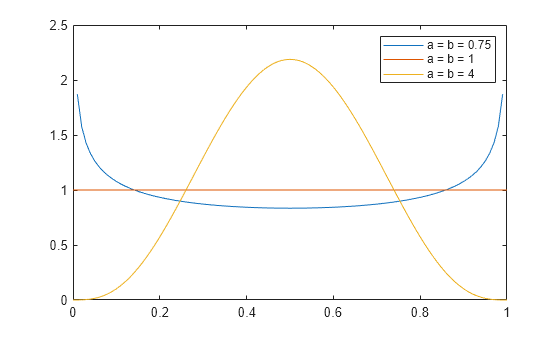
The constant pdf (the flat line) shows that the standard uniform distribution is a special case of the beta distribution, which occurs when the parameters *a* and *b* are equal to 1.
#### Estimate Beta Distribution Parameters
[Open Live Script](matlab:openExample\('stats/BetaDistributionParametersExample'\))
Compute maximum likelihood estimates (MLEs) of the parameters of a beta distribution.
Maximizing the likelihood function is a popular technique for estimating parameters. The likelihood function has the same form as the beta probability distribution function (pdf). However, for the pdf, the parameters are known constants and the variable is *x*. The likelihood function reverses the roles of the variables. That is, the sample values (the *x*'s) are already observed and are fixed constants, and the variables are the unknown parameters. Maximum likelihood estimation involves calculating the values of the parameters that produce the highest likelihood given the particular set of data.
Generate 100 random numbers from the beta distribution with *a* equal to 5 and *b* equal to 0.2. The function `betafit` returns the MLEs and confidence intervals for the parameters of the beta distribution.
```
rng("default") % For reproducibility
r = betarnd(5,0.2,100,1);
[phat, pci] = betafit(r)
```
```
phat = 1×2
7.4911 0.2135
```
```
pci = 2×2
5.0861 0.1744
11.0334 0.2614
```
The MLE for parameter *a* is 7.4911. The 95% confidence interval for *a* ranges from 5.0861 to 11.0334 and does not include the true value of 5. Although this result is unlikely, it can occur when you estimate distribution parameters.
The MLE for parameter *b* is 0.2135. The 95% confidence interval for *b* ranges from 0.1744 to 0.2614 and includes the true value 0.2.
### Related Distributions
The beta distribution has a functional relationship with the *t* distribution. If *Y* is an observation from Student's *t* distribution with *ν* degrees of freedom, then the following transformation generates *X*, which is beta distributed.
X \= 1 2 \+ 1 2 Y ν \+ Y 2
If *Y*~*t*(*v*), then X ∼ β ( ν 2 , ν 2 )
This relationship is used to compute values of the *t* cdf and inverse function as well as generating *t* distributed random numbers.
## See Also
[`BetaDistribution`](https://www.mathworks.com/help/stats/prob.betadistribution.html)
### Topics
- [Working with Probability Distributions](https://www.mathworks.com/help/stats/working-with-probability-distributions.html)
- [Supported Distributions](https://www.mathworks.com/help/stats/supported-distributions.html)
Thank you for your feedback\!
Why did you choose this rating?
Submit
How useful was this information?
Unrated
1 star
2 stars
3 stars
4 stars
5 stars
## MATLAB Command
You clicked a link that corresponds to this MATLAB command:
```
```
Run the command by entering it in the MATLAB Command Window. Web browsers do not support MATLAB commands.
Close
 
Select a Web Site
Choose a web site to get translated content where available and see local events and offers. Based on your location, we recommend that you select: **United States**.
[United States](https://www.mathworks.com/)
- [**United States** (English)](https://ch.mathworks.com/)
- [**United States** (Deutsch)](https://ch.mathworks.com/)
- [**United States** (Français)](https://ch.mathworks.com/)
- [**United States**(简体中文)](https://ww2.mathworks.cn/)
- [**United States** (English)](https://ww2.mathworks.cn/)
You can also select a web site from the following list
**How to Get Best Site Performance**
Select the China site (in Chinese or English) for best site performance. Other MathWorks country sites are not optimized for visits from your location.
Americas
- [América Latina](https://la.mathworks.com/) (Español)
- [Canada](https://www.mathworks.com/) (English)
- [United States](https://www.mathworks.com/) (English)
Europe
- [Belgium](https://nl.mathworks.com/) (English)
- [Denmark](https://se.mathworks.com/) (English)
- [Deutschland](https://de.mathworks.com/) (Deutsch)
- [España](https://es.mathworks.com/) (Español)
- [Finland](https://se.mathworks.com/) (English)
- [France](https://fr.mathworks.com/) (Français)
- [Ireland](https://uk.mathworks.com/) (English)
- [Italia](https://it.mathworks.com/) (Italiano)
- [Luxembourg](https://nl.mathworks.com/) (English)
- [Netherlands](https://nl.mathworks.com/) (English)
- [Norway](https://se.mathworks.com/) (English)
- [Österreich](https://de.mathworks.com/) (Deutsch)
- [Portugal](https://www.mathworks.com/) (English)
- [Sweden](https://se.mathworks.com/) (English)
- Switzerland
- [Deutsch](https://ch.mathworks.com/)
- [English](https://ch.mathworks.com/)
- [Français](https://ch.mathworks.com/)
- [United Kingdom](https://uk.mathworks.com/) (English)
Asia Pacific
- [Australia](https://au.mathworks.com/) (English)
- [India](https://in.mathworks.com/) (English)
- [New Zealand](https://au.mathworks.com/) (English)
- 中国
- [简体中文](https://ww2.mathworks.cn/)
- [English](https://ww2.mathworks.cn/)
- [日本](https://jp.mathworks.com/) (日本語)
- [한국](https://kr.mathworks.com/) (한국어)
[Contact your local office](https://www.mathworks.com/)
- [Trust Center](https://www.mathworks.com/company/trust-center.html?s_tid=gf_tc)
- [Trademarks](https://www.mathworks.com/company/trust-center/trademarks.html?s_tid=gf_trd)
- [Privacy Policy](https://www.mathworks.com/company/trust-center/privacy-policy.html?s_tid=gf_priv)
- [Preventing Piracy](https://www.mathworks.com/company/trust-center/piracy.html?s_tid=gf_pir)
- [Application Status](https://status.mathworks.com/?s_tid=gf_application)
- [Contact Us](https://www.mathworks.com/company/aboutus/contact_us.html?s_tid=gf_contact)
© 1994-2026 The MathWorks, Inc.
Select a Web Site United States | ||||||||||||||||||
| Readable Markdown | ### Overview
The beta distribution describes a family of curves that are nonzero only on the interval \[0,1\]. A more general version of the function assigns parameters to the endpoints of the interval.
Statistics and Machine Learning Toolbox™ provides several ways to work with the beta distribution. You can use the following approaches to estimate parameters from sample data, compute the pdf, cdf, and icdf, generate random numbers, and more.
- Fit a probability distribution object to sample data, or create a probability distribution object with specified parameter values. See `Using` [`BetaDistribution`](https://www.mathworks.com/help/stats/prob.betadistribution.html) `Objects` for more information.
- Work with data input from matrices, tables, and dataset arrays using probability distribution functions. See [Supported Distributions](https://www.mathworks.com/help/stats/supported-distributions.html) for a list of beta distribution functions.
- Interactively fit, explore, and generate random numbers from the distribution using an app or user interface.
For more information on each of these options, see [Working with Probability Distributions](https://www.mathworks.com/help/stats/working-with-probability-distributions.html).
### Parameters
The beta distribution uses the following parameters.
| Parameter | Description | Support |
|---|---|---|
| `a` | First shape parameter | a \> 0 |
### Probability Density Function
The probability density function (pdf) of the beta distribution is
where *B*( · ) is the Beta function. The indicator function *I*\[0,1\](*x*) ensures that only values of *x* in the range \[0,1\] have nonzero probability.
For an example, see [Plot Beta Distribution pdfs](https://www.mathworks.com/help/stats/beta-distribution.html#bupttis).
### Cumulative Distribution Function
The beta cdf for a given value `x` in the range \[0,1\] and a given pair of parameters `a` and `b` is
where *B*( · ) is the Beta function. The beta cdf is the same as the incomplete beta function.
### Examples
#### Plot Beta Distribution pdfs
Change the value of the beta distribution parameters to alter the shape of the probability distribution function (pdf).
Compute the pdfs of three beta distributions: one with the shape parameters *a* and *b* equal to 0.75, one with the parameters equal to 1, and one with the parameters equal to 4.
```
x = 0:0.01:1;
y1 = betapdf(x,0.75,0.75);
y2 = betapdf(x,1,1);
y3 = betapdf(x,4,4);
```
Plot the three pdfs.
```
plot(x,y1)
hold on
plot(x,y2)
plot(x,y3)
legend(["a = b = 0.75","a = b = 1","a = b = 4"]);
hold off
```

The constant pdf (the flat line) shows that the standard uniform distribution is a special case of the beta distribution, which occurs when the parameters *a* and *b* are equal to 1.
#### Estimate Beta Distribution Parameters
Compute maximum likelihood estimates (MLEs) of the parameters of a beta distribution.
Maximizing the likelihood function is a popular technique for estimating parameters. The likelihood function has the same form as the beta probability distribution function (pdf). However, for the pdf, the parameters are known constants and the variable is *x*. The likelihood function reverses the roles of the variables. That is, the sample values (the *x*'s) are already observed and are fixed constants, and the variables are the unknown parameters. Maximum likelihood estimation involves calculating the values of the parameters that produce the highest likelihood given the particular set of data.
Generate 100 random numbers from the beta distribution with *a* equal to 5 and *b* equal to 0.2. The function `betafit` returns the MLEs and confidence intervals for the parameters of the beta distribution.
```
rng("default") % For reproducibility
r = betarnd(5,0.2,100,1);
[phat, pci] = betafit(r)
```
```
phat = 1×2
7.4911 0.2135
```
```
pci = 2×2
5.0861 0.1744
11.0334 0.2614
```
The MLE for parameter *a* is 7.4911. The 95% confidence interval for *a* ranges from 5.0861 to 11.0334 and does not include the true value of 5. Although this result is unlikely, it can occur when you estimate distribution parameters.
The MLE for parameter *b* is 0.2135. The 95% confidence interval for *b* ranges from 0.1744 to 0.2614 and includes the true value 0.2.
### Related Distributions
The beta distribution has a functional relationship with the *t* distribution. If *Y* is an observation from Student's *t* distribution with *ν* degrees of freedom, then the following transformation generates *X*, which is beta distributed.
If *Y*~*t*(*v*), then X ∼ β ( ν 2 , ν 2 )
This relationship is used to compute values of the *t* cdf and inverse function as well as generating *t* distributed random numbers.
## See Also
[`BetaDistribution`](https://www.mathworks.com/help/stats/prob.betadistribution.html)
### Topics
- [Working with Probability Distributions](https://www.mathworks.com/help/stats/working-with-probability-distributions.html)
- [Supported Distributions](https://www.mathworks.com/help/stats/supported-distributions.html)
How useful was this information?
Unrated1 star2 stars3 stars4 stars5 stars | ||||||||||||||||||
| ML Classification | |||||||||||||||||||
| ML Categories |
Raw JSON{
"/Science": 697,
"/Computers_and_Electronics": 546,
"/Science/Mathematics": 491,
"/Science/Mathematics/Statistics": 469,
"/Computers_and_Electronics/Software": 458,
"/Computers_and_Electronics/Software/Educational_Software": 230
} | ||||||||||||||||||
| ML Page Types |
Raw JSON{
"/Article": 488,
"/Article/Tutorial_or_Guide": 354
} | ||||||||||||||||||
| ML Intent Types |
Raw JSON{
"Informational": 999
} | ||||||||||||||||||
| Content Metadata | |||||||||||||||||||
| Language | en | ||||||||||||||||||
| Author | null | ||||||||||||||||||
| Publish Time | not set | ||||||||||||||||||
| Original Publish Time | 2016-12-02 13:10:11 (9 years ago) | ||||||||||||||||||
| Republished | No | ||||||||||||||||||
| Word Count (Total) | 1,169 | ||||||||||||||||||
| Word Count (Content) | 735 | ||||||||||||||||||
| Links | |||||||||||||||||||
| External Links | 2 | ||||||||||||||||||
| Internal Links | 76 | ||||||||||||||||||
| Technical SEO | |||||||||||||||||||
| Meta Nofollow | No | ||||||||||||||||||
| Meta Noarchive | No | ||||||||||||||||||
| JS Rendered | Yes | ||||||||||||||||||
| Redirect Target | null | ||||||||||||||||||
| Performance | |||||||||||||||||||
| Download Time (ms) | 188 | ||||||||||||||||||
| TTFB (ms) | 180 | ||||||||||||||||||
| Download Size (bytes) | 13,612 | ||||||||||||||||||
| Shard | 161 (laksa) | ||||||||||||||||||
| Root Hash | 11303084394109755361 | ||||||||||||||||||
| Unparsed URL | com,mathworks!www,/help/stats/beta-distribution.html s443 | ||||||||||||||||||