ℹ️ Skipped - page is already crawled
| Filter | Status | Condition | Details |
|---|---|---|---|
| HTTP status | PASS | download_http_code = 200 | HTTP 200 |
| Age cutoff | FAIL | download_stamp > now() - 6 MONTH | 7.7 months ago |
| History drop | PASS | isNull(history_drop_reason) | No drop reason |
| Spam/ban | PASS | fh_dont_index != 1 AND ml_spam_score = 0 | ml_spam_score=0 |
| Canonical | PASS | meta_canonical IS NULL OR = '' OR = src_unparsed | Not set |
| Property | Value |
|---|---|
| URL | https://www.makeuseof.com/tag/best-meme-generators/ |
| Last Crawled | 2025-08-26 01:59:27 (7 months ago) |
| First Indexed | 2019-08-05 11:21:26 (6 years ago) |
| HTTP Status Code | 200 |
| Meta Title | The 9 Best Meme Generators to Make Your Own Meme |
| Meta Description | Here are the best meme generators on the internet to help you make your own memes. |
| Meta Canonical | null |
| Boilerpipe Text | From a particularly emotional shot of a well-known celebrity to a hilarious typo in someone’s tweet, literally, anything can become a meme. And if you want to jump in on this craze, you should be using the best meme generator. We’ve scoured the internet for the best meme generators and picked a few that are worth your while. Some are fairly advanced editors, while others are basic slap-captions-and-go tools. However, all of them enable you to make your own meme.
1. Kapwing Kapwing has everything you ever wanted from a meme generator. There are plenty of templates with the most common meme formats, like the one with white text at the top and the bottom. But, even better, Kapwing puts trending memes at your fingertips. You can browse through what’s hot right now, quickly change the captions in the meme you want to use, and it'll be ready to go. Kapwing also comes with a decent photo editor that allows you to crop your meme to Instagram aspect ratios, adjust color and brightness, add shapes, and so on. Once you publish the meme, you’ll be able to download it. But keep in mind the image will come with a watermark unless you’re signed in to Kapwing.
2. Canva Among the many things you can create on Canva , memes are a particular perk. You get lots of tools to play around with, whether you want a quick and easy process or to take extra care with your meme. For example, you can choose a ready-made template and adjust it as much as you like. Otherwise, add an uploaded or stock image along with custom text, icons, audio, and more. When done, you can share the meme on social media, download it in different formats, use it as a presentation, or even print it onto a T-shirt. And most of these features come for free.
3. iLoveIMG iLoveIMG comes without Kapwing’s image editing bells and whistles, but the essential elements you need to make your own meme are there. You can upload your image or browse the library, pick one of the two text templates, and then add and format your captions. What’s great about iLoveIMG is that it has a clearly labeled meme library you can choose from. The library is rife with trending stuff, not just the ancient RageGuy templates. For example, type in "dog," and sure enough you’ll get both Doge and the bad pun husky. Another perk is that you can download your very own meme without a watermark , or even save it to Google Drive and Dropbox. There are also a few handy tools for the final image, such as cropping, resizing, and compressing.
4. Imgur Imgur is the Reddit of images, where people share anything from their doggo's photos to funny GIFs. So, of course, Imgur’s meme generator tool gets a spot on this list. The obvious perk with making your own memes on Imgur is that you can share them right away and perhaps even see them go viral. The library of memes you can build upon has all the classics, but it does tend to lag behind on the latest ones. If you can’t find the meme you want in the templates, you can upload an image from your computer. And once you’re done adding captions, you can download or embed your meme, as well as publish it to Imgur.
5. Imgflip The Imgflip meme generator does a solid job of keeping up with the latest trends. What you can do with a template is more than enough: choose from a number of caption styles, draw on the image, and even add stickers. While it’s free to make your own meme with Imgflip, you should keep a few things in mind:
When you generate a meme, it gets automatically published on the website.
You’re going to need an account if you want to download the image.
You’ll need a paid subscription to remove the watermark.
With all that said, Imgflip may not be the best meme generator if you want a meme for personal use, but it’s ideal if your goal is to create something witty and let it out into the world.
6. Meme Better Meme Better is a pretty basic meme creator, but it gets the job done. If you want to make a meme that’s been around for a while, you’ll likely find it in the templates library. But if your meme of choice has only recently gone viral, you’re going to have to upload your own image. Once you have the picture, you can add captions. Just one style is available: white text at the top and the bottom. After that, save your meme without a watermark and do whatever you please with it.
7. Clideo Clideo doesn’t have a meme library like other online meme generators, but if you’re making a meme with an image of your own or you already have the file you need, it’s super easy to turn it into a meme with relevant captions. Clideo comes with two basic meme templates, and the image editing options include a convenient cropping tool with Instagram-friendly aspect ratios. Once the meme is ready, you can download it to your computer. Like many other meme makers, Clideo adds a watermark, which you can remove by creating an account and signing in.
8. Meme Generator One more website to keep in mind is Meme Generator. It’s super easy to use without any complicated tools. The platform is just there for users to quickly produce and share memes. On the homepage, click Generate to jump to the site’s creation section. There, you can upload an image or select any of the available classics before simply adding the top and bottom text. And you're done. The downside is that you can’t download the meme, but you can post it on the website for people to vote and comment on it, as well as share it on several popular platforms.
9. Mematic
More often than not, you'll make a meme to use as a reaction or to send it to a friend. And more often than not, this happens on your phone. So when an online meme generator isn’t an option, a mobile app like Mematic comes in handy. If this is more your bag, here are some more free iOS apps to create memes . You start by picking a style, and then upload a picture from your photo library. You can also choose a meme from the vast collection, with a warning from the app that those might be subject to copyright. Other image options are free stock photos from Unsplash and GIFs from Tenor. When you’re done making your meme, you can save it to your phone or share it right from the app. To get rid of the watermark, you’ll need a paid subscription. Download: Mematic for iOS | Android (Free, in-app purchases available)
Now You’re Fully Equipped to Make Your Own Meme
These are some of the best meme generators we’ve tried and tested ourselves. Pick the one that looks the most appealing and go crazy with those memes. And if you need a bit of inspiration, check out the best Happy Birthday memes to celebrate a special occasion. In fact, explore various ways you can use memes to entertain and inform. |
| Markdown | Menu
[](https://www.makeuseof.com/)
Sign in now
Close
- - PC & Mobile Submenu
- [Windows](https://www.makeuseof.com/category/windows/)
- [Android](https://www.makeuseof.com/category/google-android/)
- [iPhone](https://www.makeuseof.com/category/ios/)
- Technical Submenu
- [Tech Explained](https://www.makeuseof.com/category/technology-explained/)
- [Security](https://www.makeuseof.com/category/security/)
- Lifestyle Submenu
- [Productivity](https://www.makeuseof.com/category/productivity/)
- [Creative](https://www.makeuseof.com/category/creative/)
- [Entertainment](https://www.makeuseof.com/category/entertainment/)
Submenu
- [Streaming](https://www.makeuseof.com/category/streaming/)
- [Internet](https://www.makeuseof.com/category/web-based/)
- [Home](https://www.makeuseof.com/category/home/)
- [News](https://www.makeuseof.com/category/news/)
- [Free Cheat Sheets](https://www.makeuseof.com/tag/cheat-sheet/)
- [Sign in](https://www.makeuseof.com/tag/best-meme-generators/)
- [Newsletter](https://www.makeuseof.com/page/newsletter/)
[Windows 11](https://www.makeuseof.com/tag/windows-11/)
[ChatGPT](https://www.makeuseof.com/tag/chatgpt/)
[iPhone Help](https://www.makeuseof.com/tag/iphone-troubleshooting/)
[Facebook Help](https://www.makeuseof.com/tag/facebook/)
[Avoiding Scams](https://www.makeuseof.com/tag/scam/)
[Emojis Explained](https://www.makeuseof.com/top-emojis-explained-cheat-sheet/)
[Free Movie Streaming](https://www.makeuseof.com/free-movie-streaming-sites-no-sign-up/)
Close
# The 9 Best Meme Generators to Make Your Own Meme

By [Alice Kotlyarenko](https://www.makeuseof.com/author/alicek/)
Updated
Mar 17, 2022
Follow
Followed
Like
Link copied to clipboard
### Related
[](https://www.makeuseof.com/not-buying-that-linux-is-better-than-windows/)
##### [Everyone Says Linux Is Better Than Windows, but I'm Not Buying It](https://www.makeuseof.com/not-buying-that-linux-is-better-than-windows/ "Everyone Says Linux Is Better Than Windows, but I'm Not Buying It")
[](https://www.makeuseof.com/why-i-finally-stopped-using-firefox/)
##### [Firefox Was My Favorite Browser—Here’s Why I Finally Stopped Using It](https://www.makeuseof.com/why-i-finally-stopped-using-firefox/ "Firefox Was My Favorite Browser—Here’s Why I Finally Stopped Using It")
[](https://www.makeuseof.com/macos-better-than-linux-for-windows-users/)
##### [Sorry, Linux fans: This OS is actually the better Windows replacement](https://www.makeuseof.com/macos-better-than-linux-for-windows-users/ "Sorry, Linux fans: This OS is actually the better Windows replacement")
[Sign in to your MUO account]()
meme-generators
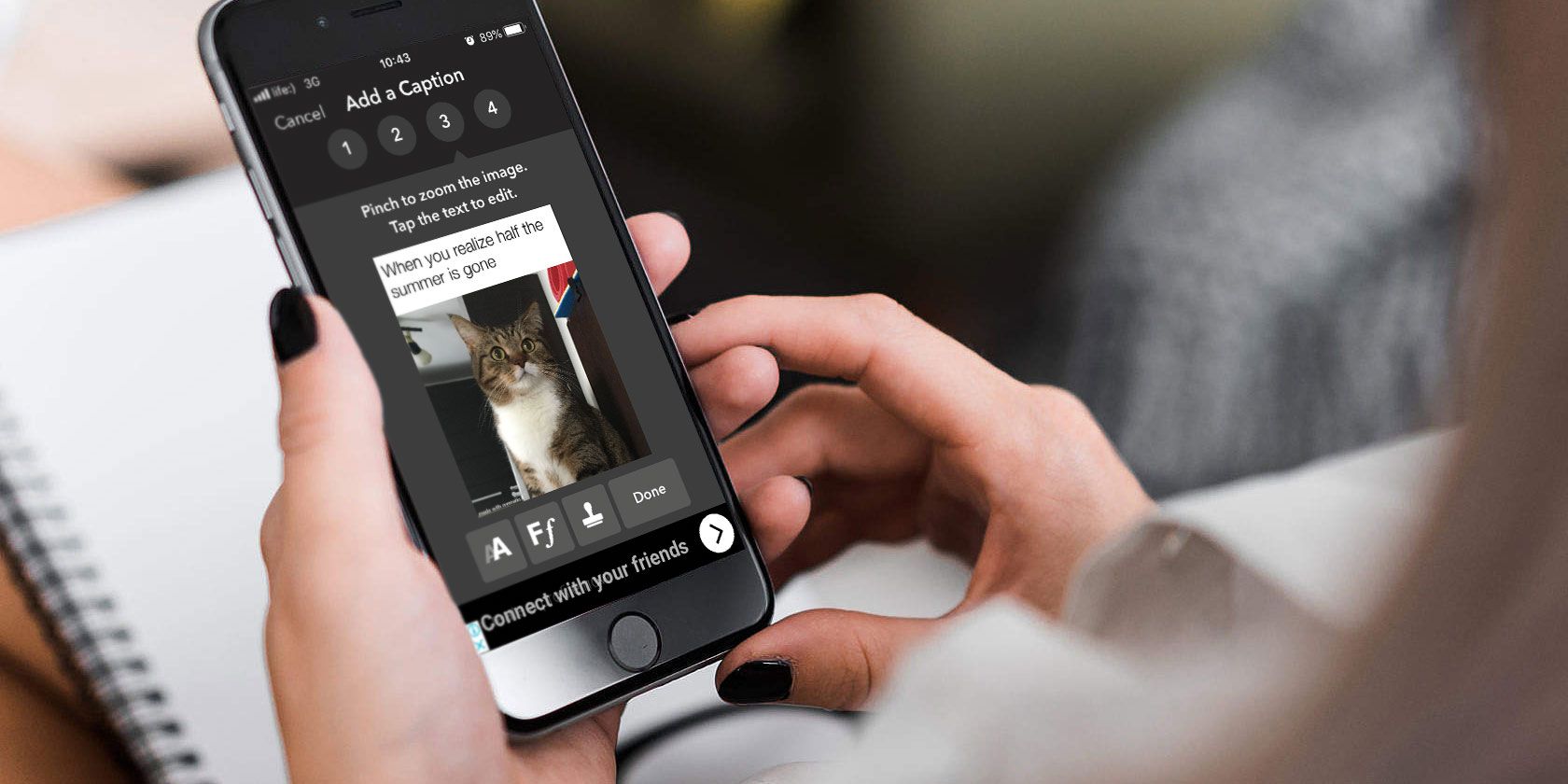
From a particularly emotional shot of a well-known celebrity to a hilarious typo in someone’s tweet, literally, anything can become a meme. And if you want to jump in on this craze, you should be using the best meme generator.
We’ve scoured the internet for the best meme generators and picked a few that are worth your while. Some are fairly advanced editors, while others are basic slap-captions-and-go tools. However, all of them enable you to make your own meme.
## 1\. [Kapwing](https://www.kapwing.com/meme-maker)
author screenshot
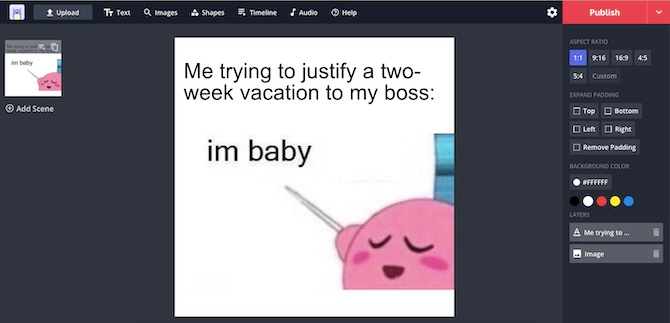
Kapwing has everything you ever wanted from a meme generator. There are plenty of templates with the most common meme formats, like the one with white text at the top and the bottom. But, even better, Kapwing puts trending memes at your fingertips. You can browse through what’s hot right now, quickly change the captions in the meme you want to use, and it'll be ready to go.
Kapwing also comes with a decent photo editor that allows you to crop your meme to Instagram aspect ratios, adjust color and brightness, add shapes, and so on. Once you publish the meme, you’ll be able to download it. But keep in mind the image will come with a watermark unless you’re signed in to Kapwing.
## 2\. [Canva](https://www.canva.com/)
Author screenshot: https://www.canva.com/design/play?type=TAEL3HOvoCo\&category=tAEL9k2NNb8\&locale=en-GB\&analyticsCorrelationId=ac2277a2-415a-4901-961c-7ddb03cf2158
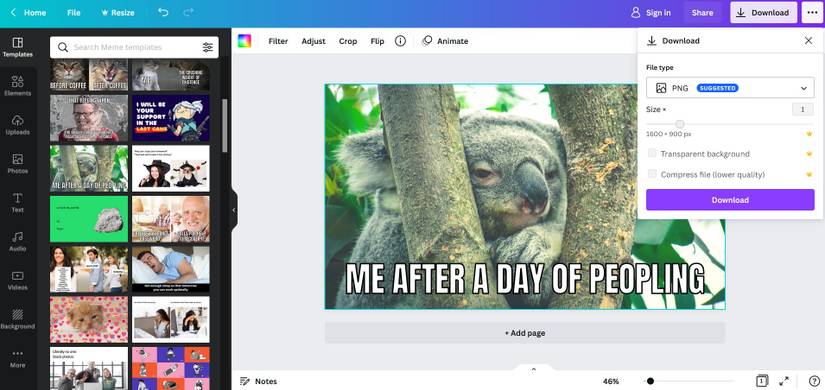
Among the [many things you can create on Canva](https://www.makeuseof.com/easy-canva-designs-create-mobile-app/), memes are a particular perk. You get lots of tools to play around with, whether you want a quick and easy process or to take extra care with your meme.
For example, you can choose a ready-made template and adjust it as much as you like. Otherwise, add an uploaded or stock image along with custom text, icons, audio, and more. When done, you can share the meme on social media, download it in different formats, use it as a presentation, or even print it onto a T-shirt. And most of these features come for free.
## 3\. [iLoveIMG](https://www.iloveimg.com/meme-generator)
author screenshot
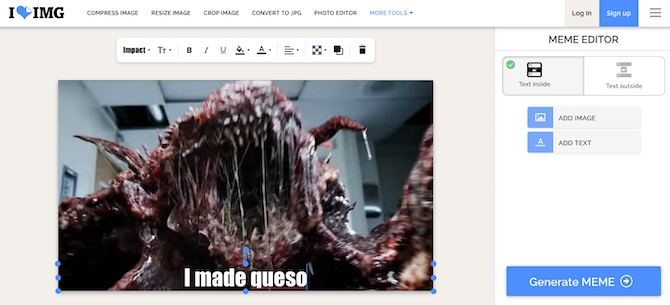
iLoveIMG comes without Kapwing’s image editing bells and whistles, but the essential elements you need to make your own meme are there. You can upload your image or browse the library, pick one of the two text templates, and then add and format your captions.
What’s great about iLoveIMG is that it has a clearly labeled meme library you can choose from. The library is rife with trending stuff, not just the ancient RageGuy templates. For example, type in "dog," and sure enough you’ll get both Doge and the bad pun husky.
Another perk is that you can download your very own meme [without a watermark](https://www.makeuseof.com/how-to-remove-watermark-from-photo/), or even save it to Google Drive and Dropbox. There are also a few handy tools for the final image, such as cropping, resizing, and compressing.
## 4\. [Imgur](https://imgur.com/memegen)
author screenshot
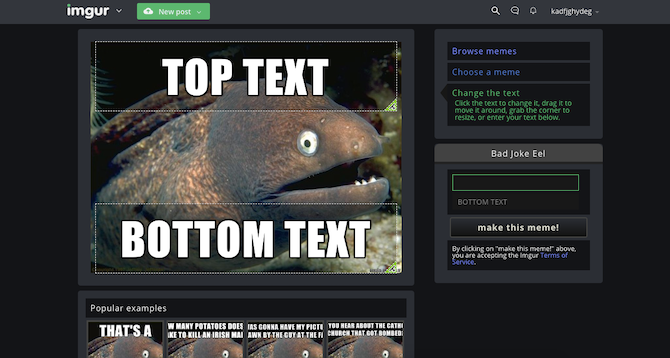
Imgur is the Reddit of images, where people share anything from their doggo's photos to funny GIFs. So, of course, Imgur’s meme generator tool gets a spot on this list.
The obvious perk with making your own memes on Imgur is that you can share them right away and perhaps even see them go viral. The library of memes you can build upon has all the classics, but it does tend to lag behind on the latest ones.
If you can’t find the meme you want in the templates, you can upload an image from your computer. And once you’re done adding captions, you can download or embed your meme, as well as publish it to Imgur.
## 5\. [Imgflip](https://imgflip.com/memegenerator)
author screenshot
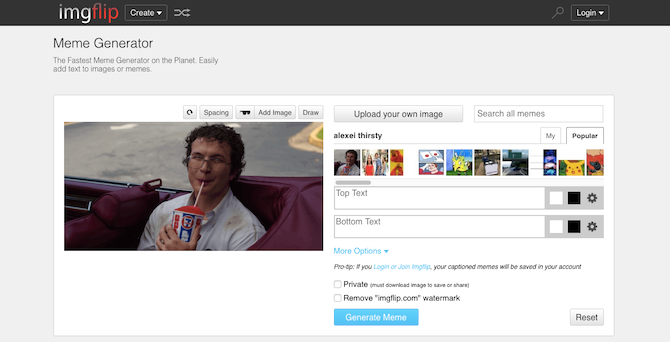
The Imgflip meme generator does a solid job of keeping up with the latest trends. What you can do with a template is more than enough: choose from a number of caption styles, draw on the image, and even add stickers.
While it’s free to make your own meme with Imgflip, you should keep a few things in mind:
- When you generate a meme, it gets automatically published on the website.
- You’re going to need an account if you want to download the image.
- You’ll need a paid subscription to remove the watermark.
With all that said, Imgflip may not be the best meme generator if you want a meme for personal use, but it’s ideal if your goal is to create something witty and let it out into the world.
## 6\. [Meme Better](https://memebetter.com/generator)
author screenshot
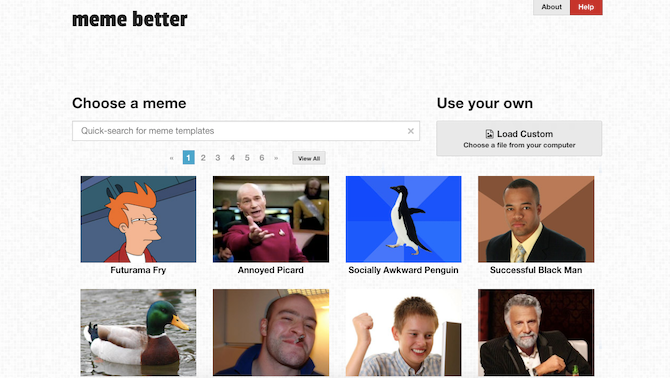
Meme Better is a pretty basic meme creator, but it gets the job done. If you want to make a meme that’s been around for a while, you’ll likely find it in the templates library. But if your meme of choice has only recently gone viral, you’re going to have to upload your own image.
Once you have the picture, you can add captions. Just one style is available: white text at the top and the bottom. After that, save your meme without a watermark and do whatever you please with it.
## 7\. [Clideo](https://clideo.com/meme-maker)
author screenshot
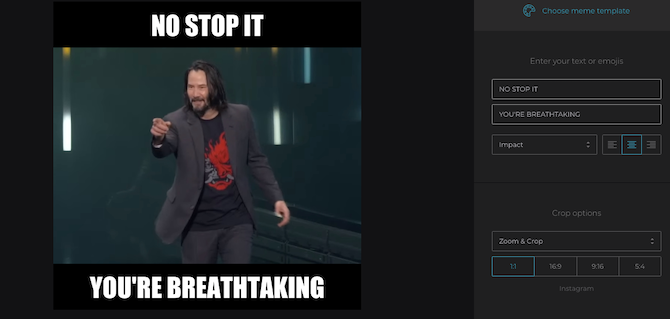
Clideo doesn’t have a meme library like other online meme generators, but if you’re [making a meme](https://www.makeuseof.com/tag/how-to-make-a-meme/) with an image of your own or you already have the file you need, it’s super easy to turn it into a meme with relevant captions.
Clideo comes with two basic meme templates, and the image editing options include a convenient cropping tool with Instagram-friendly aspect ratios. Once the meme is ready, you can download it to your computer. Like many other meme makers, Clideo adds a watermark, which you can remove by creating an account and signing in.
## 8\. [Meme Generator](http://memegenerator.net/)
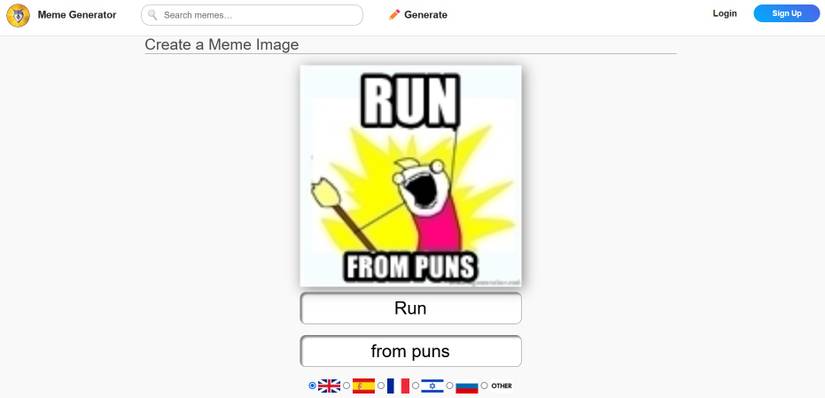
Author screenshot: https://memegenerator.net/create
One more website to keep in mind is Meme Generator. It’s super easy to use without any complicated tools. The platform is just there for users to quickly produce and share memes.
On the homepage, click **Generate** to jump to the site’s creation section. There, you can upload an image or select any of the available classics before simply adding the top and bottom text. And you're done.
The downside is that you can’t download the meme, but you can post it on the website for people to vote and comment on it, as well as share it on several popular platforms.
## 9\. Mematic
author screenshot
author screenshot
Close
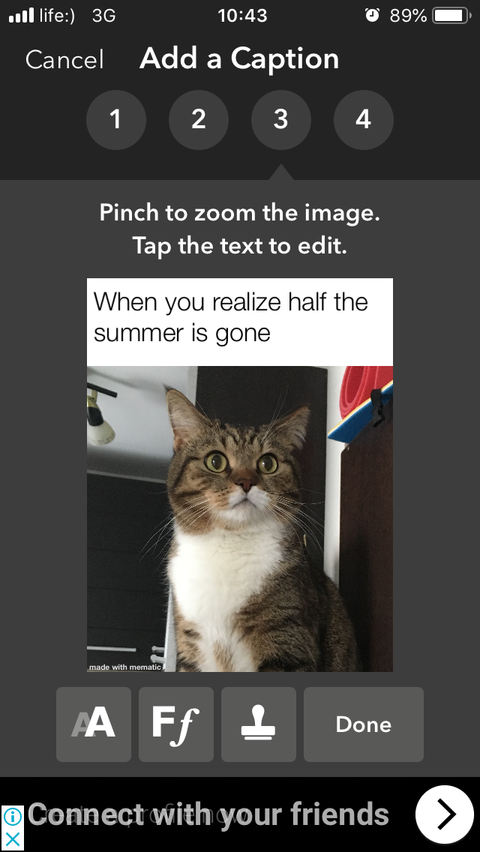
More often than not, you'll make a meme to use as a reaction or to send it to a friend. And more often than not, this happens on your phone. So when an online meme generator isn’t an option, a mobile app like Mematic comes in handy. If this is more your bag, here are some more [free iOS apps to create memes](https://www.makeuseof.com/tag/7-free-apps-create-memes-iphone-ipad/).
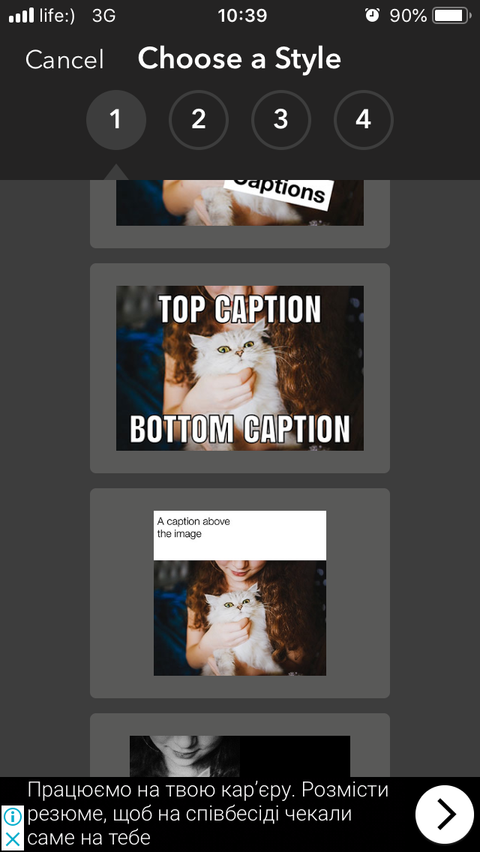
You start by picking a style, and then upload a picture from your photo library. You can also choose a meme from the vast collection, with a warning from the app that those might be subject to copyright. Other image options are free stock photos from Unsplash and GIFs from Tenor.
When you’re done making your meme, you can save it to your phone or share it right from the app. To get rid of the watermark, you’ll need a paid subscription.
**Download:** Mematic for [iOS](https://apps.apple.com/app/apple-store/id491076730) \| [Android](https://www.anrdoezrs.net/links/7251228/type/dlg/sid/UUmuoUeUpU37270/https://play.google.com/store/apps/details?id=net.trilliarden.mematic&hl=en) (Free, in-app purchases available)
## Now You’re Fully Equipped to Make Your Own Meme
These are some of the best meme generators we’ve tried and tested ourselves. Pick the one that looks the most appealing and go crazy with those memes.
And if you need a bit of inspiration, check out the best Happy Birthday memes to celebrate a special occasion. In fact, explore various ways you can use memes to entertain and inform.
- [Creative](https://www.makeuseof.com/category/creative/ "Creative")
- [Internet](https://www.makeuseof.com/category/web-based/ "Internet")
- [Meme](https://www.makeuseof.com/tag/meme/ "Meme")
Follow
Followed
Like
Share
[Facebook](https://www.facebook.com/sharer/sharer.php?u=https%3A%2F%2Fwww.makeuseof.com%2Ftag%2Fbest-meme-generators%2F%2F&src=sdkpreparse) [X](https://twitter.com/intent/tweet?text=The%209%20Best%20Meme%20Generators%20to%20Make%20Your%20Own%20Meme&url=https%3A%2F%2Fwww.makeuseof.com%2Ftag%2Fbest-meme-generators%2F) [LinkedIn](https://www.linkedin.com/shareArticle?mini=true&url=https%3A%2F%2Fwww.makeuseof.com%2Ftag%2Fbest-meme-generators%2F&title=The%209%20Best%20Meme%20Generators%20to%20Make%20Your%20Own%20Meme&source=www.makeuseof.com&summary=Here%20are%20the%20best%20meme%20generators%20on%20the%20internet%20to%20help%20you%20make%20your%20own%20memes.) [Reddit](https://www.reddit.com/submit?url=https%3A%2F%2Fwww.makeuseof.com%2Ftag%2Fbest-meme-generators%2F) [Flipboard](http://share.flipboard.com/bookmarklet/popout?v=2&title=The%209%20Best%20Meme%20Generators%20to%20Make%20Your%20Own%20Meme&url=https%3A%2F%2Fwww.makeuseof.com%2Ftag%2Fbest-meme-generators%2F&utm_campaign=tools&utm_medium=article-share&utm_source=www.makeuseof.com) [Copy link]() [Email](<mailto:?Subject=The 9 Best Meme Generators to Make Your Own Meme&Body=Check%20this%20out%21%0Ahttps://www.makeuseof.com/tag/best-meme-generators/>)
Close
Recommended
[](https://www.makeuseof.com/tag/best-happy-birthday-meme/)
##### [The 18 Best Happy Birthday Memes to Brighten Someone's Day](https://www.makeuseof.com/tag/best-happy-birthday-meme/ "The 18 Best Happy Birthday Memes to Brighten Someone's Day")
[Meme](https://www.makeuseof.com/tag/meme/ "Meme")
A happy birthday meme can make anyone smile. These birthday memes will brighten their day in a second.
Posts
Mar 4, 2020
[](https://www.makeuseof.com/these-emojis-are-everywhere-you-use-them-wrong/)
##### [These Emojis Are Everywhere but You're Using Them Wrong](https://www.makeuseof.com/these-emojis-are-everywhere-you-use-them-wrong/ "These Emojis Are Everywhere but You're Using Them Wrong")
[Emojis](https://www.makeuseof.com/tag/emojis/ "Emojis")
You're conveying the wrong meaning when you send these emojis.
Posts
[11](https://www.makeuseof.com/these-emojis-are-everywhere-you-use-them-wrong/#threads "Total Posts")
4 days ago
[](https://www.makeuseof.com/excel-functions-time-saver/)
##### [I stopped wasting time in Excel when I learned these 3 functions](https://www.makeuseof.com/excel-functions-time-saver/ "I stopped wasting time in Excel when I learned these 3 functions")
[Microsoft Excel](https://www.makeuseof.com/tag/microsoft-excel/ "Microsoft Excel")
Small formulas, big time savings.
Posts
[3](https://www.makeuseof.com/excel-functions-time-saver/#threads "Total Posts")
2 days ago
[](https://www.makeuseof.com/ai-upscaled-photo-result/)
##### [I thought my photo was ruined, but this free tool perfectly restored it](https://www.makeuseof.com/ai-upscaled-photo-result/ "I thought my photo was ruined, but this free tool perfectly restored it")
[Image Editing Tips](https://www.makeuseof.com/tag/image-editing-tips/ "Image Editing Tips")
I almost deleted the photo.
Posts
[1](https://www.makeuseof.com/ai-upscaled-photo-result/#threads "Total Posts")
1 day ago
[](https://www.makeuseof.com/iconic-tech-movies-series/)
##### [6 Films and TV Shows That Every Tech Lover Has to Watch Once](https://www.makeuseof.com/iconic-tech-movies-series/ "6 Films and TV Shows That Every Tech Lover Has to Watch Once")
[Movie Recommendations](https://www.makeuseof.com/tag/movie-recommendations/ "Movie Recommendations")
These picks will reboot how you see technology.
Posts
2 days ago
[](https://www.makeuseof.com/bookmory-reading-list-into-visual-tracker/)
##### [This App Turns Your Reading List Into a Visual Tracker You’ll Actually Want to Use](https://www.makeuseof.com/bookmory-reading-list-into-visual-tracker/ "This App Turns Your Reading List Into a Visual Tracker You’ll Actually Want to Use")
[Reading](https://www.makeuseof.com/tag/reading/ "Reading")
The one app every bookworm needs to finally finish their TBR.
Posts
[1](https://www.makeuseof.com/bookmory-reading-list-into-visual-tracker/#threads "Total Posts")
3 days ago
- ### Technology Explained
- ### PC & Mobile
[](https://www.makeuseof.com/i-plugged-random-usb-c-devices-into-my-phone-heres-what-worked/)
##### [I plugged 10 random USB-C devices into my phone—Here's what actually worked](https://www.makeuseof.com/i-plugged-random-usb-c-devices-into-my-phone-heres-what-worked/ "I plugged 10 random USB-C devices into my phone—Here's what actually worked")
1 day ago
[](https://www.makeuseof.com/stack-free-chatbots-never-pay-for-ai/)
##### [I stack free chatbots so I never pay a cent for AI](https://www.makeuseof.com/stack-free-chatbots-never-pay-for-ai/ "I stack free chatbots so I never pay a cent for AI")
1 day ago
[](https://www.makeuseof.com/chatgpt-voice-mode-dumb-try-this/)
##### [ChatGPT's Voice Mode Feels So Dumb—Try This One Instead](https://www.makeuseof.com/chatgpt-voice-mode-dumb-try-this/ "ChatGPT's Voice Mode Feels So Dumb—Try This One Instead")
2 days ago
[See More](https://www.makeuseof.com/category/technology-explained/)
[](https://www.makeuseof.com/sim-swapping-real-this-setting-protects-me/)
##### [SIM swapping is real, and this setting protects me from it](https://www.makeuseof.com/sim-swapping-real-this-setting-protects-me/ "SIM swapping is real, and this setting protects me from it")
6 hours ago
[](https://www.makeuseof.com/ways-to-free-up-ram-windows/)
##### [6 ways to free up RAM in Windows when your PC starts slowing down](https://www.makeuseof.com/ways-to-free-up-ram-windows/ "6 ways to free up RAM in Windows when your PC starts slowing down")
10 hours ago
[](https://www.makeuseof.com/knowing-this-one-windows-startup-trick-saved-me-from-dangerous-malware/)
##### [Knowing this one Windows startup trick saved me from dangerous malware](https://www.makeuseof.com/knowing-this-one-windows-startup-trick-saved-me-from-dangerous-malware/ "Knowing this one Windows startup trick saved me from dangerous malware")
1 day ago
[See More](https://www.makeuseof.com/category/pc-mobile/)
[](https://www.makeuseof.com/)
- [Join Our Team](https://www.makeuseof.com/work-with-us/)
- [Our Audience](https://www.makeuseof.com/page/advertise/)
- [About Us](https://www.makeuseof.com/page/about/)
- [Press & Events](https://www.makeuseof.com/page/press-events/)
- [Contact Us](https://www.makeuseof.com/contact/)
- Follow Us
[](https://www.valnetinc.com/en/)
- [Advertising](https://www.valnetinc.com/en/advertising)
- [Careers](https://www.valnetinc.com/en/careers)
- [Terms](https://www.valnetinc.com/en/terms-of-use)
- [Privacy](https://www.valnetinc.com/en/privacy-policy)
- [Policies](https://www.valnetinc.com/en/editorial-integrity)
[MUO](https://www.makeuseof.com/) is part of the [Valnet Publishing Group](https://www.valnetinc.com/en/)
Copyright © 2025 Valnet Inc. |
| Readable Markdown | null |
| Shard | 17 (laksa) |
| Root Hash | 8015183094204371817 |
| Unparsed URL | com,makeuseof!www,/tag/best-meme-generators/ s443 |