ℹ️ Skipped - page is already crawled
| Filter | Status | Condition | Details |
|---|---|---|---|
| HTTP status | PASS | download_http_code = 200 | HTTP 200 |
| Age cutoff | PASS | download_stamp > now() - 6 MONTH | 0.1 months ago |
| History drop | PASS | isNull(history_drop_reason) | No drop reason |
| Spam/ban | PASS | fh_dont_index != 1 AND ml_spam_score = 0 | ml_spam_score=0 |
| Canonical | PASS | meta_canonical IS NULL OR = '' OR = src_unparsed | Not set |
| Property | Value | |||||||||
|---|---|---|---|---|---|---|---|---|---|---|
| URL | https://www.local.com/marketing-tools/reviews/ahrefs | |||||||||
| Last Crawled | 2026-04-25 12:31:50 (2 days ago) | |||||||||
| First Indexed | 2025-08-13 12:05:14 (8 months ago) | |||||||||
| HTTP Status Code | 200 | |||||||||
| Content | ||||||||||
| Meta Title | Ahrefs Review: Features, Pricing, and Is It Worth the Money (2024) | |||||||||
| Meta Description | Looking for an Ahrefs review? We cover the key features, pricing, pros and cons, and how Ahrefs compares to other SEO tools for 2024. | |||||||||
| Meta Canonical | null | |||||||||
| Boilerpipe Text | Ahrefs is a popular SEO toolset provider that helps website owners and SEO professionals to monitor and optimize their website’s search engine visibility and performance. For that reason, Ahrefs crawls the entire web, stores tons of your data, and makes it accessible to users via an easy user interface.
Performance at Glance
When it comes to choosing an SEO tool, performance is a key factor to consider. You want a tool that is easy to use, offers a wide range of features, provides accurate data, and delivers value for money. Ahrefs is a popular SEO tool that has gained a strong reputation in the
Digital marketing tools
space due to its high performance and advanced features. In this section, we will examine Ahrefs’ performance in terms of ease of use, ease of setup, value for money, features, support, and G2 rating. By the end of this section, you will have a better understanding of Ahrefs’ overall performance and whether it’s the right tool for your SEO needs. If you’re looking to try Ahrefs but don’t want to pay, you can check out this guide on how to get a
free Ahrefs premium account
.
Specifications
Ahrefs Star Rating at Glance
Our Verdict
Ease of Use
Ahrefs' user-friendly interface makes it easy to navigate and use.
Ease of Setup
Ahrefs' straightforward setup process means you can get started quickly.
Value for Money
Ahrefs offers competitive pricing and a range of features that provide excellent value for money.
Features
Ahrefs offers a comprehensive suite of features that cover all aspects of SEO.
Support
Ahrefs provides top-notch customer support, with a dedicated team ready to assist you.
G2 Rating
Ahrefs has earned high ratings on G2, a leading software review platform, indicating its strong performance and customer satisfaction.
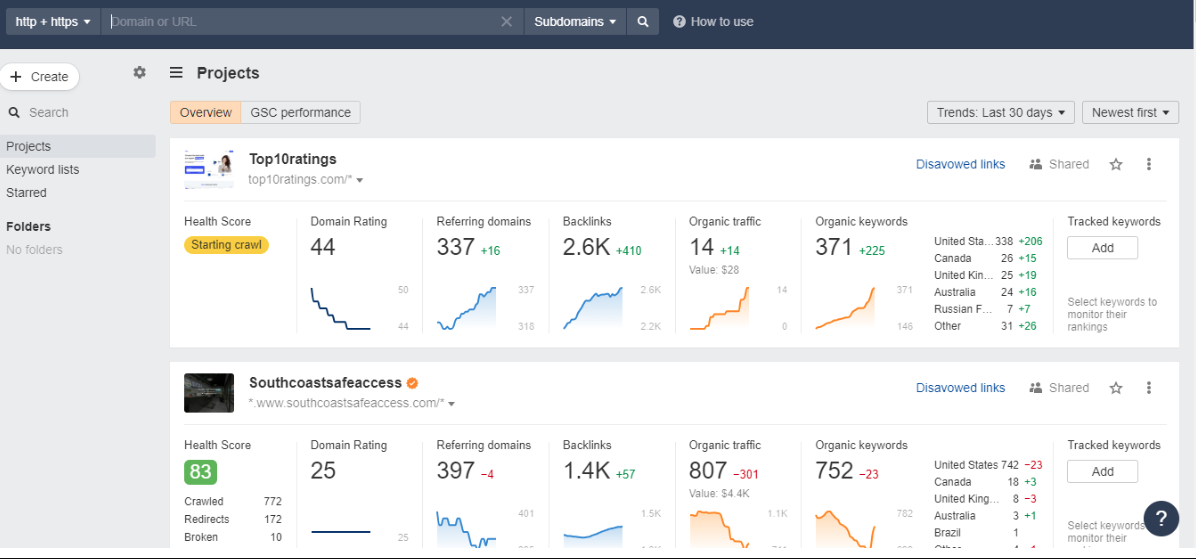
Ahrefs Dashboard
The Dashboard is the central hub to check all of your projects. Here, you can get a quick overview of the crucial metrics of all of your projects. The metrics on the Dashboard are taken from several tools like Site Explorer, Rank Tracker, and Site Audit.
The update frequency of the Site Explorer metrics is updated every 12 hours, while the metrics from the Rank Tracker and the Site Audit are mostly based on the last crawl or the update.
Google Search Console Performance
If you have connected your Google account with the Ahrefs account, you will get access to the GSC data on the dashboards.
Click on the “GSC performance” tab.
Use filters to narrow down the data you want to check. For instance, you can filter out the project’s detailed view of organic traffic based on a monthly or weekly basis.
NOTE –
Google Search Console (GSC) displays data for a maximum of 16 months. However, if you connect your GSC account to Ahrefs, you can access and view data beyond that time frame, as Ahrefs stores and presents data for a longer duration.
You can even change the way your graph appears on the dashboard.
Track Unlimited Number Of Projects
As long as you can confirm your ownership, you can include a comprehensive list of the projects you require.
You have the option to select from various verification methods or effortlessly import all your properties by connecting your Google Search Console.
Disavow URLs
Upon accessing this feature, you will be directed to our “Disavowed Links” tool. Here, you can either upload a disavowed links file or manually add the specific links you wish to disavow.
This tool will conceal the disavowed links in the backlinks and refer to domain reports related to the target project domain. It’s important to note that this function does not imply that we will submit the links for disavowal on your behalf. You will need to perform this action manually using Google’s Disavow tool.
To accomplish this, simply click on the export option, which will enable you to download a properly formatted .txt file. You can then proceed to directly upload this file to Google.
Organize Projects With Folders
Organize your projects into folders, enhancing their accessibility and facilitating sharing. You can selectively grant access to specific folders for particular team members while excluding others.
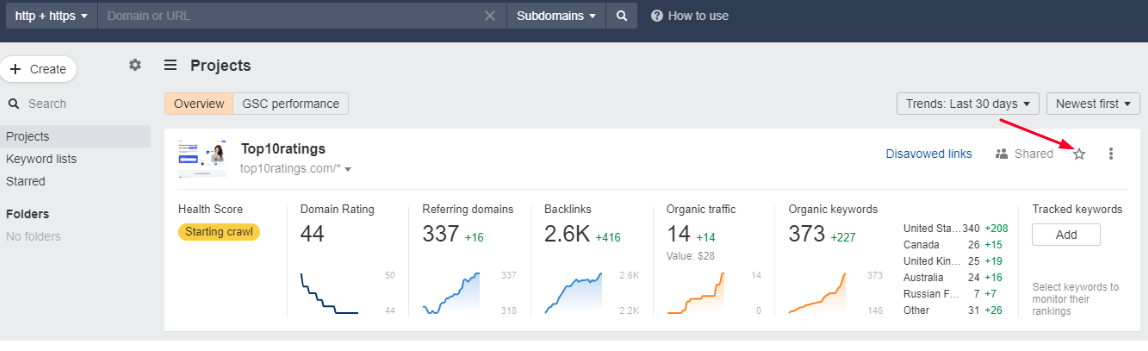
Highlight Your Important Project
You can add stars to your project, which marks it as an important one. If you want a filter for just your favorite projects, you can access them by turning on the “Starred” toggle on the upper right corner of the dashboard.
Quick Alerts
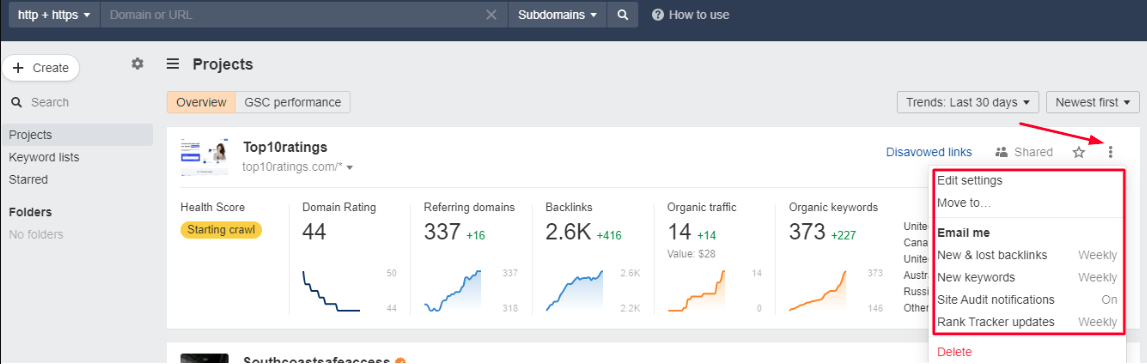
Get emails whenever your project has new/lost backlinks, new keywords, Rank Tracker updates or Site Audit crawls, generating alerts. You can get alerts or notifications by turning on the Email Alerts button available on the vertical ellipsis in the right corner of each project.
Filters
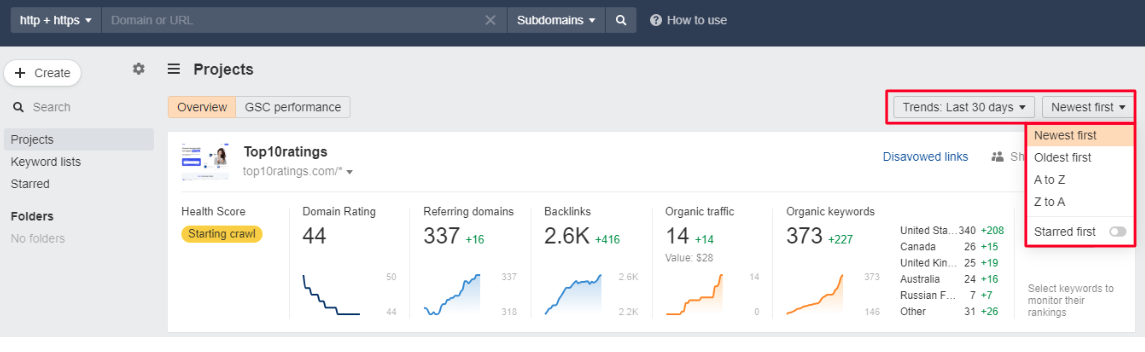
You can use filters to re-align the projects based on their name (A-Z or Z-A) or date (New – Old or Old – New). It helps in keeping a tab on every project at your convenience.
Hide Projects
Ahrefs offers you the ability to hide the project that you may not wish to see on your dashboard at the moment. For this, you need to click on the vertical ellipsis of that project and select Hide.
Unhide Projects
If you want to access any of your hidden projects, you can do that by clicking on the Hidden Projects column in the “My Projects” dropdown.
How To Set Up Projects In Ahrefs?
If you are using Ahrefs tools for the very first time, then it is something that you will immediately see after logging in.
Once you have logged in, here is a step by step information on how you can manually set up projects:
Step 1: Start By Adding The URL Or The Domain Of The Project
If you are using the tool for the first time then simply clicking on “Add Project” would be enough.
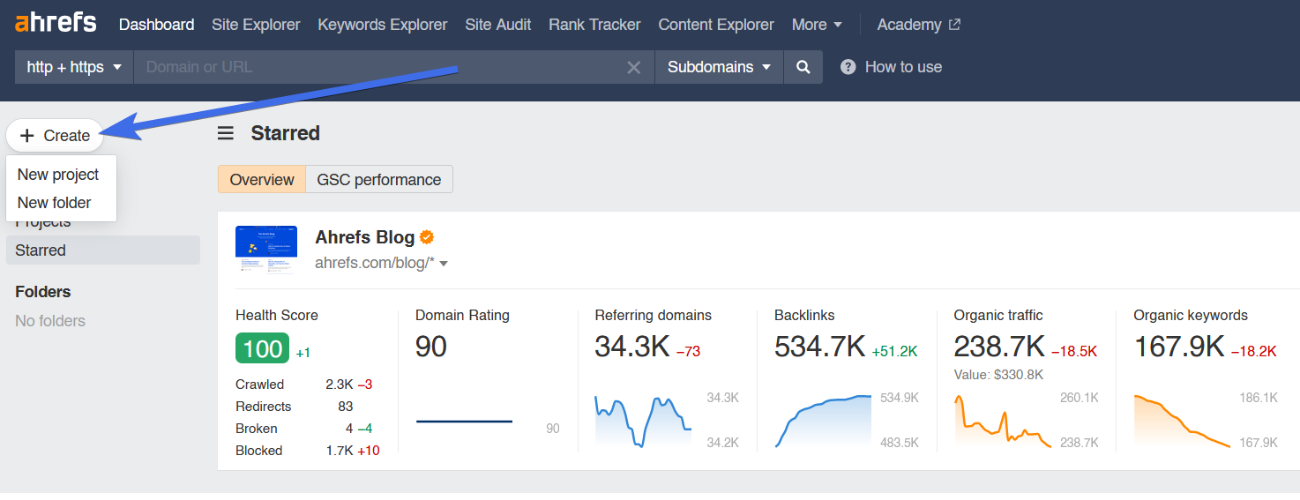
You can simply add a new project by clicking on the “Create” button and then “New Project” from the drop-down on the left corner of the dashboard.
Step 2: Determine The Protocol, Project Name, And The Mode
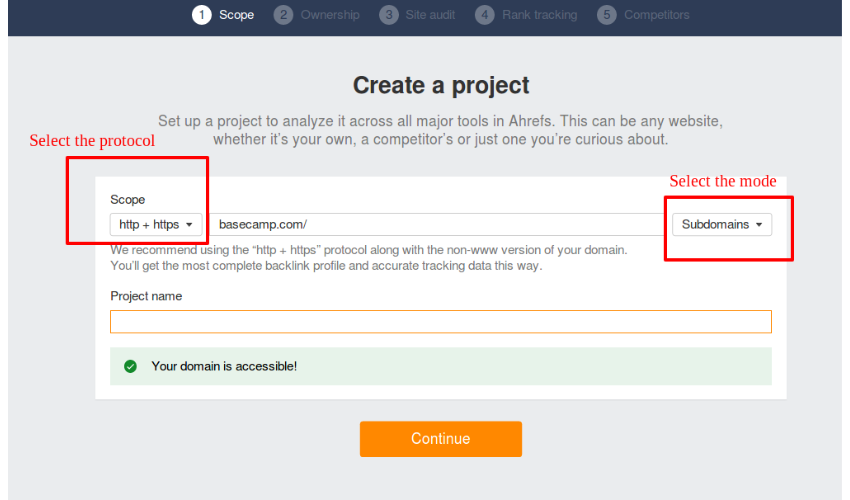
Mention the domain or the specified URL in the desired section.
Then, do not forget to select a suitable protocol or mode, as an unsuitable protocol command can result in varied results.
Although the project name would automatically generate for you from the title tag of the URL, you are free to make amendments.
You can create a folder for your project and add it as per your needs (optional).
Here, you can even decide who can access your project.
Step 3: Verifying Ownership
It is a skippable step that just ensures that you have
verified ownership
of the website. It enables a quick crawling session for Site Audit.
Step 4: Auditing: Schedule Audits, URL Sources & Crawl Settings
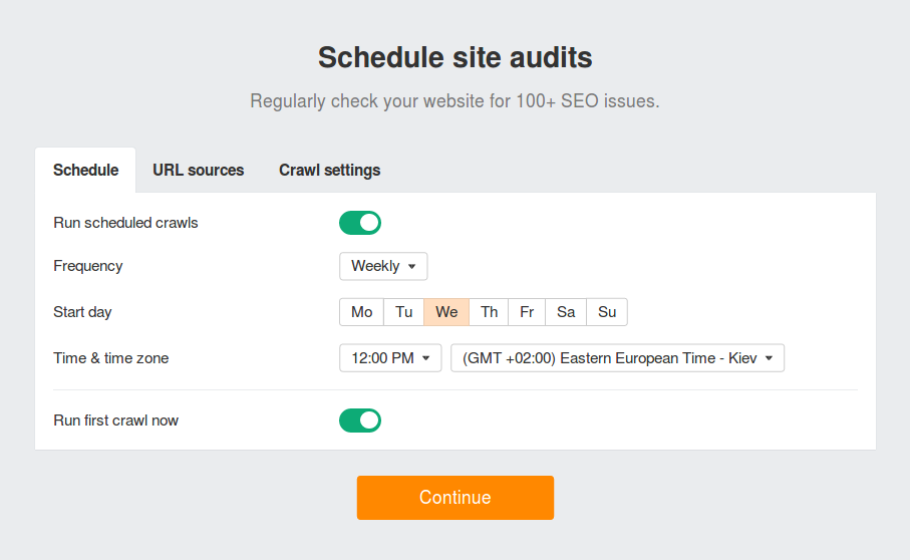
Schedule
You can customize each section of the schedule page as per your requirements. For instance, you can change the crawling frequency to monthly, weekly, or daily basis along with the date, day, and time.
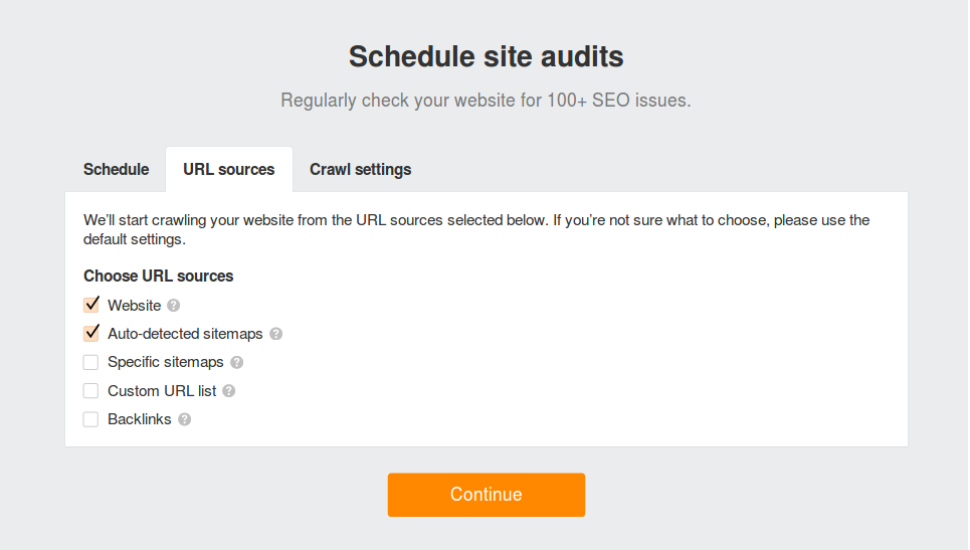
URL Sources
In this section, you can make the URL sources to start the crawling of your website. However, if you are unsure about what to choose, leave the default settings.
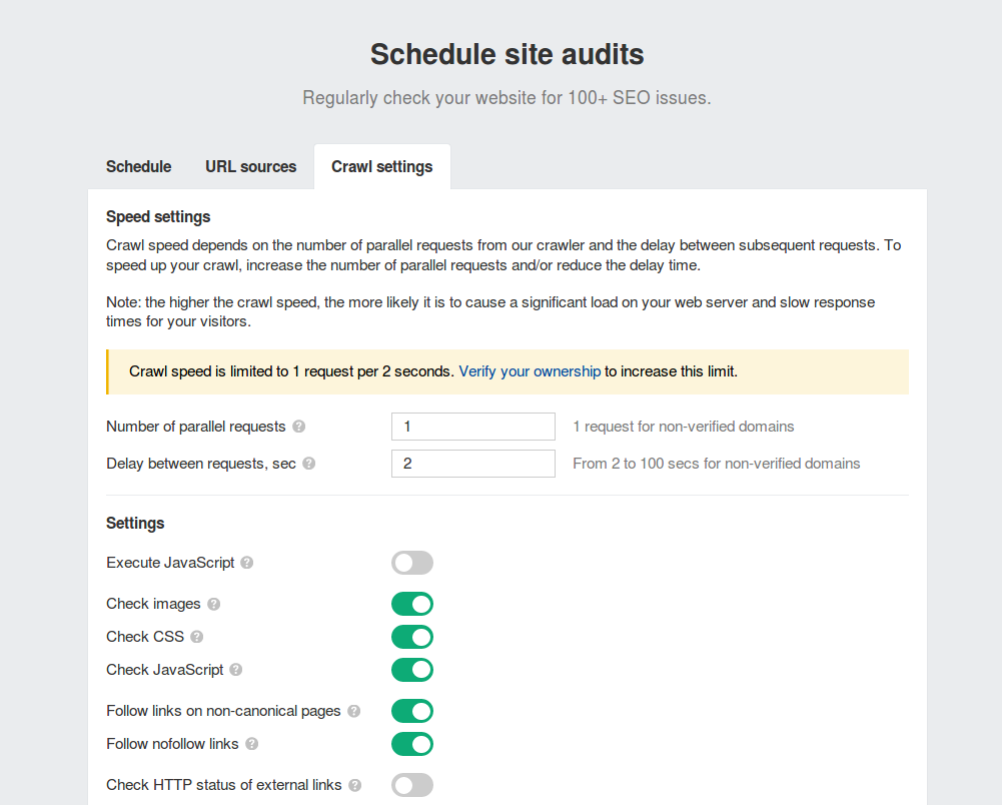
Crawl Setting
Here you can make changes in the crawl speed settings and much more. But if you are unsure about what steps to take then you can leave the default settings to work for you.
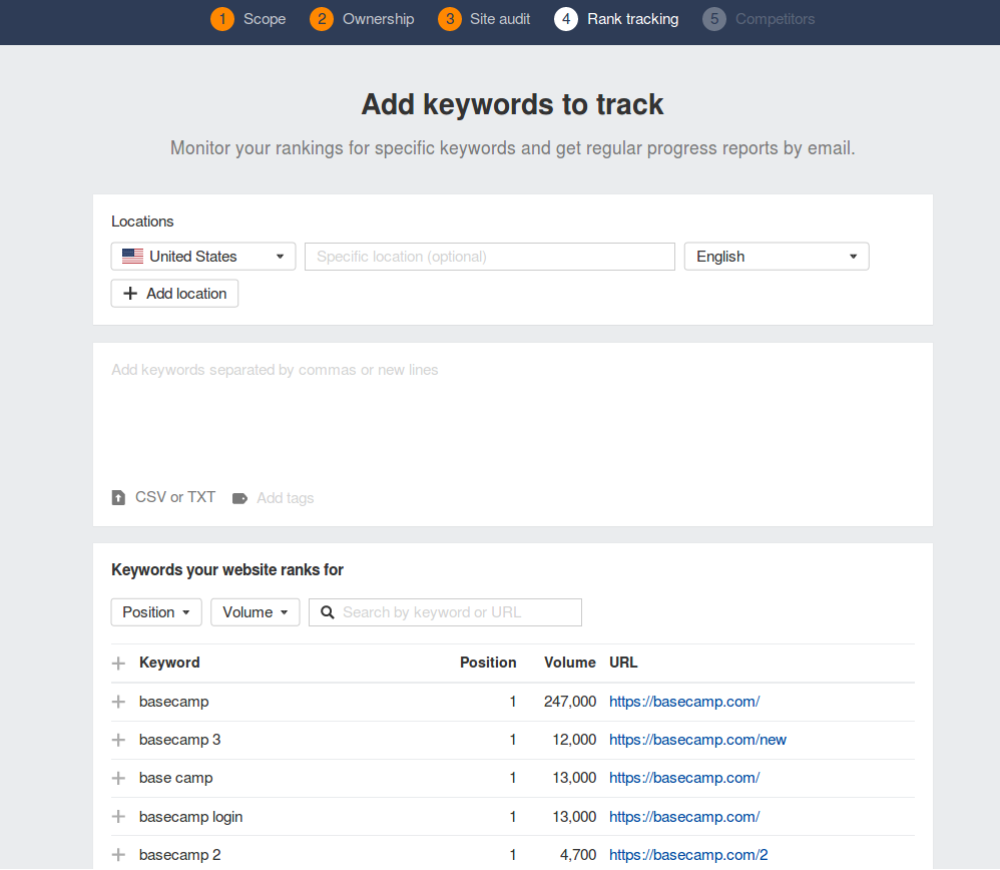
Step 5: Keyword Tracking
Add the keywords that you want to track along with the location(s) where you wish to track those keywords and Voila!
The keywords will directly be added to the Rank Tracker tool for tracking how well it lets your website rank in the organic search results. You will get regular reports of the ranking in your email.
NOTE –
You can manually upload the keywords or place the CSV or TXT file in the specified section.
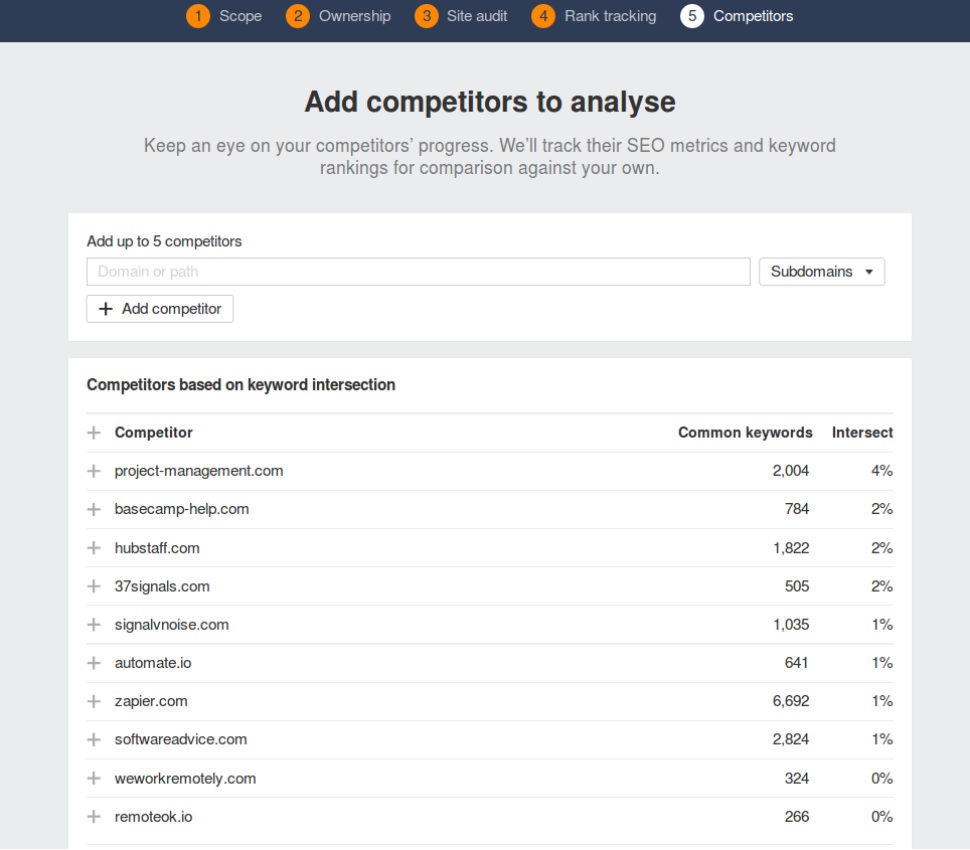
Step 6: Add Competitors
Here you can add the list of the competitors that you wish to analyze in comparison to your website’s previous set of keywords. You can either pick a few of them from the pre-populated list or mention them manually.
The list of the competitors along with keywords will be added to the Rank Tracker Tool for overall tracking of your website’s organic SERPs ranking.
That’s it, now you are ready to track progress, stagnation, or loss of the ranking of your website. To do this, you can use the following features:
Backlink Profile:
To Check All The Backlinks To Your Website
Organic Search:
To Know How Your Website Is Performing In organic Search
Outgoing Links:
Links That Your Website Points To Other Websites
Paid Search:
To Know How Your Site Is Performing In Paid Search
Ultimately, you can export your data so that you can analyze it in other software.
By using these features, you can track the progress of your website’s ranking and make adjustments to your SEO strategy as needed. This will help you improve your website’s ranking and drive more traffic to your website.
Significant Features of Ahrefs Webmaster Tool
Let’s see what is inside the
Ahref webmaster tool
and how to use it to run content marketing for your website:
Site Explorer
Site Explorer is the Ahrefs feature that gives a basic overview of the SEO quality of any website. It includes how highly a website ranks for certain phrases, a rough estimation of how much search traffic it gets, and much more. In short, it is the dashboard that lets you understand where your or your competitors’ domain could require some SEO improvements.
It is basically the cumulation of the two major features of backlinks and organic traffic. So let’s break down each of these features separately.
Backlink Profile
It showcases the website’s complete backlink profile. However, the report is not similar to most of the backlink checkers in the market like Moz Pro or SEMrush.
But the question is what makes Ahrefs different from the rest of the backlink checkers?
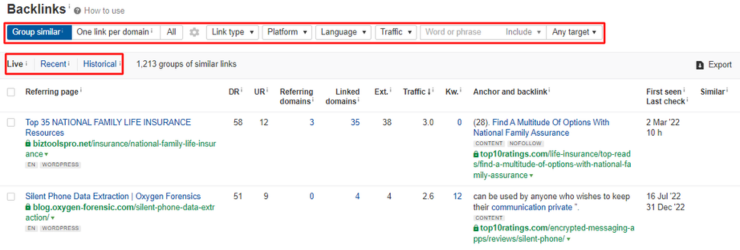
It has great filtering and sorting features.
For instance, if you only want a list of the links from the sites with higher Domain Rating or high URL Ratings, you can easily do that. In some cases, if you just want to see the no-follow links, you can do that too in Ahrefs.
Its Index is huge
The other strong point about Ahrefs is that its index is huge and advanced. In short, you may not have to worry about finding outdated linking data. As a matter of fact, Ahrefs crawler is the second most efficient after Google.
Overall, Ahrefs’ backlink profiling is a major strength of the tool – Easy to use, Regularly updated, and with filters to exactly what you need.
Organic Search
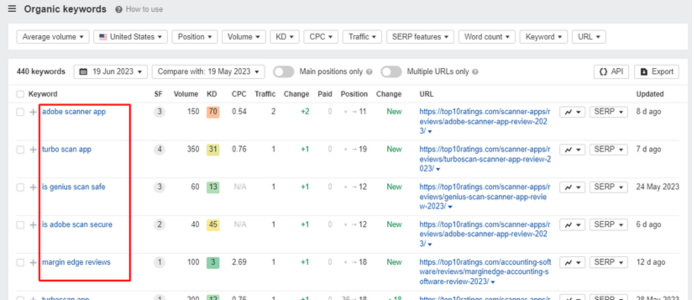
This feature allows you to identify the keywords that your competitors are using to rank well in search engine results pages (SERPs). This report can vary from someone’s Google Search Console data. However, Ahrefs results are pretty close to it.
Ahrefs excels in discovering a site’s ranking keywords and estimating their corresponding search traffic. Similar to their backlinks tool, the true power of this tool lies in its sorting and filtering capabilities.
Ahrefs states that Google currently ranks for 57.7 million keywords.
It is truly insane!
Now the question is how to make true sense of this list. It is where – Filters come into the picture.
You can filter out the keywords based on their difficulty level, ranking in the Featured Snippet spot, and much more. In short, the filtered-out set of keywords can help you work more efficiently.
There are a few secondary features inside Organic Search –
Top Pages:
Suggests pages that bring about the most organic traffic on a site.
Competing Domains: This shows
you a website’s main SEO competitors.
Content Explorer
Content Explorer is a powerful tool that allows you to find content ideas, research your competitors, and track your content performance. It has a database of over 13 billion web pages, which means you can find content on any topic.
How Does It Benefit?
Find content ideas:
You can use Content Explorer to find content ideas by keyword, topic, or domain. You can also use it to find content that is performing well in search engines.
Research your competitors:
You can use Content Explorer to research your competitors by keyword, topic, or domain. You can see what content they are ranking well for, and you can use this information to improve your own content strategy.
Track your content performance:
You can use Content Explorer to track the performance of your content by keyword, topic, or domain. You can see how much traffic your content is getting, and you can see how it is ranking in search engines.
How To Use It?
Here are a few tips to use Ahrefs Content Explorer:
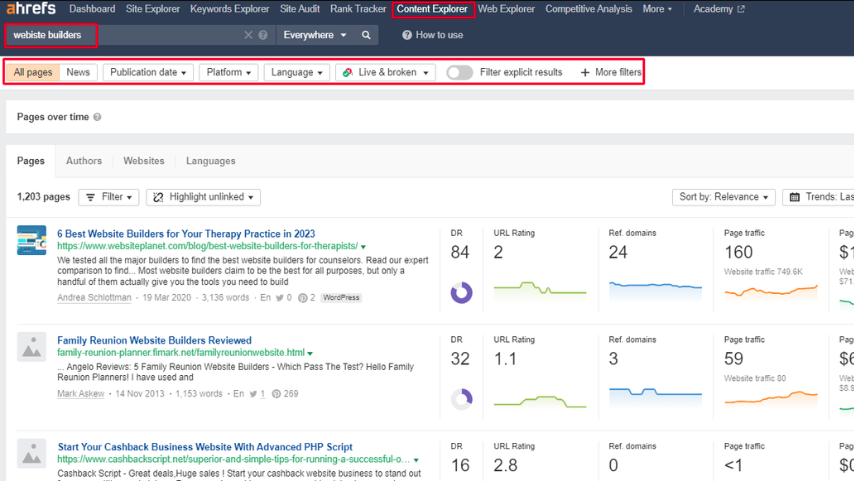
Use the filters to narrow down your results:
The filters in Content Explorer allow you to narrow down your results by keyword, topic, domain, and other criteria. This can help you to find the most relevant content.
Use the metrics to evaluate the content:
Content Explorer provides a variety of metrics that you can use to evaluate the content. These metrics include organic traffic, backlinks, and social shares.
Use the data to improve your content strategy:
The data that you collect from Content Explorer can be used to improve your content strategy. You can use this data to find new topics to write about, improve your writing style, and promote your content.
Overall, Content Explorer is a powerful tool that can help you with all aspects of your content marketing. If you are serious about creating high-quality content that drives traffic to your website, then you should definitely use Ahrefs Content Explorer.
Keywords Explorer
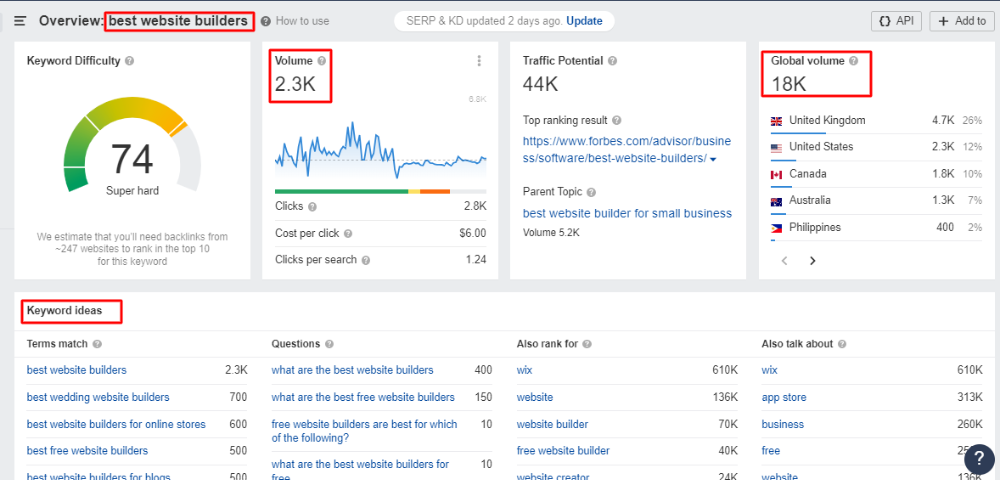
The Ahrefs Keyword Explorer is not limited to Google, unlike many other keyword search tools. It allows you to spread your arms and analyze keywords on Amazon, Bing, Yandex, and Youtube.
The keyword search report shows you the following metrics in a single report search volume, competition, CPC, CTR, SERP position history, and more. These features can help you decide between a set of different keywords. And the best part is that Ahrefs is excellent when it comes to analyzing a specific search term.
However, there is a drawback that Ahrefs is not so great at coming up with new ideas for keywords. It may offer the maximum number of keywords than any other explorer but many times the keywords are not relevant to the searched query.
Rank Tracker
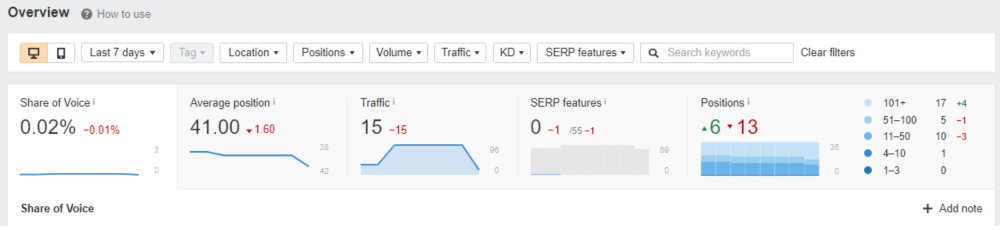
Ahrefs’ rank tracking tool functions similarly to others in the market. You input a set of keywords and observe their rankings on Google while also monitoring changes over time. However, there is an issue.
Unlike the majority of rank trackers, this tool does not provide daily updates. The frequency of ranking updates varies depending on the selected plan.
For instance, with Ahrefs Lite, keyword rankings are updated only once a week.
This might not be problematic if SEO is not a significant aspect of your site’s digital marketing strategy, as checking rankings weekly may suffice.
But for SEO professionals, it is crucial to stay constantly informed about rankings. Imagine receiving a call from a client asking about the day’s ranking changes. In such cases, a tool that offers real-time updates becomes essential.
Regrettably, Ahrefs does not offer daily updates; the most frequent option is “every 3 days” for their higher-tier plans.
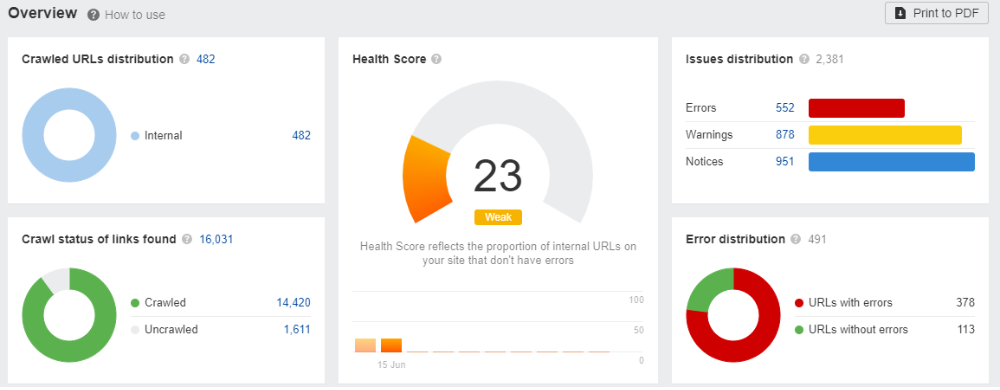
Site Audit
Similar to other audit tools, Ahrefs provides your website with a comprehensive “health score.” It highlights common technical SEO problems such as duplicate meta tags, broken redirects, and more. Overall, this tool is highly reliable for conducting SEO site audits, making it user-friendly for beginners to identify necessary actions.
How To Perform Site Audit In Ahrefs
Here are the steps on how to perform a site audit in Ahrefs:
Sign up for an Ahrefs account.
You can sign up for a free trial or a paid subscription.
Add your website to Ahrefs.
You can do this by entering your website’s URL in the search bar and clicking on the “Add Site” button.
Run a site audit.
To run a site audit, click on the “Site Audit” tab and then click on the “Run Audit” button.
Review the audit report.
The audit report will show you a list of all the issues that were found on your website.
Fix the issues.
Once you have reviewed the audit report, you can fix the issues that were found.
Things To Check For In The Site Audit:
Here are some of the things that you can check for in your site audit:
Technical SEO issues:
These are issues that can affect your website’s ranking in search engines. For example, you may have broken links, duplicate content, or slow loading times.
On-page SEO issues:
These are issues that affect the relevance of your website’s content to search engine users. For example, you may not be using the right keywords or your content may not be well-written.
Off-page SEO issues:
These are issues that affect the authority of your website. For example, you may not have enough backlinks, or your backlinks may be from low-quality websites.
By fixing the issues that were found in your site audit, you can improve your website’s ranking in search engines and drive more traffic to your website.
Unique Features of Ahrefs
Batch Analysis
Batch Analysis is a tool that easily pulls out Ahrefs’ backlink metrics for up to 200 individual URLs. You just need to copy-paste your list of URLs and the bulk backlink checker will generate a complete report with the SEO metrics:
1. Ahrefs Rank
2. Domain Rating
3. Number Of Referring Domains
4. Number Of Backlinks
5. Social Metrics
You can work with the report in the browser window or export the data directly into a CSV file. Then, finally plug it into the analysis tool of your preference.
Link Intersect
With the link intersect feature, you can find the sites that are linked to your competitors but not to your website. You can even uncover linking patterns with link interest features. It lets you discover who all are frequently linking to your competitors.
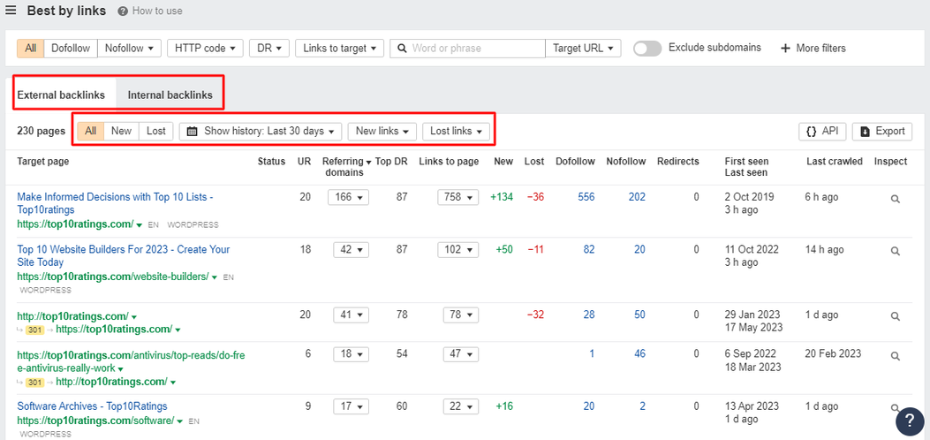
Best By Links
The Best By Links report shows which pages on a target website, subdomain, or subfolder have the maximum backlinks (both internal and external) pointing out to them.
Using this report, you can take the following actions:
See competitors’ most linked-to pages
Find broken link-building opportunities
Find and fix broken pages on your site
Find dead or no-follow internal links
Add internal links from “power” pages to boost other pages
SEO Toolbar Extension
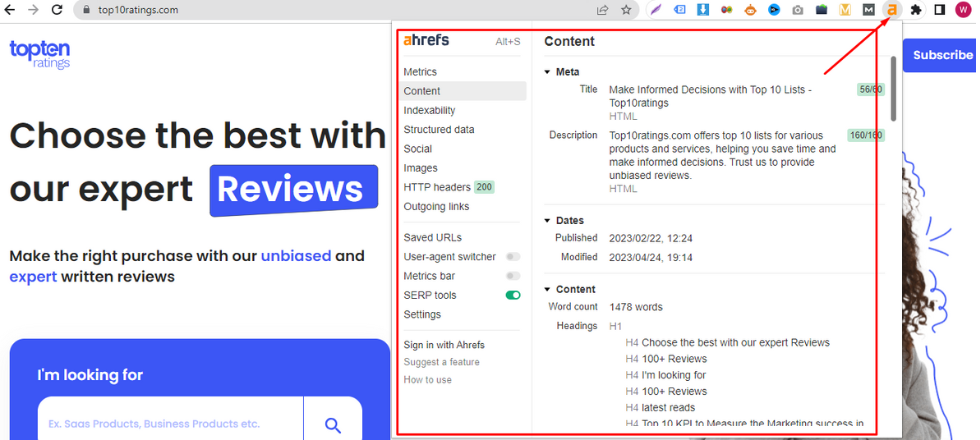
The SEO toolbar extension allows a user to get the most of the SEO metrics of any page or website you want right in your web browser. The toolbar gives you instant access to the following metrics:
Domain Rating
URL Rating
Estimated Organic Search Traffic
Number of ranking keywords
Number of referring domains
Number of backlinks
Additionally, Ahrefs SEO Toolbar shows you the most crucial keyword metrics right on the SERP including, Search volume (both Global and Country-specific), Keyword Difficulty, Clicks, and Cost per Click.
API Access
Ahrefs’ This feature is designed to empower the users to use data from Ahrefs Index in the most compatible and tailored way to suit users’ needs. The URL Profiler can access the Ahrefs API to rapidly extract link metric data including the Domain Rank and Backlink Data.
Ahrefs Best Features
Cool UX & UI
Similar to any tool, there may be a slight learning curve when initially using Ahrefs. However, once you become familiar with its functionalities, it becomes remarkably effortless to locate the information you seek. In fact, it typically requires just a click or two to access the desired data. For instance, if you wish to examine the breakdown of a site’s
anchor text
, you can easily navigate to the corresponding report directly from the sidebar. And the same is top pages, referring domains, broken links, and much more.
Site Audit Feature
The Ahrefs site audit tool is widely regarded as one of the top-performing options available in its category. In fact, it is often considered comparable to specialized tools that specifically focus on conducting site audits.
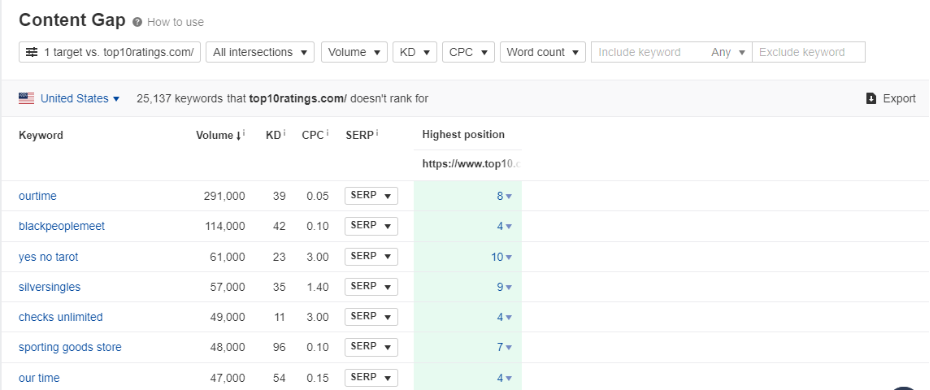
Content Gap
Ahrefs’ Content Gap is one such brilliant feature that automates a procedure that was originally accessible only to advanced users of Excel. It works on a very simple principle:
It takes all the keywords that your competitors rank for in the search results and then subtracts the keywords that your own website ranks for. Eventually, you get a list of the keywords that you should focus on. The tool allows you to do the same process with a bunch of competitors altogether, giving you a massive list of keywords that you must target further. The content gap analysis is therefore, by far the most quick way to find plenty of great keywords that your website must rank for.
Ahrefs Worst Features
Limitation of Rank Tracking
Unlike most of the other rank trackers, Ahrefs rank tracker does not update every day. It varies on the subscription plan you choose. For example, with Ahrefs Lite, your keyword ranking is updated just once a week. This updating frequency is obviously not good. That’s not good.
If SEO is not a big part of your digital marketing strategy, then it may not be a big deal. However, if you’re an SEO pro, you need to stay up to date with the rankings. But, unfortunately, Ahrefs doesn’t offer daily updates. The best it offers is an update after “every 3 days” that too with their higher-tier plans.
Limited PPC Features
Overall, Ahrefs is a great SEO tool, but its PPC features are limited. If you are looking for a tool that can provide comprehensive PPC tracking and analysis, Ahrefs is not the best option. It only tracks a limited number of PPC keywords, does not offer real-time tracking of PPC campaigns and finally, does not provide as many insights into PPC campaign performance as other PPC tools. This can make it difficult to understand what is working and what is not, and to make necessary changes to improve performance.
Backlink Index Updates
Our index undergoes partial updates every 15 minutes. The term “partially” is used here because it is impossible for the crawler to explore the entire Internet in a single second. However, at regular intervals, usually every couple of minutes, it examines a portion of the Internet, and the outcomes are promptly accessible for verification in the database. The complete update of the database, which is of the entire Internet, requires approximately two months. During this period, certain pages will receive multiple updates, while others will only be updated once, depending on their rating.
Limited Social Media Monitoring
Ahrefs is a powerful SEO tool that offers a wide range of features, but one area where it falls short is social media monitoring. The tool’s social media monitoring features are limited, and it does not offer the same level of detail or insights as other social media monitoring tools. This can be a major drawback for businesses that rely on social media for marketing and customer engagement.
Irrelevant Keyword Suggestions
Ahrefs often suggests keywords that are not relevant to the user’s search intent, which can lead to wasted time and effort. There are a few reasons why Ahrefs’ keyword suggestions are often irrelevant. First, the tool uses a keyword difficulty score to rank keywords, but this score does not take into account the user’s search intent. Second, the tool does not filter out keywords that are too competitive or that have low search volume. As a result, users of Ahrefs can easily end up wasting time and effort on keywords that are not relevant to their target audience or that are too difficult to rank for.
How To Spy Competitor Backlinks With Ahrefs?
Getting an insight into the competitor’s marketing activities is crucial if you wish to beat them. But the question is – How exactly can you spy on the activities of your competitors?
The answer is pretty simple – Use of Ahrefs tool.
Here are several activities that you can perform using Ahrefs’ tools. Let’s have a look:
Ahrefs Alerts
With Ahrefs Alerts, you can get notified when your competitors experience the following:
1. Get Or Lose A Backlink
It is a great way to keep track of your link-building activities.
2. Gets A Web Mention
It will help you learn what people may have to say about you or your competitors. You can use the collective information to your advantage. Besides reviews, you can also set this alert for any keyword which is relevant to your business so that you know about the things which are yet unknown to you.
3. New Keyword
With its extensive keyword database, Ahrefs has the capability to monitor your rankings across millions of keywords. It diligently keeps track of any significant fluctuations in the positions of these keywords and promptly notifies you of these changes.
Link Intersect
With the link intersect feature, you can be aware of the following updates from your competitors:
1. Discover your missing link opportunities
If a website links to all of your competitors, there’s a good chance they may also link to you once they discover your presence. Ahrefs’ Link Intersect tool helps you identify these websites that currently link to your competitors but haven’t linked to you yet.
2. Uncover linking patterns
Frequently, your competitors have dedicated supporters who consistently link to their new products and content. You can effortlessly identify these loyal linkers by using this approach.
Find Broken Links of Competitors
With alerts or notifications, you can stay aware if you have any broken inbound or outbound link. Let’s know more:
1. No More Broken Links
With a quick glance, you can identify all broken links on your website. Organize and filter the list to prioritize necessary fixes. By enabling alerts, you can detect and address new broken links promptly, safeguarding your SEO performance.
2.
Unbreak Any Broken Page On Your Site
Take a look at the pages on your website that have the most links but are no longer active. Restore or redirect these pages to appropriate alternatives to regain their “link equity” and potentially enhance your rankings.
3. Find And Fix Broken Redirects
Review any domains that you don’t remember linking to; they might have been redirected. Remove or replace these links for a better user experience and to avoid linking to harmful websites that could negatively impact your SEO.
4. Set Up Regular Scans To Find Newly Broken Links
Perform crawls on a daily, weekly, or monthly basis to identify both internal and external dead links. Compare the number of issues across crawls to monitor your progress.
Basic Backlink Audit
A basic backlink audit lets you see how your competitor is building backlinks and to identify any potential opportunities for improvement. Here are added benefits of backlink auditing:
1. Identify backlink opportunities:
By analyzing your competitor’s backlink profile, you can identify websites that are linking to your competitors but not to you. These websites could be potential targets for your own link-building efforts.
2. Improve your website’s ranking:
By improving the quality and quantity of your backlinks, you can improve your website’s ranking in search engines.
3. Protect your website from penalties:
By disavowing any spammy or low-quality backlinks, you can protect your website from penalties from Google.
Ahrefs Use Cases for Beginners
Ahrefs offers a wide range of tools and features that can significantly enhance your SEO and marketing endeavors. However, for individuals who are new to the field, our SEO platform might initially appear overwhelming.
If you are unfamiliar with SEO tools like Ahrefs, here is a list of simple and highly practical use cases that you can immediately try out. By implementing these strategies, you can quickly derive value from the platform. Here is the compilation of the recommended use cases:
Monitor Your Ranking Progress For Thousands Of Keywords
Your website, despite being relatively new, is likely to have achieved rankings for numerous keywords in Google. While it may not appear on the first page of search results, there are nine additional pages where it could potentially be found. By utilizing the Organic keywords report in Site Explorer, you can obtain comprehensive information about the keywords for which your website is ranking in Google. Moreover, if you have a list of crucial keywords that require close monitoring, you can include them in Ahrefs’ Rank Tracker.
Find Plenty Of Quality Link Prospects In Seconds
Imagine you are involved in SEO for a communication app. Wouldn’t it be highly advantageous to obtain a comprehensive list of websites that have mentioned the term “communication app” within their content? This information would enable you to initiate outreach efforts and potentially secure valuable backlinks from these websites, correct?
Fortunately, Ahrefs’ Content Explorer precisely caters to this requirement. By simply conducting a search for “communication app,” you will be presented with a vast collection of thousands of pages that include this specific phrase in their content.
Now, it is understandable that you may not need such an extensive list. However, there’s no need to worry. Content Explorer offers a range of powerful filters that allow you to refine the results and narrow down the selection to only the most relevant and valuable pages.
Domain rating: 40 to 90
Website traffic: From 1k
Language: English
Exclude subdomains
Exclude homepages
One page per domain
Filter explicit results
By applying these settings, you can narrow down the extensive list to a more manageable one with limited pages. Furthermore, if you find it necessary to reduce your list of potential link prospects even further, you can always refine your filters to achieve that.
Study About What People Are Currently Searching For In Google
To enhance your website’s traffic from Google, it is crucial to analyze the trending searches within your industry. This practice ensures that your content aligns with the interests of a large audience. In the realm of SEO, this process is commonly known as keyword research. Ahrefs’ Keywords Explorer empowers you to assess the popularity of any search query and enables you to uncover a multitude of relevant keywords that you can potentially focus on.
Find How Much Traffic Your Competitors Are Getting
Every business owner seeks insights into the performance of their competitors. You may want to understand whether their competitors are attracting more traffic, experiencing growth, or reaching a saturation point. You can also find out if they can surpass their competitors at their current growth rate or if they need to intensify their efforts.
Ahrefs’ Site Explorer is a valuable tool that addresses these questions by providing information about the search traffic volume of your competitors. It enables you to compare your own search traffic with that of your competitors, allowing for benchmarking.
However, it is important to note two significant considerations. Firstly, Ahrefs solely reports the search traffic of a website and does not include metrics for direct traffic, referral traffic, or traffic from social networks. Secondly, the traffic numbers provided by Ahrefs are estimates and may deviate from the actual figures observed in your Google Search Console. It is essential to recognize that this discrepancy remains consistent for all websites within a specific industry or niche.
Evaluate The Ranking Matter Of Any Keyword
Determining the relative difficulty of ranking for different keywords can be a challenging task. While certain keywords can be effortlessly ranked, others may seem unattainable, even for established and authoritative websites. However, there are ways to assess the competitiveness of keywords.
Ahrefs’ Keywords Explorer offers a useful metric known as the Keyword Difficulty (KD) score. This score assigns a value between 0 and 100 to each keyword, with higher scores indicating greater difficulty in achieving a high ranking for that keyword. The KD metric provided by Ahrefs proves to be highly valuable when sifting through a vast array of keyword ideas and identifying the easily attainable opportunities, often referred to as “low-hanging fruit.”
Ahrefs Hacks For E-commerce Sites
Even if you are well-acquainted with Ahrefs, it is likely that you only utilize a couple of tools regularly. However, there are several additional tools that you may be unaware of and consequently miss out on their benefits.
To assist you in maximizing the potential of Ahrefs, here is a list of five lesser-known use cases that can instantly enhance your SEO endeavors.
Find Low Competitive Topics With High Traffic Potential
Having to find a low competitive topic with high-traffic potential is a dream of every content marketer. But the question is, how can you discover it?
With Ahrefs’ Content Explorer, it is possible.
Just search for the broader topics and then apply the following filter –
Referring domains:
Up to 5
Page traffic:
At least 1,000
Now you are eligible to find a list of relevant topics that have the capability to get a lot of organic traffic and rank in SERPs.
You can dig further and find out the keywords that can drive organic traffic!
Find Resource Pages To Get Featured On
Resource Page Link Building is still quite a popular link-building tactic because of its scalability. It lets you acquire backlinks from web pages that curate useful industry resources. For the same reason, it is best to find out what resource pages your competitor has links to.
Find Missed Keyword Opportunities
Missed keyword opportunities are basically those keywords that other e-commerce websites rank for, but you don’t. Thus, to increase your chances of ranking higher, all you have to do is to close the content gap between you and the ranking pages of your competitors.
For achieving ultimate results, use Ahrefs Keyword Explorer to search for a keyword that you are not already using to rank in the SERPs. For example, let’s take “best website builders”.
Then, select all the top-ranking pages that are relevant pages to yours and forward them to the Ahrefs Content Gap tool. It would help you with a list of lucrative keywords that your website must be ranking for.
Build Links With The Images
If you have curated unique and informative images for your website like graphs, charts, or infographics, then there is a chance that people are linking to them and not the pages where you have featured them.
To locate and assert ownership of incorrect image attributions, input your website in Site Explorer and navigate to the Backlinks report. Proceed to apply the “Target URL” filter and search for. PNG or. JPG extensions.
Explore Opportunities For Local Citations
It is an important method to enhance your local SEO. Local citations refer to instances where your business name, address, or phone number is mentioned on popular directories, facilitating the discovery of your business by online searchers.
To uncover these citations, examine the directories where your competitors’ business profiles are featured.
For example, let’s assume you own a clothing company based in Hamilton.
If you are already aware of your competitors (if not, conduct a Google search using your industry followed by your city), access Site Explorer and navigate to the Link Intersect report.
In the top section, input the websites of your competitors, and in the bottom section, input your own website. Adjust the target mode to URL mode since citations typically direct to a homepage.
It will help you know all the websites that link to the competitor’s URLs but not to yours.
Mostly, the more targets the referring domains are linking to, the more likely it’s a business directory.
How To Get The Most With Basic Ahrefs Plan?
Having the tool is not worth it if you don’t know how to use them for your benefit. But worry not, we know exactly you can maximize the use of your Ahrefs subscription.
You can start by learning about its features and then proceed to know about some ways to apply basic tweaks to your marketing strategy. Here is how you can learn –
Ahrefs Academy
Do not feel overwhelmed when you don’t know how to crack the Ahrefs tools, instead join the
Ahrefs Academy
. It is a great way to get introduced to the toolset with bite-sized tutorials and more.
Ahrefs Blog
If you have time to spare, the
Ahrefs blog
section is where you can find in-depth information through discussions and case studies of the practical application of the tool. Once you are all penned up you can apply the strategies to explore their effectiveness.
Ahrefs Youtube Channel
If you are not a big fan of reading, then worry not, you can solve your problems with the
Ahrefs YouTube Channel
. Here you can find step-by-step video tutorials for learning to use the tool effectively.
Top Ahrefs Alternatives
While Ahrefs is a popular and highly regarded SEO tool, it’s not the only option on the market. Many other SEO tools offer similar features and functionality, making them viable alternatives to Ahrefs.
Whether you’re looking for a free Ahrefs alternative or a more affordable option, a different user interface, or a specific set of features, it’s always a good idea to explore your options and choose the tool that best fits your needs.
Alternatives
Best for
Pricing
Semrush
Handling your SEO & Marketing Needs
$1119.95/month
SpyFu
Affordable SEO Tool
$39/month
Ubersuggest
Free SEO Tool
Free
Serpstat
Growth Hacking Tool
$69/month
Google Search Console
Detailed SEO Reports
Free
Semrush
Similar to Ahrefs, Semrush offers a suite of tools for SEO, PPC, content marketing, and social media marketing. It includes features like keyword research, backlink analysis, site audit, position tracking, and more. One area where
Semrush
differs from Ahrefs is its focus on PPC advertising, with features like ad research, ad builder, and ad management.
SpyFu
SpyFu is a tool that specializes in competitor research and PPC advertising. It provides insights into a competitor’s top organic and paid keywords, ad spend, and ad copy. It also offers keyword research, backlink analysis, and rank tracking.
Ubersuggest
Ubersuggest is a free SEO tool by Neil Patel that offers keyword research, site audit, backlink analysis, content ideas, and rank tracking. While it may not offer as many features as Ahrefs, it’s a great option for those on a tight budget or just starting with SEO.
Serpstat
Serpstat is an all-in-one SEO platform that offers features like keyword research, backlink analysis, rank tracking, site audit, and competitor research. It also includes features for PPC advertising, content marketing, and market intelligence.
Google Search Console
Google Search Console is a free tool offered by Google to help website owners monitor and improve their site’s performance in search results. It provides insights into search queries, traffic, backlinks, crawl errors, and more. While it may not offer as many features as Ahrefs or other paid tools, it’s a valuable resource for any website owner looking to improve their SEO.
Ahrefs Support
Ahrefs provides dedicated support to assist users with their queries and concerns. Their support team is knowledgeable and responsive, ensuring prompt resolutions to user inquiries.
Chatbot
Ahrefs offers a convenient chatbot feature for quick access to information. Users can engage with the chatbot to get immediate assistance and find relevant resources.
Tutorials
Ahrefs offers comprehensive tutorials to help users maximize the tool’s functionalities. These tutorials cover a wide range of topics, from basic features to advanced techniques. Get access to step-by-step guides and video tutorials to enhance their understanding and skills.
Case Studies
Ahrefs provides case studies showcasing real-world examples of how the tool has been utilized. These case studies highlight successful strategies and outcomes achieved using Ahrefs. Use the insights from these case studies to improve their own digital marketing efforts.
Conclusion
Ahrefs is a highly recommended SEO tool that provides an extensive range of features to enhance website visibility and performance in search engine rankings. Its standout capabilities include a robust backlink analysis tool, an effective keyword research tool, a comprehensive site audit tool, and an accurate rank-tracking tool. Ahrefs empowers users to track their backlinks, identify broken links, discover new link-building opportunities, uncover high-traffic keywords, assess keyword difficulty and competition, conduct technical health audits, and monitor keyword rankings over time.
However, it is worth noting that Ahrefs is not a magic solution on its own. While it equips users with powerful tools, it remains essential to generate high-quality content and foster relationships with other websites to maximize search engine ranking improvements. While Ahrefs may be relatively expensive for some users and certain features may have a learning curve, its overall value and capabilities make it an indispensable resource for serious website owners and SEO professionals seeking to optimize their online presence.
Frequently Asked Questions
What is the Ahrefs Webmaster Tool?
The Ahrefs Webmaster Tool is a suite of SEO tools designed to help website owners and digital marketers optimize their websites for search engines. It offers features such as keyword research, backlink analysis, content analysis, and site audit, among others.
How is the Ahrefs Webmaster Tool different from other SEO tools?
Ahrefs stands out from other SEO tools due to its extensive database of backlinks, which is considered one of the best in the industry. Additionally, it offers a wide range of features that help users with keyword research, site optimization, and link building, among other areas.
What features does the Ahrefs Webmaster Tool offer?
The Ahrefs Webmaster Tool offers features such as backlink analysis, keyword research, content analysis, site audit, rank tracking, and competitor analysis, among others. | |||||||||
| Markdown | Categories
- Business
Unbiased Reviews of Industry Solutions Online
- Software
Expert Reviews of Software Products Online
Business
Unbiased Reviews of Industry Solutions Online
Topics
[SEO Tools](https://www.local.com/seo-tools)
[Job listing sites](https://www.local.com/job-listing-sites)
[Tax software](https://www.local.com/tax-software)
[HR Software](https://www.local.com/hr-software)
[Marketing tools](https://www.local.com/marketing-tools)
[Payroll Software](https://www.local.com/payroll-software)
[Website Builders](https://www.local.com/website-builders)
Blogs
[ How Does a Payroll Software Work in 2025 Business8 mins](https://www.local.com/payroll-software/top-reads/how-does-a-payroll-software-work)
[ Tips to Choose the Right Payroll Software for Businesses Business8 mins](https://www.local.com/payroll-software/top-reads/how-to-choose-the-right-payroll-software-for-your-business)
[ What Is A Credit Memo In QuickBooks? Business8 mins](https://www.local.com/accounting-software/top-reads/what-is-a-credit-memo-in-quickbooks)
Software
Expert Reviews of Software Products Online
Topics
[Domain Providers](https://www.local.com/domain-providers)
[Website Hosting](https://www.local.com/website-hosting)
[Antivirus](https://www.local.com/antivirus)
[Dating Apps](https://www.local.com/dating-apps)
[Password Managers](https://www.local.com/password-managers)
[Video editing software](https://www.local.com/video-editing-software)
Blogs
[ Common Types of Password Attacks and How to Stop Them Password Managers8 mins](https://www.local.com/password-managers/top-reads/common-types-of-password-attacks-and-how-to-stop-them)
[ Lightworks vs. DaVinci – Key Differences and Which One Should You Choose Video editing software8 mins](https://www.local.com/video-editing-software/top-reads/lightworks-vs-davinci-key-differences-and-which-one-should-you-choose)
[ 5 Common Mistakes to Avoid When Using a Password Manager Password Managers8 mins](https://www.local.com/password-managers/top-reads/mistakes-to-avoid-using-password-manager)
Topics
[SEO Tools](https://www.local.com/seo-tools)
[Job listing sites](https://www.local.com/job-listing-sites)
[Tax software](https://www.local.com/tax-software)
[HR Software](https://www.local.com/hr-software)
[Marketing tools](https://www.local.com/marketing-tools)
[Payroll Software](https://www.local.com/payroll-software)
[Website Builders](https://www.local.com/website-builders)
Blogs
[ How Does a Payroll Software Work in 2025 Business8 mins](https://www.local.com/payroll-software/top-reads/how-does-a-payroll-software-work)
[ Tips to Choose the Right Payroll Software for Businesses Business8 mins](https://www.local.com/payroll-software/top-reads/how-to-choose-the-right-payroll-software-for-your-business)
[ What Is A Credit Memo In QuickBooks? Business8 mins](https://www.local.com/accounting-software/top-reads/what-is-a-credit-memo-in-quickbooks)
Topics
[Domain Providers](https://www.local.com/domain-providers)
[Website Hosting](https://www.local.com/website-hosting)
[Antivirus](https://www.local.com/antivirus)
[Dating Apps](https://www.local.com/dating-apps)
[Password Managers](https://www.local.com/password-managers)
[Video editing software](https://www.local.com/video-editing-software)
Blogs
[ Common Types of Password Attacks and How to Stop Them Password Managers8 mins](https://www.local.com/password-managers/top-reads/common-types-of-password-attacks-and-how-to-stop-them)
[ Lightworks vs. DaVinci – Key Differences and Which One Should You Choose Video editing software8 mins](https://www.local.com/video-editing-software/top-reads/lightworks-vs-davinci-key-differences-and-which-one-should-you-choose)
[ 5 Common Mistakes to Avoid When Using a Password Manager Password Managers8 mins](https://www.local.com/password-managers/top-reads/mistakes-to-avoid-using-password-manager)
100 + Reviews
Make the right decision with our Reviews
[VIEW ALL TOPICS](https://www.local.com/view-all-topics/)
Stay Updated with the Latest Insights
Be the first to hear about new reviews, expert insights, and get exclusive access to discounts and vouchers on top SAAS subscriptions.

Offers and vouchers are subject to availability and may change or expire without prior notice.
[Home](https://www.local.com/)
[SEO Tools](https://www.local.com/marketing-tools)
Ahrefs SEO Tool Review: Features, Pricing, and Is It Worth It? \[2024\]
# Ahrefs SEO Tool Review: Features, Pricing, and Is It Worth It? \[2024\]
8\.4 good 
share this page


Ahrefs
[Visit Site](https://www.local.com/marketing-tools/reviews/ahrefs)
Updated On 20 December, 2023
Ahrefs is a popular SEO toolset provider that helps website owners and SEO professionals to monitor and optimize their website’s search engine visibility and performance. For that reason, Ahrefs crawls the entire web, stores tons of your data, and makes it accessible to users via an easy user interface.
## Pros
- Offers a complete set of SEO tools.
- Provides user-friendly link analysis.
- Offers affordable domain verification.
- Provides insights into traffic potential.
- Features a superior link database.
- Offers numerous content ideas.
## Cons
- Can be costly for some users.
- Limits user access to the platform.
- Customer support may not be as responsive as expected.
- Some features may have a learning curve for beginners.
- Limited to SEO-related tasks and lacks other digital marketing functionalities.
- Not all data presented by the tool may be completely accurate.
## Subscription model
| | | | | |
|---|---|---|---|---|
| **Features** | **Lite** | **Standard** | **Advanced** | **Enterprise** |
| Ahref.com Pricing | \$99/month OR \$990/year | \$199/month OR \$1990/year | \$399/mont OR \$3990/year | \$999/month OR \$9990/year |
| SEO Dashboard | Yes | Yes | Yes | Yes |
| Site Explorer | Yes | Yes | Yes | Yes |
| Keywords Explorer | Yes | Yes | Yes | Yes |
| Site Audit | Yes | Yes | Yes | Yes |
| Rank Tracker | Yes | Yes | Yes | Yes |
| Alerts | Yes | Yes | Yes | Yes |
| SERP Updates | No | Yes | Yes | Yes |
| Content Explorer | No | Yes | Yes | Yes |
| Domain Comparison | No | Yes | Yes | Yes |
| Unlimited History | No | No | No | Yes |
| Audit Log | No | No | No | Yes |
## Performance at Glance
When it comes to choosing an SEO tool, performance is a key factor to consider. You want a tool that is easy to use, offers a wide range of features, provides accurate data, and delivers value for money. Ahrefs is a popular SEO tool that has gained a strong reputation in the [Digital marketing tools](https://www.local.com/marketing-tools/) space due to its high performance and advanced features. In this section, we will examine Ahrefs’ performance in terms of ease of use, ease of setup, value for money, features, support, and G2 rating. By the end of this section, you will have a better understanding of Ahrefs’ overall performance and whether it’s the right tool for your SEO needs. If you’re looking to try Ahrefs but don’t want to pay, you can check out this guide on how to get a [free Ahrefs premium account](https://www.local.com/marketing-tools/top-reads/how-to-get-ahrefs-premium-accounts-free).
| | | |
|---|---|---|
| **Specifications** | **Ahrefs Star Rating at Glance** | **Our Verdict** |
| Ease of Use |  | Ahrefs' user-friendly interface makes it easy to navigate and use. |
| Ease of Setup |  | Ahrefs' straightforward setup process means you can get started quickly. |
| Value for Money |  | Ahrefs offers competitive pricing and a range of features that provide excellent value for money. |
| Features |  | Ahrefs offers a comprehensive suite of features that cover all aspects of SEO. |
| Support |  | Ahrefs provides top-notch customer support, with a dedicated team ready to assist you. |
| G2 Rating |  | Ahrefs has earned high ratings on G2, a leading software review platform, indicating its strong performance and customer satisfaction. |
## Ahrefs Dashboard
The Dashboard is the central hub to check all of your projects. Here, you can get a quick overview of the crucial metrics of all of your projects. The metrics on the Dashboard are taken from several tools like Site Explorer, Rank Tracker, and Site Audit. The update frequency of the Site Explorer metrics is updated every 12 hours, while the metrics from the Rank Tracker and the Site Audit are mostly based on the last crawl or the update.
### **Google Search Console Performance**
If you have connected your Google account with the Ahrefs account, you will get access to the GSC data on the dashboards.
- Click on the “GSC performance” tab.
- Use filters to narrow down the data you want to check. For instance, you can filter out the project’s detailed view of organic traffic based on a monthly or weekly basis.
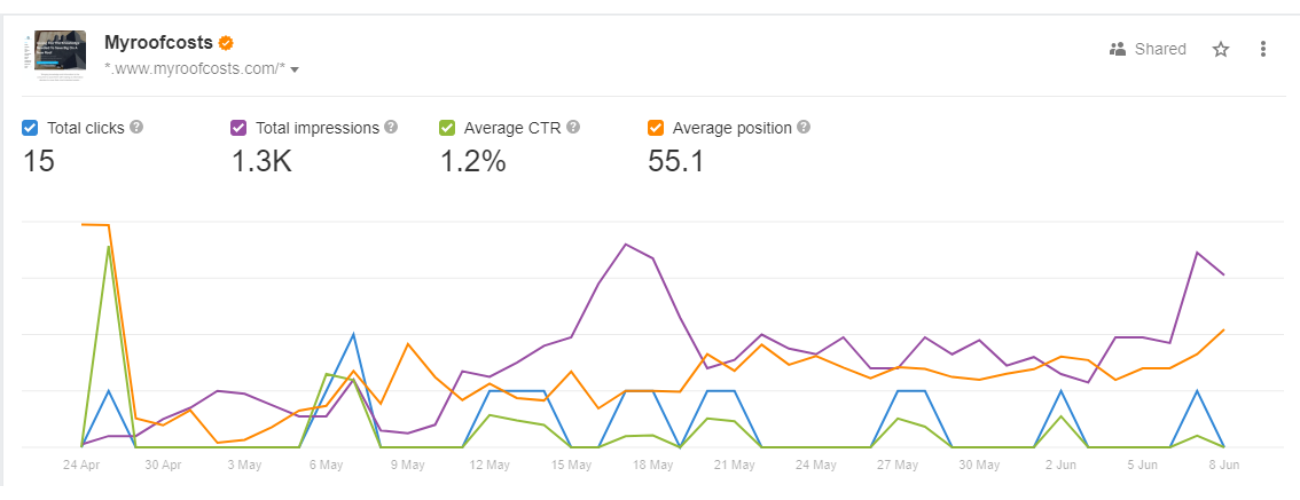
**NOTE –** Google Search Console (GSC) displays data for a maximum of 16 months. However, if you connect your GSC account to Ahrefs, you can access and view data beyond that time frame, as Ahrefs stores and presents data for a longer duration.
You can even change the way your graph appears on the dashboard.
### **Track Unlimited Number Of Projects**
As long as you can confirm your ownership, you can include a comprehensive list of the projects you require.
You have the option to select from various verification methods or effortlessly import all your properties by connecting your Google Search Console.
### **Disavow URLs**
Upon accessing this feature, you will be directed to our “Disavowed Links” tool. Here, you can either upload a disavowed links file or manually add the specific links you wish to disavow.
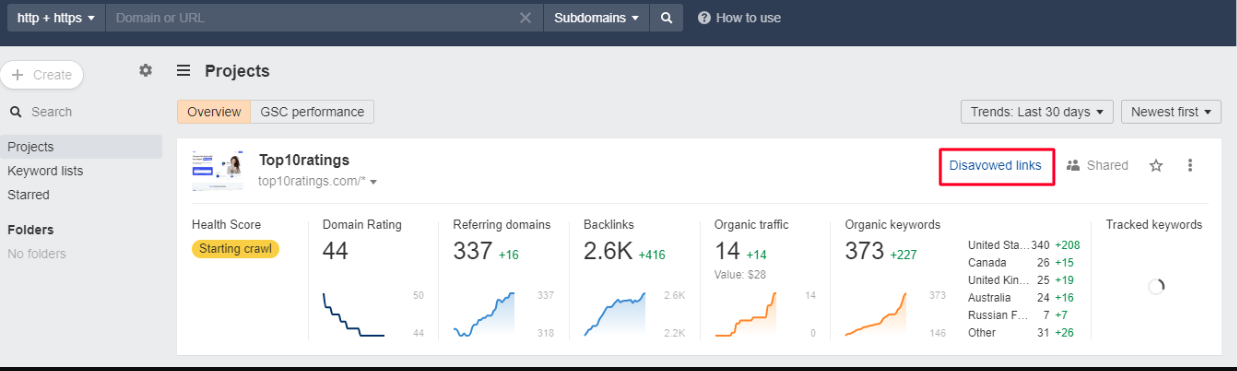
This tool will conceal the disavowed links in the backlinks and refer to domain reports related to the target project domain. It’s important to note that this function does not imply that we will submit the links for disavowal on your behalf. You will need to perform this action manually using Google’s Disavow tool.
To accomplish this, simply click on the export option, which will enable you to download a properly formatted .txt file. You can then proceed to directly upload this file to Google.
### **Organize Projects With Folders**
Organize your projects into folders, enhancing their accessibility and facilitating sharing. You can selectively grant access to specific folders for particular team members while excluding others.
### **Highlight Your Important Project**
You can add stars to your project, which marks it as an important one. If you want a filter for just your favorite projects, you can access them by turning on the “Starred” toggle on the upper right corner of the dashboard.
### **Quick Alerts**
Get emails whenever your project has new/lost backlinks, new keywords, Rank Tracker updates or Site Audit crawls, generating alerts. You can get alerts or notifications by turning on the Email Alerts button available on the vertical ellipsis in the right corner of each project.
### **Filters**
You can use filters to re-align the projects based on their name (A-Z or Z-A) or date (New – Old or Old – New). It helps in keeping a tab on every project at your convenience.
### **Hide Projects**
Ahrefs offers you the ability to hide the project that you may not wish to see on your dashboard at the moment. For this, you need to click on the vertical ellipsis of that project and select Hide.
### **Unhide Projects**
If you want to access any of your hidden projects, you can do that by clicking on the Hidden Projects column in the “My Projects” dropdown.
## How To Set Up Projects In Ahrefs?
If you are using Ahrefs tools for the very first time, then it is something that you will immediately see after logging in. Once you have logged in, here is a step by step information on how you can manually set up projects:
### **Step 1: Start By Adding The URL Or The Domain Of The Project**
- If you are using the tool for the first time then simply clicking on “Add Project” would be enough.
- You can simply add a new project by clicking on the “Create” button and then “New Project” from the drop-down on the left corner of the dashboard.
### **Step 2: Determine The Protocol, Project Name, And The Mode**
- Mention the domain or the specified URL in the desired section.
- Then, do not forget to select a suitable protocol or mode, as an unsuitable protocol command can result in varied results.
- Although the project name would automatically generate for you from the title tag of the URL, you are free to make amendments.
- You can create a folder for your project and add it as per your needs (optional).
- Here, you can even decide who can access your project.
### **Step 3: Verifying Ownership**
It is a skippable step that just ensures that you have [verified ownership](https://help.ahrefs.com/en/articles/4321336-what-is-a-verified-project) of the website. It enables a quick crawling session for Site Audit.
### **Step 4: Auditing: Schedule Audits, URL Sources & Crawl Settings**
#### **Schedule**
You can customize each section of the schedule page as per your requirements. For instance, you can change the crawling frequency to monthly, weekly, or daily basis along with the date, day, and time.
#### **URL Sources**
In this section, you can make the URL sources to start the crawling of your website. However, if you are unsure about what to choose, leave the default settings.
#### **Crawl Setting**
Here you can make changes in the crawl speed settings and much more. But if you are unsure about what steps to take then you can leave the default settings to work for you.
### **Step 5: Keyword Tracking**
Add the keywords that you want to track along with the location(s) where you wish to track those keywords and Voila\!
The keywords will directly be added to the Rank Tracker tool for tracking how well it lets your website rank in the organic search results. You will get regular reports of the ranking in your email.
**NOTE –** You can manually upload the keywords or place the CSV or TXT file in the specified section.
### **Step 6: Add Competitors**
Here you can add the list of the competitors that you wish to analyze in comparison to your website’s previous set of keywords. You can either pick a few of them from the pre-populated list or mention them manually.
The list of the competitors along with keywords will be added to the Rank Tracker Tool for overall tracking of your website’s organic SERPs ranking.
That’s it, now you are ready to track progress, stagnation, or loss of the ranking of your website. To do this, you can use the following features:
- **Backlink Profile:** To Check All The Backlinks To Your Website
- **Organic Search:** To Know How Your Website Is Performing In organic Search
- **Outgoing Links:** Links That Your Website Points To Other Websites
- **Paid Search:** To Know How Your Site Is Performing In Paid Search
Ultimately, you can export your data so that you can analyze it in other software.
By using these features, you can track the progress of your website’s ranking and make adjustments to your SEO strategy as needed. This will help you improve your website’s ranking and drive more traffic to your website.
## Significant Features of Ahrefs Webmaster Tool
Let’s see what is inside the [Ahref webmaster tool](https://ahrefs.com/webmaster-tools) and how to use it to run content marketing for your website:
### **Site Explorer**
Site Explorer is the Ahrefs feature that gives a basic overview of the SEO quality of any website. It includes how highly a website ranks for certain phrases, a rough estimation of how much search traffic it gets, and much more. In short, it is the dashboard that lets you understand where your or your competitors’ domain could require some SEO improvements.
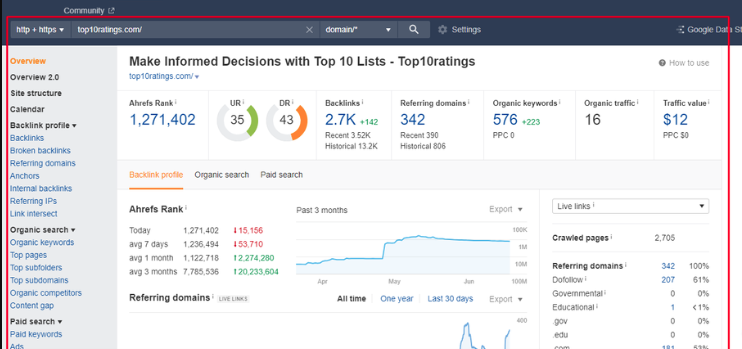
It is basically the cumulation of the two major features of backlinks and organic traffic. So let’s break down each of these features separately.
#### **Backlink Profile**
It showcases the website’s complete backlink profile. However, the report is not similar to most of the backlink checkers in the market like Moz Pro or SEMrush. But the question is what makes Ahrefs different from the rest of the backlink checkers?
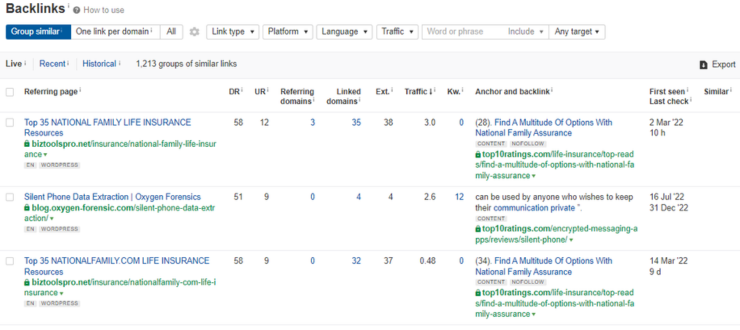
- ##### **It has great filtering and sorting features.**
For instance, if you only want a list of the links from the sites with higher Domain Rating or high URL Ratings, you can easily do that. In some cases, if you just want to see the no-follow links, you can do that too in Ahrefs.
- ##### **Its Index is huge**
The other strong point about Ahrefs is that its index is huge and advanced. In short, you may not have to worry about finding outdated linking data. As a matter of fact, Ahrefs crawler is the second most efficient after Google.
Overall, Ahrefs’ backlink profiling is a major strength of the tool – Easy to use, Regularly updated, and with filters to exactly what you need.
#### **Organic Search**
This feature allows you to identify the keywords that your competitors are using to rank well in search engine results pages (SERPs). This report can vary from someone’s Google Search Console data. However, Ahrefs results are pretty close to it. Ahrefs excels in discovering a site’s ranking keywords and estimating their corresponding search traffic. Similar to their backlinks tool, the true power of this tool lies in its sorting and filtering capabilities.
Ahrefs states that Google currently ranks for 57.7 million keywords. It is truly insane\!

Now the question is how to make true sense of this list. It is where – Filters come into the picture.
You can filter out the keywords based on their difficulty level, ranking in the Featured Snippet spot, and much more. In short, the filtered-out set of keywords can help you work more efficiently.
There are a few secondary features inside Organic Search –
- **Top Pages:** Suggests pages that bring about the most organic traffic on a site.
- **Competing Domains: This shows** you a website’s main SEO competitors.
### **Content Explorer**
Content Explorer is a powerful tool that allows you to find content ideas, research your competitors, and track your content performance. It has a database of over 13 billion web pages, which means you can find content on any topic.
#### **How Does It Benefit?**
- ##### **Find content ideas:**
You can use Content Explorer to find content ideas by keyword, topic, or domain. You can also use it to find content that is performing well in search engines.
- ##### **Research your competitors:**
You can use Content Explorer to research your competitors by keyword, topic, or domain. You can see what content they are ranking well for, and you can use this information to improve your own content strategy.
- ##### **Track your content performance:**
You can use Content Explorer to track the performance of your content by keyword, topic, or domain. You can see how much traffic your content is getting, and you can see how it is ranking in search engines.
#### **How To Use It?**
Here are a few tips to use Ahrefs Content Explorer:
- ##### **Use the filters to narrow down your results:**
The filters in Content Explorer allow you to narrow down your results by keyword, topic, domain, and other criteria. This can help you to find the most relevant content.
- ##### **Use the metrics to evaluate the content:**
Content Explorer provides a variety of metrics that you can use to evaluate the content. These metrics include organic traffic, backlinks, and social shares.
- ##### **Use the data to improve your content strategy:**
The data that you collect from Content Explorer can be used to improve your content strategy. You can use this data to find new topics to write about, improve your writing style, and promote your content.
Overall, Content Explorer is a powerful tool that can help you with all aspects of your content marketing. If you are serious about creating high-quality content that drives traffic to your website, then you should definitely use Ahrefs Content Explorer.
### **Keywords Explorer**
The Ahrefs Keyword Explorer is not limited to Google, unlike many other keyword search tools. It allows you to spread your arms and analyze keywords on Amazon, Bing, Yandex, and Youtube.
The keyword search report shows you the following metrics in a single report search volume, competition, CPC, CTR, SERP position history, and more. These features can help you decide between a set of different keywords. And the best part is that Ahrefs is excellent when it comes to analyzing a specific search term.
However, there is a drawback that Ahrefs is not so great at coming up with new ideas for keywords. It may offer the maximum number of keywords than any other explorer but many times the keywords are not relevant to the searched query.
### **Rank Tracker**
Ahrefs’ rank tracking tool functions similarly to others in the market. You input a set of keywords and observe their rankings on Google while also monitoring changes over time. However, there is an issue.
Unlike the majority of rank trackers, this tool does not provide daily updates. The frequency of ranking updates varies depending on the selected plan.
For instance, with Ahrefs Lite, keyword rankings are updated only once a week. This might not be problematic if SEO is not a significant aspect of your site’s digital marketing strategy, as checking rankings weekly may suffice.
But for SEO professionals, it is crucial to stay constantly informed about rankings. Imagine receiving a call from a client asking about the day’s ranking changes. In such cases, a tool that offers real-time updates becomes essential.
Regrettably, Ahrefs does not offer daily updates; the most frequent option is “every 3 days” for their higher-tier plans.
### **Site Audit**
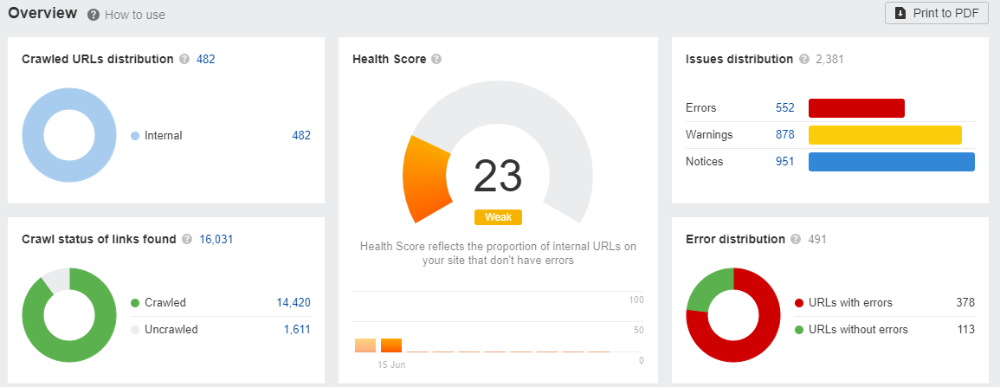
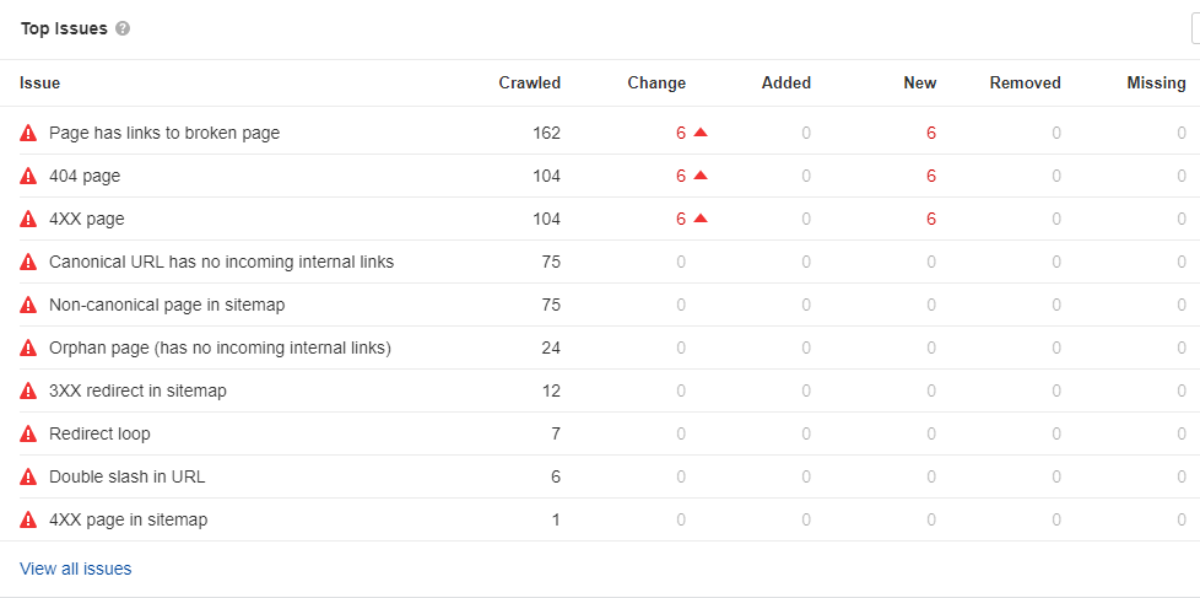
Similar to other audit tools, Ahrefs provides your website with a comprehensive “health score.” It highlights common technical SEO problems such as duplicate meta tags, broken redirects, and more. Overall, this tool is highly reliable for conducting SEO site audits, making it user-friendly for beginners to identify necessary actions.
#### **How To Perform Site Audit In Ahrefs**
Here are the steps on how to perform a site audit in Ahrefs:
- **Sign up for an Ahrefs account.** You can sign up for a free trial or a paid subscription.
- **Add your website to Ahrefs.** You can do this by entering your website’s URL in the search bar and clicking on the “Add Site” button.
- **Run a site audit.** To run a site audit, click on the “Site Audit” tab and then click on the “Run Audit” button.
- **Review the audit report.** The audit report will show you a list of all the issues that were found on your website.
- **Fix the issues.** Once you have reviewed the audit report, you can fix the issues that were found.
#### **Things To Check For In The Site Audit:**
Here are some of the things that you can check for in your site audit:
- ##### **Technical SEO issues:**
These are issues that can affect your website’s ranking in search engines. For example, you may have broken links, duplicate content, or slow loading times.
- ##### **On-page SEO issues:**
These are issues that affect the relevance of your website’s content to search engine users. For example, you may not be using the right keywords or your content may not be well-written.
- ##### **Off-page SEO issues:**
These are issues that affect the authority of your website. For example, you may not have enough backlinks, or your backlinks may be from low-quality websites.
By fixing the issues that were found in your site audit, you can improve your website’s ranking in search engines and drive more traffic to your website.
## Unique Features of Ahrefs
- ### **Batch Analysis**
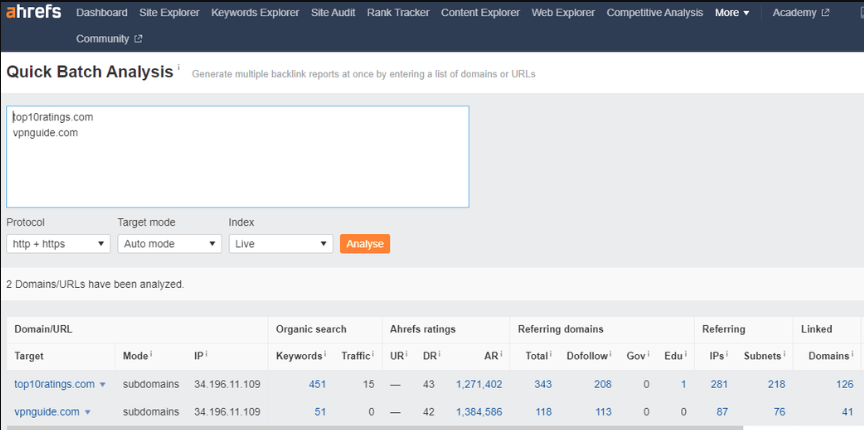
Batch Analysis is a tool that easily pulls out Ahrefs’ backlink metrics for up to 200 individual URLs. You just need to copy-paste your list of URLs and the bulk backlink checker will generate a complete report with the SEO metrics:
1\. Ahrefs Rank
2. Domain Rating
3. Number Of Referring Domains
4. Number Of Backlinks
5. Social Metrics
You can work with the report in the browser window or export the data directly into a CSV file. Then, finally plug it into the analysis tool of your preference.
- ### **Link Intersect**
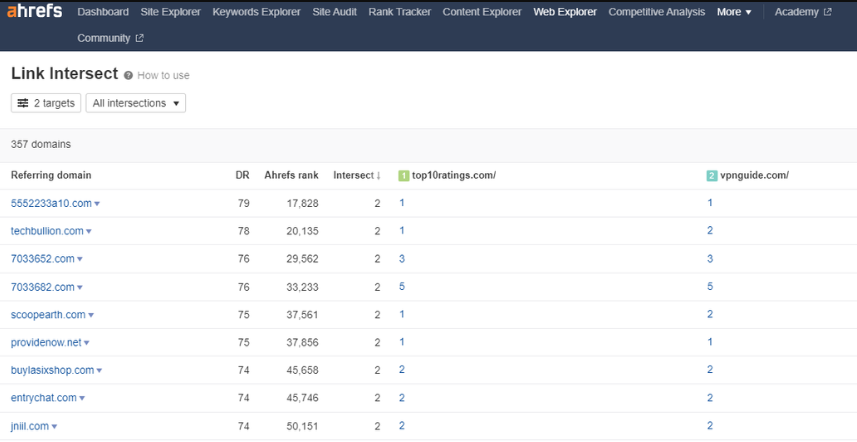
With the link intersect feature, you can find the sites that are linked to your competitors but not to your website. You can even uncover linking patterns with link interest features. It lets you discover who all are frequently linking to your competitors.
- ### **Best By Links**
The Best By Links report shows which pages on a target website, subdomain, or subfolder have the maximum backlinks (both internal and external) pointing out to them.
Using this report, you can take the following actions:
1. See competitors’ most linked-to pages
2. Find broken link-building opportunities
3. Find and fix broken pages on your site
4. Find dead or no-follow internal links
5. Add internal links from “power” pages to boost other pages
- ### **SEO Toolbar Extension**
The SEO toolbar extension allows a user to get the most of the SEO metrics of any page or website you want right in your web browser. The toolbar gives you instant access to the following metrics:
1. Domain Rating
2. URL Rating
3. Estimated Organic Search Traffic
4. Number of ranking keywords
5. Number of referring domains
6. Number of backlinks
Additionally, Ahrefs SEO Toolbar shows you the most crucial keyword metrics right on the SERP including, Search volume (both Global and Country-specific), Keyword Difficulty, Clicks, and Cost per Click.
- ### **API Access**
Ahrefs’ This feature is designed to empower the users to use data from Ahrefs Index in the most compatible and tailored way to suit users’ needs. The URL Profiler can access the Ahrefs API to rapidly extract link metric data including the Domain Rank and Backlink Data.
## Ahrefs Best Features
- ### **Cool UX & UI**
Similar to any tool, there may be a slight learning curve when initially using Ahrefs. However, once you become familiar with its functionalities, it becomes remarkably effortless to locate the information you seek. In fact, it typically requires just a click or two to access the desired data. For instance, if you wish to examine the breakdown of a site’s [anchor text](https://ahrefs.com/blog/anchor-text/), you can easily navigate to the corresponding report directly from the sidebar. And the same is top pages, referring domains, broken links, and much more.
- ### **Site Audit Feature**
The Ahrefs site audit tool is widely regarded as one of the top-performing options available in its category. In fact, it is often considered comparable to specialized tools that specifically focus on conducting site audits.
- ### **Content Gap**
Ahrefs’ Content Gap is one such brilliant feature that automates a procedure that was originally accessible only to advanced users of Excel. It works on a very simple principle:
It takes all the keywords that your competitors rank for in the search results and then subtracts the keywords that your own website ranks for. Eventually, you get a list of the keywords that you should focus on. The tool allows you to do the same process with a bunch of competitors altogether, giving you a massive list of keywords that you must target further. The content gap analysis is therefore, by far the most quick way to find plenty of great keywords that your website must rank for.
## Ahrefs Worst Features
- ### **Limitation of Rank Tracking**
Unlike most of the other rank trackers, Ahrefs rank tracker does not update every day. It varies on the subscription plan you choose. For example, with Ahrefs Lite, your keyword ranking is updated just once a week. This updating frequency is obviously not good. That’s not good.
If SEO is not a big part of your digital marketing strategy, then it may not be a big deal. However, if you’re an SEO pro, you need to stay up to date with the rankings. But, unfortunately, Ahrefs doesn’t offer daily updates. The best it offers is an update after “every 3 days” that too with their higher-tier plans.
- ### **Limited PPC Features**
Overall, Ahrefs is a great SEO tool, but its PPC features are limited. If you are looking for a tool that can provide comprehensive PPC tracking and analysis, Ahrefs is not the best option. It only tracks a limited number of PPC keywords, does not offer real-time tracking of PPC campaigns and finally, does not provide as many insights into PPC campaign performance as other PPC tools. This can make it difficult to understand what is working and what is not, and to make necessary changes to improve performance.
- ### **Backlink Index Updates**
Our index undergoes partial updates every 15 minutes. The term “partially” is used here because it is impossible for the crawler to explore the entire Internet in a single second. However, at regular intervals, usually every couple of minutes, it examines a portion of the Internet, and the outcomes are promptly accessible for verification in the database. The complete update of the database, which is of the entire Internet, requires approximately two months. During this period, certain pages will receive multiple updates, while others will only be updated once, depending on their rating.
- ### **Limited Social Media Monitoring**
Ahrefs is a powerful SEO tool that offers a wide range of features, but one area where it falls short is social media monitoring. The tool’s social media monitoring features are limited, and it does not offer the same level of detail or insights as other social media monitoring tools. This can be a major drawback for businesses that rely on social media for marketing and customer engagement.
- ### **Irrelevant Keyword Suggestions**
Ahrefs often suggests keywords that are not relevant to the user’s search intent, which can lead to wasted time and effort. There are a few reasons why Ahrefs’ keyword suggestions are often irrelevant. First, the tool uses a keyword difficulty score to rank keywords, but this score does not take into account the user’s search intent. Second, the tool does not filter out keywords that are too competitive or that have low search volume. As a result, users of Ahrefs can easily end up wasting time and effort on keywords that are not relevant to their target audience or that are too difficult to rank for.
## How To Spy Competitor Backlinks With Ahrefs?
Getting an insight into the competitor’s marketing activities is crucial if you wish to beat them. But the question is – How exactly can you spy on the activities of your competitors? The answer is pretty simple – Use of Ahrefs tool.
Here are several activities that you can perform using Ahrefs’ tools. Let’s have a look:
- ### **Ahrefs Alerts**
With Ahrefs Alerts, you can get notified when your competitors experience the following:
#### **1\. Get Or Lose A Backlink**
It is a great way to keep track of your link-building activities.
#### **2\. Gets A Web Mention**
It will help you learn what people may have to say about you or your competitors. You can use the collective information to your advantage. Besides reviews, you can also set this alert for any keyword which is relevant to your business so that you know about the things which are yet unknown to you.
#### **3\. New Keyword**
With its extensive keyword database, Ahrefs has the capability to monitor your rankings across millions of keywords. It diligently keeps track of any significant fluctuations in the positions of these keywords and promptly notifies you of these changes.
- ### **Link Intersect**
With the link intersect feature, you can be aware of the following updates from your competitors:
#### **1\. Discover your missing link opportunities**
If a website links to all of your competitors, there’s a good chance they may also link to you once they discover your presence. Ahrefs’ Link Intersect tool helps you identify these websites that currently link to your competitors but haven’t linked to you yet.
#### **2\. Uncover linking patterns**
Frequently, your competitors have dedicated supporters who consistently link to their new products and content. You can effortlessly identify these loyal linkers by using this approach.
- ### **Find Broken Links of Competitors**
With alerts or notifications, you can stay aware if you have any broken inbound or outbound link. Let’s know more:
#### **1\. No More Broken Links**
With a quick glance, you can identify all broken links on your website. Organize and filter the list to prioritize necessary fixes. By enabling alerts, you can detect and address new broken links promptly, safeguarding your SEO performance.
#### 2\. **Unbreak Any Broken Page On Your Site**
Take a look at the pages on your website that have the most links but are no longer active. Restore or redirect these pages to appropriate alternatives to regain their “link equity” and potentially enhance your rankings.
#### **3\. Find And Fix Broken Redirects**
Review any domains that you don’t remember linking to; they might have been redirected. Remove or replace these links for a better user experience and to avoid linking to harmful websites that could negatively impact your SEO.
#### **4\. Set Up Regular Scans To Find Newly Broken Links**
Perform crawls on a daily, weekly, or monthly basis to identify both internal and external dead links. Compare the number of issues across crawls to monitor your progress.
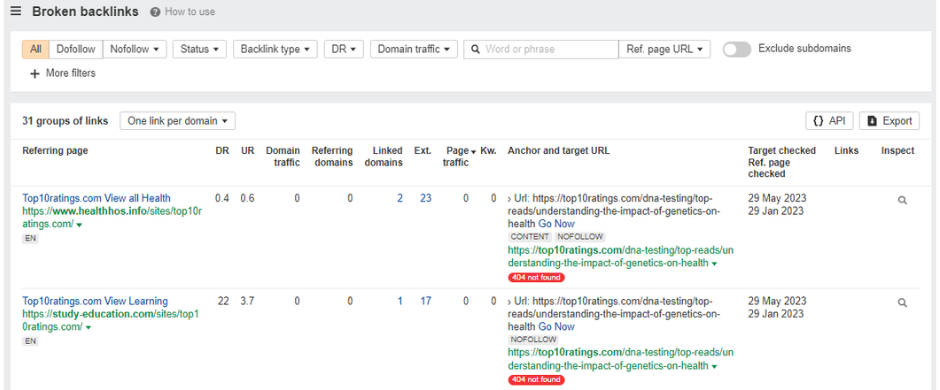
- ### **Basic Backlink Audit**
A basic backlink audit lets you see how your competitor is building backlinks and to identify any potential opportunities for improvement. Here are added benefits of backlink auditing:
#### **1\. Identify backlink opportunities:**
By analyzing your competitor’s backlink profile, you can identify websites that are linking to your competitors but not to you. These websites could be potential targets for your own link-building efforts.
#### **2\. Improve your website’s ranking:**
By improving the quality and quantity of your backlinks, you can improve your website’s ranking in search engines.
#### **3\. Protect your website from penalties:**
By disavowing any spammy or low-quality backlinks, you can protect your website from penalties from Google.

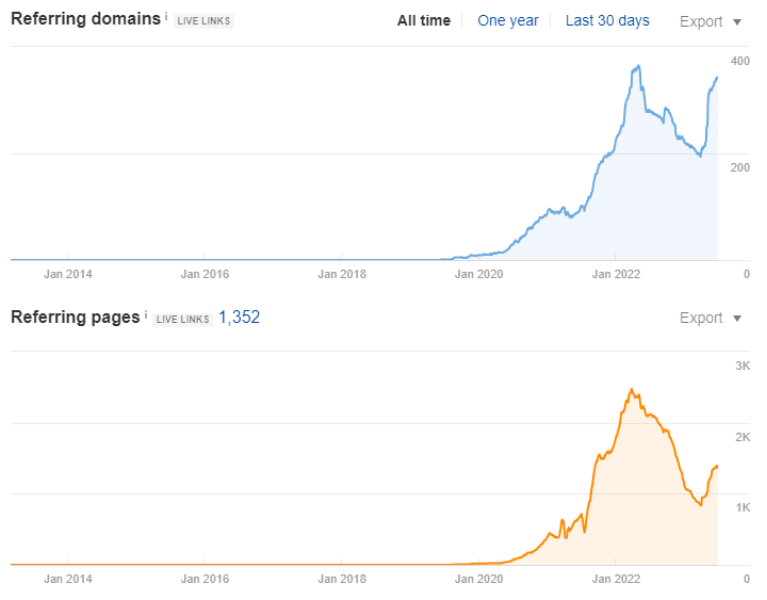
## Ahrefs Use Cases for Beginners
Ahrefs offers a wide range of tools and features that can significantly enhance your SEO and marketing endeavors. However, for individuals who are new to the field, our SEO platform might initially appear overwhelming.
If you are unfamiliar with SEO tools like Ahrefs, here is a list of simple and highly practical use cases that you can immediately try out. By implementing these strategies, you can quickly derive value from the platform. Here is the compilation of the recommended use cases:
- ### Monitor Your Ranking Progress For Thousands Of Keywords
Your website, despite being relatively new, is likely to have achieved rankings for numerous keywords in Google. While it may not appear on the first page of search results, there are nine additional pages where it could potentially be found. By utilizing the Organic keywords report in Site Explorer, you can obtain comprehensive information about the keywords for which your website is ranking in Google. Moreover, if you have a list of crucial keywords that require close monitoring, you can include them in Ahrefs’ Rank Tracker.
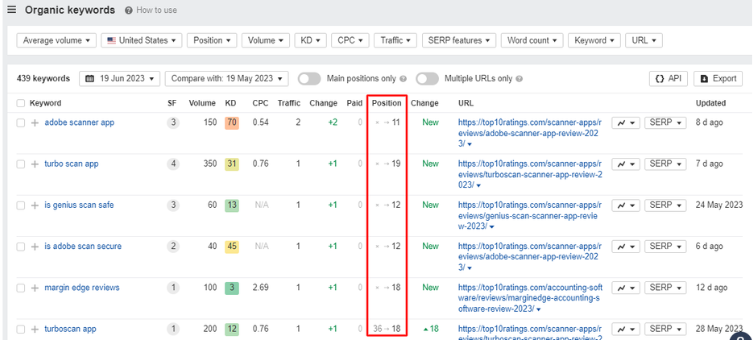
- ### Find Plenty Of Quality Link Prospects In Seconds
Imagine you are involved in SEO for a communication app. Wouldn’t it be highly advantageous to obtain a comprehensive list of websites that have mentioned the term “communication app” within their content? This information would enable you to initiate outreach efforts and potentially secure valuable backlinks from these websites, correct?
Fortunately, Ahrefs’ Content Explorer precisely caters to this requirement. By simply conducting a search for “communication app,” you will be presented with a vast collection of thousands of pages that include this specific phrase in their content.
Now, it is understandable that you may not need such an extensive list. However, there’s no need to worry. Content Explorer offers a range of powerful filters that allow you to refine the results and narrow down the selection to only the most relevant and valuable pages.
- Domain rating: 40 to 90
- Website traffic: From 1k
- Language: English
- Exclude subdomains
- Exclude homepages
- One page per domain
- Filter explicit results
By applying these settings, you can narrow down the extensive list to a more manageable one with limited pages. Furthermore, if you find it necessary to reduce your list of potential link prospects even further, you can always refine your filters to achieve that.
- ### Study About What People Are Currently Searching For In Google
To enhance your website’s traffic from Google, it is crucial to analyze the trending searches within your industry. This practice ensures that your content aligns with the interests of a large audience. In the realm of SEO, this process is commonly known as keyword research. Ahrefs’ Keywords Explorer empowers you to assess the popularity of any search query and enables you to uncover a multitude of relevant keywords that you can potentially focus on.
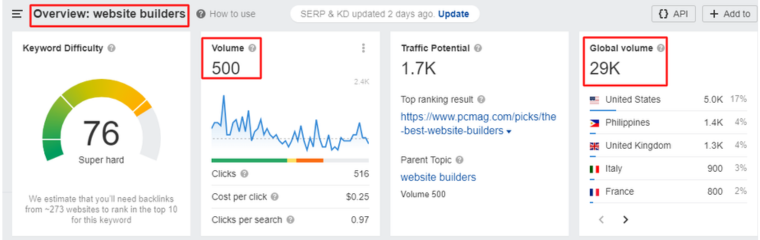
- ### Find How Much Traffic Your Competitors Are Getting
Every business owner seeks insights into the performance of their competitors. You may want to understand whether their competitors are attracting more traffic, experiencing growth, or reaching a saturation point. You can also find out if they can surpass their competitors at their current growth rate or if they need to intensify their efforts.
Ahrefs’ Site Explorer is a valuable tool that addresses these questions by providing information about the search traffic volume of your competitors. It enables you to compare your own search traffic with that of your competitors, allowing for benchmarking.
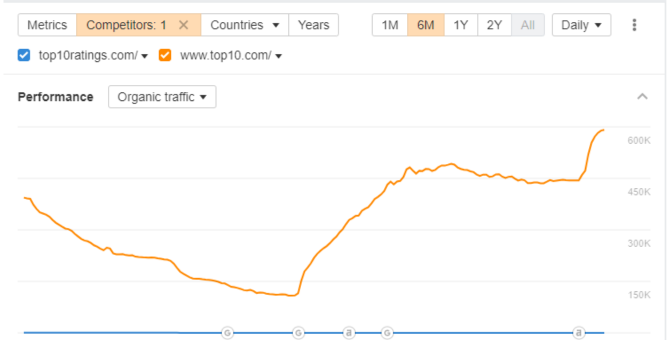
However, it is important to note two significant considerations. Firstly, Ahrefs solely reports the search traffic of a website and does not include metrics for direct traffic, referral traffic, or traffic from social networks. Secondly, the traffic numbers provided by Ahrefs are estimates and may deviate from the actual figures observed in your Google Search Console. It is essential to recognize that this discrepancy remains consistent for all websites within a specific industry or niche.
- ### Evaluate The Ranking Matter Of Any Keyword
Determining the relative difficulty of ranking for different keywords can be a challenging task. While certain keywords can be effortlessly ranked, others may seem unattainable, even for established and authoritative websites. However, there are ways to assess the competitiveness of keywords.
Ahrefs’ Keywords Explorer offers a useful metric known as the Keyword Difficulty (KD) score. This score assigns a value between 0 and 100 to each keyword, with higher scores indicating greater difficulty in achieving a high ranking for that keyword. The KD metric provided by Ahrefs proves to be highly valuable when sifting through a vast array of keyword ideas and identifying the easily attainable opportunities, often referred to as “low-hanging fruit.”
## Ahrefs Hacks For E-commerce Sites
Even if you are well-acquainted with Ahrefs, it is likely that you only utilize a couple of tools regularly. However, there are several additional tools that you may be unaware of and consequently miss out on their benefits.
To assist you in maximizing the potential of Ahrefs, here is a list of five lesser-known use cases that can instantly enhance your SEO endeavors.
- ### Find Low Competitive Topics With High Traffic Potential
Having to find a low competitive topic with high-traffic potential is a dream of every content marketer. But the question is, how can you discover it?
With Ahrefs’ Content Explorer, it is possible.
Just search for the broader topics and then apply the following filter –
**Referring domains:** Up to 5
**Page traffic:** At least 1,000
Now you are eligible to find a list of relevant topics that have the capability to get a lot of organic traffic and rank in SERPs.
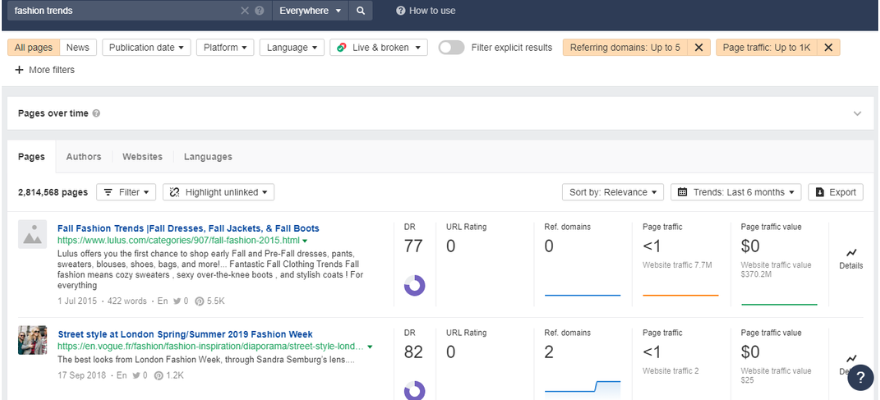
You can dig further and find out the keywords that can drive organic traffic\!
- ### Find Resource Pages To Get Featured On
Resource Page Link Building is still quite a popular link-building tactic because of its scalability. It lets you acquire backlinks from web pages that curate useful industry resources. For the same reason, it is best to find out what resource pages your competitor has links to.
- ### Find Missed Keyword Opportunities
Missed keyword opportunities are basically those keywords that other e-commerce websites rank for, but you don’t. Thus, to increase your chances of ranking higher, all you have to do is to close the content gap between you and the ranking pages of your competitors.
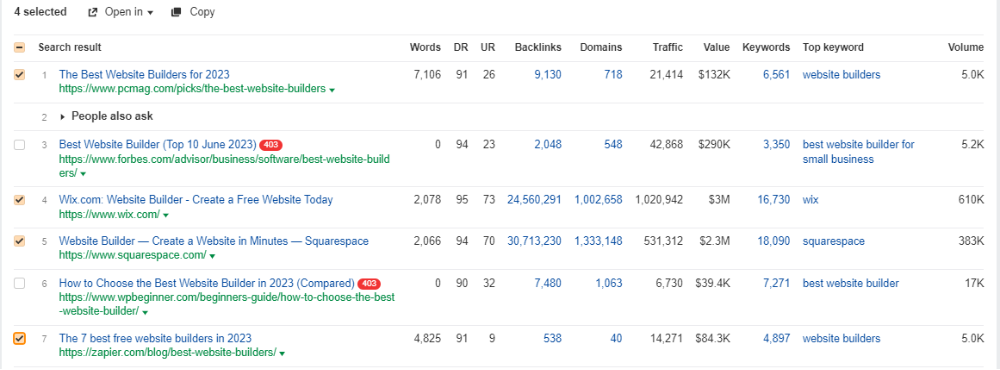
For achieving ultimate results, use Ahrefs Keyword Explorer to search for a keyword that you are not already using to rank in the SERPs. For example, let’s take “best website builders”.
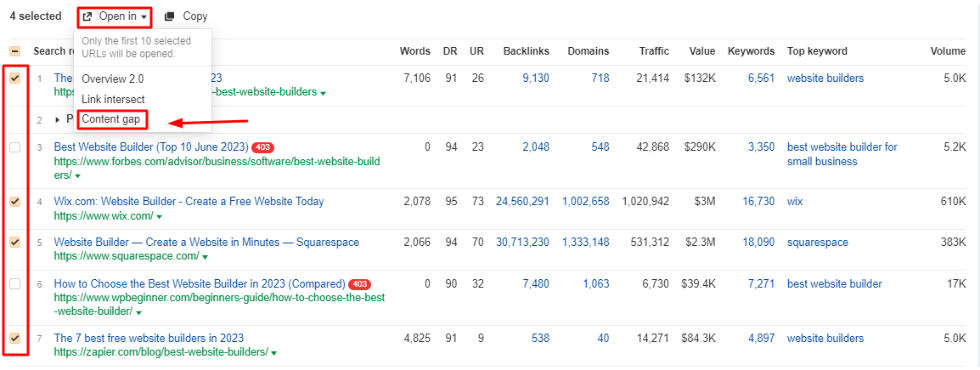
Then, select all the top-ranking pages that are relevant pages to yours and forward them to the Ahrefs Content Gap tool. It would help you with a list of lucrative keywords that your website must be ranking for.
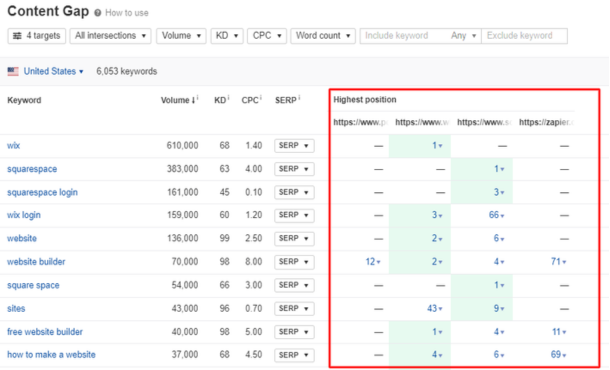
- ### Build Links With The Images
If you have curated unique and informative images for your website like graphs, charts, or infographics, then there is a chance that people are linking to them and not the pages where you have featured them.
To locate and assert ownership of incorrect image attributions, input your website in Site Explorer and navigate to the Backlinks report. Proceed to apply the “Target URL” filter and search for. PNG or. JPG extensions.
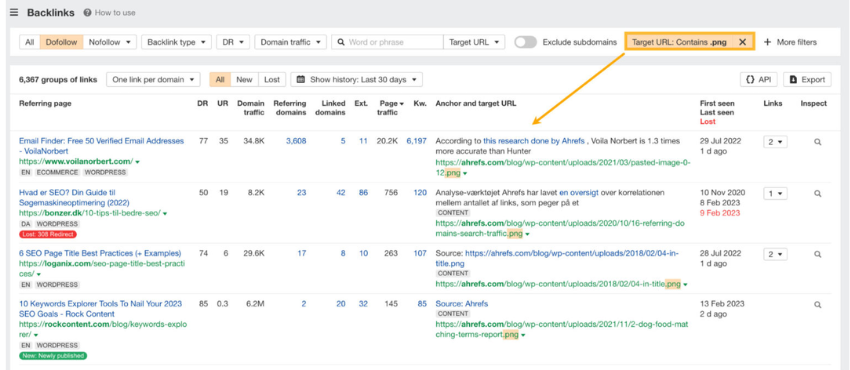
- ### Explore Opportunities For Local Citations
It is an important method to enhance your local SEO. Local citations refer to instances where your business name, address, or phone number is mentioned on popular directories, facilitating the discovery of your business by online searchers.
To uncover these citations, examine the directories where your competitors’ business profiles are featured.
For example, let’s assume you own a clothing company based in Hamilton.
If you are already aware of your competitors (if not, conduct a Google search using your industry followed by your city), access Site Explorer and navigate to the Link Intersect report.
In the top section, input the websites of your competitors, and in the bottom section, input your own website. Adjust the target mode to URL mode since citations typically direct to a homepage.
It will help you know all the websites that link to the competitor’s URLs but not to yours. Mostly, the more targets the referring domains are linking to, the more likely it’s a business directory.
## How To Get The Most With Basic Ahrefs Plan?
Having the tool is not worth it if you don’t know how to use them for your benefit. But worry not, we know exactly you can maximize the use of your Ahrefs subscription.
You can start by learning about its features and then proceed to know about some ways to apply basic tweaks to your marketing strategy. Here is how you can learn –
- ### **Ahrefs Academy**
Do not feel overwhelmed when you don’t know how to crack the Ahrefs tools, instead join the [Ahrefs Academy](https://ahrefs.com/academy). It is a great way to get introduced to the toolset with bite-sized tutorials and more.
- ### **Ahrefs Blog**
If you have time to spare, the [Ahrefs blog](https://ahrefs.com/blog/) section is where you can find in-depth information through discussions and case studies of the practical application of the tool. Once you are all penned up you can apply the strategies to explore their effectiveness.
- ### **Ahrefs Youtube Channel**
If you are not a big fan of reading, then worry not, you can solve your problems with the [Ahrefs YouTube Channel](https://www.youtube.com/c/AhrefsCom). Here you can find step-by-step video tutorials for learning to use the tool effectively.
## Top Ahrefs Alternatives
While Ahrefs is a popular and highly regarded SEO tool, it’s not the only option on the market. Many other SEO tools offer similar features and functionality, making them viable alternatives to Ahrefs.
Whether you’re looking for a free Ahrefs alternative or a more affordable option, a different user interface, or a specific set of features, it’s always a good idea to explore your options and choose the tool that best fits your needs.
| | | |
|---|---|---|
| **Alternatives** | **Best for** | **Pricing** |
| Semrush | Handling your SEO & Marketing Needs | \$1119.95/month |
| SpyFu | Affordable SEO Tool | \$39/month |
| Ubersuggest | Free SEO Tool | Free |
| Serpstat | Growth Hacking Tool | \$69/month |
| Google Search Console | Detailed SEO Reports | Free |
### **Semrush**
Similar to Ahrefs, Semrush offers a suite of tools for SEO, PPC, content marketing, and social media marketing. It includes features like keyword research, backlink analysis, site audit, position tracking, and more. One area where [Semrush](https://www.local.com/marketing-tools/reviews/semrush) differs from Ahrefs is its focus on PPC advertising, with features like ad research, ad builder, and ad management.
### **SpyFu**
SpyFu is a tool that specializes in competitor research and PPC advertising. It provides insights into a competitor’s top organic and paid keywords, ad spend, and ad copy. It also offers keyword research, backlink analysis, and rank tracking.
### **Ubersuggest**
Ubersuggest is a free SEO tool by Neil Patel that offers keyword research, site audit, backlink analysis, content ideas, and rank tracking. While it may not offer as many features as Ahrefs, it’s a great option for those on a tight budget or just starting with SEO.
### **Serpstat**
Serpstat is an all-in-one SEO platform that offers features like keyword research, backlink analysis, rank tracking, site audit, and competitor research. It also includes features for PPC advertising, content marketing, and market intelligence.
### **Google Search Console**
Google Search Console is a free tool offered by Google to help website owners monitor and improve their site’s performance in search results. It provides insights into search queries, traffic, backlinks, crawl errors, and more. While it may not offer as many features as Ahrefs or other paid tools, it’s a valuable resource for any website owner looking to improve their SEO.
## Ahrefs Support
Ahrefs provides dedicated support to assist users with their queries and concerns. Their support team is knowledgeable and responsive, ensuring prompt resolutions to user inquiries.
### **Chatbot**
Ahrefs offers a convenient chatbot feature for quick access to information. Users can engage with the chatbot to get immediate assistance and find relevant resources.
### **Tutorials**
Ahrefs offers comprehensive tutorials to help users maximize the tool’s functionalities. These tutorials cover a wide range of topics, from basic features to advanced techniques. Get access to step-by-step guides and video tutorials to enhance their understanding and skills.
### **Case Studies**
Ahrefs provides case studies showcasing real-world examples of how the tool has been utilized. These case studies highlight successful strategies and outcomes achieved using Ahrefs. Use the insights from these case studies to improve their own digital marketing efforts.
## Conclusion
Ahrefs is a highly recommended SEO tool that provides an extensive range of features to enhance website visibility and performance in search engine rankings. Its standout capabilities include a robust backlink analysis tool, an effective keyword research tool, a comprehensive site audit tool, and an accurate rank-tracking tool. Ahrefs empowers users to track their backlinks, identify broken links, discover new link-building opportunities, uncover high-traffic keywords, assess keyword difficulty and competition, conduct technical health audits, and monitor keyword rankings over time.
However, it is worth noting that Ahrefs is not a magic solution on its own. While it equips users with powerful tools, it remains essential to generate high-quality content and foster relationships with other websites to maximize search engine ranking improvements. While Ahrefs may be relatively expensive for some users and certain features may have a learning curve, its overall value and capabilities make it an indispensable resource for serious website owners and SEO professionals seeking to optimize their online presence.
## Frequently Asked Questions
- ### **What is the Ahrefs Webmaster Tool?**
The Ahrefs Webmaster Tool is a suite of SEO tools designed to help website owners and digital marketers optimize their websites for search engines. It offers features such as keyword research, backlink analysis, content analysis, and site audit, among others.
- ### **How is the Ahrefs Webmaster Tool different from other SEO tools?**
Ahrefs stands out from other SEO tools due to its extensive database of backlinks, which is considered one of the best in the industry. Additionally, it offers a wide range of features that help users with keyword research, site optimization, and link building, among other areas.
- ### **What features does the Ahrefs Webmaster Tool offer?**
The Ahrefs Webmaster Tool offers features such as backlink analysis, keyword research, content analysis, site audit, rank tracking, and competitor analysis, among others.


Ahrefs
[Visit Site](https://www.local.com/marketing-tools/reviews/ahrefs)
## About the writer

Alekh Shah
VIP Contributor, US \| Growth Marketing
#### Follow the author
With over a decade of experience in the digital marketing landscape, Alekh has driven exponential growth for global [Fortune 500](https://fortune.com/fortune500/) brands. He has led dynamic, results-oriented teams to acquire customers across digital channels. He develops strategies that deliver tangible business results. His expertise spans digital marketing, branding, organic growth, partnerships, and campaign management. He stays ahead of emerging marketing trends and technologies.
### Related Reviews
- 
Canva
- 
Hootsuite
- 
Yoast
- 
Semrush
- 
Trello
- [Compare All](https://www.local.com/marketing-tools)
## Top Reads
SEO Tools
[How To Spy Competitor Backlinks?](https://www.local.com/marketing-tools/top-reads/how-to-spy-competitor-backlinks)
SEO Tools
[Surfer SEO vs. Ahrefs – Detailed Comparison (2024)](https://www.local.com/marketing-tools/top-reads/surfer-seo-vs-ahrefs-a-comprehensive-comparison)
SEO Tools
[How to Perform the SEO Audit in Simple Steps?](https://www.local.com/marketing-tools/top-reads/how-to-perform-the-seo-audit-in-simple-steps)
Marketing
[Best Free Backlink Checker & Analysis Tools (2025)](https://www.local.com/marketing-tools/top-reads/free-backlink-checker-tools)
SEO Tools
[Mastering Keyword Research to Boost Your Website’s SEO](https://www.local.com/marketing-tools/top-reads/a-step-by-step-guide-to-keyword-research)
SEO Tools
[Ahrefs vs SpyFu: Which SEO Tool is Better One?](https://www.local.com/marketing-tools/top-reads/spyfu-vs-ahrefs-for-backlink-analysis)
[More Articles](https://www.local.com/marketing-tools/top-reads)
Best Marketing tools \ 2026
- 
Google Ads
Google Ads, formerly known as Google AdWords, is an advertising platform developed by Google that allows businesses to...
[Read Review](https://www.local.com/marketing-tools/reviews/google-ads) [Visit Site](https://www.local.com/marketing-tools/reviews/google-ads)
- 
Hootsuite
In today’s digital age, social media has become crucial to every business’s marketing strategy. With over 4.2...
[Read Review](https://www.local.com/marketing-tools/reviews/hootsuite) [Visit Site](https://www.local.com/marketing-tools/reviews/hootsuite)
- 
Canva
Canva has an extensive library of customizable templates covering a wide range of design categories. It allows users to...
[Read Review](https://www.local.com/marketing-tools/reviews/canva-design) [Visit Site](https://www.local.com/marketing-tools/reviews/canva-design)
- 
Semrush
One unique feature of Semrush is it’s all-in-one digital marketing platform, providing users with a comprehensive...
[Read Review](https://www.local.com/marketing-tools/reviews/semrush) [Visit Site](https://www.local.com/marketing-tools/reviews/semrush)
- 
Google Analytics
Google Analytics has the ability to provide real-time reporting, letting businesses track website traffic and user...
[Read Review](https://www.local.com/marketing-tools/reviews/google-analytics) [Visit Site](https://www.local.com/marketing-tools/reviews/google-analytics)
- 
Yoast
What is Yoast SEO? Yoast is a digital marketing company that offers a range of tools and services designed to help website...
[Read Review](https://www.local.com/marketing-tools/reviews/yoast) [Visit Site](https://www.local.com/marketing-tools/reviews/yoast)
#### Subscribe to receive the latest updates
Subscribe
#### Quick Links
- [Research Methodology](https://www.local.com/research-methodology)
- [Submit A Blog](https://www.local.com/expert-panel)
- [Partner With Us](https://www.local.com/partner-with-us)
- [About Us](https://www.local.com/about-us)
##
This site is designed to help users make informed decisions in the digital space. It features a wide range of product and service insights, with pricing and deals sourced directly from partners - all subject to change without notice. While our content is based on thorough research, it should not be taken as legal or professional advice. Unauthorized reproduction of any content is prohibited. As an Amazon Associate, we may earn commissions from qualifying purchases.
Duplicating any part of the content is strictly prohibited. We also earn a commission as an Amazon Associate for any qualifying purchases made.
#### Categories
- [Research Methodology](https://www.local.com/research-methodology)
- [Submit A Blog](https://www.local.com/expert-panel)
- [Partner With Us](https://www.local.com/partner-with-us)
- [About Us](https://www.local.com/about-us)
Media.net Advertising FZ-LLC
2701 Aurora Tower, Dubai Media City
Dubai 215028, UAE
© Local.com 2026. All rights reserved
- [Privacy Policy](https://www.local.com/privacy-policy)
- [Terms of Use](https://www.local.com/terms-of-use)
About cookies on this site
We use cookies to collect and analyse information on site performance and usage and to enhance and customise content and advertisements. By clicking Accept or by clicking on any content on this site, you agree to allow cookies to be placed. Click on our [Privacy Policy](https://www.local.com/privacy-policy/) page to understand what kind of data we collect and what we use it for.
Accept
Reject | |||||||||
| Readable Markdown | Ahrefs is a popular SEO toolset provider that helps website owners and SEO professionals to monitor and optimize their website’s search engine visibility and performance. For that reason, Ahrefs crawls the entire web, stores tons of your data, and makes it accessible to users via an easy user interface.
## Performance at Glance
When it comes to choosing an SEO tool, performance is a key factor to consider. You want a tool that is easy to use, offers a wide range of features, provides accurate data, and delivers value for money. Ahrefs is a popular SEO tool that has gained a strong reputation in the [Digital marketing tools](https://www.local.com/marketing-tools/) space due to its high performance and advanced features. In this section, we will examine Ahrefs’ performance in terms of ease of use, ease of setup, value for money, features, support, and G2 rating. By the end of this section, you will have a better understanding of Ahrefs’ overall performance and whether it’s the right tool for your SEO needs. If you’re looking to try Ahrefs but don’t want to pay, you can check out this guide on how to get a [free Ahrefs premium account](https://www.local.com/marketing-tools/top-reads/how-to-get-ahrefs-premium-accounts-free).
| | | |
|---|---|---|
| **Specifications** | **Ahrefs Star Rating at Glance** | **Our Verdict** |
| Ease of Use |  | Ahrefs' user-friendly interface makes it easy to navigate and use. |
| Ease of Setup |  | Ahrefs' straightforward setup process means you can get started quickly. |
| Value for Money |  | Ahrefs offers competitive pricing and a range of features that provide excellent value for money. |
| Features |  | Ahrefs offers a comprehensive suite of features that cover all aspects of SEO. |
| Support |  | Ahrefs provides top-notch customer support, with a dedicated team ready to assist you. |
| G2 Rating |  | Ahrefs has earned high ratings on G2, a leading software review platform, indicating its strong performance and customer satisfaction. |
## Ahrefs Dashboard
The Dashboard is the central hub to check all of your projects. Here, you can get a quick overview of the crucial metrics of all of your projects. The metrics on the Dashboard are taken from several tools like Site Explorer, Rank Tracker, and Site Audit. The update frequency of the Site Explorer metrics is updated every 12 hours, while the metrics from the Rank Tracker and the Site Audit are mostly based on the last crawl or the update.

### **Google Search Console Performance**
If you have connected your Google account with the Ahrefs account, you will get access to the GSC data on the dashboards.
- Click on the “GSC performance” tab.
- Use filters to narrow down the data you want to check. For instance, you can filter out the project’s detailed view of organic traffic based on a monthly or weekly basis.

**NOTE –** Google Search Console (GSC) displays data for a maximum of 16 months. However, if you connect your GSC account to Ahrefs, you can access and view data beyond that time frame, as Ahrefs stores and presents data for a longer duration.
You can even change the way your graph appears on the dashboard.
### **Track Unlimited Number Of Projects**
As long as you can confirm your ownership, you can include a comprehensive list of the projects you require.
You have the option to select from various verification methods or effortlessly import all your properties by connecting your Google Search Console.
### **Disavow URLs**
Upon accessing this feature, you will be directed to our “Disavowed Links” tool. Here, you can either upload a disavowed links file or manually add the specific links you wish to disavow.

This tool will conceal the disavowed links in the backlinks and refer to domain reports related to the target project domain. It’s important to note that this function does not imply that we will submit the links for disavowal on your behalf. You will need to perform this action manually using Google’s Disavow tool.
To accomplish this, simply click on the export option, which will enable you to download a properly formatted .txt file. You can then proceed to directly upload this file to Google.
### **Organize Projects With Folders**
Organize your projects into folders, enhancing their accessibility and facilitating sharing. You can selectively grant access to specific folders for particular team members while excluding others.
### **Highlight Your Important Project**
You can add stars to your project, which marks it as an important one. If you want a filter for just your favorite projects, you can access them by turning on the “Starred” toggle on the upper right corner of the dashboard.

### **Quick Alerts**
Get emails whenever your project has new/lost backlinks, new keywords, Rank Tracker updates or Site Audit crawls, generating alerts. You can get alerts or notifications by turning on the Email Alerts button available on the vertical ellipsis in the right corner of each project.

### **Filters**
You can use filters to re-align the projects based on their name (A-Z or Z-A) or date (New – Old or Old – New). It helps in keeping a tab on every project at your convenience.

### **Hide Projects**
Ahrefs offers you the ability to hide the project that you may not wish to see on your dashboard at the moment. For this, you need to click on the vertical ellipsis of that project and select Hide.
### **Unhide Projects**
If you want to access any of your hidden projects, you can do that by clicking on the Hidden Projects column in the “My Projects” dropdown.
## How To Set Up Projects In Ahrefs?
If you are using Ahrefs tools for the very first time, then it is something that you will immediately see after logging in. Once you have logged in, here is a step by step information on how you can manually set up projects:
### **Step 1: Start By Adding The URL Or The Domain Of The Project**
- If you are using the tool for the first time then simply clicking on “Add Project” would be enough.
- You can simply add a new project by clicking on the “Create” button and then “New Project” from the drop-down on the left corner of the dashboard.

### **Step 2: Determine The Protocol, Project Name, And The Mode**
- Mention the domain or the specified URL in the desired section.
- Then, do not forget to select a suitable protocol or mode, as an unsuitable protocol command can result in varied results.
- Although the project name would automatically generate for you from the title tag of the URL, you are free to make amendments.
- You can create a folder for your project and add it as per your needs (optional).
- Here, you can even decide who can access your project.

### **Step 3: Verifying Ownership**
It is a skippable step that just ensures that you have [verified ownership](https://help.ahrefs.com/en/articles/4321336-what-is-a-verified-project) of the website. It enables a quick crawling session for Site Audit.
### **Step 4: Auditing: Schedule Audits, URL Sources & Crawl Settings**
#### **Schedule**
You can customize each section of the schedule page as per your requirements. For instance, you can change the crawling frequency to monthly, weekly, or daily basis along with the date, day, and time.

#### **URL Sources**
In this section, you can make the URL sources to start the crawling of your website. However, if you are unsure about what to choose, leave the default settings.

#### **Crawl Setting**
Here you can make changes in the crawl speed settings and much more. But if you are unsure about what steps to take then you can leave the default settings to work for you.

### **Step 5: Keyword Tracking**
Add the keywords that you want to track along with the location(s) where you wish to track those keywords and Voila\!
The keywords will directly be added to the Rank Tracker tool for tracking how well it lets your website rank in the organic search results. You will get regular reports of the ranking in your email.
**NOTE –** You can manually upload the keywords or place the CSV or TXT file in the specified section.

### **Step 6: Add Competitors**
Here you can add the list of the competitors that you wish to analyze in comparison to your website’s previous set of keywords. You can either pick a few of them from the pre-populated list or mention them manually.
The list of the competitors along with keywords will be added to the Rank Tracker Tool for overall tracking of your website’s organic SERPs ranking.

That’s it, now you are ready to track progress, stagnation, or loss of the ranking of your website. To do this, you can use the following features:
- **Backlink Profile:** To Check All The Backlinks To Your Website
- **Organic Search:** To Know How Your Website Is Performing In organic Search
- **Outgoing Links:** Links That Your Website Points To Other Websites
- **Paid Search:** To Know How Your Site Is Performing In Paid Search
Ultimately, you can export your data so that you can analyze it in other software.
By using these features, you can track the progress of your website’s ranking and make adjustments to your SEO strategy as needed. This will help you improve your website’s ranking and drive more traffic to your website.
## Significant Features of Ahrefs Webmaster Tool
Let’s see what is inside the [Ahref webmaster tool](https://ahrefs.com/webmaster-tools) and how to use it to run content marketing for your website:
### **Site Explorer**
Site Explorer is the Ahrefs feature that gives a basic overview of the SEO quality of any website. It includes how highly a website ranks for certain phrases, a rough estimation of how much search traffic it gets, and much more. In short, it is the dashboard that lets you understand where your or your competitors’ domain could require some SEO improvements.

It is basically the cumulation of the two major features of backlinks and organic traffic. So let’s break down each of these features separately.
#### **Backlink Profile**
It showcases the website’s complete backlink profile. However, the report is not similar to most of the backlink checkers in the market like Moz Pro or SEMrush. But the question is what makes Ahrefs different from the rest of the backlink checkers?

- ##### **It has great filtering and sorting features.**
For instance, if you only want a list of the links from the sites with higher Domain Rating or high URL Ratings, you can easily do that. In some cases, if you just want to see the no-follow links, you can do that too in Ahrefs.

- ##### **Its Index is huge**
The other strong point about Ahrefs is that its index is huge and advanced. In short, you may not have to worry about finding outdated linking data. As a matter of fact, Ahrefs crawler is the second most efficient after Google.
Overall, Ahrefs’ backlink profiling is a major strength of the tool – Easy to use, Regularly updated, and with filters to exactly what you need.
#### **Organic Search**
This feature allows you to identify the keywords that your competitors are using to rank well in search engine results pages (SERPs). This report can vary from someone’s Google Search Console data. However, Ahrefs results are pretty close to it. Ahrefs excels in discovering a site’s ranking keywords and estimating their corresponding search traffic. Similar to their backlinks tool, the true power of this tool lies in its sorting and filtering capabilities.
Ahrefs states that Google currently ranks for 57.7 million keywords. It is truly insane\!

Now the question is how to make true sense of this list. It is where – Filters come into the picture.

You can filter out the keywords based on their difficulty level, ranking in the Featured Snippet spot, and much more. In short, the filtered-out set of keywords can help you work more efficiently.
There are a few secondary features inside Organic Search –
- **Top Pages:** Suggests pages that bring about the most organic traffic on a site.
- **Competing Domains: This shows** you a website’s main SEO competitors.
### **Content Explorer**
Content Explorer is a powerful tool that allows you to find content ideas, research your competitors, and track your content performance. It has a database of over 13 billion web pages, which means you can find content on any topic.
#### **How Does It Benefit?**
- ##### **Find content ideas:**
You can use Content Explorer to find content ideas by keyword, topic, or domain. You can also use it to find content that is performing well in search engines.
- ##### **Research your competitors:**
You can use Content Explorer to research your competitors by keyword, topic, or domain. You can see what content they are ranking well for, and you can use this information to improve your own content strategy.
- ##### **Track your content performance:**
You can use Content Explorer to track the performance of your content by keyword, topic, or domain. You can see how much traffic your content is getting, and you can see how it is ranking in search engines.
#### **How To Use It?**
Here are a few tips to use Ahrefs Content Explorer:

- ##### **Use the filters to narrow down your results:**
The filters in Content Explorer allow you to narrow down your results by keyword, topic, domain, and other criteria. This can help you to find the most relevant content.
- ##### **Use the metrics to evaluate the content:**
Content Explorer provides a variety of metrics that you can use to evaluate the content. These metrics include organic traffic, backlinks, and social shares.
- ##### **Use the data to improve your content strategy:**
The data that you collect from Content Explorer can be used to improve your content strategy. You can use this data to find new topics to write about, improve your writing style, and promote your content.
Overall, Content Explorer is a powerful tool that can help you with all aspects of your content marketing. If you are serious about creating high-quality content that drives traffic to your website, then you should definitely use Ahrefs Content Explorer.
### **Keywords Explorer**
The Ahrefs Keyword Explorer is not limited to Google, unlike many other keyword search tools. It allows you to spread your arms and analyze keywords on Amazon, Bing, Yandex, and Youtube.
The keyword search report shows you the following metrics in a single report search volume, competition, CPC, CTR, SERP position history, and more. These features can help you decide between a set of different keywords. And the best part is that Ahrefs is excellent when it comes to analyzing a specific search term.

However, there is a drawback that Ahrefs is not so great at coming up with new ideas for keywords. It may offer the maximum number of keywords than any other explorer but many times the keywords are not relevant to the searched query.
### **Rank Tracker**
Ahrefs’ rank tracking tool functions similarly to others in the market. You input a set of keywords and observe their rankings on Google while also monitoring changes over time. However, there is an issue.
Unlike the majority of rank trackers, this tool does not provide daily updates. The frequency of ranking updates varies depending on the selected plan.
For instance, with Ahrefs Lite, keyword rankings are updated only once a week. This might not be problematic if SEO is not a significant aspect of your site’s digital marketing strategy, as checking rankings weekly may suffice.

But for SEO professionals, it is crucial to stay constantly informed about rankings. Imagine receiving a call from a client asking about the day’s ranking changes. In such cases, a tool that offers real-time updates becomes essential.
Regrettably, Ahrefs does not offer daily updates; the most frequent option is “every 3 days” for their higher-tier plans.
### **Site Audit**
Similar to other audit tools, Ahrefs provides your website with a comprehensive “health score.” It highlights common technical SEO problems such as duplicate meta tags, broken redirects, and more. Overall, this tool is highly reliable for conducting SEO site audits, making it user-friendly for beginners to identify necessary actions.
#### **How To Perform Site Audit In Ahrefs**
Here are the steps on how to perform a site audit in Ahrefs:
- **Sign up for an Ahrefs account.** You can sign up for a free trial or a paid subscription.
- **Add your website to Ahrefs.** You can do this by entering your website’s URL in the search bar and clicking on the “Add Site” button.
- **Run a site audit.** To run a site audit, click on the “Site Audit” tab and then click on the “Run Audit” button.
- **Review the audit report.** The audit report will show you a list of all the issues that were found on your website.
- **Fix the issues.** Once you have reviewed the audit report, you can fix the issues that were found.

#### **Things To Check For In The Site Audit:**
Here are some of the things that you can check for in your site audit:
- ##### **Technical SEO issues:**
These are issues that can affect your website’s ranking in search engines. For example, you may have broken links, duplicate content, or slow loading times.
- ##### **On-page SEO issues:**
These are issues that affect the relevance of your website’s content to search engine users. For example, you may not be using the right keywords or your content may not be well-written.

- ##### **Off-page SEO issues:**
These are issues that affect the authority of your website. For example, you may not have enough backlinks, or your backlinks may be from low-quality websites.
By fixing the issues that were found in your site audit, you can improve your website’s ranking in search engines and drive more traffic to your website.
## Unique Features of Ahrefs
- ### **Batch Analysis**
Batch Analysis is a tool that easily pulls out Ahrefs’ backlink metrics for up to 200 individual URLs. You just need to copy-paste your list of URLs and the bulk backlink checker will generate a complete report with the SEO metrics:
1\. Ahrefs Rank
2. Domain Rating
3. Number Of Referring Domains
4. Number Of Backlinks
5. Social Metrics
You can work with the report in the browser window or export the data directly into a CSV file. Then, finally plug it into the analysis tool of your preference.

- ### **Link Intersect**
With the link intersect feature, you can find the sites that are linked to your competitors but not to your website. You can even uncover linking patterns with link interest features. It lets you discover who all are frequently linking to your competitors.

- ### **Best By Links**
The Best By Links report shows which pages on a target website, subdomain, or subfolder have the maximum backlinks (both internal and external) pointing out to them.
Using this report, you can take the following actions:
1. See competitors’ most linked-to pages
2. Find broken link-building opportunities
3. Find and fix broken pages on your site
4. Find dead or no-follow internal links
5. Add internal links from “power” pages to boost other pages

- ### **SEO Toolbar Extension**
The SEO toolbar extension allows a user to get the most of the SEO metrics of any page or website you want right in your web browser. The toolbar gives you instant access to the following metrics:
1. Domain Rating
2. URL Rating
3. Estimated Organic Search Traffic
4. Number of ranking keywords
5. Number of referring domains
6. Number of backlinks
Additionally, Ahrefs SEO Toolbar shows you the most crucial keyword metrics right on the SERP including, Search volume (both Global and Country-specific), Keyword Difficulty, Clicks, and Cost per Click.

- ### **API Access**
Ahrefs’ This feature is designed to empower the users to use data from Ahrefs Index in the most compatible and tailored way to suit users’ needs. The URL Profiler can access the Ahrefs API to rapidly extract link metric data including the Domain Rank and Backlink Data.
## Ahrefs Best Features
- ### **Cool UX & UI**
Similar to any tool, there may be a slight learning curve when initially using Ahrefs. However, once you become familiar with its functionalities, it becomes remarkably effortless to locate the information you seek. In fact, it typically requires just a click or two to access the desired data. For instance, if you wish to examine the breakdown of a site’s [anchor text](https://ahrefs.com/blog/anchor-text/), you can easily navigate to the corresponding report directly from the sidebar. And the same is top pages, referring domains, broken links, and much more.
- ### **Site Audit Feature**
The Ahrefs site audit tool is widely regarded as one of the top-performing options available in its category. In fact, it is often considered comparable to specialized tools that specifically focus on conducting site audits.

- ### **Content Gap**
Ahrefs’ Content Gap is one such brilliant feature that automates a procedure that was originally accessible only to advanced users of Excel. It works on a very simple principle:
It takes all the keywords that your competitors rank for in the search results and then subtracts the keywords that your own website ranks for. Eventually, you get a list of the keywords that you should focus on. The tool allows you to do the same process with a bunch of competitors altogether, giving you a massive list of keywords that you must target further. The content gap analysis is therefore, by far the most quick way to find plenty of great keywords that your website must rank for.

## Ahrefs Worst Features
- ### **Limitation of Rank Tracking**
Unlike most of the other rank trackers, Ahrefs rank tracker does not update every day. It varies on the subscription plan you choose. For example, with Ahrefs Lite, your keyword ranking is updated just once a week. This updating frequency is obviously not good. That’s not good.
If SEO is not a big part of your digital marketing strategy, then it may not be a big deal. However, if you’re an SEO pro, you need to stay up to date with the rankings. But, unfortunately, Ahrefs doesn’t offer daily updates. The best it offers is an update after “every 3 days” that too with their higher-tier plans.
- ### **Limited PPC Features**
Overall, Ahrefs is a great SEO tool, but its PPC features are limited. If you are looking for a tool that can provide comprehensive PPC tracking and analysis, Ahrefs is not the best option. It only tracks a limited number of PPC keywords, does not offer real-time tracking of PPC campaigns and finally, does not provide as many insights into PPC campaign performance as other PPC tools. This can make it difficult to understand what is working and what is not, and to make necessary changes to improve performance.
- ### **Backlink Index Updates**
Our index undergoes partial updates every 15 minutes. The term “partially” is used here because it is impossible for the crawler to explore the entire Internet in a single second. However, at regular intervals, usually every couple of minutes, it examines a portion of the Internet, and the outcomes are promptly accessible for verification in the database. The complete update of the database, which is of the entire Internet, requires approximately two months. During this period, certain pages will receive multiple updates, while others will only be updated once, depending on their rating.
- ### **Limited Social Media Monitoring**
Ahrefs is a powerful SEO tool that offers a wide range of features, but one area where it falls short is social media monitoring. The tool’s social media monitoring features are limited, and it does not offer the same level of detail or insights as other social media monitoring tools. This can be a major drawback for businesses that rely on social media for marketing and customer engagement.
- ### **Irrelevant Keyword Suggestions**
Ahrefs often suggests keywords that are not relevant to the user’s search intent, which can lead to wasted time and effort. There are a few reasons why Ahrefs’ keyword suggestions are often irrelevant. First, the tool uses a keyword difficulty score to rank keywords, but this score does not take into account the user’s search intent. Second, the tool does not filter out keywords that are too competitive or that have low search volume. As a result, users of Ahrefs can easily end up wasting time and effort on keywords that are not relevant to their target audience or that are too difficult to rank for.
## How To Spy Competitor Backlinks With Ahrefs?
Getting an insight into the competitor’s marketing activities is crucial if you wish to beat them. But the question is – How exactly can you spy on the activities of your competitors? The answer is pretty simple – Use of Ahrefs tool.
Here are several activities that you can perform using Ahrefs’ tools. Let’s have a look:
- ### **Ahrefs Alerts**
With Ahrefs Alerts, you can get notified when your competitors experience the following:
#### **1\. Get Or Lose A Backlink**
It is a great way to keep track of your link-building activities.
#### **2\. Gets A Web Mention**
It will help you learn what people may have to say about you or your competitors. You can use the collective information to your advantage. Besides reviews, you can also set this alert for any keyword which is relevant to your business so that you know about the things which are yet unknown to you.
#### **3\. New Keyword**
With its extensive keyword database, Ahrefs has the capability to monitor your rankings across millions of keywords. It diligently keeps track of any significant fluctuations in the positions of these keywords and promptly notifies you of these changes.
- ### **Link Intersect**
With the link intersect feature, you can be aware of the following updates from your competitors:
#### **1\. Discover your missing link opportunities**
If a website links to all of your competitors, there’s a good chance they may also link to you once they discover your presence. Ahrefs’ Link Intersect tool helps you identify these websites that currently link to your competitors but haven’t linked to you yet.
#### **2\. Uncover linking patterns**
Frequently, your competitors have dedicated supporters who consistently link to their new products and content. You can effortlessly identify these loyal linkers by using this approach.
- ### **Find Broken Links of Competitors**
With alerts or notifications, you can stay aware if you have any broken inbound or outbound link. Let’s know more:
#### **1\. No More Broken Links**
With a quick glance, you can identify all broken links on your website. Organize and filter the list to prioritize necessary fixes. By enabling alerts, you can detect and address new broken links promptly, safeguarding your SEO performance.
#### 2\. **Unbreak Any Broken Page On Your Site**
Take a look at the pages on your website that have the most links but are no longer active. Restore or redirect these pages to appropriate alternatives to regain their “link equity” and potentially enhance your rankings.
#### **3\. Find And Fix Broken Redirects**
Review any domains that you don’t remember linking to; they might have been redirected. Remove or replace these links for a better user experience and to avoid linking to harmful websites that could negatively impact your SEO.
#### **4\. Set Up Regular Scans To Find Newly Broken Links**
Perform crawls on a daily, weekly, or monthly basis to identify both internal and external dead links. Compare the number of issues across crawls to monitor your progress.

- ### **Basic Backlink Audit**
A basic backlink audit lets you see how your competitor is building backlinks and to identify any potential opportunities for improvement. Here are added benefits of backlink auditing:
#### **1\. Identify backlink opportunities:**
By analyzing your competitor’s backlink profile, you can identify websites that are linking to your competitors but not to you. These websites could be potential targets for your own link-building efforts.
#### **2\. Improve your website’s ranking:**
By improving the quality and quantity of your backlinks, you can improve your website’s ranking in search engines.
#### **3\. Protect your website from penalties:**
By disavowing any spammy or low-quality backlinks, you can protect your website from penalties from Google.


## Ahrefs Use Cases for Beginners
Ahrefs offers a wide range of tools and features that can significantly enhance your SEO and marketing endeavors. However, for individuals who are new to the field, our SEO platform might initially appear overwhelming.
If you are unfamiliar with SEO tools like Ahrefs, here is a list of simple and highly practical use cases that you can immediately try out. By implementing these strategies, you can quickly derive value from the platform. Here is the compilation of the recommended use cases:
- ### Monitor Your Ranking Progress For Thousands Of Keywords
Your website, despite being relatively new, is likely to have achieved rankings for numerous keywords in Google. While it may not appear on the first page of search results, there are nine additional pages where it could potentially be found. By utilizing the Organic keywords report in Site Explorer, you can obtain comprehensive information about the keywords for which your website is ranking in Google. Moreover, if you have a list of crucial keywords that require close monitoring, you can include them in Ahrefs’ Rank Tracker.

- ### Find Plenty Of Quality Link Prospects In Seconds
Imagine you are involved in SEO for a communication app. Wouldn’t it be highly advantageous to obtain a comprehensive list of websites that have mentioned the term “communication app” within their content? This information would enable you to initiate outreach efforts and potentially secure valuable backlinks from these websites, correct?
Fortunately, Ahrefs’ Content Explorer precisely caters to this requirement. By simply conducting a search for “communication app,” you will be presented with a vast collection of thousands of pages that include this specific phrase in their content.
Now, it is understandable that you may not need such an extensive list. However, there’s no need to worry. Content Explorer offers a range of powerful filters that allow you to refine the results and narrow down the selection to only the most relevant and valuable pages.
- Domain rating: 40 to 90
- Website traffic: From 1k
- Language: English
- Exclude subdomains
- Exclude homepages
- One page per domain
- Filter explicit results
By applying these settings, you can narrow down the extensive list to a more manageable one with limited pages. Furthermore, if you find it necessary to reduce your list of potential link prospects even further, you can always refine your filters to achieve that.
- ### Study About What People Are Currently Searching For In Google
To enhance your website’s traffic from Google, it is crucial to analyze the trending searches within your industry. This practice ensures that your content aligns with the interests of a large audience. In the realm of SEO, this process is commonly known as keyword research. Ahrefs’ Keywords Explorer empowers you to assess the popularity of any search query and enables you to uncover a multitude of relevant keywords that you can potentially focus on.

- ### Find How Much Traffic Your Competitors Are Getting
Every business owner seeks insights into the performance of their competitors. You may want to understand whether their competitors are attracting more traffic, experiencing growth, or reaching a saturation point. You can also find out if they can surpass their competitors at their current growth rate or if they need to intensify their efforts.
Ahrefs’ Site Explorer is a valuable tool that addresses these questions by providing information about the search traffic volume of your competitors. It enables you to compare your own search traffic with that of your competitors, allowing for benchmarking.

However, it is important to note two significant considerations. Firstly, Ahrefs solely reports the search traffic of a website and does not include metrics for direct traffic, referral traffic, or traffic from social networks. Secondly, the traffic numbers provided by Ahrefs are estimates and may deviate from the actual figures observed in your Google Search Console. It is essential to recognize that this discrepancy remains consistent for all websites within a specific industry or niche.
- ### Evaluate The Ranking Matter Of Any Keyword
Determining the relative difficulty of ranking for different keywords can be a challenging task. While certain keywords can be effortlessly ranked, others may seem unattainable, even for established and authoritative websites. However, there are ways to assess the competitiveness of keywords.
Ahrefs’ Keywords Explorer offers a useful metric known as the Keyword Difficulty (KD) score. This score assigns a value between 0 and 100 to each keyword, with higher scores indicating greater difficulty in achieving a high ranking for that keyword. The KD metric provided by Ahrefs proves to be highly valuable when sifting through a vast array of keyword ideas and identifying the easily attainable opportunities, often referred to as “low-hanging fruit.”
## Ahrefs Hacks For E-commerce Sites
Even if you are well-acquainted with Ahrefs, it is likely that you only utilize a couple of tools regularly. However, there are several additional tools that you may be unaware of and consequently miss out on their benefits.
To assist you in maximizing the potential of Ahrefs, here is a list of five lesser-known use cases that can instantly enhance your SEO endeavors.
- ### Find Low Competitive Topics With High Traffic Potential
Having to find a low competitive topic with high-traffic potential is a dream of every content marketer. But the question is, how can you discover it?
With Ahrefs’ Content Explorer, it is possible.
Just search for the broader topics and then apply the following filter –
**Referring domains:** Up to 5
**Page traffic:** At least 1,000
Now you are eligible to find a list of relevant topics that have the capability to get a lot of organic traffic and rank in SERPs.

You can dig further and find out the keywords that can drive organic traffic\!
- ### Find Resource Pages To Get Featured On
Resource Page Link Building is still quite a popular link-building tactic because of its scalability. It lets you acquire backlinks from web pages that curate useful industry resources. For the same reason, it is best to find out what resource pages your competitor has links to.
- ### Find Missed Keyword Opportunities
Missed keyword opportunities are basically those keywords that other e-commerce websites rank for, but you don’t. Thus, to increase your chances of ranking higher, all you have to do is to close the content gap between you and the ranking pages of your competitors.

For achieving ultimate results, use Ahrefs Keyword Explorer to search for a keyword that you are not already using to rank in the SERPs. For example, let’s take “best website builders”.

Then, select all the top-ranking pages that are relevant pages to yours and forward them to the Ahrefs Content Gap tool. It would help you with a list of lucrative keywords that your website must be ranking for.

- ### Build Links With The Images
If you have curated unique and informative images for your website like graphs, charts, or infographics, then there is a chance that people are linking to them and not the pages where you have featured them.
To locate and assert ownership of incorrect image attributions, input your website in Site Explorer and navigate to the Backlinks report. Proceed to apply the “Target URL” filter and search for. PNG or. JPG extensions.

- ### Explore Opportunities For Local Citations
It is an important method to enhance your local SEO. Local citations refer to instances where your business name, address, or phone number is mentioned on popular directories, facilitating the discovery of your business by online searchers.
To uncover these citations, examine the directories where your competitors’ business profiles are featured.
For example, let’s assume you own a clothing company based in Hamilton.
If you are already aware of your competitors (if not, conduct a Google search using your industry followed by your city), access Site Explorer and navigate to the Link Intersect report.
In the top section, input the websites of your competitors, and in the bottom section, input your own website. Adjust the target mode to URL mode since citations typically direct to a homepage.
It will help you know all the websites that link to the competitor’s URLs but not to yours. Mostly, the more targets the referring domains are linking to, the more likely it’s a business directory.
## How To Get The Most With Basic Ahrefs Plan?
Having the tool is not worth it if you don’t know how to use them for your benefit. But worry not, we know exactly you can maximize the use of your Ahrefs subscription.
You can start by learning about its features and then proceed to know about some ways to apply basic tweaks to your marketing strategy. Here is how you can learn –
- ### **Ahrefs Academy**
Do not feel overwhelmed when you don’t know how to crack the Ahrefs tools, instead join the [Ahrefs Academy](https://ahrefs.com/academy). It is a great way to get introduced to the toolset with bite-sized tutorials and more.
- ### **Ahrefs Blog**
If you have time to spare, the [Ahrefs blog](https://ahrefs.com/blog/) section is where you can find in-depth information through discussions and case studies of the practical application of the tool. Once you are all penned up you can apply the strategies to explore their effectiveness.
- ### **Ahrefs Youtube Channel**
If you are not a big fan of reading, then worry not, you can solve your problems with the [Ahrefs YouTube Channel](https://www.youtube.com/c/AhrefsCom). Here you can find step-by-step video tutorials for learning to use the tool effectively.
## Top Ahrefs Alternatives
While Ahrefs is a popular and highly regarded SEO tool, it’s not the only option on the market. Many other SEO tools offer similar features and functionality, making them viable alternatives to Ahrefs.
Whether you’re looking for a free Ahrefs alternative or a more affordable option, a different user interface, or a specific set of features, it’s always a good idea to explore your options and choose the tool that best fits your needs.
| | | |
|---|---|---|
| **Alternatives** | **Best for** | **Pricing** |
| Semrush | Handling your SEO & Marketing Needs | \$1119.95/month |
| SpyFu | Affordable SEO Tool | \$39/month |
| Ubersuggest | Free SEO Tool | Free |
| Serpstat | Growth Hacking Tool | \$69/month |
| Google Search Console | Detailed SEO Reports | Free |
### **Semrush**
Similar to Ahrefs, Semrush offers a suite of tools for SEO, PPC, content marketing, and social media marketing. It includes features like keyword research, backlink analysis, site audit, position tracking, and more. One area where [Semrush](https://www.local.com/marketing-tools/reviews/semrush) differs from Ahrefs is its focus on PPC advertising, with features like ad research, ad builder, and ad management.
### **SpyFu**
SpyFu is a tool that specializes in competitor research and PPC advertising. It provides insights into a competitor’s top organic and paid keywords, ad spend, and ad copy. It also offers keyword research, backlink analysis, and rank tracking.
### **Ubersuggest**
Ubersuggest is a free SEO tool by Neil Patel that offers keyword research, site audit, backlink analysis, content ideas, and rank tracking. While it may not offer as many features as Ahrefs, it’s a great option for those on a tight budget or just starting with SEO.
### **Serpstat**
Serpstat is an all-in-one SEO platform that offers features like keyword research, backlink analysis, rank tracking, site audit, and competitor research. It also includes features for PPC advertising, content marketing, and market intelligence.
### **Google Search Console**
Google Search Console is a free tool offered by Google to help website owners monitor and improve their site’s performance in search results. It provides insights into search queries, traffic, backlinks, crawl errors, and more. While it may not offer as many features as Ahrefs or other paid tools, it’s a valuable resource for any website owner looking to improve their SEO.
## Ahrefs Support
Ahrefs provides dedicated support to assist users with their queries and concerns. Their support team is knowledgeable and responsive, ensuring prompt resolutions to user inquiries.
### **Chatbot**
Ahrefs offers a convenient chatbot feature for quick access to information. Users can engage with the chatbot to get immediate assistance and find relevant resources.
### **Tutorials**
Ahrefs offers comprehensive tutorials to help users maximize the tool’s functionalities. These tutorials cover a wide range of topics, from basic features to advanced techniques. Get access to step-by-step guides and video tutorials to enhance their understanding and skills.
### **Case Studies**
Ahrefs provides case studies showcasing real-world examples of how the tool has been utilized. These case studies highlight successful strategies and outcomes achieved using Ahrefs. Use the insights from these case studies to improve their own digital marketing efforts.
## Conclusion
Ahrefs is a highly recommended SEO tool that provides an extensive range of features to enhance website visibility and performance in search engine rankings. Its standout capabilities include a robust backlink analysis tool, an effective keyword research tool, a comprehensive site audit tool, and an accurate rank-tracking tool. Ahrefs empowers users to track their backlinks, identify broken links, discover new link-building opportunities, uncover high-traffic keywords, assess keyword difficulty and competition, conduct technical health audits, and monitor keyword rankings over time.
However, it is worth noting that Ahrefs is not a magic solution on its own. While it equips users with powerful tools, it remains essential to generate high-quality content and foster relationships with other websites to maximize search engine ranking improvements. While Ahrefs may be relatively expensive for some users and certain features may have a learning curve, its overall value and capabilities make it an indispensable resource for serious website owners and SEO professionals seeking to optimize their online presence.
## Frequently Asked Questions
- ### **What is the Ahrefs Webmaster Tool?**
The Ahrefs Webmaster Tool is a suite of SEO tools designed to help website owners and digital marketers optimize their websites for search engines. It offers features such as keyword research, backlink analysis, content analysis, and site audit, among others.
- ### **How is the Ahrefs Webmaster Tool different from other SEO tools?**
Ahrefs stands out from other SEO tools due to its extensive database of backlinks, which is considered one of the best in the industry. Additionally, it offers a wide range of features that help users with keyword research, site optimization, and link building, among other areas.
- ### **What features does the Ahrefs Webmaster Tool offer?**
The Ahrefs Webmaster Tool offers features such as backlink analysis, keyword research, content analysis, site audit, rank tracking, and competitor analysis, among others. | |||||||||
| ML Classification | ||||||||||
| ML Categories |
Raw JSON{
"/Internet_and_Telecom": 957,
"/Internet_and_Telecom/Web_Services": 925,
"/Internet_and_Telecom/Web_Services/Search_Engine_Optimization_and_Marketing": 907
} | |||||||||
| ML Page Types |
Raw JSON{
"/Article": 999,
"/Article/Product_or_Brand_Review": 983
} | |||||||||
| ML Intent Types |
Raw JSON{
"Informational": 870,
"Commercial": 372
} | |||||||||
| Content Metadata | ||||||||||
| Language | en-us | |||||||||
| Author | Alekh Shah | |||||||||
| Publish Time | 2023-12-20 12:30:28 (2 years ago) | |||||||||
| Original Publish Time | 2023-12-20 12:30:28 (2 years ago) | |||||||||
| Republished | No | |||||||||
| Word Count (Total) | 7,952 | |||||||||
| Word Count (Content) | 6,905 | |||||||||
| Links | ||||||||||
| External Links | 11 | |||||||||
| Internal Links | 46 | |||||||||
| Technical SEO | ||||||||||
| Meta Nofollow | No | |||||||||
| Meta Noarchive | No | |||||||||
| JS Rendered | No | |||||||||
| Redirect Target | null | |||||||||
| Performance | ||||||||||
| Download Time (ms) | 339 | |||||||||
| TTFB (ms) | 325 | |||||||||
| Download Size (bytes) | 51,566 | |||||||||
| Shard | 130 (laksa) | |||||||||
| Root Hash | 2977592167851536130 | |||||||||
| Unparsed URL | com,local!www,/marketing-tools/reviews/ahrefs s443 | |||||||||