ℹ️ Skipped - page is already crawled
| Filter | Status | Condition | Details |
|---|---|---|---|
| HTTP status | PASS | download_http_code = 200 | HTTP 200 |
| Age cutoff | PASS | download_stamp > now() - 6 MONTH | 0.1 months ago |
| History drop | PASS | isNull(history_drop_reason) | No drop reason |
| Spam/ban | PASS | fh_dont_index != 1 AND ml_spam_score = 0 | ml_spam_score=0 |
| Canonical | PASS | meta_canonical IS NULL OR = '' OR = src_unparsed | Not set |
| Property | Value |
|---|---|
| URL | https://www.jquery-az.com/jquery-json-html-table-plug-2-demos/ |
| Last Crawled | 2026-04-16 14:56:29 (3 days ago) |
| First Indexed | 2017-11-07 17:53:17 (8 years ago) |
| HTTP Status Code | 200 |
| Meta Title | A jQuery JSON to HTML table plug-in with 2 Demos |
| Meta Description | The json-to-table is a light-weight plug-in for converting data from JSON to HTML table. Learn using it @ jQuery-az.com |
| Meta Canonical | null |
| Boilerpipe Text | The
json-to-table
is a light-weight and simple plug-in for converting data from JSON to HTML table. The jQuery-based plug-in presents the data in an HTML table which is not a data table, basically.
It has a few options for styling the table like borders, font, background color etc. See the demos below to learn more about it.
Developer page
Download plug-in
How to set up this plug-in on your web site?
First, download the plug-in from above-given links. You will see the compressed and development version of the plug-in files. Include the compressed version (JSON-to-Table.min.1.0.0) on the web page you intend to use JSON data and present it in HTML table. For example:
<script src=”js/json-to-table/JSON-to-Table.min.1.0.0.js”></script>
Make sure to include this file after the jQuery library.
In the script section, call the createTable method as used in the demos below.
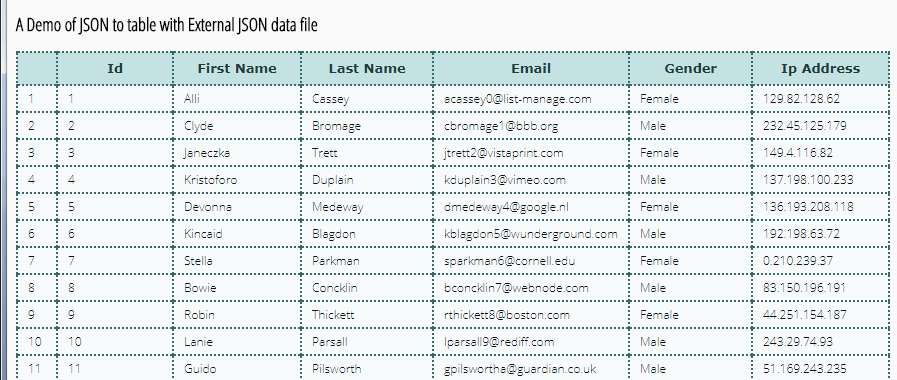
A Demo of loading and presenting JSON data from external file
In this example, an external JSON file that contains some data is used. The location of the JSON file can be as per your project directory.
Set the path of
.json
file in
getJSON
method and initiate the plug-in along with different options for styling as shown in the demo page.
See online demo and code
The script for this demo:
<script type="text/javascript">
$(document).ready(function () {
$.getJSON("js/json-to-table/sample-data.json", function (data) {
$('.json-table').createTable(data, {
// Specify the style of the table by plug-in options
borderWidth: '2px',
borderColor: '#356A6A',
borderStyle: 'dotted',
fontFamily: 'Arial, Verdana, sans-serif',
// The options for specifying the table header
thBg: '#C5E2E2',
thColor: '#1F3D3D',
thHeight: '29px',
thFontFamily: 'Verdana, sans-serif',
thFontSize: '13px',
thTextTransform: 'capitalize',
// Seting the style of table body and data
trBg: '#F7FBFB',
trColor: '#091111',
trHeight: '23px',
trFontFamily: '"Open Sans", sans-serif',
trFontSize: '12px',
// Table Body's Column Style
tdPaddingLeft: '8px',
tdPaddingRight: '8px'
});
});
});
</script>
You can see that a lot of options are used for specifying the table presentation that includes border style, color, and font. Besides, the style of the header is also set by using a number of options like thBg, thColor, thFontFamily and so on.
See the code panel on the demo page for full options. Mostly, these are self-descriptive.
The simple markup used in the demo:
<h2>A Demo of JSON to table with External JSON data file</h2>
<div class="json-table"></div>
Using data from JSON object variable demo
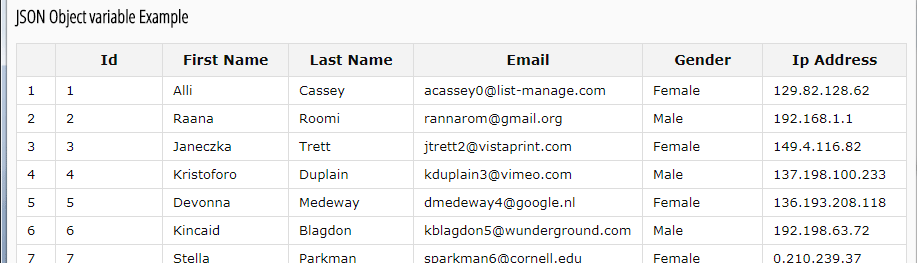
In this example of showing the JSON to table plug-in, the data is set in a variable. The JSON object variable is used where that data is assigned which is finally displayed in an HTML table.
See online demo and code
The sample data specified as using the variable for JSON:
{
"id": 2,
"first_name": "Raana",
"last_name": "Roomi",
"email": "rannarom@gmail.org",
"gender": "Male",
"ip_address": "192.168.1.1"
}
See the complete demo data in the example page’s code panel. After setting all data, just refer this as initiating the plug-in:
$('#json-table-2').createTable(data, {});
Where json-table-2 is the ID of div that displays the table for JSON data.
For more on this simple plug-in, visit the developer’s page. |
| Markdown | [Skip to content](https://www.jquery-az.com/jquery-json-html-table-plug-2-demos/#content "Skip to content")
[](https://www.jquery-az.com/)
Menu
Menu
- [Programming]()
- [Python](https://www.jquery-az.com/python-tutorials/)
- [Java](https://www.jquery-az.com/java-tutorials/)
- [C\#](https://www.jquery-az.com/c-sharp-tutorials/)
- [C++](https://www.jquery-az.com/cpp/)
- [VBA](https://www.jquery-az.com/vba/)
- [Kotlin](https://www.jquery-az.com/kotlin-tutorials/)
- [Web]()
- [HTML](https://www.jquery-az.com/html-tutorials/)
- [CSS](https://www.jquery-az.com/css-tutorials/)
- [Bootstrap 3](https://www.jquery-az.com/bootstrap-tips-tutorials/)
- [Bootstrap 4](https://www.jquery-az.com/bootstrap-4/)
- [Bootstrap 5](https://www.jquery-az.com/bootstrap-5/)
- [Materialize](https://www.jquery-az.com/materialize-tutorials/)
- [jQuery](https://www.jquery-az.com/jquery-tips/)
- [jQuery UI](https://www.jquery-az.com/jquery-ui/)
- [Tailwind CSS](https://www.jquery-az.com/tailwind-css/)
- [AngularJS](https://www.jquery-az.com/angularjs-tutorials/)
- [Bulma](https://www.jquery-az.com/bulma-tutorials/)
- [Web Elements]()
- [Tables](https://www.jquery-az.com/tag/table/)
- [Forms](https://www.jquery-az.com/tag/forms/)
- [Buttons](https://www.jquery-az.com/tag/buttons/)
- [Menus](https://www.jquery-az.com/tag/menus/)
- [Animations](https://www.jquery-az.com/tag/animations/)
- [Text](https://www.jquery-az.com/tag/text/)
- [Effects](https://www.jquery-az.com/tag/effects/)
- [Sliders](https://www.jquery-az.com/tag/sliders/)
- [Dropdown](https://www.jquery-az.com/tag/dropdown/)
- [Modals](https://www.jquery-az.com/tag/modals/)
- [Date & Time](https://www.jquery-az.com/tag/date-time/)
- [Scripting]()
- [PHP](https://www.jquery-az.com/php-tutorials/)
- [JavaScript](https://www.jquery-az.com/javascript-tutorials/)
- [Bash](https://www.jquery-az.com/bash-shell-tutorials/)
- [Database]()
- [SQL](https://www.jquery-az.com/sql-tutorials/)
- [MySQL](https://www.jquery-az.com/mysql-tutorials/)
- [More](https://www.jquery-az.com/jquery-json-html-table-plug-2-demos/)
- [Github](https://www.jquery-az.com/git-github-tutorials/)
- [What Why How](https://www.jquery-az.com/whats-whys-hows/)
# The JSON to HTML table conversion plug-in
July 15, 2025
September 9, 2017
by [Atiq Zia](https://www.jquery-az.com/author/jqueryaz/ "View all posts by Atiq Zia")
The *json-to-table* is a light-weight and simple plug-in for converting data from JSON to HTML table. The jQuery-based plug-in presents the data in an HTML table which is not a data table, basically.
It has a few options for styling the table like borders, font, background color etc. See the demos below to learn more about it.
###### [**Developer page**](https://github.com/shahnewazshamim/json-to-table) [**Download plug-in**](https://github.com/shahnewazshamim/json-to-table/archive/master.zip)
### **How to set up this plug-in on your web site?**
First, download the plug-in from above-given links. You will see the compressed and development version of the plug-in files. Include the compressed version (JSON-to-Table.min.1.0.0) on the web page you intend to use JSON data and present it in HTML table. For example:
> \<script src=”js/json-to-table/JSON-to-Table.min.1.0.0.js”\>\</script\>
Make sure to include this file after the jQuery library.
In the script section, call the createTable method as used in the demos below.
### **A Demo of loading and presenting JSON data from external file**
In this example, an external JSON file that contains some data is used. The location of the JSON file can be as per your project directory.
Set the path of **.json** file in **getJSON** method and initiate the plug-in along with different options for styling as shown in the demo page.

**See online demo and code**
**The script for this demo:**
```
<script type="text/javascript">
$(document).ready(function () {
$.getJSON("js/json-to-table/sample-data.json", function (data) {
$('.json-table').createTable(data, {
// Specify the style of the table by plug-in options
borderWidth: '2px',
borderColor: '#356A6A',
borderStyle: 'dotted',
fontFamily: 'Arial, Verdana, sans-serif',
// The options for specifying the table header
thBg: '#C5E2E2',
thColor: '#1F3D3D',
thHeight: '29px',
thFontFamily: 'Verdana, sans-serif',
thFontSize: '13px',
thTextTransform: 'capitalize',
// Seting the style of table body and data
trBg: '#F7FBFB',
trColor: '#091111',
trHeight: '23px',
trFontFamily: '"Open Sans", sans-serif',
trFontSize: '12px',
// Table Body's Column Style
tdPaddingLeft: '8px',
tdPaddingRight: '8px'
});
});
});
</script>
```
You can see that a lot of options are used for specifying the table presentation that includes border style, color, and font. Besides, the style of the header is also set by using a number of options like thBg, thColor, thFontFamily and so on.
See the code panel on the demo page for full options. Mostly, these are self-descriptive.
**The simple markup used in the demo:**
```
<h2>A Demo of JSON to table with External JSON data file</h2>
<div class="json-table"></div>
```
### **Using data from JSON object variable demo**
In this example of showing the JSON to table plug-in, the data is set in a variable. The JSON object variable is used where that data is assigned which is finally displayed in an HTML table.
###### **See online demo and code**
The sample data specified as using the variable for JSON:
```
{
"id": 2,
"first_name": "Raana",
"last_name": "Roomi",
"email": "rannarom@gmail.org",
"gender": "Male",
"ip_address": "192.168.1.1"
}
```
See the complete demo data in the example page’s code panel. After setting all data, just refer this as initiating the plug-in:
```
$('#json-table-2').createTable(data, {});
```
Where json-table-2 is the ID of div that displays the table for JSON data.
For more on this simple plug-in, visit the developer’s page.
1. [A jQuery Linked Select Dropdown Plugin](https://www.jquery-az.com/a-jquery-linked-select-dropdown-plugin-with-2-examples/ "A jQuery Linked Select Dropdown Plugin")
2. [jQuery Alerts](https://www.jquery-az.com/beautiful-jquery-alerts-with-12-demos-by-using-different-plug-ins/ "jQuery Alerts")
3. [jQuery fadeIn, fadeOut, and fadeToggle](https://www.jquery-az.com/jquery-fadein-fadeout-fadetoggle-8-demos-of-table-menu-div-and-others/ "jQuery fadeIn, fadeOut, and fadeToggle")
4. [jQuery \$.find and \$.children Methods](https://www.jquery-az.com/learn-jquery-find-and-children-methods-compared-with-examples/ "jQuery $.find and $.children Methods")
5. [jQuery Ajax Tutorial](https://www.jquery-az.com/jquery-ajax-tutorial-syntax-and-using-in-div-form-tabs-accordion-and-table-demos/ "jQuery Ajax Tutorial")
Categories [jQuery](https://www.jquery-az.com/jquery-tips/)
Tags [List of HTML/Bootstrap/Materialize/CSS Table Tutorials](https://www.jquery-az.com/tag/table/)
[jQuery plug-in for Glitch Effect](https://www.jquery-az.com/jquery-plug-in-for-glitch-effect/)
[The jQuery based color picker widget](https://www.jquery-az.com/jquery-color-picker-widget-mobile-rgb-options/)
## jQuery Tutorials
- [jQuery animate()](https://www.jquery-az.com/jquery-animate-ui-examples-free-code/)
- [jQuery click()](https://www.jquery-az.com/use-jquery-click-8-examples-free-code/)
- [jQuery on](https://www.jquery-az.com/jquery-on-click-change-events-7-examples/)
- [jQuery toggle](https://www.jquery-az.com/jquery-toggle-method-showhide-elements-6-examples/)
- [jQuery each](https://www.jquery-az.com/jquery-each-method-6-examples-different-collections/)
- [jQuery append](https://www.jquery-az.com/use-jquery-append-add-html-content-examples/)
- [jQuery fadeIn, fadeOut, fadeToggle](https://www.jquery-az.com/jquery-fadein-fadeout-fadetoggle-8-demos-of-table-menu-div-and-others/)
- [jQuery hide / show](https://www.jquery-az.com/how-to-use-jquery-hide-show-methods-with-div-table-lists-demos/)
- [jQuery AJAX](https://www.jquery-az.com/jquery-ajax-tutorial-syntax-and-using-in-div-form-tabs-accordion-and-table-demos/)
- [jQuery Post](https://www.jquery-az.com/jquery-post-method-to-load-text-file-and-database-data-in-accordion/)
- [jQuery alert](https://www.jquery-az.com/beautiful-jquery-alerts-with-12-demos-by-using-different-plug-ins/)
- [jQuery addClass](https://www.jquery-az.com/jquery-addclass-with-html-table-button-links-and-list-demos/)
- [jQuery removeClass](https://www.jquery-az.com/4-examples-to-use-jquery-removeclass-with-bootstrap-table-div-and-others/)
- [jQuery toggleClass](https://www.jquery-az.com/jquery-toggleclass/)
- [jQuery / JavaScript setTimeout](https://www.jquery-az.com/using-settimeout-in-javascriptjquery-code-with-6-demos/)
- [jQuery hover](https://www.jquery-az.com/learn-jquery-hover-method-with-css-effects-3-demos/)
- [jQuery \$.parent and \$.parents](https://www.jquery-az.com/jquery-parent-and-parents-methods-compared-with-4-examples/)
- [jQuery find and children](https://www.jquery-az.com/learn-jquery-find-and-children-methods-compared-with-examples/)
- [jQuery Carousel / image rotator](https://www.jquery-az.com/jquery-css-carousel-image-rotator-plug-in-with-3-demos/)
## Tailwind CSS Tools
- [Tailwind Button Generator](https://www.jquery-az.com/tools/tailwind-button-gen.php)
- [Tailwind Table Tool](https://www.jquery-az.com/tools/tailwind-table-tool.php)
- [Modal Maker](https://www.jquery-az.com/tools/tailwind-modal-maker.php)
- [Tailwind Card Maker](https://www.jquery-az.com/tools/tailwind-card-maker.php)
- [Popover](https://www.jquery-az.com/tools/tailwind-popover-maker.php)
- [Tailwind Badge Maker](https://www.jquery-az.com/tools/tailwind-badge-maker.php)
- [Tailwind Alerts Tool](https://www.jquery-az.com/tools/tailwind-alert-tool.php)
- [Tailwind Pagination Maker](https://www.jquery-az.com/tools/tailwind-paginated-maker.php)
- [Tailwind Progress Maker](https://www.jquery-az.com/tools/tailwind-progress-gen.php)
- [Tooltips](https://www.jquery-az.com/tools/tailwind-tooltips-maker.php)
- [Tailwind Breadcrumbs Maker](https://www.jquery-az.com/tools/tailwind-breadcrumbs-maker.php)
- [Tailwind Text Maker](https://www.jquery-az.com/tools/tailwind-text-maker.php)
- [Tailwind Dropdown Maker](https://www.jquery-az.com/tools/tailwind-dropdown-maker.php)
- [Tailwind Link Maker](https://www.jquery-az.com/tools/tailwind-link-maker.php)
- [Accordion Creator](https://www.jquery-az.com/tools/tailwind-accordion-tool.php)
## LATEST
- [VBA DateDiff Function](https://www.jquery-az.com/vba-datediff-function/)
- [INDEX Function in Excel](https://www.jquery-az.com/excel-index-function/)
## Online Free Tools
[Gradient Generator](https://www.jquery-az.com/tools/gradient-gen.html)
## About
- [Cookies & Privacy Policy](https://www.jquery-az.com/privacy-policy/)
- [About & Terms](https://www.jquery-az.com/about-us/)
- [Contact](https://www.jquery-az.com/contact/)
## Official Sites
- [Python](https://www.python.org/)
- [Bootstrap](https://getbootstrap.com/)
- [PHP](https://www.php.net/)
## Get Connected
- [YouTube](https://www.youtube.com/@jquery-az)
- [Facebook](https://www.facebook.com/jqueryaz23/)
- [LinkedIn](https://www.linkedin.com/in/jquery-az)
jQuery-AZ 2025. All Rights Reserved. |
| Readable Markdown | The *json-to-table* is a light-weight and simple plug-in for converting data from JSON to HTML table. The jQuery-based plug-in presents the data in an HTML table which is not a data table, basically.
It has a few options for styling the table like borders, font, background color etc. See the demos below to learn more about it.
###### [**Developer page**](https://github.com/shahnewazshamim/json-to-table) [**Download plug-in**](https://github.com/shahnewazshamim/json-to-table/archive/master.zip)
### **How to set up this plug-in on your web site?**
First, download the plug-in from above-given links. You will see the compressed and development version of the plug-in files. Include the compressed version (JSON-to-Table.min.1.0.0) on the web page you intend to use JSON data and present it in HTML table. For example:
> \<script src=”js/json-to-table/JSON-to-Table.min.1.0.0.js”\>\</script\>
Make sure to include this file after the jQuery library.
In the script section, call the createTable method as used in the demos below.
### **A Demo of loading and presenting JSON data from external file**
In this example, an external JSON file that contains some data is used. The location of the JSON file can be as per your project directory.
Set the path of **.json** file in **getJSON** method and initiate the plug-in along with different options for styling as shown in the demo page.

**See online demo and code**
**The script for this demo:**
```
<script type="text/javascript">
$(document).ready(function () {
$.getJSON("js/json-to-table/sample-data.json", function (data) {
$('.json-table').createTable(data, {
// Specify the style of the table by plug-in options
borderWidth: '2px',
borderColor: '#356A6A',
borderStyle: 'dotted',
fontFamily: 'Arial, Verdana, sans-serif',
// The options for specifying the table header
thBg: '#C5E2E2',
thColor: '#1F3D3D',
thHeight: '29px',
thFontFamily: 'Verdana, sans-serif',
thFontSize: '13px',
thTextTransform: 'capitalize',
// Seting the style of table body and data
trBg: '#F7FBFB',
trColor: '#091111',
trHeight: '23px',
trFontFamily: '"Open Sans", sans-serif',
trFontSize: '12px',
// Table Body's Column Style
tdPaddingLeft: '8px',
tdPaddingRight: '8px'
});
});
});
</script>
```
You can see that a lot of options are used for specifying the table presentation that includes border style, color, and font. Besides, the style of the header is also set by using a number of options like thBg, thColor, thFontFamily and so on.
See the code panel on the demo page for full options. Mostly, these are self-descriptive.
**The simple markup used in the demo:**
```
<h2>A Demo of JSON to table with External JSON data file</h2>
<div class="json-table"></div>
```
### **Using data from JSON object variable demo**
In this example of showing the JSON to table plug-in, the data is set in a variable. The JSON object variable is used where that data is assigned which is finally displayed in an HTML table.

###### **See online demo and code**
The sample data specified as using the variable for JSON:
```
{
"id": 2,
"first_name": "Raana",
"last_name": "Roomi",
"email": "rannarom@gmail.org",
"gender": "Male",
"ip_address": "192.168.1.1"
}
```
See the complete demo data in the example page’s code panel. After setting all data, just refer this as initiating the plug-in:
```
$('#json-table-2').createTable(data, {});
```
Where json-table-2 is the ID of div that displays the table for JSON data.
For more on this simple plug-in, visit the developer’s page. |
| Shard | 124 (laksa) |
| Root Hash | 3168237931127874724 |
| Unparsed URL | com,jquery-az!www,/jquery-json-html-table-plug-2-demos/ s443 |