ℹ️ Skipped - page is already crawled
| Filter | Status | Condition | Details |
|---|---|---|---|
| HTTP status | PASS | download_http_code = 200 | HTTP 200 |
| Age cutoff | PASS | download_stamp > now() - 6 MONTH | 0.1 months ago |
| History drop | PASS | isNull(history_drop_reason) | No drop reason |
| Spam/ban | PASS | fh_dont_index != 1 AND ml_spam_score = 0 | ml_spam_score=0 |
| Canonical | PASS | meta_canonical IS NULL OR = '' OR = src_unparsed | Not set |
| Property | Value |
|---|---|
| URL | https://www.itpro.com/software/355486/zoom-review-are-we-alone-now |
| Last Crawled | 2026-04-11 09:47:47 (1 day ago) |
| First Indexed | 2020-04-29 17:01:12 (5 years ago) |
| HTTP Status Code | 200 |
| Meta Title | Zoom review | IT Pro |
| Meta Description | With integrated calendaring and messaging, a smart AI Companion, and a huge library of extensions, Zoom has much to offer businesses of all sizes |
| Meta Canonical | null |
| Boilerpipe Text | Zoom rose to prominence during the pandemic as the world's most popular free
video conferencing
platform. It still offers a free service, permitting up to 100 people to meet for 40 minutes at a time, but for professional use, you'll want one of its paid-for tiers. Zoom Pro costs £129.90 per user per year and allows meetings of up to 30 hours, with the added benefits of an AI Companion, calendaring, and email services plus 5GB of cloud storage; for £174.90 per year, Zoom Business allows meetings of up to 300 people.
Unusually, Zoom lets you customize your chosen package with add-ons such as larger meetings, online scheduling, additional cloud storage, telephone access, and SIP/H.323 support, for compatibility with a wide range of video conferencing hardware. Prices range from £4.49 to £100 a month, with some discounted rates for annual commitment. So while the basic service is a little pricier than other entry-level conferencing packages, Zoom could be a cost-competitive way to get the specific features you need.
The first time you start or join a meeting you'll need to download the Zoom Workplace app. This is available for
Windows, macOS, and Linux
, plus Google's ChromeOS; there's also a handy browser extension that lets you start or schedule meetings from inside Chrome, Edge, or Firefox. Mobile users can join video meetings and text chat via the Zoom app for Android and iOS.
Whichever platform you're on, installing the app is about as easy as you could reasonably ask for, with almost no user interaction. And once you've installed it, it'll automatically pop up as needed to handle meetings.
That's not all the Workplace app does, however: Zoom sees it as a general-purpose scheduling and communications hub. With your permission, it'll connect to your Google or Microsoft calendar and contacts, so you can get notifications about upcoming meetings, and easily organize your own virtual get-togethers. There's also a Slack-style Team Chat feature and a tab that lets you create, browse, and collaborate on whiteboards. We like the way this is separate from the live meeting component – often it makes sense to work on these things offline.
Other tabs let you access Zoom's own email service, create short video clips, and subscribe to the optional Scheduler add-on. You can unpin features you don't use, and browse a library of over 100 add-on apps that extend Zoom's features. The timer, jukebox, and virtual background service are all available by default, but more advanced extensions let you add analytics, storage, streaming, and even games to your calls. The apps are all free, although some of them slot into paid services such as Hubspot
CRM
and Zendesk Support.
(Image credit: Future)
Video meetings open in a new window, with intuitive control icons along the top and bottom of the screen. It's easy to get chatting right away, but if you want to get the best from Zoom there's a fair bit of depth to explore.
Sign up today and you will receive a free copy of our Future Focus 2025 report - the leading guidance on AI, cybersecurity and other IT challenges as per 700+ senior executives
For example, numerous video enhancement options can automatically adjust your lighting and color balance, and a touch-up slider lets you lightly soften wrinkles without going full-on Instagram. You can download a range of backdrops – or upload your own, including video loops – and apply fun filters and animated avatars. The option "use for all future meetings" is sensibly unticked by default, to help you avoid any embarrassing moments when your meeting with the kids is followed by a catch-up with the CFO. There's also a selection of "immersive views" that bring everyone's heads into a single virtual location, although frankly we found this looked weird and distracting.
Zoom has some neat audio features too, including a spatial sound option that virtually spaces out your meeting participants, so they don't sound like they're all talking over one another, and an audio isolation tool that uses a digital capture of your voiceprint to identify and suppress external noise.
RELATED WHITEPAPER
(Image credit: Getty Images)
All the other additional conferencing functions you'd expect are present. You can share your whole screen, or individual application windows, participate in concurrent text chats, record your session, and switch between a range of different views. The meeting host has extensive control over which features participants are allowed to use, and – as in the Workplace app – you can helpfully drag to rearrange the icons below the main view so the features you want are at your fingertips.
Finally, paying users can activate live subtitles in a range of languages, and type questions into Zoom's AI Companion. This is particularly handy for latecomers, or those not fully tuned into the meeting: it opens with handy one-click shortcuts such as "Catch me up?" and "Was my name mentioned?" It works similarly to
Cisco Webex's
AI Assistant, although it doesn't support voice commands, and once the meeting is over it can automatically generate minutes and action points.
Zoom review: Video and audio quality
Zoom is designed with a focus on bandwidth efficiency: meetings default to a fairly low resolution of 360p, and this is absolutely fine for everyday chats. We found participants' facial expressions and gestures were as clear as you could ask for, with perfectly fluid motion. If you want more pixels though you can optionally increase the detail level to 720p, and Zoom Business customers can go all the way up to 1080p, as long as your camera and network are up to it.
While we've no complaints about image clarity, we did note that Zoom didn't seem as effective as other videoconferencing systems at correcting color casts, or clipping around curly hairstyles. We were perfectly able to communicate, but we'd tend to say that other solutions such as Webex created a cleaner, more professional impression overall.
As for audio, it's all good. During our tests, we had no problems with echoes or background noise – and if you want to give your colleagues a proper taste of your audio environment you can switch to the "original sound" or "live performance" modes, which convey a high-quality feed from your microphone with no suppression or processing.
Zoom review: Is it worth it?
This isn't 2020, and Zoom is no longer the best choice for those wanting a fully free conferencing solution. The 40-minute meeting limit is shorter than you'll get with a free
Google Meet
or
Microsoft Teams
account – and, just to be an extra pain, after a free meeting times out, Zoom makes you wait ten minutes before you can resume it. Google Meet doesn't make you jump through that hoop, and it also includes free subtitling and transcriptions, which Zoom reserves for paying subscribers.
For most businesses, though the subscription price is well within reach, and Zoom's paid plans strike a great balance between ease of use and breadth of features. You can fire up a basic conferencing session and get talking with very little fuss, while more sophisticated capabilities such as calendar integration and the AI Companion are available for those who want them. The Workplace app also provides a conveniently centralized way to extend your communications into text chat, email, collaborative drawings, and more, while optional add-ons and third-party apps ensure that Zoom will slot perfectly into your organization. |
| Markdown | 
[ IT Pro](https://www.itpro.com/uk)
UK Edition

[ US](https://www.itpro.com/software/355486/zoom-review-are-we-alone-now)
[ Australia](https://www.itpro.com/software/355486/zoom-review-are-we-alone-now)
[ UK](https://www.itpro.com/software/355486/zoom-review-are-we-alone-now)
×
- [Business](https://www.itpro.com/uk/business)
- [Cloud](https://www.itpro.com/uk/cloud)
- [Hardware](https://www.itpro.com/uk/hardware)
- [Infrastructure](https://www.itpro.com/uk/infrastructure)
- [Security](https://www.itpro.com/uk/security)
- [Content hubs](https://www.itpro.com/uk/hubs)
- [Advertise](https://www.itpro.com/advertise-with-us)
- [More](https://www.itpro.com/uk/security) More
- - About
About
- [View all More](https://www.itpro.com/uk/security)
- [About us](https://www.itpro.com/about-us)
- [Advertise with us](https://www.itpro.com/about-us)
- [Contact us](https://www.itpro.com/about-us)
- [Newsletters](https://www.itpro.com/uk/newsletter)
- Policies
Policies
- [View all More](https://www.itpro.com/uk/security)
- [Terms of Service](https://futureplc.com/terms-conditions/)
- [Privacy policy](https://futureplc.com/privacy-policy/)
- [Cookie policy](https://futureplc.com/cookies-policy/)
- [Copyright Preferences](https://www.itpro.com/about-us)
- Additional Resources
Additional Resources
- [View all More](https://www.itpro.com/uk/security)
- [AI](https://www.itpro.com/uk/technology/artificial-intelligence)
- [Zero Trust](https://www.itpro.com/uk/tag/zero-trust)
- [Software](https://www.itpro.com/uk/tag/software)
- [Technology](https://www.itpro.com/uk/technology)
- [Resources](https://www.itpro.com/uk/tag/whitepaper)
- [Webinars](https://events.actualtechmedia.com/)
- [Brand Highlights](https://www.itpro.com/about-us)
- [Product Offerings](https://www.itpro.com/about-us)
- [Case Studies](https://www.itpro.com/uk/commercial-partnerships)
[NEWSLETTER](https://www.itpro.com/newsletter-signup)
Trending
- [Subscribe to the ITPro Newsletter](https://www.itpro.com/uk/newsletter)
- [Artificial intelligence in business](https://www.itpro.com/uk/technology/artificial-intelligence)
- [Reviews and how tos](https://www.itpro.com/uk/reviews)
- [The ITPro Podcast](https://www.itpro.com/uk/the-it-pro-podcast)
- [Laying the foundations for tomorrow's AI today](https://www.itpro.com/uk/tag/laying-the-storage-foundations-for-tomorrows-ai-today)
1. [Home](https://www.itpro.com/uk)
2. [Software](https://www.itpro.com/uk/software)
3. [Video Conferencing](https://www.itpro.com/uk/software/video-conferencing)
# Zoom review: Easy video conferencing, plus plenty of clever features and add-ons
With integrated calendaring and messaging, a smart AI Companion, and a huge library of extensions, Zoom has much to offer businesses of all sizes
- [NEWSLETTER](https://www.itpro.com/newsletter-signup)
When you purchase through links on our site, we may earn an affiliate commission. [Here’s how it works](https://futureplc.com/terms-conditions/).

(Image credit: Future)
Reasons to buy
- \+
Easy to pick up and use
- \+
Useful scheduling and AI features
- \+
Impressively extensible and customizable
Reasons to avoid
- \-
Indifferent video quality in our tests

By [Darien Graham-Smith](https://www.itpro.com/uk/author/darien-graham-smith)
last updated
1 July 2024
in [Reviews](https://www.itpro.com/uk/reviews)
Zoom rose to prominence during the pandemic as the world's most popular free [video conferencing](https://www.itpro.com/software/video-conferencing/362328/best-video-conferencing-services) platform. It still offers a free service, permitting up to 100 people to meet for 40 minutes at a time, but for professional use, you'll want one of its paid-for tiers. Zoom Pro costs £129.90 per user per year and allows meetings of up to 30 hours, with the added benefits of an AI Companion, calendaring, and email services plus 5GB of cloud storage; for £174.90 per year, Zoom Business allows meetings of up to 300 people.
Unusually, Zoom lets you customize your chosen package with add-ons such as larger meetings, online scheduling, additional cloud storage, telephone access, and SIP/H.323 support, for compatibility with a wide range of video conferencing hardware. Prices range from £4.49 to £100 a month, with some discounted rates for annual commitment. So while the basic service is a little pricier than other entry-level conferencing packages, Zoom could be a cost-competitive way to get the specific features you need.
## Zoom review: Setup and features
The first time you start or join a meeting you'll need to download the Zoom Workplace app. This is available for [Windows, macOS, and Linux](https://www.itpro.com/software/364316/windows-vs-linux-vs-mac-the-channel-comparison), plus Google's ChromeOS; there's also a handy browser extension that lets you start or schedule meetings from inside Chrome, Edge, or Firefox. Mobile users can join video meetings and text chat via the Zoom app for Android and iOS.
Whichever platform you're on, installing the app is about as easy as you could reasonably ask for, with almost no user interaction. And once you've installed it, it'll automatically pop up as needed to handle meetings.
That's not all the Workplace app does, however: Zoom sees it as a general-purpose scheduling and communications hub. With your permission, it'll connect to your Google or Microsoft calendar and contacts, so you can get notifications about upcoming meetings, and easily organize your own virtual get-togethers. There's also a Slack-style Team Chat feature and a tab that lets you create, browse, and collaborate on whiteboards. We like the way this is separate from the live meeting component – often it makes sense to work on these things offline.
Other tabs let you access Zoom's own email service, create short video clips, and subscribe to the optional Scheduler add-on. You can unpin features you don't use, and browse a library of over 100 add-on apps that extend Zoom's features. The timer, jukebox, and virtual background service are all available by default, but more advanced extensions let you add analytics, storage, streaming, and even games to your calls. The apps are all free, although some of them slot into paid services such as Hubspot [CRM](https://www.itpro.com/marketing-comms/customer-relationship-management-crm/369039/how-customer-relationship-management) and Zendesk Support.
(Image credit: Future)
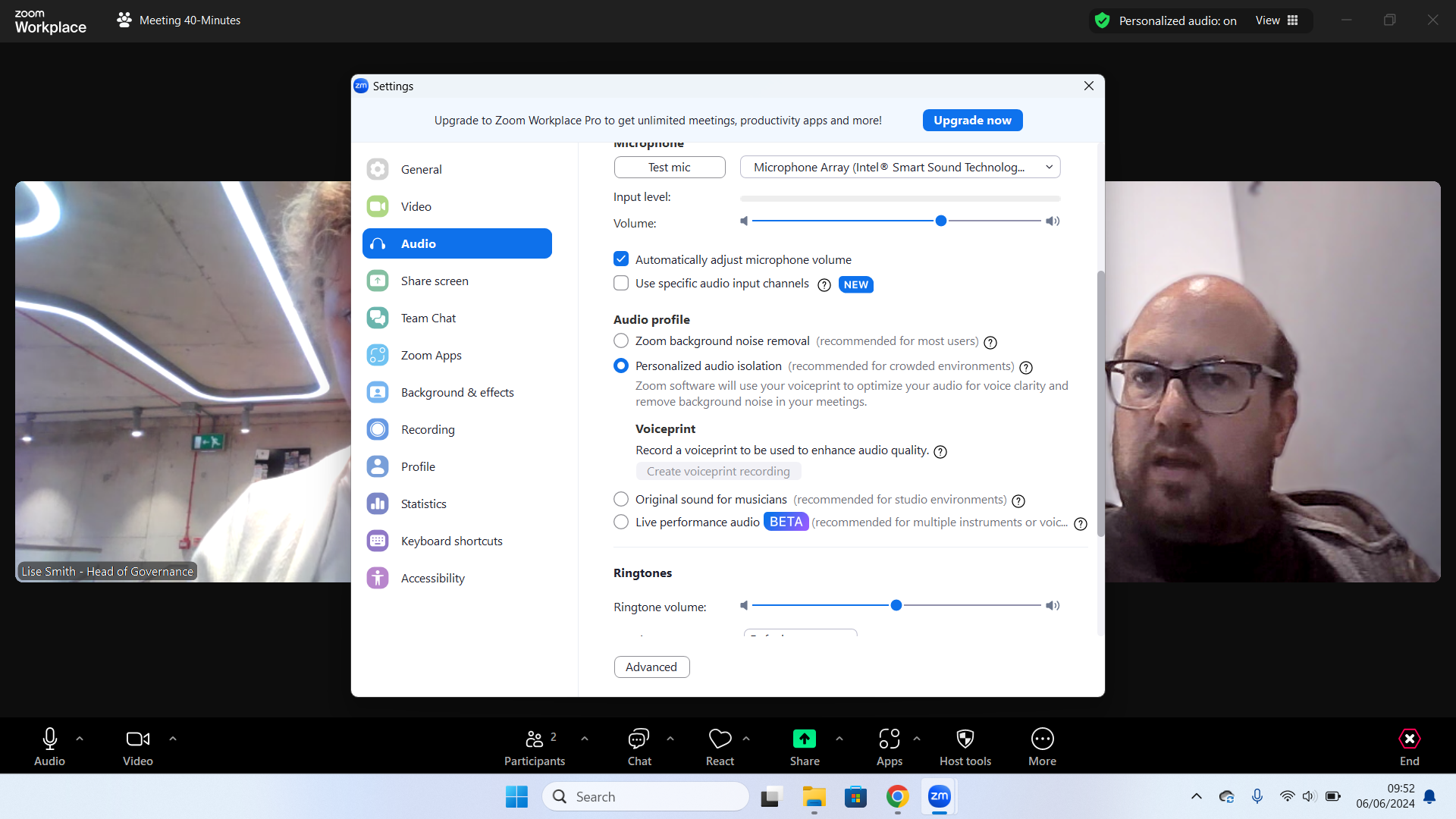
Video meetings open in a new window, with intuitive control icons along the top and bottom of the screen. It's easy to get chatting right away, but if you want to get the best from Zoom there's a fair bit of depth to explore.
Get the ITPro daily newsletter
Sign up today and you will receive a free copy of our Future Focus 2025 report - the leading guidance on AI, cybersecurity and other IT challenges as per 700+ senior executives
By signing up, you agree to our [Terms of services](https://futureplc.com/terms-conditions/) and acknowledge that you have read our [Privacy Notice](https://futureplc.com/privacy-policy). You also agree to receive marketing emails from us that may include promotions from our trusted partners and sponsors, which you can unsubscribe from at any time.
For example, numerous video enhancement options can automatically adjust your lighting and color balance, and a touch-up slider lets you lightly soften wrinkles without going full-on Instagram. You can download a range of backdrops – or upload your own, including video loops – and apply fun filters and animated avatars. The option "use for all future meetings" is sensibly unticked by default, to help you avoid any embarrassing moments when your meeting with the kids is followed by a catch-up with the CFO. There's also a selection of "immersive views" that bring everyone's heads into a single virtual location, although frankly we found this looked weird and distracting.
Zoom has some neat audio features too, including a spatial sound option that virtually spaces out your meeting participants, so they don't sound like they're all talking over one another, and an audio isolation tool that uses a digital capture of your voiceprint to identify and suppress external noise.
##### RELATED WHITEPAPER
(Image credit: Getty Images)
[*Revolutionize your IT infrastructure*](https://www.itpro.com/technology/artificial-intelligence/launching-large-language-models-on-poweredge-servers)
All the other additional conferencing functions you'd expect are present. You can share your whole screen, or individual application windows, participate in concurrent text chats, record your session, and switch between a range of different views. The meeting host has extensive control over which features participants are allowed to use, and – as in the Workplace app – you can helpfully drag to rearrange the icons below the main view so the features you want are at your fingertips.
Finally, paying users can activate live subtitles in a range of languages, and type questions into Zoom's AI Companion. This is particularly handy for latecomers, or those not fully tuned into the meeting: it opens with handy one-click shortcuts such as "Catch me up?" and "Was my name mentioned?" It works similarly to [Cisco Webex's](https://www.itpro.com/business-strategy/collaboration/363923/cisco-webex-review) AI Assistant, although it doesn't support voice commands, and once the meeting is over it can automatically generate minutes and action points.
## Zoom review: Video and audio quality
Zoom is designed with a focus on bandwidth efficiency: meetings default to a fairly low resolution of 360p, and this is absolutely fine for everyday chats. We found participants' facial expressions and gestures were as clear as you could ask for, with perfectly fluid motion. If you want more pixels though you can optionally increase the detail level to 720p, and Zoom Business customers can go all the way up to 1080p, as long as your camera and network are up to it.
While we've no complaints about image clarity, we did note that Zoom didn't seem as effective as other videoconferencing systems at correcting color casts, or clipping around curly hairstyles. We were perfectly able to communicate, but we'd tend to say that other solutions such as Webex created a cleaner, more professional impression overall.
As for audio, it's all good. During our tests, we had no problems with echoes or background noise – and if you want to give your colleagues a proper taste of your audio environment you can switch to the "original sound" or "live performance" modes, which convey a high-quality feed from your microphone with no suppression or processing.
## Zoom review: Is it worth it?
This isn't 2020, and Zoom is no longer the best choice for those wanting a fully free conferencing solution. The 40-minute meeting limit is shorter than you'll get with a free [Google Meet](https://www.itpro.com/software/video-conferencing/google-meet-review-great-value-videoconferencing-especially-for-smaller-businesses) or [Microsoft Teams](https://www.itpro.com/software/33703/microsoft-teams-review-a-no-brainer-for-microsoft-shops) account – and, just to be an extra pain, after a free meeting times out, Zoom makes you wait ten minutes before you can resume it. Google Meet doesn't make you jump through that hoop, and it also includes free subtitling and transcriptions, which Zoom reserves for paying subscribers.
For most businesses, though the subscription price is well within reach, and Zoom's paid plans strike a great balance between ease of use and breadth of features. You can fire up a basic conferencing session and get talking with very little fuss, while more sophisticated capabilities such as calendar integration and the AI Companion are available for those who want them. The Workplace app also provides a conveniently centralized way to extend your communications into text chat, email, collaborative drawings, and more, while optional add-ons and third-party apps ensure that Zoom will slot perfectly into your organization.
TOPICS
[Collaboration](https://www.itpro.com/uk/tag/collaboration)

[Darien Graham-Smith](https://www.itpro.com/uk/author/darien-graham-smith)
Darien began his IT career in the 1990s as a systems engineer, later becoming an IT project manager. His formative experiences included upgrading a major multinational from token-ring networking to Ethernet, and migrating a travelling sales force from Windows 3.1 to Windows 95.
He subsequently spent some years acting as a one-man IT department for a small publishing company, before moving into journalism himself. He is now a regular contributor to IT Pro, specialising in networking and security, and serves as associate editor of PC Pro magazine with particular responsibility for business reviews and features.
You can email Darien at [darien@pcpro.co.uk](mailto:darien@pcpro.co.uk), or follow him on Twitter at [@dariengs.](https://twitter.com/DarienGS)
Latest News
- [ OpenAI hits the brakes on Stargate UK infrastructure project, citing energy costs and regulatory concerns News The company said Stargate UK plans will resume under the “right conditions” By Ross Kelly Published 9 April 26](https://www.itpro.com/infrastructure/openai-hits-the-brakes-on-stargate-uk-infrastructure-project-citing-energy-cost-and-regulatory-concerns)
- [ Agent identity governance can't keeping up with adoption rates – and it’s creating a security nightmare News Enterprises are leaving high-privilege keys unchanged for months or years at a time By Emma Woollacott Published 9 April 26](https://www.itpro.com/security/agent-identity-governance-cant-keeping-up-with-adoption-rates-and-its-creating-a-security-nightmare)
- [ ‘AI isn’t replacing human talent’: UK tech workers are insulated from automation – at least for now News A survey from Hays shows only moderate exposure from AI on UK tech roles, including software developers and engineers By Nicole Kobie Published 9 April 26](https://www.itpro.com/business/careers-and-training/ai-isnt-replacing-human-talent-uk-tech-workers-are-insulated-from-automation-at-least-for-now)
IT Pro is part of Future plc, an international media group and leading digital publisher. [Visit our corporate site](https://futureplc.com/).
[ Add as a preferred source on Google](https://google.com/preferences/source?q=itpro.com)
### Connect With Us
[RSS](https://www.itpro.com/rss-feeds)
- [Contact Future's experts](https://futureplc.com/contact/)
- [About us](https://www.itpro.com/about-us)
- [Contact us](https://www.itpro.com/about-us)
- [Terms and conditions](https://futureplc.com/terms-conditions/)
- [Privacy policy](https://futureplc.com/privacy-policy/)
- [Web notifications](https://www.itpro.com/uk)
- [Cookies policy](https://futureplc.com/cookies-policy/)
- [Newsletters](https://www.itpro.com/newsletter-signup)
- [GDRP consent](https://www.itpro.com/software/355486/zoom-review-are-we-alone-now)
- [Careers](https://futureplc.com/careers/)
- [Contact Future's B2B experts](https://www.futureb2b.com/)
- [Do not sell or share my personal information](https://www.itpro.com/uk/privacy-portal)
© Future Publishing Limited Quay House, The Ambury, Bath BA1 1UA. All rights reserved. England and Wales company registration number 2008885. |
| Readable Markdown | Zoom rose to prominence during the pandemic as the world's most popular free [video conferencing](https://www.itpro.com/software/video-conferencing/362328/best-video-conferencing-services) platform. It still offers a free service, permitting up to 100 people to meet for 40 minutes at a time, but for professional use, you'll want one of its paid-for tiers. Zoom Pro costs £129.90 per user per year and allows meetings of up to 30 hours, with the added benefits of an AI Companion, calendaring, and email services plus 5GB of cloud storage; for £174.90 per year, Zoom Business allows meetings of up to 300 people.
Unusually, Zoom lets you customize your chosen package with add-ons such as larger meetings, online scheduling, additional cloud storage, telephone access, and SIP/H.323 support, for compatibility with a wide range of video conferencing hardware. Prices range from £4.49 to £100 a month, with some discounted rates for annual commitment. So while the basic service is a little pricier than other entry-level conferencing packages, Zoom could be a cost-competitive way to get the specific features you need.
The first time you start or join a meeting you'll need to download the Zoom Workplace app. This is available for [Windows, macOS, and Linux](https://www.itpro.com/software/364316/windows-vs-linux-vs-mac-the-channel-comparison), plus Google's ChromeOS; there's also a handy browser extension that lets you start or schedule meetings from inside Chrome, Edge, or Firefox. Mobile users can join video meetings and text chat via the Zoom app for Android and iOS.
Whichever platform you're on, installing the app is about as easy as you could reasonably ask for, with almost no user interaction. And once you've installed it, it'll automatically pop up as needed to handle meetings.
That's not all the Workplace app does, however: Zoom sees it as a general-purpose scheduling and communications hub. With your permission, it'll connect to your Google or Microsoft calendar and contacts, so you can get notifications about upcoming meetings, and easily organize your own virtual get-togethers. There's also a Slack-style Team Chat feature and a tab that lets you create, browse, and collaborate on whiteboards. We like the way this is separate from the live meeting component – often it makes sense to work on these things offline.
Other tabs let you access Zoom's own email service, create short video clips, and subscribe to the optional Scheduler add-on. You can unpin features you don't use, and browse a library of over 100 add-on apps that extend Zoom's features. The timer, jukebox, and virtual background service are all available by default, but more advanced extensions let you add analytics, storage, streaming, and even games to your calls. The apps are all free, although some of them slot into paid services such as Hubspot [CRM](https://www.itpro.com/marketing-comms/customer-relationship-management-crm/369039/how-customer-relationship-management) and Zendesk Support.

(Image credit: Future)
Video meetings open in a new window, with intuitive control icons along the top and bottom of the screen. It's easy to get chatting right away, but if you want to get the best from Zoom there's a fair bit of depth to explore.
Sign up today and you will receive a free copy of our Future Focus 2025 report - the leading guidance on AI, cybersecurity and other IT challenges as per 700+ senior executives
For example, numerous video enhancement options can automatically adjust your lighting and color balance, and a touch-up slider lets you lightly soften wrinkles without going full-on Instagram. You can download a range of backdrops – or upload your own, including video loops – and apply fun filters and animated avatars. The option "use for all future meetings" is sensibly unticked by default, to help you avoid any embarrassing moments when your meeting with the kids is followed by a catch-up with the CFO. There's also a selection of "immersive views" that bring everyone's heads into a single virtual location, although frankly we found this looked weird and distracting.
Zoom has some neat audio features too, including a spatial sound option that virtually spaces out your meeting participants, so they don't sound like they're all talking over one another, and an audio isolation tool that uses a digital capture of your voiceprint to identify and suppress external noise.
##### RELATED WHITEPAPER

(Image credit: Getty Images)
All the other additional conferencing functions you'd expect are present. You can share your whole screen, or individual application windows, participate in concurrent text chats, record your session, and switch between a range of different views. The meeting host has extensive control over which features participants are allowed to use, and – as in the Workplace app – you can helpfully drag to rearrange the icons below the main view so the features you want are at your fingertips.
Finally, paying users can activate live subtitles in a range of languages, and type questions into Zoom's AI Companion. This is particularly handy for latecomers, or those not fully tuned into the meeting: it opens with handy one-click shortcuts such as "Catch me up?" and "Was my name mentioned?" It works similarly to [Cisco Webex's](https://www.itpro.com/business-strategy/collaboration/363923/cisco-webex-review) AI Assistant, although it doesn't support voice commands, and once the meeting is over it can automatically generate minutes and action points.
## Zoom review: Video and audio quality
Zoom is designed with a focus on bandwidth efficiency: meetings default to a fairly low resolution of 360p, and this is absolutely fine for everyday chats. We found participants' facial expressions and gestures were as clear as you could ask for, with perfectly fluid motion. If you want more pixels though you can optionally increase the detail level to 720p, and Zoom Business customers can go all the way up to 1080p, as long as your camera and network are up to it.
While we've no complaints about image clarity, we did note that Zoom didn't seem as effective as other videoconferencing systems at correcting color casts, or clipping around curly hairstyles. We were perfectly able to communicate, but we'd tend to say that other solutions such as Webex created a cleaner, more professional impression overall.
As for audio, it's all good. During our tests, we had no problems with echoes or background noise – and if you want to give your colleagues a proper taste of your audio environment you can switch to the "original sound" or "live performance" modes, which convey a high-quality feed from your microphone with no suppression or processing.
## Zoom review: Is it worth it?
This isn't 2020, and Zoom is no longer the best choice for those wanting a fully free conferencing solution. The 40-minute meeting limit is shorter than you'll get with a free [Google Meet](https://www.itpro.com/software/video-conferencing/google-meet-review-great-value-videoconferencing-especially-for-smaller-businesses) or [Microsoft Teams](https://www.itpro.com/software/33703/microsoft-teams-review-a-no-brainer-for-microsoft-shops) account – and, just to be an extra pain, after a free meeting times out, Zoom makes you wait ten minutes before you can resume it. Google Meet doesn't make you jump through that hoop, and it also includes free subtitling and transcriptions, which Zoom reserves for paying subscribers.
For most businesses, though the subscription price is well within reach, and Zoom's paid plans strike a great balance between ease of use and breadth of features. You can fire up a basic conferencing session and get talking with very little fuss, while more sophisticated capabilities such as calendar integration and the AI Companion are available for those who want them. The Workplace app also provides a conveniently centralized way to extend your communications into text chat, email, collaborative drawings, and more, while optional add-ons and third-party apps ensure that Zoom will slot perfectly into your organization. |
| Shard | 120 (laksa) |
| Root Hash | 12476341652080451120 |
| Unparsed URL | com,itpro!www,/software/355486/zoom-review-are-we-alone-now s443 |