ℹ️ Skipped - page is already crawled
| Filter | Status | Condition | Details |
|---|---|---|---|
| HTTP status | PASS | download_http_code = 200 | HTTP 200 |
| Age cutoff | PASS | download_stamp > now() - 6 MONTH | 0.2 months ago |
| History drop | PASS | isNull(history_drop_reason) | No drop reason |
| Spam/ban | PASS | fh_dont_index != 1 AND ml_spam_score = 0 | ml_spam_score=0 |
| Canonical | PASS | meta_canonical IS NULL OR = '' OR = src_unparsed | Not set |
| Property | Value | ||||||||||||||||||
|---|---|---|---|---|---|---|---|---|---|---|---|---|---|---|---|---|---|---|---|
| URL | https://www.igeeksblog.com/what-is-apple-icloud-plus/ | ||||||||||||||||||
| Last Crawled | 2026-04-23 21:11:33 (4 days ago) | ||||||||||||||||||
| First Indexed | 2021-06-12 13:14:54 (4 years ago) | ||||||||||||||||||
| HTTP Status Code | 200 | ||||||||||||||||||
| Content | |||||||||||||||||||
| Meta Title | What Is iCloud+ and Should You Upgrade? – iGeeksBlog | ||||||||||||||||||
| Meta Description | Do you keep seeing or hearing about iCloud+ and wonder what it is and who it is for? Here's everything you need to know about Apple's iCloud+ subscription service. | ||||||||||||||||||
| Meta Canonical | null | ||||||||||||||||||
| Boilerpipe Text | Ever wondered what iCloud+ is, and why your iPhone keeps suggesting it? You’re not alone. Along with offering additional storage, this “plus” subscription plan also unlocks some powerful privacy and advanced features. Keep reading, and we’ll break down exactly what iCloud+ is, how it’s different from regular iCloud, what you get for your money, and whether it’s worth upgrading.
Table of Contents
What Is iCloud+, and How Is It Different From iCloud?
What Are the Key Features of iCloud+?
1. iCloud Private Relay
2. Hide My Email
3. HomeKit Secure Video
4. Custom Email Domain
5. Family Sharing
6. Recovery Contact & Legacy Contact
iCloud+ Plans and Pricing (As of 2025)
Is iCloud+ Worth It?
A Smarter, More Private iCloud Experience
What Is iCloud+, and How Is It Different From iCloud?
iCloud
is Apple’s free cloud service that gives every user 5GB of storage. It backs up your iPhone, syncs your photos, contacts, messages, and other data across devices, and works in the background to keep everything up to date.
On the other hand, iCloud+ is a paid upgrade that builds on iCloud. It gives you more cloud storage and adds features focused on privacy, security, email personalization, and smart home integration.
Besides iCloud and iCloud+, there’s one more term that you may come across on your iPhone or Mac, iCloud Drive, though it isn’t a subscription like the other two. Here’s a quick breakdown to help you understand them better:
iCloud
: The free service with basic syncing and 5GB storage.
iCloud Drive
: A part of iCloud that acts like a file manager where you can manually upload and manage files.
iCloud+
: The paid version of iCloud that unlocks premium features and higher storage options.
To
upgrade to iCloud+
, open
Settings
and tap your name at the top. Go to
iCloud > Upgrade to iCloud+
, and select the plan and complete the payment process to upgrade. The process is same on both iPhone/iPad and Mac.
What Are the Key Features of iCloud+?
iCloud+ is more than just extra space. It includes smart tools that improve how you browse, email, and secure your digital life. Let’s go over each of them in detail.
1. iCloud Private Relay
iCloud Private Relay is Apple’s privacy-focused feature that hides your IP address and browsing activity in Safari. It works a bit like a VPN but with a twist: your web traffic is encrypted and sent through two relays (servers) run by separate companies. This way, no one—not even Apple—can see both who you are and where you’re going online.
You can choose to keep your location slightly accurate (for local search results) or very broad (for more privacy). It works only in Safari and is not available in some countries like China, Saudi Arabia, and South Africa.
To set up Privacy Relay, go to
iCloud > Private Relay
and toggle the switch next to
Private Relay
on.
Also read:
iCloud Private Relay vs VPN: Which one is better?
2. Hide My Email
Whenever you need to give your email address to a website or app, you can use the Hide My Email feature to generate a random one and share that instead. Emails sent to this address will be forwarded to your real inbox, but your actual address stays private. You can create and delete these aliases anytime. This is a great feature for avoiding spam, protecting your identity, or signing up for websites without sharing your personal email.
You can create a new address by going to
iCloud > Hide My Email > Create New Address
and following the on-screen instructions. Check out our detailed guide on
how to use Hide My Email on an iPhone
to learn more.
3. HomeKit Secure Video
If you use HomeKit-compatible security cameras, iCloud+ lets you store footage securely in iCloud without it counting against your storage limit. The videos are encrypted end-to-end and analyzed locally using your home hub (like Apple TV or HomePod).
50GB plan: 1 camera
200GB plan: Up to 5 cameras
2TB and higher: Unlimited cameras
You can also set up face recognition and activity zones and share access with family members.
4. Custom Email Domain
Want an email that looks more professional? With iCloud+, you can use a domain you own (like yourname@yourdomain.com) instead of yourname@icloud.com. You can create up to 3 email addresses per domain and invite others to use the same domain with their iCloud Mail.
Creating a custom domain is simple. You can do this by navigating to
iCloud > Custom Email Domain > Add Domain
and following the on-screen instructions.
5. Family Sharing
You can share your iCloud+ plan with up to five other people in your
Family Sharing
group. When you do this, everyone gets access to the features (like Private Relay and Hide My Email) and shared storage, but your data stays private.
To share with family, go to
iCloud > Manage Account Storage > Share With Family
.
6. Recovery Contact & Legacy Contact
Recovery Contact
lets you assign a trusted person (like a parent or spouse) who can help you recover your Apple account if you get locked out.
Legacy Contact
allows someone to access your iCloud data after you pass away. It’s a secure way to pass on digital memories and important files.
If you want to add recovery or legacy contact, go to
Settings
, tap your name at the top, and select
Password & Security
.
iCloud+ Plans and Pricing (As of 2025)
If the features and extra benefits of iCloud+ piqued your interest, you can upgrade to it. Below are all the iCloud+ plans available as of the time of writing.
Plan
Storage
HomeKit Cameras
Price (Monthly, US)
Basic
50GB
1 camera
$0.99
Standard
200GB
Up to 5 cameras
$2.99
Premium
2TB
Unlimited cameras
$9.99
Ultra
6TB
Unlimited cameras
$29.99
Max
12TB
Unlimited cameras
$59.99
These plans are exclusive to the United States. If you are in any other country, the pricing can be different. Check out the
Apple page to check the pricing
in your country currently.
All plans include access to all iCloud+ features and can be shared with family. They’re also bundled with Apple One plans.
Is iCloud+ Worth It?
If you rely on iCloud for backups and syncing, use Safari, or have smart home cameras, iCloud+ offers great value even at the lowest tier. It’s especially
helpful for families and privacy-conscious users
.
The Hide My Email and Private Relay features alone can justify the cost for many, and if you’re looking for professional email or smart camera storage, higher tiers make even more sense.
Related:
How to turn off iCloud Private Relay
A Smarter, More Private iCloud Experience
iCloud+ turns Apple’s basic cloud service into a more powerful, privacy-first subscription. Whether you want more space, more control over your data, or advanced features like custom emails and secure video, iCloud+ is worth considering for most Apple users.
You might want to take a peek at these posts as well:
How to delete iCloud backups on iPhone, iPad and Mac
How to clear iCloud storage on iPhone and iPad
What is iCloud Keychain and how to turn it on iPhone? | ||||||||||||||||||
| Markdown | # What Is iCloud+ and Should You Upgrade?
Summarize
Ever wondered what iCloud+ is, and why your iPhone keeps suggesting it? You’re not alone. Along with offering additional storage, this “plus” subscription plan also unlocks some powerful privacy and advanced features. Keep reading, and we’ll break down exactly what iCloud+ is, how it’s different from regular iCloud, what you get for your money, and whether it’s worth upgrading.
## Table of Contents
1. [What Is iCloud+, and How Is It Different From iCloud?](https://www.igeeksblog.com/what-is-apple-icloud-plus/#what-is-icloud-and-how-is-it-different-from-icloud)
2. [What Are the Key Features of iCloud+?](https://www.igeeksblog.com/what-is-apple-icloud-plus/#what-are-the-key-features-of-icloud)
3. [1\. iCloud Private Relay](https://www.igeeksblog.com/what-is-apple-icloud-plus/#1-icloud-private-relay)
4. [2\. Hide My Email](https://www.igeeksblog.com/what-is-apple-icloud-plus/#2-hide-my-email)
5. [3\. HomeKit Secure Video](https://www.igeeksblog.com/what-is-apple-icloud-plus/#3-homekit-secure-video)
6. [4\. Custom Email Domain](https://www.igeeksblog.com/what-is-apple-icloud-plus/#4-custom-email-domain)
7. [5\. Family Sharing](https://www.igeeksblog.com/what-is-apple-icloud-plus/#5-family-sharing)
8. [6\. Recovery Contact & Legacy Contact](https://www.igeeksblog.com/what-is-apple-icloud-plus/#6-recovery-contact-legacy-contact)
9. [iCloud+ Plans and Pricing (As of 2025)](https://www.igeeksblog.com/what-is-apple-icloud-plus/#icloud-plans-and-pricing-as-of-2025)
10. [Is iCloud+ Worth It?](https://www.igeeksblog.com/what-is-apple-icloud-plus/#is-icloud-worth-it)
11. [A Smarter, More Private iCloud Experience](https://www.igeeksblog.com/what-is-apple-icloud-plus/#a-smarter-more-private-icloud-experience)
## What Is iCloud+, and How Is It Different From iCloud?
[iCloud](https://www.igeeksblog.com/best-icloud-tips-tricks/) is Apple’s free cloud service that gives every user 5GB of storage. It backs up your iPhone, syncs your photos, contacts, messages, and other data across devices, and works in the background to keep everything up to date.
On the other hand, iCloud+ is a paid upgrade that builds on iCloud. It gives you more cloud storage and adds features focused on privacy, security, email personalization, and smart home integration.
Besides iCloud and iCloud+, there’s one more term that you may come across on your iPhone or Mac, iCloud Drive, though it isn’t a subscription like the other two. Here’s a quick breakdown to help you understand them better:
- **iCloud**: The free service with basic syncing and 5GB storage.
- **iCloud Drive**: A part of iCloud that acts like a file manager where you can manually upload and manage files.
- **iCloud+**: The paid version of iCloud that unlocks premium features and higher storage options.
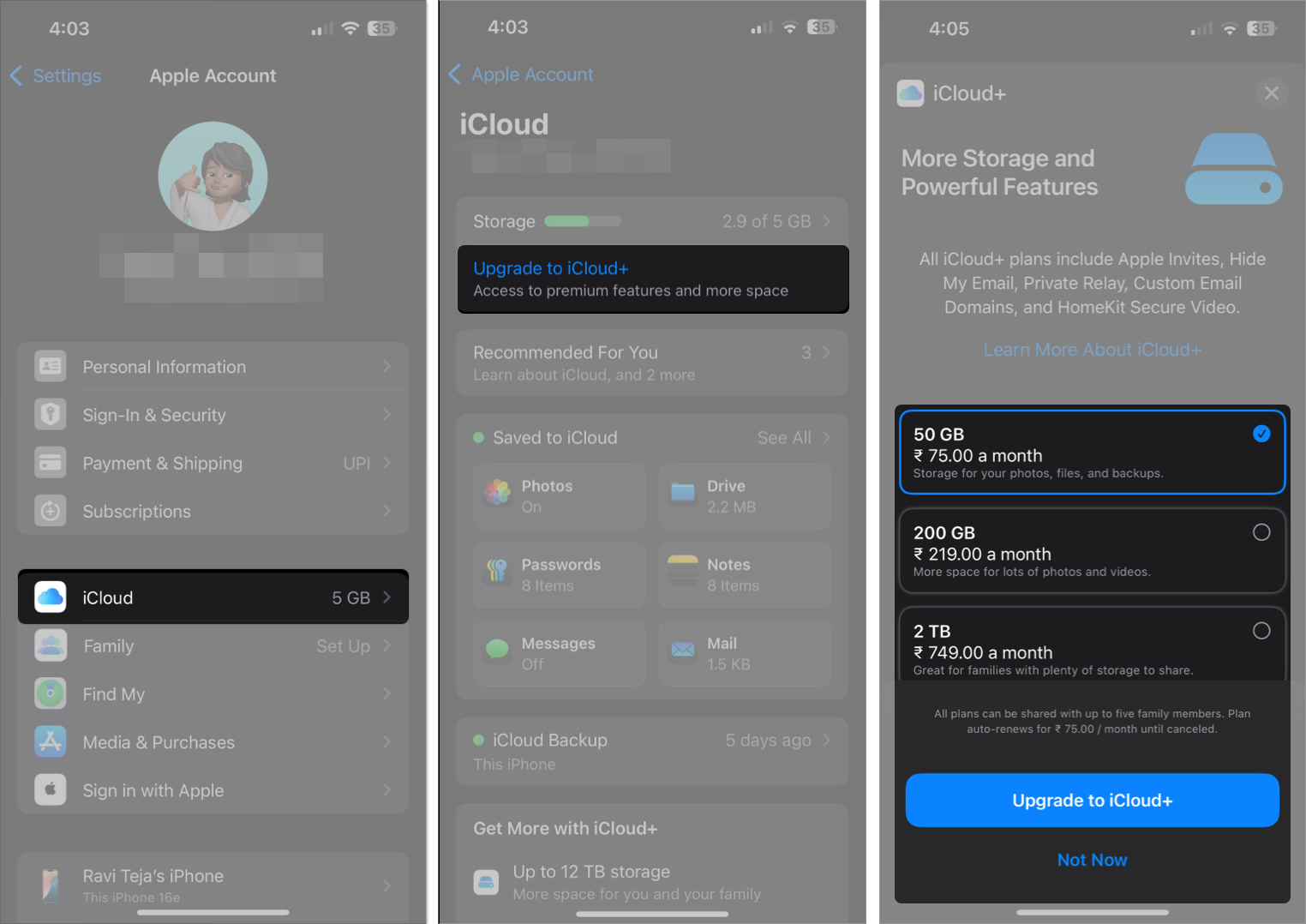
To [upgrade to iCloud+](https://www.igeeksblog.com/how-to-change-icloud-storage-plan/), open **Settings** and tap your name at the top. Go to **iCloud \> Upgrade to iCloud+**, and select the plan and complete the payment process to upgrade. The process is same on both iPhone/iPad and Mac.
## What Are the Key Features of iCloud+?
iCloud+ is more than just extra space. It includes smart tools that improve how you browse, email, and secure your digital life. Let’s go over each of them in detail.
### 1\. iCloud Private Relay
iCloud Private Relay is Apple’s privacy-focused feature that hides your IP address and browsing activity in Safari. It works a bit like a VPN but with a twist: your web traffic is encrypted and sent through two relays (servers) run by separate companies. This way, no one—not even Apple—can see both who you are and where you’re going online.
You can choose to keep your location slightly accurate (for local search results) or very broad (for more privacy). It works only in Safari and is not available in some countries like China, Saudi Arabia, and South Africa.
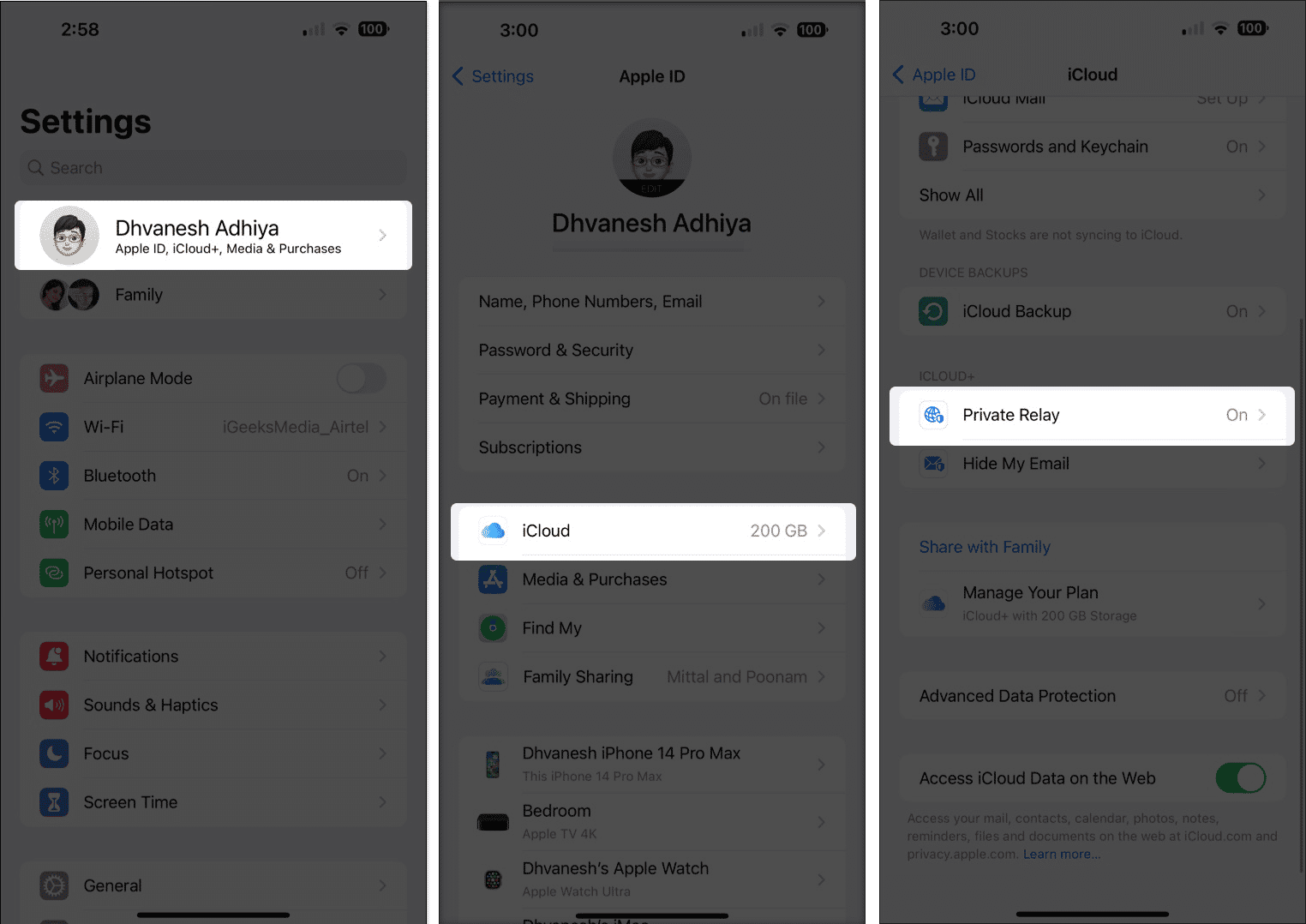
To set up Privacy Relay, go to **iCloud \> Private Relay** and toggle the switch next to **Private Relay** on.
**Also read:** [iCloud Private Relay vs VPN: Which one is better?](https://www.igeeksblog.com/icloud-private-relay-vs-vpn/)
### 2\. Hide My Email
Whenever you need to give your email address to a website or app, you can use the Hide My Email feature to generate a random one and share that instead. Emails sent to this address will be forwarded to your real inbox, but your actual address stays private. You can create and delete these aliases anytime. This is a great feature for avoiding spam, protecting your identity, or signing up for websites without sharing your personal email.
You can create a new address by going to **iCloud \> Hide My Email \> Create New Address** and following the on-screen instructions. Check out our detailed guide on [how to use Hide My Email on an iPhone](https://www.igeeksblog.com/how-to-use-apple-hide-my-email-on-iphone/) to learn more.
### 3\. HomeKit Secure Video
If you use HomeKit-compatible security cameras, iCloud+ lets you store footage securely in iCloud without it counting against your storage limit. The videos are encrypted end-to-end and analyzed locally using your home hub (like Apple TV or HomePod).
- 50GB plan: 1 camera
- 200GB plan: Up to 5 cameras
- 2TB and higher: Unlimited cameras
You can also set up face recognition and activity zones and share access with family members.
### 4\. Custom Email Domain
Want an email that looks more professional? With iCloud+, you can use a domain you own (like yourname@yourdomain.com) instead of yourname@icloud.com. You can create up to 3 email addresses per domain and invite others to use the same domain with their iCloud Mail.
Creating a custom domain is simple. You can do this by navigating to **iCloud \> Custom Email Domain \> Add Domain** and following the on-screen instructions.
### 5\. Family Sharing
You can share your iCloud+ plan with up to five other people in your [Family Sharing](https://www.igeeksblog.com/apple-family-sharing/) group. When you do this, everyone gets access to the features (like Private Relay and Hide My Email) and shared storage, but your data stays private.
To share with family, go to **iCloud \> Manage Account Storage \> Share With Family**.
### 6\. Recovery Contact & Legacy Contact
- **Recovery Contact** lets you assign a trusted person (like a parent or spouse) who can help you recover your Apple account if you get locked out.
- **Legacy Contact** allows someone to access your iCloud data after you pass away. It’s a secure way to pass on digital memories and important files.
If you want to add recovery or legacy contact, go to **Settings**, tap your name at the top, and select **Password & Security**.
## iCloud+ Plans and Pricing (As of 2025)
If the features and extra benefits of iCloud+ piqued your interest, you can upgrade to it. Below are all the iCloud+ plans available as of the time of writing.
| Plan | Storage | HomeKit Cameras | Price (Monthly, US) |
|---|---|---|---|
| Basic | 50GB | 1 camera | \$0.99 |
| Standard | 200GB | Up to 5 cameras | \$2.99 |
| Premium | 2TB | Unlimited cameras | \$9.99 |
| Ultra | 6TB | Unlimited cameras | \$29.99 |
| Max | 12TB | Unlimited cameras | \$59.99 |
These plans are exclusive to the United States. If you are in any other country, the pricing can be different. Check out the [Apple page to check the pricing](https://support.apple.com/en-us/108047) in your country currently.
All plans include access to all iCloud+ features and can be shared with family. They’re also bundled with Apple One plans.
## Is iCloud+ Worth It?
If you rely on iCloud for backups and syncing, use Safari, or have smart home cameras, iCloud+ offers great value even at the lowest tier. It’s especially **helpful for families and privacy-conscious users**.
The Hide My Email and Private Relay features alone can justify the cost for many, and if you’re looking for professional email or smart camera storage, higher tiers make even more sense.
**Related:** [How to turn off iCloud Private Relay](https://www.igeeksblog.com/how-to-turn-off-icloud-private-relay/ "How to turn off iCloud Private Relay")
## A Smarter, More Private iCloud Experience
iCloud+ turns Apple’s basic cloud service into a more powerful, privacy-first subscription. Whether you want more space, more control over your data, or advanced features like custom emails and secure video, iCloud+ is worth considering for most Apple users.
**You might want to take a peek at these posts as well:**
- [How to delete iCloud backups on iPhone, iPad and Mac](https://www.igeeksblog.com/how-to-delete-icloud-backup/)
- [How to clear iCloud storage on iPhone and iPad](https://www.igeeksblog.com/how-to-free-up-icloud-storage-on-iphone-ipad/)
- [What is iCloud Keychain and how to turn it on iPhone?](https://www.igeeksblog.com/how-to-use-icloud-keychain-on-iphone-ipad/ "What is iCloud Keychain and how to turn it on iPhone?")
### Topics
[iCloud](https://www.igeeksblog.com/tag/icloud/)[iCloud Plus](https://www.igeeksblog.com/tag/icloud-plus/)
[Add as a preferred source on Google](https://www.google.com/preferences/source?q=https://www.igeeksblog.com/)

Written by
[Ravi Teja KNTS](https://www.igeeksblog.com/author/ravi/)
I’ve been writing about tech for over 5 years, with 1000+ articles published so far. From iPhones and MacBooks to Android phones and AI tools, I’ve always enjoyed turning complicated features into simple, jargon-free guides. Recently, I switched sides and joined the Apple camp. Whether you want to try out new features, catch up on the latest news, or tweak your Apple devices, I’m here to help you get the most out of your tech.
[View all posts →](https://www.igeeksblog.com/author/ravi/)

Reviewed by
[Yash Wate](https://www.igeeksblog.com/author/yashwate/)
Yash is a tech journalist and writer based in India. He has five years of experience writing features, how-tos, and reviews for various online publications. As an editor at iGeeksBlog, Yash's job is to ensure the articles are polished and suitable for publication. You can also read his work on How-To Geek, MakeUseOf, and TechPP.
[View all posts →](https://www.igeeksblog.com/author/yashwate/)
CommentsJoin the conversation
## More from How-to
[](https://www.igeeksblog.com/carplay-live-sports-widget-how-to-set-up/)
[How-to](https://www.igeeksblog.com/category/how-to/)
[Apple brings live sports to your car with CarPlay widget: How to set it up](https://www.igeeksblog.com/carplay-live-sports-widget-how-to-set-up/)
Follow live scores of your favorite teams and league right from your car dashboard, thanks to the Sports app update.
[Ava Biswas](https://www.igeeksblog.com/author/ava/)
April 23, 2026
[](https://www.igeeksblog.com/share-link-to-specific-text-mac/)
[How-to](https://www.igeeksblog.com/category/how-to/)
[This Safari trick changed how I share links on Mac](https://www.igeeksblog.com/share-link-to-specific-text-mac/)
Sending entire articles felt unnecessary until I found this Mac trick that lets me share only the exact part I want.
[Vikhyat](https://www.igeeksblog.com/author/vikhyat/)
April 22, 2026
[](https://www.igeeksblog.com/how-to-turn-off-youtube-shorts/)
[How-to](https://www.igeeksblog.com/category/how-to/)
[Tired of YouTube Shorts? Here’s how to turn them off on your phone](https://www.igeeksblog.com/how-to-turn-off-youtube-shorts/)
YouTube Shorts can get distracting after a while. I found a simple way to limit them on my phone, and it made browsing much better.
[Vikhyat](https://www.igeeksblog.com/author/vikhyat/)
April 21, 2026
## More in How-to
[](https://www.igeeksblog.com/carplay-live-sports-widget-how-to-set-up/)
[Apple brings live sports to your car with CarPlay widget: How to set it up](https://www.igeeksblog.com/carplay-live-sports-widget-how-to-set-up/)

Ava Biswas·
April 23, 2026
[](https://www.igeeksblog.com/share-link-to-specific-text-mac/)
[This Safari trick changed how I share links on Mac](https://www.igeeksblog.com/share-link-to-specific-text-mac/)

Vikhyat·
April 22, 2026
[](https://www.igeeksblog.com/how-to-turn-off-youtube-shorts/)
[Tired of YouTube Shorts? Here’s how to turn them off on your phone](https://www.igeeksblog.com/how-to-turn-off-youtube-shorts/)

Vikhyat·
April 21, 2026
[](https://www.igeeksblog.com/instagram-privacy-settings-you-should-change-right-now/)
[Instagram privacy settings you should change right now](https://www.igeeksblog.com/instagram-privacy-settings-you-should-change-right-now/)

Vikhyat·
April 20, 2026
[](https://www.igeeksblog.com/spotify-gestures-every-user-should-know/)
[7 Spotify gestures every user should know](https://www.igeeksblog.com/spotify-gestures-every-user-should-know/)

Ava Biswas·
April 20, 2026
[View all in How-to](https://www.igeeksblog.com/category/how-to/)
## Apple eBooks
[iPhone iOS 26: The Ultimate Guide for iPhone Users \$4.99](https://ebooks.igeeksblog.com/ebooks/ios-26-ultimate-guide?utm_source=igeeksblog&utm_medium=sidebar)
[iPhone The Ultimate FaceTime Guide \$4.99](https://ebooks.igeeksblog.com/ebooks/ultimate-guide-to-use-facetime?utm_source=igeeksblog&utm_medium=sidebar)
[Browse All eBooks](https://ebooks.igeeksblog.com/ebooks?utm_source=igeeksblog&utm_medium=sidebar)
## Stay Updated
Get the latest Apple news, tips, and reviews delivered to your inbox weekly.
No spam, unsubscribe at any time. We value your privacy.
[](https://www.igeeksblog.com/)
Your daily source for Apple news, tips, reviews, and more. Helping you get the most out of your Apple devices since 2012.
### Quick Links
- [About Us](https://www.igeeksblog.com/about-us/)
- [Contact](https://www.igeeksblog.com/contact/)
- [Advertise](https://www.igeeksblog.com/advertise/)
- [How We Test](https://www.igeeksblog.com/how-we-test/)
- [Editorial Guidelines](https://www.igeeksblog.com/review-editorial-guidelines/)
### Categories
- [iPhone](https://www.igeeksblog.com/category/iphone)
- [Mac](https://www.igeeksblog.com/category/mac)
- [iPad](https://www.igeeksblog.com/category/ipad)
- [How-to](https://www.igeeksblog.com/category/how-to)
- [Reviews](https://www.igeeksblog.com/category/reviews)
- [Apps](https://www.igeeksblog.com/category/apps)
### Legal
- [Privacy Policy](https://www.igeeksblog.com/privacy-policy/)
- [Terms of Use](https://www.igeeksblog.com/terms-of-use/)
- [Cookie Policy](https://www.igeeksblog.com/cookie-policy/)
- [Disclaimer](https://www.igeeksblog.com/disclaimer/)
- Manage Cookies
[](https://www.dmca.com/Protection/Status.aspx?ID=f21b33e0-717d-4071-a215-c322c4cc20e0 "DMCA.com Protection Status")
© 2026 iGeeksBlog. All rights reserved.
Apple, iPhone, iPad, Mac are trademarks of Apple Inc. | ||||||||||||||||||
| Readable Markdown | Ever wondered what iCloud+ is, and why your iPhone keeps suggesting it? You’re not alone. Along with offering additional storage, this “plus” subscription plan also unlocks some powerful privacy and advanced features. Keep reading, and we’ll break down exactly what iCloud+ is, how it’s different from regular iCloud, what you get for your money, and whether it’s worth upgrading.
## Table of Contents
1. [What Is iCloud+, and How Is It Different From iCloud?](https://www.igeeksblog.com/what-is-apple-icloud-plus/#what-is-icloud-and-how-is-it-different-from-icloud)
2. [What Are the Key Features of iCloud+?](https://www.igeeksblog.com/what-is-apple-icloud-plus/#what-are-the-key-features-of-icloud)
3. [1\. iCloud Private Relay](https://www.igeeksblog.com/what-is-apple-icloud-plus/#1-icloud-private-relay)
4. [2\. Hide My Email](https://www.igeeksblog.com/what-is-apple-icloud-plus/#2-hide-my-email)
5. [3\. HomeKit Secure Video](https://www.igeeksblog.com/what-is-apple-icloud-plus/#3-homekit-secure-video)
6. [4\. Custom Email Domain](https://www.igeeksblog.com/what-is-apple-icloud-plus/#4-custom-email-domain)
7. [5\. Family Sharing](https://www.igeeksblog.com/what-is-apple-icloud-plus/#5-family-sharing)
8. [6\. Recovery Contact & Legacy Contact](https://www.igeeksblog.com/what-is-apple-icloud-plus/#6-recovery-contact-legacy-contact)
9. [iCloud+ Plans and Pricing (As of 2025)](https://www.igeeksblog.com/what-is-apple-icloud-plus/#icloud-plans-and-pricing-as-of-2025)
10. [Is iCloud+ Worth It?](https://www.igeeksblog.com/what-is-apple-icloud-plus/#is-icloud-worth-it)
11. [A Smarter, More Private iCloud Experience](https://www.igeeksblog.com/what-is-apple-icloud-plus/#a-smarter-more-private-icloud-experience)
## What Is iCloud+, and How Is It Different From iCloud?
[iCloud](https://www.igeeksblog.com/best-icloud-tips-tricks/) is Apple’s free cloud service that gives every user 5GB of storage. It backs up your iPhone, syncs your photos, contacts, messages, and other data across devices, and works in the background to keep everything up to date.
On the other hand, iCloud+ is a paid upgrade that builds on iCloud. It gives you more cloud storage and adds features focused on privacy, security, email personalization, and smart home integration.
Besides iCloud and iCloud+, there’s one more term that you may come across on your iPhone or Mac, iCloud Drive, though it isn’t a subscription like the other two. Here’s a quick breakdown to help you understand them better:
- **iCloud**: The free service with basic syncing and 5GB storage.
- **iCloud Drive**: A part of iCloud that acts like a file manager where you can manually upload and manage files.
- **iCloud+**: The paid version of iCloud that unlocks premium features and higher storage options.
To [upgrade to iCloud+](https://www.igeeksblog.com/how-to-change-icloud-storage-plan/), open **Settings** and tap your name at the top. Go to **iCloud \> Upgrade to iCloud+**, and select the plan and complete the payment process to upgrade. The process is same on both iPhone/iPad and Mac.

## What Are the Key Features of iCloud+?
iCloud+ is more than just extra space. It includes smart tools that improve how you browse, email, and secure your digital life. Let’s go over each of them in detail.
### 1\. iCloud Private Relay
iCloud Private Relay is Apple’s privacy-focused feature that hides your IP address and browsing activity in Safari. It works a bit like a VPN but with a twist: your web traffic is encrypted and sent through two relays (servers) run by separate companies. This way, no one—not even Apple—can see both who you are and where you’re going online.
You can choose to keep your location slightly accurate (for local search results) or very broad (for more privacy). It works only in Safari and is not available in some countries like China, Saudi Arabia, and South Africa.
To set up Privacy Relay, go to **iCloud \> Private Relay** and toggle the switch next to **Private Relay** on.

**Also read:** [iCloud Private Relay vs VPN: Which one is better?](https://www.igeeksblog.com/icloud-private-relay-vs-vpn/)
### 2\. Hide My Email
Whenever you need to give your email address to a website or app, you can use the Hide My Email feature to generate a random one and share that instead. Emails sent to this address will be forwarded to your real inbox, but your actual address stays private. You can create and delete these aliases anytime. This is a great feature for avoiding spam, protecting your identity, or signing up for websites without sharing your personal email.
You can create a new address by going to **iCloud \> Hide My Email \> Create New Address** and following the on-screen instructions. Check out our detailed guide on [how to use Hide My Email on an iPhone](https://www.igeeksblog.com/how-to-use-apple-hide-my-email-on-iphone/) to learn more.
### 3\. HomeKit Secure Video
If you use HomeKit-compatible security cameras, iCloud+ lets you store footage securely in iCloud without it counting against your storage limit. The videos are encrypted end-to-end and analyzed locally using your home hub (like Apple TV or HomePod).
- 50GB plan: 1 camera
- 200GB plan: Up to 5 cameras
- 2TB and higher: Unlimited cameras
You can also set up face recognition and activity zones and share access with family members.
### 4\. Custom Email Domain
Want an email that looks more professional? With iCloud+, you can use a domain you own (like yourname@yourdomain.com) instead of yourname@icloud.com. You can create up to 3 email addresses per domain and invite others to use the same domain with their iCloud Mail.
Creating a custom domain is simple. You can do this by navigating to **iCloud \> Custom Email Domain \> Add Domain** and following the on-screen instructions.
### 5\. Family Sharing
You can share your iCloud+ plan with up to five other people in your [Family Sharing](https://www.igeeksblog.com/apple-family-sharing/) group. When you do this, everyone gets access to the features (like Private Relay and Hide My Email) and shared storage, but your data stays private.
To share with family, go to **iCloud \> Manage Account Storage \> Share With Family**.
### 6\. Recovery Contact & Legacy Contact
- **Recovery Contact** lets you assign a trusted person (like a parent or spouse) who can help you recover your Apple account if you get locked out.
- **Legacy Contact** allows someone to access your iCloud data after you pass away. It’s a secure way to pass on digital memories and important files.
If you want to add recovery or legacy contact, go to **Settings**, tap your name at the top, and select **Password & Security**.
## iCloud+ Plans and Pricing (As of 2025)
If the features and extra benefits of iCloud+ piqued your interest, you can upgrade to it. Below are all the iCloud+ plans available as of the time of writing.
| Plan | Storage | HomeKit Cameras | Price (Monthly, US) |
|---|---|---|---|
| Basic | 50GB | 1 camera | \$0.99 |
| Standard | 200GB | Up to 5 cameras | \$2.99 |
| Premium | 2TB | Unlimited cameras | \$9.99 |
| Ultra | 6TB | Unlimited cameras | \$29.99 |
| Max | 12TB | Unlimited cameras | \$59.99 |
These plans are exclusive to the United States. If you are in any other country, the pricing can be different. Check out the [Apple page to check the pricing](https://support.apple.com/en-us/108047) in your country currently.
All plans include access to all iCloud+ features and can be shared with family. They’re also bundled with Apple One plans.
## Is iCloud+ Worth It?
If you rely on iCloud for backups and syncing, use Safari, or have smart home cameras, iCloud+ offers great value even at the lowest tier. It’s especially **helpful for families and privacy-conscious users**.
The Hide My Email and Private Relay features alone can justify the cost for many, and if you’re looking for professional email or smart camera storage, higher tiers make even more sense.
**Related:** [How to turn off iCloud Private Relay](https://www.igeeksblog.com/how-to-turn-off-icloud-private-relay/ "How to turn off iCloud Private Relay")
## A Smarter, More Private iCloud Experience
iCloud+ turns Apple’s basic cloud service into a more powerful, privacy-first subscription. Whether you want more space, more control over your data, or advanced features like custom emails and secure video, iCloud+ is worth considering for most Apple users.
**You might want to take a peek at these posts as well:**
- [How to delete iCloud backups on iPhone, iPad and Mac](https://www.igeeksblog.com/how-to-delete-icloud-backup/)
- [How to clear iCloud storage on iPhone and iPad](https://www.igeeksblog.com/how-to-free-up-icloud-storage-on-iphone-ipad/)
- [What is iCloud Keychain and how to turn it on iPhone?](https://www.igeeksblog.com/how-to-use-icloud-keychain-on-iphone-ipad/ "What is iCloud Keychain and how to turn it on iPhone?") | ||||||||||||||||||
| ML Classification | |||||||||||||||||||
| ML Categories |
Raw JSON{
"/Internet_and_Telecom": 772,
"/Internet_and_Telecom/Web_Services": 644,
"/Computers_and_Electronics": 634,
"/Internet_and_Telecom/Web_Services/Cloud_Storage": 634,
"/Computers_and_Electronics/Software": 466,
"/Computers_and_Electronics/Software/Internet_Software": 225
} | ||||||||||||||||||
| ML Page Types |
Raw JSON{
"/Article": 999,
"/Article/Tutorial_or_Guide": 488
} | ||||||||||||||||||
| ML Intent Types |
Raw JSON{
"Informational": 998
} | ||||||||||||||||||
| Content Metadata | |||||||||||||||||||
| Language | en | ||||||||||||||||||
| Author | Yash Wate | ||||||||||||||||||
| Publish Time | not set | ||||||||||||||||||
| Original Publish Time | 2021-06-12 13:14:54 (4 years ago) | ||||||||||||||||||
| Republished | No | ||||||||||||||||||
| Word Count (Total) | 1,701 | ||||||||||||||||||
| Word Count (Content) | 1,199 | ||||||||||||||||||
| Links | |||||||||||||||||||
| External Links | 0 | ||||||||||||||||||
| Internal Links | 0 | ||||||||||||||||||
| Technical SEO | |||||||||||||||||||
| Meta Nofollow | No | ||||||||||||||||||
| Meta Noarchive | No | ||||||||||||||||||
| JS Rendered | No | ||||||||||||||||||
| Redirect Target | null | ||||||||||||||||||
| Performance | |||||||||||||||||||
| Download Time (ms) | 663 | ||||||||||||||||||
| TTFB (ms) | 661 | ||||||||||||||||||
| Download Size (bytes) | 21,857 | ||||||||||||||||||
| Shard | 11 (laksa) | ||||||||||||||||||
| Root Hash | 4682435481645349411 | ||||||||||||||||||
| Unparsed URL | com,igeeksblog!www,/what-is-apple-icloud-plus/ s443 | ||||||||||||||||||