ℹ️ Skipped - page is already crawled
| Filter | Status | Condition | Details |
|---|---|---|---|
| HTTP status | PASS | download_http_code = 200 | HTTP 200 |
| Age cutoff | PASS | download_stamp > now() - 6 MONTH | 0 months ago |
| History drop | PASS | isNull(history_drop_reason) | No drop reason |
| Spam/ban | PASS | fh_dont_index != 1 AND ml_spam_score = 0 | ml_spam_score=0 |
| Canonical | PASS | meta_canonical IS NULL OR = '' OR = src_unparsed | Not set |
| Property | Value |
|---|---|
| URL | https://www.geeksforgeeks.org/python/python-exception-handling/ |
| Last Crawled | 2026-04-21 01:52:08 (8 hours ago) |
| First Indexed | 2025-07-03 19:06:51 (9 months ago) |
| HTTP Status Code | 200 |
| Meta Title | Python Exception Handling - GeeksforGeeks |
| Meta Description | Your All-in-One Learning Portal: GeeksforGeeks is a comprehensive educational platform that empowers learners across domains-spanning computer science and programming, school education, upskilling, commerce, software tools, competitive exams, and more., Your All-in-One Learning Portal. It contains well written, well thought and well explained computer science and programming articles, quizzes and practice/competitive programming/company interview Questions. |
| Meta Canonical | null |
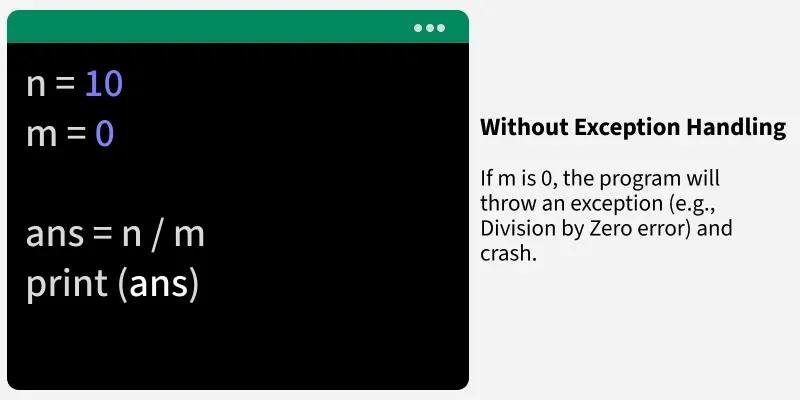
| Boilerpipe Text | Python Exception Handling allows a program to gracefully handle unexpected events (like invalid input or missing files) without crashing. Instead of terminating abruptly, Python lets you detect the problem, respond to it, and continue execution when possible.
Previous
Pause
Next
2 / 3
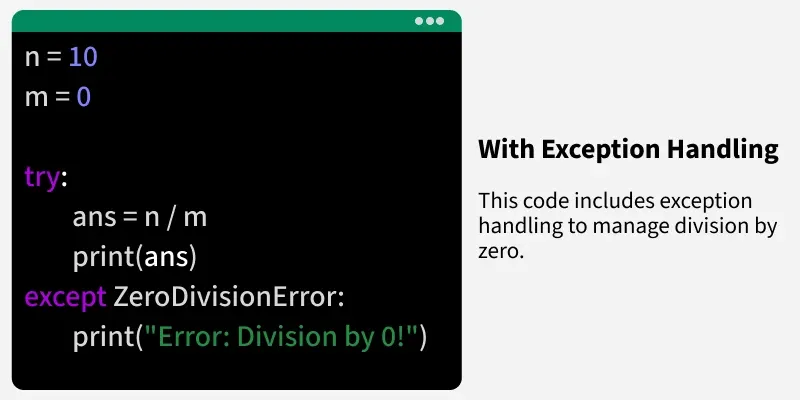
Below is a basic example demonstrating how to catch an exception and handle it gracefully:
Output
Can't be divided by zero!
Explanation:
Dividing a number by 0 raises a
ZeroDivisionError
. The try block contains code that may fail and except block catches the error, printing a safe message instead of stopping the program.
Difference Between Errors and Exceptions
Errors and exceptions are both issues in a program, but they differ in severity and handling.
Error:
Issues in the program logic such as SyntaxError, etc. It occurs at compile time.
Exception:
Problems that occur at runtime and can be managed using exception handling (e.g., invalid input, missing files).
Example:
This example shows the difference between a syntax error and a runtime exception.
Explanation:
A syntax error stops the code from running at all, while an exception like ZeroDivisionError occurs during execution and can be caught with exception handling.
Syntax of Exception Handling
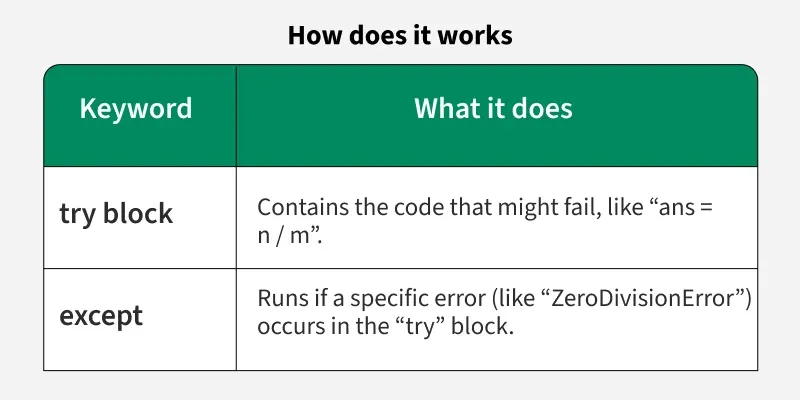
Python provides four main keywords for handling exceptions: try, except, else and finally each plays a unique role. Let's see syntax:
try:
# Code
except SomeException:
# Code
else:
# Code
finally:
# Code
try:
Runs the risky code that might cause an error.
except:
Catches and handles the error if one occurs.
else:
Executes only if no exception occurs in try.
finally:
Runs regardless of what happens useful for cleanup tasks like closing files.
Example:
This code attempts division and handles errors gracefully using try-except-else-finally.
Output
You can't divide by zero!
Execution complete.
Explanation:
try block attempts division, except blocks catch specific errors, else block executes only if no errors occur, while finally block always runs, signaling end of execution.
Please refer
Python Built-in Exceptions
for some common exceptions.
Catching Exceptions
We can handle errors more efficiently by specifying the types of exceptions we expect. This can make code both safer and easier to debug.
1. Catching Specific Exceptions
Catching specific exceptions makes code to respond to different exception types differently. It precisely makes your code safer and easier to debug. It avoids masking bugs by only reacting to the exact problems you expect.
Example:
This code handles ValueError and ZeroDivisionError with different messages.
Output
Not Valid!
Explanation:
A ValueError occurs because "str" cannot be converted to an integer. If conversion had succeeded but x were 0, a ZeroDivisionError would have been caught instead.
2. Catching Multiple Exceptions
We can catch multiple exceptions in a single block if we need to handle them in the same way or we can separate them if different types of exceptions require different handling.
Example:
This code attempts to convert list elements and handles ValueError, TypeError and IndexError.
Output
Error invalid literal for int() with base 10: 'twenty'
Explanation:
The ValueError is raised when trying to convert "twenty" to an integer. A TypeError could occur if incompatible types were used, while IndexError would trigger if the list index was out of range.
3. Catch-All Handlers and Their Risks
Catch-all handler is used to call to catch any exception (similar to else statement). Use only except keyword to define it:
Example:
This code tries dividing a string by a number, which causes a TypeError.
Output
Something went wrong!
Explanation:
A TypeError occurs because you can’t divide a string by a number. The bare except catches it, but this can make debugging harder since the actual error type is hidden. Use bare except only as a net.
Raise an Exception
We raise an exception in Python using the
raise
keyword followed by an instance of the exception class that we want to trigger. We can choose from built-in exceptions or define our own custom exceptions by inheriting from Python's built-in Exception class.
Basic Syntax:
raise ExceptionType("Error message")
Example:
This code raises a ValueError if an invalid age is given.
Output
Age cannot be negative.
Explanation:
The function checks if age is invalid. If it is, it raises a ValueError. This prevents invalid states from entering the program.
We can also create
custom exceptions
to address application-specific errors, for detailed information refer to:
Creating Custom Exceptions in Python |
| Markdown | [](https://www.geeksforgeeks.org/)

- Sign In
- [Courses]()
- [Tutorials]()
- [Interview Prep]()
- [Python Tutorial](https://www.geeksforgeeks.org/python/python-programming-language-tutorial/)
- [Data Types](https://www.geeksforgeeks.org/python/python-data-types/)
- [Interview Questions](https://www.geeksforgeeks.org/python/python-interview-questions/)
- [Examples](https://www.geeksforgeeks.org/python/python-programming-examples/)
- [Quizzes](https://www.geeksforgeeks.org/python/python-quizzes/)
- [DSA Python](https://www.geeksforgeeks.org/dsa/python-data-structures-and-algorithms/)
- [Data Science](https://www.geeksforgeeks.org/data-science/data-science-with-python-tutorial/)
- [NumPy](https://www.geeksforgeeks.org/python/numpy-tutorial/)
- [Pandas](https://www.geeksforgeeks.org/pandas/pandas-tutorial/)
- [Practice](https://www.geeksforgeeks.org/dsa/geeksforgeeks-practice-best-online-coding-platform/)
# Python Exception Handling
Last Updated : 26 Mar, 2026
Python Exception Handling allows a program to gracefully handle unexpected events (like invalid input or missing files) without crashing. Instead of terminating abruptly, Python lets you detect the problem, respond to it, and continue execution when possible.
2 / 3
Below is a basic example demonstrating how to catch an exception and handle it gracefully:
Python
``
```
n = 10
```
```
try:
```
```
res = n / 0
```
```
except ZeroDivisionError:
```
```
print("Can't be divided by zero!")
```
**Output**
```
Can't be divided by zero!
```
****Explanation:**** Dividing a number by 0 raises a [ZeroDivisionError](https://www.geeksforgeeks.org/python/zerodivisionerror-float-division-by-zero-in-python/). The try block contains code that may fail and except block catches the error, printing a safe message instead of stopping the program.
## Difference Between Errors and Exceptions
Errors and exceptions are both issues in a program, but they differ in severity and handling.
- ****Error:**** Issues in the program logic such as SyntaxError, etc. It occurs at compile time.
- ****Exception:**** Problems that occur at runtime and can be managed using exception handling (e.g., invalid input, missing files).
****Example:**** This example shows the difference between a syntax error and a runtime exception.
Python
``
```
# Syntax Error (Error)
```
```
print("Hello world" # Missing closing parenthesis
```
```
```
```
# ZeroDivisionError (Exception)
```
```
n = 10
```
```
res = n / 0
```
****Explanation:**** A syntax error stops the code from running at all, while an exception like ZeroDivisionError occurs during execution and can be caught with exception handling.
### Syntax of Exception Handling
Python provides four main keywords for handling exceptions: try, except, else and finally each plays a unique role. Let's see syntax:
> try:
> \# Code
> except SomeException:
> \# Code
> else:
> \# Code
> finally:
> \# Code
- ****try:**** Runs the risky code that might cause an error.
- ****except:**** Catches and handles the error if one occurs.
- ****else:**** Executes only if no exception occurs in try.
- ****finally:**** Runs regardless of what happens useful for cleanup tasks like closing files.
****Example:**** This code attempts division and handles errors gracefully using try-except-else-finally.
Python
``
```
try:
```
```
n = 0
```
```
res = 100 / n
```
```
```
```
except ZeroDivisionError:
```
```
print("You can't divide by zero!")
```
```
```
```
except ValueError:
```
```
print("Enter a valid number!")
```
```
```
```
else:
```
```
print("Result is", res)
```
```
```
```
finally:
```
```
print("Execution complete.")
```
**Output**
```
You can't divide by zero!
Execution complete.
```
****Explanation:**** try block attempts division, except blocks catch specific errors, else block executes only if no errors occur, while finally block always runs, signaling end of execution.
> Please refer [Python Built-in Exceptions](https://www.geeksforgeeks.org/python/built-exceptions-python/) for some common exceptions.
## Catching Exceptions
We can handle errors more efficiently by specifying the types of exceptions we expect. This can make code both safer and easier to debug.
### 1\. Catching Specific Exceptions
Catching specific exceptions makes code to respond to different exception types differently. It precisely makes your code safer and easier to debug. It avoids masking bugs by only reacting to the exact problems you expect.
****Example:**** This code handles ValueError and ZeroDivisionError with different messages.
Python
``
```
try:
```
```
# This will cause ValueError
```
```
x = int("str")
```
```
inv = 1 / x # Inverse calculation
```
```
```
```
except ValueError:
```
```
print("Not Valid!")
```
```
```
```
except ZeroDivisionError:
```
```
print("Zero has no inverse!")
```
**Output**
```
Not Valid!
```
****Explanation:**** A ValueError occurs because "str" cannot be converted to an integer. If conversion had succeeded but x were 0, a ZeroDivisionError would have been caught instead.
### 2\. Catching Multiple Exceptions
We can catch multiple exceptions in a single block if we need to handle them in the same way or we can separate them if different types of exceptions require different handling.
****Example:**** This code attempts to convert list elements and handles ValueError, TypeError and IndexError.
Python
``
```
a = ["10", "twenty", 30]
```
```
try:
```
```
# 'twenty' cannot be converted to int
```
```
total = int(a[0]) + int(a[1])
```
```
```
```
except (ValueError, TypeError) as e:
```
```
print("Error", e)
```
```
```
```
except IndexError:
```
```
print("Index out of range.")
```
**Output**
```
Error invalid literal for int() with base 10: 'twenty'
```
****Explanation:**** The ValueError is raised when trying to convert "twenty" to an integer. A TypeError could occur if incompatible types were used, while IndexError would trigger if the list index was out of range.
### 3\. Catch-All Handlers and Their Risks
Catch-all handler is used to call to catch any exception (similar to else statement). Use only except keyword to define it:
****Example:**** This code tries dividing a string by a number, which causes a TypeError.
Python
``
```
try:
```
```
# Risky operation: dividing string by number
```
```
res = "100" / 20
```
```
```
```
except ArithmeticError:
```
```
print("Arithmetic problem.")
```
```
```
```
except:
```
```
print("Something went wrong!")
```
**Output**
```
Something went wrong!
```
****Explanation:**** A TypeError occurs because you can’t divide a string by a number. The bare except catches it, but this can make debugging harder since the actual error type is hidden. Use bare except only as a net.
## Raise an Exception
We raise an exception in Python using the [raise](https://www.geeksforgeeks.org/python/python-raise-keyword/) keyword followed by an instance of the exception class that we want to trigger. We can choose from built-in exceptions or define our own custom exceptions by inheriting from Python's built-in Exception class.
****Basic Syntax:****
> raise ExceptionType("Error message")
****Example:**** This code raises a ValueError if an invalid age is given.
Python
``
```
def set(age):
```
```
if age < 0:
```
```
raise ValueError("Age cannot be negative.")
```
```
print(f"Age set to {age}")
```
```
```
```
try:
```
```
set(-5)
```
```
except ValueError as e:
```
```
print(e)
```
**Output**
```
Age cannot be negative.
```
****Explanation:**** The function checks if age is invalid. If it is, it raises a ValueError. This prevents invalid states from entering the program.
We can also create ****custom exceptions**** to address application-specific errors, for detailed information refer to: [Creating Custom Exceptions in Python](https://www.geeksforgeeks.org/python/define-custom-exceptions-in-python/)
Suggested Quiz

5 Questions
How can you handle exceptions in Python?
- A
Using if-else statements
- B
Using try-except blocks
- C
Using switch-case statements
- D
Using for loops
What is the purpose of the finally block in exception handling?
- A
To define a block of code that will be executed if an exception occurs
- B
To specify the code to be executed regardless of whether an exception occurs or not
- C
To catch and handle specific exceptions
- D
To raise a custom exception
Which of the following statements is used to raise a custom exception in Python?
- A
throw
- B
raise
- C
catch
- D
except
What will be the output of the following code?
Python
``
- A
10
- B
"Infinity"
- C
ZeroDivisionError
- D
None
How can you catch multiple exceptions in a single except block?
- A
Using a comma-separated list of exceptions
- B
Using nested try-except blocks
- C
By defining a custom exception
- D
Using the catch keyword

Quiz Completed Successfully
Your Score :0/5
Accuracy :0%
Login to View Explanation
**1**/5
\< Previous
Next \>
Comment
[K](https://www.geeksforgeeks.org/user/Nikhil%20Kumar%20Singh/)
kartik
288
Article Tags:
Article Tags:
[Python](https://www.geeksforgeeks.org/category/programming-language/python/)
### Explore
[](https://www.geeksforgeeks.org/)

Corporate & Communications Address:
A-143, 7th Floor, Sovereign Corporate Tower, Sector- 136, Noida, Uttar Pradesh (201305)

Registered Address:
K 061, Tower K, Gulshan Vivante Apartment, Sector 137, Noida, Gautam Buddh Nagar, Uttar Pradesh, 201305
[](https://geeksforgeeksapp.page.link/gfg-app)[](https://geeksforgeeksapp.page.link/gfg-app)
- Company
- [About Us](https://www.geeksforgeeks.org/about/)
- [Legal](https://www.geeksforgeeks.org/legal/)
- [Privacy Policy](https://www.geeksforgeeks.org/legal/privacy-policy/)
- [Contact Us](https://www.geeksforgeeks.org/about/contact-us/)
- [Advertise with us](https://www.geeksforgeeks.org/advertise-with-us/)
- [GFG Corporate Solution](https://www.geeksforgeeks.org/gfg-corporate-solution/)
- [Campus Training Program](https://www.geeksforgeeks.org/campus-training-program/)
- Explore
- [POTD](https://www.geeksforgeeks.org/problem-of-the-day)
- [Job-A-Thon](https://practice.geeksforgeeks.org/events/rec/job-a-thon/)
- [Blogs](https://www.geeksforgeeks.org/category/blogs/?type=recent)
- [Nation Skill Up](https://www.geeksforgeeks.org/nation-skill-up/)
- Tutorials
- [Programming Languages](https://www.geeksforgeeks.org/computer-science-fundamentals/programming-language-tutorials/)
- [DSA](https://www.geeksforgeeks.org/dsa/dsa-tutorial-learn-data-structures-and-algorithms/)
- [Web Technology](https://www.geeksforgeeks.org/web-tech/web-technology/)
- [AI, ML & Data Science](https://www.geeksforgeeks.org/machine-learning/ai-ml-and-data-science-tutorial-learn-ai-ml-and-data-science/)
- [DevOps](https://www.geeksforgeeks.org/devops/devops-tutorial/)
- [CS Core Subjects](https://www.geeksforgeeks.org/gate/gate-exam-tutorial/)
- [Interview Preparation](https://www.geeksforgeeks.org/aptitude/interview-corner/)
- [Software and Tools](https://www.geeksforgeeks.org/websites-apps/software-and-tools-a-to-z-list/)
- Courses
- [ML and Data Science](https://www.geeksforgeeks.org/courses/category/machine-learning-data-science)
- [DSA and Placements](https://www.geeksforgeeks.org/courses/category/dsa-placements)
- [Web Development](https://www.geeksforgeeks.org/courses/category/development-testing)
- [Programming Languages](https://www.geeksforgeeks.org/courses/category/programming-languages)
- [DevOps & Cloud](https://www.geeksforgeeks.org/courses/category/cloud-devops)
- [GATE](https://www.geeksforgeeks.org/courses/category/gate)
- [Trending Technologies](https://www.geeksforgeeks.org/courses/category/trending-technologies/)
- Videos
- [DSA](https://www.geeksforgeeks.org/videos/category/sde-sheet/)
- [Python](https://www.geeksforgeeks.org/videos/category/python/)
- [Java](https://www.geeksforgeeks.org/videos/category/java-w6y5f4/)
- [C++](https://www.geeksforgeeks.org/videos/category/c/)
- [Web Development](https://www.geeksforgeeks.org/videos/category/web-development/)
- [Data Science](https://www.geeksforgeeks.org/videos/category/data-science/)
- [CS Subjects](https://www.geeksforgeeks.org/videos/category/cs-subjects/)
- Preparation Corner
- [Interview Corner](https://www.geeksforgeeks.org/interview-prep/interview-corner/)
- [Aptitude](https://www.geeksforgeeks.org/aptitude/aptitude-questions-and-answers/)
- [Puzzles](https://www.geeksforgeeks.org/aptitude/puzzles/)
- [GfG 160](https://www.geeksforgeeks.org/courses/gfg-160-series)
- [System Design](https://www.geeksforgeeks.org/system-design/system-design-tutorial/)
[@GeeksforGeeks, Sanchhaya Education Private Limited](https://www.geeksforgeeks.org/), [All rights reserved](https://www.geeksforgeeks.org/copyright-information/)
![]() |
| Readable Markdown | Python Exception Handling allows a program to gracefully handle unexpected events (like invalid input or missing files) without crashing. Instead of terminating abruptly, Python lets you detect the problem, respond to it, and continue execution when possible.



2 / 3
Below is a basic example demonstrating how to catch an exception and handle it gracefully:
**Output**
```
Can't be divided by zero!
```
****Explanation:**** Dividing a number by 0 raises a [ZeroDivisionError](https://www.geeksforgeeks.org/python/zerodivisionerror-float-division-by-zero-in-python/). The try block contains code that may fail and except block catches the error, printing a safe message instead of stopping the program.
## Difference Between Errors and Exceptions
Errors and exceptions are both issues in a program, but they differ in severity and handling.
- ****Error:**** Issues in the program logic such as SyntaxError, etc. It occurs at compile time.
- ****Exception:**** Problems that occur at runtime and can be managed using exception handling (e.g., invalid input, missing files).
****Example:**** This example shows the difference between a syntax error and a runtime exception.
****Explanation:**** A syntax error stops the code from running at all, while an exception like ZeroDivisionError occurs during execution and can be caught with exception handling.
### Syntax of Exception Handling
Python provides four main keywords for handling exceptions: try, except, else and finally each plays a unique role. Let's see syntax:
> try:
> \# Code
> except SomeException:
> \# Code
> else:
> \# Code
> finally:
> \# Code
- ****try:**** Runs the risky code that might cause an error.
- ****except:**** Catches and handles the error if one occurs.
- ****else:**** Executes only if no exception occurs in try.
- ****finally:**** Runs regardless of what happens useful for cleanup tasks like closing files.
****Example:**** This code attempts division and handles errors gracefully using try-except-else-finally.
**Output**
```
You can't divide by zero!
Execution complete.
```
****Explanation:**** try block attempts division, except blocks catch specific errors, else block executes only if no errors occur, while finally block always runs, signaling end of execution.
> Please refer [Python Built-in Exceptions](https://www.geeksforgeeks.org/python/built-exceptions-python/) for some common exceptions.
## Catching Exceptions
We can handle errors more efficiently by specifying the types of exceptions we expect. This can make code both safer and easier to debug.
### 1\. Catching Specific Exceptions
Catching specific exceptions makes code to respond to different exception types differently. It precisely makes your code safer and easier to debug. It avoids masking bugs by only reacting to the exact problems you expect.
****Example:**** This code handles ValueError and ZeroDivisionError with different messages.
**Output**
```
Not Valid!
```
****Explanation:**** A ValueError occurs because "str" cannot be converted to an integer. If conversion had succeeded but x were 0, a ZeroDivisionError would have been caught instead.
### 2\. Catching Multiple Exceptions
We can catch multiple exceptions in a single block if we need to handle them in the same way or we can separate them if different types of exceptions require different handling.
****Example:**** This code attempts to convert list elements and handles ValueError, TypeError and IndexError.
**Output**
```
Error invalid literal for int() with base 10: 'twenty'
```
****Explanation:**** The ValueError is raised when trying to convert "twenty" to an integer. A TypeError could occur if incompatible types were used, while IndexError would trigger if the list index was out of range.
### 3\. Catch-All Handlers and Their Risks
Catch-all handler is used to call to catch any exception (similar to else statement). Use only except keyword to define it:
****Example:**** This code tries dividing a string by a number, which causes a TypeError.
**Output**
```
Something went wrong!
```
****Explanation:**** A TypeError occurs because you can’t divide a string by a number. The bare except catches it, but this can make debugging harder since the actual error type is hidden. Use bare except only as a net.
## Raise an Exception
We raise an exception in Python using the [raise](https://www.geeksforgeeks.org/python/python-raise-keyword/) keyword followed by an instance of the exception class that we want to trigger. We can choose from built-in exceptions or define our own custom exceptions by inheriting from Python's built-in Exception class.
****Basic Syntax:****
> raise ExceptionType("Error message")
****Example:**** This code raises a ValueError if an invalid age is given.
**Output**
```
Age cannot be negative.
```
****Explanation:**** The function checks if age is invalid. If it is, it raises a ValueError. This prevents invalid states from entering the program.
We can also create ****custom exceptions**** to address application-specific errors, for detailed information refer to: [Creating Custom Exceptions in Python](https://www.geeksforgeeks.org/python/define-custom-exceptions-in-python/) |
| Shard | 103 (laksa) |
| Root Hash | 12046344915360636903 |
| Unparsed URL | org,geeksforgeeks!www,/python/python-exception-handling/ s443 |