ℹ️ Skipped - page is already crawled
| Filter | Status | Condition | Details |
|---|---|---|---|
| HTTP status | PASS | download_http_code = 200 | HTTP 200 |
| Age cutoff | PASS | download_stamp > now() - 6 MONTH | 0 months ago |
| History drop | PASS | isNull(history_drop_reason) | No drop reason |
| Spam/ban | PASS | fh_dont_index != 1 AND ml_spam_score = 0 | ml_spam_score=0 |
| Canonical | PASS | meta_canonical IS NULL OR = '' OR = src_unparsed | Not set |
| Property | Value |
|---|---|
| URL | https://www.gadgetbytenepal.com/mi-tv-4x-55-review/ |
| Last Crawled | 2026-04-19 03:58:35 (17 hours ago) |
| First Indexed | 2020-11-20 19:05:14 (5 years ago) |
| HTTP Status Code | 200 |
| Meta Title | Xiaomi Mi TV 4X 55 Review: Disruptingly Good |
| Meta Description | Find out all about the Xiaomi Mi TV 4X 55 4K HDR TV in this review, including its design, display, audio, remote, pros, cons, and more. |
| Meta Canonical | null |
| Boilerpipe Text | Home
TV
Xiaomi Mi TV 4X 55 Review: Disruptingly Good
N
By
| Senior Editor
Senior Editor
Published
Nov 20, 2020
Why Trust Gadgetbyte?
At Gadgetbyte, we invest substantial hours into rigorously testing each product or service we review, guaranteeing that you make informed purchases.
Learn more about our testing process.
Review Overview
4.1
If you want a big TV watching experience, but don't have the best dollars, the Mi TV 4X 55 is almost a no brainer. For casual TV viewers, what Xiaomi has been able to deliver at this price point is truly remarkable. Having said that, it does have some limitations that might come into play if you've developed (or are looking to develop) a sophisticated TV lifestyle.
Design & Build
9/10
Display
8/10
Audio
8/10
Connectivity
9/10
Software
7/10
Remote
7/10
Value for Money
9/10
Xiaomi is one of those companies that has built its entire fanbase thanks to its aggressive pricing strategies. And just a couple of months ago, Xiaomi entered the TV market here in Nepal by launching
two TVs
. While saying this move blew the competitors out of the water is a blatant exaggeration, I can say that Xiaomi’s presence in the domestic TV industry was a surprise to be sure, but a welcome one. We were quite eager to test, review the Xiaomi
Mi TV 4X 55
in particular, so we got one for ourselves. Retailing at Rs. 65,000, it is an intriguing offering (to say the least). After having used it for about 2 months now, I can safely say that this is a banger of a TV, at least considering other options in the local market. So, allow me to discuss the Xiaomi Mi TV 4X 55 at length in this review.
Xiaomi Mi TV 4X 55 Specifications:
Display:
55-inches LED-backlit LCD display
Resolution:
4K Ultra-HD (3840 x 2160 pixels)
Dimensions:
48.9W x 28.35H" (w/o stand) | 48.9W x 30.3H" (w/ stand)
Weight:
12.70 kg (w/o stand); 13 kg (w/ stand)
Sound:
2x Speakers with 20W Output (6ohm)
Audio Decoder:
Dolby Audio, DTS-HD
OS:
Android TV 9.0 (Pie), PatchWall
Processor:
Amlogic quad-core CPU (Cortex-A53), Mali-450 MP3 GPU
Memory:
2GB RAM, 8GB eMMC storage
HDR:
Yes (HDR10)
Refresh Rate:
60Hz
Viewing Angle:
178-degree
Response Time:
6.5ms (typ)
Power:
AC100-240V 50/60Hz (140W)
Wireless Connectivity:
WiFi (dual-band), Bluetooth 4.2
I/O Ports:
3x HDMI (including one HDMI ARC), 2x USB 2.0, 1x Ethernet (LAN), 1x Antenna, 1x S/PDIF, 1x AV input
Remote:
Mi Remote (battery not included inside the box)
Warranty:
1 year brand + 1 year on the panel
Price in Nepal:
Rs.
64,999
74,999
Xiaomi Mi TV 4X 55 Review:
Design & Build
A plastic back panel, minimal bezels upfront
Can be wall-mounted or installed using a stand
As always, let’s start with the design & build quality. Like it is with every other TVs these days, the Mi TV 4X bears a striking resemblance to any one of them out there—with its minimal bezels and the standard black color finish. The back panel has been made from some sort of plastic material while Xiaomi has given a coarse touch to the entirety of the panel too.
Similarly, the bezels on the front have this sort-of matte finish to them, while the chin houses a small “Mi” branding. And just below it, you’ll find the LED power indicator. Underneath it, there’s a dedicated power button as well, which is self-explanatory. The Mi TV 4X 55 can be either wall-mounted or installed using a stand. We went the second route as it offers a greater level of flexibility for our inconsistent office layout. Weighing just 13 kg, the TV is relatively easy to carry around from one room to another. There is a little bit of wobble to it, but nothing to be alarmed by. Looking at the back of the TV, one can find a separate module that houses the I/O ports. Unlike the supposedly premium TVs from other manufacturers like LG, Samsung, Sony, etc. this one does not have a cable management mechanism. So, installing a bunch of wired components may disturb the room’s aesthetics if not handled well.
Display
55" 4K UHD LED-backlit LCD display
HDR content compatible
60Hz refresh rate, 178º viewing angle
Moving on, as I mentioned earlier, this is a 55” 4K UHD TV which has an LED-backlit LCD display. Unfortunately, Xiaomi hasn’t specified the type/grading of the panel used and I couldn’t find any binding detail about it on the web either.
Android Authority
does mention that the TV comes with an IPS panel but hasn’t provided any source to the claim, nor has it elaborated on it in any way. Furthermore, during the review, the display of Xiaomi Mi TV 4X 55 seemed to reveal characteristics that side with a VA panel instead. For instance, its viewing angle isn’t that good—a trait common in VA panels. Although the official product page specifies a 178-degree viewing angle, the reality is far worse. Unless you’re sitting straight ahead of the TV, there’s a noticeable drop in brightness and saturation level. It’s almost bizarrely bad. Like, I would move a couple of changes to the side and the viewing angle would suffer. So, if you’re planning on installing this TV in your living room where you’d want to enjoy it alongside your friends & family, disappointment awaits. Likewise, the display is quite glossy and reflective too. To counter this, I had to put on opaque drapes so that it would stop reflecting light all that well. This could easily be prevented by setting the TV in a fairly dark room. But it’s reasonable to say that that’s not possible in every household.
Anyway, talking about the quality of the core panel itself, it’s pretty good—although I’m slightly leaning towards the one on
CG55A1
that I reviewed a while back. The colors, contrast are excellent and it supports HDR format as well.
HDR, overdone?
The spec-sheet of the Mi TV 4X 55 further specifies 10-bit color depth and Vivid Picture Engine for enhanced color reproduction and a boosted brightness level. All sounds good till now but at times, I felt like this algorithm along with other internal image processing is a little too aggressive to my liking. I watched the second episode of Netflix’s The Umbrella Academy’s season 2 and dear heavens—the contrast level is almost an overkill on this TV. In the scene where Allison goes to the police station (timestamp - 18:03), I almost couldn’t make what’s happening on the screen. It is a fairly well-lit scene but still, the HDR algorithm just—spikes up the black levels too much, and subjects sometimes tend to look over-sharpened as well. Everything looked perfectly fine when playing a few HDR test videos from YouTube, though. I mean, it has a rich contrast and the black uniformity is pretty impressive. But on other dynamic content, the story was a little different. I also tried playing the hallway fight scene from Daredevil season 1 and here, although things weren’t as bad as the previous instance, the overall experience was slightly underwhelming. The yellow and red levels are slightly off the charts but still enjoyable. Moreover, the Mi TV 4X 55 is equipped with the standard 60Hz refresh rate and Xiaomi hasn’t bothered with any form of motion smoothing feature. While this is an inherently unnecessary thing to have in regular content, it does have some significant uses. In fast-paced programs like live-action sports, events, etc. this feature elevates the TV-viewing experience to new heights. But, this “soap opera effect” is dreaded to have activated on standard TV programs, movies, etc. Maybe that’s where Xiaomi’s priorities were—I don’t know.
Fast-paced content
Regardless, watching sports channels was a bag of mixed feelings. In certain cases, the gameplay looks all right with no image retention, or other issues of any kind. Perhaps the signal broadcaster itself is applying some sort of frame interpolation algorithm—I’m not sure. But in most cases, the content looks choppy and jittery. And when watching a couple of boxing games, I could even notice the ghosting effect.
Besides these, I didn’t face any problem regarding brightness, sharpness, and other factors with Mi TV 4X 55’s display. When viewing the TV from approximately 2 meters away, I couldn’t notice pixelation and the content on the display looks crystal clear. There is not much to mess around with the display settings. You can play around with the color temperature, backlight level, picture mode, etc. but, the default settings worked just fine for my eyes. One interesting feature I noticed is called “Dynamic Backlighting”. What it basically does is adjust the panel’s backlight level depending on the content playing. I did find that turning this on enhanced the viewing experience when watching comparatively under-lit content.
Audio
2x10W speakers (bottom-firing)
Dolby Audio, DTS-HD compatible
In terms of the audio, the Mi TV 4X 55 has two speakers with 10W output each. These down-firing speakers also support Dolby Audio and DTS-HD. The speaker gets plenty loud and can rock an average-sized room of about 200-300 square feet without breaking a sweat. Vocals sound crisp and clear whereas there are a fair bit of details in the high frequency as well. However, its low-frequency reproduction like the bass is almost dismissable and is rather overblown by the mids most of the time. This one doesn’t have 360-degree audio either so immersive sound quality is out of the question. But, that’s a perfectly excusable exclusion considering the price of the thing. The audio gets slightly distorted when cranking up the volume to the max so be advised against that as well. Overall, the audio on this TV is not that bad. But if you have a trained set of ears and want immersive sound quality, you’re better off installing an external soundbar or a home theater system.
Connectivity
A healthy selection of I/O ports
Dual-band WiFi, Bluetooth 4.2
Getting to the connectivity front, the Mi TV 4X 55 has a healthy selection of ports. You get 3x HDMI, 2x USB 2.0, and an antenna socket on the right edge. Similarly, there’s 1x ethernet (RJ45), 1x S/PDIF, and an AV input connection on the side. Among the available 3 HDMI ports, 1 of them also supports ARC (Audio Return Channel) protocol. Using this, you can connect the TV with your ARC-compatible AV receiver or soundbar.
Ports
1/2
Similarly, the wireless options on the TV include Bluetooth 4.2 and dual-band WiFi. Here, you’ll definitely want to use a LAN cable for a relatively buffer-free 4K streaming. During the test, I found that even when connected to a 5GHz network, the TV would buffer significantly more sometimes—a problem almost eliminated with a stable wired connection. In addition, you can also connect your thumb drive to view pictures, play audio files, or watch movies.
Software
Android TV 9.0 with PatchWall
Google Assistant-enabled
Chromecast built-in
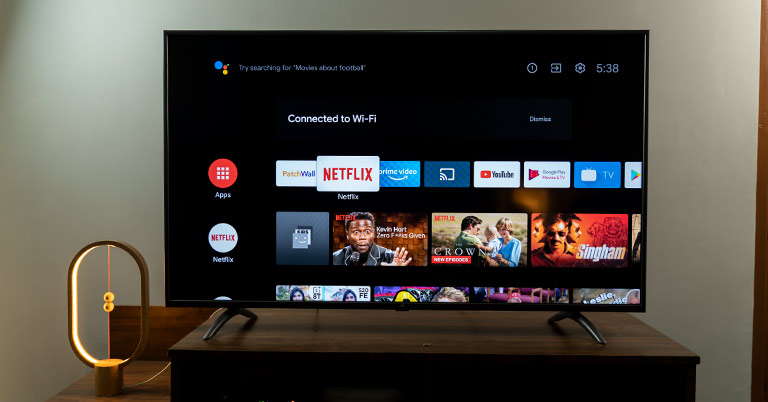
On the software side of things, Mi TV 4X 55 is an Android TV running on version 9.0 (Pie). With this, you can easily download all your favorite apps from the Play Store. The interface is clean and extremely user friendly. But, we’ve received news that this TV won’t be getting any software update. Now that’s a major bummer because I really think the Mi TV 4X 55 could use some software optimization for better performance. Powering the device is a quad-core Amlogic processor, with 2GB of RAM and 8GB of internal storage. First off, the entire UI feels slightly off, laggy sometimes. Moreover, its cold boot can take up to 30 seconds. This TV also supports Google Assistant voice control, but that too is far from ideal. I don’t understand why but it just gets unresponsive sometimes while working fine the other times. It’s weird to say that occasionally, even the speech recognition takes a hit. You’re requesting one thing, and the assistant processes something different altogether. You get a “Try Saying” suggestion prompt on the TV as soon as you press the assistant button on the remote. Still, it doesn’t take your requests just then and there but rather proceeds to process the end portions of your command. The apparent trick is to wait a couple of seconds before the UI layout of the TV gets subdued indicating that the assistant can now take your requests. You can also open the TV’s settings, open apps by requesting Google Assistant. Yet, this is hit-or-miss as well.
PatchWall
Further disappointment comes from Xiaomi’s content-recommendation system PatchWall—in that it doesn’t work in Nepal. I tried changing the TV’s region to India. With this, the Mi TV 4X 55 would load up the PatchWall UI in its entirety but would refuse to play most of the content. At first, most of the recommended movies, shows, documentaries belonged either to Disney+ Hotstar, or Amazon Prime Video—while still holding a separate tab for Netflix, YouTube, and such. Videos from Netflix, YouTube played fine (as it directed to their respective app) but on other streaming services, I would get an error message. So, to rid of this half-baked experience, I switched the TV’s region back to “Other”. Once again, I checked to see if something would be different this time around when setting the region to India. Surprisingly, it did. Now, it wouldn’t even load up the PatchWall UI that it did before.
Chromecast
Besides all these, the Mi TV 4X 55 also has Chromecast built-in. With this, you can easily stream content from your phone to the TV. This feature worked perfectly without any hiccup. If you are on a metered connection (volume-based internet plan), the Data Saver feature is something you’d really want as well. Turning this on intelligently adjusts the streaming quality to use as little data as possible. Xiaomi claims a 3x drop in bandwidth consumption but it was hard to test it out; given how vague of an assertion that is. Likewise, Mi Nepal’s product page for the TV 4X 55 mentions that it supports H.264 (AVC) video decoder, and not H.265 (HEVC). This could very easily be a typo on their end when looking at other sources like Mi India. And, disabling a video decoder feels based on region sounds like an implausible thing to do. Now, the reason I’m talking about it is that H.265 offers better bandwidth saving compared to H.264. All the popular streaming services like YouTube, Netflix, Amazon Prime Video, etc. already support this codec. Therefore, you can stream high-quality content from such sources with minimum data.
Remote
Mi Remote's design is pretty sleek
Could've used a couple more buttons
On to the remote, the Mi TV 4X 55 gets a small, minimalistic Mi Remote. With a subtle matte finish, this remote is incredibly lightweight and easy to use. The buttons feel plasticky, but I got used to it in a matter of days. While the design, build quality are praiseworthy, the button choice could’ve been a little more extensive. The lack of dedicated settings, mute, YouTube button resulted in quite a bit of hassle during my usage. Going through a bunch of hoops to activate such seemingly simple features is an uninspiring journey.
Conclusion
In conclusion, the Mi TV 4X 55 is a great value-for-money TV in Nepal. Getting a 55” 4K HDR TV of this quality for under 70K is a significant achievement for the domestic TV market. With its 1 year of product and an additional 1 year of warranty on panel, this TV is a superb TV for the average Nepali household. Admittedly, it is far from perfect and doesn’t compare to similar offerings from other established brands. If you already have a taste for premium TVs, this one is not for you. But for those specifically looking for a premium TV experience on a budget, it is an excellent contender for your money. Some might even argue that a couple of complaints I made about the Xiaomi Mi TV 4X 55 throughout the review are negligible considering the overall value offered by the TV.
Xiaomi Mi TV 4X 55 Review: Pros & Cons
Pros:
Terrific value for money
Nice design, build quality
Decent display quality for the price
Dolby Audio, DTS-HD audio output
Port selection is excellent
Intuitive Android TV interface
Data saver feature is a big deal
Cons:
HDR videos look overdone at times
The viewing angle could've been better
Fast-paced content can look choppy
Time & again, UI can get quite laggy
Google Assistant doesn't work well
Mi Remote lacks some basic buttons
Article Last updated:
February 5, 2026
Add us as a preferred source on Google »
No Active Polls
There are currently no polls available. Check back later for new polls to participate in!
Polls will appear here when available
How did we do with this article? |
| Markdown | [Gadgetbyte](https://www.gadgetbytenepal.com/)
[Login/Register](https://www.gadgetbytenepal.com/login/)
Cancel
[Gadgetbyte](https://www.gadgetbytenepal.com/)
- Explore
- [Home](https://www.gadgetbytenepal.com/)
- [News](https://www.gadgetbytenepal.com/blog-news-list/)
- [Reviews](https://www.gadgetbytenepal.com/category/review/)
- [Mobile Price](https://www.gadgetbytenepal.com/category/mobile-price-in-nepal/)
- [Mobile Guides](https://www.gadgetbytenepal.com/category/mobile-buy-guides/)
- [Laptop Price](https://www.gadgetbytenepal.com/category/laptop-price-in-nepal/)
- [Laptop Guides](https://www.gadgetbytenepal.com/category/laptop-buy-guides/)
- [Blind Camera Test](https://www.gadgetbytenepal.com/blindtest/)
- Explore
- [Home](https://www.gadgetbytenepal.com/)
- [News](https://www.gadgetbytenepal.com/blog-news-list/)
- [Reviews](https://www.gadgetbytenepal.com/category/review/)
- [Mobile Price](https://www.gadgetbytenepal.com/category/mobile-price-in-nepal/)
- [Mobile Guides](https://www.gadgetbytenepal.com/category/mobile-buy-guides/)
- [Laptop Price](https://www.gadgetbytenepal.com/category/laptop-price-in-nepal/)
- [Laptop Guides](https://www.gadgetbytenepal.com/category/laptop-buy-guides/)
- [Blind Camera Test](https://www.gadgetbytenepal.com/blindtest/)
1. [Home](https://www.gadgetbytenepal.com/)
2. [TV](https://www.gadgetbytenepal.com/category/tv/ "TV")
3. Xiaomi Mi TV 4X 55 Review: Disruptingly Good
Advertisement
[](https://buysamsung.com.np/)
Advertisement
[](https://www.facebook.com/XiaomiNepal)
[TV](https://www.gadgetbytenepal.com/category/tv/)[Reviews](https://www.gadgetbytenepal.com/category/review/)[Xiaomi](https://www.gadgetbytenepal.com/category/xiaomi/)[TV Review](https://www.gadgetbytenepal.com/category/tv-review/)[Television](https://www.gadgetbytenepal.com/category/television/)
# Xiaomi Mi TV 4X 55 Review: Disruptingly Good
In this Article
- [Xiaomi Mi TV 4X 55 Specifications:](https://www.gadgetbytenepal.com/mi-tv-4x-55-review/#h3-0)
- [Xiaomi Mi TV 4X 55 Review:](https://www.gadgetbytenepal.com/mi-tv-4x-55-review/#h2-1)
- [Design & Build](https://www.gadgetbytenepal.com/mi-tv-4x-55-review/#h3-2)
- [Display](https://www.gadgetbytenepal.com/mi-tv-4x-55-review/#h3-3)
- [Audio](https://www.gadgetbytenepal.com/mi-tv-4x-55-review/#h3-4)
- [Connectivity](https://www.gadgetbytenepal.com/mi-tv-4x-55-review/#h3-5)
- [Software](https://www.gadgetbytenepal.com/mi-tv-4x-55-review/#h3-6)
- [Remote](https://www.gadgetbytenepal.com/mi-tv-4x-55-review/#h3-7)
- [Conclusion](https://www.gadgetbytenepal.com/mi-tv-4x-55-review/#h3-8)
- [Xiaomi Mi TV 4X 55 Review: Pros & Cons](https://www.gadgetbytenepal.com/mi-tv-4x-55-review/#h2-9)
[Add us as a preferred source on Google »](https://www.google.com/preferences/source?q=gadgetbytenepal.com)
In this article
10
N
By Nikhil Shrestha\| Senior Editor
Senior Editor
Published Nov 20, 2020
[Advertisement](https://cgmobiles.com.np/)
[Advertisement](https://www.facebook.com/realmeNP)
In this Article
- [Xiaomi Mi TV 4X 55 Specifications:](https://www.gadgetbytenepal.com/mi-tv-4x-55-review/#h3-0)
- [Xiaomi Mi TV 4X 55 Review:](https://www.gadgetbytenepal.com/mi-tv-4x-55-review/#h2-1)
- [Design & Build](https://www.gadgetbytenepal.com/mi-tv-4x-55-review/#h3-2)
- [Display](https://www.gadgetbytenepal.com/mi-tv-4x-55-review/#h3-3)
- [Audio](https://www.gadgetbytenepal.com/mi-tv-4x-55-review/#h3-4)
- [Connectivity](https://www.gadgetbytenepal.com/mi-tv-4x-55-review/#h3-5)
- [Software](https://www.gadgetbytenepal.com/mi-tv-4x-55-review/#h3-6)
- [Remote](https://www.gadgetbytenepal.com/mi-tv-4x-55-review/#h3-7)
- [Conclusion](https://www.gadgetbytenepal.com/mi-tv-4x-55-review/#h3-8)
- [Xiaomi Mi TV 4X 55 Review: Pros & Cons](https://www.gadgetbytenepal.com/mi-tv-4x-55-review/#h2-9)
[Add us as a preferred source on Google »](https://www.google.com/preferences/source?q=gadgetbytenepal.com)
In this article
10
Why Trust Gadgetbyte?
At Gadgetbyte, we invest substantial hours into rigorously testing each product or service we review, guaranteeing that you make informed purchases. [Learn more about our testing process.](https://www.gadgetbytenepal.com/how-we-test/)
Review Overview
4\.1
If you want a big TV watching experience, but don't have the best dollars, the Mi TV 4X 55 is almost a no brainer. For casual TV viewers, what Xiaomi has been able to deliver at this price point is truly remarkable. Having said that, it does have some limitations that might come into play if you've developed (or are looking to develop) a sophisticated TV lifestyle.
Design & Build
9/10
Display
8/10
Audio
8/10
Connectivity
9/10
Software
7/10
Remote
7/10
Value for Money
9/10
Xiaomi is one of those companies that has built its entire fanbase thanks to its aggressive pricing strategies. And just a couple of months ago, Xiaomi entered the TV market here in Nepal by launching [two TVs](https://www.gadgetbytenepal.com/mi-tv-price-nepal/). While saying this move blew the competitors out of the water is a blatant exaggeration, I can say that Xiaomi’s presence in the domestic TV industry was a surprise to be sure, but a welcome one. We were quite eager to test, review the Xiaomi **Mi TV 4X 55** in particular, so we got one for ourselves. Retailing at Rs. 65,000, it is an intriguing offering (to say the least). After having used it for about 2 months now, I can safely say that this is a banger of a TV, at least considering other options in the local market. So, allow me to discuss the Xiaomi Mi TV 4X 55 at length in this review.
Advertisement
[](https://www.facebook.com/honornepall)
### **Xiaomi Mi TV 4X 55 Specifications:**
- **Display:** 55-inches LED-backlit LCD display
- **Resolution:** 4K Ultra-HD (3840 x 2160 pixels)
- **Dimensions:** 48\.9W x 28.35H" (w/o stand) \| 48.9W x 30.3H" (w/ stand)
- **Weight:** 12.70 kg (w/o stand); 13 kg (w/ stand)
- **Sound:** 2x Speakers with 20W Output (6ohm)
- **Audio Decoder:** Dolby Audio, DTS-HD
- **OS:** Android TV 9.0 (Pie), PatchWall
- **Processor:** Amlogic quad-core CPU (Cortex-A53), Mali-450 MP3 GPU
- **Memory:** 2GB RAM, 8GB eMMC storage
- **HDR:** Yes (HDR10)
- **Refresh Rate:** 60Hz
- **Viewing Angle:** 178-degree
- **Response Time:** 6.5ms (typ)
- **Power:** AC100-240V 50/60Hz (140W)
- **Wireless Connectivity:** WiFi (dual-band), Bluetooth 4.2
- **I/O Ports:** 3x HDMI (including one HDMI ARC), 2x USB 2.0, 1x Ethernet (LAN), 1x Antenna, 1x S/PDIF, 1x AV input
- **Remote:** Mi Remote (battery not included inside the box)
- **Warranty:** 1 year brand + 1 year on the panel
- **Price in Nepal:** Rs. 64,999 74,999
## **Xiaomi Mi TV 4X 55 Review:**
### **Design & Build**
- A plastic back panel, minimal bezels upfront
- Can be wall-mounted or installed using a stand
As always, let’s start with the design & build quality. Like it is with every other TVs these days, the Mi TV 4X bears a striking resemblance to any one of them out there—with its minimal bezels and the standard black color finish. The back panel has been made from some sort of plastic material while Xiaomi has given a coarse touch to the entirety of the panel too.
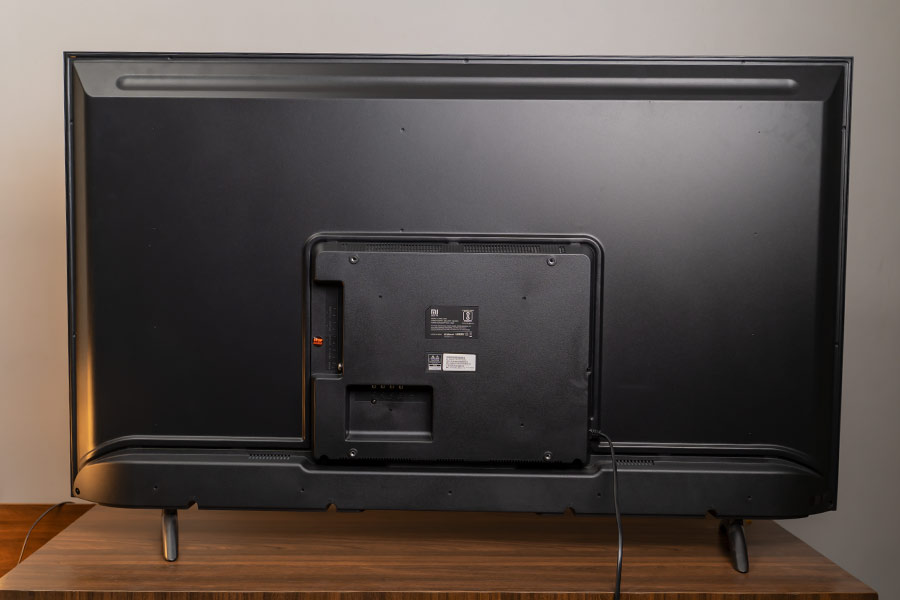
Similarly, the bezels on the front have this sort-of matte finish to them, while the chin houses a small “Mi” branding. And just below it, you’ll find the LED power indicator. Underneath it, there’s a dedicated power button as well, which is self-explanatory. The Mi TV 4X 55 can be either wall-mounted or installed using a stand. We went the second route as it offers a greater level of flexibility for our inconsistent office layout. Weighing just 13 kg, the TV is relatively easy to carry around from one room to another. There is a little bit of wobble to it, but nothing to be alarmed by. Looking at the back of the TV, one can find a separate module that houses the I/O ports. Unlike the supposedly premium TVs from other manufacturers like LG, Samsung, Sony, etc. this one does not have a cable management mechanism. So, installing a bunch of wired components may disturb the room’s aesthetics if not handled well.
### **Display**
- 55" 4K UHD LED-backlit LCD display
- HDR content compatible
- 60Hz refresh rate, 178º viewing angle
Moving on, as I mentioned earlier, this is a 55” 4K UHD TV which has an LED-backlit LCD display. Unfortunately, Xiaomi hasn’t specified the type/grading of the panel used and I couldn’t find any binding detail about it on the web either. [Android Authority](https://www.androidauthority.com/xiaomis-mi-tv-4x-2020-edition-price-availability-specs-1060263/) does mention that the TV comes with an IPS panel but hasn’t provided any source to the claim, nor has it elaborated on it in any way. Furthermore, during the review, the display of Xiaomi Mi TV 4X 55 seemed to reveal characteristics that side with a VA panel instead. For instance, its viewing angle isn’t that good—a trait common in VA panels. Although the official product page specifies a 178-degree viewing angle, the reality is far worse. Unless you’re sitting straight ahead of the TV, there’s a noticeable drop in brightness and saturation level. It’s almost bizarrely bad. Like, I would move a couple of changes to the side and the viewing angle would suffer. So, if you’re planning on installing this TV in your living room where you’d want to enjoy it alongside your friends & family, disappointment awaits. Likewise, the display is quite glossy and reflective too. To counter this, I had to put on opaque drapes so that it would stop reflecting light all that well. This could easily be prevented by setting the TV in a fairly dark room. But it’s reasonable to say that that’s not possible in every household.
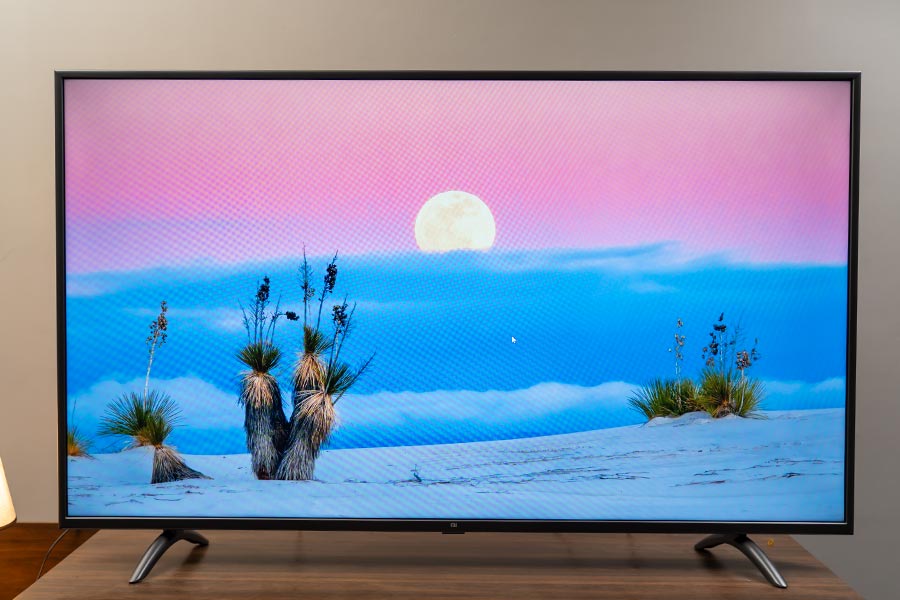
Anyway, talking about the quality of the core panel itself, it’s pretty good—although I’m slightly leaning towards the one on [CG55A1](https://www.youtube.com/watch?v=EtZI9pK_J3Q) that I reviewed a while back. The colors, contrast are excellent and it supports HDR format as well.
#### **HDR, overdone?**
The spec-sheet of the Mi TV 4X 55 further specifies 10-bit color depth and Vivid Picture Engine for enhanced color reproduction and a boosted brightness level. All sounds good till now but at times, I felt like this algorithm along with other internal image processing is a little too aggressive to my liking. I watched the second episode of Netflix’s The Umbrella Academy’s season 2 and dear heavens—the contrast level is almost an overkill on this TV. In the scene where Allison goes to the police station (timestamp - 18:03), I almost couldn’t make what’s happening on the screen. It is a fairly well-lit scene but still, the HDR algorithm just—spikes up the black levels too much, and subjects sometimes tend to look over-sharpened as well. Everything looked perfectly fine when playing a few HDR test videos from YouTube, though. I mean, it has a rich contrast and the black uniformity is pretty impressive. But on other dynamic content, the story was a little different. I also tried playing the hallway fight scene from Daredevil season 1 and here, although things weren’t as bad as the previous instance, the overall experience was slightly underwhelming. The yellow and red levels are slightly off the charts but still enjoyable. Moreover, the Mi TV 4X 55 is equipped with the standard 60Hz refresh rate and Xiaomi hasn’t bothered with any form of motion smoothing feature. While this is an inherently unnecessary thing to have in regular content, it does have some significant uses. In fast-paced programs like live-action sports, events, etc. this feature elevates the TV-viewing experience to new heights. But, this “soap opera effect” is dreaded to have activated on standard TV programs, movies, etc. Maybe that’s where Xiaomi’s priorities were—I don’t know.
#### **Fast-paced content**
Regardless, watching sports channels was a bag of mixed feelings. In certain cases, the gameplay looks all right with no image retention, or other issues of any kind. Perhaps the signal broadcaster itself is applying some sort of frame interpolation algorithm—I’m not sure. But in most cases, the content looks choppy and jittery. And when watching a couple of boxing games, I could even notice the ghosting effect.
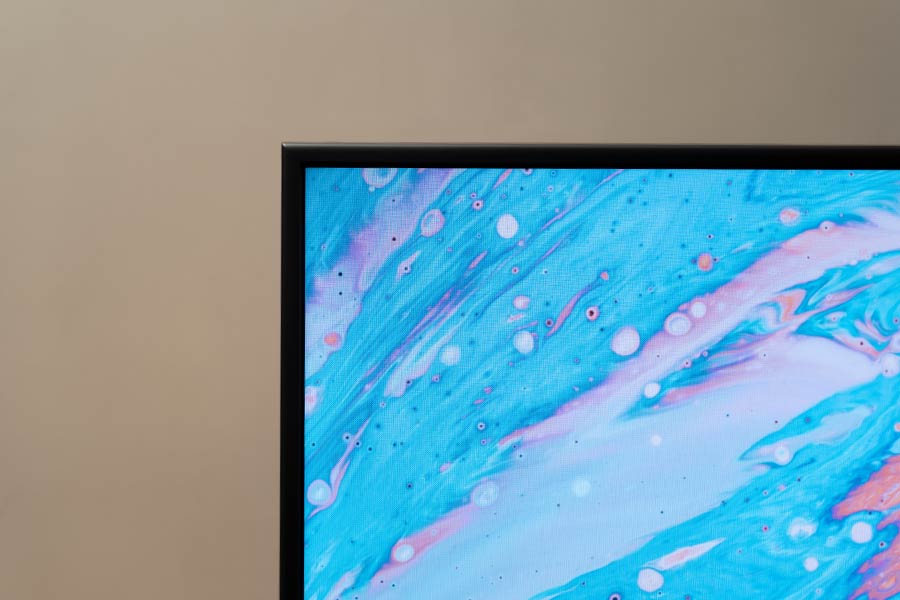
Besides these, I didn’t face any problem regarding brightness, sharpness, and other factors with Mi TV 4X 55’s display. When viewing the TV from approximately 2 meters away, I couldn’t notice pixelation and the content on the display looks crystal clear. There is not much to mess around with the display settings. You can play around with the color temperature, backlight level, picture mode, etc. but, the default settings worked just fine for my eyes. One interesting feature I noticed is called “Dynamic Backlighting”. What it basically does is adjust the panel’s backlight level depending on the content playing. I did find that turning this on enhanced the viewing experience when watching comparatively under-lit content.
### **Audio**
- 2x10W speakers (bottom-firing)
- Dolby Audio, DTS-HD compatible
In terms of the audio, the Mi TV 4X 55 has two speakers with 10W output each. These down-firing speakers also support Dolby Audio and DTS-HD. The speaker gets plenty loud and can rock an average-sized room of about 200-300 square feet without breaking a sweat. Vocals sound crisp and clear whereas there are a fair bit of details in the high frequency as well. However, its low-frequency reproduction like the bass is almost dismissable and is rather overblown by the mids most of the time. This one doesn’t have 360-degree audio either so immersive sound quality is out of the question. But, that’s a perfectly excusable exclusion considering the price of the thing. The audio gets slightly distorted when cranking up the volume to the max so be advised against that as well. Overall, the audio on this TV is not that bad. But if you have a trained set of ears and want immersive sound quality, you’re better off installing an external soundbar or a home theater system.
### **Connectivity**
- A healthy selection of I/O ports
- Dual-band WiFi, Bluetooth 4.2
Getting to the connectivity front, the Mi TV 4X 55 has a healthy selection of ports. You get 3x HDMI, 2x USB 2.0, and an antenna socket on the right edge. Similarly, there’s 1x ethernet (RJ45), 1x S/PDIF, and an AV input connection on the side. Among the available 3 HDMI ports, 1 of them also supports ARC (Audio Return Channel) protocol. Using this, you can connect the TV with your ARC-compatible AV receiver or soundbar.
Ports
1/2


Previous slide
Next slide


Similarly, the wireless options on the TV include Bluetooth 4.2 and dual-band WiFi. Here, you’ll definitely want to use a LAN cable for a relatively buffer-free 4K streaming. During the test, I found that even when connected to a 5GHz network, the TV would buffer significantly more sometimes—a problem almost eliminated with a stable wired connection. In addition, you can also connect your thumb drive to view pictures, play audio files, or watch movies.
### **Software**
- Android TV 9.0 with PatchWall
- Google Assistant-enabled
- Chromecast built-in
On the software side of things, Mi TV 4X 55 is an Android TV running on version 9.0 (Pie). With this, you can easily download all your favorite apps from the Play Store. The interface is clean and extremely user friendly. But, we’ve received news that this TV won’t be getting any software update. Now that’s a major bummer because I really think the Mi TV 4X 55 could use some software optimization for better performance. Powering the device is a quad-core Amlogic processor, with 2GB of RAM and 8GB of internal storage. First off, the entire UI feels slightly off, laggy sometimes. Moreover, its cold boot can take up to 30 seconds. This TV also supports Google Assistant voice control, but that too is far from ideal. I don’t understand why but it just gets unresponsive sometimes while working fine the other times. It’s weird to say that occasionally, even the speech recognition takes a hit. You’re requesting one thing, and the assistant processes something different altogether. You get a “Try Saying” suggestion prompt on the TV as soon as you press the assistant button on the remote. Still, it doesn’t take your requests just then and there but rather proceeds to process the end portions of your command. The apparent trick is to wait a couple of seconds before the UI layout of the TV gets subdued indicating that the assistant can now take your requests. You can also open the TV’s settings, open apps by requesting Google Assistant. Yet, this is hit-or-miss as well.
#### **PatchWall**
Further disappointment comes from Xiaomi’s content-recommendation system PatchWall—in that it doesn’t work in Nepal. I tried changing the TV’s region to India. With this, the Mi TV 4X 55 would load up the PatchWall UI in its entirety but would refuse to play most of the content. At first, most of the recommended movies, shows, documentaries belonged either to Disney+ Hotstar, or Amazon Prime Video—while still holding a separate tab for Netflix, YouTube, and such. Videos from Netflix, YouTube played fine (as it directed to their respective app) but on other streaming services, I would get an error message. So, to rid of this half-baked experience, I switched the TV’s region back to “Other”. Once again, I checked to see if something would be different this time around when setting the region to India. Surprisingly, it did. Now, it wouldn’t even load up the PatchWall UI that it did before.
#### **Chromecast**
Besides all these, the Mi TV 4X 55 also has Chromecast built-in. With this, you can easily stream content from your phone to the TV. This feature worked perfectly without any hiccup. If you are on a metered connection (volume-based internet plan), the Data Saver feature is something you’d really want as well. Turning this on intelligently adjusts the streaming quality to use as little data as possible. Xiaomi claims a 3x drop in bandwidth consumption but it was hard to test it out; given how vague of an assertion that is. Likewise, Mi Nepal’s product page for the TV 4X 55 mentions that it supports H.264 (AVC) video decoder, and not H.265 (HEVC). This could very easily be a typo on their end when looking at other sources like Mi India. And, disabling a video decoder feels based on region sounds like an implausible thing to do. Now, the reason I’m talking about it is that H.265 offers better bandwidth saving compared to H.264. All the popular streaming services like YouTube, Netflix, Amazon Prime Video, etc. already support this codec. Therefore, you can stream high-quality content from such sources with minimum data.
### **Remote**
- Mi Remote's design is pretty sleek
- Could've used a couple more buttons
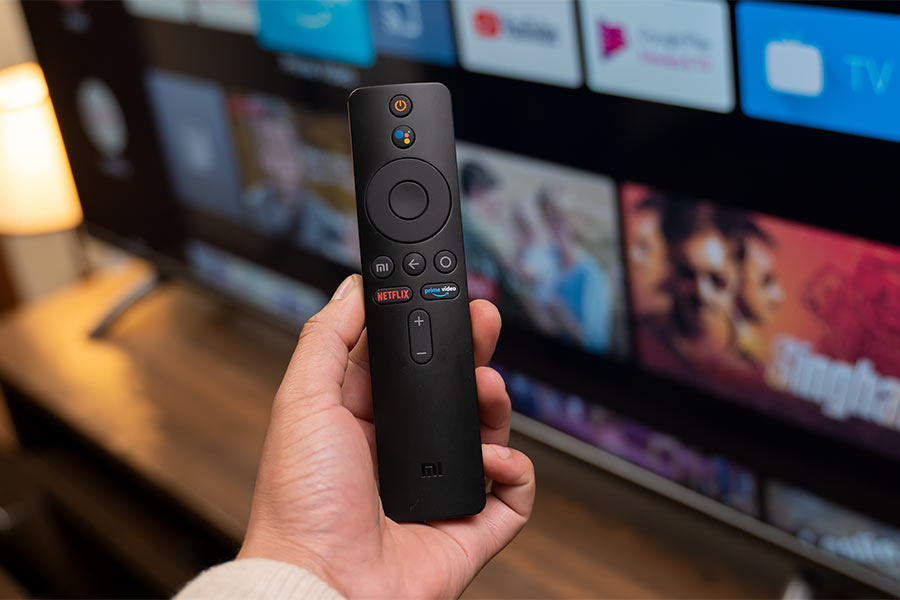
On to the remote, the Mi TV 4X 55 gets a small, minimalistic Mi Remote. With a subtle matte finish, this remote is incredibly lightweight and easy to use. The buttons feel plasticky, but I got used to it in a matter of days. While the design, build quality are praiseworthy, the button choice could’ve been a little more extensive. The lack of dedicated settings, mute, YouTube button resulted in quite a bit of hassle during my usage. Going through a bunch of hoops to activate such seemingly simple features is an uninspiring journey.
### **Conclusion**
In conclusion, the Mi TV 4X 55 is a great value-for-money TV in Nepal. Getting a 55” 4K HDR TV of this quality for under 70K is a significant achievement for the domestic TV market. With its 1 year of product and an additional 1 year of warranty on panel, this TV is a superb TV for the average Nepali household. Admittedly, it is far from perfect and doesn’t compare to similar offerings from other established brands. If you already have a taste for premium TVs, this one is not for you. But for those specifically looking for a premium TV experience on a budget, it is an excellent contender for your money. Some might even argue that a couple of complaints I made about the Xiaomi Mi TV 4X 55 throughout the review are negligible considering the overall value offered by the TV.
[Advertisement](https://www.facebook.com/ztemobilesnepal)
## **Xiaomi Mi TV 4X 55 Review: Pros & Cons**
**Pros:**
- Terrific value for money
- Nice design, build quality
- Decent display quality for the price
- Dolby Audio, DTS-HD audio output
- Port selection is excellent
- Intuitive Android TV interface
- Data saver feature is a big deal
**Cons:**
- HDR videos look overdone at times
- The viewing angle could've been better
- Fast-paced content can look choppy
- Time & again, UI can get quite laggy
- Google Assistant doesn't work well
- Mi Remote lacks some basic buttons
Article Last updated: February 5, 2026
[Add us as a preferred source on Google »](https://www.google.com/preferences/source?q=gadgetbytenepal.com)
Best Tech Deals
[5% OFF  Xiaomi Pad 8 (Cash back of Rs. 3000) ✓Best Premium Tablet in Nepal रु56,999रु59,999 Buy now](https://docs.google.com/forms/d/e/1FAIpQLScb8t2kajwjczT7YiMpsqWd4TABYDZubCG0AwCq3If7yHTO_A/viewform)
[5% OFF  Honor Magic 8 Pro (12/512GB) ✓Get a FREE Honor Tab worth Rs. 29999 रु199,999रु209,999 Buy now](https://docs.google.com/forms/d/e/1FAIpQLSfFFk7WbFKn1jNDmIgAtC9tDqx_M1cXEZ36G65xI0cd0dokgw/viewform)
[5% OFF  Vivo V70 (FREE TWS + Insurance) ✓Best Premium Midrange Phone of 2026 रु83,999रु87,999 Buy now](https://docs.google.com/forms/d/e/1FAIpQLSdRWUT2YApa0AdfV1vEhWph2TynVS2nkonrBR3YGgzgmwhKHA/viewform)
No Active Polls
There are currently no polls available. Check back later for new polls to participate in\!
Polls will appear here when available
How did we do with this article?
😍
Loved it\!
😕
Needs work
## Conversation
We’d love to hear your thoughts! Let's keep it respectful and on-topic. Any inappropriate remarks may be removed. Happy commenting! [Privacy Policy](https://www.gadgetbytenepal.com/privacy-policy/)
0 comments
Be the first to share your thoughts-start the conversation\!
Advertisement
[](https://www.facebook.com/honornepall)
Trending News
[ Ai+ Nova 2 5G is here with Unisoc T8200 SoC and 6,000mAh battery](https://www.gadgetbytenepal.com/ai-plus-nova-2-5g-price-nepal/)
[ Redmi Buds 8 Active launched in Nepal with 37-hour battery and HyperOS connect](https://www.gadgetbytenepal.com/redmi-buds-8-active-price-nepal/)
[ Ai+ arrives with its Nova Flip 5G with Dimensity 7300X and 4325mAh battery\!](https://www.gadgetbytenepal.com/ai-plus-nova-flip-5g-price-nepal/)
[![DJI Osmo Mobile 8 Price in Nepal \[Updated 2026\]](https://media.gadgetbytenepal.com/2025/10/DJI-Osmo-Mobile-8-Price-in-Nepal.jpg) DJI Osmo Mobile 8 Price in Nepal \[Updated 2026\]](https://www.gadgetbytenepal.com/dji-osmo-mobile-8-price-nepal/)
Mobile Buying Guides
[ Second Hand Mobile in Nepal \[Buy Guide\]](https://www.gadgetbytenepal.com/second-hand-mobile-in-nepal-buy-guide/)
[ Best Premium Midrange Smartphones in Nepal \[Updated 2026\]](https://www.gadgetbytenepal.com/best-premium-midrange-phones-nepal/)
[ Best Mobile Phones Under Rs. 20000 in Nepal \[Updated 2026\]](https://www.gadgetbytenepal.com/best-phones-under-20000-nepal/)
[ Best Mobile Phones Under Rs. 15000 in Nepal \[Updated 2026\]](https://www.gadgetbytenepal.com/best-phones-under-15000-nepal/)
Latest tech, all here
[YouTube Subscribe](https://www.youtube.com/@GadgetByteNepali)
[Instagram Follow](https://www.instagram.com/gadgetbyte/)
[X Follow](https://x.com/gadgetbytenepal)
[Facebook Like](https://www.facebook.com/gadgetbytenepal)
[Tiktok Follow](https://www.tiktok.com/@gadgetbytenp)
Best Tech Deals
[ Xiaomi Pad 8 (Cash back of Rs. 3000) Best Premium Tablet in Nepal Rs. 56,999 Rs. 59,999 Get the deal](https://docs.google.com/forms/d/e/1FAIpQLScb8t2kajwjczT7YiMpsqWd4TABYDZubCG0AwCq3If7yHTO_A/viewform)
[ Honor Magic 8 Pro (12/512GB) Get a FREE Honor Tab worth Rs. 29999 Rs. 199,999 Rs. 209,999 Get the deal](https://docs.google.com/forms/d/e/1FAIpQLSfFFk7WbFKn1jNDmIgAtC9tDqx_M1cXEZ36G65xI0cd0dokgw/viewform)
[ Vivo V70 (FREE TWS + Insurance) Best Premium Midrange Phone of 2026 Rs. 83,999 Rs. 87,999 Get the deal](https://docs.google.com/forms/d/e/1FAIpQLSdRWUT2YApa0AdfV1vEhWph2TynVS2nkonrBR3YGgzgmwhKHA/viewform)
Latest Articles
[](https://www.gadgetbytenepal.com/dji-osmo-pocket-4-price-nepal/ "The DJI Osmo Pocket 4 is here, and it’s basically a cheat code for creators")[The DJI Osmo Pocket 4 is here, and it’s basically a cheat code for creators](https://www.gadgetbytenepal.com/dji-osmo-pocket-4-price-nepal/ "The DJI Osmo Pocket 4 is here, and it’s basically a cheat code for creators")
[Amrita Gurung](https://www.gadgetbytenepal.com/author/amygurung98/) - 1 day ago
[](https://www.gadgetbytenepal.com/iphone-15-price-nepal/ "Praise the lord—the iPhone 15 just got a little more affordable in Nepal!")[Praise the lord—the iPhone 15 just got a little more affordable in Nepal\!](https://www.gadgetbytenepal.com/iphone-15-price-nepal/ "Praise the lord—the iPhone 15 just got a little more affordable in Nepal!")
[Yural Maskey](https://www.gadgetbytenepal.com/author/yural/) - 1 day ago
[](https://www.gadgetbytenepal.com/apple-iphone-price-nepal/ "Apple iPhone Price in Nepal [Updated 2026]")[Apple iPhone Price in Nepal \[Updated 2026\]](https://www.gadgetbytenepal.com/apple-iphone-price-nepal/ "Apple iPhone Price in Nepal [Updated 2026]")
[Pratima Adhikari](https://www.gadgetbytenepal.com/author/pratima0/) - 1 day ago
[](https://www.gadgetbytenepal.com/insta360-luna-ultra-rumors/ "Insta360 Luna Ultra leaks online with 6x optical zoom and detachable gimbal")[Insta360 Luna Ultra leaks online with 6x optical zoom and detachable gimbal](https://www.gadgetbytenepal.com/insta360-luna-ultra-rumors/ "Insta360 Luna Ultra leaks online with 6x optical zoom and detachable gimbal")
[Apeksha Ghimire](https://www.gadgetbytenepal.com/author/apeksha/) - 1 day ago
[](https://www.gadgetbytenepal.com/realme-buds-t500-pro-price-nepal/ "Realme Buds T500 Pro is live in India with 50dB ANC and 56-hour battery life!")[Realme Buds T500 Pro is live in India with 50dB ANC and 56-hour battery life\!](https://www.gadgetbytenepal.com/realme-buds-t500-pro-price-nepal/ "Realme Buds T500 Pro is live in India with 50dB ANC and 56-hour battery life!")
[Apeksha Ghimire](https://www.gadgetbytenepal.com/author/apeksha/) - 1 day ago
[](https://www.gadgetbytenepal.com/best-laptops-content-creators-nepal/ "Best Laptops for Content Creators in Nepal [Updated 2026]")[Best Laptops for Content Creators in Nepal \[Updated 2026\]](https://www.gadgetbytenepal.com/best-laptops-content-creators-nepal/ "Best Laptops for Content Creators in Nepal [Updated 2026]")
[Sujal Dev Pant](https://www.gadgetbytenepal.com/author/sujdev-92001/) - 1 day ago
[](https://www.gadgetbytenepal.com/oppo-f33-pro-price-nepal/ "OPPO F33 and F33 Pro are here with Dimensity 6360 MAX and a 7,000mAh battery!")[OPPO F33 and F33 Pro are here with Dimensity 6360 MAX and a 7,000mAh battery\!](https://www.gadgetbytenepal.com/oppo-f33-pro-price-nepal/ "OPPO F33 and F33 Pro are here with Dimensity 6360 MAX and a 7,000mAh battery!")
[Apeksha Ghimire](https://www.gadgetbytenepal.com/author/apeksha/) - 2 days ago
[](https://www.gadgetbytenepal.com/gopro-mission-1-series-price-nepal/ "GoPro has launched Mission 1 Action Cinema Camera series: A pro cinema camera that everyone was waiting for")[GoPro has launched Mission 1 Action Cinema Camera series: A pro cinema camera that everyone was waiting for](https://www.gadgetbytenepal.com/gopro-mission-1-series-price-nepal/ "GoPro has launched Mission 1 Action Cinema Camera series: A pro cinema camera that everyone was waiting for")
[Amrita Gurung](https://www.gadgetbytenepal.com/author/amygurung98/) - 2 days ago
Advertisement
[](https://www.facebook.com/honornepall)
Best Tech Deals
Want to hear from us ?
subscribe to our newsletter
Useful Links
- [News](https://www.gadgetbytenepal.com/blog-news-list/)
- [Reviews](https://www.gadgetbytenepal.com/category/review/)
- [Mobile Buying Guides](https://www.gadgetbytenepal.com/category/guides/mobile-buy-guides/)
- [Laptop Buying Guides](https://www.gadgetbytenepal.com/category/guides/laptop-buy-guides/)
- [Compare](https://www.gadgetbytenepal.com/gbn-compare/)
- [Find Gadgets](https://www.gadgetbytenepal.com/cat/mobiles/)
Other Resources
- [Submit News](https://www.gadgetbytenepal.com/submit-news/)
- [Careers](https://www.gadgetbytenepal.com/job-vacancy-post-hiring/)
- [About Gadgetbyte](https://www.gadgetbytenepal.com/about-gadgetbyte/)
- [Advertise with us](https://www.gadgetbytenepal.com/advertise/)
- [Privacy Policy](https://www.gadgetbytenepal.com/privacy-policy/)
- [Contact](https://www.gadgetbytenepal.com/contact/)
[](https://www.gadgetbytenepal.com/)
Designed and developed by [Quark Infotech](https://quarkinfotech.com/)
© Gadgetbyte Nepal Pvt. Ltd. 2013-2026 |
| Readable Markdown | 1. [Home](https://www.gadgetbytenepal.com/)
2. [TV](https://www.gadgetbytenepal.com/category/tv/ "TV")
3. Xiaomi Mi TV 4X 55 Review: Disruptingly Good
N
By \| Senior Editor
Senior Editor
Published Nov 20, 2020

Why Trust Gadgetbyte?
At Gadgetbyte, we invest substantial hours into rigorously testing each product or service we review, guaranteeing that you make informed purchases. [Learn more about our testing process.](https://www.gadgetbytenepal.com/how-we-test/)
Review Overview
4\.1
If you want a big TV watching experience, but don't have the best dollars, the Mi TV 4X 55 is almost a no brainer. For casual TV viewers, what Xiaomi has been able to deliver at this price point is truly remarkable. Having said that, it does have some limitations that might come into play if you've developed (or are looking to develop) a sophisticated TV lifestyle.
Design & Build
9/10
Display
8/10
Audio
8/10
Connectivity
9/10
Software
7/10
Remote
7/10
Value for Money
9/10
Xiaomi is one of those companies that has built its entire fanbase thanks to its aggressive pricing strategies. And just a couple of months ago, Xiaomi entered the TV market here in Nepal by launching [two TVs](https://www.gadgetbytenepal.com/mi-tv-price-nepal/). While saying this move blew the competitors out of the water is a blatant exaggeration, I can say that Xiaomi’s presence in the domestic TV industry was a surprise to be sure, but a welcome one. We were quite eager to test, review the Xiaomi **Mi TV 4X 55** in particular, so we got one for ourselves. Retailing at Rs. 65,000, it is an intriguing offering (to say the least). After having used it for about 2 months now, I can safely say that this is a banger of a TV, at least considering other options in the local market. So, allow me to discuss the Xiaomi Mi TV 4X 55 at length in this review.
### **Xiaomi Mi TV 4X 55 Specifications:**
- **Display:** 55-inches LED-backlit LCD display
- **Resolution:** 4K Ultra-HD (3840 x 2160 pixels)
- **Dimensions:** 48\.9W x 28.35H" (w/o stand) \| 48.9W x 30.3H" (w/ stand)
- **Weight:** 12.70 kg (w/o stand); 13 kg (w/ stand)
- **Sound:** 2x Speakers with 20W Output (6ohm)
- **Audio Decoder:** Dolby Audio, DTS-HD
- **OS:** Android TV 9.0 (Pie), PatchWall
- **Processor:** Amlogic quad-core CPU (Cortex-A53), Mali-450 MP3 GPU
- **Memory:** 2GB RAM, 8GB eMMC storage
- **HDR:** Yes (HDR10)
- **Refresh Rate:** 60Hz
- **Viewing Angle:** 178-degree
- **Response Time:** 6.5ms (typ)
- **Power:** AC100-240V 50/60Hz (140W)
- **Wireless Connectivity:** WiFi (dual-band), Bluetooth 4.2
- **I/O Ports:** 3x HDMI (including one HDMI ARC), 2x USB 2.0, 1x Ethernet (LAN), 1x Antenna, 1x S/PDIF, 1x AV input
- **Remote:** Mi Remote (battery not included inside the box)
- **Warranty:** 1 year brand + 1 year on the panel
- **Price in Nepal:** Rs. 64,999 74,999
## **Xiaomi Mi TV 4X 55 Review:**
### **Design & Build**
- A plastic back panel, minimal bezels upfront
- Can be wall-mounted or installed using a stand
As always, let’s start with the design & build quality. Like it is with every other TVs these days, the Mi TV 4X bears a striking resemblance to any one of them out there—with its minimal bezels and the standard black color finish. The back panel has been made from some sort of plastic material while Xiaomi has given a coarse touch to the entirety of the panel too.

Similarly, the bezels on the front have this sort-of matte finish to them, while the chin houses a small “Mi” branding. And just below it, you’ll find the LED power indicator. Underneath it, there’s a dedicated power button as well, which is self-explanatory. The Mi TV 4X 55 can be either wall-mounted or installed using a stand. We went the second route as it offers a greater level of flexibility for our inconsistent office layout. Weighing just 13 kg, the TV is relatively easy to carry around from one room to another. There is a little bit of wobble to it, but nothing to be alarmed by. Looking at the back of the TV, one can find a separate module that houses the I/O ports. Unlike the supposedly premium TVs from other manufacturers like LG, Samsung, Sony, etc. this one does not have a cable management mechanism. So, installing a bunch of wired components may disturb the room’s aesthetics if not handled well.
### **Display**
- 55" 4K UHD LED-backlit LCD display
- HDR content compatible
- 60Hz refresh rate, 178º viewing angle
Moving on, as I mentioned earlier, this is a 55” 4K UHD TV which has an LED-backlit LCD display. Unfortunately, Xiaomi hasn’t specified the type/grading of the panel used and I couldn’t find any binding detail about it on the web either. [Android Authority](https://www.androidauthority.com/xiaomis-mi-tv-4x-2020-edition-price-availability-specs-1060263/) does mention that the TV comes with an IPS panel but hasn’t provided any source to the claim, nor has it elaborated on it in any way. Furthermore, during the review, the display of Xiaomi Mi TV 4X 55 seemed to reveal characteristics that side with a VA panel instead. For instance, its viewing angle isn’t that good—a trait common in VA panels. Although the official product page specifies a 178-degree viewing angle, the reality is far worse. Unless you’re sitting straight ahead of the TV, there’s a noticeable drop in brightness and saturation level. It’s almost bizarrely bad. Like, I would move a couple of changes to the side and the viewing angle would suffer. So, if you’re planning on installing this TV in your living room where you’d want to enjoy it alongside your friends & family, disappointment awaits. Likewise, the display is quite glossy and reflective too. To counter this, I had to put on opaque drapes so that it would stop reflecting light all that well. This could easily be prevented by setting the TV in a fairly dark room. But it’s reasonable to say that that’s not possible in every household.

Anyway, talking about the quality of the core panel itself, it’s pretty good—although I’m slightly leaning towards the one on [CG55A1](https://www.youtube.com/watch?v=EtZI9pK_J3Q) that I reviewed a while back. The colors, contrast are excellent and it supports HDR format as well.
#### **HDR, overdone?**
The spec-sheet of the Mi TV 4X 55 further specifies 10-bit color depth and Vivid Picture Engine for enhanced color reproduction and a boosted brightness level. All sounds good till now but at times, I felt like this algorithm along with other internal image processing is a little too aggressive to my liking. I watched the second episode of Netflix’s The Umbrella Academy’s season 2 and dear heavens—the contrast level is almost an overkill on this TV. In the scene where Allison goes to the police station (timestamp - 18:03), I almost couldn’t make what’s happening on the screen. It is a fairly well-lit scene but still, the HDR algorithm just—spikes up the black levels too much, and subjects sometimes tend to look over-sharpened as well. Everything looked perfectly fine when playing a few HDR test videos from YouTube, though. I mean, it has a rich contrast and the black uniformity is pretty impressive. But on other dynamic content, the story was a little different. I also tried playing the hallway fight scene from Daredevil season 1 and here, although things weren’t as bad as the previous instance, the overall experience was slightly underwhelming. The yellow and red levels are slightly off the charts but still enjoyable. Moreover, the Mi TV 4X 55 is equipped with the standard 60Hz refresh rate and Xiaomi hasn’t bothered with any form of motion smoothing feature. While this is an inherently unnecessary thing to have in regular content, it does have some significant uses. In fast-paced programs like live-action sports, events, etc. this feature elevates the TV-viewing experience to new heights. But, this “soap opera effect” is dreaded to have activated on standard TV programs, movies, etc. Maybe that’s where Xiaomi’s priorities were—I don’t know.
#### **Fast-paced content**
Regardless, watching sports channels was a bag of mixed feelings. In certain cases, the gameplay looks all right with no image retention, or other issues of any kind. Perhaps the signal broadcaster itself is applying some sort of frame interpolation algorithm—I’m not sure. But in most cases, the content looks choppy and jittery. And when watching a couple of boxing games, I could even notice the ghosting effect.

Besides these, I didn’t face any problem regarding brightness, sharpness, and other factors with Mi TV 4X 55’s display. When viewing the TV from approximately 2 meters away, I couldn’t notice pixelation and the content on the display looks crystal clear. There is not much to mess around with the display settings. You can play around with the color temperature, backlight level, picture mode, etc. but, the default settings worked just fine for my eyes. One interesting feature I noticed is called “Dynamic Backlighting”. What it basically does is adjust the panel’s backlight level depending on the content playing. I did find that turning this on enhanced the viewing experience when watching comparatively under-lit content.
### **Audio**
- 2x10W speakers (bottom-firing)
- Dolby Audio, DTS-HD compatible
In terms of the audio, the Mi TV 4X 55 has two speakers with 10W output each. These down-firing speakers also support Dolby Audio and DTS-HD. The speaker gets plenty loud and can rock an average-sized room of about 200-300 square feet without breaking a sweat. Vocals sound crisp and clear whereas there are a fair bit of details in the high frequency as well. However, its low-frequency reproduction like the bass is almost dismissable and is rather overblown by the mids most of the time. This one doesn’t have 360-degree audio either so immersive sound quality is out of the question. But, that’s a perfectly excusable exclusion considering the price of the thing. The audio gets slightly distorted when cranking up the volume to the max so be advised against that as well. Overall, the audio on this TV is not that bad. But if you have a trained set of ears and want immersive sound quality, you’re better off installing an external soundbar or a home theater system.
### **Connectivity**
- A healthy selection of I/O ports
- Dual-band WiFi, Bluetooth 4.2
Getting to the connectivity front, the Mi TV 4X 55 has a healthy selection of ports. You get 3x HDMI, 2x USB 2.0, and an antenna socket on the right edge. Similarly, there’s 1x ethernet (RJ45), 1x S/PDIF, and an AV input connection on the side. Among the available 3 HDMI ports, 1 of them also supports ARC (Audio Return Channel) protocol. Using this, you can connect the TV with your ARC-compatible AV receiver or soundbar.
Ports
1/2
Similarly, the wireless options on the TV include Bluetooth 4.2 and dual-band WiFi. Here, you’ll definitely want to use a LAN cable for a relatively buffer-free 4K streaming. During the test, I found that even when connected to a 5GHz network, the TV would buffer significantly more sometimes—a problem almost eliminated with a stable wired connection. In addition, you can also connect your thumb drive to view pictures, play audio files, or watch movies.
### **Software**
- Android TV 9.0 with PatchWall
- Google Assistant-enabled
- Chromecast built-in
On the software side of things, Mi TV 4X 55 is an Android TV running on version 9.0 (Pie). With this, you can easily download all your favorite apps from the Play Store. The interface is clean and extremely user friendly. But, we’ve received news that this TV won’t be getting any software update. Now that’s a major bummer because I really think the Mi TV 4X 55 could use some software optimization for better performance. Powering the device is a quad-core Amlogic processor, with 2GB of RAM and 8GB of internal storage. First off, the entire UI feels slightly off, laggy sometimes. Moreover, its cold boot can take up to 30 seconds. This TV also supports Google Assistant voice control, but that too is far from ideal. I don’t understand why but it just gets unresponsive sometimes while working fine the other times. It’s weird to say that occasionally, even the speech recognition takes a hit. You’re requesting one thing, and the assistant processes something different altogether. You get a “Try Saying” suggestion prompt on the TV as soon as you press the assistant button on the remote. Still, it doesn’t take your requests just then and there but rather proceeds to process the end portions of your command. The apparent trick is to wait a couple of seconds before the UI layout of the TV gets subdued indicating that the assistant can now take your requests. You can also open the TV’s settings, open apps by requesting Google Assistant. Yet, this is hit-or-miss as well.
#### **PatchWall**
Further disappointment comes from Xiaomi’s content-recommendation system PatchWall—in that it doesn’t work in Nepal. I tried changing the TV’s region to India. With this, the Mi TV 4X 55 would load up the PatchWall UI in its entirety but would refuse to play most of the content. At first, most of the recommended movies, shows, documentaries belonged either to Disney+ Hotstar, or Amazon Prime Video—while still holding a separate tab for Netflix, YouTube, and such. Videos from Netflix, YouTube played fine (as it directed to their respective app) but on other streaming services, I would get an error message. So, to rid of this half-baked experience, I switched the TV’s region back to “Other”. Once again, I checked to see if something would be different this time around when setting the region to India. Surprisingly, it did. Now, it wouldn’t even load up the PatchWall UI that it did before.
#### **Chromecast**
Besides all these, the Mi TV 4X 55 also has Chromecast built-in. With this, you can easily stream content from your phone to the TV. This feature worked perfectly without any hiccup. If you are on a metered connection (volume-based internet plan), the Data Saver feature is something you’d really want as well. Turning this on intelligently adjusts the streaming quality to use as little data as possible. Xiaomi claims a 3x drop in bandwidth consumption but it was hard to test it out; given how vague of an assertion that is. Likewise, Mi Nepal’s product page for the TV 4X 55 mentions that it supports H.264 (AVC) video decoder, and not H.265 (HEVC). This could very easily be a typo on their end when looking at other sources like Mi India. And, disabling a video decoder feels based on region sounds like an implausible thing to do. Now, the reason I’m talking about it is that H.265 offers better bandwidth saving compared to H.264. All the popular streaming services like YouTube, Netflix, Amazon Prime Video, etc. already support this codec. Therefore, you can stream high-quality content from such sources with minimum data.
### **Remote**
- Mi Remote's design is pretty sleek
- Could've used a couple more buttons

On to the remote, the Mi TV 4X 55 gets a small, minimalistic Mi Remote. With a subtle matte finish, this remote is incredibly lightweight and easy to use. The buttons feel plasticky, but I got used to it in a matter of days. While the design, build quality are praiseworthy, the button choice could’ve been a little more extensive. The lack of dedicated settings, mute, YouTube button resulted in quite a bit of hassle during my usage. Going through a bunch of hoops to activate such seemingly simple features is an uninspiring journey.
### **Conclusion**
In conclusion, the Mi TV 4X 55 is a great value-for-money TV in Nepal. Getting a 55” 4K HDR TV of this quality for under 70K is a significant achievement for the domestic TV market. With its 1 year of product and an additional 1 year of warranty on panel, this TV is a superb TV for the average Nepali household. Admittedly, it is far from perfect and doesn’t compare to similar offerings from other established brands. If you already have a taste for premium TVs, this one is not for you. But for those specifically looking for a premium TV experience on a budget, it is an excellent contender for your money. Some might even argue that a couple of complaints I made about the Xiaomi Mi TV 4X 55 throughout the review are negligible considering the overall value offered by the TV.
## **Xiaomi Mi TV 4X 55 Review: Pros & Cons**
**Pros:**
- Terrific value for money
- Nice design, build quality
- Decent display quality for the price
- Dolby Audio, DTS-HD audio output
- Port selection is excellent
- Intuitive Android TV interface
- Data saver feature is a big deal
**Cons:**
- HDR videos look overdone at times
- The viewing angle could've been better
- Fast-paced content can look choppy
- Time & again, UI can get quite laggy
- Google Assistant doesn't work well
- Mi Remote lacks some basic buttons
Article Last updated: February 5, 2026
[Add us as a preferred source on Google »](https://www.google.com/preferences/source?q=gadgetbytenepal.com)
No Active Polls
There are currently no polls available. Check back later for new polls to participate in\!
Polls will appear here when available
How did we do with this article? |
| Shard | 173 (laksa) |
| Root Hash | 10173252994894476573 |
| Unparsed URL | com,gadgetbytenepal!www,/mi-tv-4x-55-review/ s443 |