ℹ️ Skipped - page is already crawled
| Filter | Status | Condition | Details |
|---|---|---|---|
| HTTP status | PASS | download_http_code = 200 | HTTP 200 |
| Age cutoff | PASS | download_stamp > now() - 6 MONTH | 0.3 months ago |
| History drop | PASS | isNull(history_drop_reason) | No drop reason |
| Spam/ban | PASS | fh_dont_index != 1 AND ml_spam_score = 0 | ml_spam_score=0 |
| Canonical | PASS | meta_canonical IS NULL OR = '' OR = src_unparsed | Not set |
| Property | Value |
|---|---|
| URL | https://www.dremendo.com/cpp-programming-tutorial/cpp-queue |
| Last Crawled | 2026-04-14 08:10:58 (7 days ago) |
| First Indexed | 2022-11-23 16:14:27 (3 years ago) |
| HTTP Status Code | 200 |
| Meta Title | Queue in C++ Programming | Dremendo |
| Meta Description | A Queue in C++ is a data structure in which we can add element only at one end, called the rear of the queue, and delete element only at the other end, called the front of the queue. |
| Meta Canonical | null |
| Boilerpipe Text | Data Structure in C++
In this lesson, we will understand what is Queue in C++ Programming and how to create them along with some examples.
What is Queue in C++
A
Queue
in C++ is a data structure in which we can add element only at one end, called the rear of the queue, and delete element only at the other end, called the front of the queue.
We can see the example of a queue in our daily life as the queue of people.
In the above image, we can see that the new people can join the queue from the rear end and, when the work is over, the people at the front will leave first.
Operation on Queue
There are two operations possible on the queue.
Add -
When we add an element in the queue.
Delete -
When we delete an element from the queue.
To understand how the above operations work on a queue. See the example given below.
From the above image, we can see that when we add a new element in the queue, the variable
R
is increased by 1, and the new element is added at the new position of
R
. Similarly, when we delete an element from the queue, the variable
F
is increased by 1.
The queue behaves like a
first in first out
manner. It means that the elements that are added first to the queue, are removed first from the queue.
So a queue is also known as
FIFO
(First In First Out) data structure.
Implementation of Queue in C++
The queue in C++ programming can be implemented in two ways using:
Array
Single Linked List
In this lesson, we will see the implementation of a queue using an array. We will also discuss queue using a single linked list later on in the subsequent lesson.
Array Implementation of Queue
Since a queue is a collection of the same type of elements, so we can implement the queue using an array.
In the above image, we can see an array named
arr
whose size is
5
. We take two variables
R
and
F
, The variable
R
stands for rear and the default value is
-1
. The variable
F
stands for front and the default value is
0
.
Add Operation in Queue
For add operation in the queue first, we check if the value of
R
is equal to the value of
size-1
then, we will display a message
Queue is full
, else we will increase the value of
R
by 1 and add the element in the array at the new location of
R
.
Example
if(R==size-1)
{
cout<<"Queue is full\n";
}
else
{
R=R+1;
arr[R]=new_item;
}
If we add three elements, say 12, 15 and 26 in the queue, then the queue will look like as shown in the image below.
Delete Operation in Queue
For delete operation in the queue first, we check if the value of
F
is greater than the value of
R
then, we will display a message
Queue is empty
, else we will display the deleted element on the screen and then increase the value of
F
by 1.
Example
if(F>R)
{
cout<<"Queue is empty\n";
}
else
{
cout<<"Element Deleted = %d",arr[F];
F=F+1;
}
If we delete the first elements 12 from the queue, then the queue will look like as shown in the image below.
Program of Queue using Array
Below is the complete program of queue in C++ using an array having size 5.
Queue Program in C++ using Array
#include <iostream>
#include <conio.h>
#include <stdlib.h>
using namespace std;
#define size 5
int main()
{
int arr[size],R=-1,F=0,ch,n,i;
for(;;) // An infinite loop
{
system("cls"); // for clearing the screen
cout<<"1. Add\n";
cout<<"2. Delete\n";
cout<<"3. Display\n";
cout<<"4. Exit\n";
cout<<"Enter Choice: ";
cin>>ch;
switch(ch)
{
case 1:
if(R==size-1)
{
cout<<"Queue is full";
getch(); // pause the loop to see the message
}
else
{
cout<<"Enter a number ";
cin>>n;
R++;
arr[R]=n;
}
break;
case 2:
if(F>R)
{
cout<<"Queue is empty";
getch(); // pause the loop to see the message
}
else
{
cout<<"Number Deleted = "<<arr[F];
F++;
getch(); // pause the loop to see the number
}
break;
case 3:
if(F>R)
{
cout<<"Queue is empty";
getch(); // pause the loop to see the message
}
else
{
for(i=F; i<=R; i++)
{
cout<<arr[i]<<" ";
}
getch(); // pause the loop to see the numbers
}
break;
case 4:
exit(0);
break;
default:
cout<<"Wrong Choice";
getch(); // pause the loop to see the message
}
}
return 0;
}
In the above program, we have defined a macro named
size
having value
5
using the statement
#define
. We can use the word
size
to declare the size of the array as
int arr[size]
. When we run the above program, the word
size
will be replaced by its value
5
. So the size of the array will be
5
. |
| Markdown | [](https://www.dremendo.com/)
###### 
- [C](https://www.dremendo.com/c-programming-tutorial/ "Learn C")
- [C++](https://www.dremendo.com/cpp-programming-tutorial/ "Learn C++")
- [Java](https://www.dremendo.com/java-programming-tutorial/ "Learn Java")
- [Python](https://www.dremendo.com/python-programming-tutorial/ "Learn Python")
- [HTML](https://www.dremendo.com/html-tutorial/ "Learn HTML")
- [CSS](https://www.dremendo.com/css-tutorial/ "Learn CSS")
- More
- [C Tutorial](https://www.dremendo.com/c-programming-tutorial/ "C Programming Tutorial")
- [C++ Tutorial](https://www.dremendo.com/cpp-programming-tutorial/ "C++ Programming Tutorial")
- [Java Tutorial](https://www.dremendo.com/java-programming-tutorial/ "Java Programming Tutorial")
- [Python Tutorial](https://www.dremendo.com/python-programming-tutorial/ "Python Programming Tutorial")
- [HTML Tutorial](https://www.dremendo.com/html-tutorial/ "HTML Tutorial")
- [CSS Tutorial](https://www.dremendo.com/css-tutorial/ "CSS Tutorial")
[C++ Programming Tutorial](https://www.dremendo.com/cpp-programming-tutorial/ "C++ Programming Tutorial")
- C++ Basic Concepts
- [C++ Introduction](https://www.dremendo.com/cpp-programming-tutorial/ "C++ Introduction")
- [C++ Variable](https://www.dremendo.com/cpp-programming-tutorial/cpp-variable "C++ Variable")
- [C++ Data Types and Modifiers](https://www.dremendo.com/cpp-programming-tutorial/cpp-data-types-and-modifiers "C++ Data Types and Modifiers")
- [C++ Naming Conventions](https://www.dremendo.com/cpp-programming-tutorial/cpp-naming-conventions "C++ Naming Conventions")
- [C++ Integer Variable](https://www.dremendo.com/cpp-programming-tutorial/cpp-integer-variable "C++ Integer Variable")
- [C++ Float and Double Variables](https://www.dremendo.com/cpp-programming-tutorial/cpp-float-and-double-variables "C++ Float and Double type Variable")
- [C++ Character Variable](https://www.dremendo.com/cpp-programming-tutorial/cpp-character-variable "C++ Character Variable")
- [C++ Boolean Variable](https://www.dremendo.com/cpp-programming-tutorial/cpp-boolean-variable "C++ Boolean Variable")
- [C++ Constant Variable](https://www.dremendo.com/cpp-programming-tutorial/cpp-constant-variable "C++ Constant Variable")
- [C++ Typecasting](https://www.dremendo.com/cpp-programming-tutorial/cpp-typecasting "C++ Typecasting")
- Operators in C++
- [C++ Operators](https://www.dremendo.com/cpp-programming-tutorial/cpp-operators "C++ Operators")
- [C++ Assignment Operators](https://www.dremendo.com/cpp-programming-tutorial/cpp-assignment-operators "C++ Assignment Operators")
- [C++ Arithmetic Operators](https://www.dremendo.com/cpp-programming-tutorial/cpp-arithmetic-operators "C++ Arithmetic Operators")
- [C++ Relational Operators](https://www.dremendo.com/cpp-programming-tutorial/cpp-relational-operators "C++ Relational Operators")
- [C++ Logical Operators](https://www.dremendo.com/cpp-programming-tutorial/cpp-logical-operators "C++ Logical Operators")
- [C++ Operator Precedence](https://www.dremendo.com/cpp-programming-tutorial/cpp-operator-precedence "C++ Operators Precedence")
- Input and Output in C++
- [C++ Environment Setup](https://www.dremendo.com/cpp-programming-tutorial/cpp-environment-setup "C++ Environment Setup")
- [C++ Program Basic Structure](https://www.dremendo.com/cpp-programming-tutorial/cpp-program-basic-structure "C++ Program Basic Structure")
- [C++ cout Statement](https://www.dremendo.com/cpp-programming-tutorial/cpp-cout-statement "C++ cout Statement")
- [C++ cin Statement](https://www.dremendo.com/cpp-programming-tutorial/cpp-cin-statement "C++ cin Statement")
- [C++ Comments](https://www.dremendo.com/cpp-programming-tutorial/cpp-comments "C++ Comments")
- Decision Making in C++
- [C++ Decision Making](https://www.dremendo.com/cpp-programming-tutorial/cpp-decision-making "C++ Decision Making")
- [C++ if Statement](https://www.dremendo.com/cpp-programming-tutorial/cpp-if-statement "C++ if Statement")
- [C++ if else Statement](https://www.dremendo.com/cpp-programming-tutorial/cpp-if-else-statement "C++ if else Statement")
- [C++ if else if Statement](https://www.dremendo.com/cpp-programming-tutorial/cpp-if-else-if-statement "C++ if else if Statement")
- [C++ Conditional Operator](https://www.dremendo.com/cpp-programming-tutorial/cpp-conditional-operator "C++ Conditional Operator")
- [C++ switch case Statement](https://www.dremendo.com/cpp-programming-tutorial/cpp-switch-case-statement "C++ switch case Statement")
- Mathematical Functions in C++
- [C++ Mathematical Functions](https://www.dremendo.com/cpp-programming-tutorial/cpp-mathematical-functions "C++ Mathematical Functions")
- Loops in C++
- [C++ Loops](https://www.dremendo.com/cpp-programming-tutorial/cpp-loops "C++ Loops")
- [C++ for Loop](https://www.dremendo.com/cpp-programming-tutorial/cpp-for-loop "C++ for Loop")
- [C++ while Loop](https://www.dremendo.com/cpp-programming-tutorial/cpp-while-loop "C++ while Loop")
- [C++ do while Loop](https://www.dremendo.com/cpp-programming-tutorial/cpp-do-while-loop "C++ do while Loop")
- [C++ break and continue](https://www.dremendo.com/cpp-programming-tutorial/cpp-break-and-continue-statement "C++ break and continue Statement")
- Arrays in C++
- [C++ One Dimensional Array](https://www.dremendo.com/cpp-programming-tutorial/cpp-one-dimensional-array "C++ One Dimensional Array")
- [C++ Two Dimensional Array](https://www.dremendo.com/cpp-programming-tutorial/cpp-two-dimensional-array "C++ One Dimensional Array")
- String in C++
- [C++ String](https://www.dremendo.com/cpp-programming-tutorial/cpp-string "C++ String")
- [C++ String Methods](https://www.dremendo.com/cpp-programming-tutorial/cpp-string-methods "C++ String Methods")
- Sorting in C++
- [C++ Bubble Sort](https://www.dremendo.com/cpp-programming-tutorial/cpp-bubble-sort "C++ Bubble Sort")
- [C++ Selection Sort](https://www.dremendo.com/cpp-programming-tutorial/cpp-selection-sort "C++ Selection Sort")
- [C++ Insertion Sort](https://www.dremendo.com/cpp-programming-tutorial/cpp-insertion-sort "C++ Insertion Sort")
- Searching in C++
- [C++ Linear Search](https://www.dremendo.com/cpp-programming-tutorial/cpp-linear-search "C++ Linear Search")
- [C++ Binary Search](https://www.dremendo.com/cpp-programming-tutorial/cpp-binary-search "C++ Binary Search")
- Pointer and Structure in C++
- [C++ Pointer](https://www.dremendo.com/cpp-programming-tutorial/cpp-pointer "C++ Pointer")
- [C++ Dynamic Memory Allocation](https://www.dremendo.com/cpp-programming-tutorial/cpp-dynamic-memory-allocation "C++ Dynamic Memory Allocation")
- [C++ Structure](https://www.dremendo.com/cpp-programming-tutorial/cpp-structure "C++ Structure")
- [C++ References](https://www.dremendo.com/cpp-programming-tutorial/cpp-references "C++ References")
- Function in C++
- [C++ Function](https://www.dremendo.com/cpp-programming-tutorial/cpp-function "C++ Function")
- [C++ Recursive Function](https://www.dremendo.com/cpp-programming-tutorial/cpp-recursive-function "C++ Recursive Function")
- [C++ Function Overloading](https://www.dremendo.com/cpp-programming-tutorial/cpp-function-overloading "C++ Function Overloading")
- Data Structures in C++
- [C++ Stack](https://www.dremendo.com/cpp-programming-tutorial/cpp-stack "C++ Stack")
- [C++ Queue](https://www.dremendo.com/cpp-programming-tutorial/cpp-queue "C++ Queue")
- [C++ Circular Queue](https://www.dremendo.com/cpp-programming-tutorial/cpp-circular-queue "C++ Circular Queue")
- [C++ Double Ended Queue](https://www.dremendo.com/cpp-programming-tutorial/cpp-double-ended-queue "C++ Double Ended Queue")
- [C++ Singly Linked List](https://www.dremendo.com/cpp-programming-tutorial/cpp-singly-linked-list "C++ Singly Linked List")
- [C++ Doubly Linked List](https://www.dremendo.com/cpp-programming-tutorial/cpp-doubly-linked-list "C++ Doubly Linked List")
- [C++ Stack using Linked List](https://www.dremendo.com/cpp-programming-tutorial/cpp-stack-using-linked-list "C++ Stack using Linked List")
- [C++ Queue using Linked List](https://www.dremendo.com/cpp-programming-tutorial/cpp-queue-using-linked-list "C++ Queue using Linked List")
- OOPs in C++
- [C++ Classes and Objects](https://www.dremendo.com/cpp-programming-tutorial/cpp-classes-and-objects "C++ Classes and Objects")
- [C++ Instance Variables](https://www.dremendo.com/cpp-programming-tutorial/cpp-instance-variables "C++ Instance Variables")
- [C++ Static Variables](https://www.dremendo.com/cpp-programming-tutorial/cpp-static-variables "C++ Static Variables")
- [C++ Instance Methods](https://www.dremendo.com/cpp-programming-tutorial/cpp-instance-methods "C++ Instance Methods")
- [C++ Static Methods](https://www.dremendo.com/cpp-programming-tutorial/cpp-static-methods "C++ Static Methods")
- [C++ Destructor](https://www.dremendo.com/cpp-programming-tutorial/cpp-destructor "C++ Destructor")
- [C++ Friend Function](https://www.dremendo.com/cpp-programming-tutorial/cpp-friend-function "C++ Friend Function")
- [C++ Friend Class](https://www.dremendo.com/cpp-programming-tutorial/cpp-friend-class "C++ Friend Class")
- [C++ Inheritance](https://www.dremendo.com/cpp-programming-tutorial/cpp-inheritance "C++ Inheritance")
- [C++ Access Specifiers](https://www.dremendo.com/cpp-programming-tutorial/cpp-access-specifiers "C++ Access Specifiers")
- [C++ Types of Inheritance](https://www.dremendo.com/cpp-programming-tutorial/cpp-types-of-inheritance "C++ Types of Inheritance")
- [C++ Polymorphism](https://www.dremendo.com/cpp-programming-tutorial/cpp-polymorphism "C++ Polymorphism")
- [C++ Abstract Class](https://www.dremendo.com/cpp-programming-tutorial/cpp-abstract-class "C++ Abstract Class")
- File Handling in C++
- [C++ Text File Handling](https://www.dremendo.com/cpp-programming-tutorial/cpp-text-file-handling "C++ Text File Handling")
- [C++ Binary File Handling](https://www.dremendo.com/cpp-programming-tutorial/cpp-binary-file-handling "C++ Binary File Handling")
# Queue in C++ Programming
###### Data Structure in C++
In this lesson, we will understand what is Queue in C++ Programming and how to create them along with some examples.
## What is Queue in C++
A **Queue** in C++ is a data structure in which we can add element only at one end, called the rear of the queue, and delete element only at the other end, called the front of the queue.
We can see the example of a queue in our daily life as the queue of people.
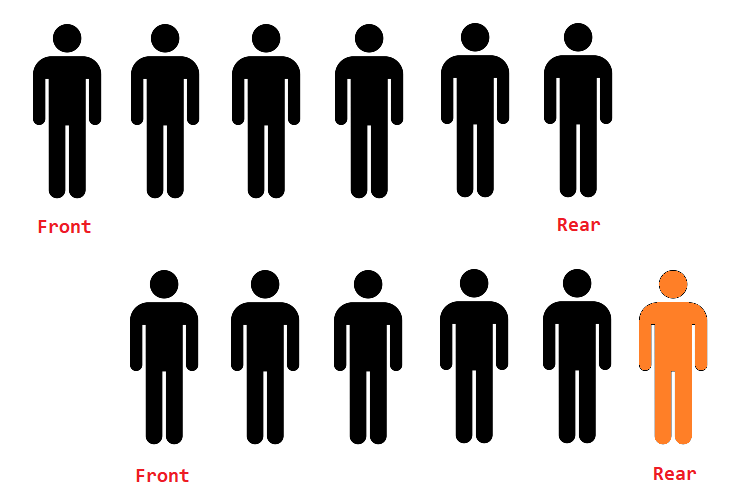
In the above image, we can see that the new people can join the queue from the rear end and, when the work is over, the people at the front will leave first.

## Operation on Queue
There are two operations possible on the queue.
- **Add -** When we add an element in the queue.
- **Delete -** When we delete an element from the queue.
To understand how the above operations work on a queue. See the example given below.
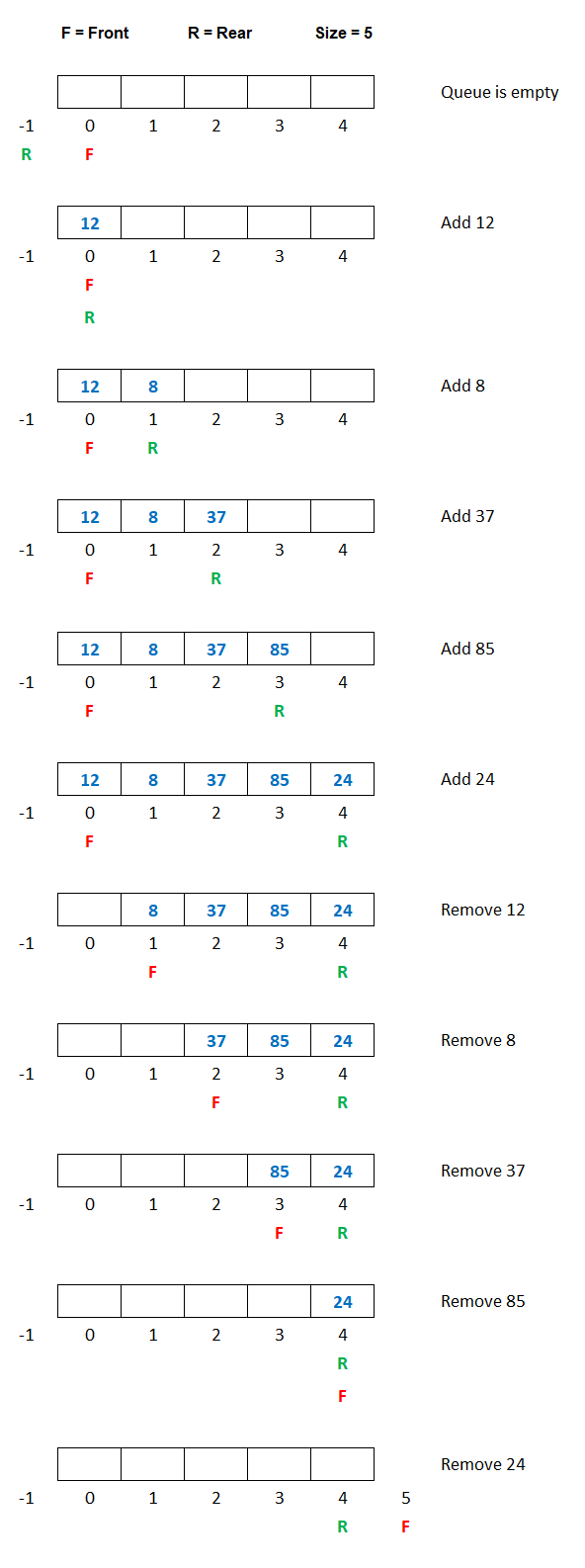
From the above image, we can see that when we add a new element in the queue, the variable **R** is increased by 1, and the new element is added at the new position of **R**. Similarly, when we delete an element from the queue, the variable **F** is increased by 1.
The queue behaves like a **first in first out** manner. It means that the elements that are added first to the queue, are removed first from the queue.
So a queue is also known as **FIFO** (First In First Out) data structure.
## Implementation of Queue in C++
The queue in C++ programming can be implemented in two ways using:
- **Array**
- **Single Linked List**
In this lesson, we will see the implementation of a queue using an array. We will also discuss queue using a single linked list later on in the subsequent lesson.
## Array Implementation of Queue
Since a queue is a collection of the same type of elements, so we can implement the queue using an array.
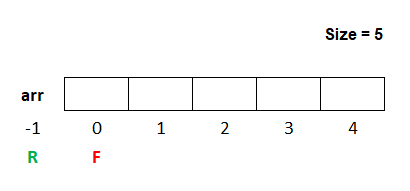
In the above image, we can see an array named **arr** whose size is **5**. We take two variables **R** and **F**, The variable **R** stands for rear and the default value is **\-1**. The variable **F** stands for front and the default value is **0**.
### Add Operation in Queue
For add operation in the queue first, we check if the value of **R** is equal to the value of **size-1** then, we will display a message **Queue is full**, else we will increase the value of **R** by 1 and add the element in the array at the new location of **R**.
#### Example
```
if(R==size-1)
{
cout<<"Queue is full\n";
}
else
{
R=R+1;
arr[R]=new_item;
}
```
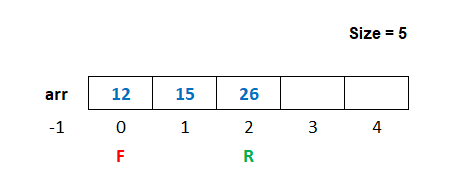
If we add three elements, say 12, 15 and 26 in the queue, then the queue will look like as shown in the image below.
### Delete Operation in Queue
For delete operation in the queue first, we check if the value of **F** is greater than the value of **R** then, we will display a message **Queue is empty**, else we will display the deleted element on the screen and then increase the value of **F** by 1.
#### Example
```
if(F>R)
{
cout<<"Queue is empty\n";
}
else
{
cout<<"Element Deleted = %d",arr[F];
F=F+1;
}
```
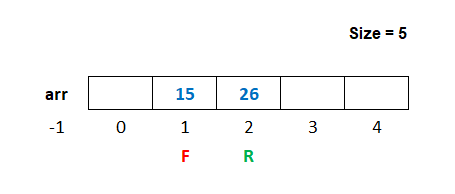
If we delete the first elements 12 from the queue, then the queue will look like as shown in the image below.
## Program of Queue using Array
Below is the complete program of queue in C++ using an array having size 5.
#### Queue Program in C++ using Array
```
#include <iostream>
#include <conio.h>
#include <stdlib.h>
using namespace std;
#define size 5
int main()
{
int arr[size],R=-1,F=0,ch,n,i;
for(;;) // An infinite loop
{
system("cls"); // for clearing the screen
cout<<"1. Add\n";
cout<<"2. Delete\n";
cout<<"3. Display\n";
cout<<"4. Exit\n";
cout<<"Enter Choice: ";
cin>>ch;
switch(ch)
{
case 1:
if(R==size-1)
{
cout<<"Queue is full";
getch(); // pause the loop to see the message
}
else
{
cout<<"Enter a number ";
cin>>n;
R++;
arr[R]=n;
}
break;
case 2:
if(F>R)
{
cout<<"Queue is empty";
getch(); // pause the loop to see the message
}
else
{
cout<<"Number Deleted = "<<arr[F];
F++;
getch(); // pause the loop to see the number
}
break;
case 3:
if(F>R)
{
cout<<"Queue is empty";
getch(); // pause the loop to see the message
}
else
{
for(i=F; i<=R; i++)
{
cout<<arr[i]<<" ";
}
getch(); // pause the loop to see the numbers
}
break;
case 4:
exit(0);
break;
default:
cout<<"Wrong Choice";
getch(); // pause the loop to see the message
}
}
return 0;
}
```
In the above program, we have defined a macro named **size** having value **5** using the statement **\#define**. We can use the word **size** to declare the size of the array as **int arr\[size\]**. When we run the above program, the word **size** will be replaced by its value **5**. So the size of the array will be **5**.
[Previous](https://www.dremendo.com/cpp-programming-tutorial/cpp-queue) [Next](https://www.dremendo.com/cpp-programming-tutorial/cpp-queue)
[](https://www.dremendo.com/cpp-programming-tutorial/cpp-queue)
For over a decade, Dremendo has been recognized for providing quality education. We proudly introduce our newly open online learning platform, which offers free access to popular computer courses.
##### Our Courses
- [C Tutorial](https://www.dremendo.com/c-programming-tutorial/ "C Tutorial")
- [C++ Tutorial](https://www.dremendo.com/cpp-programming-tutorial/ "C++ Tutorial")
- [Java Tutorial](https://www.dremendo.com/java-programming-tutorial/ "Java Tutorial")
- [Python Tutorial](https://www.dremendo.com/python-programming-tutorial/ "Python Tutorial")
- [HTML Tutorial](https://www.dremendo.com/html-tutorial/ "HTML Tutorial")
- [CSS Tutorial](https://www.dremendo.com/css-tutorial/ "CSS Tutorial")
##### News Updates
© 2026 Dremendo. All Rights Reserved.
- [Pricing](https://www.dremendo.com/pricing "Pricing")
- [Refund and Cancellation](https://www.dremendo.com/refund-and-cancel "Refund and Cancellation")
- [About Us](https://www.dremendo.com/about "About Us")
- [Contact](https://www.dremendo.com/contact "Contact")
- [Privacy Policy](https://www.dremendo.com/privacy-policy "Privacy Policy")
- [Terms](https://www.dremendo.com/terms-of-service "Terms of Service")
**Do you like cookies?** 🍪 We use cookies to ensure you get the best experience on our website. [Learn more](https://cookiesandyou.com/)
I agree |
| Readable Markdown | ###### Data Structure in C++
In this lesson, we will understand what is Queue in C++ Programming and how to create them along with some examples.
## What is Queue in C++
A **Queue** in C++ is a data structure in which we can add element only at one end, called the rear of the queue, and delete element only at the other end, called the front of the queue.
We can see the example of a queue in our daily life as the queue of people.

In the above image, we can see that the new people can join the queue from the rear end and, when the work is over, the people at the front will leave first.

## Operation on Queue
There are two operations possible on the queue.
- **Add -** When we add an element in the queue.
- **Delete -** When we delete an element from the queue.
To understand how the above operations work on a queue. See the example given below.

From the above image, we can see that when we add a new element in the queue, the variable **R** is increased by 1, and the new element is added at the new position of **R**. Similarly, when we delete an element from the queue, the variable **F** is increased by 1.
The queue behaves like a **first in first out** manner. It means that the elements that are added first to the queue, are removed first from the queue.
So a queue is also known as **FIFO** (First In First Out) data structure.
## Implementation of Queue in C++
The queue in C++ programming can be implemented in two ways using:
- **Array**
- **Single Linked List**
In this lesson, we will see the implementation of a queue using an array. We will also discuss queue using a single linked list later on in the subsequent lesson.
## Array Implementation of Queue
Since a queue is a collection of the same type of elements, so we can implement the queue using an array.

In the above image, we can see an array named **arr** whose size is **5**. We take two variables **R** and **F**, The variable **R** stands for rear and the default value is **\-1**. The variable **F** stands for front and the default value is **0**.
### Add Operation in Queue
For add operation in the queue first, we check if the value of **R** is equal to the value of **size-1** then, we will display a message **Queue is full**, else we will increase the value of **R** by 1 and add the element in the array at the new location of **R**.
#### Example
```
if(R==size-1)
{
cout<<"Queue is full\n";
}
else
{
R=R+1;
arr[R]=new_item;
}
```
If we add three elements, say 12, 15 and 26 in the queue, then the queue will look like as shown in the image below.

### Delete Operation in Queue
For delete operation in the queue first, we check if the value of **F** is greater than the value of **R** then, we will display a message **Queue is empty**, else we will display the deleted element on the screen and then increase the value of **F** by 1.
#### Example
```
if(F>R)
{
cout<<"Queue is empty\n";
}
else
{
cout<<"Element Deleted = %d",arr[F];
F=F+1;
}
```
If we delete the first elements 12 from the queue, then the queue will look like as shown in the image below.

## Program of Queue using Array
Below is the complete program of queue in C++ using an array having size 5.
#### Queue Program in C++ using Array
```
#include <iostream>
#include <conio.h>
#include <stdlib.h>
using namespace std;
#define size 5
int main()
{
int arr[size],R=-1,F=0,ch,n,i;
for(;;) // An infinite loop
{
system("cls"); // for clearing the screen
cout<<"1. Add\n";
cout<<"2. Delete\n";
cout<<"3. Display\n";
cout<<"4. Exit\n";
cout<<"Enter Choice: ";
cin>>ch;
switch(ch)
{
case 1:
if(R==size-1)
{
cout<<"Queue is full";
getch(); // pause the loop to see the message
}
else
{
cout<<"Enter a number ";
cin>>n;
R++;
arr[R]=n;
}
break;
case 2:
if(F>R)
{
cout<<"Queue is empty";
getch(); // pause the loop to see the message
}
else
{
cout<<"Number Deleted = "<<arr[F];
F++;
getch(); // pause the loop to see the number
}
break;
case 3:
if(F>R)
{
cout<<"Queue is empty";
getch(); // pause the loop to see the message
}
else
{
for(i=F; i<=R; i++)
{
cout<<arr[i]<<" ";
}
getch(); // pause the loop to see the numbers
}
break;
case 4:
exit(0);
break;
default:
cout<<"Wrong Choice";
getch(); // pause the loop to see the message
}
}
return 0;
}
```
In the above program, we have defined a macro named **size** having value **5** using the statement **\#define**. We can use the word **size** to declare the size of the array as **int arr\[size\]**. When we run the above program, the word **size** will be replaced by its value **5**. So the size of the array will be **5**. |
| Shard | 34 (laksa) |
| Root Hash | 5957959446806291634 |
| Unparsed URL | com,dremendo!www,/cpp-programming-tutorial/cpp-queue s443 |