ℹ️ Skipped - page is already crawled
| Filter | Status | Condition | Details |
|---|---|---|---|
| HTTP status | PASS | download_http_code = 200 | HTTP 200 |
| Age cutoff | PASS | download_stamp > now() - 6 MONTH | 0.2 months ago |
| History drop | PASS | isNull(history_drop_reason) | No drop reason |
| Spam/ban | PASS | fh_dont_index != 1 AND ml_spam_score = 0 | ml_spam_score=0 |
| Canonical | PASS | meta_canonical IS NULL OR = '' OR = src_unparsed | Not set |
| Property | Value |
|---|---|
| URL | https://www.dbs.com.sg/personal/support/bank-account-new-opening.html |
| Last Crawled | 2026-04-16 23:52:59 (5 days ago) |
| First Indexed | 2017-03-16 08:07:36 (9 years ago) |
| HTTP Status Code | 200 |
| Meta Title | Open a New Bank Account with DBS/POSB | DBS Singapore |
| Meta Description | Open a new account with us anytime, anywhere with digibank using these easy steps. |
| Meta Canonical | null |
| Boilerpipe Text | You can open your personal My Account and Multiplier Account directly on DBS or POSB digibank mobile.
Before you apply, do prepare the required documents using our checklist.
Note:
If additional document or information is required after you submit your application, we will send you a follow up email with the necessary details and instructions.
For additional assistance on account opening, simply drop us a note
here
and our service team will contact you at your preferred date and time.
Follow the steps to open a new account with us using digibank mobile.
Using Singpass
Not Using Singpass
Accounts
(Click for more info)
Application
My Account
(Personal and Joint-alternate accounts available)
The first account you can customise to the way you live.
Scan the QR code to open a MyAccount on digibank now
Open a Joint-Alternate My Account
DBS Multiplier Account
(Personal account only)
Earn up to 4.1% p.a. on your savings. No minimum salary credit. No minimum credit card spend. Plus, save and transact in SGD and foreign currencies in one account.
Scan the QR code to open a Multiplier on digibank now
Get the latest DBS digibank mobile app now! |
| Markdown | 1. [Help & Support](https://www.dbs.com.sg/personal/support/home.html)
2. [Banking](https://www.dbs.com.sg/personal/support/banking-product.html)
3. Open a New Bank Account with DBS/POSB
## Open a New Bank Account with DBS/POSB
Open a new account with us anytime, anywhere with digibank using these easy steps.
*Part of: Guides \>* [Your Guide to digibank](https://www.dbs.com.sg/personal/support/guide-ibanking.html)
### Are you new to the bank or an existing customer?
##### New Customers
You can open your personal My Account and Multiplier Account directly on DBS or POSB digibank mobile.
Before you apply, do prepare the required documents using our checklist.
[Review Document List](https://www.dbs.com.sg/personal/documents-required-checklist/default.page?pid=sg-dbs-help-and-support-bank-account-new-opening-txtlink-access-checklist)
Note: *If additional document or information is required after you submit your application, we will send you a follow up email with the necessary details and instructions.*
For additional assistance on account opening, simply drop us a note [here](https://www.dbs.com.sg/Contact/dbs/account-opening/default.page?pid=sg-dbs-pweb-bank-deposits-support-bank-account-opening) and our service team will contact you at your preferred date and time.
Follow the steps to open a new account with us using digibank mobile.
- [Using Singpass](https://www.dbs.com.sg/personal/support/bank-account-new-opening.html#mobile-tab1)
- [Not Using Singpass](https://www.dbs.com.sg/personal/support/bank-account-new-opening.html#mobile-tab2)

- 1
- 2
- 3
- 4
- 5
- 6
- 7
- 8
- 9
- 10
- 11
**Here’s a tip\!** Use Singpass to pre-populate information on your application and for instant account opening.
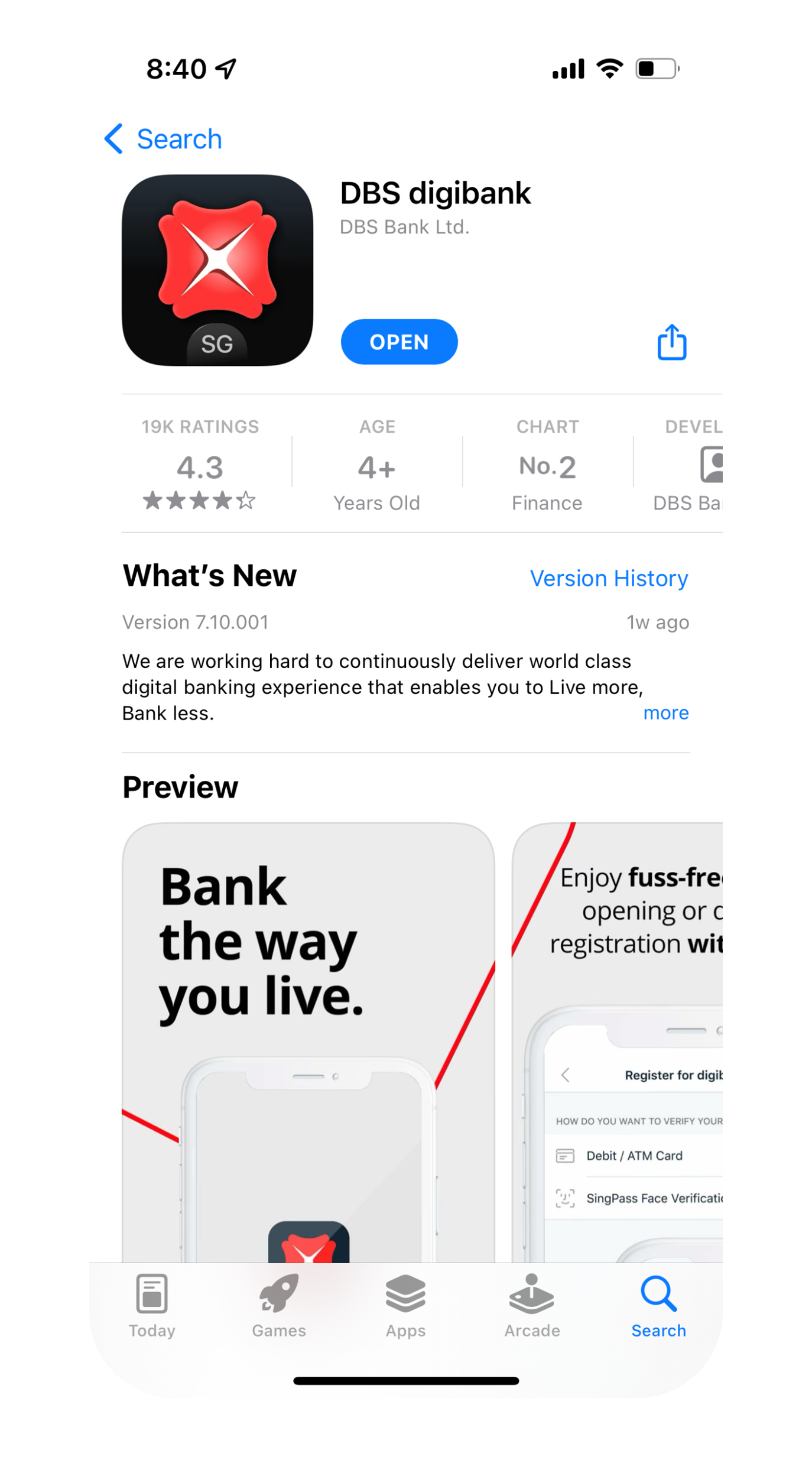
[1]()
**Step 1**
Download the digibank mobile app from the App Store, Google Play or AppGallery.
[2]()
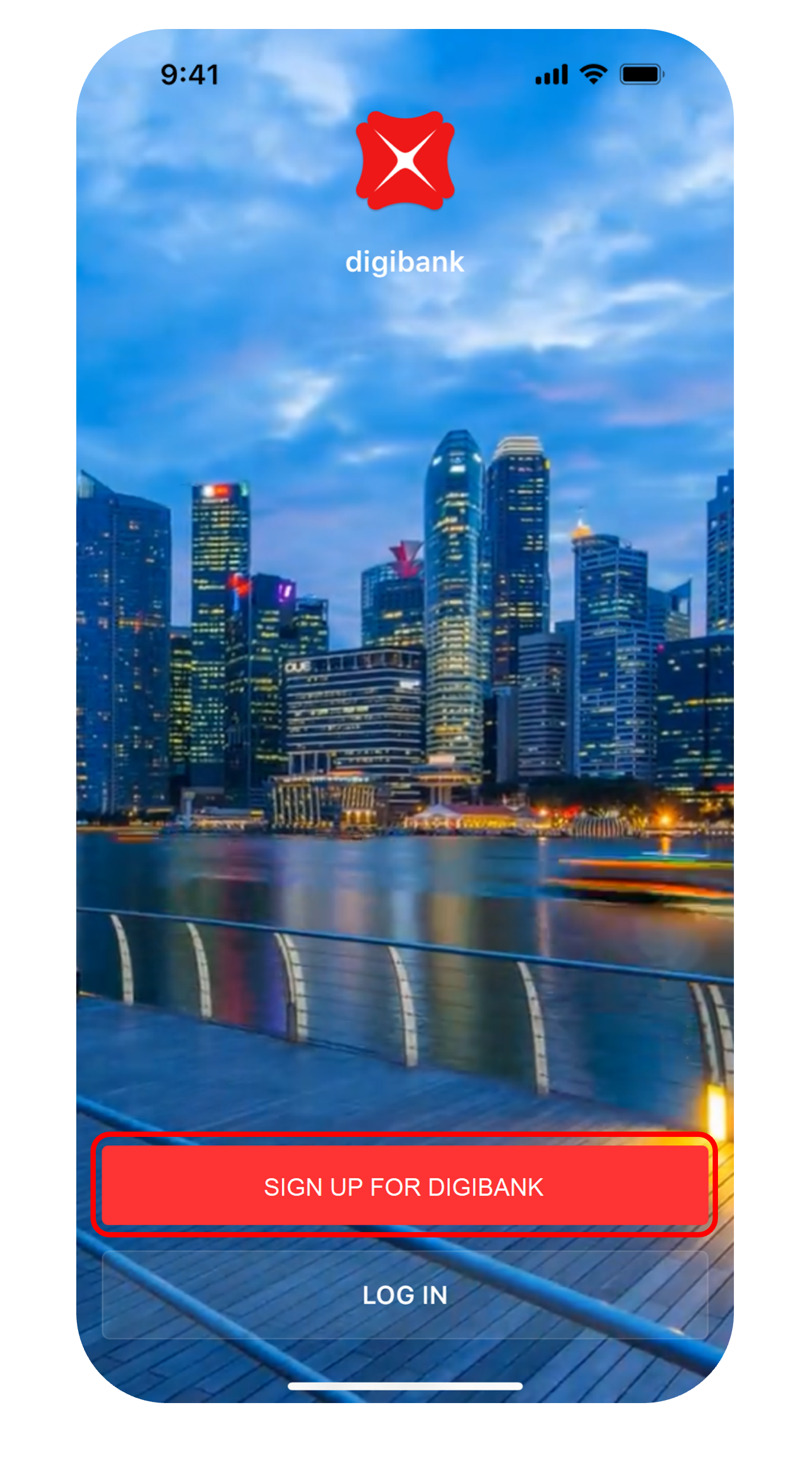
**Step 2**
Launch the digibank mobile app and tap on Sign up for digibank.
[3]()
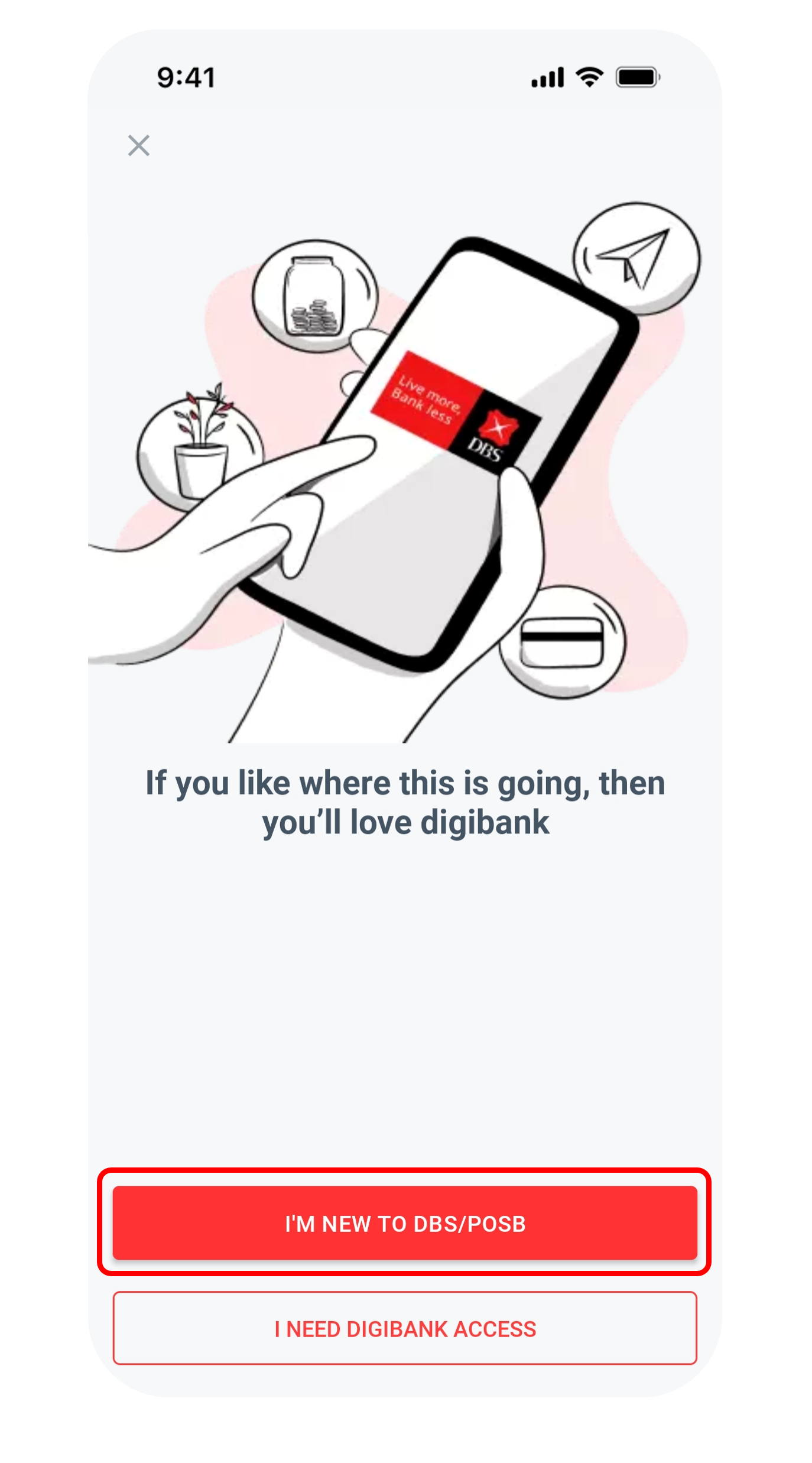
**Step 3**
Swipe through the introduction screens and tap on I'm New to DBS/POSB.
[4]()
**Step 4**
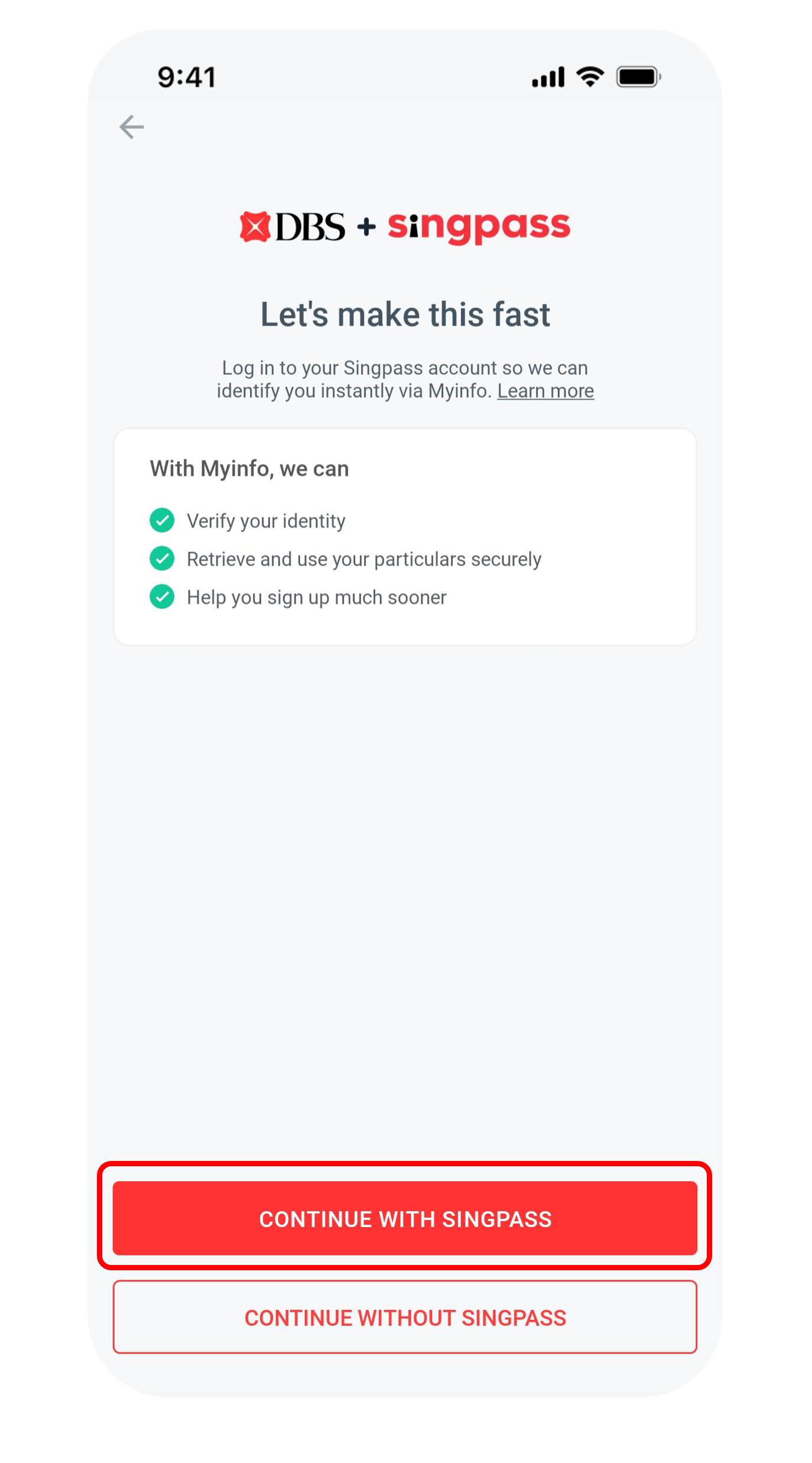
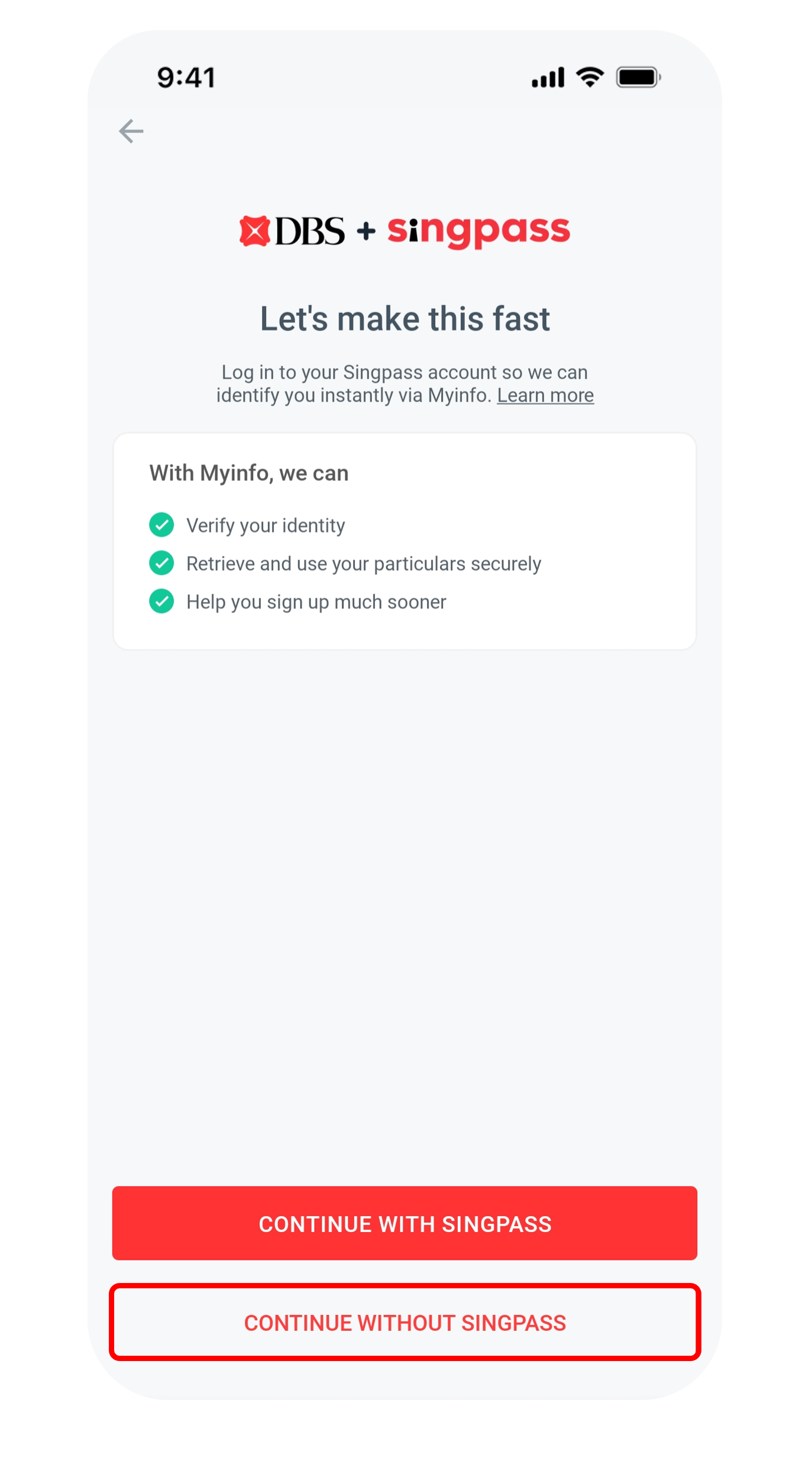
Tap Continue with Singpass, login with your Singpass and tap I Agree to retrieve your personal data.
*If you do not have Singpass, [register online](https://www.dbs.com.sg/personal/common-disclaimer.page?url=https://www.singpass.gov.sg/home/ui/register/instructions&3rdparty=%27Singpass%27&pid=sg-dbs-help-support-bank-account-new-opening.html). You can refer to the [Singpass Instructional Guide](https://www.dbs.com.sg/personal/common-disclaimer.page?url=https://www.singpass.gov.sg/home/ui/assets/pdf/Singpass_Registration_Guide.pdf&3rdparty=%27Singpass%27&pid=sg-dbs-help-support-bank-account-new-opening.html).*
Alternatively, you can tap on Continue without Singpass *(see Not Using Singpass tab for the steps)*
[5]()
**Step 5**
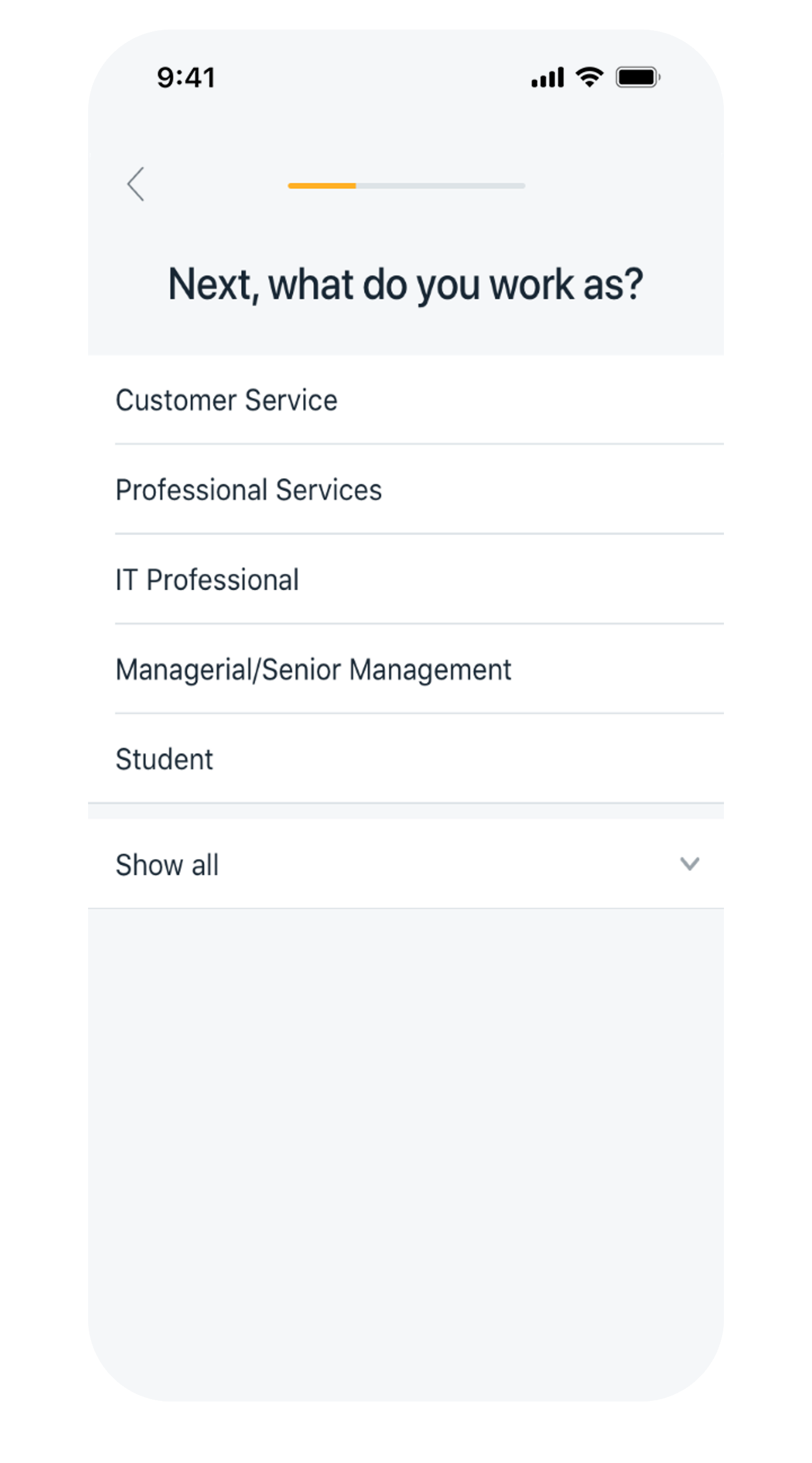
Provide all required information in the succeeding screens including your occupation and industry.
[6]()
**Step 6**
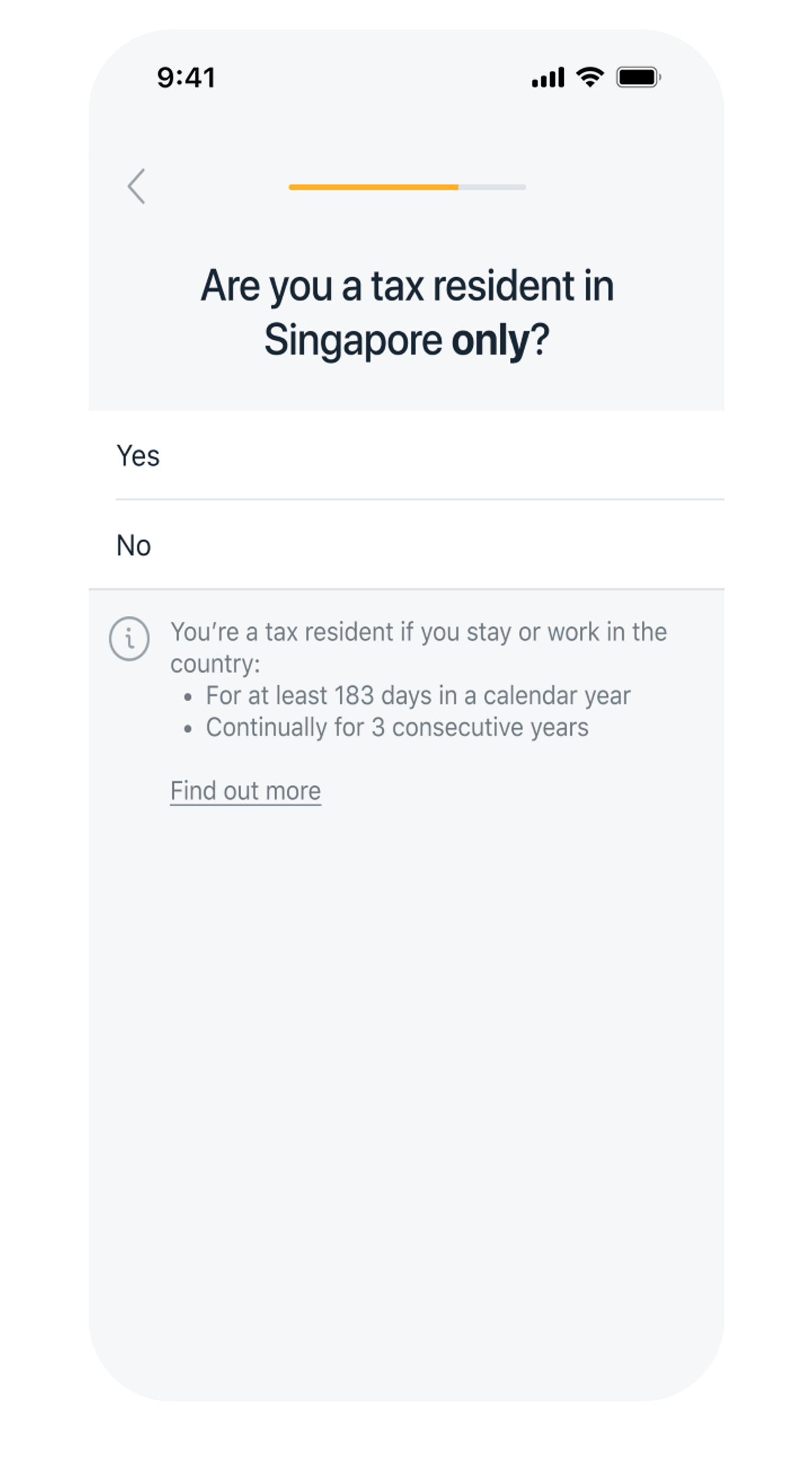
Declare your tax residency status.
Select Yes if you are Singapore Tax Resident only. Otherwise, select No and add the country/jurisdiction(s) of your tax residency.
*Refer to the [Rules Governing Tax Residence](https://www.dbs.com.sg/personal/common-disclaimer.page?url=http://www.oecd.org/tax/automatic-exchange/crs-implementation-and-assistance/tax-residency/&3rdparty=%27OECD%27&pid=sg-dbs-help-and-support-bank-account-new-opening-txtlink-singpass-rules-gov-tax-residence) for information on the respective jurisdiction's tax residency rules.*
[7]()
**Step 7**
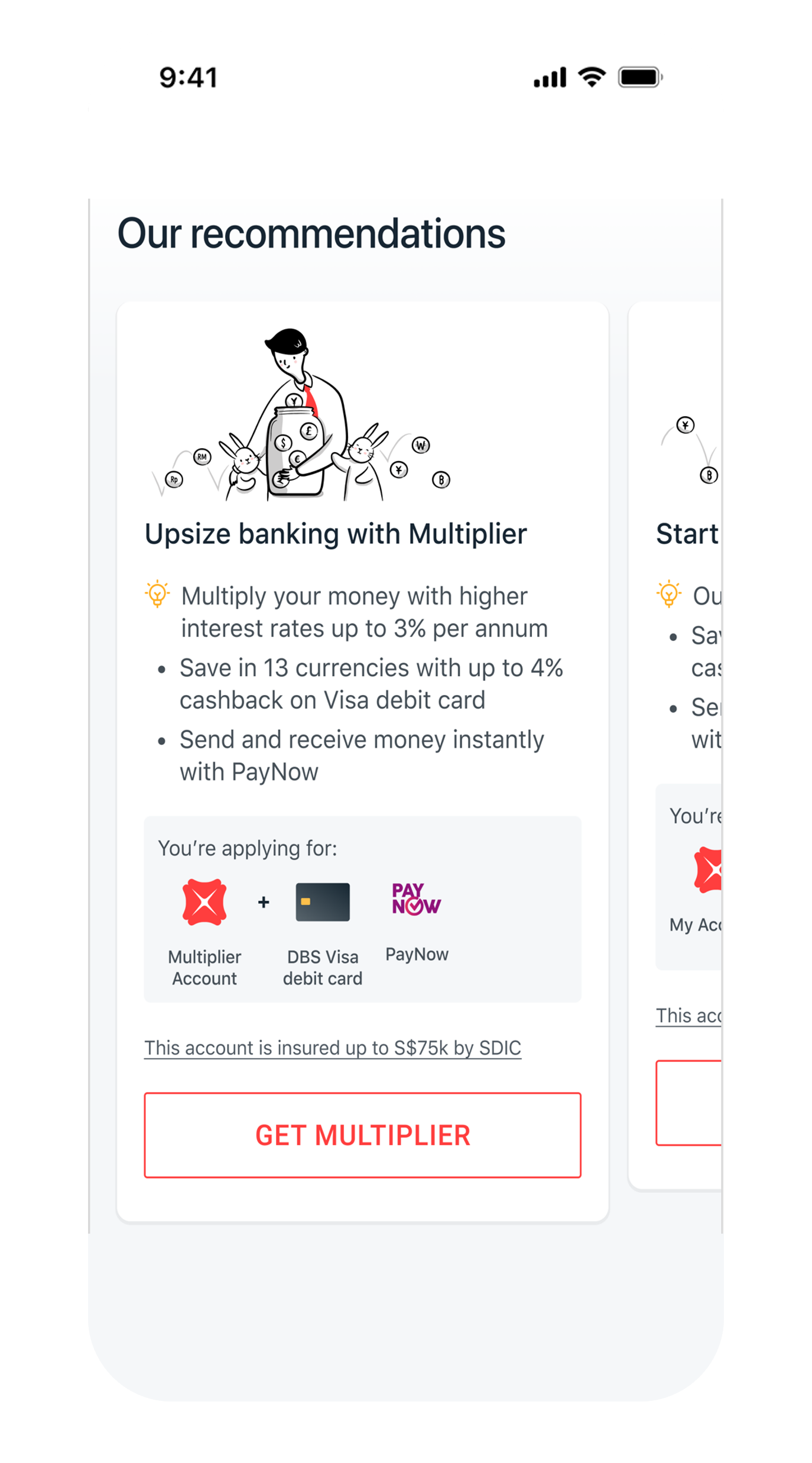
Tap on the suitable bundle to open an account.
[8]()
**Step 8**
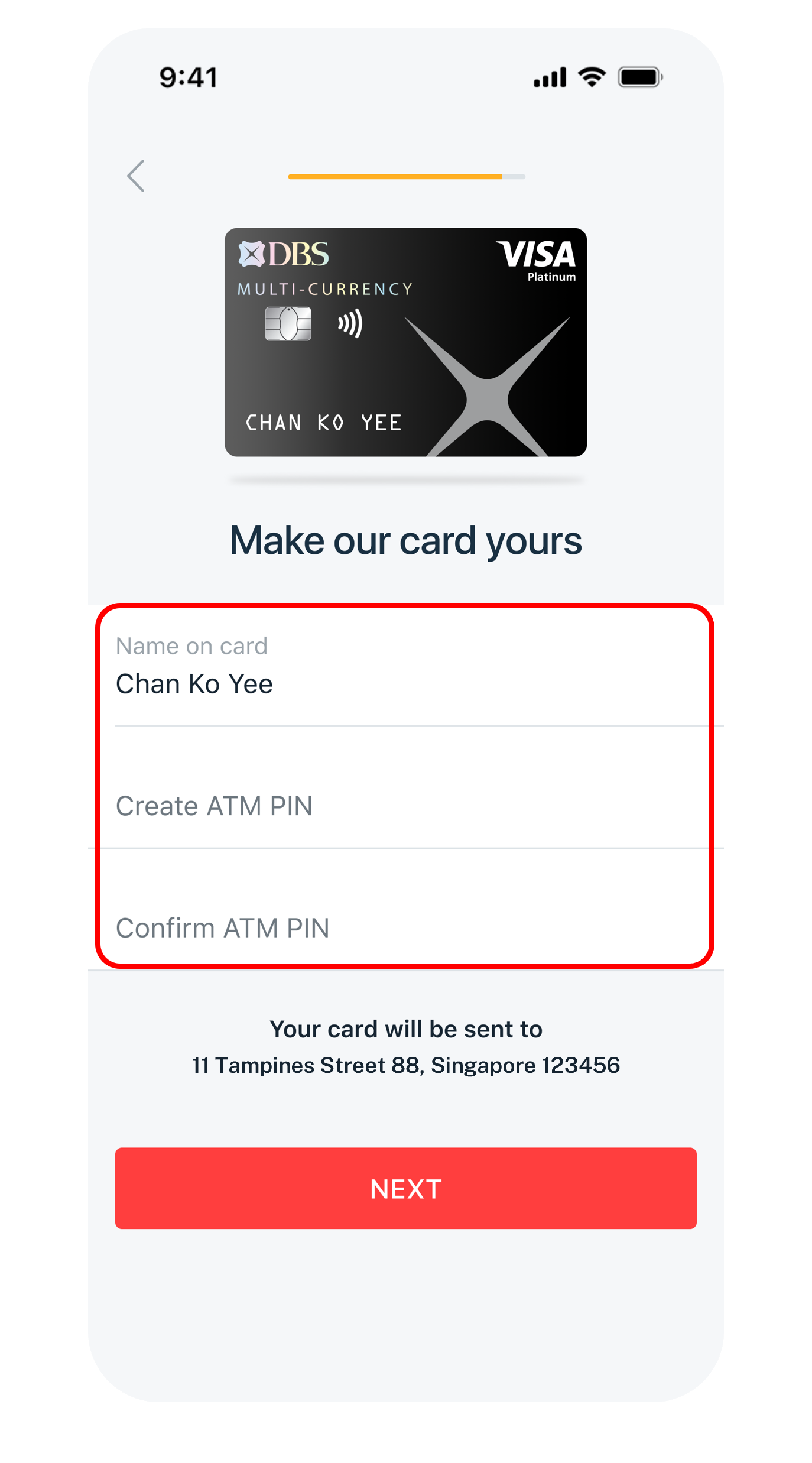
Complete the questions in the succeeding screens including Name on card & PIN.
[9]()
**Step 9**
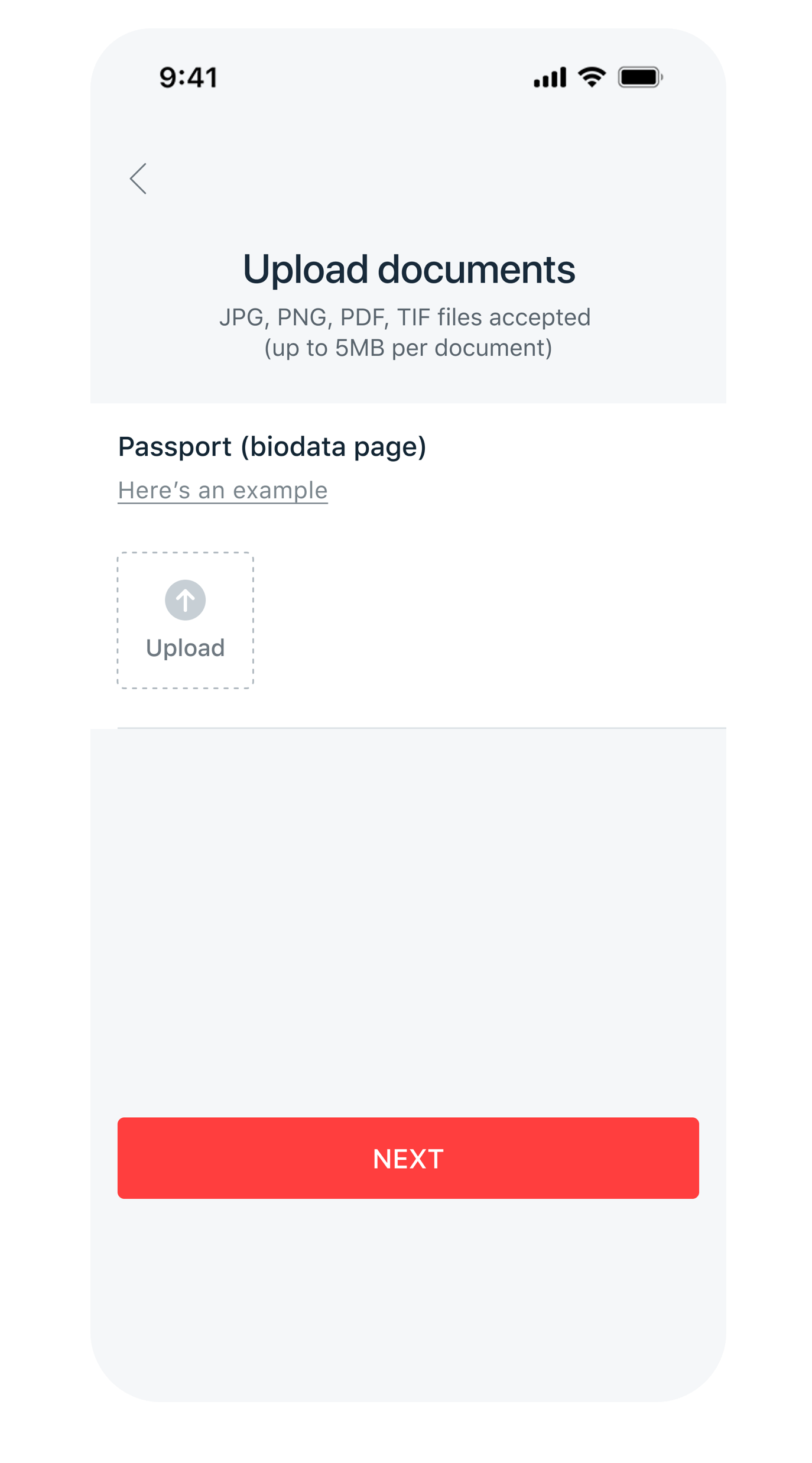
Upload Supporting Documents and tap Next, if required.
*Learn more about [Documents Required for Account Opening](https://www.dbs.com.sg/personal/support/bank-account-opening-documents-required.html?pid=sg-dbs-help-and-support-bank-account-new-opening). (Note: After submission, if additional document(s) is required, you will receive an email notification with the necessary instructions.)*
[10]()
**Step 10**
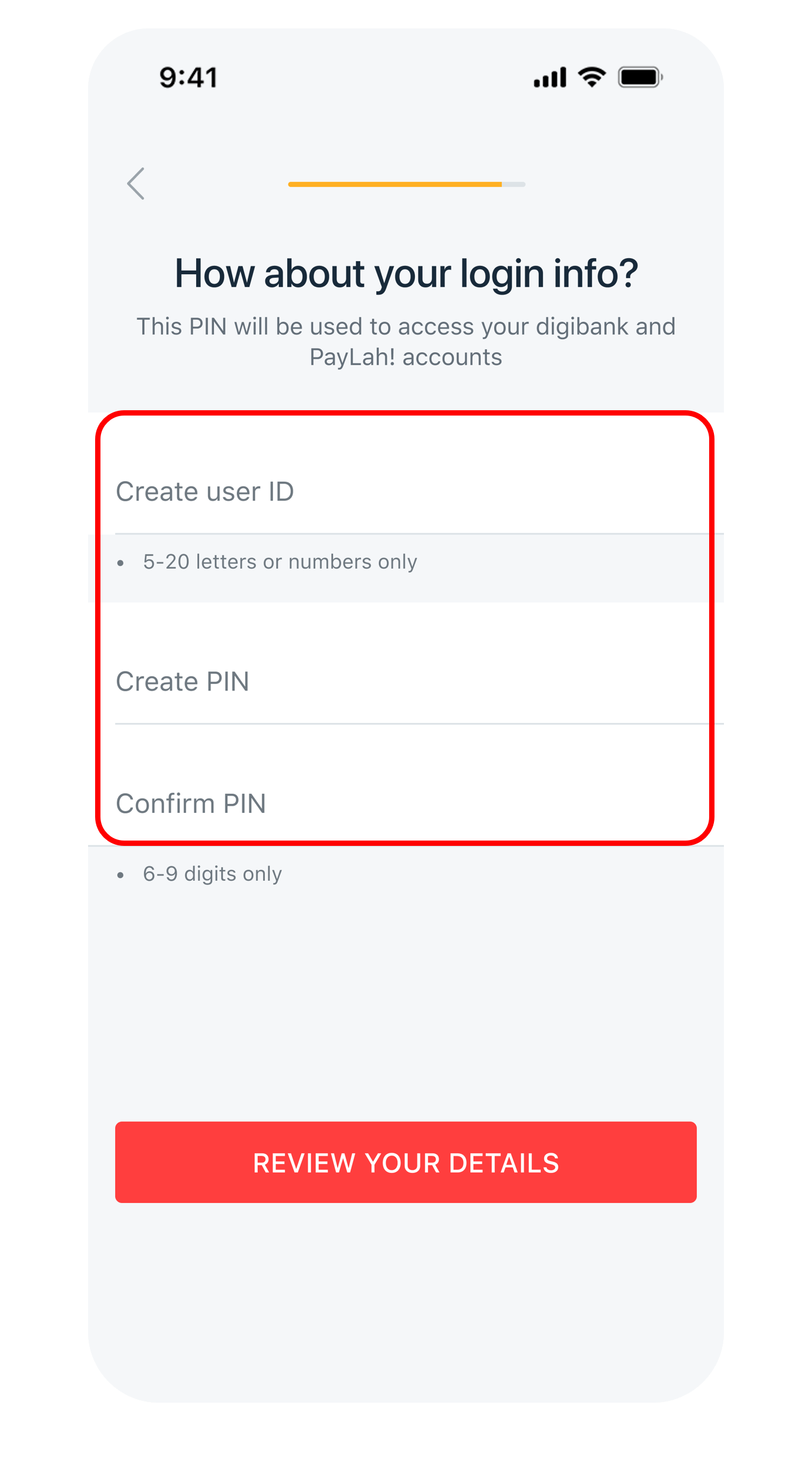
Input your preferred User ID & PIN to create your digibank Credentials.
[11]()
**Step 11**
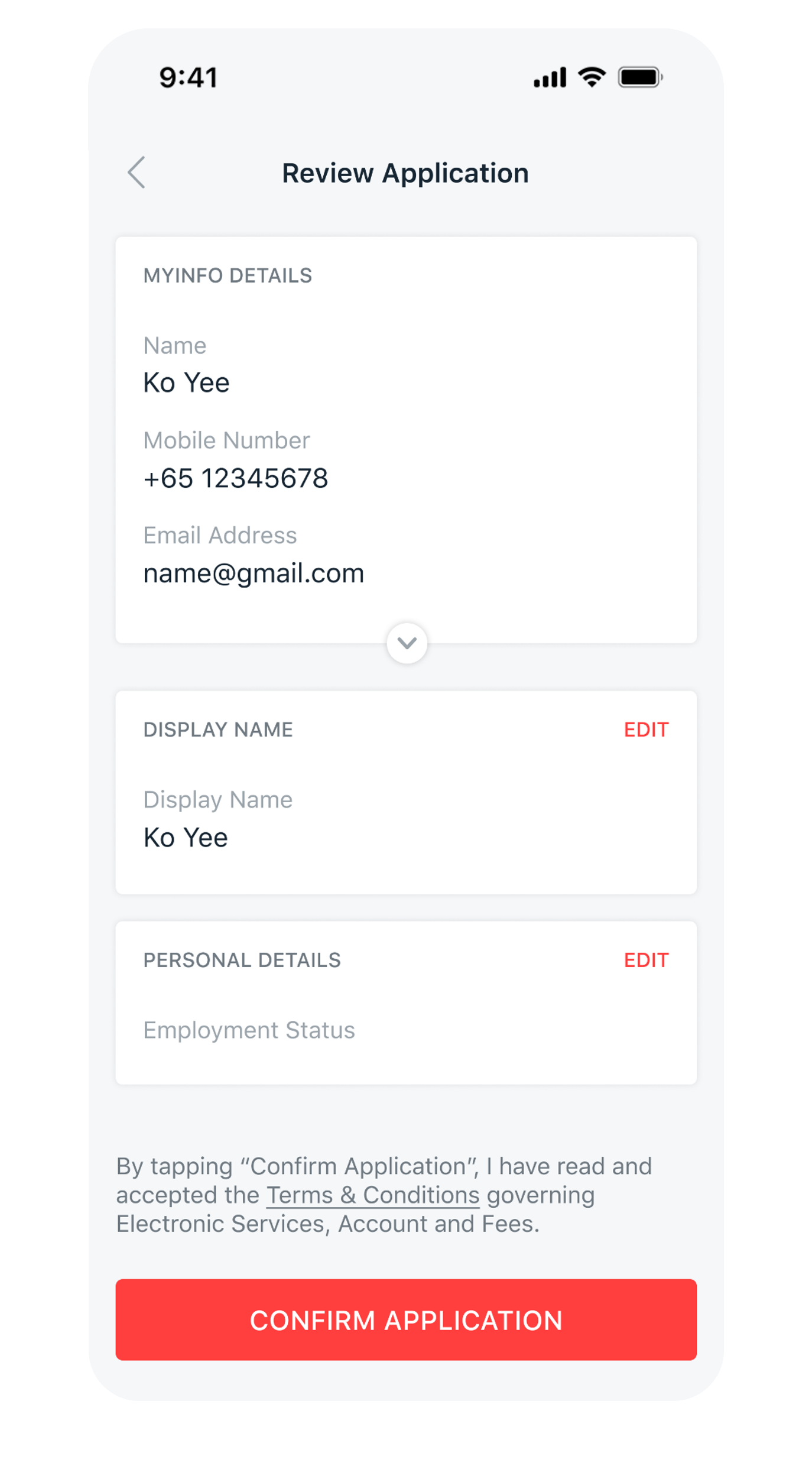
Review the details and tap Confirm Application to open your account.
*If you were required to upload supporting document, your application will be processed within 3 working days after we receive your complete application.*
| **Accounts** *(Click for more info)* | **Application** |
|---|---|
| [**My Account**](https://www.dbs.com.sg/personal/deposits/savings-accounts/my-account?pid=sg-dbs-help-and-support-bank-account-new-opening) *(Personal and Joint-alternate accounts available)* The first account you can customise to the way you live. | Scan the QR code to open a MyAccount on digibank now  Open a Joint-Alternate My Account [Apply Online Now](https://www.dbs.com.sg/dbsweb-forms/deposits/apply/personal?product=0105-MAC&appln=joint&pid=sg-dbs-help-and-support-bank-account-new-opening) |
| [**DBS Multiplier Account**](https://www.dbs.com.sg/personal/landing/dbs-multiplier/index.html?pid=sg-dbs-help-and-support-bank-account-new-opening) *(Personal account only)* Earn up to 4.1% p.a. on your savings. No minimum salary credit. No minimum credit card spend. Plus, save and transact in SGD and foreign currencies in one account. | Scan the QR code to open a Multiplier on digibank now  |
##### Get the latest DBS digibank mobile app now\!
[](https://itunes.apple.com/us/app/dbs-mobile-banking/id1068403826?mt=8) [](https://play.google.com/store/apps/details?id=com.dbs.sg.dbsmbanking) [](https://appgallery.cloud.huawei.com/marketshare/app/C101888471?locale=en_GB&source=appshare&subsource=C101888471)










- 1
- 2
- 3
- 4
- 5
- 6
- 7
- 8
- 9
- 10
**Here’s a tip\!** Prepare all [supporting documents](https://www.dbs.com.sg/personal/support/bank-account-opening-documents-required.html?pid=sg-dbs-help-and-support-bank-account-new-opening-txtlink-non-singpass-supporting-documents) before starting your application to save time.
[1]()
**Step 1**
Download the digibank mobile app from the App Store, Google Play or AppGallery.
[2]()
**Step 2**
Launch the digibank mobile app and tap on Sign up for digibank.
[3]()
**Step 3**
Swipe through the introduction screens and tap on I'm New to DBS/POSB.
[4]()
**Step 4**
Tap Continue without Singpass and tap Sign up Manually.
[5]()
**Step 5**
Provide all required information in the succeeding screens including your occupation and industry.
[6]()
**Step 6**
Declare your tax residency status.
Select Yes if you are Singapore Tax Resident only. Otherwise, select No and add the country/jurisdiction(s) of your tax residency.
*Refer to the [Rules Governing Tax Residence](https://www.dbs.com.sg/personal/common-disclaimer.page?url=http://www.oecd.org/tax/automatic-exchange/crs-implementation-and-assistance/tax-residency/&3rdparty=%27OECD%27&pid=sg-dbs-help-and-support-bank-account-new-opening-txtlink-singpass-rules-gov-tax-residence) for information on the respective jurisdiction's tax residency rules.*
[7]()
**Step 7**
Tap on the suitable bundle to open an account.
[8]()
**Step 8**
Complete the questions in the succeeding screens including Name on card & PIN.
[9]()
**Step 9**
Upload Supporting Documents and tap Next, if required.
*Learn more about [Documents Required for Account Opening](https://www.dbs.com.sg/personal/support/bank-account-opening-documents-required.html?pid=sg-dbs-help-and-support-bank-account-new-opening). (Note: After submission, if additional document(s) is required, you will receive an email notification with the necessary instructions.)*
[10]()
**Step 10**
Review the details and tap Confirm Application to open your account.
| **Accounts** *(Click for more info)* | **Application** |
|---|---|
| [**My Account**](https://www.dbs.com.sg/personal/deposits/savings-accounts/my-account?pid=sg-dbs-help-and-support-bank-account-new-opening) *(Personal and Joint-alternate accounts available)* The first account you can customise to the way you live. | Scan the QR code to open a MyAccount on digibank now  Open a Joint-Alternate My Account [Apply Online Now](https://www.dbs.com.sg/dbsweb-forms/deposits/apply/personal?product=0105-MAC&appln=joint&pid=sg-dbs-help-and-support-bank-account-new-opening) |
| [**DBS Multiplier Account**](https://www.dbs.com.sg/personal/landing/dbs-multiplier/index.html?pid=sg-dbs-help-and-support-bank-account-new-opening) *(Personal account only)* Earn up to 4.1% p.a. on your savings. No minimum salary credit. No minimum credit card spend. Plus, save and transact in SGD and foreign currencies in one account. | Scan the QR code to open a Multiplier on digibank now  |
##### Get the latest DBS digibank mobile app now\!
[](https://itunes.apple.com/us/app/dbs-mobile-banking/id1068403826?mt=8) [](https://play.google.com/store/apps/details?id=com.dbs.sg.dbsmbanking) [](https://appgallery.huawei.com/#/app/C101888471)
##### Existing DBS/POSB Customers
Follow the steps to open a new personal account with us using digibank.
To open Joint account, you may use our online form in [My Account](https://www.dbs.com.sg/personal/deposits/savings-accounts/my-account?pid=sg-dbs-help-and-support-bank-account-new-opening#AppforajoiMy_5) and [eMySavings](https://www.dbs.com.sg/personal/deposits/savings-accounts/mysavings-account?pid=sg-dbs-help-and-support-bank-account-new-opening#AppforaJoiAc_5) pages.
- [digibank mobile](https://www.dbs.com.sg/personal/support/bank-account-new-opening.html#mobile-tab3)
- [digibank online](https://www.dbs.com.sg/personal/support/bank-account-new-opening.html#mobile-tab4)

- 1
- 2
- 3
- 4
- 5
- 6
[1]()
**Step 1**
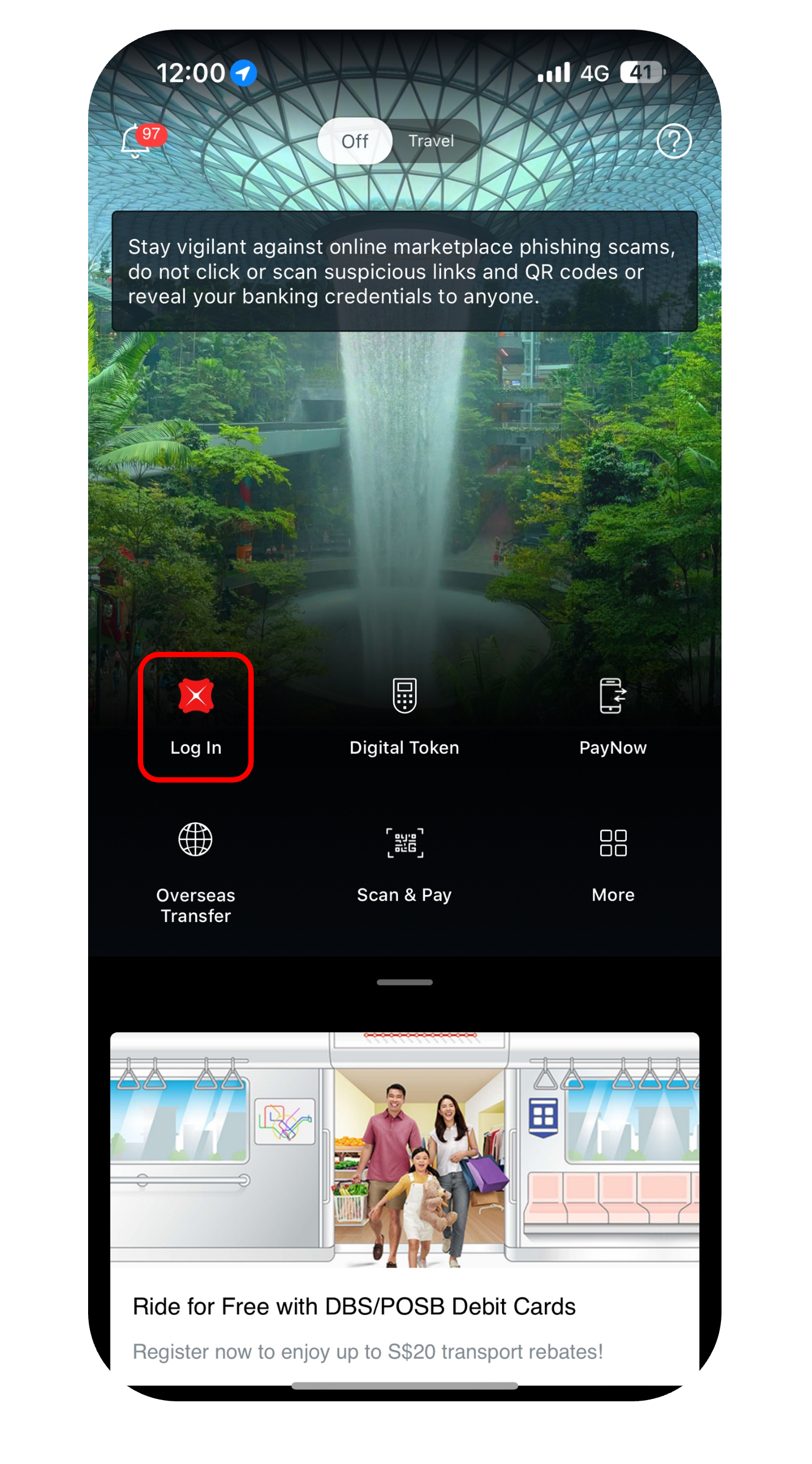
Log in to digibank mobile with your Touch / Face ID or digibank User ID & PIN.
[2]()
**Step 2**
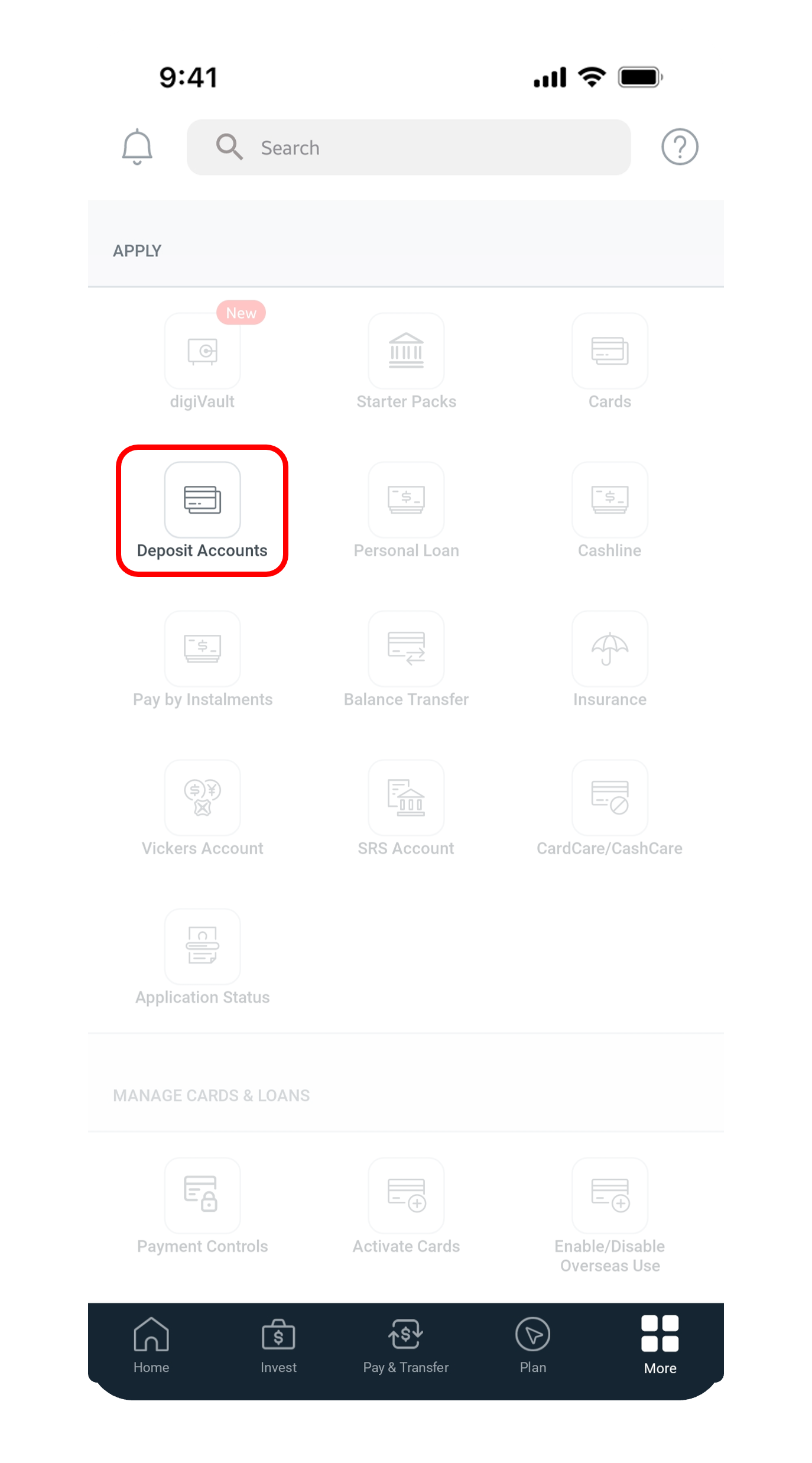
Tap More on the bottom navigation bar and under Apply, tap on Deposit Accounts.
[3]()
**Step 3**
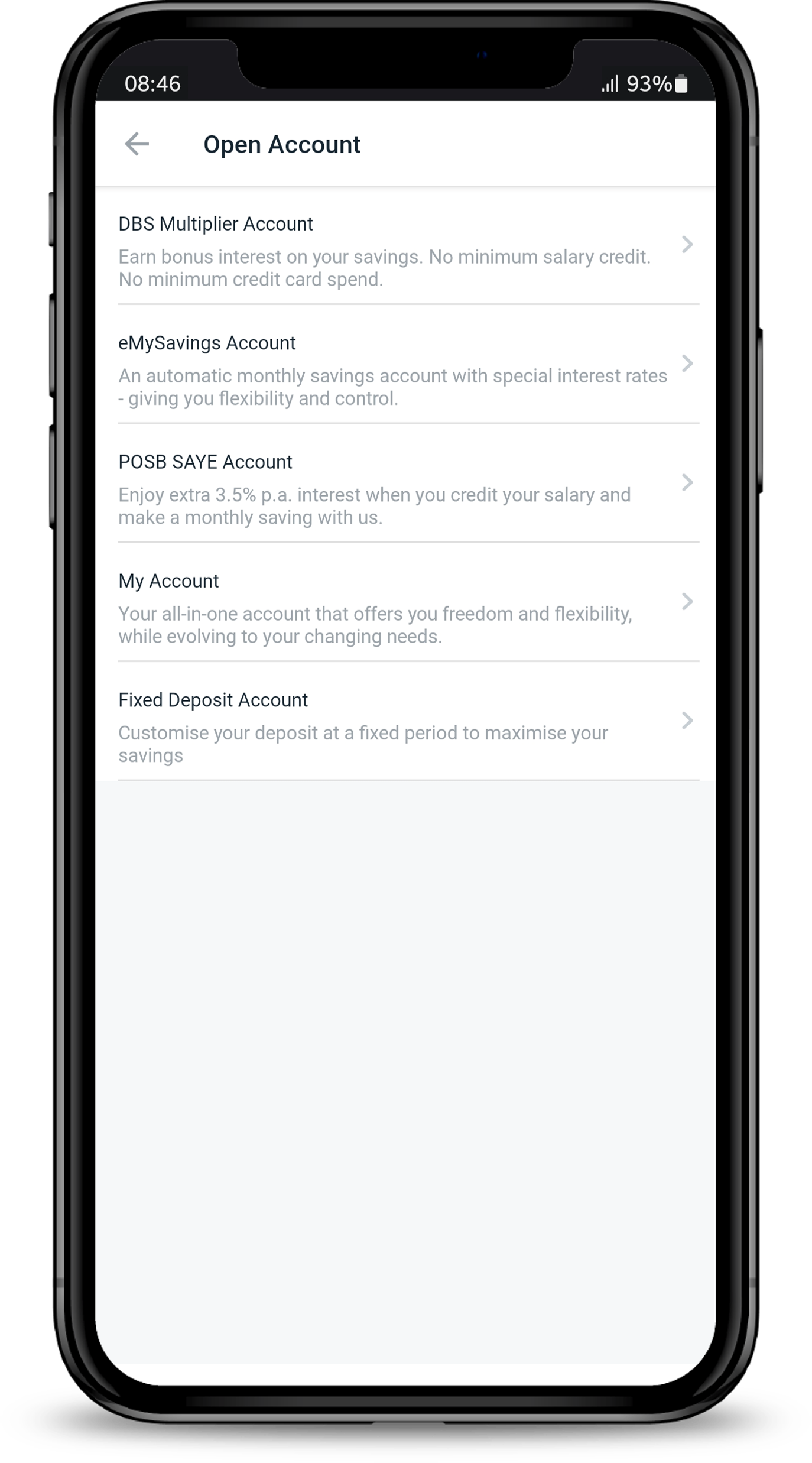
Select an account that you wish to open. Below are the accounts that you can open instantly using digibank mobile.
[4]()
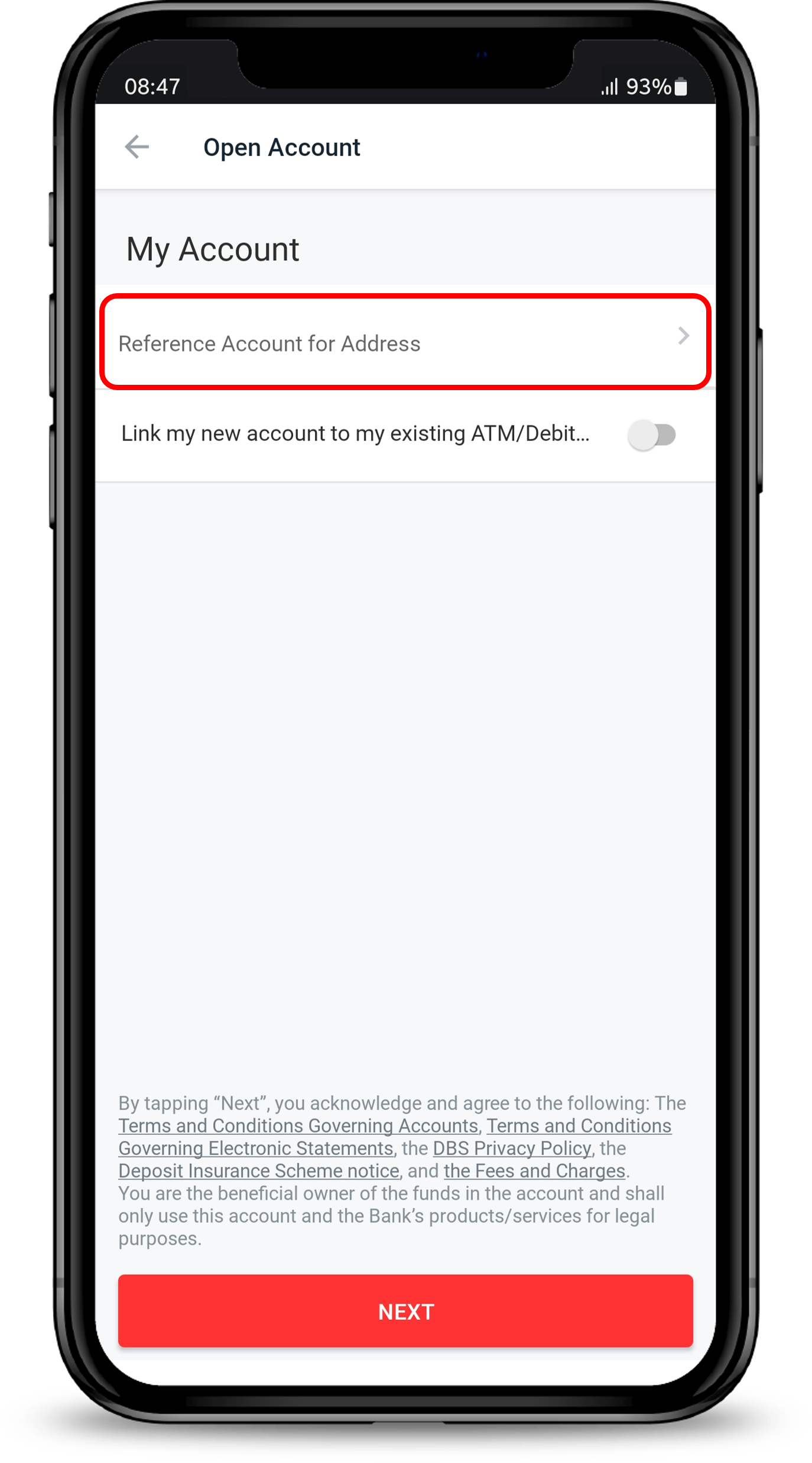
**Step 4**
Tap on Reference Account for Address to select the account you wish to use as a reference for mailing address.
If you wish to link your new account to your existing ATM/Debit card, tap on Link my new account to my exisiting ATM/Debit card and tap on Next.
*(Note: If you have selected "Link my new account to my exisiting ATM/Debit card", no new card will be issued. You may also link the new account to an existing card at a later time via digibank. Learn more about [How to link account to your card](https://www.dbs.com.sg/personal/support/card-application-link-card-to-deposit-account.html?pid=sg-dbs-help-and-support-bank-account-new-opening).)*
[5]()
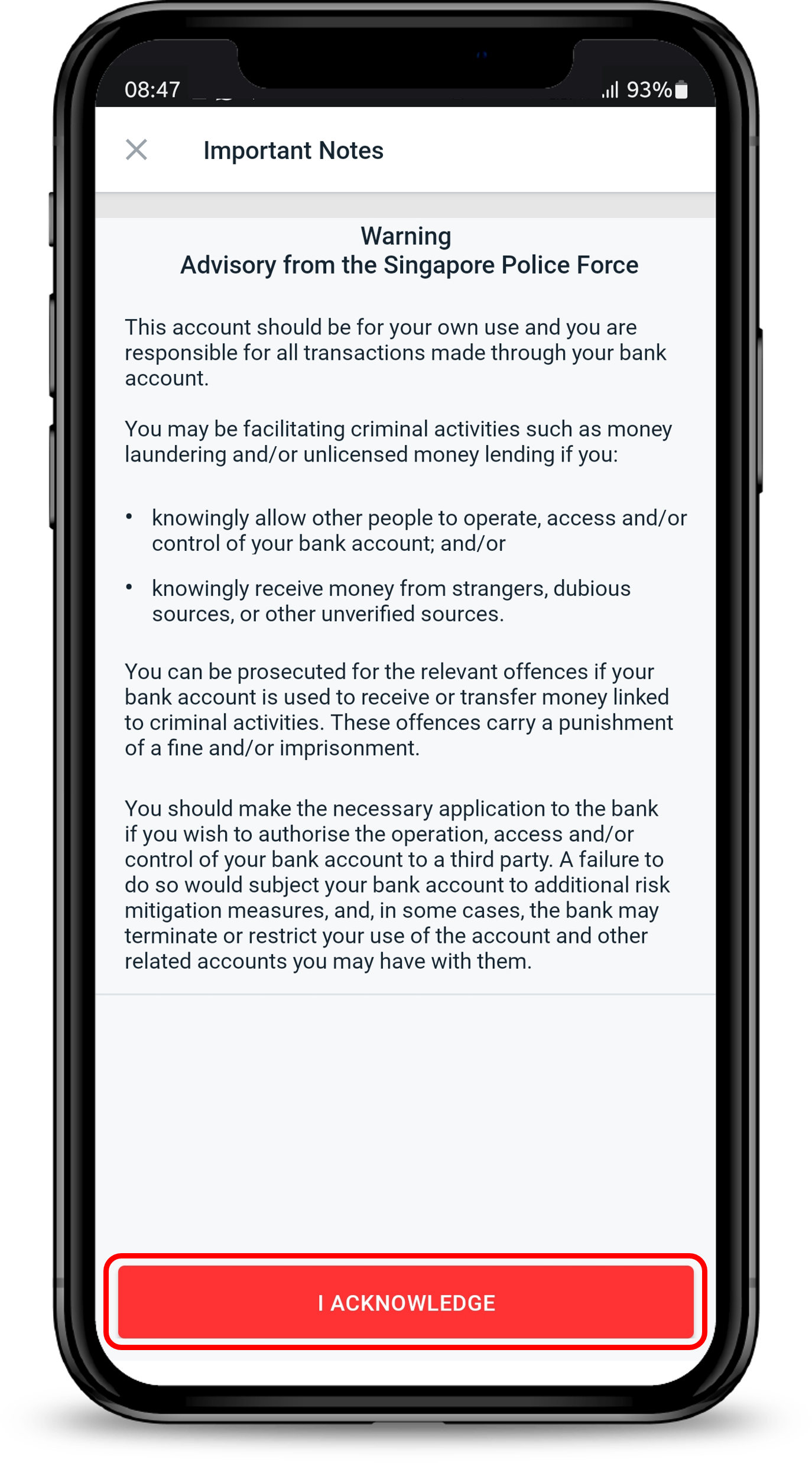
**Step 5**
Read through the Important Notes and tap on I Acknowledge.
[6]()
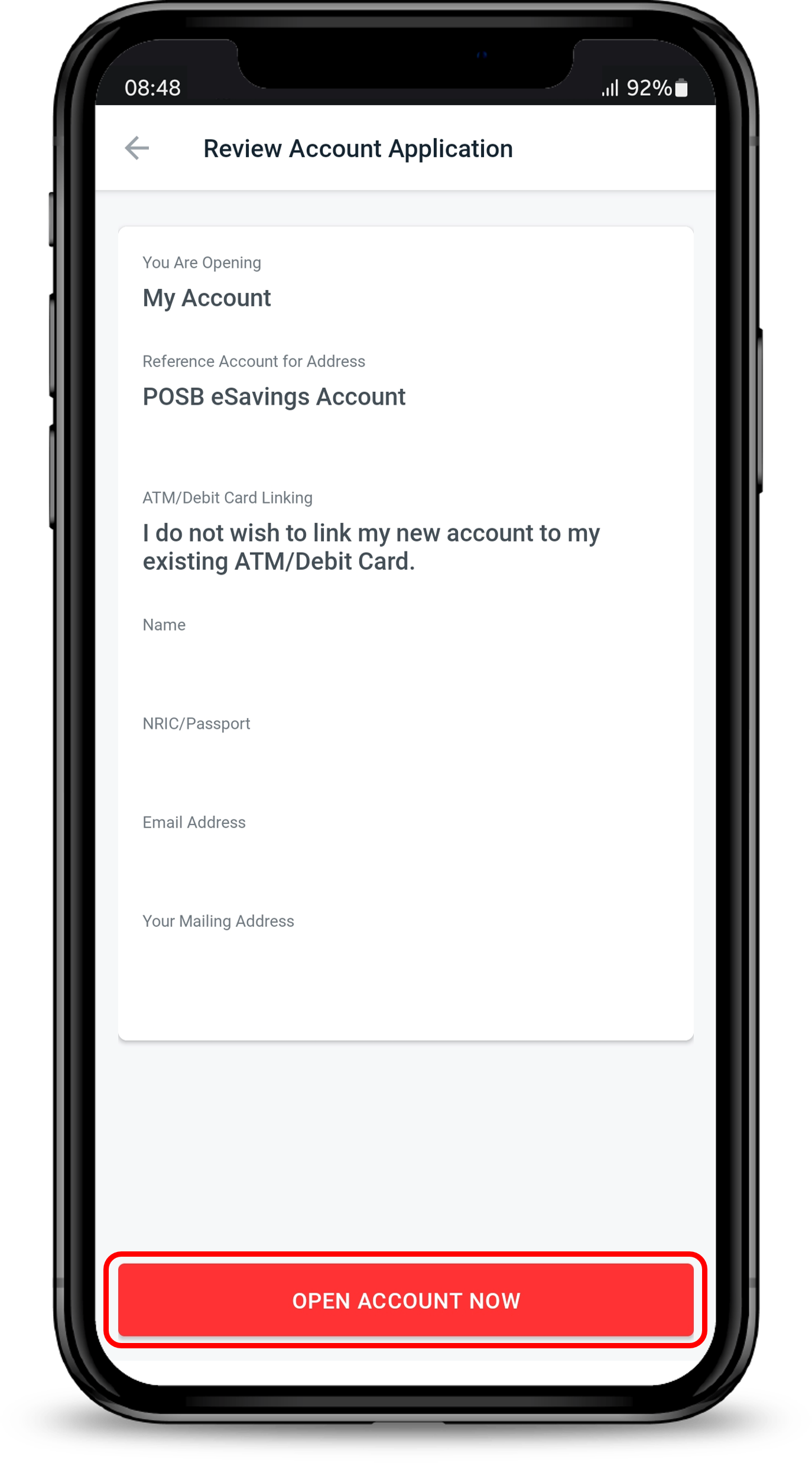
**Step 6**
Review and confirm your details and tap on Open Account Now to open your account.
| **Accounts** *(Click for more info)* | **Description** |
|---|---|
| [**My Account**](https://www.dbs.com.sg/personal/deposits/savings-accounts/my-account?pid=sg-dbs-help-and-support-bank-account-new-opening) *(Personal and Joint-alternate accounts available)* | The all-in-one account that offers you freedom and flexibility, while evolving to your changing needs. |
| [**DBS Multiplier Account**](https://www.dbs.com.sg/personal/landing/dbs-multiplier/index.html?pid=sg-dbs-help-and-support-bank-account-new-opening) *(Personal account only)* | Earn up to 4.1% p.a. on your savings. No minimum salary credit. No minimum credit card spend. |
| [**eMySavings Account**](https://www.dbs.com.sg/personal/deposits/savings-accounts/mysavings-account?pid=sg-dbs-help-and-support-bank-account-new-opening) *(Personal and Joint-alternate accounts available)* | An automatic monthly savings account with special interest rates - giving you flexibility and control |
| [**POSB SAYE Account**](https://www.posb.com.sg/personal/deposits/savings-accounts/saye?pid=sg-dbs-help-and-support-bank-account-new-opening) *(Personal account only)* | Enjoy extra 3.5% p.a. interest when you credit your salary and make a monthly saving with us. |
| [**Fixed Deposit Account**](https://www.dbs.com.sg/personal/deposits/fixed-deposits/fixed-deposit?pid=sg-dbs-help-and-support-bank-account-new-opening) *(Personal account only)* | Customise your deposit at a fixed period to maximise your savings. |
##### Get the latest DBS digibank mobile app now\!
[](https://itunes.apple.com/us/app/dbs-mobile-banking/id1068403826?mt=8) [](https://play.google.com/store/apps/details?id=com.dbs.sg.dbsmbanking) [](https://appgallery.cloud.huawei.com/marketshare/app/C101888471?locale=en_GB&source=appshare&subsource=C101888471)



- 1
- 2
- 3
- 4
- 5
- 6
- 7
- 8
[1]()
**Step 1**
[Log in to digibank online](https://internet-banking.dbs.com.sg/digi-web/ngib/) with your User ID & PIN.
[2]()
**Step 2**
Complete the Authentication Process.
[3]()
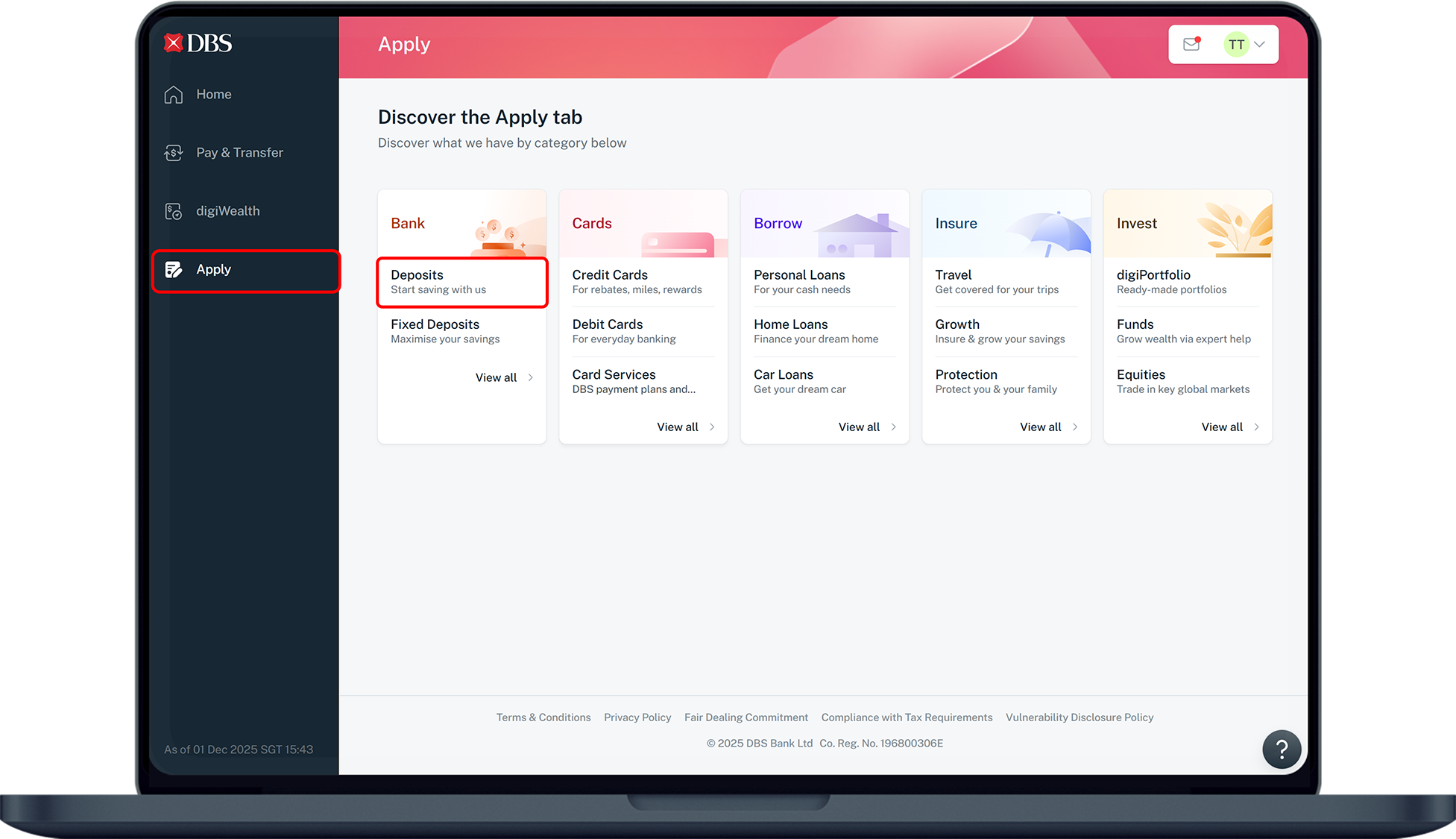
**Step 3**
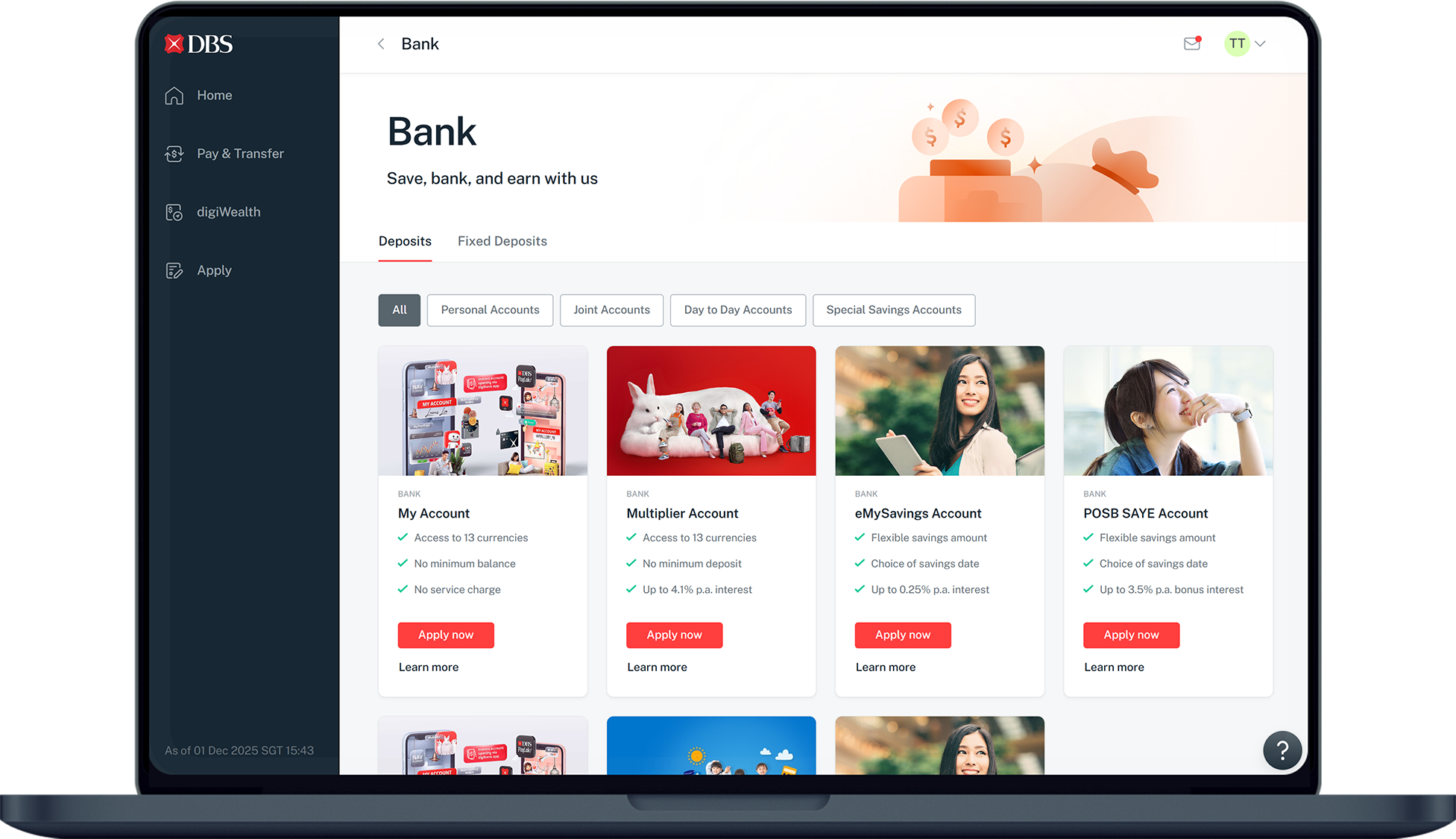
Click on Apply on the left and under Bank, select Deposits.
[4]()
**Step 4**
Select the account and click on Apply.
[5]()
**Step 5**
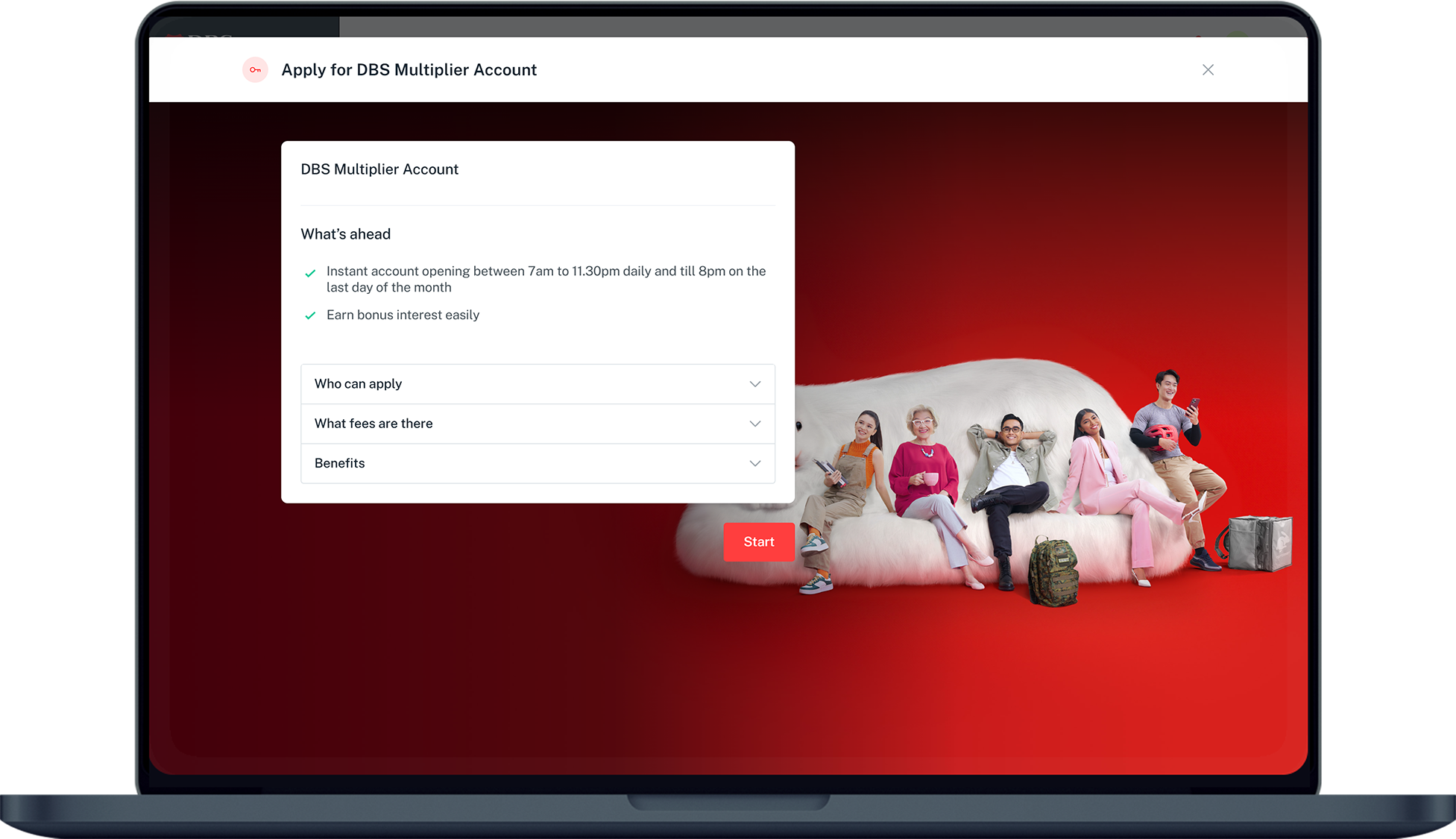
Read through the information and click Start.
[6]()
**Step 6**
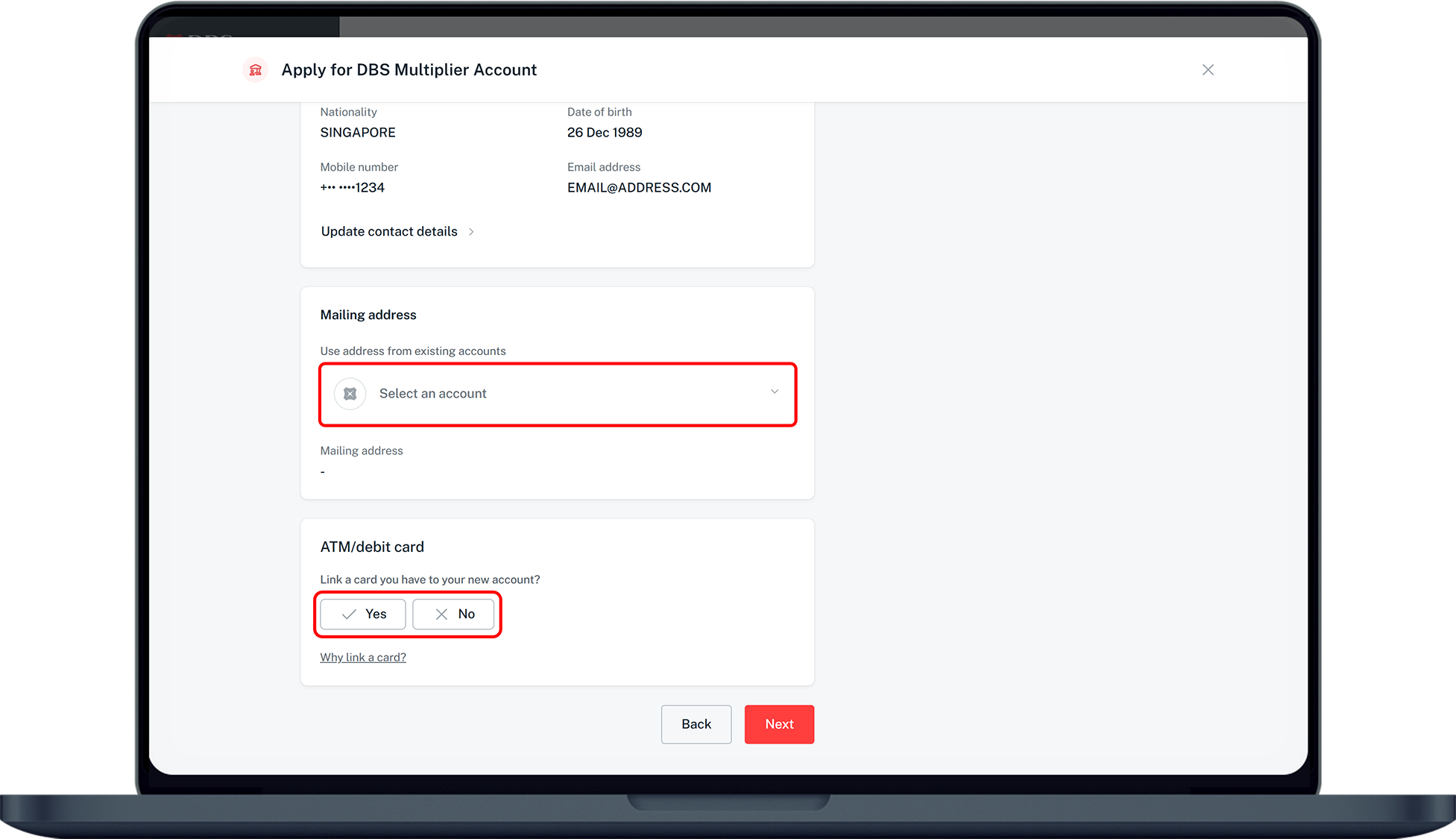
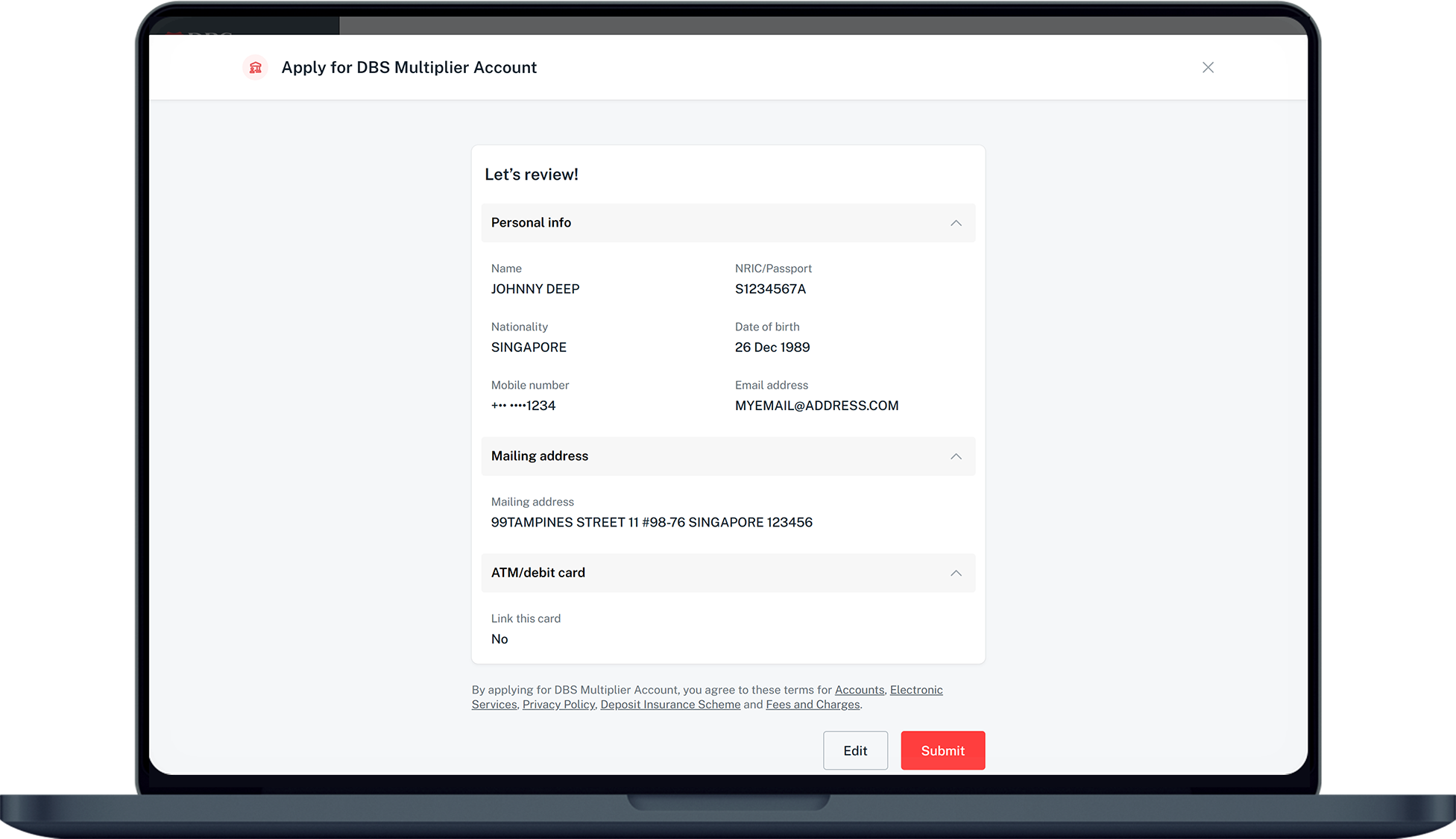
Check your personal details, select an account your wish to use as the reference address and select Yes or No to choose if you want to link your new account to your existing ATM/ Debit card. Click Next.
*(Note: If you have selected Yes, no new card will be issued. You may also link the new account to an existing card at a later time via digibank. Learn more about How to link account to your card.)*
[7]()
**Step 7**
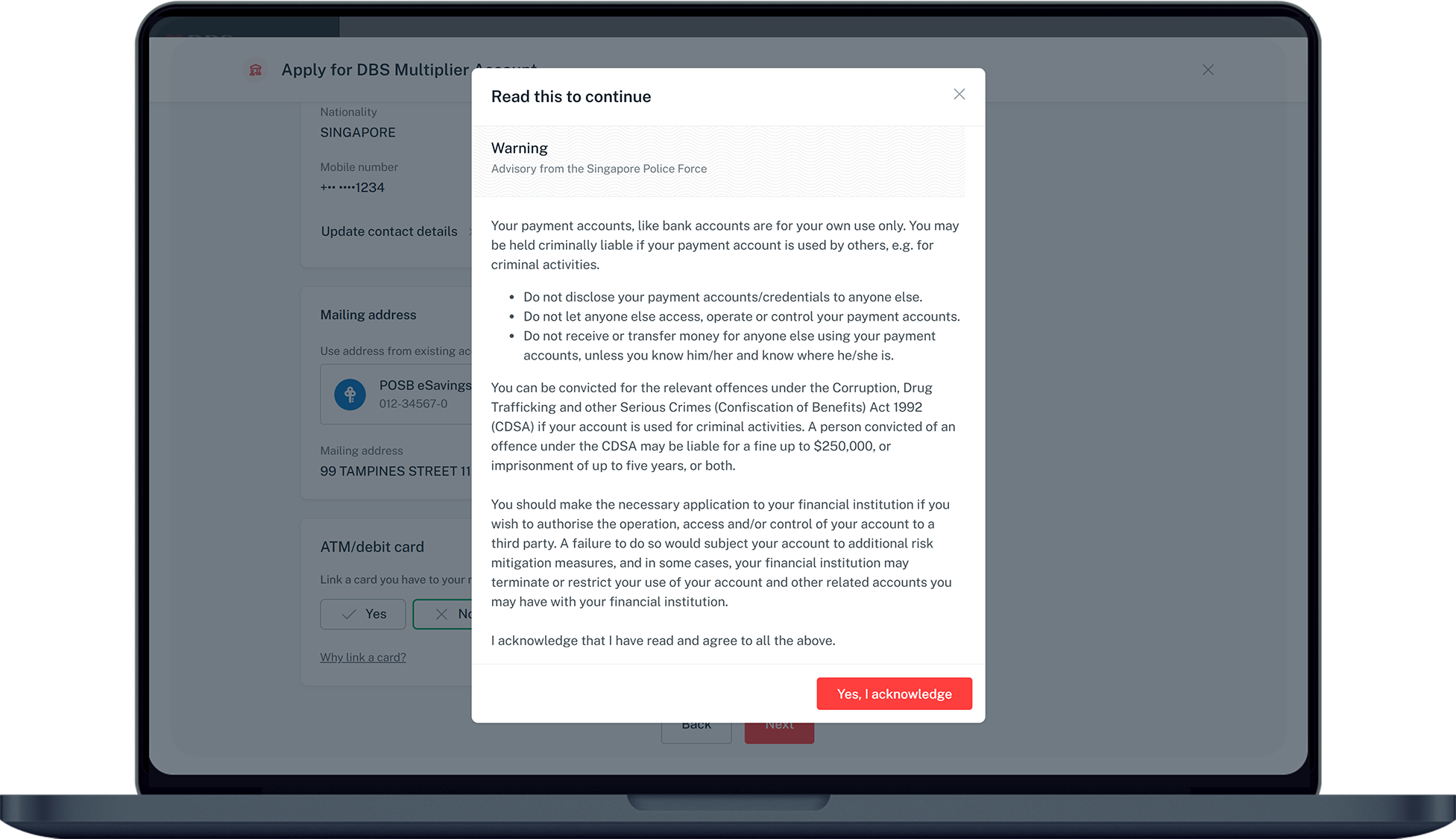
Read through the information and click on Yes, I acknowledge to continue.
[8]()
**Step 8**
Verify your details and click Submit to complete your application.
| **Accounts** *(Click for more info)* | **Description** | **Application** |
|---|---|---|
| [**My Account**](https://www.dbs.com.sg/personal/deposits/savings-accounts/my-account?pid=sg-dbs-help-and-support-bank-account-new-opening) *(Personal and Joint-alternate accounts available)* | The all-in-one account that offers you freedom and flexibility, while evolving to your changing needs. Save and transact in SGD and enjoy access to 12 foreign currencies instantly. | [Apply for Personal Account](https://www.dbs.com.sg/personal/deposits/savings-accounts/my-account?pid=sg-dbs-help-and-support-bank-account-new-opening) [Apply for Joint-Alternate Account](https://www.dbs.com.sg/dbsweb-forms/deposits/apply/personal?product=0105-MAC&appln=joint&pid=sg-dbs-help-and-support-bank-account-new-opening) [Apply with your Child below 16 years old](https://www.posb.com.sg/personal/deposits/savings-accounts/my-account-kids#apply-now) |
| [**DBS Multiplier Account**](https://www.dbs.com.sg/personal/landing/dbs-multiplier/index.html?pid=sg-dbs-help-and-support-bank-account-new-opening) *(Personal account only)* | Earn up to 4.1% p.a. on your savings. No minimum salary credit. No minimum credit card spend. Plus, save and transact in SGD and foreign currencies in one account. | [Apply Now](https://www.dbs.com.sg/personal/landing/dbs-multiplier/index.html?pid=sg-dbs-help-and-support-bank-account-new-opening) |
| [**eMySavings Account**](https://www.posb.com.sg/personal/deposits/savings-accounts/emysavings-account?pid=sg-dbs-help-and-support-bank-account-new-opening) *(Personal and Joint-alternate accounts available)* | A special savings account that allows you to save monthly in a hassle-free way. | [Apply for Personal Account](https://www.posb.com.sg/personal/deposits/savings-accounts/emysavings-account) [Apply for Joint-Alternate Account](https://www.dbs.com.sg/dbsweb-forms/deposits/apply/personal?product=0062-EMSA&appln=joint&pid=sg-dbs-help-and-support-bank-account-new-opening) |
| [**POSB SAYE Account**](https://www.posb.com.sg/personal/deposits/savings-accounts/saye?pid=sg-dbs-help-and-support-bank-account-new-opening) *(Personal account only)* | Enjoy extra 3.5% p.a. interest when you credit your salary and have successful monthly savings with us. | [Apply Now](https://www.posb.com.sg/personal/deposits/savings-accounts/saye) |
| [**Fixed Deposit Account**](https://www.dbs.com.sg/personal/deposits/fixed-deposits/fixed-deposit?pid=sg-dbs-help-and-support-bank-account-new-opening) *(Personal account only)* | Customise your deposit at a fixed period to maximise your savings. | [Apply Now](https://internet-banking.dbs.com.sg/digi-web/ngib/deeplink/000000002200002?categoryId=lmcbva8i&subCategoryId=lmcbva8n&livesiteid=lvkwksjx&pid=sg-dbs-help-support-bank-account-new-opening-txtlink-apply-now) |
| [**Supplementary Retirement Scheme**](https://www.dbs.com.sg/personal/investments/srs-and-cpf/supplementary-retirement-scheme?pid=sg-dbs-help-and-support-bank-account-new-opening) *(Personal account only)* | Supplementary Retirement Scheme (SRS) lets you save for your retirement and enjoys tax benefits. | [Apply Now](http://internet-banking.dbs.com.sg/digi-web/ngib/deeplink/000000002200002?categoryId=lnstofnb&subCategoryId=mhp8jw2r&livesiteid=lvkwkpza&pid=sg-dbs-help-support-bank-account-new-opening-txtlink-apply-now) |
##### Already a digibank user?
[Login now](https://internet-banking.dbs.com.sg/digi-web/ngib/)
Forgot [User ID](https://internet-banking.dbs.com.sg/digi-web/ngib/forgot-userid) or [PIN](https://internet-banking.dbs.com.sg/digi-web/ngib/forgot-pin)
##### Not yet a digibank user?
[Get Started](https://www.dbs.com.sg/personal/hoap/registration?brand=dbs&entry=IBNextgen)
*For customers with ATM/Debit/Credit Card*
### Frequently Asked Questions
##### New DBS or POSB Customers
##### Who are eligible to open their first account using digibank mobile?
Customers who are at least 16 years old and meet any of the following can open their first account directly using DBS digibank mobile:
- Customers who do not have any product or services with DBS or POSB; or
- Customers who only have Joint-Trust account with their parents; or
- Customer who only have Paylah account with DBS.
##### I have just registered for a Singpass account. When can I start using it to register for an account on digibank mobile?
Your Singpass/MyInfo profile should be up and ready to use the next day for new account application on your digibank app.
##### What if my mobile number or Registered Address\* in Singpass is incorrect or outdated?
You may update your details in Singpass before you proceed with your application.
**Note**: *\*Your new debit card will be mailed to your registered address.*
##### I used Singpass to submit application however my account is not instantly opened, why?
If you were required to upload supporting document(s), additional processing is required for your application. Your application will be processed within 3 working days upon receiving complete application.
##### I do not have Singpass account, what are the requirements to open an account in digibank mobile?
You will need:
1. Valid mobile number, email address and residential address
2. [Supporting documents](https://www.dbs.com.sg/personal/support/bank-account-opening-documents-required.html?pid=sg-dbs-help-and-support-bank-account-new-opening-faq-txtlink-supporting-documents)
##### I did not use Singpass to submit my application, what are my next steps?
Your application will be processed within 3 working days after we receive your complete application. Once approved, you will receive your debit card within 3-5 working days then proceed with the following steps:
1. Activate your debit card. Learn more on how to [Activate New Card](https://www.dbs.com.sg/personal/support/card-activate-new-card.html?pid=sg-dbs-help-and-support-bank-account-new-opening-faq-txtlink-debit-card-activation2%E2%80%8B).
2. Once your card is activated, proceed to [digibank mobile Registration](https://www.dbs.com.sg/personal/support/bank-ibanking-application.html?pid=sg-dbs-help-and-support-bank-account-new-opening-faq-txtlink-register-for-digibank-access2).
3. Once registered, login in digibank and [set up your Digital Token](https://www.dbs.com.sg/personal/support/bank-ibanking-digital-token-setup.html?pid=sg-dbs-help-and-support-bank-account-new-opening-faq-txtlink-set-up-your-digital-token2) when prompted.
##### Where can I check the status of my account opening application?
You may check the status of your application in [Application Status Portal](https://www.dbs.com.sg/map/login?pid=sg-dbs-help-and-support-bank-account-new-opening-faq-txtlink-application-status-portal). Learn more on how to [Check Account Opening Application Status](https://www.dbs.com.sg/personal/support/bank-account-application-status.html?pid=sg-dbs-help-and-support-bank-account-new-opening-faq-txtlink-map-check-account-opening-application-status) using the portal.
##### Existing DBS or POSB Customers
##### Why am I getting error when I try to open a new account using digibank?
For existing DBS or POSB customers, you may open account using digibank if:
1. You have existing valid deposit account with DBS or POSB
2. You have valid contact details and address in the bank’s record
You may also try to open account by tapping on **Starter Pack** menu under **Apply** in digibank mobile.
##### What is the minimum age to open a personal account?
Your child must be at least 16 years old on the date of application.
##### How can my child own a personal account?
- If your child does not have any account with DBS or POSB or their only account is a Joint Trust account, they may apply for a personal My Account as a new DBS or POSB customer.
- If your child has other existing account with DBS or POSB and has digibank access, you may refer to the steps above to open a personal account
##### I have a Joint-Alternate My Account with my child. Can my child have digital access to the account
Yes, your child must be at least 16 years old on the date of application to apply for digibank. Learn more on [digibank mobile Registration](https://www.dbs.com.sg/personal/support/bank-ibanking-application.html?pid=sg-dbs-help-and-support-bank-account-new-opening).
Your child must have:
- Valid contact details (mobile number and email address) and residential address in the bank’s record. Learn more on how to update [mobile number](https://www.dbs.com.sg/personal/support/general-profile-update-mobile-number.html?pid=sg-dbs-help-support-bank-account-new-opening.html) and [email address](https://www.dbs.com.sg/personal/support/general-profile-update-email-address.html?pid=sg-dbs-help-support-bank-account-new-opening.html).
- Activated ATM, Debit, or Credit Card, or his own Singpass account (for Singaporean and Permanent Residents only)
##### Can I convert the Joint-Alternate My Account for Kids to a personal account for my child?
Joint-Alternate My Account for Kids cannot be converted to a personal account. However, your child can apply for a personal account via digibank online or digibank mobile app once they reach 16 years old.
### More information
- Once your account is opened, you will be notified via email.
- Your debit card will be mailed to your registered address within 3 working days.
- [Documents Required for Account Opening](https://www.dbs.com.sg/personal/support/bank-account-opening-documents-required.html?pid=sg-dbs-help-and-support-bank-account-new-opening)
**Was this information useful?**
Yes
No
## We welcome your feedback
### Thanks for your feedback\!
#### We’ll continue to work towards serving you better.
#### Related articles
- [Open a POSB Smiley Child Development Account (CDA)](https://www.posb.com.sg/personal/support/bank-account-cda-application.html)
- [Documents Required for Account Opening](https://www.dbs.com.sg/personal/support/bank-account-opening-documents-required.html)
- [Check Account Opening Application Status](https://www.dbs.com.sg/personal/support/bank-account-application-status.html)
- [Apply for a New Credit Card](https://www.dbs.com.sg/personal/support/card-application-new-card.html)
- [Apply for a Supplementary Card](https://www.dbs.com.sg/personal/support/card-application-supplementary-card.html)
#### Related articles
- [Open a POSB Smiley Child Development Account (CDA)](https://www.posb.com.sg/personal/support/bank-account-cda-application.html)
- [Documents Required for Account Opening](https://www.dbs.com.sg/personal/support/bank-account-opening-documents-required.html)
- [Check Account Opening Application Status](https://www.dbs.com.sg/personal/support/bank-account-application-status.html)
- [Apply for a New Credit Card](https://www.dbs.com.sg/personal/support/card-application-new-card.html)
- [Apply for a Supplementary Card](https://www.dbs.com.sg/personal/support/card-application-supplementary-card.html)


May I help you?

May I help you?
digibot
Credit Card
Banking
Borrow
Contact Me
General Help
Deal Details
2026
January
| Su | Mo | Tu | We | Th | Fr | Sa |
|---|---|---|---|---|---|---|
| | | | | 1 | 2 | 3 |
| 4 | 5 | 6 | 7 | 8 | 9 | 10 |
| 11 | 12 | 13 | 14 | 15 | 16 | 17 |
| 18 | 19 | 20 | 21 | 22 | 23 | 24 |
| 25 | 26 | 27 | 28 | 29 | 30 | 31 |
February
| Su | Mo | Tu | We | Th | Fr | Sa |
|---|---|---|---|---|---|---|
| 1 | 2 | 3 | 4 | 5 | 6 | 7 |
| 8 | 9 | 10 | 11 | 12 | 13 | 14 |
| 15 | 16 | 17 | 18 | 19 | 20 | 21 |
| 22 | 23 | 24 | 25 | 26 | 27 | 28 |
March
| Su | Mo | Tu | We | Th | Fr | Sa |
|---|---|---|---|---|---|---|
| 1 | 2 | 3 | 4 | 5 | 6 | 7 |
| 8 | 9 | 10 | 11 | 12 | 13 | 14 |
| 15 | 16 | 17 | 18 | 19 | 20 | 21 |
| 22 | 23 | 24 | 25 | 26 | 27 | 28 |
| 29 | 30 | 31 | | | | |
April
| Su | Mo | Tu | We | Th | Fr | Sa |
|---|---|---|---|---|---|---|
| | | | 1 | 2 | 3 | 4 |
| 5 | 6 | 7 | 8 | 9 | 10 | 11 |
| 12 | 13 | 14 | 15 | 16 | 17 | 18 |
| 19 | 20 | 21 | 22 | 23 | 24 | 25 |
| 26 | 27 | 28 | 29 | 30 | | |
May
| Su | Mo | Tu | We | Th | Fr | Sa |
|---|---|---|---|---|---|---|
| | | | | | 1 | 2 |
| 3 | 4 | 5 | 6 | 7 | 8 | 9 |
| 10 | 11 | 12 | 13 | 14 | 15 | 16 |
| 17 | 18 | 19 | 20 | 21 | 22 | 23 |
| 24 | 25 | 26 | 27 | 28 | 29 | 30 |
| 31 | | | | | | |
June
| Su | Mo | Tu | We | Th | Fr | Sa |
|---|---|---|---|---|---|---|
| | 1 | 2 | 3 | 4 | 5 | 6 |
| 7 | 8 | 9 | 10 | 11 | 12 | 13 |
| 14 | 15 | 16 | 17 | 18 | 19 | 20 |
| 21 | 22 | 23 | 24 | 25 | 26 | 27 |
| 28 | 29 | 30 | | | | |
July
| Su | Mo | Tu | We | Th | Fr | Sa |
|---|---|---|---|---|---|---|
| | | | 1 | 2 | 3 | 4 |
| 5 | 6 | 7 | 8 | 9 | 10 | 11 |
| 12 | 13 | 14 | 15 | 16 | 17 | 18 |
| 19 | 20 | 21 | 22 | 23 | 24 | 25 |
| 26 | 27 | 28 | 29 | 30 | 31 | |
August
| Su | Mo | Tu | We | Th | Fr | Sa |
|---|---|---|---|---|---|---|
| | | | | | | 1 |
| 2 | 3 | 4 | 5 | 6 | 7 | 8 |
| 9 | 10 | 11 | 12 | 13 | 14 | 15 |
| 16 | 17 | 18 | 19 | 20 | 21 | 22 |
| 23 | 24 | 25 | 26 | 27 | 28 | 29 |
| 30 | 31 | | | | | |
September
| Su | Mo | Tu | We | Th | Fr | Sa |
|---|---|---|---|---|---|---|
| | | 1 | 2 | 3 | 4 | 5 |
| 6 | 7 | 8 | 9 | 10 | 11 | 12 |
| 13 | 14 | 15 | 16 | 17 | 18 | 19 |
| 20 | 21 | 22 | 23 | 24 | 25 | 26 |
| 27 | 28 | 29 | 30 | | | |
October
| Su | Mo | Tu | We | Th | Fr | Sa |
|---|---|---|---|---|---|---|
| | | | | 1 | 2 | 3 |
| 4 | 5 | 6 | 7 | 8 | 9 | 10 |
| 11 | 12 | 13 | 14 | 15 | 16 | 17 |
| 18 | 19 | 20 | 21 | 22 | 23 | 24 |
| 25 | 26 | 27 | 28 | 29 | 30 | 31 |
November
| Su | Mo | Tu | We | Th | Fr | Sa |
|---|---|---|---|---|---|---|
| 1 | 2 | 3 | 4 | 5 | 6 | 7 |
| 8 | 9 | 10 | 11 | 12 | 13 | 14 |
| 15 | 16 | 17 | 18 | 19 | 20 | 21 |
| 22 | 23 | 24 | 25 | 26 | 27 | 28 |
| 29 | 30 | | | | | |
December
| Su | Mo | Tu | We | Th | Fr | Sa |
|---|---|---|---|---|---|---|
| | | 1 | 2 | 3 | 4 | 5 |
| 6 | 7 | 8 | 9 | 10 | 11 | 12 |
| 13 | 14 | 15 | 16 | 17 | 18 | 19 |
| 20 | 21 | 22 | 23 | 24 | 25 | 26 |
| 27 | 28 | 29 | 30 | 31 | | |
Cancel
Apply
Detail Page
Authentication Successful\!
LEAVE A MESSAGE
BACK TO DIGIBOT
CANCEL
Chat Session has been ended
Ok
Are you sure you want to end the chat?
Cancel
End Chat |
| Readable Markdown | You can open your personal My Account and Multiplier Account directly on DBS or POSB digibank mobile.
Before you apply, do prepare the required documents using our checklist.
Note: *If additional document or information is required after you submit your application, we will send you a follow up email with the necessary details and instructions.*
For additional assistance on account opening, simply drop us a note [here](https://www.dbs.com.sg/Contact/dbs/account-opening/default.page?pid=sg-dbs-pweb-bank-deposits-support-bank-account-opening) and our service team will contact you at your preferred date and time.
Follow the steps to open a new account with us using digibank mobile.
- [Using Singpass](https://www.dbs.com.sg/personal/support/bank-account-new-opening.html#mobile-tab1)
- [Not Using Singpass](https://www.dbs.com.sg/personal/support/bank-account-new-opening.html#mobile-tab2)


| **Accounts** *(Click for more info)* | **Application** |
|---|---|
| [**My Account**](https://www.dbs.com.sg/personal/deposits/savings-accounts/my-account?pid=sg-dbs-help-and-support-bank-account-new-opening) *(Personal and Joint-alternate accounts available)*The first account you can customise to the way you live. | Scan the QR code to open a MyAccount on digibank now  Open a Joint-Alternate My Account |
| [**DBS Multiplier Account**](https://www.dbs.com.sg/personal/landing/dbs-multiplier/index.html?pid=sg-dbs-help-and-support-bank-account-new-opening) *(Personal account only)*Earn up to 4.1% p.a. on your savings. No minimum salary credit. No minimum credit card spend. Plus, save and transact in SGD and foreign currencies in one account. | Scan the QR code to open a Multiplier on digibank now  |
Get the latest DBS digibank mobile app now\!
[](https://itunes.apple.com/us/app/dbs-mobile-banking/id1068403826?mt=8) [](https://play.google.com/store/apps/details?id=com.dbs.sg.dbsmbanking) [](https://appgallery.cloud.huawei.com/marketshare/app/C101888471?locale=en_GB&source=appshare&subsource=C101888471) |
| Shard | 19 (laksa) |
| Root Hash | 5447297805767515419 |
| Unparsed URL | sg,com,dbs!www,/personal/support/bank-account-new-opening.html s443 |