ℹ️ Skipped - page is already crawled
| Filter | Status | Condition | Details |
|---|---|---|---|
| HTTP status | PASS | download_http_code = 200 | HTTP 200 |
| Age cutoff | PASS | download_stamp > now() - 6 MONTH | 0 months ago |
| History drop | PASS | isNull(history_drop_reason) | No drop reason |
| Spam/ban | PASS | fh_dont_index != 1 AND ml_spam_score = 0 | ml_spam_score=0 |
| Canonical | PASS | meta_canonical IS NULL OR = '' OR = src_unparsed | Not set |
| Property | Value |
|---|---|
| URL | https://www.coursera.org/tutorials/python-traceback |
| Last Crawled | 2026-04-20 23:40:49 (11 hours ago) |
| First Indexed | 2022-12-08 21:33:16 (3 years ago) |
| HTTP Status Code | 200 |
| Meta Title | How to Print, Read, and Format a Python Traceback | Coursera |
| Meta Description | By the end of this tutorial, you will be able to retrieve, read, print, and format a Python traceback. Learn online and earn valuable credentials from top universities like Yale, Michigan, Stanford, and leading companies like Google and IBM. Join ... |
| Meta Canonical | null |
| Boilerpipe Text | Materials Required:
Latest version of Python (
Python 3
), an integrated development environment (IDE) of your choice (or terminal), stable internet connection
Prerequisites/helpful expertise:
Basic knowledge of Python and programming concepts
The Python traceback module contains vital information for identifying and resolving problems in your code. Learning to use tracebacks will help you master the Python language and become a stronger programmer overall.
Glossary
Term
Definition
Exception
A logical error that occurs during execution.
Print
print() is a function that converts a specified object into text and sends it to the screen or other standard output device.
Output
The output is the end result of the code you have written. It’s what the computer
puts out
in response to your commands.
Newline
In Python, \n is used to create a new line. If inserted into a string, all characters after \n will be added to a new line.
Stack trace
A stack trace is a list of method calls that were active at the time that an error or exception was thrown. The term is commonly used synonymously with traceback, although they
do not
share the same meaning. A traceback is a module unique to Python. It’s used to format, extract, and print stack traces.
Method
A method is a function that
belongs
to an object. For example, a list object has insert, remove, and sort methods associated with it. Methods are called on a specific object. In contrast, functions are called without any object.
What is a Python traceback?
A traceback is a Python module you can use to trace an error back to its source. It reports the function calls made at a specific point in your code. When your code throws (or raises) an exception, Python provides a traceback. Here’s a breakdown of
Python traceback structure
:
From bottom to top, here are the elements of the traceback:
The
red box
shows the error type and a description of the exception.
The
green box
shows the line of code that executed when the error occured.
The
blue box
lists the various function calls from most recent to least recent (bottom to top). In this case, you'll see only one call with the line of code indicated.
And here’s an example of a Python traceback in response to a
TypeError
:
Need help?
What if the location the traceback is pointing to doesn’t contain code with an error? Tracebacks aren’t always 100 percent precise. They point to the line where the interpreter first noticed the issue. It can be helpful to note that Python raises an error based on the expression or statement, not the specific argument. The error can come from any part of the expression that’s been thrown.
A traceback is full of helpful information, but it can be challenging to digest for the first time. The first rule to remember is that you should read a Python traceback from the bottom up.
Walkthrough: Understanding common Python tracebacks
In the next section, we’ll dissect a couple of common Python tracebacks to identify their cause, meaning, and how to address them:
NameError
Python raises a
NameError
if you’ve referenced a global or local name that hasn’t yet been defined in your code (like a variable, function, or class). Here’s an example:
Reading this from the bottom up, we can see that this block of code caused a
NameError
because we didn't define the variable
drinks
before attempting to call it in line 4. We could resolve this error in two ways:
Delete
+ drinks
Assign a new list to the variable
drinks
before we define
grocery_list
AttributeError
An
AttributeError
is raised when a reference or assignment to an attribute has failed. Here’s an example of a Python traceback in response to an
AttributeError
:
Starting from the bottom, we can see that we've generated an
AttributeError
in line 2 of our code. This was caused by trying to use the attribute
append
on the variable
drinks
, which we defines as a string. Since string objects have no attribute
append
, the interpreter raised an error.
Read more
Learn more about exception types in the previous tutorial: How to Catch, Raise and Print a Python Exception.
Try it yourself
Can you identify and resolve the error being raised in this Python traceback?
Expand to view solution
How to get traceback from an exception in Python
The traceback module provides a standard interface for extracting, printing, and formatting stack traces. If you need to
extract
a traceback, you have two options in the traceback module:
extract_tb():
This function will return a
StackSummary
object. The object represents a list of pre-processed stack trace entries from the traceback object tb. Pre-processed stack trace entries are
FrameSummary
objects representing the printed stack trace information. They contain the following attributes:
filename
lineno
name
line
extract_stack():
This function extracts the current stack frame’s raw traceback. A stack frame represents just one function call.
How to print traceback in Python
The chart below outlines each print function defined in the Python traceback module:
Function
Method
traceback.print_tb()
Prints the stack traces from a traceback (
tb
) object up to a limit, beginning with the caller’s frame. The limit can be used as a parameter to specify the amount of required trace. In default, the value is
None
, and Python will print the entire stack trace.
traceback.print_exception()
Prints exception information and stack trace entries from
tb
(traceback object) to file.
traceback.print_exc()
Shorthand for
print_exception
(*
sys.exc_info()
, limit, file, chain). Uses
sys.exc_info()
to get exception information for the current thread, format the results, and print to
sys.stderr
.
traceback.print_last()
Shorthand for
print_exception
(*
sys.last_type, sys.last_value, sys.last_traceback
, limit, file, chain). An exception must have reached an interactive prompt for this to work.
traceback.print_stack()
Prints stack trace entries starting from the invocation point up to a limit. All stack trace entries will be printed if the limit is
None
or omitted. To select an alternate stack frame to start, you can use the
f
argument. However, it must have the same meaning as for
print_tb()
.
Here's an example of how you might print an exception in response to an
IndexError
:
How to format a Python traceback
The additional information you can uncover by formatting a Python traceback is extremely valuable. You can use it to identify and resolve errors more easily. The following chart defines each formatting function in the Python traceback module:
Function
Use
traceback.format_list()
Return a list of strings ready for print when given a list of tuples or
FrameSummary
objects as returned by one of the extract functions listed above.
traceback.format_exception_only()
Format the exception in a traceback by using the exception value. The return value is a list of strings that each end in a newline (\n). By default, the list will contain a single string unless it is for a
SyntaxError
exception
. Those include several lines that display details about where the syntax error occurred upon printing.
traceback.format_exception()
Format the exception information and a stack trace. Argument meaning is the same as corresponding arguments to
print_exception()
. The return value is also a list of strings. Each end in a newline. However, some contain internal newlines.
traceback.format_exc()
Similar to
print_exc(limit)
. Returns a string rather than printing to a file.
traceback.format_tb()
Shorthand version of
format_list(extract_tb(tb, limit))
.
traceback.format_stack()
Shorthand version of
format_list(extract_stack(f, limit))
.
traceback.clear_frames()
Calls the
clear()
method of each frame object, clearing the local variables of all stack frames in a traceback
tb
.
traceback.walk_stack()
From the given frame, walk a stack following
f.f_back
giving the frame and the line number for each frame. If
f
is None, the current stack will be used. This is employed with
StackSummary.extract()
traceback.walk_tb()
Following
tb_next
, walk a traceback giving the frame and the line number for each frame. Also employed with
StackSummary.extract()
.
Key takeaways
Python provides a traceback when an exception is raised.
You can extract, format, and print stack traces with the Python traceback module.
Tracebacks are read from the bottom up. The exception or error encountered is always on the last line of the traceback.
Formatting a traceback can provide you with additional information for troubleshooting the error you’ve encountered.
Resources
You can get involved with the Python community to stay current on tips and recent releases by subscribing to the
free Python email newsletter
or connecting with peers by joining the
Python programming Slack channel
.
Python traceback module documentation
Python errors and exceptions documentation
Exception handling cheat sheet
Python syntax tutorial
Python syntax cheat sheet
Being a Python Developer: What They Can Do, Earn, and More
Continue building your Python expertise with Coursera.
Take the next step in mastering the Python language by completing a Guided Project like
Testing and Debugging Python
. For a deeper exploration of the language that rewards your work with a certificate, consider an online course like the
Python 3 Programming Specialization
from the University of Michigan. |
| Markdown | - [For Individuals](https://www.coursera.org/)
- [For Businesses](https://www.coursera.org/business?utm_content=corp-to-home-for-enterprise&utm_campaign=website&utm_medium=coursera&utm_source=header&utm_term=b-out)
- [For Universities](https://www.coursera.org/campus?utm_content=corp-to-landing-for-campus&utm_campaign=website&utm_medium=coursera&utm_source=header&utm_term=b-out)
- [For Governments](https://www.coursera.org/government?utm_content=corp-to-landing-for-government&utm_campaign=website&utm_medium=coursera&utm_source=header&utm_term=b-out)
Explore
[Degrees](https://www.coursera.org/degrees)
[Log In](https://www.coursera.org/tutorials/python-traceback?authMode=login)
[Join for Free](https://www.coursera.org/tutorials/python-traceback?authMode=signup)
Join for Free
1. [How to Print, Read, and Format a Python Traceback]()
# How to Print, Read, and Format a Python Traceback
Written by Coursera •
Updated on
Mar 10, 2023
[Share]()
By the end of this tutorial, you will be able to retrieve, read, print, and format a Python traceback.
![\[Featured Image\] Someone uses a desktop computer to print and log a python traceback](https://d3njjcbhbojbot.cloudfront.net/api/utilities/v1/imageproxy/https://images.ctfassets.net/wp1lcwdav1p1/5vrDh63V95mQdI4jN0qc2x/902bc5a44684332e66e1f0177fd2c598/GettyImages-530196724__1_.jpg?w=1500&h=680&q=60&fit=fill&f=faces&fm=jpg&fl=progressive&auto=format%2Ccompress&dpr=1&w=1000)
### On this page
- [Glossary](https://www.coursera.org/tutorials/python-traceback#glossary)
- [What is a Python traceback?](https://www.coursera.org/tutorials/python-traceback#what-is-a-python-traceback)
- [How to read a Python traceback](https://www.coursera.org/tutorials/python-traceback#how-to-read-a-python-traceback)
- [Walkthrough: Understanding common Python tracebacks](https://www.coursera.org/tutorials/python-traceback#walkthrough-understanding-common-python-tracebacks)
- [Try it yourself](https://www.coursera.org/tutorials/python-traceback#try-it-yourself)
- [How to get traceback from an exception in Python](https://www.coursera.org/tutorials/python-traceback#how-to-get-traceback-from-an-exception-in-python)
- [How to print traceback in Python](https://www.coursera.org/tutorials/python-traceback#how-to-print-traceback-in-python)
- [How to format a Python traceback](https://www.coursera.org/tutorials/python-traceback#how-to-format-a-python-traceback)
- [Key takeaways](https://www.coursera.org/tutorials/python-traceback#key-takeaways)
- [Resources](https://www.coursera.org/tutorials/python-traceback#resources)
- [Continue building your Python expertise with Coursera.](https://www.coursera.org/tutorials/python-traceback#continue-building-your-python-expertise-with-coursera)
**Materials Required:** Latest version of Python ([Python 3](https://www.python.org/downloads/)), an integrated development environment (IDE) of your choice (or terminal), stable internet connection
**Prerequisites/helpful expertise:** Basic knowledge of Python and programming concepts
The Python traceback module contains vital information for identifying and resolving problems in your code. Learning to use tracebacks will help you master the Python language and become a stronger programmer overall.
## [Glossary](https://www.coursera.org/tutorials/python-traceback#glossary)
| Term | Definition |
|---|---|
| Exception | A logical error that occurs during execution. |
| Print | print() is a function that converts a specified object into text and sends it to the screen or other standard output device. |
| Output | The output is the end result of the code you have written. It’s what the computer puts out in response to your commands. |
| Newline | In Python, \\n is used to create a new line. If inserted into a string, all characters after \\n will be added to a new line. |
| Stack trace | A stack trace is a list of method calls that were active at the time that an error or exception was thrown. The term is commonly used synonymously with traceback, although they do notshare the same meaning. A traceback is a module unique to Python. It’s used to format, extract, and print stack traces. |
| Method | A method is a function that belongsto an object. For example, a list object has insert, remove, and sort methods associated with it. Methods are called on a specific object. In contrast, functions are called without any object. |
## [What is a Python traceback?](https://www.coursera.org/tutorials/python-traceback#what-is-a-python-traceback)
A traceback is a Python module you can use to trace an error back to its source. It reports the function calls made at a specific point in your code. When your code throws (or raises) an exception, Python provides a traceback. Here’s a breakdown of **Python traceback structure**: 
From bottom to top, here are the elements of the traceback:
- The **red box** shows the error type and a description of the exception.
- The **green box** shows the line of code that executed when the error occured.
- The **blue box** lists the various function calls from most recent to least recent (bottom to top). In this case, you'll see only one call with the line of code indicated.
And here’s an example of a Python traceback in response to a `TypeError`: 
Need help?
What if the location the traceback is pointing to doesn’t contain code with an error? Tracebacks aren’t always 100 percent precise. They point to the line where the interpreter first noticed the issue. It can be helpful to note that Python raises an error based on the expression or statement, not the specific argument. The error can come from any part of the expression that’s been thrown.
## [How to read a Python traceback](https://www.coursera.org/tutorials/python-traceback#how-to-read-a-python-traceback)
A traceback is full of helpful information, but it can be challenging to digest for the first time. The first rule to remember is that you should read a Python traceback from the bottom up. 
### Walkthrough: Understanding common Python tracebacks
In the next section, we’ll dissect a couple of common Python tracebacks to identify their cause, meaning, and how to address them:
**NameError**
Python raises a `NameError` if you’ve referenced a global or local name that hasn’t yet been defined in your code (like a variable, function, or class). Here’s an example: 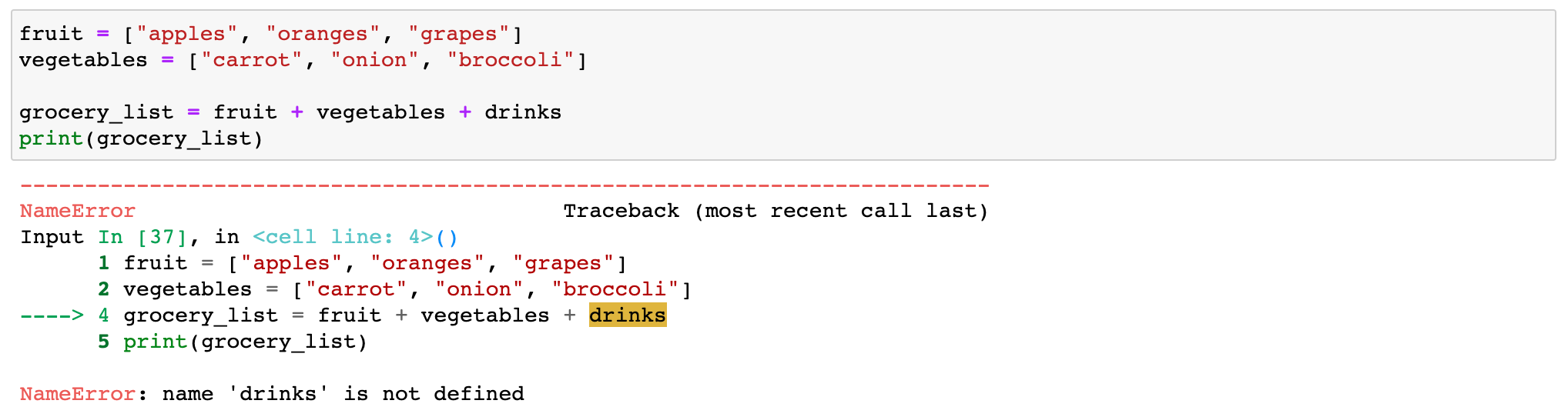
Reading this from the bottom up, we can see that this block of code caused a `NameError` because we didn't define the variable `drinks` before attempting to call it in line 4. We could resolve this error in two ways:
1. Delete `+ drinks`
2. Assign a new list to the variable `drinks` before we define `grocery_list`
**AttributeError**
An `AttributeError` is raised when a reference or assignment to an attribute has failed. Here’s an example of a Python traceback in response to an `AttributeError`: 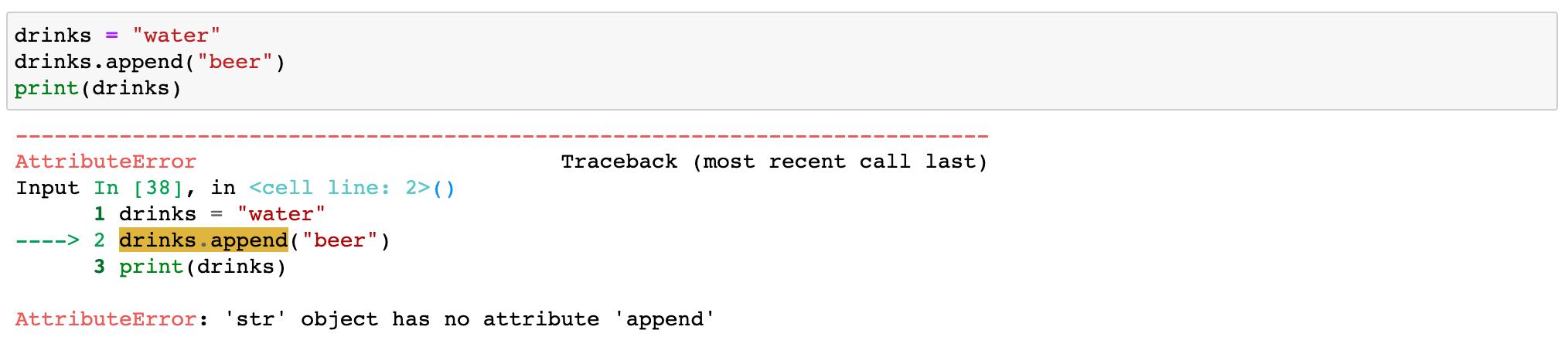
Starting from the bottom, we can see that we've generated an `AttributeError` in line 2 of our code. This was caused by trying to use the attribute `append` on the variable `drinks`, which we defines as a string. Since string objects have no attribute `append`, the interpreter raised an error.
Read more
Learn more about exception types in the previous tutorial: How to Catch, Raise and Print a Python Exception.
### Try it yourself
Can you identify and resolve the error being raised in this Python traceback? 
### HintExpand to view solution
Think about how items are indexed in Python. What would be the correct index for `broccoli` in the list `vegetables`?
## [How to get traceback from an exception in Python](https://www.coursera.org/tutorials/python-traceback#how-to-get-traceback-from-an-exception-in-python)
The traceback module provides a standard interface for extracting, printing, and formatting stack traces. If you need to **extract** a traceback, you have two options in the traceback module:
1. **extract\_tb():** This function will return a `StackSummary` object. The object represents a list of pre-processed stack trace entries from the traceback object tb. Pre-processed stack trace entries are `FrameSummary` objects representing the printed stack trace information. They contain the following attributes:
- filename
- lineno
- name
- line
2. **extract\_stack():** This function extracts the current stack frame’s raw traceback. A stack frame represents just one function call.
## [How to print traceback in Python](https://www.coursera.org/tutorials/python-traceback#how-to-print-traceback-in-python)
The chart below outlines each print function defined in the Python traceback module:
| Function | Method |
|---|---|
| `traceback.print_tb()` | Prints the stack traces from a traceback (`tb`) object up to a limit, beginning with the caller’s frame. The limit can be used as a parameter to specify the amount of required trace. In default, the value is `None`, and Python will print the entire stack trace. |
| `traceback.print_exception()` | Prints exception information and stack trace entries from `tb` (traceback object) to file. |
| `traceback.print_exc()` | Shorthand for `print_exception`(\*[sys.exc\_info()](https://docs.python.org/3/library/sys.html#sys.exc_info), limit, file, chain). Uses `sys.exc_info()` to get exception information for the current thread, format the results, and print to `sys.stderr`. |
| `traceback.print_last()` | Shorthand for `print_exception`(\*[sys.last\_type, sys.last\_value, sys.last\_traceback](https://docs.python.org/3/library/sys.html#sys.last_type), limit, file, chain). An exception must have reached an interactive prompt for this to work. |
| `traceback.print_stack()` | Prints stack trace entries starting from the invocation point up to a limit. All stack trace entries will be printed if the limit is `None` or omitted. To select an alternate stack frame to start, you can use the fargument. However, it must have the same meaning as for [`print_tb()`](https://docs.python.org/3/library/traceback.html#traceback.print_tb). |
Here's an example of how you might print an exception in response to an `IndexError`: 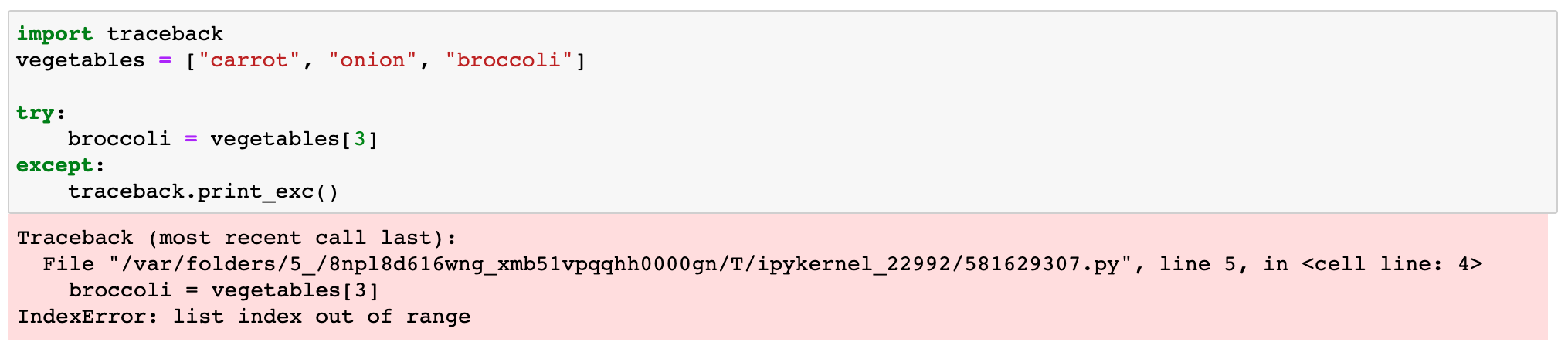
## [How to format a Python traceback](https://www.coursera.org/tutorials/python-traceback#how-to-format-a-python-traceback)
The additional information you can uncover by formatting a Python traceback is extremely valuable. You can use it to identify and resolve errors more easily. The following chart defines each formatting function in the Python traceback module:
| Function | Use |
|---|---|
| `traceback.format_list()` | Return a list of strings ready for print when given a list of tuples or `FrameSummary` objects as returned by one of the extract functions listed above. |
| `traceback.format_exception_only()` | Format the exception in a traceback by using the exception value. The return value is a list of strings that each end in a newline (\\n). By default, the list will contain a single string unless it is for a [`SyntaxError` exception](https://docs.python.org/3/library/exceptions.html#SyntaxError). Those include several lines that display details about where the syntax error occurred upon printing. |
| `traceback.format_exception()` | Format the exception information and a stack trace. Argument meaning is the same as corresponding arguments to `print_exception()`. The return value is also a list of strings. Each end in a newline. However, some contain internal newlines. |
| `traceback.format_exc()` | Similar to `print_exc(limit)`. Returns a string rather than printing to a file. |
| `traceback.format_tb()` | Shorthand version of `format_list(extract_tb(tb, limit))`. |
| `traceback.format_stack()` | Shorthand version of `format_list(extract_stack(f, limit))`. |
| `traceback.clear_frames()` | Calls the `clear()` method of each frame object, clearing the local variables of all stack frames in a traceback tb. |
| `traceback.walk_stack()` | From the given frame, walk a stack following `f.f_back` giving the frame and the line number for each frame. If fis None, the current stack will be used. This is employed with [`StackSummary.extract()`](https://docs.python.org/3/library/traceback.html#traceback.StackSummary.extract) |
| `traceback.walk_tb()` | Following `tb_next`, walk a traceback giving the frame and the line number for each frame. Also employed with `StackSummary.extract()`. |
### Key takeaways
- Python provides a traceback when an exception is raised.
- You can extract, format, and print stack traces with the Python traceback module.
- Tracebacks are read from the bottom up. The exception or error encountered is always on the last line of the traceback.
- Formatting a traceback can provide you with additional information for troubleshooting the error you’ve encountered.
### Resources
You can get involved with the Python community to stay current on tips and recent releases by subscribing to the [free Python email newsletter](http://www.pythonweekly.com/) or connecting with peers by joining the [Python programming Slack channel](https://pyslackers.com/web).
- [Python traceback module documentation](https://docs.python.org/3/library/traceback.html#traceback.print_last)
- [Python errors and exceptions documentation](https://docs.python.org/3/tutorial/errors.html)
- [Exception handling cheat sheet](https://www.coursera.org/tutorials/python-exception-cheat-sheet)
- [Python syntax tutorial](https://www.coursera.org/tutorials/python-syntax)
- [Python syntax cheat sheet](https://www.coursera.org/tutorials/python-syntax-cheat-sheet)
- [Being a Python Developer: What They Can Do, Earn, and More](https://www.coursera.org/articles/python-developer)
## [Continue building your Python expertise with Coursera.](https://www.coursera.org/tutorials/python-traceback#continue-building-your-python-expertise-with-coursera)
Take the next step in mastering the Python language by completing a Guided Project like [Testing and Debugging Python](https://www.coursera.org/projects/testing-and-debugging-python). For a deeper exploration of the language that rewards your work with a certificate, consider an online course like the [Python 3 Programming Specialization](https://www.coursera.org/specializations/python-3-programming) from the University of Michigan.
***
Written by Coursera •
Updated on
Mar 10, 2023
[Share]()
This content has been made available for informational purposes only. Learners are advised to conduct additional research to ensure that courses and other credentials pursued meet their personal, professional, and financial goals.
### On this page
- [Glossary](https://www.coursera.org/tutorials/python-traceback#glossary)
- [What is a Python traceback?](https://www.coursera.org/tutorials/python-traceback#what-is-a-python-traceback)
- [How to read a Python traceback](https://www.coursera.org/tutorials/python-traceback#how-to-read-a-python-traceback)
- [Walkthrough: Understanding common Python tracebacks](https://www.coursera.org/tutorials/python-traceback#walkthrough-understanding-common-python-tracebacks)
- [Try it yourself](https://www.coursera.org/tutorials/python-traceback#try-it-yourself)
- [How to get traceback from an exception in Python](https://www.coursera.org/tutorials/python-traceback#how-to-get-traceback-from-an-exception-in-python)
- [How to print traceback in Python](https://www.coursera.org/tutorials/python-traceback#how-to-print-traceback-in-python)
- [How to format a Python traceback](https://www.coursera.org/tutorials/python-traceback#how-to-format-a-python-traceback)
- [Key takeaways](https://www.coursera.org/tutorials/python-traceback#key-takeaways)
- [Resources](https://www.coursera.org/tutorials/python-traceback#resources)
- [Continue building your Python expertise with Coursera.](https://www.coursera.org/tutorials/python-traceback#continue-building-your-python-expertise-with-coursera)
## Learn without limits

Join for Free
Coursera Footer
## Skills
- [Accounting](https://www.coursera.org/courses?query=accounting)
- [Artificial Intelligence (AI)](https://www.coursera.org/courses?query=artificial%20intelligence)
- [Cybersecurity](https://www.coursera.org/courses?query=cybersecurity)
- [Data Analytics](https://www.coursera.org/courses?query=data%20analytics)
- [Digital Marketing](https://www.coursera.org/courses?query=digital%20marketing)
- [Human Resources (HR)](https://www.coursera.org/courses?query=hr)
- [Microsoft Excel](https://www.coursera.org/courses?query=microsoft%20excel)
- [Project Management](https://www.coursera.org/courses?query=project%20management)
- [Python](https://www.coursera.org/courses?query=python)
- [SQL](https://www.coursera.org/courses?query=sql)
## Professional Certificates
- [Google AI Certificate](https://www.coursera.org/professional-certificates/google-ai)
- [Google Cybersecurity Certificate](https://www.coursera.org/professional-certificates/google-cybersecurity)
- [Google Data Analytics Certificate](https://www.coursera.org/professional-certificates/google-data-analytics)
- [Google IT Support Certificate](https://www.coursera.org/professional-certificates/google-it-support)
- [Google Project Management Certificate](https://www.coursera.org/professional-certificates/google-project-management)
- [Google UX Design Certificate](https://www.coursera.org/professional-certificates/google-ux-design)
- [IBM AI Engineering Certificate](https://www.coursera.org/professional-certificates/ai-engineer)
- [IBM AI Product Manager Certificate](https://www.coursera.org/professional-certificates/ibm-ai-product-manager)
- [IBM Data Science Certificate](https://www.coursera.org/professional-certificates/ibm-data-science)
- [Intuit Academy Bookkeeping Certificate](https://www.coursera.org/professional-certificates/intuit-bookkeeping)
## Courses & Specializations
- [AI Essentials Specialization](https://www.coursera.org/specializations/ai-essentials-google)
- [AI For Business Specialization](https://www.coursera.org/specializations/ai-for-business-wharton)
- [AI For Everyone Course](https://www.coursera.org/learn/ai-for-everyone)
- [AI in Healthcare Specialization](https://www.coursera.org/specializations/ai-healthcare)
- [Deep Learning Specialization](https://www.coursera.org/specializations/deep-learning)
- [Excel Skills for Business Specialization](https://www.coursera.org/specializations/excel)
- [Financial Markets Course](https://www.coursera.org/learn/financial-markets-global)
- [Machine Learning Specialization](https://www.coursera.org/specializations/machine-learning-introduction)
- [Prompt Engineering for ChatGPT Course](https://www.coursera.org/learn/prompt-engineering)
- [Python for Everybody Specialization](https://www.coursera.org/specializations/python)
## Career Resources
- [Career Aptitude Test](https://www.coursera.org/resources/career-quiz)
- [CAPM Certification Requirements](https://www.coursera.org/articles/capm-certification-guide)
- [CompTIA A+ Certification Requirements](https://www.coursera.org/articles/what-is-the-comptia-a-certification-what-to-know)
- [CompTIA Security+ Certification Requirements](https://www.coursera.org/articles/what-is-the-comptia-security-plus-certification)
- [Essential IT Certifications](https://www.coursera.org/articles/essential-it-certifications-entry-level-and-beginner)
- [Free IT Certifications and Courses](https://www.coursera.org/articles/free-it-certifications)
- [High-Income Skills to Learn](https://www.coursera.org/articles/high-income-skills)
- [How to Learn Artificial Intelligence](https://www.coursera.org/articles/how-to-learn-artificial-intelligence)
- [PMP Certification Requirements](https://www.coursera.org/articles/the-pmp-certification-a-guide-to-getting-started)
- [Popular Cybersecurity Certifications](https://www.coursera.org/articles/popular-cybersecurity-certifications)
## Coursera
- [About](https://www.coursera.org/about)
- [What We Offer](https://www.coursera.org/about/how-coursera-works/)
- [Leadership](https://www.coursera.org/about/leadership)
- [Careers](https://careers.coursera.com/)
- [Catalog](https://www.coursera.org/browse)
- [Coursera Plus](https://www.coursera.org/courseraplus)
- [Professional Certificates](https://www.coursera.org/professional-certificates)
- [MasterTrack® Certificates](https://www.coursera.org/mastertrack)
- [Degrees](https://www.coursera.org/degrees)
- [For Enterprise](https://www.coursera.org/business?utm_campaign=website&utm_content=corp-to-home-footer-for-enterprise&utm_medium=coursera&utm_source=enterprise)
- [For Government](https://www.coursera.org/government?utm_campaign=website&utm_content=corp-to-home-footer-for-government&utm_medium=coursera&utm_source=enterprise)
- [For Campus](https://www.coursera.org/campus?utm_campaign=website&utm_content=corp-to-home-footer-for-campus&utm_medium=coursera&utm_source=enterprise)
- [Become a Partner](https://partnerships.coursera.org/?utm_medium=coursera&utm_source=partnerships&utm_campaign=website&utm_content=corp-to-home-footer-become-a-partner)
- [Social Impact](https://www.coursera.org/social-impact)
- [Free Courses](https://www.coursera.org/courses?query=free)
- [Share your Coursera learning story](https://airtable.com/appxSsG2Dz9CjSpF8/pagCDDP2Uinw59CNP/form?prefill_utm_source=product&prefill_utm_campaign=seo_footer&prefill_utm_medium=written)
## Community
- [Learners](https://www.coursera.community/)
- [Partners](https://www.coursera.org/partners)
- [Beta Testers](https://www.coursera.support/s/article/360000152926-Become-a-Coursera-beta-tester)
- [Blog](https://blog.coursera.org/)
- [The Coursera Podcast](https://open.spotify.com/show/58M36bneU7REOofdPZxe6A)
- [Tech Blog](https://medium.com/coursera-engineering)
## More
- [Press](https://www.coursera.org/about/press)
- [Investors](https://investor.coursera.com/)
- [Terms](https://www.coursera.org/about/terms)
- [Privacy](https://www.coursera.org/about/privacy)
- [Help](https://learner.coursera.help/hc)
- [Accessibility](https://learner.coursera.help/hc/articles/360050668591-Accessibility-Statement)
- [Contact](https://www.coursera.org/about/contact)
- [Articles](https://www.coursera.org/articles)
- [Directory](https://www.coursera.org/directory)
- [Affiliates](https://www.coursera.org/about/affiliates)
- [Modern Slavery Statement](https://coursera_assets.s3.amazonaws.com/footer/Modern+Slavery+Statement+\(approved+March+26%2C+2025\).pdf)
- [Cookies Preference Center](https://www.coursera.org/about/cookies-manage)
Learn Anywhere
[](https://itunes.apple.com/app/apple-store/id736535961?pt=2334150&ct=Coursera%20Web%20Promo%20Banner&mt=8)
[](http://play.google.com/store/apps/details?id=org.coursera.android)

© 2026 Coursera Inc. All rights reserved.
- [](https://www.facebook.com/Coursera)
- [](https://www.linkedin.com/company/coursera)
- [](https://twitter.com/coursera)
- [](https://www.youtube.com/user/coursera)
- [](https://www.instagram.com/coursera/)
- [](https://www.tiktok.com/@coursera) |
| Readable Markdown | **Materials Required:** Latest version of Python ([Python 3](https://www.python.org/downloads/)), an integrated development environment (IDE) of your choice (or terminal), stable internet connection
**Prerequisites/helpful expertise:** Basic knowledge of Python and programming concepts
The Python traceback module contains vital information for identifying and resolving problems in your code. Learning to use tracebacks will help you master the Python language and become a stronger programmer overall.
## [Glossary](https://www.coursera.org/tutorials/python-traceback#glossary)
| Term | Definition |
|---|---|
| Exception | A logical error that occurs during execution. |
| Print | print() is a function that converts a specified object into text and sends it to the screen or other standard output device. |
| Output | The output is the end result of the code you have written. It’s what the computer puts out in response to your commands. |
| Newline | In Python, \\n is used to create a new line. If inserted into a string, all characters after \\n will be added to a new line. |
| Stack trace | A stack trace is a list of method calls that were active at the time that an error or exception was thrown. The term is commonly used synonymously with traceback, although they do notshare the same meaning. A traceback is a module unique to Python. It’s used to format, extract, and print stack traces. |
| Method | A method is a function that belongsto an object. For example, a list object has insert, remove, and sort methods associated with it. Methods are called on a specific object. In contrast, functions are called without any object. |
## [What is a Python traceback?](https://www.coursera.org/tutorials/python-traceback#what-is-a-python-traceback)
A traceback is a Python module you can use to trace an error back to its source. It reports the function calls made at a specific point in your code. When your code throws (or raises) an exception, Python provides a traceback. Here’s a breakdown of **Python traceback structure**: 
From bottom to top, here are the elements of the traceback:
- The **red box** shows the error type and a description of the exception.
- The **green box** shows the line of code that executed when the error occured.
- The **blue box** lists the various function calls from most recent to least recent (bottom to top). In this case, you'll see only one call with the line of code indicated.
And here’s an example of a Python traceback in response to a `TypeError`: 
Need help?
What if the location the traceback is pointing to doesn’t contain code with an error? Tracebacks aren’t always 100 percent precise. They point to the line where the interpreter first noticed the issue. It can be helpful to note that Python raises an error based on the expression or statement, not the specific argument. The error can come from any part of the expression that’s been thrown.
A traceback is full of helpful information, but it can be challenging to digest for the first time. The first rule to remember is that you should read a Python traceback from the bottom up. 
### Walkthrough: Understanding common Python tracebacks
In the next section, we’ll dissect a couple of common Python tracebacks to identify their cause, meaning, and how to address them:
**NameError**
Python raises a `NameError` if you’ve referenced a global or local name that hasn’t yet been defined in your code (like a variable, function, or class). Here’s an example: 
Reading this from the bottom up, we can see that this block of code caused a `NameError` because we didn't define the variable `drinks` before attempting to call it in line 4. We could resolve this error in two ways:
1. Delete `+ drinks`
2. Assign a new list to the variable `drinks` before we define `grocery_list`
**AttributeError**
An `AttributeError` is raised when a reference or assignment to an attribute has failed. Here’s an example of a Python traceback in response to an `AttributeError`: 
Starting from the bottom, we can see that we've generated an `AttributeError` in line 2 of our code. This was caused by trying to use the attribute `append` on the variable `drinks`, which we defines as a string. Since string objects have no attribute `append`, the interpreter raised an error.
Read more
Learn more about exception types in the previous tutorial: How to Catch, Raise and Print a Python Exception.
### Try it yourself
Can you identify and resolve the error being raised in this Python traceback? 
### Expand to view solution
## [How to get traceback from an exception in Python](https://www.coursera.org/tutorials/python-traceback#how-to-get-traceback-from-an-exception-in-python)
The traceback module provides a standard interface for extracting, printing, and formatting stack traces. If you need to **extract** a traceback, you have two options in the traceback module:
1. **extract\_tb():** This function will return a `StackSummary` object. The object represents a list of pre-processed stack trace entries from the traceback object tb. Pre-processed stack trace entries are `FrameSummary` objects representing the printed stack trace information. They contain the following attributes:
- filename
- lineno
- name
- line
2. **extract\_stack():** This function extracts the current stack frame’s raw traceback. A stack frame represents just one function call.
## [How to print traceback in Python](https://www.coursera.org/tutorials/python-traceback#how-to-print-traceback-in-python)
The chart below outlines each print function defined in the Python traceback module:
| Function | Method |
|---|---|
| `traceback.print_tb()` | Prints the stack traces from a traceback (`tb`) object up to a limit, beginning with the caller’s frame. The limit can be used as a parameter to specify the amount of required trace. In default, the value is `None`, and Python will print the entire stack trace. |
| `traceback.print_exception()` | Prints exception information and stack trace entries from `tb` (traceback object) to file. |
| `traceback.print_exc()` | Shorthand for `print_exception`(\*[sys.exc\_info()](https://docs.python.org/3/library/sys.html#sys.exc_info), limit, file, chain). Uses `sys.exc_info()` to get exception information for the current thread, format the results, and print to `sys.stderr`. |
| `traceback.print_last()` | Shorthand for `print_exception`(\*[sys.last\_type, sys.last\_value, sys.last\_traceback](https://docs.python.org/3/library/sys.html#sys.last_type), limit, file, chain). An exception must have reached an interactive prompt for this to work. |
| `traceback.print_stack()` | Prints stack trace entries starting from the invocation point up to a limit. All stack trace entries will be printed if the limit is `None` or omitted. To select an alternate stack frame to start, you can use the fargument. However, it must have the same meaning as for [`print_tb()`](https://docs.python.org/3/library/traceback.html#traceback.print_tb). |
Here's an example of how you might print an exception in response to an `IndexError`: 
## [How to format a Python traceback](https://www.coursera.org/tutorials/python-traceback#how-to-format-a-python-traceback)
The additional information you can uncover by formatting a Python traceback is extremely valuable. You can use it to identify and resolve errors more easily. The following chart defines each formatting function in the Python traceback module:
| Function | Use |
|---|---|
| `traceback.format_list()` | Return a list of strings ready for print when given a list of tuples or `FrameSummary` objects as returned by one of the extract functions listed above. |
| `traceback.format_exception_only()` | Format the exception in a traceback by using the exception value. The return value is a list of strings that each end in a newline (\\n). By default, the list will contain a single string unless it is for a [`SyntaxError` exception](https://docs.python.org/3/library/exceptions.html#SyntaxError). Those include several lines that display details about where the syntax error occurred upon printing. |
| `traceback.format_exception()` | Format the exception information and a stack trace. Argument meaning is the same as corresponding arguments to `print_exception()`. The return value is also a list of strings. Each end in a newline. However, some contain internal newlines. |
| `traceback.format_exc()` | Similar to `print_exc(limit)`. Returns a string rather than printing to a file. |
| `traceback.format_tb()` | Shorthand version of `format_list(extract_tb(tb, limit))`. |
| `traceback.format_stack()` | Shorthand version of `format_list(extract_stack(f, limit))`. |
| `traceback.clear_frames()` | Calls the `clear()` method of each frame object, clearing the local variables of all stack frames in a traceback tb. |
| `traceback.walk_stack()` | From the given frame, walk a stack following `f.f_back` giving the frame and the line number for each frame. If fis None, the current stack will be used. This is employed with [`StackSummary.extract()`](https://docs.python.org/3/library/traceback.html#traceback.StackSummary.extract) |
| `traceback.walk_tb()` | Following `tb_next`, walk a traceback giving the frame and the line number for each frame. Also employed with `StackSummary.extract()`. |
### Key takeaways
- Python provides a traceback when an exception is raised.
- You can extract, format, and print stack traces with the Python traceback module.
- Tracebacks are read from the bottom up. The exception or error encountered is always on the last line of the traceback.
- Formatting a traceback can provide you with additional information for troubleshooting the error you’ve encountered.
### Resources
You can get involved with the Python community to stay current on tips and recent releases by subscribing to the [free Python email newsletter](http://www.pythonweekly.com/) or connecting with peers by joining the [Python programming Slack channel](https://pyslackers.com/web).
- [Python traceback module documentation](https://docs.python.org/3/library/traceback.html#traceback.print_last)
- [Python errors and exceptions documentation](https://docs.python.org/3/tutorial/errors.html)
- [Exception handling cheat sheet](https://www.coursera.org/tutorials/python-exception-cheat-sheet)
- [Python syntax tutorial](https://www.coursera.org/tutorials/python-syntax)
- [Python syntax cheat sheet](https://www.coursera.org/tutorials/python-syntax-cheat-sheet)
- [Being a Python Developer: What They Can Do, Earn, and More](https://www.coursera.org/articles/python-developer)
## [Continue building your Python expertise with Coursera.](https://www.coursera.org/tutorials/python-traceback#continue-building-your-python-expertise-with-coursera)
Take the next step in mastering the Python language by completing a Guided Project like [Testing and Debugging Python](https://www.coursera.org/projects/testing-and-debugging-python). For a deeper exploration of the language that rewards your work with a certificate, consider an online course like the [Python 3 Programming Specialization](https://www.coursera.org/specializations/python-3-programming) from the University of Michigan. |
| Shard | 97 (laksa) |
| Root Hash | 1995246928644532097 |
| Unparsed URL | org,coursera!www,/tutorials/python-traceback s443 |