ℹ️ Skipped - page is already crawled
| Filter | Status | Condition | Details |
|---|---|---|---|
| HTTP status | PASS | download_http_code = 200 | HTTP 200 |
| Age cutoff | PASS | download_stamp > now() - 6 MONTH | 0.6 months ago |
| History drop | PASS | isNull(history_drop_reason) | No drop reason |
| Spam/ban | PASS | fh_dont_index != 1 AND ml_spam_score = 0 | ml_spam_score=0 |
| Canonical | PASS | meta_canonical IS NULL OR = '' OR = src_unparsed | Not set |
| Property | Value |
|---|---|
| URL | https://www.auslogics.com/en/articles/how-to-download-a-video-from-youtube/ |
| Last Crawled | 2026-04-07 23:50:29 (16 days ago) |
| First Indexed | 2021-01-28 16:20:29 (5 years ago) |
| HTTP Status Code | 200 |
| Content | |
| Meta Title | How to Download a YouTube Video to Your PC? — Auslogics Blog |
| Meta Description | Learn how to download a YouTube video to your PC with our step-by-step guide. Enjoy your favorite videos again and again. |
| Meta Canonical | null |
| Boilerpipe Text | Table of contents
Is It Legal to Download YouTube Videos?
How to Download a YouTube Video to Computer: What to Consider
Video Quality
Subtitles
Multiple File Format Compatibility
Simultaneous Downloads
Fast Download Speeds
Built-in Editing Features
Multiple Download Sources
Scheduled Downloads
How to Download a YouTube Video: Top 4 Options
1. Auslogics Video Grabber
Features of Auslogics Video Grabber
How to Download a YouTube Video to Computer Using Video Grabber
Is Auslogics Video Grabber Safe and Legal?
2. Use the YouTube App
Get YouTube’s or the Licensor’s Consent
3. Download Videos Using VLC Media Player
Final Thoughts
FAQs
1. What is the best YouTube downloader?
2. How to download videos from Facebook?
3. How to download videos from Twitter?
4. How to download videos from Vimeo?
YouTube is the largest and most popular video-sharing platform in the world.
You can easily watch, upload, like, and comment on videos.
However, you should download some videos because you might need them for offline viewing or to avoid network connectivity issues later.
So if you’re wondering how to download a YouTube video to your PC, we’ve got you covered.
Is It Legal to Download YouTube Videos?
You can legally download YouTube videos by using third-party Youtube downloaders. The copyright laws don’t apply to some third parties, or the copyright grants you the right to reproduce some videos.
So, you can legally download videos from YouTube that are
Public Domain
– No one owns the video because the copyright has expired, been waived, forfeited, etc.
Creative Commons
– The content owner retains the copyright but grants the public the right to duplicate and distribute the videos.
Copyleft
– The
copyleft
gives you the right to distribute, reproduce, and modify videos. However, you must retain the same rights to the videos you modified, shared, or reproduced.
So it’s ideal to use third-party YouTube downloaders to get the videos you want.
How to Download a YouTube Video to Computer: What to Consider
Before you download Youtube videos, consider the following features and factors. That will help you choose the right video downloader.
Video Quality
No one enjoys watching a blurry movie. So make sure the downloading tool of your choice can handle both standard- and high-definition video to guarantee excellent viewing.
Your downloading tool should offer you the resolution of your choice. It should provide you with low-, medium-, and high-resolution video. Tools that let you select specific screen resolutions, such as 360p, 720p, 1080p, 4K, and so on, are better options.
Subtitles
If you watch movies in different languages, you need subtitles. Logically, you wouldn’t want to download such videos without subtitles. Therefore, ensure your video downloading tool supports subtitles.
Multiple File Format Compatibility
Sometimes, we want to watch our videos on our iPad, iPhone, Android, iPod, and
PSP devices
. Therefore, you must ensure your downloading tool can convert downloaded videos to AVI, 3GP, or any other format you can use on your devices. Such a downloading tool allows you to be more flexible.
Simultaneous Downloads
Nobody wants to wait for one download to complete before commencing another, especially if they have several videos to download. That’ll be a waste of time. Instead, ensure the YouTube downloading tool supports bulk downloads and can download an entire playlist.
Fast Download Speeds
Some video downloading tools throttle download speeds when it comes to multiple downloads, while others may restrict the number of simultaneous downloads possible to maintain high download speeds. Ensure the tool can download multiple files simultaneously without sacrificing download speeds.
Built-in Editing Features
It may be necessary to edit or cut out a particular portion of a video, which makes video editing an essential feature of a helpful video-downloading tool.
Multiple Download Sources
Ensure the video downloading tool you choose can download from other sources, such as Facebook, Vimeo, Metacafe, and Dailymotion.
Scheduled Downloads
A video downloading tool that can start your downloads at any convenient time is also a great choice.
How to Download a YouTube Video: Top 4 Options
If you want to know how to download a YouTube video to a computer, use the below YouTube video downloaders:
1. Auslogics Video Grabber
With Auslogics Video Grabber, you can quickly and easily download YouTube videos. On top of that, the software gives you the option to download videos from numerous sources like Vimeo, Dailymotion, Facebook, Twitter, Metacafe, etc.
After downloading, you can convert the videos to a format playable on your iOS, Android, or PSP device. Video Grabber also lets you set a timer for when downloads will begin, making it easy to get them started whenever it’s most convenient for you.
You can store an extensive library of videos and watch hours of high-quality videos when you don’t have access to the internet.
Features of Auslogics Video Grabber
High-Definition Video Download
The program has no trouble playing back Full HD videos (720p or 1080p) from YouTube and other sites. You just have to make sure the video site supports HD videos.
Auto-Paste Video Links
As an added convenience, when you copy a link, Video Grabber will immediately know to put it into the
“Add URL”
section.
Schedule Downloads
Grabber allows you to schedule your downloads to begin at the most convenient time.
Download Numerous Videos at the Same Time
You can save time by downloading numerous videos simultaneously. Add as many links as you like to the download list; they’ll download in the order they were added.
Video Format Conversion
You can play videos on your Android, Apple, or PSP devices by converting them to a format that works with those devices.
How to Download a YouTube Video to Computer Using Video Grabber
Downloading videos from YouTube only requires
three steps with Auslogics Video Grabber:
First, start the program.
Search for the video you want to download on YouTube and copy the link.
Go to Video Grabber, paste the link and click on download. That’s it!
Is Auslogics Video Grabber Safe and Legal?
Yes. Video Grabber is safe and legal, so you have nothing to worry about. Also, the program has been tested and approved by certified authorities, so it’s free from malware and other potential threats that could harm your computer.
📌 Check out this guide for more details:
Auslogics Video Grabber – Video Downloader Review
2. Use the YouTube App
You can download videos from YouTube using its official mobile app (for Android or iOS). To do that, open the video you want to download using the app and tap the
“Download”
button below the video’s thumbnail.
Choose the video quality you want and tap OK. The app then saves the video to Downloads, where you can watch it offline anytime. However, this option is not usually available for commercial content.
📌 Related:
[SOLVED]
YouTube Video Loading But not Playing
Get YouTube’s or the Licensor’s Consent
You can also download videos by getting written consent from YouTube or the content’s licensor and adhering strictly to their conditions.
Content obtained this way is usually for personal use. Moreover, such videos don’t have the “Download” button or link.
3. Download Videos Using VLC Media Player
VLC is one of the most widely used video and audio players worldwide. Besides downloading videos from YouTube, it supports virtually all video file formats. Plus, it’s available on desktop operating systems and mobile platforms for free.
Here’s how to download videos using VLC Player:
Search for the video you want to download and copy its URL.
Launch the VLC Player, click
“Media,”
and select
“Open Network Stream”
from the options.
Paste the URL link in the dialog box that appears and hit play.
When the video starts, click
“Tools”
and
“Codec Information.”
In the list of information that appears, copy the video link from
“Location.”
Open your browser and paste the link.
The video will start playing in the browser. Then, right-click on the video and select
“Save as”
to download the video.
📌 Also read:
Fixing YouTube Running Slow on Your PC
Final Thoughts
If you want to learn how to download a YouTube video to a computer, use the steps described in this guide. Ultimately, we recommend using
Auslogics Video Grabber
. It’s safe, easy to use, and doesn’t require many steps.
Just download the application, copy the YouTube video link, and start downloading. The best part is that you can use the program to download videos from several sites, not just YouTube.
FAQs
1. What is the best YouTube downloader?
There are a few video downloaders to consider, but we have collected TOP-5 for you in our post
“TOP-5 Best YouTube Downloaders”
. Check out the post and choose the one that best suits your needs.
2. How to download videos from Facebook?
There are multiple methods to download videos from Facebook. One of the simplest approaches involves downloading Auslogics Video Grabber, pasting the Facebook video link into the app, and initiating the download process. This process is quick and effortless.
For more information, check our post
“How to download Facebook videos to your computer?”
3. How to download videos from Twitter?
You can use various techniques to download videos from Twitter. Check out the full post here:
“How to download videos from Twitter”
.
4. How to download videos from Vimeo?
There are a few ways to download videos from Vimeo. Our post
“How to download Vimeo videos?”
will help you make an informed decision and choose the most convenient video downloader for you. |
| Markdown | [ ](https://www.auslogics.com/en/)
[](https://www.auslogics.com/en/articles/)
- [About Us](https://www.auslogics.com/en/articles/about-us/)
- [Contacts](https://www.auslogics.com/contact/?department=article)
- [Subscribe]()
- All Categories
- [Optimization](https://www.auslogics.com/en/articles/category/optimization/)
- [Internet](https://www.auslogics.com/en/articles/category/optimization/internet/)
- [PC Performance](https://www.auslogics.com/en/articles/category/optimization/pc-performance/)
- [Hardware](https://www.auslogics.com/en/articles/category/optimization/hardware/)
- [Software](https://www.auslogics.com/en/articles/category/optimization/software/)
- [Go to category](https://www.auslogics.com/en/articles/category/optimization/)
- [Security](https://www.auslogics.com/en/articles/category/security/)
- [Privacy Protection](https://www.auslogics.com/en/articles/category/security/privacy-protection/)
- [Online Security](https://www.auslogics.com/en/articles/category/security/online-security/)
- [Security Threats](https://www.auslogics.com/en/articles/category/security/threats/)
- [Device Security](https://www.auslogics.com/en/articles/category/security/device-security/)
- [Go to category](https://www.auslogics.com/en/articles/category/security/)
- [Maintenance](https://www.auslogics.com/en/articles/category/maintenance/)
- [System Cleanup](https://www.auslogics.com/en/articles/category/maintenance/system-cleanup/)
- [Windows Registry](https://www.auslogics.com/en/articles/category/maintenance/windows-registry/)
- [Drivers](https://www.auslogics.com/en/articles/category/maintenance/drivers/)
- [Storage & Memory](https://www.auslogics.com/en/articles/category/maintenance/storage-and-memory/)
- [Go to category](https://www.auslogics.com/en/articles/category/maintenance/)
- [Productivity](https://www.auslogics.com/en/articles/category/productivity/)
- [Video](https://www.auslogics.com/en/articles/category/productivity/video/)
- [Multimedia](https://www.auslogics.com/en/articles/category/productivity/multimedia/)
- [Files](https://www.auslogics.com/en/articles/category/productivity/files/)
- [Go to category](https://www.auslogics.com/en/articles/category/productivity/)
- [How To\`s](https://www.auslogics.com/en/articles/category/how-tos/)
- [Windows System](https://www.auslogics.com/en/articles/category/how-tos/windows-system/)
- [Browser](https://www.auslogics.com/en/articles/category/how-tos/browser-how-tos/)
- [Device Issues](https://www.auslogics.com/en/articles/category/how-tos/device-issues/)
- [Windows Update Errors](https://www.auslogics.com/en/articles/category/how-tos/windows-update-errors/)
- [Network Errors](https://www.auslogics.com/en/articles/category/how-tos/network-errors/)
- [Go to category](https://www.auslogics.com/en/articles/category/how-tos/)
- [Tech News](https://www.auslogics.com/en/articles/category/tech-news/)
- [Microsoft Products](https://www.auslogics.com/en/articles/category/tech-news/microsoft-products/)
- [Software](https://www.auslogics.com/en/articles/category/tech-news/software-reviews/)
- [Top Lists](https://www.auslogics.com/en/articles/category/tech-news/top-lists/)
- [Tech Gear](https://www.auslogics.com/en/articles/category/tech-news/tech-gear/)
- [Go to category](https://www.auslogics.com/en/articles/category/tech-news/)
- [Gaming](https://www.auslogics.com/en/articles/category/gaming/)
- [Game Fixes](https://www.auslogics.com/en/articles/category/gaming/game-fixes/)
- [Game Boost](https://www.auslogics.com/en/articles/category/gaming/game-boost/)
- [Game Graphics](https://www.auslogics.com/en/articles/category/gaming/game-graphics/)
- [Go to category](https://www.auslogics.com/en/articles/category/gaming/)
- [Archives](https://www.auslogics.com/en/articles/category/archives/)
- [Optimization](https://www.auslogics.com/en/articles/category/optimization/)
- [Internet](https://www.auslogics.com/en/articles/category/optimization/internet/)
- [PC Performance](https://www.auslogics.com/en/articles/category/optimization/pc-performance/)
- [Hardware](https://www.auslogics.com/en/articles/category/optimization/hardware/)
- [Software](https://www.auslogics.com/en/articles/category/optimization/software/)
- [Go to category](https://www.auslogics.com/en/articles/category/optimization/)
- [Security](https://www.auslogics.com/en/articles/category/security/)
- [Privacy Protection](https://www.auslogics.com/en/articles/category/security/privacy-protection/)
- [Online Security](https://www.auslogics.com/en/articles/category/security/online-security/)
- [Security Threats](https://www.auslogics.com/en/articles/category/security/threats/)
- [Device Security](https://www.auslogics.com/en/articles/category/security/device-security/)
- [Go to category](https://www.auslogics.com/en/articles/category/security/)
- [Maintenance](https://www.auslogics.com/en/articles/category/maintenance/)
- [System Cleanup](https://www.auslogics.com/en/articles/category/maintenance/system-cleanup/)
- [Windows Registry](https://www.auslogics.com/en/articles/category/maintenance/windows-registry/)
- [Drivers](https://www.auslogics.com/en/articles/category/maintenance/drivers/)
- [Storage & Memory](https://www.auslogics.com/en/articles/category/maintenance/storage-and-memory/)
- [Go to category](https://www.auslogics.com/en/articles/category/maintenance/)
- [Productivity](https://www.auslogics.com/en/articles/category/productivity/)
- [Video](https://www.auslogics.com/en/articles/category/productivity/video/)
- [Multimedia](https://www.auslogics.com/en/articles/category/productivity/multimedia/)
- [Files](https://www.auslogics.com/en/articles/category/productivity/files/)
- [Go to category](https://www.auslogics.com/en/articles/category/productivity/)
- [How To\`s](https://www.auslogics.com/en/articles/category/how-tos/)
- [Windows System](https://www.auslogics.com/en/articles/category/how-tos/windows-system/)
- [Browser](https://www.auslogics.com/en/articles/category/how-tos/browser-how-tos/)
- [Device Issues](https://www.auslogics.com/en/articles/category/how-tos/device-issues/)
- [Windows Update Errors](https://www.auslogics.com/en/articles/category/how-tos/windows-update-errors/)
- [Network Errors](https://www.auslogics.com/en/articles/category/how-tos/network-errors/)
- [Go to category](https://www.auslogics.com/en/articles/category/how-tos/)
- [Tech News](https://www.auslogics.com/en/articles/category/tech-news/)
- [Microsoft Products](https://www.auslogics.com/en/articles/category/tech-news/microsoft-products/)
- [Software](https://www.auslogics.com/en/articles/category/tech-news/software-reviews/)
- [Top Lists](https://www.auslogics.com/en/articles/category/tech-news/top-lists/)
- [Tech Gear](https://www.auslogics.com/en/articles/category/tech-news/tech-gear/)
- [Go to category](https://www.auslogics.com/en/articles/category/tech-news/)
- [Gaming](https://www.auslogics.com/en/articles/category/gaming/)
- [Game Fixes](https://www.auslogics.com/en/articles/category/gaming/game-fixes/)
- [Game Boost](https://www.auslogics.com/en/articles/category/gaming/game-boost/)
- [Game Graphics](https://www.auslogics.com/en/articles/category/gaming/game-graphics/)
- [Go to category](https://www.auslogics.com/en/articles/category/gaming/)
- [Archives](https://www.auslogics.com/en/articles/category/archives/)
[Tech Wisdom Blog](https://www.auslogics.com/en/articles/) [Productivity](https://www.auslogics.com/en/articles/category/productivity/) [Multimedia](https://www.auslogics.com/en/articles/category/productivity/multimedia/) How to Download a YouTube Video to Your PC?
[How To\`s](https://www.auslogics.com/en/articles/category/how-tos/)
# How to Download a YouTube Video to Your PC?
YouTube is the largest and most popular video-sharing platform in the world. You can easily watch, upload, like, and comment on videos. However, you should download some videos because you might need them for offline viewing or to avoid network connectivity issues later. So if you’re…
[Aziz Hamidov](https://www.auslogics.com/en/articles/author/aziz-hamidov/)
24 Mar 2023
6 min to read


- [5]()
- [1](https://www.facebook.com/sharer/sharer?u=https://www.auslogics.com/en/articles/how-to-download-a-video-from-youtube/)
- [1](https://twitter.com/intent/tweet?text=How+to+Download+a+YouTube+Video+to+Your+PC%3F&url=https://www.auslogics.com/en/articles/how-to-download-a-video-from-youtube/)
- [1](http://www.linkedin.com/shareArticle?mini=true&url=https://www.auslogics.com/en/articles/how-to-download-a-video-from-youtube/&title=How+to+Download+a+YouTube+Video+to+Your+PC%3F)
- [5]()
- [1](https://www.facebook.com/sharer/sharer?u=https://www.auslogics.com/en/articles/how-to-download-a-video-from-youtube/)
- [1](https://twitter.com/intent/tweet?text=How+to+Download+a+YouTube+Video+to+Your+PC%3F&url=https://www.auslogics.com/en/articles/how-to-download-a-video-from-youtube/)
- [1](http://www.linkedin.com/shareArticle?mini=true&url=https://www.auslogics.com/en/articles/how-to-download-a-video-from-youtube/&title=How+to+Download+a+YouTube+Video+to+Your+PC%3F)
Table of contents
- [Is It Legal to Download YouTube Videos?](https://www.auslogics.com/en/articles/how-to-download-a-video-from-youtube/#is-it-legal-to-download-youtube-videos "Is It Legal to Download YouTube Videos?")
- [How to Download a YouTube Video to Computer: What to Consider](https://www.auslogics.com/en/articles/how-to-download-a-video-from-youtube/#how-to-download-a-youtube-video-to-computer-what-to-consider "How to Download a YouTube Video to Computer: What to Consider")
- [Video Quality](https://www.auslogics.com/en/articles/how-to-download-a-video-from-youtube/#video-quality "Video Quality")
- [Subtitles](https://www.auslogics.com/en/articles/how-to-download-a-video-from-youtube/#subtitles "Subtitles")
- [Multiple File Format Compatibility](https://www.auslogics.com/en/articles/how-to-download-a-video-from-youtube/#multiple-file-format-compatibility "Multiple File Format Compatibility")
- [Simultaneous Downloads](https://www.auslogics.com/en/articles/how-to-download-a-video-from-youtube/#simultaneous-downloads "Simultaneous Downloads")
- [Fast Download Speeds](https://www.auslogics.com/en/articles/how-to-download-a-video-from-youtube/#fast-download-speeds "Fast Download Speeds")
- [Built-in Editing Features](https://www.auslogics.com/en/articles/how-to-download-a-video-from-youtube/#built-in-editing-features "Built-in Editing Features")
- [Multiple Download Sources](https://www.auslogics.com/en/articles/how-to-download-a-video-from-youtube/#multiple-download-sources "Multiple Download Sources")
- [Scheduled Downloads](https://www.auslogics.com/en/articles/how-to-download-a-video-from-youtube/#scheduled-downloads "Scheduled Downloads")
- [How to Download a YouTube Video: Top 4 Options](https://www.auslogics.com/en/articles/how-to-download-a-video-from-youtube/#how-to-download-a-youtube-video-top-4-options "How to Download a YouTube Video: Top 4 Options")
- [1\. Auslogics Video Grabber](https://www.auslogics.com/en/articles/how-to-download-a-video-from-youtube/#1-auslogics-video-grabber "1. Auslogics Video Grabber")
- [Features of Auslogics Video Grabber](https://www.auslogics.com/en/articles/how-to-download-a-video-from-youtube/#features-of-auslogics-video-grabber "Features of Auslogics Video Grabber")
- [How to Download a YouTube Video to Computer Using Video Grabber](https://www.auslogics.com/en/articles/how-to-download-a-video-from-youtube/#how-to-download-a-youtube-video-to-computer-using-video-grabber "How to Download a YouTube Video to Computer Using Video Grabber")
- [Is Auslogics Video Grabber Safe and Legal?](https://www.auslogics.com/en/articles/how-to-download-a-video-from-youtube/#is-auslogics-video-grabber-safe-and-legal "Is Auslogics Video Grabber Safe and Legal?")
- [2\. Use the YouTube App](https://www.auslogics.com/en/articles/how-to-download-a-video-from-youtube/#2-use-the-youtube-app "2. Use the YouTube App")
- [Get YouTube’s or the Licensor’s Consent](https://www.auslogics.com/en/articles/how-to-download-a-video-from-youtube/#get-youtubes-or-the-licensors-consent "Get YouTube’s or the Licensor’s Consent")
- [3\. Download Videos Using VLC Media Player](https://www.auslogics.com/en/articles/how-to-download-a-video-from-youtube/#3-download-videos-using-vlc-media-player "3. Download Videos Using VLC Media Player")
- [Final Thoughts](https://www.auslogics.com/en/articles/how-to-download-a-video-from-youtube/#final-thoughts "Final Thoughts")
- [FAQs](https://www.auslogics.com/en/articles/how-to-download-a-video-from-youtube/#faqs "FAQs")
- [1\. What is the best YouTube downloader?](https://www.auslogics.com/en/articles/how-to-download-a-video-from-youtube/#1-what-is-the-best-youtube-downloader "1. What is the best YouTube downloader?")
- [2\. How to download videos from Facebook?](https://www.auslogics.com/en/articles/how-to-download-a-video-from-youtube/#2-how-to-download-videos-from-facebook "2. How to download videos from Facebook?")
- [3\. How to download videos from Twitter?](https://www.auslogics.com/en/articles/how-to-download-a-video-from-youtube/#3-how-to-download-videos-from-twitter "3. How to download videos from Twitter?")
- [4\. How to download videos from Vimeo?](https://www.auslogics.com/en/articles/how-to-download-a-video-from-youtube/#4-how-to-download-videos-from-vimeo "4. How to download videos from Vimeo?")
YouTube is the largest and most popular video-sharing platform in the world.
You can easily watch, upload, like, and comment on videos.
However, you should download some videos because you might need them for offline viewing or to avoid network connectivity issues later.
So if you’re wondering how to download a YouTube video to your PC, we’ve got you covered.
## Is It Legal to Download YouTube Videos?
You can legally download YouTube videos by using third-party Youtube downloaders. The copyright laws don’t apply to some third parties, or the copyright grants you the right to reproduce some videos.
So, you can legally download videos from YouTube that are
1. **Public Domain** – No one owns the video because the copyright has expired, been waived, forfeited, etc.
2. **Creative Commons** – The content owner retains the copyright but grants the public the right to duplicate and distribute the videos.
3. **Copyleft** – The **[copyleft](https://www.makeuseof.com/tag/copyleft-copyright-key-concepts/)** gives you the right to distribute, reproduce, and modify videos. However, you must retain the same rights to the videos you modified, shared, or reproduced.
So it’s ideal to use third-party YouTube downloaders to get the videos you want.
## How to Download a YouTube Video to Computer: What to Consider
Before you download Youtube videos, consider the following features and factors. That will help you choose the right video downloader.
### Video Quality
No one enjoys watching a blurry movie. So make sure the downloading tool of your choice can handle both standard- and high-definition video to guarantee excellent viewing.
Your downloading tool should offer you the resolution of your choice. It should provide you with low-, medium-, and high-resolution video. Tools that let you select specific screen resolutions, such as 360p, 720p, 1080p, 4K, and so on, are better options.
### Subtitles
If you watch movies in different languages, you need subtitles. Logically, you wouldn’t want to download such videos without subtitles. Therefore, ensure your video downloading tool supports subtitles.
### Multiple File Format Compatibility
Sometimes, we want to watch our videos on our iPad, iPhone, Android, iPod, and [PSP devices](https://itstillworks.com/format-video-psp-12295.html). Therefore, you must ensure your downloading tool can convert downloaded videos to AVI, 3GP, or any other format you can use on your devices. Such a downloading tool allows you to be more flexible.
### Simultaneous Downloads
Nobody wants to wait for one download to complete before commencing another, especially if they have several videos to download. That’ll be a waste of time. Instead, ensure the YouTube downloading tool supports bulk downloads and can download an entire playlist.
### Fast Download Speeds
Some video downloading tools throttle download speeds when it comes to multiple downloads, while others may restrict the number of simultaneous downloads possible to maintain high download speeds. Ensure the tool can download multiple files simultaneously without sacrificing download speeds.
### Built-in Editing Features
It may be necessary to edit or cut out a particular portion of a video, which makes video editing an essential feature of a helpful video-downloading tool.
### Multiple Download Sources
Ensure the video downloading tool you choose can download from other sources, such as Facebook, Vimeo, Metacafe, and Dailymotion.
### Scheduled Downloads
A video downloading tool that can start your downloads at any convenient time is also a great choice.
## How to Download a YouTube Video: Top 4 Options
If you want to know how to download a YouTube video to a computer, use the below YouTube video downloaders:
### 1\. Auslogics Video Grabber
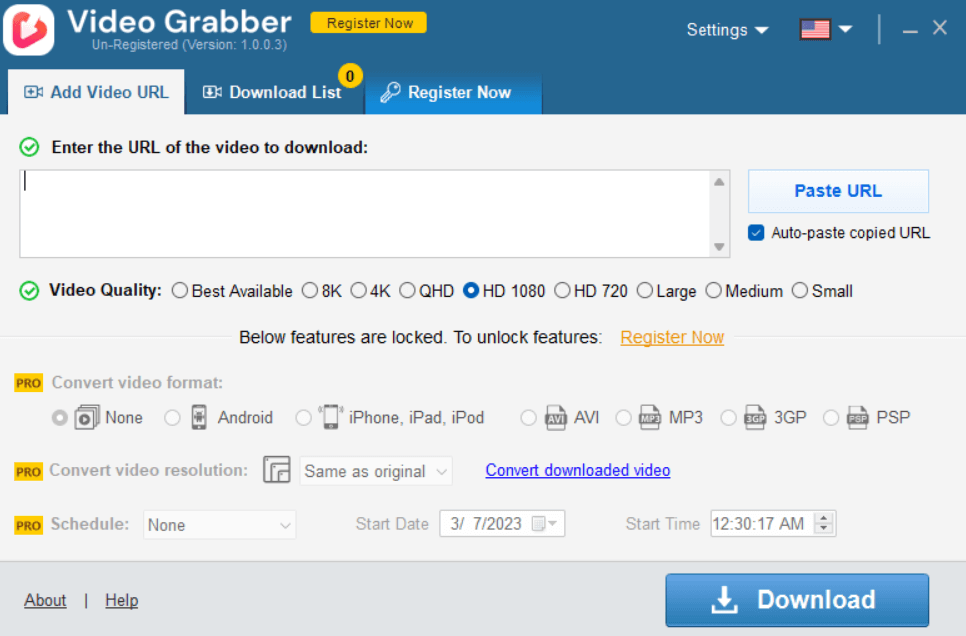
With Auslogics Video Grabber, you can quickly and easily download YouTube videos. On top of that, the software gives you the option to download videos from numerous sources like Vimeo, Dailymotion, Facebook, Twitter, Metacafe, etc.
After downloading, you can convert the videos to a format playable on your iOS, Android, or PSP device. Video Grabber also lets you set a timer for when downloads will begin, making it easy to get them started whenever it’s most convenient for you.
You can store an extensive library of videos and watch hours of high-quality videos when you don’t have access to the internet.
#### Features of Auslogics Video Grabber
- **High-Definition Video Download**
The program has no trouble playing back Full HD videos (720p or 1080p) from YouTube and other sites. You just have to make sure the video site supports HD videos.
- **Auto-Paste Video Links**
As an added convenience, when you copy a link, Video Grabber will immediately know to put it into the **“Add URL”** section.
- **Schedule Downloads**
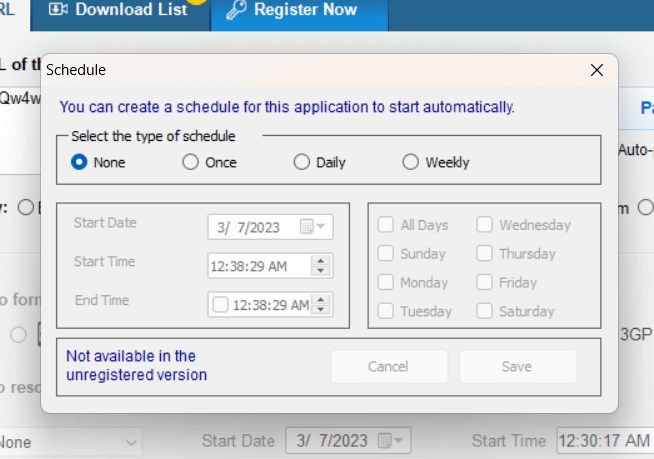
Grabber allows you to schedule your downloads to begin at the most convenient time.
- **Download Numerous Videos at the Same Time**
You can save time by downloading numerous videos simultaneously. Add as many links as you like to the download list; they’ll download in the order they were added.
- **Video Format Conversion**
You can play videos on your Android, Apple, or PSP devices by converting them to a format that works with those devices.
#### How to Download a YouTube Video to Computer Using Video Grabber
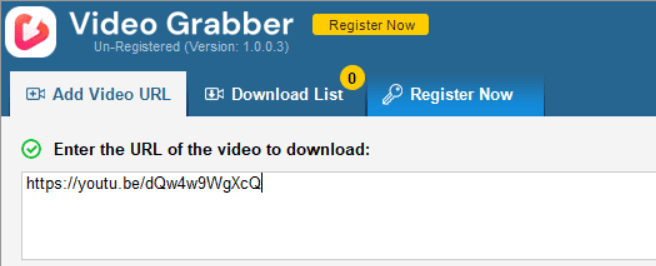
Downloading videos from YouTube only requires **three steps with Auslogics Video Grabber:**
- First, start the program.
- Search for the video you want to download on YouTube and copy the link.
- Go to Video Grabber, paste the link and click on download. That’s it\!
#### Is Auslogics Video Grabber Safe and Legal?
Yes. Video Grabber is safe and legal, so you have nothing to worry about. Also, the program has been tested and approved by certified authorities, so it’s free from malware and other potential threats that could harm your computer.
***
**📌 Check out this guide for more details:** [Auslogics Video Grabber – Video Downloader Review](https://www.auslogics.com/en/articles/auslogics-video-grabber-review/#is-auslogics-video-grabber-safe)
***
### 2\. Use the YouTube App
You can download videos from YouTube using its official mobile app (for Android or iOS). To do that, open the video you want to download using the app and tap the **“Download”** button below the video’s thumbnail.
Choose the video quality you want and tap OK. The app then saves the video to Downloads, where you can watch it offline anytime. However, this option is not usually available for commercial content.
***
**📌 Related:** [\[SOLVED\]](https://www.auslogics.com/en/articles/fix-youtube-videos-not-playing/) [YouTube Video Loading But not Playing](https://www.auslogics.com/en/articles/fix-youtube-videos-not-playing/)
***
#### Get YouTube’s or the Licensor’s Consent
You can also download videos by getting written consent from YouTube or the content’s licensor and adhering strictly to their conditions.
Content obtained this way is usually for personal use. Moreover, such videos don’t have the “Download” button or link.
### 3\. Download Videos Using VLC Media Player
VLC is one of the most widely used video and audio players worldwide. Besides downloading videos from YouTube, it supports virtually all video file formats. Plus, it’s available on desktop operating systems and mobile platforms for free.
Here’s how to download videos using VLC Player:
- Search for the video you want to download and copy its URL.
- Launch the VLC Player, click **“Media,”** and select **“Open Network Stream”** from the options.
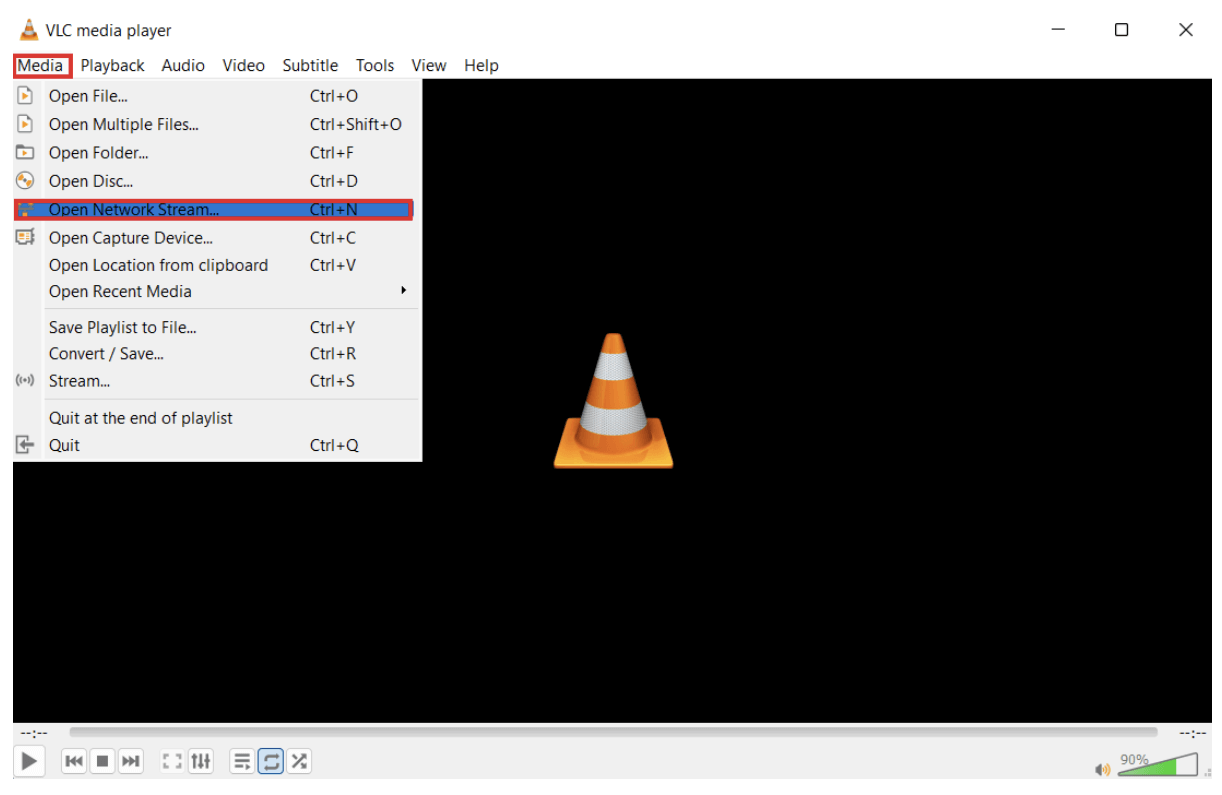
- Paste the URL link in the dialog box that appears and hit play.
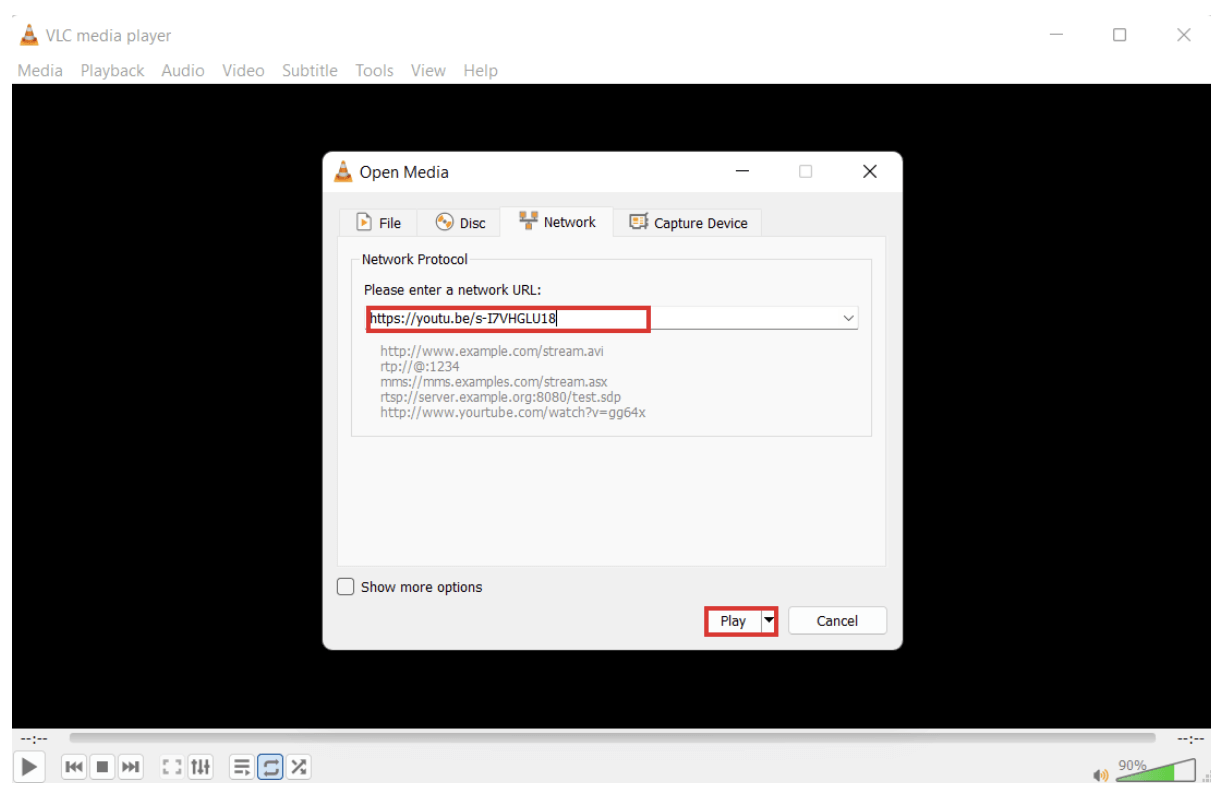
- When the video starts, click **“Tools”** and **“Codec Information.”**
- In the list of information that appears, copy the video link from **“Location.”**
- Open your browser and paste the link.
- The video will start playing in the browser. Then, right-click on the video and select **“Save as”** to download the video.
***
**📌 Also read:** [Fixing YouTube Running Slow on Your PC](https://www.auslogics.com/en/articles/fixing-youtube-running-slow-on-your-pc/)
***
## Final Thoughts
If you want to learn how to download a YouTube video to a computer, use the steps described in this guide. Ultimately, we recommend using [Auslogics Video Grabber](https://www.auslogics.com/en/software/video-grabber/). It’s safe, easy to use, and doesn’t require many steps.
Just download the application, copy the YouTube video link, and start downloading. The best part is that you can use the program to download videos from several sites, not just YouTube.
## FAQs
### 1\. What is the best YouTube downloader?
There are a few video downloaders to consider, but we have collected TOP-5 for you in our post [**“TOP-5 Best YouTube Downloaders”**](https://www.auslogics.com/en/articles/top-5-best-youtube-downloaders/). Check out the post and choose the one that best suits your needs.
### 2\. How to download videos from Facebook?
There are multiple methods to download videos from Facebook. One of the simplest approaches involves downloading Auslogics Video Grabber, pasting the Facebook video link into the app, and initiating the download process. This process is quick and effortless.
For more information, check our post **[“How to download Facebook videos to your computer?”](https://www.auslogics.com/en/articles/how-to-download-a-video-from-facebook/)**
### 3\. How to download videos from Twitter?
You can use various techniques to download videos from Twitter. Check out the full post here: [**“How to download videos from Twitter”**](https://www.auslogics.com/en/articles/how-to-download-videos-from-twitter/).
### 4\. How to download videos from Vimeo?
There are a few ways to download videos from Vimeo. Our post [**“How to download Vimeo videos?”**](https://www.auslogics.com/en/articles/how-to-download-vimeo-videos/) will help you make an informed decision and choose the most convenient video downloader for you.
Did you like this article?
![vote]()
![vote]()
Thanks for vote\!
![vote]()
![vote]()
24 Mar 2023
by
[Aziz Hamidov](https://www.auslogics.com/en/articles/author/aziz-hamidov/)
## Leave a Reply [Cancel reply](https://www.auslogics.com/en/articles/how-to-download-a-video-from-youtube/#respond)
- [5]()
- [1](https://www.facebook.com/sharer/sharer?u=https://www.auslogics.com/en/articles/how-to-download-a-video-from-youtube/)
- [1](https://twitter.com/intent/tweet?text=How+to+Download+a+YouTube+Video+to+Your+PC%3F&url=https://www.auslogics.com/en/articles/how-to-download-a-video-from-youtube/)
- [1](http://www.linkedin.com/shareArticle?mini=true&url=https://www.auslogics.com/en/articles/how-to-download-a-video-from-youtube/&title=How+to+Download+a+YouTube+Video+to+Your+PC%3F)
Tags
[Android](https://www.auslogics.com/en/articles/tag/android/)[Auslogics Software](https://www.auslogics.com/en/articles/tag/auslogics-software/)[YouTube](https://www.auslogics.com/en/articles/tag/youtube/)
Useful tools
[BoostSpeed 14](https://www.auslogics.com/software/boost-speed/)
Your one-stop PC maintenance and optimization tool, this program will clean, speed up, repair and tweak your system to ensure maximum speed and efficiency.
[Download](https://www.auslogics.com/software/boost-speed/after-download/)
[Driver Updater](https://www.auslogics.com/software/driver-updater/)
Prevent hardware errors and ensure problem-free device operation with this advanced tool that detects outdated drivers and safely gets them updated.
[Download](https://www.auslogics.com/software/driver-updater/after-download/)
[Disk Defrag](https://www.auslogics.com/software/disk-defrag/)
Recommended by experts as one of the fastest and most efficient defraggers, this tool defragments and rearranges files on your hard drive to restore efficiency.
[Download](https://www.auslogics.com/software/disk-defrag/after-download/)
## You may also like
![Rating-Up]()
0
[Optimization](https://www.auslogics.com/en/articles/category/optimization/)
[Delete Your Tracks: How to Clear YouTube Search and Watch History on Your Devices](https://www.auslogics.com/en/articles/how-to-clear-youtube-search-and-watch-history-mobile-and-desktop/)
11 Sep 2025
## Subscribe to Our Newsletter
Get exclusive deal alerts, helpful tips and software release news
Subscribe
Email address is invalid
**Done\!** Great to see you among our subscribers\!
All personal data you provide to us is handled in accordance with applicable laws, including the European GDPR. Please see our [Privacy Policy](https://www.auslogics.com/en/legal/) for more details.
[![logo]()](https://www.auslogics.com/en/)
Founded in 2008 in Sydney, Australia, Auslogics has grown into an industry leader in the production of computer maintenance and optimization software for Microsoft Windows.
- Premium products
- [BoostSpeed 13 Pro](https://www.auslogics.com/en/software/boost-speed/)
- [Disk Defrag Pro](https://www.auslogics.com/en/software/disk-defrag/)
- [Registry Cleaner Pro](https://www.auslogics.com/en/software/registry-cleaner/)
- [Windows Slimmer Pro](https://www.auslogics.com/en/software/windows-slimmer/)
- [BitReplica Pro](http://www.bitreplica.com/download/)
- [Driver Updater](https://www.auslogics.com/en/software/driver-updater/)
- [Disk Defrag Ultimate](https://www.auslogics.com/en/software/disk-defrag-ultimate/)
- [Anti-Malware](https://www.auslogics.com/en/software/anti-malware/)
- [File Recovery](https://www.auslogics.com/en/software/file-recovery/)
- [Video Grabber](https://www.auslogics.com/en/software/video-grabber/)
- [Essential Tools](https://www.auslogics.com/en/software/essential-tools/)
- Free products
- [BoostSpeed 13 Free](https://www.auslogics.com/en/software/boost-speed/)
- [Disk Defrag Free](https://www.auslogics.com/en/software/disk-defrag/)
- [Registry Cleaner Free](https://www.auslogics.com/en/software/registry-cleaner/)
- [Windows Slimmer Free](https://www.auslogics.com/en/software/windows-slimmer/)
- [BitReplica](http://www.bitreplica.com/)
- [Registry Defrag](https://www.auslogics.com/en/software/registry-defrag/)
- [Duplicate File Finder](https://www.auslogics.com/en/software/duplicate-file-finder/)
- Resources
- [Support](https://www.auslogics.com/en/support/)
- [Articles](https://www.auslogics.com/en/articles/)
- [Ask a Question](https://qa.auslogics.com/)
- [Newsletter](https://www.auslogics.com/en/newsletter)
- [Join us on Facebook](https://www.facebook.com/auslogics)
- [Follow us on X](https://www.twitter.com/auslogics)
- Company
- [About Us](https://www.auslogics.com/en/about/)
- [Contact Us](https://www.auslogics.com/contact/?department=article)
- [Jobs](https://www.auslogics.com/en/jobs/)
- [Press Center](https://www.auslogics.com/en/press/)
- [Partners](https://www.auslogics.com/en/partners/)
Microsoft and Windows are trademarks of the Microsoft group of companies. © 2008-2026 Auslogics Labs Pty Ltd
- [EULA](https://www.auslogics.com/en/eula/)
- [Privacy Policy](https://www.auslogics.com/en/legal/)
- [Subscription and Refunds](https://www.auslogics.com/en/refunds/)
- [How to uninstall](https://www.auslogics.com/en/cpages/how-to-uninstall/)
- [Contact Us](https://www.auslogics.com/en/contact/?department=tech)
UP

Link copied
Subscribe
to Our Newsletter
Get exclusive deal alerts, helpful tips and software release news 💪
Subscribe
**Done\!** Great to see you among our subscribers\!
Email address is invalid
All personal data you provide to us is handled in accordance with applicable laws, including the European GDPR. Please see our [Privacy Policy](https://www.auslogics.com/en/legal/) for more details. |
| Readable Markdown | null |
| ML Classification | |
| ML Categories | null |
| ML Page Types | null |
| ML Intent Types | null |
| Content Metadata | |
| Language | en-us |
| Author | Aziz Hamidov |
| Publish Time | 2023-03-24 15:06:20 (3 years ago) |
| Original Publish Time | 2021-01-28 16:20:29 (5 years ago) |
| Republished | Yes |
| Word Count (Total) | 2,224 |
| Word Count (Content) | 1,573 |
| Links | |
| External Links | 14 |
| Internal Links | 90 |
| Technical SEO | |
| Meta Nofollow | No |
| Meta Noarchive | No |
| JS Rendered | No |
| Redirect Target | null |
| Performance | |
| Download Time (ms) | 454 |
| TTFB (ms) | 390 |
| Download Size (bytes) | 36,382 |
| Shard | 28 (laksa) |
| Root Hash | 256708116419658428 |
| Unparsed URL | com,auslogics!www,/en/articles/how-to-download-a-video-from-youtube/ s443 |