ℹ️ Skipped - page is already crawled
| Filter | Status | Condition | Details |
|---|---|---|---|
| HTTP status | PASS | download_http_code = 200 | HTTP 200 |
| Age cutoff | PASS | download_stamp > now() - 6 MONTH | 0.8 months ago |
| History drop | PASS | isNull(history_drop_reason) | No drop reason |
| Spam/ban | PASS | fh_dont_index != 1 AND ml_spam_score = 0 | ml_spam_score=0 |
| Canonical | PASS | meta_canonical IS NULL OR = '' OR = src_unparsed | Not set |
| Property | Value |
|---|---|
| URL | https://www.adobe.com/creativecloud/tools/app-design-software.html |
| Last Crawled | 2026-03-20 22:48:14 (23 days ago) |
| First Indexed | 2019-01-11 18:03:37 (7 years ago) |
| HTTP Status Code | 200 |
| Meta Title | App design software | Adobe |
| Meta Description | Make better mobile and web apps with intuitive app design software. Create an engaging user experience with advanced & intuitive app design tools. Try for free today! |
| Meta Canonical | null |
| Boilerpipe Text | Create a great user experience with intuitive app design software.
Building a sharp app or web design isn’t complicated when you have the right app design software. Whether your goal is to be a top seller on the app store or to build an app for your small business, there’s an appropriate tool for making your project. With powerful desktop, mobile, and web apps, you can work on app creation anywhere. And effective collaboration features guarantee quick app-building iterations — put your ideas into action.
Lay out beautiful apps and websites.
Use industry-leading layout tools and make sharper designs. Create precise layouts with visual flair and intuitive functionality.
Work with more app design features in InDesign.
Lay out your title/home page and build your secondary master page. Set frames for images, text and interactive buttons.
Import your text and graphics and place them into your design. Refine your design by tweaking frames and adjusting fonts, colors and textures.
Assign actions to buttons. Create content links, shortcuts, hyperlinks and navigation controls.
Save as an interactive PDF, a JPEG file or another suitable format for delivery to designers. Or send to Adobe Experience Manager to build as a mobile app.
Get a head start with professionally designed, modern templates. Adapt the template to your layout by adjusting frames, fonts, colors and more.
Search and licence graphics and templates through Adobe Stock. Manage your licensing centrally and speed up asset acquisition.
Export your project as a PDF, JPEG, EPUB or HTML file for web-ready applications. Re-purpose content for multiple media.
Design, code and publish. Faster.
Build responsive apps and websites quickly, with potent coding tools for many programming languages. Preview and refine in real time.
Features to make quick work of app design.
Work in Standard mode to see a preview of your site and useful panels. Switch to Developer mode to maximize coding space.
Create your CSS style sheets. Define your styles for headers, menus and text. Assign fonts and weights.
Build up your HTML structure and content. Add JavaScript elements for interactivity or app functionality.
Preview your finished site. Test it and gather feedback. When it’s done, upload it to a web host and publish.
Quickly search for and licence content for your website. Find the graphics, add-on widgets, and app templates you need for your design.
Back-end work made easy. Build lines of code with a few clicks. Use structure shorthand and keyboard shortcuts to make lines of perfectly nested code quickly.
Check and refine your design with previews on web browsers and mobile devices. Get feedback from collaborators and testers using QR code links.
Simple, easy, free web designer.
Create a beautiful web page in minutes. Use an intuitive web creator to combine text, images, graphics, and textures.
Adobe Express
Create graphics, web pages, and video stories in minutes.
Intuitive features help you create quickly with Adobe Express.
What is your web page for? Write a title that clearly and concisely captures the essence of your web page.
Choose a background color or image. You can make any customized color with the color picker. Upload a photo or graphic as a background or search for a free image to use.
Upload and arrange text, images and video clips. Use Adobe Express to create collages and other graphics.
Post your web page to a social media platform or send a link via email. Adobe Express will host your web page.
There are dozens of professional fonts to use on your web page. Experiment with different typefaces and colors until you find the right mix.
Let the web page creator prompt you for content and then watch as it assembles your content into a modern design.
Carefully designed themes give your page style. Experiment with different themes to find the one that fits your page best.
Compare the features of web and app design software.
High-level design or dealing with the nitty-gritty, for a web page or web platform, we have tools that are perfect for your project.
Artboards
Checkmark
Layout tools
Checkmark
App templates
Checkmark
Checkmark
UI toolkits
Wireframes
Checkmark
Checkmark
Previews
Checkmark
Mockups
Checkmark
Checkmark
Live previews
Checkmark
Interactive prototypes
Desktop app
Checkmark
Checkmark
Checkmark
Mobile app
Learn how to design better apps and websites.
Creative Cloud apps are full of possibilities. Learn how to use their powerful features for better designs.
There are no limits to what you can do with app design software for Windows, macOS, Android, and iOS.
Design better, build responsively, and iterate faster with robust development software. Creative Cloud has industry-leading app-builder tools for every stage of the creative process. Integrated collaboration tools and an intuitive user interface let your whole team work together to quickly refine every aspect of a design. With attractive membership options for individuals and businesses, and special discounts for students and educators, there’s a plan for everyone. Find the one that works best for you.
Find the plan that's right for you.
Individuals
Get the entire collection of creative apps and services.
Students and teachers
Students and teachers save over 60% on Creative Cloud.
Business
Industry-leading creative apps with simple license management and easy deployment.
Adobe Stock
Find the perfect image for your next creative project. Get 10 free images with your first month. |
| Markdown | [](https://www.adobe.com/)
Creativity & Design
Shop for
- [ What is Creative Cloud? Creative apps and services for everyone](https://www.adobe.com/creativecloud.html)
- [Photographers Lightroom, Photoshop, and more](https://www.adobe.com/creativecloud/photography.html)
- [Individuals 20+ creative apps, Acrobat, and more](https://www.adobe.com/creativecloud/all-apps.html)
- [Business Solutions for teams and enterprises](https://www.adobe.com/creativecloud/business.html)
- [Students and teachers Save 71% on Creative Cloud](https://www.adobe.com/creativecloud/buy/students.html)
- [View plans and pricing](https://www.adobe.com/creativecloud/plans.html)
Featured products
- [Photoshop Image editing and design](https://www.adobe.com/products/photoshop.html)
- [Premiere Video editing and production](https://www.adobe.com/products/premiere.html)
- [Adobe Firefly AI-powered content creation](https://www.adobe.com/products/firefly.html)
- [Illustrator Vector graphics and illustration](https://www.adobe.com/products/illustrator.html)
- [Adobe Express All-in-one design, video, photo, and PDF app](https://www.adobe.com/express/?promoid=Y69SGP43&mv=other)
- [Lightroom Photo editing and organization](https://www.adobe.com/products/photoshop-lightroom.html)
- [Adobe Stock High-quality licensable assets](https://stock.adobe.com/?as_channel=adobe_com&as_source=profile_menu&as_campclass=brand&as_campaign=may2017&as_audience=users&as_content=globalnav)
- [View all products](https://www.adobe.com/products/catalog.html#category=creativity-design)
Online tools
- [Remove background](https://www.adobe.com/express/feature/image/remove-background)
- [Generate AI images](https://www.adobe.com/products/firefly/features/text-to-image.html)
- [Generate AI videos](https://www.adobe.com/products/firefly/features/ai-video-generator.html)
- [Generate AI art](https://www.adobe.com/products/firefly/features/ai-art-generator.html)
- [Edit photos with AI](https://www.adobe.com/products/firefly/features/ai-photo-editor.html)
[](https://www.adobe.com/creativecloud/plan-recommender/quiz.html)
Find the perfect app in about 60 seconds.
[Get started](https://www.adobe.com/creativecloud/plan-recommender/quiz.html)
- [Adobe.com](https://www.adobe.com/index.html)
- [PDF & E-signatures](https://www.adobe.com/acrobat.html)
- [Marketing & Commerce](https://business.adobe.com/)
- [Learn & Support](https://helpx.adobe.com/support.html)
PDF & E-signatures
Products
- [ Adobe Acrobat Faster insights, content creation and PDF tools all in one place](https://www.adobe.com/acrobat.html)
- [Adobe Acrobat Pro The secure PDF and e-signature solution](https://www.adobe.com/acrobat/acrobat-pro.html)
- [AI Assistant for Acrobat AI-powered summaries and knowledge hub](https://www.adobe.com/acrobat/generative-ai-pdf.html)
- [Acrobat Sign The essential e-signature solution](https://www.adobe.com/sign.html)
- [Acrobat Reader View, scan, and annotate PDFs](https://www.adobe.com/acrobat/pdf-reader.html)
- [Acrobat plans and pricing](https://www.adobe.com/acrobat/pricing.html)
Shop for
- [Business](https://www.adobe.com/acrobat/business.html)
- [Student & Teachers](https://www.adobe.com/acrobat/students.html)
- [Home & Personal](https://www.adobe.com/acrobat/personal-document-management.html)
- [Government](https://www.adobe.com/acrobat/business/industries/government.html)
- [Nonprofits](https://www.adobe.com/nonprofits/acrobat.html)
Online tools
- [Edit PDF](https://www.adobe.com/acrobat/online/pdf-editor.html)
- [Chat with PDF](https://www.adobe.com/acrobat/online/ai-chat-pdf.html)
- [PDF to Word](https://www.adobe.com/acrobat/online/pdf-to-word.html)
- [Compress PDF](https://www.adobe.com/acrobat/online/compress-pdf.html)
- [Merge PDF](https://www.adobe.com/acrobat/online/merge-pdf.html)
- [Word to PDF](https://www.adobe.com/acrobat/online/word-to-pdf.html)
- [View all tools](https://www.adobe.com/acrobat/online.html)
[](https://www.adobe.com/acrobat/free-trial-download.html)
Adobe Acrobat
Trusted PDF tools enhanced with AI to answer questions and generate summaries.
[Start free trial](https://www.adobe.com/acrobat/free-trial-download.html)
- [Adobe.com](https://www.adobe.com/index.html)
- [Creativity & Design](https://www.adobe.com/creativecloud.html)
- [PDF & E-signatures](https://www.adobe.com/acrobat.html)
- [Marketing & Commerce](https://business.adobe.com/)
- [Help & Support](https://helpx.adobe.com/support.html)
Marketing & Commerce
Featured products
- Content management
- [Adobe GenStudio for Performance Marketing Accelerate your content supply chain](https://business.adobe.com/products/genstudio-for-performance-marketing.html)
- [Adobe Experience Manager Sites Content management system (CMS)](https://business.adobe.com/products/experience-manager/sites/aem-sites.html)
- [Adobe Experience Manager Assets Digital asset management (DAM)](https://business.adobe.com/products/experience-manager/assets.html)
- [Adobe Commerce (Magento) Digital commerce](https://business.adobe.com/products/commerce.html)
- Workflow management
- [Adobe Workfront Work and project management](https://business.adobe.com/products/workfront.html)
- Data & analytics
- [Adobe Real-Time CDP Customer data platform (CDP)](https://business.adobe.com/products/real-time-customer-data-platform/rtcdp.html)
- [Adobe Analytics Advanced analytics solutions](https://business.adobe.com/products/adobe-analytics.html)
- Campaign management
- [Adobe Journey Optimizer Customer journey management](https://business.adobe.com/products/journey-optimizer.html)
- [Adobe Journey Optimizer B2B Edition Increase buying group engagement](https://business.adobe.com/products/journey-optimizer-b2b-edition.html)
- [Adobe Marketo Engage Marketing automation](https://business.adobe.com/products/marketo.html)
- [View all products](https://business.adobe.com/products.html)
What we solve
- [Content supply chain](https://business.adobe.com/solutions/content-supply-chain.html)
- [Content creation and production](https://business.adobe.com/solutions/content-supply-chain/creation-production.html)
- [Unified customer experience](https://business.adobe.com/solutions/unified-customer-experience.html)
- [B2B GTM orchestration](https://business.adobe.com/solutions/b2b-marketing.html)
AI for business
- [Adobe GenAI](https://business.adobe.com/ai/adobe-genai.html)
- [Experience Platform Agent Orchestrator](https://business.adobe.com/products/experience-platform/agent-orchestrator.html)
- [Brand Concierge](https://business.adobe.com/products/brand-concierge.html)
[](http://business.adobe.com/)
Adobe for Business. Creativity and marketing solutions for your medium to large business needs.
[Learn more](http://business.adobe.com/)
- [Adobe.com](https://www.adobe.com/index.html)
- [Creativity & Design](https://www.adobe.com/creativecloud.html)
- [PDF & E-signatures](https://www.adobe.com/acrobat.html)
- [Help & Support](https://helpx.adobe.com/support.html)
Learn & Support
Help and Community
- [Help Center Troubleshooting and how-tos](https://helpx.adobe.com/support.html)
- [Enterprise Support Dedicated help for large organizations](https://helpx.adobe.com/contact/enterprise-support.html)
- [Adobe Community Connect and get inspired](https://www.adobe.com/community.html)
- [Adobe Events Explore in-person and online events](http://adobe.com/events)
- [Adobe Developer Resources to empower developer creativity](https://developer.adobe.com/)
- [Download and install](http://creativecloud.adobe.com/apps/download/creative-cloud)
- [Contact us](https://helpx.adobe.com/#open-jarvis-chat)
Common tasks
- [Manage my account](https://account.adobe.com/)
- [Manage my plan](https://account.adobe.com/plans)
- [Subscribe to Adobe Status](https://status.adobe.com/help/proactivesubscriptions)
Learning resources
- [Adobe Learn Develop your creative skills with Adobe apps](https://www.adobe.com/learn/?locale=en&learnIn=1)
- [Express Tutorials Quick steps to start a project](https://www.adobe.com/learn/express/?learnIn=1)
- [Acrobat Tutorials Short lessons to improve your Acrobat skills](https://www.adobe.com/learn/acrobat/?learnIn=1)
- [Adobe Experience League Build Experience Cloud skills with personalized learning](https://experienceleague.adobe.com/)
- [Adobe Certified Professional Grow your career with Adobe](https://certifiedprofessional.adobe.com/en/home)
- [Adobe Education Exchange Discover free teaching resources for your class](https://edex.adobe.com/)
[](https://www.adobe.com/express/learn/tutorials?promoid=Z9X3FKHM&mv=other)
Make social content and more with Adobe Express video tutorials.
[Get started](https://www.adobe.com/express/learn/tutorials?promoid=Z9X3FKHM&mv=other)
- [Adobe.com](https://www.adobe.com/index.html)
- [Creativity & Design](https://www.adobe.com/creativecloud.html)
- [PDF & E-signatures](https://www.adobe.com/acrobat.html)
- [Marketing & Commerce](https://business.adobe.com/)
App switcher
Sign in
- [Home](https://www.adobe.com/)
- /[Adobe Creative Cloud](https://www.adobe.com/creativecloud.html)
- /[Tools](https://www.adobe.com/creativecloud/tools.html)
- /App design software
# **Create a great user experience with intuitive app design software.**
Building a sharp app or web design isn’t complicated when you have the right app design software. Whether your goal is to be a top seller on the app store or to build an app for your small business, there’s an appropriate tool for making your project. With powerful desktop, mobile, and web apps, you can work on app creation anywhere. And effective collaboration features guarantee quick app-building iterations — put your ideas into action.

## App and web design, illustration, animation, and photography. Adobe Creative Cloud has you covered.
[Start free trial](https://commerce.adobe.com/store/segmentation?cli=mini_plans&ctx=if&co=US&lang=en&ms=COM&ot=TRIAL&cs=INDIVIDUAL&pa=ccsn_direct_individual&rtc=t&lo=sl&af=uc_new_user_iframe%2Cuc_new_system_close)
## **Lay out beautiful apps and websites.**
Use industry-leading layout tools and make sharper designs. Create precise layouts with visual flair and intuitive functionality.
background
\#f5f5f5

[Adobe InDesign](https://www.adobe.com/products/indesign.html)
Craft elegant layouts at your desk or on the go.
[Try now](https://commerce.adobe.com/store/segmentation?cli=mini_plans&ctx=if&co=US&lang=en&ms=COM&ot=TRIAL&cs=INDIVIDUAL&pa=idsn_direct_individual&rtc=t&lo=sl&af=uc_new_user_iframe%2Cuc_new_system_close)
style
Grid width 6
background
\#f5f5f5
## App design software for interactive digital publications and print media.
Make an impression with top-notch design tools for digital and print. Create interactive publications, e-books, websites and more.
[Choose a plan](https://www.adobe.com/creativecloud/plans.html)

style
Xl spacing
background
\#f5f5f5
## **Work with more app design features in InDesign.**
**Define your pages**
Lay out your title/home page and build your secondary master page. Set frames for images, text and interactive buttons.
**Add content**
Import your text and graphics and place them into your design. Refine your design by tweaking frames and adjusting fonts, colors and textures.
**Build interactivity**
Assign actions to buttons. Create content links, shortcuts, hyperlinks and navigation controls.
**Export**
Save as an interactive PDF, a JPEG file or another suitable format for delivery to designers. Or send to Adobe Experience Manager to build as a mobile app.
**Professional templates**
Get a head start with professionally designed, modern templates. Adapt the template to your layout by adjusting frames, fonts, colors and more.
**Adobe Stock integration**
Search and licence graphics and templates through Adobe Stock. Manage your licensing centrally and speed up asset acquisition.
**More export possibilities**
Export your project as a PDF, JPEG, EPUB or HTML file for web-ready applications. Re-purpose content for multiple media.
style
four up, l gap
[Learn more about what you can do with InDesign](https://www.adobe.com/products/indesign.html)
style
**grid width 6, center**
## **Design, code and publish. Faster.**
Build responsive apps and websites quickly, with potent coding tools for many programming languages. Preview and refine in real time.
background
\#f5f5f5

[Adobe Dreamweaver](https://www.adobe.com/products/dreamweaver.html)
Design and develop modern, responsive websites.
[Try now](https://commerce.adobe.com/store/segmentation?cli=mini_plans&ctx=if&co=US&lang=en&ms=COM&ot=TRIAL&cs=INDIVIDUAL&pa=drwv_direct_individual&rtc=t&lo=sl&af=uc_new_user_iframe%2Cuc_new_system_close)
style
Grid width 6
background
\#f5f5f5
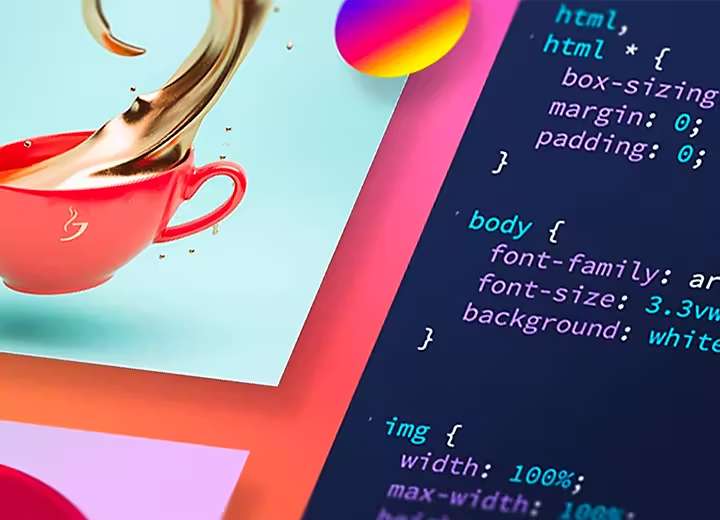
## App design software with the power of code.
A development platform with serious coding tools for full control and efficient design. Write and edit quickly in HTML, CSS, JavaScript, PHP and more
[Choose a plan](https://www.adobe.com/creativecloud/plans.html)
style
Xl spacing
background
\#f5f5f5
## **Features to make quick work of app design.**
**Use Standard or Developer mode**
Work in Standard mode to see a preview of your site and useful panels. Switch to Developer mode to maximize coding space.
**Create style sheets**
Create your CSS style sheets. Define your styles for headers, menus and text. Assign fonts and weights.
**Build with HTML and JavaScript**
Build up your HTML structure and content. Add JavaScript elements for interactivity or app functionality.
**Preview, test and publish**
Preview your finished site. Test it and gather feedback. When it’s done, upload it to a web host and publish.
**Adobe Stock integration**
Quickly search for and licence content for your website. Find the graphics, add-on widgets, and app templates you need for your design.
**Coding shortcuts**
Back-end work made easy. Build lines of code with a few clicks. Use structure shorthand and keyboard shortcuts to make lines of perfectly nested code quickly.
**Browser and device previews**
Check and refine your design with previews on web browsers and mobile devices. Get feedback from collaborators and testers using QR code links.
style
four up, l gap
[Learn more about what you can do with Dreamweaver](https://www.adobe.com/products/dreamweaver.html)
style
**grid width 6, center**
## **Simple, easy, free web designer.**
Create a beautiful web page in minutes. Use an intuitive web creator to combine text, images, graphics, and textures.
background
\#f5f5f5

[Adobe Express](https://www.adobe.com/express/)
Create graphics, web pages, and video stories in minutes.
[Try now](https://www.adobe.com/express/)
style
Grid width 6
background
\#f5f5f5
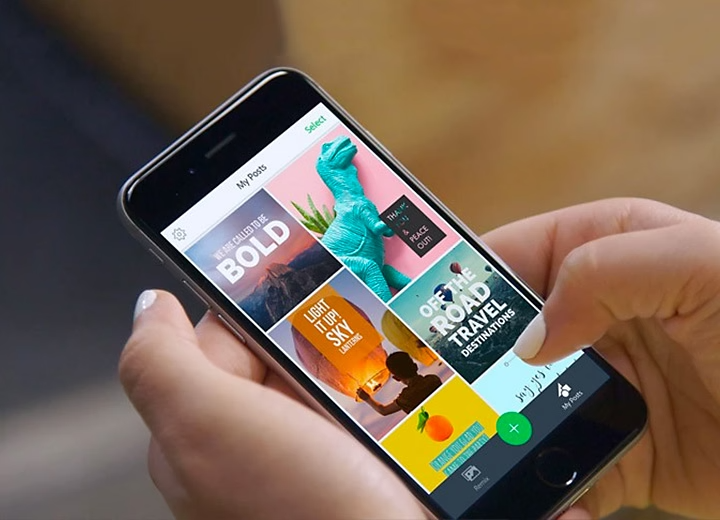
## Express it.
A simple free online tool to create sophisticated, modern web pages. Develop your design with text, graphics, and video.
[Choose a plan](https://www.adobe.com/express/pricing)
style
Xl spacing
background
\#f5f5f5
## **Intuitive features help you create quickly with Adobe Express.**
**Write a title**
What is your web page for? Write a title that clearly and concisely captures the essence of your web page.
**Pick a background**
Choose a background color or image. You can make any customized color with the color picker. Upload a photo or graphic as a background or search for a free image to use.
**Add copy, images and video**
Upload and arrange text, images and video clips. Use Adobe Express to create collages and other graphics.
**Share**
Post your web page to a social media platform or send a link via email. Adobe Express will host your web page.
**High-quality fonts**
There are dozens of professional fonts to use on your web page. Experiment with different typefaces and colors until you find the right mix.
**Guided design**
Let the web page creator prompt you for content and then watch as it assembles your content into a modern design.
**Elegant themes**
Carefully designed themes give your page style. Experiment with different themes to find the one that fits your page best.
style
four up, l gap
[Learn more about what you can do with Adobe Express](https://www.adobe.com/express/create/website-page)
style
**grid width 6, center**
## **Compare the features of web and app design software.**
High-level design or dealing with the nitty-gritty, for a web page or web platform, we have tools that are perfect for your project.

InDesign

Dreamweaver

Adobe Express
Artboards
Layout tools
App templates
UI toolkits
Wireframes
Previews
Mockups
Live previews
Interactive prototypes
Desktop app
Mobile app
style
Xl spacing
## **Learn how to design better apps and websites.**
Creative Cloud apps are full of possibilities. Learn how to use their powerful features for better designs.
background
\#f5f5f5
[](https://helpx.adobe.com/xd/help/access-ui-kits.html)
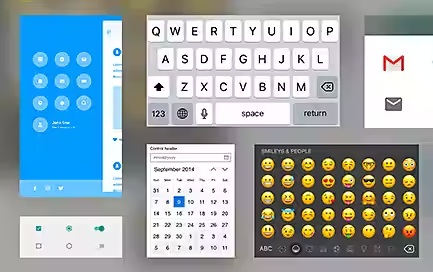
**Start with UI kits for faster design.**
Populate your artboards quickly using UI kits full of common app elements. Adapt them to your own app design by customizing fonts, colors, and icons.
[Learn more](https://helpx.adobe.com/xd/help/access-ui-kits.html)
[](https://helpx.adobe.com/xd/help/create-prototypes.html)
**Preview, modify, and test prototypes on desktop and mobile.**
Understand the app refinement process using prototypes. Tap into user-friendly live previews, make on-the-spot changes, and test your final design.
[Learn more](https://helpx.adobe.com/xd/help/create-prototypes.html)
[](https://www.adobe.com/express/create/website-page)
**Create a site on the go with Express**
Learn how to maximize your workflow with a combination of mobile and desktop apps. Create a design on the spot and refine it using a desktop app for a quick turnaround.
[Learn more](https://www.adobe.com/express/create/website-page)
style
Three up
background
\#f5f5f5
## There are no limits to what you can do with app design software for Windows, macOS, Android, and iOS.
Design better, build responsively, and iterate faster with robust development software. Creative Cloud has industry-leading app-builder tools for every stage of the creative process. Integrated collaboration tools and an intuitive user interface let your whole team work together to quickly refine every aspect of a design. With attractive membership options for individuals and businesses, and special discounts for students and educators, there’s a plan for everyone. Find the one that works best for you.
[Choose a plan](https://www.adobe.com/creativecloud/plans.html)
style
xl spacing
# Find the plan that's right for you.
style
Dark, xl spacing
background
\#1d1d1d

### Individuals
Get the entire collection of creative apps and services.
[Learn more](https://www.adobe.com/creativecloud.html)

### Students and teachers
Students and teachers save over 60% on Creative Cloud.
[Learn more](https://www.adobe.com/creativecloud/buy/students.html)

### Business
Industry-leading creative apps with simple license management and easy deployment.
[Learn more](https://www.adobe.com/creativecloud/business.html)

### Adobe Stock
Find the perfect image for your next creative project. Get 10 free images with your first month.
[Learn more](https://stock.adobe.com/in/)
style
four-up, xxl spacing top, dark
[See all plans and pricing](https://www.adobe.com/creativecloud/plans.html)
background
**\#1d1d1d**
style
**Dark, m spacing**
style
**Dark, center, m spacing**
For individuals & small business
- [Creative AI](https://www.adobe.com/products/firefly.html)
- [Photography](https://www.adobe.com/creativecloud/photography/apps.html)
- [Design and illustration](https://www.adobe.com/creativecloud/design.html)
- [Video and animation](https://www.adobe.com/creativecloud/video.html)
- [PDF](https://www.adobe.com/acrobat.html)
- [3D](https://www.adobe.com/products/substance3d.html)
- [Elements Family](https://www.adobe.com/products/elements-family.html)
- [Stock images and video](http://stock.adobe.com/)
- [View all products](https://www.adobe.com/products/catalog.html#category=all)
For medium & large business
- [Personalization at scale](https://business.adobe.com/solutions/personalization-at-scale.html)
- [Content supply chain](https://business.adobe.com/solutions/content-supply-chain.html)
- [Unified customer experience](https://business.adobe.com/solutions/unified-customer-experience.html)
- [Creativity and production](https://business.adobe.com/solutions/content-supply-chain/creation-production.html)
- [B2B GTM orchestration](https://business.adobe.com/solutions/b2b-marketing.html)
- [View all products](https://business.adobe.com/products.html)
For organizations
- [Education](https://www.adobe.com/education.html)
- [Nonprofits](https://www.adobe.com/nonprofits.html)
- [Government](https://www.adobe.com/howtobuy/buying-programs/government.html)
Support
- [Help Center](https://helpx.adobe.com/support.html)
- [Download and install](https://helpx.adobe.com/download-install.html)
- [Adobe Community](https://www.adobe.com/community.html)
- [Adobe Learn](https://www.adobe.com/learn)
- [Medium and large business support](https://business.adobe.com/support/main.html)
Contact
- [Chat with sales](https://www.adobe.com/#open-jarvis-chat)
- [Request information](https://business.adobe.com/request-consultation.html)
Adobe
- [Log into your account](https://account.adobe.com/)
- [About](https://www.adobe.com/about-adobe.html)
- [Careers](https://www.adobe.com/careers.html)
- [Events](https://www.adobe.com/events.html)
- [Newsroom](https://news.adobe.com/)
- [Corporate responsibility](https://www.adobe.com/corporate-responsibility.html)
- [Investor Relations](https://www.adobe.com/investor-relations.html)
- [Supply chain](https://www.adobe.com/corporate-responsibility/supply-chain.html)
- [Trust Center](https://www.adobe.com/trust.html)
- [Integrity](https://www.adobe.com/about-adobe/integrity.html)
- [Adobe for All](https://www.adobe.com/diversity.html)
- [Adobe Blog](https://blog.adobe.com/)
Featured products
- [ Acrobat Reader](https://get.adobe.com/reader/)
- [ Firefly](https://www.adobe.com/products/firefly.html)
- [ Adobe Express](https://www.adobe.com/express/?promoid=Z2G1FSYV&mv=other)
- [ Photoshop](https://www.adobe.com/products/photoshop/free-trial-download.html)
[Change region](https://www.adobe.com/creativecloud/tools/app-design-software.html#langnav)
- Copyright © 2026 Adobe. All rights reserved./
- [Privacy](https://www.adobe.com/privacy.html)/
- [Terms of Use](https://www.adobe.com/legal/terms.html)/
- [Cookie preferences](https://www.adobe.com/#openPrivacy)/
- [Do not sell or share my personal information](https://www.adobe.com/privacy/location-specific-notice.html#how-to)/
- [AdChoices](https://www.adobe.com/privacy/opt-out.html#interest-based-ads) |
| Readable Markdown | ## **Create a great user experience with intuitive app design software.**
Building a sharp app or web design isn’t complicated when you have the right app design software. Whether your goal is to be a top seller on the app store or to build an app for your small business, there’s an appropriate tool for making your project. With powerful desktop, mobile, and web apps, you can work on app creation anywhere. And effective collaboration features guarantee quick app-building iterations — put your ideas into action.

## **Lay out beautiful apps and websites.**
Use industry-leading layout tools and make sharper designs. Create precise layouts with visual flair and intuitive functionality.

**Work with more app design features in InDesign.**
Lay out your title/home page and build your secondary master page. Set frames for images, text and interactive buttons.
Import your text and graphics and place them into your design. Refine your design by tweaking frames and adjusting fonts, colors and textures.
Assign actions to buttons. Create content links, shortcuts, hyperlinks and navigation controls.
Save as an interactive PDF, a JPEG file or another suitable format for delivery to designers. Or send to Adobe Experience Manager to build as a mobile app.
Get a head start with professionally designed, modern templates. Adapt the template to your layout by adjusting frames, fonts, colors and more.
Search and licence graphics and templates through Adobe Stock. Manage your licensing centrally and speed up asset acquisition.
Export your project as a PDF, JPEG, EPUB or HTML file for web-ready applications. Re-purpose content for multiple media.
## **Design, code and publish. Faster.**
Build responsive apps and websites quickly, with potent coding tools for many programming languages. Preview and refine in real time.

**Features to make quick work of app design.**
Work in Standard mode to see a preview of your site and useful panels. Switch to Developer mode to maximize coding space.
Create your CSS style sheets. Define your styles for headers, menus and text. Assign fonts and weights.
Build up your HTML structure and content. Add JavaScript elements for interactivity or app functionality.
Preview your finished site. Test it and gather feedback. When it’s done, upload it to a web host and publish.
Quickly search for and licence content for your website. Find the graphics, add-on widgets, and app templates you need for your design.
Back-end work made easy. Build lines of code with a few clicks. Use structure shorthand and keyboard shortcuts to make lines of perfectly nested code quickly.
Check and refine your design with previews on web browsers and mobile devices. Get feedback from collaborators and testers using QR code links.
## **Simple, easy, free web designer.**
Create a beautiful web page in minutes. Use an intuitive web creator to combine text, images, graphics, and textures.

[Adobe Express](https://www.adobe.com/express/)
Create graphics, web pages, and video stories in minutes.
**Intuitive features help you create quickly with Adobe Express.**
What is your web page for? Write a title that clearly and concisely captures the essence of your web page.
Choose a background color or image. You can make any customized color with the color picker. Upload a photo or graphic as a background or search for a free image to use.
Upload and arrange text, images and video clips. Use Adobe Express to create collages and other graphics.
Post your web page to a social media platform or send a link via email. Adobe Express will host your web page.
There are dozens of professional fonts to use on your web page. Experiment with different typefaces and colors until you find the right mix.
Let the web page creator prompt you for content and then watch as it assembles your content into a modern design.
Carefully designed themes give your page style. Experiment with different themes to find the one that fits your page best.
## **Compare the features of web and app design software.**
High-level design or dealing with the nitty-gritty, for a web page or web platform, we have tools that are perfect for your project.
Artboards
Layout tools
App templates
UI toolkits
Wireframes
Previews
Mockups
Live previews
Interactive prototypes
Desktop app
Mobile app
## **Learn how to design better apps and websites.**
Creative Cloud apps are full of possibilities. Learn how to use their powerful features for better designs.
## There are no limits to what you can do with app design software for Windows, macOS, Android, and iOS.
Design better, build responsively, and iterate faster with robust development software. Creative Cloud has industry-leading app-builder tools for every stage of the creative process. Integrated collaboration tools and an intuitive user interface let your whole team work together to quickly refine every aspect of a design. With attractive membership options for individuals and businesses, and special discounts for students and educators, there’s a plan for everyone. Find the one that works best for you.
Find the plan that's right for you.

### Individuals
Get the entire collection of creative apps and services.

### Students and teachers
Students and teachers save over 60% on Creative Cloud.

### Business
Industry-leading creative apps with simple license management and easy deployment.

### Adobe Stock
Find the perfect image for your next creative project. Get 10 free images with your first month. |
| Shard | 124 (laksa) |
| Root Hash | 8632794615158933124 |
| Unparsed URL | com,adobe!www,/creativecloud/tools/app-design-software.html s443 |