ℹ️ Skipped - page is already crawled
| Filter | Status | Condition | Details |
|---|---|---|---|
| HTTP status | PASS | download_http_code = 200 | HTTP 200 |
| Age cutoff | PASS | download_stamp > now() - 6 MONTH | 0.1 months ago |
| History drop | PASS | isNull(history_drop_reason) | No drop reason |
| Spam/ban | PASS | fh_dont_index != 1 AND ml_spam_score = 0 | ml_spam_score=0 |
| Canonical | PASS | meta_canonical IS NULL OR = '' OR = src_unparsed | Not set |
| Property | Value |
|---|---|
| URL | https://www.aarp.org/personal-technology/how-to-use-zoom/ |
| Last Crawled | 2026-04-06 00:52:13 (3 days ago) |
| First Indexed | 2025-06-13 17:48:16 (10 months ago) |
| HTTP Status Code | 200 |
| Meta Title | Zoom Stays in the Fast Lane of Videoconferencing |
| Meta Description | Whether you are working from home or videoconferencing with family, try these tips to download, join a session or host a meeting on Zoom. |
| Meta Canonical | null |
| Boilerpipe Text | How to Use Zoom to Stay Connected
Zoom became synonymous with keeping businesses running during the pandemic, and the name alone became a buzzword for all means of communicating outside of quarantine.
But videoconferencing hasn’t lost its luster. Folks, including those 50 and far older, continue to rely on Zoom for their everyday connections when distance, time and convenience call for face-to-face interaction.
Other
video chat options
are available, including Cisco Webex,
Facebook Messenger
,
FaceTime
, Google Hangouts, Microsoft Teams, and
Skype
, but many Zoomers choose the service because of its relative simplicity. Click a link and you’re attending a book club meeting, getting personal pet training from your breeder or just schmoozing with friends.
Los Angeles-based physician Steven Goldberg, 73, a self-described “sober alcoholic,” said that even today, being able “to find a Zoom Alcoholics Anonymous meeting at any hour of the day” is still going strong.
If you're unsure about Zoom — and maybe a little intimidated — we're here to help.
What Zoom costs today
A basic Zoom membership is free, allowing you to host a meeting of up to 100 attendees for up to 40 minutes. Participants can join a Zoom meeting from their computer, smartphone or tablet.
With a free Zoom account, people can sign back in after 40 minutes or another host can start a second meeting. But that can be a bit of a hassle.
Pay plans that let meetings extend up to 30 hours, among other added benefits, start at $14.99 a month or $149.90 a year, per user. The Pro plan allows up to nine licensed accounts and lets you conduct meetings that run for up to 30 hours. Zoom has higher-priced plans for large businesses.
How to get started
Zoom works on Windows PCs, Macs, smartphones and tablets, with some interface and feature distinctions among devices. You can
download desktop software
for Zoom on a computer or get the iOS and Android app versions in the Apple App Store or Google Play Store.
You also can participate in a Zoom call through your web browser without having any software installed on your device, albeit with more limited functionality. Zoom continues to add new features to the browser. For example, you can now schedule a one-time or recurring meeting from the web browser.
This story was produced in collaboration with
Senior Planet
, which helps people 60 and older learn technology skills to find community, reach their goals and thrive in the digital world. Senior Planet is part of Older Adults Technology Services (OATS) from AARP, which teaches more than
50 free virtual programs
each week on a wide range of topics, such as getting in shape, joining telemedicine appointments, listening to podcasts, making friends and saving money.
Senior Planet recently introduced findings of a study it conducted at various times throughout the pandemic that reinforces the power of maintaining social connections for older adults using technology like Zoom. The nonprofit presented a training course called Android Essentials twice a week over Zoom to a group of low-income New York City adults 60 and older, who were each given a free tablet. The study compared the group to a similarly aged control group of people who were issued tablets but didn’t receive the Senior Planet training.
The findings:
Those who took the course were far more likely to use the tablet to expand their social connections. More than half, 52.6 percent, of the participants indicated that they connected with someone new, compared with 25.8 percent who didn’t take the course. About 38 percent of participants in the training group reported that they had a video call with someone new, compared with 22 percent of folks in the other group.
While you don’t need an account to join a Zoom meeting, you’ll need one to host your own conference. And you may have to register to participate in webinars or other sessions. Some hosts restrict access to people who have created an authorized profile under a
Zoom account
.
Keep in mind that whether you use Zoom through a cellphone or on your home Wi-Fi, you'll
need a decent speed
.
“We've struggled with some people who don't have a powerful connection. And so they haven't had as much access,” says Paula Rochelle, 77, of San Jose, California, who learned the technology in 2020 to stay active in the groups she's involved in. That includes organizations from the activist Raging Grannies to Toastmasters.
More recently, Rochelle added a twice-weekly band-and-weight exercise session on Zoom with women in their 70s and 80s from California, Montana, Utah, Virginia and Washington. “We call it ‘pre-hab’ exercise instead of ‘rehab’ exercise since several of us have had incidents or injuries that have put us in rehab.”
How do I join a Zoom session?
An invitation typically arrives via email or text. Click the
Join Zoom Meeting
link in the body of the message. You'll be prompted to download Zoom or to launch the app if you already have it. You then just choose to join a meeting with or without video.
If the host hasn't started the meeting yet, you'll have to wait on hold. Use this time to test your computer audio and video settings, typically through the internal microphone and speaker on your system.
As part of a test, Zoom will play an audio tone and record your voice — you will know something is off if you can't hear the tone or your voice. A video preview window lets you see how you'll look to others.
Tip: If you plan on using video, make sure light is shining on you, rather than coming from behind.
On a desktop, Zoom will play a tone and record your voice as part of a mic and speakers test when you join a meeting. A video preview shows how you’ll look to others.
Zoom/AARP
You can reach the platform in other ways too. If you're attending a Zoom webinar, click the link for the meeting that has likely been provided on the sponsor's website. You can also join directly from the Zoom application. Click the
Meetings
tab to check out any scheduled events and select
Join
at the appointed time.
You can join meetings by telephone using the teleconferencing number and meeting ID that the host supplies. Some also require a password, which the host will share.
"It's really easy,” says Alyce Appleman Mariam, 62, whose husband, Tom, taught her to use Zoom. “My 80-something-year-old mom uses it."
Speaker view, on the left, and gallery view. The control to toggle between views is toward the top right corner of the Zoom window on laptops and desktops.
Courtesy of Zoom
How will I see other people?
Zoom has two common layouts: speaker view, in which the active speaker takes up the entire screen; or gallery view, which shows condensed photos of participants laid out in a grid pattern. On a laptop or desktop computer, the control to toggle between these views is at the top right corner of the Zoom window.
On a tablet, it's on the upper left. You may have to gently tap the screen to see it.
You'll see all participants' live video feeds if they've enabled their camera. In the absence of video, you may see a dark rectangle with the person's name or initials or new animal avatars used to represent them.
Should I mute my microphone?
Etiquette suggests that you should mute yourself if you're not about to speak, especially if you’re with other people in the chat. Barking dogs and ringing doorbells are a distraction — though Zoom lets you filter out background noise in the settings.
To do this, press the
Mute
button when you’re not speaking. To raise your hand, click on
More
in the top right corner of the Zoom window on laptops and desktops.
"I think that the mute button is everybody’s friend,” says Marisa Giorgi, director of curriculum development at Senior Planet.
You'll know that the mic is muted when a red slash appears on top of the microphone icon and the word
Mute
changes to
Unmute
. Remember to tap or click the icon to unmute when it's time for you to speak.
Worth noting:
Hosts have the power to mute all participants. To be recognized to speak in a webinar, you may be able to tap or click the
Raise Hand
icon, but the host can disable this feature.
How do I host a Zoom meeting?
Make sure the app is installed and enter your account credentials. Select
New Meeting
to start an instant meeting.
Check that the
Video On
switch is enabled to proceed with video. Click
Participants
to invite contacts or others via email or texts. To arrange a call for a later time, click
Schedule
and choose when the meeting will occur, and among other options, determine whether invitees will need a password to join.
AARP
What about chatting and screen sharing?
Another way to contribute to the conversation is to type comments or questions in the chat box. You can enter comments for all to see or direct them to a single individual.
Be careful, though. While only the person you’re sending a message to will see a one-to-one comment during the meeting, the host can download the chat transcript once it’s over. Avoid snide remarks you wouldn't want to be seen later.
“We remind people that it's only private in that moment,” says Breana Clark, who runs Zoom training sessions for Senior Planet.
If you need to collaborate or want to show something — photos, legal documents or other documents stored on your computer — you can use a
Share Screen
function. Note that for security reasons, hosts can prevent users from sharing their screens.
The Chat and Share Screen buttons in desktop view. After you hit Share Screen, choose what you want to share.
AARP
What if I’m camera shy?
Zoom has introduced an Avatars feature for people who may be reticent about appearing on camera but still want to show off facial expressions and body language. The feature is available on Windows and macOS computers and on iOS mobile devices.
With your web camera on and video enabled, go to the meeting toolbar, select the
Stop Video
menu, and select
Choose Virtual Background
or
Choose Video Filter
option. Navigate to the
Avatars
tab and pick the virtual animal that will represent your Zoom persona.
If you’re feeling playful, you can also add free Zoom filters, from a crown of flowers to a pirate eye patch.
On a desktop, choose “Virtual Background” to choose an image or video as your Zoom background.
Zoom/AARP
If the room behind you is messy or you just feel like transporting yourself to a new place, you can
choose a virtual background
instead of your own. Once again, with your camera on and video enabled, choose
Stop Video
|
Virtual Background
|
Choose Virtual Background
. For a quick change, pick one that comes with the app.
Is Zoom secure?
Unfortunately, just like everything these days, uninvited guests can bypass the system and crash the party. They’ve been known to intrude on a Zoom session and act inappropriately, called Zoombombing.
Hosts can reduce this likelihood by controlling screen sharing and mute settings and by enabling the “waiting room” feature in which participants are on hold until a call starts. Taking this action prevents people from entering a meeting without the host's permission.
Other pre-meeting security options let you block users from joining from specific domains or require others to join with passcodes. The most recent Zoom, version 5.12, helps bolster security with robust encryption and the promise of increased protections against tampering.
Editor's note: This article, originally published May 27, 2020, has been revised and updated to reflect new information on various Zoom features.
Edward C. Baig is a contributing writer who covers technology and other consumer topics. He previously worked for
USA Today
,
BusinessWeek
,
U.S. News & World Report
and
Fortune
, and is author of
Macs for Dummies
and coauthor of
iPhone for Dummies
and
iPad for Dummies
. |
| Markdown | Javascript is not enabled.
Javascript must be enabled to use this site. Please enable Javascript in your browser and try again.
[Skip to content](https://www.aarp.org/personal-technology/how-to-use-zoom/#aarp-u-end-of-header)
[Get started with Staying Sharp. Follow this simple, flexible roadmap to learn about brain health.](https://stayingsharp.aarp.org/about/how-to-get-started/?INTCMP=INT9050915487)
[](https://www.aarp.org/?intcmp=GLOBAL-HDR-BTN-CLK-LOGO-UXDIA "Homepage")
- [Join](https://join.aarp.org/joinnav)
- [Renew](https://join.aarp.org/rfrenew)
- - [Membership & Benefits](https://www.aarp.org/membership/benefits/all-offers-a-z/ "Membership and Benefits")
- - [Members Edition](https://www.aarp.org/membership/members-edition/ "members edition")
[AARP Rewards](https://www.aarp.org/rewards/)
[Help](https://help.aarp.org/s/?intcmp=HelpDefaultTest12)
[Register](https://secure.aarp.org/applications/user/register?promo=MBPHDR)
[Login](https://secure.aarp.org/applications/user/login "Login to AARP")
[Login](https://secure.aarp.org/applications/user/login "Login to AARP")
Content starts here
CLOSE ×
Search
All Topics
All Topics
Entertainment
Health
Money
Policy & Research
Travel
Work
Member Benefits
Caregiving
Games
Rewards
Videos
{"dropDownLabel":"All Topics","dropDownValue":"everywhere"},{"dropDownLabel":"Entertainment","dropDownValue":"entertainment"},{"dropDownLabel":"Health","dropDownValue":"health"},{"dropDownLabel":"Money","dropDownValue":"money"},{"dropDownLabel":"Policy & Research","dropDownValue":"research"},{"dropDownLabel":"Travel","dropDownValue":"travel"},{"dropDownLabel":"Work","dropDownValue":"work"},{"dropDownLabel":"Member Benefits","dropDownValue":"member benefits"},{"dropDownLabel":"Caregiving","dropDownValue":"caregiving"},{"dropDownLabel":"Games","dropDownValue":"games"},{"dropDownLabel":"Rewards","dropDownValue":"rewards"},{"dropDownLabel":"Videos","dropDownValue":"videos"}
Search
Popular Searches
[Games](https://www.aarp.org/games/)
[Car rental](https://www.aarp.org/membership/benefits/carrental/?intcmp=DSO-HDR-BENEFITS-EWHERE)
[AARP daily Crossword Puzzle](https://games.aarp.org/games/daily-crossword)
[Hotels with AARP discounts](https://www.aarp.org/membership/benefits/hotels/?intcmp=DSO-HDR-BENEFITS-EWHERE)
[Life Insurance](https://www.aarp.org/membership/benefits/insurance/life/?intcmp=DSO-HDR-BENEFITS-EWHERE)
[AARP Dental Insurance Plans](https://www.aarp.org/membership/benefits/insurance/delta-dental/)
[Travel](https://www.aarp.org/travel/)
Suggested Links
[Help](https://help.aarp.org/s/) [Show me my account info](https://help.aarp.org/s/article/show-me-my-account-info) [Change my Address](https://help.aarp.org/s/article/i-want-to-change-my-address) [How do I contact AARP?](https://help.aarp.org/s/article/contact-aarp) [Where is my membership card?](https://help.aarp.org/s/article/where-is-my-membership-card) [How do I get a digital card?](https://help.aarp.org/s/article/how-do-i-access-my-aarp-digital-card-via-aarp-now-app)


AARP Membership — \$15 for your first year when you sign up for Automatic Renewal
Get instant access to members-only products and hundreds of discounts, a free second membership, and a subscription to AARP the Magazine.
[Join Now](https://join.aarp.org/orgisjoin)
[Renew Now](https://join.aarp.org/orgisrenew)
CLOSE ×
Search
All Topics
All Topics
Entertainment
Health
Money
Policy & Research
Travel
Work
Member Benefits
Caregiving
Games
Rewards
Videos
{"dropDownLabel":"All Topics","dropDownValue":"everywhere"},{"dropDownLabel":"Entertainment","dropDownValue":"entertainment"},{"dropDownLabel":"Health","dropDownValue":"health"},{"dropDownLabel":"Money","dropDownValue":"money"},{"dropDownLabel":"Policy & Research","dropDownValue":"research"},{"dropDownLabel":"Travel","dropDownValue":"travel"},{"dropDownLabel":"Work","dropDownValue":"work"},{"dropDownLabel":"Member Benefits","dropDownValue":"member benefits"},{"dropDownLabel":"Caregiving","dropDownValue":"caregiving"},{"dropDownLabel":"Games","dropDownValue":"games"},{"dropDownLabel":"Rewards","dropDownValue":"rewards"},{"dropDownLabel":"Videos","dropDownValue":"videos"}
Search
Popular Searches
[Games](https://www.aarp.org/games/)
[Car rental](https://www.aarp.org/membership/benefits/carrental/?intcmp=DSO-HDR-BENEFITS-EWHERE)
[AARP daily Crossword Puzzle](https://games.aarp.org/games/daily-crossword)
[Hotels with AARP discounts](https://www.aarp.org/membership/benefits/hotels/?intcmp=DSO-HDR-BENEFITS-EWHERE)
[Life Insurance](https://www.aarp.org/membership/benefits/insurance/life/?intcmp=DSO-HDR-BENEFITS-EWHERE)
[AARP Dental Insurance Plans](https://www.aarp.org/membership/benefits/insurance/delta-dental/)
[Travel](https://www.aarp.org/travel/)
Suggested Links
[Help](https://help.aarp.org/s/) [Show me my account info](https://help.aarp.org/s/article/show-me-my-account-info) [Change my Address](https://help.aarp.org/s/article/i-want-to-change-my-address) [How do I contact AARP?](https://help.aarp.org/s/article/contact-aarp) [Where is my membership card?](https://help.aarp.org/s/article/where-is-my-membership-card) [How do I get a digital card?](https://help.aarp.org/s/article/how-do-i-access-my-aarp-digital-card-via-aarp-now-app)


AARP Membership — \$15 for your first year when you sign up for Automatic Renewal
Get instant access to members-only products and hundreds of discounts, a free second membership, and a subscription to AARP the Magazine.
[Join Now](https://join.aarp.org/orgisjoin)
[Renew Now](https://join.aarp.org/orgisrenew)
[ ![the help icon]()](https://help.aarp.org/s/?intcmp=AE-HP-HDR-HELP)
[Join](https://join.aarp.org/joinnav?intcmp=GLOBAL-HDR-BTN-CLK-MPROMO-JOIN-UXDIA-DEFAULT)
[Renew](https://join.aarp.org/rfrenew?intcmp=GLOBAL-HDR-BTN-CLK-MPROMO-RENEW-UXDIA-DEFAULT)
[AARP en Español](https://www.aarp.org/espanol/ "Link to spanish homepage")
[ ![the help icon]()](https://help.aarp.org/s/?intcmp=AE-HP-HDR-HELP)
- [AARP en Español](https://www.aarp.org/espanol/)
- [Membership & Benefits](https://www.aarp.org/membership/benefits/all-offers-a-z/)
- [Members Edition](https://www.aarp.org/membership/members-edition/)
- [AARP Rewards](https://www.aarp.org/rewards/)
- [AARP en Español](https://www.aarp.org/espanol/)
- [Membership & Benefits](https://www.aarp.org/membership/benefits/all-offers-a-z/)
- [Members Edition](https://www.aarp.org/membership/members-edition/)
- [AARP Rewards %{points}%](https://www.aarp.org/rewards/)
- right\_container
- Health
- Money
- Work & Jobs
- Advocacy
- Social Security
- Medicare
- Caregiving
- Games
- Travel
- More...
[Back](https://www.aarp.org/personal-technology/how-to-use-zoom/)
[Health](https://www.aarp.org/health/ "link to health page")
[Close Menu](https://www.aarp.org/personal-technology/how-to-use-zoom/ "link to close menu")
[Healthy Living](https://www.aarp.org/health/healthy-living/ "link to healthy living topic page")
[Conditions & Treatments](https://www.aarp.org/health/conditions-treatments/ "Link to conditions and treatment page")
[Drugs & Supplements](https://www.aarp.org/health/drugs-supplements/ "link to drugs and supplements page")
[Health Care & Coverage](https://www.aarp.org/health/healthcare/ "link to health insurance page")
[Health Benefits](https://www.aarp.org/membership/benefits/health/ "AARP Health & Wellness Benefits")
[ ![]()](https://www.aarp.org/health/conditions-treatments/hearing-resource-center/ "Advice on Tinnitus and Hearing Loss")
AARP Hearing Center
[Advice on Tinnitus and Hearing Loss](https://www.aarp.org/health/conditions-treatments/hearing-resource-center/)
[ ![gloved hand holding a vaccine vial with a syringe in the background]()](https://www.aarp.org/health/conditions-treatments/vaccines-after-50/ "What to Know About Vaccines")
Your Health
[What to Know About Vaccines](https://www.aarp.org/health/conditions-treatments/vaccines-after-50/)
[ ![An illustration of a brain palette on a pink background]()](https://www.aarp.org/health/brain-health/ "Tools and Explainers on Brain Health")
Brain Health Resources
[Tools and Explainers on Brain Health](https://www.aarp.org/health/brain-health/)
[ ![illustration of a woman doing a leg unge in her living room]()](https://secure.aarp.org/applications/user/programOptIn?promo=RWDFIT&ref=https://www.aarp.org/rewards/earn/fitness/30daychallenge/ "30-Day Couch-to-Fit Challenge")
Fitness
[30-Day Couch-to-Fit Challenge](https://secure.aarp.org/applications/user/programOptIn?promo=RWDFIT&ref=https://www.aarp.org/rewards/earn/fitness/30daychallenge/)
[Back](https://www.aarp.org/personal-technology/how-to-use-zoom/)
[Money](https://www.aarp.org/money/ "Link to money channel page")
[Close Menu](https://www.aarp.org/personal-technology/how-to-use-zoom/ "link to close menu")
[Scams & Fraud](https://www.aarp.org/money/scams-fraud/ "link to scams and fraud landing page")
[Personal Finance](https://www.aarp.org/money/personal-finance/ "link to personal finance page")
[Taxes](https://www.aarp.org/money/taxes/ "Link to taxes landing page")
[Retirement](https://www.aarp.org/money/retirement/ "Link to retirement landing page")
[Money Benefits](https://www.aarp.org/membership/benefits/finance/ "AARP Money Benefits")
[ ![]()](https://www.aarp.org/money/scams-fraud/tracking-map/ "View and Report Scams in Your Area")
Scams & Fraud
[View and Report Scams in Your Area](https://www.aarp.org/money/scams-fraud/tracking-map/)
[ ![top view montage of brightly colored donation coin collection containers that all read, "Please Give Generously"]()](https://www.aarp.org/money/personal-finance/charitable-giving-quiz/ "Take the Charitable Giving Quiz")
Giving Back
[Take the Charitable Giving Quiz](https://www.aarp.org/money/personal-finance/charitable-giving-quiz/)
[ ![]()](https://www.aarp.org/money/retirement/retirement-calculator/ "AARP Retirement Calculator")
Retirement
[AARP Retirement Calculator](https://www.aarp.org/money/retirement/retirement-calculator/)
[ ![]() MEMBERS ONLY](https://www.aarp.org/money/personal-finance/ways-to-save-at-the-supermarket/ "25 Ways to Save at the Grocery Store")
Your Money
[25 Ways to Save at the Grocery Store](https://www.aarp.org/money/personal-finance/ways-to-save-at-the-supermarket/)
MEMBERS ONLY
[Back](https://www.aarp.org/personal-technology/how-to-use-zoom/)
[Work & Jobs](https://www.aarp.org/work/ "Link to work and jobs channel page")
[Close Menu](https://www.aarp.org/personal-technology/how-to-use-zoom/ "link to close menu")
[Job Search](https://www.aarp.org/work/job-search/ "link to job search landing page")
[Careers](https://www.aarp.org/work/careers/ "link to the careers landing page")
[Small Business](https://www.aarp.org/work/small-business/ "link to small business landing page")
[Employers](https://www.aarp.org/work/employers/ "Link to the employers landing page")
[Age Discrimination](https://www.aarp.org/work/age-discrimination/ "Link to the age discrimination landing page")
[Member Benefits](https://www.aarp.org/membership/benefits/finance/)
[ ![]()](https://www.aarp.org/work/job-search/indeed-career-services/ "Job Search Help from AARP and Indeed")
Flexible Work
[Job Search Help from AARP and Indeed](https://www.aarp.org/work/job-search/indeed-career-services/)
[ ![]()](https://www.aarp.org/work/skills-builder/ "Online Courses to Boost Your Career")
AARP Skills Builder
[Online Courses to Boost Your Career](https://www.aarp.org/work/skills-builder/)
[ ![]()](https://www.aarp.org/work/job-search/retiree-part-time-jobs/ "Part-Time Jobs (No Degree Required!)")
Flexible Work
[Part-Time Jobs (No Degree Required!)](https://www.aarp.org/work/job-search/retiree-part-time-jobs/)
[ ![a person on a laptop screen with various icons around it]()](https://virtualevents.aarp.org/workjobs-hub/en/home?utm_medium=dotorg&utm_source=aarp&utm_campaign=workjobs-turnkey-webinar-hubpage-2024&utm_content=evergreen-top-nav&cmp=OTH-IMM-WORKJOBS-WEBINAR-HOUSE_TOPNAV "Tips to Enhance Your Job Search")
ON-DEMAND WEBINARS
[Tips to Enhance Your Job Search](https://virtualevents.aarp.org/workjobs-hub/en/home?utm_medium=dotorg&utm_source=aarp&utm_campaign=workjobs-turnkey-webinar-hubpage-2024&utm_content=evergreen-top-nav&cmp=OTH-IMM-WORKJOBS-WEBINAR-HOUSE_TOPNAV)
[Back](https://www.aarp.org/personal-technology/how-to-use-zoom/)
[Advocacy](https://www.aarp.org/advocacy/ "Link to advocacy channel page")
[Close Menu](https://www.aarp.org/personal-technology/how-to-use-zoom/ "link to close menu")
[ ![]()](https://www.aarp.org/medicare/more-medicare-drug-price-negotiations-2025/ "Saving You RX Dollars")
Drug Prices
[Saving You RX Dollars](https://www.aarp.org/medicare/more-medicare-drug-price-negotiations-2025/)
[ ![]()](https://www.aarp.org/advocacy/call-on-congress-protect-social-security-2025/ "Fighting to Protect Social Security")
Social Security
[Fighting to Protect Social Security](https://www.aarp.org/advocacy/call-on-congress-protect-social-security-2025/)
[ ![]()](https://www.aarp.org/advocacy/safeguard-medicaid-2025/ "Advocating for Strong Programs")
Medicare & Medicaid
[Advocating for Strong Programs](https://www.aarp.org/advocacy/safeguard-medicaid-2025/)
[ ![]()](https://www.aarp.org/advocacy/100-reasons-support-family-caregivers-2025/ "Supporting Family Caregivers")
Caregiving
[Supporting Family Caregivers](https://www.aarp.org/advocacy/100-reasons-support-family-caregivers-2025/)
[Back](https://www.aarp.org/personal-technology/how-to-use-zoom/)
[Social Security](https://www.aarp.org/social-security/)
[Close Menu](https://www.aarp.org/personal-technology/how-to-use-zoom/ "link to close menu")
[ ![]()](https://virtualevents.aarp.org/socialsecurity-hub/en/home "Navigating important Social Security decisions? We Can Help.")
Webinars
[Navigating important Social Security decisions? We Can Help.](https://virtualevents.aarp.org/socialsecurity-hub/en/home)
[ ![ask a a r p on a red background]()](https://www.aarp.org/ask-aarp/ "Ask AARP: AI-powered Tool to Get the Most Out of Social Security")
Tool
[Ask AARP: AI-powered Tool to Get the Most Out of Social Security](https://www.aarp.org/ask-aarp/)
[ ![]()](https://www.aarp.org/social-security/retirement/basics/ "10 Things You Need to Know About Social Security")
Basics
[10 Things You Need to Know About Social Security](https://www.aarp.org/social-security/retirement/basics/)
[ ![]()](https://www.aarp.org/social-security/benefits-calculator/ "Social Security Benefits Calculator: Maximize Your Benefits")
Tools
[Social Security Benefits Calculator: Maximize Your Benefits](https://www.aarp.org/social-security/benefits-calculator/)
[Back](https://www.aarp.org/personal-technology/how-to-use-zoom/)
[Medicare](https://www.aarp.org/medicare/)
[Close Menu](https://www.aarp.org/personal-technology/how-to-use-zoom/ "link to close menu")
[Approaching Medicare](https://www.aarp.org/medicare/approaching-medicare/ "Link to approaching medicare pathway overview")
[Enrolling in Medicare](https://www.aarp.org/medicare/enrolling-medicare/ "link to parts of enrolling in medicare pathway overview")
[Managing Costs & Coverage](https://www.aarp.org/medicare/managing-costs-coverage/ "link to managing medicare costs pathway overview")
[Getting Help](https://www.aarp.org/medicare/getting-help/ "link to getting help with medicare series")
[Latest News](https://www.aarp.org/medicare/latest-news/ "link to the latest medicare news")
[ ![Ask A A R P. A I powered help from trusted A A R P sources. Illustration of a man using a laptop]()](https://www.aarp.org/ask-aarp/ "Ask AARP: AI-powered Tool to Get the Most Out of Medicare ")
Tool
[Ask AARP: AI-powered Tool to Get the Most Out of Medicare](https://www.aarp.org/ask-aarp/)
[ ![illustration of a clipboard with a checklist and medical cross on it]()](https://navigator.aarp.org/en_gb/courses/course/17 "Take This Course to Feel Prepared About Enrolling in Medicare ")
AARP Navigator
[Take This Course to Feel Prepared About Enrolling in Medicare](https://navigator.aarp.org/en_gb/courses/course/17)
[ ![a red and white illustration showing a woman in a monitor flanked by a word bubble and a calendar]()](https://virtualevents.aarp.org/medicare-hub/en/home?cmp=OTH-CSN-LEARN-MULTI-MEDICARE "Get Answers to Medicare Questions With Our On-demand Webinars ")
On-Demand Webinars
[Get Answers to Medicare Questions With Our On-demand Webinars](https://virtualevents.aarp.org/medicare-hub/en/home?cmp=OTH-CSN-LEARN-MULTI-MEDICARE)
[ ![Medical stethoscope and US flag on a pink background signifying advocacy]()](https://www.aarp.org/advocacy/#medicare "Learn How AARP is Fighting for Better Medicare")
Advocacy
[Learn How AARP is Fighting for Better Medicare](https://www.aarp.org/advocacy/#medicare)
[Back](https://www.aarp.org/personal-technology/how-to-use-zoom/)
[Caregiving](https://www.aarp.org/caregiving/ "Link to caregiving channel page")
[Close Menu](https://www.aarp.org/personal-technology/how-to-use-zoom/ "Link to close menu")
[Basics](https://www.aarp.org/caregiving/basics/ "Link to basics laning page")
[Care at Home](https://www.aarp.org/caregiving/home-care/ "Link to care at home landing page")
[Medical](https://www.aarp.org/caregiving/medical/ "Link to medical landing page")
[Financial & Legal](https://www.aarp.org/caregiving/financial-legal/ "Link to the finance and legal landing page")
[Life Balance](https://www.aarp.org/caregiving/life-balance/ "Link to life balance landing page")
[Local](https://www.aarp.org/caregiving/local/ "Link to the local landing page")
[Member Benefits](https://www.aarp.org/membership/benefits/caregiving/)
[ ![person stands at a door marked with a first aid cross there are a series of many doors and the person is wondering which is the best choice]()](https://www.aarp.org/caregiving/financial-legal/understanding-long-term-care-insurance/ "Understanding Basics of LTC Insurance")
LONG-TERM CARE
[Understanding Basics of LTC Insurance](https://www.aarp.org/caregiving/financial-legal/understanding-long-term-care-insurance/)
[ ![illustration of a map with an icon of a person helping another person with a cane navigate towards caregiving]()](https://www.aarp.org/caregiving/care-connect/resources/ "Assistance and Services in Your Area")
State Guides
[Assistance and Services in Your Area](https://www.aarp.org/caregiving/care-connect/resources/)
[ ![]()](https://www.aarp.org/caregiving/prepare-to-care-planning-guide/ "How to Develop a Caregiving Plan")
Prepare to Care Guides
[How to Develop a Caregiving Plan](https://www.aarp.org/caregiving/prepare-to-care-planning-guide/)
[ ![Close up of a hospice nurse holding the hands of one of her patients]()](https://www.aarp.org/caregiving/grief-loss-end-of-life/ "How to Cope With Grief, Loss")
End of Life
[How to Cope With Grief, Loss](https://www.aarp.org/caregiving/grief-loss-end-of-life/)
[Back](https://www.aarp.org/personal-technology/how-to-use-zoom/)
[Games](https://www.aarp.org/games/)
[Close Menu](https://www.aarp.org/personal-technology/how-to-use-zoom/ "Link to close menu")
[All](https://www.aarp.org/games/category/all-games/ "Link to the AARP All Games landing page")
[Recently Played](https://games.aarp.org/category/recently-played "Link to AARP recently played games")
[Word & Trivia](https://www.aarp.org/games/category/word/ "Link to AARP Games Word and Trivia category landing page")
[Rewards](https://www.aarp.org/games/category/rewards-games/ "Link to the AARP Games Rewards category landing age")
[Atari® & Retro](https://www.aarp.org/games/category/atari-games/ "Link to the AARP Games Atari and Retro category landing page")
[Mahjongg](https://www.aarp.org/games/category/mahjongg/ "Link to the AARP Games Mahjongg category landing page")
[Members Only](https://www.aarp.org/games/category/members/ "Link to the AARP Games Members Only category landing page")
[Staying Sharp](https://www.aarp.org/games/category/staying-sharp/ "Link to the AARP Games Staying Sharp category landing page")
[Solitare](https://www.aarp.org/games/category/solitaire/ "Link to the AARP Games Solitare category landing page")
[New Games](https://www.aarp.org/games/category/new/ "Link to new games webpage")
[Strategy](https://www.aarp.org/games/category/strategy/ "Link to the AARP Games Strategy category landing page")
[Arcade](https://www.aarp.org/games/category/arcade/ "Link to the AARP Games Arcade category landing page")
[Puzzles](https://www.aarp.org/games/category/puzzles/ "Link to the AARP Games Puzzle category landing page")
[Card](https://www.aarp.org/games/category/card/ "Link to the AARP Games Card category landing page")
[Juegos](https://www.aarp.org/games/category/juegos-espanol/ "Link to the AARP Games Juegos category landing page")
[Daily](https://www.aarp.org/games/category/daily-games/ "Link to the AARP Games Daily category landing page")
[Game Shows](https://www.aarp.org/games/category/game-shows/ "Learn more about the game show")
[Multiplayer](https://www.aarp.org/games/category/multiplayer-games/ "Learn more about the multiplayer games")
[More About Games](https://www.aarp.org/games/more-on-games/ "Learn more about A A R P games")
[ ![AARP Right Again Trivia and AARP Rewards]()](https://games.aarp.org/games/right-again-trivia "Right Again! Trivia")
[Right Again! Trivia](https://games.aarp.org/games/right-again-trivia)
[ ![AARP Right Again Trivia Sports and AARP Rewards]()](https://games.aarp.org/games/right-again-trivia-sports "Right Again! Trivia – Sports")
[Right Again! Trivia – Sports](https://games.aarp.org/games/right-again-trivia-sports)
[ ![Atari, Centipede, Pong, Breakout, Missile Command Asteroids]()](https://www.aarp.org/games/category/atari-games/ "Atari® Video Games")
[Atari® Video Games](https://www.aarp.org/games/category/atari-games/)
[ ![Throwback Thursday Crossword and AARP Rewards]()](https://games.aarp.org/games/throwback-thursday-crossword "Throwback Thursday Crossword")
[Throwback Thursday Crossword](https://games.aarp.org/games/throwback-thursday-crossword)
[Back](https://www.aarp.org/personal-technology/how-to-use-zoom/)
[Travel](https://www.aarp.org/travel/ "Link to travel channel page")
[Close Menu](https://www.aarp.org/personal-technology/how-to-use-zoom/ "Link to close menu")
[Travel Tips](https://www.aarp.org/travel/travel-tips/ "Link to travel tips page")
[Vacation Ideas](https://www.aarp.org/travel/vacation-ideas/ "Link to vacation ideas landing page")
[Destinations](https://www.aarp.org/travel/destinations/ "Link to destinations landing page")
[Travel Benefits](https://www.aarp.org/membership/benefits/travel/ "AARP Travel Benefits")
[ ![]()](https://www.aarp.org/travel/vacation-ideas/affordable-off-peak-getaways/ "Budget-Friendly Locations")
OFF-PEAK TRAVEL
[Budget-Friendly Locations](https://www.aarp.org/travel/vacation-ideas/affordable-off-peak-getaways/)
[ ![]()](https://www.aarp.org/travel/travel-tips/real-id-questions/ "No Real ID? $45 Fee Starts Feb. 1")
NEW TSA FEE
[No Real ID? \$45 Fee Starts Feb. 1](https://www.aarp.org/travel/travel-tips/real-id-questions/)
[ ![]() MEMBERS ONLY](https://www.aarp.org/travel/travel-tips/luxury-travel-retirement-budget/ "How to Travel on a Retirement Budget")
LUXURY TRAVEL FOR LESS
[How to Travel on a Retirement Budget](https://www.aarp.org/travel/travel-tips/luxury-travel-retirement-budget/)
MEMBERS ONLY
[ ![]()](https://www.aarp.org/travel/travel-tips/preserve-trip-memories/ "Ideas to Capture Vacation Moments")
PRESERVE TRIP MEMORIES
[Ideas to Capture Vacation Moments](https://www.aarp.org/travel/travel-tips/preserve-trip-memories/)
- Entertainment & Style
- Family & Relationships
- Personal Tech
- AARP Smart Picks
- Home & Living
- Auto
- Staying Sharp
- Podcasts
- Videos
- Events
- AARP Near You
[Back](https://www.aarp.org/personal-technology/how-to-use-zoom/)
[Entertainment & Style](https://www.aarp.org/entertainment/ "Link to entertainment channel page")
[Close Menu](https://www.aarp.org/personal-technology/how-to-use-zoom/ "link to close menu")
[Movies](https://www.aarp.org/entertainment/movies-for-grownups/ "Link to movies laning page")
[TV](https://www.aarp.org/entertainment/television/ "Link to television landing page")
[Music](https://www.aarp.org/entertainment/music/ "Link to the music landing page")
[Celebrities](https://www.aarp.org/entertainment/celebrities/ "Link to the celebrity landing page")
[Beauty & Style](https://www.aarp.org/entertainment/beauty-style/ "Link to beauty and style landing page")
[Books](https://www.aarp.org/entertainment/books/ "Link to books landing page")
[Member Benefits](https://www.aarp.org/membership/benefits/entertainment/)
[ ![]()](https://www.aarp.org/entertainment/beauty-style/winter-white-fashion-tips/ "Getting Winter White, Right!")
Beauty & Style
[Getting Winter White, Right\!](https://www.aarp.org/entertainment/beauty-style/winter-white-fashion-tips/)
[ ![]()](https://www.aarp.org/entertainment/movies-for-grownups/movie-preview-2026/ "2026 Movie Preview")
Movies for Grownups
[2026 Movie Preview](https://www.aarp.org/entertainment/movies-for-grownups/movie-preview-2026/)
[ ![]() MEMBERS ONLY](https://www.aarp.org/entertainment/music/essential-songs-for-gen-x/ "Essential Songs for Gen Xers")
MUSIC
[Essential Songs for Gen Xers](https://www.aarp.org/entertainment/music/essential-songs-for-gen-x/)
MEMBERS ONLY
[Back](https://www.aarp.org/personal-technology/how-to-use-zoom/)
[Family & Relationships](https://www.aarp.org/family-relationships/ "Link to family and relationships landing page")
[Close Menu](https://www.aarp.org/personal-technology/how-to-use-zoom/ "link to close menu")
[ ![graphic of a man and a woman with a cherry in their mouths]()](https://www.aarp.org/membership/members-edition/in-the-mood/ "Your Questions Answered")
Sex & Dating
[Your Questions Answered](https://www.aarp.org/membership/members-edition/in-the-mood/)
[ ![]()](https://www.aarp.org/caregiving/grandparents/ "Everything You Need to Know")
Grandparenting
[Everything You Need to Know](https://www.aarp.org/caregiving/grandparents/)
[ ![]() MEMBERS ONLY](https://www.aarp.org/family-relationships/great-ways-to-bond-with-your-dog/ "Great Ways to Bond With Your Dog")
Pets
[Great Ways to Bond With Your Dog](https://www.aarp.org/family-relationships/great-ways-to-bond-with-your-dog/)
MEMBERS ONLY
[Back](https://www.aarp.org/personal-technology/how-to-use-zoom/)
[Personal Tech](https://www.aarp.org/personal-technology/ "link to personal tech landing page")
[Close Menu](https://www.aarp.org/personal-technology/how-to-use-zoom/ "link to close menu")
[ ![a tablet displaying smart home controls in a living room]()](https://www.aarp.org/personal-technology/caregiving-smart-home-technology/ "Caregiver’s Guide to Smart Home Tech")
Home Technology
[Caregiver’s Guide to Smart Home Tech](https://www.aarp.org/personal-technology/caregiving-smart-home-technology/)
[ ![]()](https://www.aarp.org/social-connections/ "Creating Social Connections")
Get Happier
[Creating Social Connections](https://www.aarp.org/social-connections/)
[ ![a hand is touching computer signals on a blue background]()](https://www.aarp.org/personal-technology/artificial-intelligence/ "Weighing the Perils and Positives")
POSSIBILITIES OF AI
[Weighing the Perils and Positives](https://www.aarp.org/personal-technology/artificial-intelligence/)
[Back](https://www.aarp.org/personal-technology/how-to-use-zoom/)
[AARP Smart Picks](https://www.aarp.org/product-reviews/)
[Close Menu](https://www.aarp.org/personal-technology/how-to-use-zoom/ "link to close menu")
[ ![]()](https://www.aarp.org/health/healthy-living/best-mattress/ "The Best Mattresses of 2026: Expert Testing")
Sleep
[The Best Mattresses of 2026: Expert Testing](https://www.aarp.org/health/healthy-living/best-mattress/)
[ ![]()](https://www.aarp.org/family-relationships/best-dating-sites-for-seniors/ "The Top Dating Sites for Seniors Compared")
Relationships
[The Top Dating Sites for Seniors Compared](https://www.aarp.org/family-relationships/best-dating-sites-for-seniors/)
[ ![]()](https://www.aarp.org/health/conditions-treatments/best-blood-pressure-monitors/ "Best Blood Pressure Monitors 2026")
Home Health
[Best Blood Pressure Monitors 2026](https://www.aarp.org/health/conditions-treatments/best-blood-pressure-monitors/)
[Back](https://www.aarp.org/personal-technology/how-to-use-zoom/)
[Home & Living](https://www.aarp.org/home-living/ "link to your home landing page")
[Close Menu](https://www.aarp.org/personal-technology/how-to-use-zoom/ "link to close menu")
[ ![]()](https://www.aarp.org/home-living/fall-prevention-safety-tips/ "Tips to Prevent Dangerous Falls")
SAFE AT HOME
[Tips to Prevent Dangerous Falls](https://www.aarp.org/home-living/fall-prevention-safety-tips/)
[ ![]()](https://www.aarp.org/home-living/is-over-55-community-right-for-you/ "Is a 55+ Community Right for You?")
AGING IN PLACE
[Is a 55+ Community Right for You?](https://www.aarp.org/home-living/is-over-55-community-right-for-you/)
[ ![]() MEMBERS ONLY](https://www.aarp.org/home-living/guide-to-getting-rid-of-anything/ "What to Do With Your Unwanted Stuff")
Declutter
[What to Do With Your Unwanted Stuff](https://www.aarp.org/home-living/guide-to-getting-rid-of-anything/)
MEMBERS ONLY
[Back](https://www.aarp.org/personal-technology/how-to-use-zoom/)
[Auto](https://www.aarp.org/auto/ "Link to auto channel page")
[Close Menu](https://www.aarp.org/personal-technology/how-to-use-zoom/ "link to close menu")
[Car Buying](https://www.aarp.org/auto/car-buying/ "Link to car buying landing page")
[Driver Safety](https://www.aarp.org/auto/driver-safety/ "Link to driver safety landing page")
[Maintenance & Safety](https://www.aarp.org/auto/car-maintenance-safety/ "Link to maintenance and safety page")
[Trends & Technology](https://www.aarp.org/auto/trends-technology/ "Link to car trends and technology landing page")
[Member Benefits](https://www.aarp.org/membership/benefits/auto/)
[ ![]() MEMBERS ONLY](https://www.aarp.org/auto/car-buying/new-car-forever-subscription-fees/ "Beware of Subscription Fees")
CAR BUYING
[Beware of Subscription Fees](https://www.aarp.org/auto/car-buying/new-car-forever-subscription-fees/)
MEMBERS ONLY
[ ![older woman and mother with locked arms walking and talking outside]()](https://www.aarp.org/auto/driver-safety/we-need-to-talk/ "Assess Your Loved One's Driving Skills")
We Need To Talk
[Assess Your Loved One's Driving Skills](https://www.aarp.org/auto/driver-safety/we-need-to-talk/)
[ ![AARP]()](https://www.aarp.org/auto/driver-safety/ "AARP Smart Driver Course")
Driver Safety
[AARP Smart Driver Course](https://www.aarp.org/auto/driver-safety/)
[Back](https://www.aarp.org/personal-technology/how-to-use-zoom/)
[Staying Sharp](https://stayingsharp.aarp.org/ "Link to staying sharp website")
[Close Menu](https://www.aarp.org/personal-technology/how-to-use-zoom/ "link to close menu")
[Assessment](https://stayingsharp.aarp.org/assessment/ "Link to the assesment landing page")
[Challenges](https://stayingsharp.aarp.org/challenges/ "Link to challenge landing page")
[Articles](https://stayingsharp.aarp.org/articles/ "Link to staying sharp articles landing page")
[Videos](https://stayingsharp.aarp.org/videos/ "Link to the staying sharp videos landing page")
[Recipes](https://stayingsharp.aarp.org/recipes/ "Link to staying sharp recipes landing page")
[ ![A woman using a tablet inside by a window]()](https://stayingsharp.aarp.org/themes/resilience "Building Resilience in Difficult Times")
[Building Resilience in Difficult Times](https://stayingsharp.aarp.org/themes/resilience)
[ ![A close-up view of a stack of rocks]()](https://stayingsharp.aarp.org/themes/find-your-calm/ "Tips for Finding Your Calm")
[Tips for Finding Your Calm](https://stayingsharp.aarp.org/themes/find-your-calm/)
[ ![A woman unpacking her groceries at home]()](https://stayingsharp.aarp.org/challenges/weight-loss-after-50 "Weight Loss After 50 Challenge")
[Weight Loss After 50 Challenge](https://stayingsharp.aarp.org/challenges/weight-loss-after-50)
[Back](https://www.aarp.org/personal-technology/how-to-use-zoom/)
[Podcasts](https://www.aarp.org/podcasts/ "Link to the Podcast landing page")
[Close Menu](https://www.aarp.org/personal-technology/how-to-use-zoom/ "link to close menu")
[ ![AARP Perfect scam podcast ]()](https://www.aarp.org/podcasts/the-perfect-scam/ "Cautionary Tales of Today's Biggest Scams")
[Cautionary Tales of Today's Biggest Scams](https://www.aarp.org/podcasts/the-perfect-scam/)
[ ![Travel stuff on desktop: map, sun glasses, camera, tickets, passport etc.]()](https://www.aarp.org/travel/vacation-ideas/history-culture/travel-podcasts/ "7 Top Podcasts for Armchair Travelers")
[7 Top Podcasts for Armchair Travelers](https://www.aarp.org/travel/vacation-ideas/history-culture/travel-podcasts/)
[ ![jean chatzky smiling in front of city skyline]() MEMBERS ONLY](https://www.aarp.org/money/personal-finance/closing-the-savings-gap-audio-series/ " Jean Chatzky: ‘Closing the Savings Gap’ ")
[Jean Chatzky: ‘Closing the Savings Gap’](https://www.aarp.org/money/personal-finance/closing-the-savings-gap-audio-series/)
MEMBERS ONLY
[Back](https://www.aarp.org/personal-technology/how-to-use-zoom/)
[Videos](https://www.aarp.org/videos/ "Link to the videos landing page")
[Close Menu](https://www.aarp.org/personal-technology/how-to-use-zoom/ "link to close menu")
[ ![a man is shown in a photo looking at papers with his laptop nearby]()](https://www.aarp.org/videos/things-to-know-this-week/ "AARP Things to Know This Week")
[AARP Things to Know This Week](https://www.aarp.org/videos/things-to-know-this-week/)
[ ![A man and woman looking at a guitar in a store]()](https://www.aarp.org/videos/top-tips/ "AARP Top Tips for Navigating Life")
[AARP Top Tips for Navigating Life](https://www.aarp.org/videos/top-tips/)
[ ![two women exercising in their living room with their arms raised]()](https://www.aarp.org/videos/health/fitness/ "Get Moving With Our Workout Series")
[Get Moving With Our Workout Series](https://www.aarp.org/videos/health/fitness/)
[Back](https://www.aarp.org/personal-technology/how-to-use-zoom/)
[Events](https://www.aarp.org/events/)
[Close Menu](https://www.aarp.org/personal-technology/how-to-use-zoom/ "link to close menu")
[All Events](https://www.aarp.org/events/find/?eventType=In-person "see all events")
[In-Person Events](https://www.aarp.org/events/find/?eventType=In-person "in person")
[Online Events](https://www.aarp.org/events/find/?eventType=Virtual "virtual events")
[Back](https://www.aarp.org/personal-technology/how-to-use-zoom/)
[AARP Near You](https://www.aarp.org/states/local/)
[Close Menu](https://www.aarp.org/personal-technology/how-to-use-zoom/ "link to close menu")
[ ![close up of a red map pin icon on a road map]()](https://www.aarp.org/states/local/ "Find My City")
AARP Near You
[Find My City](https://www.aarp.org/states/local/)
[ ![Wooden US States map on the wall with multicolored pins on it.]()](https://www.aarp.org/states/ " Events, News and Resources in Your State")
STATE OFFICE
[Events, News and Resources in Your State](https://www.aarp.org/states/)
[Join](https://join.aarp.org/joinnav?intcmp=GLOBAL-HDR-BTN-CLK-MPROMO-JOIN-UXDIA)
[Renew](https://join.aarp.org/rfrenew?intcmp=GLOBAL-HDR-BTN-CLK-MPROMO-RENEW-UXDIA)
Leaving AARP.org Website
You are now leaving AARP.org and going to a website that is not operated by AARP. A different privacy policy and terms of service will apply.
[Continue](https://www.aarp.org/personal-technology/how-to-use-zoom/) [Cancel](https://www.aarp.org/personal-technology/how-to-use-zoom/)
[Personal Technology Resource Center](https://www.aarp.org/personal-technology/)
# Zoom Stays in the Fast Lane of Videoconferencing
## App that has seen a boost in the past 2 years offers new features to keep users connected
***
By
Edward C. Baig,
Updated October 05, 2022
AARP
21
Comments
[En español](https://www.aarp.org/espanol/hogar-familia/tecnologia/info-2020/como-usar-servicio-de-videoconferencia-zoom.html)
Published November 18, 2020
/ Updated October 05, 2022
- [Facebook](http://www.facebook.com/sharer/sharer.php?u=https://www.aarp.org/personal-technology/how-to-use-zoom/)
- [Twitter](http://twitter.com/intent/tweet?url=https://www.aarp.org/personal-technology/how-to-use-zoom/&related=CreateTheGood&text=Zoom%2520Stays%2520in%2520the%2520Fast%2520Lane%2520of%2520Videoconferencing)
- [LinkedIn](https://www.linkedin.com/shareArticle?mini=true&url=https://www.aarp.org/personal-technology/how-to-use-zoom/&title=Zoom%2520Stays%2520in%2520the%2520Fast%2520Lane%2520of%2520Videoconferencing)
How to Use Zoom to Stay Connected
Zoom is a videoconferencing tool that helps people keep in touch. This recording of a live online training session, presented by AARP in collaboration with Senior Planet, will teach you everything you need to know to get started.
Video Player is loading.
Play Video
Play
Mute
Current Time 0:00
/
Duration 0:00
Loaded: 0%
0:00
Stream Type LIVE
Seek to live, currently behind liveLIVE
Remaining Time \-0:00
Download Transcript
1x
Playback Rate
Chapters
- Chapters
Descriptions
- descriptions off, selected
Captions
- captions settings, opens captions settings dialog
- captions off, selected
Audio Track
Fullscreen
This is a modal window.
Beginning of dialog window. Escape will cancel and close the window.
Text
Color
Transparency
Background
Color
Transparency
Window
Color
Transparency
Font Size
Text Edge Style
Font Family
Reset restore all settings to the default values
Done
Close Modal Dialog
End of dialog window.
Close Modal Dialog
This is a modal window. This modal can be closed by pressing the Escape key or activating the close button.

How to Use Zoom to Stay Connected
Zoom became synonymous with keeping businesses running during the pandemic, and the name alone became a buzzword for all means of communicating outside of quarantine.
But videoconferencing hasn’t lost its luster. Folks, including those 50 and far older, continue to rely on Zoom for their everyday connections when distance, time and convenience call for face-to-face interaction.
[home-and-family]()
[Get the Must-Read Newsletter for Gen X Women A free, weekly email newsletter celebrating women over 40. Enjoy the best beauty, health, travel, sex, and life tips, all delivered to your inbox every Thursday. Subscribe today\!](https://secure.aarp.org/applications/user/login?promo=GF-ACQ&ecmp=GAR&referrer=https://www.thegirlfriend.com/subscription-confirmed)
Members only
Other [video chat options](https://www.aarp.org/personal-technology/video-chat-apps/ "video chat apps") are available, including Cisco Webex, [Facebook Messenger](https://videos.aarp.org/detail/video/6147828477001/how-to-video-chat-on-facebook "how to use facebook video chat"), [FaceTime](https://www.aarp.org/personal-technology/how-to-facetime/ "how to facetime"), Google Hangouts, Microsoft Teams, and [Skype](https://videos.aarp.org/detail/video/6143565225001/how-to-video-call-on-skype "using skype for video calls"), but many Zoomers choose the service because of its relative simplicity. Click a link and you’re attending a book club meeting, getting personal pet training from your breeder or just schmoozing with friends.
Los Angeles-based physician Steven Goldberg, 73, a self-described “sober alcoholic,” said that even today, being able “to find a Zoom Alcoholics Anonymous meeting at any hour of the day” is still going strong.
If you're unsure about Zoom — and maybe a little intimidated — we're here to help.
### What Zoom costs today
A basic Zoom membership is free, allowing you to host a meeting of up to 100 attendees for up to 40 minutes. Participants can join a Zoom meeting from their computer, smartphone or tablet.
With a free Zoom account, people can sign back in after 40 minutes or another host can start a second meeting. But that can be a bit of a hassle.
Pay plans that let meetings extend up to 30 hours, among other added benefits, start at \$14.99 a month or \$149.90 a year, per user. The Pro plan allows up to nine licensed accounts and lets you conduct meetings that run for up to 30 hours. Zoom has higher-priced plans for large businesses.
### How to get started
Zoom works on Windows PCs, Macs, smartphones and tablets, with some interface and feature distinctions among devices. You can [download desktop software](https://zoom.us/ "zoom website") for Zoom on a computer or get the iOS and Android app versions in the Apple App Store or Google Play Store.
You also can participate in a Zoom call through your web browser without having any software installed on your device, albeit with more limited functionality. Zoom continues to add new features to the browser. For example, you can now schedule a one-time or recurring meeting from the web browser.


This story was produced in collaboration with [Senior Planet](https://seniorplanet.org/ "senior planet"), which helps people 60 and older learn technology skills to find community, reach their goals and thrive in the digital world. Senior Planet is part of Older Adults Technology Services (OATS) from AARP, which teaches more than [50 free virtual programs](https://seniorplanet.org/classes/ "free virtual programs") each week on a wide range of topics, such as getting in shape, joining telemedicine appointments, listening to podcasts, making friends and saving money.
Senior Planet recently introduced findings of a study it conducted at various times throughout the pandemic that reinforces the power of maintaining social connections for older adults using technology like Zoom. The nonprofit presented a training course called Android Essentials twice a week over Zoom to a group of low-income New York City adults 60 and older, who were each given a free tablet. The study compared the group to a similarly aged control group of people who were issued tablets but didn’t receive the Senior Planet training.
**The findings:** Those who took the course were far more likely to use the tablet to expand their social connections. More than half, 52.6 percent, of the participants indicated that they connected with someone new, compared with 25.8 percent who didn’t take the course. About 38 percent of participants in the training group reported that they had a video call with someone new, compared with 22 percent of folks in the other group.
While you don’t need an account to join a Zoom meeting, you’ll need one to host your own conference. And you may have to register to participate in webinars or other sessions. Some hosts restrict access to people who have created an authorized profile under a [Zoom account](https://zoom.us/signup#/signup "signing up for zoom").
Keep in mind that whether you use Zoom through a cellphone or on your home Wi-Fi, you'll [need a decent speed](https://www.aarp.org/personal-technology/internet-speed-test/ "internet speed test").
“We've struggled with some people who don't have a powerful connection. And so they haven't had as much access,” says Paula Rochelle, 77, of San Jose, California, who learned the technology in 2020 to stay active in the groups she's involved in. That includes organizations from the activist Raging Grannies to Toastmasters.
More recently, Rochelle added a twice-weekly band-and-weight exercise session on Zoom with women in their 70s and 80s from California, Montana, Utah, Virginia and Washington. “We call it ‘pre-hab’ exercise instead of ‘rehab’ exercise since several of us have had incidents or injuries that have put us in rehab.”
### How do I join a Zoom session?
An invitation typically arrives via email or text. Click the **Join Zoom Meeting** link in the body of the message. You'll be prompted to download Zoom or to launch the app if you already have it. You then just choose to join a meeting with or without video.


AARP NEWSLETTERS


Get The Daily for news that matters
**The latest in health, money, entertainment, jobs, and travel each weekday\!**
[See All Newsletters](https://www.aarp.org/newsletters/)
[Privacy Hub](https://www.aarp.org/about-aarp/privacy-policy/ "privacy policy link")
ARTICLE CONTINUES AFTER ADVERTISEMENT
If the host hasn't started the meeting yet, you'll have to wait on hold. Use this time to test your computer audio and video settings, typically through the internal microphone and speaker on your system.
As part of a test, Zoom will play an audio tone and record your voice — you will know something is off if you can't hear the tone or your voice. A video preview window lets you see how you'll look to others.
[Home & Technology]()
[AARP Personal Technology Resource Center The latest articles, tips, reviews and videos to help you stay tech savvy](https://www.aarp.org/membership/benefits/tech/aarp-personal-technology-resource-center/)
Members only
Tip: If you plan on using video, make sure light is shining on you, rather than coming from behind.


On a desktop, Zoom will play a tone and record your voice as part of a mic and speakers test when you join a meeting. A video preview shows how you’ll look to others.
Zoom/AARP
You can reach the platform in other ways too. If you're attending a Zoom webinar, click the link for the meeting that has likely been provided on the sponsor's website. You can also join directly from the Zoom application. Click the **Meetings** tab to check out any scheduled events and select **Join** at the appointed time.
You can join meetings by telephone using the teleconferencing number and meeting ID that the host supplies. Some also require a password, which the host will share.
"It's really easy,” says Alyce Appleman Mariam, 62, whose husband, Tom, taught her to use Zoom. “My 80-something-year-old mom uses it."


Speaker view, on the left, and gallery view. The control to toggle between views is toward the top right corner of the Zoom window on laptops and desktops.
Courtesy of Zoom
### How will I see other people?
Zoom has two common layouts: speaker view, in which the active speaker takes up the entire screen; or gallery view, which shows condensed photos of participants laid out in a grid pattern. On a laptop or desktop computer, the control to toggle between these views is at the top right corner of the Zoom window.
On a tablet, it's on the upper left. You may have to gently tap the screen to see it.
You'll see all participants' live video feeds if they've enabled their camera. In the absence of video, you may see a dark rectangle with the person's name or initials or new animal avatars used to represent them.
### Should I mute my microphone?
Etiquette suggests that you should mute yourself if you're not about to speak, especially if you’re with other people in the chat. Barking dogs and ringing doorbells are a distraction — though Zoom lets you filter out background noise in the settings.
To do this, press the **Mute** button when you’re not speaking. To raise your hand, click on **More** in the top right corner of the Zoom window on laptops and desktops.
"I think that the mute button is everybody’s friend,” says Marisa Giorgi, director of curriculum development at Senior Planet.
You'll know that the mic is muted when a red slash appears on top of the microphone icon and the word **Mute** changes to **Unmute**. Remember to tap or click the icon to unmute when it's time for you to speak.
**Worth noting:** Hosts have the power to mute all participants. To be recognized to speak in a webinar, you may be able to tap or click the **Raise Hand** icon, but the host can disable this feature.
### How do I host a Zoom meeting?
Make sure the app is installed and enter your account credentials. Select **New Meeting** to start an instant meeting.


AARP NEWSLETTERS


Get The Daily for news that matters
**The latest in health, money, entertainment, jobs, and travel each weekday\!**
[See All Newsletters](https://www.aarp.org/newsletters/)
[Privacy Hub](https://www.aarp.org/about-aarp/privacy-policy/ "privacy policy link")
ARTICLE CONTINUES AFTER ADVERTISEMENT
Check that the **Video On** switch is enabled to proceed with video. Click **Participants** to invite contacts or others via email or texts. To arrange a call for a later time, click **Schedule** and choose when the meeting will occur, and among other options, determine whether invitees will need a password to join.


AARP
### What about chatting and screen sharing?
Another way to contribute to the conversation is to type comments or questions in the chat box. You can enter comments for all to see or direct them to a single individual.
Be careful, though. While only the person you’re sending a message to will see a one-to-one comment during the meeting, the host can download the chat transcript once it’s over. Avoid snide remarks you wouldn't want to be seen later.
“We remind people that it's only private in that moment,” says Breana Clark, who runs Zoom training sessions for Senior Planet.
If you need to collaborate or want to show something — photos, legal documents or other documents stored on your computer — you can use a **Share Screen** function. Note that for security reasons, hosts can prevent users from sharing their screens.

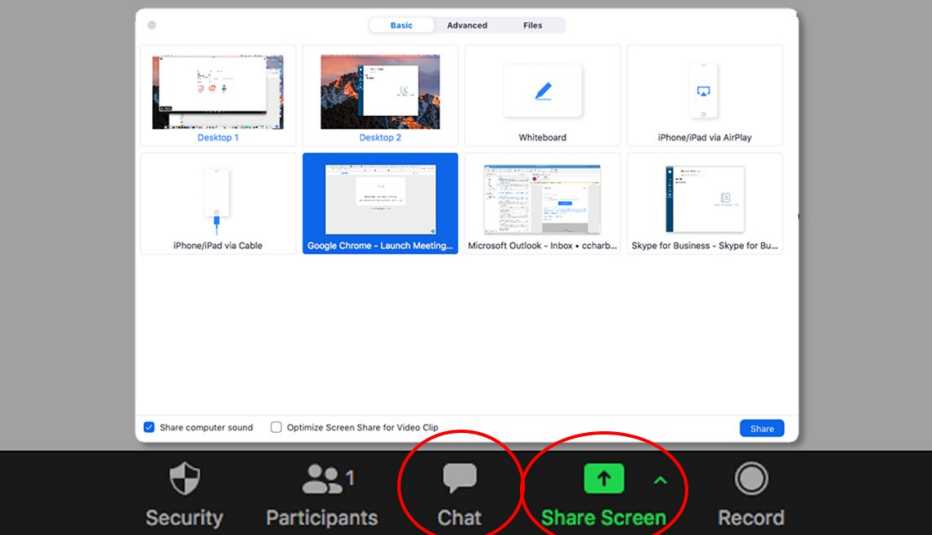
The Chat and Share Screen buttons in desktop view. After you hit Share Screen, choose what you want to share.
AARP
### What if I’m camera shy?
Zoom has introduced an Avatars feature for people who may be reticent about appearing on camera but still want to show off facial expressions and body language. The feature is available on Windows and macOS computers and on iOS mobile devices.
With your web camera on and video enabled, go to the meeting toolbar, select the **Stop Video** menu, and select **Choose Virtual Background** or **Choose Video Filter** option. Navigate to the **Avatars** tab and pick the virtual animal that will represent your Zoom persona.
If you’re feeling playful, you can also add free Zoom filters, from a crown of flowers to a pirate eye patch.

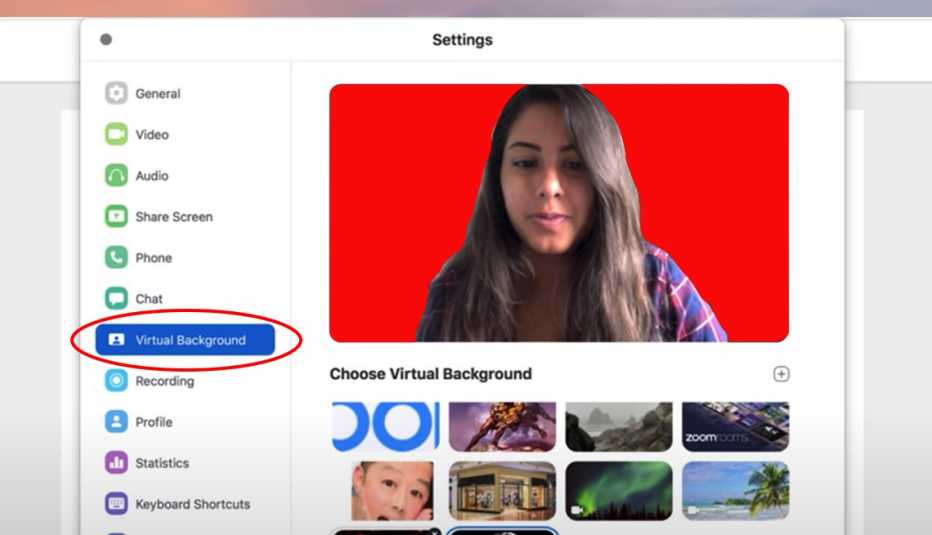
On a desktop, choose “Virtual Background” to choose an image or video as your Zoom background.
Zoom/AARP
If the room behind you is messy or you just feel like transporting yourself to a new place, you can [choose a virtual background](https://www.aarp.org/personal-technology/change-virtual-background/ "changing your virtual background") instead of your own. Once again, with your camera on and video enabled, choose **Stop Video** \| **Virtual Background** \| **Choose Virtual Background**. For a quick change, pick one that comes with the app.
### Is Zoom secure?
Unfortunately, just like everything these days, uninvited guests can bypass the system and crash the party. They’ve been known to intrude on a Zoom session and act inappropriately, called Zoombombing.
Hosts can reduce this likelihood by controlling screen sharing and mute settings and by enabling the “waiting room” feature in which participants are on hold until a call starts. Taking this action prevents people from entering a meeting without the host's permission.
Other pre-meeting security options let you block users from joining from specific domains or require others to join with passcodes. The most recent Zoom, version 5.12, helps bolster security with robust encryption and the promise of increased protections against tampering.
*Editor's note: This article, originally published May 27, 2020, has been revised and updated to reflect new information on various Zoom features.*
*Edward C. Baig is a contributing writer who covers technology and other consumer topics. He previously worked for* USA Today*,* BusinessWeek*,* U.S. News & World Report *and* Fortune*, and is author of* Macs for Dummies *and coauthor of* iPhone for Dummies *and* iPad for Dummies*.*
[%{postComment}%](https://www.aarp.org/personal-technology/how-to-use-zoom/#comments_widget_id)
Unlock Access to AARP Members Edition
[Join AARP to Continue](https://appsec.aarp.org/mem/join?campaignID=UBJFMOA23&intcmp=MEM-ONLY-ACCESS)
Already a Member? [Login](https://secure.aarp.org/applications/user/login?promo=MOA&intcmp=MEM-ONLY-ACCESS)


AARP NEWSLETTERS


Get The Daily for news that matters
**The latest in health, money, entertainment, jobs, and travel each weekday\!**
[See All Newsletters](https://www.aarp.org/newsletters/)
[Privacy Hub](https://www.aarp.org/about-aarp/privacy-policy/ "privacy policy link")


AARP NEWSLETTERS


Get The Daily for news that matters
**The latest in health, money, entertainment, jobs, and travel each weekday\!**
[See All Newsletters](https://www.aarp.org/newsletters/)
[Privacy Hub](https://www.aarp.org/about-aarp/privacy-policy/ "privacy policy link")
More on Personal Technology
[ ](https://www.aarp.org/personal-technology/parents-teens-and-apps/ "What Parents and Grandparents Need to Know about the Perils of Ever-Changing Apps
")
[What Parents and Grandparents Need to Know about the Perils of Ever-Changing Apps](https://www.aarp.org/personal-technology/parents-teens-and-apps/)
[Data sharing among teens, via app companies creates a new level of risk](https://www.aarp.org/personal-technology/parents-teens-and-apps/)
[ ](https://www.aarp.org/personal-technology/identifying-disinformation/ "10 Ways to Spot Fake Videos, Falsehoods on the Internet
")
[10 Ways to Spot Fake Videos, Falsehoods on the Internet](https://www.aarp.org/personal-technology/identifying-disinformation/)
[You can sleuth for the truth as you look at apps, web](https://www.aarp.org/personal-technology/identifying-disinformation/)
[ ](https://www.aarp.org/health/conditions-treatments/info-2020/videoconferencing-hearing-loss.html "Videoconferencing Tips for People With Hearing Loss")
[Videoconferencing Tips for People With Hearing Loss](https://www.aarp.org/health/conditions-treatments/info-2020/videoconferencing-hearing-loss.html)
[A few adjustments can make virtual meetings easier for everyone to follow](https://www.aarp.org/health/conditions-treatments/info-2020/videoconferencing-hearing-loss.html)
{ "maxItems":3, "itemsPerRow":"3", "rows":"4", "loadMore":"6", "adsNum":"0", "resultsLength":"3" }
ARTICLE CONTINUES AFTER ADVERTISEMENT
{ "articlePagePath" :"/content/aarpe/en/home/personal-technology/how-to-use-zoom", "aarpId" : "20065c95c871847eec810f8d729e56c5" "customContainerId" : "" "limit" : "5" "paginationLimit" : "5" "replyLimit" : "2" "paginationReplyLimit" : "5" "sort" : "" "featuredTabActiveThreshold" : "5" }
Benefits Recommended For You
[See All](https://www.aarp.org/membership/benefits/all-offers-a-z/ "See All")
[  Members only Home & Technology AARP Personal Technology Resource Center The latest articles, tips, reviews and videos to help you stay tech savvy](https://www.aarp.org/membership/benefits/tech/aarp-personal-technology-resource-center/)
[  Members only Health & Wellness Hero® Smart Pill Dispenser Up to \$143 off a Hero smart dispenser subscription](https://www.aarp.org/membership/benefits/health/hero-smart-pill-dispenser/)
[  Members only Work & Finances Indeed Career Services: Career Help Get a free instant resume report, a free interview guide, or talk with an Indeed career coach](https://www.aarp.org/membership/benefits/jobs/indeed-career-coaching/)
[  Members only Entertainment Walt Disney World® Resort Up to \$60 off theme park tickets](https://www.aarp.org/membership/benefits/entertainment/walt-disney-world-resort/)
[See All](https://www.aarp.org/membership/benefits/all-offers-a-z/ "See All")
[HOT DEALS](https://www.aarp.org/membership/benefits/hot-deals/ "See All Hot Deals")
SAVE MONEY WITH THESE LIMITED-TIME OFFERS
[See All Hot Deals](https://www.aarp.org/membership/benefits/hot-deals/ "See All Hot Deals")
AARP is a nonprofit, nonpartisan organization that empowers people to choose how they live as they age.
[About Us](https://www.aarp.org/about-aarp/?intcmp=GLOBAL-FTR-LNK-CLK-ABOUT_US-UXDIA)
[Donate](https://action.aarp.org/ADV_Donation_Form?intcmp=GLOBAL-FTR-LNK-CLK-DONATE-UXDIA)
[Volunteer](https://www.aarp.org/volunteer/?intcmp=GLOBAL-FTR-LNK-CLK-VOLUNTEER-UXDIA)
[Membership](https://www.aarp.org/membership/?intcmp=FTR-LINKS-MEM-MB-UXDIA)
[AARP Rewards](https://www.aarp.org/rewards/?intcmp=GLOBAL-FTR-LNK-CLK-REWARDS-UXDIA)
[Advertise with AARP](https://advertise.aarp.org/?intcmp=GLOBAL-FTR-LNK-CLK-ADVERTISE_WITH_AARP-UXDIA)
[Contact Us](https://help.aarp.org/s/article/contact-aarp?intcmp=GLOBAL-FTR-LNK-CLK-CONTACT-UXDIA)
[Careers at AARP](https://careers.aarp.org/careers-home/?intcmp=GLOBAL-FTR-LNK-CLK-CAREERS-UXDIA)
[AARP Services Inc.](https://www.aarp.org/about-aarp/aarp-services/?intcmp=GLOBAL-FTR-LNK-CLK-AARP_SERVICES_INC-UXDIA)
[Policy & Research](https://www.aarp.org/pri/?intcmp=GLOBAL-FTR-LNK-CLK-PRI-UXDIA)
[Newsletters](https://www.aarp.org/newsletters/?intcmp=GLOBAL-FTR-LNK-CLK-NEWSLETTERS-UXDIA)
[AARP Near You](https://www.aarp.org/states/local/?intcmp=GLOBAL-FTR-LNK-CLK-LOCAL-UXDIA)
[AARP En Español](https://www.aarp.org/espanol/?intcmp=GLOBAL-FTR-LNK-CLK-ESPANOL-UXDIA)
[AARP樂齡會](https://chinese.aarp.org/?intcmp=GLOBAL-FTR-LNK-CLK-CHINESE-UXDIA)
[Press Center](https://press.aarp.org/?intcmp=GLOBAL-FTR-LNK-CLK-PRESS_CENTER-UXDIA)
[AARP Foundation](https://www.aarp.org/aarp-foundation/?intcmp=GLOBAL-FTR-LNK-CLK-AARP_FOUNDATION-UXDIA)
[Wish of a Lifetime](https://wishofalifetime.org/?intcmp=GLOBAL-FTR-LNK-CLK-WISHLIFTM-UXDIA)
[Senior Planet \| OATS](https://seniorplanet.org/?intcmp=GLOBAL-FTR-LNK-CLK-SENIORPLANETOATS-UXDIA)
[AgeTech Collaborative™](https://agetechcollaborative.org/?intcmp=GLOBAL-FTR-LNK-CLK-AGETECH-UXDIA)
[Legal Counsel for the Elderly](https://www.aarp.org/legal-counsel-for-elderly/?intcmp=GLOBAL-FTR-LNK-CLK-LEGAL_COUNSEL-UXDIA)
- [Sitemap](https://www.aarp.org/sitemap/?intcmp=GLOBAL-FTR-LNK-CLK-SITEMAP-UXDIA "Sitemap")
- [AARP Privacy Hub](https://www.aarp.org/privacy/?intcmp=GLOBAL-FTR-LNK-CLK-PRIVACYPOLICY-UXDIA "AARP Privacy Hub")
- [Terms of Service](https://www.aarp.org/about-aarp/terms-of-service/?intcmp=GLOBAL-FTR-LNK-CLK-TERMSOFSERVICE-UXDIA "Terms of Service")
- [Accessibility Statement](https://www.aarp.org/about-aarp/accessibility-statement/?intcmp=GLOBAL-FTR-LNK-CLK-ACCESSIBILITY-UXDIA)
- [AARP Rewards Terms & Conditions](https://www.aarp.org/about-aarp/rewards-terms-and-conditions/?intcmp=GLOBAL-FTR-LNK-CLK-REWARDSTERMSCOND-UXDIA "Rewards Terms and Conditions")
- [Copyright Information](https://www.aarp.org/about-aarp/aarp-website-copyright-information/?intcmp=GLOBAL-FTR-LNK-CLK-COPYRIGHT-UXDIA "Copyright Information")
- [Vulnerability Disclosure Program](https://www.aarp.org/about-aarp/vulnerability-disclosure-program/?intcmp=GLOBAL-FTR-LNK-CLK-ACCESSIBILITY-UXDIA)
- [Ad Choices](http://optout.aboutads.info/ "Ad Choices")
- [Your Privacy Choices](https://www.aarp.org/privacy/?intcmp=GLOBAL-FTR-LNK-CLK-PRIVACYPOLICY-UXDIA#anchor-privacy "DO NOT SELL MY PERSONAL INFORMATION Your California Privacy Rights")
- [Facebook](https://www.facebook.com/AARP)
- [Twitter](https://twitter.com/AARP)
- [Instagram](https://www.instagram.com/aarp/)
- [LinkedIn](https://www.linkedin.com/company/aarp)
**0** |
| Readable Markdown | How to Use Zoom to Stay Connected
Zoom became synonymous with keeping businesses running during the pandemic, and the name alone became a buzzword for all means of communicating outside of quarantine.
But videoconferencing hasn’t lost its luster. Folks, including those 50 and far older, continue to rely on Zoom for their everyday connections when distance, time and convenience call for face-to-face interaction.
Other [video chat options](https://www.aarp.org/personal-technology/video-chat-apps/ "video chat apps") are available, including Cisco Webex, [Facebook Messenger](https://videos.aarp.org/detail/video/6147828477001/how-to-video-chat-on-facebook "how to use facebook video chat"), [FaceTime](https://www.aarp.org/personal-technology/how-to-facetime/ "how to facetime"), Google Hangouts, Microsoft Teams, and [Skype](https://videos.aarp.org/detail/video/6143565225001/how-to-video-call-on-skype "using skype for video calls"), but many Zoomers choose the service because of its relative simplicity. Click a link and you’re attending a book club meeting, getting personal pet training from your breeder or just schmoozing with friends.
Los Angeles-based physician Steven Goldberg, 73, a self-described “sober alcoholic,” said that even today, being able “to find a Zoom Alcoholics Anonymous meeting at any hour of the day” is still going strong.
If you're unsure about Zoom — and maybe a little intimidated — we're here to help.
### What Zoom costs today
A basic Zoom membership is free, allowing you to host a meeting of up to 100 attendees for up to 40 minutes. Participants can join a Zoom meeting from their computer, smartphone or tablet.
With a free Zoom account, people can sign back in after 40 minutes or another host can start a second meeting. But that can be a bit of a hassle.
Pay plans that let meetings extend up to 30 hours, among other added benefits, start at \$14.99 a month or \$149.90 a year, per user. The Pro plan allows up to nine licensed accounts and lets you conduct meetings that run for up to 30 hours. Zoom has higher-priced plans for large businesses.
### How to get started
Zoom works on Windows PCs, Macs, smartphones and tablets, with some interface and feature distinctions among devices. You can [download desktop software](https://zoom.us/ "zoom website") for Zoom on a computer or get the iOS and Android app versions in the Apple App Store or Google Play Store.
You also can participate in a Zoom call through your web browser without having any software installed on your device, albeit with more limited functionality. Zoom continues to add new features to the browser. For example, you can now schedule a one-time or recurring meeting from the web browser.


This story was produced in collaboration with [Senior Planet](https://seniorplanet.org/ "senior planet"), which helps people 60 and older learn technology skills to find community, reach their goals and thrive in the digital world. Senior Planet is part of Older Adults Technology Services (OATS) from AARP, which teaches more than [50 free virtual programs](https://seniorplanet.org/classes/ "free virtual programs") each week on a wide range of topics, such as getting in shape, joining telemedicine appointments, listening to podcasts, making friends and saving money.
Senior Planet recently introduced findings of a study it conducted at various times throughout the pandemic that reinforces the power of maintaining social connections for older adults using technology like Zoom. The nonprofit presented a training course called Android Essentials twice a week over Zoom to a group of low-income New York City adults 60 and older, who were each given a free tablet. The study compared the group to a similarly aged control group of people who were issued tablets but didn’t receive the Senior Planet training.
**The findings:** Those who took the course were far more likely to use the tablet to expand their social connections. More than half, 52.6 percent, of the participants indicated that they connected with someone new, compared with 25.8 percent who didn’t take the course. About 38 percent of participants in the training group reported that they had a video call with someone new, compared with 22 percent of folks in the other group.
While you don’t need an account to join a Zoom meeting, you’ll need one to host your own conference. And you may have to register to participate in webinars or other sessions. Some hosts restrict access to people who have created an authorized profile under a [Zoom account](https://zoom.us/signup#/signup "signing up for zoom").
Keep in mind that whether you use Zoom through a cellphone or on your home Wi-Fi, you'll [need a decent speed](https://www.aarp.org/personal-technology/internet-speed-test/ "internet speed test").
“We've struggled with some people who don't have a powerful connection. And so they haven't had as much access,” says Paula Rochelle, 77, of San Jose, California, who learned the technology in 2020 to stay active in the groups she's involved in. That includes organizations from the activist Raging Grannies to Toastmasters.
More recently, Rochelle added a twice-weekly band-and-weight exercise session on Zoom with women in their 70s and 80s from California, Montana, Utah, Virginia and Washington. “We call it ‘pre-hab’ exercise instead of ‘rehab’ exercise since several of us have had incidents or injuries that have put us in rehab.”
### How do I join a Zoom session?
An invitation typically arrives via email or text. Click the **Join Zoom Meeting** link in the body of the message. You'll be prompted to download Zoom or to launch the app if you already have it. You then just choose to join a meeting with or without video.
If the host hasn't started the meeting yet, you'll have to wait on hold. Use this time to test your computer audio and video settings, typically through the internal microphone and speaker on your system.
As part of a test, Zoom will play an audio tone and record your voice — you will know something is off if you can't hear the tone or your voice. A video preview window lets you see how you'll look to others.
Tip: If you plan on using video, make sure light is shining on you, rather than coming from behind.


On a desktop, Zoom will play a tone and record your voice as part of a mic and speakers test when you join a meeting. A video preview shows how you’ll look to others.
Zoom/AARP
You can reach the platform in other ways too. If you're attending a Zoom webinar, click the link for the meeting that has likely been provided on the sponsor's website. You can also join directly from the Zoom application. Click the **Meetings** tab to check out any scheduled events and select **Join** at the appointed time.
You can join meetings by telephone using the teleconferencing number and meeting ID that the host supplies. Some also require a password, which the host will share.
"It's really easy,” says Alyce Appleman Mariam, 62, whose husband, Tom, taught her to use Zoom. “My 80-something-year-old mom uses it."


Speaker view, on the left, and gallery view. The control to toggle between views is toward the top right corner of the Zoom window on laptops and desktops.
Courtesy of Zoom
### How will I see other people?
Zoom has two common layouts: speaker view, in which the active speaker takes up the entire screen; or gallery view, which shows condensed photos of participants laid out in a grid pattern. On a laptop or desktop computer, the control to toggle between these views is at the top right corner of the Zoom window.
On a tablet, it's on the upper left. You may have to gently tap the screen to see it.
You'll see all participants' live video feeds if they've enabled their camera. In the absence of video, you may see a dark rectangle with the person's name or initials or new animal avatars used to represent them.
### Should I mute my microphone?
Etiquette suggests that you should mute yourself if you're not about to speak, especially if you’re with other people in the chat. Barking dogs and ringing doorbells are a distraction — though Zoom lets you filter out background noise in the settings.
To do this, press the **Mute** button when you’re not speaking. To raise your hand, click on **More** in the top right corner of the Zoom window on laptops and desktops.
"I think that the mute button is everybody’s friend,” says Marisa Giorgi, director of curriculum development at Senior Planet.
You'll know that the mic is muted when a red slash appears on top of the microphone icon and the word **Mute** changes to **Unmute**. Remember to tap or click the icon to unmute when it's time for you to speak.
**Worth noting:** Hosts have the power to mute all participants. To be recognized to speak in a webinar, you may be able to tap or click the **Raise Hand** icon, but the host can disable this feature.
### How do I host a Zoom meeting?
Make sure the app is installed and enter your account credentials. Select **New Meeting** to start an instant meeting.
Check that the **Video On** switch is enabled to proceed with video. Click **Participants** to invite contacts or others via email or texts. To arrange a call for a later time, click **Schedule** and choose when the meeting will occur, and among other options, determine whether invitees will need a password to join.


AARP
### What about chatting and screen sharing?
Another way to contribute to the conversation is to type comments or questions in the chat box. You can enter comments for all to see or direct them to a single individual.
Be careful, though. While only the person you’re sending a message to will see a one-to-one comment during the meeting, the host can download the chat transcript once it’s over. Avoid snide remarks you wouldn't want to be seen later.
“We remind people that it's only private in that moment,” says Breana Clark, who runs Zoom training sessions for Senior Planet.
If you need to collaborate or want to show something — photos, legal documents or other documents stored on your computer — you can use a **Share Screen** function. Note that for security reasons, hosts can prevent users from sharing their screens.


The Chat and Share Screen buttons in desktop view. After you hit Share Screen, choose what you want to share.
AARP
### What if I’m camera shy?
Zoom has introduced an Avatars feature for people who may be reticent about appearing on camera but still want to show off facial expressions and body language. The feature is available on Windows and macOS computers and on iOS mobile devices.
With your web camera on and video enabled, go to the meeting toolbar, select the **Stop Video** menu, and select **Choose Virtual Background** or **Choose Video Filter** option. Navigate to the **Avatars** tab and pick the virtual animal that will represent your Zoom persona.
If you’re feeling playful, you can also add free Zoom filters, from a crown of flowers to a pirate eye patch.


On a desktop, choose “Virtual Background” to choose an image or video as your Zoom background.
Zoom/AARP
If the room behind you is messy or you just feel like transporting yourself to a new place, you can [choose a virtual background](https://www.aarp.org/personal-technology/change-virtual-background/ "changing your virtual background") instead of your own. Once again, with your camera on and video enabled, choose **Stop Video** \| **Virtual Background** \| **Choose Virtual Background**. For a quick change, pick one that comes with the app.
### Is Zoom secure?
Unfortunately, just like everything these days, uninvited guests can bypass the system and crash the party. They’ve been known to intrude on a Zoom session and act inappropriately, called Zoombombing.
Hosts can reduce this likelihood by controlling screen sharing and mute settings and by enabling the “waiting room” feature in which participants are on hold until a call starts. Taking this action prevents people from entering a meeting without the host's permission.
Other pre-meeting security options let you block users from joining from specific domains or require others to join with passcodes. The most recent Zoom, version 5.12, helps bolster security with robust encryption and the promise of increased protections against tampering.
*Editor's note: This article, originally published May 27, 2020, has been revised and updated to reflect new information on various Zoom features.*
*Edward C. Baig is a contributing writer who covers technology and other consumer topics. He previously worked for* USA Today*,* BusinessWeek*,* U.S. News & World Report *and* Fortune*, and is author of* Macs for Dummies *and coauthor of* iPhone for Dummies *and* iPad for Dummies*.* |
| Shard | 135 (laksa) |
| Root Hash | 2223325636571181335 |
| Unparsed URL | org,aarp!www,/personal-technology/how-to-use-zoom/ s443 |