ℹ️ Skipped - page is already crawled
| Filter | Status | Condition | Details |
|---|---|---|---|
| HTTP status | PASS | download_http_code = 200 | HTTP 200 |
| Age cutoff | PASS | download_stamp > now() - 6 MONTH | 0.1 months ago |
| History drop | PASS | isNull(history_drop_reason) | No drop reason |
| Spam/ban | PASS | fh_dont_index != 1 AND ml_spam_score = 0 | ml_spam_score=0 |
| Canonical | PASS | meta_canonical IS NULL OR = '' OR = src_unparsed | Not set |
| Property | Value |
|---|---|
| URL | https://utorrent.macupdate.com/ |
| Last Crawled | 2026-04-03 14:04:52 (3 days ago) |
| First Indexed | 2024-08-27 00:20:18 (1 year ago) |
| HTTP Status Code | 200 |
| Meta Title | Download uTorrent for Mac | MacUpdate |
| Meta Description | Download the latest version of uTorrent for Mac for free. Read 240 user reviews and compare with similar apps on MacUpdate. |
| Meta Canonical | null |
| Boilerpipe Text | uTorrent overview
uTorrent
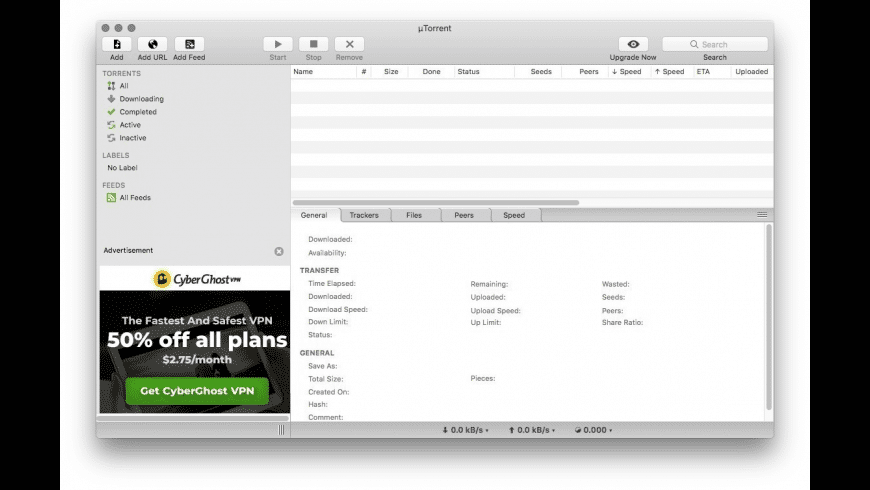
is a lightweight BitTorrent client. While the interface has been polished and the overall size remains smaller than your average Facebook pic, uTorrent is now packed with some insanely powerful features:
Find:
Search for torrents or browse artist-sponsored content, directly from your software interface.
Get:
Download torrents and manage your files in the torrent manager.
Play:
It's better than ever with buttons for Play and Stream right where you can see them.
What’s new in version 45548
Version 1.8.7 (build 45548):
Note:
This product is not compatible with macOS Catalina and later.
Minor bug fixes
View older uTorrent versions
FAQ
How to install uTorrent on Mac
Browse to the uTorrent download link and download the uTorrent for Mac installation file.
Once downloaded, find the .dmg file, usually in your Downloads folder.
Run the installation file. After you accept the EULA and click agree the installation will start.
The installation will complete automatically.
You can now open the uTorrent app by double clicking on the icon.
How to update uTorrent on Mac
Simply download the latest version of the uTorrent app, download it and install it. The latest version of uTorrent is currently 1.8.7 build 45548. This is a 32bit version and does not work on Catalina as that version of macOS only supports 64bit applications. There are currently no plans for uTorrent to write a 64bit version. There is an alternative 64bit compatible version called uTorrent Web.
Is uTorrent safe for Mac
uTorrent is used by millions of users around the world and the application is safe to download and use. Torrents generally have a bad reputation because of the potential that they have for carrying malware and viruses, but this is not a reflection of uTorrent itself. Users should only download trustworthy torrents from legitimate sources to protect themselves from any unwanted malware and viruses.
How to speed up uTorrent
The uTorrent client, and other torrent clients, operate on a peer-to-peer network. To improve your uTorrent client’s performance, you need to limit the upload rate of your uTorrent client so that seeding a completed torrent does not use all of your bandwidth. You should enable multiple torrents depending on your preference, and make sure that the download rate is set to unlimited.
How to remove ads from uTorrent
There are 2 ways of disabling uTorrent ads. The first way is to set some flags to false in Advanced Settings within the uTorrent application. To disable the sidebar ad, click on options and deselect the “Show information about Plus” option. To disable the ‘featured’ ad banner, click on the Preferences icon, click on Advanced, and then change the value of sponsored_torrent_offer_enabled to false.
How to stop uTorrent from opening on startup
Open the uTorrent client application.
Right click on the dock icon of the uTorrent application.
A menu will pop up with several items to select.
Select the Options line.
You will see an option called ‘Open at Login’.
If this option is ticked, simply click on it to untick it.
uTorrent will no longer open when the operating system starts.
How to stop seeding on uTorrent
There are 3 ways of preventing a torrent from seeding
Once a torrent has finished downloading then remove the torrent from the uTorrent queue. Be sure to keep the data of the torrent and only remove the torrent itself.
uTorrent’s preferences allow you to set the maximum upload speed to 1kbps. This won’t stop torrent seeding but reduces the upload speed to almost nothing.
In uTorrent’s preferences set the number of upload slots per torrent to 0.
How to uninstall uTorrent from Mac
Make sure that you have closed the uTorrent application.
Locate the uTorrent icon in your Applications folder.
Drag the uTorrent icon into the Trash icon in the dock, or right lick on the uTorrent icon and select ‘Move to Trash’.
Next, click on the Trash icon and then select Empty Trash to remove uTorrent completely.
You have now uninstalled uTorrent from your Mac.
App Specs
Updated on
Jul 05 2020
License
Free
Monetization
Absolutely Free
Size
4.3 MB
Architecture
Intel 32
OS
Mac OS X 10.6
or later
Downloads
421448
Developer
Go to developer’s website |
| Markdown | We stand with Ukraine to help keep people safe. [Join us](https://uadroneschool.com/)
[ MacUpdate](https://www.macupdate.com/)
[All apps](https://utorrent.macupdate.com/find/mac)
[All apps](https://utorrent.macupdate.com/find/mac)
[Categories](https://utorrent.macupdate.com/)
[AI](https://www.macupdate.com/explore/categories/ai)
[Browsing](https://www.macupdate.com/explore/categories/browsing)
[Safari Extensions](https://www.macupdate.com/explore/categories/browsing/safari-extensions)
[Business](https://www.macupdate.com/explore/categories/business)
[CRM](https://www.macupdate.com/explore/categories/business/crm)[Inventory Management](https://www.macupdate.com/explore/categories/business/inventory-management)[Project Management](https://www.macupdate.com/explore/categories/business/project-management)[SEO](https://www.macupdate.com/explore/categories/business/seo)
[Customization](https://www.macupdate.com/explore/categories/customization)
[Cursor](https://www.macupdate.com/explore/categories/customization/cursor)[Dashboard Widgets](https://www.macupdate.com/explore/categories/customization/dashboard-widgets)[Desktop](https://www.macupdate.com/explore/categories/customization/desktop)[Keyboard & Touch Bar](https://www.macupdate.com/explore/categories/customization/keyboard-touch-bar)[Screensavers](https://www.macupdate.com/explore/categories/customization/screensavers)[Wallpapers](https://www.macupdate.com/explore/categories/customization/wallpapers)
[Developer Tools](https://www.macupdate.com/explore/categories/developer-tools)
[AppleScript](https://www.macupdate.com/explore/categories/developer-tools/applescript)[Compilers & Interpreters](https://www.macupdate.com/explore/categories/developer-tools/compilers-interpreters)[Components & Libraries](https://www.macupdate.com/explore/categories/developer-tools/components-libraries)[Database](https://www.macupdate.com/explore/categories/developer-tools/database)[Debugging](https://www.macupdate.com/explore/categories/developer-tools/debugging)[IDE Software](https://www.macupdate.com/explore/categories/developer-tools/ide-software)[Manuals & Tutorials](https://www.macupdate.com/explore/categories/developer-tools/manuals-tutorials)[Programming Languages](https://www.macupdate.com/explore/categories/developer-tools/programming-languages)[Source Code Management](https://www.macupdate.com/explore/categories/developer-tools/source-code-management)[Web Development](https://www.macupdate.com/explore/categories/developer-tools/web-development)
[Education](https://www.macupdate.com/explore/categories/education)
[E-Readers](https://www.macupdate.com/explore/categories/education/e-readers)[Geography](https://www.macupdate.com/explore/categories/education/geography)[Language Learning](https://www.macupdate.com/explore/categories/education/language-learning)[Learning](https://www.macupdate.com/explore/categories/education/learning)[Math](https://www.macupdate.com/explore/categories/education/math)[Medical Education](https://www.macupdate.com/explore/categories/education/medical-education)[Music Education](https://www.macupdate.com/explore/categories/education/music-education)[Reference Management](https://www.macupdate.com/explore/categories/education/reference-management)[Science](https://www.macupdate.com/explore/categories/education/science)[Student](https://www.macupdate.com/explore/categories/education/student)[Translation](https://www.macupdate.com/explore/categories/education/translation)
[Finance](https://www.macupdate.com/explore/categories/finance)
[Accounting](https://www.macupdate.com/explore/categories/finance/accounting)[Banking](https://www.macupdate.com/explore/categories/finance/banking)[Billing](https://www.macupdate.com/explore/categories/finance/billing)[Calculators & Converters](https://www.macupdate.com/explore/categories/finance/calculators-converters)[Cryptocurrency](https://www.macupdate.com/explore/categories/finance/cryptocurrency)[Financial Analysis](https://www.macupdate.com/explore/categories/finance/financial-analysis)[Investment Management](https://www.macupdate.com/explore/categories/finance/investment-management)[Personal Finance](https://www.macupdate.com/explore/categories/finance/personal-finance)[Spreadsheet](https://www.macupdate.com/explore/categories/finance/spreadsheet)[Trading](https://www.macupdate.com/explore/categories/finance/trading)
[Games](https://www.macupdate.com/explore/categories/games)
[Action](https://www.macupdate.com/explore/categories/games/action)[Adventure](https://www.macupdate.com/explore/categories/games/adventure)[Arcade](https://www.macupdate.com/explore/categories/games/arcade)[Board Games](https://www.macupdate.com/explore/categories/games/board-games)[Card Games](https://www.macupdate.com/explore/categories/games/card-games)[Gaming Tools & Utilities](https://www.macupdate.com/explore/categories/games/gaming-tools-utilities)[Puzzles](https://www.macupdate.com/explore/categories/games/puzzles)[Racing](https://www.macupdate.com/explore/categories/games/racing)[Shooting](https://www.macupdate.com/explore/categories/games/shooting)[Simulation](https://www.macupdate.com/explore/categories/games/simulation)[Sports](https://www.macupdate.com/explore/categories/games/sports)[Strategy](https://www.macupdate.com/explore/categories/games/strategy)[War](https://www.macupdate.com/explore/categories/games/war)[Word Games](https://www.macupdate.com/explore/categories/games/word-games)
[Graphic Design](https://www.macupdate.com/explore/categories/graphic-design)
[3D Modeling](https://www.macupdate.com/explore/categories/graphic-design/3d-modeling)[Animation](https://www.macupdate.com/explore/categories/graphic-design/animation)[Authorship & Copyright](https://www.macupdate.com/explore/categories/graphic-design/authorship-copyright)[CAD Software](https://www.macupdate.com/explore/categories/graphic-design/cad-software)[Desktop Publishing](https://www.macupdate.com/explore/categories/graphic-design/desktop-publishing)[Diagrams & Graphs](https://www.macupdate.com/explore/categories/graphic-design/diagrams-graphs)[Fonts](https://www.macupdate.com/explore/categories/graphic-design/fonts)[Icons](https://www.macupdate.com/explore/categories/graphic-design/icons)[Illustration](https://www.macupdate.com/explore/categories/graphic-design/illustration)[PDF](https://www.macupdate.com/explore/categories/graphic-design/pdf)[Photoshop Plug-ins](https://www.macupdate.com/explore/categories/graphic-design/photoshop-plug-ins)
[Health & Fitness](https://www.macupdate.com/explore/categories/health-fitness)
[Meditation & Relaxation](https://www.macupdate.com/explore/categories/health-fitness/meditation-relaxation)[Nutrition](https://www.macupdate.com/explore/categories/health-fitness/nutrition)[Workout & Fitness](https://www.macupdate.com/explore/categories/health-fitness/workout-fitness)
[Internet Utilities](https://www.macupdate.com/explore/categories/internet-utilities)
[Cloud Storage](https://www.macupdate.com/explore/categories/internet-utilities/cloud-storage)[Download Managers](https://www.macupdate.com/explore/categories/internet-utilities/download-managers)[Email Clients](https://www.macupdate.com/explore/categories/internet-utilities/email-clients)[Email Converters](https://www.macupdate.com/explore/categories/internet-utilities/email-converters)[Email Servers](https://www.macupdate.com/explore/categories/internet-utilities/email-servers)[File Sharing](https://www.macupdate.com/explore/categories/internet-utilities/file-sharing)[FTP Software](https://www.macupdate.com/explore/categories/internet-utilities/ftp-software)[Internet Radio Players](https://www.macupdate.com/explore/categories/internet-utilities/internet-radio-players)[Messengers](https://www.macupdate.com/explore/categories/internet-utilities/messengers)[Newsreaders](https://www.macupdate.com/explore/categories/internet-utilities/newsreaders)[Online TV Players](https://www.macupdate.com/explore/categories/internet-utilities/online-tv-players)[Remote Management](https://www.macupdate.com/explore/categories/internet-utilities/remote-management)[RSS](https://www.macupdate.com/explore/categories/internet-utilities/rss)[Server Software](https://www.macupdate.com/explore/categories/internet-utilities/server-software)[Social Network Software](https://www.macupdate.com/explore/categories/internet-utilities/social-network-software)
[Lifestyle & Hobby](https://www.macupdate.com/explore/categories/lifestyle-hobby)
[Barcode](https://www.macupdate.com/explore/categories/lifestyle-hobby/barcode)[Cooking](https://www.macupdate.com/explore/categories/lifestyle-hobby/cooking)[Food & Drink](https://www.macupdate.com/explore/categories/lifestyle-hobby/food-drink)[Genealogy](https://www.macupdate.com/explore/categories/lifestyle-hobby/genealogy)[Kids](https://www.macupdate.com/explore/categories/lifestyle-hobby/kids)[Religion](https://www.macupdate.com/explore/categories/lifestyle-hobby/religion)[Shopping](https://www.macupdate.com/explore/categories/lifestyle-hobby/shopping)[Sports](https://www.macupdate.com/explore/categories/lifestyle-hobby/sports)[Transport](https://www.macupdate.com/explore/categories/lifestyle-hobby/transport)[Weather](https://www.macupdate.com/explore/categories/lifestyle-hobby/weather)
[Medical Software](https://www.macupdate.com/explore/categories/medical-software)
[Music & Audio](https://www.macupdate.com/explore/categories/music-audio)
[Audio Converters](https://www.macupdate.com/explore/categories/music-audio/audio-converters)[Audio Players](https://www.macupdate.com/explore/categories/music-audio/audio-players)[Audio Plug-ins](https://www.macupdate.com/explore/categories/music-audio/audio-plug-ins)[Audio Production](https://www.macupdate.com/explore/categories/music-audio/audio-production)[Audio Recording](https://www.macupdate.com/explore/categories/music-audio/audio-recording)[Audio Streaming](https://www.macupdate.com/explore/categories/music-audio/audio-streaming)[DJ Mixing Software](https://www.macupdate.com/explore/categories/music-audio/dj-mixing-software)[Music Management](https://www.macupdate.com/explore/categories/music-audio/music-management)[Radio](https://www.macupdate.com/explore/categories/music-audio/radio)
[Photography](https://www.macupdate.com/explore/categories/photography)
[Album & Collage Makers](https://www.macupdate.com/explore/categories/photography/album-collage-makers)[Image Capture](https://www.macupdate.com/explore/categories/photography/image-capture)[Image Converters](https://www.macupdate.com/explore/categories/photography/image-converters)[Photo Editors](https://www.macupdate.com/explore/categories/photography/photo-editors)[Photo Management](https://www.macupdate.com/explore/categories/photography/photo-management)[Photo Viewers](https://www.macupdate.com/explore/categories/photography/photo-viewers)
[Productivity](https://www.macupdate.com/explore/categories/productivity)
[Calendars](https://www.macupdate.com/explore/categories/productivity/calendars)[Contact Management](https://www.macupdate.com/explore/categories/productivity/contact-management)[Mind Mapping](https://www.macupdate.com/explore/categories/productivity/mind-mapping)[Personal Information Managers](https://www.macupdate.com/explore/categories/productivity/personal-information-managers)[Presentations](https://www.macupdate.com/explore/categories/productivity/presentations)[Reminders](https://www.macupdate.com/explore/categories/productivity/reminders)[Text Editors](https://www.macupdate.com/explore/categories/productivity/text-editors)[Time Management](https://www.macupdate.com/explore/categories/productivity/time-management)[Word Processing](https://www.macupdate.com/explore/categories/productivity/word-processing)
[Security](https://www.macupdate.com/explore/categories/security)
[Access Control](https://www.macupdate.com/explore/categories/security/access-control)[Ad Blockers](https://www.macupdate.com/explore/categories/security/ad-blockers)[Antiviruses](https://www.macupdate.com/explore/categories/security/antiviruses)[Encryption & Decryption](https://www.macupdate.com/explore/categories/security/encryption-decryption)[Firewall](https://www.macupdate.com/explore/categories/security/firewall)[Locker Apps](https://www.macupdate.com/explore/categories/security/locker-apps)[Network Security](https://www.macupdate.com/explore/categories/security/network-security)[Parental Control](https://www.macupdate.com/explore/categories/security/parental-control)[Password Generators](https://www.macupdate.com/explore/categories/security/password-generators)[Password Managers](https://www.macupdate.com/explore/categories/security/password-managers)[Privacy](https://www.macupdate.com/explore/categories/security/privacy)[VPN](https://www.macupdate.com/explore/categories/security/vpn)
[System Utilities](https://www.macupdate.com/explore/categories/system-utilities)
[Automation](https://www.macupdate.com/explore/categories/system-utilities/automation)[Backup](https://www.macupdate.com/explore/categories/system-utilities/backup)[Cleaners](https://www.macupdate.com/explore/categories/system-utilities/cleaners)[Clocks & Alarms](https://www.macupdate.com/explore/categories/system-utilities/clocks-alarms)[Compression](https://www.macupdate.com/explore/categories/system-utilities/compression)[Contextual Menus](https://www.macupdate.com/explore/categories/system-utilities/contextual-menus)[Diagnostic Software](https://www.macupdate.com/explore/categories/system-utilities/diagnostic-software)[Disk Utilities](https://www.macupdate.com/explore/categories/system-utilities/disk-utilities)[Emulation](https://www.macupdate.com/explore/categories/system-utilities/emulation)[File Management](https://www.macupdate.com/explore/categories/system-utilities/file-management)[Font Managers](https://www.macupdate.com/explore/categories/system-utilities/font-managers)[Maintenance & Optimization](https://www.macupdate.com/explore/categories/system-utilities/maintenance-optimization)[Network Software](https://www.macupdate.com/explore/categories/system-utilities/network-software)[Printer & Scanner Drivers](https://www.macupdate.com/explore/categories/system-utilities/printer-scanner-drivers)[Recovery](https://www.macupdate.com/explore/categories/system-utilities/recovery)[Synchronization](https://www.macupdate.com/explore/categories/system-utilities/synchronization)[USB Drivers](https://www.macupdate.com/explore/categories/system-utilities/usb-drivers)[Virtualization](https://www.macupdate.com/explore/categories/system-utilities/virtualization)
[Travel](https://www.macupdate.com/explore/categories/travel)
[Navigation](https://www.macupdate.com/explore/categories/travel/navigation)[Transport Planning](https://www.macupdate.com/explore/categories/travel/transport-planning)[Trip Planners](https://www.macupdate.com/explore/categories/travel/trip-planners)
[Video](https://www.macupdate.com/explore/categories/video)
[DVD Software](https://www.macupdate.com/explore/categories/video/dvd-software)[Video Converters](https://www.macupdate.com/explore/categories/video/video-converters)[Video Editors](https://www.macupdate.com/explore/categories/video/video-editors)[Video Players](https://www.macupdate.com/explore/categories/video/video-players)[Video Recording](https://www.macupdate.com/explore/categories/video/video-recording)[Video Streaming](https://www.macupdate.com/explore/categories/video/video-streaming)
[Articles](https://utorrent.macupdate.com/)
[Best Apps](https://www.macupdate.com/best-picks)[Reviews](https://www.macupdate.com/reviews)[Comparisons](https://www.macupdate.com/comparisons)[How-To](https://www.macupdate.com/how-to)
Sign in
Create account
When you purchase through links on our site, we may earn an affiliate commission
[Home](https://www.macupdate.com/)[Internet Utilities](https://www.macupdate.com/explore/categories/internet-utilities)[Download Managers](https://www.macupdate.com/explore/categories/internet-utilities/download-managers)uTorrent

# uTorrent for Mac
Lightweight BitTorrent client.
Free
In English
[Version 45548]("45548")
Version 45548
[See previous versions](https://utorrent.macupdate.com/app/mac/29824/utorrent/old-versions)
[Download (4.3 MB)](https://download.macupdate.com/app/mac/29824/utorrent/download)
3\.1
Based on 169 user rates
[Read reviews & comments](https://utorrent.macupdate.com/#comments)
[Follow this app](https://utorrent.macupdate.com/)[Developer website](https://www.utorrent.com/mac-index)
## uTorrent overview
**uTorrent** is a lightweight BitTorrent client. While the interface has been polished and the overall size remains smaller than your average Facebook pic, uTorrent is now packed with some insanely powerful features:
- **Find:** Search for torrents or browse artist-sponsored content, directly from your software interface.
- **Get:** Download torrents and manage your files in the torrent manager.
- **Play:** It's better than ever with buttons for Play and Stream right where you can see them.
## What’s new in version 45548
Version 1.8.7 (build 45548):
**Note:** This product is not compatible with macOS Catalina and later.
- Minor bug fixes
[View older uTorrent versions](https://utorrent.macupdate.com/app/mac/29824/utorrent/old-versions)
## FAQ
How to install uTorrent on Mac
1. Browse to the uTorrent download link and download the uTorrent for Mac installation file.
2. Once downloaded, find the .dmg file, usually in your Downloads folder.
3. Run the installation file. After you accept the EULA and click agree the installation will start.
4. The installation will complete automatically.
5. You can now open the uTorrent app by double clicking on the icon.
How to update uTorrent on Mac
Simply download the latest version of the uTorrent app, download it and install it. The latest version of uTorrent is currently 1.8.7 build 45548. This is a 32bit version and does not work on Catalina as that version of macOS only supports 64bit applications. There are currently no plans for uTorrent to write a 64bit version. There is an alternative 64bit compatible version called uTorrent Web.
Is uTorrent safe for Mac
uTorrent is used by millions of users around the world and the application is safe to download and use. Torrents generally have a bad reputation because of the potential that they have for carrying malware and viruses, but this is not a reflection of uTorrent itself. Users should only download trustworthy torrents from legitimate sources to protect themselves from any unwanted malware and viruses.
How to speed up uTorrent
The uTorrent client, and other torrent clients, operate on a peer-to-peer network. To improve your uTorrent client’s performance, you need to limit the upload rate of your uTorrent client so that seeding a completed torrent does not use all of your bandwidth. You should enable multiple torrents depending on your preference, and make sure that the download rate is set to unlimited.
How to remove ads from uTorrent
There are 2 ways of disabling uTorrent ads. The first way is to set some flags to false in Advanced Settings within the uTorrent application. To disable the sidebar ad, click on options and deselect the “Show information about Plus” option. To disable the ‘featured’ ad banner, click on the Preferences icon, click on Advanced, and then change the value of sponsored\_torrent\_offer\_enabled to false.
How to stop uTorrent from opening on startup
1. Open the uTorrent client application.
2. Right click on the dock icon of the uTorrent application.
3. A menu will pop up with several items to select.
4. Select the Options line.
5. You will see an option called ‘Open at Login’.
6. If this option is ticked, simply click on it to untick it.
7. uTorrent will no longer open when the operating system starts.
How to stop seeding on uTorrent
There are 3 ways of preventing a torrent from seeding
1. Once a torrent has finished downloading then remove the torrent from the uTorrent queue. Be sure to keep the data of the torrent and only remove the torrent itself.
2. uTorrent’s preferences allow you to set the maximum upload speed to 1kbps. This won’t stop torrent seeding but reduces the upload speed to almost nothing.
3. In uTorrent’s preferences set the number of upload slots per torrent to 0.
How to uninstall uTorrent from Mac
1. Make sure that you have closed the uTorrent application.
2. Locate the uTorrent icon in your Applications folder.
3. Drag the uTorrent icon into the Trash icon in the dock, or right lick on the uTorrent icon and select ‘Move to Trash’.
4. Next, click on the Trash icon and then select Empty Trash to remove uTorrent completely.
5. You have now uninstalled uTorrent from your Mac.
## App Specs
- 
- 
- ### Updated on
Jul 05 2020
- ### License
Free
- ### Monetization
- Absolutely Free
- ### Size
4\.3 MB
- ### Architecture
- Intel 32
- ### OS
Mac OS X 10.6 or later
- ### Downloads
421448
- ### Developer
[Go to developer’s website](https://www.utorrent.com/mac-index)
### How would you rate uTorrent?

## uTorrent for Mac
Free
In English
Version 45548
[Download (4.3 MB)](https://download.macupdate.com/app/mac/29824/utorrent/download)
Write a detailed review about uTorrent
Write review
3\.1
### (240 Reviews of uTorrent)
- Comments
- User Ratings
[](https://member.macupdate.com/member/profile/hadeelkhalil92)
[hadeelkhalil92](https://member.macupdate.com/member/profile/hadeelkhalil92 "hadeelkhalil92")
Apr 29 2021
45548
0\.0
Apr 29 2021
0\.0
Version: 45548
hi, after download it said that the developer needs to update the application, could you please do that ? thanks,
1
0
Reply
[](https://member.macupdate.com/member/profile/pubuduimesh295)
[pubuduimesh295](https://member.macupdate.com/member/profile/pubuduimesh295 "pubuduimesh295")
Feb 6 2021
45548
0\.0
Feb 6 2021
0\.0
Version: 45548
Superb\!
Reply
[](https://member.macupdate.com/member/profile/robertjameswatson17)
[robertjameswatson17](https://member.macupdate.com/member/profile/robertjameswatson17 "robertjameswatson17")
Nov 27 2020
45548
1\.0
Nov 27 2020
1\.0
Version: 45548
Refuses to work on High Sierra
Reply
[](https://member.macupdate.com/member/profile/lazermax2010)
[lazermax2010](https://member.macupdate.com/member/profile/lazermax2010 "lazermax2010")
Sep 19 2020
45548
1\.0
Sep 19 2020
1\.0
Version: 45548
Web version is piece of shit. The mac version was working but they stopped supported it for whatever reason. I'm using Folx now.
1
0
Reply
[](https://member.macupdate.com/member/profile/steveoliver360)
[steveoliver360](https://member.macupdate.com/member/profile/steveoliver360 "steveoliver360")
Jul 5 2020
45548
2\.0
Jul 5 2020
2\.0
Version: 45548
After using uTorrent for years the developers decided not to support modern Mac operating systems. I tried the online version but it sucked, I'm now using Transmission and have never looked back.
1
0
Reply
2 Comments
Show more
[](https://member.macupdate.com/member/profile/aldpfmek)
[aldpfmek](https://member.macupdate.com/member/profile/aldpfmek "aldpfmek")
Aug 5 2023
45548
4\.0
Aug 5 2023
4\.0
Version: 45548
[](https://member.macupdate.com/member/profile/The_Blinded)
[The\_Blinded](https://member.macupdate.com/member/profile/The_Blinded "The_Blinded")
Oct 8 2022
45548
5\.0
Oct 8 2022
5\.0
Version: 45548
[](https://member.macupdate.com/member/profile/nikax85)
[nikax85](https://member.macupdate.com/member/profile/nikax85 "nikax85")
Apr 23 2022
45548
5\.0
Apr 23 2022
5\.0
Version: 45548
[](https://member.macupdate.com/member/profile/amirstudiopune)
[amirstudiopune](https://member.macupdate.com/member/profile/amirstudiopune "amirstudiopune")
Jan 13 2022
45548
5\.0
Jan 13 2022
5\.0
Version: 45548
[](https://member.macupdate.com/member/profile/noqabiilok)
[noqabiilok](https://member.macupdate.com/member/profile/noqabiilok "noqabiilok")
Jul 15 2021
45548
5\.0
Jul 15 2021
5\.0
Version: 45548
[](https://member.macupdate.com/member/profile/robertjameswatson17)
[robertjameswatson17](https://member.macupdate.com/member/profile/robertjameswatson17 "robertjameswatson17")
Nov 27 2020
1\.0
Nov 27 2020
1\.0
Version: null
[](https://member.macupdate.com/member/profile/lazermax2010)
[lazermax2010](https://member.macupdate.com/member/profile/lazermax2010 "lazermax2010")
Sep 19 2020
1\.0
Sep 19 2020
1\.0
Version: null
[](https://member.macupdate.com/member/profile/steveoliver360)
[steveoliver360](https://member.macupdate.com/member/profile/steveoliver360 "steveoliver360")
Jul 5 2020
2\.0
Jul 5 2020
2\.0
Version: null
[](https://member.macupdate.com/member/profile/esmdesginr)
[esmdesginr](https://member.macupdate.com/member/profile/esmdesginr "esmdesginr")
May 2 2020
5\.0
May 2 2020
5\.0
Version: null
[](https://member.macupdate.com/member/profile/janie-4)
[janie-4](https://member.macupdate.com/member/profile/janie-4 "janie-4")
Mar 23 2020
1\.0
Mar 23 2020
1\.0
Version: null
[](https://member.macupdate.com/member/profile/alexandravogiatzi)
[alexandravogiatzi](https://member.macupdate.com/member/profile/alexandravogiatzi "alexandravogiatzi")
Jan 4 2020
5\.0
Jan 4 2020
5\.0
Version: null
[](https://member.macupdate.com/member/profile/singerg)
[singerg](https://member.macupdate.com/member/profile/singerg "singerg")
Nov 14 2019
3\.0
Nov 14 2019
3\.0
Version: null
[](https://member.macupdate.com/member/profile/angus010)
[angus010](https://member.macupdate.com/member/profile/angus010 "angus010")
Nov 8 2019
5\.0
Nov 8 2019
5\.0
Version: null
[](https://member.macupdate.com/member/profile/Jack-the-Mac)
[Jack-the-Mac](https://member.macupdate.com/member/profile/Jack-the-Mac "Jack-the-Mac")
Apr 30 2019
5\.0
Apr 30 2019
5\.0
Version: null
[](https://member.macupdate.com/member/profile/Borisd)
[Borisd](https://member.macupdate.com/member/profile/Borisd "Borisd")
Nov 19 2018
4\.0
Nov 19 2018
4\.0
Version: null
[](https://member.macupdate.com/member/profile/DennyWatsons)
[DennyWatsons](https://member.macupdate.com/member/profile/DennyWatsons "DennyWatsons")
Feb 23 2018
4\.0
Feb 23 2018
4\.0
Version: null
[](https://member.macupdate.com/member/profile/alisalevchenko07)
[alisalevchenko07](https://member.macupdate.com/member/profile/alisalevchenko07 "alisalevchenko07")
Feb 23 2018
4\.0
Feb 23 2018
4\.0
Version: null
[](https://member.macupdate.com/member/profile/Rey)
[Rey](https://member.macupdate.com/member/profile/Rey "Rey")
Dec 8 2016
0\.5
Dec 8 2016
0\.5
Version: null
[](https://member.macupdate.com/member/profile/dogwithsocks)
[dogwithsocks](https://member.macupdate.com/member/profile/dogwithsocks "dogwithsocks")
Nov 29 2016
0\.5
Nov 29 2016
0\.5
Version: null
[](https://member.macupdate.com/member/profile/Derekcurrie)
[Derekcurrie](https://member.macupdate.com/member/profile/Derekcurrie "Derekcurrie")
Nov 29 2016
0\.5
Nov 29 2016
0\.5
Version: null
[](https://member.macupdate.com/member/profile/Seedy)
[Seedy](https://member.macupdate.com/member/profile/Seedy "Seedy")
Oct 17 2016
0\.5
Oct 17 2016
0\.5
Version: null
[](https://member.macupdate.com/member/profile/marko-lindgren)
[marko-lindgren](https://member.macupdate.com/member/profile/marko-lindgren "marko-lindgren")
Jun 27 2016
0\.5
Jun 27 2016
0\.5
Version: null
[](https://member.macupdate.com/member/profile/erik-d-morganstein)
[erik-d-morganstein](https://member.macupdate.com/member/profile/erik-d-morganstein "erik-d-morganstein")
May 16 2016
4\.0
May 16 2016
4\.0
Version: null
[](https://member.macupdate.com/member/profile/Freenergy)
[Freenergy](https://member.macupdate.com/member/profile/Freenergy "Freenergy")
Jan 2 2016
4\.5
Jan 2 2016
4\.5
Version: null
[](https://member.macupdate.com/member/profile/Gary30)
[Gary30](https://member.macupdate.com/member/profile/Gary30 "Gary30")
Nov 3 2015
1\.0
Nov 3 2015
1\.0
Version: null
[](https://member.macupdate.com/member/profile/Macupdate153)
[Macupdate153](https://member.macupdate.com/member/profile/Macupdate153 "Macupdate153")
Oct 24 2015
2\.0
Oct 24 2015
2\.0
Version: null
[](https://member.macupdate.com/member/profile/Guest)
[Guest](https://member.macupdate.com/member/profile/Guest "Guest")
Oct 17 2015
0\.5
Oct 17 2015
0\.5
Version: null
[](https://member.macupdate.com/member/profile/toddgarvin)
[toddgarvin](https://member.macupdate.com/member/profile/toddgarvin "toddgarvin")
Sep 9 2015
1\.0
Sep 9 2015
1\.0
Version: null
[](https://member.macupdate.com/member/profile/Rerex)
[Rerex](https://member.macupdate.com/member/profile/Rerex "Rerex")
Sep 5 2015
2\.5
Sep 5 2015
2\.5
Version: null
[](https://member.macupdate.com/member/profile/matt-rossner)
[matt-rossner](https://member.macupdate.com/member/profile/matt-rossner "matt-rossner")
Jul 25 2015
1\.0
Jul 25 2015
1\.0
Version: null
[](https://member.macupdate.com/member/profile/csaborio)
[csaborio](https://member.macupdate.com/member/profile/csaborio "csaborio")
Jul 7 2015
0\.5
Jul 7 2015
0\.5
Version: null
[](https://member.macupdate.com/member/profile/Nihilism4U)
[Nihilism4U](https://member.macupdate.com/member/profile/Nihilism4U "Nihilism4U")
Jun 6 2015
0\.5
Jun 6 2015
0\.5
Version: null
[](https://member.macupdate.com/member/profile/Maylbu)
[Maylbu](https://member.macupdate.com/member/profile/Maylbu "Maylbu")
May 1 2015
0\.5
May 1 2015
0\.5
Version: null
[](https://member.macupdate.com/member/profile/alanB8048)
[alanB8048](https://member.macupdate.com/member/profile/alanB8048 "alanB8048")
Apr 4 2015
4\.0
Apr 4 2015
4\.0
Version: null
[](https://member.macupdate.com/member/profile/seaneee175)
[seaneee175](https://member.macupdate.com/member/profile/seaneee175 "seaneee175")
Apr 4 2015
0\.5
Apr 4 2015
0\.5
Version: null
[](https://member.macupdate.com/member/profile/c2276093)
[c2276093](https://member.macupdate.com/member/profile/c2276093 "c2276093")
Feb 21 2015
2\.5
Feb 21 2015
2\.5
Version: null
[](https://member.macupdate.com/member/profile/Viking-the)
[Viking-the](https://member.macupdate.com/member/profile/Viking-the "Viking-the")
Feb 14 2015
0\.5
Feb 14 2015
0\.5
Version: null
[](https://member.macupdate.com/member/profile/Rondfranks)
[Rondfranks](https://member.macupdate.com/member/profile/Rondfranks "Rondfranks")
Jan 30 2015
0\.5
Jan 30 2015
0\.5
Version: null
[](https://member.macupdate.com/member/profile/The-Equalizer)
[The-Equalizer](https://member.macupdate.com/member/profile/The-Equalizer "The-Equalizer")
Jan 28 2015
0\.5
Jan 28 2015
0\.5
Version: null
[](https://member.macupdate.com/member/profile/MichaelHaeusler)
[MichaelHaeusler](https://member.macupdate.com/member/profile/MichaelHaeusler "MichaelHaeusler")
Jan 28 2015
0\.5
Jan 28 2015
0\.5
Version: null
Show more

### One App To Manage Them All
Update, install, launch, and remove apps in one app
[Get with 30% OFF](https://store.payproglobal.com/checkout?products[1][id]=94814&coupon-code-to-add=mud_30_site)
### Similar apps
[TransmissionPopular BitTorrent client.](https://www.macupdate.com/app/mac/19378)
7
Is this app is similar to Transmission? Vote to improve the quality of this list.
Upvote
Downvote
Vote results
8
Upvotes
7
Total score
\-1
Downvotes
[qBitTorrentLightweight Bittorrent client.](https://www.macupdate.com/app/mac/33202)
3
Is this app is similar to qBitTorrent? Vote to improve the quality of this list.
Upvote
Downvote
Vote results
3
Upvotes
3
Total score
0
Downvotes
[BiglyBTBittorrent client forked from Azureus.](https://www.macupdate.com/app/mac/59946)
1
Is this app is similar to BiglyBT? Vote to improve the quality of this list.
Upvote
Downvote
Vote results
0
Upvotes
1
Total score
0
Downvotes
[XtorrentBitTorrent client.](https://www.macupdate.com/app/mac/22815)
0
Is this app is similar to Xtorrent? Vote to improve the quality of this list.
Upvote
Downvote
Vote results
0
Upvotes
0
Total score
0
Downvotes
[BitTorrent SyncSync files securely without the cloud.](https://www.macupdate.com/app/mac/47763)
0
Is this app is similar to BitTorrent Sync? Vote to improve the quality of this list.
Upvote
Downvote
Vote results
0
Upvotes
0
Total score
0
Downvotes
Suggest similar app
[MacUpdate](https://www.macupdate.com/)
Sourcing the best Mac apps and software for over a million users since 1997.
- [About](https://www.macupdate.com/about)
- [Add App](https://www.macupdate.com/content/submit)
- [Discontinued Apps](https://www.macupdate.com/discontinued-apps)
- [Add Article](https://www.macupdate.com/article/submit)
- [Terms of Service](https://www.macupdate.com/terms/website)
- [Privacy Policy](https://www.macupdate.com/privacy)
- [Privacy Settings](https://utorrent.macupdate.com/)
- [Cookie Policy](https://www.macupdate.com/cookie-policy)
- [Contact](https://www.macupdate.com/write-for-us)
- [Help](https://www.macupdate.com/help)
- [RSS Feed](https://feeds.feedburner.com/macupdate/apps)
© 1997-2026 Tekkie OU. All rights reserved. |
| Readable Markdown | ## uTorrent overview
**uTorrent** is a lightweight BitTorrent client. While the interface has been polished and the overall size remains smaller than your average Facebook pic, uTorrent is now packed with some insanely powerful features:
- **Find:** Search for torrents or browse artist-sponsored content, directly from your software interface.
- **Get:** Download torrents and manage your files in the torrent manager.
- **Play:** It's better than ever with buttons for Play and Stream right where you can see them.
What’s new in version 45548
Version 1.8.7 (build 45548):
**Note:** This product is not compatible with macOS Catalina and later.
- Minor bug fixes
[View older uTorrent versions](https://utorrent.macupdate.com/app/mac/29824/utorrent/old-versions)
## FAQ
How to install uTorrent on Mac
1. Browse to the uTorrent download link and download the uTorrent for Mac installation file.
2. Once downloaded, find the .dmg file, usually in your Downloads folder.
3. Run the installation file. After you accept the EULA and click agree the installation will start.
4. The installation will complete automatically.
5. You can now open the uTorrent app by double clicking on the icon.
How to update uTorrent on Mac
Simply download the latest version of the uTorrent app, download it and install it. The latest version of uTorrent is currently 1.8.7 build 45548. This is a 32bit version and does not work on Catalina as that version of macOS only supports 64bit applications. There are currently no plans for uTorrent to write a 64bit version. There is an alternative 64bit compatible version called uTorrent Web.
Is uTorrent safe for Mac
uTorrent is used by millions of users around the world and the application is safe to download and use. Torrents generally have a bad reputation because of the potential that they have for carrying malware and viruses, but this is not a reflection of uTorrent itself. Users should only download trustworthy torrents from legitimate sources to protect themselves from any unwanted malware and viruses.
How to speed up uTorrent
The uTorrent client, and other torrent clients, operate on a peer-to-peer network. To improve your uTorrent client’s performance, you need to limit the upload rate of your uTorrent client so that seeding a completed torrent does not use all of your bandwidth. You should enable multiple torrents depending on your preference, and make sure that the download rate is set to unlimited.
How to remove ads from uTorrent
There are 2 ways of disabling uTorrent ads. The first way is to set some flags to false in Advanced Settings within the uTorrent application. To disable the sidebar ad, click on options and deselect the “Show information about Plus” option. To disable the ‘featured’ ad banner, click on the Preferences icon, click on Advanced, and then change the value of sponsored\_torrent\_offer\_enabled to false.
How to stop uTorrent from opening on startup
1. Open the uTorrent client application.
2. Right click on the dock icon of the uTorrent application.
3. A menu will pop up with several items to select.
4. Select the Options line.
5. You will see an option called ‘Open at Login’.
6. If this option is ticked, simply click on it to untick it.
7. uTorrent will no longer open when the operating system starts.
How to stop seeding on uTorrent
There are 3 ways of preventing a torrent from seeding
1. Once a torrent has finished downloading then remove the torrent from the uTorrent queue. Be sure to keep the data of the torrent and only remove the torrent itself.
2. uTorrent’s preferences allow you to set the maximum upload speed to 1kbps. This won’t stop torrent seeding but reduces the upload speed to almost nothing.
3. In uTorrent’s preferences set the number of upload slots per torrent to 0.
How to uninstall uTorrent from Mac
1. Make sure that you have closed the uTorrent application.
2. Locate the uTorrent icon in your Applications folder.
3. Drag the uTorrent icon into the Trash icon in the dock, or right lick on the uTorrent icon and select ‘Move to Trash’.
4. Next, click on the Trash icon and then select Empty Trash to remove uTorrent completely.
5. You have now uninstalled uTorrent from your Mac.
## App Specs
- ### Updated on
Jul 05 2020
- ### License
Free
- ### Monetization
- Absolutely Free
- ### Size
4\.3 MB
- ### Architecture
- Intel 32
- ### OS
Mac OS X 10.6 or later
- ### Downloads
421448
- ### Developer
[Go to developer’s website](https://www.utorrent.com/mac-index) |
| Shard | 143 (laksa) |
| Root Hash | 18392969546658571743 |
| Unparsed URL | com,macupdate!utorrent,/ s443 |