ℹ️ Skipped - page is already crawled
| Filter | Status | Condition | Details |
|---|---|---|---|
| HTTP status | PASS | download_http_code = 200 | HTTP 200 |
| Age cutoff | PASS | download_stamp > now() - 6 MONTH | 0 months ago |
| History drop | PASS | isNull(history_drop_reason) | No drop reason |
| Spam/ban | PASS | fh_dont_index != 1 AND ml_spam_score = 0 | ml_spam_score=0 |
| Canonical | PASS | meta_canonical IS NULL OR = '' OR = src_unparsed | Not set |
| Property | Value |
|---|---|
| URL | https://the-gadgeteer.com/2014/10/27/sjcam-sj4000-action-camera-review/ |
| Last Crawled | 2026-04-20 02:09:50 (11 hours ago) |
| First Indexed | 2016-08-01 07:25:48 (9 years ago) |
| HTTP Status Code | 200 |
| Meta Title | SJCAM SJ4000 Action Camera review - The Gadgeteer |
| Meta Description | Time for another review for another action camera. This time this review is for SJCAM's Sports HD DV 1080P camera, the SJ4000. At first glance, this camera |
| Meta Canonical | null |
| Boilerpipe Text | If you buy something from a link in this article, we may earn a commission.
Learn more
Time for another review for another action camera. This time this review is for SJCAM’s Sports HD DV 1080P camera, the SJ4000. At first glance, this camera resembles the look and feel similar to a GoPro camera. Many available action cameras on the market have taken a cue in design and form from GoPro cameras and this camera is no different. So, let’s take a look at how well this camera measured up and performs.
The body design of the SJ4000 is comparable to the popular rectangle box shape with its physical dimensions being about 30x59x41 mm, or about 1x2x1.6 in. It is a CMOS camera that has a field of view of 170° and can record .MOV H.264 video at 1920x1080P(30fps), 1280x720P(60fps), 848×640(60fps),and 648×480 (60fps). I’m really liking that it can record to 1080P. I have some action cameras that can only record to 720, so having the higher recording resolution is definitely a big plus.
Still shot taken with SJ4000 on a sunny day. No editing or touch-ups.
Still shot taken with SJ4000 on a cloudy day. No editing or touch-ups.
The pictures that it captures in Photo mode are just as good. It can capture JPG images at 12MP, 10MP, 8MP, 5MP, 3MP, 2MHD(1080), VGA(480), and 1.3M(960). Images and video are recorded on a MicoSD card. The camera can support SD cards up to 32GB’s.
Battery door on bottom of camera.
Let’s talk battery. The SJ4000’s 900 mAH Li-on battery is removable which is nice so that you will be able to have extra recharged batteries ready to swap when you need them. With the supplied MicroUSB cable, charging took around 3 hours to fully charge. The camera had a recording time average of about 70 minutes per battery charge. I found some batteries on eBay for a lot of 2 for around $6 dollars. Not bad. Just remember to keep those extra batteries charged too. One thing about the battery door is that I had a really hard time opening it. I had a really difficult time tying to slide the little lock over and then trying to pry open the door with my finger nail. Because the slide lock and the channel to open the battery door are so close together, it’s hard to pop open. You need something like a small flathead screwdriver to get it to open.
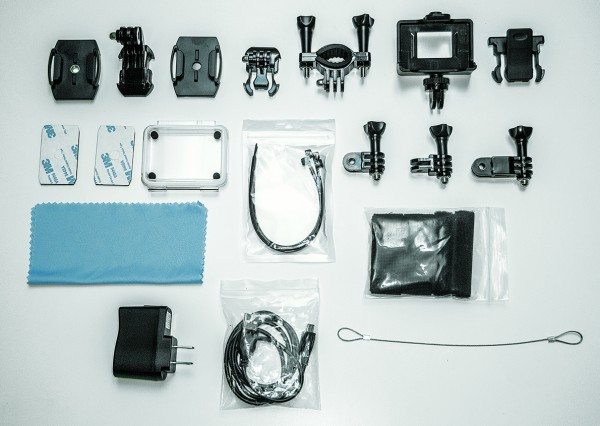
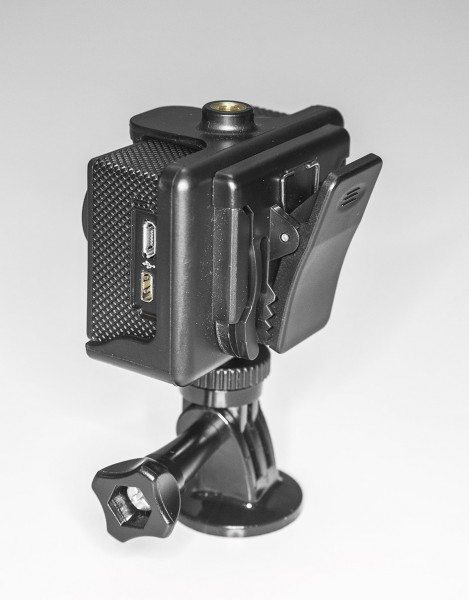
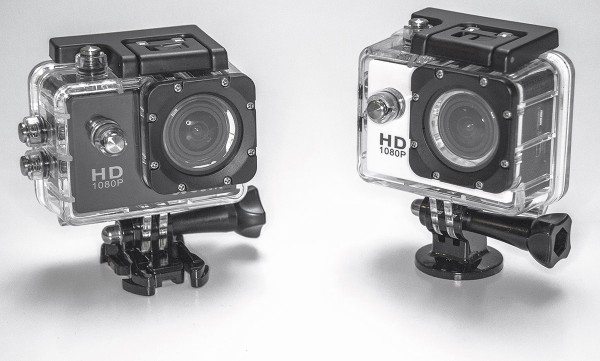
Included in the box is a waterproof case, USB charger, adhesive tapes, zip ties, safety wire, velcro straps, an extra door for the case and several different mounts. You can use these accessories to configure many ways to mount the camera to what best suits your needs. Need a helmet mount? It’s there. Need a bicycle mount? Included. Need a mount to clip to your belt? Yup, have that too. One of the mounts also has a metal screw thread so that you can use a mini or regular tripod should you need it. One particular accessory I was partial to was an ordinary clip that attaches to one of the included camera mounts. With all these body and chest mounts today that seem to be draped and wrapped over your body, it seems practical to just clip the camera to your belt or shirt pocket or wherever if you want to record with the camera. I clipped the camera to my belt, and even though it was lower than chest high, the 170° camera field of view caught plenty of action.
Obviously, you wouldn’t want to just clip the camera to your shirt pocket if you are doing kickflips and ollies on your skateboard or snow skiing down a hill, or running the course on Ninja Warrior. For those times times you want the camera to be locked down and secured for those hard jarring activities so there is no chance of it flying off. But say you want to record yourself walking through your house during your daily routines and watch it back later, then clipping the camera to your shirt or belt would be the way to go. Don’t ask me why anyone would do this but believe me people have recorded more unusual things than this. To each their own I say.
One warning about using the clip or just using the camera without its waterproof case, is that the Power/Mode button can be easily pressed causing you to switch modes. You could be in Camcorder Mode and tap the Power/Mode button then instantly be in Photo Mode or Menu Mode or Playback depending how many times you may have scrolled by accidentally pressing the Power/Mode button.
One of the features that the SJ4000 has is Car Mode. This feature works with the MicroUSB cable plugged into your car’s power outlet so that when you start your car and the camera turns on, the camera begins recording. And with the MicroUSB is plugged into the camera, the battery life is sustained all the while the camera is plugged into your car’s power outlet. In conjunction with the Car Mode, the SJ4000 has a Cyclic Record function of 3 minutes, 5 minutes and 10 minutes. What this function does is let the camera record for the selected time whether 3, 5, or 10 minutes and then after the time is up, it saves the file and starts a new video file after that duration time is met. Then when the SD card reaches its full capacity, the camera deletes the oldest file and continues to record and process continues. This is a useful feature to have should you need some sort of evidence in a traffic accident or altercation. You would have video of the incident recorded on the SD Card as helpful evidence so there would be no second guessing as what to what happened since you could just review the recorded footage.
The SJ4000 also has a Motion Detection feature which is pretty self-explanatory. Turn on the Motion Detection from the camera’s menu and any motion in front of the camera will start the recording. SJCAM advertises this function as their Home Security feature.I’m not really sold on this idea as a home security since the camera can’t alert you in real-time that someone is creeping around your house. If this camera had a Wi-Fi connection and the right app you should be able to at least view some streaming footage. Hypothetically, chances are that you could view the footage from the camera but by then it would already be too late since you would be seeing the person who robbed you leaving the premises.
I was a little disappointed to find out that there wasn’t a time lapse feature on this camera. Time lapse video is one of my favorite features on a camera. However, there is a setting in Photo Mode that will take a snapshot every 5, 10 or 20 seconds from the time you press the Ok/Record button. Press the button again to stop recording. So, in theory this feature acts the same as a time lapse but what you will have to do is take all those photos and import them into an editing program and export as a video file.
One thing I really liked about the SJ400o is the ability to manually control some settings like the ISO, white balance, exposure, etc. I like to have as much control over my settings as possible like when I am feeling that I want more picture control over a scene especially if I am shooting with another action camera of a different brand and model. There is also a setting to turn off audio recording too because there are times where you don’t need to record sound. This helps in keeping the video file size down and gives you more room on the SD card to record. However, the recorded sound was what you would expect from a POV action camera, not bad, but not great. So, when the camera is in its waterproof case, and you’re shooting underwater there really wouldn’t be any need for audio recording since the microphone will be muffed anyway inside the case anyway. This may be a good time to turn off the audio recording. By the way, it’s waterproof up to about 60 feet/30 meters.
There are a few other general settings that can be accessed through the camera’s menu such as Photo Quality, Photo Sharpness, Color, Face Detection, Anti-Shaking, Beep Sound, Screen Savers, Resolution, and Date Stamp, HDR and more. The SJ4000 can also zoom up to 4X in Photo and Video mode. I like this feature on camera such as this because there may be times where you don’t want such a super wide view.
One feature that I discovered by accident is the camera’s ability to automatically rotate the viewing screen to keep the image level. So, as you rotate the camera, what you see in the camera’s 1.5 LCD screen will stay right-side up. This is helpful to have the automatic rotating screen so that you lessen setup time and continue with placement of the camera. So you can forego flipping your head upside down trying to compose your shot.
There are cameras that have a feature to flip the screen, but not many. Plus having to go back and forth in your camera’s menu to switch orientation can become irritating. Keep in mind, although the automatic screen rotation is nice, when you turn the camera upside down it will record the scene upside down. However, in the Menu settings, there is a feature for screen Rotation but all you really need to do is flip the image 180° in your editing program and you should be good go to view the footage in the correct orientation.
On a side note, if you are previewing your footage and want to skip to the next clip you can’t just skip to the it since there isn’t a Skip Forward or Skip Back button. What I did was press the Up and Down buttons on the side to fast forward the clip I’m watching to get to the next clip. This is a pain but since the manual doesn’t really go into detail on the operation of the camera, this was the only way I knew how to advance to the next clip. Nor could I figure out a way to delete a clip or image that I didn’t want. But I figured I would delete any footage I didn’t want on the computer as I reviewed the footage and photos.
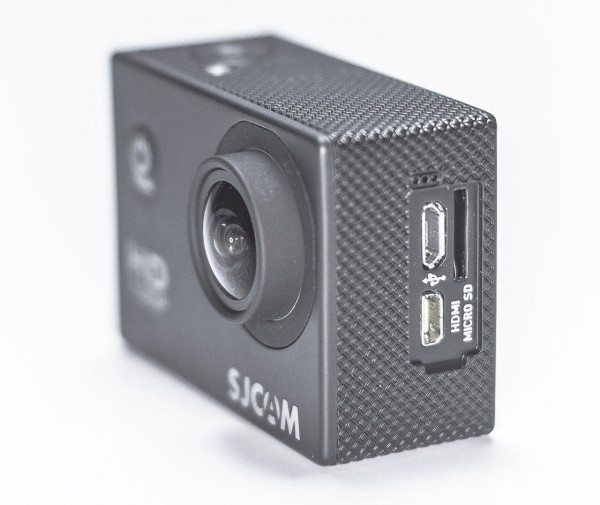
And speaking of viewing footage, just below the MicroUSB port is a HDMI out so that you can view your footage on a television that has an HDMI connection. Because watching your footage is better seen on a big screen than on the camera’s small LCD screen. And behind the ports is the slot for the SD card. I did note that the SD slot and ports do not have a door. It would have been nice to have some kind of cover to protect these slots from things like dust or other small particles. They are fine in the waterproof housing but sometimes you may not use the housing and just shoot video with out it. This is just piece of mind for me to know that the slots are protected just a little bit.
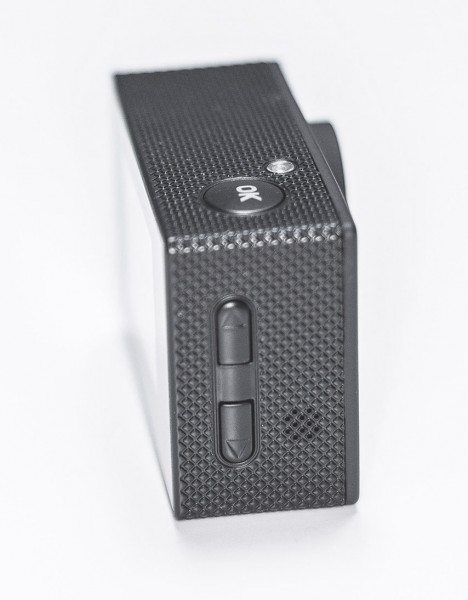
There is a small speaker on the side where the Up and Down buttons are. Its nice to have the speaker while reviewing your footage when you don’t have the camera connected to a TV. The sound is something you would expect from a speaker so small; monotone and tinny. Although the sound is decent for reviewing footage, I couldn’t locate a Volume button. The Up and Down buttons on the side operated as Fast Forward and Reverse buttons only.
If you tried to compare the SJCAM SJ4000 to other popular, cameras like the GoPro HERO Black, you would see that they are similar in looks and function. Sure, the GoPro may offer more features like Wi-Fi, Bluetooth, or low light shooting, but if you are looking for a simple alternative to higher priced action cameras then the SJ4000 is the way to go. SJCAM has the camera listed on their website for around $119.00 however, I found them on Amazon for almost half the price and some bundled with more goodies for a few bucks more.
There is an
SJ4000 with Wi-Fi
capabilities so don’t rule out that feature for this camera. Plus, with the included MicroUSB cable you can connect the camera to your computer and use it as a web camera.
And they come in 7 different colors: Black, White, Silver, Blue, Yellow, Pink and Gold. In case, you get tired of the everyday black and silver colors.
Update 02/19/15
I have been using the SJ4000 to help me record concerts and local band gigs. It’s fairly easy to use and I am happy with the image quality. I like the small size and I can throw this camera in my camera bag along with some of my other equipment. I just set it up where I need it and then let it record. The wide angle is nice so I get a lot of action in its field of view. The SJ4000 is a great companion to my main Canon DSLR camera.
Source
: The sample for this review was provided by SpyTec. Visit
http://www.spytecinc.com/
for more info.
Love our content?
Sign up
for our newsletter today.
No ads, no spam, just links to our latest articles!
Product Information
Price:
$99.95
Manufacturer:
SJCAM
Retailer:
SpyTec
Pros:
Assorted mounts included.
Multiple colors to choose from.
Can use as webcam.
Good price.
Auto screen rotation.
Ability to record while MicroUSB plugged in.
Motion detetction.
Cons:
Battery door difficult to open.
No delete button.
No Forward or Back button.
No cover doors for MicroUSB, HDMI and SD card slots. |
| Markdown | 
[Skip to content](https://the-gadgeteer.com/2014/10/27/sjcam-sj4000-action-camera-review/#content "Skip to content")
[](https://the-gadgeteer.com/)
- [Reviews]()
- […all Reviews](https://the-gadgeteer.com/category/reviews/)
- [Review updates](https://the-gadgeteer.com/tag/review-updates/)
- [Articles]()
- [… all Articles](https://the-gadgeteer.com/category/articles/)
- [… all News](https://the-gadgeteer.com/category/news/)
- [… all Deals](https://the-gadgeteer.com/tag/deal/)
- [Julie’s gadget diary posts](https://the-gadgeteer.com/tag/gadget-diary/)
- [Deals](https://the-gadgeteer.com/tag/deal/)
- [Buyer’s Guide](https://the-gadgeteer.com/category/buyers-guide/)
- [EDC](https://the-gadgeteer.com/tag/edc/)
- [… all EDC gear](https://the-gadgeteer.com/tag/edc/)
- [Bags]()
- [Backpacks](https://the-gadgeteer.com/tag/backpack/)
- [Camera bags](https://the-gadgeteer.com/tag/camera-bag/)
- [Luggage](https://the-gadgeteer.com/tag/luggage/)
- [Messenger bags](https://the-gadgeteer.com/tag/messenger-bag/)
- [Shoulder bags](https://the-gadgeteer.com/tag/shoulder-bag/)
- [… All Bags](https://the-gadgeteer.com/tag/bags-2/)
- [Flashlights](https://the-gadgeteer.com/tag/flashlight/)
- [Keychain](https://the-gadgeteer.com/tag/keychain/)
- [Knives](https://the-gadgeteer.com/tag/knives/)
- [Multi-tools](https://the-gadgeteer.com/tag/multi-tool/)
- [Notebooks](https://the-gadgeteer.com/tag/notebooks/)
- [Pencils](https://the-gadgeteer.com/tag/pencil/)
- [Pens](https://the-gadgeteer.com/tag/pens/)
- [Pocket Gear](https://the-gadgeteer.com/tag/pocket-gear/)
- [Wallets](https://the-gadgeteer.com/tag/wallets/)
- [Watches](https://the-gadgeteer.com/tag/watches/)
- [More]()
- [3D printers](https://the-gadgeteer.com/tag/3d-printing/)
- [Audio, Video, TV](https://the-gadgeteer.com/tag/audio_video_gear/)
- [Bluetooth](https://the-gadgeteer.com/tag/bluetooth/)
- [Bluetooth audio adapters](https://the-gadgeteer.com/tag/bluetooth-audio-adapter/)
- [Bluetooth earbuds](https://the-gadgeteer.com/tag/bluetooth-earbuds/)
- [Bluetooth headphones](https://the-gadgeteer.com/tag/bluetooth-headphones/)
- [Bluetooth headsets](https://the-gadgeteer.com/tag/bluetooth-headset/)
- [Bluetooth speakers](https://the-gadgeteer.com/tag/bluetooth-speaker/)
- [Bluetooth keyboards](https://the-gadgeteer.com/tag/bluetooth-keyboard/)
- [Bluetooth mice](https://the-gadgeteer.com/tag/bluetooth-mouse/)
- [… all Bluetooth gear](https://the-gadgeteer.com/tag/bluetooth/)
- [Car Gear](https://the-gadgeteer.com/tag/car_gear/)
- [Electric Bike](https://the-gadgeteer.com/tag/electric-bike/)
- [Gaming Gear](https://the-gadgeteer.com/tag/gaming-gear/)
- [Graphics tablets](https://the-gadgeteer.com/tag/graphics-tablet/)
- [Home and Kitchen](https://the-gadgeteer.com/tag/home_tech/)
- [Mechanical keyboards](https://the-gadgeteer.com/tag/mechanical-keyboard/)
- [Outdoor Gear](https://the-gadgeteer.com/tag/outdoor-gear/)
- [Pets](https://the-gadgeteer.com/tag/pet-gadgets/)
- [Power Stations](https://the-gadgeteer.com/tag/power-station/)
- [Travel Gear](https://the-gadgeteer.com/tag/travel_gear/)
- [Toys](https://the-gadgeteer.com/tag/toys/)
[Search](https://the-gadgeteer.com/2014/10/27/sjcam-sj4000-action-camera-review/)
[](https://the-gadgeteer.com/)
[Search](https://the-gadgeteer.com/2014/10/27/sjcam-sj4000-action-camera-review/)
- [Reviews]()
- […all Reviews](https://the-gadgeteer.com/category/reviews/)
- [Review updates](https://the-gadgeteer.com/tag/review-updates/)
- [Articles]()
- [… all Articles](https://the-gadgeteer.com/category/articles/)
- [… all News](https://the-gadgeteer.com/category/news/)
- [… all Deals](https://the-gadgeteer.com/tag/deal/)
- [Julie’s gadget diary posts](https://the-gadgeteer.com/tag/gadget-diary/)
- [Deals](https://the-gadgeteer.com/tag/deal/)
- [Buyer’s Guide](https://the-gadgeteer.com/category/buyers-guide/)
- [EDC](https://the-gadgeteer.com/tag/edc/)
- [… all EDC gear](https://the-gadgeteer.com/tag/edc/)
- [Bags]()
- [Backpacks](https://the-gadgeteer.com/tag/backpack/)
- [Camera bags](https://the-gadgeteer.com/tag/camera-bag/)
- [Luggage](https://the-gadgeteer.com/tag/luggage/)
- [Messenger bags](https://the-gadgeteer.com/tag/messenger-bag/)
- [Shoulder bags](https://the-gadgeteer.com/tag/shoulder-bag/)
- [… All Bags](https://the-gadgeteer.com/tag/bags-2/)
- [Flashlights](https://the-gadgeteer.com/tag/flashlight/)
- [Keychain](https://the-gadgeteer.com/tag/keychain/)
- [Knives](https://the-gadgeteer.com/tag/knives/)
- [Multi-tools](https://the-gadgeteer.com/tag/multi-tool/)
- [Notebooks](https://the-gadgeteer.com/tag/notebooks/)
- [Pencils](https://the-gadgeteer.com/tag/pencil/)
- [Pens](https://the-gadgeteer.com/tag/pens/)
- [Pocket Gear](https://the-gadgeteer.com/tag/pocket-gear/)
- [Wallets](https://the-gadgeteer.com/tag/wallets/)
- [Watches](https://the-gadgeteer.com/tag/watches/)
- [More]()
- [3D printers](https://the-gadgeteer.com/tag/3d-printing/)
- [Audio, Video, TV](https://the-gadgeteer.com/tag/audio_video_gear/)
- [Bluetooth](https://the-gadgeteer.com/tag/bluetooth/)
- [Bluetooth audio adapters](https://the-gadgeteer.com/tag/bluetooth-audio-adapter/)
- [Bluetooth earbuds](https://the-gadgeteer.com/tag/bluetooth-earbuds/)
- [Bluetooth headphones](https://the-gadgeteer.com/tag/bluetooth-headphones/)
- [Bluetooth headsets](https://the-gadgeteer.com/tag/bluetooth-headset/)
- [Bluetooth speakers](https://the-gadgeteer.com/tag/bluetooth-speaker/)
- [Bluetooth keyboards](https://the-gadgeteer.com/tag/bluetooth-keyboard/)
- [Bluetooth mice](https://the-gadgeteer.com/tag/bluetooth-mouse/)
- [… all Bluetooth gear](https://the-gadgeteer.com/tag/bluetooth/)
- [Car Gear](https://the-gadgeteer.com/tag/car_gear/)
- [Electric Bike](https://the-gadgeteer.com/tag/electric-bike/)
- [Gaming Gear](https://the-gadgeteer.com/tag/gaming-gear/)
- [Graphics tablets](https://the-gadgeteer.com/tag/graphics-tablet/)
- [Home and Kitchen](https://the-gadgeteer.com/tag/home_tech/)
- [Mechanical keyboards](https://the-gadgeteer.com/tag/mechanical-keyboard/)
- [Outdoor Gear](https://the-gadgeteer.com/tag/outdoor-gear/)
- [Pets](https://the-gadgeteer.com/tag/pet-gadgets/)
- [Power Stations](https://the-gadgeteer.com/tag/power-station/)
- [Travel Gear](https://the-gadgeteer.com/tag/travel_gear/)
- [Toys](https://the-gadgeteer.com/tag/toys/)
# SJCAM SJ4000 Action Camera review
By [Raul Sanchez](https://the-gadgeteer.com/author/raul-sanchez/ "View all posts by Raul Sanchez") / October 27, 2014 / [Reviews](https://the-gadgeteer.com/category/reviews/) / [Action Camera](https://the-gadgeteer.com/tag/action-camera/), [Camera gear](https://the-gadgeteer.com/tag/camera-gear/) / [191 Comments](https://the-gadgeteer.com/2014/10/27/sjcam-sj4000-action-camera-review/#comments)
If you buy something from a link in this article, we may earn a commission. [Learn more](https://the-gadgeteer.com/disclosure/)
[](https://the-gadgeteer.com/wp-content/uploads/2014/10/SJCAM_1-e1413163239496.jpg)
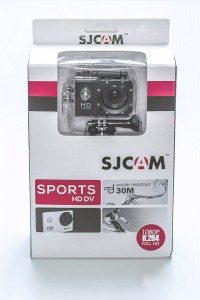
Time for another review for another action camera. This time this review is for SJCAM’s Sports HD DV 1080P camera, the SJ4000. At first glance, this camera resembles the look and feel similar to a GoPro camera. Many available action cameras on the market have taken a cue in design and form from GoPro cameras and this camera is no different. So, let’s take a look at how well this camera measured up and performs.
The body design of the SJ4000 is comparable to the popular rectangle box shape with its physical dimensions being about 30x59x41 mm, or about 1x2x1.6 in. It is a CMOS camera that has a field of view of 170° and can record .MOV H.264 video at 1920x1080P(30fps), 1280x720P(60fps), 848×640(60fps),and 648×480 (60fps). I’m really liking that it can record to 1080P. I have some action cameras that can only record to 720, so having the higher recording resolution is definitely a big plus.
[](https://the-gadgeteer.com/wp-content/uploads/2014/10/SJCAM-Sunny-copy.jpg)
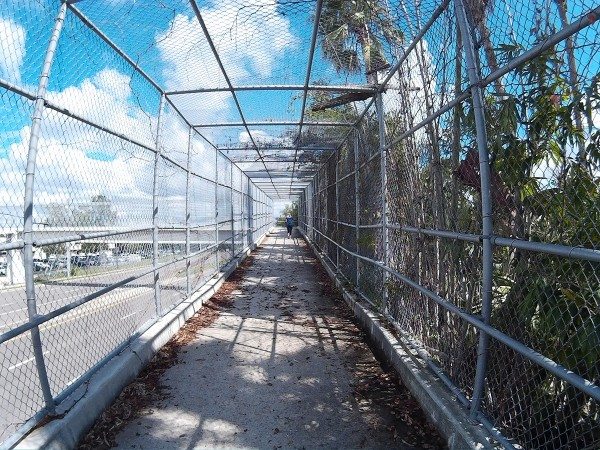
Still shot taken with SJ4000 on a sunny day. No editing or touch-ups.
[](https://the-gadgeteer.com/wp-content/uploads/2014/10/SJCAM-Cloudy-copy.jpg)
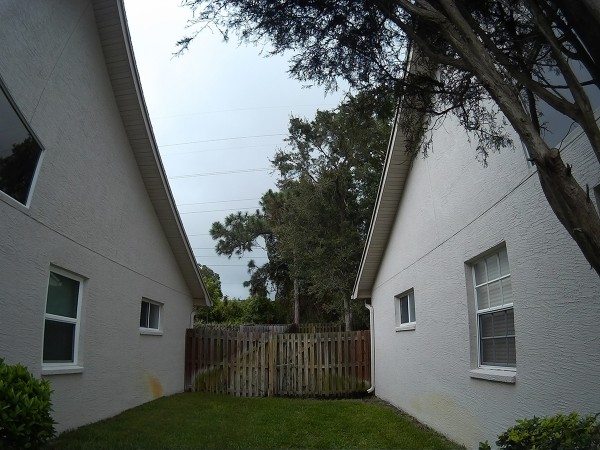
Still shot taken with SJ4000 on a cloudy day. No editing or touch-ups.
The pictures that it captures in Photo mode are just as good. It can capture JPG images at 12MP, 10MP, 8MP, 5MP, 3MP, 2MHD(1080), VGA(480), and 1.3M(960). Images and video are recorded on a MicoSD card. The camera can support SD cards up to 32GB’s.
[](https://the-gadgeteer.com/wp-content/uploads/2014/10/SJCAM_6.jpg)
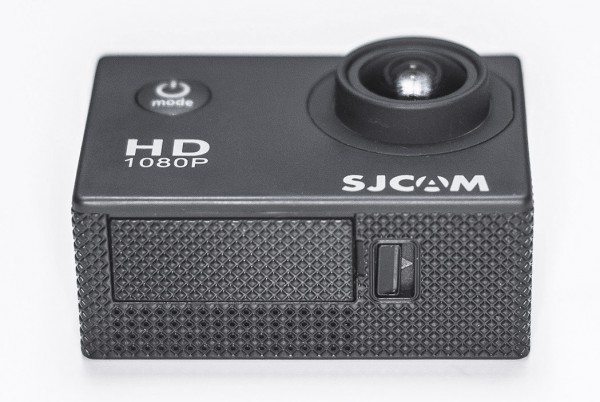
Battery door on bottom of camera.
Let’s talk battery. The SJ4000’s 900 mAH Li-on battery is removable which is nice so that you will be able to have extra recharged batteries ready to swap when you need them. With the supplied MicroUSB cable, charging took around 3 hours to fully charge. The camera had a recording time average of about 70 minutes per battery charge. I found some batteries on eBay for a lot of 2 for around \$6 dollars. Not bad. Just remember to keep those extra batteries charged too. One thing about the battery door is that I had a really hard time opening it. I had a really difficult time tying to slide the little lock over and then trying to pry open the door with my finger nail. Because the slide lock and the channel to open the battery door are so close together, it’s hard to pop open. You need something like a small flathead screwdriver to get it to open.
[](https://the-gadgeteer.com/wp-content/uploads/2014/10/SJCAM_12.jpg)
Included in the box is a waterproof case, USB charger, adhesive tapes, zip ties, safety wire, velcro straps, an extra door for the case and several different mounts. You can use these accessories to configure many ways to mount the camera to what best suits your needs. Need a helmet mount? It’s there. Need a bicycle mount? Included. Need a mount to clip to your belt? Yup, have that too. One of the mounts also has a metal screw thread so that you can use a mini or regular tripod should you need it. One particular accessory I was partial to was an ordinary clip that attaches to one of the included camera mounts. With all these body and chest mounts today that seem to be draped and wrapped over your body, it seems practical to just clip the camera to your belt or shirt pocket or wherever if you want to record with the camera. I clipped the camera to my belt, and even though it was lower than chest high, the 170° camera field of view caught plenty of action.
[](https://the-gadgeteer.com/wp-content/uploads/2014/10/SJCAM_10.jpg)
Obviously, you wouldn’t want to just clip the camera to your shirt pocket if you are doing kickflips and ollies on your skateboard or snow skiing down a hill, or running the course on Ninja Warrior. For those times times you want the camera to be locked down and secured for those hard jarring activities so there is no chance of it flying off. But say you want to record yourself walking through your house during your daily routines and watch it back later, then clipping the camera to your shirt or belt would be the way to go. Don’t ask me why anyone would do this but believe me people have recorded more unusual things than this. To each their own I say.
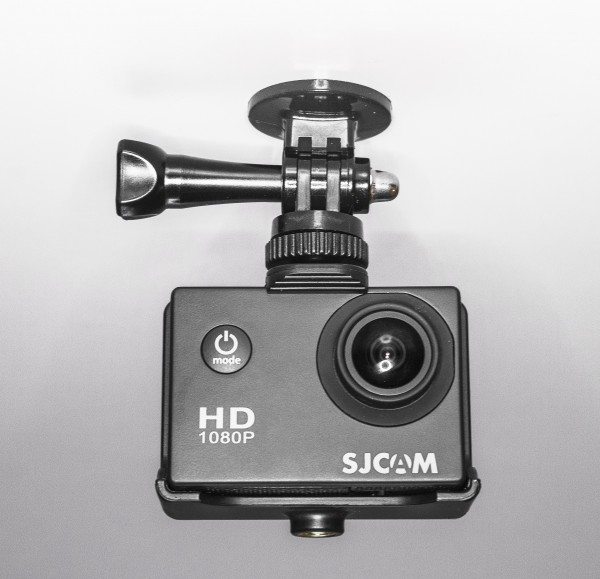
One warning about using the clip or just using the camera without its waterproof case, is that the Power/Mode button can be easily pressed causing you to switch modes. You could be in Camcorder Mode and tap the Power/Mode button then instantly be in Photo Mode or Menu Mode or Playback depending how many times you may have scrolled by accidentally pressing the Power/Mode button.
One of the features that the SJ4000 has is Car Mode. This feature works with the MicroUSB cable plugged into your car’s power outlet so that when you start your car and the camera turns on, the camera begins recording. And with the MicroUSB is plugged into the camera, the battery life is sustained all the while the camera is plugged into your car’s power outlet. In conjunction with the Car Mode, the SJ4000 has a Cyclic Record function of 3 minutes, 5 minutes and 10 minutes. What this function does is let the camera record for the selected time whether 3, 5, or 10 minutes and then after the time is up, it saves the file and starts a new video file after that duration time is met. Then when the SD card reaches its full capacity, the camera deletes the oldest file and continues to record and process continues. This is a useful feature to have should you need some sort of evidence in a traffic accident or altercation. You would have video of the incident recorded on the SD Card as helpful evidence so there would be no second guessing as what to what happened since you could just review the recorded footage.
The SJ4000 also has a Motion Detection feature which is pretty self-explanatory. Turn on the Motion Detection from the camera’s menu and any motion in front of the camera will start the recording. SJCAM advertises this function as their Home Security feature.I’m not really sold on this idea as a home security since the camera can’t alert you in real-time that someone is creeping around your house. If this camera had a Wi-Fi connection and the right app you should be able to at least view some streaming footage. Hypothetically, chances are that you could view the footage from the camera but by then it would already be too late since you would be seeing the person who robbed you leaving the premises.
I was a little disappointed to find out that there wasn’t a time lapse feature on this camera. Time lapse video is one of my favorite features on a camera. However, there is a setting in Photo Mode that will take a snapshot every 5, 10 or 20 seconds from the time you press the Ok/Record button. Press the button again to stop recording. So, in theory this feature acts the same as a time lapse but what you will have to do is take all those photos and import them into an editing program and export as a video file.
[](https://the-gadgeteer.com/wp-content/uploads/2014/10/SJCAM_8.jpg)
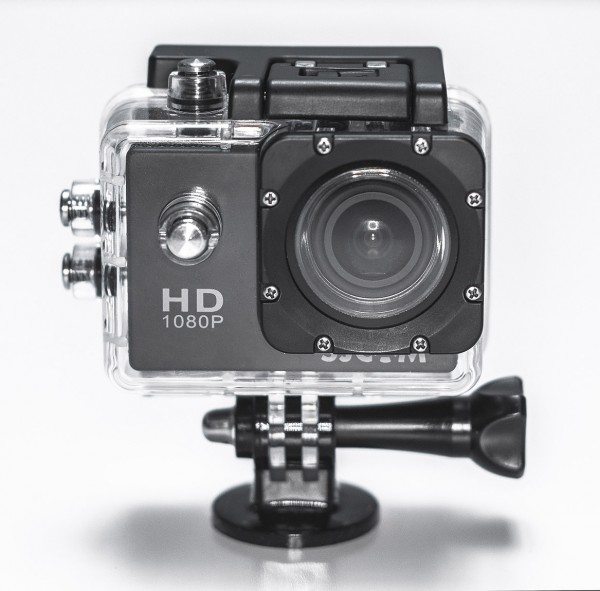
One thing I really liked about the SJ400o is the ability to manually control some settings like the ISO, white balance, exposure, etc. I like to have as much control over my settings as possible like when I am feeling that I want more picture control over a scene especially if I am shooting with another action camera of a different brand and model. There is also a setting to turn off audio recording too because there are times where you don’t need to record sound. This helps in keeping the video file size down and gives you more room on the SD card to record. However, the recorded sound was what you would expect from a POV action camera, not bad, but not great. So, when the camera is in its waterproof case, and you’re shooting underwater there really wouldn’t be any need for audio recording since the microphone will be muffed anyway inside the case anyway. This may be a good time to turn off the audio recording. By the way, it’s waterproof up to about 60 feet/30 meters.
There are a few other general settings that can be accessed through the camera’s menu such as Photo Quality, Photo Sharpness, Color, Face Detection, Anti-Shaking, Beep Sound, Screen Savers, Resolution, and Date Stamp, HDR and more. The SJ4000 can also zoom up to 4X in Photo and Video mode. I like this feature on camera such as this because there may be times where you don’t want such a super wide view.
[](https://the-gadgeteer.com/wp-content/uploads/2014/10/SJCAM_11.jpg)
One feature that I discovered by accident is the camera’s ability to automatically rotate the viewing screen to keep the image level. So, as you rotate the camera, what you see in the camera’s 1.5 LCD screen will stay right-side up. This is helpful to have the automatic rotating screen so that you lessen setup time and continue with placement of the camera. So you can forego flipping your head upside down trying to compose your shot.
There are cameras that have a feature to flip the screen, but not many. Plus having to go back and forth in your camera’s menu to switch orientation can become irritating. Keep in mind, although the automatic screen rotation is nice, when you turn the camera upside down it will record the scene upside down. However, in the Menu settings, there is a feature for screen Rotation but all you really need to do is flip the image 180° in your editing program and you should be good go to view the footage in the correct orientation.
On a side note, if you are previewing your footage and want to skip to the next clip you can’t just skip to the it since there isn’t a Skip Forward or Skip Back button. What I did was press the Up and Down buttons on the side to fast forward the clip I’m watching to get to the next clip. This is a pain but since the manual doesn’t really go into detail on the operation of the camera, this was the only way I knew how to advance to the next clip. Nor could I figure out a way to delete a clip or image that I didn’t want. But I figured I would delete any footage I didn’t want on the computer as I reviewed the footage and photos.
[](https://the-gadgeteer.com/wp-content/uploads/2014/10/SJCAM_4.jpg)
And speaking of viewing footage, just below the MicroUSB port is a HDMI out so that you can view your footage on a television that has an HDMI connection. Because watching your footage is better seen on a big screen than on the camera’s small LCD screen. And behind the ports is the slot for the SD card. I did note that the SD slot and ports do not have a door. It would have been nice to have some kind of cover to protect these slots from things like dust or other small particles. They are fine in the waterproof housing but sometimes you may not use the housing and just shoot video with out it. This is just piece of mind for me to know that the slots are protected just a little bit.
There is a small speaker on the side where the Up and Down buttons are. Its nice to have the speaker while reviewing your footage when you don’t have the camera connected to a TV. The sound is something you would expect from a speaker so small; monotone and tinny. Although the sound is decent for reviewing footage, I couldn’t locate a Volume button. The Up and Down buttons on the side operated as Fast Forward and Reverse buttons only.
[](https://the-gadgeteer.com/wp-content/uploads/2014/10/SJCAM_5.jpg)
If you tried to compare the SJCAM SJ4000 to other popular, cameras like the GoPro HERO Black, you would see that they are similar in looks and function. Sure, the GoPro may offer more features like Wi-Fi, Bluetooth, or low light shooting, but if you are looking for a simple alternative to higher priced action cameras then the SJ4000 is the way to go. SJCAM has the camera listed on their website for around \$119.00 however, I found them on Amazon for almost half the price and some bundled with more goodies for a few bucks more.
[](https://the-gadgeteer.com/wp-content/uploads/2014/10/SJCAM_2.jpg)
There is an [SJ4000 with Wi-Fi](http://www.spytecinc.com/sj4000-wifi-1080p-hd-action-camera.html "SJ4000 with WiFi") capabilities so don’t rule out that feature for this camera. Plus, with the included MicroUSB cable you can connect the camera to your computer and use it as a web camera.
And they come in 7 different colors: Black, White, Silver, Blue, Yellow, Pink and Gold. In case, you get tired of the everyday black and silver colors.
### Update 02/19/15
I have been using the SJ4000 to help me record concerts and local band gigs. It’s fairly easy to use and I am happy with the image quality. I like the small size and I can throw this camera in my camera bag along with some of my other equipment. I just set it up where I need it and then let it record. The wide angle is nice so I get a lot of action in its field of view. The SJ4000 is a great companion to my main Canon DSLR camera.
**Source**: The sample for this review was provided by SpyTec. Visit <http://www.spytecinc.com/> for more info.
##### SHARE ON
[Twitter](https://twitter.com/intent/tweet?text=SJCAM++SJ4000+Action+Camera+review&url=https%3A%2F%2Fthe-gadgeteer.com%2F2014%2F10%2F27%2Fsjcam-sj4000-action-camera-review%2F&via=Crunchify)[Facebook](https://www.facebook.com/sharer/sharer.php?u=https%3A%2F%2Fthe-gadgeteer.com%2F2014%2F10%2F27%2Fsjcam-sj4000-action-camera-review%2F)[Pin It](https://pinterest.com/pin/create/button/?url=https%3A%2F%2Fthe-gadgeteer.com%2F2014%2F10%2F27%2Fsjcam-sj4000-action-camera-review%2F&media=https://the-gadgeteer.com/wp-content/uploads/2014/10/SJCAM_8.jpg&description=SJCAM++SJ4000+Action+Camera+review)
**Love our content?** [Sign up](https://newsletter.squintdog.com/subscription?f=NAH947bZNqVX892T763kMynLaDJOdfzaUXqeRdnBuwDZlKHM9p4K0sLCmT7UCI3Hp3763OgjtwGdW9YQ892TqPMXOE5YXw) **for our newsletter today.** No ads, no spam, just links to our latest articles\!
[](https://www.amazon.com/dp/B0FLYL9R51?tag=thegadg0e-20&linkCode=osi&th=1&psc=1&language=en_US¤cy=USD "SJCAM SJ4000 4K Ultra HD Waterproof Action Camera - 20MP WiFi Sports Cam for Adventure & Diving | EIS Anti-Shake, Support External Mic & 4X Zoom, Reliable Beginner Camera for Travel, Hiking, & Surfing: 【4K Action Camera Entry-Level Action Camera】: with Pro Performance: SJCAM SJ4000 has all the features of an action camera with built-in gyro stabilization. It can take up to 40M photos and is easy to operate. The camera comes with 2 x 900mAh recharge...")
##### [SJCAM SJ4000 4K Ultra HD Waterproof Action Camera - 20MP WiFi Sports Cam for Adventure & Diving \| EIS Anti-Shake, Support External Mic & 4X Zoom, Reliable Beginner Camera for Travel, Hiking, & Surfing](https://www.amazon.com/dp/B0FLYL9R51?tag=thegadg0e-20&linkCode=osi&th=1&psc=1&language=en_US¤cy=USD "SJCAM SJ4000 4K Ultra HD Waterproof Action Camera - 20MP WiFi Sports Cam for Adventure & Diving | EIS Anti-Shake, Support External Mic & 4X Zoom, Reliable Beginner Camera for Travel, Hiking, & Surfing: 【4K Action Camera Entry-Level Action Camera】: with Pro Performance: SJCAM SJ4000 has all the features of an action camera with built-in gyro stabilization. It can take up to 40M photos and is easy to operate. The camera comes with 2 x 900mAh recharge...")
(as of April 18, 2026 19:45 GMT -05:00 - [More infoProduct prices and availability are accurate as of the date/time indicated and are subject to change. Any price and availability information displayed on \[relevant Amazon Site(s), as applicable\] at the time of purchase will apply to the purchase of this product.](https://the-gadgeteer.com/2014/10/27/sjcam-sj4000-action-camera-review/))
[](https://www.amazon.com/dp/B09GB1LN8V?tag=thegadg0e-20&linkCode=osi&th=1&psc=1&language=en_US¤cy=USD "SJCAM SJ4000 Pro-Grade 4K Action Camera, 40MP 3-Axis EIS Stabilization Motorcycle Sport Camera, 170°FOV Waterproof Camera Underwater, 5X Zoom, Dual Batteries, 32G SD Card and Helmet Accessory Kit: Entry-Level Action Camera with Pro Performance: SJCAM SJ4000 has all the features of an action camera with built-in gyro stabilization. It can take up to 40M photos and is easy to operate. The camera comes with 2 x 900mAh rechargeable batteries, 32G ...")
##### [SJCAM SJ4000 Pro-Grade 4K Action Camera, 40MP 3-Axis EIS Stabilization Motorcycle Sport Camera, 170°FOV Waterproof Camera Underwater, 5X Zoom, Dual Batteries, 32G SD Card and Helmet Accessory Kit](https://www.amazon.com/dp/B09GB1LN8V?tag=thegadg0e-20&linkCode=osi&th=1&psc=1&language=en_US¤cy=USD "SJCAM SJ4000 Pro-Grade 4K Action Camera, 40MP 3-Axis EIS Stabilization Motorcycle Sport Camera, 170°FOV Waterproof Camera Underwater, 5X Zoom, Dual Batteries, 32G SD Card and Helmet Accessory Kit: Entry-Level Action Camera with Pro Performance: SJCAM SJ4000 has all the features of an action camera with built-in gyro stabilization. It can take up to 40M photos and is easy to operate. The camera comes with 2 x 900mAh rechargeable batteries, 32G ...")
(as of April 18, 2026 19:45 GMT -05:00 - [More infoProduct prices and availability are accurate as of the date/time indicated and are subject to change. Any price and availability information displayed on \[relevant Amazon Site(s), as applicable\] at the time of purchase will apply to the purchase of this product.](https://the-gadgeteer.com/2014/10/27/sjcam-sj4000-action-camera-review/))
### Product Information
| | |
|---|---|
| Price: | \$99.95 |
| Manufacturer: | [SJCAM](http://www.sjcam.com/) |
| Retailer: | [SpyTec](http://www.spytecinc.com/sj4000-1080p-hd-action-camera.html) |
| Pros: | Assorted mounts included. Multiple colors to choose from. Can use as webcam. Good price. Auto screen rotation. Ability to record while MicroUSB plugged in. Motion detetction. |
| Cons: | Battery door difficult to open. No delete button. No Forward or Back button. No cover doors for MicroUSB, HDMI and SD card slots. |
### About The Author

[Raul Sanchez](https://the-gadgeteer.com/author/raul-sanchez/)
[← Previous Post](https://the-gadgeteer.com/2014/10/27/brew-your-coffee-your-way-with-this-timbuk2-travel-kit/ "Brew your coffee your way with this Timbuk2 travel kit")
[Next Post →](https://the-gadgeteer.com/2014/10/27/its-all-about-cool-with-the-a2-portable-speaker/ "It's all about cool with the A2 portable speaker")
### 191 thoughts on “SJCAM SJ4000 Action Camera review”
1. [Gadgeteer Comment Policy](https://the-gadgeteer.com/comment-policy/) - Please read before commenting
2. 
**Pierre**
[November 2, 2014 at 1:26 am](https://the-gadgeteer.com/2014/10/27/sjcam-sj4000-action-camera-review/#comment-2324774)
Dear Raul,
I do have a question about this product: is it possible to turn of the camera screen while shooting or doing time laspe? or while using the smartphone app?
This is, in order to increase the battery life.
Or maybe that’s the purpose of the screen saver feature?
Best regards,
[Reply](https://the-gadgeteer.com/2014/10/27/sjcam-sj4000-action-camera-review/#comment-2324774)
1. 
**EB**
[December 16, 2014 at 12:42 am](https://the-gadgeteer.com/2014/10/27/sjcam-sj4000-action-camera-review/#comment-3049247)
I have two of these cameras. I love them, great value. The camera screen times out and shuts off after a couple of minutes to preserve battery life.
[Reply](https://the-gadgeteer.com/2014/10/27/sjcam-sj4000-action-camera-review/#comment-3049247)
3. 
**bob**
[November 17, 2014 at 10:52 am](https://the-gadgeteer.com/2014/10/27/sjcam-sj4000-action-camera-review/#comment-2618168)
Nice review Raul. Very useful.
[Reply](https://the-gadgeteer.com/2014/10/27/sjcam-sj4000-action-camera-review/#comment-2618168)
4. 
**[Sjcamforum](http://www.sjcamforum.com/)**
[December 3, 2014 at 7:41 pm](https://the-gadgeteer.com/2014/10/27/sjcam-sj4000-action-camera-review/#comment-2864478)
Dear Raul, nice review! I notify you and all of this web followers we have just created the first SJCAM forum. The website is: <http://www.sjcamforum.com>
Please, visit and register to become a big comunity.
[Reply](https://the-gadgeteer.com/2014/10/27/sjcam-sj4000-action-camera-review/#comment-2864478)
1. 
**Raul Sanchez**
[February 14, 2015 at 11:24 pm](https://the-gadgeteer.com/2014/10/27/sjcam-sj4000-action-camera-review/#comment-3684239)
thanks guys! I’ll check the forum out.
[Reply](https://the-gadgeteer.com/2014/10/27/sjcam-sj4000-action-camera-review/#comment-3684239)
5. 
**Charlie**
[December 8, 2014 at 9:47 pm](https://the-gadgeteer.com/2014/10/27/sjcam-sj4000-action-camera-review/#comment-2948938)
Great review. Just one correction to some information listed in it. It is waterproof to 30 meters, or 98.4252, not 60 feet like you mentioned. Other than that, it was a great review
[Reply](https://the-gadgeteer.com/2014/10/27/sjcam-sj4000-action-camera-review/#comment-2948938)
1. 
**Raul Sanchez**
[February 14, 2015 at 11:34 pm](https://the-gadgeteer.com/2014/10/27/sjcam-sj4000-action-camera-review/#comment-3684266)
Charlie
you are correct. It is 30 meters and not 60 as I mentioned. I think I got a little overzealous during those late nights writing. Thanks for catching that\!
[Reply](https://the-gadgeteer.com/2014/10/27/sjcam-sj4000-action-camera-review/#comment-3684266)
6. 
**Alan**
[December 20, 2014 at 5:30 am](https://the-gadgeteer.com/2014/10/27/sjcam-sj4000-action-camera-review/#comment-3116172)
Nice Review. FYI: You can delete directly from the camera, though it’s somewhat of a pain…
1\. Flip through to the photo/video-clip that you want to delete.
2. Press “Mode” button to get to settings
3. Scroll to “Delete”, Press “OK”
4. Choose “Delete Current” (deletes the pic/video that you choose) or
Choose “Delete All”
Hope that helps\!
[Reply](https://the-gadgeteer.com/2014/10/27/sjcam-sj4000-action-camera-review/#comment-3116172)
1. 
**Will**
[July 19, 2015 at 11:43 am](https://the-gadgeteer.com/2014/10/27/sjcam-sj4000-action-camera-review/#comment-4507637)
Thank you for that, It was very useful and made my decision.
[Reply](https://the-gadgeteer.com/2014/10/27/sjcam-sj4000-action-camera-review/#comment-4507637)
7. 
**[Gay Aida Dumaguing](http://www.bloggerstech.com/)**
[December 22, 2014 at 10:42 pm](https://the-gadgeteer.com/2014/10/27/sjcam-sj4000-action-camera-review/#comment-3156066)
Where can I buy this (the original)? It’s being sold here in my country but I’m thinking twice if it’s original.
[Reply](https://the-gadgeteer.com/2014/10/27/sjcam-sj4000-action-camera-review/#comment-3156066)
1. 
**Adrian**
[June 2, 2015 at 11:15 am](https://the-gadgeteer.com/2014/10/27/sjcam-sj4000-action-camera-review/#comment-4273142)
They are sold on amazon, but I would stay away from there. The last two I’ve purchased from there have been fakes. You can purchase the actual ones straight from there website at <http://www.sjcam.com>
[Reply](https://the-gadgeteer.com/2014/10/27/sjcam-sj4000-action-camera-review/#comment-4273142)
2. 
**Darrall**
[June 2, 2015 at 11:31 am](https://the-gadgeteer.com/2014/10/27/sjcam-sj4000-action-camera-review/#comment-4273187)
Amazon is a good place to get them. You just need to pay attention & make sure the one you order says SJCAM on the front of the camera under the lens.
[Reply](https://the-gadgeteer.com/2014/10/27/sjcam-sj4000-action-camera-review/#comment-4273187)
8. 
**guts**
[December 30, 2014 at 9:18 pm](https://the-gadgeteer.com/2014/10/27/sjcam-sj4000-action-camera-review/#comment-3261695)
Nice Review Mr. Sanchez,
now you can have a video time lapse feature by upgrading your firmware. you can go directly to the official website <http://www.sjcam.com/en/content/8-sjcam-sj4000-wifi-action-camera-firmware>.
I already upgrade it, it works\!
[Reply](https://the-gadgeteer.com/2014/10/27/sjcam-sj4000-action-camera-review/#comment-3261695)
1. 
**Raul Sanchez**
[February 14, 2015 at 11:16 pm](https://the-gadgeteer.com/2014/10/27/sjcam-sj4000-action-camera-review/#comment-3684213)
guts
Thank you! Good to know there is a firmware upgrade. I’ll upgrade mine.
Thanks again.
Raul
[Reply](https://the-gadgeteer.com/2014/10/27/sjcam-sj4000-action-camera-review/#comment-3684213)
2. 
**Theodor**
[December 4, 2015 at 5:18 am](https://the-gadgeteer.com/2014/10/27/sjcam-sj4000-action-camera-review/#comment-4891742)
What is the firmware that you say that gives you time laps video mode?
Is it for “Wifi” model?
[Reply](https://the-gadgeteer.com/2014/10/27/sjcam-sj4000-action-camera-review/#comment-4891742)
9. 
**[Danut](https://www.youtube.com/aclmini)**
[January 4, 2015 at 8:48 am](https://the-gadgeteer.com/2014/10/27/sjcam-sj4000-action-camera-review/#comment-3317597)
I’ve noticed that when SJ4000 connected to external monitor via HDMI output, it won’t let me record videos but taking photos still works well.
Anyone can recording videos while using HDMI slot??
[Reply](https://the-gadgeteer.com/2014/10/27/sjcam-sj4000-action-camera-review/#comment-3317597)
1. 
**b9**
[May 14, 2015 at 6:35 pm](https://the-gadgeteer.com/2014/10/27/sjcam-sj4000-action-camera-review/#comment-4181977)
Hello Danut – did you get this resolved? I’m anting to run mine as a cctv onto a small monitor – will I need an HDMI input on the monitor?
Cheers, B9
[Reply](https://the-gadgeteer.com/2014/10/27/sjcam-sj4000-action-camera-review/#comment-4181977)
10. 
**dniwog**
[January 12, 2015 at 6:11 pm](https://the-gadgeteer.com/2014/10/27/sjcam-sj4000-action-camera-review/#comment-3411631)
Hi
I solved the battery door issue. You can find small tag on the battery. You can put them out then closed the battery door. Whenever you want to open battery door just pull and slide the lock.
I very satisfiy with my sj4000 wifi version. I think wifi ability is better then Gopro. Combination between my Gopro Hero 3 balck edition and iPhone5s wifi live view is frequently disconnected while recording but sj4000 isn’t. I think wifi range is also longer then gopro.
SJ4000 wifi version also supports Time Lapse shooting. It automatically build time lapse movie. But I guess it produce a battery issue. I shoot 20 minute’s time lapse movie with 2 second interval then battery is almost expired.
Image quality, I prefer GOPRO’s smooth image then SJ4000’s contrasty one. SJ4000’s image process feels that it applied too much digital sharpening which I don’t like.
[Reply](https://the-gadgeteer.com/2014/10/27/sjcam-sj4000-action-camera-review/#comment-3411631)
11. 
**Tom Slater**
[January 13, 2015 at 10:38 am](https://the-gadgeteer.com/2014/10/27/sjcam-sj4000-action-camera-review/#comment-3417691)
Can you let me know how to get the zoom function to work. I cannot find anything on this in the documentation.
[Reply](https://the-gadgeteer.com/2014/10/27/sjcam-sj4000-action-camera-review/#comment-3417691)
1. 
**Raul Sanchez**
[February 14, 2015 at 11:20 pm](https://the-gadgeteer.com/2014/10/27/sjcam-sj4000-action-camera-review/#comment-3684228)
Tom
In either the video or still camera, if you are looking at the LCD screen on the back, you can zoom in by using the up and down buttons on the right side. Hope that helps.
[Reply](https://the-gadgeteer.com/2014/10/27/sjcam-sj4000-action-camera-review/#comment-3684228)
12. 
**Darrall**
[January 28, 2015 at 11:43 am](https://the-gadgeteer.com/2014/10/27/sjcam-sj4000-action-camera-review/#comment-3545617)
Why doesn’t my computer recognize the camera when I connect it to the usb port?
[Reply](https://the-gadgeteer.com/2014/10/27/sjcam-sj4000-action-camera-review/#comment-3545617)
1. 
**Luke**
[February 18, 2015 at 9:08 am](https://the-gadgeteer.com/2014/10/27/sjcam-sj4000-action-camera-review/#comment-3700608)
It’s in “car mode”. Turn car mode off from about page 8 of settings. My sj4000 copy doesn’t have ability to turn car mode on or off so I have to use a card reader everytime.
[Reply](https://the-gadgeteer.com/2014/10/27/sjcam-sj4000-action-camera-review/#comment-3700608)
1. 
**Darrall**
[February 18, 2015 at 10:19 am](https://the-gadgeteer.com/2014/10/27/sjcam-sj4000-action-camera-review/#comment-3700758)
I’ll check it & see. Never used car mode. But maybe it’s on by default.
[Reply](https://the-gadgeteer.com/2014/10/27/sjcam-sj4000-action-camera-review/#comment-3700758)
13. 
**Francis**
[January 30, 2015 at 1:46 am](https://the-gadgeteer.com/2014/10/27/sjcam-sj4000-action-camera-review/#comment-3558153)
Nice cam SJ4000 you can record time-lapse videos like this one:
<https://www.youtube.com/watch?v=xkgkc9A-Dkc>
[Reply](https://the-gadgeteer.com/2014/10/27/sjcam-sj4000-action-camera-review/#comment-3558153)
14. 
**LittleJohn**
[February 6, 2015 at 7:26 pm](https://the-gadgeteer.com/2014/10/27/sjcam-sj4000-action-camera-review/#comment-3624493)
Check out these feeds on SJ4000 that I recently done whilst out detecting\!
<https://www.youtube.com/watch?v=ont7uaQnHPM>
<https://www.youtube.com/watch?v=1_Erdbi3mQE>
[Reply](https://the-gadgeteer.com/2014/10/27/sjcam-sj4000-action-camera-review/#comment-3624493)
15. 
**Enrique**
[February 12, 2015 at 9:26 am](https://the-gadgeteer.com/2014/10/27/sjcam-sj4000-action-camera-review/#comment-3667614)
Hi There,
Quick question. Can this camera be used as a dashboard car camera at night? Is the image good enough?
[Reply](https://the-gadgeteer.com/2014/10/27/sjcam-sj4000-action-camera-review/#comment-3667614)
16. 
**Gary**
[February 12, 2015 at 5:31 pm](https://the-gadgeteer.com/2014/10/27/sjcam-sj4000-action-camera-review/#comment-3669960)
I’m using the camera as a dash cam in between using it as it’s purpose and the night vision is fine – downloads are easy and it is bright enough to watch the footage – no complaints!\!
[Reply](https://the-gadgeteer.com/2014/10/27/sjcam-sj4000-action-camera-review/#comment-3669960)
17. 
**James Carl**
[February 13, 2015 at 5:52 am](https://the-gadgeteer.com/2014/10/27/sjcam-sj4000-action-camera-review/#comment-3673506)
I just got this camera and I was wondering if how many hours would it take for the battery to fully charge?
[Reply](https://the-gadgeteer.com/2014/10/27/sjcam-sj4000-action-camera-review/#comment-3673506)
1. 
**Raul Sanchez**
[February 14, 2015 at 11:23 pm](https://the-gadgeteer.com/2014/10/27/sjcam-sj4000-action-camera-review/#comment-3684235)
James
Battery charge to full is about 3 hours. Hope that helps.
Raul
[Reply](https://the-gadgeteer.com/2014/10/27/sjcam-sj4000-action-camera-review/#comment-3684235)
18. 
**carlota**
[February 15, 2015 at 2:17 pm](https://the-gadgeteer.com/2014/10/27/sjcam-sj4000-action-camera-review/#comment-3687607)
Hola Raul,
me preguntaba que firmware poner-le a mi camera para tener una buena calidad de foto.
También me gustaría saber cual es la mejor configuración de ISO, Exposicion, etc de la camera para tomar buenas fotografías.
muchas gracias\!
[Reply](https://the-gadgeteer.com/2014/10/27/sjcam-sj4000-action-camera-review/#comment-3687607)
1. 
**[Raul Sanchez](https://the-gadgeteer.com/author/raul-sanchez/)**
[February 18, 2015 at 10:13 pm](https://the-gadgeteer.com/2014/10/27/sjcam-sj4000-action-camera-review/#comment-3702517)
Carlota
Hola! Que paso?
Sorry I don’t speak Spanish. But after translating your question through Google it seems like you want to know what is the best settings are for the camera.
You could always just set everything to automatic but I understand if you prefer using manual settings. sometimes do the same. However, the settings are probaly going to be based on the environment that you are using the camera in. In low light settings, you may want to bump up the ISO settings to its highest settings or adjust with the Exposure and ISO, just don’t blow out your image. You could adjust your Resolution and Sharpness settings. Not too sharp, the image might get too contrasty. You may just have to experiment with the camera. Play around with the camera and see what the best settings that fit your needs.
Check out other people’s videos on YouTube or Vimeo that you like and see if they have their settings listed in their description.
Hope that helps.
Raul
[Reply](https://the-gadgeteer.com/2014/10/27/sjcam-sj4000-action-camera-review/#comment-3702517)
1. 
**aga**
[April 1, 2015 at 5:34 am](https://the-gadgeteer.com/2014/10/27/sjcam-sj4000-action-camera-review/#comment-3955660)
Hi Raul and Carlota,
I just found a link. It explain everything about the settings on SJCam 4000. Hopefully it will be useful for you Carlota. <http://actioncamfaq.com/2014/01/11/sj4000-setup-menu-options/>
Regards,
Aga
[Reply](https://the-gadgeteer.com/2014/10/27/sjcam-sj4000-action-camera-review/#comment-3955660)
19. 
**Darrall**
[February 15, 2015 at 4:45 pm](https://the-gadgeteer.com/2014/10/27/sjcam-sj4000-action-camera-review/#comment-3688298)
Can anyone answer my question above?
Thanks,
Darrall
[Reply](https://the-gadgeteer.com/2014/10/27/sjcam-sj4000-action-camera-review/#comment-3688298)
1. 
**Raul Sanchez**
[February 15, 2015 at 5:45 pm](https://the-gadgeteer.com/2014/10/27/sjcam-sj4000-action-camera-review/#comment-3688583)
Darrall
I would need more info. What OS is your computer? Is it Mac or PC? Is your camera on or off when you connect to computer?
Has your computer recognized it before or is this the first time you are connecting?
Have you tried other USB ports?
[Reply](https://the-gadgeteer.com/2014/10/27/sjcam-sj4000-action-camera-review/#comment-3688583)
1. 
**Darrall**
[February 16, 2015 at 8:46 am](https://the-gadgeteer.com/2014/10/27/sjcam-sj4000-action-camera-review/#comment-3691831)
PC windows XP. Doesn’t matter if camera is on or off. It still doesn’t recognize it & never has. Different USB port doesn’t make a difference. Had to use my SD card reader to get the files off the SD card. Computer does recognize my other digital camera.
Thanks,
Darrall
[Reply](https://the-gadgeteer.com/2014/10/27/sjcam-sj4000-action-camera-review/#comment-3691831)
1. 
**[Raul Sanchez](https://the-gadgeteer.com/author/raul-sanchez/)**
[February 18, 2015 at 10:04 pm](https://the-gadgeteer.com/2014/10/27/sjcam-sj4000-action-camera-review/#comment-3702500)
Darrall
Have you contacted SJCAM? They could probably troubleshoot the issue and help you out.
If not, you could try SJCamForum. You could see if anyone has the same problem and if they found out what the problem was.
<http://www.sjcamforum.com>
[Reply](https://the-gadgeteer.com/2014/10/27/sjcam-sj4000-action-camera-review/#comment-3702500)
1. 
**tony**
[March 13, 2015 at 8:53 am](https://the-gadgeteer.com/2014/10/27/sjcam-sj4000-action-camera-review/#comment-3827464)
Please read your manual it might have been indicated that you can connect only to windows 7 and up version of windows like mine.
20. 
**MK**
[February 26, 2015 at 4:25 am](https://the-gadgeteer.com/2014/10/27/sjcam-sj4000-action-camera-review/#comment-3729267)
I bought one of these and the very first time I inserted the USB cable into it, the USB slot fell straight into the casing. A known issue apparently. This thing is a great camera housed in a junk enclosure. Just get a gopro and be done with it.
[Reply](https://the-gadgeteer.com/2014/10/27/sjcam-sj4000-action-camera-review/#comment-3729267)
1. 
**stack**
[December 16, 2015 at 11:16 am](https://the-gadgeteer.com/2014/10/27/sjcam-sj4000-action-camera-review/#comment-4907282)
Sorry but you probably got a fake. I have spent thousands on GoPro devices and these are just as good in every way. GoPro needs to wake up and drop their prices.
[Reply](https://the-gadgeteer.com/2014/10/27/sjcam-sj4000-action-camera-review/#comment-4907282)
21. 
**SJ4000 Spain**
[February 26, 2015 at 9:22 pm](https://the-gadgeteer.com/2014/10/27/sjcam-sj4000-action-camera-review/#comment-3734231)
Two videos recorded in Spain with SJ4000 and edited with Sony Vegas Pro 12
<https://www.youtube.com/watch?v=06U7H-kcFgU>
<https://www.youtube.com/watch?v=Q77BVLyka6s>
More in <https://www.youtube.com/user/fcogarcia81/videos>
[Reply](https://the-gadgeteer.com/2014/10/27/sjcam-sj4000-action-camera-review/#comment-3734231)
1. 
**Mkelis**
[April 13, 2016 at 10:17 am](https://the-gadgeteer.com/2014/10/27/sjcam-sj4000-action-camera-review/#comment-5138365)
Could you please post Sony Vegas rendering settings? For some reason when I upload the video to youtube, the quality becomes miserable, however output from sony vegas is ok. I am using Main Concept 1080, 60fps, 50M bitrate
[Reply](https://the-gadgeteer.com/2014/10/27/sjcam-sj4000-action-camera-review/#comment-5138365)
22. 
**dror**
[March 2, 2015 at 3:28 am](https://the-gadgeteer.com/2014/10/27/sjcam-sj4000-action-camera-review/#comment-3757031)
Can you help me understand why the camera every 2 seconds starts to shoot video of herself?
Without touching it.
dror
[Reply](https://the-gadgeteer.com/2014/10/27/sjcam-sj4000-action-camera-review/#comment-3757031)
1. 
**[Raul Sanchez](https://the-gadgeteer.com/author/raul-sanchez/)**
[March 10, 2015 at 9:48 pm](https://the-gadgeteer.com/2014/10/27/sjcam-sj4000-action-camera-review/#comment-3811145)
dror
did you check to see if the camera is in time lapse mode?
Does it start recording when you first turn it on or when you plug USB cable into it. Check to see if it is in Car mode also. I think in Car mode it will start recording when power goes to the camera like if you have cable plugged into cigarette lighter and you start your car the camera will begin recording.
[Reply](https://the-gadgeteer.com/2014/10/27/sjcam-sj4000-action-camera-review/#comment-3811145)
1. 
**dror cohen**
[March 12, 2015 at 3:06 am](https://the-gadgeteer.com/2014/10/27/sjcam-sj4000-action-camera-review/#comment-3818720)
Thank you Raul Sanchez
Help me a lot ..
Motion sensor was activated
[Reply](https://the-gadgeteer.com/2014/10/27/sjcam-sj4000-action-camera-review/#comment-3818720)
23. 
**Diego**
[March 4, 2015 at 2:19 pm](https://the-gadgeteer.com/2014/10/27/sjcam-sj4000-action-camera-review/#comment-3770280)
Hello,
Is it possible to record video while charging the camera? I want to do a time lapse during an exhibition and I would like to shot every 3 or 5 seconds during the whole day and I don’t want to be changing the battery.
Thank you
[Reply](https://the-gadgeteer.com/2014/10/27/sjcam-sj4000-action-camera-review/#comment-3770280)
1. 
**[Raul Sanchez](https://the-gadgeteer.com/author/raul-sanchez/)**
[March 10, 2015 at 9:44 pm](https://the-gadgeteer.com/2014/10/27/sjcam-sj4000-action-camera-review/#comment-3811129)
Diego
Yes, you should be able to record while the USB is connected to the camera.
[Reply](https://the-gadgeteer.com/2014/10/27/sjcam-sj4000-action-camera-review/#comment-3811129)
1. 
**Diego**
[March 11, 2015 at 7:33 am](https://the-gadgeteer.com/2014/10/27/sjcam-sj4000-action-camera-review/#comment-3813327)
Thank you Saul.
[Reply](https://the-gadgeteer.com/2014/10/27/sjcam-sj4000-action-camera-review/#comment-3813327)
24. 
**har\_harrr**
[March 11, 2015 at 12:42 am](https://the-gadgeteer.com/2014/10/27/sjcam-sj4000-action-camera-review/#comment-3811830)
Thanks man found this review that’s why i bought one.. checkout i test it underwater/swimming pool [http://youtu.be/rVC4Ln7zaoU](https://youtu.be/rVC4Ln7zaoU)
[Reply](https://the-gadgeteer.com/2014/10/27/sjcam-sj4000-action-camera-review/#comment-3811830)
25. 
**Garry**
[March 13, 2015 at 5:27 am](https://the-gadgeteer.com/2014/10/27/sjcam-sj4000-action-camera-review/#comment-3826560)
I\`ve just purchased this cam, for my car and it has a remote control with it, in the instructions its not clear on the settings, so wondered if you can help me, my main problem is that when recording in car after 3 min it goes into standby mode and then the remote wont re activate it, all I want to be able to do is whilst driving have it on for say 5 min then turn it off and then back on again when I need to. also I go on track a lot and its a 25min session and if I put in a 32gb card I want it to record the whole session not just 3 – 5 min of it can anyone help me many thanks garry
[Reply](https://the-gadgeteer.com/2014/10/27/sjcam-sj4000-action-camera-review/#comment-3826560)
26. 
**tom sneade**
[March 15, 2015 at 7:19 am](https://the-gadgeteer.com/2014/10/27/sjcam-sj4000-action-camera-review/#comment-3840825)
Hi, could you please tell me how to record whilst recharging the battery with the usb plugged in to the computer. I just get 2 options appear on the screen; Mass storage and PC camera. Many thanks.
[Reply](https://the-gadgeteer.com/2014/10/27/sjcam-sj4000-action-camera-review/#comment-3840825)
1. 
**[Raul Sanchez](https://the-gadgeteer.com/author/raul-sanchez/)**
[March 23, 2015 at 11:43 am](https://the-gadgeteer.com/2014/10/27/sjcam-sj4000-action-camera-review/#comment-3900482)
tom
I can’t comment at this time about your question since I haven’t used the camera that way yet, being connected to computer and recording. But I think I would use the PC Camera option since in the Mass Storage option will allow you to view your previous recorded footage.
But in the meantime you could see if anyone has an answer to your question on the SJCAM forum.
<http://www.sjcamforum.com>
Hope that helps.
Raul
[Reply](https://the-gadgeteer.com/2014/10/27/sjcam-sj4000-action-camera-review/#comment-3900482)
27. 
**jimmy lai**
[March 21, 2015 at 5:15 am](https://the-gadgeteer.com/2014/10/27/sjcam-sj4000-action-camera-review/#comment-3885017)
how do the sj4000 compare to Zetta Z16. which one you recommend? thanks\!
[Reply](https://the-gadgeteer.com/2014/10/27/sjcam-sj4000-action-camera-review/#comment-3885017)
1. 
**[Raul Sanchez](https://the-gadgeteer.com/author/raul-sanchez/)**
[March 23, 2015 at 11:49 am](https://the-gadgeteer.com/2014/10/27/sjcam-sj4000-action-camera-review/#comment-3900505)
jimmy
I can’t comment on the comparison between the SJ400 and the Zetta Z16. I have never used the Z16. The SJ4000 is a action camera whereas the Z16 is more of a security camera. Although some of the features are comparable, they are 2 different styles of cameras. Maybe one day I’ll be able to compare the 2 together.
Raul
[Reply](https://the-gadgeteer.com/2014/10/27/sjcam-sj4000-action-camera-review/#comment-3900505)
1. 
**jimmy**
[March 23, 2015 at 2:10 pm](https://the-gadgeteer.com/2014/10/27/sjcam-sj4000-action-camera-review/#comment-3901256)
Thanks Paul for your reply.
[Reply](https://the-gadgeteer.com/2014/10/27/sjcam-sj4000-action-camera-review/#comment-3901256)
28. 
**Jickain**
[March 21, 2015 at 6:13 pm](https://the-gadgeteer.com/2014/10/27/sjcam-sj4000-action-camera-review/#comment-3889261)
Does it have a timer option?
[Reply](https://the-gadgeteer.com/2014/10/27/sjcam-sj4000-action-camera-review/#comment-3889261)
29. 
**[jimmy](https://the-gadgeteer.com/?s=zetta+z16+review)**
[March 21, 2015 at 9:59 pm](https://the-gadgeteer.com/2014/10/27/sjcam-sj4000-action-camera-review/#comment-3890394)
yes and many other option.
[Reply](https://the-gadgeteer.com/2014/10/27/sjcam-sj4000-action-camera-review/#comment-3890394)
30. 
**jimmy**
[March 22, 2015 at 4:07 am](https://the-gadgeteer.com/2014/10/27/sjcam-sj4000-action-camera-review/#comment-3892009)
why there are so many different BRAND of SJ4000 cameras in the market – AMAZON SITE – Original SJ4000 WiFi; RioRand SJ4000; transport SJ4000 Novated; New Chance SJ4000. Are they all difference or they are all the same with same features? if they are all difference and which one is most popular and the best?
[Reply](https://the-gadgeteer.com/2014/10/27/sjcam-sj4000-action-camera-review/#comment-3892009)
1. 
**[Raul Sanchez](https://the-gadgeteer.com/author/raul-sanchez/)**
[March 23, 2015 at 11:31 am](https://the-gadgeteer.com/2014/10/27/sjcam-sj4000-action-camera-review/#comment-3900418)
Jimmy
there are a lot of camera on Amazon that have similar model names listed as SJ4000. However, they are from different companies. This review is for the SJ4000 from SJCAM. I can’t comment on the performance on the other SJ4000 cameras from the other companies on Amazon but I hope this review for SJCAM SJ4000 can help you out.
[Reply](https://the-gadgeteer.com/2014/10/27/sjcam-sj4000-action-camera-review/#comment-3900418)
1. 
**jimmy**
[March 23, 2015 at 2:04 pm](https://the-gadgeteer.com/2014/10/27/sjcam-sj4000-action-camera-review/#comment-3901234)
Thanks for your reply Paul \!
[Reply](https://the-gadgeteer.com/2014/10/27/sjcam-sj4000-action-camera-review/#comment-3901234)
2. 
**riitta**
[October 17, 2015 at 7:26 pm](https://the-gadgeteer.com/2014/10/27/sjcam-sj4000-action-camera-review/#comment-4779804)
If you want real sjcam Go to <http://www.sjcamhd.com/> and you get 100 % real sjcam. I got mine this week. and the price is ok. There is many fakes out there. Today is very very very difficult the get it (real) from some ebay or other stores.. fakes are there and plenty..
[Reply](https://the-gadgeteer.com/2014/10/27/sjcam-sj4000-action-camera-review/#comment-4779804)
31. 
**[jimmy](https://www.amazon.ca/s/ref=nb_sb_noss_1?url=search-alias%3Daps&field-keywords=sj4000&sprefix=sj400%2Caps)**
[March 23, 2015 at 2:39 am](https://the-gadgeteer.com/2014/10/27/sjcam-sj4000-action-camera-review/#comment-3897802)
can anyone answer my question? I want to buy one but I am very confuse due to all the different models in the market. its looks like a good cam and the price is very reasonable.
[Reply](https://the-gadgeteer.com/2014/10/27/sjcam-sj4000-action-camera-review/#comment-3897802)
32. 
**Darrall**
[March 23, 2015 at 8:42 am](https://the-gadgeteer.com/2014/10/27/sjcam-sj4000-action-camera-review/#comment-3899523)
Make sure it says SJCAM under the lens. There are several knock offs.
[Reply](https://the-gadgeteer.com/2014/10/27/sjcam-sj4000-action-camera-review/#comment-3899523)
1. 
**jimmy**
[March 23, 2015 at 2:06 pm](https://the-gadgeteer.com/2014/10/27/sjcam-sj4000-action-camera-review/#comment-3901243)
Thanks Darrall for your reply.
[Reply](https://the-gadgeteer.com/2014/10/27/sjcam-sj4000-action-camera-review/#comment-3901243)
33. 
**[Eric](http://www.wideeyevideo.com/)**
[March 27, 2015 at 6:45 pm](https://the-gadgeteer.com/2014/10/27/sjcam-sj4000-action-camera-review/#comment-3930167)
I just ordered one of these for my new drone to add aerial photo/video to my capabilities. Nowhere do I see any mention of aspect ratio for stills but any samples I see are 4:3 instead of 16:9 widescreen.
This is a slight disappointment since most everything is 16:9 nowadays. I wonder if new firmware might be able to update that (eventually).
[Reply](https://the-gadgeteer.com/2014/10/27/sjcam-sj4000-action-camera-review/#comment-3930167)
34. 
**Marvin**
[March 29, 2015 at 12:15 pm](https://the-gadgeteer.com/2014/10/27/sjcam-sj4000-action-camera-review/#comment-3939936)
Can i fly with this camera FPV and record at the same time?
grz.marvin
[Reply](https://the-gadgeteer.com/2014/10/27/sjcam-sj4000-action-camera-review/#comment-3939936)
1. 
**riitta**
[October 17, 2015 at 7:29 pm](https://the-gadgeteer.com/2014/10/27/sjcam-sj4000-action-camera-review/#comment-4779811)
Yes you can. Just use correct USB-cable. You get Composite video out. use setting: tv-out.
[Reply](https://the-gadgeteer.com/2014/10/27/sjcam-sj4000-action-camera-review/#comment-4779811)
35. 
**[Rob](http://none/)**
[April 6, 2015 at 12:27 pm](https://the-gadgeteer.com/2014/10/27/sjcam-sj4000-action-camera-review/#comment-3976898)
Hey can anyone helop me, I seem to have protected photos and small video clips my son took when we first got the camera. I can seem to delete them off the camera directly , there appears a small key image on the top right hand side of the image?? How may I delete these items??
Thanks Rob
[Reply](https://the-gadgeteer.com/2014/10/27/sjcam-sj4000-action-camera-review/#comment-3976898)
36. 
**[Active Gear Co.](http://activegearco.com.au/)**
[April 7, 2015 at 4:09 am](https://the-gadgeteer.com/2014/10/27/sjcam-sj4000-action-camera-review/#comment-3978996)
For any Australians looking to purchase the SJCAM range, head over to my store Active Gear Co. <http://activegearco.com.au>. We will provide any support and information you require so you don’t have to deal with anyone overseas.
[Reply](https://the-gadgeteer.com/2014/10/27/sjcam-sj4000-action-camera-review/#comment-3978996)
37. 
**[Joey](http://twitch.tv/gnomedic)**
[April 21, 2015 at 9:50 am](https://the-gadgeteer.com/2014/10/27/sjcam-sj4000-action-camera-review/#comment-4031802)
Hi there! Fantastic review that will hopefully help guide my in purchasing one of these bad boys. I did have a question regarding audio: are you able to attach an external microphone for better audio capture? I didn’t see an audio port, but maybe you could use the USB slot?
[Reply](https://the-gadgeteer.com/2014/10/27/sjcam-sj4000-action-camera-review/#comment-4031802)
1. 
**E**
[April 21, 2015 at 2:41 pm](https://the-gadgeteer.com/2014/10/27/sjcam-sj4000-action-camera-review/#comment-4032884)
Joey,
There is no audio port but there’s a hack you can find on youtube on how to relatively easily install one.
[Reply](https://the-gadgeteer.com/2014/10/27/sjcam-sj4000-action-camera-review/#comment-4032884)
2. 
**SAJAN**
[December 22, 2015 at 6:21 am](https://the-gadgeteer.com/2014/10/27/sjcam-sj4000-action-camera-review/#comment-4915260)
Has anyone tried the mini usb microphones that can be used with gopro….does that work with sjcam?
[Reply](https://the-gadgeteer.com/2014/10/27/sjcam-sj4000-action-camera-review/#comment-4915260)
38. 
**Bruce Jay**
[April 26, 2015 at 1:43 pm](https://the-gadgeteer.com/2014/10/27/sjcam-sj4000-action-camera-review/#comment-4059488)
Hey Thanks for this wonderful review. I just finished ordering mine over B\&H, I actually ordered 2. Hopeful can use them for a Documentary that I’m filming.
[Reply](https://the-gadgeteer.com/2014/10/27/sjcam-sj4000-action-camera-review/#comment-4059488)
1. 
**[Raul Sanchez](https://the-gadgeteer.com/author/raul-sanchez/)**
[April 26, 2015 at 3:15 pm](https://the-gadgeteer.com/2014/10/27/sjcam-sj4000-action-camera-review/#comment-4059786)
Bruce
Glad you like the review. Don’t forget to share the footage from the doc when you are done. 🙂
[Reply](https://the-gadgeteer.com/2014/10/27/sjcam-sj4000-action-camera-review/#comment-4059786)
1. 
**Bruce Jay**
[April 26, 2015 at 4:02 pm](https://the-gadgeteer.com/2014/10/27/sjcam-sj4000-action-camera-review/#comment-4059944)
Yes I will ! =)
[Reply](https://the-gadgeteer.com/2014/10/27/sjcam-sj4000-action-camera-review/#comment-4059944)
39. 
**Roland Deshain**
[April 27, 2015 at 4:38 pm](https://the-gadgeteer.com/2014/10/27/sjcam-sj4000-action-camera-review/#comment-4066559)
I purchased this camera. Almost immediately, I had a problem with the button on the front. I had to pop off the front and put a small piece of electrical tape under it to make it work. 34 days later, after my return date, I am now having trouble with the shutter button. This button is not as accessible, so is it fixable? I cannot find the site I got the other info so I was wondering if you had a solution.
[Reply](https://the-gadgeteer.com/2014/10/27/sjcam-sj4000-action-camera-review/#comment-4066559)
1. 
**[Raul Sanchez](https://the-gadgeteer.com/author/raul-sanchez/)**
[April 28, 2015 at 11:02 am](https://the-gadgeteer.com/2014/10/27/sjcam-sj4000-action-camera-review/#comment-4071673)
Roland
sorry to hear about your dilemma. I have never heard of that button problem. You may have to contact SJCAM and see what the can do to remedy the situation. <http://www.sjcam.com/contact-us>
You should also try <http://www.sjcamforum.com> to see if anyone else has had that same problem.
Hope that will help you out.
Raul
[Reply](https://the-gadgeteer.com/2014/10/27/sjcam-sj4000-action-camera-review/#comment-4071673)
40. 
**bryan johnson**
[April 28, 2015 at 2:52 am](https://the-gadgeteer.com/2014/10/27/sjcam-sj4000-action-camera-review/#comment-4069483)
hey raul,
great write up. all my inside pics and videos seem to have a dark yellowish tint to it. what am I doing wrong? still new to this but love the sj. thanks.
[Reply](https://the-gadgeteer.com/2014/10/27/sjcam-sj4000-action-camera-review/#comment-4069483)
1. 
**[Raul Sanchez](https://the-gadgeteer.com/author/raul-sanchez/)**
[April 28, 2015 at 10:53 am](https://the-gadgeteer.com/2014/10/27/sjcam-sj4000-action-camera-review/#comment-4071633)
Bryan,
Greetings….
Check your white balance through the Menu and see what the setting is on. Could be that it is set to Cloudy or another setting that is set for something other than the environment you are recording in. Try it on Auto and see if it adjusts to your liking.
Hope that helps.
[Reply](https://the-gadgeteer.com/2014/10/27/sjcam-sj4000-action-camera-review/#comment-4071633)
1. 
**aryaniaga**
[April 28, 2015 at 6:21 pm](https://the-gadgeteer.com/2014/10/27/sjcam-sj4000-action-camera-review/#comment-4073470)
Raul, just for info, there is a fake sjcam in my country. It was branded SJ6000. Yep, it’s SJ6000. The feature seems similar to SJ4000, with novatek chip, but with sun sensor (I cannot clarify if I write the sensor type right, because I just know it from my friend). And the result of images are terrible, it suddenly came out with yellowish and seconds later with blueish, without touching any setting on WB. I hope Bryan here didn’t get this fake SJCAM.
[Reply](https://the-gadgeteer.com/2014/10/27/sjcam-sj4000-action-camera-review/#comment-4073470)
1. 
**[Raul Sanchez](https://the-gadgeteer.com/author/raul-sanchez/)**
[July 20, 2015 at 7:50 pm](https://the-gadgeteer.com/2014/10/27/sjcam-sj4000-action-camera-review/#comment-4512336)
aryaniaga
thanks for the heads up. I might have to look up that SJ6000 and check it out.
[Reply](https://the-gadgeteer.com/2014/10/27/sjcam-sj4000-action-camera-review/#comment-4512336)
1. 
**barrett**
[October 20, 2015 at 12:23 am](https://the-gadgeteer.com/2014/10/27/sjcam-sj4000-action-camera-review/#comment-4789424)
hey.
I have the same problem I also have a yellow tint to my video as well, and its an sjcam 4000 wifi. I looked it up its not a fake, can anyone help thanks
41. 
**Mark**
[April 29, 2015 at 12:13 am](https://the-gadgeteer.com/2014/10/27/sjcam-sj4000-action-camera-review/#comment-4074761)
Hi. You mentioned you have been using it to record concerts. How is the audio performance? Is it a built-in stereo mic or mono? Will the camera work with an external stereo mic? I’d like to know if you can get decent quality audio when filming a band. Thanks I appreciate your response.
[Reply](https://the-gadgeteer.com/2014/10/27/sjcam-sj4000-action-camera-review/#comment-4074761)
1. 
**aryaniaga**
[April 29, 2015 at 9:04 am](https://the-gadgeteer.com/2014/10/27/sjcam-sj4000-action-camera-review/#comment-4077028)
Hi Mark,
It’s possible to use external mic, but you have to make a little modification on your SJCAM. Pls find it on youtube, “how to install external microphone jack”.
Pls make a note that this will void your warranty.
There’s a safe way if you want to record the sound perfectly, but it need little effort. Make a video with your SJCAM, and record sound separately with other devices. Then you have to sync them all in your PC.
Hope those will be helpful.
[Reply](https://the-gadgeteer.com/2014/10/27/sjcam-sj4000-action-camera-review/#comment-4077028)
42. 
**Oriol**
[April 29, 2015 at 10:59 am](https://the-gadgeteer.com/2014/10/27/sjcam-sj4000-action-camera-review/#comment-4077467)
Hi! Does it last? i mean, are the materials good and you can use it for a couple of years properly??
[Reply](https://the-gadgeteer.com/2014/10/27/sjcam-sj4000-action-camera-review/#comment-4077467)
43. 
**lorenzo**
[April 30, 2015 at 7:10 am](https://the-gadgeteer.com/2014/10/27/sjcam-sj4000-action-camera-review/#comment-4082373)
hi there
any one knows if this cam has the “one tap option” as goPRO does???
it meas that when the device is swiched off and you tap the start button it automatically turns on and starts recording
\#greatreview
[Reply](https://the-gadgeteer.com/2014/10/27/sjcam-sj4000-action-camera-review/#comment-4082373)
1. 
**riitta**
[October 17, 2015 at 7:34 pm](https://the-gadgeteer.com/2014/10/27/sjcam-sj4000-action-camera-review/#comment-4779827)
There is a motion sensor option… about the same..
only a short time recordings.. ? seconds..
[Reply](https://the-gadgeteer.com/2014/10/27/sjcam-sj4000-action-camera-review/#comment-4779827)
44. 
**b9**
[May 2, 2015 at 5:56 pm](https://the-gadgeteer.com/2014/10/27/sjcam-sj4000-action-camera-review/#comment-4098670)
Just had delivery of my SJ4000 wifi – so far, so good.
Is there a way I can keep the camera in its case and charge the battery via its usb port? Or would I have to make alterations to the case, such as cutting a slot for the usb?
BTW, great review.
[Reply](https://the-gadgeteer.com/2014/10/27/sjcam-sj4000-action-camera-review/#comment-4098670)
1. 
**[Raul Sanchez](https://the-gadgeteer.com/author/raul-sanchez/)**
[May 10, 2015 at 3:03 am](https://the-gadgeteer.com/2014/10/27/sjcam-sj4000-action-camera-review/#comment-4153339)
b9
Glad you liked the review.
I don’t think there is any way to charge the camera with the case on without making alterations to the case. Just be aware if you do make a hole in the case that it won’t be waterproof anymore.
[Reply](https://the-gadgeteer.com/2014/10/27/sjcam-sj4000-action-camera-review/#comment-4153339)
1. 
**b9**
[May 10, 2015 at 5:40 pm](https://the-gadgeteer.com/2014/10/27/sjcam-sj4000-action-camera-review/#comment-4158016)
Hello Raul,
Many thanks for your reply to my query. This particular camera wouldn’t be used outdoors, so being waterproof isn’t a necessity.
Apart from using a small screen, are there any tablets etc with an HDMI input port that I could use as a monitor for this camera?
Best wishes,
Butch
[Reply](https://the-gadgeteer.com/2014/10/27/sjcam-sj4000-action-camera-review/#comment-4158016)
1. 
**Shane**
[September 24, 2015 at 11:23 am](https://the-gadgeteer.com/2014/10/27/sjcam-sj4000-action-camera-review/#comment-4715062)
Yes. Try Sony Ericsson Ion HDMI cable. I’m using it with my SJ5000+
[Reply](https://the-gadgeteer.com/2014/10/27/sjcam-sj4000-action-camera-review/#comment-4715062)
1. 
**B9**
[October 9, 2016 at 4:40 am](https://the-gadgeteer.com/2014/10/27/sjcam-sj4000-action-camera-review/#comment-5433926)
Hello Shane – apologies for not saying thank you for your tip…. thank you\!
45. 
**Stacek**
[May 4, 2015 at 4:14 pm](https://the-gadgeteer.com/2014/10/27/sjcam-sj4000-action-camera-review/#comment-4111674)
I just received my brand new SJCam 4000 WiFi. My question. It has the newest firmware from 2015. Why I can’t record my movie in HD quality? The HD pic is also not visible in my LCD screen. The setting is 1080FHD 1920×1080.
[Reply](https://the-gadgeteer.com/2014/10/27/sjcam-sj4000-action-camera-review/#comment-4111674)
1. 
**[Raul Sanchez](https://the-gadgeteer.com/author/raul-sanchez/)**
[May 10, 2015 at 3:08 am](https://the-gadgeteer.com/2014/10/27/sjcam-sj4000-action-camera-review/#comment-4153361)
Stacek
Are you viewing the recorded video on a computer or TV or just the LCD screen? Can you import your footage on your computer and look at the metadata to see what the settings are?
Are you trying to view the HD pic in the playback option?
Need a little more info.
[Reply](https://the-gadgeteer.com/2014/10/27/sjcam-sj4000-action-camera-review/#comment-4153361)
46. 
**b9**
[May 14, 2015 at 6:27 pm](https://the-gadgeteer.com/2014/10/27/sjcam-sj4000-action-camera-review/#comment-4181953)
If I want to use my sj4000 wifi as a security camera, what sort of monitor would I need, such as HDMI input? I’m looking for a monitor about 8 to 10″
Any suggestions would be much appreciated.
Many thanks, B9
[Reply](https://the-gadgeteer.com/2014/10/27/sjcam-sj4000-action-camera-review/#comment-4181953)
1. 
**riitta**
[October 17, 2015 at 7:40 pm](https://the-gadgeteer.com/2014/10/27/sjcam-sj4000-action-camera-review/#comment-4779842)
Far as i know only composite video is for real time video.
Available on USB-port pins 4 and 5. 5 is ground and 4 is comp- video.
You have to set menu. TV-out.. Not need the latest firmware. Look Youtube. guy makes cable himself. <https://www.youtube.com/watch?v=oWP3VhQnu8E>
[Reply](https://the-gadgeteer.com/2014/10/27/sjcam-sj4000-action-camera-review/#comment-4779842)
47. 
**Mark**
[July 1, 2015 at 6:41 pm](https://the-gadgeteer.com/2014/10/27/sjcam-sj4000-action-camera-review/#comment-4450446)
How many minutes can you shoot full HD 1080 on a 32G micro SD card with the SJCAM4000? Can you shoot continuously or do you have to restart the camera every few minutes? Thanks.
[Reply](https://the-gadgeteer.com/2014/10/27/sjcam-sj4000-action-camera-review/#comment-4450446)
48. 
**[Ged](http://www.pulseidea.com/)**
[July 8, 2015 at 6:52 am](https://the-gadgeteer.com/2014/10/27/sjcam-sj4000-action-camera-review/#comment-4471458)
Hello,
Please note that Sj4000 does 30fps 1280x720P not 60fps video.
I also made my sj4000 test video: <https://www.youtube.com/watch?v=kuqBQIm97oo>
BR,
Ged
[Reply](https://the-gadgeteer.com/2014/10/27/sjcam-sj4000-action-camera-review/#comment-4471458)
1. 
**[Ged](http://www.pulseidea.com/)**
[July 8, 2015 at 9:17 am](https://the-gadgeteer.com/2014/10/27/sjcam-sj4000-action-camera-review/#comment-4471812)
…to be more specific SJ4000 does:
1920\*1080P 30 fps
1280\*720P 60/30 fps (not actual 60fps, doubles each frame twice)
640 x 480P 60fps
848\*480P 60fps
Ged
[Reply](https://the-gadgeteer.com/2014/10/27/sjcam-sj4000-action-camera-review/#comment-4471812)
49. 
**doug**
[July 10, 2015 at 3:16 pm](https://the-gadgeteer.com/2014/10/27/sjcam-sj4000-action-camera-review/#comment-4479412)
Hi, I can only get 110 degrees angle of view out of my SJ4000. I measured it very accurately with a protractor and vertical objects I brought into view. On playback, I can confirm it is 110 degrees and not 170 degrees. Does anyone know how to get it to record at 170 degrees. I have written to SJ Cam but they have not responded.
[Reply](https://the-gadgeteer.com/2014/10/27/sjcam-sj4000-action-camera-review/#comment-4479412)
1. 
**[Raul Sanchez](https://the-gadgeteer.com/author/raul-sanchez/)**
[July 20, 2015 at 8:00 pm](https://the-gadgeteer.com/2014/10/27/sjcam-sj4000-action-camera-review/#comment-4512367)
doug
are you looking at playback on the LCD screen or on a TV or monitor?
I know with some camcorders there is an actual overscan around the edges so when I brought the recorded video file into my editing timeline there is actually a little more area or field of view that is recorded.
I would try again to contact SJCAM and see if they can answer that question for you but in my experience with camcorders I get overscan but a 60 degree difference is a little high.
[Reply](https://the-gadgeteer.com/2014/10/27/sjcam-sj4000-action-camera-review/#comment-4512367)
50. 
**Marko**
[July 17, 2015 at 5:09 pm](https://the-gadgeteer.com/2014/10/27/sjcam-sj4000-action-camera-review/#comment-4501763)
Hi, tank for this quick intro for camera.
I want to know how battery realy works.You said that batery life is 70 minutes while filming.Does it realy last for 70 min? And one more question, if i change the battery with new one… should i set up all setting again or setting will be same as before changing hte battery ?
[Reply](https://the-gadgeteer.com/2014/10/27/sjcam-sj4000-action-camera-review/#comment-4501763)
1. 
**[Raul Sanchez](https://the-gadgeteer.com/author/raul-sanchez/)**
[July 20, 2015 at 7:48 pm](https://the-gadgeteer.com/2014/10/27/sjcam-sj4000-action-camera-review/#comment-4512332)
Marko
when I have used my SJ4000 the battery has lasted me about an hour of continuous recording.
However, I have not had the opportunity to switch out the battery with another one.
You can try to see if anyone at <http://www.actioncamfaq.com> can tell you if switching batteries will reset the settings.
But, I can tell you that after I have exhausted the battery and it died, I have charged it back up to full and didn’t notice any changes in my settings.
Hope that helps.
[Reply](https://the-gadgeteer.com/2014/10/27/sjcam-sj4000-action-camera-review/#comment-4512332)
2. 
**Darrall**
[July 21, 2015 at 8:27 am](https://the-gadgeteer.com/2014/10/27/sjcam-sj4000-action-camera-review/#comment-4514125)
You will need to reset the date / time when you change the batteries.
Probably about the only thing I don’t like about the camera.
[Reply](https://the-gadgeteer.com/2014/10/27/sjcam-sj4000-action-camera-review/#comment-4514125)
51. 
**Mark**
[July 20, 2015 at 6:53 pm](https://the-gadgeteer.com/2014/10/27/sjcam-sj4000-action-camera-review/#comment-4512143)
Can anyone tell me if you can record continuously until the sd card is full or does the camera turn off every few minutes and create a file? I would like to film a concert that lasts maybe 45 minutes without turning off the camera. Thanks for your help.
[Reply](https://the-gadgeteer.com/2014/10/27/sjcam-sj4000-action-camera-review/#comment-4512143)
1. 
**[Raul Sanchez](https://the-gadgeteer.com/author/raul-sanchez/)**
[July 20, 2015 at 7:27 pm](https://the-gadgeteer.com/2014/10/27/sjcam-sj4000-action-camera-review/#comment-4512259)
Mark
I found this on the SJ4000 forum. <http://actioncamfaq.com/2014/01/11/sj4000-setup-menu-options>
“Cyclic Record is for the video recording mode. The default mode is Off.Off = Record 1 large video file stop recording when out of micro SD space or video file size reaches 4GB3, 5, 10 Minutes = Record the video file for the specified time. Save the file and start a new file. This process continues until out of micro SD space. At that time the oldest is deleted and the recording continues. Note: There is a 1 frame overlap between files. The last frame of the file saved becomes the first frame of the new file.
If you are using this as a car cam you will want to enable this mode. As it allows the SJ4000 to manage the video files always giving you a continuous recording with no intervention.”
If anyone has wants to go onto their forum, you can check them out at <http://www.actioncamfaq.com>.
Hope this helps.
Raul
[Reply](https://the-gadgeteer.com/2014/10/27/sjcam-sj4000-action-camera-review/#comment-4512259)
52. 
**[ChaiAction](https://chaisactioncamera.blogspot.com/)**
[July 21, 2015 at 11:15 am](https://the-gadgeteer.com/2014/10/27/sjcam-sj4000-action-camera-review/#comment-4514502)
I starting use SJ4000 Wifi Action camera and writing review. I like this image from SJ4000 Wifi. The Video clip easy manage.
See my Blog [http://chaisactioncamera.blogspot.com/](https://chaisactioncamera.blogspot.com/)
[Reply](https://the-gadgeteer.com/2014/10/27/sjcam-sj4000-action-camera-review/#comment-4514502)
53. 
**Brittany**
[July 28, 2015 at 1:28 pm](https://the-gadgeteer.com/2014/10/27/sjcam-sj4000-action-camera-review/#comment-4538598)
So on my camera I will take a video then after I am done there is a key symbol on the top of the screen of the video i just took. When i try to go and delete the video or picture it says that it is protected and won’t allow me to delete it. So my question is how do i get rid of that and make it stop protecting my videos? I have gone through all the settings and nothing says anything that can help me figure this out.
[Reply](https://the-gadgeteer.com/2014/10/27/sjcam-sj4000-action-camera-review/#comment-4538598)
54. 
**Jeff**
[August 3, 2015 at 10:52 am](https://the-gadgeteer.com/2014/10/27/sjcam-sj4000-action-camera-review/#comment-4555205)
Raul,
This was a great review of the SJCAM, in fact I have the SJ5000 and like it very much. However, I would like to make a comment on the company as a whole. Their customer service is HORRIBLE. I sent them a comment about an issue I am having with the microphone when recording videos a couple weeks ago and have not heard anything other than a auto generated response that they received the email. So that is something to consider when purchasing one.
[Reply](https://the-gadgeteer.com/2014/10/27/sjcam-sj4000-action-camera-review/#comment-4555205)
55. 
**Gary**
[August 8, 2015 at 10:50 am](https://the-gadgeteer.com/2014/10/27/sjcam-sj4000-action-camera-review/#comment-4569609)
Hi there, I bought a genuine Apple lightning cable so that I can import my photos instantly from my camera rather than messing about with my laptop but when I connect it it reads no photos to import, I’ve just taken it to the Apple Store who weren’t any help
I am using a Samsung 32 EVO micro SD card.
I can download photos using USB cable plugged into my laptop and into camera.
If I put card into Apple lightning cable it says no photos to import.
If I put card into my digital camera and take a photo it will import it to my iPad
If I put the SD card which is normally in my digital camera and put it in the SJ4000 and take a photo it will show it back on the camera but not import it to my iPad
Have you any ideas what is wrong, as I want to import photos to my iPad and not my lap top.Can you recommend an SD micro card that you know will work.Thanks Gary
[Reply](https://the-gadgeteer.com/2014/10/27/sjcam-sj4000-action-camera-review/#comment-4569609)
1. 
**riitta**
[October 17, 2015 at 7:47 pm](https://the-gadgeteer.com/2014/10/27/sjcam-sj4000-action-camera-review/#comment-4779860)
Hi. I have 2 samsung Evo 32GB microSD-cards, they work 100% ok. (faster write speeds than sandisk). See tests on net. Take the card and put in your computer and copy files. Works every time. If you format your card on mac that might be THE problem..
[Reply](https://the-gadgeteer.com/2014/10/27/sjcam-sj4000-action-camera-review/#comment-4779860)
56. 
**lance**
[August 14, 2015 at 4:08 am](https://the-gadgeteer.com/2014/10/27/sjcam-sj4000-action-camera-review/#comment-4586535)
Hi, can anyone help me with this.. no matter what type of 32gb micro sd card i use, the timer on the camera says i have 2 hours 56 mins and 25 sec recording time. This is the case wether i select 1080p or the 720p x 30 fps or 60fps.? I then put my sd card into my friends sj4000 and it comes up with upto 10 hours of recording time ?? theres is a wifi version but i wouldnt have thought this would have made a differance? I also left my camera charging via usb and recording at the the same time for 5 hours, when i came to view the footage i had files ranging from 8 mins to 35 mins? The only differance i could see with the settings to my friends was the firmware version, mine started with an N and his with G. Please help as i am due to go touring and dont want to think i have been recording for an to find it has stopped 10 minutes into a ride.
[Reply](https://the-gadgeteer.com/2014/10/27/sjcam-sj4000-action-camera-review/#comment-4586535)
57. 
**t chet**
[August 16, 2015 at 6:26 pm](https://the-gadgeteer.com/2014/10/27/sjcam-sj4000-action-camera-review/#comment-4594687)
I have the sj4000. I love the images but he Up/wifi button quit working after a couple of months. Very disappointing and no response from sjcam. I cant recommend it.
[Reply](https://the-gadgeteer.com/2014/10/27/sjcam-sj4000-action-camera-review/#comment-4594687)
1. 
**riitta**
[October 17, 2015 at 7:49 pm](https://the-gadgeteer.com/2014/10/27/sjcam-sj4000-action-camera-review/#comment-4779866)
Fake Sjcam go broke if flashed with real SJcam FW. The missing “OK” button is symptom.
Go back to original FW.
[Reply](https://the-gadgeteer.com/2014/10/27/sjcam-sj4000-action-camera-review/#comment-4779866)
58. 
**Joe**
[September 1, 2015 at 1:20 pm](https://the-gadgeteer.com/2014/10/27/sjcam-sj4000-action-camera-review/#comment-4649412)
“Peace of mind” is to feel at ease. “Piece of mind” is a small bit of brain matter. Other than that – great review\!
[Reply](https://the-gadgeteer.com/2014/10/27/sjcam-sj4000-action-camera-review/#comment-4649412)
59. 
**Annaleah**
[September 4, 2015 at 4:38 pm](https://the-gadgeteer.com/2014/10/27/sjcam-sj4000-action-camera-review/#comment-4659442)
I would love to know how to adjust the volume? I have searched through all of the settings and I have done several searches on the internet and I can’t find any way to turn the volume up for video recording.
Please help\!
Thank you for any information on the volume.
Xo
[Reply](https://the-gadgeteer.com/2014/10/27/sjcam-sj4000-action-camera-review/#comment-4659442)
60. 
**John**
[September 28, 2015 at 9:46 am](https://the-gadgeteer.com/2014/10/27/sjcam-sj4000-action-camera-review/#comment-4723790)
Hi, I was given this camera new from a family member, it worked fine until I thought I’d change the colour on it. I selected the sepia and now all it does when I turn it on is load up then restart straight away. Any idea on how I can fix this issue?
[Reply](https://the-gadgeteer.com/2014/10/27/sjcam-sj4000-action-camera-review/#comment-4723790)
61. 
**SuperTech-IT**
[October 13, 2015 at 5:21 am](https://the-gadgeteer.com/2014/10/27/sjcam-sj4000-action-camera-review/#comment-4762973)
I was happy you explained the cyclical recording to me.
Actually, I liked a lot of your straight forward explanations as documentation is sparse for this, and I am used to getting 3 pound manuals for a point and click camera.
[Reply](https://the-gadgeteer.com/2014/10/27/sjcam-sj4000-action-camera-review/#comment-4762973)
62. 
**Jennifer Rosa**
[October 14, 2015 at 3:18 pm](https://the-gadgeteer.com/2014/10/27/sjcam-sj4000-action-camera-review/#comment-4767912)
Hi Raul\!
I bought the SJCAM4000, but the quality of my photos are not like yours. Could you tell about what setting you used when took the photos above?
Thank you\!
[Reply](https://the-gadgeteer.com/2014/10/27/sjcam-sj4000-action-camera-review/#comment-4767912)
1. 
**[Raul Sanchez](https://the-gadgeteer.com/author/raul-sanchez/)**
[December 21, 2015 at 3:18 am](https://the-gadgeteer.com/2014/10/27/sjcam-sj4000-action-camera-review/#comment-4914107)
Jennifer
I shot the top picture on a bright sunny day so that helped a little in quality but I shot in 12MP, Quality was set to Fine, and Sharpness was set to Normal. White Balance and ISO was set to Auto.
Hope that helps.
Raul
[Reply](https://the-gadgeteer.com/2014/10/27/sjcam-sj4000-action-camera-review/#comment-4914107)
63. 
**Eric**
[October 16, 2015 at 3:49 pm](https://the-gadgeteer.com/2014/10/27/sjcam-sj4000-action-camera-review/#comment-4775698)
Once connecting to the camera via Wifi with my phone, the Camera stays on(screensaver set to ON and that works) but the battery runs out in like 80 minutes with it just sitting there not recording or doing anything but being connected via Wifi. Is there a “sleep” mode or anything that I can put the camera on and then “wake” it back up from the phone app so that it saves on the battery?
[Reply](https://the-gadgeteer.com/2014/10/27/sjcam-sj4000-action-camera-review/#comment-4775698)
64. 
**karl**
[October 23, 2015 at 6:05 am](https://the-gadgeteer.com/2014/10/27/sjcam-sj4000-action-camera-review/#comment-4799624)
Dear Raul i just want to say a big thank you for a fantastic review.
I now own this camera because of your review cheers
[Reply](https://the-gadgeteer.com/2014/10/27/sjcam-sj4000-action-camera-review/#comment-4799624)
1. 
**[Raul Sanchez](https://the-gadgeteer.com/author/raul-sanchez/)**
[December 21, 2015 at 2:40 am](https://the-gadgeteer.com/2014/10/27/sjcam-sj4000-action-camera-review/#comment-4914068)
Karl
Glad the review helped you make a decision on getting the camera. Have fun shooting\!
Raul
[Reply](https://the-gadgeteer.com/2014/10/27/sjcam-sj4000-action-camera-review/#comment-4914068)
65. 
**vik**
[November 1, 2015 at 12:37 am](https://the-gadgeteer.com/2014/10/27/sjcam-sj4000-action-camera-review/#comment-4826283)
Dear Raul, can the SJ4000 withstand extreme cold temperatures? I am planning to get an action cam for a mountaineering expedition to Kilimanjaro. Thanks, Vik
[Reply](https://the-gadgeteer.com/2014/10/27/sjcam-sj4000-action-camera-review/#comment-4826283)
1. 
**[Raul Sanchez](https://the-gadgeteer.com/author/raul-sanchez/)**
[December 21, 2015 at 3:00 am](https://the-gadgeteer.com/2014/10/27/sjcam-sj4000-action-camera-review/#comment-4914083)
Vik
Being in Florida I haven’t had the opportunity to try the camera in an extreme cold weather but I have watched plenty of snowboarding videos shot with this camera and have never seen or read any complaints of its performance in really cold snowy locations. Maybe you can reach out to someone who has shot footage in cold snowy conditions and see what their experience with it was.
Raul
[Reply](https://the-gadgeteer.com/2014/10/27/sjcam-sj4000-action-camera-review/#comment-4914083)
2. 
**Lars**
[January 13, 2016 at 12:35 pm](https://the-gadgeteer.com/2014/10/27/sjcam-sj4000-action-camera-review/#comment-4946817)
If you are going Mountaineering on Kilimanjaro, buy a GoPro, I have the SJCAM M10 and cold weather performance is poor (10 minutes video at 16F) I also had a leaking waterproof case, quality is poor. I fixed the waterproof case, but still working on the battery issue.
[Reply](https://the-gadgeteer.com/2014/10/27/sjcam-sj4000-action-camera-review/#comment-4946817)
1. 
**Lars**
[January 14, 2016 at 10:24 pm](https://the-gadgeteer.com/2014/10/27/sjcam-sj4000-action-camera-review/#comment-4948411)
Raul, just put it in the freezer, and see how long it lasts. charge it up fully, put the camera in the freezer for 30 minutes for it to soak, and then turn on the video. 0F is not that extreme. I found at that temperature, it immediately turns off due to low battery. So it is unusable for skiing. I am awaiting a new battery to see if it is battery related, but I am getting 88min of recording at 65F so it seems the battery is good.
[Reply](https://the-gadgeteer.com/2014/10/27/sjcam-sj4000-action-camera-review/#comment-4948411)
66. 
**[Jan Mares](http://wedoskupon.eu/)**
[November 13, 2015 at 12:25 pm](https://the-gadgeteer.com/2014/10/27/sjcam-sj4000-action-camera-review/#comment-4858414)
I plan to buy this camera for my trip to Thailand. The quality of still photos is not that bad actually. From what I read in reviews on price comparison sites I expected much worse results 🙂 Thank you for putting the effort and writing this article.
[Reply](https://the-gadgeteer.com/2014/10/27/sjcam-sj4000-action-camera-review/#comment-4858414)
1. 
**[Raul Sanchez](https://the-gadgeteer.com/author/raul-sanchez/)**
[December 21, 2015 at 3:10 am](https://the-gadgeteer.com/2014/10/27/sjcam-sj4000-action-camera-review/#comment-4914096)
Jan
Glad this review helped you out.
Raul
[Reply](https://the-gadgeteer.com/2014/10/27/sjcam-sj4000-action-camera-review/#comment-4914096)
67. 
**Richard St-Louis**
[November 14, 2015 at 8:56 am](https://the-gadgeteer.com/2014/10/27/sjcam-sj4000-action-camera-review/#comment-4860228)
I bought this product from B\&H photo store. I though that buying the original product from a well known photo store would prevent me trouble in case I have any problem with this cam. I was wrong. The WIFI button (which is also required for many other functions) stopped functioning for no apparent reason after only a week so I contacted SJCAM to have it replaced or repaired but they simply told we that this is the seller’s (B\&H) responsibility. Of course B\&H store replied me to contact SJCAM which is normal, normally this not belong to the store to replace or repair the product they sell unless they have an arrangement which they don’t. So don’t waste your money buying the original product because anyway the original manufacturer don’t honor any warranty. Buy a good GOPRO and if you can afford it buy a SJCAM copy available at 45\$. That way when it fails you wouldn’t have wasted too much money.
[Reply](https://the-gadgeteer.com/2014/10/27/sjcam-sj4000-action-camera-review/#comment-4860228)
1. 
**Lars**
[January 14, 2016 at 10:32 pm](https://the-gadgeteer.com/2014/10/27/sjcam-sj4000-action-camera-review/#comment-4948416)
Richard, the fact that there is no warranty coverage is never mentioned in any review I have read. I hope you left a review at B\&H to get the word out that there is no warranty. I am in similar situation, but from Adorama, I have multiple problems, but I am still in my 30 day return window.
[Reply](https://the-gadgeteer.com/2014/10/27/sjcam-sj4000-action-camera-review/#comment-4948416)
68. 
**Dredge**
[November 29, 2015 at 10:33 pm](https://the-gadgeteer.com/2014/10/27/sjcam-sj4000-action-camera-review/#comment-4883399)
Hi i have a small key icon on the back screen which is a lock i would say it is stopping me from deleting photos how do i unlock it
cheers
[Reply](https://the-gadgeteer.com/2014/10/27/sjcam-sj4000-action-camera-review/#comment-4883399)
1. 
**[Raul Sanchez](https://the-gadgeteer.com/author/raul-sanchez/)**
[December 21, 2015 at 3:03 am](https://the-gadgeteer.com/2014/10/27/sjcam-sj4000-action-camera-review/#comment-4914088)
Dredge
I’ve been playing around with that lock feature. I don’t see any instructions on how to unlock and I tried researching it online but with no luck. Give me some time to play with the camera and see if I can find an answer for you.
Raul
[Reply](https://the-gadgeteer.com/2014/10/27/sjcam-sj4000-action-camera-review/#comment-4914088)
69. 
**jhayr**
[December 8, 2015 at 3:41 am](https://the-gadgeteer.com/2014/10/27/sjcam-sj4000-action-camera-review/#comment-4897184)
I have SGCAM but the up and down button it doesn’t work..plss help thanks
[Reply](https://the-gadgeteer.com/2014/10/27/sjcam-sj4000-action-camera-review/#comment-4897184)
70. 
**fluffyskulls**
[December 20, 2015 at 6:37 am](https://the-gadgeteer.com/2014/10/27/sjcam-sj4000-action-camera-review/#comment-4912917)
Hi, 2 or 3 people have asked this question but not been answered. I also have a key symbol on a video showing it is protected – I don’t know how I locked it but cannot delete the file – help, how do I unprotect the video so I can delete it
[Reply](https://the-gadgeteer.com/2014/10/27/sjcam-sj4000-action-camera-review/#comment-4912917)
1. 
**Geoff**
[December 20, 2015 at 4:48 pm](https://the-gadgeteer.com/2014/10/27/sjcam-sj4000-action-camera-review/#comment-4913524)
Hi fluffyskulls , try scrolling to fomat & delete via that it worked for me
cheers
[Reply](https://the-gadgeteer.com/2014/10/27/sjcam-sj4000-action-camera-review/#comment-4913524)
1. 
**[Raul Sanchez](https://the-gadgeteer.com/author/raul-sanchez/)**
[December 21, 2015 at 3:09 am](https://the-gadgeteer.com/2014/10/27/sjcam-sj4000-action-camera-review/#comment-4914094)
Geoff
when you deleted the file, were you able to delete just that one file or did your method delete all the files?
Thanks
Raul
[Reply](https://the-gadgeteer.com/2014/10/27/sjcam-sj4000-action-camera-review/#comment-4914094)
1. 
**Geoff**
[December 22, 2015 at 9:31 pm](https://the-gadgeteer.com/2014/10/27/sjcam-sj4000-action-camera-review/#comment-4915861)
Hi Raul , I saved every thing from sd card to computer then deleted .l havnt had the icon back yet now l just delete from the camera
regards Geoff
[Reply](https://the-gadgeteer.com/2014/10/27/sjcam-sj4000-action-camera-review/#comment-4915861)
2. 
**[Raul Sanchez](https://the-gadgeteer.com/author/raul-sanchez/)**
[December 21, 2015 at 3:07 am](https://the-gadgeteer.com/2014/10/27/sjcam-sj4000-action-camera-review/#comment-4914092)
fluffyskulls
that lock appears when you are recording and you press the Power on the front of the camera. It is a feature to protect that recorded file.
Unfortunately, I myself cannot get rid of the lock. I am trying to play around with it and see what I can figure out. Meanwhile, I have been researching on how to remove the lock. I am trying to reach out to SJCAM ans well as look around on the SJCAM forum.
In the meantime, if you or anyone else has figured out on how to unprotect and remove the lock icon please let us know.
[Reply](https://the-gadgeteer.com/2014/10/27/sjcam-sj4000-action-camera-review/#comment-4914092)
1. 
**fluffyskulls**
[December 24, 2015 at 12:22 pm](https://the-gadgeteer.com/2014/10/27/sjcam-sj4000-action-camera-review/#comment-4918100)
I couldn’t delete the file or lock in the Scam but put the micro SD in an adaptor and plugged into my PC and it allowed me to delete just that file without formatting and losing the whole card. Hope that helps
[Reply](https://the-gadgeteer.com/2014/10/27/sjcam-sj4000-action-camera-review/#comment-4918100)
71. 
**Tim**
[December 25, 2015 at 10:46 am](https://the-gadgeteer.com/2014/10/27/sjcam-sj4000-action-camera-review/#comment-4919528)
Can any one tell me if there is a manual for an SJ4000. The little book that came with it only tells me what the buttons do. OK, thats good, but how do I transfer pictures to the computer, how do I use the features of the camera, so forth and so on. Thank You.
[Reply](https://the-gadgeteer.com/2014/10/27/sjcam-sj4000-action-camera-review/#comment-4919528)
1. 
**[Raul Sanchez](https://the-gadgeteer.com/author/raul-sanchez/)**
[January 4, 2016 at 1:50 pm](https://the-gadgeteer.com/2014/10/27/sjcam-sj4000-action-camera-review/#comment-4934757)
Tim
try this link at ExtremeSprortDV
<https://www.xtremesportdv.com/xs-sj4000-action-camera-quick-start-guide/>
I haven’t looked at everything on their site but has some pretty good links on it like Tutorials.
In the Manual there is a section on how to transferring files to computer.
(3. File Storage & Playing
After you are done recording, use a USB cable to export the videos onto a
computer to play. Or you can take the Micro SD card out and access the image
data with a card reader.)
Hope that helps.
Raul
[Reply](https://the-gadgeteer.com/2014/10/27/sjcam-sj4000-action-camera-review/#comment-4934757)
2. 
**[Raul Sanchez](https://the-gadgeteer.com/author/raul-sanchez/)**
[January 4, 2016 at 2:00 pm](https://the-gadgeteer.com/2014/10/27/sjcam-sj4000-action-camera-review/#comment-4934772)
Also, keep in mind that that link is for the Xtreme Sport SJ4000 not the SJCAM SJ4000 but I would think that they would be similar in buttons and features. But at least it could give you some of direction or assistance.
Raul
[Reply](https://the-gadgeteer.com/2014/10/27/sjcam-sj4000-action-camera-review/#comment-4934772)
72. 
**John**
[January 2, 2016 at 9:25 pm](https://the-gadgeteer.com/2014/10/27/sjcam-sj4000-action-camera-review/#comment-4932448)
Looking to attach an Eachine Light L250 5.8G 250mW VTX FPV Transmitter for Gopro 3 3+ 4 Camera.-
Does the SJ4000 have the same spacing and orientation for HDMI and Power source connectors as Gopro 3. I cannot seem to find anywhere.
Thanks
[Reply](https://the-gadgeteer.com/2014/10/27/sjcam-sj4000-action-camera-review/#comment-4932448)
1. 
**[Raul Sanchez](https://the-gadgeteer.com/author/raul-sanchez/)**
[January 4, 2016 at 1:57 pm](https://the-gadgeteer.com/2014/10/27/sjcam-sj4000-action-camera-review/#comment-4934771)
John
I don’t think the transmitter will fit. The Eachine uses a MiniUSB and the SJ4000 uses a MicroUSB for power. I did read that one is being considered for the SJ4000 but I haven’t seen it yet.
Hope that helps.
Raul
[Reply](https://the-gadgeteer.com/2014/10/27/sjcam-sj4000-action-camera-review/#comment-4934771)
73. 
**Sid**
[January 14, 2016 at 8:01 am](https://the-gadgeteer.com/2014/10/27/sjcam-sj4000-action-camera-review/#comment-4947711)
Hey Raul,
Just bought the SJCAM SJ4000 after going through a lot of material on the internet but the deal maker for me was your review.
I will be going on a vacation to Thailand in a week and will post a few videos up here for everyone to see how good this camera really is, that is if you don’t mind though.
Thank you for the review.
Sid
[Reply](https://the-gadgeteer.com/2014/10/27/sjcam-sj4000-action-camera-review/#comment-4947711)
74. 
**Shane**
[January 29, 2016 at 1:33 am](https://the-gadgeteer.com/2014/10/27/sjcam-sj4000-action-camera-review/#comment-4967755)
Nice camera. I’ve changed the settings I want, but can’t seem to save the changes to the date /time. How is that done? Thank you.
[Reply](https://the-gadgeteer.com/2014/10/27/sjcam-sj4000-action-camera-review/#comment-4967755)
75. 
**Tabitha**
[February 1, 2016 at 11:58 am](https://the-gadgeteer.com/2014/10/27/sjcam-sj4000-action-camera-review/#comment-4972517)
how do you get the footage from the camera to a computer? I have a macbook pro. Also what kind of editing software do you recommend?
thank you
Tabitha
[Reply](https://the-gadgeteer.com/2014/10/27/sjcam-sj4000-action-camera-review/#comment-4972517)
1. 
**[Raul Sanchez](https://the-gadgeteer.com/author/raul-sanchez/)**
[February 29, 2016 at 2:10 pm](https://the-gadgeteer.com/2014/10/27/sjcam-sj4000-action-camera-review/#comment-5010628)
Tabitha
you can connect the included MicroUSB cable to the SJ4000 and then to the Macbook’s USB.
Or you can insert the MicroSD card, with an SD adapter, into the SD slot on the Mackbook. Or if there is no SD slot then you can use a card reader, connect to your Macbook’s USB port and insert the SD card into the card reader.
Those ways you can transfer over the photo and video files.
As far as editing software , I use Adobe Premiere Pro. I think you should be able to use iMovie on your Macbook. Start there and then you can move up to other popular programs like Final Cut, Premiere and Sony Vegas. There are a bunch of editing softwares available but I would start out with the free ones to get used to the flow of editing and then move up when you are ready.
Hope that helps.
[Reply](https://the-gadgeteer.com/2014/10/27/sjcam-sj4000-action-camera-review/#comment-5010628)
76. 
**[Oliver](http://none/)**
[February 29, 2016 at 2:08 am](https://the-gadgeteer.com/2014/10/27/sjcam-sj4000-action-camera-review/#comment-5010129)
Great Review
Question… I thought there was no touch up or editing done on the picture when I check on it says edited thru ADOBE PHOTOSHOP CS6 and I thought the aperture for the lens is f/2.8 why does it says F/1.8 on the exif on both pictures? is it really SJCAM?
Kindly correct me if im wrong. Thank You
[Reply](https://the-gadgeteer.com/2014/10/27/sjcam-sj4000-action-camera-review/#comment-5010129)
1. 
**[Raul Sanchez](https://the-gadgeteer.com/author/raul-sanchez/)**
[February 29, 2016 at 2:39 pm](https://the-gadgeteer.com/2014/10/27/sjcam-sj4000-action-camera-review/#comment-5010641)
Oliver,
Glad you liked the review.
Good question on the aperture. Keep in mind that f2.8 is the Maximum aperture, and that I shot the photo on Auto. I didn’t set ISO, Exposure or White Balance. The SJ4000 could have been analyzing the scenes and choose a different f-stop according to what it calculated. That is something I wouldn’t mind addressing to SJCAM and see what they have to say.
I should have been more clear on the no editing and no touch ups. I used Photoshop just to size down the image from it’s original size down to a smaller compressed size for the website. We are kind of restricted on the size of images we can upload to the site.
However, the photos have not been retouched with color-correction, sharpening, cropping, contrast, etc. is what I meant.
Hope that helps.
Raul
[Reply](https://the-gadgeteer.com/2014/10/27/sjcam-sj4000-action-camera-review/#comment-5010641)
1. 
**Lars Tomasson**
[March 4, 2016 at 7:25 pm](https://the-gadgeteer.com/2014/10/27/sjcam-sj4000-action-camera-review/#comment-5017494)
The SJCAM does not change apertures it is a fixed aperture camera and only changes ISO.
[Reply](https://the-gadgeteer.com/2014/10/27/sjcam-sj4000-action-camera-review/#comment-5017494)
1. 
**[Oliver](http://none/)**
[March 4, 2016 at 10:52 pm](https://the-gadgeteer.com/2014/10/27/sjcam-sj4000-action-camera-review/#comment-5017712)
so my question remains why in the sample photos the aperture for both photos are F/1.8 while the unit that I have and also base on the Original Specs and others users from SJCAM its a F/2.8?
Are there variants for SJCAM?
[Reply](https://the-gadgeteer.com/2014/10/27/sjcam-sj4000-action-camera-review/#comment-5017712)
77. 
**[Oliver](http://www.oliver.com/)**
[February 29, 2016 at 5:56 pm](https://the-gadgeteer.com/2014/10/27/sjcam-sj4000-action-camera-review/#comment-5010772)
Thank You so much for taking time to reply and clarifying it. Im waiting for my order already and it should arrive later today or tomorrow.
Have a Good Day. ???
[Reply](https://the-gadgeteer.com/2014/10/27/sjcam-sj4000-action-camera-review/#comment-5010772)
78. 
**Ruan**
[March 1, 2016 at 9:06 am](https://the-gadgeteer.com/2014/10/27/sjcam-sj4000-action-camera-review/#comment-5011330)
I got mine a few weeks ago and first had problems with the battery life and it constantly freezing, so I returned it for a new one. The new one is ok but I use it as a dash cam with a 32gb sd card, and it takes the 10min interval video’s, for some reason the first 3 vids are fine, playable and good quality, but anything after that is unsupported files, I have tried playing it through different computers and programs but it won’t play, If anyone can help it would be greatly appreciated, it is not a fake I checked.
[Reply](https://the-gadgeteer.com/2014/10/27/sjcam-sj4000-action-camera-review/#comment-5011330)
79. 
**John K**
[March 30, 2016 at 12:26 am](https://the-gadgeteer.com/2014/10/27/sjcam-sj4000-action-camera-review/#comment-5122945)
does the sj 4000 have a remote ?How can one take picks with the camera strapped to the helmet while riding?
[Reply](https://the-gadgeteer.com/2014/10/27/sjcam-sj4000-action-camera-review/#comment-5122945)
1. 
**Darrall Dougherty**
[April 18, 2016 at 10:40 am](https://the-gadgeteer.com/2014/10/27/sjcam-sj4000-action-camera-review/#comment-5144900)
No remote
[Reply](https://the-gadgeteer.com/2014/10/27/sjcam-sj4000-action-camera-review/#comment-5144900)
80. 
**Eric Palmer**
[April 16, 2016 at 2:29 pm](https://the-gadgeteer.com/2014/10/27/sjcam-sj4000-action-camera-review/#comment-5141640)
It would seem there are many versions of the SJ4000 mine a present is the SJ4000 215 V142 and many of the features are missing. The still photos say 3M and 5M but are just video frame grabs of 80 Kb or 32 Kb. As for wide angle it is more like 50° so about the same as a 50mm prime lens on a 35mm camera. However it was cheap and it does take pictures in wet conditions I would not want to use my DSLR in. Since “still” is no better than “video” answer to use on helmet is take “video” not “stills” and select what you want when home.
[Reply](https://the-gadgeteer.com/2014/10/27/sjcam-sj4000-action-camera-review/#comment-5141640)
81. 
**Darrall Dougherty**
[April 18, 2016 at 10:39 am](https://the-gadgeteer.com/2014/10/27/sjcam-sj4000-action-camera-review/#comment-5144899)
I love my SJCAM. Just wondering how you guys are setting it up to get the best video / pictures? Mine is really hot. Colors are almost to bright if that makes sense.
Darrall
[Reply](https://the-gadgeteer.com/2014/10/27/sjcam-sj4000-action-camera-review/#comment-5144899)
1. 
**[Raul Sanchez](https://the-gadgeteer.com/author/raul-sanchez/)**
[May 18, 2016 at 1:57 pm](https://the-gadgeteer.com/2014/10/27/sjcam-sj4000-action-camera-review/#comment-5199376)
Darall
what settings are you using? What is your ISO and exposure set at?
Or is this happening on Auto?
[Reply](https://the-gadgeteer.com/2014/10/27/sjcam-sj4000-action-camera-review/#comment-5199376)
1. 
**Darrall Dougherty**
[May 22, 2016 at 5:01 am](https://the-gadgeteer.com/2014/10/27/sjcam-sj4000-action-camera-review/#comment-5208812)
I have it on auto. I was using the zoom function as well. But that seems to make the video grainy. Seems better since I updated the software.
[Reply](https://the-gadgeteer.com/2014/10/27/sjcam-sj4000-action-camera-review/#comment-5208812)
82. 
**Nicholus samson**
[April 18, 2016 at 3:08 pm](https://the-gadgeteer.com/2014/10/27/sjcam-sj4000-action-camera-review/#comment-5145251)
Hello there.i just received mine today..well as evryone ask there is an option to delete files from camera itself.while viewing pictures or videos,long press the Up button and you will find deleting option… Well mkne is a SJ4000 wifi… Cheers !!\!
[Reply](https://the-gadgeteer.com/2014/10/27/sjcam-sj4000-action-camera-review/#comment-5145251)
83. 
**Hannah Johnsen**
[April 25, 2016 at 1:46 pm](https://the-gadgeteer.com/2014/10/27/sjcam-sj4000-action-camera-review/#comment-5159804)
I have had my SJ4000 for a few months and I do enjoy it. I have used it for mainly scuba diving. The first time I plugged it into my computer to get my pictures off, it was very easy. Then I brought it on a trip to San Francisco. When I plugged it into the computer nothing happened. So I used the WIFI feature with the app on my phone. I was only able to download my pictures, none of my videos showed up on my phone. I have been looking EVERYWHERE to figure out how to get my videos. I have an Galaxy note 4 and a windows 10 computer.
Other than this small issue, I love this camera. I would highly recommend it to anyone who is into water sports. The underwater pictures and videos are awesome!\!
[Reply](https://the-gadgeteer.com/2014/10/27/sjcam-sj4000-action-camera-review/#comment-5159804)
1. 
**[Raul Sanchez](https://the-gadgeteer.com/author/raul-sanchez/)**
[May 18, 2016 at 1:55 pm](https://the-gadgeteer.com/2014/10/27/sjcam-sj4000-action-camera-review/#comment-5199374)
Hannah
that is weird that you cannot see your videos. Have you tried using an miscroSD Card adapter instead of connecting the camera to your computer?
Have you tried recording video and connecting to your computer lately? If so, are you having the same problem?
Glad you like the camera.
Raul
[Reply](https://the-gadgeteer.com/2014/10/27/sjcam-sj4000-action-camera-review/#comment-5199374)
84. 
**rorray**
[May 11, 2016 at 12:33 pm](https://the-gadgeteer.com/2014/10/27/sjcam-sj4000-action-camera-review/#comment-5185673)
I have a question . this SJCAM SJ400 is also 30 M waterproof like SJCAMx1000 ? Please reply.
[Reply](https://the-gadgeteer.com/2014/10/27/sjcam-sj4000-action-camera-review/#comment-5185673)
1. 
**[Raul Sanchez](https://the-gadgeteer.com/author/raul-sanchez/)**
[May 18, 2016 at 1:50 pm](https://the-gadgeteer.com/2014/10/27/sjcam-sj4000-action-camera-review/#comment-5199366)
rorray
yes, both cameras are waterproof up to 30 meters.
[Reply](https://the-gadgeteer.com/2014/10/27/sjcam-sj4000-action-camera-review/#comment-5199366)
85. 
**sharron**
[May 21, 2016 at 7:45 am](https://the-gadgeteer.com/2014/10/27/sjcam-sj4000-action-camera-review/#comment-5205141)
hiya, how do i set this to record continously, it just keeps recording in 3 minute burst!! Thanks.
[Reply](https://the-gadgeteer.com/2014/10/27/sjcam-sj4000-action-camera-review/#comment-5205141)
1. 
**Raniel Briz**
[November 30, 2016 at 8:22 pm](https://the-gadgeteer.com/2014/10/27/sjcam-sj4000-action-camera-review/#comment-5517081)
try changing your memory to class 10, extreme or extreme pro
[Reply](https://the-gadgeteer.com/2014/10/27/sjcam-sj4000-action-camera-review/#comment-5517081)
86. 
**john**
[May 21, 2016 at 11:38 am](https://the-gadgeteer.com/2014/10/27/sjcam-sj4000-action-camera-review/#comment-5205919)
Has any one used the SJCAM 5000 M20 with remote?
Do share feedback.
Regards
John
[Reply](https://the-gadgeteer.com/2014/10/27/sjcam-sj4000-action-camera-review/#comment-5205919)
87. 
**lachezar**
[May 24, 2016 at 4:39 am](https://the-gadgeteer.com/2014/10/27/sjcam-sj4000-action-camera-review/#comment-5213529)
Hello ,
It was rly a nice review. Mu question is – can you charge the camera while filming ?
And can you turn off the displey, while filming ?
[Reply](https://the-gadgeteer.com/2014/10/27/sjcam-sj4000-action-camera-review/#comment-5213529)
88. 
**Wade**
[May 31, 2016 at 10:48 pm](https://the-gadgeteer.com/2014/10/27/sjcam-sj4000-action-camera-review/#comment-5225172)
I’m still torn between getting this with or without wifi/bluetooth. Which is better? Please enlighten me, sj4000 is better than sj5000? or is it the other way around? Thanks\!
[Reply](https://the-gadgeteer.com/2014/10/27/sjcam-sj4000-action-camera-review/#comment-5225172)
1. 
**[Raul Sanchez](https://the-gadgeteer.com/author/raul-sanchez/)**
[August 2, 2016 at 9:26 am](https://the-gadgeteer.com/2014/10/27/sjcam-sj4000-action-camera-review/#comment-5328787)
Wade
I haven’t had a chance to use the SJ5000 so I wouldn’t be able to give a good comparison between the two. However, I found this link that may be helpful.
<http://pevly.com/sjcam-sj4000-vs-sj5000-difference/>
It compares the differences between the SJ4000 and the SJ5000.
Hope this helps.
Raul
[Reply](https://the-gadgeteer.com/2014/10/27/sjcam-sj4000-action-camera-review/#comment-5328787)
89. 
**Charles Ng**
[June 30, 2016 at 9:25 pm](https://the-gadgeteer.com/2014/10/27/sjcam-sj4000-action-camera-review/#comment-5279721)
Hi, I have downloaded and installed the android app so that i can remote the SJ4000. But the apps i found from their official website either SJCAMHD or SJCAM Zone, both this app having so much of delay in camera mode. Anyone know how to solve this? (my firmware is the latest version)
[Reply](https://the-gadgeteer.com/2014/10/27/sjcam-sj4000-action-camera-review/#comment-5279721)
90. 
**Raneem**
[July 21, 2016 at 11:33 am](https://the-gadgeteer.com/2014/10/27/sjcam-sj4000-action-camera-review/#comment-5310818)
Did it record sound from the speakers in the plane if i get Cockpit Audio Recording Cable
[Reply](https://the-gadgeteer.com/2014/10/27/sjcam-sj4000-action-camera-review/#comment-5310818)
91. 
**Ashish Sharma**
[July 28, 2016 at 2:00 am](https://the-gadgeteer.com/2014/10/27/sjcam-sj4000-action-camera-review/#comment-5321369)
Hi Raul,
Thanks for a comprehensive review. I have a question, I am not a swimmer or an underwater person but I am into stuffs like hiking, trekking etc.
Would you suggest this camera to me. I currently use an SLR so even though picture quality is great, most of the times it is too bulky and u wish u have just a one handed light camera to work with.
Pls suggest your view.
Thanks
Ashish Sharma
[Reply](https://the-gadgeteer.com/2014/10/27/sjcam-sj4000-action-camera-review/#comment-5321369)
1. 
**[Raul Sanchez](https://the-gadgeteer.com/author/raul-sanchez/)**
[August 2, 2016 at 9:18 am](https://the-gadgeteer.com/2014/10/27/sjcam-sj4000-action-camera-review/#comment-5328784)
Ashish
Hi.
Yes this is a great compact camera to bring with you.
Although this camera comes with a clip mount that you clip to your belt or shirt pocket, or the bike mount you can attach to your bike handle, there are optional mounts like a headmount, or chestmounts that I have seen people use and record some great video. Plus, with the SJ4000 in the waterproof housing helps keep it from the knocks and bumps from the hikes or treks, as well as getting some cool footage in or near any water you encounter on your hikes.
Hope that helps.
Raul
[Reply](https://the-gadgeteer.com/2014/10/27/sjcam-sj4000-action-camera-review/#comment-5328784)
1. 
**Ashish Sharma**
[October 9, 2016 at 3:10 pm](https://the-gadgeteer.com/2014/10/27/sjcam-sj4000-action-camera-review/#comment-5434458)
Thank you so much for your advise Raul.
Have a great time.
Bye
Ashish Sharma
[Reply](https://the-gadgeteer.com/2014/10/27/sjcam-sj4000-action-camera-review/#comment-5434458)
2. 
**hannah**
[January 7, 2017 at 10:32 pm](https://the-gadgeteer.com/2014/10/27/sjcam-sj4000-action-camera-review/#comment-5582702)
can it be connected to a selfie stick kind of thing? and where would i find one?
[Reply](https://the-gadgeteer.com/2014/10/27/sjcam-sj4000-action-camera-review/#comment-5582702)
92. 
**Lynn**
[August 3, 2016 at 5:27 am](https://the-gadgeteer.com/2014/10/27/sjcam-sj4000-action-camera-review/#comment-5329877)
Hello,
Do you maybe already know the answer how to delete the little key?
We are traveling and only have an iPad with us to import the video’s.
But the sd cards with a video with the key on, doesn’t allow us to import all the other videos. And the only way I know to get rid of the key is to format everything, but then I loose all the other videos.
The sd cards who doesn’t have any keys, import normally. So that’s why I really think the key on it is the problem to import everything..
So I really hope there is a way on the camera itself to get rid of the stupid key\!
[Reply](https://the-gadgeteer.com/2014/10/27/sjcam-sj4000-action-camera-review/#comment-5329877)
93. 
**gary buckley**
[October 15, 2016 at 8:33 am](https://the-gadgeteer.com/2014/10/27/sjcam-sj4000-action-camera-review/#comment-5443219)
i would be careful not to buy unbranded versions. i did an had nothing but trouble. it was all down to the \`inferior\`usb socket connection. i took it apart when it finally failed and realised the \` flimsy\` solder connections were all that held it in place. minimum force meant the connector just fell away. i can\`t speak for the Go Pro version.
[Reply](https://the-gadgeteer.com/2014/10/27/sjcam-sj4000-action-camera-review/#comment-5443219)
94. 
**Darrall Dougherty**
[October 17, 2016 at 9:04 am](https://the-gadgeteer.com/2014/10/27/sjcam-sj4000-action-camera-review/#comment-5446874)
Why aren’t my videos clear? Seem to have a lot of grain in them. I’m set to 1080 on the wide setting. If I switch it to middle or narrow view it gets even worse. What settings are you using?
Thanks,
Darrall
[Reply](https://the-gadgeteer.com/2014/10/27/sjcam-sj4000-action-camera-review/#comment-5446874)
95. 
**[Nestor](https://justpaste.it/urbo)**
[October 25, 2016 at 6:45 am](https://the-gadgeteer.com/2014/10/27/sjcam-sj4000-action-camera-review/#comment-5459434)
So now I use each\!
[Reply](https://the-gadgeteer.com/2014/10/27/sjcam-sj4000-action-camera-review/#comment-5459434)
96. 
**David**
[December 14, 2016 at 11:06 pm](https://the-gadgeteer.com/2014/10/27/sjcam-sj4000-action-camera-review/#comment-5539770)
Does this camera have clean hdmi output when I hook it up to view on a tv?
[Reply](https://the-gadgeteer.com/2014/10/27/sjcam-sj4000-action-camera-review/#comment-5539770)
97. 
**[Marcus](https://bestactioncamera.net/)**
[December 15, 2016 at 2:49 pm](https://the-gadgeteer.com/2014/10/27/sjcam-sj4000-action-camera-review/#comment-5540856)
Do you know how well it performs as a dashcamera?
[Reply](https://the-gadgeteer.com/2014/10/27/sjcam-sj4000-action-camera-review/#comment-5540856)
98. 
**hannah**
[January 7, 2017 at 10:28 pm](https://the-gadgeteer.com/2014/10/27/sjcam-sj4000-action-camera-review/#comment-5582696)
Hi i would like to know if the camera can be put on something like a selfie stick? and also would it be trustworthy to buy one off ebay?
[Reply](https://the-gadgeteer.com/2014/10/27/sjcam-sj4000-action-camera-review/#comment-5582696)
99. 
**Stephanie**
[January 15, 2017 at 3:32 am](https://the-gadgeteer.com/2014/10/27/sjcam-sj4000-action-camera-review/#comment-5592471)
Hey there, thanks for a great review! You mentioned that the GoPro has a low level light function and the SJcam doesn’t….how well does the SJ perform in low level light? I’m interested in filming (with sound) my cabaret musical gigs and it’s often low lighting. Thanks 🙂
[Reply](https://the-gadgeteer.com/2014/10/27/sjcam-sj4000-action-camera-review/#comment-5592471)
100. 
**pauline**
[March 9, 2017 at 6:39 pm](https://the-gadgeteer.com/2014/10/27/sjcam-sj4000-action-camera-review/#comment-5662944)
Hi There\!
I received as a gift Sports HD DV 1080P H.264 full HD thats 30M water resistant unfortunately the power button seems to be faulty, please advise if this can be fixed reasonably priced. Gift never been used and unable to return to where it came from as that is unknown.
Thanks
[Reply](https://the-gadgeteer.com/2014/10/27/sjcam-sj4000-action-camera-review/#comment-5662944)
101. 
**Darrall Dougherty**
[May 26, 2017 at 10:14 am](https://the-gadgeteer.com/2014/10/27/sjcam-sj4000-action-camera-review/#comment-5730253)
The usb port on the side of my camera broke. I was plugging a cable in here & running it to an external power source for longer battery life. I was wondering if I could cut the cable and solder them direct inside the battery port or to the pcb. Does anyone know how to do that or know which pins in the battery compartment are positive & negative?
Thanks
[Reply](https://the-gadgeteer.com/2014/10/27/sjcam-sj4000-action-camera-review/#comment-5730253)
102. 
**[Ruby L](https://bestcameraworld.com/)**
[October 29, 2017 at 12:23 pm](https://the-gadgeteer.com/2014/10/27/sjcam-sj4000-action-camera-review/#comment-5878315)
I think SJCAM brand Is better and good quality action camera. A few months ago I bought elephone action camera. It was good but problem while record video In low-light situation.
[Reply](https://the-gadgeteer.com/2014/10/27/sjcam-sj4000-action-camera-review/#comment-5878315)
103. 
**Richard Quackenbush**
[October 30, 2017 at 8:30 pm](https://the-gadgeteer.com/2014/10/27/sjcam-sj4000-action-camera-review/#comment-5879779)
Help
I have an older SJ4000 1.5 screen SJCAM HD 1980P camera and cannot get it to record. Our Son gave it to us but he is in Afghanistan right now and a little hard to get a hold of. I am getting three blue screens at start up. Please Insert Card ( Card is in ), No Image, and Memory Error, all three in blue. It will not record and I have tried a number of different memory cards. Can anybody help. Postal service wants \$81.00 to send it to China to repair. [\[email protected\]](https://the-gadgeteer.com/cdn-cgi/l/email-protection#bac8d3d9d2dbc8dee5cbcfdbd9d1dfd4d8cfc9d2fac3dbd2d5d594d9d5d7)
[Reply](https://the-gadgeteer.com/2014/10/27/sjcam-sj4000-action-camera-review/#comment-5879779)
104. 
**James Stone**
[August 1, 2024 at 7:07 pm](https://the-gadgeteer.com/2014/10/27/sjcam-sj4000-action-camera-review/#comment-8093512)
I think SJCAM brand Is better and good quality action camera. A few months ago I bought elephone action camera. It was good but problem while record video In low-light situation.
<https://floridareptiles.us/>
[Reply](https://the-gadgeteer.com/2014/10/27/sjcam-sj4000-action-camera-review/#comment-8093512)
1. 
**[Raul Sanchez](https://the-gadgeteer.com/author/raul-sanchez/)**
[August 1, 2024 at 10:27 pm](https://the-gadgeteer.com/2014/10/27/sjcam-sj4000-action-camera-review/#comment-8093538)
James ,
I’m glad you like the the SJCAM cameras.
I like them a lot myself.
[Reply](https://the-gadgeteer.com/2014/10/27/sjcam-sj4000-action-camera-review/#comment-8093538)
### Leave a Comment [Cancel Reply](https://the-gadgeteer.com/2014/10/27/sjcam-sj4000-action-camera-review/#respond)
## Latest reviews
- [](https://the-gadgeteer.com/2026/04/14/kiwibit-bird-feeder-2-review-4k-clarity-and-solar-freedom-for-the-modern-backyard/ "Kiwibit Bird Feeder 2 Review: 4K Clarity and Solar Freedom for the Modern Backyard") [Kiwibit Bird Feeder 2 Review: 4K Clarity and Solar Freedom for the Modern Backyard](https://the-gadgeteer.com/2026/04/14/kiwibit-bird-feeder-2-review-4k-clarity-and-solar-freedom-for-the-modern-backyard/)
- [](https://the-gadgeteer.com/2026/04/13/beatbot-aquasense-x-review-the-astrorinse-station-is-a-breakthrough-in-pool-cleaning/ "Beatbot AquaSense X Review: The AstroRinse Station Is a Breakthrough in Pool Cleaning") [Beatbot AquaSense X Review: The AstroRinse Station Is a Breakthrough in Pool Cleaning](https://the-gadgeteer.com/2026/04/13/beatbot-aquasense-x-review-the-astrorinse-station-is-a-breakthrough-in-pool-cleaning/)
- [](https://the-gadgeteer.com/2026/04/03/bebird-earsight-ultra-x-review-4k-smart-ear-camera-for-safer-cleaning/ "Bebird EarSight Ultra X Review: 4K Smart Ear Camera for Safer Cleaning") [Bebird EarSight Ultra X Review: 4K Smart Ear Camera for Safer Cleaning](https://the-gadgeteer.com/2026/04/03/bebird-earsight-ultra-x-review-4k-smart-ear-camera-for-safer-cleaning/)
## Latest news
- [](https://the-gadgeteer.com/2026/04/02/lenovos-circular-600g-puck-pc-the-yoga-mini-i-gen-11-is-a-design-marvel/ "Lenovo’s Circular 600g “Puck” PC: The Yoga Mini i Gen 11 is a Design Marvel") [Lenovo’s Circular 600g “Puck” PC: The Yoga Mini i Gen 11 is a Design Marvel](https://the-gadgeteer.com/2026/04/02/lenovos-circular-600g-puck-pc-the-yoga-mini-i-gen-11-is-a-design-marvel/)
- [](https://the-gadgeteer.com/2026/04/02/this-21-pound-speaker-is-louder-than-a-rock-concert/ "This 21-Pound Speaker Is Louder Than a Rock Concert") [This 21-Pound Speaker Is Louder Than a Rock Concert](https://the-gadgeteer.com/2026/04/02/this-21-pound-speaker-is-louder-than-a-rock-concert/)
- [](https://the-gadgeteer.com/2026/03/25/the-thinnest-gaming-laptop-just-got-33-more-cores-and-all-day-battery-life/ "The thinnest gaming laptop just got 33% more cores and all-day battery life") [The thinnest gaming laptop just got 33% more cores and all-day battery life](https://the-gadgeteer.com/2026/03/25/the-thinnest-gaming-laptop-just-got-33-more-cores-and-all-day-battery-life/)
## Must Read
- [BLUETTI’s New EnergyPro 13K Can Run Your Entire Home When the Grid Goes Down](https://the-gadgeteer.com/2026/04/04/bluettis-new-energypro-13k-can-run-your-entire-home-when-the-grid-goes-down/ "BLUETTI’s New EnergyPro 13K Can Run Your Entire Home When the Grid Goes Down")
- [Talosbo C1 Pool Robot Drops to \$341, Runs 3 Hours and Cleans Floor, Walls, and Waterline](https://the-gadgeteer.com/2026/03/28/talosbo-c1-pool-robot-drops-to-341-runs-3-hours-and-cleans-floor-walls-and-waterline/ "Talosbo C1 Pool Robot Drops to $341, Runs 3 Hours and Cleans Floor, Walls, and Waterline")
- [iGarden K36 Cordless Pool Robot Helps Tackle Spring Pool Cleanup Faster](https://the-gadgeteer.com/2026/03/27/igarden-k36-cordless-pool-robot-helps-tackle-spring-pool-cleanup-faster/ "iGarden K36 Cordless Pool Robot Helps Tackle Spring Pool Cleanup Faster")
- [The KeenMow K1 Is the Wire Free Robot Lawn Mower Built by a Company That’s Already Deployed 100,000 Robots](https://the-gadgeteer.com/2026/03/26/the-keenmow-k1-is-the-wire-free-robot-lawn-mower-built-by-a-company-thats-already-deployed-100000-robots/ "The KeenMow K1 Is the Wire Free Robot Lawn Mower Built by a Company That’s Already Deployed 100,000 Robots")
- [The AOTOS Flux X26 Is the Perfect Balance of City Commutes and Off Road Weekends](https://the-gadgeteer.com/2026/03/25/aotos-flux-x26-electric-moto-kickstarter/ "The AOTOS Flux X26 Is the Perfect Balance of City Commutes and Off Road Weekends")
## Gadgeteer Time Machine
1 Year ago
5 Years ago
10 Years ago
##### April 18, 2025
***
- [](https://the-gadgeteer.com/2025/04/18/laserpecker-safety-enclosure-review-good-enclosure-but-features-and-software-need-work/)[LaserPecker Safety Enclosure review – Good enclosure, but features and software need work](https://the-gadgeteer.com/2025/04/18/laserpecker-safety-enclosure-review-good-enclosure-but-features-and-software-need-work/)
- [](https://the-gadgeteer.com/2025/04/18/edifier-lolliclip-open-ear-true-wireless-earbuds-review-silly-name-serious-sound/)[Edifier LolliClip Open-ear True Wireless Earbuds review – Silly name, serious sound](https://the-gadgeteer.com/2025/04/18/edifier-lolliclip-open-ear-true-wireless-earbuds-review-silly-name-serious-sound/)
- [](https://the-gadgeteer.com/2025/04/18/kuxiu-k1-magsafe-power-bank-review/)[Kuxiu K1 MagSafe power bank review](https://the-gadgeteer.com/2025/04/18/kuxiu-k1-magsafe-power-bank-review/)
***
##### April 18, 2021
***
- [](https://the-gadgeteer.com/2021/04/18/lybra-balance-lamp-review/)[Lybra Balance Lamp review](https://the-gadgeteer.com/2021/04/18/lybra-balance-lamp-review/)
- [](https://the-gadgeteer.com/2021/04/18/wellue-blood-pressure-ekg-monitor-review-keep-calm-but-monitor-on/)[Wellue Blood Pressure/EKG Monitor review – Keep calm but monitor on](https://the-gadgeteer.com/2021/04/18/wellue-blood-pressure-ekg-monitor-review-keep-calm-but-monitor-on/)
***
##### April 18, 2016
***
- [](https://the-gadgeteer.com/2016/04/18/kinsa-smart-thermometer-review/)[Kinsa Smart Thermometer review](https://the-gadgeteer.com/2016/04/18/kinsa-smart-thermometer-review/)
***
## EDC gear
- [Case Launches Axe Handle, Its First New Slipjoint Pattern](https://the-gadgeteer.com/2026/04/17/case-axe-handle-knife-new-slipjoint-pattern/ "Case Launches Axe Handle, Its First New Slipjoint Pattern")
## Latest articles
- [](https://the-gadgeteer.com/2026/04/18/gucci-is-going-after-ray-ban-meta-with-googles-help/ "Gucci Is Going After Ray-Ban Meta, With Google’s Help") [Gucci Is Going After Ray-Ban Meta, With Google’s Help](https://the-gadgeteer.com/2026/04/18/gucci-is-going-after-ray-ban-meta-with-googles-help/)
- [](https://the-gadgeteer.com/2026/04/18/dreames-smart-lock-unlocks-with-an-iphone-or-apple-watch/ "Dreame’s Smart Lock Unlocks With an iPhone or Apple Watch") [Dreame’s Smart Lock Unlocks With an iPhone or Apple Watch](https://the-gadgeteer.com/2026/04/18/dreames-smart-lock-unlocks-with-an-iphone-or-apple-watch/)
- [](https://the-gadgeteer.com/2026/04/18/best-travel-gadgets-spring-2026/ "6 Travel Gadgets That Earn Their Space in Your Bag This Spring") [6 Travel Gadgets That Earn Their Space in Your Bag This Spring](https://the-gadgeteer.com/2026/04/18/best-travel-gadgets-spring-2026/)
- [About](https://the-gadgeteer.com/about/)
- [Follow Us\!](https://the-gadgeteer.com/subscribe/)
- [Contact us](https://the-gadgeteer.com/contact-julie/)
- [Privacy Policy](https://the-gadgeteer.com/privacy/)
- [Terms of Service](https://the-gadgeteer.com/terms-of-service/)
- [Disclosure](https://the-gadgeteer.com/disclosure/)
- [Accessibly Statement](https://the-gadgeteer.com/the-gadgeteer-com-website-accessibly-statement/)
Copyright © 2026 The Gadgeteer \| All rights reserved. Reproduction without explicit permission is prohibited. |
| Readable Markdown | If you buy something from a link in this article, we may earn a commission. [Learn more](https://the-gadgeteer.com/disclosure/)
[](https://the-gadgeteer.com/wp-content/uploads/2014/10/SJCAM_1-e1413163239496.jpg)
Time for another review for another action camera. This time this review is for SJCAM’s Sports HD DV 1080P camera, the SJ4000. At first glance, this camera resembles the look and feel similar to a GoPro camera. Many available action cameras on the market have taken a cue in design and form from GoPro cameras and this camera is no different. So, let’s take a look at how well this camera measured up and performs.
The body design of the SJ4000 is comparable to the popular rectangle box shape with its physical dimensions being about 30x59x41 mm, or about 1x2x1.6 in. It is a CMOS camera that has a field of view of 170° and can record .MOV H.264 video at 1920x1080P(30fps), 1280x720P(60fps), 848×640(60fps),and 648×480 (60fps). I’m really liking that it can record to 1080P. I have some action cameras that can only record to 720, so having the higher recording resolution is definitely a big plus.
[](https://the-gadgeteer.com/wp-content/uploads/2014/10/SJCAM-Sunny-copy.jpg)
Still shot taken with SJ4000 on a sunny day. No editing or touch-ups.
[](https://the-gadgeteer.com/wp-content/uploads/2014/10/SJCAM-Cloudy-copy.jpg)
Still shot taken with SJ4000 on a cloudy day. No editing or touch-ups.
The pictures that it captures in Photo mode are just as good. It can capture JPG images at 12MP, 10MP, 8MP, 5MP, 3MP, 2MHD(1080), VGA(480), and 1.3M(960). Images and video are recorded on a MicoSD card. The camera can support SD cards up to 32GB’s.
[](https://the-gadgeteer.com/wp-content/uploads/2014/10/SJCAM_6.jpg)
Battery door on bottom of camera.
Let’s talk battery. The SJ4000’s 900 mAH Li-on battery is removable which is nice so that you will be able to have extra recharged batteries ready to swap when you need them. With the supplied MicroUSB cable, charging took around 3 hours to fully charge. The camera had a recording time average of about 70 minutes per battery charge. I found some batteries on eBay for a lot of 2 for around \$6 dollars. Not bad. Just remember to keep those extra batteries charged too. One thing about the battery door is that I had a really hard time opening it. I had a really difficult time tying to slide the little lock over and then trying to pry open the door with my finger nail. Because the slide lock and the channel to open the battery door are so close together, it’s hard to pop open. You need something like a small flathead screwdriver to get it to open.
[](https://the-gadgeteer.com/wp-content/uploads/2014/10/SJCAM_12.jpg)
Included in the box is a waterproof case, USB charger, adhesive tapes, zip ties, safety wire, velcro straps, an extra door for the case and several different mounts. You can use these accessories to configure many ways to mount the camera to what best suits your needs. Need a helmet mount? It’s there. Need a bicycle mount? Included. Need a mount to clip to your belt? Yup, have that too. One of the mounts also has a metal screw thread so that you can use a mini or regular tripod should you need it. One particular accessory I was partial to was an ordinary clip that attaches to one of the included camera mounts. With all these body and chest mounts today that seem to be draped and wrapped over your body, it seems practical to just clip the camera to your belt or shirt pocket or wherever if you want to record with the camera. I clipped the camera to my belt, and even though it was lower than chest high, the 170° camera field of view caught plenty of action.
[](https://the-gadgeteer.com/wp-content/uploads/2014/10/SJCAM_10.jpg)
Obviously, you wouldn’t want to just clip the camera to your shirt pocket if you are doing kickflips and ollies on your skateboard or snow skiing down a hill, or running the course on Ninja Warrior. For those times times you want the camera to be locked down and secured for those hard jarring activities so there is no chance of it flying off. But say you want to record yourself walking through your house during your daily routines and watch it back later, then clipping the camera to your shirt or belt would be the way to go. Don’t ask me why anyone would do this but believe me people have recorded more unusual things than this. To each their own I say.
One warning about using the clip or just using the camera without its waterproof case, is that the Power/Mode button can be easily pressed causing you to switch modes. You could be in Camcorder Mode and tap the Power/Mode button then instantly be in Photo Mode or Menu Mode or Playback depending how many times you may have scrolled by accidentally pressing the Power/Mode button.
One of the features that the SJ4000 has is Car Mode. This feature works with the MicroUSB cable plugged into your car’s power outlet so that when you start your car and the camera turns on, the camera begins recording. And with the MicroUSB is plugged into the camera, the battery life is sustained all the while the camera is plugged into your car’s power outlet. In conjunction with the Car Mode, the SJ4000 has a Cyclic Record function of 3 minutes, 5 minutes and 10 minutes. What this function does is let the camera record for the selected time whether 3, 5, or 10 minutes and then after the time is up, it saves the file and starts a new video file after that duration time is met. Then when the SD card reaches its full capacity, the camera deletes the oldest file and continues to record and process continues. This is a useful feature to have should you need some sort of evidence in a traffic accident or altercation. You would have video of the incident recorded on the SD Card as helpful evidence so there would be no second guessing as what to what happened since you could just review the recorded footage.
The SJ4000 also has a Motion Detection feature which is pretty self-explanatory. Turn on the Motion Detection from the camera’s menu and any motion in front of the camera will start the recording. SJCAM advertises this function as their Home Security feature.I’m not really sold on this idea as a home security since the camera can’t alert you in real-time that someone is creeping around your house. If this camera had a Wi-Fi connection and the right app you should be able to at least view some streaming footage. Hypothetically, chances are that you could view the footage from the camera but by then it would already be too late since you would be seeing the person who robbed you leaving the premises.
I was a little disappointed to find out that there wasn’t a time lapse feature on this camera. Time lapse video is one of my favorite features on a camera. However, there is a setting in Photo Mode that will take a snapshot every 5, 10 or 20 seconds from the time you press the Ok/Record button. Press the button again to stop recording. So, in theory this feature acts the same as a time lapse but what you will have to do is take all those photos and import them into an editing program and export as a video file.
[](https://the-gadgeteer.com/wp-content/uploads/2014/10/SJCAM_8.jpg)
One thing I really liked about the SJ400o is the ability to manually control some settings like the ISO, white balance, exposure, etc. I like to have as much control over my settings as possible like when I am feeling that I want more picture control over a scene especially if I am shooting with another action camera of a different brand and model. There is also a setting to turn off audio recording too because there are times where you don’t need to record sound. This helps in keeping the video file size down and gives you more room on the SD card to record. However, the recorded sound was what you would expect from a POV action camera, not bad, but not great. So, when the camera is in its waterproof case, and you’re shooting underwater there really wouldn’t be any need for audio recording since the microphone will be muffed anyway inside the case anyway. This may be a good time to turn off the audio recording. By the way, it’s waterproof up to about 60 feet/30 meters.
There are a few other general settings that can be accessed through the camera’s menu such as Photo Quality, Photo Sharpness, Color, Face Detection, Anti-Shaking, Beep Sound, Screen Savers, Resolution, and Date Stamp, HDR and more. The SJ4000 can also zoom up to 4X in Photo and Video mode. I like this feature on camera such as this because there may be times where you don’t want such a super wide view.
[](https://the-gadgeteer.com/wp-content/uploads/2014/10/SJCAM_11.jpg)
One feature that I discovered by accident is the camera’s ability to automatically rotate the viewing screen to keep the image level. So, as you rotate the camera, what you see in the camera’s 1.5 LCD screen will stay right-side up. This is helpful to have the automatic rotating screen so that you lessen setup time and continue with placement of the camera. So you can forego flipping your head upside down trying to compose your shot.
There are cameras that have a feature to flip the screen, but not many. Plus having to go back and forth in your camera’s menu to switch orientation can become irritating. Keep in mind, although the automatic screen rotation is nice, when you turn the camera upside down it will record the scene upside down. However, in the Menu settings, there is a feature for screen Rotation but all you really need to do is flip the image 180° in your editing program and you should be good go to view the footage in the correct orientation.
On a side note, if you are previewing your footage and want to skip to the next clip you can’t just skip to the it since there isn’t a Skip Forward or Skip Back button. What I did was press the Up and Down buttons on the side to fast forward the clip I’m watching to get to the next clip. This is a pain but since the manual doesn’t really go into detail on the operation of the camera, this was the only way I knew how to advance to the next clip. Nor could I figure out a way to delete a clip or image that I didn’t want. But I figured I would delete any footage I didn’t want on the computer as I reviewed the footage and photos.
[](https://the-gadgeteer.com/wp-content/uploads/2014/10/SJCAM_4.jpg)
And speaking of viewing footage, just below the MicroUSB port is a HDMI out so that you can view your footage on a television that has an HDMI connection. Because watching your footage is better seen on a big screen than on the camera’s small LCD screen. And behind the ports is the slot for the SD card. I did note that the SD slot and ports do not have a door. It would have been nice to have some kind of cover to protect these slots from things like dust or other small particles. They are fine in the waterproof housing but sometimes you may not use the housing and just shoot video with out it. This is just piece of mind for me to know that the slots are protected just a little bit.
There is a small speaker on the side where the Up and Down buttons are. Its nice to have the speaker while reviewing your footage when you don’t have the camera connected to a TV. The sound is something you would expect from a speaker so small; monotone and tinny. Although the sound is decent for reviewing footage, I couldn’t locate a Volume button. The Up and Down buttons on the side operated as Fast Forward and Reverse buttons only.
[](https://the-gadgeteer.com/wp-content/uploads/2014/10/SJCAM_5.jpg)
If you tried to compare the SJCAM SJ4000 to other popular, cameras like the GoPro HERO Black, you would see that they are similar in looks and function. Sure, the GoPro may offer more features like Wi-Fi, Bluetooth, or low light shooting, but if you are looking for a simple alternative to higher priced action cameras then the SJ4000 is the way to go. SJCAM has the camera listed on their website for around \$119.00 however, I found them on Amazon for almost half the price and some bundled with more goodies for a few bucks more.
[](https://the-gadgeteer.com/wp-content/uploads/2014/10/SJCAM_2.jpg)
There is an [SJ4000 with Wi-Fi](http://www.spytecinc.com/sj4000-wifi-1080p-hd-action-camera.html "SJ4000 with WiFi") capabilities so don’t rule out that feature for this camera. Plus, with the included MicroUSB cable you can connect the camera to your computer and use it as a web camera.
And they come in 7 different colors: Black, White, Silver, Blue, Yellow, Pink and Gold. In case, you get tired of the everyday black and silver colors.
### Update 02/19/15
I have been using the SJ4000 to help me record concerts and local band gigs. It’s fairly easy to use and I am happy with the image quality. I like the small size and I can throw this camera in my camera bag along with some of my other equipment. I just set it up where I need it and then let it record. The wide angle is nice so I get a lot of action in its field of view. The SJ4000 is a great companion to my main Canon DSLR camera.
**Source**: The sample for this review was provided by SpyTec. Visit <http://www.spytecinc.com/> for more info.
**Love our content?** [Sign up](https://newsletter.squintdog.com/subscription?f=NAH947bZNqVX892T763kMynLaDJOdfzaUXqeRdnBuwDZlKHM9p4K0sLCmT7UCI3Hp3763OgjtwGdW9YQ892TqPMXOE5YXw) **for our newsletter today.** No ads, no spam, just links to our latest articles\!
[](https://www.amazon.com/dp/B0FLYL9R51?tag=thegadg0e-20&linkCode=osi&th=1&psc=1&language=en_US¤cy=USD "SJCAM SJ4000 4K Ultra HD Waterproof Action Camera - 20MP WiFi Sports Cam for Adventure & Diving | EIS Anti-Shake, Support External Mic & 4X Zoom, Reliable Beginner Camera for Travel, Hiking, & Surfing: 【4K Action Camera Entry-Level Action Camera】: with Pro Performance: SJCAM SJ4000 has all the features of an action camera with built-in gyro stabilization. It can take up to 40M photos and is easy to operate. The camera comes with 2 x 900mAh recharge...")
[](https://www.amazon.com/dp/B09GB1LN8V?tag=thegadg0e-20&linkCode=osi&th=1&psc=1&language=en_US¤cy=USD "SJCAM SJ4000 Pro-Grade 4K Action Camera, 40MP 3-Axis EIS Stabilization Motorcycle Sport Camera, 170°FOV Waterproof Camera Underwater, 5X Zoom, Dual Batteries, 32G SD Card and Helmet Accessory Kit: Entry-Level Action Camera with Pro Performance: SJCAM SJ4000 has all the features of an action camera with built-in gyro stabilization. It can take up to 40M photos and is easy to operate. The camera comes with 2 x 900mAh rechargeable batteries, 32G ...")
### Product Information
| | |
|---|---|
| Price: | \$99.95 |
| Manufacturer: | [SJCAM](http://www.sjcam.com/) |
| Retailer: | [SpyTec](http://www.spytecinc.com/sj4000-1080p-hd-action-camera.html) |
| Pros: | Assorted mounts included. Multiple colors to choose from. Can use as webcam. Good price. Auto screen rotation. Ability to record while MicroUSB plugged in. Motion detetction. |
| Cons: | Battery door difficult to open. No delete button. No Forward or Back button. No cover doors for MicroUSB, HDMI and SD card slots. | |
| Shard | 115 (laksa) |
| Root Hash | 1078306029527499315 |
| Unparsed URL | com,the-gadgeteer!/2014/10/27/sjcam-sj4000-action-camera-review/ s443 |