ℹ️ Skipped - page is already crawled
| Filter | Status | Condition | Details |
|---|---|---|---|
| HTTP status | PASS | download_http_code = 200 | HTTP 200 |
| Age cutoff | PASS | download_stamp > now() - 6 MONTH | 0.3 months ago |
| History drop | PASS | isNull(history_drop_reason) | No drop reason |
| Spam/ban | PASS | fh_dont_index != 1 AND ml_spam_score = 0 | ml_spam_score=0 |
| Canonical | PASS | meta_canonical IS NULL OR = '' OR = src_unparsed | Not set |
| Property | Value |
|---|---|
| URL | https://soyacincau.com/2021/10/12/xiaomi-mi-tv-q1-75-review-malaysia-the-classic-recipe/ |
| Last Crawled | 2026-04-12 01:53:26 (8 days ago) |
| First Indexed | 2021-10-12 12:31:45 (4 years ago) |
| HTTP Status Code | 200 |
| Meta Title | Xiaomi Mi TV Q1 75" 4K review Malaysia: The classic formula |
| Meta Description | Xiaomi is making a strong case that their Mi TV Q1 75" 4K television should be your first Smart TV. But is it actually worth your time and money? |
| Meta Canonical | null |
| Boilerpipe Text | As someone who grew up without Astro or a high end gaming console or any kind of expensive streaming service, I never really saw the need for a television. Especially after I discovered the wonderful world of personal computing.
Which is why I would never drop tens of thousands of ringgit on a big 4K Smart TV when you could watch anything and everything you want on a computer. But with great age, comes a great need to spend money on things that are perhaps not that necessary. And, as a result, I’ve started to come around to the idea of having a nice big 4K Smart TV in my living room.
I can’t say I didn’t see this coming because in the past I also never really thought I’d need or want an electric toothbrush, digital scale or tiny handheld vacuum cleaner. Yet now I have a Mi Electric Toothbrush, a
Mi Smart Scale
and a
Mi Vacuum Cleaner Mini
.
Which then brings us to the subject of today’s review:
Xiaomi
’s brand new
Mi TV Q1
75”. Given my track record, if there was one Smart TV to get me to take the plunge, it might very well be it.
What is it?
Before I get too deep into it though, I have to warn you that I’m not a TV-phile. I’m coming at this as a first-time TV buyer, so if you’re expecting some super detailed review where I bust out the spider, then this is not it.
I will, however, point out a couple of interesting features that this TV comes with, and let you know if it’s actually worth your time and/or money.
The Xiaomi Mi TV Q1 75” is the top of the line television in Xiaomi’s new lineup of Smart TVs. It has the biggest panel size, measuring 75 inches diagonally, and while it’s not the only one with a 4K UHD panel, it is the only one that uses a Quantum Dot-based LED display tech.
On top of that, it’s a Smart TV that runs on Android TV 10, and is able to output 120Hz thanks to MEMC support. Since it’s Smart, it’ll also have support for 5GHz WiFi, Bluetooth 5.0 and also 100Mbps Ethernet.
But y’know, it’s a TV so I think the part that makes the most sense to start with is:
How it looks
In short, it’s pretty darn good. Xiaomi says that it uses a Quantum Dot-based LED technology, but what that actually means in the grand scheme of things is above my level of knowledge. All I understand is that it’s very similar to Samsung’s QLED technology, and that much is made clear from Xiaomi’s marketing material.
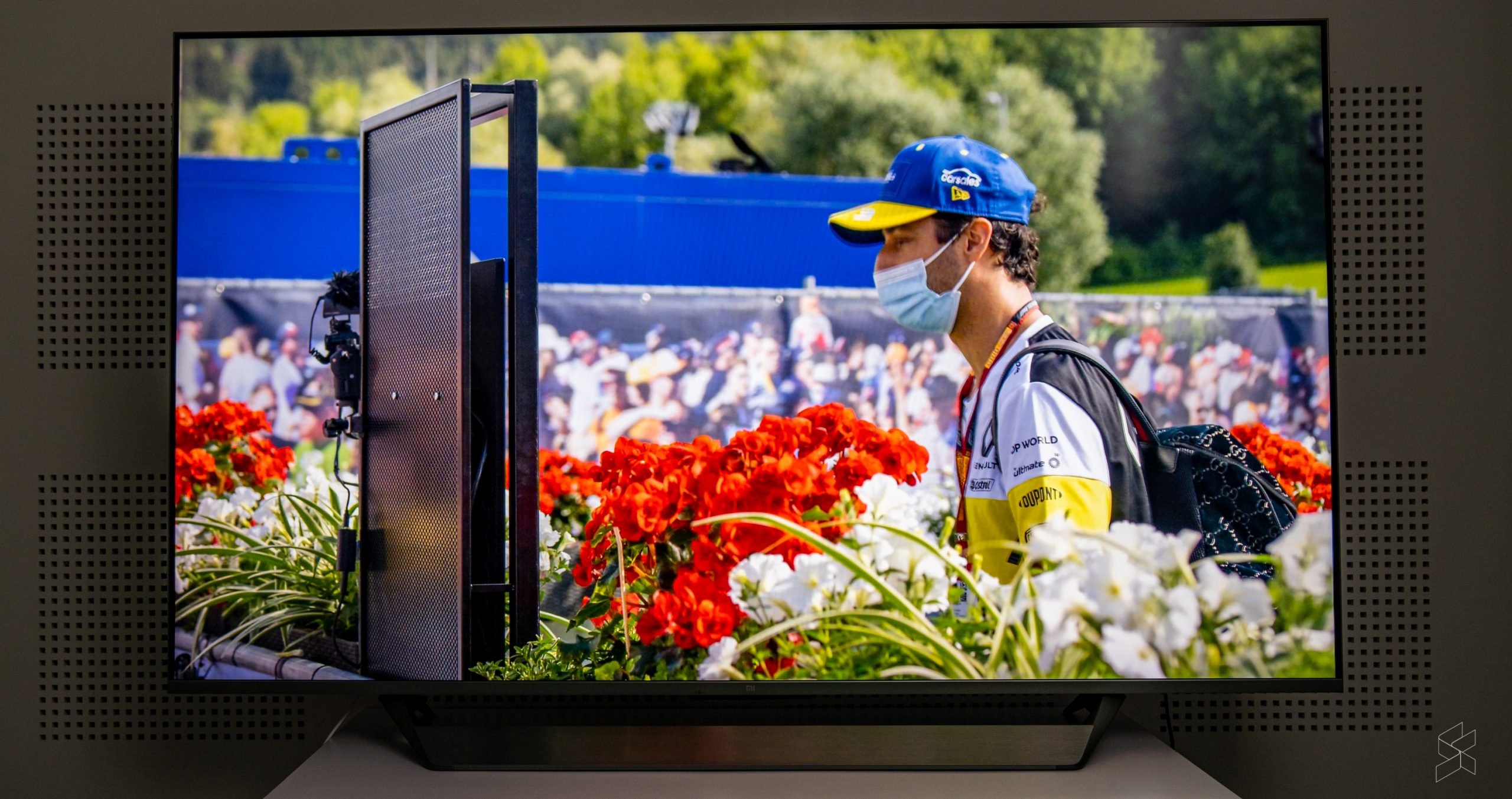
But I can tell you what my eyes see, and honestly they’re pretty impressed with what they see. From a reasonable viewing distance, the panel looks really good, especially when you’re making use of the HDR10+ and Dolby Vision support.
I mostly watched Netflix and YouTube content on this TV during my review period and I have to say that the Netflix stuff looks amazing. Deep blacks, great contrast, and excellent viewing angles—the Mi TV Q1 definitely feels like an upgrade to your typical bargain bin TV or computer monitor.
There were instances when I noticed a little bit of the post-processing added by the TV to improve sharpness—especially on older titles like Seinfeld—but from a comfortable TV viewing distance, these were minor enough that I could ignore it.
On top of that, when you fire up shows that supported Dolby Vision (DV), you could see this little prompt at the top corner that let you know Dolby Vision was enabled. This comes with a couple of new settings parameters and Dolby Vision-specific profiles.
I’m not sure if my untrained eyes actually noticed a huge difference between the DV content and the non-DV content, because I didn’t see an option to turn DV off. But, I have to say that seeing that little pop up made me feel like I was about to see something special, and that goes a long way in improving the viewing experience.
That said, while I enjoyed the Netflix viewing experience, content on YouTube was a lot more hit or miss. Even though I specifically watched content from channels that I knew had excellent cinematography, I didn’t feel like I was getting the same kind of quality as I did from the Netflix stuff. I found that I had to do a lot more tweaking in the settings menu to get a good experience, while the Netflix stuff was just hit play and enjoy.
Another aspect I didn’t enjoy was the 120Hz motion smoothness. You see, the Mi TV Q1 doesn’t support native 4K 120Hz, instead, it relies on something called Motion Estimation. Motion Compensation (MEMC) technology to “upscale” content to 120Hz. And this was a little bit too hit or miss.
I definitely didn’t like it when watching content on the TV because I personally feel that for anything that isn’t high-action like sports, 24fps or 30fps is ideal. But even in those fast-moving sports content, the 120Hz upscaling didn’t feel consistent enough. Some movement was made really smooth while others were comparatively slower.
This made the whole experience feel very artificial and it served to be more of a distraction than anything. In theory, gaming would be where this fast refresh rate excels, but my colleague Hanif noted that in several games he tried, there was a noticeable delay in his input with this motion smoothness turned on.
The good news is that you can always turn it off if you don’t like it, which to me makes this not a big deal. What I did find was a big deal, was the operating system itself:
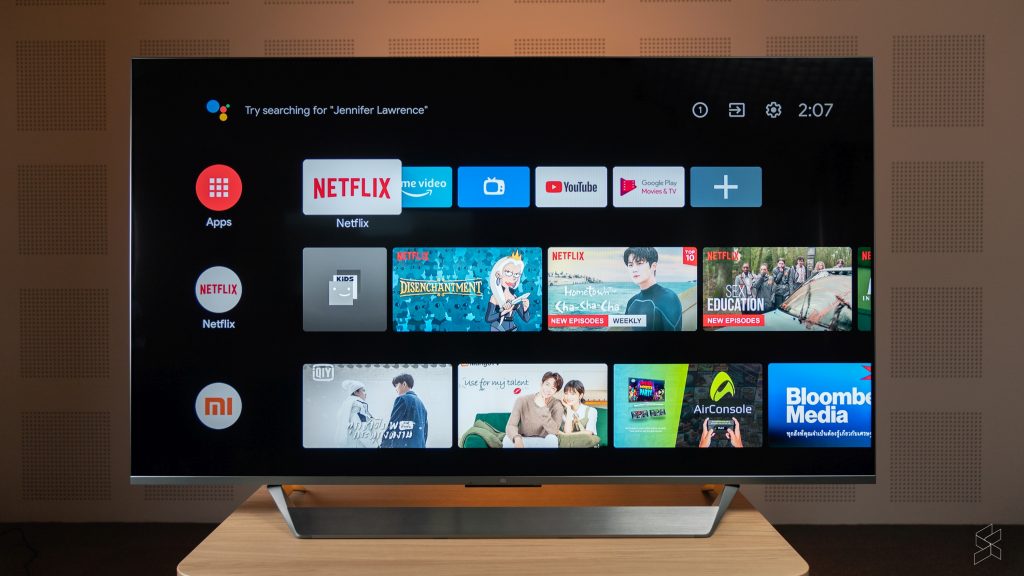
Android TV isn’t great, but laggy Android TV is absolutely not it
I’ll come right out and say it: Android TV is my least favourite Smart TV interface. As someone who’s a fan of stock Android and bloatware-free Windows, I do not like Android TV. It’s literally too basic. It feels like I’m using the Linux equivalent of a TV UX.
Functionally, it’s mostly all there. And it’s an operating system that I’m familiar with because I have a Mi Box at home that’s plugged into my ancient TV. You can access your installed apps, you can set up favourites, and in the case of the Mi TV Q1, the remote also gives you direct access to apps like Netflix & Amazon Prime via a dedicated button.
But the thing with Android TV is, since the day I bought my Mi Box several years ago, until this Mi TV Q1, I feel like the UX has not changed one bit.
Compared to Samsung’s Tizen, or LG’s WebOS, the Android TV experience is just sorely lacking when it comes to how a modern TV operating system should look and function. Maybe it’s the whole Android of it all but simple things like tweaking picture settings can only be done in the settings menu, while Samsung’s Tizen for example has a row of quick settings for adjusting picture and sound.
Nevertheless, I’d be willing to put this down as a preference thing. After all, functionally, it works—I just think that there are more slick and simple solutions out there.
What I find absolutely unacceptable is how sluggish the system is. For starters, booting up takes an unnecessarily long time. While my experience with Samsung TVs have been near instantaneous, the Mi TV Q1 75” feels like it takes an
eternity
to get to the main screen. And even there, it takes a couple more seconds to load in all the previews for the thumbnails.
Then, you get the occasional lag spikes when navigating through the interface. And perhaps worst of all, when you try to access the menu or navigate out of a 4K video, the TV also takes a while and a bit to respond.
Smooth isn’t what I’d use to describe the navigation experience, and that’s a little disappointing because as far as responsiveness, this expensive TV feels no different to my cheap Mi Box.
But, I kinda get why it turned out this way
Xiaomi’s not really a TV company the way Samsung and LG are. Besides, it’s super obvious that the Mi TV Q1 75” was built to a price—flagship or not.
From a regular TV viewing distance, the Mi TV actually looks pretty legit. It has very slim bezels all around, and a very unobtrusive frame. But, if you get closer, you start to see that the fit and finish could have been a little bit better, and it’s not quite as sleek as it could be.
Though, the part that sticks out the most like a sore thumb is the stand. It looks like the TV is throwing a tantrum, sticking out its bottom lip. Plus, it’s shiny so it does pick up light and can be distracting at times.
Hanif is convinced that the stand is also affecting the audio quality of the TV’s speakers, but I personally think that the 30W (2x 15W) speakers just aren’t that special to begin with. They’re definitely functional, but I think if you want a proper audio experience, you’d be better off investing in a soundbar.
It’s just going to be a bit tricky to tuck it under the TV since the stand has that huge lip.
Does that mean it’s a bad buy then?
I think if we were judging it purely based on the image quality, I don’t think the Mi TV Q1 75” is bad at all. In fact, I think it’s quite the opposite. And if you take the RM7,999 price (
Lazada
,
Shopee
) into consideration, it becomes a much more appealing package. Not surprising, if you’re familiar with Xiaomi’s track record.
For example, I wasn’t able to find a 75” QLED Samsung TV for around the same price as the Mi TV. If you wanted a 75” 4K Samsung smart TV for less than RM8,000, you’d probably be looking at their
Crystal UHD series
instead.
Of course, there are compromises here, but if you’re looking at it from a value perspective, I haven’t really found a better option. Just remember if you’re looking to buy this TV that there are definitely a couple of issues you will have to deal with.
But if you’re OK with that, I think you’ll be happy with the visual experience. For me though, I think I’ll be holding off until I get to check out their P1 series. Although you don’t get the QLED experience, the much lower price point could make it worth it in the end. Plus, I live in a small apartment so I don’t really need a 75” panel.
Would you like to see a review of the
Mi TV P1
too? Let me know in the comments below.
Photography by
Rory Lee
&
Marcus Choo
with the Sony A7 III.
Related |
| Markdown | [](https://soyacincau.com/)
- [中文版](https://cn.soyacincau.com/)
- [BM](http://bm.soyacincau.com/)
- [News](https://soyacincau.com/category/news/)
- [Deals](https://soyacincau.com/category/deals/)
- [Reviews](https://soyacincau.com/category/reviews/)
- [First Impressions](https://soyacincau.com/category/first-impressions/)
- [Hands-on](https://soyacincau.com/category/hands-on/)
- [Comparisons](https://soyacincau.com/category/comparisons/)
- [Tech](https://soyacincau.com/category/tech/)
- [Mobile](https://www.soyacincau.com/tag/mobile/)
- [Computers](https://www.soyacincau.com/tag/computers/)
- [Cameras](https://www.soyacincau.com/tag/cameras/)
- [Wearables](https://www.soyacincau.com/tag/smartwatch/)
- [Audio](https://www.soyacincau.com/tag/headphones/)
- [Drones](https://www.soyacincau.com/tag/drones/)
- [Telco](https://soyacincau.com/category/telco/)
- [Celcom](https://www.soyacincau.com/tag/celcom)
- [Digi](https://www.soyacincau.com/tag/digi/)
- [Maxis](https://www.soyacincau.com/tag/maxis/)
- [Time](https://www.soyacincau.com/tag/time-broadband/)
- [Tune Talk](https://www.soyacincau.com/tag/tune-talk)
- [U Mobile](https://www.soyacincau.com/tag/u-mobile/)
- [Unifi](https://www.soyacincau.com/tag/unifi/)
- [Yes](https://www.soyacincau.com/tag/yes-4g/)
- [Cars](https://soyacincau.com/category/transport/cars/)
- [Contribute](https://soyacincau.com/contribute-to-us/)
- [Jobs](https://soyacincau.com/jobs/)
Menu
- [中文版](https://cn.soyacincau.com/)
- [BM](http://bm.soyacincau.com/)
- [News](https://soyacincau.com/category/news/)
- [Deals](https://soyacincau.com/category/deals/)
- [Reviews](https://soyacincau.com/category/reviews/)
- [First Impressions](https://soyacincau.com/category/first-impressions/)
- [Hands-on](https://soyacincau.com/category/hands-on/)
- [Comparisons](https://soyacincau.com/category/comparisons/)
- [Tech](https://soyacincau.com/category/tech/)
- [Mobile](https://www.soyacincau.com/tag/mobile/)
- [Computers](https://www.soyacincau.com/tag/computers/)
- [Cameras](https://www.soyacincau.com/tag/cameras/)
- [Wearables](https://www.soyacincau.com/tag/smartwatch/)
- [Audio](https://www.soyacincau.com/tag/headphones/)
- [Drones](https://www.soyacincau.com/tag/drones/)
- [Telco](https://soyacincau.com/category/telco/)
- [Celcom](https://www.soyacincau.com/tag/celcom)
- [Digi](https://www.soyacincau.com/tag/digi/)
- [Maxis](https://www.soyacincau.com/tag/maxis/)
- [Time](https://www.soyacincau.com/tag/time-broadband/)
- [Tune Talk](https://www.soyacincau.com/tag/tune-talk)
- [U Mobile](https://www.soyacincau.com/tag/u-mobile/)
- [Unifi](https://www.soyacincau.com/tag/unifi/)
- [Yes](https://www.soyacincau.com/tag/yes-4g/)
- [Cars](https://soyacincau.com/category/transport/cars/)
- [Contribute](https://soyacincau.com/contribute-to-us/)
- [Jobs](https://soyacincau.com/jobs/)
- [Tech](https://soyacincau.com/category/tech/)
- [News](https://soyacincau.com/category/news/)
- [Mobile](https://www.soyacincau.com/tag/mobile/)
- [Computers](https://www.soyacincau.com/tag/computers/)
- [Cameras](https://www.soyacincau.com/tag/cameras/)
- [Wearables](https://www.soyacincau.com/tag/wearables/)
- [Audio](https://www.soyacincau.com/tag/audio/)
- [Drones](https://www.soyacincau.com/tag/drones/)
- [Telco](https://soyacincau.com/category/telco/)
- [Celcom](https://www.soyacincau.com/tag/celcom/)
- [Digi](https://www.soyacincau.com/tag/digi/)
- [Maxis](https://www.soyacincau.com/tag/maxis/)
- [Time](https://www.soyacincau.com/tag/time-broadband/)
- [U Mobile](https://www.soyacincau.com/tag/u-mobile/)
- [Unifi](https://www.soyacincau.com/tag/unifi/)
- [Yes](https://www.soyacincau.com/tag/yes-4g/)
- [Reviews](https://soyacincau.com/category/reviews/)
- [First Impressions](https://soyacincau.com/category/first-impressions/)
- [Hands-on](https://soyacincau.com/category/hands-on/)
- [Comparisons](https://soyacincau.com/category/comparisons/)
- [Buyer’s Guide](https://soyacincau.com/category/buyers-guide/)
- [Opinions](https://soyacincau.com/category/opinions/)
- [Digital Life](https://soyacincau.com/category/the-digital-life/)
- [Video](https://soyacincau.com/category/video/)
- [Deals](https://soyacincau.com/category/deals/)
- [How-To](https://soyacincau.com/category/how-to/)
- [Cars](https://soyacincau.com/category/transport/cars/)
- [Bahasa Melayu](https://bm.soyacincau.com/)
- [EV](https://soyacincau.com/tag/ev)
- [Contribute](https://soyacincau.com/contribute-to-us/)
- [Advertise](https://soyacincau.com/advertising/)
Menu
- [Tech](https://soyacincau.com/category/tech/)
- [News](https://soyacincau.com/category/news/)
- [Mobile](https://www.soyacincau.com/tag/mobile/)
- [Computers](https://www.soyacincau.com/tag/computers/)
- [Cameras](https://www.soyacincau.com/tag/cameras/)
- [Wearables](https://www.soyacincau.com/tag/wearables/)
- [Audio](https://www.soyacincau.com/tag/audio/)
- [Drones](https://www.soyacincau.com/tag/drones/)
- [Telco](https://soyacincau.com/category/telco/)
- [Celcom](https://www.soyacincau.com/tag/celcom/)
- [Digi](https://www.soyacincau.com/tag/digi/)
- [Maxis](https://www.soyacincau.com/tag/maxis/)
- [Time](https://www.soyacincau.com/tag/time-broadband/)
- [U Mobile](https://www.soyacincau.com/tag/u-mobile/)
- [Unifi](https://www.soyacincau.com/tag/unifi/)
- [Yes](https://www.soyacincau.com/tag/yes-4g/)
- [Reviews](https://soyacincau.com/category/reviews/)
- [First Impressions](https://soyacincau.com/category/first-impressions/)
- [Hands-on](https://soyacincau.com/category/hands-on/)
- [Comparisons](https://soyacincau.com/category/comparisons/)
- [Buyer’s Guide](https://soyacincau.com/category/buyers-guide/)
- [Opinions](https://soyacincau.com/category/opinions/)
- [Digital Life](https://soyacincau.com/category/the-digital-life/)
- [Video](https://soyacincau.com/category/video/)
- [Deals](https://soyacincau.com/category/deals/)
- [How-To](https://soyacincau.com/category/how-to/)
- [Cars](https://soyacincau.com/category/transport/cars/)
- [Bahasa Melayu](https://bm.soyacincau.com/)
- [EV](https://soyacincau.com/tag/ev)
- [Contribute](https://soyacincau.com/contribute-to-us/)
- [Advertise](https://soyacincau.com/advertising/)
[](https://soyacincau.com/)
[Home](https://soyacincau.com/) [Digital Life](https://soyacincau.com/category/the-digital-life/)
# Xiaomi Mi TV Q1 75″ review Malaysia: The classic recipe
 by [Rory Lee](https://soyacincau.com/author/rorylee/)
[October 12, 2021](https://soyacincau.com/2021/10/12/xiaomi-mi-tv-q1-75-review-malaysia-the-classic-recipe/)
in [Digital Life](https://soyacincau.com/category/the-digital-life/), [Reviews](https://soyacincau.com/category/reviews/), [Tech](https://soyacincau.com/category/tech/)
[0](https://soyacincau.com/2021/10/12/xiaomi-mi-tv-q1-75-review-malaysia-the-classic-recipe/#comments)
[](https://soyacincau.com/wp-content/uploads/2021/10/211012-xiaomi-mi-tv-q1-4k-75-malaysia-11-scaled.jpg)
0
SHARES
0
VIEWS
[Share on Facebook](https://www.facebook.com/sharer.php?u=https%3A%2F%2Fsoyacincau.com%2F2021%2F10%2F12%2Fxiaomi-mi-tv-q1-75-review-malaysia-the-classic-recipe%2F)[Share on Twitter](https://twitter.com/intent/tweet?text=Xiaomi+Mi+TV+Q1+75%E2%80%B3+review+Malaysia%3A+The+classic+recipe&url=https%3A%2F%2Fsoyacincau.com%2F2021%2F10%2F12%2Fxiaomi-mi-tv-q1-75-review-malaysia-the-classic-recipe%2F)
As someone who grew up without Astro or a high end gaming console or any kind of expensive streaming service, I never really saw the need for a television. Especially after I discovered the wonderful world of personal computing.
Which is why I would never drop tens of thousands of ringgit on a big 4K Smart TV when you could watch anything and everything you want on a computer. But with great age, comes a great need to spend money on things that are perhaps not that necessary. And, as a result, I’ve started to come around to the idea of having a nice big 4K Smart TV in my living room.
I can’t say I didn’t see this coming because in the past I also never really thought I’d need or want an electric toothbrush, digital scale or tiny handheld vacuum cleaner. Yet now I have a Mi Electric Toothbrush, a [Mi Smart Scale](https://soyacincau.com/2017/07/13/xiaomi-finally-brought-the-mi-smart-scale-to-malaysia/) and a [Mi Vacuum Cleaner Mini](https://soyacincau.com/2020/11/06/new-xiaomi-mi-vacuum-cleaner-mini-will-be-available-during-lazada-11-11-sale-for-rm169/).
Which then brings us to the subject of today’s review: [Xiaomi](https://soyacincau.com/tag/xiaomi/)’s brand new [Mi TV Q1](https://soyacincau.com/tag/mi-tv-q1/) 75”. Given my track record, if there was one Smart TV to get me to take the plunge, it might very well be it.
## **What is it?**
Before I get too deep into it though, I have to warn you that I’m not a TV-phile. I’m coming at this as a first-time TV buyer, so if you’re expecting some super detailed review where I bust out the spider, then this is not it.
I will, however, point out a couple of interesting features that this TV comes with, and let you know if it’s actually worth your time and/or money.
The Xiaomi Mi TV Q1 75” is the top of the line television in Xiaomi’s new lineup of Smart TVs. It has the biggest panel size, measuring 75 inches diagonally, and while it’s not the only one with a 4K UHD panel, it is the only one that uses a Quantum Dot-based LED display tech.
On top of that, it’s a Smart TV that runs on Android TV 10, and is able to output 120Hz thanks to MEMC support. Since it’s Smart, it’ll also have support for 5GHz WiFi, Bluetooth 5.0 and also 100Mbps Ethernet.
But y’know, it’s a TV so I think the part that makes the most sense to start with is:
## **How it looks**
In short, it’s pretty darn good. Xiaomi says that it uses a Quantum Dot-based LED technology, but what that actually means in the grand scheme of things is above my level of knowledge. All I understand is that it’s very similar to Samsung’s QLED technology, and that much is made clear from Xiaomi’s marketing material.
But I can tell you what my eyes see, and honestly they’re pretty impressed with what they see. From a reasonable viewing distance, the panel looks really good, especially when you’re making use of the HDR10+ and Dolby Vision support.
I mostly watched Netflix and YouTube content on this TV during my review period and I have to say that the Netflix stuff looks amazing. Deep blacks, great contrast, and excellent viewing angles—the Mi TV Q1 definitely feels like an upgrade to your typical bargain bin TV or computer monitor.
There were instances when I noticed a little bit of the post-processing added by the TV to improve sharpness—especially on older titles like Seinfeld—but from a comfortable TV viewing distance, these were minor enough that I could ignore it.
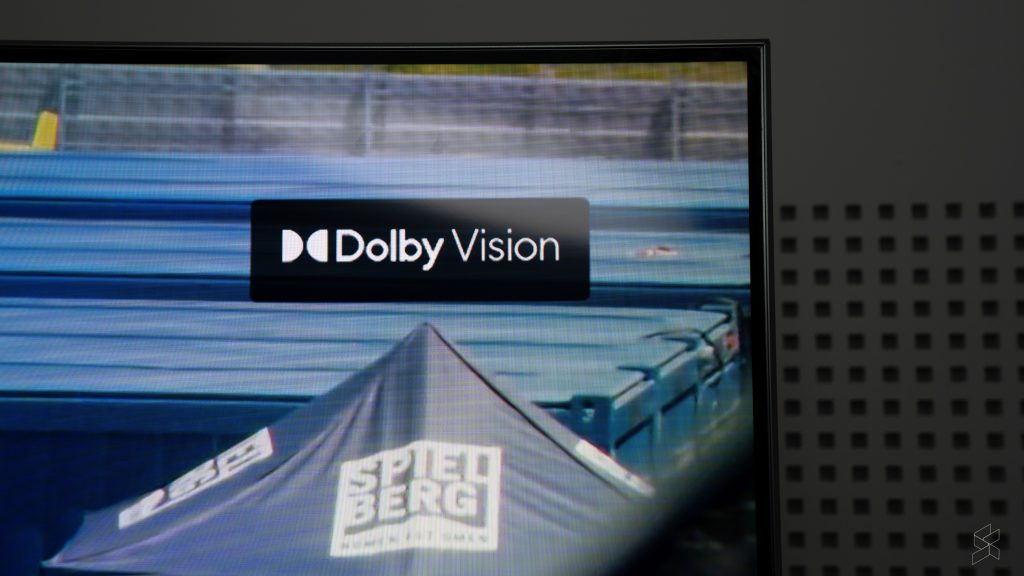
On top of that, when you fire up shows that supported Dolby Vision (DV), you could see this little prompt at the top corner that let you know Dolby Vision was enabled. This comes with a couple of new settings parameters and Dolby Vision-specific profiles.
I’m not sure if my untrained eyes actually noticed a huge difference between the DV content and the non-DV content, because I didn’t see an option to turn DV off. But, I have to say that seeing that little pop up made me feel like I was about to see something special, and that goes a long way in improving the viewing experience.
That said, while I enjoyed the Netflix viewing experience, content on YouTube was a lot more hit or miss. Even though I specifically watched content from channels that I knew had excellent cinematography, I didn’t feel like I was getting the same kind of quality as I did from the Netflix stuff. I found that I had to do a lot more tweaking in the settings menu to get a good experience, while the Netflix stuff was just hit play and enjoy.
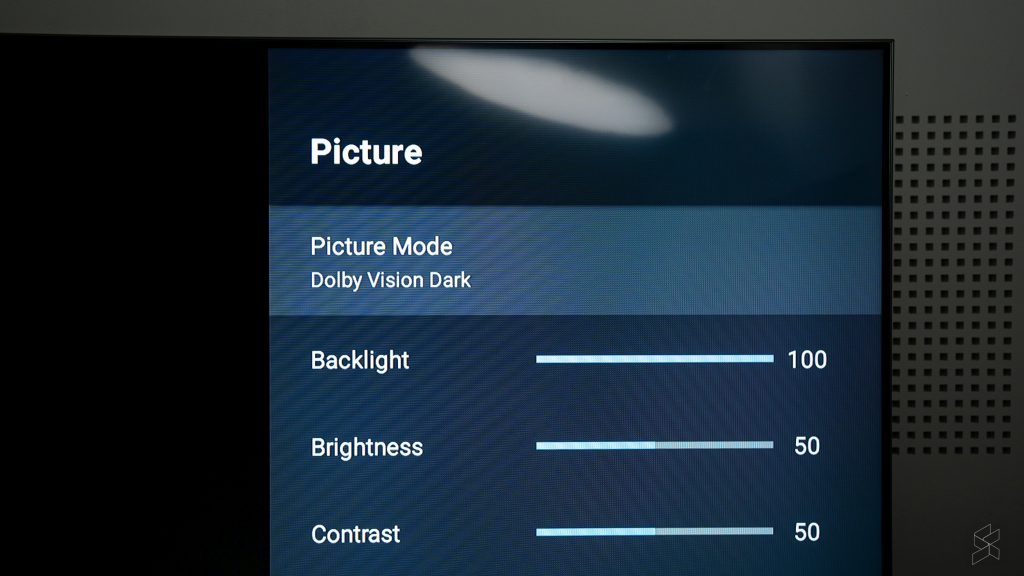
Another aspect I didn’t enjoy was the 120Hz motion smoothness. You see, the Mi TV Q1 doesn’t support native 4K 120Hz, instead, it relies on something called Motion Estimation. Motion Compensation (MEMC) technology to “upscale” content to 120Hz. And this was a little bit too hit or miss.
I definitely didn’t like it when watching content on the TV because I personally feel that for anything that isn’t high-action like sports, 24fps or 30fps is ideal. But even in those fast-moving sports content, the 120Hz upscaling didn’t feel consistent enough. Some movement was made really smooth while others were comparatively slower.
This made the whole experience feel very artificial and it served to be more of a distraction than anything. In theory, gaming would be where this fast refresh rate excels, but my colleague Hanif noted that in several games he tried, there was a noticeable delay in his input with this motion smoothness turned on.
The good news is that you can always turn it off if you don’t like it, which to me makes this not a big deal. What I did find was a big deal, was the operating system itself:
## **Android TV isn’t great, but laggy Android TV is absolutely not it**
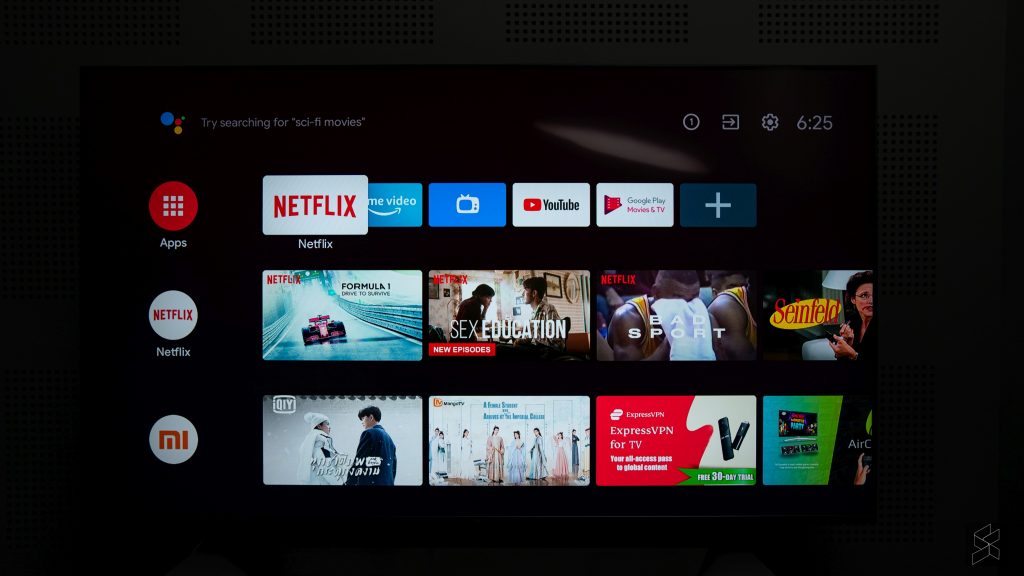
I’ll come right out and say it: Android TV is my least favourite Smart TV interface. As someone who’s a fan of stock Android and bloatware-free Windows, I do not like Android TV. It’s literally too basic. It feels like I’m using the Linux equivalent of a TV UX.
Functionally, it’s mostly all there. And it’s an operating system that I’m familiar with because I have a Mi Box at home that’s plugged into my ancient TV. You can access your installed apps, you can set up favourites, and in the case of the Mi TV Q1, the remote also gives you direct access to apps like Netflix & Amazon Prime via a dedicated button.
But the thing with Android TV is, since the day I bought my Mi Box several years ago, until this Mi TV Q1, I feel like the UX has not changed one bit.
Compared to Samsung’s Tizen, or LG’s WebOS, the Android TV experience is just sorely lacking when it comes to how a modern TV operating system should look and function. Maybe it’s the whole Android of it all but simple things like tweaking picture settings can only be done in the settings menu, while Samsung’s Tizen for example has a row of quick settings for adjusting picture and sound.

Nevertheless, I’d be willing to put this down as a preference thing. After all, functionally, it works—I just think that there are more slick and simple solutions out there.
What I find absolutely unacceptable is how sluggish the system is. For starters, booting up takes an unnecessarily long time. While my experience with Samsung TVs have been near instantaneous, the Mi TV Q1 75” feels like it takes an *eternity* to get to the main screen. And even there, it takes a couple more seconds to load in all the previews for the thumbnails.
Then, you get the occasional lag spikes when navigating through the interface. And perhaps worst of all, when you try to access the menu or navigate out of a 4K video, the TV also takes a while and a bit to respond.
Smooth isn’t what I’d use to describe the navigation experience, and that’s a little disappointing because as far as responsiveness, this expensive TV feels no different to my cheap Mi Box.
## **But, I kinda get why it turned out this way**
Xiaomi’s not really a TV company the way Samsung and LG are. Besides, it’s super obvious that the Mi TV Q1 75” was built to a price—flagship or not.
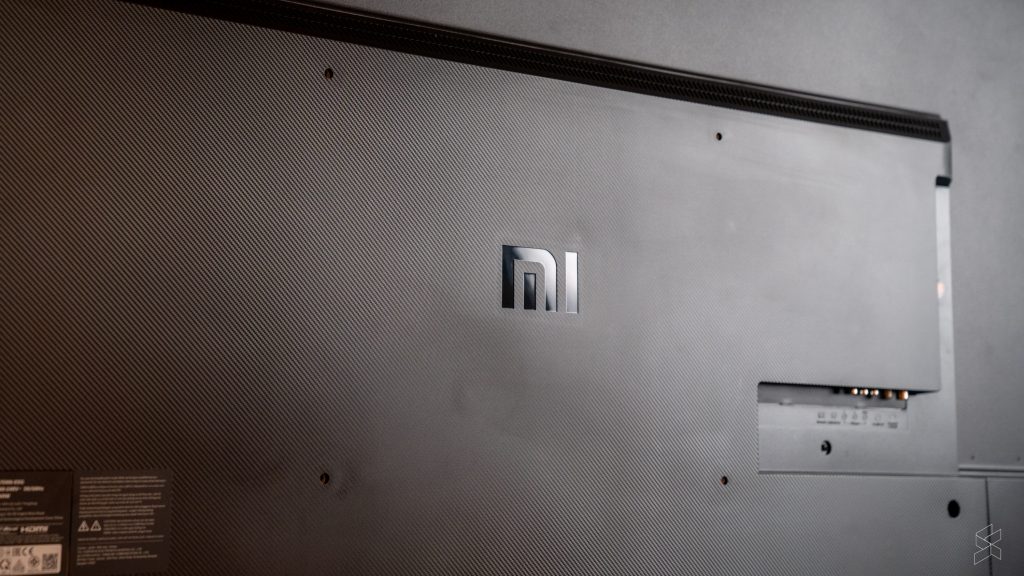
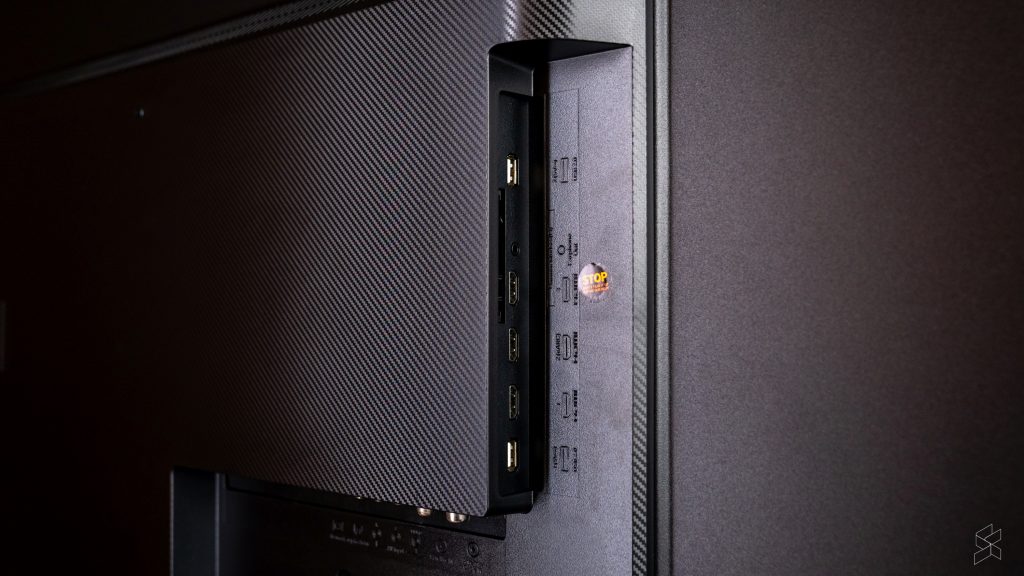
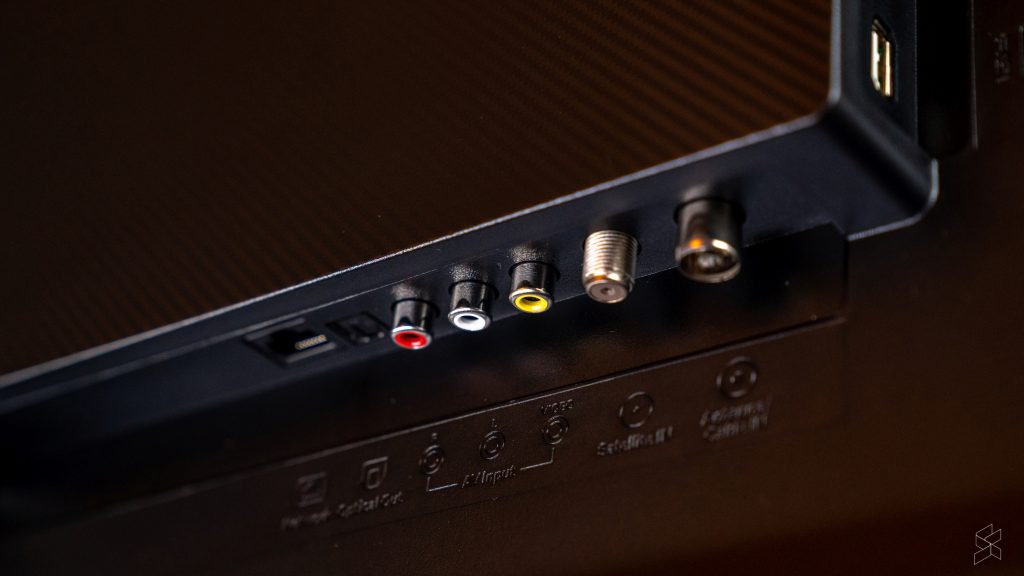
From a regular TV viewing distance, the Mi TV actually looks pretty legit. It has very slim bezels all around, and a very unobtrusive frame. But, if you get closer, you start to see that the fit and finish could have been a little bit better, and it’s not quite as sleek as it could be.
- [](https://soyacincau.com/wp-content/uploads/2021/10/211012-xiaomi-mi-tv-q1-4k-75-malaysia-8-scaled.jpg)
- [](https://soyacincau.com/wp-content/uploads/2021/10/211012-xiaomi-mi-tv-q1-4k-75-malaysia-6-scaled.jpg)
- [](https://soyacincau.com/wp-content/uploads/2021/10/211012-xiaomi-mi-tv-q1-4k-75-malaysia-7-scaled.jpg)
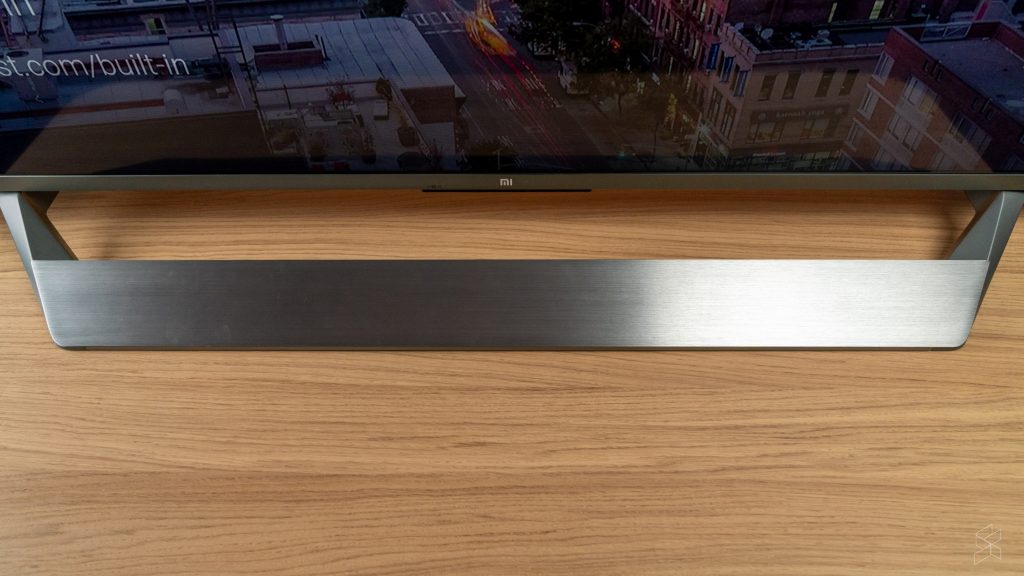
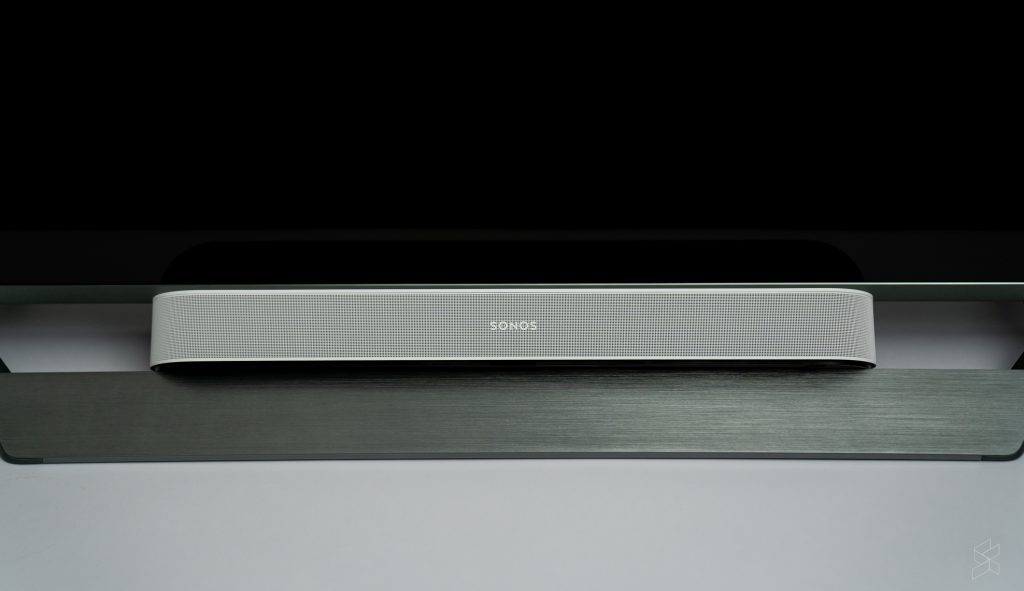
Though, the part that sticks out the most like a sore thumb is the stand. It looks like the TV is throwing a tantrum, sticking out its bottom lip. Plus, it’s shiny so it does pick up light and can be distracting at times.
Hanif is convinced that the stand is also affecting the audio quality of the TV’s speakers, but I personally think that the 30W (2x 15W) speakers just aren’t that special to begin with. They’re definitely functional, but I think if you want a proper audio experience, you’d be better off investing in a soundbar.
It’s just going to be a bit tricky to tuck it under the TV since the stand has that huge lip.
## **Does that mean it’s a bad buy then?**
I think if we were judging it purely based on the image quality, I don’t think the Mi TV Q1 75” is bad at all. In fact, I think it’s quite the opposite. And if you take the RM7,999 price ([Lazada](https://www.lazada.com.my/shop/xiaomicertifiedstoreos?tab=promotion&path=promotion-29455-0.htm&laz_trackid=2:mm_150170571_51451294_2010401338:clkgikrjt1fhq2q44ag7ne&mkttid=clkgikrjt1fhq2q44ag7ne), [Shopee](https://shopee.com.my/xiaomicertifiedstore.os?af_click_lookback=7d&af_reengagement_window=7d&af_siteid=an_12111300000&af_sub_siteid=851fb09eb24a45a3b1ff28c277d748f9-33736-101339&af_viewthrough_lookback=1d&c=4cgb2kmhpgyd-&is_retargeting=true&pid=affiliates&utm_campaign=4cgb2kmhpgyd-&utm_content=851fb09eb24a45a3b1ff28c277d748f9-33736-101339&utm_medium=affiliates&utm_source=an_12111300000)) into consideration, it becomes a much more appealing package. Not surprising, if you’re familiar with Xiaomi’s track record.
For example, I wasn’t able to find a 75” QLED Samsung TV for around the same price as the Mi TV. If you wanted a 75” 4K Samsung smart TV for less than RM8,000, you’d probably be looking at their [Crystal UHD series](https://shopee.com.my/Samsung-75-lnch-LED-\(UA75AU7700\)-4K-UHD-Smart-TV-with-One-Remote-Control-UA75AU7700KXXM-i.193325852.10007456394?position=15) instead.
Of course, there are compromises here, but if you’re looking at it from a value perspective, I haven’t really found a better option. Just remember if you’re looking to buy this TV that there are definitely a couple of issues you will have to deal with.
But if you’re OK with that, I think you’ll be happy with the visual experience. For me though, I think I’ll be holding off until I get to check out their P1 series. Although you don’t get the QLED experience, the much lower price point could make it worth it in the end. Plus, I live in a small apartment so I don’t really need a 75” panel.
Would you like to see a review of the [Mi TV P1](https://soyacincau.com/2021/10/09/xiaomi-malaysia-10-10-sale-smart-tv-android-tv-q1-p1-xrs/) too? Let me know in the comments below.
*Photography by [Rory Lee](https://www.instagram.com/roryqwerty/) & [Marcus Choo](https://www.instagram.com/marcus_choo_wk/) with the Sony A7 III.*
## Related
> [Deal: Xiaomi Malaysia offers its Android TVs from as low as RM899 on 10.10](https://soyacincau.com/2021/10/09/xiaomi-malaysia-10-10-sale-smart-tv-android-tv-q1-p1-xrs/)
Tags: [Xiaomi](https://soyacincau.com/tag/xiaomi/)[Xiaomi MI TV Q1](https://soyacincau.com/tag/xiaomi-mi-tv-q1/)[Xiaomi Smart TV Malaysia](https://soyacincau.com/tag/xiaomi-smart-tv-malaysia/)
[Previous Post MOH: COVID-19 tests are no longer mandatory for travel to Langkawi, fully vaccinated status is still required](https://soyacincau.com/2021/10/12/moh-langkawi-travel-no-longer-mandatory-covid-19-self-test-fully-vaccinated-rule-remains/)
[Next Post Interstate Travel: Transport companies must ensure all passengers are fully vaccinated](https://soyacincau.com/2021/10/12/malaysia-interstate-travel-transport-companies-must-ensure-all-passengers-fully-vaccinated/)
Next Post
[](https://soyacincau.com/2021/10/12/malaysia-interstate-travel-transport-companies-must-ensure-all-passengers-fully-vaccinated/)
### [Interstate Travel: Transport companies must ensure all passengers are fully vaccinated](https://soyacincau.com/2021/10/12/malaysia-interstate-travel-transport-companies-must-ensure-all-passengers-fully-vaccinated/)

## Copyright © 2025 · SoyaCincau.com Mind Blow Sdn Bhd (1076827-P)
- [ADVERTISE](https://soyacincau.com/advertising/)
- [DISCLAIMER](https://soyacincau.com/website-disclaimer/)

## Copyright © 2026 · SoyaCincau.com – Mind Blow Sdn Bhd (1076827-P)
- [ADVERTISE](https://soyacincau.com/advertising/)
- [DISCLAIMER](https://soyacincau.com/website-disclaimer/) |
| Readable Markdown | As someone who grew up without Astro or a high end gaming console or any kind of expensive streaming service, I never really saw the need for a television. Especially after I discovered the wonderful world of personal computing.
Which is why I would never drop tens of thousands of ringgit on a big 4K Smart TV when you could watch anything and everything you want on a computer. But with great age, comes a great need to spend money on things that are perhaps not that necessary. And, as a result, I’ve started to come around to the idea of having a nice big 4K Smart TV in my living room.
I can’t say I didn’t see this coming because in the past I also never really thought I’d need or want an electric toothbrush, digital scale or tiny handheld vacuum cleaner. Yet now I have a Mi Electric Toothbrush, a [Mi Smart Scale](https://soyacincau.com/2017/07/13/xiaomi-finally-brought-the-mi-smart-scale-to-malaysia/) and a [Mi Vacuum Cleaner Mini](https://soyacincau.com/2020/11/06/new-xiaomi-mi-vacuum-cleaner-mini-will-be-available-during-lazada-11-11-sale-for-rm169/).
Which then brings us to the subject of today’s review: [Xiaomi](https://soyacincau.com/tag/xiaomi/)’s brand new [Mi TV Q1](https://soyacincau.com/tag/mi-tv-q1/) 75”. Given my track record, if there was one Smart TV to get me to take the plunge, it might very well be it.
## **What is it?**

Before I get too deep into it though, I have to warn you that I’m not a TV-phile. I’m coming at this as a first-time TV buyer, so if you’re expecting some super detailed review where I bust out the spider, then this is not it.
I will, however, point out a couple of interesting features that this TV comes with, and let you know if it’s actually worth your time and/or money.
The Xiaomi Mi TV Q1 75” is the top of the line television in Xiaomi’s new lineup of Smart TVs. It has the biggest panel size, measuring 75 inches diagonally, and while it’s not the only one with a 4K UHD panel, it is the only one that uses a Quantum Dot-based LED display tech.
On top of that, it’s a Smart TV that runs on Android TV 10, and is able to output 120Hz thanks to MEMC support. Since it’s Smart, it’ll also have support for 5GHz WiFi, Bluetooth 5.0 and also 100Mbps Ethernet.
But y’know, it’s a TV so I think the part that makes the most sense to start with is:
## **How it looks**

In short, it’s pretty darn good. Xiaomi says that it uses a Quantum Dot-based LED technology, but what that actually means in the grand scheme of things is above my level of knowledge. All I understand is that it’s very similar to Samsung’s QLED technology, and that much is made clear from Xiaomi’s marketing material.
But I can tell you what my eyes see, and honestly they’re pretty impressed with what they see. From a reasonable viewing distance, the panel looks really good, especially when you’re making use of the HDR10+ and Dolby Vision support.
I mostly watched Netflix and YouTube content on this TV during my review period and I have to say that the Netflix stuff looks amazing. Deep blacks, great contrast, and excellent viewing angles—the Mi TV Q1 definitely feels like an upgrade to your typical bargain bin TV or computer monitor.
There were instances when I noticed a little bit of the post-processing added by the TV to improve sharpness—especially on older titles like Seinfeld—but from a comfortable TV viewing distance, these were minor enough that I could ignore it.

On top of that, when you fire up shows that supported Dolby Vision (DV), you could see this little prompt at the top corner that let you know Dolby Vision was enabled. This comes with a couple of new settings parameters and Dolby Vision-specific profiles.
I’m not sure if my untrained eyes actually noticed a huge difference between the DV content and the non-DV content, because I didn’t see an option to turn DV off. But, I have to say that seeing that little pop up made me feel like I was about to see something special, and that goes a long way in improving the viewing experience.
That said, while I enjoyed the Netflix viewing experience, content on YouTube was a lot more hit or miss. Even though I specifically watched content from channels that I knew had excellent cinematography, I didn’t feel like I was getting the same kind of quality as I did from the Netflix stuff. I found that I had to do a lot more tweaking in the settings menu to get a good experience, while the Netflix stuff was just hit play and enjoy.

Another aspect I didn’t enjoy was the 120Hz motion smoothness. You see, the Mi TV Q1 doesn’t support native 4K 120Hz, instead, it relies on something called Motion Estimation. Motion Compensation (MEMC) technology to “upscale” content to 120Hz. And this was a little bit too hit or miss.
I definitely didn’t like it when watching content on the TV because I personally feel that for anything that isn’t high-action like sports, 24fps or 30fps is ideal. But even in those fast-moving sports content, the 120Hz upscaling didn’t feel consistent enough. Some movement was made really smooth while others were comparatively slower.
This made the whole experience feel very artificial and it served to be more of a distraction than anything. In theory, gaming would be where this fast refresh rate excels, but my colleague Hanif noted that in several games he tried, there was a noticeable delay in his input with this motion smoothness turned on.
The good news is that you can always turn it off if you don’t like it, which to me makes this not a big deal. What I did find was a big deal, was the operating system itself:
## **Android TV isn’t great, but laggy Android TV is absolutely not it**

I’ll come right out and say it: Android TV is my least favourite Smart TV interface. As someone who’s a fan of stock Android and bloatware-free Windows, I do not like Android TV. It’s literally too basic. It feels like I’m using the Linux equivalent of a TV UX.
Functionally, it’s mostly all there. And it’s an operating system that I’m familiar with because I have a Mi Box at home that’s plugged into my ancient TV. You can access your installed apps, you can set up favourites, and in the case of the Mi TV Q1, the remote also gives you direct access to apps like Netflix & Amazon Prime via a dedicated button.
But the thing with Android TV is, since the day I bought my Mi Box several years ago, until this Mi TV Q1, I feel like the UX has not changed one bit.
Compared to Samsung’s Tizen, or LG’s WebOS, the Android TV experience is just sorely lacking when it comes to how a modern TV operating system should look and function. Maybe it’s the whole Android of it all but simple things like tweaking picture settings can only be done in the settings menu, while Samsung’s Tizen for example has a row of quick settings for adjusting picture and sound.

Nevertheless, I’d be willing to put this down as a preference thing. After all, functionally, it works—I just think that there are more slick and simple solutions out there.
What I find absolutely unacceptable is how sluggish the system is. For starters, booting up takes an unnecessarily long time. While my experience with Samsung TVs have been near instantaneous, the Mi TV Q1 75” feels like it takes an *eternity* to get to the main screen. And even there, it takes a couple more seconds to load in all the previews for the thumbnails.
Then, you get the occasional lag spikes when navigating through the interface. And perhaps worst of all, when you try to access the menu or navigate out of a 4K video, the TV also takes a while and a bit to respond.
Smooth isn’t what I’d use to describe the navigation experience, and that’s a little disappointing because as far as responsiveness, this expensive TV feels no different to my cheap Mi Box.
## **But, I kinda get why it turned out this way**

Xiaomi’s not really a TV company the way Samsung and LG are. Besides, it’s super obvious that the Mi TV Q1 75” was built to a price—flagship or not.
From a regular TV viewing distance, the Mi TV actually looks pretty legit. It has very slim bezels all around, and a very unobtrusive frame. But, if you get closer, you start to see that the fit and finish could have been a little bit better, and it’s not quite as sleek as it could be.
- [](https://soyacincau.com/wp-content/uploads/2021/10/211012-xiaomi-mi-tv-q1-4k-75-malaysia-8-scaled.jpg)
- [](https://soyacincau.com/wp-content/uploads/2021/10/211012-xiaomi-mi-tv-q1-4k-75-malaysia-6-scaled.jpg)
- [](https://soyacincau.com/wp-content/uploads/2021/10/211012-xiaomi-mi-tv-q1-4k-75-malaysia-7-scaled.jpg)
Though, the part that sticks out the most like a sore thumb is the stand. It looks like the TV is throwing a tantrum, sticking out its bottom lip. Plus, it’s shiny so it does pick up light and can be distracting at times.
Hanif is convinced that the stand is also affecting the audio quality of the TV’s speakers, but I personally think that the 30W (2x 15W) speakers just aren’t that special to begin with. They’re definitely functional, but I think if you want a proper audio experience, you’d be better off investing in a soundbar.
It’s just going to be a bit tricky to tuck it under the TV since the stand has that huge lip.

## **Does that mean it’s a bad buy then?**
I think if we were judging it purely based on the image quality, I don’t think the Mi TV Q1 75” is bad at all. In fact, I think it’s quite the opposite. And if you take the RM7,999 price ([Lazada](https://www.lazada.com.my/shop/xiaomicertifiedstoreos?tab=promotion&path=promotion-29455-0.htm&laz_trackid=2:mm_150170571_51451294_2010401338:clkgikrjt1fhq2q44ag7ne&mkttid=clkgikrjt1fhq2q44ag7ne), [Shopee](https://shopee.com.my/xiaomicertifiedstore.os?af_click_lookback=7d&af_reengagement_window=7d&af_siteid=an_12111300000&af_sub_siteid=851fb09eb24a45a3b1ff28c277d748f9-33736-101339&af_viewthrough_lookback=1d&c=4cgb2kmhpgyd-&is_retargeting=true&pid=affiliates&utm_campaign=4cgb2kmhpgyd-&utm_content=851fb09eb24a45a3b1ff28c277d748f9-33736-101339&utm_medium=affiliates&utm_source=an_12111300000)) into consideration, it becomes a much more appealing package. Not surprising, if you’re familiar with Xiaomi’s track record.
For example, I wasn’t able to find a 75” QLED Samsung TV for around the same price as the Mi TV. If you wanted a 75” 4K Samsung smart TV for less than RM8,000, you’d probably be looking at their [Crystal UHD series](https://shopee.com.my/Samsung-75-lnch-LED-\(UA75AU7700\)-4K-UHD-Smart-TV-with-One-Remote-Control-UA75AU7700KXXM-i.193325852.10007456394?position=15) instead.
Of course, there are compromises here, but if you’re looking at it from a value perspective, I haven’t really found a better option. Just remember if you’re looking to buy this TV that there are definitely a couple of issues you will have to deal with.
But if you’re OK with that, I think you’ll be happy with the visual experience. For me though, I think I’ll be holding off until I get to check out their P1 series. Although you don’t get the QLED experience, the much lower price point could make it worth it in the end. Plus, I live in a small apartment so I don’t really need a 75” panel.
Would you like to see a review of the [Mi TV P1](https://soyacincau.com/2021/10/09/xiaomi-malaysia-10-10-sale-smart-tv-android-tv-q1-p1-xrs/) too? Let me know in the comments below.
*Photography by [Rory Lee](https://www.instagram.com/roryqwerty/) & [Marcus Choo](https://www.instagram.com/marcus_choo_wk/) with the Sony A7 III.*
## Related |
| Shard | 29 (laksa) |
| Root Hash | 5919380801177432629 |
| Unparsed URL | com,soyacincau!/2021/10/12/xiaomi-mi-tv-q1-75-review-malaysia-the-classic-recipe/ s443 |