ℹ️ Skipped - page is already crawled
| Filter | Status | Condition | Details |
|---|---|---|---|
| HTTP status | PASS | download_http_code = 200 | HTTP 200 |
| Age cutoff | PASS | download_stamp > now() - 6 MONTH | 1.1 months ago |
| History drop | PASS | isNull(history_drop_reason) | No drop reason |
| Spam/ban | PASS | fh_dont_index != 1 AND ml_spam_score = 0 | ml_spam_score=0 |
| Canonical | PASS | meta_canonical IS NULL OR = '' OR = src_unparsed | Not set |
| Property | Value |
|---|---|
| URL | https://setapp.com/how-to/create-an-app |
| Last Crawled | 2026-03-07 22:10:29 (1 month ago) |
| First Indexed | 2025-04-18 09:14:10 (11 months ago) |
| HTTP Status Code | 200 |
| Meta Title | How to create an app in 2025: My step-by-step guide [no code] |
| Meta Description | How do I create an app without coding skills? Is it even possible? Check out my guide for detailed instructions and tools. |
| Meta Canonical | null |
| Boilerpipe Text | I guess you’re here reading this article because you want to know how to create your own app. So, let’s not waste time on a long intro.
My guide will walk you through the essential steps to turn your app vision into reality, from brainstorming your idea to introducing your app to the App Store audience. Ready?
How to find a winning app idea in 2025
Finding that perfect app idea is where it all begins. Think about the problems you face daily. What annoys you the most? What could be improved? For example, I don’t have time to read a lot as I did before, but I still want to learn something new. That’s where I use the book summary app called Headway. Think of similar frustrations you see around you that you could address with an app.
To vet your idea, I recommend you check out Google Trends. It will help you understand what people are currently searching for. If you see that your application can be of help to them, why not give it a try?
Check out
Everything developers need to know about the iOS market in the EU [+ Infographics]
.
Things to know before creating an app
If you’re looking for how to create an app, you’ll definitely need to do the things below:
Create a list of ideas:
No matter how far-fetched the idea, just sit down with your favorite
note-taking app
and write it down. By doing this, you get your ideas out of your head and make room for new thoughts.
Engage others:
Talk with your colleagues and friends. Sometimes, just talking things over with others can really help you see what you didn’t see before.
Research:
After you’ve picked a few ideas, do a quick search to check for similar apps on the market. Look at the reviews to find out what users like and what they don’t.
How to design an app
Once you have an idea, move on to designing. I recommend you use the following tools:
Wireframing
Figma or Adobe XD
Prototyping
Uizard
Templates
Canva
Remember, it doesn’t have to be perfect at the wireframing stage. It just needs to convey the layout and flow. Don’t let the perfectionist inside you get you stuck in one spot.
At the same time, still think about user experience when designing. Your application should be intuitive and really easy to navigate.
How to build an app: Coding vs. No-code vs. AI in 2025
Now comes the fun part! Let’s build your app. For starters, here is some good news. There was a time when you had to be a programmer in order to build an application. Now? Not necessarily.
You have several options for how to go about this:
Method 1: The good old coding
If you’re tech-savvy or willing to learn, choose coding, as it can give you full control and customization. Today, Swift is the go-to for iOS apps. If you can’t or just don’t want to code, be prepared for a potential budget of over $20,000 to hire a developer.
Method 2: No-code platforms
If coding isn’t your thing or you don’t have enough money to hire a pro, don’t worry. There are no-code platforms like Bubble or Adalo to simplify the process for you. What I like most about this method is that anyone can create functional apps without writing a single line of code. Prices can range from $50 to $5,000. So it’s budget-friendly.
Method 3: AI tools
My favorite part — innovation and AI. If you're fine with AI tools, try something like Backendless. This tool automates many processes and makes it faster and easier for you to get your app up and running.
How to test an app before launch in 2025
Congratulations! You know how to develop an app, and you finally did it. What’s next? Well, before you launch your new app into the wide world, test it thoroughly. It’s better to find someone else than test yourself. Try TestFlight. The real-world feedback from beta testers will help you identify bugs and areas for improvement.
After beta testing, you should also monitor performance. Tools like Firebase allow you to check how well your app runs. Look at the app’s speed, bugs, and user engagement. Gathering insightful data helps you make necessary adjustments before your grand launch.
Check out
What I learned as an Australian indie developer adapting my apps for the EU market and trends
.
How to launch your app on the App Store in 2025
Woohoo! You’ve done the hard work! Now it’s time for your app’s debut! To launch on the App Store, you have to pay a $99 annual fee to Apple. Next, make sure your app is optimized for visibility — think keywords and catchy descriptions. The more appealing your app looks in the store, the more downloads you’ll get.
How much does it cost to create an app in 2025?
Now, we have the money part of the conversation. How much does it really cost to create an app in 2025? Well, the cost can vary based on the development method you choose.
If you choose no-code solutions, expect to spend between $50 and $5,000 for these platforms. In my opinion, they are a decent way to keep costs low while still producing a quality app.
If you go for custom builds (coding), you’ll need to budget anywhere from $20,000 to over $100,000. Indeed, it’s a larger investment but can yield a highly tailored product that meets your specifications.
In terms of timelines, creating your app can take anywhere from one month to a year. Everything will depend on the complexity and the development method you choose.
How to keep your app alive after launch in 2025
Once your app is live, don’t relax too fast. The “fun” isn’t over just yet. If your goal is long-term success with your app, you’ll always need to keep the product fresh and running smoothly. If you update it regularly, chances are your users stay excited about your app and continue paying money.
Tools like Mixpanel will help you to see how people are using your app. Analyze the info received and try to understand what users already love and what maybe needs some improvement. Pay attention to their feedback, and be ready to make changes based on their suggestions. Think about adding cool new features that incorporate the latest tech.
How to create an app? Start now!
By now, you have a general idea of how to build an app. Why wait any longer? Creating your app can be one of the most fulfilling things you can do in 2025. So start now. If you’re not tech-savvy or not sure that you want to hire a developer, try
SwiftyLaunch
and save countless hours of development. The app is available on
Setapp
, a platform with more than 250 top-rated Mac, iOS, and web apps for any task at hand, from mind-mapping (
MindNode
) to writing with AI (
TypingMind
).
Remember, every great app starts with a simple idea. So go ahead — bring that idea to life!
FAQ
How much does it cost to build an app?
If you use a no-code platform, it will cost you between $50 and $5,000. If you decide to hire a developer, be prepared to pay from $20,000 to over $100,000, depending on the features you need in your new app.
Can I build an app for free?
Maybe not for free but much cheaper compared to hiring a developer. You can build an app using no-code platforms, such as Bubble or Adalo. Some tools let you create basic apps without any cost, but they may have limited features or ads.
SwiftyLaunch
on Setapp offers a great way to start building your app without breaking the bank. You can try the tool at no cost for 7 days.
Can a beginner make an app?
Absolutely! Many no-code platforms are beginner-friendly. They guide you through the process, so you don’t need coding skills to start. Try
SwiftyLaunch
. It’s the iOS app boilerplate generator that does all the heavy lifting for you. SwiftyLaunch generates code needed for most iOS apps, such as Auth, In-App Purchases, Analytics, and more.
Is there an AI that can create apps?
Yes, there are AI tools that can assist you in creating apps. They automate much of the process, which lets you build an app without needing to code. |
| Markdown | [Marketplace](https://setapp.com/marketplace)
[Membership](https://setapp.com/membership)
[How it works](https://setapp.com/how-it-works) [Solve with AI+](https://app.setapp.com/ai-plus) [Pricing](https://setapp.com/pricing) [Blog](https://setapp.com/blog) [About Setapp](https://setapp.com/about)
Menu
[Sign in](https://account.setapp.com/signin) [Try free](https://setapp.com/membership/join)


[Home](https://setapp.com/) [Marketplace](https://setapp.com/marketplace) [Membership](https://setapp.com/membership) [How it works](https://setapp.com/how-it-works) [Solve with AI+](https://app.setapp.com/ai-plus) [Pricing](https://setapp.com/pricing) [Blog](https://setapp.com/blog) [About Setapp](https://setapp.com/about)
[Sign in](https://account.setapp.com/signin)

[Home](https://setapp.com/) [Blog](https://setapp.com/blog) [How to](https://setapp.com/blog/how-to) How to create an app in 2025: Here’s what I learned \[Step guide included\]
# How to create an app in 2025: Here’s what I learned \[Step guide included\]
4\.7K views
10 min read
TL;DR
- **Idea:** Validate with Google Trends.
- **Build:** Use no-code tools like [SwiftyLaunch](https://setapp.com/apps/swiftylaunch) or code in Swift.
- **Tip:** Start writing an app description with the help of [TypingMind](https://setapp.com/apps/typingmind).
✕
I guess you’re here reading this article because you want to know how to create your own app. So, let’s not waste time on a long intro.
My guide will walk you through the essential steps to turn your app vision into reality, from brainstorming your idea to introducing your app to the App Store audience. Ready?
Speed up iOS app development
Input details, choose the features you want, and SwirftyLauch will generate the code for you. Available on Setapp.
[Try free](https://setapp.com/membership/join)
Security-tested
✕
## How to find a winning app idea in 2025
Finding that perfect app idea is where it all begins. Think about the problems you face daily. What annoys you the most? What could be improved? For example, I don’t have time to read a lot as I did before, but I still want to learn something new. That’s where I use the book summary app called Headway. Think of similar frustrations you see around you that you could address with an app.
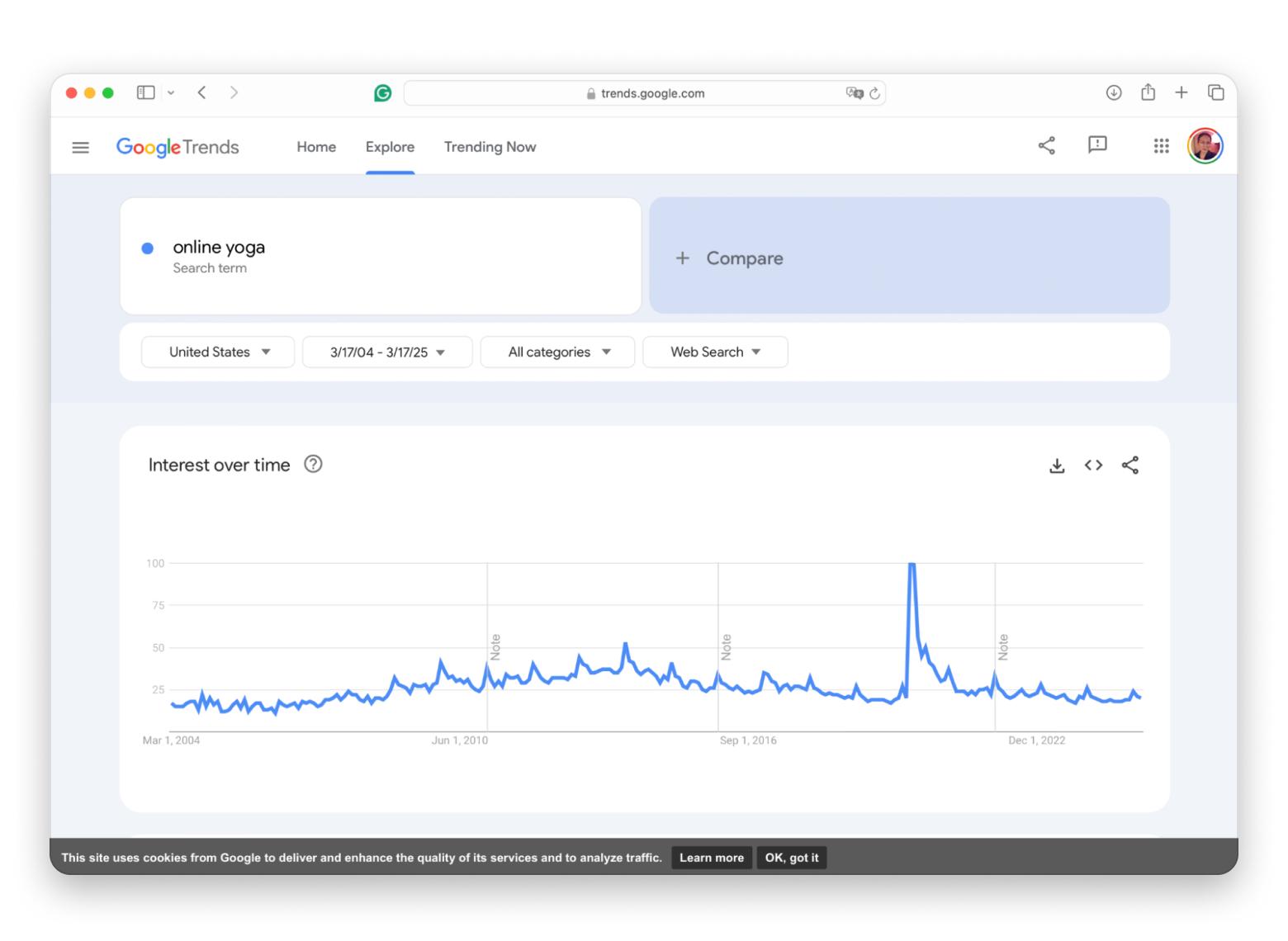
To vet your idea, I recommend you check out Google Trends. It will help you understand what people are currently searching for. If you see that your application can be of help to them, why not give it a try?
Check out [Everything developers need to know about the iOS market in the EU \[+ Infographics\]](https://setapp.com/tech-talks/ios-market-in-the-eu-infographics).
## Things to know before creating an app
If you’re looking for how to create an app, you’ll definitely need to do the things below:
- **Create a list of ideas:** No matter how far-fetched the idea, just sit down with your favorite [note-taking app](https://setapp.com/app-reviews/note-taking-apps-for-mac) and write it down. By doing this, you get your ideas out of your head and make room for new thoughts.
- **Engage others:** Talk with your colleagues and friends. Sometimes, just talking things over with others can really help you see what you didn’t see before.
- **Research:** After you’ve picked a few ideas, do a quick search to check for similar apps on the market. Look at the reviews to find out what users like and what they don’t.
Tip
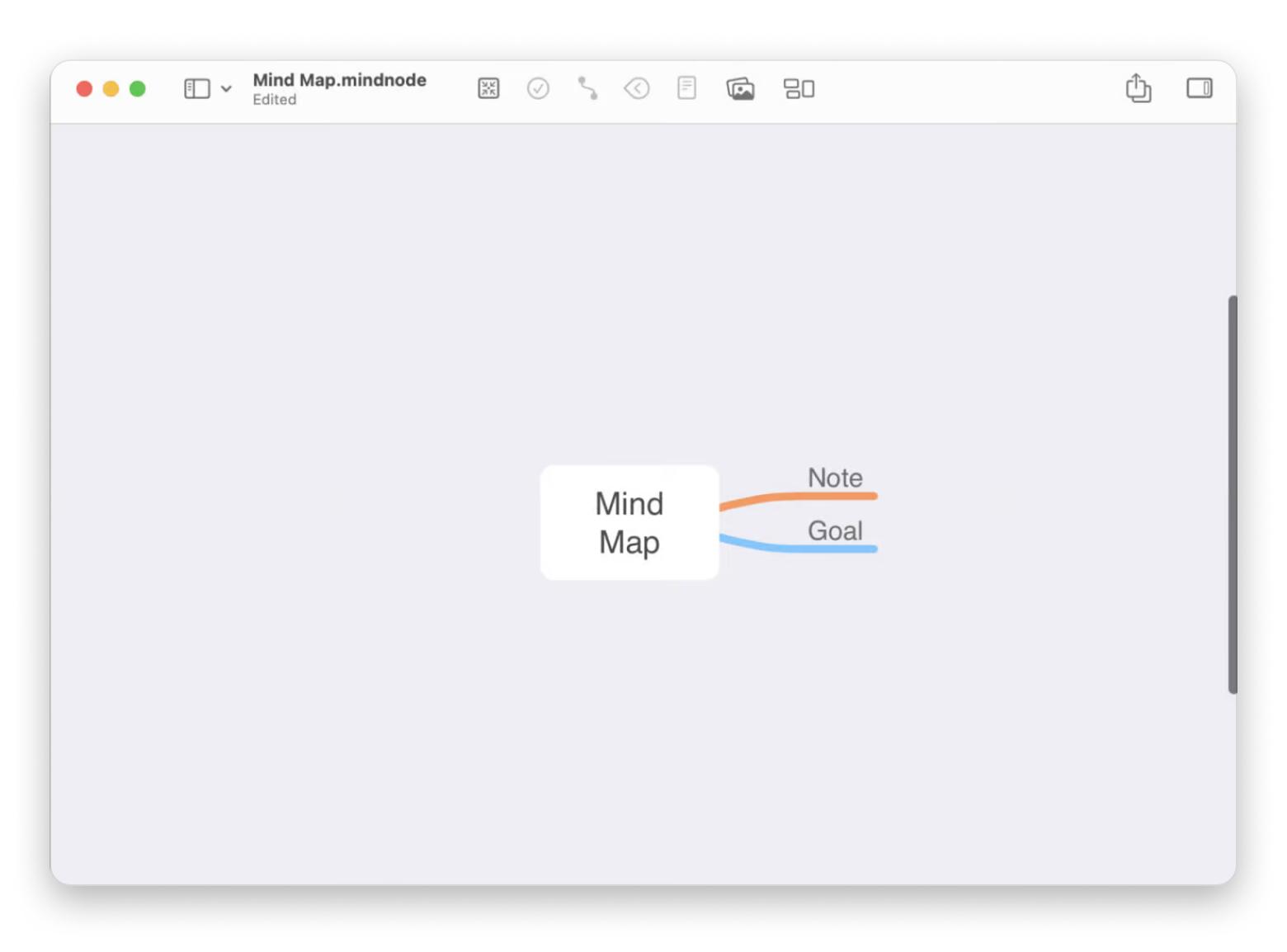
If you’re looking for a good app to organize your thoughts, get [MindNode Classic](https://setapp.com/apps/mindnode)! You can use words, images, stickers, tags, tasks, notes, and more to visualize your idea.
My favorite feature is how you can switch between outlining and mind mapping. Even better, you can use both at the same time! Once you’re done brainstorming, it’s super easy to export your mind map in different formats.
✕
## How to design an app
Once you have an idea, move on to designing. I recommend you use the following tools:
- Wireframing
- Figma or Adobe XD
- Prototyping
- Uizard
- Templates
- Canva
Remember, it doesn’t have to be perfect at the wireframing stage. It just needs to convey the layout and flow. Don’t let the perfectionist inside you get you stuck in one spot.
At the same time, still think about user experience when designing. Your application should be intuitive and really easy to navigate.
## How to build an app: Coding vs. No-code vs. AI in 2025
Now comes the fun part! Let’s build your app. For starters, here is some good news. There was a time when you had to be a programmer in order to build an application. Now? Not necessarily.
You have several options for how to go about this:
### Method 1: The good old coding
If you’re tech-savvy or willing to learn, choose coding, as it can give you full control and customization. Today, Swift is the go-to for iOS apps. If you can’t or just don’t want to code, be prepared for a potential budget of over \$20,000 to hire a developer.
### Method 2: No-code platforms
If coding isn’t your thing or you don’t have enough money to hire a pro, don’t worry. There are no-code platforms like Bubble or Adalo to simplify the process for you. What I like most about this method is that anyone can create functional apps without writing a single line of code. Prices can range from \$50 to \$5,000. So it’s budget-friendly.
### Method 3: AI tools
My favorite part — innovation and AI. If you're fine with AI tools, try something like Backendless. This tool automates many processes and makes it faster and easier for you to get your app up and running.
Tip
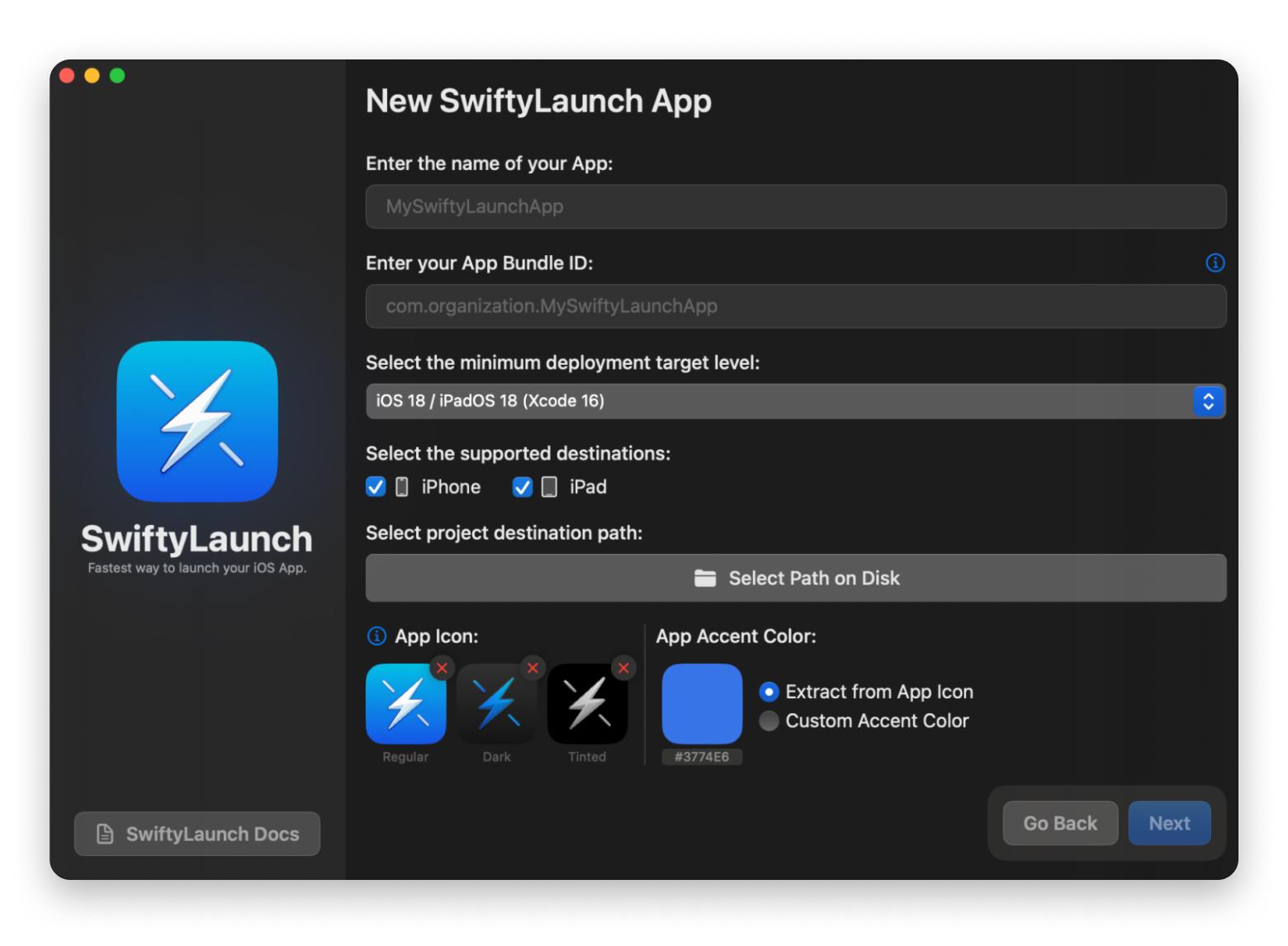
Creating your app shouldn’t be a struggle. Get [SwiftyLaunch](https://setapp.com/apps/swiftylaunch) and easily transform your idea into a complete iOS application. No coding skills required! Generate full Xcode projects, choose from a range of pre-built features, and utilize powerful development modules to streamline your workflow. Whether you’re looking to implement authentication flows, manage in-app purchases, or add AI functionalities, SwiftyLaunch has everything you need.
✕
## How to test an app before launch in 2025
Congratulations! You know how to develop an app, and you finally did it. What’s next? Well, before you launch your new app into the wide world, test it thoroughly. It’s better to find someone else than test yourself. Try TestFlight. The real-world feedback from beta testers will help you identify bugs and areas for improvement.
After beta testing, you should also monitor performance. Tools like Firebase allow you to check how well your app runs. Look at the app’s speed, bugs, and user engagement. Gathering insightful data helps you make necessary adjustments before your grand launch.
Check out [What I learned as an Australian indie developer adapting my apps for the EU market and trends](https://setapp.com/tech-talks/adapt-apps-for-eu-market).
## How to launch your app on the App Store in 2025
Woohoo! You’ve done the hard work! Now it’s time for your app’s debut! To launch on the App Store, you have to pay a \$99 annual fee to Apple. Next, make sure your app is optimized for visibility — think keywords and catchy descriptions. The more appealing your app looks in the store, the more downloads you’ll get.
Tip
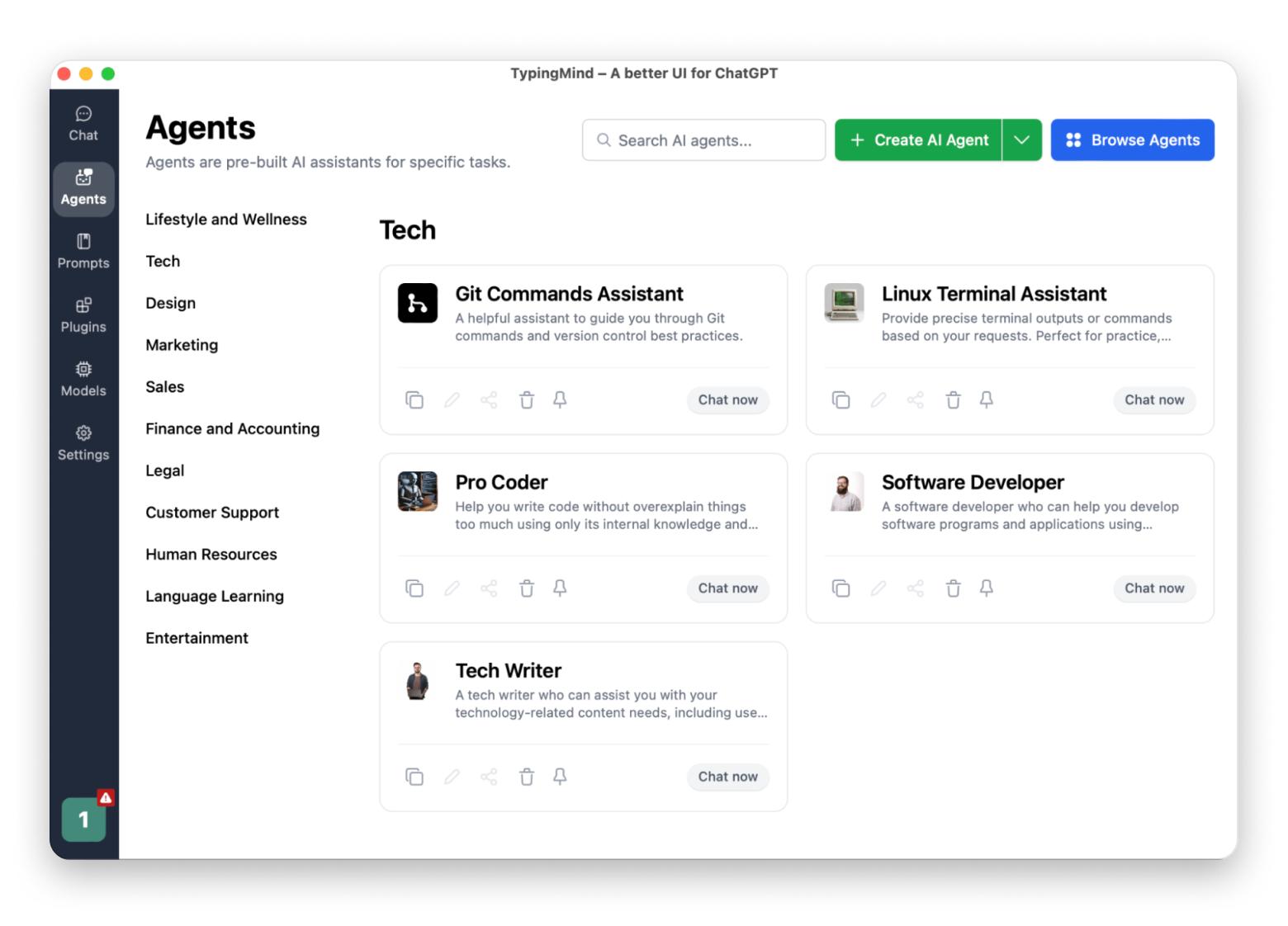
Don’t know where to start writing your app description? I bet you’ll hire a copywriter or ask ChatGPT. Check out [TypingMind](https://setapp.com/apps/typingmind)! It’s ChatGPT in a nicer, friendlier UI. My favorite thing is that TypingMind has a collection of built-in AI characters with which you can chat. From a life hacker to a software developer, you can pick a character and ask them questions or request pieces of text, guides, or explainers.
✕
## How much does it cost to create an app in 2025?
Now, we have the money part of the conversation. How much does it really cost to create an app in 2025? Well, the cost can vary based on the development method you choose.
If you choose no-code solutions, expect to spend between \$50 and \$5,000 for these platforms. In my opinion, they are a decent way to keep costs low while still producing a quality app.
If you go for custom builds (coding), you’ll need to budget anywhere from \$20,000 to over \$100,000. Indeed, it’s a larger investment but can yield a highly tailored product that meets your specifications.
In terms of timelines, creating your app can take anywhere from one month to a year. Everything will depend on the complexity and the development method you choose.
## How to keep your app alive after launch in 2025
Once your app is live, don’t relax too fast. The “fun” isn’t over just yet. If your goal is long-term success with your app, you’ll always need to keep the product fresh and running smoothly. If you update it regularly, chances are your users stay excited about your app and continue paying money.
Tools like Mixpanel will help you to see how people are using your app. Analyze the info received and try to understand what users already love and what maybe needs some improvement. Pay attention to their feedback, and be ready to make changes based on their suggestions. Think about adding cool new features that incorporate the latest tech.
## How to create an app? Start now\!
By now, you have a general idea of how to build an app. Why wait any longer? Creating your app can be one of the most fulfilling things you can do in 2025. So start now. If you’re not tech-savvy or not sure that you want to hire a developer, try [SwiftyLaunch](https://setapp.com/apps/swiftylaunch) and save countless hours of development. The app is available on [Setapp](https://setapp.com/), a platform with more than 250 top-rated Mac, iOS, and web apps for any task at hand, from mind-mapping ([MindNode](https://setapp.com/apps/mindnode)) to writing with AI ([TypingMind](https://setapp.com/apps/typingmind)).
Remember, every great app starts with a simple idea. So go ahead — bring that idea to life\!
## FAQ
### How much does it cost to build an app?
If you use a no-code platform, it will cost you between \$50 and \$5,000. If you decide to hire a developer, be prepared to pay from \$20,000 to over \$100,000, depending on the features you need in your new app.
### Can I build an app for free?
Maybe not for free but much cheaper compared to hiring a developer. You can build an app using no-code platforms, such as Bubble or Adalo. Some tools let you create basic apps without any cost, but they may have limited features or ads. [SwiftyLaunch](https://setapp.com/apps/swiftylaunch) on Setapp offers a great way to start building your app without breaking the bank. You can try the tool at no cost for 7 days.
### Can a beginner make an app?
Absolutely! Many no-code platforms are beginner-friendly. They guide you through the process, so you don’t need coding skills to start. Try [SwiftyLaunch](https://setapp.com/apps/swiftylaunch). It’s the iOS app boilerplate generator that does all the heavy lifting for you. SwiftyLaunch generates code needed for most iOS apps, such as Auth, In-App Purchases, Analytics, and more.
### Is there an AI that can create apps?
Yes, there are AI tools that can assist you in creating apps. They automate much of the process, which lets you build an app without needing to code.

Superpowers for your Mac
Tackle your tasks with dozens of helpful apps on Setapp.
[Try free](https://setapp.com/membership/join)
 Security-tested
[Tips & tricks](https://setapp.com/blog?tag=tips-n-tricks) [Tutorial](https://setapp.com/blog?tag=tutorial) [Development](https://setapp.com/blog?tag=development)
[](https://setapp.com/author/natalie-polly)
[Natalie Polishchuk](https://setapp.com/author/natalie-polly)
Updated: Apr 18, 2025
Go Up
270+ apps for all your daily tasks.
Sign up to Setapp and try them for free.
[Get apps](https://setapp.com/membership/join?eventLabel=Footer+Banner)
 Security-tested
More reads you might like
- [ 7 top-rated database software for Mac users \[My free & paid finds\]](https://setapp.com/how-to/dbms-for-mac)
- [ 7 SQL Server Management Studio (SSMS) alternatives for Mac](https://setapp.com/app-reviews/sql-server-management-studio-alternatives-for-mac)
- [ How to distribute your iOS/iPadOS app via alternative marketplaces in the EU](https://setapp.com/tech-talks/distribute-ios-ipados-app-via-alternative-marketplaces-in-eu)

### Company
- [Home](https://setapp.com/)
- [All apps](https://setapp.com/apps)
- [How it works](https://setapp.com/how-it-works)
- [Pricing](https://setapp.com/pricing)
- [About Setapp](https://setapp.com/about)
- [Download Setapp](https://setapp.com/download)
- [Getting started with Setapp](https://support.setapp.com/hc/en-us/sections/360003139980-Getting-started)
- [Uninstall Setapp](https://support.setapp.com/hc/en-us/articles/213588369-Uninstall-Setapp-desktop)
### Helpful
- [Support](https://support.setapp.com/hc/en-us)
- [Trust center](https://security.setapp.com/)
- [Join as a developer](https://setapp.com/developers)
- [Setapp reviews](https://setapp.com/reviews)
- [Affiliate program](https://setapp.com/affiliate-program)
- [Blog](https://setapp.com/blog)
### Inside the blog
- [Editorial process](https://setapp.com/lifestyle/our-editorial-process)
- [How we evaluate apps](https://setapp.com/app-reviews/how-we-evaluate-apps)
- [Human writing](https://setapp.com/news/why-human-writing-important)
- [Write for us](https://setapp.com/news/write-for-setapp)
### Best apps
- [VPN for Mac](https://setapp.com/app-reviews/best-vpn-for-mac)
- [YouTube downloader for Mac](https://setapp.com/app-reviews/best-youtube-downloaders)
- [Screen recorder for Mac](https://setapp.com/app-reviews/best-screen-recorders-for-mac)
- [Recovery software for Mac](https://setapp.com/how-to/the-best-file-recovery-software-for-mac)
- [Password manager for Mac](https://setapp.com/how-to/best-password-managers-for-mac)
- [Video editing software for Mac](https://setapp.com/how-to/best-video-editing-software-for-mac)
- [Note–taking app for Mac](https://setapp.com/app-reviews/note-taking-apps-for-mac)
- [Terminal for Mac](https://setapp.com/how-to/terminal-alternatives-for-mac)
- [Calendar app for Mac](https://setapp.com/how-to/how-to-get-google-calendar-for-mac)
- [Remote desktop for Mac](https://setapp.com/how-to/best-remote-desktop-for-mac)
- [Cloud backup for Mac](https://setapp.com/how-to/best-mac-backup-software)
- [Screenshot tool for Mac](https://setapp.com/app-reviews/best-screenshot-apps-for-mac)
- [Antivirus for Mac](https://setapp.com/lifestyle/the-best-antivirus-for-mac)
- [Browser for Mac](https://setapp.com/lifestyle/best-browser-for-mac)
### Our best content
- [All macOS versions](https://setapp.com/how-to/full-list-of-all-macos-versions)
- [All iOS versions](https://setapp.com/how-to/full-list-of-all-ios-versions)
- [MacBook generations in order](https://setapp.com/how-to/full-list-of-all-macbook-generations-in-order)
- [iPhone releases in order](https://setapp.com/how-to/every-iphone-release-in-chronological-order)
- [iPad generations in order](https://setapp.com/how-to/all-ipad-generations-in-order)
- [AirPods generations in order](https://setapp.com/how-to/all-airpods-generations-in-order)
### How to's
- [View clipboard history on Mac](https://setapp.com/how-to/how-to-view-clipboard-history-on-mac)
- [Change folder icon or color on Mac](https://setapp.com/how-to/change-folder-color-or-icon-on-mac)
- [Recover deleted iPhone photos](https://setapp.com/how-to/recover-deleted-photos-from-iphone)
- [Access unrecognized external drive](https://setapp.com/how-to/how-to-access-external-drive-thats-not-recognized-on-mac)
- [Access your Mac remotely](https://setapp.com/how-to/how-to-access-your-mac-remotely)
- [Use recovery mode on Mac](https://setapp.com/how-to/use-recovery-mode-on-mac)
- [View and kill processes on Mac](https://setapp.com/how-to/how-to-view-and-kill-processes-on-mac)
- [Stop Mac from sleeping](https://setapp.com/how-to/how-to-stop-mac-from-sleeping)
- [Check MacBook temperature](https://setapp.com/how-to/how-to-check-mac-temperature)
- [Fix frozen Mac](https://setapp.com/how-to/how-to-fix-frozen-mac)
- [Reset iPhone](https://setapp.com/how-to/reset-iphone)
- [Reset iPad](https://setapp.com/how-to/reset-ipad)
### Our tools
- [Apple serial number](https://app.setapp.com/apple-serial-number-lookup)
- [iPhone serial number](https://app.setapp.com/apple-iphone-serial-number-lookup)
- [Mac serial number](https://app.setapp.com/macbook-serial-number-lookup)
- [iPad serial number](https://app.setapp.com/apple-ipad-serial-number-lookup)
- [AirPods serial number](https://app.setapp.com/airpods-serial-number-lookup)
- [Apple Watch serial number](https://app.setapp.com/apple-watch-serial-number-lookup)
- [Apple warranty number](https://app.setapp.com/apple-warranty-check)
- [Mac warranty checker](https://app.setapp.com/mac-warranty-check)
- [iPad warranty checker](https://app.setapp.com/ipad-warranty-check)
- [HEIC to JPG](https://app.setapp.com/convert-heic-to-jpg)
- [HEIC to PNG](https://app.setapp.com/convert-heic-to-png)
- [HEIC to PDF](https://app.setapp.com/convert-heic-to-pdf)
- [GPTs for Mac](https://app.setapp.com/gpts)
Updates from our team, written with love
[Need help?](https://support.setapp.com/hc/en) [Terms of Use](https://setapp.com/terms-of-use) [Privacy Notice](https://setapp.com/privacy-notice)
© 2026 MacPaw Way Ltd., 25 Serifou, Allure Center 11, Office No. 11-12, 2nd Floor, 3046 Zakaki, Limassol, Cyprus |
| Readable Markdown | I guess you’re here reading this article because you want to know how to create your own app. So, let’s not waste time on a long intro.
My guide will walk you through the essential steps to turn your app vision into reality, from brainstorming your idea to introducing your app to the App Store audience. Ready?
## How to find a winning app idea in 2025
Finding that perfect app idea is where it all begins. Think about the problems you face daily. What annoys you the most? What could be improved? For example, I don’t have time to read a lot as I did before, but I still want to learn something new. That’s where I use the book summary app called Headway. Think of similar frustrations you see around you that you could address with an app.
To vet your idea, I recommend you check out Google Trends. It will help you understand what people are currently searching for. If you see that your application can be of help to them, why not give it a try?

Check out [Everything developers need to know about the iOS market in the EU \[+ Infographics\]](https://setapp.com/tech-talks/ios-market-in-the-eu-infographics).
## Things to know before creating an app
If you’re looking for how to create an app, you’ll definitely need to do the things below:
- **Create a list of ideas:** No matter how far-fetched the idea, just sit down with your favorite [note-taking app](https://setapp.com/app-reviews/note-taking-apps-for-mac) and write it down. By doing this, you get your ideas out of your head and make room for new thoughts.
- **Engage others:** Talk with your colleagues and friends. Sometimes, just talking things over with others can really help you see what you didn’t see before.
- **Research:** After you’ve picked a few ideas, do a quick search to check for similar apps on the market. Look at the reviews to find out what users like and what they don’t.
## How to design an app
Once you have an idea, move on to designing. I recommend you use the following tools:
- Wireframing
- Figma or Adobe XD
- Prototyping
- Uizard
- Templates
- Canva
Remember, it doesn’t have to be perfect at the wireframing stage. It just needs to convey the layout and flow. Don’t let the perfectionist inside you get you stuck in one spot.
At the same time, still think about user experience when designing. Your application should be intuitive and really easy to navigate.
## How to build an app: Coding vs. No-code vs. AI in 2025
Now comes the fun part! Let’s build your app. For starters, here is some good news. There was a time when you had to be a programmer in order to build an application. Now? Not necessarily.
You have several options for how to go about this:
### Method 1: The good old coding
If you’re tech-savvy or willing to learn, choose coding, as it can give you full control and customization. Today, Swift is the go-to for iOS apps. If you can’t or just don’t want to code, be prepared for a potential budget of over \$20,000 to hire a developer.
### Method 2: No-code platforms
If coding isn’t your thing or you don’t have enough money to hire a pro, don’t worry. There are no-code platforms like Bubble or Adalo to simplify the process for you. What I like most about this method is that anyone can create functional apps without writing a single line of code. Prices can range from \$50 to \$5,000. So it’s budget-friendly.
### Method 3: AI tools
My favorite part — innovation and AI. If you're fine with AI tools, try something like Backendless. This tool automates many processes and makes it faster and easier for you to get your app up and running.
## How to test an app before launch in 2025
Congratulations! You know how to develop an app, and you finally did it. What’s next? Well, before you launch your new app into the wide world, test it thoroughly. It’s better to find someone else than test yourself. Try TestFlight. The real-world feedback from beta testers will help you identify bugs and areas for improvement.
After beta testing, you should also monitor performance. Tools like Firebase allow you to check how well your app runs. Look at the app’s speed, bugs, and user engagement. Gathering insightful data helps you make necessary adjustments before your grand launch.
Check out [What I learned as an Australian indie developer adapting my apps for the EU market and trends](https://setapp.com/tech-talks/adapt-apps-for-eu-market).
## How to launch your app on the App Store in 2025
Woohoo! You’ve done the hard work! Now it’s time for your app’s debut! To launch on the App Store, you have to pay a \$99 annual fee to Apple. Next, make sure your app is optimized for visibility — think keywords and catchy descriptions. The more appealing your app looks in the store, the more downloads you’ll get.
## How much does it cost to create an app in 2025?
Now, we have the money part of the conversation. How much does it really cost to create an app in 2025? Well, the cost can vary based on the development method you choose.
If you choose no-code solutions, expect to spend between \$50 and \$5,000 for these platforms. In my opinion, they are a decent way to keep costs low while still producing a quality app.
If you go for custom builds (coding), you’ll need to budget anywhere from \$20,000 to over \$100,000. Indeed, it’s a larger investment but can yield a highly tailored product that meets your specifications.
In terms of timelines, creating your app can take anywhere from one month to a year. Everything will depend on the complexity and the development method you choose.
## How to keep your app alive after launch in 2025
Once your app is live, don’t relax too fast. The “fun” isn’t over just yet. If your goal is long-term success with your app, you’ll always need to keep the product fresh and running smoothly. If you update it regularly, chances are your users stay excited about your app and continue paying money.
Tools like Mixpanel will help you to see how people are using your app. Analyze the info received and try to understand what users already love and what maybe needs some improvement. Pay attention to their feedback, and be ready to make changes based on their suggestions. Think about adding cool new features that incorporate the latest tech.
## How to create an app? Start now\!
By now, you have a general idea of how to build an app. Why wait any longer? Creating your app can be one of the most fulfilling things you can do in 2025. So start now. If you’re not tech-savvy or not sure that you want to hire a developer, try [SwiftyLaunch](https://setapp.com/apps/swiftylaunch) and save countless hours of development. The app is available on [Setapp](https://setapp.com/), a platform with more than 250 top-rated Mac, iOS, and web apps for any task at hand, from mind-mapping ([MindNode](https://setapp.com/apps/mindnode)) to writing with AI ([TypingMind](https://setapp.com/apps/typingmind)).
Remember, every great app starts with a simple idea. So go ahead — bring that idea to life\!
## FAQ
### How much does it cost to build an app?
If you use a no-code platform, it will cost you between \$50 and \$5,000. If you decide to hire a developer, be prepared to pay from \$20,000 to over \$100,000, depending on the features you need in your new app.
### Can I build an app for free?
Maybe not for free but much cheaper compared to hiring a developer. You can build an app using no-code platforms, such as Bubble or Adalo. Some tools let you create basic apps without any cost, but they may have limited features or ads. [SwiftyLaunch](https://setapp.com/apps/swiftylaunch) on Setapp offers a great way to start building your app without breaking the bank. You can try the tool at no cost for 7 days.
### Can a beginner make an app?
Absolutely! Many no-code platforms are beginner-friendly. They guide you through the process, so you don’t need coding skills to start. Try [SwiftyLaunch](https://setapp.com/apps/swiftylaunch). It’s the iOS app boilerplate generator that does all the heavy lifting for you. SwiftyLaunch generates code needed for most iOS apps, such as Auth, In-App Purchases, Analytics, and more.
### Is there an AI that can create apps?
Yes, there are AI tools that can assist you in creating apps. They automate much of the process, which lets you build an app without needing to code. |
| Shard | 81 (laksa) |
| Root Hash | 16919375276051626281 |
| Unparsed URL | com,setapp!/how-to/create-an-app s443 |