ℹ️ Skipped - page is already crawled
| Filter | Status | Condition | Details |
|---|---|---|---|
| HTTP status | PASS | download_http_code = 200 | HTTP 200 |
| Age cutoff | PASS | download_stamp > now() - 6 MONTH | 0.2 months ago |
| History drop | PASS | isNull(history_drop_reason) | No drop reason |
| Spam/ban | PASS | fh_dont_index != 1 AND ml_spam_score = 0 | ml_spam_score=0 |
| Canonical | PASS | meta_canonical IS NULL OR = '' OR = src_unparsed | Not set |
| Property | Value | |||||||||
|---|---|---|---|---|---|---|---|---|---|---|
| URL | https://realpython.com/python-concurrency/ | |||||||||
| Last Crawled | 2026-04-16 08:54:05 (6 days ago) | |||||||||
| First Indexed | 2019-01-14 14:59:57 (7 years ago) | |||||||||
| HTTP Status Code | 200 | |||||||||
| Content | ||||||||||
| Meta Title | Speed Up Your Python Program With Concurrency – Real Python | |||||||||
| Meta Description | In this tutorial, you'll explore concurrency in Python, including multi-threaded and asynchronous solutions for I/O-bound tasks, and multiprocessing for CPU-bound tasks. By the end of this tutorial, you'll know how to choose the appropriate concurrency model for your program's needs. | |||||||||
| Meta Canonical | null | |||||||||
| Boilerpipe Text | Concurrency refers to the ability of a program to manage multiple tasks at once, improving performance and responsiveness. It encompasses different models like threading, asynchronous tasks, and multiprocessing, each offering unique benefits and trade-offs. In Python, threads and asynchronous tasks facilitate concurrency on a single processor, while multiprocessing allows for true parallelism by utilizing multiple CPU cores.
Understanding concurrency is crucial for optimizing programs, especially those that are I/O-bound or CPU-bound. Efficient concurrency management can significantly enhance a program’s performance by reducing wait times and better utilizing system resources.
In this tutorial, you’ll learn how to:
Understand
the different forms of
concurrency
in Python
Implement
multi-threaded and asynchronous solutions for
I/O-bound
tasks
Leverage
multiprocessing for
CPU-bound
tasks to achieve true parallelism
Choose
the appropriate concurrency model based on your program’s needs
To get the most out of this tutorial, you should be familiar with
Python basics
, including
functions
and
loops
. A rudimentary understanding of system processes and CPU operations will also be helpful. You can download the sample code for this tutorial by clicking the link below:
Take the Quiz:
Test your knowledge with our interactive “Python Concurrency” quiz. You’ll receive a score upon completion to help you track your learning progress:
Interactive Quiz
Python Concurrency
In this quiz, you'll test your understanding of Python concurrency. You'll revisit the different forms of concurrency in Python, how to implement multi-threaded and asynchronous solutions for I/O-bound tasks, and how to achieve true parallelism for CPU-bound tasks.
Exploring Concurrency in Python
In this section, you’ll get familiar with the terminology surrounding concurrency. You’ll also learn that concurrency can take different forms depending on the problem it aims to solve. Finally, you’ll discover how the different concurrency models translate to Python.
What Is Concurrency?
The dictionary definition of concurrency is
simultaneous occurrence
. In Python, the things that are occurring simultaneously are called by different names, including these:
Thread
Task
Process
At a high level, they all refer to a sequence of instructions that run in order. You can think of them as different
trains of thought
. Each one can be stopped at certain points, and the CPU or brain that’s processing them can switch to a different one. The state of each train of thought is saved so it can be restored right where it was interrupted.
You might wonder why Python uses different words for the same concept. It turns out that threads, tasks, and processes are only the same if you view them from a high-level perspective. Once you start digging into the details, you’ll find that they all represent slightly different things. You’ll see more of how they’re different as you progress through the examples.
Now, you’ll consider the
simultaneous
part of that definition. You have to be a little careful because, when you get down to the details, you’ll discover that only multiple
system processes
can enable Python to run these trains of thought at literally the same time.
In contrast,
threads
and
asynchronous tasks
always run on a single processor, which means they can only run one at a time. They just cleverly find ways to take turns to speed up the overall process. Even though they don’t run different trains of thought simultaneously, they still fall under the concept of
concurrency
.
The way the threads, tasks, or processes take turns differs. In a multi-threaded approach, the operating system actually knows about each thread and can interrupt it at any time to start running a different thread. This mechanism is also true for processes. It’s called
preemptive multitasking
since the operating system can preempt your thread or process to make the switch.
Preemptive multitasking is handy in that the code in the thread doesn’t need to do anything special to make the switch. It can also be difficult because of that
at any time
phrase. The
context switch
can happen in the middle of a single Python statement, even a trivial one like
x = x + 1
. This is because Python statements typically consist of several low-level
bytecode
instructions.
On the other hand, asynchronous tasks use
cooperative multitasking
. The tasks must cooperate with each other by announcing when they’re ready to be switched out without the operating system’s involvement. This means that the code in the task has to change slightly to make it happen.
The benefit of doing this extra work upfront is that you always know where your task will be swapped out, making it easier to reason about the flow of execution. A task won’t be swapped out in the middle of a Python statement unless that statement is appropriately marked. You’ll see later how this can simplify parts of your design.
What Is Parallelism?
So far, you’ve looked at concurrency that happens on a single
processor
. What about all of those
CPU cores
your cool, new laptop has? How can you make use of them in Python? The answer is to execute separate processes!
A
process
can be thought of as almost a completely different program, though technically, it’s usually defined as a collection of resources including memory,
file handles
, and things like that. One way to think about it is that each process runs in its own Python interpreter.
Because they’re different processes, each of your trains of thought in a program leveraging
multiprocessing
can run on a different CPU core. Running on a different core means that they can actually run at the same time, which is fabulous. There are some complications that arise from doing this, but Python does a pretty good job of smoothing them over most of the time.
Now that you have an idea of what
concurrency
and
parallelism
are, you can review their differences and then determine which Python modules support them:
Python Module
CPU
Multitasking
Switching Decision
asyncio
One
Cooperative
The tasks decide when to give up control.
threading
One
Preemptive
The operating system decides when to switch tasks external to Python.
multiprocessing
Many
Preemptive
The processes all run at the same time on different processors.
You’ll explore these modules as you make your way through the tutorial.
Each of the corresponding types of concurrency can be useful in its own way. You’ll now take a look at what types of programs they can help you speed up.
When Is Concurrency Useful?
Concurrency can make a big difference for two types of problems:
I/O-Bound
CPU-Bound
I/O-bound problems cause your program to slow down because it frequently must wait for
input or output
(I/O) from some external resource. They arise when your program is working with things that are much slower than your CPU.
Examples of things that are slower than your CPU are legion, but your program thankfully doesn’t interact with most of them. The slow things your program will interact with the most are the
file system
and
network connections
.
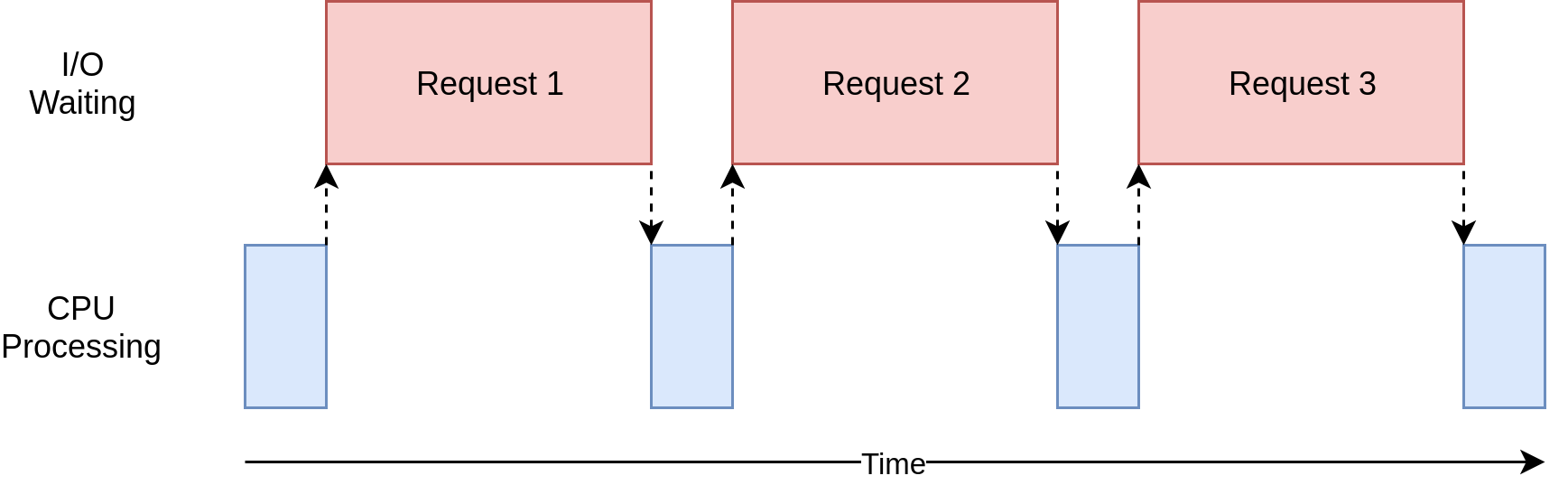
Here’s a diagram illustrating an
I/O-bound
operation:
The blue boxes show the time when your program is doing work, and the red boxes are time spent waiting for an I/O operation to complete. This diagram is not to scale because requests on the internet can take several orders of magnitude longer than CPU instructions, so your program can end up spending most of its time waiting. That’s what your web browser is doing most of the time.
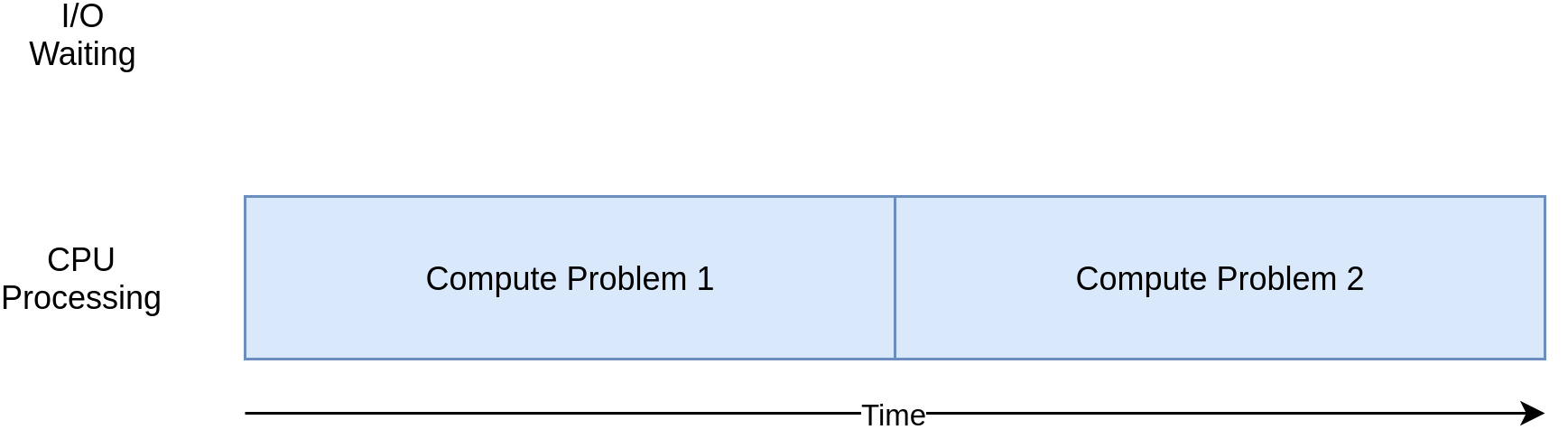
On the flip side, there are classes of programs that do significant computation without talking to the network or accessing a file. These are CPU-bound programs because the resource limiting the speed of your program is the CPU, not the network or the file system.
Here’s a corresponding diagram for a
CPU-bound
program:
As you work through the examples in the following section, you’ll see that different forms of concurrency work better or worse with I/O-bound and CPU-bound programs. Adding concurrency to your program introduces extra code and complications, so you’ll need to decide if the potential speedup is worth the additional effort. By the end of this tutorial, you should have enough information to start making that decision.
Here’s a quick summary to clarify this concept:
I/O-Bound Process
CPU-Bound Process
Your program spends most of its time talking to a slow device, like a network adapter, a hard drive, or a printer.
Your program spends most of its time doing CPU operations.
Speeding it up involves overlapping the times spent waiting for these devices.
Speeding it up involves finding ways to do more computations in the same amount of time.
You’ll look at I/O-bound programs first. Then, you’ll get to see some code dealing with CPU-bound programs.
Speeding Up an I/O-Bound Program
In this section, you’ll focus on I/O-bound programs and a common problem: downloading content over the network. For this example, you’ll be downloading web pages from a few sites, but it really could be any network traffic. It’s just more convenient to visualize and set up with web pages.
Synchronous Version
You’ll start with a non-concurrent version of this task. Note that this program requires the third-party
Requests
library. So, you should first run the following command in an activated
virtual environment
:
This version of your program doesn’t use concurrency at all:
As you can see, this is a fairly short program. It just downloads the site contents from a
list
of addresses and prints their sizes.
One small thing to point out is that you’re using a
session object
from
requests
. It’s possible to call
requests.get()
directly, but creating a
Session
object allows the library to retain state across requests and reuse the connection to speed things up.
You create the session in
download_all_sites()
and then walk through the list of sites, downloading each one in turn. Finally, you
print
out how long this process took so you can have the satisfaction of seeing how much concurrency has helped you in the following examples.
The processing diagram for this program will look much like the I/O-bound diagram in the last section.
The great thing about this version of code is that, well, it’s simple. It was comparatively quick to write and debug. It’s also more straightforward to think about. There’s only
one train of thought
running through it, so you can predict what the next step is and how it’ll behave.
The big problem here is that it’s relatively slow compared to the other solutions that you’re about to see. Here’s an example of what the final output might look like:
Note that these results may vary significantly depending on the speed of your internet connection, network congestion, and other factors. To account for them, you should repeat each benchmark a few times and take the fastest of the runs. That way, the differences between your program’s versions will still be clear.
Being slower isn’t always a big issue. If the program you’re running takes only two seconds with a synchronous version and is only run rarely, then it’s probably not worth adding concurrency. You can stop here.
What if your program
is
run frequently? What if it takes hours to run? You’ll move on to concurrency by rewriting this program using
Python threads
.
Multi-Threaded Version
As you probably guessed, writing a program leveraging
multithreading
takes more effort. However, you might be surprised at how little extra effort it takes for basic cases. Here’s what the same program looks like when you take advantage of the
concurrent.futures
and
threading
modules mentioned earlier:
The overall structure of your program is the same, but the highlighted lines indicate the changes you needed to make.
On
line 20
, you created an instance of the
ThreadPoolExecutor
to manage the threads for you. In this case, you explicitly requested five workers or threads.
Creating a
ThreadPoolExecutor
seems like a complicated thing. But, when you break it down, you’ll end up with these three components:
Thread
Pool
Executor
You already know about the
thread
part. That’s just the train of thought mentioned earlier. The
pool
portion is where it starts to get interesting. This object is going to create a
pool of threads
, each of which can run concurrently. Finally, the
executor
is the part that’s going to control how and when each of the threads in the pool will run. It’ll execute the request in the pool.
The standard library implements
ThreadPoolExecutor
as a
context manager
, so you can use the
with
syntax to manage creating and freeing the pool of
threading.Thread
instances.
In this multi-threaded version of the program, you let the executor call
download_site()
on your behalf instead of doing it manually in a loop. The
executor.map()
method on
line 21
takes care of distributing the workload across the available threads, allowing each one to handle a different site concurrently. This method takes two arguments:
A function to be executed on each data item, like a site address
A collection of data items to be processed by that function
Since the function that you passed to the executor’s
.map()
method must take exactly one argument, you modified
download_site()
on
line 23
to only accept a URL. But how do you obtain the session object now?
This is one of the interesting and difficult issues with threading. Because the operating system controls when your task gets interrupted and another task starts, any data shared between the threads needs to be protected or
thread-safe
to avoid unexpected behavior or potential data corruption. Unfortunately,
requests.Session()
isn’t thread-safe, meaning that one thread may interfere with the session while another thread is still using it.
There are several strategies for making data access thread-safe. One of them is to use a
thread-safe data structure
, such as a
queue.Queue
,
multiprocessing.Queue
, or an
asyncio.Queue
. These objects use low-level primitives like
lock objects
to ensure that only one thread can access a block of code or a bit of memory at the same time. You’re using this strategy indirectly by way of the
ThreadPoolExecutor
object.
Another strategy to use here is something called
thread-local storage
. When you call
threading.local()
on
line 7
, you create an object that resembles a
global variable
but is specific to each individual thread. It looks a little odd, but you only want to create one of these objects, not one for each thread. The object itself takes care of separating accesses from different threads to its attributes.
When
get_session_for_thread()
is called, the session it looks up is specific to the particular thread on which it’s running. So each thread will create a single session the first time it calls
get_session_for_thread()
and then will use that session on each subsequent call throughout its lifetime.
Okay. It’s time to put your multi-threaded program to the ultimate test:
It’s fast! Remember that the non-concurrent version took more than fourteen seconds in the best case.
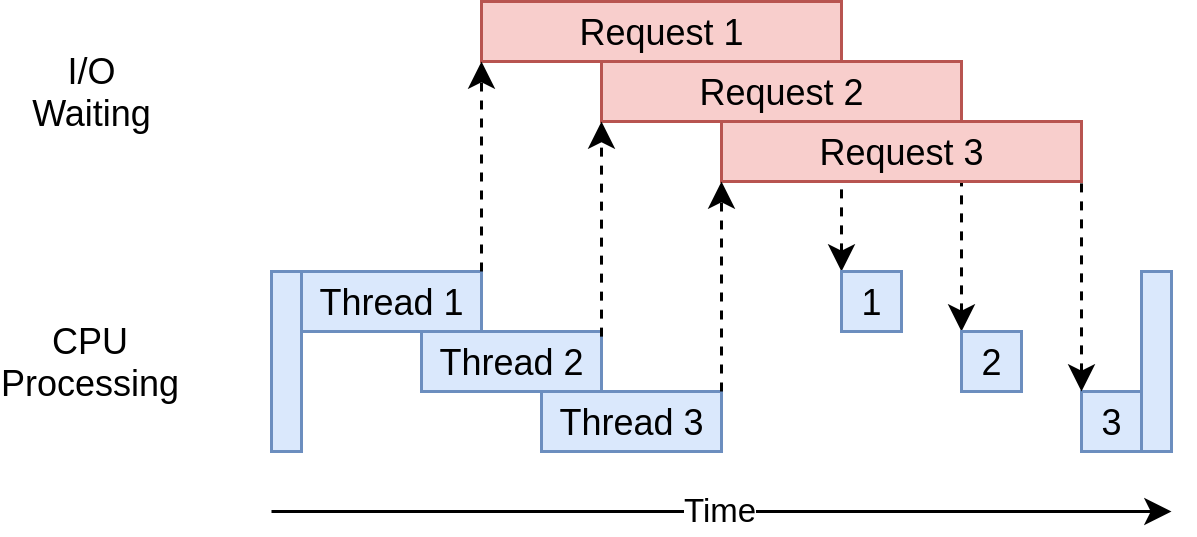
Here’s what its execution timing diagram looks like:
The program uses multiple threads to have many open requests out to web sites at the same time. This allows your program to overlap the waiting times and get the final result faster. Yippee! That was the goal.
Are there any problems with the multi-threaded version? Well, as you can see from the example, it takes a little more code to make this happen, and you really have to give some thought to what data is shared between threads.
Threads can interact in ways that are subtle and hard to detect. These interactions can cause
race conditions
that frequently result in random, intermittent bugs that can be quite difficult to find. If you’re unfamiliar with this concept, then you might want to check out a section on
race conditions
in another tutorial on thread safety.
Asynchronous Version
Running threads concurrently allowed you to cut down the total execution time of your original synchronous code by an order of magnitude. That’s already pretty remarkable, but you can do even better than that by taking advantage of Python’s
asyncio
module, which enables
asynchronous I/O
.
Asynchronous processing is a concurrency model that’s well-suited for
I/O-bound tasks
—hence the name,
asyncio
. It avoids the overhead of context switching between threads by employing the
event loop
,
non-blocking operations
, and
coroutines
, among other things. Perhaps somewhat surprisingly, the asynchronous code needs only one thread of execution to run concurrently.
In a nutshell, the
event loop
controls how and when each asynchronous task gets to execute. As the name suggests, it continuously
loops
through your tasks while monitoring their state. As soon as the current task starts waiting for an I/O operation to finish, the loop suspends it and immediately switches to another task. Conversely, once the expected
event
occurs, the loop will eventually resume the suspended task in the next iteration.
A
coroutine
is similar to a thread but much more lightweight and cheaper to suspend or resume. That’s what makes it possible to spawn
many
more coroutines than threads without a significant memory or performance overhead. This capability helps address the
C10k problem
, which involves handling ten thousand concurrent connections efficiently. But there’s a catch.
You can’t have blocking function calls in your coroutines if you want to reap the full benefits of asynchronous programming. A blocking call is a synchronous one, meaning that it prevents other code from running while it’s waiting for data to arrive. In contrast, a
non-blocking call
can voluntarily give up control and wait to be notified when the data is ready.
In Python, you create a
coroutine object
by calling an
asynchronous function
, also known as a
coroutine function
. Those are defined with the
async def
statement instead of the usual
def
. Only within the body of an asynchronous function are you allowed to use the
await
keyword, which pauses the execution of the coroutine until the awaited task is completed:
In this case, you defined
main()
as an asynchronous function that implicitly returns a coroutine object when called. Thanks to the
await
keyword, your coroutine makes a non-blocking call to
asyncio.sleep()
, simulating a delay of three and a half seconds. While your
main()
function awaits the wake-up event, other tasks could potentially run concurrently.
Now that you’ve got a basic understanding of what asynchronous I/O is, you can walk through the asynchronous version of the example code and figure out how it works. However, because the Requests library that you’ve been using in this tutorial is blocking, you must now switch to a non-blocking counterpart, such as
aiohttp
, which was designed for Python’s
asyncio
:
After installing this library in your virtual environment, you can use it in the asynchronous version of the code:
This version looks strikingly similar to the synchronous one, which is yet another advantage of
asyncio
. It’s a double-edged sword, though. While it arguably makes your concurrent code easier to reason about than the multi-threaded version,
asyncio
is far from easy when you get into more complex scenarios.
Here are the most important differences when compared to the non-concurrent version:
Line 1
imports
asyncio
from Python’s standard library. This is necessary to run your asynchronous
main()
function on
line 26
.
Line 4
imports the third-party
aiohttp
library, which you’ve installed into the virtual environment. This library replaces Requests from earlier examples.
Lines 6
,
16
, and
21
redefine your regular functions as asynchronous ones by qualifying their
signatures
with the
async
keyword.
Line 12
prepends the
await
keyword to
download_all_sites()
so that the returned coroutine object can be awaited. This effectively suspends your
main()
function until all sites have been downloaded.
Lines 17
and
22
leverage the
async with
statement to create
asynchronous context managers
for the session object and the response, respectively.
Line 18
creates a list of tasks using a
list comprehension
, where each task is a coroutine object returned by
download_site()
. Notice that you don’t await the individual coroutine objects, as doing so would lead to executing them sequentially.
Line 19
uses
asyncio.gather()
to run all the tasks concurrently, allowing for efficient downloading of multiple sites at the same time.
Line 23
awaits the completion of the session’s
HTTP GET
request before printing the number of bytes read.
You can share the session across all tasks, so the session is created here as a context manager. The tasks can share the session because they’re all running on the same thread. There’s no way one task could interrupt another while the session is in a bad state.
There’s one small but important change buried in the details here. Remember the mention about the optimal number of threads to create? It wasn’t obvious in the multi-threaded example what the optimal number of threads was.
One of the cool advantages of
asyncio
is that it scales far better than
threading
or
concurrent.futures
. Each task takes far fewer resources and less time to create than a thread, so creating and running more of them works well. This example just creates a separate task for each site to download, which works out quite well.
And, it’s really fast. The asynchronous version is the fastest of them all by a good margin:
It took less than a half a second to complete, making this code seven times quicker than the multi-threaded version and over thirty times faster than the non-concurrent version!
The execution timing diagram looks quite similar to what’s happening in the multi-threaded example. It’s just that the I/O requests are all done by the same thread:
There’s a common argument that having to add
async
and
await
in the proper locations is an extra complication. To a small extent, that’s true. The flip side of this argument is that it forces you to think about when a given task will get swapped out, which can help you create a better design.
The scaling issue also looms large here. Running the multi-threaded example with a thread for each site is noticeably slower than running it with a handful of threads. Running the
asyncio
example with hundreds of tasks doesn’t slow it down at all.
There are a couple of issues with
asyncio
at this point. You need special asynchronous versions of libraries to gain the full advantage of
asyncio
. Had you just used Requests for downloading the sites, it would’ve been much slower because Requests isn’t designed to notify the event loop that it’s blocked. This issue is becoming less significant as time goes on and more libraries embrace
asyncio
.
Another more subtle issue is that all the advantages of cooperative multitasking get thrown away if one of the tasks doesn’t cooperate. A minor mistake in code can cause a task to run off and hold the processor for a long time, starving other tasks that need running. There’s no way for the event loop to break in if a task doesn’t hand control back to it.
With that in mind, you can step up to a radically different approach to concurrency using multiple processes.
Process-Based Version
Up to this point, all of the examples of concurrency in this tutorial ran only on a single CPU or core in your computer. The reasons for this have to do with the current design of
CPython
and something called the
Global Interpreter Lock
, or GIL.
This tutorial won’t dive into the hows and whys of the GIL. It’s enough for now to know that the
synchronous
,
multi-threaded
, and
asynchronous versions
of this example all run on a single CPU.
The
multiprocessing
module, along with the corresponding wrappers in
concurrent.futures
, was designed to break down that barrier and run your code across multiple CPUs. At a high level, it does this by creating a new instance of the Python interpreter to run on each CPU and then farming out part of your program to run on it.
As you can imagine, bringing up a separate Python interpreter is not as fast as starting a new thread in the current Python interpreter. It’s a heavyweight operation and comes with some restrictions and difficulties, but for the correct problem, it can make a huge difference.
Unlike the previous approaches, using
multiprocessing
allows you to take full advantage of the all CPUs that your cool, new computer has. Here’s the sample code:
This actually looks quite similar to the multi-threaded example, as you leverage the familiar
concurrent.future
abstraction instead of relying on
multiprocessing
directly. Go ahead and take a quick tour of what this code does for you:
Line 8
uses
type hints
to declare a global variable that will hold the session object. Note that this doesn’t actually define the value of the variable.
Line 21
replaces
ThreadPoolExecutor
with
ProcessPoolExecutor
from
concurrent.futures
and passes
init_process()
, which is defined further down.
Lines 29 to 32
define a custom initializer function that each process will call shortly after starting. It ensures that each process initializes its own session.
Line 32
registers a cleanup function with
atexit
, which ensures that the session is properly closed when the process stops. This helps prevent potential
memory leaks
.
What happens here is that the pool creates a number of separate
Python interpreter processes
and has each one run the specified function on some of the items in the
iterable
, which in your case is the list of sites. The communication between the main process and the other processes is handled for you.
The line that creates a pool instance is worth your attention. First off, it doesn’t specify how many processes to create in the pool, although that’s an optional parameter. By default, it’ll determine the
number of CPUs
in your computer and match that. This is frequently the best answer, and it is in your case.
For an I/O-bound problem, increasing the number of processes won’t make things faster. It’ll actually slow things down because the cost of setting up and tearing down all those processes is larger than the benefit of doing the I/O requests in parallel.
Next, you have the initializer part of that call. Remember that each process in our pool has its own
memory space
. That means they can’t easily share things like a session object. You don’t want to create a new
Session
instance each time the function is called—you want to create one for each process.
The
initializer
function parameter is built for just this case. There’s no way to pass a
return value
back from the
initializer
to
download_site()
, but you can initialize a global
session
variable to hold the single session for each process. Because each process has its own memory space, the global for each one will be different.
That’s really all there is to it. The rest of the code is quite similar to what you’ve seen before. The process-based version does require some extra setup, and the global session object is strange. You have to spend some time thinking about which variables will be accessed in each process.
While this version takes full advantage of the CPU power in your computer, the resulting performance is surprisingly underwhelming:
On a computer equipped with four CPU cores, it runs about four times faster than the synchronous version. Still, it’s a bit slower than the multi-threaded version and much slower than the asynchronous version.
The execution timing diagram for this code looks like this:
There are a few separate processes executing in parallel. The corresponding diagrams of each one of them resemble the non-concurrent version you saw at the beginning of this tutorial.
I/O-bound problems aren’t really why multiprocessing exists. You’ll see more as you step into the next section and look at CPU-bound examples.
Speeding Up a CPU-Bound Program
It’s time to shift gears here a little bit. The examples so far have all dealt with an I/O-bound problem. Now, you’ll look into a CPU-bound problem. As you learned earlier, an I/O-bound problem spends most of its time waiting for external operations to complete, such as network calls. In contrast, a CPU-bound problem performs fewer I/O operations, and its total execution time depends on how quickly it can process the required data.
For the purposes of this example, you’ll use a somewhat silly function to create a piece of code that takes a long time to run on the CPU. This function computes the n-th
Fibonacci number
using the
recursive
approach:
Notice how quickly the resulting values grow as the function computes higher Fibonacci numbers. The recursive nature of this implementation leads to many repeated calculations of the same numbers, which requires substantial processing time. That’s what makes this such a convenient example of a CPU-bound task.
Remember, this is just a placeholder for your code that actually does something useful and requires lengthy processing, like computing the roots of equations or
sorting
a large data structure.
Synchronous Version
First off, you can look at the non-concurrent version of the example:
This code calls
fib(35)
twenty times in a loop. Due to the recursive nature of its implementation, the function calls itself hundreds of millions of times! It does all of this on a single thread in a single process on a single CPU.
The execution timing diagram looks like this:
Unlike the I/O-bound examples, the CPU-bound examples are usually fairly consistent in their run times. This one takes about thirty-five seconds on the same machine as before:
Clearly, you can do better than this. After all, it’s all running on a single CPU with no concurrency. Next, you’ll see what you can do to improve it.
Multi-Threaded Version
How much do you think rewriting this code using threads—or asynchronous tasks—will speed this up?
If you answered “Not at all,” then give yourself a cookie. If you answered, “It will slow it down,” then give yourself two cookies.
Here’s why: In your earlier I/O-bound example, much of the overall time was spent waiting for slow operations to finish. Threads and asynchronous tasks sped this up by allowing you to overlap the waiting times instead of performing them sequentially.
With a CPU-bound problem, there’s no waiting. The CPU is cranking away as fast as it can to finish the problem. In Python, both threads and asynchronous tasks run on the same CPU in the same process. This means that the one CPU is doing all of the work of the non-concurrent code plus the extra work of setting up threads or tasks.
Here’s the code of the multi-threaded version of your CPU-bound problem:
Little of this code had to change from the non-concurrent version. After importing
concurrent.futures
, you just changed from looping through the numbers to creating a
thread pool
and using its
.map()
method to send individual numbers to worker threads as they become free.
This was just what you did for the I/O-bound multi-threaded code, but here, you didn’t need to worry about the
Session
object.
Below is the output you might see when running this code:
Unsurprisingly, it takes a few seconds longer than the synchronous version.
Okay. At this point, you should know what to expect from the asynchronous version of a CPU-bound problem. But for completeness, you’ll now test how it stacks up against the others.
Asynchronous Version
Implementing the asynchronous version of this CPU-bound problem involves rewriting your functions into coroutine functions with
async def
and awaiting their return values:
You create twenty tasks and pass them to
asyncio.gather()
to let the corresponding coroutines run concurrently. However, they actually run in sequence, as each blocks execution until the previous one is finished.
When run, this code takes over twice as long to execute as your original synchronous version and also takes longer than the multi-threaded version:
Ironically, the asynchronous approach is the slowest for a CPU-bound problem, yet it was the fastest for an I/O-bound one. Because there are no I/O operations involved here, there’s nothing to wait for. The overhead of the event loop and context switching at every single
await
statement slows down the total execution substantially.
In Python, to improve the performance of a CPU-bound task like this one, you must use an alternative concurrency model. You’ll take a closer look at that now.
Process-Based Version
You’ve finally reached the part where
multiprocessing
really shines. Unlike the other concurrency models, process-based parallelism is explicitly designed to share heavy CPU workloads across multiple CPUs.
Here’s what the corresponding code looks like:
It’s almost identical to the multi-threaded version of the Fibonacci problem. You literally changed just two lines of code! Instead of using
ThreadPoolExecutor
, you replaced it with
ProcessPoolExecutor
.
As mentioned before, the
max_workers
optional parameter to the pool’s
constructor
deserves some attention. You can use it to specify how many processes you want to be created and managed in the pool. By default, it’ll determine how many CPUs are in your machine and create a process for each one. While this works great for your simple example, you might want to have a little more control in a production environment.
This version takes about ten seconds, which is less than one-third of the non-concurrent implementation you started with:
This is much better than what you saw with the other options, making it by far the best choice for this kind of task.
Here’s what the execution timing diagram looks like:
The individual tasks run alongside each other on separate CPU cores, making
parallel execution
possible.
There are some drawbacks to using multiprocessing that don’t really show up in a simple example like this one. For example, dividing your problem into segments so each processor can operate independently can sometimes be difficult.
Also, many solutions require more communication between the processes. This can add some complexity to your solution that a non-concurrent program just wouldn’t need to deal with.
Deciding When to Use Concurrency
You’ve covered a lot of ground here, so it might be a good time to review some of the key ideas and then discuss some decision points that will help you determine which, if any, concurrency module you want to use in your project.
The first step of this process is deciding if you
should
use a concurrency module. While the examples here make each of the libraries look pretty simple, concurrency always comes with extra complexity and can often result in bugs that are difficult to find.
Hold out on adding concurrency until you have a known performance issue and
then
determine which type of concurrency you need. As
Donald Knuth
has said, “Premature optimization is the root of all evil (or at least most of it) in programming.”
Once you’ve decided that you should optimize your program, figuring out if your program is
I/O-bound
or
CPU-bound
is a great next step. Remember that I/O-bound programs are those that spend most of their time waiting for something to happen, while CPU-bound programs spend their time processing data or crunching numbers as fast as they can.
As you saw, CPU-bound problems only really benefit from using
process-based concurrency
in Python. Multithreading and asynchronous I/O don’t help this type of problem at all.
For I/O-bound problems, there’s a general rule of thumb in the Python community: “Use
asyncio
when you can,
threading
or
concurrent.futures
when you must.”
asyncio
can provide the best speed-up for this type of program, but sometimes you’ll require critical libraries that haven’t been ported to take advantage of
asyncio
. Remember that any task that doesn’t give up control to the event loop will block all of the other tasks.
Conclusion
You’ve learned about concurrency in Python and how it can enhance the performance and responsiveness of your programs. You explored different concurrency models, including
threading
, asynchronous tasks, and
multiprocessing
. Through practical examples, you gained insight into when and how to implement these models to optimize both
I/O-bound
and
CPU-bound
tasks.
Understanding concurrency is vital for Python developers seeking to improve application efficiency, particularly in scenarios involving intensive I/O operations or computational workloads. By choosing the right concurrency model, you can significantly reduce execution times and better utilize available system resources.
In this tutorial, you’ve learned how to:
Understand
the different forms of
concurrency
in Python
Implement
multi-threaded and asynchronous solutions for
I/O-bound
tasks
Leverage
multiprocessing for
CPU-bound
tasks to achieve true parallelism
Choose
the appropriate concurrency model based on your program’s needs
With these skills, you’re now equipped to analyze your Python programs and apply concurrency effectively to tackle performance bottlenecks. Whether optimizing a
web scraper
or a data processing pipeline, you can confidently select the best concurrency model to enhance your application’s performance.
Take the Quiz:
Test your knowledge with our interactive “Python Concurrency” quiz. You’ll receive a score upon completion to help you track your learning progress:
Interactive Quiz
Python Concurrency
In this quiz, you'll test your understanding of Python concurrency. You'll revisit the different forms of concurrency in Python, how to implement multi-threaded and asynchronous solutions for I/O-bound tasks, and how to achieve true parallelism for CPU-bound tasks. | |||||||||
| Markdown | [](https://realpython.com/)
- [Start Here](https://realpython.com/start-here/)
- [Learn Python](https://realpython.com/python-concurrency/)
[Python Tutorials → In-depth articles and video courses](https://realpython.com/search?kind=article&kind=course&order=newest)
[Learning Paths → Guided study plans for accelerated learning](https://realpython.com/learning-paths/)
[Quizzes & Exercises → Check your learning progress](https://realpython.com/quizzes/)
[Browse Topics → Focus on a specific area or skill level](https://realpython.com/tutorials/all/)
[Community Chat → Learn with other Pythonistas](https://realpython.com/community/)
[Office Hours → Live Q\&A calls with Python experts](https://realpython.com/office-hours/)
[Live Courses → Live, instructor-led Python courses](https://realpython.com/live/)
[Podcast → Hear what’s new in the world of Python](https://realpython.com/podcasts/rpp/)
[Books → Round out your knowledge and learn offline](https://realpython.com/products/books/)
[Reference → Concise definitions for common Python terms](https://realpython.com/ref/)
[Code Mentor →Beta Personalized code assistance & learning tools](https://realpython.com/mentor/)
[Unlock All Content →](https://realpython.com/account/join/)
- [More](https://realpython.com/python-concurrency/)
[Learner Stories](https://realpython.com/learner-stories/) [Python Newsletter](https://realpython.com/newsletter/) [Python Job Board](https://www.pythonjobshq.com/) [Meet the Team](https://realpython.com/team/) [Become a Contributor](https://realpython.com/jobs/)
- [Search](https://realpython.com/search "Search")
- [Join](https://realpython.com/account/join/)
- [Sign‑In](https://realpython.com/account/login/?next=%2Fpython-concurrency%2F)
[Browse Topics](https://realpython.com/tutorials/all/)
[Guided Learning Paths](https://realpython.com/learning-paths/)
[Basics](https://realpython.com/search?level=basics)
[Intermediate](https://realpython.com/search?level=intermediate)
[Advanced](https://realpython.com/search?level=advanced)
***
[ai](https://realpython.com/tutorials/ai/) [algorithms](https://realpython.com/tutorials/algorithms/) [api](https://realpython.com/tutorials/api/) [best-practices](https://realpython.com/tutorials/best-practices/) [career](https://realpython.com/tutorials/career/) [community](https://realpython.com/tutorials/community/) [databases](https://realpython.com/tutorials/databases/) [data-science](https://realpython.com/tutorials/data-science/) [data-structures](https://realpython.com/tutorials/data-structures/) [data-viz](https://realpython.com/tutorials/data-viz/) [devops](https://realpython.com/tutorials/devops/) [django](https://realpython.com/tutorials/django/) [docker](https://realpython.com/tutorials/docker/) [editors](https://realpython.com/tutorials/editors/) [flask](https://realpython.com/tutorials/flask/) [front-end](https://realpython.com/tutorials/front-end/) [gamedev](https://realpython.com/tutorials/gamedev/) [gui](https://realpython.com/tutorials/gui/) [machine-learning](https://realpython.com/tutorials/machine-learning/) [news](https://realpython.com/tutorials/news/) [numpy](https://realpython.com/tutorials/numpy/) [projects](https://realpython.com/tutorials/projects/) [python](https://realpython.com/tutorials/python/) [stdlib](https://realpython.com/tutorials/stdlib/) [testing](https://realpython.com/tutorials/testing/) [tools](https://realpython.com/tutorials/tools/) [web-dev](https://realpython.com/tutorials/web-dev/) [web-scraping](https://realpython.com/tutorials/web-scraping/)
[Table of Contents](https://realpython.com/python-concurrency/#toc)
- [Exploring Concurrency in Python](https://realpython.com/python-concurrency/#exploring-concurrency-in-python)
- [What Is Concurrency?](https://realpython.com/python-concurrency/#what-is-concurrency)
- [What Is Parallelism?](https://realpython.com/python-concurrency/#what-is-parallelism)
- [When Is Concurrency Useful?](https://realpython.com/python-concurrency/#when-is-concurrency-useful)
- [Speeding Up an I/O-Bound Program](https://realpython.com/python-concurrency/#speeding-up-an-io-bound-program)
- [Synchronous Version](https://realpython.com/python-concurrency/#synchronous-version)
- [Multi-Threaded Version](https://realpython.com/python-concurrency/#multi-threaded-version)
- [Asynchronous Version](https://realpython.com/python-concurrency/#asynchronous-version)
- [Process-Based Version](https://realpython.com/python-concurrency/#process-based-version)
- [Speeding Up a CPU-Bound Program](https://realpython.com/python-concurrency/#speeding-up-a-cpu-bound-program)
- [Synchronous Version](https://realpython.com/python-concurrency/#synchronous-version_1)
- [Multi-Threaded Version](https://realpython.com/python-concurrency/#multi-threaded-version_1)
- [Asynchronous Version](https://realpython.com/python-concurrency/#asynchronous-version_1)
- [Process-Based Version](https://realpython.com/python-concurrency/#process-based-version_1)
- [Deciding When to Use Concurrency](https://realpython.com/python-concurrency/#deciding-when-to-use-concurrency)
- [Conclusion](https://realpython.com/python-concurrency/#conclusion)
Mark as Completed
Share
Recommended Course
[ Speed Up Python With Concurrency 1h 45m · 15 lessons](https://realpython.com/courses/speed-python-concurrency/)

# Speed Up Your Python Program With Concurrency
by [Jim Anderson](https://realpython.com/python-concurrency/#author)
Reading time estimate
40m
[122 Comments](https://realpython.com/python-concurrency/#reader-comments)
[advanced](https://realpython.com/tutorials/advanced/) [best-practices](https://realpython.com/tutorials/best-practices/)
Mark as Completed
Share
Table of Contents
- [Exploring Concurrency in Python](https://realpython.com/python-concurrency/#exploring-concurrency-in-python)
- [What Is Concurrency?](https://realpython.com/python-concurrency/#what-is-concurrency)
- [What Is Parallelism?](https://realpython.com/python-concurrency/#what-is-parallelism)
- [When Is Concurrency Useful?](https://realpython.com/python-concurrency/#when-is-concurrency-useful)
- [Speeding Up an I/O-Bound Program](https://realpython.com/python-concurrency/#speeding-up-an-io-bound-program)
- [Synchronous Version](https://realpython.com/python-concurrency/#synchronous-version)
- [Multi-Threaded Version](https://realpython.com/python-concurrency/#multi-threaded-version)
- [Asynchronous Version](https://realpython.com/python-concurrency/#asynchronous-version)
- [Process-Based Version](https://realpython.com/python-concurrency/#process-based-version)
- [Speeding Up a CPU-Bound Program](https://realpython.com/python-concurrency/#speeding-up-a-cpu-bound-program)
- [Synchronous Version](https://realpython.com/python-concurrency/#synchronous-version_1)
- [Multi-Threaded Version](https://realpython.com/python-concurrency/#multi-threaded-version_1)
- [Asynchronous Version](https://realpython.com/python-concurrency/#asynchronous-version_1)
- [Process-Based Version](https://realpython.com/python-concurrency/#process-based-version_1)
- [Deciding When to Use Concurrency](https://realpython.com/python-concurrency/#deciding-when-to-use-concurrency)
- [Conclusion](https://realpython.com/python-concurrency/#conclusion)
[Remove ads](https://realpython.com/account/join/)
Recommended Course
[Speed Up Python With Concurrency](https://realpython.com/courses/speed-python-concurrency/) (1h 45m)
Concurrency refers to the ability of a program to manage multiple tasks at once, improving performance and responsiveness. It encompasses different models like threading, asynchronous tasks, and multiprocessing, each offering unique benefits and trade-offs. In Python, threads and asynchronous tasks facilitate concurrency on a single processor, while multiprocessing allows for true parallelism by utilizing multiple CPU cores.
Understanding concurrency is crucial for optimizing programs, especially those that are I/O-bound or CPU-bound. Efficient concurrency management can significantly enhance a program’s performance by reducing wait times and better utilizing system resources.
**In this tutorial, you’ll learn how to:**
- **Understand** the different forms of **concurrency** in Python
- **Implement** multi-threaded and asynchronous solutions for **I/O-bound** tasks
- **Leverage** multiprocessing for **CPU-bound** tasks to achieve true parallelism
- **Choose** the appropriate concurrency model based on your program’s needs
To get the most out of this tutorial, you should be familiar with [Python basics](https://realpython.com/learning-paths/python-basics/), including [functions](https://realpython.com/defining-your-own-python-function/) and [loops](https://realpython.com/python-for-loop/). A rudimentary understanding of system processes and CPU operations will also be helpful. You can download the sample code for this tutorial by clicking the link below:
**Get Your Code:** [Click here to download the free sample code](https://realpython.com/bonus/python-concurrency-code/) that you’ll use to learn about speeding up your Python program with concurrency.
***Take the Quiz:*** Test your knowledge with our interactive “Python Concurrency” quiz. You’ll receive a score upon completion to help you track your learning progress:
***
[](https://realpython.com/quizzes/python-concurrency/)
**Interactive Quiz**
[Python Concurrency](https://realpython.com/quizzes/python-concurrency/)
In this quiz, you'll test your understanding of Python concurrency. You'll revisit the different forms of concurrency in Python, how to implement multi-threaded and asynchronous solutions for I/O-bound tasks, and how to achieve true parallelism for CPU-bound tasks.
## Exploring Concurrency in Python
In this section, you’ll get familiar with the terminology surrounding concurrency. You’ll also learn that concurrency can take different forms depending on the problem it aims to solve. Finally, you’ll discover how the different concurrency models translate to Python.
[Remove ads](https://realpython.com/account/join/)
### What Is Concurrency?
The dictionary definition of concurrency is **simultaneous occurrence**. In Python, the things that are occurring simultaneously are called by different names, including these:
- **Thread**
- **Task**
- **Process**
At a high level, they all refer to a sequence of instructions that run in order. You can think of them as different **trains of thought**. Each one can be stopped at certain points, and the CPU or brain that’s processing them can switch to a different one. The state of each train of thought is saved so it can be restored right where it was interrupted.
You might wonder why Python uses different words for the same concept. It turns out that threads, tasks, and processes are only the same if you view them from a high-level perspective. Once you start digging into the details, you’ll find that they all represent slightly different things. You’ll see more of how they’re different as you progress through the examples.
Now, you’ll consider the *simultaneous* part of that definition. You have to be a little careful because, when you get down to the details, you’ll discover that only multiple [system processes](https://en.wikipedia.org/wiki/Process_\(computing\)) can enable Python to run these trains of thought at literally the same time.
In contrast, [threads](https://en.wikipedia.org/wiki/Thread_\(computing\)) and [asynchronous tasks](https://en.wikipedia.org/wiki/Asynchrony_\(computer_programming\)) always run on a single processor, which means they can only run one at a time. They just cleverly find ways to take turns to speed up the overall process. Even though they don’t run different trains of thought simultaneously, they still fall under the concept of **concurrency**.
**Note:** Threads in most other programming languages often run in parallel. To learn why Python threads can’t, check out [What Is the Python Global Interpreter Lock (GIL)?](https://realpython.com/python-gil/)
If you’re curious about even more details, then you can also read about [Bypassing the GIL for Parallel Processing in Python](https://realpython.com/python-parallel-processing/) or check out the experimental [free threading](https://realpython.com/python313-free-threading-jit/) introduced in [Python 3.13](https://realpython.com/python313-new-features/).
The way the threads, tasks, or processes take turns differs. In a multi-threaded approach, the operating system actually knows about each thread and can interrupt it at any time to start running a different thread. This mechanism is also true for processes. It’s called [preemptive multitasking](https://en.wikipedia.org/wiki/Preemption_%28computing%29#Preemptive_multitasking) since the operating system can preempt your thread or process to make the switch.
Preemptive multitasking is handy in that the code in the thread doesn’t need to do anything special to make the switch. It can also be difficult because of that *at any time* phrase. The [context switch](https://en.wikipedia.org/wiki/Context_switch) can happen in the middle of a single Python statement, even a trivial one like `x = x + 1`. This is because Python statements typically consist of several low-level [bytecode](https://en.wikipedia.org/wiki/Bytecode) instructions.
On the other hand, asynchronous tasks use [cooperative multitasking](https://en.wikipedia.org/wiki/Cooperative_multitasking). The tasks must cooperate with each other by announcing when they’re ready to be switched out without the operating system’s involvement. This means that the code in the task has to change slightly to make it happen.
The benefit of doing this extra work upfront is that you always know where your task will be swapped out, making it easier to reason about the flow of execution. A task won’t be swapped out in the middle of a Python statement unless that statement is appropriately marked. You’ll see later how this can simplify parts of your design.
### What Is Parallelism?
So far, you’ve looked at concurrency that happens on a single [processor](https://en.wikipedia.org/wiki/Processor_\(computing\)). What about all of those [CPU cores](https://en.wikipedia.org/wiki/Multi-core_processor) your cool, new laptop has? How can you make use of them in Python? The answer is to execute separate processes\!
A **process** can be thought of as almost a completely different program, though technically, it’s usually defined as a collection of resources including memory, [file handles](https://en.wikipedia.org/wiki/File_descriptor), and things like that. One way to think about it is that each process runs in its own Python interpreter.
Because they’re different processes, each of your trains of thought in a program leveraging **multiprocessing** can run on a different CPU core. Running on a different core means that they can actually run at the same time, which is fabulous. There are some complications that arise from doing this, but Python does a pretty good job of smoothing them over most of the time.
Now that you have an idea of what **concurrency** and **parallelism** are, you can review their differences and then determine which Python modules support them:
| Python Module | CPU | Multitasking | Switching Decision |
|---|---|---|---|
| `asyncio` | One | Cooperative | The tasks decide when to give up control. |
| `threading` | One | Preemptive | The operating system decides when to switch tasks external to Python. |
| `multiprocessing` | Many | Preemptive | The processes all run at the same time on different processors. |
You’ll explore these modules as you make your way through the tutorial.
**Note:** Both [`threading`](https://docs.python.org/3/library/threading.html) and [`multiprocessing`](https://docs.python.org/3/library/multiprocessing.html) represent fairly low-level building blocks in concurrent programs. In practice, you can often replace them with [`concurrent.futures`](https://docs.python.org/3/library/concurrent.futures.html), which provides a higher-level interface for both modules. On the other hand, [`asyncio`](https://docs.python.org/3/library/asyncio.html) offers a bit of a different approach to concurrency, which you’ll dive into later.
Each of the corresponding types of concurrency can be useful in its own way. You’ll now take a look at what types of programs they can help you speed up.
[Remove ads](https://realpython.com/account/join/)
### When Is Concurrency Useful?
Concurrency can make a big difference for two types of problems:
1. [I/O-Bound](https://en.wikipedia.org/wiki/I/O_bound)
2. [CPU-Bound](https://en.wikipedia.org/wiki/CPU-bound)
I/O-bound problems cause your program to slow down because it frequently must wait for [input or output](https://realpython.com/python-input-output/) (I/O) from some external resource. They arise when your program is working with things that are much slower than your CPU.
Examples of things that are slower than your CPU are legion, but your program thankfully doesn’t interact with most of them. The slow things your program will interact with the most are the **file system** and **network connections**.
Here’s a diagram illustrating an **I/O-bound** operation:
[](https://files.realpython.com/media/IOBound.4810a888b457.png)
The blue boxes show the time when your program is doing work, and the red boxes are time spent waiting for an I/O operation to complete. This diagram is not to scale because requests on the internet can take several orders of magnitude longer than CPU instructions, so your program can end up spending most of its time waiting. That’s what your web browser is doing most of the time.
On the flip side, there are classes of programs that do significant computation without talking to the network or accessing a file. These are CPU-bound programs because the resource limiting the speed of your program is the CPU, not the network or the file system.
Here’s a corresponding diagram for a **CPU-bound** program:
[](https://files.realpython.com/media/CPUBound.d2d32cb2626c.png)
As you work through the examples in the following section, you’ll see that different forms of concurrency work better or worse with I/O-bound and CPU-bound programs. Adding concurrency to your program introduces extra code and complications, so you’ll need to decide if the potential speedup is worth the additional effort. By the end of this tutorial, you should have enough information to start making that decision.
Here’s a quick summary to clarify this concept:
| I/O-Bound Process | CPU-Bound Process |
|---|---|
| Your program spends most of its time talking to a slow device, like a network adapter, a hard drive, or a printer. | Your program spends most of its time doing CPU operations. |
| Speeding it up involves overlapping the times spent waiting for these devices. | Speeding it up involves finding ways to do more computations in the same amount of time. |
You’ll look at I/O-bound programs first. Then, you’ll get to see some code dealing with CPU-bound programs.
## Speeding Up an I/O-Bound Program
In this section, you’ll focus on I/O-bound programs and a common problem: downloading content over the network. For this example, you’ll be downloading web pages from a few sites, but it really could be any network traffic. It’s just more convenient to visualize and set up with web pages.
### Synchronous Version
You’ll start with a non-concurrent version of this task. Note that this program requires the third-party [Requests](https://realpython.com/python-requests/) library. So, you should first run the following command in an activated [virtual environment](https://realpython.com/python-virtual-environments-a-primer/):
Shell
```
(venv) $ python -m pip install requests
```
This version of your program doesn’t use concurrency at all:
Python `io_non_concurrent.py`
```
```
As you can see, this is a fairly short program. It just downloads the site contents from a [list](https://realpython.com/python-list/) of addresses and prints their sizes.
One small thing to point out is that you’re using a [session object](https://requests.readthedocs.io/en/stable/user/advanced/#session-objects) from `requests`. It’s possible to call [`requests.get()`](https://requests.readthedocs.io/en/stable/api/#requests.get) directly, but creating a `Session` object allows the library to retain state across requests and reuse the connection to speed things up.
You create the session in `download_all_sites()` and then walk through the list of sites, downloading each one in turn. Finally, you [print](https://realpython.com/python-print/) out how long this process took so you can have the satisfaction of seeing how much concurrency has helped you in the following examples.
The processing diagram for this program will look much like the I/O-bound diagram in the last section.
**Note:** Network traffic is dependent on many factors that can vary from second to second. You may see the times of these tests double from one run to another due to network issues.
The great thing about this version of code is that, well, it’s simple. It was comparatively quick to write and debug. It’s also more straightforward to think about. There’s only **one train of thought** running through it, so you can predict what the next step is and how it’ll behave.
The big problem here is that it’s relatively slow compared to the other solutions that you’re about to see. Here’s an example of what the final output might look like:
Shell
```
```
Note that these results may vary significantly depending on the speed of your internet connection, network congestion, and other factors. To account for them, you should repeat each benchmark a few times and take the fastest of the runs. That way, the differences between your program’s versions will still be clear.
Being slower isn’t always a big issue. If the program you’re running takes only two seconds with a synchronous version and is only run rarely, then it’s probably not worth adding concurrency. You can stop here.
What if your program *is* run frequently? What if it takes hours to run? You’ll move on to concurrency by rewriting this program using [Python threads](https://realpython.com/intro-to-python-threading/).
[Remove ads](https://realpython.com/account/join/)
### Multi-Threaded Version
As you probably guessed, writing a program leveraging [multithreading](https://en.wikipedia.org/wiki/Multithreading_\(computer_architecture\)) takes more effort. However, you might be surprised at how little extra effort it takes for basic cases. Here’s what the same program looks like when you take advantage of the `concurrent.futures` and `threading` modules mentioned earlier:
Python `io_threads.py`
```
```
The overall structure of your program is the same, but the highlighted lines indicate the changes you needed to make.
On **line 20**, you created an instance of the [`ThreadPoolExecutor`](https://docs.python.org/3/library/concurrent.futures.html#concurrent.futures.ThreadPoolExecutor) to manage the threads for you. In this case, you explicitly requested five workers or threads.
**Note:** How do you pick the number of threads in your pool? The difficult answer here is that the correct number of threads is not a constant from one task to another.
In general, with IO-bound problems, you’re not limited to the number of CPU cores. In fact, it’s not uncommon to create hundreds or even thousands of threads as long as they wait for data instead of doing real work. But, at some point, you’ll eventually start experiencing diminishing returns due to the extra overhead of switching threads.
Some experimentation is always recommended. Feel free to play around with this number to see how it affects the overall execution time.
Creating a `ThreadPoolExecutor` seems like a complicated thing. But, when you break it down, you’ll end up with these three components:
1. Thread
2. Pool
3. Executor
You already know about the **thread** part. That’s just the train of thought mentioned earlier. The **pool** portion is where it starts to get interesting. This object is going to create a [pool of threads](https://en.wikipedia.org/wiki/Thread_pool), each of which can run concurrently. Finally, the **executor** is the part that’s going to control how and when each of the threads in the pool will run. It’ll execute the request in the pool.
**Note:** Using a thread pool can be beneficial when you have limited system resources but still want to handle many tasks. By creating the threads upfront and reusing them for the subsequent tasks, a pool reduces the overhead of repeatedly creating and destroying threads.
The standard library implements `ThreadPoolExecutor` as a [context manager](https://realpython.com/python-with-statement/), so you can use the `with` syntax to manage creating and freeing the pool of [`threading.Thread`](https://docs.python.org/3/library/threading.html#threading.Thread) instances.
In this multi-threaded version of the program, you let the executor call `download_site()` on your behalf instead of doing it manually in a loop. The [`executor.map()`](https://docs.python.org/3/library/concurrent.futures.html#concurrent.futures.Executor.map) method on **line 21** takes care of distributing the workload across the available threads, allowing each one to handle a different site concurrently. This method takes two arguments:
1. A function to be executed on each data item, like a site address
2. A collection of data items to be processed by that function
Since the function that you passed to the executor’s `.map()` method must take exactly one argument, you modified `download_site()` on **line 23** to only accept a URL. But how do you obtain the session object now?
This is one of the interesting and difficult issues with threading. Because the operating system controls when your task gets interrupted and another task starts, any data shared between the threads needs to be protected or [thread-safe](https://realpython.com/python-thread-lock/) to avoid unexpected behavior or potential data corruption. Unfortunately, `requests.Session()` isn’t thread-safe, meaning that one thread may interfere with the session while another thread is still using it.
There are several strategies for making data access thread-safe. One of them is to use a **thread-safe data structure**, such as a [`queue.Queue`](https://realpython.com/queue-in-python/#using-thread-safe-queues), [`multiprocessing.Queue`](https://realpython.com/queue-in-python/#using-multiprocessingqueue-for-interprocess-communication-ipc), or an [`asyncio.Queue`](https://realpython.com/queue-in-python/#asyncioqueue). These objects use low-level primitives like [lock objects](https://docs.python.org/3/library/threading.html#lock-objects) to ensure that only one thread can access a block of code or a bit of memory at the same time. You’re using this strategy indirectly by way of the `ThreadPoolExecutor` object.
Another strategy to use here is something called [thread-local storage](https://en.wikipedia.org/wiki/Thread-local_storage). When you call `threading.local()` on **line 7**, you create an object that resembles a [global variable](https://realpython.com/python-use-global-variable-in-function/) but is specific to each individual thread. It looks a little odd, but you only want to create one of these objects, not one for each thread. The object itself takes care of separating accesses from different threads to its attributes.
When `get_session_for_thread()` is called, the session it looks up is specific to the particular thread on which it’s running. So each thread will create a single session the first time it calls `get_session_for_thread()` and then will use that session on each subsequent call throughout its lifetime.
Okay. It’s time to put your multi-threaded program to the ultimate test:
Shell
```
```
It’s fast! Remember that the non-concurrent version took more than fourteen seconds in the best case.
Here’s what its execution timing diagram looks like:
[](https://files.realpython.com/media/Threading.3eef48da829e.png)
The program uses multiple threads to have many open requests out to web sites at the same time. This allows your program to overlap the waiting times and get the final result faster. Yippee! That was the goal.
Are there any problems with the multi-threaded version? Well, as you can see from the example, it takes a little more code to make this happen, and you really have to give some thought to what data is shared between threads.
Threads can interact in ways that are subtle and hard to detect. These interactions can cause **race conditions** that frequently result in random, intermittent bugs that can be quite difficult to find. If you’re unfamiliar with this concept, then you might want to check out a section on [race conditions](https://realpython.com/python-thread-lock/#race-conditions) in another tutorial on thread safety.
[Remove ads](https://realpython.com/account/join/)
### Asynchronous Version
Running threads concurrently allowed you to cut down the total execution time of your original synchronous code by an order of magnitude. That’s already pretty remarkable, but you can do even better than that by taking advantage of Python’s [`asyncio`](https://realpython.com/async-io-python/) module, which enables [asynchronous I/O](https://en.wikipedia.org/wiki/Asynchronous_I/O).
Asynchronous processing is a concurrency model that’s well-suited for **I/O-bound tasks**—hence the name, `asyncio`. It avoids the overhead of context switching between threads by employing the **event loop**, **non-blocking operations**, and **coroutines**, among other things. Perhaps somewhat surprisingly, the asynchronous code needs only one thread of execution to run concurrently.
**Note:** If these concepts sound unfamiliar to you, or you need a quick refresher, then check out [Getting Started With Async Features in Python](https://realpython.com/python-async-features/) and [Async IO in Python: A Complete Walkthrough](https://realpython.com/async-io-python/) to learn more.
In a nutshell, the [event loop](https://docs.python.org/3/library/asyncio-eventloop.html) controls how and when each asynchronous task gets to execute. As the name suggests, it continuously *loops* through your tasks while monitoring their state. As soon as the current task starts waiting for an I/O operation to finish, the loop suspends it and immediately switches to another task. Conversely, once the expected *event* occurs, the loop will eventually resume the suspended task in the next iteration.
A [coroutine](https://docs.python.org/3/glossary.html#term-coroutine) is similar to a thread but much more lightweight and cheaper to suspend or resume. That’s what makes it possible to spawn *many* more coroutines than threads without a significant memory or performance overhead. This capability helps address the [C10k problem](https://en.wikipedia.org/wiki/C10k_problem), which involves handling ten thousand concurrent connections efficiently. But there’s a catch.
You can’t have blocking function calls in your coroutines if you want to reap the full benefits of asynchronous programming. A blocking call is a synchronous one, meaning that it prevents other code from running while it’s waiting for data to arrive. In contrast, a **non-blocking call** can voluntarily give up control and wait to be notified when the data is ready.
In Python, you create a **coroutine object** by calling an **asynchronous function**, also known as a [coroutine function](https://docs.python.org/3/glossary.html#term-coroutine-function). Those are defined with the [`async def`](https://docs.python.org/3/reference/compound_stmts.html#async-def) statement instead of the usual `def`. Only within the body of an asynchronous function are you allowed to use the `await` keyword, which pauses the execution of the coroutine until the awaited task is completed:
Python
```
```
In this case, you defined `main()` as an asynchronous function that implicitly returns a coroutine object when called. Thanks to the `await` keyword, your coroutine makes a non-blocking call to [`asyncio.sleep()`](https://docs.python.org/3/library/asyncio-task.html#asyncio.sleep), simulating a delay of three and a half seconds. While your `main()` function awaits the wake-up event, other tasks could potentially run concurrently.
**Note:** To run the sample code above, you’ll need to either wrap the call to `main()` in [`asyncio.run()`](https://docs.python.org/3/library/asyncio-runner.html#asyncio.run) or await `main()` in Python’s [asyncio REPL](https://docs.python.org/3/library/asyncio.html#asyncio-cli).
Now that you’ve got a basic understanding of what asynchronous I/O is, you can walk through the asynchronous version of the example code and figure out how it works. However, because the Requests library that you’ve been using in this tutorial is blocking, you must now switch to a non-blocking counterpart, such as [`aiohttp`](https://aiohttp.readthedocs.io/en/stable/), which was designed for Python’s `asyncio`:
Shell
```
(venv) $ python -m pip install aiohttp
```
After installing this library in your virtual environment, you can use it in the asynchronous version of the code:
Python `io_asyncio.py`
```
```
This version looks strikingly similar to the synchronous one, which is yet another advantage of `asyncio`. It’s a double-edged sword, though. While it arguably makes your concurrent code easier to reason about than the multi-threaded version, `asyncio` is far from easy when you get into more complex scenarios.
Here are the most important differences when compared to the non-concurrent version:
- **Line 1** imports `asyncio` from Python’s standard library. This is necessary to run your asynchronous `main()` function on **line 26**.
- **Line 4** imports the third-party `aiohttp` library, which you’ve installed into the virtual environment. This library replaces Requests from earlier examples.
- **Lines 6**, **16**, and **21** redefine your regular functions as asynchronous ones by qualifying their [signatures](https://en.wikipedia.org/wiki/Type_signature) with the `async` keyword.
- **Line 12** prepends the `await` keyword to `download_all_sites()` so that the returned coroutine object can be awaited. This effectively suspends your `main()` function until all sites have been downloaded.
- **Lines 17** and **22** leverage the [`async with`](https://docs.python.org/3/reference/compound_stmts.html#async-with) statement to create [asynchronous context managers](https://docs.python.org/3/glossary.html#term-asynchronous-context-manager) for the session object and the response, respectively.
- **Line 18** creates a list of tasks using a [list comprehension](https://realpython.com/list-comprehension-python/), where each task is a coroutine object returned by `download_site()`. Notice that you don’t await the individual coroutine objects, as doing so would lead to executing them sequentially.
- **Line 19** uses [`asyncio.gather()`](https://docs.python.org/3/library/asyncio-task.html#asyncio.gather) to run all the tasks concurrently, allowing for efficient downloading of multiple sites at the same time.
- **Line 23** awaits the completion of the session’s [HTTP GET](https://developer.mozilla.org/en-US/docs/Web/HTTP/Methods/GET) request before printing the number of bytes read.
You can share the session across all tasks, so the session is created here as a context manager. The tasks can share the session because they’re all running on the same thread. There’s no way one task could interrupt another while the session is in a bad state.
There’s one small but important change buried in the details here. Remember the mention about the optimal number of threads to create? It wasn’t obvious in the multi-threaded example what the optimal number of threads was.
One of the cool advantages of `asyncio` is that it scales far better than `threading` or `concurrent.futures`. Each task takes far fewer resources and less time to create than a thread, so creating and running more of them works well. This example just creates a separate task for each site to download, which works out quite well.
And, it’s really fast. The asynchronous version is the fastest of them all by a good margin:
Shell
```
```
It took less than a half a second to complete, making this code seven times quicker than the multi-threaded version and over thirty times faster than the non-concurrent version\!
**Note:** In the synchronous version, you cycled through a list of sites and kept downloading their content in a deterministic order. With the multi-threaded version, you ceded control over task scheduling to the operating system, so the final order seemed random. While the asynchronous version may show some clustering of completions, it’s generally non-deterministic due to changing network conditions.
The execution timing diagram looks quite similar to what’s happening in the multi-threaded example. It’s just that the I/O requests are all done by the same thread:
[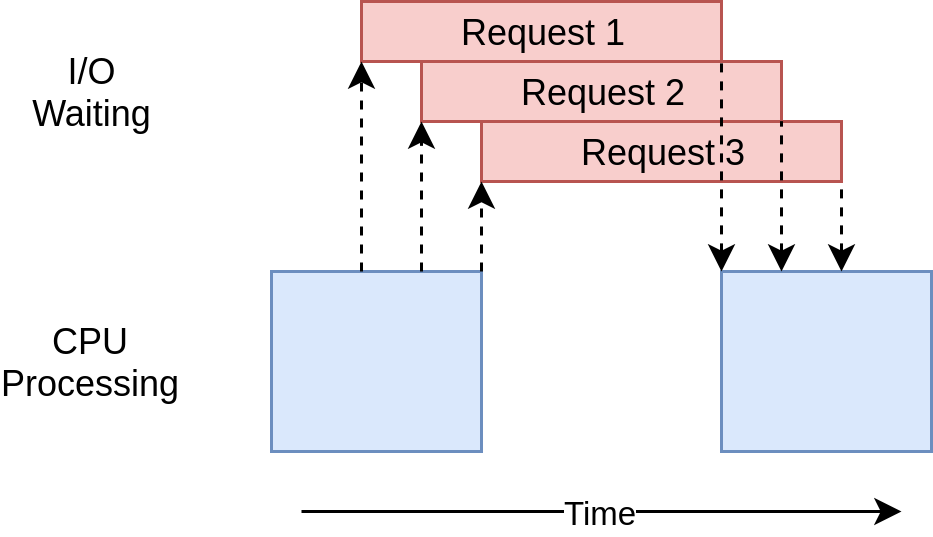](https://files.realpython.com/media/Asyncio.31182d3731cf.png)
There’s a common argument that having to add `async` and `await` in the proper locations is an extra complication. To a small extent, that’s true. The flip side of this argument is that it forces you to think about when a given task will get swapped out, which can help you create a better design.
The scaling issue also looms large here. Running the multi-threaded example with a thread for each site is noticeably slower than running it with a handful of threads. Running the `asyncio` example with hundreds of tasks doesn’t slow it down at all.
There are a couple of issues with `asyncio` at this point. You need special asynchronous versions of libraries to gain the full advantage of `asyncio`. Had you just used Requests for downloading the sites, it would’ve been much slower because Requests isn’t designed to notify the event loop that it’s blocked. This issue is becoming less significant as time goes on and more libraries embrace `asyncio`.
Another more subtle issue is that all the advantages of cooperative multitasking get thrown away if one of the tasks doesn’t cooperate. A minor mistake in code can cause a task to run off and hold the processor for a long time, starving other tasks that need running. There’s no way for the event loop to break in if a task doesn’t hand control back to it.
With that in mind, you can step up to a radically different approach to concurrency using multiple processes.
[Remove ads](https://realpython.com/account/join/)
### Process-Based Version
Up to this point, all of the examples of concurrency in this tutorial ran only on a single CPU or core in your computer. The reasons for this have to do with the current design of [CPython](https://realpython.com/cpython-source-code-guide/) and something called the [Global Interpreter Lock](https://realpython.com/python-gil/), or GIL.
This tutorial won’t dive into the hows and whys of the GIL. It’s enough for now to know that the **synchronous**, **multi-threaded**, and **asynchronous versions** of this example all run on a single CPU.
The [`multiprocessing`](https://docs.python.org/3/library/multiprocessing.html) module, along with the corresponding wrappers in `concurrent.futures`, was designed to break down that barrier and run your code across multiple CPUs. At a high level, it does this by creating a new instance of the Python interpreter to run on each CPU and then farming out part of your program to run on it.
As you can imagine, bringing up a separate Python interpreter is not as fast as starting a new thread in the current Python interpreter. It’s a heavyweight operation and comes with some restrictions and difficulties, but for the correct problem, it can make a huge difference.
Unlike the previous approaches, using [multiprocessing](https://en.wikipedia.org/wiki/Multiprocessing) allows you to take full advantage of the all CPUs that your cool, new computer has. Here’s the sample code:
Python `io_processes.py`
```
```
This actually looks quite similar to the multi-threaded example, as you leverage the familiar `concurrent.future` abstraction instead of relying on `multiprocessing` directly. Go ahead and take a quick tour of what this code does for you:
- **Line 8** uses [type hints](https://realpython.com/python-type-checking/) to declare a global variable that will hold the session object. Note that this doesn’t actually define the value of the variable.
- **Line 21** replaces `ThreadPoolExecutor` with [`ProcessPoolExecutor`](https://docs.python.org/3/library/concurrent.futures.html#concurrent.futures.ProcessPoolExecutor) from `concurrent.futures` and passes `init_process()`, which is defined further down.
- **Lines 29 to 32** define a custom initializer function that each process will call shortly after starting. It ensures that each process initializes its own session.
- **Line 32** registers a cleanup function with [`atexit`](https://docs.python.org/3/library/atexit.html), which ensures that the session is properly closed when the process stops. This helps prevent potential [memory leaks](https://en.wikipedia.org/wiki/Memory_leak).
What happens here is that the pool creates a number of separate **Python interpreter processes** and has each one run the specified function on some of the items in the [iterable](https://realpython.com/python-iterators-iterables/), which in your case is the list of sites. The communication between the main process and the other processes is handled for you.
The line that creates a pool instance is worth your attention. First off, it doesn’t specify how many processes to create in the pool, although that’s an optional parameter. By default, it’ll determine the **number of CPUs** in your computer and match that. This is frequently the best answer, and it is in your case.
For an I/O-bound problem, increasing the number of processes won’t make things faster. It’ll actually slow things down because the cost of setting up and tearing down all those processes is larger than the benefit of doing the I/O requests in parallel.
**Note:** If you need to exchange data between your processes, then it’ll require expensive [inter-process communication (IPC)](https://en.wikipedia.org/wiki/Inter-process_communication) and [data serialization](https://realpython.com/python-serialize-data/), which increases the overall cost even further. Besides this, serialization isn’t always possible because Python uses the [`pickle`](https://realpython.com/python-pickle-module/) module under the surface, which supports only a few data types.
Next, you have the initializer part of that call. Remember that each process in our pool has its own **memory space**. That means they can’t easily share things like a session object. You don’t want to create a new `Session` instance each time the function is called—you want to create one for each process.
The `initializer` function parameter is built for just this case. There’s no way to pass a [return value](https://realpython.com/python-return-statement/) back from the `initializer` to `download_site()`, but you can initialize a global `session` variable to hold the single session for each process. Because each process has its own memory space, the global for each one will be different.
That’s really all there is to it. The rest of the code is quite similar to what you’ve seen before. The process-based version does require some extra setup, and the global session object is strange. You have to spend some time thinking about which variables will be accessed in each process.
While this version takes full advantage of the CPU power in your computer, the resulting performance is surprisingly underwhelming:
Shell
```
```
On a computer equipped with four CPU cores, it runs about four times faster than the synchronous version. Still, it’s a bit slower than the multi-threaded version and much slower than the asynchronous version.
The execution timing diagram for this code looks like this:
[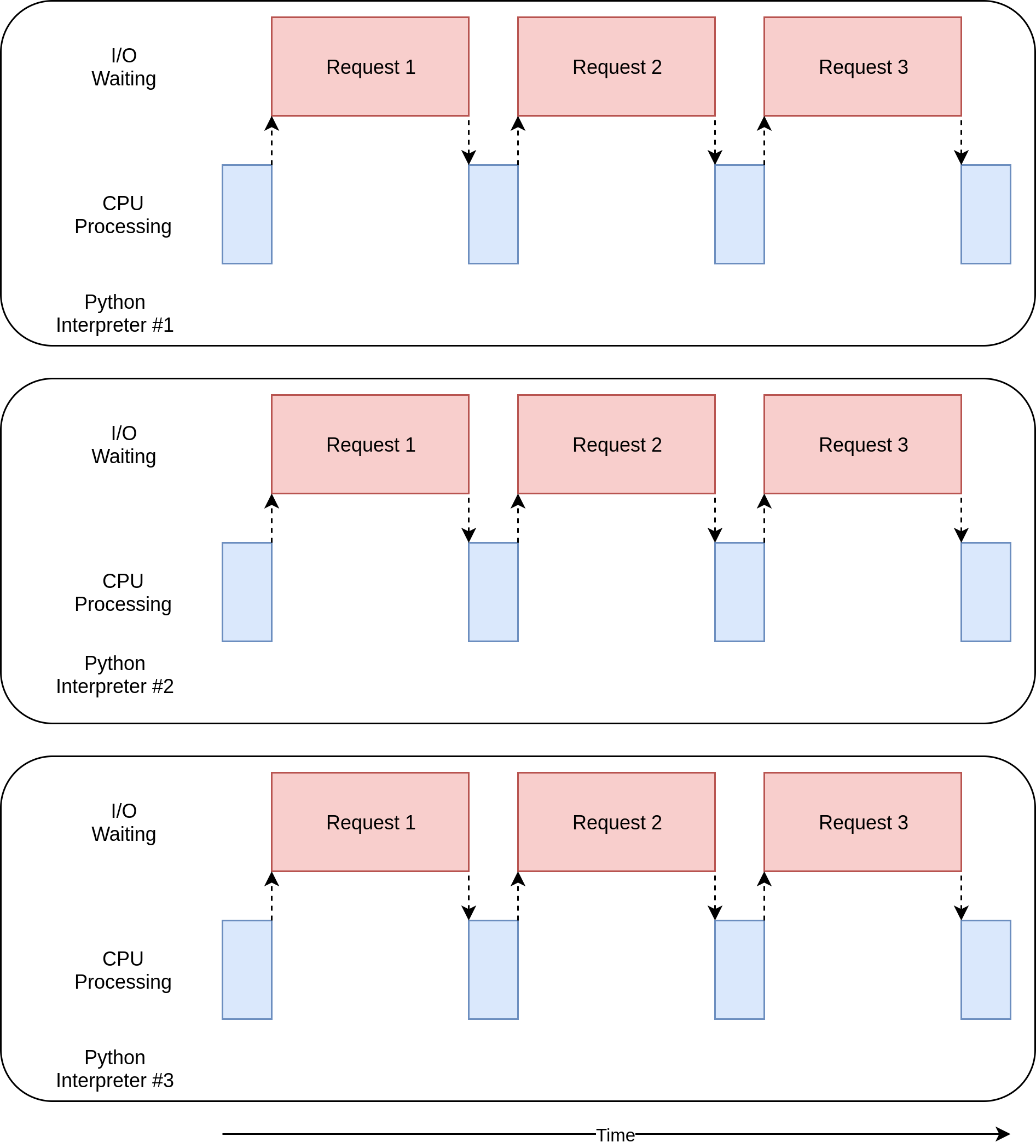](https://files.realpython.com/media/MProc.7cf3be371bbc.png)
There are a few separate processes executing in parallel. The corresponding diagrams of each one of them resemble the non-concurrent version you saw at the beginning of this tutorial.
I/O-bound problems aren’t really why multiprocessing exists. You’ll see more as you step into the next section and look at CPU-bound examples.
[Remove ads](https://realpython.com/account/join/)
## Speeding Up a CPU-Bound Program
It’s time to shift gears here a little bit. The examples so far have all dealt with an I/O-bound problem. Now, you’ll look into a CPU-bound problem. As you learned earlier, an I/O-bound problem spends most of its time waiting for external operations to complete, such as network calls. In contrast, a CPU-bound problem performs fewer I/O operations, and its total execution time depends on how quickly it can process the required data.
For the purposes of this example, you’ll use a somewhat silly function to create a piece of code that takes a long time to run on the CPU. This function computes the n-th [Fibonacci number](https://realpython.com/fibonacci-sequence-python/) using the [recursive](https://realpython.com/python-recursion/) approach:
Python
```
```
Notice how quickly the resulting values grow as the function computes higher Fibonacci numbers. The recursive nature of this implementation leads to many repeated calculations of the same numbers, which requires substantial processing time. That’s what makes this such a convenient example of a CPU-bound task.
Remember, this is just a placeholder for your code that actually does something useful and requires lengthy processing, like computing the roots of equations or [sorting](https://realpython.com/sorting-algorithms-python/) a large data structure.
### Synchronous Version
First off, you can look at the non-concurrent version of the example:
Python
```
```
This code calls `fib(35)` twenty times in a loop. Due to the recursive nature of its implementation, the function calls itself hundreds of millions of times! It does all of this on a single thread in a single process on a single CPU.
The execution timing diagram looks like this:
[](https://files.realpython.com/media/CPUBound.d2d32cb2626c.png)
Unlike the I/O-bound examples, the CPU-bound examples are usually fairly consistent in their run times. This one takes about thirty-five seconds on the same machine as before:
Shell
```
```
Clearly, you can do better than this. After all, it’s all running on a single CPU with no concurrency. Next, you’ll see what you can do to improve it.
### Multi-Threaded Version
How much do you think rewriting this code using threads—or asynchronous tasks—will speed this up?
If you answered “Not at all,” then give yourself a cookie. If you answered, “It will slow it down,” then give yourself two cookies.
Here’s why: In your earlier I/O-bound example, much of the overall time was spent waiting for slow operations to finish. Threads and asynchronous tasks sped this up by allowing you to overlap the waiting times instead of performing them sequentially.
With a CPU-bound problem, there’s no waiting. The CPU is cranking away as fast as it can to finish the problem. In Python, both threads and asynchronous tasks run on the same CPU in the same process. This means that the one CPU is doing all of the work of the non-concurrent code plus the extra work of setting up threads or tasks.
Here’s the code of the multi-threaded version of your CPU-bound problem:
Python `cpu_threads.py`
```
```
Little of this code had to change from the non-concurrent version. After importing `concurrent.futures`, you just changed from looping through the numbers to creating a **thread pool** and using its `.map()` method to send individual numbers to worker threads as they become free.
This was just what you did for the I/O-bound multi-threaded code, but here, you didn’t need to worry about the `Session` object.
Below is the output you might see when running this code:
Shell
```
```
Unsurprisingly, it takes a few seconds longer than the synchronous version.
Okay. At this point, you should know what to expect from the asynchronous version of a CPU-bound problem. But for completeness, you’ll now test how it stacks up against the others.
[Remove ads](https://realpython.com/account/join/)
### Asynchronous Version
Implementing the asynchronous version of this CPU-bound problem involves rewriting your functions into coroutine functions with `async def` and awaiting their return values:
Python `cpu_asyncio.py`
```
```
You create twenty tasks and pass them to `asyncio.gather()` to let the corresponding coroutines run concurrently. However, they actually run in sequence, as each blocks execution until the previous one is finished.
When run, this code takes over twice as long to execute as your original synchronous version and also takes longer than the multi-threaded version:
Shell
```
```
Ironically, the asynchronous approach is the slowest for a CPU-bound problem, yet it was the fastest for an I/O-bound one. Because there are no I/O operations involved here, there’s nothing to wait for. The overhead of the event loop and context switching at every single `await` statement slows down the total execution substantially.
In Python, to improve the performance of a CPU-bound task like this one, you must use an alternative concurrency model. You’ll take a closer look at that now.
### Process-Based Version
You’ve finally reached the part where **multiprocessing** really shines. Unlike the other concurrency models, process-based parallelism is explicitly designed to share heavy CPU workloads across multiple CPUs.
Here’s what the corresponding code looks like:
Python
```
```
It’s almost identical to the multi-threaded version of the Fibonacci problem. You literally changed just two lines of code! Instead of using `ThreadPoolExecutor`, you replaced it with `ProcessPoolExecutor`.
As mentioned before, the `max_workers` optional parameter to the pool’s [constructor](https://realpython.com/python-class-constructor/) deserves some attention. You can use it to specify how many processes you want to be created and managed in the pool. By default, it’ll determine how many CPUs are in your machine and create a process for each one. While this works great for your simple example, you might want to have a little more control in a production environment.
This version takes about ten seconds, which is less than one-third of the non-concurrent implementation you started with:
Shell
```
```
This is much better than what you saw with the other options, making it by far the best choice for this kind of task.
Here’s what the execution timing diagram looks like:
[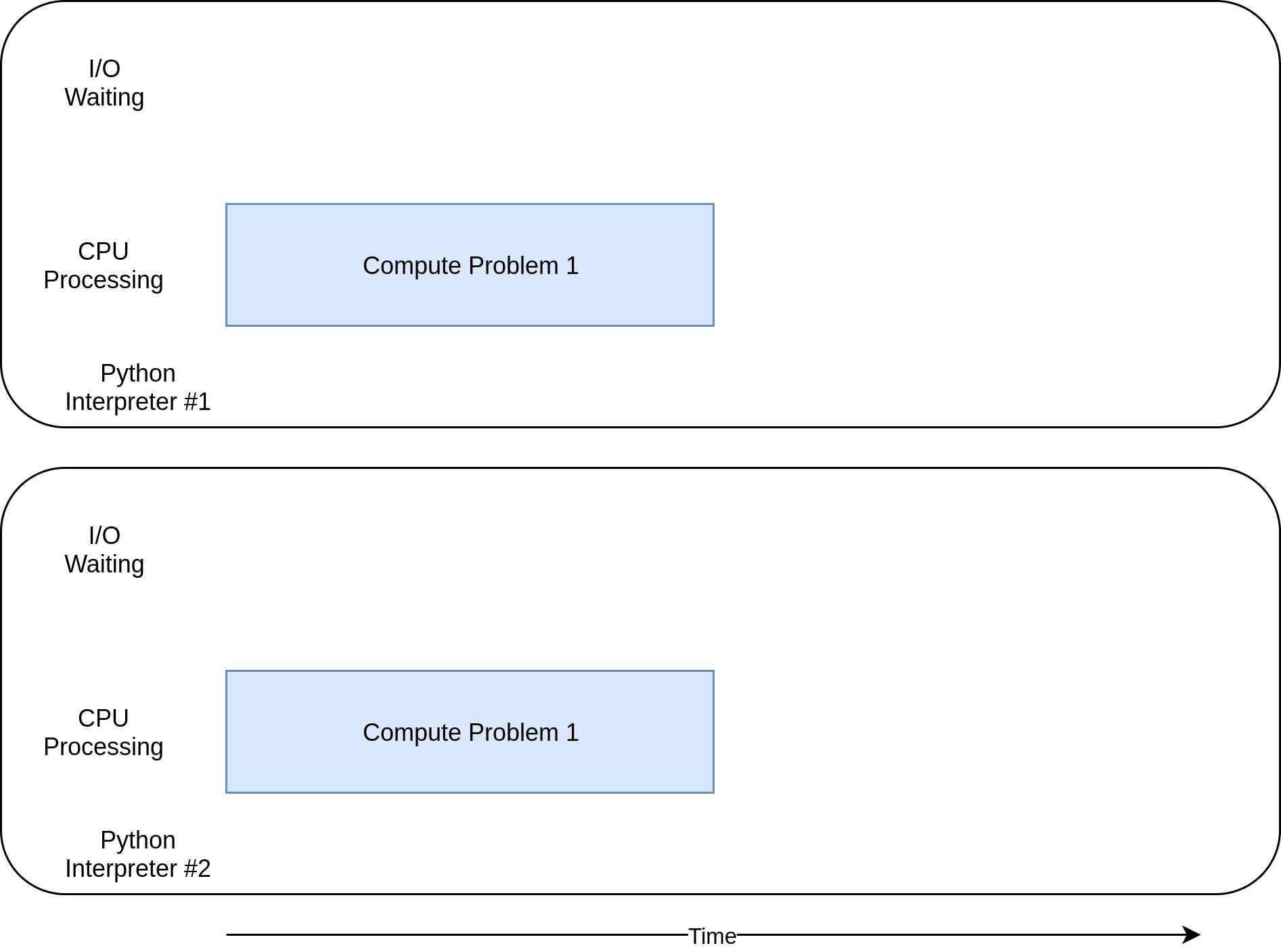](https://files.realpython.com/media/CPUMP.69c1a7fad9c4.png)
The individual tasks run alongside each other on separate CPU cores, making **parallel execution** possible.
There are some drawbacks to using multiprocessing that don’t really show up in a simple example like this one. For example, dividing your problem into segments so each processor can operate independently can sometimes be difficult.
Also, many solutions require more communication between the processes. This can add some complexity to your solution that a non-concurrent program just wouldn’t need to deal with.
[Remove ads](https://realpython.com/account/join/)
## Deciding When to Use Concurrency
You’ve covered a lot of ground here, so it might be a good time to review some of the key ideas and then discuss some decision points that will help you determine which, if any, concurrency module you want to use in your project.
The first step of this process is deciding if you *should* use a concurrency module. While the examples here make each of the libraries look pretty simple, concurrency always comes with extra complexity and can often result in bugs that are difficult to find.
Hold out on adding concurrency until you have a known performance issue and *then* determine which type of concurrency you need. As [Donald Knuth](https://en.wikipedia.org/wiki/Donald_Knuth) has said, “Premature optimization is the root of all evil (or at least most of it) in programming.”
Once you’ve decided that you should optimize your program, figuring out if your program is **I/O-bound** or **CPU-bound** is a great next step. Remember that I/O-bound programs are those that spend most of their time waiting for something to happen, while CPU-bound programs spend their time processing data or crunching numbers as fast as they can.
As you saw, CPU-bound problems only really benefit from using **process-based concurrency** in Python. Multithreading and asynchronous I/O don’t help this type of problem at all.
For I/O-bound problems, there’s a general rule of thumb in the Python community: “Use `asyncio` when you can, `threading` or `concurrent.futures` when you must.” `asyncio` can provide the best speed-up for this type of program, but sometimes you’ll require critical libraries that haven’t been ported to take advantage of `asyncio`. Remember that any task that doesn’t give up control to the event loop will block all of the other tasks.
## Conclusion
You’ve learned about concurrency in Python and how it can enhance the performance and responsiveness of your programs. You explored different concurrency models, including **threading**, asynchronous tasks, and **multiprocessing**. Through practical examples, you gained insight into when and how to implement these models to optimize both **I/O-bound** and **CPU-bound** tasks.
Understanding concurrency is vital for Python developers seeking to improve application efficiency, particularly in scenarios involving intensive I/O operations or computational workloads. By choosing the right concurrency model, you can significantly reduce execution times and better utilize available system resources.
**In this tutorial, you’ve learned how to:**
- **Understand** the different forms of **concurrency** in Python
- **Implement** multi-threaded and asynchronous solutions for **I/O-bound** tasks
- **Leverage** multiprocessing for **CPU-bound** tasks to achieve true parallelism
- **Choose** the appropriate concurrency model based on your program’s needs
With these skills, you’re now equipped to analyze your Python programs and apply concurrency effectively to tackle performance bottlenecks. Whether optimizing a [web scraper](https://realpython.com/beautiful-soup-web-scraper-python/) or a data processing pipeline, you can confidently select the best concurrency model to enhance your application’s performance.
**Get Your Code:** [Click here to download the free sample code](https://realpython.com/bonus/python-concurrency-code/) that you’ll use to learn about speeding up your Python program with concurrency.
***Take the Quiz:*** Test your knowledge with our interactive “Python Concurrency” quiz. You’ll receive a score upon completion to help you track your learning progress:
***
[](https://realpython.com/quizzes/python-concurrency/)
**Interactive Quiz**
[Python Concurrency](https://realpython.com/quizzes/python-concurrency/)
In this quiz, you'll test your understanding of Python concurrency. You'll revisit the different forms of concurrency in Python, how to implement multi-threaded and asynchronous solutions for I/O-bound tasks, and how to achieve true parallelism for CPU-bound tasks.
Mark as Completed
Share
Recommended Course
[Speed Up Python With Concurrency](https://realpython.com/courses/speed-python-concurrency/) (1h 45m)
🐍 Python Tricks 💌
Get a short & sweet **Python Trick** delivered to your inbox every couple of days. No spam ever. Unsubscribe any time. Curated by the Real Python team.

About **Jim Anderson**
[ ](https://realpython.com/team/janderson/)
Jim has been programming for a long time in a variety of languages. He has worked on embedded systems, built distributed build systems, done off-shore vendor management, and sat in many, many meetings.
[» More about Jim](https://realpython.com/team/janderson/)
***
*Each tutorial at Real Python is created by a team of developers so that it meets our high quality standards. The team members who worked on this tutorial are:*
[](https://realpython.com/team/asantos/)
[Aldren](https://realpython.com/team/asantos/)
[](https://realpython.com/team/bsolomon/)
[Brad](https://realpython.com/team/bsolomon/)
[](https://realpython.com/team/bweleschuk/)
[Brenda](https://realpython.com/team/bweleschuk/)
[](https://realpython.com/team/bzaczynski/)
[Bartosz](https://realpython.com/team/bzaczynski/)
[](https://realpython.com/team/damos/)
[David](https://realpython.com/team/damos/)
[](https://realpython.com/team/gahjelle/)
[Geir Arne](https://realpython.com/team/gahjelle/)
[](https://realpython.com/team/jjablonski/)
[Joanna](https://realpython.com/team/jjablonski/)
Master Real-World Python Skills With Unlimited Access to Real Python

**Join us and get access to thousands of tutorials, hands-on video courses, and a community of expert Pythonistas:**
[Level Up Your Python Skills »](https://realpython.com/account/join/?utm_source=rp_article_footer&utm_content=python-concurrency)
Master Real-World Python Skills
With Unlimited Access to Real Python

**Join us and get access to thousands of tutorials, hands-on video courses, and a community of expert Pythonistas:**
[Level Up Your Python Skills »](https://realpython.com/account/join/?utm_source=rp_article_footer&utm_content=python-concurrency)
What Do You Think?
**Rate this article:**
[LinkedIn](https://www.linkedin.com/sharing/share-offsite/?url=https%3A%2F%2Frealpython.com%2Fpython-concurrency%2F)
[Twitter](https://twitter.com/intent/tweet/?text=Interesting%20Python%20article%20on%20%40realpython%3A%20Speed%20Up%20Your%20Python%20Program%20With%20Concurrency&url=https%3A%2F%2Frealpython.com%2Fpython-concurrency%2F)
[Bluesky](https://bsky.app/intent/compose?text=Interesting%20Python%20article%20on%20%40realpython.com%3A%20Speed%20Up%20Your%20Python%20Program%20With%20Concurrency%20https%3A%2F%2Frealpython.com%2Fpython-concurrency%2F)
[Facebook](https://facebook.com/sharer/sharer.php?u=https%3A%2F%2Frealpython.com%2Fpython-concurrency%2F)
[Email](mailto:?subject=Python%20article%20for%20you&body=Speed%20Up%20Your%20Python%20Program%20With%20Concurrency%20on%20Real%20Python%0A%0Ahttps%3A%2F%2Frealpython.com%2Fpython-concurrency%2F%0A)
What’s your \#1 takeaway or favorite thing you learned? How are you going to put your newfound skills to use? Leave a comment below and let us know.
**Commenting Tips:** The most useful comments are those written with the goal of learning from or helping out other students. [Get tips for asking good questions](https://realpython.com/python-beginner-tips/#tip-9-ask-good-questions) and [get answers to common questions in our support portal](https://support.realpython.com/).
***
Looking for a real-time conversation? Visit the [Real Python Community Chat](https://realpython.com/community/) or join the next [“Office Hours” Live Q\&A Session](https://realpython.com/office-hours/). Happy Pythoning\!
Keep Learning
Related Topics: [advanced](https://realpython.com/tutorials/advanced/) [best-practices](https://realpython.com/tutorials/best-practices/)
Related Learning Paths:
- [Concurrency and Async Programming](https://realpython.com/learning-paths/python-concurrency-parallel-programming/?utm_source=realpython&utm_medium=web&utm_campaign=related-learning-path&utm_content=python-concurrency)
Related Courses:
- [Speed Up Python With Concurrency](https://realpython.com/courses/speed-python-concurrency/?utm_source=realpython&utm_medium=web&utm_campaign=related-course&utm_content=python-concurrency)
Related Tutorials:
- [Python's asyncio: A Hands-On Walkthrough](https://realpython.com/async-io-python/?utm_source=realpython&utm_medium=web&utm_campaign=related-post&utm_content=python-concurrency)
- [An Intro to Threading in Python](https://realpython.com/intro-to-python-threading/?utm_source=realpython&utm_medium=web&utm_campaign=related-post&utm_content=python-concurrency)
- [What Is the Python Global Interpreter Lock (GIL)?](https://realpython.com/python-gil/?utm_source=realpython&utm_medium=web&utm_campaign=related-post&utm_content=python-concurrency)
- [Getting Started With Async Features in Python](https://realpython.com/python-async-features/?utm_source=realpython&utm_medium=web&utm_campaign=related-post&utm_content=python-concurrency)
- [Python's with Statement: Manage External Resources Safely](https://realpython.com/python-with-statement/?utm_source=realpython&utm_medium=web&utm_campaign=related-post&utm_content=python-concurrency)
## Keep reading Real Python by creating a free account or signing in:
[](https://realpython.com/account/signup/?intent=continue_reading&utm_source=rp&utm_medium=web&utm_campaign=rwn&utm_content=v1&next=%2Fpython-concurrency%2F)
[Continue »](https://realpython.com/account/signup/?intent=continue_reading&utm_source=rp&utm_medium=web&utm_campaign=rwn&utm_content=v1&next=%2Fpython-concurrency%2F)
Already have an account? [Sign-In](https://realpython.com/account/login/?next=/python-concurrency/)
Almost there! Complete this form and click the button below to gain instant access:
×

Speed Up Your Python Program With Concurrency (Sample Code)
##### Learn Python
- [Start Here](https://realpython.com/start-here/)
- [Learning Resources](https://realpython.com/search)
- [Code Mentor](https://realpython.com/mentor/)
- [Python Reference](https://realpython.com/ref/)
- [Python Cheat Sheet](https://realpython.com/cheatsheets/python/)
- [Support Center](https://support.realpython.com/)
##### Courses & Paths
- [Learning Paths](https://realpython.com/learning-paths/)
- [Quizzes & Exercises](https://realpython.com/quizzes/)
- [Browse Topics](https://realpython.com/tutorials/all/)
- [Live Courses](https://realpython.com/live/)
- [Books](https://realpython.com/books/)
##### Community
- [Podcast](https://realpython.com/podcasts/rpp/)
- [Newsletter](https://realpython.com/newsletter/)
- [Community Chat](https://realpython.com/community/)
- [Office Hours](https://realpython.com/office-hours/)
- [Learner Stories](https://realpython.com/learner-stories/)
##### Membership
- [Plans & Pricing](https://realpython.com/account/join/)
- [Team Plans](https://realpython.com/account/join-team/)
- [For Business](https://realpython.com/account/join-team/inquiry/)
- [For Schools](https://realpython.com/account/join-team/education-inquiry/)
- [Reviews](https://realpython.com/learner-stories/)
##### Company
- [About Us](https://realpython.com/about/)
- [Team](https://realpython.com/team/)
- [Mission & Values](https://realpython.com/mission/)
- [Editorial Guidelines](https://realpython.com/editorial-guidelines/)
- [Sponsorships](https://realpython.com/sponsorships/)
- [Careers](https://realpython.workable.com/)
- [Press Kit](https://realpython.com/media-kit/)
- [Merch](https://realpython.com/merch)
[Privacy Policy](https://realpython.com/privacy-policy/) ⋅ [Terms of Use](https://realpython.com/terms/) ⋅ [Security](https://realpython.com/security/) ⋅ [Contact](https://realpython.com/contact/)
Happy Pythoning\!
© 2012–2026 DevCademy Media Inc. DBA Real Python. All rights reserved.
REALPYTHON™ is a trademark of DevCademy Media Inc.
[](https://realpython.com/)

You've blocked notifications | |||||||||
| Readable Markdown | Concurrency refers to the ability of a program to manage multiple tasks at once, improving performance and responsiveness. It encompasses different models like threading, asynchronous tasks, and multiprocessing, each offering unique benefits and trade-offs. In Python, threads and asynchronous tasks facilitate concurrency on a single processor, while multiprocessing allows for true parallelism by utilizing multiple CPU cores.
Understanding concurrency is crucial for optimizing programs, especially those that are I/O-bound or CPU-bound. Efficient concurrency management can significantly enhance a program’s performance by reducing wait times and better utilizing system resources.
**In this tutorial, you’ll learn how to:**
- **Understand** the different forms of **concurrency** in Python
- **Implement** multi-threaded and asynchronous solutions for **I/O-bound** tasks
- **Leverage** multiprocessing for **CPU-bound** tasks to achieve true parallelism
- **Choose** the appropriate concurrency model based on your program’s needs
To get the most out of this tutorial, you should be familiar with [Python basics](https://realpython.com/learning-paths/python-basics/), including [functions](https://realpython.com/defining-your-own-python-function/) and [loops](https://realpython.com/python-for-loop/). A rudimentary understanding of system processes and CPU operations will also be helpful. You can download the sample code for this tutorial by clicking the link below:
***Take the Quiz:*** Test your knowledge with our interactive “Python Concurrency” quiz. You’ll receive a score upon completion to help you track your learning progress:
***
[](https://realpython.com/quizzes/python-concurrency/)
**Interactive Quiz**
[Python Concurrency](https://realpython.com/quizzes/python-concurrency/)
In this quiz, you'll test your understanding of Python concurrency. You'll revisit the different forms of concurrency in Python, how to implement multi-threaded and asynchronous solutions for I/O-bound tasks, and how to achieve true parallelism for CPU-bound tasks.
## Exploring Concurrency in Python
In this section, you’ll get familiar with the terminology surrounding concurrency. You’ll also learn that concurrency can take different forms depending on the problem it aims to solve. Finally, you’ll discover how the different concurrency models translate to Python.
### What Is Concurrency?
The dictionary definition of concurrency is **simultaneous occurrence**. In Python, the things that are occurring simultaneously are called by different names, including these:
- **Thread**
- **Task**
- **Process**
At a high level, they all refer to a sequence of instructions that run in order. You can think of them as different **trains of thought**. Each one can be stopped at certain points, and the CPU or brain that’s processing them can switch to a different one. The state of each train of thought is saved so it can be restored right where it was interrupted.
You might wonder why Python uses different words for the same concept. It turns out that threads, tasks, and processes are only the same if you view them from a high-level perspective. Once you start digging into the details, you’ll find that they all represent slightly different things. You’ll see more of how they’re different as you progress through the examples.
Now, you’ll consider the *simultaneous* part of that definition. You have to be a little careful because, when you get down to the details, you’ll discover that only multiple [system processes](https://en.wikipedia.org/wiki/Process_\(computing\)) can enable Python to run these trains of thought at literally the same time.
In contrast, [threads](https://en.wikipedia.org/wiki/Thread_\(computing\)) and [asynchronous tasks](https://en.wikipedia.org/wiki/Asynchrony_\(computer_programming\)) always run on a single processor, which means they can only run one at a time. They just cleverly find ways to take turns to speed up the overall process. Even though they don’t run different trains of thought simultaneously, they still fall under the concept of **concurrency**.
The way the threads, tasks, or processes take turns differs. In a multi-threaded approach, the operating system actually knows about each thread and can interrupt it at any time to start running a different thread. This mechanism is also true for processes. It’s called [preemptive multitasking](https://en.wikipedia.org/wiki/Preemption_%28computing%29#Preemptive_multitasking) since the operating system can preempt your thread or process to make the switch.
Preemptive multitasking is handy in that the code in the thread doesn’t need to do anything special to make the switch. It can also be difficult because of that *at any time* phrase. The [context switch](https://en.wikipedia.org/wiki/Context_switch) can happen in the middle of a single Python statement, even a trivial one like `x = x + 1`. This is because Python statements typically consist of several low-level [bytecode](https://en.wikipedia.org/wiki/Bytecode) instructions.
On the other hand, asynchronous tasks use [cooperative multitasking](https://en.wikipedia.org/wiki/Cooperative_multitasking). The tasks must cooperate with each other by announcing when they’re ready to be switched out without the operating system’s involvement. This means that the code in the task has to change slightly to make it happen.
The benefit of doing this extra work upfront is that you always know where your task will be swapped out, making it easier to reason about the flow of execution. A task won’t be swapped out in the middle of a Python statement unless that statement is appropriately marked. You’ll see later how this can simplify parts of your design.
### What Is Parallelism?
So far, you’ve looked at concurrency that happens on a single [processor](https://en.wikipedia.org/wiki/Processor_\(computing\)). What about all of those [CPU cores](https://en.wikipedia.org/wiki/Multi-core_processor) your cool, new laptop has? How can you make use of them in Python? The answer is to execute separate processes\!
A **process** can be thought of as almost a completely different program, though technically, it’s usually defined as a collection of resources including memory, [file handles](https://en.wikipedia.org/wiki/File_descriptor), and things like that. One way to think about it is that each process runs in its own Python interpreter.
Because they’re different processes, each of your trains of thought in a program leveraging **multiprocessing** can run on a different CPU core. Running on a different core means that they can actually run at the same time, which is fabulous. There are some complications that arise from doing this, but Python does a pretty good job of smoothing them over most of the time.
Now that you have an idea of what **concurrency** and **parallelism** are, you can review their differences and then determine which Python modules support them:
| Python Module | CPU | Multitasking | Switching Decision |
|---|---|---|---|
| `asyncio` | One | Cooperative | The tasks decide when to give up control. |
| `threading` | One | Preemptive | The operating system decides when to switch tasks external to Python. |
| `multiprocessing` | Many | Preemptive | The processes all run at the same time on different processors. |
You’ll explore these modules as you make your way through the tutorial.
Each of the corresponding types of concurrency can be useful in its own way. You’ll now take a look at what types of programs they can help you speed up.
### When Is Concurrency Useful?
Concurrency can make a big difference for two types of problems:
1. [I/O-Bound](https://en.wikipedia.org/wiki/I/O_bound)
2. [CPU-Bound](https://en.wikipedia.org/wiki/CPU-bound)
I/O-bound problems cause your program to slow down because it frequently must wait for [input or output](https://realpython.com/python-input-output/) (I/O) from some external resource. They arise when your program is working with things that are much slower than your CPU.
Examples of things that are slower than your CPU are legion, but your program thankfully doesn’t interact with most of them. The slow things your program will interact with the most are the **file system** and **network connections**.
Here’s a diagram illustrating an **I/O-bound** operation:
[](https://files.realpython.com/media/IOBound.4810a888b457.png)
The blue boxes show the time when your program is doing work, and the red boxes are time spent waiting for an I/O operation to complete. This diagram is not to scale because requests on the internet can take several orders of magnitude longer than CPU instructions, so your program can end up spending most of its time waiting. That’s what your web browser is doing most of the time.
On the flip side, there are classes of programs that do significant computation without talking to the network or accessing a file. These are CPU-bound programs because the resource limiting the speed of your program is the CPU, not the network or the file system.
Here’s a corresponding diagram for a **CPU-bound** program:
[](https://files.realpython.com/media/CPUBound.d2d32cb2626c.png)
As you work through the examples in the following section, you’ll see that different forms of concurrency work better or worse with I/O-bound and CPU-bound programs. Adding concurrency to your program introduces extra code and complications, so you’ll need to decide if the potential speedup is worth the additional effort. By the end of this tutorial, you should have enough information to start making that decision.
Here’s a quick summary to clarify this concept:
| I/O-Bound Process | CPU-Bound Process |
|---|---|
| Your program spends most of its time talking to a slow device, like a network adapter, a hard drive, or a printer. | Your program spends most of its time doing CPU operations. |
| Speeding it up involves overlapping the times spent waiting for these devices. | Speeding it up involves finding ways to do more computations in the same amount of time. |
You’ll look at I/O-bound programs first. Then, you’ll get to see some code dealing with CPU-bound programs.
## Speeding Up an I/O-Bound Program
In this section, you’ll focus on I/O-bound programs and a common problem: downloading content over the network. For this example, you’ll be downloading web pages from a few sites, but it really could be any network traffic. It’s just more convenient to visualize and set up with web pages.
### Synchronous Version
You’ll start with a non-concurrent version of this task. Note that this program requires the third-party [Requests](https://realpython.com/python-requests/) library. So, you should first run the following command in an activated [virtual environment](https://realpython.com/python-virtual-environments-a-primer/):
This version of your program doesn’t use concurrency at all:
As you can see, this is a fairly short program. It just downloads the site contents from a [list](https://realpython.com/python-list/) of addresses and prints their sizes.
One small thing to point out is that you’re using a [session object](https://requests.readthedocs.io/en/stable/user/advanced/#session-objects) from `requests`. It’s possible to call [`requests.get()`](https://requests.readthedocs.io/en/stable/api/#requests.get) directly, but creating a `Session` object allows the library to retain state across requests and reuse the connection to speed things up.
You create the session in `download_all_sites()` and then walk through the list of sites, downloading each one in turn. Finally, you [print](https://realpython.com/python-print/) out how long this process took so you can have the satisfaction of seeing how much concurrency has helped you in the following examples.
The processing diagram for this program will look much like the I/O-bound diagram in the last section.
The great thing about this version of code is that, well, it’s simple. It was comparatively quick to write and debug. It’s also more straightforward to think about. There’s only **one train of thought** running through it, so you can predict what the next step is and how it’ll behave.
The big problem here is that it’s relatively slow compared to the other solutions that you’re about to see. Here’s an example of what the final output might look like:
Note that these results may vary significantly depending on the speed of your internet connection, network congestion, and other factors. To account for them, you should repeat each benchmark a few times and take the fastest of the runs. That way, the differences between your program’s versions will still be clear.
Being slower isn’t always a big issue. If the program you’re running takes only two seconds with a synchronous version and is only run rarely, then it’s probably not worth adding concurrency. You can stop here.
What if your program *is* run frequently? What if it takes hours to run? You’ll move on to concurrency by rewriting this program using [Python threads](https://realpython.com/intro-to-python-threading/).
### Multi-Threaded Version
As you probably guessed, writing a program leveraging [multithreading](https://en.wikipedia.org/wiki/Multithreading_\(computer_architecture\)) takes more effort. However, you might be surprised at how little extra effort it takes for basic cases. Here’s what the same program looks like when you take advantage of the `concurrent.futures` and `threading` modules mentioned earlier:
The overall structure of your program is the same, but the highlighted lines indicate the changes you needed to make.
On **line 20**, you created an instance of the [`ThreadPoolExecutor`](https://docs.python.org/3/library/concurrent.futures.html#concurrent.futures.ThreadPoolExecutor) to manage the threads for you. In this case, you explicitly requested five workers or threads.
Creating a `ThreadPoolExecutor` seems like a complicated thing. But, when you break it down, you’ll end up with these three components:
1. Thread
2. Pool
3. Executor
You already know about the **thread** part. That’s just the train of thought mentioned earlier. The **pool** portion is where it starts to get interesting. This object is going to create a [pool of threads](https://en.wikipedia.org/wiki/Thread_pool), each of which can run concurrently. Finally, the **executor** is the part that’s going to control how and when each of the threads in the pool will run. It’ll execute the request in the pool.
The standard library implements `ThreadPoolExecutor` as a [context manager](https://realpython.com/python-with-statement/), so you can use the `with` syntax to manage creating and freeing the pool of [`threading.Thread`](https://docs.python.org/3/library/threading.html#threading.Thread) instances.
In this multi-threaded version of the program, you let the executor call `download_site()` on your behalf instead of doing it manually in a loop. The [`executor.map()`](https://docs.python.org/3/library/concurrent.futures.html#concurrent.futures.Executor.map) method on **line 21** takes care of distributing the workload across the available threads, allowing each one to handle a different site concurrently. This method takes two arguments:
1. A function to be executed on each data item, like a site address
2. A collection of data items to be processed by that function
Since the function that you passed to the executor’s `.map()` method must take exactly one argument, you modified `download_site()` on **line 23** to only accept a URL. But how do you obtain the session object now?
This is one of the interesting and difficult issues with threading. Because the operating system controls when your task gets interrupted and another task starts, any data shared between the threads needs to be protected or [thread-safe](https://realpython.com/python-thread-lock/) to avoid unexpected behavior or potential data corruption. Unfortunately, `requests.Session()` isn’t thread-safe, meaning that one thread may interfere with the session while another thread is still using it.
There are several strategies for making data access thread-safe. One of them is to use a **thread-safe data structure**, such as a [`queue.Queue`](https://realpython.com/queue-in-python/#using-thread-safe-queues), [`multiprocessing.Queue`](https://realpython.com/queue-in-python/#using-multiprocessingqueue-for-interprocess-communication-ipc), or an [`asyncio.Queue`](https://realpython.com/queue-in-python/#asyncioqueue). These objects use low-level primitives like [lock objects](https://docs.python.org/3/library/threading.html#lock-objects) to ensure that only one thread can access a block of code or a bit of memory at the same time. You’re using this strategy indirectly by way of the `ThreadPoolExecutor` object.
Another strategy to use here is something called [thread-local storage](https://en.wikipedia.org/wiki/Thread-local_storage). When you call `threading.local()` on **line 7**, you create an object that resembles a [global variable](https://realpython.com/python-use-global-variable-in-function/) but is specific to each individual thread. It looks a little odd, but you only want to create one of these objects, not one for each thread. The object itself takes care of separating accesses from different threads to its attributes.
When `get_session_for_thread()` is called, the session it looks up is specific to the particular thread on which it’s running. So each thread will create a single session the first time it calls `get_session_for_thread()` and then will use that session on each subsequent call throughout its lifetime.
Okay. It’s time to put your multi-threaded program to the ultimate test:
It’s fast! Remember that the non-concurrent version took more than fourteen seconds in the best case.
Here’s what its execution timing diagram looks like:
[](https://files.realpython.com/media/Threading.3eef48da829e.png)
The program uses multiple threads to have many open requests out to web sites at the same time. This allows your program to overlap the waiting times and get the final result faster. Yippee! That was the goal.
Are there any problems with the multi-threaded version? Well, as you can see from the example, it takes a little more code to make this happen, and you really have to give some thought to what data is shared between threads.
Threads can interact in ways that are subtle and hard to detect. These interactions can cause **race conditions** that frequently result in random, intermittent bugs that can be quite difficult to find. If you’re unfamiliar with this concept, then you might want to check out a section on [race conditions](https://realpython.com/python-thread-lock/#race-conditions) in another tutorial on thread safety.
### Asynchronous Version
Running threads concurrently allowed you to cut down the total execution time of your original synchronous code by an order of magnitude. That’s already pretty remarkable, but you can do even better than that by taking advantage of Python’s [`asyncio`](https://realpython.com/async-io-python/) module, which enables [asynchronous I/O](https://en.wikipedia.org/wiki/Asynchronous_I/O).
Asynchronous processing is a concurrency model that’s well-suited for **I/O-bound tasks**—hence the name, `asyncio`. It avoids the overhead of context switching between threads by employing the **event loop**, **non-blocking operations**, and **coroutines**, among other things. Perhaps somewhat surprisingly, the asynchronous code needs only one thread of execution to run concurrently.
In a nutshell, the [event loop](https://docs.python.org/3/library/asyncio-eventloop.html) controls how and when each asynchronous task gets to execute. As the name suggests, it continuously *loops* through your tasks while monitoring their state. As soon as the current task starts waiting for an I/O operation to finish, the loop suspends it and immediately switches to another task. Conversely, once the expected *event* occurs, the loop will eventually resume the suspended task in the next iteration.
A [coroutine](https://docs.python.org/3/glossary.html#term-coroutine) is similar to a thread but much more lightweight and cheaper to suspend or resume. That’s what makes it possible to spawn *many* more coroutines than threads without a significant memory or performance overhead. This capability helps address the [C10k problem](https://en.wikipedia.org/wiki/C10k_problem), which involves handling ten thousand concurrent connections efficiently. But there’s a catch.
You can’t have blocking function calls in your coroutines if you want to reap the full benefits of asynchronous programming. A blocking call is a synchronous one, meaning that it prevents other code from running while it’s waiting for data to arrive. In contrast, a **non-blocking call** can voluntarily give up control and wait to be notified when the data is ready.
In Python, you create a **coroutine object** by calling an **asynchronous function**, also known as a [coroutine function](https://docs.python.org/3/glossary.html#term-coroutine-function). Those are defined with the [`async def`](https://docs.python.org/3/reference/compound_stmts.html#async-def) statement instead of the usual `def`. Only within the body of an asynchronous function are you allowed to use the `await` keyword, which pauses the execution of the coroutine until the awaited task is completed:
In this case, you defined `main()` as an asynchronous function that implicitly returns a coroutine object when called. Thanks to the `await` keyword, your coroutine makes a non-blocking call to [`asyncio.sleep()`](https://docs.python.org/3/library/asyncio-task.html#asyncio.sleep), simulating a delay of three and a half seconds. While your `main()` function awaits the wake-up event, other tasks could potentially run concurrently.
Now that you’ve got a basic understanding of what asynchronous I/O is, you can walk through the asynchronous version of the example code and figure out how it works. However, because the Requests library that you’ve been using in this tutorial is blocking, you must now switch to a non-blocking counterpart, such as [`aiohttp`](https://aiohttp.readthedocs.io/en/stable/), which was designed for Python’s `asyncio`:
After installing this library in your virtual environment, you can use it in the asynchronous version of the code:
This version looks strikingly similar to the synchronous one, which is yet another advantage of `asyncio`. It’s a double-edged sword, though. While it arguably makes your concurrent code easier to reason about than the multi-threaded version, `asyncio` is far from easy when you get into more complex scenarios.
Here are the most important differences when compared to the non-concurrent version:
- **Line 1** imports `asyncio` from Python’s standard library. This is necessary to run your asynchronous `main()` function on **line 26**.
- **Line 4** imports the third-party `aiohttp` library, which you’ve installed into the virtual environment. This library replaces Requests from earlier examples.
- **Lines 6**, **16**, and **21** redefine your regular functions as asynchronous ones by qualifying their [signatures](https://en.wikipedia.org/wiki/Type_signature) with the `async` keyword.
- **Line 12** prepends the `await` keyword to `download_all_sites()` so that the returned coroutine object can be awaited. This effectively suspends your `main()` function until all sites have been downloaded.
- **Lines 17** and **22** leverage the [`async with`](https://docs.python.org/3/reference/compound_stmts.html#async-with) statement to create [asynchronous context managers](https://docs.python.org/3/glossary.html#term-asynchronous-context-manager) for the session object and the response, respectively.
- **Line 18** creates a list of tasks using a [list comprehension](https://realpython.com/list-comprehension-python/), where each task is a coroutine object returned by `download_site()`. Notice that you don’t await the individual coroutine objects, as doing so would lead to executing them sequentially.
- **Line 19** uses [`asyncio.gather()`](https://docs.python.org/3/library/asyncio-task.html#asyncio.gather) to run all the tasks concurrently, allowing for efficient downloading of multiple sites at the same time.
- **Line 23** awaits the completion of the session’s [HTTP GET](https://developer.mozilla.org/en-US/docs/Web/HTTP/Methods/GET) request before printing the number of bytes read.
You can share the session across all tasks, so the session is created here as a context manager. The tasks can share the session because they’re all running on the same thread. There’s no way one task could interrupt another while the session is in a bad state.
There’s one small but important change buried in the details here. Remember the mention about the optimal number of threads to create? It wasn’t obvious in the multi-threaded example what the optimal number of threads was.
One of the cool advantages of `asyncio` is that it scales far better than `threading` or `concurrent.futures`. Each task takes far fewer resources and less time to create than a thread, so creating and running more of them works well. This example just creates a separate task for each site to download, which works out quite well.
And, it’s really fast. The asynchronous version is the fastest of them all by a good margin:
It took less than a half a second to complete, making this code seven times quicker than the multi-threaded version and over thirty times faster than the non-concurrent version\!
The execution timing diagram looks quite similar to what’s happening in the multi-threaded example. It’s just that the I/O requests are all done by the same thread:
[](https://files.realpython.com/media/Asyncio.31182d3731cf.png)
There’s a common argument that having to add `async` and `await` in the proper locations is an extra complication. To a small extent, that’s true. The flip side of this argument is that it forces you to think about when a given task will get swapped out, which can help you create a better design.
The scaling issue also looms large here. Running the multi-threaded example with a thread for each site is noticeably slower than running it with a handful of threads. Running the `asyncio` example with hundreds of tasks doesn’t slow it down at all.
There are a couple of issues with `asyncio` at this point. You need special asynchronous versions of libraries to gain the full advantage of `asyncio`. Had you just used Requests for downloading the sites, it would’ve been much slower because Requests isn’t designed to notify the event loop that it’s blocked. This issue is becoming less significant as time goes on and more libraries embrace `asyncio`.
Another more subtle issue is that all the advantages of cooperative multitasking get thrown away if one of the tasks doesn’t cooperate. A minor mistake in code can cause a task to run off and hold the processor for a long time, starving other tasks that need running. There’s no way for the event loop to break in if a task doesn’t hand control back to it.
With that in mind, you can step up to a radically different approach to concurrency using multiple processes.
### Process-Based Version
Up to this point, all of the examples of concurrency in this tutorial ran only on a single CPU or core in your computer. The reasons for this have to do with the current design of [CPython](https://realpython.com/cpython-source-code-guide/) and something called the [Global Interpreter Lock](https://realpython.com/python-gil/), or GIL.
This tutorial won’t dive into the hows and whys of the GIL. It’s enough for now to know that the **synchronous**, **multi-threaded**, and **asynchronous versions** of this example all run on a single CPU.
The [`multiprocessing`](https://docs.python.org/3/library/multiprocessing.html) module, along with the corresponding wrappers in `concurrent.futures`, was designed to break down that barrier and run your code across multiple CPUs. At a high level, it does this by creating a new instance of the Python interpreter to run on each CPU and then farming out part of your program to run on it.
As you can imagine, bringing up a separate Python interpreter is not as fast as starting a new thread in the current Python interpreter. It’s a heavyweight operation and comes with some restrictions and difficulties, but for the correct problem, it can make a huge difference.
Unlike the previous approaches, using [multiprocessing](https://en.wikipedia.org/wiki/Multiprocessing) allows you to take full advantage of the all CPUs that your cool, new computer has. Here’s the sample code:
This actually looks quite similar to the multi-threaded example, as you leverage the familiar `concurrent.future` abstraction instead of relying on `multiprocessing` directly. Go ahead and take a quick tour of what this code does for you:
- **Line 8** uses [type hints](https://realpython.com/python-type-checking/) to declare a global variable that will hold the session object. Note that this doesn’t actually define the value of the variable.
- **Line 21** replaces `ThreadPoolExecutor` with [`ProcessPoolExecutor`](https://docs.python.org/3/library/concurrent.futures.html#concurrent.futures.ProcessPoolExecutor) from `concurrent.futures` and passes `init_process()`, which is defined further down.
- **Lines 29 to 32** define a custom initializer function that each process will call shortly after starting. It ensures that each process initializes its own session.
- **Line 32** registers a cleanup function with [`atexit`](https://docs.python.org/3/library/atexit.html), which ensures that the session is properly closed when the process stops. This helps prevent potential [memory leaks](https://en.wikipedia.org/wiki/Memory_leak).
What happens here is that the pool creates a number of separate **Python interpreter processes** and has each one run the specified function on some of the items in the [iterable](https://realpython.com/python-iterators-iterables/), which in your case is the list of sites. The communication between the main process and the other processes is handled for you.
The line that creates a pool instance is worth your attention. First off, it doesn’t specify how many processes to create in the pool, although that’s an optional parameter. By default, it’ll determine the **number of CPUs** in your computer and match that. This is frequently the best answer, and it is in your case.
For an I/O-bound problem, increasing the number of processes won’t make things faster. It’ll actually slow things down because the cost of setting up and tearing down all those processes is larger than the benefit of doing the I/O requests in parallel.
Next, you have the initializer part of that call. Remember that each process in our pool has its own **memory space**. That means they can’t easily share things like a session object. You don’t want to create a new `Session` instance each time the function is called—you want to create one for each process.
The `initializer` function parameter is built for just this case. There’s no way to pass a [return value](https://realpython.com/python-return-statement/) back from the `initializer` to `download_site()`, but you can initialize a global `session` variable to hold the single session for each process. Because each process has its own memory space, the global for each one will be different.
That’s really all there is to it. The rest of the code is quite similar to what you’ve seen before. The process-based version does require some extra setup, and the global session object is strange. You have to spend some time thinking about which variables will be accessed in each process.
While this version takes full advantage of the CPU power in your computer, the resulting performance is surprisingly underwhelming:
On a computer equipped with four CPU cores, it runs about four times faster than the synchronous version. Still, it’s a bit slower than the multi-threaded version and much slower than the asynchronous version.
The execution timing diagram for this code looks like this:
[](https://files.realpython.com/media/MProc.7cf3be371bbc.png)
There are a few separate processes executing in parallel. The corresponding diagrams of each one of them resemble the non-concurrent version you saw at the beginning of this tutorial.
I/O-bound problems aren’t really why multiprocessing exists. You’ll see more as you step into the next section and look at CPU-bound examples.
## Speeding Up a CPU-Bound Program
It’s time to shift gears here a little bit. The examples so far have all dealt with an I/O-bound problem. Now, you’ll look into a CPU-bound problem. As you learned earlier, an I/O-bound problem spends most of its time waiting for external operations to complete, such as network calls. In contrast, a CPU-bound problem performs fewer I/O operations, and its total execution time depends on how quickly it can process the required data.
For the purposes of this example, you’ll use a somewhat silly function to create a piece of code that takes a long time to run on the CPU. This function computes the n-th [Fibonacci number](https://realpython.com/fibonacci-sequence-python/) using the [recursive](https://realpython.com/python-recursion/) approach:
Notice how quickly the resulting values grow as the function computes higher Fibonacci numbers. The recursive nature of this implementation leads to many repeated calculations of the same numbers, which requires substantial processing time. That’s what makes this such a convenient example of a CPU-bound task.
Remember, this is just a placeholder for your code that actually does something useful and requires lengthy processing, like computing the roots of equations or [sorting](https://realpython.com/sorting-algorithms-python/) a large data structure.
### Synchronous Version
First off, you can look at the non-concurrent version of the example:
This code calls `fib(35)` twenty times in a loop. Due to the recursive nature of its implementation, the function calls itself hundreds of millions of times! It does all of this on a single thread in a single process on a single CPU.
The execution timing diagram looks like this:
[](https://files.realpython.com/media/CPUBound.d2d32cb2626c.png)
Unlike the I/O-bound examples, the CPU-bound examples are usually fairly consistent in their run times. This one takes about thirty-five seconds on the same machine as before:
Clearly, you can do better than this. After all, it’s all running on a single CPU with no concurrency. Next, you’ll see what you can do to improve it.
### Multi-Threaded Version
How much do you think rewriting this code using threads—or asynchronous tasks—will speed this up?
If you answered “Not at all,” then give yourself a cookie. If you answered, “It will slow it down,” then give yourself two cookies.
Here’s why: In your earlier I/O-bound example, much of the overall time was spent waiting for slow operations to finish. Threads and asynchronous tasks sped this up by allowing you to overlap the waiting times instead of performing them sequentially.
With a CPU-bound problem, there’s no waiting. The CPU is cranking away as fast as it can to finish the problem. In Python, both threads and asynchronous tasks run on the same CPU in the same process. This means that the one CPU is doing all of the work of the non-concurrent code plus the extra work of setting up threads or tasks.
Here’s the code of the multi-threaded version of your CPU-bound problem:
Little of this code had to change from the non-concurrent version. After importing `concurrent.futures`, you just changed from looping through the numbers to creating a **thread pool** and using its `.map()` method to send individual numbers to worker threads as they become free.
This was just what you did for the I/O-bound multi-threaded code, but here, you didn’t need to worry about the `Session` object.
Below is the output you might see when running this code:
Unsurprisingly, it takes a few seconds longer than the synchronous version.
Okay. At this point, you should know what to expect from the asynchronous version of a CPU-bound problem. But for completeness, you’ll now test how it stacks up against the others.
### Asynchronous Version
Implementing the asynchronous version of this CPU-bound problem involves rewriting your functions into coroutine functions with `async def` and awaiting their return values:
You create twenty tasks and pass them to `asyncio.gather()` to let the corresponding coroutines run concurrently. However, they actually run in sequence, as each blocks execution until the previous one is finished.
When run, this code takes over twice as long to execute as your original synchronous version and also takes longer than the multi-threaded version:
Ironically, the asynchronous approach is the slowest for a CPU-bound problem, yet it was the fastest for an I/O-bound one. Because there are no I/O operations involved here, there’s nothing to wait for. The overhead of the event loop and context switching at every single `await` statement slows down the total execution substantially.
In Python, to improve the performance of a CPU-bound task like this one, you must use an alternative concurrency model. You’ll take a closer look at that now.
### Process-Based Version
You’ve finally reached the part where **multiprocessing** really shines. Unlike the other concurrency models, process-based parallelism is explicitly designed to share heavy CPU workloads across multiple CPUs.
Here’s what the corresponding code looks like:
It’s almost identical to the multi-threaded version of the Fibonacci problem. You literally changed just two lines of code! Instead of using `ThreadPoolExecutor`, you replaced it with `ProcessPoolExecutor`.
As mentioned before, the `max_workers` optional parameter to the pool’s [constructor](https://realpython.com/python-class-constructor/) deserves some attention. You can use it to specify how many processes you want to be created and managed in the pool. By default, it’ll determine how many CPUs are in your machine and create a process for each one. While this works great for your simple example, you might want to have a little more control in a production environment.
This version takes about ten seconds, which is less than one-third of the non-concurrent implementation you started with:
This is much better than what you saw with the other options, making it by far the best choice for this kind of task.
Here’s what the execution timing diagram looks like:
[](https://files.realpython.com/media/CPUMP.69c1a7fad9c4.png)
The individual tasks run alongside each other on separate CPU cores, making **parallel execution** possible.
There are some drawbacks to using multiprocessing that don’t really show up in a simple example like this one. For example, dividing your problem into segments so each processor can operate independently can sometimes be difficult.
Also, many solutions require more communication between the processes. This can add some complexity to your solution that a non-concurrent program just wouldn’t need to deal with.
## Deciding When to Use Concurrency
You’ve covered a lot of ground here, so it might be a good time to review some of the key ideas and then discuss some decision points that will help you determine which, if any, concurrency module you want to use in your project.
The first step of this process is deciding if you *should* use a concurrency module. While the examples here make each of the libraries look pretty simple, concurrency always comes with extra complexity and can often result in bugs that are difficult to find.
Hold out on adding concurrency until you have a known performance issue and *then* determine which type of concurrency you need. As [Donald Knuth](https://en.wikipedia.org/wiki/Donald_Knuth) has said, “Premature optimization is the root of all evil (or at least most of it) in programming.”
Once you’ve decided that you should optimize your program, figuring out if your program is **I/O-bound** or **CPU-bound** is a great next step. Remember that I/O-bound programs are those that spend most of their time waiting for something to happen, while CPU-bound programs spend their time processing data or crunching numbers as fast as they can.
As you saw, CPU-bound problems only really benefit from using **process-based concurrency** in Python. Multithreading and asynchronous I/O don’t help this type of problem at all.
For I/O-bound problems, there’s a general rule of thumb in the Python community: “Use `asyncio` when you can, `threading` or `concurrent.futures` when you must.” `asyncio` can provide the best speed-up for this type of program, but sometimes you’ll require critical libraries that haven’t been ported to take advantage of `asyncio`. Remember that any task that doesn’t give up control to the event loop will block all of the other tasks.
## Conclusion
You’ve learned about concurrency in Python and how it can enhance the performance and responsiveness of your programs. You explored different concurrency models, including **threading**, asynchronous tasks, and **multiprocessing**. Through practical examples, you gained insight into when and how to implement these models to optimize both **I/O-bound** and **CPU-bound** tasks.
Understanding concurrency is vital for Python developers seeking to improve application efficiency, particularly in scenarios involving intensive I/O operations or computational workloads. By choosing the right concurrency model, you can significantly reduce execution times and better utilize available system resources.
**In this tutorial, you’ve learned how to:**
- **Understand** the different forms of **concurrency** in Python
- **Implement** multi-threaded and asynchronous solutions for **I/O-bound** tasks
- **Leverage** multiprocessing for **CPU-bound** tasks to achieve true parallelism
- **Choose** the appropriate concurrency model based on your program’s needs
With these skills, you’re now equipped to analyze your Python programs and apply concurrency effectively to tackle performance bottlenecks. Whether optimizing a [web scraper](https://realpython.com/beautiful-soup-web-scraper-python/) or a data processing pipeline, you can confidently select the best concurrency model to enhance your application’s performance.
***Take the Quiz:*** Test your knowledge with our interactive “Python Concurrency” quiz. You’ll receive a score upon completion to help you track your learning progress:
***
[](https://realpython.com/quizzes/python-concurrency/)
**Interactive Quiz**
[Python Concurrency](https://realpython.com/quizzes/python-concurrency/)
In this quiz, you'll test your understanding of Python concurrency. You'll revisit the different forms of concurrency in Python, how to implement multi-threaded and asynchronous solutions for I/O-bound tasks, and how to achieve true parallelism for CPU-bound tasks. | |||||||||
| ML Classification | ||||||||||
| ML Categories |
Raw JSON{
"/Computers_and_Electronics": 988,
"/Computers_and_Electronics/Programming": 966,
"/Computers_and_Electronics/Programming/Scripting_Languages": 892
} | |||||||||
| ML Page Types |
Raw JSON{
"/Article": 999,
"/Article/Tutorial_or_Guide": 994
} | |||||||||
| ML Intent Types |
Raw JSON{
"Informational": 999
} | |||||||||
| Content Metadata | ||||||||||
| Language | en | |||||||||
| Author | Real Python | |||||||||
| Publish Time | not set | |||||||||
| Original Publish Time | 2019-01-14 14:59:57 (7 years ago) | |||||||||
| Republished | No | |||||||||
| Word Count (Total) | 8,796 | |||||||||
| Word Count (Content) | 6,144 | |||||||||
| Links | ||||||||||
| External Links | 53 | |||||||||
| Internal Links | 131 | |||||||||
| Technical SEO | ||||||||||
| Meta Nofollow | No | |||||||||
| Meta Noarchive | No | |||||||||
| JS Rendered | Yes | |||||||||
| Redirect Target | null | |||||||||
| Performance | ||||||||||
| Download Time (ms) | 232 | |||||||||
| TTFB (ms) | 207 | |||||||||
| Download Size (bytes) | 39,142 | |||||||||
| Shard | 71 (laksa) | |||||||||
| Root Hash | 13351397557425671 | |||||||||
| Unparsed URL | com,realpython!/python-concurrency/ s443 | |||||||||