ℹ️ Skipped - page is already crawled
| Filter | Status | Condition | Details |
|---|---|---|---|
| HTTP status | PASS | download_http_code = 200 | HTTP 200 |
| Age cutoff | PASS | download_stamp > now() - 6 MONTH | 0.1 months ago |
| History drop | PASS | isNull(history_drop_reason) | No drop reason |
| Spam/ban | PASS | fh_dont_index != 1 AND ml_spam_score = 0 | ml_spam_score=0 |
| Canonical | PASS | meta_canonical IS NULL OR = '' OR = src_unparsed | Not set |
| Property | Value | |||||||||
|---|---|---|---|---|---|---|---|---|---|---|
| URL | https://osxdaily.com/2010/11/01/open-and-unrar-rar-files-on-a-mac/ | |||||||||
| Last Crawled | 2026-04-25 08:06:20 (2 days ago) | |||||||||
| First Indexed | 2018-11-21 16:00:56 (7 years ago) | |||||||||
| HTTP Status Code | 200 | |||||||||
| Content | ||||||||||
| Meta Title | Open and UnRar RAR Files on a Mac | |||||||||
| Meta Description | Open and UnRar RAR Files on a Mac | |||||||||
| Meta Canonical | null | |||||||||
| Boilerpipe Text | If you need to open and expand rar files in Mac OS X, you can unrar files with two free utilities available for the Mac. Not only will either of these apps quickly open and decompress .rar files, but it also has the ability to restore corrupted and missing archives using par files. Archive restoration using par2 is often essential when working with torrent and newsgroup downloads.
The two unrar apps we’re discussing here the free UnArchiver or UnRarX tools. UnRarX is predominately a rar application with par2 restoration abilities, whereas UnArchiver will open rar files and many other file formats as well. You can download either, or both, they work essentially the same in OS X, and both being free it’s easy to try them out.
How to Open .rar Files and Unrar in Mac OS X
Once you download the app, opening and expanding rar files is similar to .zip and .sit archives:
Download an app from the these link which can identify rar files, both apps are fine but we like UnArchiver for multi-use function
The Unarchiver
is a free download from the Mac App Store and will open rar files
UnRarX is also a free download and you can
get it here
After the app has downloaded, launch the unrar application – with unarchiver, associate it with the rar file formats
Now either drag and drop any rar archives into the open application to unrar them instantly, or double-click the rar file to decompress it and extract the contents
After downloading and installing The Unarchiver you can also choose to right-click on the rar file and choose “Open with The Unarchiver” to extract the file, though double-clicking it after the rar has been associated with the app is likely the easiest method of extracting the files.
UnRarX has a simple interface for extractions as well, but is limited to rar documents:
The unrar’ed contents will be placed into the same directory as the rar file originated. For example, if the rar file is in the ~/Downloads/ folder, that’s where the extracted rar file contents will be located as well.
After either Unarchiver or UnRarX has been run, it will now be associated with .rar archives on your Mac, allowing you to just double-click on any rar file to extract it in the future. You can also just open the rar file and explore the archive without uncompressing it.
The Unarchiver, seen below, can be associated with many other package file types as well as rar archives.
Rar files are often thought of as part of the Windows world, but Mac users frequently come across them too. I get asked on a somewhat regular basis “What is a RAR file and how do I use it?” from both Windows and Mac users. After explaining it’s an archive format, I always come back to recommending these utilities frequently to be able to open them, and if there is a better free solution for
Mac OS X
I haven’t found it yet. | |||||||||
| Markdown | [](https://osxdaily.com/)
- [Home](https://osxdaily.com/)
- [Mac OS](https://osxdaily.com/category/mac-os-x/)
- [iPhone](https://osxdaily.com/category/iphone/)
- [iPad](https://osxdaily.com/category/ipad/)
- [Tips & Tricks](https://osxdaily.com/category/tips-tricks/)
- [News](https://osxdaily.com/category/news/)
- [iOS](https://osxdaily.com/tag/ios/)
- [Troubleshooting](https://osxdaily.com/category/troubleshooting/)
# Open and UnRar RAR Files on a Mac
Nov 1, 2010 - [17 Comments](https://osxdaily.com/2010/11/01/open-and-unrar-rar-files-on-a-mac/#comments)

If you need to open and expand rar files in Mac OS X, you can unrar files with two free utilities available for the Mac. Not only will either of these apps quickly open and decompress .rar files, but it also has the ability to restore corrupted and missing archives using par files. Archive restoration using par2 is often essential when working with torrent and newsgroup downloads.
The two unrar apps we’re discussing here the free UnArchiver or UnRarX tools. UnRarX is predominately a rar application with par2 restoration abilities, whereas UnArchiver will open rar files and many other file formats as well. You can download either, or both, they work essentially the same in OS X, and both being free it’s easy to try them out.
## How to Open .rar Files and Unrar in Mac OS X
Once you download the app, opening and expanding rar files is similar to .zip and .sit archives:
1. Download an app from the these link which can identify rar files, both apps are fine but we like UnArchiver for multi-use function
- [The Unarchiver](https://itunes.apple.com/app/the-unarchiver/id425424353?mt=12&ls=1) is a free download from the Mac App Store and will open rar files
- UnRarX is also a free download and you can [get it here](http://www.unrarx.com/)
2. After the app has downloaded, launch the unrar application – with unarchiver, associate it with the rar file formats
3. Now either drag and drop any rar archives into the open application to unrar them instantly, or double-click the rar file to decompress it and extract the contents
After downloading and installing The Unarchiver you can also choose to right-click on the rar file and choose “Open with The Unarchiver” to extract the file, though double-clicking it after the rar has been associated with the app is likely the easiest method of extracting the files.
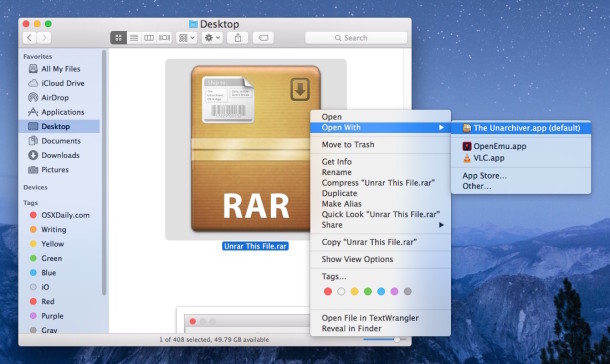
UnRarX has a simple interface for extractions as well, but is limited to rar documents:

The unrar’ed contents will be placed into the same directory as the rar file originated. For example, if the rar file is in the ~/Downloads/ folder, that’s where the extracted rar file contents will be located as well.
After either Unarchiver or UnRarX has been run, it will now be associated with .rar archives on your Mac, allowing you to just double-click on any rar file to extract it in the future. You can also just open the rar file and explore the archive without uncompressing it.
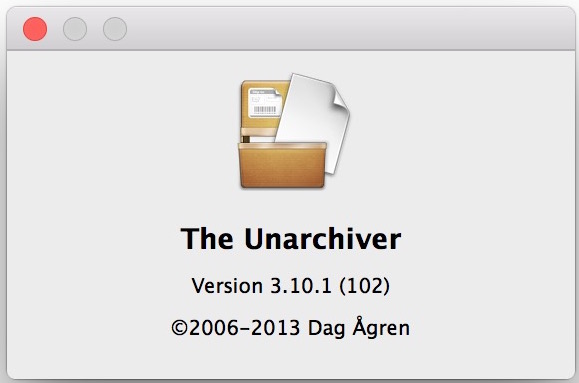
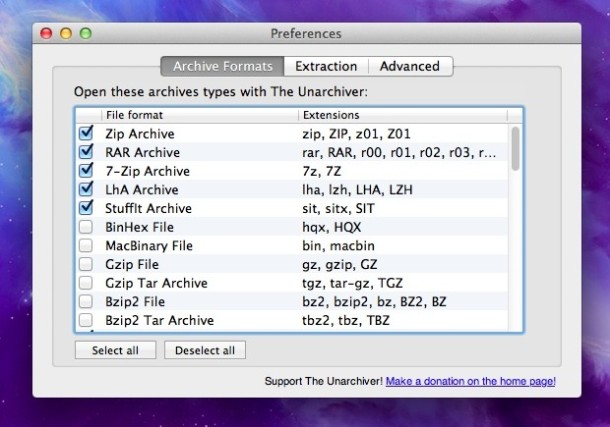
The Unarchiver, seen below, can be associated with many other package file types as well as rar archives.
Rar files are often thought of as part of the Windows world, but Mac users frequently come across them too. I get asked on a somewhat regular basis “What is a RAR file and how do I use it?” from both Windows and Mac users. After explaining it’s an archive format, I always come back to recommending these utilities frequently to be able to open them, and if there is a better free solution for [Mac OS X](https://osxdaily.com/category/mac-os-x) I haven’t found it yet.
- [Click to share on Facebook (Opens in new window) Facebook](https://osxdaily.com/2010/11/01/open-and-unrar-rar-files-on-a-mac/?share=facebook&nb=1)
- [Click to share on X (Opens in new window) X](https://osxdaily.com/2010/11/01/open-and-unrar-rar-files-on-a-mac/?share=twitter&nb=1)
- [Click to share on Reddit (Opens in new window) Reddit](https://osxdaily.com/2010/11/01/open-and-unrar-rar-files-on-a-mac/?share=reddit&nb=1)
- [More](https://osxdaily.com/2010/11/01/open-and-unrar-rar-files-on-a-mac/)
- [Click to share on LinkedIn (Opens in new window) LinkedIn](https://osxdaily.com/2010/11/01/open-and-unrar-rar-files-on-a-mac/?share=linkedin&nb=1)
- [Click to print (Opens in new window) Print](https://osxdaily.com/2010/11/01/open-and-unrar-rar-files-on-a-mac/#print?share=print&nb=1)
- [Click to share on Tumblr (Opens in new window) Tumblr](https://osxdaily.com/2010/11/01/open-and-unrar-rar-files-on-a-mac/?share=tumblr&nb=1)
- [Click to share on Pinterest (Opens in new window) Pinterest](https://osxdaily.com/2010/11/01/open-and-unrar-rar-files-on-a-mac/?share=pinterest&nb=1)
- [Click to share on Pocket (Opens in new window) Pocket](https://osxdaily.com/2010/11/01/open-and-unrar-rar-files-on-a-mac/?share=pocket&nb=1)
- [Click to share on Telegram (Opens in new window) Telegram](https://osxdaily.com/2010/11/01/open-and-unrar-rar-files-on-a-mac/?share=telegram&nb=1)
- [Click to share on WhatsApp (Opens in new window) WhatsApp](https://osxdaily.com/2010/11/01/open-and-unrar-rar-files-on-a-mac/?share=jetpack-whatsapp&nb=1)
### *Related*
[](https://osxdaily.com/2012/05/26/extract-uncompress-virtually-any-archive-file-with-unarchiver-for-mac-os-x/ "Extract & Uncompress Any Archive File with Unarchiver for Mac OS X")
#### [Extract & Uncompress Any Archive File with Unarchiver for Mac OS X](https://osxdaily.com/2012/05/26/extract-uncompress-virtually-any-archive-file-with-unarchiver-for-mac-os-x/ "Extract & Uncompress Any Archive File with Unarchiver for Mac OS X")
The Unarchiver is a one stop shop for extracting and uncompressing virtually any archive file that you'll come across on a Mac. Easily managing the usual archive formats of zip, sit, gzip, bin, tar, hqx, it'll also easily tear through less common archive types including rar files, 7z, bzip2, cab,…
[](https://osxdaily.com/2010/12/13/open-7z-files-on-a-mac/ "Open .7z files on a Mac")
#### [Open .7z files on a Mac](https://osxdaily.com/2010/12/13/open-7z-files-on-a-mac/ "Open .7z files on a Mac")
So you've come across a .7z file and you're on a Mac, what is it and how do you use it? First off, a .7z file is an archive format that stands for 7-zip, you can think of it like any other archive file. By default, Mac OS X does…
[](https://osxdaily.com/2017/11/05/how-open-zip-file-mac/ "How to Open Zip Files on Mac OS")
#### [How to Open Zip Files on Mac OS](https://osxdaily.com/2017/11/05/how-open-zip-file-mac/ "How to Open Zip Files on Mac OS")
Zip files are archives that function as a single compressed package of a either multiple files, a folder, or a single item. Zip files are frequently encountered when downloading stuff from the web or elsewhere to a Mac, and while the Zip format used to be widely limited to the…
#### Enjoy this tip? Subscribe to our newsletter\!
Get more of our great Apple tips, tricks, and important news delivered to your inbox with the OSXDaily newsletter.
#### Thank you\!
You have successfully joined our subscriber list.

### Related articles:
- [How to Open & Extract RAR Files on iPhone & iPad](https://osxdaily.com/2021/04/16/how-open-rar-files-iphone-ipad/ "Permanent Link: How to Open & Extract RAR Files on iPhone & iPad")
- [How to Open 7z Files on iPhone & iPad](https://osxdaily.com/2023/03/10/how-to-open-7z-files-on-iphone-ipad/ "Permanent Link: How to Open 7z Files on iPhone & iPad")
- [Open .7z files on a Mac](https://osxdaily.com/2010/12/13/open-7z-files-on-a-mac/ "Permanent Link: Open .7z files on a Mac")
- [How to Open Zip Files on Mac OS](https://osxdaily.com/2017/11/05/how-open-zip-file-mac/ "Permanent Link: How to Open Zip Files on Mac OS")
**Posted by: Paul Horowitz in [Mac OS](https://osxdaily.com/category/mac-os-x/), [Tips & Tricks](https://osxdaily.com/category/tips-tricks/)**
#### 17 Comments
[» Comments RSS Feed](https://osxdaily.com/2010/11/01/open-and-unrar-rar-files-on-a-mac/feed/)
1. Jokkey
says:
[November 28, 2015 at 4:45 pm](https://osxdaily.com/2010/11/01/open-and-unrar-rar-files-on-a-mac/#comment-1686369)
Thank you for your tutorial! I have unarchived .7z file from my purchase icons
[Reply](https://osxdaily.com/2010/11/01/open-and-unrar-rar-files-on-a-mac/?replytocom=1686369#respond)
2. Carlos Le Mare
says:
[November 6, 2015 at 3:56 pm](https://osxdaily.com/2010/11/01/open-and-unrar-rar-files-on-a-mac/#comment-1636816)
This has no sense. In old versions of Mac OS X, when you install the unrar utility (command line application) from Ports (a Linux port of the command), the system automatically recognize the new format like it does with zip files. Now I have unrar installed, however the OS doesn’t recognize the file format, I don’t know why.
[Reply](https://osxdaily.com/2010/11/01/open-and-unrar-rar-files-on-a-mac/?replytocom=1636816#respond)
- ppr
says:
[November 6, 2015 at 4:16 pm](https://osxdaily.com/2010/11/01/open-and-unrar-rar-files-on-a-mac/#comment-1636847)
Try installing The Unarchiver
[Reply](https://osxdaily.com/2010/11/01/open-and-unrar-rar-files-on-a-mac/?replytocom=1636847#respond)
3. jackson
says:
[January 11, 2011 at 12:17 pm](https://osxdaily.com/2010/11/01/open-and-unrar-rar-files-on-a-mac/#comment-160039)
Ez7z is better, actually it’s probably the best.
[Reply](https://osxdaily.com/2010/11/01/open-and-unrar-rar-files-on-a-mac/?replytocom=160039#respond)
4. [Open .7z files on a Mac](https://osxdaily.com/2010/12/13/open-7z-files-on-a-mac/)
says:
[December 13, 2010 at 4:16 am](https://osxdaily.com/2010/11/01/open-and-unrar-rar-files-on-a-mac/#comment-146116)
\[…\] all sorts of archive formats, it has been discussed here before as an alternate when you need to open and unrar RAR files in Mac OS X as well. Because of it’s flexibility, it’s a good addition to any Mac software \[…\]
[Reply](https://osxdaily.com/2010/11/01/open-and-unrar-rar-files-on-a-mac/?replytocom=146116#respond)
5. [Fine Tune Archive Behavior with the Secret Archives Preference Pane](https://osxdaily.com/2010/12/03/adjust-archive-behavior-with-secret-archives-preference-pane/)
says:
[December 3, 2010 at 4:53 am](https://osxdaily.com/2010/11/01/open-and-unrar-rar-files-on-a-mac/#comment-141291)
\[…\] definitely handy and makes the built-in archive tool a lot more useful (now if only it could unrar files \[…\]
[Reply](https://osxdaily.com/2010/11/01/open-and-unrar-rar-files-on-a-mac/?replytocom=141291#respond)
6. Joris
says:
[November 4, 2010 at 12:16 am](https://osxdaily.com/2010/11/01/open-and-unrar-rar-files-on-a-mac/#comment-129835)
I use RAR Expander: <http://rarexpander.sourceforge.net/>
Works perfect, never had any problems with it. But then again, I never tried out the above suggestions. Anyway, I like what I use, so why change, right?
[Reply](https://osxdaily.com/2010/11/01/open-and-unrar-rar-files-on-a-mac/?replytocom=129835#respond)
7. Shane
says:
[November 3, 2010 at 10:38 am](https://osxdaily.com/2010/11/01/open-and-unrar-rar-files-on-a-mac/#comment-129704)
I used to use the Unarchiver (great app), but now I find iExpander is better. It does .rar files and dozens more. You have to set-up it’s preferences to “unzip” any of the more obscure compression algorithms. It’s good 5 stars out of 5 on MacUpdate. I just went there to see more info on it (it’s free by the way) but the link to the developer’s site is broken. Don’t know if the developer even still exists.
[Reply](https://osxdaily.com/2010/11/01/open-and-unrar-rar-files-on-a-mac/?replytocom=129704#respond)
8. roger
says:
[November 2, 2010 at 7:49 am](https://osxdaily.com/2010/11/01/open-and-unrar-rar-files-on-a-mac/#comment-129350)
For me the Unarchiver did it. I tried simply all programs, and all ruined at some point. MacPar Deluxe was the second best, but Unarchiver ruled in all my tests, configurable, enqueues multiple requests, deletes multi-file without a glitch, great support, free, etc.
[Reply](https://osxdaily.com/2010/11/01/open-and-unrar-rar-files-on-a-mac/?replytocom=129350#respond)
9. Brah
says:
[November 1, 2010 at 11:42 pm](https://osxdaily.com/2010/11/01/open-and-unrar-rar-files-on-a-mac/#comment-129233)
I tried unarchiver and unrarx and eventually settled on RarMachine. I like it the best. I can make RAR files and also extract them. I can make RAR files with passwords and also broken into smaller size chunks with RarMachine.
[Reply](https://osxdaily.com/2010/11/01/open-and-unrar-rar-files-on-a-mac/?replytocom=129233#respond)
10. Harry
says:
[November 1, 2010 at 10:25 pm](https://osxdaily.com/2010/11/01/open-and-unrar-rar-files-on-a-mac/#comment-129222)
My vote is for Unarchiver (an all-in-one solution). Now, if either of the apps also did archiving as well, then we’d really have something great … for free.
@moz- u can keep Unarchiver on a USB and it doesn’t have to replace the default.
[Reply](https://osxdaily.com/2010/11/01/open-and-unrar-rar-files-on-a-mac/?replytocom=129222#respond)
11. moz
says:
[November 1, 2010 at 3:24 pm](https://osxdaily.com/2010/11/01/open-and-unrar-rar-files-on-a-mac/#comment-129131)
I like Unarchiver and Unrarx, unrarx is a good solution to keep on a USB key too since it can launch anywhere. Unarchiver is probably more powerful but it basically replaces your default extractor.
[Reply](https://osxdaily.com/2010/11/01/open-and-unrar-rar-files-on-a-mac/?replytocom=129131#respond)
12. Septus
says:
[November 1, 2010 at 3:24 pm](https://osxdaily.com/2010/11/01/open-and-unrar-rar-files-on-a-mac/#comment-129130)
it’s too bad rarlabs hasn’t made a mac version of there gui app for windows.
With Macs gaining momentum the last years, i think they might do it eventually :)
[Reply](https://osxdaily.com/2010/11/01/open-and-unrar-rar-files-on-a-mac/?replytocom=129130#respond)
13. Kevin
says:
[November 1, 2010 at 3:03 pm](https://osxdaily.com/2010/11/01/open-and-unrar-rar-files-on-a-mac/#comment-129125)
MacPAR Deluxe for me.
[Reply](https://osxdaily.com/2010/11/01/open-and-unrar-rar-files-on-a-mac/?replytocom=129125#respond)
14. dvkch
says:
[November 1, 2010 at 2:41 pm](https://osxdaily.com/2010/11/01/open-and-unrar-rar-files-on-a-mac/#comment-129116)
For my personal use i took The Unarchiver. It supports a lot of formats including .rar, and password protected archives. If i remember well UnRarX sometimes had trouble to open them.
[Reply](https://osxdaily.com/2010/11/01/open-and-unrar-rar-files-on-a-mac/?replytocom=129116#respond)
- Paul
says:
[November 1, 2010 at 2:50 pm](https://osxdaily.com/2010/11/01/open-and-unrar-rar-files-on-a-mac/#comment-129120)
The Unarchiver looks great, I’ll check it out thanks\!
[Reply](https://osxdaily.com/2010/11/01/open-and-unrar-rar-files-on-a-mac/?replytocom=129120#respond)
- docMD
says:
[November 2, 2010 at 12:17 am](https://osxdaily.com/2010/11/01/open-and-unrar-rar-files-on-a-mac/#comment-129238)
I second dvkch’s opinion on The Unarchiver. It handles everything I throw at it and it is far better (especially for newbies) to just have one thing than a bunch of programs. Install and forget – the best endorsement in my book.
[Reply](https://osxdaily.com/2010/11/01/open-and-unrar-rar-files-on-a-mac/?replytocom=129238#respond)
### Leave a Reply
[Click here to cancel reply.](https://osxdaily.com/2010/11/01/open-and-unrar-rar-files-on-a-mac/#respond)
« [RedSn0w 0.9.6b2 Download Available Now](https://osxdaily.com/2010/11/01/redsn0w-0-9-6b2-download-available-now/)
[iOS 4.2 GM Download Available Now](https://osxdaily.com/2010/11/01/ios-4-2-gm-available-now/) »
[Shop on Amazon.com and help support OSXDaily\!](https://www.amazon.com/Apple-Computers/b/ref=as_li_ss_tl?ie=UTF8&node=565124&linkCode=ll2&tag=oxd-20&linkId=fff1f4b70b63770f7842cbf241018a29&language=en_US)
### Subscribe to OSXDaily
[](https://osxdaily.com/feed/) [](https://twitter.com/osxdaily) [](https://www.facebook.com/osxdaily) [](https://landing.mailerlite.com/webforms/landing/y5p1r1)
[Follow @OSXDaily](https://twitter.com/OSXDaily)
### Tips & Tricks
- \- [Why WindowServer Uses High CPU & Memory on MacOS Tahoe and How to Fix It](https://osxdaily.com/2026/04/22/why-windowserver-uses-high-cpu-memory-macos-fix/)
- \- [How to Resize Photos on iPhone & iPad with the Free Image Size App](https://osxdaily.com/2026/04/21/how-to-resize-photos-on-iphone-ipad-with-the-free-image-size-app/)
- \- [How to Disable Liquid Glass on iOS 26 for iPhone As Much As Possible](https://osxdaily.com/2026/04/20/how-to-disable-liquid-glass-on-ios-26-for-iphone-as-much-as-possible/)
- \- [How to Connect Xbox Series X Controller to iPad & iPhone](https://osxdaily.com/2026/04/17/how-to-connect-xbox-series-x-controller-to-ipad-iphone/)
- \- [Control Your iPad & Launch Apps with a Game Controller](https://osxdaily.com/2026/04/16/control-your-ipad-launch-apps-with-a-game-controller/)
### News
- \- [iOS 26.4.2 for iPhone & iPad Released with Bug & Security Fixes](https://osxdaily.com/2026/04/23/ios-26-4-2-for-iphone-ipad-released-with-bug-security-fixes/)
- \- [Tim Cook to Step Down as Apple CEO, John Ternus to Lead Next Era](https://osxdaily.com/2026/04/20/tim-cook-to-step-down-as-apple-ceo-john-ternus-replacing/)
- \- [3rd Beta of iOS 26.5 & macOS Tahoe 26.5 Available for Testing](https://osxdaily.com/2026/04/20/3rd-beta-of-ios-26-5-macos-tahoe-26-5-available-for-testing/)
- \- [2nd Beta of macOS Tahoe 26.5 & iOS 26.5 Available for Testing](https://osxdaily.com/2026/04/13/2nd-beta-of-macos-tahoe-26-5-ios-26-5-available-for-testing/)
- \- [MacOS Tahoe 26.4.1 Update Released with Bug Fixes](https://osxdaily.com/2026/04/09/macos-tahoe-26-4-1-update-released-with-bug-fixes/)
### iPhone / iPad
- \- [iOS 26.4.2 for iPhone & iPad Released with Bug & Security Fixes](https://osxdaily.com/2026/04/23/ios-26-4-2-for-iphone-ipad-released-with-bug-security-fixes/)
- \- [How to Resize Photos on iPhone & iPad with the Free Image Size App](https://osxdaily.com/2026/04/21/how-to-resize-photos-on-iphone-ipad-with-the-free-image-size-app/)
- \- [How to Disable Liquid Glass on iOS 26 for iPhone As Much As Possible](https://osxdaily.com/2026/04/20/how-to-disable-liquid-glass-on-ios-26-for-iphone-as-much-as-possible/)
- \- [How to Connect Xbox Series X Controller to iPad & iPhone](https://osxdaily.com/2026/04/17/how-to-connect-xbox-series-x-controller-to-ipad-iphone/)
- \- [iPhone Volume Buttons Not Working on Calls? Here’s How to Fix It](https://osxdaily.com/2026/04/15/iphone-volume-buttons-not-working-on-calls-heres-how-to-fix-it/)
### Mac
- \- [Why WindowServer Uses High CPU & Memory on MacOS Tahoe and How to Fix It](https://osxdaily.com/2026/04/22/why-windowserver-uses-high-cpu-memory-macos-fix/)
- \- [How to Highlight the Active Foreground Window on Mac with HazeOver (MacOS Tahoe Fix)](https://osxdaily.com/2026/04/13/how-highlight-active-foreground-window-mac-hazeover/)
- \- [StillColor for Mac Disables Temporal Dithering to Reduce Eye Strain and Flicker](https://osxdaily.com/2026/04/10/stillcolor-for-mac-disables-temporal-dithering-to-reduce-eye-strain-and-flicker/)
- \- [MacOS Tahoe 26.4.1 Update Released with Bug Fixes](https://osxdaily.com/2026/04/09/macos-tahoe-26-4-1-update-released-with-bug-fixes/)
- \- [How to Downgrade from MacOS Tahoe to MacOS Sequoia](https://osxdaily.com/2026/03/30/how-to-downgrade-from-macos-tahoe-to-macos-sequoia/)
### Troubleshooting
- \- [Why WindowServer Uses High CPU & Memory on MacOS Tahoe and How to Fix It](https://osxdaily.com/2026/04/22/why-windowserver-uses-high-cpu-memory-macos-fix/)
- \- [How to Disable Liquid Glass on iOS 26 for iPhone As Much As Possible](https://osxdaily.com/2026/04/20/how-to-disable-liquid-glass-on-ios-26-for-iphone-as-much-as-possible/)
- \- [iPhone Volume Buttons Not Working on Calls? Here’s How to Fix It](https://osxdaily.com/2026/04/15/iphone-volume-buttons-not-working-on-calls-heres-how-to-fix-it/)
- \- [How to Highlight the Active Foreground Window on Mac with HazeOver (MacOS Tahoe Fix)](https://osxdaily.com/2026/04/13/how-highlight-active-foreground-window-mac-hazeover/)
- \- [StillColor for Mac Disables Temporal Dithering to Reduce Eye Strain and Flicker](https://osxdaily.com/2026/04/10/stillcolor-for-mac-disables-temporal-dithering-to-reduce-eye-strain-and-flicker/)
[](https://www.amazon.com/ref=as_li_ss_tl?ie=UTF8&linkCode=ll2&tag=oxd-20&linkId=64d3941a2a40f30b13accdf967a25940&language=en_US)
#### OSXDaily
[About OSXDaily](https://osxdaily.com/about/) \| [Contact Us](https://osxdaily.com/contact-os-x-daily/) \| [Privacy Policy](https://osxdaily.com/osxdailycom-privacy-policy/) \| [Sitemap](https://osxdaily.com/sitemap-all/)
This website is unrelated to Apple Inc
All trademarks and copyrights on this website are property of their respective owners.
© 2026 OS X Daily. All Rights Reserved. Reproduction without explicit permission is prohibited. | |||||||||
| Readable Markdown | 
If you need to open and expand rar files in Mac OS X, you can unrar files with two free utilities available for the Mac. Not only will either of these apps quickly open and decompress .rar files, but it also has the ability to restore corrupted and missing archives using par files. Archive restoration using par2 is often essential when working with torrent and newsgroup downloads.
The two unrar apps we’re discussing here the free UnArchiver or UnRarX tools. UnRarX is predominately a rar application with par2 restoration abilities, whereas UnArchiver will open rar files and many other file formats as well. You can download either, or both, they work essentially the same in OS X, and both being free it’s easy to try them out.
## How to Open .rar Files and Unrar in Mac OS X
Once you download the app, opening and expanding rar files is similar to .zip and .sit archives:
1. Download an app from the these link which can identify rar files, both apps are fine but we like UnArchiver for multi-use function
- [The Unarchiver](https://itunes.apple.com/app/the-unarchiver/id425424353?mt=12&ls=1) is a free download from the Mac App Store and will open rar files
- UnRarX is also a free download and you can [get it here](http://www.unrarx.com/)
2. After the app has downloaded, launch the unrar application – with unarchiver, associate it with the rar file formats
3. Now either drag and drop any rar archives into the open application to unrar them instantly, or double-click the rar file to decompress it and extract the contents
After downloading and installing The Unarchiver you can also choose to right-click on the rar file and choose “Open with The Unarchiver” to extract the file, though double-clicking it after the rar has been associated with the app is likely the easiest method of extracting the files.

UnRarX has a simple interface for extractions as well, but is limited to rar documents:

The unrar’ed contents will be placed into the same directory as the rar file originated. For example, if the rar file is in the ~/Downloads/ folder, that’s where the extracted rar file contents will be located as well.
After either Unarchiver or UnRarX has been run, it will now be associated with .rar archives on your Mac, allowing you to just double-click on any rar file to extract it in the future. You can also just open the rar file and explore the archive without uncompressing it.

The Unarchiver, seen below, can be associated with many other package file types as well as rar archives.

Rar files are often thought of as part of the Windows world, but Mac users frequently come across them too. I get asked on a somewhat regular basis “What is a RAR file and how do I use it?” from both Windows and Mac users. After explaining it’s an archive format, I always come back to recommending these utilities frequently to be able to open them, and if there is a better free solution for [Mac OS X](https://osxdaily.com/category/mac-os-x) I haven’t found it yet. | |||||||||
| ML Classification | ||||||||||
| ML Categories |
Raw JSON{
"/Computers_and_Electronics": 992,
"/Computers_and_Electronics/Software": 955,
"/Computers_and_Electronics/Software/Software_Utilities": 873
} | |||||||||
| ML Page Types |
Raw JSON{
"/Article": 998,
"/Article/How_to": 846
} | |||||||||
| ML Intent Types |
Raw JSON{
"Informational": 900,
"Commercial": 110
} | |||||||||
| Content Metadata | ||||||||||
| Language | en | |||||||||
| Author | null | |||||||||
| Publish Time | 2010-11-01 21:28:34 (15 years ago) | |||||||||
| Original Publish Time | 2010-11-01 21:28:34 (15 years ago) | |||||||||
| Republished | No | |||||||||
| Word Count (Total) | 2,044 | |||||||||
| Word Count (Content) | 503 | |||||||||
| Links | ||||||||||
| External Links | 15 | |||||||||
| Internal Links | 58 | |||||||||
| Technical SEO | ||||||||||
| Meta Nofollow | No | |||||||||
| Meta Noarchive | No | |||||||||
| JS Rendered | Yes | |||||||||
| Redirect Target | null | |||||||||
| Performance | ||||||||||
| Download Time (ms) | 95 | |||||||||
| TTFB (ms) | 66 | |||||||||
| Download Size (bytes) | 78,405 | |||||||||
| Shard | 155 (laksa) | |||||||||
| Root Hash | 5510881953311266755 | |||||||||
| Unparsed URL | com,osxdaily!/2010/11/01/open-and-unrar-rar-files-on-a-mac/ s443 | |||||||||