ℹ️ Skipped - page is already crawled
| Filter | Status | Condition | Details |
|---|---|---|---|
| HTTP status | PASS | download_http_code = 200 | HTTP 200 |
| Age cutoff | PASS | download_stamp > now() - 6 MONTH | 0 months ago |
| History drop | PASS | isNull(history_drop_reason) | No drop reason |
| Spam/ban | PASS | fh_dont_index != 1 AND ml_spam_score = 0 | ml_spam_score=0 |
| Canonical | PASS | meta_canonical IS NULL OR = '' OR = src_unparsed | Not set |
| Property | Value | ||||||||||||||||||
|---|---|---|---|---|---|---|---|---|---|---|---|---|---|---|---|---|---|---|---|
| URL | https://monday.com/blog/task-management/profit-and-loss-template/ | ||||||||||||||||||
| Last Crawled | 2026-04-27 12:55:29 (1 day ago) | ||||||||||||||||||
| First Indexed | 2022-03-15 19:21:10 (4 years ago) | ||||||||||||||||||
| HTTP Status Code | 200 | ||||||||||||||||||
| Content | |||||||||||||||||||
| Meta Title | Customizable profit and loss template for SMBs | monday.com Blog | ||||||||||||||||||
| Meta Description | Transform your company’s finances and get the big picture in minutes with the profit and loss statement template, crafted for you by the team at monday.com. | ||||||||||||||||||
| Meta Canonical | null | ||||||||||||||||||
| Boilerpipe Text | Not quite sure what a profit and loss template is or what it does? You’re not alone. A profit and loss statement is known by many different names. You’ll often hear people talk about income statements, a statement of operations, a statement of earnings, a statement of profit and loss — well, they all mean the same thing.
No matter what you want to call them, they’re crucial
financial statements
that break down your company’s financial performance. But creating a profit and loss statement is a challenge — especially if you’re running a small team without a full-time accountant.
That’s why we’ve created an easy-to-use profit and loss template that can help you create a solid financial statement in minutes. Read on to learn more about why it’s important, see examples of how to use it, and more.
Get the template
What is a profit and loss template?
A profit and loss statement template — or “P&L” template — is a pre-built financial report designed to help you figure out your company’s net income versus your net expenses incurred. This is normally done to help you calculate profit. You’ll often see a profit and loss statement called a statement of operations, income statement, or statement of earnings.
Download Excel template
Profit and loss templates are typically quite simple in terms of design, but there are a few different types. Because P&L statements are designed to look at your
business expenses
over a given period of time, profit and loss templates are usually formatted to compare your profit and loss by month, quarter, or year.
Templates generally include a number of pre-labeled rows that each represents a source of income or an expense. You can then customize those rows and drop in your own data to quickly create a suitable P&L statement for your business.
Completing a profit and loss statement can be a mammoth undertaking. If you’re wearing a dozen different hats for your small business or don’t have a full-time accountant to devote to this task, it can be tricky getting started — and time-consuming once you get going. Aside from saving time, there are a couple other reasons it’s beneficial as well.
Why use a profit and loss template?
Let’s look at a few reasons how a profit and loss template can help you.
Don’t miss out on crucial fields
By using a pre-built template, you’ll get a professional’s take on the various fields your statement should include — whether it’s a particular stream of revenue, cost, or anything in between. That means there’s less of a chance you’ll forget an important factor in your statement.
Speed up the process
A template also saves you loads of time. Rather than sitting around with your nose in the books trying to figure out what data to include, a template gives you a huge head start by pointing you to all the relevant information.
From there, it’s simply a matter of dragging and dropping the relevant data — because any template worth its salt will also have pre-populated formulas that automatically tally up your totals for you.
Now that you know how using a profit and loss template can be helpful, let’s look at some different kinds of templates.
Get started
What are some examples of profit and loss templates?
Because profit and loss statements can tell a few different stories about a company’s financial position, there are a few different types of profit and loss templates available for you to use. To help you get started on your search for the perfect P&L template, let’s quickly walk through a few of the most common options.
Annual income statement template
An annual income statement template — or annual profit and loss statement template — is a pre-tailored statement to help you show all the revenue and expenses your business has generated over a period of one year — although you can find both quarterly and annual templates.
(
Image Source
)
An annual income statement should include pre-labeled fields to enter your revenue, cost of goods sold — COGS, expenses, and other income over a 12-month period.
Monthly income statement template
A monthly income statement template — or monthly profit and loss statement template — is a pre-tailored financial statement you can customize to figure out your company’s performance month-over-month.
(
Image Source
)
Rather than compare annual performance, a monthly statement template includes columns labeled by month, which you can adapt based on the period of time you’re comparing. Like an annual template, a monthly template should include rows related to different expenses, COGS, and revenues.
Break-even analysis template
A break-even analysis template is a special type of profit and loss template designed to help you weigh the costs of a new product, service, or business against the potential income you’ll generate. This helps you figure out when you’ll break even.
(
Image Source
)
A basic break-even analysis template should include customizable fields where you can input all the variable costs of your new venture — including fixed costs, price, volume, and other factors that could ultimately affect your net profit.
monday.com’s profit and loss template
There are a lot of online templates you can use to try and piece together a profit and loss statement for your business. But if you want your income statement to be more engaging and interactive and promote actions from across your team, you need monday.com’s dynamic and fully customizable profit and loss template.
Unlike downloadable Excel templates, our professional profit and loss template isn’t some static spreadsheet you update. It’s an interactive dashboard that you can use to inform the daily tasks your team undergoes.
By taking advantage of our visual builder, you can easily complete your P&L statement by dragging and dropping your financials into place. From there, you can tag other members of your team, take advantage of various views to easily demonstrate to stakeholders how well your business is doing, and even assign action items to members of your team based on your P&L results.
Best of all, our profit and loss template will let you leverage all the other amazing benefits you’ve come to know and love from monday.com Work OS, including:
Fully customizable layouts with dozens of column types and widgets
A real-time reporting dashboard to see the financial health of your company
Over 37 integrations
— for example, with payment processor Stripe, so you can see your cash flow in real time
Unlimited automations
Get the template
Related templates
Finance requests template
monday.com’s
finance requests template
lets you quickly collect your team’s finance requests so that you can keep all employees informed by tracking statuses, updates, and more.
You can also monitor your overall employee expenses with a chart view and transform your data to see it your way with a variety of data visualizations.
Get started
FAQs about profit and loss templates
How do you create a profit and loss statement?
To create your own business profit and loss statement, you’ll need to complete these steps and record each value:
Calculate all of your revenue
Calculate your cost of goods sold — COGS
Figure out your profit by subtracting your COGS from your revenue
Calculate your operating expenses
Find your operating profit by subtracting your operating expenses from your gross profit
If required, you can then add any extra income to your operating profit
Calculate your interest, taxes, depreciation, and amortization
Find your net profit by subtracting your interest, taxes, depreciation, and amortization expenses from your EBITDA
By finding and recording all these values, you’ll be able to present a complete profit and loss statement to stakeholders and give them a decent snapshot of your company’s income relative to its outgoing expenses and interest.
Is there a profit and loss template in Excel?
Yes, there are several profit and loss templates in Excel. Microsoft Office offers a number of different P&L statement templates you can use in Excel, with options ranging from annual income statements and monthly statements to a break-even analysis. Many external sites also offer free profit and loss templates for Excel.
But if you want to give all your managers a real-time overview of your finances, you can’t do better than monday.com’s profit and loss template.
How do you do a P&L in Excel?
If you do want to go the Excel route, getting started on a profit and loss template is pretty simple. All you have to do is open up Excel and type a couple of keywords relevant to your work in the “Search All Templates” bar.
Once you’ve found the right template for you, select it and start filling in the placeholder data with your company’s actual financials.
It’s important to remember you can import your Excel workbooks into monday.com whenever you want to automatically transform them into engaging three-dimensional dashboards.
Can I do my own profit and loss statement?
As long as you’re fully aware of what a P&L statement is and all of the elements that need to be included, you can make your own profit and loss statement in Excel, Google Sheets, or a Work OS like monday.com.
The key here is to make sure you fully understand the crucial fields — and the implications if you forget anything. Because it can be a bit tricky getting started, a lot of business owners opt to start with a template and then customize that template as they go to suit their business plans. | ||||||||||||||||||
| Markdown | [Skip to main content](https://monday.com/blog/task-management/profit-and-loss-template/#content) [Skip to footer](https://monday.com/blog/task-management/profit-and-loss-template/#footer)
[ ](https://monday.com/blog)
- [Topics](https://monday.com/blog/task-management/profit-and-loss-template/#submenu-dtmenu-1)
- [Project management](https://monday.com/blog/project-management/)
- [CRM and sales](https://monday.com/blog/crm-and-sales/)
- [Product development life cycle](https://monday.com/blog/rnd/)
- [Service management](https://monday.com/blog/service/)
- [AI Agents](https://monday.com/blog/ai-agents/)
- [Marketing](https://monday.com/blog/marketing/)
- [Construction management](https://monday.com/blog/construction/)
- [monday campaigns](https://monday.com/blog/monday-campaigns/)
- [monday.com updates](https://monday.com/blog/product/)
- [monday.com](https://monday.com/)
- [English](https://monday.com/blog/)
[Español](https://monday.com/blog/es/)
[Português](https://monday.com/blog/pt/)
[Français](https://monday.com/blog/fr/)
[Deutsch](https://monday.com/blog/de/)
[日本語](https://monday.com/blog/ja/)
[한국어](https://monday.com/blog/ko/)
- [Get started](https://auth.monday.com/users/sign_up_new)
- [Topics](https://monday.com/blog/task-management/profit-and-loss-template/#submenu-mbmenu-1)
- [Project management](https://monday.com/blog/project-management/)
- [CRM and sales](https://monday.com/blog/crm-and-sales/)
- [Product development life cycle](https://monday.com/blog/rnd/)
- [Service management](https://monday.com/blog/service/)
- [AI Agents](https://monday.com/blog/ai-agents/)
- [Marketing](https://monday.com/blog/marketing/)
- [Construction management](https://monday.com/blog/construction/)
- [monday campaigns](https://monday.com/blog/monday-campaigns/)
- [monday.com updates](https://monday.com/blog/product/)
[Get started](https://auth.monday.com/users/sign_up_new)
[Task management](https://monday.com/blog/task-management/)
# Customizable profit and loss template for SMBs
[ Zoe Averbuch](https://monday.com/blog/author/zoe/)•
Updated on Aug 17, 2022
•9 min read
[Get started](https://auth.monday.com/users/sign_up_new) [Contact sales](https://monday.com/ap/mondayforenterprise?utm_campaign=contact-sales-button&utm_source=blog)
Link Copied\!

Not quite sure what a profit and loss template is or what it does? You’re not alone. A profit and loss statement is known by many different names. You’ll often hear people talk about income statements, a statement of operations, a statement of earnings, a statement of profit and loss — well, they all mean the same thing.
No matter what you want to call them, they’re crucial [financial statements](https://monday.com/blog/task-management/financial-statement-template/) that break down your company’s financial performance. But creating a profit and loss statement is a challenge — especially if you’re running a small team without a full-time accountant.
That’s why we’ve created an easy-to-use profit and loss template that can help you create a solid financial statement in minutes. Read on to learn more about why it’s important, see examples of how to use it, and more.
[Get the template](http://auth.monday.com/solutions/add_solution?solution_id=10049447)
## What is a profit and loss template?
A profit and loss statement template — or “P\&L” template — is a pre-built financial report designed to help you figure out your company’s net income versus your net expenses incurred. This is normally done to help you calculate profit. You’ll often see a profit and loss statement called a statement of operations, income statement, or statement of earnings.
[Download Excel template](https://monday.com/blog/wp-content/uploads/2022/07/Profit-and-Loss-Template-1.xlsx)
Profit and loss templates are typically quite simple in terms of design, but there are a few different types. Because P\&L statements are designed to look at your [business expenses](https://monday.com/blog/project-management/excel-spreadsheet-for-business-expenses/) over a given period of time, profit and loss templates are usually formatted to compare your profit and loss by month, quarter, or year.
Templates generally include a number of pre-labeled rows that each represents a source of income or an expense. You can then customize those rows and drop in your own data to quickly create a suitable P\&L statement for your business.
Completing a profit and loss statement can be a mammoth undertaking. If you’re wearing a dozen different hats for your small business or don’t have a full-time accountant to devote to this task, it can be tricky getting started — and time-consuming once you get going. Aside from saving time, there are a couple other reasons it’s beneficial as well.
## Why use a profit and loss template?
Let’s look at a few reasons how a profit and loss template can help you.
### Don’t miss out on crucial fields
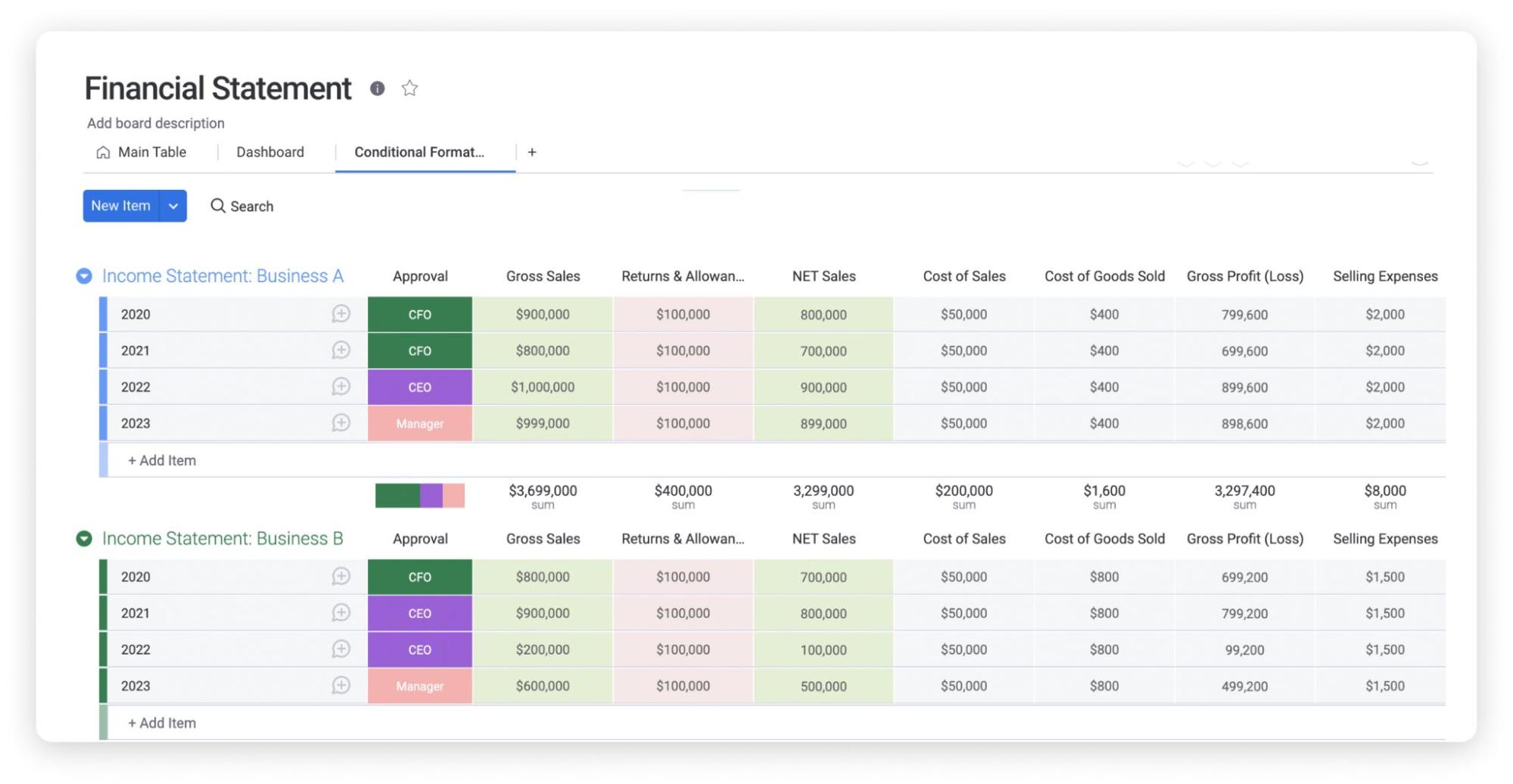
> By using a pre-built template, you’ll get a professional’s take on the various fields your statement should include — whether it’s a particular stream of revenue, cost, or anything in between. That means there’s less of a chance you’ll forget an important factor in your statement.
### Speed up the process
A template also saves you loads of time. Rather than sitting around with your nose in the books trying to figure out what data to include, a template gives you a huge head start by pointing you to all the relevant information.
From there, it’s simply a matter of dragging and dropping the relevant data — because any template worth its salt will also have pre-populated formulas that automatically tally up your totals for you.
Now that you know how using a profit and loss template can be helpful, let’s look at some different kinds of templates.
[Get started](https://auth.monday.com/users/sign_up_new)
## What are some examples of profit and loss templates?
Because profit and loss statements can tell a few different stories about a company’s financial position, there are a few different types of profit and loss templates available for you to use. To help you get started on your search for the perfect P\&L template, let’s quickly walk through a few of the most common options.
### Annual income statement template
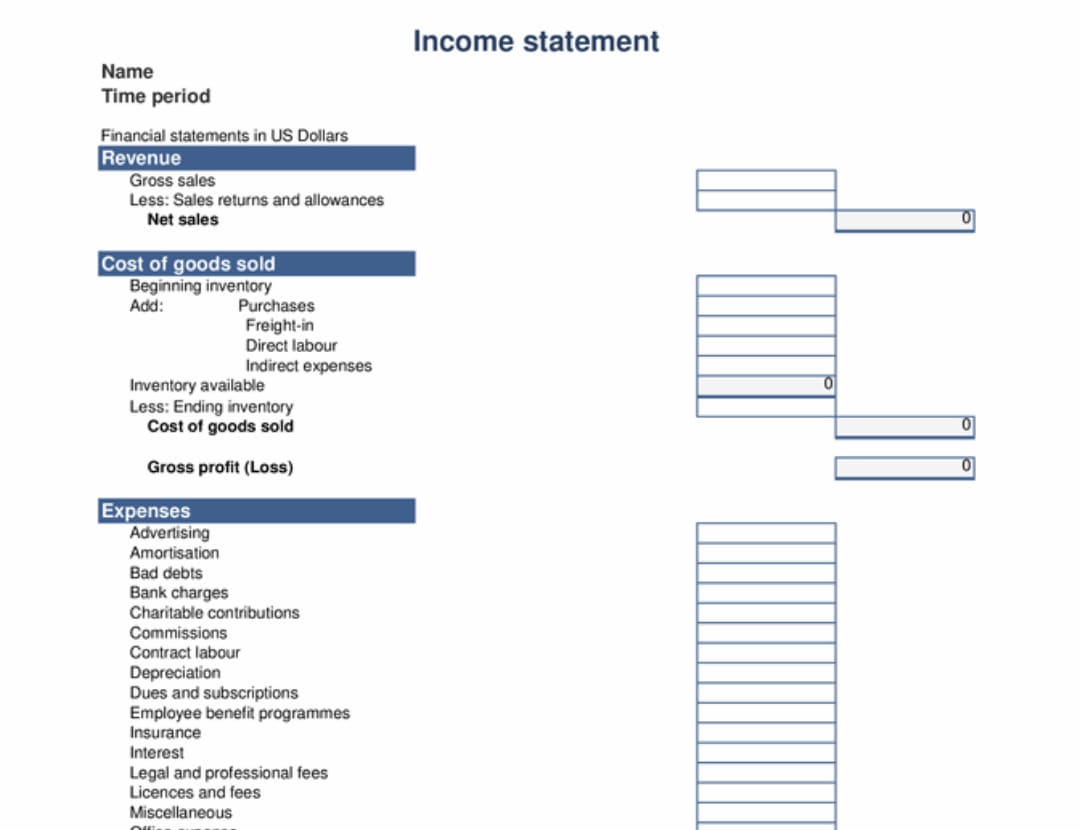
An annual income statement template — or annual profit and loss statement template — is a pre-tailored statement to help you show all the revenue and expenses your business has generated over a period of one year — although you can find both quarterly and annual templates.
([Image Source](https://templates.office.com/en-gb/income-statement-1-year-tm16410109))
An annual income statement should include pre-labeled fields to enter your revenue, cost of goods sold — COGS, expenses, and other income over a 12-month period.
### Monthly income statement template
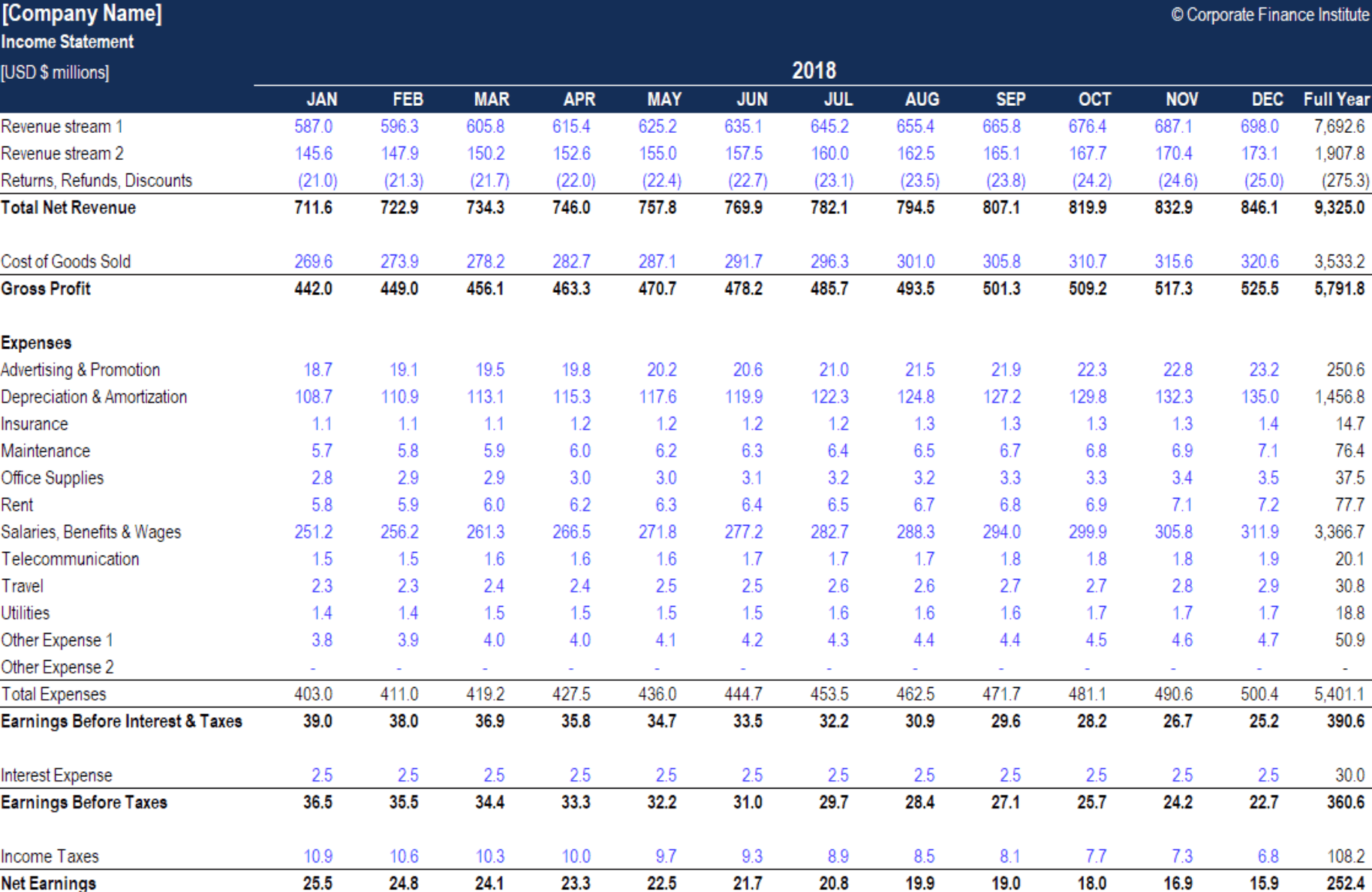
A monthly income statement template — or monthly profit and loss statement template — is a pre-tailored financial statement you can customize to figure out your company’s performance month-over-month.
([Image Source](https://corporatefinanceinstitute.com/resources/templates/excel-modeling/free-income-statement-template/))
Rather than compare annual performance, a monthly statement template includes columns labeled by month, which you can adapt based on the period of time you’re comparing. Like an annual template, a monthly template should include rows related to different expenses, COGS, and revenues.
### Break-even analysis template
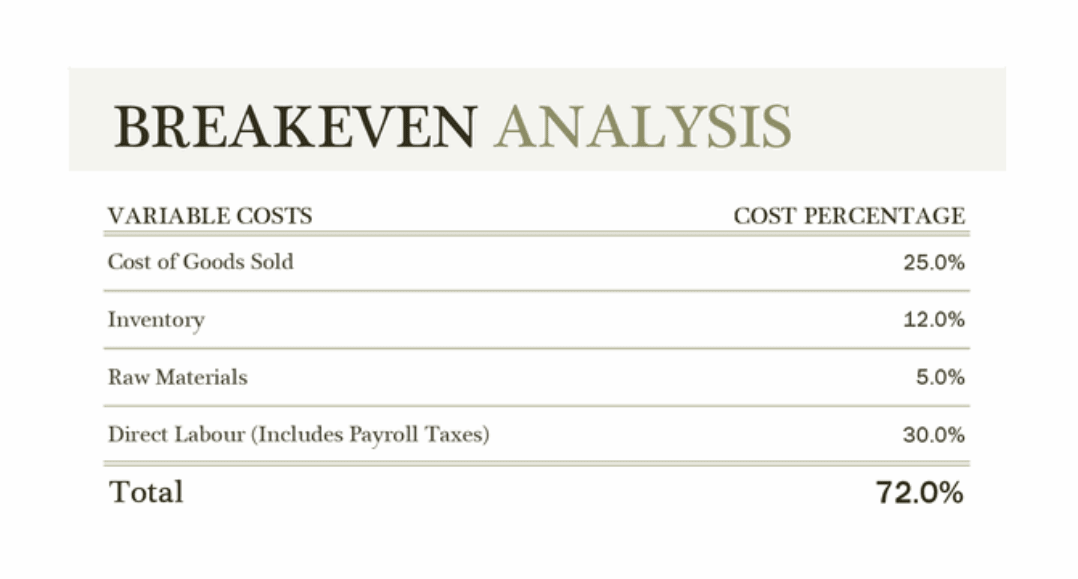
A break-even analysis template is a special type of profit and loss template designed to help you weigh the costs of a new product, service, or business against the potential income you’ll generate. This helps you figure out when you’ll break even.
([Image Source](https://templates.office.com/en-gb/breakeven-analysis-tm03987170))
A basic break-even analysis template should include customizable fields where you can input all the variable costs of your new venture — including fixed costs, price, volume, and other factors that could ultimately affect your net profit.
## monday.com’s profit and loss template
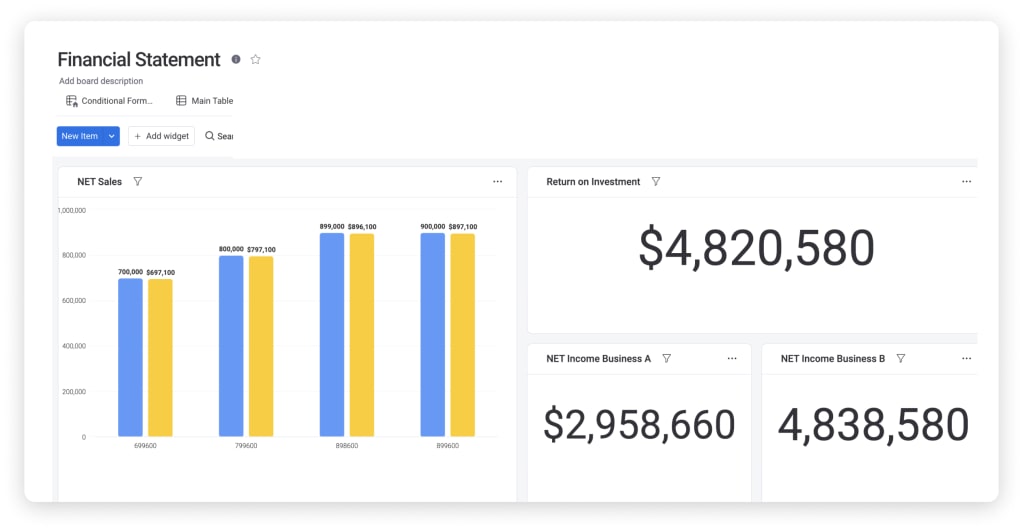
There are a lot of online templates you can use to try and piece together a profit and loss statement for your business. But if you want your income statement to be more engaging and interactive and promote actions from across your team, you need monday.com’s dynamic and fully customizable profit and loss template.
[Unlike downloadable Excel templates, our professional profit and loss template isn’t some static spreadsheet you update. It’s an interactive dashboard that you can use to inform the daily tasks your team undergoes.](https://twitter.com/intent/tweet?text=)
By taking advantage of our visual builder, you can easily complete your P\&L statement by dragging and dropping your financials into place. From there, you can tag other members of your team, take advantage of various views to easily demonstrate to stakeholders how well your business is doing, and even assign action items to members of your team based on your P\&L results.
Best of all, our profit and loss template will let you leverage all the other amazing benefits you’ve come to know and love from monday.com Work OS, including:
- Fully customizable layouts with dozens of column types and widgets
- A real-time reporting dashboard to see the financial health of your company
- [Over 37 integrations](https://monday.com/integrations) — for example, with payment processor Stripe, so you can see your cash flow in real time
- Unlimited automations
[Get the template](http://auth.monday.com/solutions/add_solution?solution_id=10049447)
## Related templates
### Finance requests template
monday.com’s [finance requests template](https://monday.com/templates/template/40627/finance-requests) lets you quickly collect your team’s finance requests so that you can keep all employees informed by tracking statuses, updates, and more.
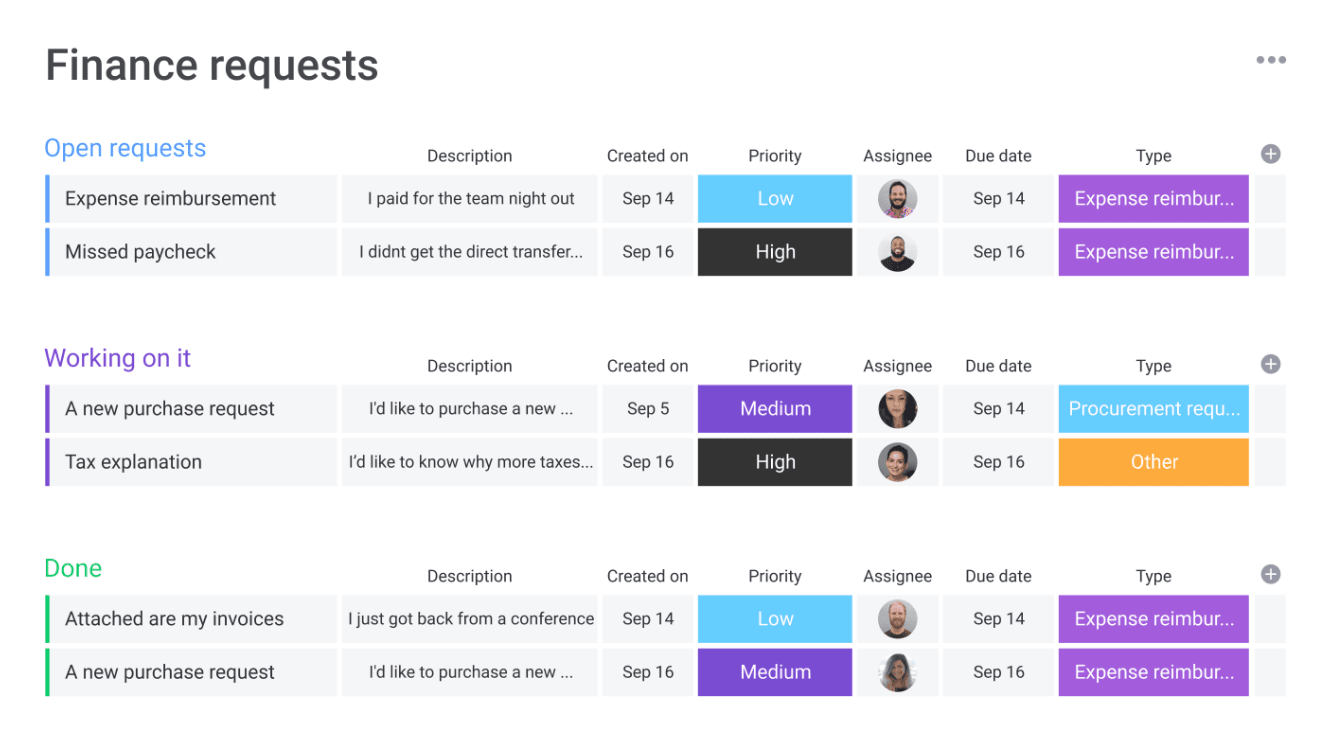
You can also monitor your overall employee expenses with a chart view and transform your data to see it your way with a variety of data visualizations.
[Get started](https://auth.monday.com/users/sign_up_new)
## FAQs about profit and loss templates
### How do you create a profit and loss statement?
To create your own business profit and loss statement, you’ll need to complete these steps and record each value:
1. Calculate all of your revenue
2. Calculate your cost of goods sold — COGS
3. Figure out your profit by subtracting your COGS from your revenue
4. Calculate your operating expenses
5. Find your operating profit by subtracting your operating expenses from your gross profit
6. If required, you can then add any extra income to your operating profit
7. Calculate your interest, taxes, depreciation, and amortization
8. Find your net profit by subtracting your interest, taxes, depreciation, and amortization expenses from your EBITDA
By finding and recording all these values, you’ll be able to present a complete profit and loss statement to stakeholders and give them a decent snapshot of your company’s income relative to its outgoing expenses and interest.
### Is there a profit and loss template in Excel?
Yes, there are several profit and loss templates in Excel. Microsoft Office offers a number of different P\&L statement templates you can use in Excel, with options ranging from annual income statements and monthly statements to a break-even analysis. Many external sites also offer free profit and loss templates for Excel.
But if you want to give all your managers a real-time overview of your finances, you can’t do better than monday.com’s profit and loss template.
### How do you do a P\&L in Excel?
If you do want to go the Excel route, getting started on a profit and loss template is pretty simple. All you have to do is open up Excel and type a couple of keywords relevant to your work in the “Search All Templates” bar.
Once you’ve found the right template for you, select it and start filling in the placeholder data with your company’s actual financials.
It’s important to remember you can import your Excel workbooks into monday.com whenever you want to automatically transform them into engaging three-dimensional dashboards.
### Can I do my own profit and loss statement?
As long as you’re fully aware of what a P\&L statement is and all of the elements that need to be included, you can make your own profit and loss statement in Excel, Google Sheets, or a Work OS like monday.com.
The key here is to make sure you fully understand the crucial fields — and the implications if you forget anything. Because it can be a bit tricky getting started, a lot of business owners opt to start with a template and then customize that template as they go to suit their business plans.
[](https://monday.com/blog/author/zoe/)
Zoe is a New Jersey native gone Telavivian and marketing fanatic. On a typical day, you can find her writing about the latest in tech whilst making her 10th cup of coffee.
Create a solid financial statement
Join the 150K+ teams that use monday.com


[Get started](https://auth.monday.com/users/sign_up_new#soft_signup_from_step)


Send this article to someone who’d like it.
Link Copied\!
[Home](https://monday.com/blog/) \> [Task management](https://monday.com/blog/task-management/) \> Customizable profit and loss template for SMBs
Back to top
## Related posts
[](https://monday.com/blog/task-management/medicine-chart-template/)
[Task management](https://monday.com/blog/task-management/)
### [A helpful medicine chart template for tracking medications](https://monday.com/blog/task-management/medicine-chart-template/)
As a healthcare provider, whether you’re experimenting with a new medication or increasing a patient’s...
monday.com\| 8 min read
[](https://monday.com/blog/task-management/timelog-template/)
[Task management](https://monday.com/blog/task-management/)
### [Free timelog template to simplify your productivity](https://monday.com/blog/task-management/timelog-template/)
Time slips away so easily. Before you know it, your entire workday is gone, and you barely remember where the...
monday.com\| 8 min read
[](https://monday.com/blog/task-management/policy-template/)
[Task management](https://monday.com/blog/task-management/)
### [Free policy template + examples to draw inspiration from](https://monday.com/blog/task-management/policy-template/)
Clear, comprehensive, and organized company policies are integral to all organizations’ smooth and safe...
monday.com\| 8 min read
[ ](https://monday.com/)
[Pricing](https://monday.com/pricing)
[Contact us](https://monday.com/help)
[Templates](https://monday.com/templates)
[SMB](https://monday.com/smb)
[Enterprise](https://monday.com/w/enterprise)
[Nonprofits](https://monday.com/nonprofits)
[App marketplace](https://monday.com/marketplace)
[24/7 support](https://monday.com/helpcenter/contact-support)
Features
[Docs](https://monday.com/workdocs)
[Integrations](https://monday.com/integrations)
[Automations](https://monday.com/features/automations)
[AI](https://monday.com/w/ai)
[Dashboards](https://monday.com/features/dashboards)
[Kanban](https://monday.com/features/kanban)
[Gantt](https://monday.com/features/gantt)
monday products
[ monday work management](https://monday.com/w/work-management)
[ monday CRM](https://monday.com/crm)
[ monday campaigns](https://monday.com/w/crm/campaigns)
[ monday dev](https://monday.com/w/dev)
[ monday service](https://monday.com/w/service)
More by monday.com
[ WorkCanvas](https://workcanvas.com/)
[ WorkForms](https://monday.com/lp/forms)
Use cases
[Marketing](https://monday.com/work-management/marketing)
[Project management](https://monday.com/work-management/pmo)
[Sales](https://monday.com/crm)
[Developers](https://monday.com/w/dev)
[HR](https://monday.com/use-cases/hr-management-software)
[IT](https://monday.com/w/service)
[Operations](https://monday.com/operations)
[Construction](https://monday.com/construction)
Company
[About us](https://monday.com/p/about/)
[Careers - We're hiring\!](https://monday.com/careers)
[Insights for leaders](https://monday.com/w/insights)
[Press](https://monday.com/p/news/)
[Customer stories](https://monday.com/w/customer-stories)
[Become a partner](https://monday.com/w/partnership)
[Sustainability & ESG](https://monday.com/p/esg/)
[Affiliates](https://monday.com/affiliate-program)
[Emergency Response](https://mondayert.org/)
[Investor relations](https://ir.monday.com/)
Resources
[Help Center](https://monday.com/helpcenter/)
[Community](https://community.monday.com/)
[Blog](https://monday.com/blog)
[What's new](https://monday.com/whats-new)
[monday academy](https://monday.com/helpcenter/academy)
[Global events](https://monday.com/p/events-hub/)
[monday spaces](https://mondayspaces.com/)
[Startup for startup](https://www.startupforstartup.com/ww/)
[App development](https://monday.com/appdeveloper)
[Find a partner](https://monday.com/p/find-a-partner/)
[Hire an expert](https://monday.com/expertcatalog?utm_medium=website&utm_source=footer&utm_campaign=multi-en-certificate-other-multi-website_footer)
[Compare](https://monday.com/alternative)
English
[English](https://monday.com/blog)
[Español](https://monday.com/blog/es/)
[Português](https://monday.com/blog/pt/)
[Français](https://monday.com/blog/fr/)
[Deutsch](https://monday.com/blog/de/)
[日本語](https://monday.com/blog/ja/)
[한국어](https://monday.com/blog/ko/)
[繁體中文](https://monday.com/blog/zh_TW/)
[ ](https://monday.com/terms/gdpr)
[ ](https://monday.com/trustcenter/iso)
[ ](https://monday.com/terms/soc2)
[ ](https://support.monday.com/hc/en-us/articles/360006506699)
[Legal](https://monday.com/l/)
[Terms of Service](https://monday.com/l/legal/tos/)
[Privacy policy](https://monday.com/l/privacy/privacy-policy/)
Your privacy choices
All Rights Reserved © monday.com
[Accessibility statement](https://monday.com/accessibility-statement)
[ ](https://monday.com/)
English
[English](https://monday.com/blog)
[Español](https://monday.com/blog/es/)
[Português](https://monday.com/blog/pt/)
[Français](https://monday.com/blog/fr/)
[Deutsch](https://monday.com/blog/de/)
[日本語](https://monday.com/blog/ja/)
[한국어](https://monday.com/blog/ko/)
[繁體中文](https://monday.com/blog/zh_TW/)
[Products]()
[ Work Management](https://monday.com/w/work-management)
[ CRM](https://monday.com/crm)
[ Campaigns](https://monday.com/w/crm/campaigns)
[ Dev](https://monday.com/w/dev)
[ Service](https://monday.com/w/service)
[Features]()
[AI ](https://monday.com/w/ai)
[Dashboard](https://monday.com/features/dashboards)
[Integrations](https://monday.com/integrations)
[Automations](https://monday.com/features/automations)
[Gantt](https://monday.com/features/gantt)
[Kanban](https://monday.com/features/kanban)
[Docs](https://monday.com/workdocs)
[Forms](https://monday.com/features/forms)
[Company]()
[About us](https://monday.com/p/about/)
[Careers](https://monday.com/careers)
[Investor relations](https://ir.monday.com/)
[Become a partner](https://monday.com/w/partnership)
[Insights for leaders](https://monday.com/w/insights)
[Resources]()
[Blog](https://monday.com/blog)
[What's new](https://monday.com/whats-new)
[monday spaces](https://mondayspaces.com/)
[Teams]()
[Project management](https://monday.com/work-management/pmo)
[Marketing](https://monday.com/work-management/marketing)
[Sales](https://monday.com/crm)
[Product development](https://monday.com/w/dev)
[Operations](https://monday.com/operations)
[IT](https://monday.com/w/service)
[HR](https://monday.com/use-cases/hr-management-software)
[Company size]()
[Enterprise](https://monday.com/w/enterprise)
[Small business](https://monday.com/smb)
[Nonprofit](https://monday.com/nonprofits)
[Pricing](https://monday.com/crm/pricing)
[Contact sales](https://monday.com/sales/contact-us?from=footer)
[Contact us](https://monday.com/help)
All Rights Reserved © monday.com
[Accessibility statement](https://monday.com/accessibility-statement)
[Legal](https://monday.com/l/)
[Privacy policy](https://monday.com/l/privacy/privacy-policy/)
[Your privacy choices]()
[Get started](https://auth.monday.com/users/sign_up_new) | ||||||||||||||||||
| Readable Markdown | Not quite sure what a profit and loss template is or what it does? You’re not alone. A profit and loss statement is known by many different names. You’ll often hear people talk about income statements, a statement of operations, a statement of earnings, a statement of profit and loss — well, they all mean the same thing.
No matter what you want to call them, they’re crucial [financial statements](https://monday.com/blog/task-management/financial-statement-template/) that break down your company’s financial performance. But creating a profit and loss statement is a challenge — especially if you’re running a small team without a full-time accountant.
That’s why we’ve created an easy-to-use profit and loss template that can help you create a solid financial statement in minutes. Read on to learn more about why it’s important, see examples of how to use it, and more.
[Get the template](http://auth.monday.com/solutions/add_solution?solution_id=10049447)
## What is a profit and loss template?
A profit and loss statement template — or “P\&L” template — is a pre-built financial report designed to help you figure out your company’s net income versus your net expenses incurred. This is normally done to help you calculate profit. You’ll often see a profit and loss statement called a statement of operations, income statement, or statement of earnings.
[Download Excel template](https://monday.com/blog/wp-content/uploads/2022/07/Profit-and-Loss-Template-1.xlsx)
Profit and loss templates are typically quite simple in terms of design, but there are a few different types. Because P\&L statements are designed to look at your [business expenses](https://monday.com/blog/project-management/excel-spreadsheet-for-business-expenses/) over a given period of time, profit and loss templates are usually formatted to compare your profit and loss by month, quarter, or year.
Templates generally include a number of pre-labeled rows that each represents a source of income or an expense. You can then customize those rows and drop in your own data to quickly create a suitable P\&L statement for your business.
Completing a profit and loss statement can be a mammoth undertaking. If you’re wearing a dozen different hats for your small business or don’t have a full-time accountant to devote to this task, it can be tricky getting started — and time-consuming once you get going. Aside from saving time, there are a couple other reasons it’s beneficial as well.
## Why use a profit and loss template?
Let’s look at a few reasons how a profit and loss template can help you.
### Don’t miss out on crucial fields
> By using a pre-built template, you’ll get a professional’s take on the various fields your statement should include — whether it’s a particular stream of revenue, cost, or anything in between. That means there’s less of a chance you’ll forget an important factor in your statement.

### Speed up the process
A template also saves you loads of time. Rather than sitting around with your nose in the books trying to figure out what data to include, a template gives you a huge head start by pointing you to all the relevant information.
From there, it’s simply a matter of dragging and dropping the relevant data — because any template worth its salt will also have pre-populated formulas that automatically tally up your totals for you.
Now that you know how using a profit and loss template can be helpful, let’s look at some different kinds of templates.
[Get started](https://auth.monday.com/users/sign_up_new)
## What are some examples of profit and loss templates?
Because profit and loss statements can tell a few different stories about a company’s financial position, there are a few different types of profit and loss templates available for you to use. To help you get started on your search for the perfect P\&L template, let’s quickly walk through a few of the most common options.
### Annual income statement template
An annual income statement template — or annual profit and loss statement template — is a pre-tailored statement to help you show all the revenue and expenses your business has generated over a period of one year — although you can find both quarterly and annual templates.

([Image Source](https://templates.office.com/en-gb/income-statement-1-year-tm16410109))
An annual income statement should include pre-labeled fields to enter your revenue, cost of goods sold — COGS, expenses, and other income over a 12-month period.
### Monthly income statement template
A monthly income statement template — or monthly profit and loss statement template — is a pre-tailored financial statement you can customize to figure out your company’s performance month-over-month.

([Image Source](https://corporatefinanceinstitute.com/resources/templates/excel-modeling/free-income-statement-template/))
Rather than compare annual performance, a monthly statement template includes columns labeled by month, which you can adapt based on the period of time you’re comparing. Like an annual template, a monthly template should include rows related to different expenses, COGS, and revenues.
### Break-even analysis template
A break-even analysis template is a special type of profit and loss template designed to help you weigh the costs of a new product, service, or business against the potential income you’ll generate. This helps you figure out when you’ll break even.

([Image Source](https://templates.office.com/en-gb/breakeven-analysis-tm03987170))
A basic break-even analysis template should include customizable fields where you can input all the variable costs of your new venture — including fixed costs, price, volume, and other factors that could ultimately affect your net profit.
## monday.com’s profit and loss template
There are a lot of online templates you can use to try and piece together a profit and loss statement for your business. But if you want your income statement to be more engaging and interactive and promote actions from across your team, you need monday.com’s dynamic and fully customizable profit and loss template.
[Unlike downloadable Excel templates, our professional profit and loss template isn’t some static spreadsheet you update. It’s an interactive dashboard that you can use to inform the daily tasks your team undergoes.](https://twitter.com/intent/tweet?text=)
By taking advantage of our visual builder, you can easily complete your P\&L statement by dragging and dropping your financials into place. From there, you can tag other members of your team, take advantage of various views to easily demonstrate to stakeholders how well your business is doing, and even assign action items to members of your team based on your P\&L results.
Best of all, our profit and loss template will let you leverage all the other amazing benefits you’ve come to know and love from monday.com Work OS, including:
- Fully customizable layouts with dozens of column types and widgets
- A real-time reporting dashboard to see the financial health of your company
- [Over 37 integrations](https://monday.com/integrations) — for example, with payment processor Stripe, so you can see your cash flow in real time
- Unlimited automations

[Get the template](http://auth.monday.com/solutions/add_solution?solution_id=10049447)
## Related templates
### Finance requests template
monday.com’s [finance requests template](https://monday.com/templates/template/40627/finance-requests) lets you quickly collect your team’s finance requests so that you can keep all employees informed by tracking statuses, updates, and more.

You can also monitor your overall employee expenses with a chart view and transform your data to see it your way with a variety of data visualizations.
[Get started](https://auth.monday.com/users/sign_up_new)
## FAQs about profit and loss templates
### How do you create a profit and loss statement?
To create your own business profit and loss statement, you’ll need to complete these steps and record each value:
1. Calculate all of your revenue
2. Calculate your cost of goods sold — COGS
3. Figure out your profit by subtracting your COGS from your revenue
4. Calculate your operating expenses
5. Find your operating profit by subtracting your operating expenses from your gross profit
6. If required, you can then add any extra income to your operating profit
7. Calculate your interest, taxes, depreciation, and amortization
8. Find your net profit by subtracting your interest, taxes, depreciation, and amortization expenses from your EBITDA
By finding and recording all these values, you’ll be able to present a complete profit and loss statement to stakeholders and give them a decent snapshot of your company’s income relative to its outgoing expenses and interest.
### Is there a profit and loss template in Excel?
Yes, there are several profit and loss templates in Excel. Microsoft Office offers a number of different P\&L statement templates you can use in Excel, with options ranging from annual income statements and monthly statements to a break-even analysis. Many external sites also offer free profit and loss templates for Excel.
But if you want to give all your managers a real-time overview of your finances, you can’t do better than monday.com’s profit and loss template.
### How do you do a P\&L in Excel?
If you do want to go the Excel route, getting started on a profit and loss template is pretty simple. All you have to do is open up Excel and type a couple of keywords relevant to your work in the “Search All Templates” bar.
Once you’ve found the right template for you, select it and start filling in the placeholder data with your company’s actual financials.
It’s important to remember you can import your Excel workbooks into monday.com whenever you want to automatically transform them into engaging three-dimensional dashboards.
### Can I do my own profit and loss statement?
As long as you’re fully aware of what a P\&L statement is and all of the elements that need to be included, you can make your own profit and loss statement in Excel, Google Sheets, or a Work OS like monday.com.
The key here is to make sure you fully understand the crucial fields — and the implications if you forget anything. Because it can be a bit tricky getting started, a lot of business owners opt to start with a template and then customize that template as they go to suit their business plans. | ||||||||||||||||||
| ML Classification | |||||||||||||||||||
| ML Categories |
Raw JSON{
"/Finance": 975,
"/Finance/Financial_Planning_and_Management": 535,
"/Finance/Financial_Planning_and_Management/Asset_and_Portfolio_Management": 474,
"/Business_and_Industrial": 394,
"/Business_and_Industrial/Business_Finance": 298,
"/Business_and_Industrial/Business_Finance/Other": 197
} | ||||||||||||||||||
| ML Page Types |
Raw JSON{
"/Article": 953,
"/Article/Tutorial_or_Guide": 603
} | ||||||||||||||||||
| ML Intent Types |
Raw JSON{
"Commercial": 602,
"Informational": 522,
"Transactional": 134
} | ||||||||||||||||||
| Content Metadata | |||||||||||||||||||
| Language | en-us | ||||||||||||||||||
| Author | Zoe Averbuch | ||||||||||||||||||
| Publish Time | 2022-03-15 15:47:58 (4 years ago) | ||||||||||||||||||
| Original Publish Time | 2022-03-15 15:47:58 (4 years ago) | ||||||||||||||||||
| Republished | No | ||||||||||||||||||
| Word Count (Total) | 2,043 | ||||||||||||||||||
| Word Count (Content) | 1,577 | ||||||||||||||||||
| Links | |||||||||||||||||||
| External Links | 24 | ||||||||||||||||||
| Internal Links | 102 | ||||||||||||||||||
| Technical SEO | |||||||||||||||||||
| Meta Nofollow | No | ||||||||||||||||||
| Meta Noarchive | No | ||||||||||||||||||
| JS Rendered | No | ||||||||||||||||||
| Redirect Target | null | ||||||||||||||||||
| Performance | |||||||||||||||||||
| Download Time (ms) | 867 | ||||||||||||||||||
| TTFB (ms) | 740 | ||||||||||||||||||
| Download Size (bytes) | 63,977 | ||||||||||||||||||
| Shard | 175 (laksa) | ||||||||||||||||||
| Root Hash | 3256787733073865375 | ||||||||||||||||||
| Unparsed URL | com,monday!/blog/task-management/profit-and-loss-template/ s443 | ||||||||||||||||||