ℹ️ Skipped - page is already crawled
| Filter | Status | Condition | Details |
|---|---|---|---|
| HTTP status | PASS | download_http_code = 200 | HTTP 200 |
| Age cutoff | PASS | download_stamp > now() - 6 MONTH | 2.6 months ago (distributed domain, exempt) |
| History drop | PASS | isNull(history_drop_reason) | No drop reason |
| Spam/ban | PASS | fh_dont_index != 1 AND ml_spam_score = 0 | ml_spam_score=0 |
| Canonical | PASS | meta_canonical IS NULL OR = '' OR = src_unparsed | Not set |
| Property | Value |
|---|---|
| URL | https://learn.microsoft.com/en-us/power-platform/guidance/coe/overview |
| Last Crawled | 2026-01-19 23:47:15 (2 months ago) |
| First Indexed | 2022-09-24 10:03:41 (3 years ago) |
| HTTP Status Code | 200 |
| Meta Title | Power Platform Center of Excellence (CoE) Starter Kit overview - Power Platform | Microsoft Learn |
| Meta Description | Establish a Power Platform Center of Excellence using the CoE Starter Kit components and strategic framework to drive organizational adoption, governance, and community growth. |
| Meta Canonical | null |
| Boilerpipe Text | The Power Platform CoE Starter Kit is a comprehensive reference implementation that demonstrates how to build sophisticated governance, monitoring, and adoption capabilities using Power Platform's native low-code tools. This collection of components and solutions helps you develop a strategy for adopting and supporting Power Platform while showcasing what's possible with the platform's out-of-the-box features.
A Center of Excellence (CoE) is a team or entity within an organization that provides leadership, best practices, research, support, and training for a specific focus area—in this case, Power Platform.
The Power Platform CoE Starter Kit doesn't represent the entire Center of Excellence or CoE. Managing a CoE requires more than tools. A CoE needs people, communication, and defined requirements and processes. Tools are a means to an end, and each organization must thoughtfully design its CoE based on its unique needs and goals. Learn more about creating a Center of Excellence for Power Platform adoption in
Establish a Microsoft Power Platform Center of Excellence
.
A Power Platform Center of Excellence (CoE) is a strategic organizational capability that provides leadership, governance, and enablement for low-code transformation.
The CoE Starter Kit demonstrates this capability through a reference low-code solution built entirely using out-of-the-box Power Platform features, including Power Apps, Power Automate, Power BI, and Dataverse. This approach showcases how organizations can implement sophisticated governance and monitoring capabilities using the platform's native low-code tools.
Unlike traditional IT approaches, a Power Platform CoE:
Balances innovation and control
: Enables rapid business solution development while maintaining governance.
Drives cultural change
: Transforms how organizations approach automation and app development.
Scales citizen development
: Empowers business users while providing expert guidance and support.
Delivers measurable outcomes
: Connects low-code initiatives to business metrics and return on investment (ROI).
The CoE Starter Kit bridges the gap between strategic vision and practical implementation by providing a comprehensive reference example of what's possible with Power Platform's low-code capabilities. While establishing a CoE requires organizational commitment, change management, and cultural transformation, the Starter Kit provides the technical foundation and operational processes to support your strategic goals.
Strategic + technical approach
: Successful CoE implementation combines organizational strategy (people, processes, governance) with technical enablement (monitoring, automation, analytics). The Starter Kit addresses the technical implementation while supporting your broader strategic transformation—all through low-code solutions that demonstrate the platform's enterprise capabilities.
The CoE Starter Kit is a set of templates designed to help you develop a strategy for adopting, maintaining, and supporting Power Platform. The kit includes:
Multiple Power Apps and Power BI analytics reports to view and interact with the data collected.
Assets such as templates and suggested patterns and practices for implementing CoE efforts.
Automation and tooling to build the monitoring and automation necessary to support a CoE.
The foundation of the kit is a Microsoft Dataverse data model and workflows to collect resource information across the tenant environments.
Download the most recently updated assets from the
coe-starter-kit
GitHub repository.
Note
Although the kit's underlying features and components (such as Dataverse, admin APIs, and connectors) are fully supported, the kit itself represents sample implementations. You'll need to create your own vision for Power Platform adoption and customize the kit's features to reflect the administrative and governance goals of your organization.
Tip
If you face issues with:
Using the kit
: Report your issue at
aka.ms/coe-starter-kit-issues
. Microsoft Support might not be able to help you with issues related to the kit, but can assist with related platform and feature issues.
Core features of Microsoft Power Platform
: Use your standard channel to contact Support.
First,
set up the CoE Starter Kit solution
. Then start to become familiar with the resources in your tenant.
Note
The following steps are examples of what you can do with the CoE Starter Kit. Explore the rest of this guidance to discover what's available and to use the kit effectively.
Launch the Power BI dashboard and familiarize yourself with resources and makers that are already in your environments.
Identify orphaned apps and assign them to new owners by using the embedded app in the Power BI dashboard.
Start planning your
governance strategy
.
Start by asking:
What are the requirements of a compliant app or maker?
What information do you need per app or maker?
What happens to noncompliant apps and makers?
How do you plan to support your maker community in building compliant apps that follow best practices?
What actions do you plan to take based on your collected information?
Embrace your maker community and develop a nurture and adoption strategy. Think about how to onboard new makers. Organize internal events such as training workshops and hackathons. Put together templates and best practices for your makers to use. Learn more in
Nurture your Power Platform community
.
The
Automation Kit
is set of tools that accelerates the use and support of Power Automate for desktop for automation projects. The kit provides tools that help you manage automation projects and monitor them to estimate savings and ROI.
The kit is especially useful to an Automation Center of Excellence (CoE) team, which is a team of experts who support automation within your organization. This team typically has solid knowledge of Power Automate for desktop, sets up and maintains the Automation Kit, and maintains configuration data such as departments, process categories, goals, and more.
The Automation Kit can be used standalone or alongside the CoE Starter Kit. Learn more about the Automation Kit in
Overview of the Automation Kit
.
A Power Platform CoE manages Power Platform administration, nurturing, and operations support. Admin and governance tools fall into three broad categories:
Admin center
Platform extensions
Templates and customizations
Power Platform admin center
features help you complete tasks:
- Environment and environment security management
- Data policy management
- Data integration and gateway management
- Admin analytics: View capacity and activity on Microsoft Dataverse, Power Apps, and Power Automate
- Support ticket requests
Connectors provide access to the same APIs that the products and admin centers use.
These libraries are exposed through the connectors library to help users create custom solutions to execute administrative or governance-related tasks.
Learn more in:
-
Power Platform for Admins
-
Power Apps for Admins
-
Power Automate Management
-
Power Apps for Makers
The CoE Starter Kit falls into this category. The CoE templates use the admin connectors in combination with other connectors and formulas to achieve specific goals.
Note:
The nature of a template is to provide a good solution for a specific task, but it might not have the exact functionality that you need. You might have to adjust it to achieve what you're looking for.
Managed Environments and tenant-level analytics assist with administrative tasks, such as managing Power Platform at scale and providing insights into usage and inventory.
Managed Environments
is a suite of capabilities that allows admins to manage Power Platform at scale with more control, less effort, and more insights. The capabilities are available out of the box from within the Power Platform admin center. Managed Environment capabilities can be used standalone, or alongside capabilities of the CoE Starter Kit to administer and govern your Power Platform adoption.
The CoE Starter Kit encourages experimentation and innovation with an open-source, low-code model influenced by customer feedback. Managed Environments will replace certain features in the CoE Starter Kit eventually. As the evolution of Managed Environments continues, new experiments and innovations will be added to the CoE Starter Kit to gauge interest.
Start with the out-of-the-box capabilities in Power Platform admin center and Managed Environments. These capabilities are robust and fully supported. If you need more capabilities to govern your tenant, check if features in the CoE Starter Kit complement what you get out of the box.
Consider the individual features of Managed Environments to see how they compare to what's in the CoE Starter Kit.
Maker welcome content
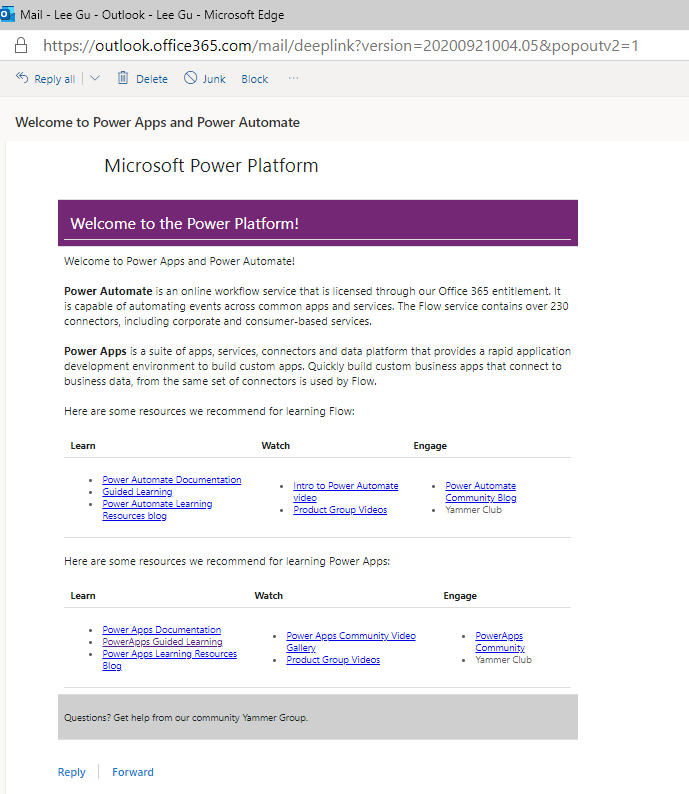
In Managed Environments, admins can provide customized welcome content to help their makers get started with Power Apps. When welcome content is enabled, makers signing in to Power Apps are greeted with customized getting-started information.
A similar concept in the CoE Starter Kit is the
welcome email
, which is sent to new makers only after they create an app, flow, or agent for the first time. Makers may get necessary information only after they create their first resource, whereas the Managed Environments feature shows them information when they sign in to Power Apps.
Weekly digest
The CoE Starter Kit doesn't have a weekly digest for admins. Instead, admins self-serve information through the
Power BI dashboard
. Inactive apps and flows are highlighted in the Weekly digest email. In the CoE Starter Kit, a similar goal is achieved with the
inactivity notification process
, which notifies makers of their inactive resources and asks for approval to delete them.
One main goal of Managed Environments and the CoE Starter Kit is to provide insights that help admins take action. The CoE kit offers more capabilities that reduce the admin's burden of managing inactive resources. For example, it directs resource management to the maker, making the owner responsible for their own resources.
Limit sharing
The CoE Starter Kit doesn't limit sharing on resources. Proactive governance is only possible through Managed Environments.
The
Compliance process
in the CoE Starter Kit offers a reactive way to identify highly shared resources. This process identifies highly shared resources and asks makers to provide additional information, enabling admins to make better support solutions. For example, admins might choose to move resources to a dedicated environment. With the Power BI dashboard, admins can also identify highly shared resources.
Data policies
Managed Environments allows you to see what data policies apply to the environment. The
DLP Editor
, part of the CoE Starter Kit, also shows you data policies that are applied to an environment, and the impact of data policies on existing apps and flows in that environment.
Note
The CoE Starter Kit offers capabilities that aren't yet met with Managed Environments, such as bulk updating permissions, cleaning up abandoned resources, surveying makers, and calculating the ROI of ideas.
Tenant-level analytics
in the Power Platform admin center provide a holistic overview of usage and inventory for apps, flows, makers, and environments. These analytics help you identify metrics like the most used apps and top makers.
The
Power BI dashboard
in the CoE Starter Kit combines your tenant-level inventory and usage data with organizational data to provide more granular insights into which departments, cities, and countries or regions use Power Platform.
You can use a broader range of customizable filters to view your inventory by connector, classification (premium or standard), or the number of users with the shared app.
Tenant-level insights in the Power Platform admin center provide a great starting point to understand your tenant's adoption of Power Platform. As your need for insights grows, explore the rich and customizable reports available in the CoE Starter Kit.
Explore the
Power Platform admin documentation
.
Find training resources like guided learning and step-by-step guides at
aka.ms/PowerPlatformLabs
.
Read up on customer success stories and find resources relevant to your experience, technical background, and skill level at
aka.ms/PowerPlatformResources
.
Explore
Microsoft Power Platform training
.
Learn more about
Power Platform adoption
. |
| Markdown | [Skip to main content](https://learn.microsoft.com/en-us/power-platform/guidance/coe/overview#main) [Skip to Ask Learn chat experience](https://learn.microsoft.com/en-us/power-platform/guidance/coe/overview)
This browser is no longer supported.
Upgrade to Microsoft Edge to take advantage of the latest features, security updates, and technical support.
[Download Microsoft Edge](https://go.microsoft.com/fwlink/p/?LinkID=2092881%20) [More info about Internet Explorer and Microsoft Edge](https://learn.microsoft.com/en-us/lifecycle/faq/internet-explorer-microsoft-edge)
[Learn](https://learn.microsoft.com/en-us/)
[Sign in](https://learn.microsoft.com/en-us/power-platform/guidance/coe/overview)
![]()
![]()
- [Profile](https://learn.microsoft.com/en-us/users/me/activity/)
- [Settings](https://learn.microsoft.com/en-us/users/me/settings/)
[Sign out](https://learn.microsoft.com/en-us/power-platform/guidance/coe/overview)
[Learn](https://learn.microsoft.com/en-us/)
- Documentation
- [All product documentation](https://learn.microsoft.com/en-us/docs/)
- [Azure documentation](https://learn.microsoft.com/en-us/azure/?product=popular)
- [Dynamics 365 documentation](https://learn.microsoft.com/en-us/dynamics365/)
- [Microsoft Copilot documentation](https://learn.microsoft.com/en-us/copilot/)
- [Microsoft 365 documentation](https://learn.microsoft.com/en-us/microsoft-365/)
- [Power Platform documentation](https://learn.microsoft.com/en-us/power-platform/)
- [Code samples](https://learn.microsoft.com/en-us/samples/)
- [Troubleshooting documentation](https://learn.microsoft.com/en-us/troubleshoot/)
Free to join. Request to attend.
[Microsoft AI Tour](https://aitour.microsoft.com/?wt.mc_id=itour26_learnmarketingspot_wwl)
Take your business to the AI frontier.
- Training
- [All training](https://learn.microsoft.com/en-us/training/)
- [Azure training](https://learn.microsoft.com/en-us/training/browse/?products=azure)
- [Dynamics 365 training](https://learn.microsoft.com/en-us/training/browse/?products=dynamics-365)
- [Microsoft Copilot training](https://learn.microsoft.com/en-us/training/browse/?products=ms-copilot)
- [Microsoft 365 training](https://learn.microsoft.com/en-us/training/browse/?products=m365)
- [Microsoft Power Platform training](https://learn.microsoft.com/en-us/training/browse/?products=power-platform)
- [Credentials](https://learn.microsoft.com/en-us/credentials/)
- [Career paths](https://learn.microsoft.com/en-us/training/career-paths/)
Free to join. Request to attend.
[Microsoft AI Tour](https://aitour.microsoft.com/?wt.mc_id=itour26_learnmarketingspot_wwl)
Take your business to the AI frontier.
- Q\&A
- [Ask a question](https://learn.microsoft.com/en-us/answers/questions/ask/)
- [Azure questions](https://learn.microsoft.com/en-us/answers/tags/133/azure/)
- [Windows questions](https://learn.microsoft.com/en-us/answers/tags/60/windows/)
- [Microsoft 365 questions](https://learn.microsoft.com/en-us/answers/tags/9/m365/)
- [Microsoft Outlook questions](https://learn.microsoft.com/en-us/answers/tags/131/office-outlook/)
- [Microsoft Teams questions](https://learn.microsoft.com/en-us/answers/tags/108/office-teams/)
- [Popular tags](https://learn.microsoft.com/en-us/answers/tags/)
- [All questions](https://learn.microsoft.com/en-us/answers/questions/)
Free to join. Request to attend.
[Microsoft AI Tour](https://aitour.microsoft.com/?wt.mc_id=itour26_learnmarketingspot_wwl)
Take your business to the AI frontier.
- Topics
- [Artificial intelligence](https://learn.microsoft.com/en-us/ai/)
Learning hub to build AI skills
- [Compliance](https://learn.microsoft.com/en-us/compliance/)
Compliance resources you need to get started with your business
- [DevOps](https://learn.microsoft.com/en-us/devops/)
DevOps practices, Git version control and Agile methods
- [Learn for Organizations](https://learn.microsoft.com/en-us/training/organizations/)
Curated offerings from Microsoft to boost your team’s technical skills
- [Platform engineering](https://learn.microsoft.com/en-us/platform-engineering/)
Tools from Microsoft and others to build personalized developer experiences
- [Security](https://learn.microsoft.com/en-us/security/)
Guidance to help you tackle security challenges
- [Assessments](https://learn.microsoft.com/en-us/assessments/)
Interactive guidance with custom recommendations
- [Student hub](https://learn.microsoft.com/en-us/training/student-hub/)
Self-paced and interactive training for students
- [Educator center](https://learn.microsoft.com/en-us/training/educator-center/)
Resources for educators to bring technical innovation in their classroom
Free to join. Request to attend.
[Microsoft AI Tour](https://aitour.microsoft.com/?wt.mc_id=itour26_learnmarketingspot_wwl)
Take your business to the AI frontier.
[Sign in](https://learn.microsoft.com/en-us/power-platform/guidance/coe/overview)
![]()
![]()
- [Profile](https://learn.microsoft.com/en-us/users/me/activity/)
- [Settings](https://learn.microsoft.com/en-us/users/me/settings/)
[Sign out](https://learn.microsoft.com/en-us/power-platform/guidance/coe/overview)
[Power Platform](https://learn.microsoft.com/en-us/power-platform/)
- Get started
- [Admin guide](https://learn.microsoft.com/en-us/power-platform/admin/)
- [ALM guide](https://learn.microsoft.com/en-us/power-platform/alm/)
- [Developer guide](https://learn.microsoft.com/en-us/power-platform/developer/)
- [Training](https://learn.microsoft.com/en-us/training/powerplatform/)
- Products
- [Power Apps](https://learn.microsoft.com/en-us/power-apps/)
- [Power Automate](https://learn.microsoft.com/en-us/power-automate/)
- [Power BI](https://learn.microsoft.com/en-us/power-bi/)
- [Power Pages](https://learn.microsoft.com/en-us/power-pages/)
- [Copilot Studio](https://learn.microsoft.com/en-us/microsoft-copilot-studio/)
- Guidance
- [Adoption](https://learn.microsoft.com/en-us/power-platform/guidance/)
- [Architecture](https://learn.microsoft.com/en-us/power-platform/architecture/)
- [Case studies](https://learn.microsoft.com/en-us/power-platform/guidance/case-studies/)
- [Toolkits](https://learn.microsoft.com/en-us/power-platform/guidance/toolkits/)
- [Well-Architected](https://learn.microsoft.com/en-us/power-platform/well-architected/)
- Troubleshooting
- [Get help and support](https://learn.microsoft.com/en-us/power-platform/admin/get-help-support)
- [Troubleshooting articles](https://learn.microsoft.com/en-us/troubleshoot/power-platform/)
- [Release plans](https://learn.microsoft.com/en-us/dynamics365/release-plans/)
- Resources
- [Community](https://powerusers.microsoft.com/)
- [Blog](https://cloudblogs.microsoft.com/powerplatform/)
- [Geographical availability](https://powerplatform.microsoft.com/availability-reports/georeport/)
- [Language availability](https://powerplatform.microsoft.com/availability-reports/languagereport/)
- More
- Get started
- [Admin guide](https://learn.microsoft.com/en-us/power-platform/admin/)
- [ALM guide](https://learn.microsoft.com/en-us/power-platform/alm/)
- [Developer guide](https://learn.microsoft.com/en-us/power-platform/developer/)
- [Training](https://learn.microsoft.com/en-us/training/powerplatform/)
- Products
- [Power Apps](https://learn.microsoft.com/en-us/power-apps/)
- [Power Automate](https://learn.microsoft.com/en-us/power-automate/)
- [Power BI](https://learn.microsoft.com/en-us/power-bi/)
- [Power Pages](https://learn.microsoft.com/en-us/power-pages/)
- [Copilot Studio](https://learn.microsoft.com/en-us/microsoft-copilot-studio/)
- Guidance
- [Adoption](https://learn.microsoft.com/en-us/power-platform/guidance/)
- [Architecture](https://learn.microsoft.com/en-us/power-platform/architecture/)
- [Case studies](https://learn.microsoft.com/en-us/power-platform/guidance/case-studies/)
- [Toolkits](https://learn.microsoft.com/en-us/power-platform/guidance/toolkits/)
- [Well-Architected](https://learn.microsoft.com/en-us/power-platform/well-architected/)
- Troubleshooting
- [Get help and support](https://learn.microsoft.com/en-us/power-platform/admin/get-help-support)
- [Troubleshooting articles](https://learn.microsoft.com/en-us/troubleshoot/power-platform/)
- [Release plans](https://learn.microsoft.com/en-us/dynamics365/release-plans/)
- Resources
- [Community](https://powerusers.microsoft.com/)
- [Blog](https://cloudblogs.microsoft.com/powerplatform/)
- [Geographical availability](https://powerplatform.microsoft.com/availability-reports/georeport/)
- [Language availability](https://powerplatform.microsoft.com/availability-reports/languagereport/)
- [Power Platform toolkits](https://learn.microsoft.com/en-us/power-platform/guidance/toolkits/)
- Power Platform Center of Excellence (CoE) Starter Kit
- [Power Platform Center of Excellence (CoE) Starter Kit](https://learn.microsoft.com/en-us/power-platform/guidance/coe/starter-kit)
- [Overview](https://learn.microsoft.com/en-us/power-platform/guidance/coe/overview)
- [Establish tenant hygiene](https://learn.microsoft.com/en-us/power-platform/guidance/coe/after-setup-tenant-hygiene)
- Set up the CoE Starter Kit
- What's in the CoE Starter Kit
- How to use the CoE Starter Kit
- CoE command line interface
- Tips and FAQs
- [Limitations](https://learn.microsoft.com/en-us/power-platform/guidance/coe/limitations)
- [Release notes](https://github.com/microsoft/coe-starter-kit/releases/latest)
- [Feedback and support](https://learn.microsoft.com/en-us/power-platform/guidance/coe/feedback-support)
- Power Platform ALM Accelerator
- Power Platform Creator Kit
- Related documentation
Download PDF
Table of contents
Exit editor mode
1. [Learn](https://learn.microsoft.com/en-us/)
2. [Power Platform](https://learn.microsoft.com/en-us/power-platform/)
3. [Guidance](https://learn.microsoft.com/en-us/power-platform/guidance/)
1. [Learn](https://learn.microsoft.com/en-us/)
2. [Power Platform](https://learn.microsoft.com/en-us/power-platform/)
3. [Guidance](https://learn.microsoft.com/en-us/power-platform/guidance/)
Ask Learn
Ask Learn
Focus mode
Table of contents
[Read in English](https://learn.microsoft.com/en-us/power-platform/guidance/coe/overview)
Add to Collections
Add to plan
[Edit](https://github.com/MicrosoftDocs/power-platform/blob/main/power-platform/guidance/coe/overview.md)
***
#### Share via
[Facebook](https://www.facebook.com/sharer/sharer.php?u=https%3A%2F%2Flearn.microsoft.com%2Fen-us%2Fpower-platform%2Fguidance%2Fcoe%2Foverview%3FWT.mc_id%3Dfacebook) [x.com](https://twitter.com/intent/tweet?original_referer=https%3A%2F%2Flearn.microsoft.com%2Fen-us%2Fpower-platform%2Fguidance%2Fcoe%2Foverview%3FWT.mc_id%3Dtwitter&tw_p=tweetbutton&url=https%3A%2F%2Flearn.microsoft.com%2Fen-us%2Fpower-platform%2Fguidance%2Fcoe%2Foverview%3FWT.mc_id%3Dtwitter) [LinkedIn](https://www.linkedin.com/feed/?shareActive=true&text=%0A%0D%0Ahttps%3A%2F%2Flearn.microsoft.com%2Fen-us%2Fpower-platform%2Fguidance%2Fcoe%2Foverview%3FWT.mc_id%3Dlinkedin) [Email](mailto:?subject=%5BShared%20Article%5D%20Power%20Platform%20Center%20of%20Excellence%20\(CoE\)%20Starter%20Kit%20overview%20-%20Power%20Platform%20%7C%20Microsoft%20Learn&body=%0A%0D%0Ahttps%3A%2F%2Flearn.microsoft.com%2Fen-us%2Fpower-platform%2Fguidance%2Fcoe%2Foverview%3FWT.mc_id%3Demail)
***
Print
***
Note
Access to this page requires authorization. You can try [signing in](https://learn.microsoft.com/en-us/power-platform/guidance/coe/overview) or [changing directories]().
Access to this page requires authorization. You can try [changing directories]().
# Power Platform Center of Excellence (CoE) Starter Kit overview
Feedback
Summarize this article for me
## In this article
1. [What is a Center of Excellence (CoE)?](https://learn.microsoft.com/en-us/power-platform/guidance/coe/overview#what-is-a-center-of-excellence-coe)
2. [Strategic foundation: Power Platform Center of Excellence](https://learn.microsoft.com/en-us/power-platform/guidance/coe/overview#strategic-foundation-power-platform-center-of-excellence)
3. [CoE Starter Kit: Strategy to implementation](https://learn.microsoft.com/en-us/power-platform/guidance/coe/overview#coe-starter-kit-strategy-to-implementation)
4. [What's in the CoE Starter Kit?](https://learn.microsoft.com/en-us/power-platform/guidance/coe/overview#whats-in-the-coe-starter-kit)
5. [Get started using the CoE Starter Kit](https://learn.microsoft.com/en-us/power-platform/guidance/coe/overview#get-started-using-the-coe-starter-kit)
6. [Use the CoE Starter Kit alongside Automation Kit](https://learn.microsoft.com/en-us/power-platform/guidance/coe/overview#use-the-coe-starter-kit-alongside-automation-kit)
7. [Administrative tools available](https://learn.microsoft.com/en-us/power-platform/guidance/coe/overview#administrative-tools-available)
8. [How to use the CoE Starter Kit alongside Power Platform admin center](https://learn.microsoft.com/en-us/power-platform/guidance/coe/overview#how-to-use-the-coe-starter-kit-alongside-power-platform-admin-center)
9. [Next steps](https://learn.microsoft.com/en-us/power-platform/guidance/coe/overview#next-steps)
Show 5 more
The Power Platform CoE Starter Kit is a comprehensive reference implementation that demonstrates how to build sophisticated governance, monitoring, and adoption capabilities using Power Platform's native low-code tools. This collection of components and solutions helps you develop a strategy for adopting and supporting Power Platform while showcasing what's possible with the platform's out-of-the-box features.
## What is a Center of Excellence (CoE)?
A Center of Excellence (CoE) is a team or entity within an organization that provides leadership, best practices, research, support, and training for a specific focus area—in this case, Power Platform.
The Power Platform CoE Starter Kit doesn't represent the entire Center of Excellence or CoE. Managing a CoE requires more than tools. A CoE needs people, communication, and defined requirements and processes. Tools are a means to an end, and each organization must thoughtfully design its CoE based on its unique needs and goals. Learn more about creating a Center of Excellence for Power Platform adoption in [Establish a Microsoft Power Platform Center of Excellence](https://learn.microsoft.com/en-us/power-platform/guidance/adoption/coe).
## Strategic foundation: Power Platform Center of Excellence
A Power Platform Center of Excellence (CoE) is a strategic organizational capability that provides leadership, governance, and enablement for low-code transformation.
The CoE Starter Kit demonstrates this capability through a reference low-code solution built entirely using out-of-the-box Power Platform features, including Power Apps, Power Automate, Power BI, and Dataverse. This approach showcases how organizations can implement sophisticated governance and monitoring capabilities using the platform's native low-code tools.
Unlike traditional IT approaches, a Power Platform CoE:
- **Balances innovation and control**: Enables rapid business solution development while maintaining governance.
- **Drives cultural change**: Transforms how organizations approach automation and app development.
- **Scales citizen development**: Empowers business users while providing expert guidance and support.
- **Delivers measurable outcomes**: Connects low-code initiatives to business metrics and return on investment (ROI).
## CoE Starter Kit: Strategy to implementation
The CoE Starter Kit bridges the gap between strategic vision and practical implementation by providing a comprehensive reference example of what's possible with Power Platform's low-code capabilities. While establishing a CoE requires organizational commitment, change management, and cultural transformation, the Starter Kit provides the technical foundation and operational processes to support your strategic goals.
**Strategic + technical approach**: Successful CoE implementation combines organizational strategy (people, processes, governance) with technical enablement (monitoring, automation, analytics). The Starter Kit addresses the technical implementation while supporting your broader strategic transformation—all through low-code solutions that demonstrate the platform's enterprise capabilities.
## What's in the CoE Starter Kit?
The CoE Starter Kit is a set of templates designed to help you develop a strategy for adopting, maintaining, and supporting Power Platform. The kit includes:
- Multiple Power Apps and Power BI analytics reports to view and interact with the data collected.
- Assets such as templates and suggested patterns and practices for implementing CoE efforts.
- Automation and tooling to build the monitoring and automation necessary to support a CoE.
The foundation of the kit is a Microsoft Dataverse data model and workflows to collect resource information across the tenant environments.
Download the most recently updated assets from the [coe-starter-kit](https://aka.ms/CoEStarterKitRepo) GitHub repository.
Note
Although the kit's underlying features and components (such as Dataverse, admin APIs, and connectors) are fully supported, the kit itself represents sample implementations. You'll need to create your own vision for Power Platform adoption and customize the kit's features to reflect the administrative and governance goals of your organization.
Tip
If you face issues with:
- **Using the kit**: Report your issue at [aka.ms/coe-starter-kit-issues](https://aka.ms/coe-starter-kit-issues). Microsoft Support might not be able to help you with issues related to the kit, but can assist with related platform and feature issues.
- **Core features of Microsoft Power Platform**: Use your standard channel to contact Support.
## Get started using the CoE Starter Kit
First, [set up the CoE Starter Kit solution](https://learn.microsoft.com/en-us/power-platform/guidance/coe/setup). Then start to become familiar with the resources in your tenant.
Note
The following steps are examples of what you can do with the CoE Starter Kit. Explore the rest of this guidance to discover what's available and to use the kit effectively.
1. Launch the Power BI dashboard and familiarize yourself with resources and makers that are already in your environments.
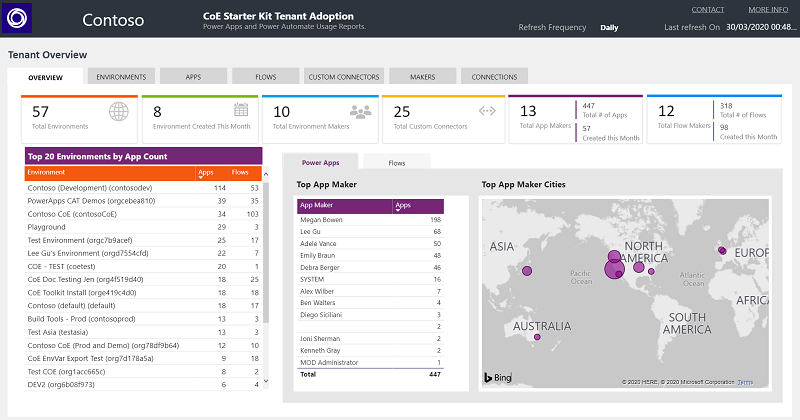
2. Identify orphaned apps and assign them to new owners by using the embedded app in the Power BI dashboard.
3. Start planning your [governance strategy](https://learn.microsoft.com/en-us/power-platform/guidance/adoption/common-vision/establish-coe).
Start by asking:
- What are the requirements of a compliant app or maker?
- What information do you need per app or maker?
- What happens to noncompliant apps and makers?
- How do you plan to support your maker community in building compliant apps that follow best practices?
- What actions do you plan to take based on your collected information?
4. Embrace your maker community and develop a nurture and adoption strategy. Think about how to onboard new makers. Organize internal events such as training workshops and hackathons. Put together templates and best practices for your makers to use. Learn more in [Nurture your Power Platform community](https://learn.microsoft.com/en-us/power-platform/guidance/adoption/nurture-best-practices).
## Use the CoE Starter Kit alongside Automation Kit
The [Automation Kit](https://aka.ms/automationcoe) is set of tools that accelerates the use and support of Power Automate for desktop for automation projects. The kit provides tools that help you manage automation projects and monitor them to estimate savings and ROI.
The kit is especially useful to an Automation Center of Excellence (CoE) team, which is a team of experts who support automation within your organization. This team typically has solid knowledge of Power Automate for desktop, sets up and maintains the Automation Kit, and maintains configuration data such as departments, process categories, goals, and more.
The Automation Kit can be used standalone or alongside the CoE Starter Kit. Learn more about the Automation Kit in [Overview of the Automation Kit](https://learn.microsoft.com/en-us/power-automate/guidance/automation-kit/overview/introduction).
## Administrative tools available
A Power Platform CoE manages Power Platform administration, nurturing, and operations support. Admin and governance tools fall into three broad categories:
Expand table
| Admin center | Platform extensions | Templates and customizations |
|---|---|---|
| [Power Platform admin center](https://learn.microsoft.com/en-us/power-platform/admin/) features help you complete tasks: \- Environment and environment security management \- Data policy management \- Data integration and gateway management \- Admin analytics: View capacity and activity on Microsoft Dataverse, Power Apps, and Power Automate \- Support ticket requests | Connectors provide access to the same APIs that the products and admin centers use. These libraries are exposed through the connectors library to help users create custom solutions to execute administrative or governance-related tasks. Learn more in: \- [Power Platform for Admins](https://learn.microsoft.com/en-us/connectors/powerplatformforadmins/) \- [Power Apps for Admins](https://learn.microsoft.com/en-us/connectors/powerappsforadmins/) \- [Power Automate Management](https://learn.microsoft.com/en-us/connectors/flowmanagement/) \- [Power Apps for Makers](https://learn.microsoft.com/en-us/connectors/powerappsforappmakers/) | The CoE Starter Kit falls into this category. The CoE templates use the admin connectors in combination with other connectors and formulas to achieve specific goals. **Note:** The nature of a template is to provide a good solution for a specific task, but it might not have the exact functionality that you need. You might have to adjust it to achieve what you're looking for. |
## How to use the CoE Starter Kit alongside Power Platform admin center
Managed Environments and tenant-level analytics assist with administrative tasks, such as managing Power Platform at scale and providing insights into usage and inventory.
### Managed Environments for Power Platform
[Managed Environments](https://learn.microsoft.com/en-us/power-platform/admin/managed-environment-overview) is a suite of capabilities that allows admins to manage Power Platform at scale with more control, less effort, and more insights. The capabilities are available out of the box from within the Power Platform admin center. Managed Environment capabilities can be used standalone, or alongside capabilities of the CoE Starter Kit to administer and govern your Power Platform adoption.
The CoE Starter Kit encourages experimentation and innovation with an open-source, low-code model influenced by customer feedback. Managed Environments will replace certain features in the CoE Starter Kit eventually. As the evolution of Managed Environments continues, new experiments and innovations will be added to the CoE Starter Kit to gauge interest.
Start with the out-of-the-box capabilities in Power Platform admin center and Managed Environments. These capabilities are robust and fully supported. If you need more capabilities to govern your tenant, check if features in the CoE Starter Kit complement what you get out of the box.
#### Individual features
Consider the individual features of Managed Environments to see how they compare to what's in the CoE Starter Kit.
- **[Maker welcome content](https://learn.microsoft.com/en-us/power-platform/admin/welcome-content)**
In Managed Environments, admins can provide customized welcome content to help their makers get started with Power Apps. When welcome content is enabled, makers signing in to Power Apps are greeted with customized getting-started information.
A similar concept in the CoE Starter Kit is the [welcome email](https://learn.microsoft.com/en-us/power-platform/guidance/coe/core-components), which is sent to new makers only after they create an app, flow, or agent for the first time. Makers may get necessary information only after they create their first resource, whereas the Managed Environments feature shows them information when they sign in to Power Apps.
- **[Weekly digest](https://learn.microsoft.com/en-us/power-platform/admin/managed-environment-weekly-digests)**
The CoE Starter Kit doesn't have a weekly digest for admins. Instead, admins self-serve information through the [Power BI dashboard](https://learn.microsoft.com/en-us/power-platform/guidance/coe/power-bi). Inactive apps and flows are highlighted in the Weekly digest email. In the CoE Starter Kit, a similar goal is achieved with the [inactivity notification process](https://learn.microsoft.com/en-us/power-platform/guidance/coe/governance-components#inactivity-processes), which notifies makers of their inactive resources and asks for approval to delete them.
One main goal of Managed Environments and the CoE Starter Kit is to provide insights that help admins take action. The CoE kit offers more capabilities that reduce the admin's burden of managing inactive resources. For example, it directs resource management to the maker, making the owner responsible for their own resources.
- **[Limit sharing](https://learn.microsoft.com/en-us/power-platform/admin/managed-environment-sharing-limits)**
The CoE Starter Kit doesn't limit sharing on resources. Proactive governance is only possible through Managed Environments.
The [Compliance process](https://learn.microsoft.com/en-us/power-platform/guidance/coe/governance-components) in the CoE Starter Kit offers a reactive way to identify highly shared resources. This process identifies highly shared resources and asks makers to provide additional information, enabling admins to make better support solutions. For example, admins might choose to move resources to a dedicated environment. With the Power BI dashboard, admins can also identify highly shared resources.
- **[Data policies](https://learn.microsoft.com/en-us/power-platform/admin/managed-environment-data-policies)**
Managed Environments allows you to see what data policies apply to the environment. The [DLP Editor](https://learn.microsoft.com/en-us/power-platform/guidance/coe/core-components#dlp-impact-analysis), part of the CoE Starter Kit, also shows you data policies that are applied to an environment, and the impact of data policies on existing apps and flows in that environment.
Note
The CoE Starter Kit offers capabilities that aren't yet met with Managed Environments, such as bulk updating permissions, cleaning up abandoned resources, surveying makers, and calculating the ROI of ideas.
### Tenant-level analytics
[Tenant-level analytics](https://learn.microsoft.com/en-us/power-platform/admin/tenant-level-analytics) in the Power Platform admin center provide a holistic overview of usage and inventory for apps, flows, makers, and environments. These analytics help you identify metrics like the most used apps and top makers.
The [Power BI dashboard](https://learn.microsoft.com/en-us/power-platform/guidance/coe/power-bi) in the CoE Starter Kit combines your tenant-level inventory and usage data with organizational data to provide more granular insights into which departments, cities, and countries or regions use Power Platform.
You can use a broader range of customizable filters to view your inventory by connector, classification (premium or standard), or the number of users with the shared app.
Tenant-level insights in the Power Platform admin center provide a great starting point to understand your tenant's adoption of Power Platform. As your need for insights grows, explore the rich and customizable reports available in the CoE Starter Kit.
## Next steps
- Explore the [Power Platform admin documentation](https://learn.microsoft.com/en-us/power-platform/admin/admin-documentation).
- Find training resources like guided learning and step-by-step guides at [aka.ms/PowerPlatformLabs](https://aka.ms/powerplatformlabs).
- Read up on customer success stories and find resources relevant to your experience, technical background, and skill level at [aka.ms/PowerPlatformResources](https://aka.ms/powerplatformresources).
- Explore [Microsoft Power Platform training](https://learn.microsoft.com/en-us/training/powerplatform/).
- Learn more about [Power Platform adoption](https://learn.microsoft.com/en-us/power-platform/guidance/).
***
## Feedback
Was this page helpful?
Yes
No
No
Need help with this topic?
Want to try using Ask Learn to clarify or guide you through this topic?
Ask Learn
Ask Learn
Suggest a fix?
***
## Additional resources
Training
Module
[Get started with Microsoft Power Platform Center of Excellence - Training](https://learn.microsoft.com/en-us/training/modules/get-started-center-excellence/?source=recommendations)
Learn about using Microsoft Power Platform Center of Excellence (CoE) kit in your tenant.
Certification
[Microsoft Certified: Power Platform Fundamentals - Certifications](https://learn.microsoft.com/en-us/credentials/certifications/power-platform-fundamentals/?source=recommendations)
Demonstrate the business value and product capabilities of Microsoft Power Platform, such as Power Apps, data connections with Dataverse, and Power Automate.
***
- Last updated on
07/26/2025
## In this article
1. [What is a Center of Excellence (CoE)?](https://learn.microsoft.com/en-us/power-platform/guidance/coe/overview#what-is-a-center-of-excellence-coe)
2. [Strategic foundation: Power Platform Center of Excellence](https://learn.microsoft.com/en-us/power-platform/guidance/coe/overview#strategic-foundation-power-platform-center-of-excellence)
3. [CoE Starter Kit: Strategy to implementation](https://learn.microsoft.com/en-us/power-platform/guidance/coe/overview#coe-starter-kit-strategy-to-implementation)
4. [What's in the CoE Starter Kit?](https://learn.microsoft.com/en-us/power-platform/guidance/coe/overview#whats-in-the-coe-starter-kit)
5. [Get started using the CoE Starter Kit](https://learn.microsoft.com/en-us/power-platform/guidance/coe/overview#get-started-using-the-coe-starter-kit)
6. [Use the CoE Starter Kit alongside Automation Kit](https://learn.microsoft.com/en-us/power-platform/guidance/coe/overview#use-the-coe-starter-kit-alongside-automation-kit)
7. [Administrative tools available](https://learn.microsoft.com/en-us/power-platform/guidance/coe/overview#administrative-tools-available)
8. [How to use the CoE Starter Kit alongside Power Platform admin center](https://learn.microsoft.com/en-us/power-platform/guidance/coe/overview#how-to-use-the-coe-starter-kit-alongside-power-platform-admin-center)
9. [Next steps](https://learn.microsoft.com/en-us/power-platform/guidance/coe/overview#next-steps)
Was this page helpful?
Yes
No
No
Need help with this topic?
Want to try using Ask Learn to clarify or guide you through this topic?
Ask Learn
Ask Learn
Suggest a fix?
## Ask Learn
Preview
Ask Learn is an AI assistant that can answer questions, clarify concepts, and define terms using trusted Microsoft documentation.
Please sign in to use Ask Learn.
[Sign in](https://learn.microsoft.com/en-us/power-platform/guidance/coe/overview)
[English (United States)](https://learn.microsoft.com/en-us/locale?target=https%3A%2F%2Flearn.microsoft.com%2Fen-us%2Fpower-platform%2Fguidance%2Fcoe%2Foverview)
[Your Privacy Choices](https://aka.ms/yourcaliforniaprivacychoices)
Theme
- Light
- Dark
- High contrast
- [AI Disclaimer](https://learn.microsoft.com/en-us/principles-for-ai-generated-content)
- [Previous Versions](https://learn.microsoft.com/en-us/previous-versions/)
- [Blog](https://techcommunity.microsoft.com/t5/microsoft-learn-blog/bg-p/MicrosoftLearnBlog)
- [Contribute](https://learn.microsoft.com/en-us/contribute)
- [Privacy](https://go.microsoft.com/fwlink/?LinkId=521839)
- [Terms of Use](https://learn.microsoft.com/en-us/legal/termsofuse)
- [Trademarks](https://www.microsoft.com/legal/intellectualproperty/Trademarks/)
- © Microsoft 2026 |
| Readable Markdown | null |
| Shard | 168 (laksa) |
| Root Hash | 14615152987638977768 |
| Unparsed URL | com,microsoft!learn,/en-us/power-platform/guidance/coe/overview s443 |