ℹ️ Skipped - page is already crawled
| Filter | Status | Condition | Details |
|---|---|---|---|
| HTTP status | PASS | download_http_code = 200 | HTTP 200 |
| Age cutoff | PASS | download_stamp > now() - 6 MONTH | 1.1 months ago (distributed domain, exempt) |
| History drop | PASS | isNull(history_drop_reason) | No drop reason |
| Spam/ban | PASS | fh_dont_index != 1 AND ml_spam_score = 0 | ml_spam_score=0 |
| Canonical | PASS | meta_canonical IS NULL OR = '' OR = src_unparsed | Not set |
| Property | Value |
|---|---|
| URL | https://learn.microsoft.com/en-us/answers/questions/3170099/finding-my-ip-address |
| Last Crawled | 2026-03-13 02:56:18 (1 month ago) |
| First Indexed | not set |
| HTTP Status Code | 200 |
| Meta Title | finding my IP address - Microsoft Q&A |
| Meta Description | I have a HP all in one Desktop with Windows 10. I need to find the location for my IP address. To view the IP address of a wireless connection, select WiFi on the left menu pane and click Advanced Options, your IP address will appear next to… |
| Meta Canonical | null |
| Boilerpipe Text | Hi Ruth
You actually have 2 IP Addresses, one on your PC and one on your Router
1.
PC IP Address
Click your Start Button, then just type cmd and hit Enter
Paste this command into the resulting command prompt window and hit Enter:
ipconfig /all
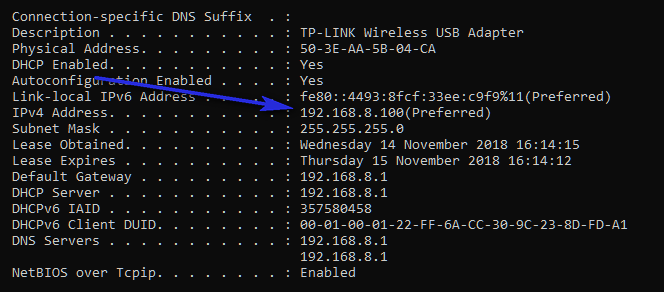
In the resulting printout, scroll down to your current WiFi connection and you will see your PC's IP address (marked Preferred)
2.
Router IP Address
In the back or bottom of your Router is a sticker with a UserName, Password and IP address (something like 192.002.005.001) printed on it
Note those down
Go to your PC and open a Web Browser
In the address type the IP address and hit Enter
That will bring up your routers configuration page
Usually under System - Device Settings you will find the router's IP address
Before you can change that, you will need to enter the UserName and Password you noted down from that sticker on the router
That's It! |
| Markdown | [Skip to main content](https://learn.microsoft.com/en-us/answers/questions/3170099/finding-my-ip-address#main)
This browser is no longer supported.
Upgrade to Microsoft Edge to take advantage of the latest features, security updates, and technical support.
[Download Microsoft Edge](https://go.microsoft.com/fwlink/p/?LinkID=2092881%20) [More info about Internet Explorer and Microsoft Edge](https://learn.microsoft.com/en-us/lifecycle/faq/internet-explorer-microsoft-edge)
[Learn](https://learn.microsoft.com/en-us/)
[Sign in](https://learn.microsoft.com/en-us/answers/questions/3170099/finding-my-ip-address)
![]()
![]()
- [Profile](https://learn.microsoft.com/en-us/users/me/activity/)
- [Settings](https://learn.microsoft.com/en-us/users/me/settings/)
[Sign out](https://learn.microsoft.com/en-us/answers/questions/3170099/finding-my-ip-address)
[Learn](https://learn.microsoft.com/en-us/)
- Documentation
- [All product documentation](https://learn.microsoft.com/en-us/docs/)
- [Azure documentation](https://learn.microsoft.com/en-us/azure/?product=popular)
- [Dynamics 365 documentation](https://learn.microsoft.com/en-us/dynamics365/)
- [Microsoft Copilot documentation](https://learn.microsoft.com/en-us/copilot/)
- [Microsoft 365 documentation](https://learn.microsoft.com/en-us/microsoft-365/)
- [Power Platform documentation](https://learn.microsoft.com/en-us/power-platform/)
- [Code samples](https://learn.microsoft.com/en-us/samples/)
- [Troubleshooting documentation](https://learn.microsoft.com/en-us/troubleshoot/)
Free to join. Request to attend.
[Microsoft AI Tour](https://aitour.microsoft.com/?wt.mc_id=itour26_learnmarketingspot_wwl)
Take your business to the AI frontier.
- Training & Labs
- [All training](https://learn.microsoft.com/en-us/training/)
- [Azure training](https://learn.microsoft.com/en-us/training/browse/?products=azure)
- [Dynamics 365 training](https://learn.microsoft.com/en-us/training/browse/?products=dynamics-365)
- [Microsoft Copilot training](https://learn.microsoft.com/en-us/training/browse/?products=ms-copilot)
- [Microsoft 365 training](https://learn.microsoft.com/en-us/training/browse/?products=m365)
- [Microsoft Power Platform training](https://learn.microsoft.com/en-us/training/browse/?products=power-platform)
- [Labs](https://learn.microsoft.com/en-us/labs/)
- [Credentials](https://learn.microsoft.com/en-us/credentials/)
- [Career paths](https://learn.microsoft.com/en-us/training/career-paths/)
Free to join. Request to attend.
[Microsoft AI Tour](https://aitour.microsoft.com/?wt.mc_id=itour26_learnmarketingspot_wwl)
Take your business to the AI frontier.
- Q\&A
- [Ask a question](https://learn.microsoft.com/en-us/answers/questions/ask/)
- [Azure questions](https://learn.microsoft.com/en-us/answers/tags/133/azure/)
- [Windows questions](https://learn.microsoft.com/en-us/answers/tags/60/windows/)
- [Microsoft 365 questions](https://learn.microsoft.com/en-us/answers/tags/9/m365/)
- [Microsoft Outlook questions](https://learn.microsoft.com/en-us/answers/tags/131/office-outlook/)
- [Microsoft Teams questions](https://learn.microsoft.com/en-us/answers/tags/108/office-teams/)
- [Popular tags](https://learn.microsoft.com/en-us/answers/tags/)
- [All questions](https://learn.microsoft.com/en-us/answers/questions/)
Free to join. Request to attend.
[Microsoft AI Tour](https://aitour.microsoft.com/?wt.mc_id=itour26_learnmarketingspot_wwl)
Take your business to the AI frontier.
- Topics
- [Artificial intelligence](https://learn.microsoft.com/en-us/ai/)
Learning hub to build AI skills
- [Compliance](https://learn.microsoft.com/en-us/compliance/)
Compliance resources you need to get started with your business
- [DevOps](https://learn.microsoft.com/en-us/devops/)
DevOps practices, Git version control and Agile methods
- [Learn for Organizations](https://learn.microsoft.com/en-us/training/organizations/)
Curated offerings from Microsoft to boost your team’s technical skills
- [Platform engineering](https://learn.microsoft.com/en-us/platform-engineering/)
Tools from Microsoft and others to build personalized developer experiences
- [Security](https://learn.microsoft.com/en-us/security/)
Guidance to help you tackle security challenges
- [Assessments](https://learn.microsoft.com/en-us/assessments/)
Interactive guidance with custom recommendations
- [Student hub](https://learn.microsoft.com/en-us/training/student-hub/)
Self-paced and interactive training for students
- [Educator center](https://learn.microsoft.com/en-us/training/educator-center/)
Resources for educators to bring technical innovation in their classroom
Free to join. Request to attend.
[Microsoft AI Tour](https://aitour.microsoft.com/?wt.mc_id=itour26_learnmarketingspot_wwl)
Take your business to the AI frontier.
[Sign in](https://learn.microsoft.com/en-us/answers/questions/3170099/finding-my-ip-address)
![]()
![]()
- [Profile](https://learn.microsoft.com/en-us/users/me/activity/)
- [Settings](https://learn.microsoft.com/en-us/users/me/settings/)
[Sign out](https://learn.microsoft.com/en-us/answers/questions/3170099/finding-my-ip-address)
[Q\&A](https://learn.microsoft.com/en-us/answers/)
- [Questions](https://learn.microsoft.com/en-us/answers/questions/)
- [Tags](https://learn.microsoft.com/en-us/answers/tags/)
- [Help](https://learn.microsoft.com/en-us/answers/support/)
- More
- [Questions](https://learn.microsoft.com/en-us/answers/questions/)
- [Tags](https://learn.microsoft.com/en-us/answers/tags/)
- [Help](https://learn.microsoft.com/en-us/answers/support/)
[Ask a question](https://learn.microsoft.com/en-us/answers/questions/ask/)
Add to Collections
Add to plan
***
#### Share via
[Facebook](https://www.facebook.com/sharer/sharer.php?u=https%3A%2F%2Flearn.microsoft.com%2Fen-us%2Fanswers%2Fquestions%2F3170099%2Ffinding-my-ip-address%0A%09%09%09%09%09%09%09%09%09%09%09) [x.com](https://twitter.com/intent/tweet?original_referer=https%3A%2F%2Flearn.microsoft.com%2Fen-us%2Fanswers%2Fquestions%2F3170099%2Ffinding-my-ip-address%0A%09%09%09%09%09%09%09%09%09%09%09&text=finding%20my%20IP%20address%0A%09%09%09%09%09%09%09%09%09%09%09&tw_p=tweetbutton&url=https%3A%2F%2Flearn.microsoft.com%2Fen-us%2Fanswers%2Fquestions%2F3170099%2Ffinding-my-ip-address) [LinkedIn](https://www.linkedin.com/cws/share?url=https%3A%2F%2Flearn.microsoft.com%2Fen-us%2Fanswers%2Fquestions%2F3170099%2Ffinding-my-ip-address) [Email](<mailto:?subject= 												%5BShared%20Question%5D%20finding%20my%20IP%20address&body=finding my IP addresshttps%3A%2F%2Flearn.microsoft.com%2Fen-us%2Fanswers%2Fquestions%2F3170099%2Ffinding-my-ip-address>)
# finding my IP address
' cx='32' cy='32' r='32' /%3E%3Ctext x='50%25' y='55%25' dominant-baseline='middle' text-anchor='middle' fill='%23FFF' %3EA%3C/text%3E%3C/svg%3E>)
Anonymous
Nov 14, 2018, 5:48 PM
I have a HP all in one Desktop with Windows 10. I need to find the location for my IP address. To view the IP address of a wireless connection, select WiFi on the left menu pane and click Advanced Options, your IP address will appear next to "IPv4 Address. I don't have IPv4 in the Advanced settings for WiFi connection in my settings.
I try to follow Microsoft's instructions, but nothing works well since I bought my computer with Windows 10 already installed.
I'd appreciate any suggestions on how to fix this. If you need to, you can call me after 10:00 am EST at 1-941-764-1246. But I'll try to use written instructions if they are different than the line above: To view the IP address of a wireless connection, select WiFi on the left menu pane and click Advanced Options, your IP address will appear next to "IPv4 Address. And that's because IPv4 in the advanced settings for Wi-Fi settings.
Ruth 801
Windows for home \| Windows 10 \| Performance and system failures
[Windows for home \| Windows 10 \| Performance and system failures](https://learn.microsoft.com/en-us/answers/tags/1002/windows-home-windows-10-platform-windows-performance/)

Sign in to follow
Locked Question. This question was migrated from the Microsoft Support Community. You can vote on whether it's helpful, but you can't add comments or replies or follow the question.
0 comments No comments
Report a concern
I have the same question
I have the same question
2 {count} votes
## 3 answers
Sort by: Most helpful
[Most helpful](https://learn.microsoft.com/en-us/answers/questions/3170099/finding-my-ip-address?orderby=helpful&page=1#answers) [Newest](https://learn.microsoft.com/en-us/answers/questions/3170099/finding-my-ip-address?orderby=newest&page=1#answers) [Oldest](https://learn.microsoft.com/en-us/answers/questions/3170099/finding-my-ip-address?orderby=oldest&page=1#answers)
1. 
[DaveM121](https://learn.microsoft.com/en-us/users/na/?userid=873f553c-11b8-4f5c-b034-14c0940062ff) •
850\.7K Reputation points • Independent Advisor
Nov 14, 2018, 5:56 PM
Hi Ruth
You actually have 2 IP Addresses, one on your PC and one on your Router
1\.
PC IP Address
Click your Start Button, then just type cmd and hit Enter
Paste this command into the resulting command prompt window and hit Enter:
ipconfig /all
In the resulting printout, scroll down to your current WiFi connection and you will see your PC's IP address (marked Preferred)
[](https://learn-attachment.microsoft.com/api/attachments/bce65903-185a-4505-99df-bd9e5dc214a7?platform=QnA)
2\.
Router IP Address
In the back or bottom of your Router is a sticker with a UserName, Password and IP address (something like 192.002.005.001) printed on it
Note those down
Go to your PC and open a Web Browser
In the address type the IP address and hit Enter
That will bring up your routers configuration page
Usually under System - Device Settings you will find the router's IP address
Before you can change that, you will need to enter the UserName and Password you noted down from that sticker on the router
That's It\!
0 comments No comments
Report a concern
2. 
[Vijay A. Verma](https://learn.microsoft.com/en-us/users/na/?userid=b3d9f528-2cc7-49c4-8419-a4c8ac86a2ba) •
104\.8K Reputation points • Volunteer Moderator
Nov 14, 2018, 6:07 PM
To find your IP address, follow the below directions
Windows Key+R \> Type cmd and Enter
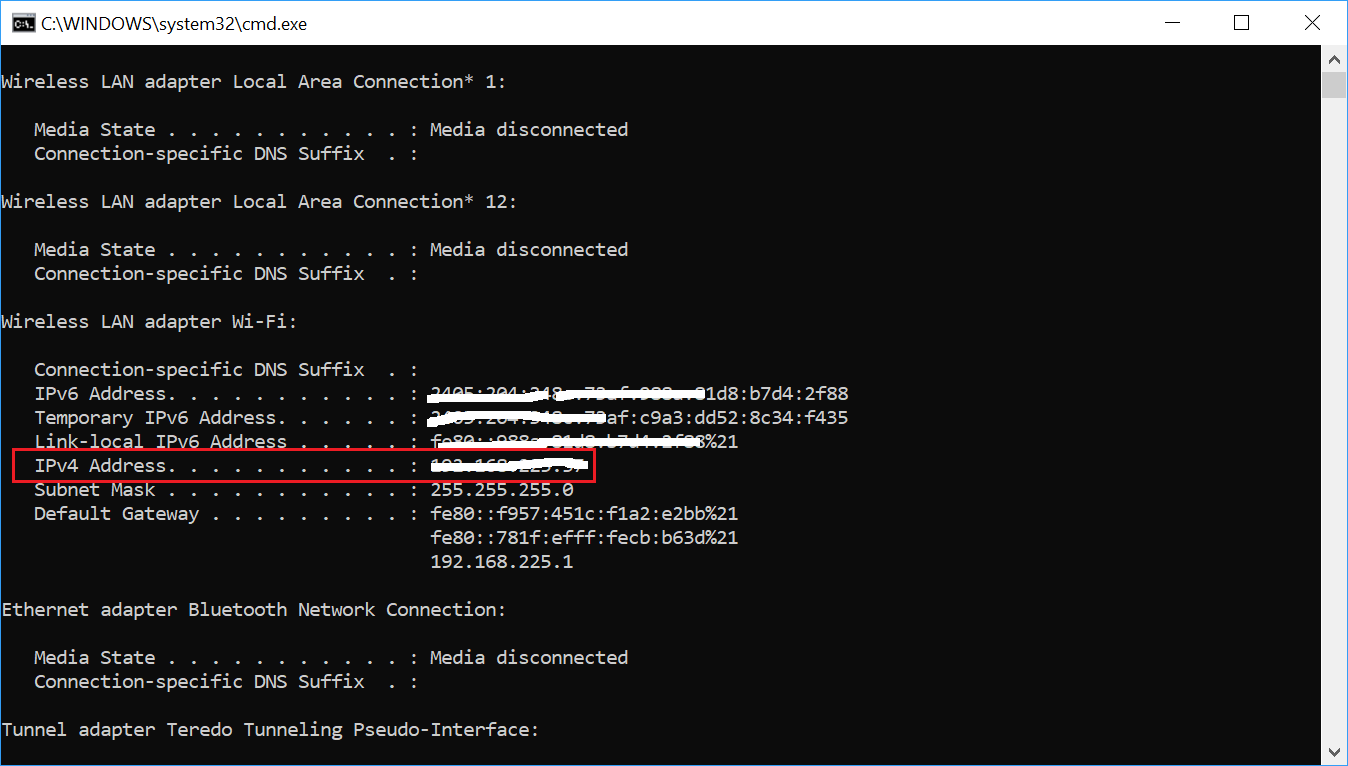
In the command prompt, type ipconfig and Enter
Now, look for IPv4 Address under Wifi. This is your IP Address
0 comments No comments
Report a concern
3. ' cx='32' cy='32' r='32' /%3E%3Ctext x='50%25' y='55%25' dominant-baseline='middle' text-anchor='middle' fill='%23FFF' %3EA%3C/text%3E%3C/svg%3E>)
Anonymous
Nov 15, 2018, 5:06 AM
Hello,
Please refer this guide:
[https://www.kapilarya.com/how-to-find-your-curr...](https://www.kapilarya.com/how-to-find-your-current-ip-address-on-windows-10)
Let us know if this helps\!
Note: This is a non-Microsoft website. The page appears to be providing accurate, safe information. Watch out for ads on the site that may advertise products frequently classified as a PUP (Potentially Unwanted Products). Thoroughly research any product advertised on the site before you decide to download and install it.
0 comments No comments
Report a concern
[English (United States)](https://learn.microsoft.com/en-us/locale?target=https%3A%2F%2Flearn.microsoft.com%2Fen-us%2Fanswers%2Fquestions%2F3170099%2Ffinding-my-ip-address)
[Your Privacy Choices](https://aka.ms/yourcaliforniaprivacychoices)
Theme
- Light
- Dark
- High contrast
- [AI Disclaimer](https://learn.microsoft.com/en-us/principles-for-ai-generated-content)
- [Previous Versions](https://learn.microsoft.com/en-us/previous-versions/)
- [Blog](https://techcommunity.microsoft.com/t5/microsoft-learn-blog/bg-p/MicrosoftLearnBlog)
- [Contribute](https://learn.microsoft.com/en-us/contribute)
- [Privacy](https://go.microsoft.com/fwlink/?LinkId=521839)
- [Consumer Health Privacy](https://go.microsoft.com/fwlink/?linkid=2259814)
- [Terms of Use](https://learn.microsoft.com/en-us/legal/termsofuse)
- [Code of Conduct](https://aka.ms/msftqacodeconduct)
- [Trademarks](https://www.microsoft.com/legal/intellectualproperty/Trademarks/)
- © Microsoft 2026 |
| Readable Markdown | Hi Ruth
You actually have 2 IP Addresses, one on your PC and one on your Router
1\.
PC IP Address
Click your Start Button, then just type cmd and hit Enter
Paste this command into the resulting command prompt window and hit Enter:
ipconfig /all
In the resulting printout, scroll down to your current WiFi connection and you will see your PC's IP address (marked Preferred)
[](https://learn-attachment.microsoft.com/api/attachments/bce65903-185a-4505-99df-bd9e5dc214a7?platform=QnA)
2\.
Router IP Address
In the back or bottom of your Router is a sticker with a UserName, Password and IP address (something like 192.002.005.001) printed on it
Note those down
Go to your PC and open a Web Browser
In the address type the IP address and hit Enter
That will bring up your routers configuration page
Usually under System - Device Settings you will find the router's IP address
Before you can change that, you will need to enter the UserName and Password you noted down from that sticker on the router
That's It\! |
| Shard | 168 (laksa) |
| Root Hash | 14615152987638977768 |
| Unparsed URL | com,microsoft!learn,/en-us/answers/questions/3170099/finding-my-ip-address s443 |