ℹ️ Skipped - page is already crawled
| Filter | Status | Condition | Details |
|---|---|---|---|
| HTTP status | PASS | download_http_code = 200 | HTTP 200 |
| Age cutoff | PASS | download_stamp > now() - 6 MONTH | 0 months ago |
| History drop | PASS | isNull(history_drop_reason) | No drop reason |
| Spam/ban | PASS | fh_dont_index != 1 AND ml_spam_score = 0 | ml_spam_score=0 |
| Canonical | PASS | meta_canonical IS NULL OR = '' OR = src_unparsed | Not set |
| Property | Value | |||||||||
|---|---|---|---|---|---|---|---|---|---|---|
| URL | https://larryludwig.com/ahrefs-review/ | |||||||||
| Last Crawled | 2026-04-21 23:21:36 (1 day ago) | |||||||||
| First Indexed | 2022-01-28 19:27:37 (4 years ago) | |||||||||
| HTTP Status Code | 200 | |||||||||
| Content | ||||||||||
| Meta Title | Ahrefs Review – How To Use Ahrefs for SEO & Link Building | |||||||||
| Meta Description | Ahrefs is an incredible tool. But it's useless if you don't really know how to use Ahrefs. This extensive guide walks through each feature set. Read on! | |||||||||
| Meta Canonical | null | |||||||||
| Boilerpipe Text | Larry's Take
My go-to SEO research tool. I use this tool daily and I highly recommended it. There are too many features to count. If you are wanting to improve your SEO game you must get a tool like Ahrefs to do your research, monitoring and getting a feedback loop of if you are improving SEO over time.
10.0
Out of 10
Platform
Cloud
Price
$99 - $999 per month
Annual Discount
Yes - 2 months free
Learn More
What Is Ahrefs?
Ahrefs is one of the most powerful suites of social media & SEO tools that I’ve ever used. Most SEOs know it as a “backlink checker” that competes with
Majestic
,
Mangools
,
Moz
, and
Semrush
. But “backlink checker” grossly undersells Ahrefs as a marketing suite.
Ahrefs has so many features that you can get lost and resort to simply staring at your own links – maybe rank tracking a few keywords. Here’s the guide to how to use Ahrefs that I wish existed when I first signed up.
Ahrefs Alternatives
Ahrefs Glossary
Every piece of software has its own little universe of jargon. I’ll use these words throughout the guide. So here’s a glossary of terms.
URL Rating
– Ahrefs’ measure of the quantity and quality of links pointing to a given URL. Link quantity and quality correlate with higher rankings in search engines.
Domain Rating
– Ahrefs’ measure of the quantity and quality of links pointing to an entire domain. Link quantity and quality correlate with higher rankings for all URLs on a domain in search engines.
Ahrefs Rank
– Ahrefs’ ranking of a domain’s rating relative to all the other domains on the Internet.
Backlinks
– The number of hyperlinks pointing to a URL.
Referring Page
– The number of pages with a hyperlink pointing to a URL. A page can have multiple links.
Referring Domains
– The number of unique domains with a hyperlink pointing to a URL. A domain can have multiple referring pages and backlinks.
Referring Content
– Ahrefs’ measure of the relative traffic that a unique piece of content sends to a given URL based on the popularity of the referring content.
Anchors
– The anchor text used within a URL’s backlinks.
Sitewide / Not Sitewide
– Ahrefs’ categorization of a link showing whether it shows in the same location on every page of a referring domain or not.
Fresh Index/Live Index
– This is a new feature rolled out in an effort to maintain a historical index of links. Here’s the
full blog post and here’s the Ahrefs definition
:
Live Index – contains all links that were “live” on Ahrefs’ last re-crawl;
Fresh Index – contains all links that Ahrefs’ has seen “live” in the last 3 months (including those that were “dead” on the last re-crawl).
In this post
, Ahrefs also says that they are “going to add a “Historic” index, that would include all backlinks that we have seen live starting from 13th of August 2015.”
Top Pages
– A given URLs’ top pages based on the criteria that you sort for.
Ahrefs Dashboard
The Ahrefs Dashboard is where you keep track of all your data. You can add a URL to keep a running snapshot of a domain’s health. It will quickly show you any technical crawl errors, new links, new referring domains, and a snapshot of Ahrefs’ domain rating and URL ranking.
On the dashboard, you can also keep track of keyword rankings, any content alerts, and any links that you are trying to disavow.
Key Features
I think the main features of the Ahrefs dashboard are keyword rankings and content alerts. Although I don’t think
rankings are as important
as they used to be back in the days of old-school SEO, they can be an interesting diagnostic indicator, and another data point to factor into your analysis. Since tracking is included with Ahrefs, it’s worth adding your critical keywords.
Alerts are useful for planning outreach and for competitive analysis. Target several phrases that are directly relevant to your website so that you can get a feed whenever a new piece of content is published around that phrase or keywords.
Fun Hacks
Email notifications are boring, but setting them up is a great way to hack your habits and discipline so that you can use Ahrefs’ data.
Unless you are extraordinarily disciplined, it’s easy to let monitoring and alerts slide. That’s why I love setting up
Google Analytics intelligence alerts
and
Ahrefs’ email notifications. Set them up at a useful interval, and you’ll never miss an issue.
Site Explorer (Link Data)
Site Explorer is Ahrefs’ bread and butter. It allows you to enter a URL and check that URLs backlinks – and, as of 2016, everything from organic keywords to social data to PPC data as well. This section will focus on the Link Data.
Ahrefs gets this data by running a crawler around the Web just like Googlebot. Every backlink checker tries to replicate how & where Googlebot crawls links. No backlink checker is Googlebot. And no crawler can cover the entire Web.
According to an analysis
by some of the best technical SEOs, Ahrefs is at the front of the pack.
Why? With Site Explorer, they not only have a large link index that closely replicates the Googlebot, they also extract & overlay additional data.
They pull out anchor text (the actual text within the link), backlink type, backlink follow status, social metrics, IP Address, and HTTP status. These additional pieces of information – paired with an enormous index of URLs – sets Ahrefs apart and turns it into a marketer’s suite.
The Site Explorer, however, is also the most daunting of all the tools because there is so much information. So here’s what I think are the key features.
Key Features of Site Explorer’s Link Data
The first key feature is
Inbound Links
.
Search engines use Inbound Links
as a proxy for human endorsement. More links from trustworthy sites on relevant pages equal more organic traffic. The links feature allows you to pull all the links to a specific URL and then sift and sort to dig up the information you want.
The second key feature is
Top Content
. This feature allows you to look at how specific pages on a URL perform. You can sift and sort by links, shares, or Ahrefs weighted importance score.
The third key feature is
Top Referring Content
. This feature shows you what content on the Internet that has a link to the URL you are exploring has the most links/shares or estimated traffic. You can get a ballpark estimate of what links send referral traffic to your URL.
The fourth and last key feature appears in both Inbound and Outbound Links – and that is
Broken Links
. This feature shows you which links are linking to or linking out to a URL that no longer exists.
What You Can Do With Site Explorer
Whatever you are used to doing with other backlink checkers, you can do with Ahrefs. There’s plenty you can do directly on the main screen, but keep in mind that you can also do an Export to Excel or Google Sheets if that’s your native work environment.
Determine What Marketing Tactics Are Working for Competitors
You can take your competitors – big and small – and see where they are getting their links from. Then you can go and try to get the same links. Or (and I recommend this approach), you can use the information to understand what has been working in the industry and use it to develop your own unique tactics.
You can also look at Referring Domains, which will group the links by domain.
Determine What Content Does Well
We all browse the Internet in a “filter bubble.” Sometimes it’s hard to believe that a site or blog post that you love isn’t more widely shared.
Or at a much higher level, many marketers think that the content that generates shares will also directly generate links.
That perception is a myth
.
You can use the top content report to understand exactly what works well. Understand what pages actually get links if you are building your organic presence. Understand what gets shared. Understand what type of content gets picked up.
Do press releases matter? Do infographics actually work? What’s the one piece of content for competitors or industry publications that drives 80% of their links and shares?
You can answer all those questions with the Top Content report.
Identify Low-Hanging Fruit / Easy Link Opportunities
Site Explorer has a Link Intersect report that allows you to input several URLs and learn which websites are linking to competitors (or industry sites), but not your site. You can get this same data by exporting links from several sites and running a few Excel tricks. But the
link intersect tool
does it quickly.
Does an industry publication have links to all your competitors, but forget to link to you? Is there a reporter that interviews your competitors but not you?
Find out with the link intersect tool and discover some quick wins that will bring you up to an even playing field.
Identify Influential Marketing Prospects
You can use a combination of the Top Referring Content report and the Inbound Links report to identify influential websites that are already linking to competitors and/or industry publications. But you can take it a step further and sort by Domain or URL Rating to figure out who matters the most. In a world of limited resources and time – priorities matter.
But be sure to note your goals…
Sometimes the influencers are not in the markets you expect. In the example above – REIs biggest influencers are in the travel hacking & survivalist niches.
Conduct A Broken Link Building Campaign
Broken link-building is one of the most effective and consistent link-building tactics in SEO. The idea is to find resources that no longer exist, rebuild them, then pitch to get the links pointing at the broken resource switched to point at yours. Or, on the flipside, correct any broken links that your site has.
I’ve written a full
guide to Broken Link Building
. You can do broken link building manually, but Ahrefs’ broken link reports allow you to do broken link building efficiently and effectively.
Fun Hacks with Site Explorer
Quickly Find Worthwhile Broken Links
Take a giant site and look at Broken Outbound Links. You’ll quickly get a list of broken resources. Take all those URLs, and look at Inbound Links. The sites that link to your broken URLs are prospects for a broken link-building campaign.
The inverse also works well. Take a giant site – one that has plenty of resource pages. Pull Broken Inbound Links. Then pull the links pointed to those URLs. That will be your prospect list for a Broken Link Building campaign.
Explore Wikipedia & Top Publishers
Pull link metrics on
Wikipedia URLs
related to your industry – remember that you can search by subfolder. Create marketing ideas around the results.
Here’s a video guide to how I use these tactics. Note that the design is old, but the tactics are the same.
Take a publishing focused site in your industry or related to your industry and pull a top content report. This will allow you to skip to content that you know works. It will also give you link opportunities that are outside of what your competitors have.
See this other video guide of mine.
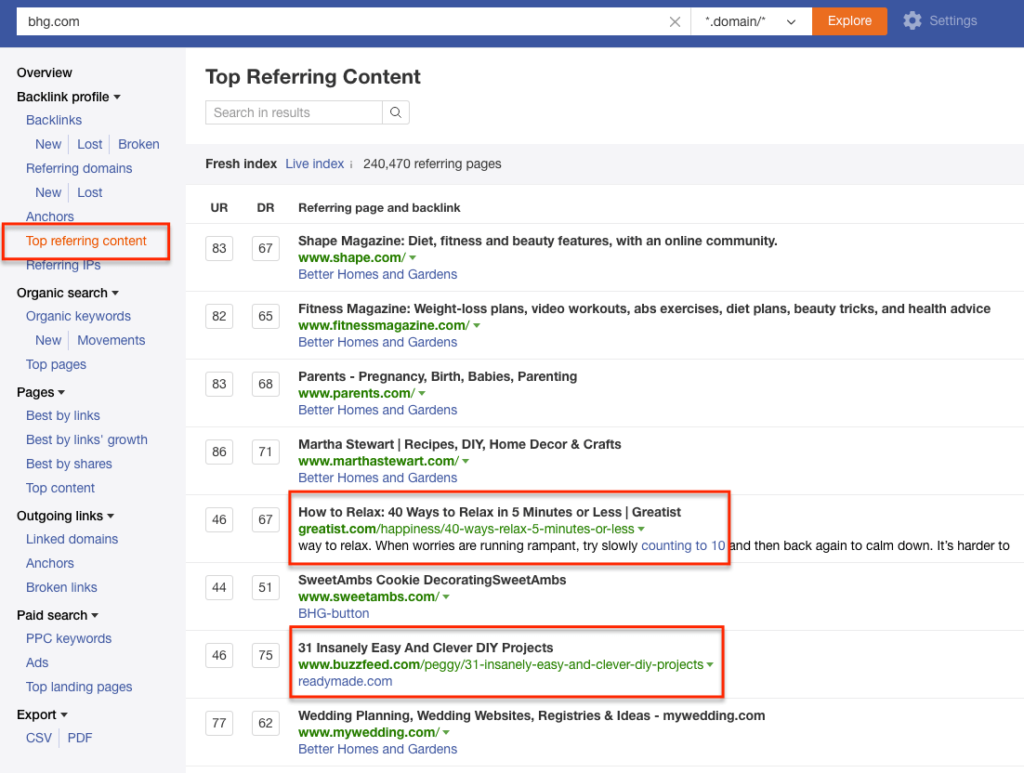
Take an industry publication or industry-related Wikipedia pages. Pull a Top Referring Content report. You’ll likely get a list that includes mainstream media publications. Click through and do research on the journalist who linked out to the piece.
Narrow Results
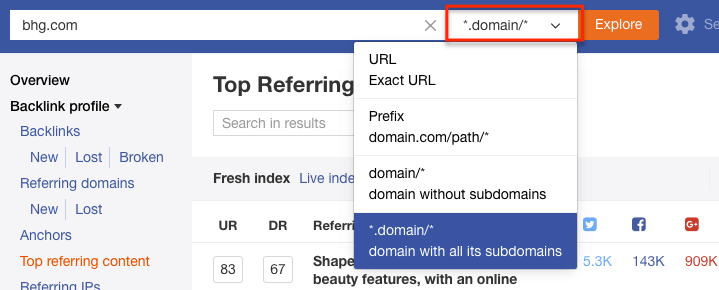
As I mentioned with Wikipedia, don’t forget that you can search for just a
subdomain
, a subfolder, or a specific URL in Site Explorer.
Site Explorer (Search Data)
Site Explorer’s Search Data (formerly Positions Explorer) shows what keywords a domain is ranking for, then provides estimates for what kind of traffic that domain and its pages are getting organically.
It also tracks paid positions. Think of it like rank tracking for every domain on the Internet.
Site Explorer crawls Google search results pages (SERPs) and aggregates the data into something you can search. They also pull search volume from Keyword Planner. Then it triangulates the organic traffic going to a domain based on standard click-through rates per position.
A couple of caveats – and this goes for every “traffic estimation tool” including SimilarWeb, Compete, SEMRush, etc – everything in this tool is a ballpark estimation. I do not recommend you use it for reporting. There are many variables in play – each with a lot of margin of error. Don’t let the exactness of the numbers lull you into a sense of certainty. Ahrefs pulls keyword data fast & frequently, but be sure to check key rankings manually & against Keyword Planner.
With that said, I’ll go ahead and state that this is Ahrefs’ most underestimated tool. Either that or the marketers who know about it aren’t talking about it. Regardless, here we go.
Key features
The most obvious feature is Ahrefs’ estimation for how many significant keywords (i.e., they have search volume) a domain is ranking for and their estimation of traffic based on those keywords.
That overview feature is interesting, but again, not super-useful without some context.
The feature that provides 80% of this tool’s value is the Top Pages feature under both Organic and Paid sections.
The other notable features are the PPC Ads and Top Competitors, which shows what domains most frequently share the same search results as the domain you’re looking for. And the PPC Ads show you a sample of PPC ads in the SERPs.
What You Can Do With Site Explorer’s Search Data
Understand Top Content for Other Websites
Although the exact numbers in Site Explorer are not accurate, the relationships and differential among the pages & keywords are accurate.
In other words, even if a given URL doesn’t drive XX visits per month, if it is listed as the Top Organic Page –
that position is accurate
. The difference in traffic between the top URL and the second URL is accurate as well – both for a couple reasons.
First, even if the traffic numbers aren’t exactly right, their relative volumes are correct. Head terms show more volume than long-tail terms. Second, on the landing page level, nearly every site’s traffic will conform to the 80/20 pattern – 20% of pages will drive 80% of the traffic. And so on for every given set of URLs.
Why does this matter?
This data is invaluable because you can discover and build off a competitor or other industry websites. You can learn from all their content and go straight for the best terms.
In the example above, you’ll see that for whatever reason, this company gets almost all their non-brand organic traffic from a (not so special) Garage Kit category page. It would make an excellent target for anyone in that industry.
Or you get to find out that your favorite website’s biggest winner is a throwaway post that happens to rank for a really broad but non-competitive term.
Either way, you get to learn from your competitor’s best (and worst) content. Ahrefs did a video tutorial on this feature –
Do Better Keyword Research
The toughest challenge of keyword research is
thinking laterally
. It’s hard to make the jump from different variations of a single obvious keyword to complementary or semi-synonymous keywords that reflect the real intent of your audience.
For example, it’s the insight that helps you make the leap from “winter gloves”… “gloves for winter”… “gloves for cold weather” to “mittens.” Or if you’re in the plumbing industry, making the leap from “outdoor faucet” to “sillcock.”
Ahrefs’ Position Explorer solves this issue by allowing you to take top pages and viewing what other keywords those pages are ranking for. It gives you a bigger seed list & introduces more diversity into
your keyword research process
.
Do Better Competitor Research
Usually, your competitors in real life are very different than your competitors in any given search result. It can be hard to track down who your
SERP competitors
are without a bit of help. And that help is Ahref’s Competing Pages, Competing Domains and Content Gap tools.
These tools are huge. If you know one of your SERP competitors, you can find out all of them. From there, you can figure out what content you can target more effectively.
Steal Ads
You can use the Paid section of Positions Explorer to swipe ad ideas from competitors. If you can see the angle/benefit that competitors are using, you have a direction to either copy or play off or test both.
Find Competitors for Keyword / Link Research
Most SEOs are familiar with telling clients that their SERP competitors are different from their real-world competitors.
But outside of scraping a few head or vanity terms, it’s fairly difficult to find SERP competitors systematically. You can use Ahrefs’ Positions Explorer to at least add a few new ones to the mix.
Fun Hacks
For marketers who love Excel and/or Google Sheets, you can export keywords under both Top Pages and Organic Keywords.
If you want to remove brand & noisy terms, go to Organic Keywords and
filter by phrase length
and by
keyword included
. Longer phrases will often give you more insight.
Content Explorer
Ahrefs’ Content Explorer shows the most shared content around any topic. It’s like Site Explorer’s Top Content report…but for the entire internet. For marketers who read a bit – it’s basically BuzzSumo but you get it in addition to Ahrefs’ link data.
But like Site Explorer, the key to Content Explorer is understanding the features’ functionality. That will take it from a trivia tool to a marketing tool.
Key Features
The key – and really only feature of Content Explorer – is the ability to search by topic. You enter a phrase and it tells you the most shared/linked to content about that topic across the Internet.
In the original versions of Content Explorer, you would quickly notice that there’s a wide gulf in the results you get. If you enter a broad topic, you get a lot of meaningless noise (re-posted clickbait stuff). If you enter a specific topic, then you’ll get very few results.
Ahrefs has dramatically improved the tool so that you can easily find relevant content. However, you can find
exactly
what you want when you understand how to narrow & curate the results. And that is where Boolean Operators and Advanced Search filters (ie, “search everywhere / in title / in content”) come in.
I can feel your excitement.
But really if you’ve ever used
Google Search Operators
like site: or even putting a phrase in quotes, you’ll know how you use these. Just navigate to Advanced Search in Content Explorer.
The ones I’ve found most useful are: exclude a word, filter a site and define date range (especially for seasonal ideas).
To use boolean operators effectively though, you have to approach Content Explorer with a goal in mind. It’s fun – and sometimes useful to just click around – but it’s most useful when you are looking for a specific piece of data to support a strategy.
For example, you want to create a blog post that drives Facebook likes. Or, you want to create an infographic that drives links. Or, you need to understand what type of Christmas content stands out in December. If you have a specific goal in mind, you can mix, match and combine boolean operators to focus your search.
What You Can Do With Content Explorer
Inform PR Strategy
“Press release and pray” is not an effective PR strategy, especially if you want a quality pick up from a major publication.
The best angle for getting a press pickup is that the piece will bring in readers. You can use Content Explorer to figure out what pieces do well and what type of content a publication likes.
You can even drill down to figure out what a specific journalist likes to write about – and what content they were most successful with.
In 2013, I got a
personal blog post to go viral
with exactly 1 email pitch to 1 journalist. I knew what the journalist wrote about. And I knew what drove page views for them. It was a perfect fit for both of us.
*Note – this feature is still in the early days for Ahrefs. You’ll get the most out of it by pairing it with Google search operators.
Understand a Topic
“The
curse of knowledge
” is a concept that says the more familiar you are with a topic, the less you understand how to think about a topic from the perspective of those less familiar.
And it’s a huge problem in content marketing. You can use Content Explorer to understand what angles, language, and facts resonate with people on any given topic.
Look for Top Performers’ Commonalities
On a related note, you can use Content Explorer to figure out what form your content should be in. Many times a text post won’t work but a video will. Or an infographic will work in one industry but not in another. For example, if you run Content Explorer and see that every top performer has a video included…you should probably include a video in your content.
Set Benchmarks
Every company would love for a positive story to “go viral” but that term is basically meaningless because it can mean anything to anybody depending on context and a dozen other factors.
In a
study of content by Moz and BuzzSumo
, they found that 75% of content got zero shares and zero links. Zero.
And then, on any given day, BuzzFeed will be able to manufacture 1 million-plus shares across every platform.
Purina Cat Food might be able to create a piece of content that generates hundreds of thousands of shares because they are a huge brand operating in the
cat
market.
GE is an even bigger brand than Purina but they won’t get a million shares because they make stuff like aircraft engines.
Either way, Content Explorer can at least give you a ballpark benchmark for a successful campaign. If your goal is shares and the best campaign in your industry generated a 1000 shares – “success” might be defined as 100, not 10,000.
Understand Platform Types & Goals
As Moz & BuzzSumo found in their study
, links do not always correlate with shares. And shares on one platform do not always correlate with other platforms, e.g., Facebook Shares vs. Twitter Tweets.
Use Content Explorer to figure out what content fits your marketing goals. For example, if it’s a campaign to drive organic traffic, sort by links – not by overall shares.
Fun Hacks
Click-through to Author
On the Content Explorer results, you can click through to look at a specific writer. This is useful for tracking down guest post opportunities or finding a freelance journalist who writes at a range of publications.
Export Twitter Sharers
Also on the Content Explorer results, you can view & export people who have tweeted each piece of content in the last 7 days (the 7 days is to ensure you’re only getting people who remember Tweeting it – you can still get a larger export from Topsy). This opens up a whole new world of Twitter marketing opportunities.
But the most immediate uses are to:
Create a custom audience for Twitter advertising. If you know they tweeted one piece of content on a topic, they are probably interested in another. I did this for a
small giveaway experiment
.
Create Twitter lists for manual outreach later. If you identify a few highly influential accounts, you can set them aside for further research and outreach.
Take the data and send it to one of the dozens of
Twitter tools for analysis of personas
, related interests, best time to tweet, related followers, etc.
*Note – I’ve found this feature to be amazing but still buggy.
View URL Data
Lastly, in the Content Explorer results, there’s a little dropdown menu that will show you detailed link data and the keywords that the content most likely ranks for. That data is invaluable for planning a well-rounded piece of content.
Keywords Explorer
Keywords Explorer is Ahrefs’ tool to pull and manipulate keywords generated in Google Search Autocomplete (aka type a keyword, hit space but not enter). For SEOs who know their tools, it’s like Ubersuggest or KeywordTool.io.
In November 2016, they launched a huge new revision called Keywords Explorer 2.0.
It’s the most useful keyword tool that I’ve seen yet. I’ll cover a few key ideas here, but I highly recommend reading their
comprehensive introductory post
to get a sense of all the definitions & features.
Key features
There’s one key feature of this tool: pulling a ton of keyword variations from Google Searches in a very similar way to Google Autocomplete.
Google Autocomplete is one of the most useful keyword research tools
because the variations not only give you longer-tail, more specific terms to target, but they also provide a window into user intent.
With the launch of Keywords Explorer 2.0 – Ahrefs pulls in ClickStream data. ClickStream data gets a little technical – if you are interested, you can
learn more about it here
. For our purposes, it’s sufficient to say that Ahrefs’ keyword data is accurate enough to make marketing decisions with.
In other words, don’t assume that the exact volumes are correct, but you can assume that they are accurate enough to decide what you should target & prioritize when
choosing target keywords
.
What You Can Do With Keyword Explorer
Either way, in the meantime, you can quickly do
a lot of interesting keyword research
all within Ahrefs. Take a broad keyword, and run it through Keyword Explorer to get a lot of useful variations on your broad keyword.
Do In-depth Keyword Research
Contemporary keyword research goes beyond finding search volume and modifiers (e.g. “blue winter gloves” has 1000 searches per month, and we should also mention “navy blue winter glove”, “light blue winter glove” on the page).
Those details are important. But more important now are understanding things like –
what broad topic is the keyword is a part of
what type of page the typical searcher wants to see
what lateral & complementary terms are relevant (e.g., “blue mittens”)
what type of site the searcher wants to see
what terms people also ask before and after that specific query
etc, etc, etc
This doesn’t mean that keyword research is difficult or mind-blowing. But it is usually tedious to do it correctly at scale.
Ahrefs Keywords Explorer speeds up the process by integrating full SERPs, phrase match ideas, Parent Topic, Search Suggestions, and pages also rank for directly in the Dashboard.
Judge Keyword Difficulty
One of the toughest (and tedious) parts of keyword research is figuring out whether your website could rank for a certain theme of keywords.
There’s no sense investing in new content or high volume topic targeting if there’s no way that you can win. And even if you can compete – it’s critical to know what you’re going to need to compete (e.g., links to that page, answer box considerations, etc).
Judging keyword difficulty is a skill that is not necessarily complicated
. It’s mostly just tedious. For non-SEOS, it requires pulling link data and really looking at each SERP. Veteran SEOs can quickly open up a SERP, scroll through and make a quick judgment call. But even that takes time when you are considering thousands of keyword opportunities.
The Keyword Difficulty score is
extremely
useful to make the “first cut” in your keyword research process. Ahrefs uses a 0 to 100 scale based on their link data to score what it would take to rank for a certain keyword.
Ahrefs explains this metric here
.
Within the Dashboard, use this feature heavily to sift & sort not only low-hanging fruit but also to create a realistic content promotion strategy to get your content visible.
Estimate Return on Investment
Predicting a return on investment for SEO is notoriously difficult (and arguably impossible). But you have to
have something to help prioritize opportunities
– even if you can’t say exactly what those opportunities will bring.
Keywords Explorer’s number on Clicks, Return Rate and Clicks per Search are ballpark accurate enough to make these sorts of judgment calls.
With Return Rate and Clicks per Search – you can get a good snapshot of what kind of visibility and traffic levels you’ll get if you rank well for a specific keyword.
Explore Different SERP Features
Google Search Results (SERPs) have not been a collection of “10 Blue Links” in years. And everyday since 2016 or so, Google has been customizing more and more of the SERPs with special features such as Rich Answers (Featured Snippets), Knowledge Graph results, and People Also Ask boxes (Related Questions) and more.
Many of these are far more valuable than a
#1 ranking any day
. The trouble is that these results are so highly personalized that it’s hard to get any large scale visibility. Ahrefs’ Keyword Explorer can provide some – and definitely enough to direct your manual research.
After dropping in a keyword, explore the Questions tab and expand the SERP to explore what all special features show up. You can also see what “parent topic” a keyword is in to help find overlapping Related Questions & Featured Snippets.
Fun Hacks
Find Guerrilla Keyword Angles
The biggest wins in keyword research are when you can make a “lateral” move to a relevant target keyword that is not competitive. I’ve written about how to use all sorts of tools from
Google Books
to
Wikipedia
and more to find these golden nuggets of SEO.
I still use those sources – but Ahrefs makes these finds even easier & faster to find than ever before. You simply have to click to the right places and keep your eyes open.
Find SERP Competitors
In SEO, you’ll often find that your industry competitors are not the same as your SERP competitors. And that’s an issue as you continue your search for broader & more in-depth keywords.
Enter Keyword Explorer’s Traffic Share feature. Search for a broad topic that you’re trying to compete in. You’ll get a full list of domains. Now you can take those domains and reverse engineer them for the best keyword opportunities.
Toss Broad Nets w/ Include & Exclude Features
This last “hack” is simple but ridiculously powerful. Instead of searching for a keyword – search for a modifier.
Then use Ahrefs’ menu of include & exclude features to find very high volume keywords (
then rank for them
).
Ahrefs Tools
Ahrefs Labs is Ahrefs’ collection of apps that take Ahrefs’ data and put it into something useful. It includes Ahrefs’ API, the Link Intersect tool, the Domain Comparison tool, and others.
Key Features
If you are trying to manipulate data at scale quickly, Ahrefs Labs is where to go. Most of the tools are either specific use or are mentioned in Site Explorer.
The
SEO Toolbar
is useful to have installed on your browser so that you can get a sense of marketing data as you browse the Internet. It’s a great way to get immersed in SEO/Social data and develop an intuitive sense of what matters on a webpage.
The SEO Toolbar also has a SERP overlay function that will pull data and overlay it on your Google Search Results Page.
The
Ahrefs Top
tool is interesting, but I’ve yet to find a good use for it.
Under Apps, I highly recommend Jon Cooper’s
Link Miner
app. If you are doing
broken link building
, it’s a must-have. It syncs up with Ahrefs and pulls data straight to your broken link scan.
The
Ahrefs Rank Tracker
is an interesting tool. It’s fairly accurate – though it’s important to understand what the
data can and cannot tell you
.
Next Steps
Ahrefs is fairly pricey, but it has a giant feature set. Like most marketing tools, its usefulness is only limited by your creativity and understanding of the feature set.
Approach Ahrefs with specific marketing goals in mind, and you’ll get a lot of value out of it. Be sure to use it as more than a backlink checker.
If you are curious about other
SEO tools
, here’s how I categorize the universe of Ahrefs’ competitors. They generally all specialize in one channel but overlap with a secondary channel.
Ahrefs
– Primarily SEO with Social components and some PPC data.
Semrush
– Primarily SEO but with full suite of PPC & Social tools.
Mangools
– Primarily SEO with lower data use limits but at a more affordable price point.
Moz
– Primarily Community / Education with SEO and Social components.
BuzzSumo
– Primarily Social with SEO components.
Majestic
– Exclusively SEO with focus on penalty analysis.
SpyFu
– Primarily PPC with SEO components.
Raven Tools
– Primarily Analytics with SEO and Social components. | |||||||||
| Markdown | - [Skip to primary navigation](https://larryludwig.com/ahrefs-review/#genesis-nav-primary)
- [Skip to main content](https://larryludwig.com/ahrefs-review/#main-content)
- [Skip to primary sidebar](https://larryludwig.com/ahrefs-review/#genesis-sidebar-primary)
[Larry Ludwig](https://larryludwig.com/)
- [Blogging](https://larryludwig.com/blogging/)
- [How-To](https://larryludwig.com/blogging/)
- [How To Start A Blog And Make Money](https://larryludwig.com/start-blog-make-money/)
- [Best Blogging Tools](https://larryludwig.com/best-blogging-tools/)
- [Create a Membership Website](https://larryludwig.com/create-membership-website/)
- [WordPress](https://larryludwig.com/blogging/wordpress/)
- [Build A WordPress Website](https://larryludwig.com/build-wordpress-website/)
- [Best WordPress Themes](https://larryludwig.com/best-wordpress-themes/)
- [Best WordPress Plugins](https://larryludwig.com/best-wordpress-plugins/)
- [WordPress Security](https://larryludwig.com/wordpress-security/)
- [WordPress.com vs. WordPress.org](https://larryludwig.com/wordpress-com-vs-wordpress-org/)
- [WordPress Hosting](https://larryludwig.com/blogging/wordpress/)
- [Best WordPress Hosting](https://larryludwig.com/best-wordpress-hosting/)
- [Best Managed WordPress Hosting](https://larryludwig.com/best-managed-wordpress-hosting/)
- [WordPress.com Review](https://larryludwig.com/wordpress-com-review/)
- [WP Engine Review](https://larryludwig.com/wp-engine-review/)
- [Digital Marketing](https://larryludwig.com/digital-marketing/)
- [SEO](https://larryludwig.com/digital-marketing/seo/)
- [Best SEO Tools](https://larryludwig.com/best-seo-tools/)
- [SEO Writing](https://larryludwig.com/seo-writing/)
- [Technical SEO Audit](https://larryludwig.com/technical-seo-audit/)
- [Surfer SEO Review](https://larryludwig.com/surfer-seo-review/)
- [Semrush Review](https://larryludwig.com/semrush-review/)
- [KWFinder Review](https://larryludwig.com/kwfinder-review/)
- [Email Marketing](https://larryludwig.com/digital-marketing/email-marketing/)
- [Improve Email Deliverability](https://larryludwig.com/improve-email-deliverability/)
- [ActiveCampaign Review](https://larryludwig.com/activecampaign-review/)
- [ConvertKit Review](https://larryludwig.com/convertkit-review/)
- [ConvertKit vs. ActiveCampaign](https://larryludwig.com/convertkit-vs-activecampaign/)
- [OptinMonster Review](https://larryludwig.com/optinmonster-review/)
- [Deadline Funnel Review](https://larryludwig.com/deadline-funnel-review/)
- [Webinar Software](https://larryludwig.com/webinar-software/)
- [Best Webinar Platforms](https://larryludwig.com/best-webinar-software-platforms/)
- [Demio Review](https://larryludwig.com/demio-review/)
- [WebinarJam Review](https://larryludwig.com/webinarjam-review/)
- [EverWebinar Review](https://larryludwig.com/everwebinar-review/)
- [EasyWebinar Review](https://larryludwig.com/easywebinar-review/)
- [ClickMeeting Review](https://larryludwig.com/clickmeeting-review/)
- [Hosting](https://larryludwig.com/websites/)
- [Web Hosting](https://larryludwig.com/websites/web-hosting/)
- [Web Hosting Reviews](https://larryludwig.com/best-web-hosting/)
- [Bluehost Review](https://larryludwig.com/bluehost-review/)
- [InMotion Hosting Review](https://larryludwig.com/inmotion-hosting-review/)
- [HostGator Review](https://larryludwig.com/hostgator-review/)
- [DreamHost Review](https://larryludwig.com/dreamhost-review/)
- [Hostinger Review](https://larryludwig.com/hostinger-review/)
- [Website Builders](https://larryludwig.com/websites/website-builder/)
- [Website Builder Reviews](https://larryludwig.com/best-website-builder/)
- [WordPress.com Review](https://larryludwig.com/wordpress-com-review/)
- [Wix Review](https://larryludwig.com/wix-review/)
- [Weebly Review](https://larryludwig.com/weebly-review/)
- [Squarespace Review](https://larryludwig.com/squarespace-review/)
- [eCommerce Platforms](https://larryludwig.com/websites/ecommerce-platforms/)
- [Best eCommerce Platforms](https://larryludwig.com/best-ecommerce-platform/)
- [ThriveCart Review](https://larryludwig.com/thrivecart-review/)
- [SamCart Review](https://larryludwig.com/samcart-review/)
- [Shopify Review](https://larryludwig.com/shopify-review/)
- [ThriveCart vs. SamCart](https://larryludwig.com/thrivecart-vs-samcart/)
- [Domain Registrars](https://larryludwig.com/websites/domain-registrar/)
- [Best Domain Registrars](https://larryludwig.com/best-domain-registrar/)
- [Hosting vs. Domains](https://larryludwig.com/hosting-vs-domain/)
- [Namecheap Review](https://larryludwig.com/namecheap-review/)
- [Dynadot Review](https://larryludwig.com/dynadot-review/)
- [Namecheap vs. Google Domains](https://larryludwig.com/namecheap-vs-google-domains/)
- [LinkClicky](https://linkclicky.com/)
**Disclaimer:** This post may contain affiliate links. The opinions expressed are mine. [Read more](https://larryludwig.com/disclaimer/).
[Home](https://larryludwig.com/)
[Digital Marketing](https://larryludwig.com/digital-marketing/)
[SEO](https://larryludwig.com/digital-marketing/seo/)
Ahrefs Review
# Ahrefs Review – How To Use Ahrefs for SEO & Link Building
### [](https://go.larryludwig.com/ahrefs/summaryimg "Visit Ahrefs")
#### Larry's Take
My go-to SEO research tool. I use this tool daily and I highly recommended it. There are too many features to count. If you are wanting to improve your SEO game you must get a tool like Ahrefs to do your research, monitoring and getting a feedback loop of if you are improving SEO over time.
**10\.0** Out of 10
| | |
|---|---|
| Platform | Cloud |
| Price | \$99 - \$999 per month |
| Annual Discount | Yes - 2 months free |
[Learn More](https://go.larryludwig.com/ahrefs/summary "Learn More")
## What Is Ahrefs?
Ahrefs is one of the most powerful suites of social media & SEO tools that I’ve ever used. Most SEOs know it as a “backlink checker” that competes with [Majestic](https://go.larryludwig.com/majestic/), [Mangools](https://go.larryludwig.com/mangools/), [Moz](https://go.larryludwig.com/moz/), and [Semrush](https://larryludwig.com/semrush-review/). But “backlink checker” grossly undersells Ahrefs as a marketing suite.
Ahrefs has so many features that you can get lost and resort to simply staring at your own links – maybe rank tracking a few keywords. Here’s the guide to how to use Ahrefs that I wish existed when I first signed up.
## Ahrefs Alternatives
[](https://go.larryludwig.com/semrush/alt)
[Semrush Review](https://larryludwig.com/semrush-review/ "Semrush Review")
Rating
**9\.0/10**
Price
\$119.95 - \$449.95 per month
Promotion
[Try For Free](https://go.larryludwig.com/semrush/altpromo)
[](https://go.larryludwig.com/surferseo/alt)
[Surfer Review](https://larryludwig.com/surfer-seo-review/ "Surfer Review")
Rating
**9\.0/10**
Price
FREE - \$239 per month
Promotion
[Start For Free](https://go.larryludwig.com/surferseo/altpromo)
[](https://go.larryludwig.com/mangools/alt)
Rating
**8\.0/10**
Price
\$49 - \$129 per month
Promotion
[10-day FREE Trial](https://go.larryludwig.com/mangools/altpromo)
[Find The Best SEO Tools](https://larryludwig.com/best-seo-tools/)
## Ahrefs Glossary
Every piece of software has its own little universe of jargon. I’ll use these words throughout the guide. So here’s a glossary of terms.
***URL Rating*** – Ahrefs’ measure of the quantity and quality of links pointing to a given URL. Link quantity and quality correlate with higher rankings in search engines.
***Domain Rating*** – Ahrefs’ measure of the quantity and quality of links pointing to an entire domain. Link quantity and quality correlate with higher rankings for all URLs on a domain in search engines.
***Ahrefs Rank*** – Ahrefs’ ranking of a domain’s rating relative to all the other domains on the Internet.
***Backlinks*** – The number of hyperlinks pointing to a URL.
***Referring Page*** – The number of pages with a hyperlink pointing to a URL. A page can have multiple links.
***Referring Domains*** – The number of unique domains with a hyperlink pointing to a URL. A domain can have multiple referring pages and backlinks.
***Referring Content*** – Ahrefs’ measure of the relative traffic that a unique piece of content sends to a given URL based on the popularity of the referring content.
***Anchors*** – The anchor text used within a URL’s backlinks.
***Sitewide / Not Sitewide*** – Ahrefs’ categorization of a link showing whether it shows in the same location on every page of a referring domain or not.
***Fresh Index/Live Index*** – This is a new feature rolled out in an effort to maintain a historical index of links. Here’s the [full blog post and here’s the Ahrefs definition](https://ahrefs.com/blog/historical-backlink-data/):
- Live Index – contains all links that were “live” on Ahrefs’ last re-crawl;
- Fresh Index – contains all links that Ahrefs’ has seen “live” in the last 3 months (including those that were “dead” on the last re-crawl).
[In this post](https://ahrefs.com/blog/historical-backlink-data/), Ahrefs also says that they are “going to add a “Historic” index, that would include all backlinks that we have seen live starting from 13th of August 2015.”
***Top Pages*** – A given URLs’ top pages based on the criteria that you sort for.
## Ahrefs Dashboard
The Ahrefs Dashboard is where you keep track of all your data. You can add a URL to keep a running snapshot of a domain’s health. It will quickly show you any technical crawl errors, new links, new referring domains, and a snapshot of Ahrefs’ domain rating and URL ranking.


On the dashboard, you can also keep track of keyword rankings, any content alerts, and any links that you are trying to disavow.
### Key Features
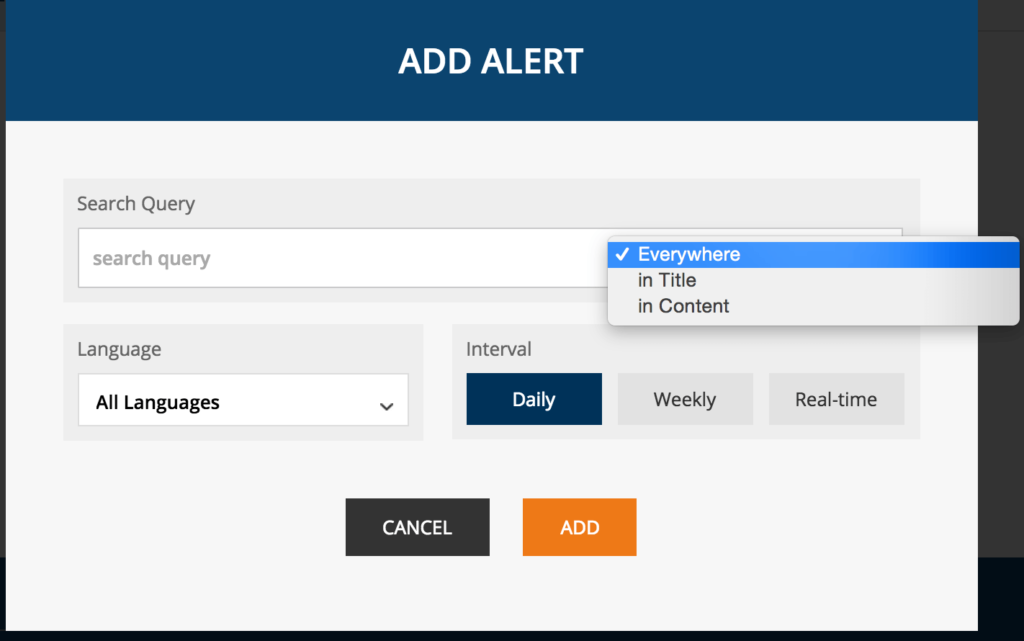
I think the main features of the Ahrefs dashboard are keyword rankings and content alerts. Although I don’t think [rankings are as important](https://larryludwig.com/why-your-keyword-rank-doesnt-matter-and-what-actually-does/) as they used to be back in the days of old-school SEO, they can be an interesting diagnostic indicator, and another data point to factor into your analysis. Since tracking is included with Ahrefs, it’s worth adding your critical keywords.
Alerts are useful for planning outreach and for competitive analysis. Target several phrases that are directly relevant to your website so that you can get a feed whenever a new piece of content is published around that phrase or keywords.

### Fun Hacks
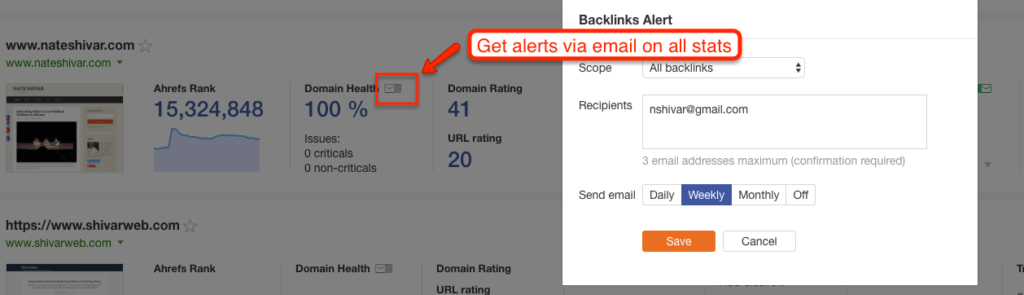
Email notifications are boring, but setting them up is a great way to hack your habits and discipline so that you can use Ahrefs’ data.
Unless you are extraordinarily disciplined, it’s easy to let monitoring and alerts slide. That’s why I love setting up [Google Analytics intelligence alerts](https://support.google.com/analytics/answer/1033021?hl=en) *and* Ahrefs’ email notifications. Set them up at a useful interval, and you’ll never miss an issue.

## Site Explorer (Link Data)
Site Explorer is Ahrefs’ bread and butter. It allows you to enter a URL and check that URLs backlinks – and, as of 2016, everything from organic keywords to social data to PPC data as well. This section will focus on the Link Data.
Ahrefs gets this data by running a crawler around the Web just like Googlebot. Every backlink checker tries to replicate how & where Googlebot crawls links. No backlink checker is Googlebot. And no crawler can cover the entire Web. [According to an analysis](https://moz.com/blog/big-data-big-problems-link-indexes-compared) by some of the best technical SEOs, Ahrefs is at the front of the pack.
Why? With Site Explorer, they not only have a large link index that closely replicates the Googlebot, they also extract & overlay additional data.
They pull out anchor text (the actual text within the link), backlink type, backlink follow status, social metrics, IP Address, and HTTP status. These additional pieces of information – paired with an enormous index of URLs – sets Ahrefs apart and turns it into a marketer’s suite.

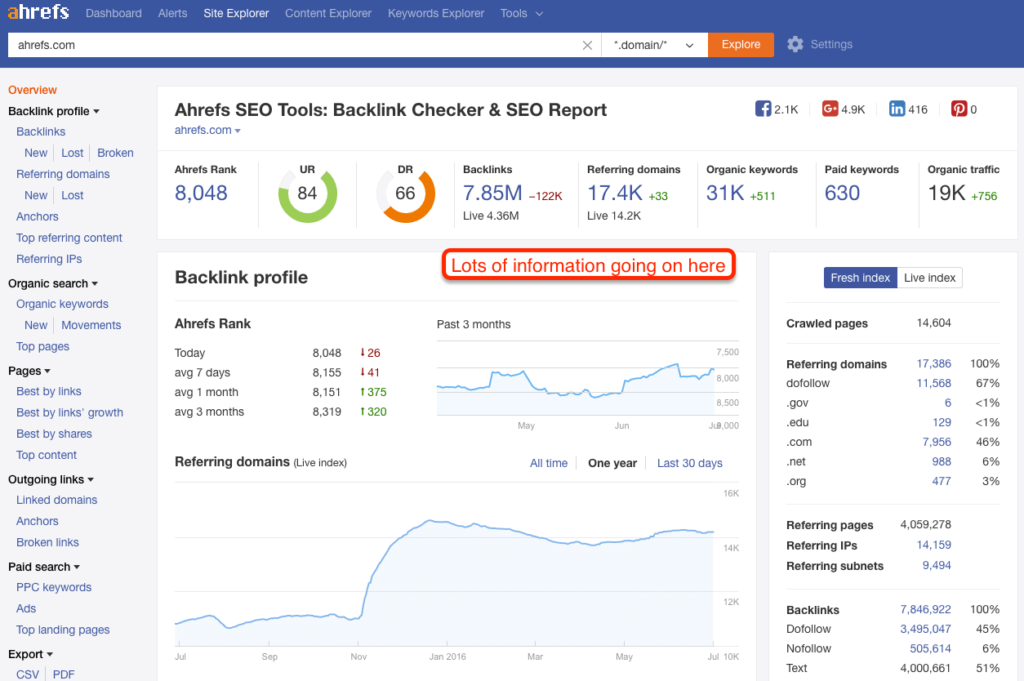
The Site Explorer, however, is also the most daunting of all the tools because there is so much information. So here’s what I think are the key features.
### Key Features of Site Explorer’s Link Data
The first key feature is *Inbound Links*. [Search engines use Inbound Links](https://developers.google.com/search/docs/beginner/how-search-works?hl=en) as a proxy for human endorsement. More links from trustworthy sites on relevant pages equal more organic traffic. The links feature allows you to pull all the links to a specific URL and then sift and sort to dig up the information you want.
The second key feature is *Top Content*. This feature allows you to look at how specific pages on a URL perform. You can sift and sort by links, shares, or Ahrefs weighted importance score.
The third key feature is *Top Referring Content*. This feature shows you what content on the Internet that has a link to the URL you are exploring has the most links/shares or estimated traffic. You can get a ballpark estimate of what links send referral traffic to your URL.
The fourth and last key feature appears in both Inbound and Outbound Links – and that is *Broken Links*. This feature shows you which links are linking to or linking out to a URL that no longer exists.
### What You Can Do With Site Explorer
Whatever you are used to doing with other backlink checkers, you can do with Ahrefs. There’s plenty you can do directly on the main screen, but keep in mind that you can also do an Export to Excel or Google Sheets if that’s your native work environment.
#### Determine What Marketing Tactics Are Working for Competitors
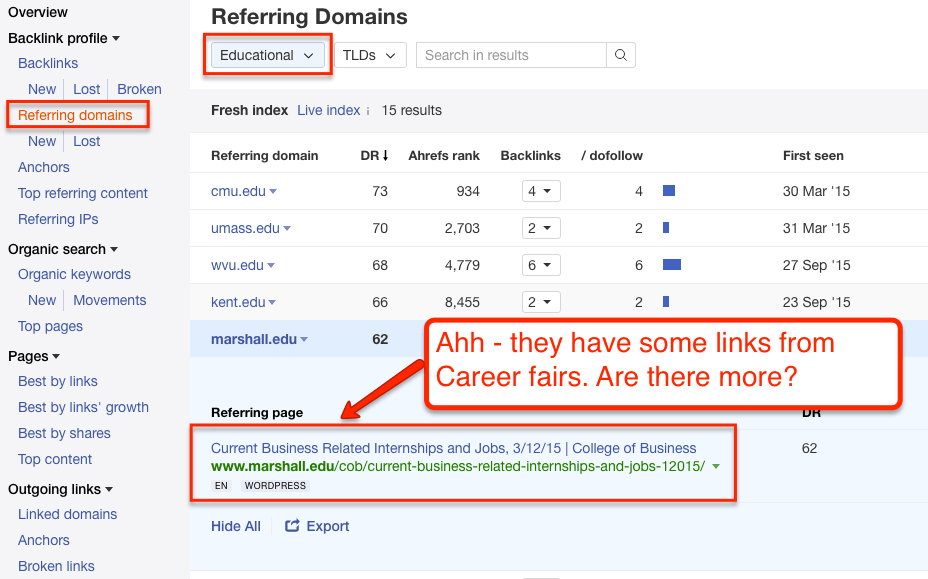
You can take your competitors – big and small – and see where they are getting their links from. Then you can go and try to get the same links. Or (and I recommend this approach), you can use the information to understand what has been working in the industry and use it to develop your own unique tactics.

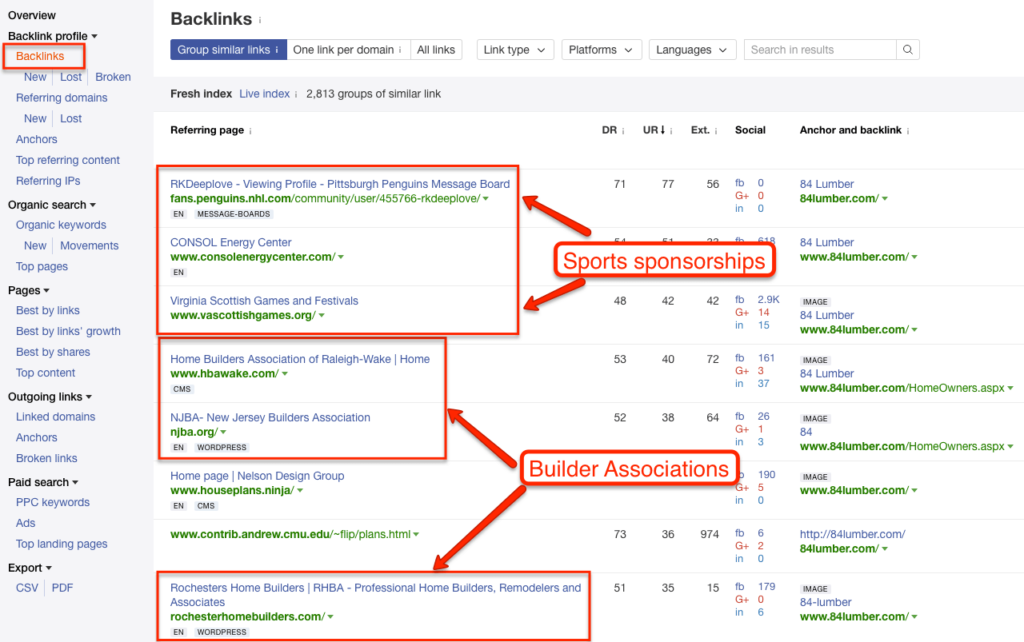
You can also look at Referring Domains, which will group the links by domain.

#### Determine What Content Does Well
We all browse the Internet in a “filter bubble.” Sometimes it’s hard to believe that a site or blog post that you love isn’t more widely shared.
Or at a much higher level, many marketers think that the content that generates shares will also directly generate links. [That perception is a myth](https://moz.com/blog/content-shares-and-links-insights-from-analyzing-1-million-articles).
You can use the top content report to understand exactly what works well. Understand what pages actually get links if you are building your organic presence. Understand what gets shared. Understand what type of content gets picked up.

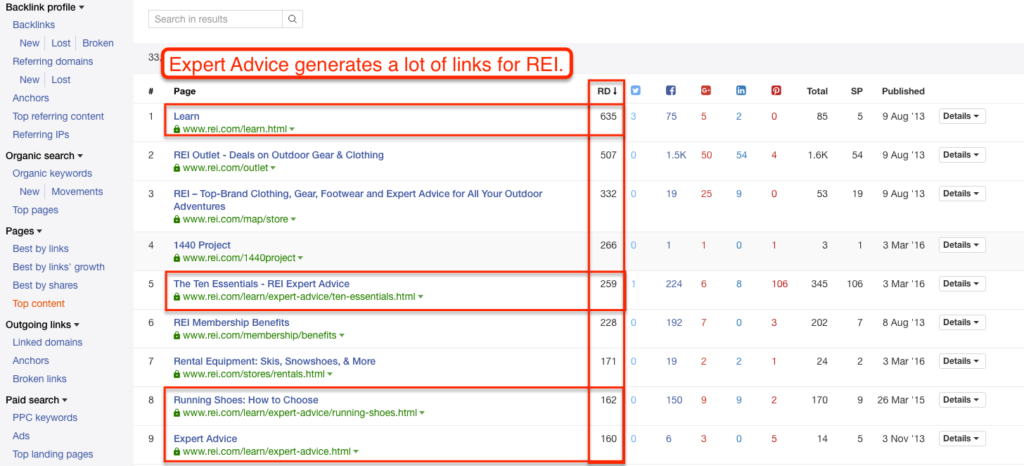
Do press releases matter? Do infographics actually work? What’s the one piece of content for competitors or industry publications that drives 80% of their links and shares?

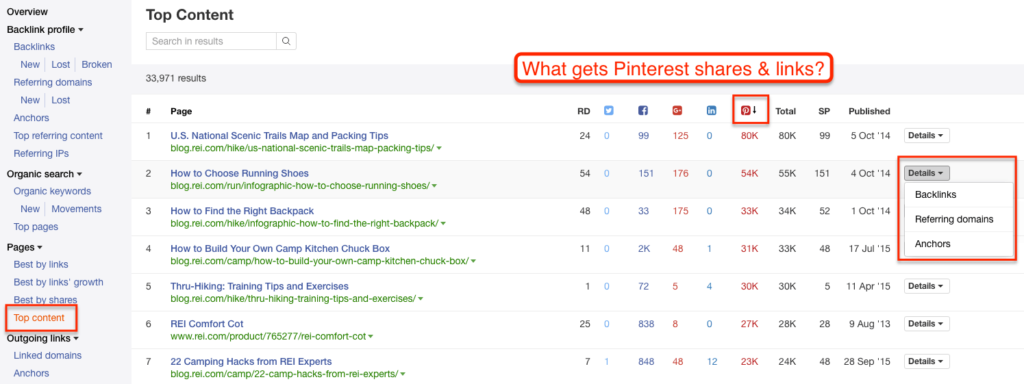
You can answer all those questions with the Top Content report.
#### Identify Low-Hanging Fruit / Easy Link Opportunities
Site Explorer has a Link Intersect report that allows you to input several URLs and learn which websites are linking to competitors (or industry sites), but not your site. You can get this same data by exporting links from several sites and running a few Excel tricks. But the ***link intersect tool*** does it quickly.
Does an industry publication have links to all your competitors, but forget to link to you? Is there a reporter that interviews your competitors but not you?

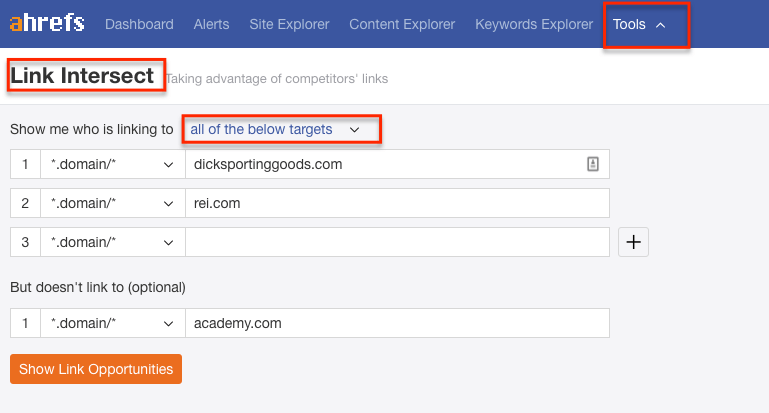

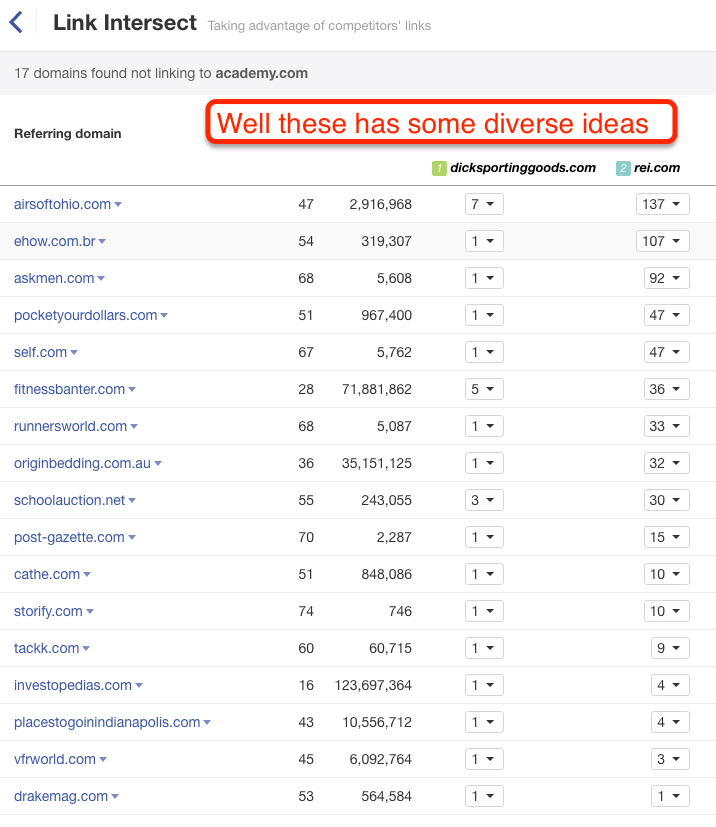
Find out with the link intersect tool and discover some quick wins that will bring you up to an even playing field.
#### Identify Influential Marketing Prospects
You can use a combination of the Top Referring Content report and the Inbound Links report to identify influential websites that are already linking to competitors and/or industry publications. But you can take it a step further and sort by Domain or URL Rating to figure out who matters the most. In a world of limited resources and time – priorities matter.

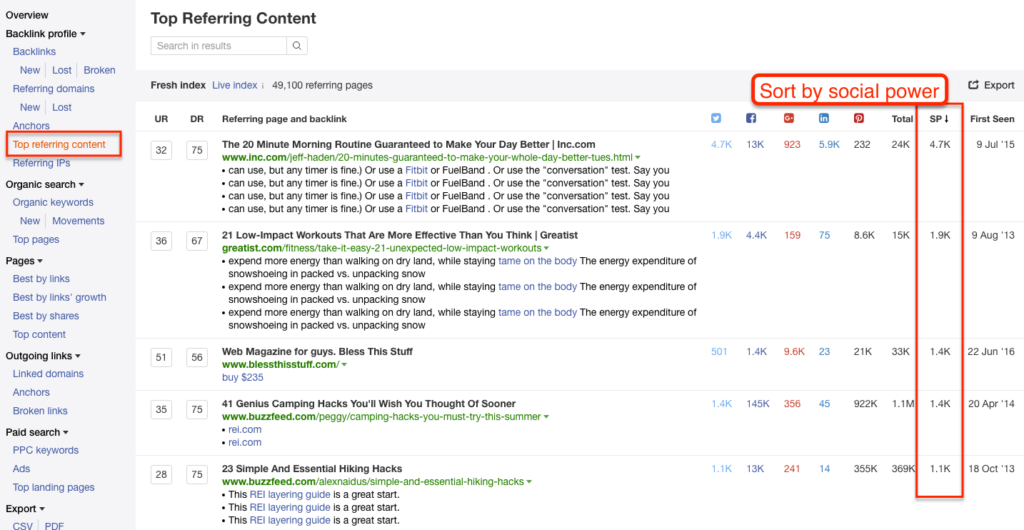
But be sure to note your goals…

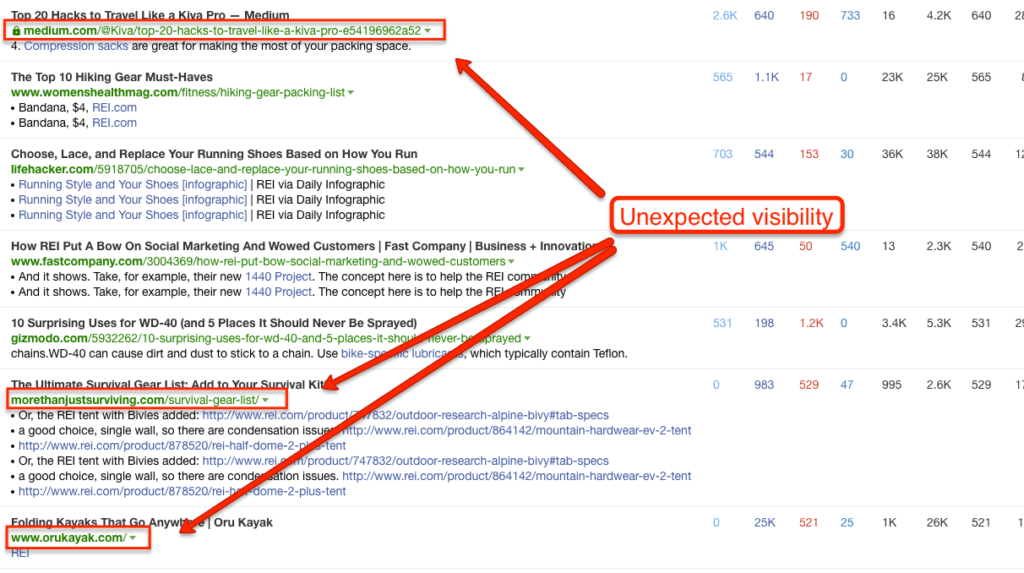
Sometimes the influencers are not in the markets you expect. In the example above – REIs biggest influencers are in the travel hacking & survivalist niches.
#### Conduct A Broken Link Building Campaign
Broken link-building is one of the most effective and consistent link-building tactics in SEO. The idea is to find resources that no longer exist, rebuild them, then pitch to get the links pointing at the broken resource switched to point at yours. Or, on the flipside, correct any broken links that your site has.

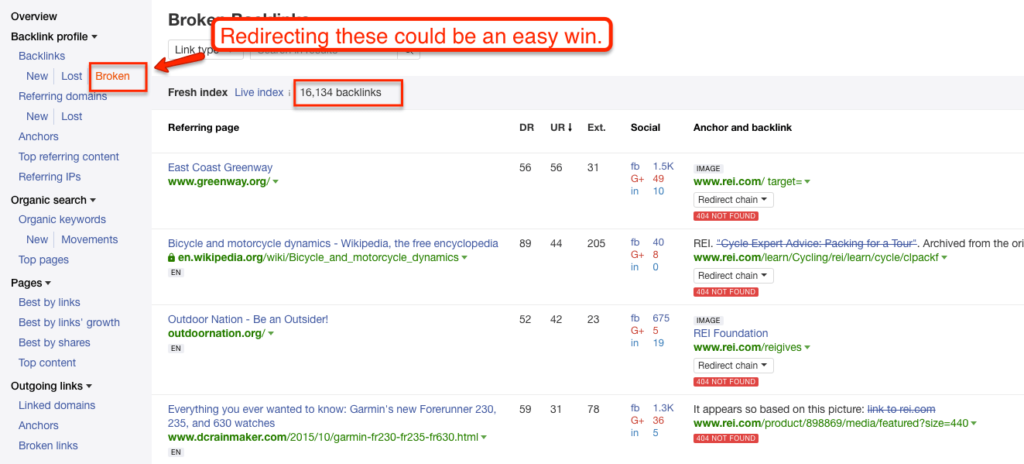
I’ve written a full [guide to Broken Link Building](https://larryludwig.com/broken-link-building-guide/). You can do broken link building manually, but Ahrefs’ broken link reports allow you to do broken link building efficiently and effectively.
### Fun Hacks with Site Explorer
#### Quickly Find Worthwhile Broken Links
Take a giant site and look at Broken Outbound Links. You’ll quickly get a list of broken resources. Take all those URLs, and look at Inbound Links. The sites that link to your broken URLs are prospects for a broken link-building campaign.

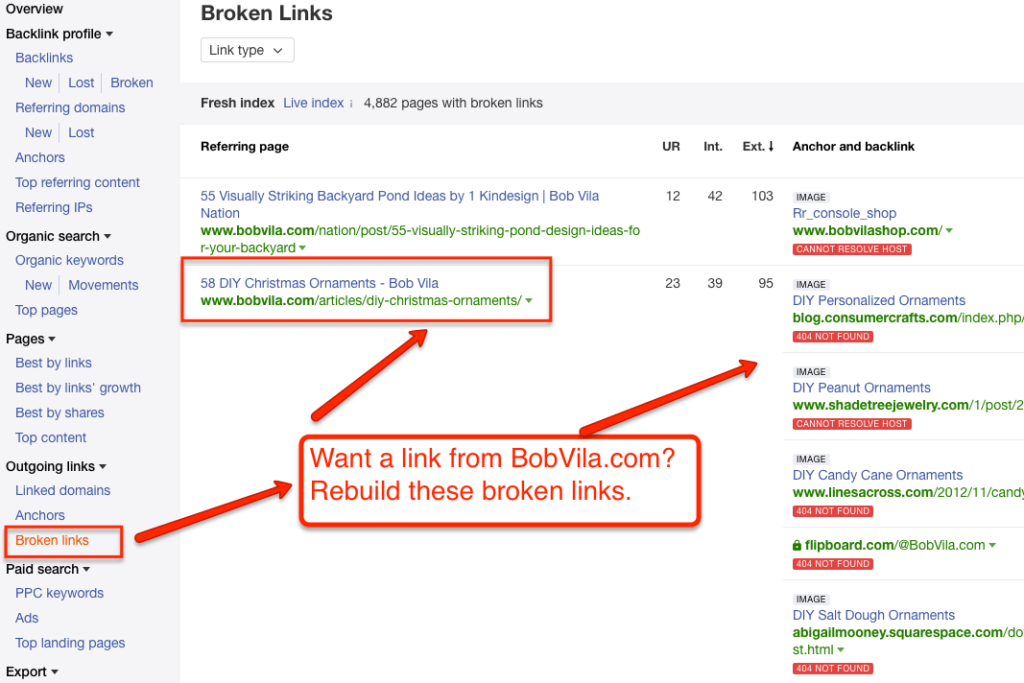
The inverse also works well. Take a giant site – one that has plenty of resource pages. Pull Broken Inbound Links. Then pull the links pointed to those URLs. That will be your prospect list for a Broken Link Building campaign.
#### Explore Wikipedia & Top Publishers
Pull link metrics on [Wikipedia URLs](https://larryludwig.com/how-to-use-wikipedia-for-seo/) related to your industry – remember that you can search by subfolder. Create marketing ideas around the results.

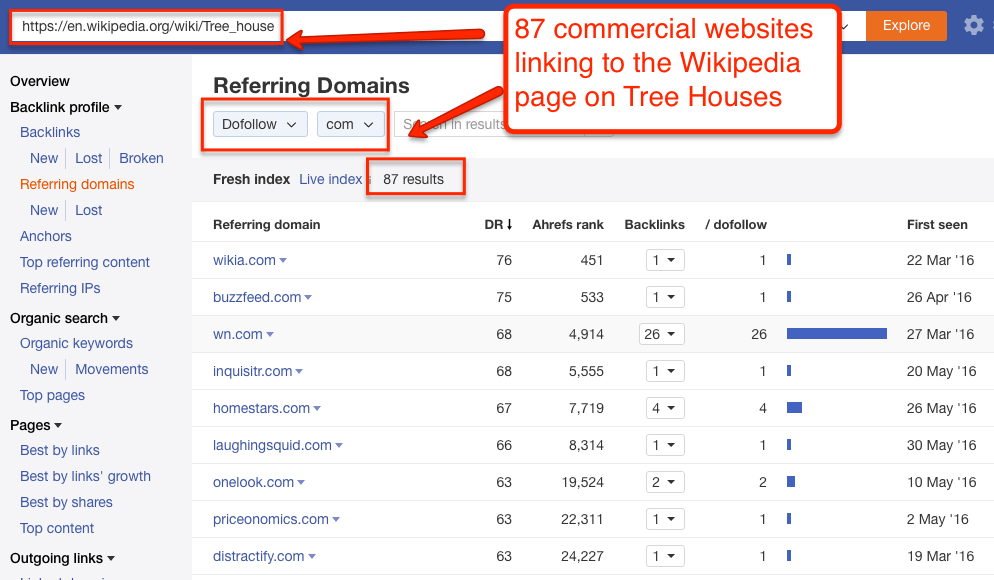
Here’s a video guide to how I use these tactics. Note that the design is old, but the tactics are the same.
Take a publishing focused site in your industry or related to your industry and pull a top content report. This will allow you to skip to content that you know works. It will also give you link opportunities that are outside of what your competitors have.

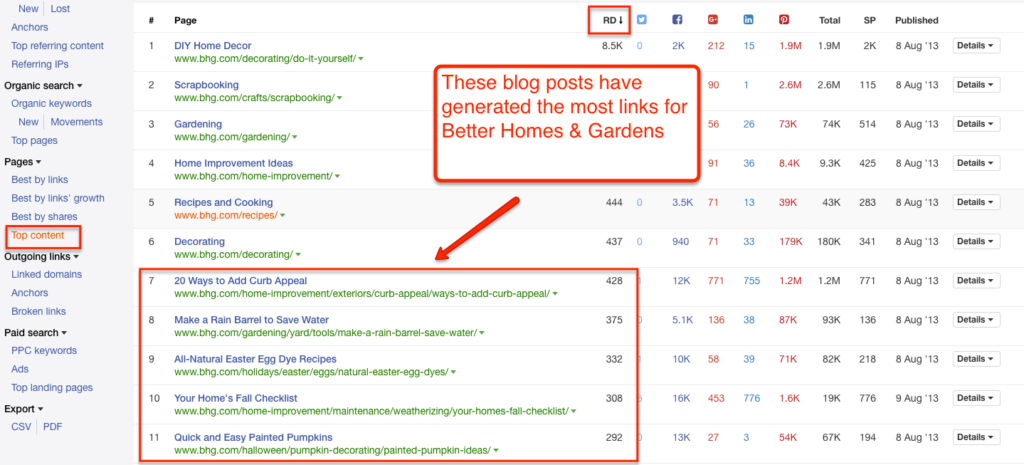
See this other video guide of mine.
Take an industry publication or industry-related Wikipedia pages. Pull a Top Referring Content report. You’ll likely get a list that includes mainstream media publications. Click through and do research on the journalist who linked out to the piece.

#### Narrow Results
As I mentioned with Wikipedia, don’t forget that you can search for just a [subdomain](https://larryludwig.com/what-is-a-subdomain/), a subfolder, or a specific URL in Site Explorer.

## Site Explorer (Search Data)
Site Explorer’s Search Data (formerly Positions Explorer) shows what keywords a domain is ranking for, then provides estimates for what kind of traffic that domain and its pages are getting organically.
It also tracks paid positions. Think of it like rank tracking for every domain on the Internet.
Site Explorer crawls Google search results pages (SERPs) and aggregates the data into something you can search. They also pull search volume from Keyword Planner. Then it triangulates the organic traffic going to a domain based on standard click-through rates per position.
A couple of caveats – and this goes for every “traffic estimation tool” including SimilarWeb, Compete, SEMRush, etc – everything in this tool is a ballpark estimation. I do not recommend you use it for reporting. There are many variables in play – each with a lot of margin of error. Don’t let the exactness of the numbers lull you into a sense of certainty. Ahrefs pulls keyword data fast & frequently, but be sure to check key rankings manually & against Keyword Planner.
With that said, I’ll go ahead and state that this is Ahrefs’ most underestimated tool. Either that or the marketers who know about it aren’t talking about it. Regardless, here we go.
### Key features

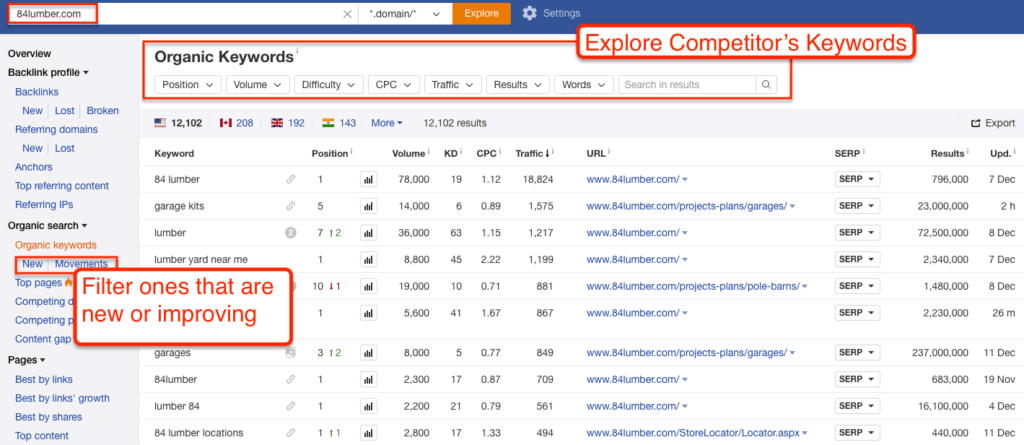
The most obvious feature is Ahrefs’ estimation for how many significant keywords (i.e., they have search volume) a domain is ranking for and their estimation of traffic based on those keywords.
That overview feature is interesting, but again, not super-useful without some context.
The feature that provides 80% of this tool’s value is the Top Pages feature under both Organic and Paid sections.
The other notable features are the PPC Ads and Top Competitors, which shows what domains most frequently share the same search results as the domain you’re looking for. And the PPC Ads show you a sample of PPC ads in the SERPs.
### What You Can Do With Site Explorer’s Search Data
#### Understand Top Content for Other Websites
Although the exact numbers in Site Explorer are not accurate, the relationships and differential among the pages & keywords are accurate.
In other words, even if a given URL doesn’t drive XX visits per month, if it is listed as the Top Organic Page – *that position is accurate*. The difference in traffic between the top URL and the second URL is accurate as well – both for a couple reasons.
First, even if the traffic numbers aren’t exactly right, their relative volumes are correct. Head terms show more volume than long-tail terms. Second, on the landing page level, nearly every site’s traffic will conform to the 80/20 pattern – 20% of pages will drive 80% of the traffic. And so on for every given set of URLs.
Why does this matter?
*This data is invaluable because you can discover and build off a competitor or other industry websites. You can learn from all their content and go straight for the best terms.*

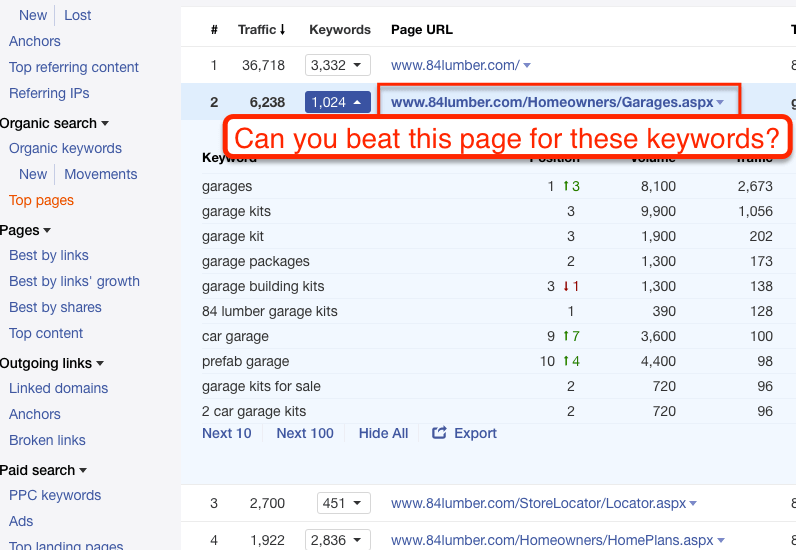
In the example above, you’ll see that for whatever reason, this company gets almost all their non-brand organic traffic from a (not so special) Garage Kit category page. It would make an excellent target for anyone in that industry.
Or you get to find out that your favorite website’s biggest winner is a throwaway post that happens to rank for a really broad but non-competitive term.

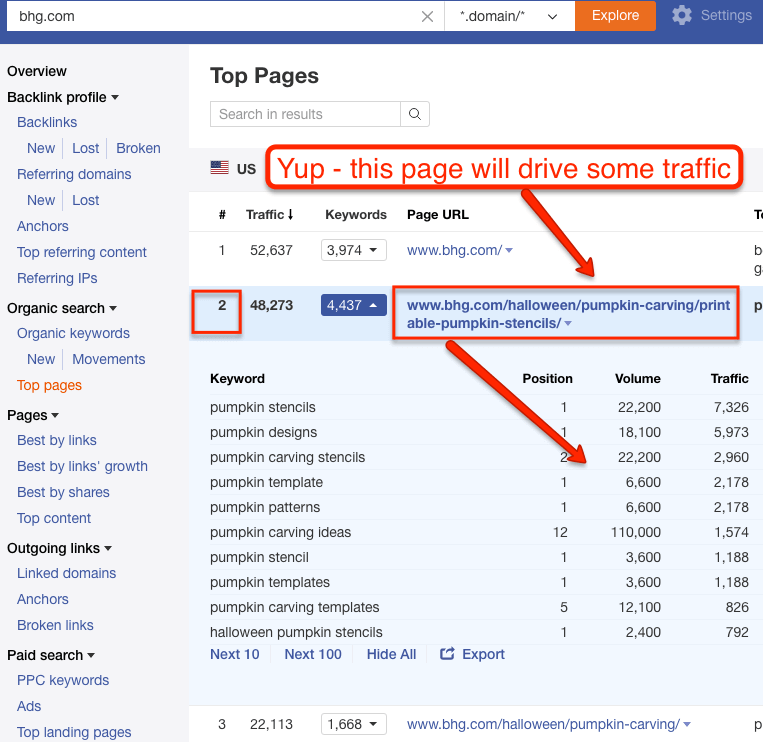
Either way, you get to learn from your competitor’s best (and worst) content. Ahrefs did a video tutorial on this feature –
#### Do Better Keyword Research
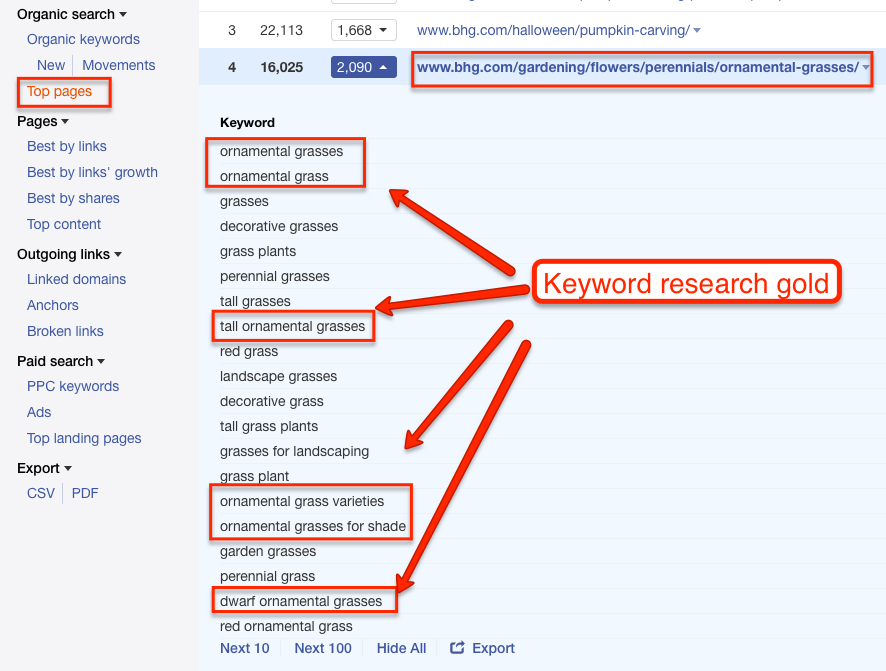
The toughest challenge of keyword research is *thinking laterally*. It’s hard to make the jump from different variations of a single obvious keyword to complementary or semi-synonymous keywords that reflect the real intent of your audience.
For example, it’s the insight that helps you make the leap from “winter gloves”… “gloves for winter”… “gloves for cold weather” to “mittens.” Or if you’re in the plumbing industry, making the leap from “outdoor faucet” to “sillcock.”
Ahrefs’ Position Explorer solves this issue by allowing you to take top pages and viewing what other keywords those pages are ranking for. It gives you a bigger seed list & introduces more diversity into [your keyword research process](https://larryludwig.com/keyword-research-for-beginners/).

#### Do Better Competitor Research
Usually, your competitors in real life are very different than your competitors in any given search result. It can be hard to track down who your *SERP competitors* are without a bit of help. And that help is Ahref’s Competing Pages, Competing Domains and Content Gap tools.

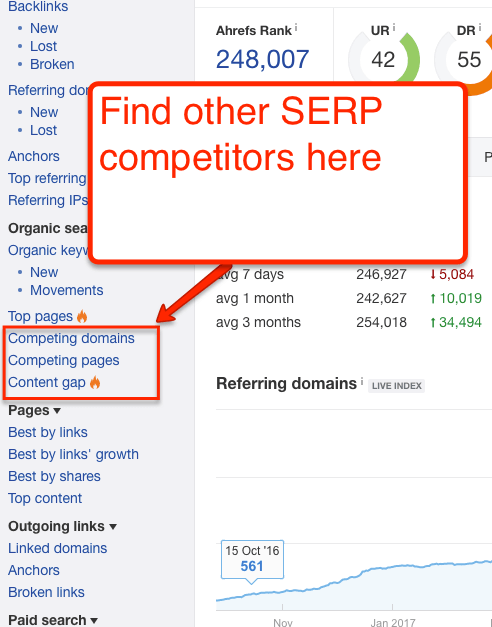
These tools are huge. If you know one of your SERP competitors, you can find out all of them. From there, you can figure out what content you can target more effectively.
#### Steal Ads
You can use the Paid section of Positions Explorer to swipe ad ideas from competitors. If you can see the angle/benefit that competitors are using, you have a direction to either copy or play off or test both.

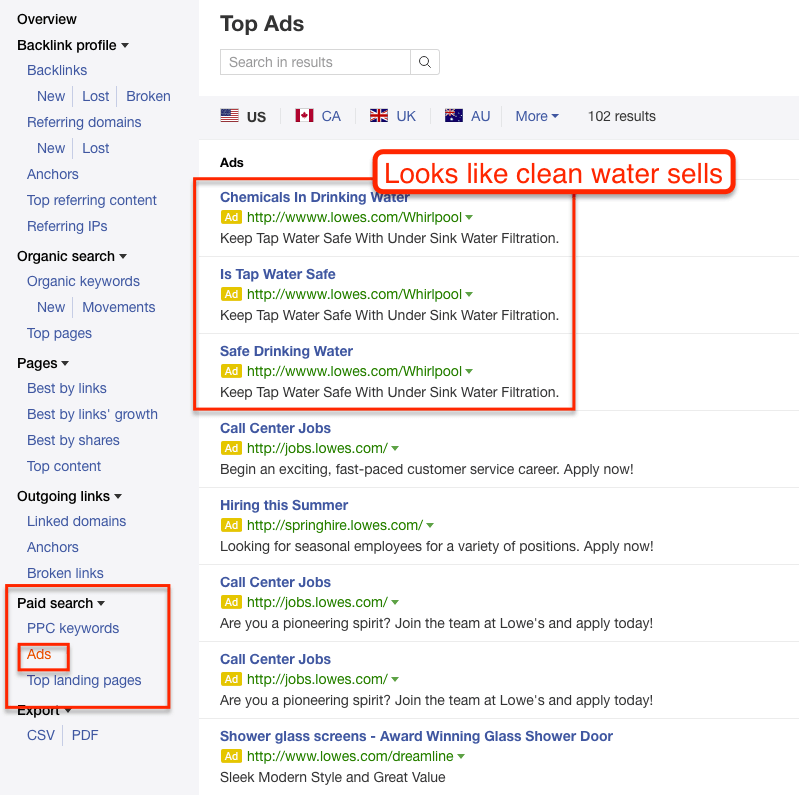
#### Find Competitors for Keyword / Link Research
Most SEOs are familiar with telling clients that their SERP competitors are different from their real-world competitors.
But outside of scraping a few head or vanity terms, it’s fairly difficult to find SERP competitors systematically. You can use Ahrefs’ Positions Explorer to at least add a few new ones to the mix.
### Fun Hacks
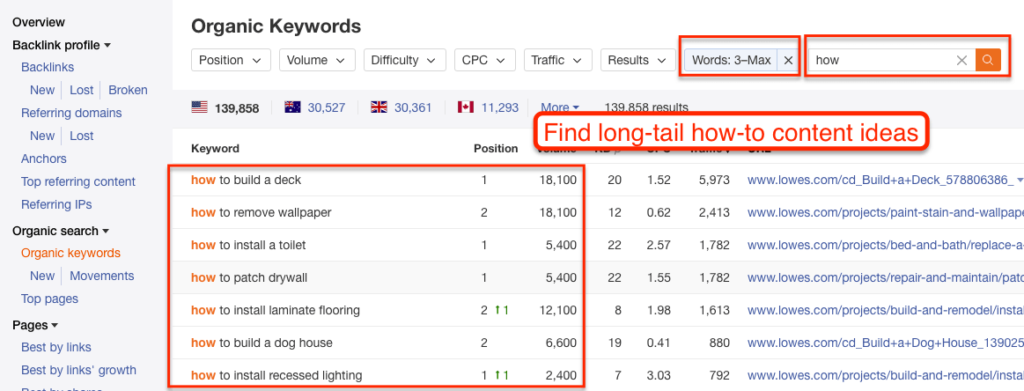
For marketers who love Excel and/or Google Sheets, you can export keywords under both Top Pages and Organic Keywords.
If you want to remove brand & noisy terms, go to Organic Keywords and *filter by phrase length* and by *keyword included*. Longer phrases will often give you more insight.

## Content Explorer
Ahrefs’ Content Explorer shows the most shared content around any topic. It’s like Site Explorer’s Top Content report…but for the entire internet. For marketers who read a bit – it’s basically BuzzSumo but you get it in addition to Ahrefs’ link data.
But like Site Explorer, the key to Content Explorer is understanding the features’ functionality. That will take it from a trivia tool to a marketing tool.
### Key Features
The key – and really only feature of Content Explorer – is the ability to search by topic. You enter a phrase and it tells you the most shared/linked to content about that topic across the Internet.
In the original versions of Content Explorer, you would quickly notice that there’s a wide gulf in the results you get. If you enter a broad topic, you get a lot of meaningless noise (re-posted clickbait stuff). If you enter a specific topic, then you’ll get very few results.
Ahrefs has dramatically improved the tool so that you can easily find relevant content. However, you can find *exactly* what you want when you understand how to narrow & curate the results. And that is where Boolean Operators and Advanced Search filters (ie, “search everywhere / in title / in content”) come in.
I can feel your excitement.
But really if you’ve ever used [Google Search Operators](http://www.googleguide.com/advanced_operators_reference.html) like site: or even putting a phrase in quotes, you’ll know how you use these. Just navigate to Advanced Search in Content Explorer.

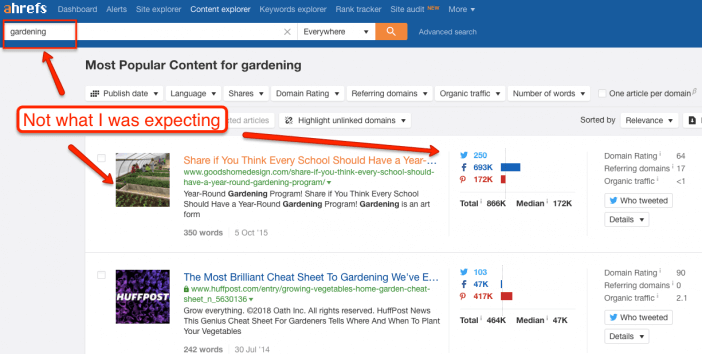
The ones I’ve found most useful are: exclude a word, filter a site and define date range (especially for seasonal ideas).
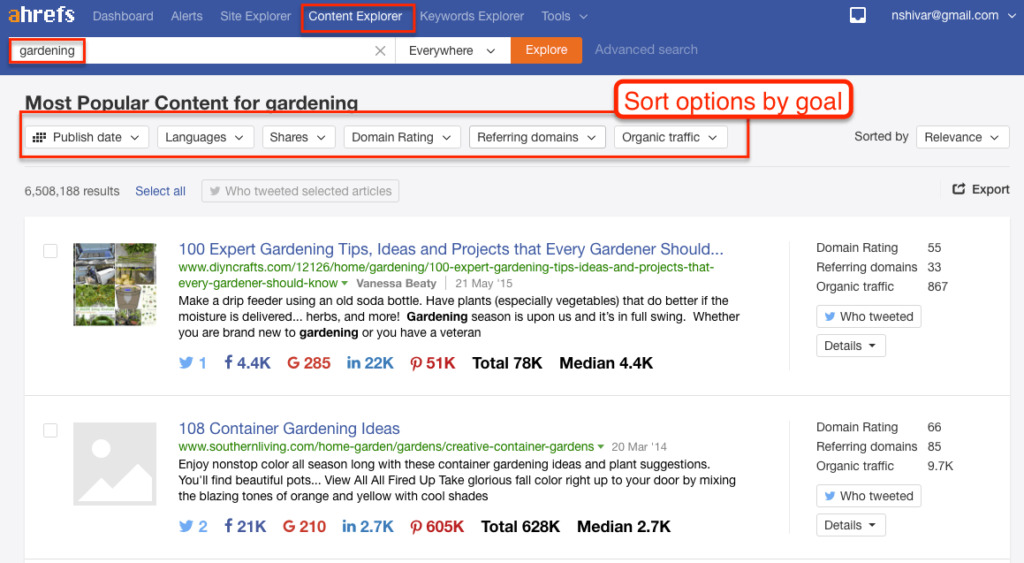
To use boolean operators effectively though, you have to approach Content Explorer with a goal in mind. It’s fun – and sometimes useful to just click around – but it’s most useful when you are looking for a specific piece of data to support a strategy.
For example, you want to create a blog post that drives Facebook likes. Or, you want to create an infographic that drives links. Or, you need to understand what type of Christmas content stands out in December. If you have a specific goal in mind, you can mix, match and combine boolean operators to focus your search.

### What You Can Do With Content Explorer
#### Inform PR Strategy
“Press release and pray” is not an effective PR strategy, especially if you want a quality pick up from a major publication.
The best angle for getting a press pickup is that the piece will bring in readers. You can use Content Explorer to figure out what pieces do well and what type of content a publication likes.

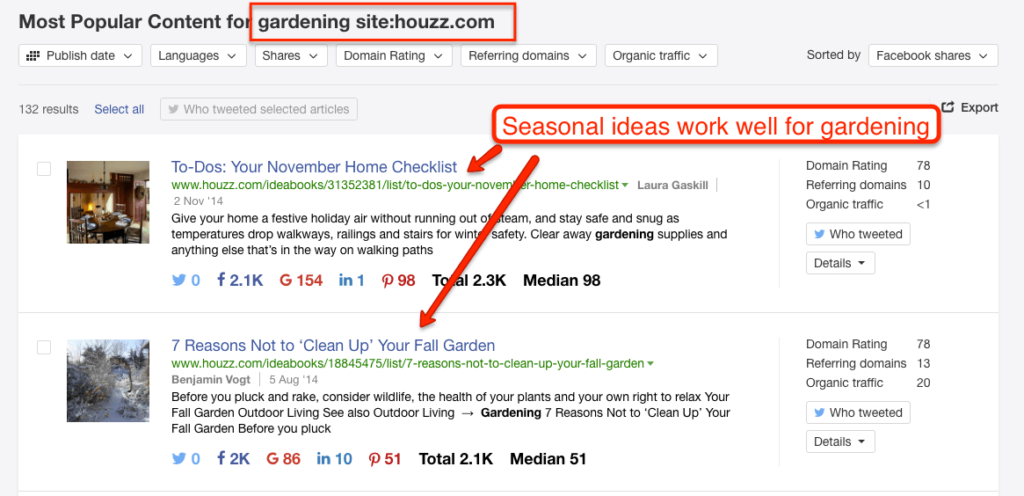
You can even drill down to figure out what a specific journalist likes to write about – and what content they were most successful with.

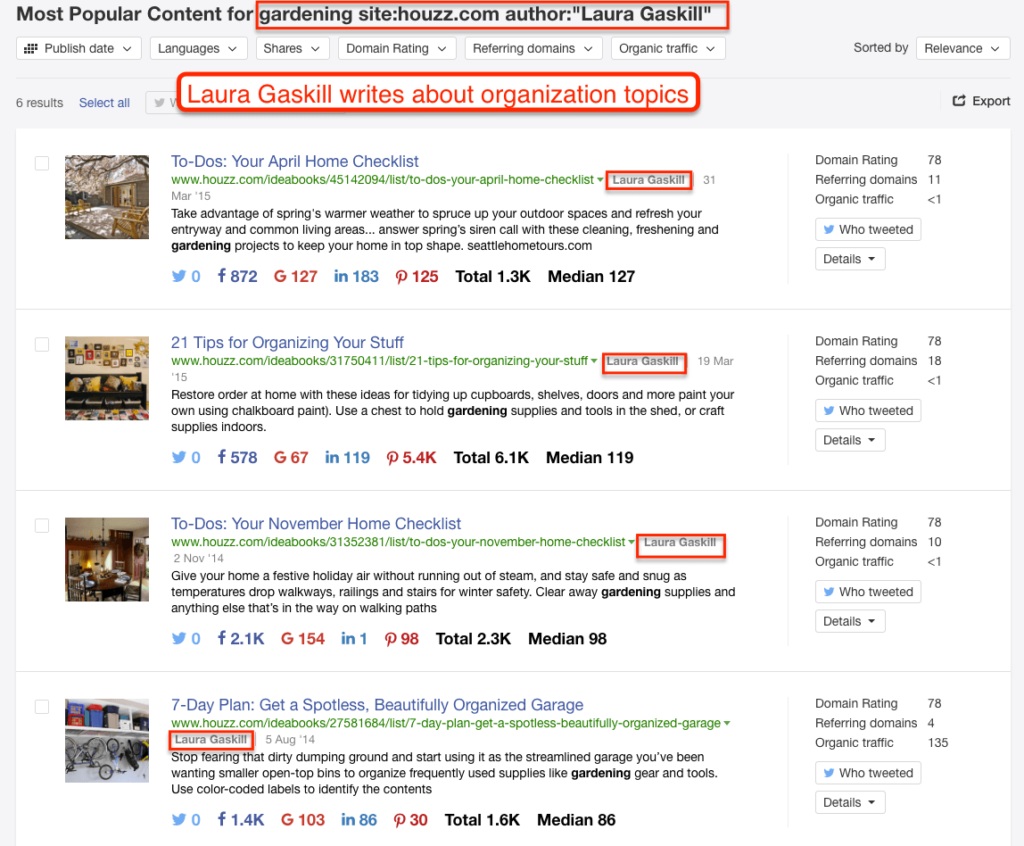
In 2013, I got a [personal blog post to go viral](https://www.bloomberg.com/news/articles/2013-07-11/-why-is-boston-so-racist-and-50-other-city-stereotypes-revealed-by-google-autocomplete) with exactly 1 email pitch to 1 journalist. I knew what the journalist wrote about. And I knew what drove page views for them. It was a perfect fit for both of us.
\*Note – this feature is still in the early days for Ahrefs. You’ll get the most out of it by pairing it with Google search operators.
#### Understand a Topic
“The [curse of knowledge](https://en.wikipedia.org/wiki/Curse_of_knowledge)” is a concept that says the more familiar you are with a topic, the less you understand how to think about a topic from the perspective of those less familiar.
And it’s a huge problem in content marketing. You can use Content Explorer to understand what angles, language, and facts resonate with people on any given topic.
#### Look for Top Performers’ Commonalities
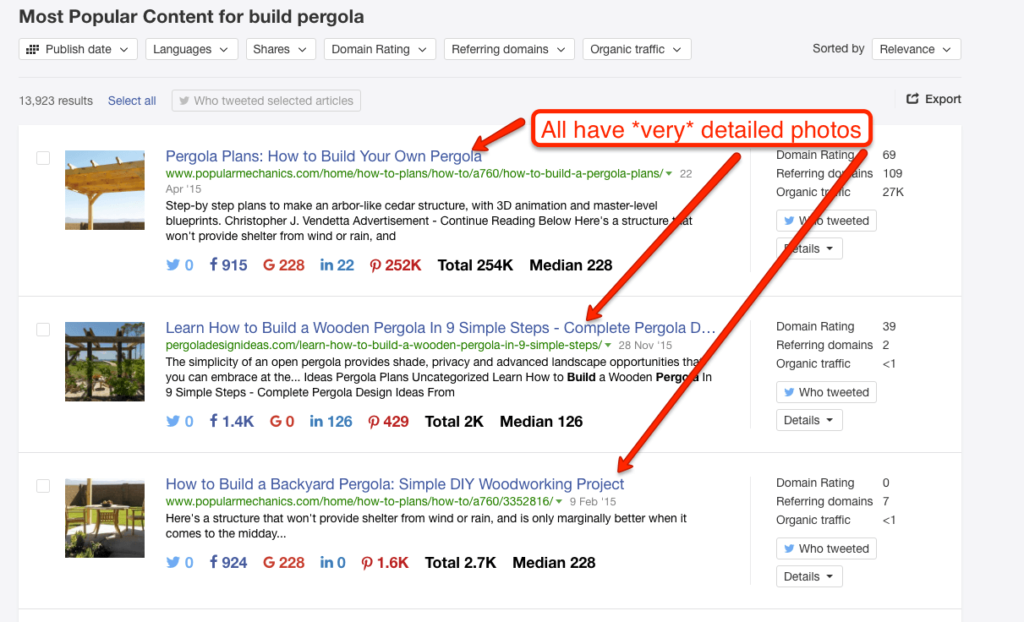
On a related note, you can use Content Explorer to figure out what form your content should be in. Many times a text post won’t work but a video will. Or an infographic will work in one industry but not in another. For example, if you run Content Explorer and see that every top performer has a video included…you should probably include a video in your content.

#### Set Benchmarks
Every company would love for a positive story to “go viral” but that term is basically meaningless because it can mean anything to anybody depending on context and a dozen other factors.
In a [study of content by Moz and BuzzSumo](https://moz.com/blog/content-shares-and-links-insights-from-analyzing-1-million-articles), they found that 75% of content got zero shares and zero links. Zero.
And then, on any given day, BuzzFeed will be able to manufacture 1 million-plus shares across every platform.
Purina Cat Food might be able to create a piece of content that generates hundreds of thousands of shares because they are a huge brand operating in the *cat* market.

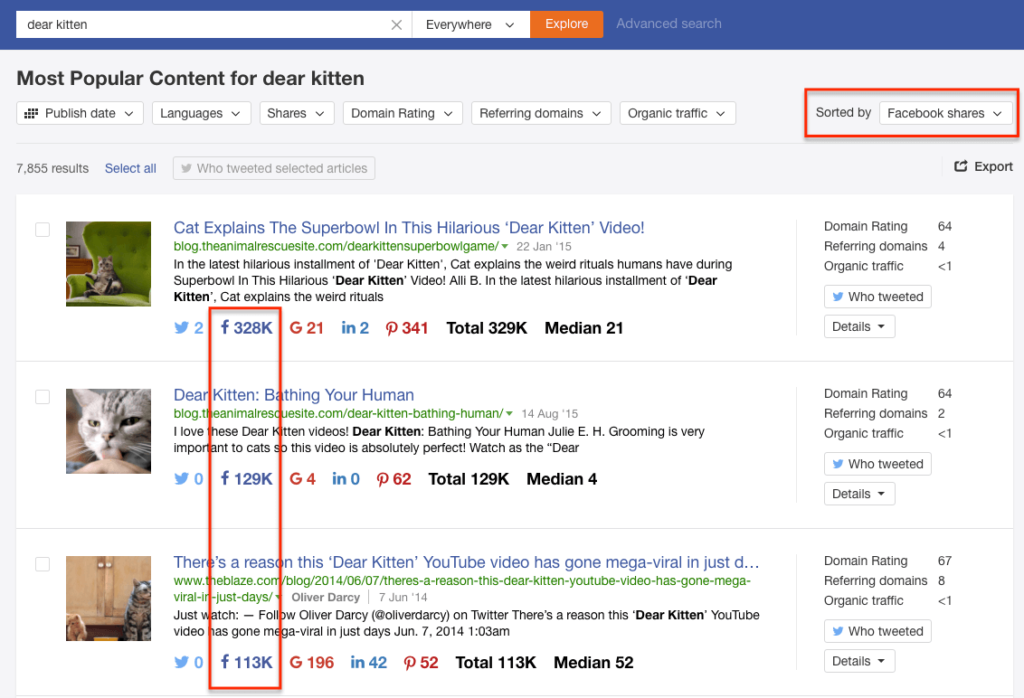
GE is an even bigger brand than Purina but they won’t get a million shares because they make stuff like aircraft engines.
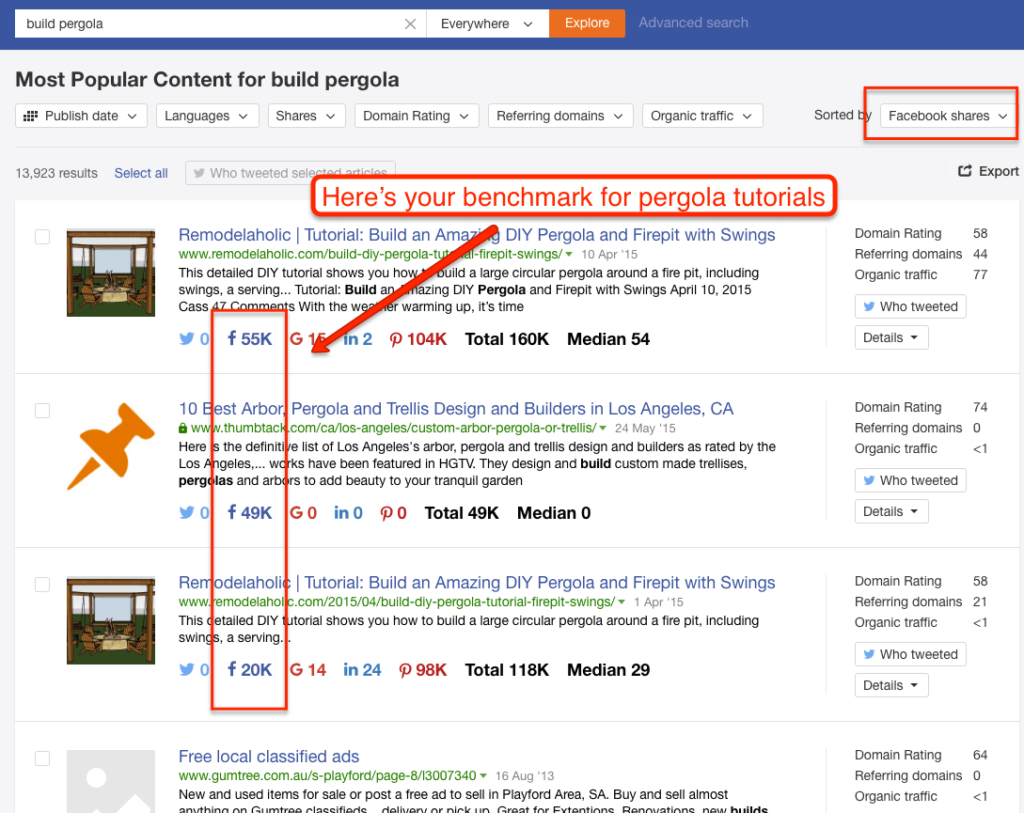
Either way, Content Explorer can at least give you a ballpark benchmark for a successful campaign. If your goal is shares and the best campaign in your industry generated a 1000 shares – “success” might be defined as 100, not 10,000.

#### Understand Platform Types & Goals
[As Moz & BuzzSumo found in their study](https://moz.com/blog/content-shares-and-links-insights-from-analyzing-1-million-articles), links do not always correlate with shares. And shares on one platform do not always correlate with other platforms, e.g., Facebook Shares vs. Twitter Tweets.
Use Content Explorer to figure out what content fits your marketing goals. For example, if it’s a campaign to drive organic traffic, sort by links – not by overall shares.
### Fun Hacks
#### Click-through to Author
On the Content Explorer results, you can click through to look at a specific writer. This is useful for tracking down guest post opportunities or finding a freelance journalist who writes at a range of publications.
#### Export Twitter Sharers
Also on the Content Explorer results, you can view & export people who have tweeted each piece of content in the last 7 days (the 7 days is to ensure you’re only getting people who remember Tweeting it – you can still get a larger export from Topsy). This opens up a whole new world of Twitter marketing opportunities.

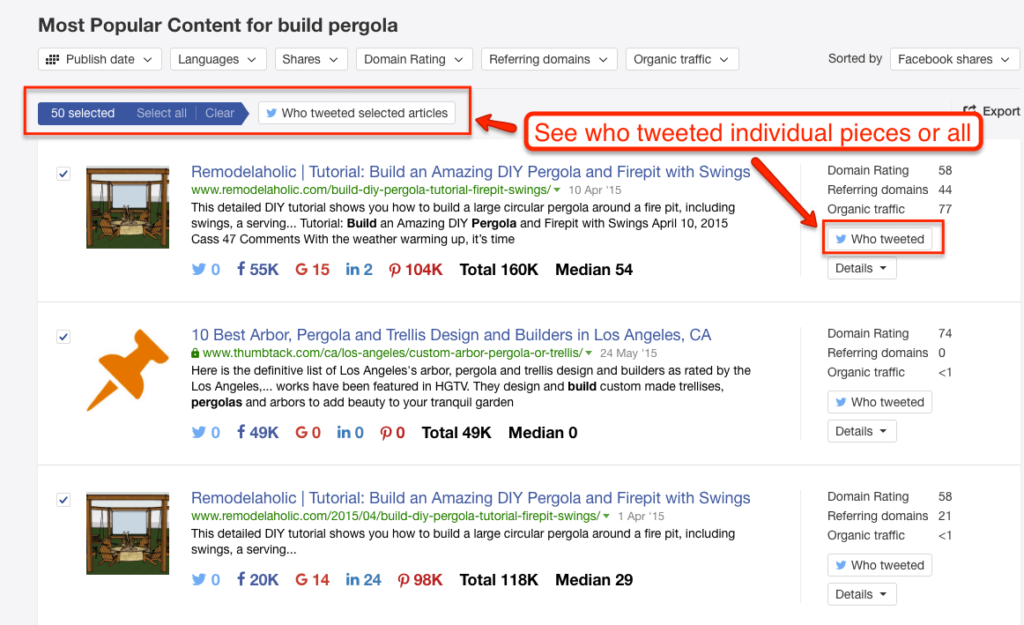
But the most immediate uses are to:
- Create a custom audience for Twitter advertising. If you know they tweeted one piece of content on a topic, they are probably interested in another. I did this for a [small giveaway experiment](https://larryludwig.com/using-giveaways-for-marketing/).
- Create Twitter lists for manual outreach later. If you identify a few highly influential accounts, you can set them aside for further research and outreach.
- Take the data and send it to one of the dozens of [Twitter tools for analysis of personas](http://www.bamboochalupa.com/episode-20/), related interests, best time to tweet, related followers, etc.
\*Note – I’ve found this feature to be amazing but still buggy.
#### View URL Data
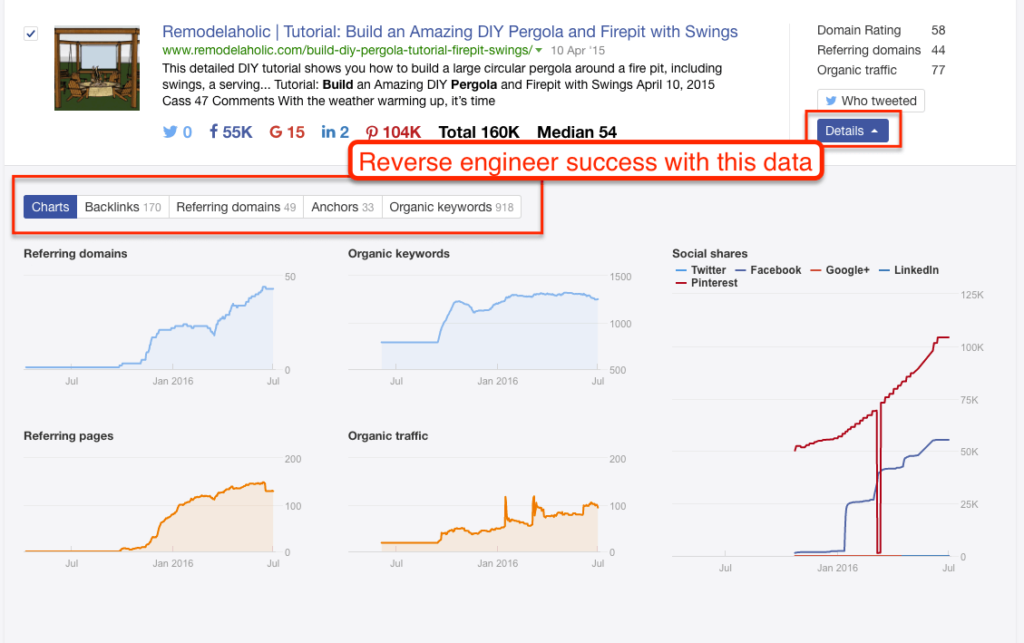
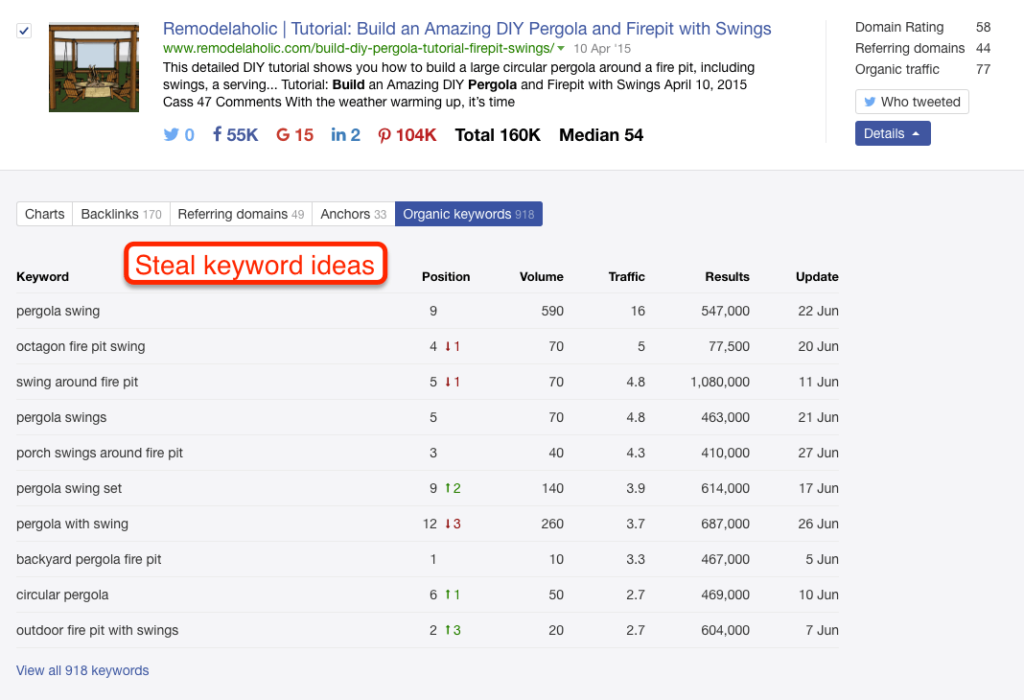
Lastly, in the Content Explorer results, there’s a little dropdown menu that will show you detailed link data and the keywords that the content most likely ranks for. That data is invaluable for planning a well-rounded piece of content.


## Keywords Explorer
Keywords Explorer is Ahrefs’ tool to pull and manipulate keywords generated in Google Search Autocomplete (aka type a keyword, hit space but not enter). For SEOs who know their tools, it’s like Ubersuggest or KeywordTool.io.
In November 2016, they launched a huge new revision called Keywords Explorer 2.0.
It’s the most useful keyword tool that I’ve seen yet. I’ll cover a few key ideas here, but I highly recommend reading their [comprehensive introductory post](https://ahrefs.com/blog/keyword-generator/) to get a sense of all the definitions & features.
### Key features
There’s one key feature of this tool: pulling a ton of keyword variations from Google Searches in a very similar way to Google Autocomplete. [Google Autocomplete is one of the most useful keyword research tools](https://www.seerinteractive.com/blog/spark-new-ideas-with-these-keyword-research-toolstips/) because the variations not only give you longer-tail, more specific terms to target, but they also provide a window into user intent.
With the launch of Keywords Explorer 2.0 – Ahrefs pulls in ClickStream data. ClickStream data gets a little technical – if you are interested, you can [learn more about it here](https://moz.com/blog/clickstream-data-revolution). For our purposes, it’s sufficient to say that Ahrefs’ keyword data is accurate enough to make marketing decisions with.
In other words, don’t assume that the exact volumes are correct, but you can assume that they are accurate enough to decide what you should target & prioritize when [choosing target keywords](https://larryludwig.com/how-to-use-keywords-on-your-website/).
### What You Can Do With Keyword Explorer
Either way, in the meantime, you can quickly do *a lot of interesting keyword research* all within Ahrefs. Take a broad keyword, and run it through Keyword Explorer to get a lot of useful variations on your broad keyword.
#### Do In-depth Keyword Research
Contemporary keyword research goes beyond finding search volume and modifiers (e.g. “blue winter gloves” has 1000 searches per month, and we should also mention “navy blue winter glove”, “light blue winter glove” on the page).
Those details are important. But more important now are understanding things like –
- what broad topic is the keyword is a part of
- what type of page the typical searcher wants to see
- what lateral & complementary terms are relevant (e.g., “blue mittens”)
- what type of site the searcher wants to see
- what terms people also ask before and after that specific query
- etc, etc, etc
This doesn’t mean that keyword research is difficult or mind-blowing. But it is usually tedious to do it correctly at scale.
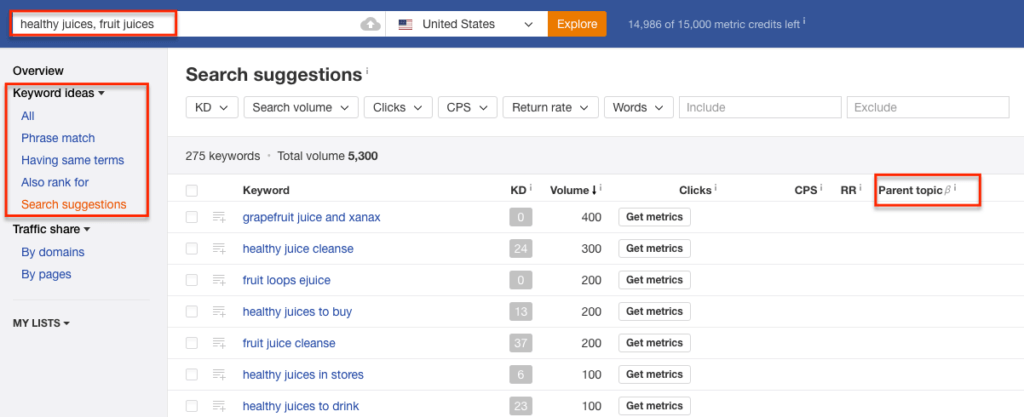
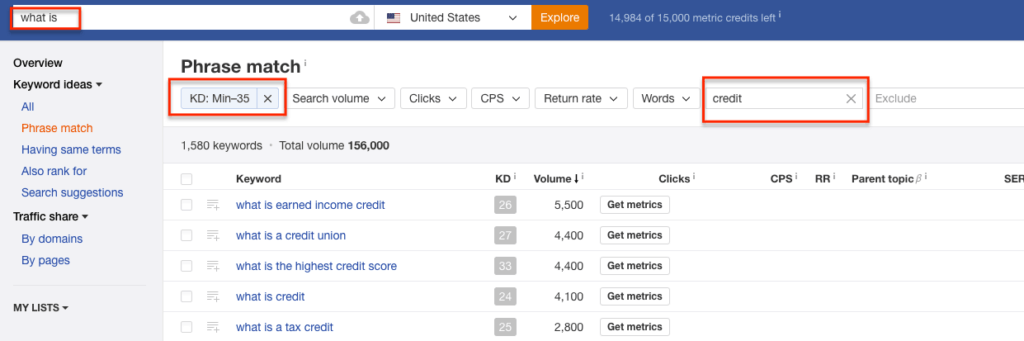
Ahrefs Keywords Explorer speeds up the process by integrating full SERPs, phrase match ideas, Parent Topic, Search Suggestions, and pages also rank for directly in the Dashboard.

#### Judge Keyword Difficulty
One of the toughest (and tedious) parts of keyword research is figuring out whether your website could rank for a certain theme of keywords.
There’s no sense investing in new content or high volume topic targeting if there’s no way that you can win. And even if you can compete – it’s critical to know what you’re going to need to compete (e.g., links to that page, answer box considerations, etc).
[Judging keyword difficulty is a skill that is not necessarily complicated](https://larryludwig.com/how-to-judge-keyword-difficulty/). It’s mostly just tedious. For non-SEOS, it requires pulling link data and really looking at each SERP. Veteran SEOs can quickly open up a SERP, scroll through and make a quick judgment call. But even that takes time when you are considering thousands of keyword opportunities.
The Keyword Difficulty score is *extremely* useful to make the “first cut” in your keyword research process. Ahrefs uses a 0 to 100 scale based on their link data to score what it would take to rank for a certain keyword. [Ahrefs explains this metric here](https://ahrefs.com/blog/keyword-difficulty/).
Within the Dashboard, use this feature heavily to sift & sort not only low-hanging fruit but also to create a realistic content promotion strategy to get your content visible.

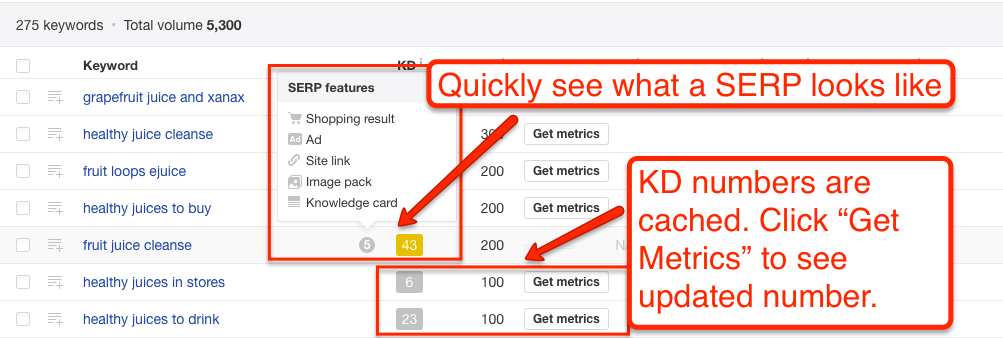
#### Estimate Return on Investment
Predicting a return on investment for SEO is notoriously difficult (and arguably impossible). But you have to [have something to help prioritize opportunities](http://www.bamboochalupa.com/episode-30/) – even if you can’t say exactly what those opportunities will bring.
Keywords Explorer’s number on Clicks, Return Rate and Clicks per Search are ballpark accurate enough to make these sorts of judgment calls.
With Return Rate and Clicks per Search – you can get a good snapshot of what kind of visibility and traffic levels you’ll get if you rank well for a specific keyword.
#### Explore Different SERP Features
Google Search Results (SERPs) have not been a collection of “10 Blue Links” in years. And everyday since 2016 or so, Google has been customizing more and more of the SERPs with special features such as Rich Answers (Featured Snippets), Knowledge Graph results, and People Also Ask boxes (Related Questions) and more.
Many of these are far more valuable than a [\#1 ranking any day](https://larryludwig.com/why-your-keyword-rank-doesnt-matter-and-what-actually-does/). The trouble is that these results are so highly personalized that it’s hard to get any large scale visibility. Ahrefs’ Keyword Explorer can provide some – and definitely enough to direct your manual research.

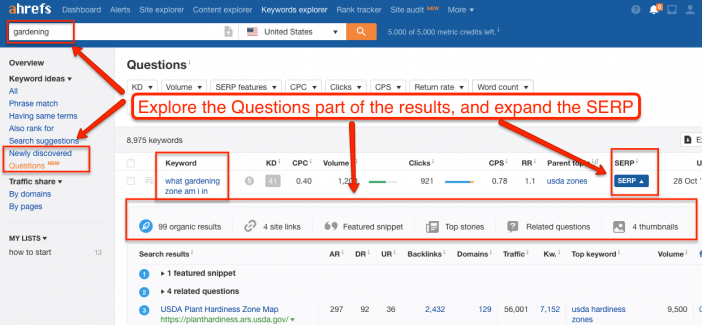
After dropping in a keyword, explore the Questions tab and expand the SERP to explore what all special features show up. You can also see what “parent topic” a keyword is in to help find overlapping Related Questions & Featured Snippets.
### Fun Hacks
#### Find Guerrilla Keyword Angles
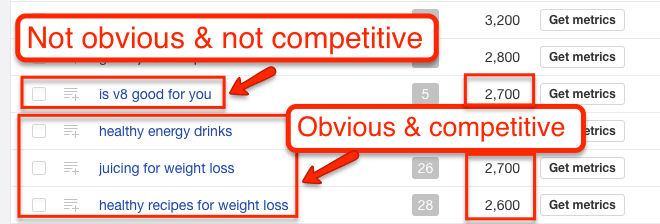
The biggest wins in keyword research are when you can make a “lateral” move to a relevant target keyword that is not competitive. I’ve written about how to use all sorts of tools from [Google Books](https://larryludwig.com/use-google-books-for-seo/) to [Wikipedia](https://larryludwig.com/how-to-use-wikipedia-for-seo/) and more to find these golden nuggets of SEO.
I still use those sources – but Ahrefs makes these finds even easier & faster to find than ever before. You simply have to click to the right places and keep your eyes open.

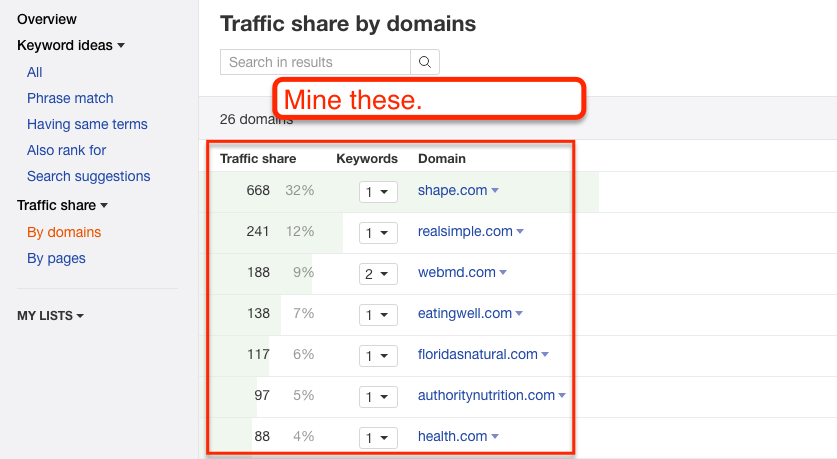
#### Find SERP Competitors
In SEO, you’ll often find that your industry competitors are not the same as your SERP competitors. And that’s an issue as you continue your search for broader & more in-depth keywords.
Enter Keyword Explorer’s Traffic Share feature. Search for a broad topic that you’re trying to compete in. You’ll get a full list of domains. Now you can take those domains and reverse engineer them for the best keyword opportunities.

#### Toss Broad Nets w/ Include & Exclude Features
This last “hack” is simple but ridiculously powerful. Instead of searching for a keyword – search for a modifier.
Then use Ahrefs’ menu of include & exclude features to find very high volume keywords ([then rank for them](http://www.siegemedia.com/strategy/increase-website-traffic)).

## Ahrefs Tools
Ahrefs Labs is Ahrefs’ collection of apps that take Ahrefs’ data and put it into something useful. It includes Ahrefs’ API, the Link Intersect tool, the Domain Comparison tool, and others.
### Key Features
If you are trying to manipulate data at scale quickly, Ahrefs Labs is where to go. Most of the tools are either specific use or are mentioned in Site Explorer.
The ***SEO Toolbar*** is useful to have installed on your browser so that you can get a sense of marketing data as you browse the Internet. It’s a great way to get immersed in SEO/Social data and develop an intuitive sense of what matters on a webpage.
The SEO Toolbar also has a SERP overlay function that will pull data and overlay it on your Google Search Results Page.
The ***Ahrefs Top*** tool is interesting, but I’ve yet to find a good use for it.
Under Apps, I highly recommend Jon Cooper’s [Link Miner](https://backlinko.com/blog) app. If you are doing [broken link building](https://larryludwig.com/broken-link-building-guide/), it’s a must-have. It syncs up with Ahrefs and pulls data straight to your broken link scan.
The ***Ahrefs Rank Tracker*** is an interesting tool. It’s fairly accurate – though it’s important to understand what the [data can and cannot tell you](https://larryludwig.com/why-your-keyword-rank-doesnt-matter-and-what-actually-does/).
## Next Steps
Ahrefs is fairly pricey, but it has a giant feature set. Like most marketing tools, its usefulness is only limited by your creativity and understanding of the feature set.
Approach Ahrefs with specific marketing goals in mind, and you’ll get a lot of value out of it. Be sure to use it as more than a backlink checker.
If you are curious about other [SEO tools](https://larryludwig.com/best-seo-tools/), here’s how I categorize the universe of Ahrefs’ competitors. They generally all specialize in one channel but overlap with a secondary channel.
- [Ahrefs](https://go.larryludwig.com/ahrefs/) – Primarily SEO with Social components and some PPC data.
- [Semrush](https://go.larryludwig.com/semrush/) – Primarily SEO but with full suite of PPC & Social tools.
- [Mangools](https://go.larryludwig.com/mangools/) – Primarily SEO with lower data use limits but at a more affordable price point.
- [Moz](https://go.larryludwig.com/moz/) – Primarily Community / Education with SEO and Social components.
- [BuzzSumo](https://go.larryludwig.com/buzzsumo/) – Primarily Social with SEO components.
- [Majestic](https://go.larryludwig.com/majestic/) – Exclusively SEO with focus on penalty analysis.
- [SpyFu](https://go.larryludwig.com/spyfu/) – Primarily PPC with SEO components.
- [Raven Tools](https://go.larryludwig.com/raven-tools/) – Primarily Analytics with SEO and Social components.
Last Updated: March 24, 2022
Category: [SEO](https://larryludwig.com/digital-marketing/seo/)
[](https://larryludwig.com/about/)
About Larry Ludwig
Larry Ludwig is an entrepreneur, financial expert, tech & marketing guru with over 25 years of industry experience.
In July 2018, Larry successfully sold Investor Junkie for \$6 million.
[Read More](https://larryludwig.com/about/)
## You May Also Like
[](https://larryludwig.com/semrush-review/)
### [Semrush Review (2026) – The SEO Swiss Army Knife](https://larryludwig.com/semrush-review/)
Last Updated: July 19, 2023
Looking for an all-in-one SEO research tool? Find out why you should put Semrush on your short-list to consider.
[](https://larryludwig.com/surfer-seo-review/)
### [Surfer SEO Review – Save Hours In Technical SEO Research](https://larryludwig.com/surfer-seo-review/)
Last Updated: September 8, 2023
Surfer SEO performs technical SEO analysis without you having to spend hours of research. Find out if you should purchase Surfer from my detailed review.
[](https://larryludwig.com/kwfinder-review/)
### [KWFinder Review (2026) – A Cheap SEO Keyword Alternative](https://larryludwig.com/kwfinder-review/)
Last Updated: July 19, 2023
Perform SEO keyword rsearch with KWFinder. Should you buy? Find out what's great and not so hot with KWFinder from Mangools.
[](https://larryludwig.com/best-seo-tools/)
### [The 12 Best SEO Tools – Free & Paid Tools I Used On My Blog](https://larryludwig.com/best-seo-tools/)
Last Updated: November 27, 2022
If you run an agency or want to start your own blog, you'll know that tracking your SEO progress is one of the most valuable tasks that you can do. After all, you can't improve what you don't track.
9 Comments
Oldest
Newest Most Voted
Inline Feedbacks
View all comments
Jeric
10 years ago
Thanks Larry for sharing this awesome guide for Ahrefs. I’ve been using this tool but I didn’t realize that there are still useful things this tool could offer.
0
Jean Baptiste Lammoglia
10 years ago
Hi Shivar great article\!
Just a few things that I needed further explaining.
In your “Identify Low-Hanging Fruit / Easy Link Opportunities” section. Once analysis has taken place of competitors how would you approach this opportunity? get in contact?
Thanks in advance.
0
View Replies (1)
Kris Fannin
9 years ago
This is incredible! Definitely saving for future reference and giving to our new content team for learning. Thank you! We just signed up for Ahrefs so still learning the hacks. This makes it much easier to leverage all of the features.
0
View Replies (1)
خرید اپل ایدی
9 years ago
thanks for sharing
0
Jon DuVall
9 years ago
Hi Larry, First of all, thank you for all of the information you provide via your newsletter. A few months ago you gave me some SEO advice on my sister’s website and I have a quick question about tags. I have a tag that has been moving up on GOOGLE and it gets searched 8000 times per month which is significant for us as we are not getting much traffic on our website. Currently, we rank for this term \#12 so it is not too far off from the middle of the first page. Would you recommend I link this… Read more »
0
View Replies (2)
## Primary Sidebar
Table of Contents
1. [What Is Ahrefs?](https://larryludwig.com/ahrefs-review/#what-is-ahrefs)
2. [Ahrefs Alternatives](https://larryludwig.com/ahrefs-review/#ahrefs-alternatives)
3. [Ahrefs Glossary](https://larryludwig.com/ahrefs-review/#ahrefs-glossary)
4. [Ahrefs Dashboard](https://larryludwig.com/ahrefs-review/#ahrefs-dashboard)
5. [Site Explorer (Link Data)](https://larryludwig.com/ahrefs-review/#site-explorer-link-data)
6. [Site Explorer (Search Data)](https://larryludwig.com/ahrefs-review/#site-explorer-search-data)
7. [Content Explorer](https://larryludwig.com/ahrefs-review/#content-explorer)
8. [Keywords Explorer](https://larryludwig.com/ahrefs-review/#keywords-explorer)
9. [Ahrefs Tools](https://larryludwig.com/ahrefs-review/#ahrefs-tools)
10. [Next Steps](https://larryludwig.com/ahrefs-review/#next-steps)
[Larry Ludwig](https://larryludwig.com/)
- [Guides]()
- [How To Start A Blog And Make Money](https://larryludwig.com/start-blog-make-money/)
- [Creating a Membership Website](https://larryludwig.com/create-membership-website/)
- [How To Build A WordPress Website](https://larryludwig.com/build-wordpress-website/)
- [Best In Category]()
- [Best Web Hosting](https://larryludwig.com/best-web-hosting/)
- [Best Domain Registrars](https://larryludwig.com/best-domain-registrar/)
- [Best WordPress Hosting](https://larryludwig.com/best-wordpress-hosting/)
- [Best WordPress Themes](https://larryludwig.com/best-wordpress-themes/)
- [Best SEO Tools](https://larryludwig.com/best-seo-tools/)
- [Best Webinar Platforms](https://larryludwig.com/best-webinar-software-platforms/)
- [About Larry Ludwig](https://larryludwig.com/about/)
- [My Background](https://larryludwig.com/about/)
- [Hire Me](https://larryludwig.com/consultant/)
- [My Software](https://larryludwig.com/plugins/)
- [Members Area](https://members.larryludwig.com/dashboard/)
- [Contact Me](https://larryludwig.com/contact/)
***
Copyright © 2026 · Ludwig Media, Inc. · [Privacy Policy](https://larryludwig.com/privacy/) · [Terms](https://larryludwig.com/terms/) · [Disclaimer](https://larryludwig.com/disclaimer/)
wpDiscuz
Insert
 | |||||||||
| Readable Markdown | ### [](https://go.larryludwig.com/ahrefs/summaryimg "Visit Ahrefs")
#### Larry's Take
My go-to SEO research tool. I use this tool daily and I highly recommended it. There are too many features to count. If you are wanting to improve your SEO game you must get a tool like Ahrefs to do your research, monitoring and getting a feedback loop of if you are improving SEO over time.
**10\.0** Out of 10
| | |
|---|---|
| Platform | Cloud |
| Price | \$99 - \$999 per month |
| Annual Discount | Yes - 2 months free |
[Learn More](https://go.larryludwig.com/ahrefs/summary "Learn More")
## What Is Ahrefs?
Ahrefs is one of the most powerful suites of social media & SEO tools that I’ve ever used. Most SEOs know it as a “backlink checker” that competes with [Majestic](https://go.larryludwig.com/majestic/), [Mangools](https://go.larryludwig.com/mangools/), [Moz](https://go.larryludwig.com/moz/), and [Semrush](https://larryludwig.com/semrush-review/). But “backlink checker” grossly undersells Ahrefs as a marketing suite.
Ahrefs has so many features that you can get lost and resort to simply staring at your own links – maybe rank tracking a few keywords. Here’s the guide to how to use Ahrefs that I wish existed when I first signed up.
## Ahrefs Alternatives
## Ahrefs Glossary
Every piece of software has its own little universe of jargon. I’ll use these words throughout the guide. So here’s a glossary of terms.
***URL Rating*** – Ahrefs’ measure of the quantity and quality of links pointing to a given URL. Link quantity and quality correlate with higher rankings in search engines.
***Domain Rating*** – Ahrefs’ measure of the quantity and quality of links pointing to an entire domain. Link quantity and quality correlate with higher rankings for all URLs on a domain in search engines.
***Ahrefs Rank*** – Ahrefs’ ranking of a domain’s rating relative to all the other domains on the Internet.
***Backlinks*** – The number of hyperlinks pointing to a URL.
***Referring Page*** – The number of pages with a hyperlink pointing to a URL. A page can have multiple links.
***Referring Domains*** – The number of unique domains with a hyperlink pointing to a URL. A domain can have multiple referring pages and backlinks.
***Referring Content*** – Ahrefs’ measure of the relative traffic that a unique piece of content sends to a given URL based on the popularity of the referring content.
***Anchors*** – The anchor text used within a URL’s backlinks.
***Sitewide / Not Sitewide*** – Ahrefs’ categorization of a link showing whether it shows in the same location on every page of a referring domain or not.
***Fresh Index/Live Index*** – This is a new feature rolled out in an effort to maintain a historical index of links. Here’s the [full blog post and here’s the Ahrefs definition](https://ahrefs.com/blog/historical-backlink-data/):
- Live Index – contains all links that were “live” on Ahrefs’ last re-crawl;
- Fresh Index – contains all links that Ahrefs’ has seen “live” in the last 3 months (including those that were “dead” on the last re-crawl).
[In this post](https://ahrefs.com/blog/historical-backlink-data/), Ahrefs also says that they are “going to add a “Historic” index, that would include all backlinks that we have seen live starting from 13th of August 2015.”
***Top Pages*** – A given URLs’ top pages based on the criteria that you sort for.
## Ahrefs Dashboard
The Ahrefs Dashboard is where you keep track of all your data. You can add a URL to keep a running snapshot of a domain’s health. It will quickly show you any technical crawl errors, new links, new referring domains, and a snapshot of Ahrefs’ domain rating and URL ranking.

On the dashboard, you can also keep track of keyword rankings, any content alerts, and any links that you are trying to disavow.
### Key Features
I think the main features of the Ahrefs dashboard are keyword rankings and content alerts. Although I don’t think [rankings are as important](https://larryludwig.com/why-your-keyword-rank-doesnt-matter-and-what-actually-does/) as they used to be back in the days of old-school SEO, they can be an interesting diagnostic indicator, and another data point to factor into your analysis. Since tracking is included with Ahrefs, it’s worth adding your critical keywords.
Alerts are useful for planning outreach and for competitive analysis. Target several phrases that are directly relevant to your website so that you can get a feed whenever a new piece of content is published around that phrase or keywords.

### Fun Hacks
Email notifications are boring, but setting them up is a great way to hack your habits and discipline so that you can use Ahrefs’ data.
Unless you are extraordinarily disciplined, it’s easy to let monitoring and alerts slide. That’s why I love setting up [Google Analytics intelligence alerts](https://support.google.com/analytics/answer/1033021?hl=en) *and* Ahrefs’ email notifications. Set them up at a useful interval, and you’ll never miss an issue.

## Site Explorer (Link Data)
Site Explorer is Ahrefs’ bread and butter. It allows you to enter a URL and check that URLs backlinks – and, as of 2016, everything from organic keywords to social data to PPC data as well. This section will focus on the Link Data.
Ahrefs gets this data by running a crawler around the Web just like Googlebot. Every backlink checker tries to replicate how & where Googlebot crawls links. No backlink checker is Googlebot. And no crawler can cover the entire Web. [According to an analysis](https://moz.com/blog/big-data-big-problems-link-indexes-compared) by some of the best technical SEOs, Ahrefs is at the front of the pack.
Why? With Site Explorer, they not only have a large link index that closely replicates the Googlebot, they also extract & overlay additional data.
They pull out anchor text (the actual text within the link), backlink type, backlink follow status, social metrics, IP Address, and HTTP status. These additional pieces of information – paired with an enormous index of URLs – sets Ahrefs apart and turns it into a marketer’s suite.

The Site Explorer, however, is also the most daunting of all the tools because there is so much information. So here’s what I think are the key features.
### Key Features of Site Explorer’s Link Data
The first key feature is *Inbound Links*. [Search engines use Inbound Links](https://developers.google.com/search/docs/beginner/how-search-works?hl=en) as a proxy for human endorsement. More links from trustworthy sites on relevant pages equal more organic traffic. The links feature allows you to pull all the links to a specific URL and then sift and sort to dig up the information you want.
The second key feature is *Top Content*. This feature allows you to look at how specific pages on a URL perform. You can sift and sort by links, shares, or Ahrefs weighted importance score.
The third key feature is *Top Referring Content*. This feature shows you what content on the Internet that has a link to the URL you are exploring has the most links/shares or estimated traffic. You can get a ballpark estimate of what links send referral traffic to your URL.
The fourth and last key feature appears in both Inbound and Outbound Links – and that is *Broken Links*. This feature shows you which links are linking to or linking out to a URL that no longer exists.
### What You Can Do With Site Explorer
Whatever you are used to doing with other backlink checkers, you can do with Ahrefs. There’s plenty you can do directly on the main screen, but keep in mind that you can also do an Export to Excel or Google Sheets if that’s your native work environment.
#### Determine What Marketing Tactics Are Working for Competitors
You can take your competitors – big and small – and see where they are getting their links from. Then you can go and try to get the same links. Or (and I recommend this approach), you can use the information to understand what has been working in the industry and use it to develop your own unique tactics.

You can also look at Referring Domains, which will group the links by domain.

#### Determine What Content Does Well
We all browse the Internet in a “filter bubble.” Sometimes it’s hard to believe that a site or blog post that you love isn’t more widely shared.
Or at a much higher level, many marketers think that the content that generates shares will also directly generate links. [That perception is a myth](https://moz.com/blog/content-shares-and-links-insights-from-analyzing-1-million-articles).
You can use the top content report to understand exactly what works well. Understand what pages actually get links if you are building your organic presence. Understand what gets shared. Understand what type of content gets picked up.

Do press releases matter? Do infographics actually work? What’s the one piece of content for competitors or industry publications that drives 80% of their links and shares?

You can answer all those questions with the Top Content report.
#### Identify Low-Hanging Fruit / Easy Link Opportunities
Site Explorer has a Link Intersect report that allows you to input several URLs and learn which websites are linking to competitors (or industry sites), but not your site. You can get this same data by exporting links from several sites and running a few Excel tricks. But the ***link intersect tool*** does it quickly.
Does an industry publication have links to all your competitors, but forget to link to you? Is there a reporter that interviews your competitors but not you?


Find out with the link intersect tool and discover some quick wins that will bring you up to an even playing field.
#### Identify Influential Marketing Prospects
You can use a combination of the Top Referring Content report and the Inbound Links report to identify influential websites that are already linking to competitors and/or industry publications. But you can take it a step further and sort by Domain or URL Rating to figure out who matters the most. In a world of limited resources and time – priorities matter.

But be sure to note your goals…

Sometimes the influencers are not in the markets you expect. In the example above – REIs biggest influencers are in the travel hacking & survivalist niches.
#### Conduct A Broken Link Building Campaign
Broken link-building is one of the most effective and consistent link-building tactics in SEO. The idea is to find resources that no longer exist, rebuild them, then pitch to get the links pointing at the broken resource switched to point at yours. Or, on the flipside, correct any broken links that your site has.

I’ve written a full [guide to Broken Link Building](https://larryludwig.com/broken-link-building-guide/). You can do broken link building manually, but Ahrefs’ broken link reports allow you to do broken link building efficiently and effectively.
### Fun Hacks with Site Explorer
#### Quickly Find Worthwhile Broken Links
Take a giant site and look at Broken Outbound Links. You’ll quickly get a list of broken resources. Take all those URLs, and look at Inbound Links. The sites that link to your broken URLs are prospects for a broken link-building campaign.

The inverse also works well. Take a giant site – one that has plenty of resource pages. Pull Broken Inbound Links. Then pull the links pointed to those URLs. That will be your prospect list for a Broken Link Building campaign.
#### Explore Wikipedia & Top Publishers
Pull link metrics on [Wikipedia URLs](https://larryludwig.com/how-to-use-wikipedia-for-seo/) related to your industry – remember that you can search by subfolder. Create marketing ideas around the results.

Here’s a video guide to how I use these tactics. Note that the design is old, but the tactics are the same.
Take a publishing focused site in your industry or related to your industry and pull a top content report. This will allow you to skip to content that you know works. It will also give you link opportunities that are outside of what your competitors have.

See this other video guide of mine.
Take an industry publication or industry-related Wikipedia pages. Pull a Top Referring Content report. You’ll likely get a list that includes mainstream media publications. Click through and do research on the journalist who linked out to the piece.

#### Narrow Results
As I mentioned with Wikipedia, don’t forget that you can search for just a [subdomain](https://larryludwig.com/what-is-a-subdomain/), a subfolder, or a specific URL in Site Explorer.

## Site Explorer (Search Data)
Site Explorer’s Search Data (formerly Positions Explorer) shows what keywords a domain is ranking for, then provides estimates for what kind of traffic that domain and its pages are getting organically.
It also tracks paid positions. Think of it like rank tracking for every domain on the Internet.
Site Explorer crawls Google search results pages (SERPs) and aggregates the data into something you can search. They also pull search volume from Keyword Planner. Then it triangulates the organic traffic going to a domain based on standard click-through rates per position.
A couple of caveats – and this goes for every “traffic estimation tool” including SimilarWeb, Compete, SEMRush, etc – everything in this tool is a ballpark estimation. I do not recommend you use it for reporting. There are many variables in play – each with a lot of margin of error. Don’t let the exactness of the numbers lull you into a sense of certainty. Ahrefs pulls keyword data fast & frequently, but be sure to check key rankings manually & against Keyword Planner.
With that said, I’ll go ahead and state that this is Ahrefs’ most underestimated tool. Either that or the marketers who know about it aren’t talking about it. Regardless, here we go.
### Key features

The most obvious feature is Ahrefs’ estimation for how many significant keywords (i.e., they have search volume) a domain is ranking for and their estimation of traffic based on those keywords.
That overview feature is interesting, but again, not super-useful without some context.
The feature that provides 80% of this tool’s value is the Top Pages feature under both Organic and Paid sections.
The other notable features are the PPC Ads and Top Competitors, which shows what domains most frequently share the same search results as the domain you’re looking for. And the PPC Ads show you a sample of PPC ads in the SERPs.
### What You Can Do With Site Explorer’s Search Data
#### Understand Top Content for Other Websites
Although the exact numbers in Site Explorer are not accurate, the relationships and differential among the pages & keywords are accurate.
In other words, even if a given URL doesn’t drive XX visits per month, if it is listed as the Top Organic Page – *that position is accurate*. The difference in traffic between the top URL and the second URL is accurate as well – both for a couple reasons.
First, even if the traffic numbers aren’t exactly right, their relative volumes are correct. Head terms show more volume than long-tail terms. Second, on the landing page level, nearly every site’s traffic will conform to the 80/20 pattern – 20% of pages will drive 80% of the traffic. And so on for every given set of URLs.
Why does this matter?
*This data is invaluable because you can discover and build off a competitor or other industry websites. You can learn from all their content and go straight for the best terms.*

In the example above, you’ll see that for whatever reason, this company gets almost all their non-brand organic traffic from a (not so special) Garage Kit category page. It would make an excellent target for anyone in that industry.
Or you get to find out that your favorite website’s biggest winner is a throwaway post that happens to rank for a really broad but non-competitive term.

Either way, you get to learn from your competitor’s best (and worst) content. Ahrefs did a video tutorial on this feature –
#### Do Better Keyword Research
The toughest challenge of keyword research is *thinking laterally*. It’s hard to make the jump from different variations of a single obvious keyword to complementary or semi-synonymous keywords that reflect the real intent of your audience.
For example, it’s the insight that helps you make the leap from “winter gloves”… “gloves for winter”… “gloves for cold weather” to “mittens.” Or if you’re in the plumbing industry, making the leap from “outdoor faucet” to “sillcock.”
Ahrefs’ Position Explorer solves this issue by allowing you to take top pages and viewing what other keywords those pages are ranking for. It gives you a bigger seed list & introduces more diversity into [your keyword research process](https://larryludwig.com/keyword-research-for-beginners/).

#### Do Better Competitor Research
Usually, your competitors in real life are very different than your competitors in any given search result. It can be hard to track down who your *SERP competitors* are without a bit of help. And that help is Ahref’s Competing Pages, Competing Domains and Content Gap tools.

These tools are huge. If you know one of your SERP competitors, you can find out all of them. From there, you can figure out what content you can target more effectively.
#### Steal Ads
You can use the Paid section of Positions Explorer to swipe ad ideas from competitors. If you can see the angle/benefit that competitors are using, you have a direction to either copy or play off or test both.

#### Find Competitors for Keyword / Link Research
Most SEOs are familiar with telling clients that their SERP competitors are different from their real-world competitors.
But outside of scraping a few head or vanity terms, it’s fairly difficult to find SERP competitors systematically. You can use Ahrefs’ Positions Explorer to at least add a few new ones to the mix.
### Fun Hacks
For marketers who love Excel and/or Google Sheets, you can export keywords under both Top Pages and Organic Keywords.
If you want to remove brand & noisy terms, go to Organic Keywords and *filter by phrase length* and by *keyword included*. Longer phrases will often give you more insight.

## Content Explorer
Ahrefs’ Content Explorer shows the most shared content around any topic. It’s like Site Explorer’s Top Content report…but for the entire internet. For marketers who read a bit – it’s basically BuzzSumo but you get it in addition to Ahrefs’ link data.
But like Site Explorer, the key to Content Explorer is understanding the features’ functionality. That will take it from a trivia tool to a marketing tool.
### Key Features
The key – and really only feature of Content Explorer – is the ability to search by topic. You enter a phrase and it tells you the most shared/linked to content about that topic across the Internet.
In the original versions of Content Explorer, you would quickly notice that there’s a wide gulf in the results you get. If you enter a broad topic, you get a lot of meaningless noise (re-posted clickbait stuff). If you enter a specific topic, then you’ll get very few results.
Ahrefs has dramatically improved the tool so that you can easily find relevant content. However, you can find *exactly* what you want when you understand how to narrow & curate the results. And that is where Boolean Operators and Advanced Search filters (ie, “search everywhere / in title / in content”) come in.
I can feel your excitement.
But really if you’ve ever used [Google Search Operators](http://www.googleguide.com/advanced_operators_reference.html) like site: or even putting a phrase in quotes, you’ll know how you use these. Just navigate to Advanced Search in Content Explorer.

The ones I’ve found most useful are: exclude a word, filter a site and define date range (especially for seasonal ideas).
To use boolean operators effectively though, you have to approach Content Explorer with a goal in mind. It’s fun – and sometimes useful to just click around – but it’s most useful when you are looking for a specific piece of data to support a strategy.
For example, you want to create a blog post that drives Facebook likes. Or, you want to create an infographic that drives links. Or, you need to understand what type of Christmas content stands out in December. If you have a specific goal in mind, you can mix, match and combine boolean operators to focus your search.

### What You Can Do With Content Explorer
#### Inform PR Strategy
“Press release and pray” is not an effective PR strategy, especially if you want a quality pick up from a major publication.
The best angle for getting a press pickup is that the piece will bring in readers. You can use Content Explorer to figure out what pieces do well and what type of content a publication likes.

You can even drill down to figure out what a specific journalist likes to write about – and what content they were most successful with.

In 2013, I got a [personal blog post to go viral](https://www.bloomberg.com/news/articles/2013-07-11/-why-is-boston-so-racist-and-50-other-city-stereotypes-revealed-by-google-autocomplete) with exactly 1 email pitch to 1 journalist. I knew what the journalist wrote about. And I knew what drove page views for them. It was a perfect fit for both of us.
\*Note – this feature is still in the early days for Ahrefs. You’ll get the most out of it by pairing it with Google search operators.
#### Understand a Topic
“The [curse of knowledge](https://en.wikipedia.org/wiki/Curse_of_knowledge)” is a concept that says the more familiar you are with a topic, the less you understand how to think about a topic from the perspective of those less familiar.
And it’s a huge problem in content marketing. You can use Content Explorer to understand what angles, language, and facts resonate with people on any given topic.
#### Look for Top Performers’ Commonalities
On a related note, you can use Content Explorer to figure out what form your content should be in. Many times a text post won’t work but a video will. Or an infographic will work in one industry but not in another. For example, if you run Content Explorer and see that every top performer has a video included…you should probably include a video in your content.

#### Set Benchmarks
Every company would love for a positive story to “go viral” but that term is basically meaningless because it can mean anything to anybody depending on context and a dozen other factors.
In a [study of content by Moz and BuzzSumo](https://moz.com/blog/content-shares-and-links-insights-from-analyzing-1-million-articles), they found that 75% of content got zero shares and zero links. Zero.
And then, on any given day, BuzzFeed will be able to manufacture 1 million-plus shares across every platform.
Purina Cat Food might be able to create a piece of content that generates hundreds of thousands of shares because they are a huge brand operating in the *cat* market.

GE is an even bigger brand than Purina but they won’t get a million shares because they make stuff like aircraft engines.
Either way, Content Explorer can at least give you a ballpark benchmark for a successful campaign. If your goal is shares and the best campaign in your industry generated a 1000 shares – “success” might be defined as 100, not 10,000.

#### Understand Platform Types & Goals
[As Moz & BuzzSumo found in their study](https://moz.com/blog/content-shares-and-links-insights-from-analyzing-1-million-articles), links do not always correlate with shares. And shares on one platform do not always correlate with other platforms, e.g., Facebook Shares vs. Twitter Tweets.
Use Content Explorer to figure out what content fits your marketing goals. For example, if it’s a campaign to drive organic traffic, sort by links – not by overall shares.
### Fun Hacks
#### Click-through to Author
On the Content Explorer results, you can click through to look at a specific writer. This is useful for tracking down guest post opportunities or finding a freelance journalist who writes at a range of publications.
#### Export Twitter Sharers
Also on the Content Explorer results, you can view & export people who have tweeted each piece of content in the last 7 days (the 7 days is to ensure you’re only getting people who remember Tweeting it – you can still get a larger export from Topsy). This opens up a whole new world of Twitter marketing opportunities.

But the most immediate uses are to:
- Create a custom audience for Twitter advertising. If you know they tweeted one piece of content on a topic, they are probably interested in another. I did this for a [small giveaway experiment](https://larryludwig.com/using-giveaways-for-marketing/).
- Create Twitter lists for manual outreach later. If you identify a few highly influential accounts, you can set them aside for further research and outreach.
- Take the data and send it to one of the dozens of [Twitter tools for analysis of personas](http://www.bamboochalupa.com/episode-20/), related interests, best time to tweet, related followers, etc.
\*Note – I’ve found this feature to be amazing but still buggy.
#### View URL Data
Lastly, in the Content Explorer results, there’s a little dropdown menu that will show you detailed link data and the keywords that the content most likely ranks for. That data is invaluable for planning a well-rounded piece of content.


## Keywords Explorer
Keywords Explorer is Ahrefs’ tool to pull and manipulate keywords generated in Google Search Autocomplete (aka type a keyword, hit space but not enter). For SEOs who know their tools, it’s like Ubersuggest or KeywordTool.io.
In November 2016, they launched a huge new revision called Keywords Explorer 2.0.
It’s the most useful keyword tool that I’ve seen yet. I’ll cover a few key ideas here, but I highly recommend reading their [comprehensive introductory post](https://ahrefs.com/blog/keyword-generator/) to get a sense of all the definitions & features.
### Key features
There’s one key feature of this tool: pulling a ton of keyword variations from Google Searches in a very similar way to Google Autocomplete. [Google Autocomplete is one of the most useful keyword research tools](https://www.seerinteractive.com/blog/spark-new-ideas-with-these-keyword-research-toolstips/) because the variations not only give you longer-tail, more specific terms to target, but they also provide a window into user intent.
With the launch of Keywords Explorer 2.0 – Ahrefs pulls in ClickStream data. ClickStream data gets a little technical – if you are interested, you can [learn more about it here](https://moz.com/blog/clickstream-data-revolution). For our purposes, it’s sufficient to say that Ahrefs’ keyword data is accurate enough to make marketing decisions with.
In other words, don’t assume that the exact volumes are correct, but you can assume that they are accurate enough to decide what you should target & prioritize when [choosing target keywords](https://larryludwig.com/how-to-use-keywords-on-your-website/).
### What You Can Do With Keyword Explorer
Either way, in the meantime, you can quickly do *a lot of interesting keyword research* all within Ahrefs. Take a broad keyword, and run it through Keyword Explorer to get a lot of useful variations on your broad keyword.
#### Do In-depth Keyword Research
Contemporary keyword research goes beyond finding search volume and modifiers (e.g. “blue winter gloves” has 1000 searches per month, and we should also mention “navy blue winter glove”, “light blue winter glove” on the page).
Those details are important. But more important now are understanding things like –
- what broad topic is the keyword is a part of
- what type of page the typical searcher wants to see
- what lateral & complementary terms are relevant (e.g., “blue mittens”)
- what type of site the searcher wants to see
- what terms people also ask before and after that specific query
- etc, etc, etc
This doesn’t mean that keyword research is difficult or mind-blowing. But it is usually tedious to do it correctly at scale.
Ahrefs Keywords Explorer speeds up the process by integrating full SERPs, phrase match ideas, Parent Topic, Search Suggestions, and pages also rank for directly in the Dashboard.

#### Judge Keyword Difficulty
One of the toughest (and tedious) parts of keyword research is figuring out whether your website could rank for a certain theme of keywords.
There’s no sense investing in new content or high volume topic targeting if there’s no way that you can win. And even if you can compete – it’s critical to know what you’re going to need to compete (e.g., links to that page, answer box considerations, etc).
[Judging keyword difficulty is a skill that is not necessarily complicated](https://larryludwig.com/how-to-judge-keyword-difficulty/). It’s mostly just tedious. For non-SEOS, it requires pulling link data and really looking at each SERP. Veteran SEOs can quickly open up a SERP, scroll through and make a quick judgment call. But even that takes time when you are considering thousands of keyword opportunities.
The Keyword Difficulty score is *extremely* useful to make the “first cut” in your keyword research process. Ahrefs uses a 0 to 100 scale based on their link data to score what it would take to rank for a certain keyword. [Ahrefs explains this metric here](https://ahrefs.com/blog/keyword-difficulty/).
Within the Dashboard, use this feature heavily to sift & sort not only low-hanging fruit but also to create a realistic content promotion strategy to get your content visible.

#### Estimate Return on Investment
Predicting a return on investment for SEO is notoriously difficult (and arguably impossible). But you have to [have something to help prioritize opportunities](http://www.bamboochalupa.com/episode-30/) – even if you can’t say exactly what those opportunities will bring.
Keywords Explorer’s number on Clicks, Return Rate and Clicks per Search are ballpark accurate enough to make these sorts of judgment calls.
With Return Rate and Clicks per Search – you can get a good snapshot of what kind of visibility and traffic levels you’ll get if you rank well for a specific keyword.
#### Explore Different SERP Features
Google Search Results (SERPs) have not been a collection of “10 Blue Links” in years. And everyday since 2016 or so, Google has been customizing more and more of the SERPs with special features such as Rich Answers (Featured Snippets), Knowledge Graph results, and People Also Ask boxes (Related Questions) and more.
Many of these are far more valuable than a [\#1 ranking any day](https://larryludwig.com/why-your-keyword-rank-doesnt-matter-and-what-actually-does/). The trouble is that these results are so highly personalized that it’s hard to get any large scale visibility. Ahrefs’ Keyword Explorer can provide some – and definitely enough to direct your manual research.

After dropping in a keyword, explore the Questions tab and expand the SERP to explore what all special features show up. You can also see what “parent topic” a keyword is in to help find overlapping Related Questions & Featured Snippets.
### Fun Hacks
#### Find Guerrilla Keyword Angles
The biggest wins in keyword research are when you can make a “lateral” move to a relevant target keyword that is not competitive. I’ve written about how to use all sorts of tools from [Google Books](https://larryludwig.com/use-google-books-for-seo/) to [Wikipedia](https://larryludwig.com/how-to-use-wikipedia-for-seo/) and more to find these golden nuggets of SEO.
I still use those sources – but Ahrefs makes these finds even easier & faster to find than ever before. You simply have to click to the right places and keep your eyes open.

#### Find SERP Competitors
In SEO, you’ll often find that your industry competitors are not the same as your SERP competitors. And that’s an issue as you continue your search for broader & more in-depth keywords.
Enter Keyword Explorer’s Traffic Share feature. Search for a broad topic that you’re trying to compete in. You’ll get a full list of domains. Now you can take those domains and reverse engineer them for the best keyword opportunities.

#### Toss Broad Nets w/ Include & Exclude Features
This last “hack” is simple but ridiculously powerful. Instead of searching for a keyword – search for a modifier.
Then use Ahrefs’ menu of include & exclude features to find very high volume keywords ([then rank for them](http://www.siegemedia.com/strategy/increase-website-traffic)).

## Ahrefs Tools
Ahrefs Labs is Ahrefs’ collection of apps that take Ahrefs’ data and put it into something useful. It includes Ahrefs’ API, the Link Intersect tool, the Domain Comparison tool, and others.
### Key Features
If you are trying to manipulate data at scale quickly, Ahrefs Labs is where to go. Most of the tools are either specific use or are mentioned in Site Explorer.
The ***SEO Toolbar*** is useful to have installed on your browser so that you can get a sense of marketing data as you browse the Internet. It’s a great way to get immersed in SEO/Social data and develop an intuitive sense of what matters on a webpage.
The SEO Toolbar also has a SERP overlay function that will pull data and overlay it on your Google Search Results Page.
The ***Ahrefs Top*** tool is interesting, but I’ve yet to find a good use for it.
Under Apps, I highly recommend Jon Cooper’s [Link Miner](https://backlinko.com/blog) app. If you are doing [broken link building](https://larryludwig.com/broken-link-building-guide/), it’s a must-have. It syncs up with Ahrefs and pulls data straight to your broken link scan.
The ***Ahrefs Rank Tracker*** is an interesting tool. It’s fairly accurate – though it’s important to understand what the [data can and cannot tell you](https://larryludwig.com/why-your-keyword-rank-doesnt-matter-and-what-actually-does/).
## Next Steps
Ahrefs is fairly pricey, but it has a giant feature set. Like most marketing tools, its usefulness is only limited by your creativity and understanding of the feature set.
Approach Ahrefs with specific marketing goals in mind, and you’ll get a lot of value out of it. Be sure to use it as more than a backlink checker.
If you are curious about other [SEO tools](https://larryludwig.com/best-seo-tools/), here’s how I categorize the universe of Ahrefs’ competitors. They generally all specialize in one channel but overlap with a secondary channel.
- [Ahrefs](https://go.larryludwig.com/ahrefs/) – Primarily SEO with Social components and some PPC data.
- [Semrush](https://go.larryludwig.com/semrush/) – Primarily SEO but with full suite of PPC & Social tools.
- [Mangools](https://go.larryludwig.com/mangools/) – Primarily SEO with lower data use limits but at a more affordable price point.
- [Moz](https://go.larryludwig.com/moz/) – Primarily Community / Education with SEO and Social components.
- [BuzzSumo](https://go.larryludwig.com/buzzsumo/) – Primarily Social with SEO components.
- [Majestic](https://go.larryludwig.com/majestic/) – Exclusively SEO with focus on penalty analysis.
- [SpyFu](https://go.larryludwig.com/spyfu/) – Primarily PPC with SEO components.
- [Raven Tools](https://go.larryludwig.com/raven-tools/) – Primarily Analytics with SEO and Social components. | |||||||||
| ML Classification | ||||||||||
| ML Categories |
Raw JSON{
"/Internet_and_Telecom": 932,
"/Internet_and_Telecom/Web_Services": 907,
"/Internet_and_Telecom/Web_Services/Search_Engine_Optimization_and_Marketing": 889
} | |||||||||
| ML Page Types |
Raw JSON{
"/Article": 999,
"/Article/Tutorial_or_Guide": 891
} | |||||||||
| ML Intent Types |
Raw JSON{
"Informational": 999
} | |||||||||
| Content Metadata | ||||||||||
| Language | en-us | |||||||||
| Author | null | |||||||||
| Publish Time | 2022-03-24 12:42:02 (4 years ago) | |||||||||
| Original Publish Time | 2022-01-28 19:27:37 (4 years ago) | |||||||||
| Republished | Yes | |||||||||
| Word Count (Total) | 6,390 | |||||||||
| Word Count (Content) | 5,557 | |||||||||
| Links | ||||||||||
| External Links | 38 | |||||||||
| Internal Links | 99 | |||||||||
| Technical SEO | ||||||||||
| Meta Nofollow | No | |||||||||
| Meta Noarchive | No | |||||||||
| JS Rendered | No | |||||||||
| Redirect Target | null | |||||||||
| Performance | ||||||||||
| Download Time (ms) | 92 | |||||||||
| TTFB (ms) | 91 | |||||||||
| Download Size (bytes) | 49,058 | |||||||||
| Shard | 107 (laksa) | |||||||||
| Root Hash | 3588035112365906907 | |||||||||
| Unparsed URL | com,larryludwig!/ahrefs-review/ s443 | |||||||||