ℹ️ Skipped - page is already crawled
| Filter | Status | Condition | Details |
|---|---|---|---|
| HTTP status | PASS | download_http_code = 200 | HTTP 200 |
| Age cutoff | PASS | download_stamp > now() - 6 MONTH | 0.6 months ago |
| History drop | PASS | isNull(history_drop_reason) | No drop reason |
| Spam/ban | PASS | fh_dont_index != 1 AND ml_spam_score = 0 | ml_spam_score=0 |
| Canonical | PASS | meta_canonical IS NULL OR = '' OR = src_unparsed | Not set |
| Property | Value |
|---|---|
| URL | https://filmora.wondershare.com/meme/best-free-meme-maker-online.html |
| Last Crawled | 2026-03-20 20:40:13 (18 days ago) |
| First Indexed | 2018-10-07 21:13:30 (7 years ago) |
| HTTP Status Code | 200 |
| Meta Title | Best Free Meme Generators in 2026 (AI-Powered & Fast) |
| Meta Description | Looking for the best free meme generator? Create viral memes in seconds with these 10 top tools. Compare AI meme makers and classic editors for 2026. |
| Meta Canonical | null |
| Boilerpipe Text | Memes have become a central part of many online conversations. They pop up a lot on social media, especially platforms such as Twitter, Tumblr, and Facebook. People even converse with each other using meme keyboards.
With memes taking over popular culture, you may want to make a meme for yourself. By using a meme maker, you can do just that! Here is a look at the top 10+ best
meme maker online
options that you can use for free.
Detailed Review: 10 Best Free Meme Creators & Generators
Supermeme
Supermeme can turn your thoughts into memes in just a few clicks! This AI-driven platform simplifies the meme-making process, making it easier than ever to bring your ideas to life.
Key Highlights
Free and easy to use.
Ability to create memes with your images.
Option to add filters to images for your memes.
Option to change font and text color.
Quickmeme
Quickmeme is the best meme maker option for anyone who wants a simple experience, without too many frills. You can check out featured memes, which show you the most popular ones right now.
All you need to do to create a meme is go on "upload a funny" to start from scratch. If you want to select a famous picture and add your own text, you can do so using the "caption a meme" option.
Key Highlights
Create a meme with your own images or famous images.
Login with Facebook to set up your account and save the memes you create.
MemeGenerator
One of the most popular tools for creating memes, MemeGenerator is the meme maker online that you can use when you want to add some funny captions to images. You can check out all the popular images that are being used to create memes by other people.
If you want to create a meme with one of those images, simply click on them or you can choose "create" to start making a meme with your own image or character.
Key Highlights
Create memes with custom images or characters.
Add your own text to famous meme images.
Send and share memes through the site.
Imgur
Imgur is mostly known as an image hosting platform. People will host images on Imgur so they can share them with friends or on social media. But there is also a meme creation tool that you can use on the site.
All you need to do is select one of the default images on the site, or use your own, and you can add the text that you want. Selecting the text to put at the top and bottom of the image is very easy with Imgur.
Key Highlights
Takes under a minute to create a meme with your own image or pre-selected ones.
Imgur also offers an image hosting service.
Make a Meme
When you go on Make a Meme, you will immediately see images of all the most famous memes from around the world. You can click on those images, where you get an interface asking for the top text, bottom text, and your custom title. Then you click on "make a meme" and your image is ready.
You can even upload your own image and then add text to it in a similar way. You have the option to preview your memes before you create them as well.
Key Highlights
Create memes from custom images or popular ones.
Add top and bottom text easily.
Create custom meme titles.
Preview memes before making them.
Image Resizer
Image Resizer is a straightforward online tool primarily used for resizing images, but it also offers meme-making capabilities.
You may select any of those images to create your own meme, or upload your own image and add the relevant text. You can save the image on your computer and even share it through the site.
Key Highlights
Includes nearly every popular meme as preselected images.
Ability to create custom image memes.
Easily share created memes.
Canva
Unlike other sites, Canva goes a step further and gives you professionally created templates that you can use for your memes. There are over a million stock photos available to you. It is a much larger selection than other sites.
But you can also upload your own image, add relevant text and then create the meme.
Key Highlights
Large collection of stock images.
Ability to create memes with your own images.
Option to add filters to images for your memes.
Option to change font and text color.
iLoveIMG
iLoveIMG is one of the easiest sites to use if you want to create a meme. The homepage will let you upload an image or select a meme template to get started.
Text boxes are already present, but you can edit them with your own text and see exactly how they would look. If you want to add more lines of text, you can do that as well.
It is even possible to add an image on top of one image to take your meme game to a whole new level!
Key Highlights
Easy meme creation with uploaded or custom images.
Ability to add more than two lines of text.
Option to add an image on top of the existing image.
Meme Creator
With Meme Creator, you can recreate existing memes with the text of your choice, or upload images to make custom memes.
The site is very easy to use, which does not require you to create an account, and is completely free. It is possible to adjust the text size and color when you are using this meme generator, which is not always an option on these free tools.
Within a minute, you will have the custom meme that you can share with friends!
Key Highlights
Use preexisting and custom images for memes.
Adjust the color and font size of both top and bottom text.
DIYLOL
Want to create a meme from images that have already become popular memes? Now you can do so with DIYLOL. All you need to do is pick the preexisting image that you like best, add your top and bottom text, and you are ready to go.
You can even adjust the font color and size for the top and bottom text. Then you can download the image to share with friends and family.
Key Highlights
Easy tool to create memes from preexisting images.
Ability to adjust font size and color.
Conclusion
By using an online meme maker, you have the ability to create your own memes whenever you want. All you need is a source image and your idea for the text. Within minutes, the meme generator you are using will have your meme ready to download. Then you can share it with friends and save it on all your devices. And the best part is that you can do all of this with a meme maker online that is completely free!
Filmora
AI Video Editing App & Software
Best tool for making videos anywhere for all creators!
Simplify all your steps in video editing, from the pre-processing to finalizing, Filmora AI stays tuned. |
| Markdown | [ Filmora - AI Video Editor Edit Faster, Smarter and Easier! OPEN](https://app.adjust.com/arr17f1_s7yo674)
[wondershare](https://www.wondershare.com/)
- Featured Products
AIGC Digital Creativity
Video Creativity Products
- [Filmora Complete Video Editing Tool.](https://filmora.wondershare.com/)
- [ToMoviee AI All-in-One AI Creative Studio.](https://www.tomoviee.ai/)
- [UniConverter High-Speed Media Conversion.](https://videoconverter.wondershare.com/)
- [Media.io AI Video, Image, Music Generator.](https://www.media.io/)
- [SelfyzAI AI-Powered Creative Tool.](https://app.adjust.com/1ljh6vum_1lr8ci7x?adgroup=ws-banner)
Diagram & Graphics Products
- [EdrawMax Simple Diagramming.](https://edrawmax.wondershare.com/)
- [EdrawMind Collaborative Mind Mapping.](https://edrawmind.wondershare.com/)
- [Edraw.AI Online Visual Collaboration Platform.](https://www.edraw.ai/)
PDF Solutions Products
- [PDFelement PDF Creation And Editing.](https://pdf.wondershare.com/)
- [PDFelement Cloud Cloud-Based Document Management.](https://pdf.wondershare.com/document-cloud/)
- [PDFelement Online Free PDF Tools Online.](https://pdf.wondershare.com/online-pdf.html)
- [HiPDF Free All-In-One Online PDF Tool.](https://www.hipdf.com/)
Explore more
- [Overview](https://www.wondershare.com/products-solutions/digital-creativity/)
- [Video](https://www.wondershare.com/products-solutions/digital-creativity/video.html)
- [Photo](https://www.wondershare.com/products-solutions/digital-creativity/photo.html)
Utility
Utility Products
- [Recoverit Lost File Recovery.](https://recoverit.wondershare.com/)
- [Repairit Repair Broken Videos, Photos, Etc.](https://repairit.wondershare.com/)
- [Dr.Fone Mobile Device Management.](https://drfone.wondershare.com/)
- [MobileTrans Phone To Phone Transfer.](https://mobiletrans.wondershare.com/)
- [FamiSafe Parental Control App.](https://famisafe.wondershare.com/)
About Wondershare
- [Business](https://www.wondershare.com/business/enterprise.html)
- [About us](https://www.wondershare.com/about/)
- [Newsroom](https://www.wondershare.com/news/)
- [Shop](https://www.wondershare.com/shop/individuals.html)
- [Support](https://support.wondershare.com/)
[View All Products](https://www.wondershare.com/shop/individuals.html)
- Business
Overview
Overview
- [Enterprise](https://www.wondershare.com/business/enterprise.html)
- [Education](https://www.wondershare.com/business/education.html)
- [Partners](https://www.wondershare.com/business/resellers.html)
- [Affiliate](https://www.wondershare.com/business/affiliate.html)
- [Resources](https://www.wondershare.com/business/resources.html)
Solutions
PDF Solutions
- [PDFelement](https://pdf.wondershare.com/business/)
Diagram & Graphics
- [EdrawMind](https://edrawmind.wondershare.com/business.html)
- [EdrawMax](https://edrawmax.wondershare.com/business.html)
Video Creativity
- [Filmora](https://filmora.wondershare.com/store/buy-business.html)
- [UniConverter](https://videoconverter.wondershare.com/store/business.html)
- [DemoCreator](https://democreator.wondershare.com/business.html)
Utility
- [Dr.Fone](https://drfone.wondershare.com/business/volume-license.html)
- [Recoverit](https://recoverit.wondershare.com/buy/business.html)
- [MobileTrans](https://mobiletrans.wondershare.com/buy/pricing-for-business.html)
- About Us
About Us
- [About Us](https://www.wondershare.com/about/)
- [Our Story](https://www.wondershare.com/about/founders-speech.html)
- [Careers](https://www.wondershare.com/about/careers.html)
- [Contact Us](https://www.wondershare.com/about/contact-us.html)
- [Newsroom](https://www.wondershare.com/news/)
- [Shop](https://www.wondershare.com/shop/individuals.html)
- [Support](https://support.wondershare.com/)
[wondershare](https://www.wondershare.com/)
Explore Wondershare
[ **Filmora**](https://filmora.wondershare.com/)
[Try Now](https://app.adjust.com/1la5bsfb_1lmhavzj)
- Products
###### Platforms
- Desktop
- [Video Editor \>](https://filmora.wondershare.com/video-editor/)
- [Mac Video Editor \>](https://filmora.wondershare.com/video-editor-mac/)
- Mobile
- [Video Editor for iOS \>](https://filmora.wondershare.com/filmora-ai-video-editing-app/)
- [Video Editor for Android \>](https://filmora.wondershare.com/filmora-ai-video-editing-app-android/)
- [Video Editor for iPad \>](https://filmora.wondershare.com/video-editor-for-ipad.html)
###### Features
- ###### Video
- [Timeline Editing \>](https://filmora.wondershare.com/timeline-video-editor.html)
- [Flicker Removal](https://filmora.wondershare.com/flicker-removal.html)NEW
- [Pen Tool](https://filmora.wondershare.com/pen-tool-filmora.html)NEW
- [Planar Tracking](https://filmora.wondershare.com/planar-tracker.html)NEW
- ###### Audio
- [Silence Detection \>](https://filmora.wondershare.com/silence-detection.html)
- [Auto Beat Sync \>](https://filmora.wondershare.com/auto-beat-sync.html)
- [Audio Ducking \>](https://filmora.wondershare.com/audio-ducking.html)
- [Sync Audio \>](https://filmora.wondershare.com/audio-sync.html)
- ###### Texts
- [Add Texts \>](https://filmora.wondershare.com/add-text-to-video.html)
- [Text Path \>](https://filmora.wondershare.com/text-path.html)
- [Text Animation \>](https://filmora.wondershare.com/text-animation.html)
- [Title Editing \>](https://filmora.wondershare.com/title-editing.html)
[View All Features \>](https://filmora.wondershare.com/filmora-features.html)
###### Assets
- ###### Assets
- [Video Effects \>](https://filmora.wondershare.com/video-effect.html)
- [Video TemplatesHOT](https://filmora.wondershare.com/video-template.html)
- [Video Filters \>](https://filmora.wondershare.com/video-filters.html)
- [Audio Library \>](https://filmora.wondershare.com/audio-library.html)
- [Animated ChartsNEW](https://filmora.wondershare.com/animated-charts.html)
- [2\.9M+ Creative Assets \>](https://filmora.wondershare.com/creative-assets.html)
Free Download
- AI
- Content Generation
- Efficiency Level-Up
[All AI Tools \>](https://filmora.wondershare.com/ai-video-editing.html)
###### Video/Image
- [AI Text to VideoVeo 3.1](https://filmora.wondershare.com/ai-text-to-video.html)
- [AI Image to VideoVeo 3.1](https://filmora.wondershare.com/ai-image-to-video.html)
- [AI Image Generator \>](https://filmora.wondershare.com/ai-image.html)
- [AI Video ExtenderNEW](https://filmora.wondershare.com/ai-video-extender.html)
###### Audio
- [AI Audio to Video](https://filmora.wondershare.com/audio-to-video.html)NEW
- [AI Sound Effect Generator](https://filmora.wondershare.com/ai-sound-effect-generator.html)NEW
- [AI Text to Speech \>](https://filmora.wondershare.com/text-to-speech.html)
- [AI Music Generator \>](https://filmora.wondershare.com/ai-music-generator.html)
###### Texts
- [AI Video Translation \>](https://filmora.wondershare.com/ai-translation.html)
- [AI Copywriting \>](https://filmora.wondershare.com/ai-copywriting.html)
- [Auto Caption \>](https://filmora.wondershare.com/auto-caption.html)
###### Video/Image
- [Smart Short Clips](https://filmora.wondershare.com/long-video-to-short-video.html)NEW
- [Social Content PlannerNEW](https://filmora.wondershare.com/social-content-planner.html)
- [AI Portrait Cutout \>](https://filmora.wondershare.com/ai-portrait.html)
- [AI Video Object Remover](https://filmora.wondershare.com/ai-video-object-remover.html)NEW
###### Audio
- [AI Audio Enhancer](https://filmora.wondershare.com/ai-audio-enhancer.html)NEW
- [AI Audio Denoise \>](https://filmora.wondershare.com/ai-audio-denoise.html)
- [AI Audio Stretch \>](https://filmora.wondershare.com/ai-audio-stretch.html)
- [AI Vocal Remover \>](https://filmora.wondershare.com/ai-vocal-remover.html)
###### Texts
- [AI Mate EditingNEW](https://filmora.wondershare.com/ai-copilot-editing.html)
- [Music Beats Text Animation \>](https://filmora.wondershare.com/audio-driven-text.html)
- [AI Speech To Text \>](https://filmora.wondershare.com/speech-to-text.html)
- [AI Text Based Editing \>](https://filmora.wondershare.com/ai-text-based-editing.html)
Free Download
- Solutions
###### Who
- [ Business](https://filmora.wondershare.com/video-editor-business.html)
- [ Marketers](https://filmora.wondershare.com/video-editing-for-marketers.html)
- [ Freelancers](https://filmora.wondershare.com/video-editing-for-freelancer.html)
- [ Influencers](https://filmora.wondershare.com/video-editing-for-influencers.html)
###### Create
- ###### Business
- [Video Resume \>](https://filmora.wondershare.com/video-solution/video-resume.html)
- [Product Video \>](https://filmora.wondershare.com/video-solution/product-video.html)
- [Presentation Video \>](https://filmora.wondershare.com/video-solution/presentation-video.html)
- [Commercial Video \>](https://filmora.wondershare.com/video-solution/commercial-video.html)
- [Slideshow Video Maker \>](https://filmora.wondershare.com/video-solution/slideshow-video.html)
- ###### Social Media
- [IG Reels EditorNEW](https://filmora.wondershare.com/instagram/how-to-make-instagram-reels.html)
- [Short Video MakerNEW](https://filmora.wondershare.com/business/short-video-maker.html)
- [TikTok Video Editor](https://filmora.wondershare.com/video-solution/tiktok-video-editor.html)HOT
- [YouTube Shorts Maker \>](https://filmora.wondershare.com/ai-efficiency/youtube-shorts-maker.html)
- [Animation Video Maker \>](https://filmora.wondershare.com/video-editor/animated-video-maker.html)
- ###### Event
- [Wedding Invitation Video](https://filmora.wondershare.com/family-n-personal/best-wedding-invitation-video-maker.html)HOT
- [New Year Video \>](https://filmora.wondershare.com/festival/new-year-video.html)
- [Christmas Video \>](https://filmora.wondershare.com/festival/christmas-video-maker.html)
###### Learning
- [Explainer Video \>](https://filmora.wondershare.com/video-solution/explainer-video.html)
[Find All Video Solutions \>](https://filmora.wondershare.com/video-solution/)
Free Download
- Resources
- [ Video Prompts 150+ FREE video prompts covered to quickly generate similar videos](https://filmora.wondershare.com/video-prompts.html)
- [ Video Trends Discover top ten vdeo marketing trends 2025](https://filmora.wondershare.com/trending-video-topic.html)
- [ Video Encyclopedia Learn video editing technical terms](https://filmora.wondershare.com/what-is-resource.html)
- [ Content Hub Explore tips, creation ideas, and sparkling events](https://filmora.wondershare.com/topic-hub.html)
- [ Creator Hub Get inspired by a wide range of content creators](https://filmora.wondershare.com/hub/home)
- [ DIY Special Effects Create video effects like a pro just by yourself](https://filmora.wondershare.com/diy-special-effects/)
###### Community
- [Creative Garage \>](https://filmora.wondershare.com/creative-garage/video-editing-tips.html)
- [Creator Spotlight \>](https://filmora.wondershare.com/spotlight.html)
- [Get Certified \>](https://filmora.wondershare.com/event/filmora-certified-creative-new.html)
- [Creator Monetization Program \>](https://filmora.wondershare.com/creator-monetization-program.html)
- [Achievement Program \>](https://filmora.wondershare.com/topic/filmora-achievement-program.html)
- [Refer a Friend Program \>](https://filmora.wondershare.com/referral-program.html)
- [Video Events \>](https://filmora.wondershare.com/discover.html)
###### Featured Content
- [Generate Kiss Videos Using AI \>](https://filmora.wondershare.com/ai-generation/make-ai-kiss-video.html)
- [Make Epic AI Fight Videos Instantly \>](https://filmora.wondershare.com/ai-generation/make-ai-fights-video.html)
- [How To Add Motion Blur Effect \>](https://filmora.wondershare.com/video-effect/motion-blur-effect.html)
- [Tips To Rip Audio From YouTube \>](https://filmora.wondershare.com/youtube/how-to-rip-audio-from-youtube.html)
- [Quick Guide: Time-Lapse to Normal Video Conversion \>](https://filmora.wondershare.com/video-editor/convert-time-lapse-to-normal-video.html)
- [Video Maker with Templates for Effortless Editing \>](https://filmora.wondershare.com/video-editor/video-maker-with-templates.html)
[Read More \>](https://filmora.wondershare.com/resource.html)
Free Download
- Help Center
- [ Contact Us We're here to help](https://support.wondershare.com/contact/login.html)
- [ Customer Stories See how our customers find success](https://filmora.wondershare.com/customer-story.html)
- [ Affiliate Program Unlock enterprise-level parternership](https://www.wondershare.com/business/affiliate.html)
###### Support
- [FAQs \>](https://support.wondershare.com/how-tos/filmora/)
Troubleshooting and help files
- [Guide & Tutorials \>](https://filmora.wondershare.com/guide/)
Product videos, tutorials, and guides
- [Tech Specs \>](https://filmora.wondershare.com/tech-spec.html)
Specific product requirements and functions
###### Learn
- [What's New \>](https://filmora.wondershare.com/whats-new-in-filmora-video-editor.html)
Our latest updates and problem fixes
- [Version History \>](https://filmora.wondershare.com/download-filmora-old-version.html)
To see how products and offerings have changed
- [Reviews \>](https://filmora.wondershare.com/reviews.html)
See what our users say
Free Download
- [Download](https://download.wondershare.com/filmora_full846.exe) [Download](https://download.wondershare.com/filmora-mac_full14792.dmg)   
[Pricing](https://filmora.wondershare.com/shop/buy/buy-video-editor.html) [Pricing](https://filmora.wondershare.com/shop/buy/buy-mac-video-editor.html) [Pricing](https://filmora.wondershare.com/shop/buy/buy-video-editor.html)
[Sign In](https://accounts.wondershare.com/web/login?source=3&redirect_uri=https%3A%2F%2Ffilmora.wondershare.com%2Fmeme%2Fbest-free-meme-maker-online.html%3Fsource%3D3&site=filmora.wondershare.com&verify=no)

[Account Center](https://filmora.wondershare.com/meme/best-free-meme-maker-online.html) [Sign out](https://filmora.wondershare.com/meme/best-free-meme-maker-online.html)
- [search](https://filmora.wondershare.com/search.html)
Main menu
[Sign in](https://accounts.wondershare.com/web/login?source=3&redirect_uri=https%3A%2F%2Ffilmora.wondershare.com%2Fmeme%2Fbest-free-meme-maker-online.html%3Fsource%3D3&site=filmora.wondershare.com&verify=no)
×
Call us: +1-60-4343-8521
Mon-Fri 6:00 PM to 11:00 AM Pacific Time
International phone rates may be charged by your service provider
# Best Free Online Meme Generator & Creator: Top 10 Tools (2026)
## Effortlessly create video with AI
- Various AI editing tools to increase your video creation efficiency.
- Offer popular templates and royalty-free creative resources.
- Cross-platform functionality for editing everywhere.
[Edit Video For Free](https://download.wondershare.com/filmora_full846.exe) [Edit Video For Free](https://download.wondershare.com/filmora-mac_full14792.dmg)

Scan to get the Filmora App
[Edit Video For Free](https://app.adjust.com/w06dr6m_19za1f6)
100% Security Verified \| No Subscription Required \| No Malware
Table of Contents
**[Detailed Review: 10 Best Free Meme Creators & Generators](https://filmora.wondershare.com/meme/best-free-meme-maker-online.html#part1)**
- [1\. Supermeme](https://filmora.wondershare.com/meme/best-free-meme-maker-online.html#part1-1)
- [2\. Quickmeme](https://filmora.wondershare.com/meme/best-free-meme-maker-online.html#part1-2)
- [3\. MemeGenerator](https://filmora.wondershare.com/meme/best-free-meme-maker-online.html#part1-3)
- [4\. Imgur](https://filmora.wondershare.com/meme/best-free-meme-maker-online.html#part1-4)
- [5\. Make a Meme](https://filmora.wondershare.com/meme/best-free-meme-maker-online.html#part1-5)
- [6\. Image Resizer](https://filmora.wondershare.com/meme/best-free-meme-maker-online.html#part1-6)
- [7\. Canva](https://filmora.wondershare.com/meme/best-free-meme-maker-online.html#part1-7)
- [8\. iLoveIMG](https://filmora.wondershare.com/meme/best-free-meme-maker-online.html#part1-8)
- [9\. Meme Creator](https://filmora.wondershare.com/meme/best-free-meme-maker-online.html#part1-9)
- [10\. DIYLOL](https://filmora.wondershare.com/meme/best-free-meme-maker-online.html#part1-10)
**[Conclusion](https://filmora.wondershare.com/meme/best-free-meme-maker-online.html#part2)**
[](https://download.wondershare.com/filmora_full846.exe) [](https://download.wondershare.com/filmora-mac_full14792.dmg)
- [Home](https://filmora.wondershare.com/)
- [Video Edit Software](https://filmora.wondershare.com/video-editor-review/)
- Best Free Online Meme Generator & Creator: Top 10 Tools (2026)
Memes have become a central part of many online conversations. They pop up a lot on social media, especially platforms such as Twitter, Tumblr, and Facebook. People even converse with each other using meme keyboards.
With memes taking over popular culture, you may want to make a meme for yourself. By using a meme maker, you can do just that! Here is a look at the top 10+ best **meme maker online** options that you can use for free.
## Detailed Review: 10 Best Free Meme Creators & Generators
### [Supermeme](https://supermeme.ai/)
Supermeme can turn your thoughts into memes in just a few clicks! This AI-driven platform simplifies the meme-making process, making it easier than ever to bring your ideas to life.
Key Highlights
- Free and easy to use.
- Ability to create memes with your images.
- Option to add filters to images for your memes.
- Option to change font and text color.
### [Quickmeme](http://www.quickmeme.com/)
Quickmeme is the best meme maker option for anyone who wants a simple experience, without too many frills. You can check out featured memes, which show you the most popular ones right now.
All you need to do to create a meme is go on "upload a funny" to start from scratch. If you want to select a famous picture and add your own text, you can do so using the "caption a meme" option.
Key Highlights
- Create a meme with your own images or famous images.
- Login with Facebook to set up your account and save the memes you create.
### [MemeGenerator](https://imgflip.com/memegenerator)
One of the most popular tools for creating memes, MemeGenerator is the meme maker online that you can use when you want to add some funny captions to images. You can check out all the popular images that are being used to create memes by other people.
If you want to create a meme with one of those images, simply click on them or you can choose "create" to start making a meme with your own image or character.
Key Highlights
- Create memes with custom images or characters.
- Add your own text to famous meme images.
- Send and share memes through the site.
### [Imgur](https://imgur.com/meme-generator)
Imgur is mostly known as an image hosting platform. People will host images on Imgur so they can share them with friends or on social media. But there is also a meme creation tool that you can use on the site.
All you need to do is select one of the default images on the site, or use your own, and you can add the text that you want. Selecting the text to put at the top and bottom of the image is very easy with Imgur.
Key Highlights
- Takes under a minute to create a meme with your own image or pre-selected ones.
- Imgur also offers an image hosting service.
### [Make a Meme](https://makeameme.org/)
When you go on Make a Meme, you will immediately see images of all the most famous memes from around the world. You can click on those images, where you get an interface asking for the top text, bottom text, and your custom title. Then you click on "make a meme" and your image is ready.
You can even upload your own image and then add text to it in a similar way. You have the option to preview your memes before you create them as well.
Key Highlights
- Create memes from custom images or popular ones.
- Add top and bottom text easily.
- Create custom meme titles.
- Preview memes before making them.
### [Image Resizer](https://imageresizer.com/meme-generator)
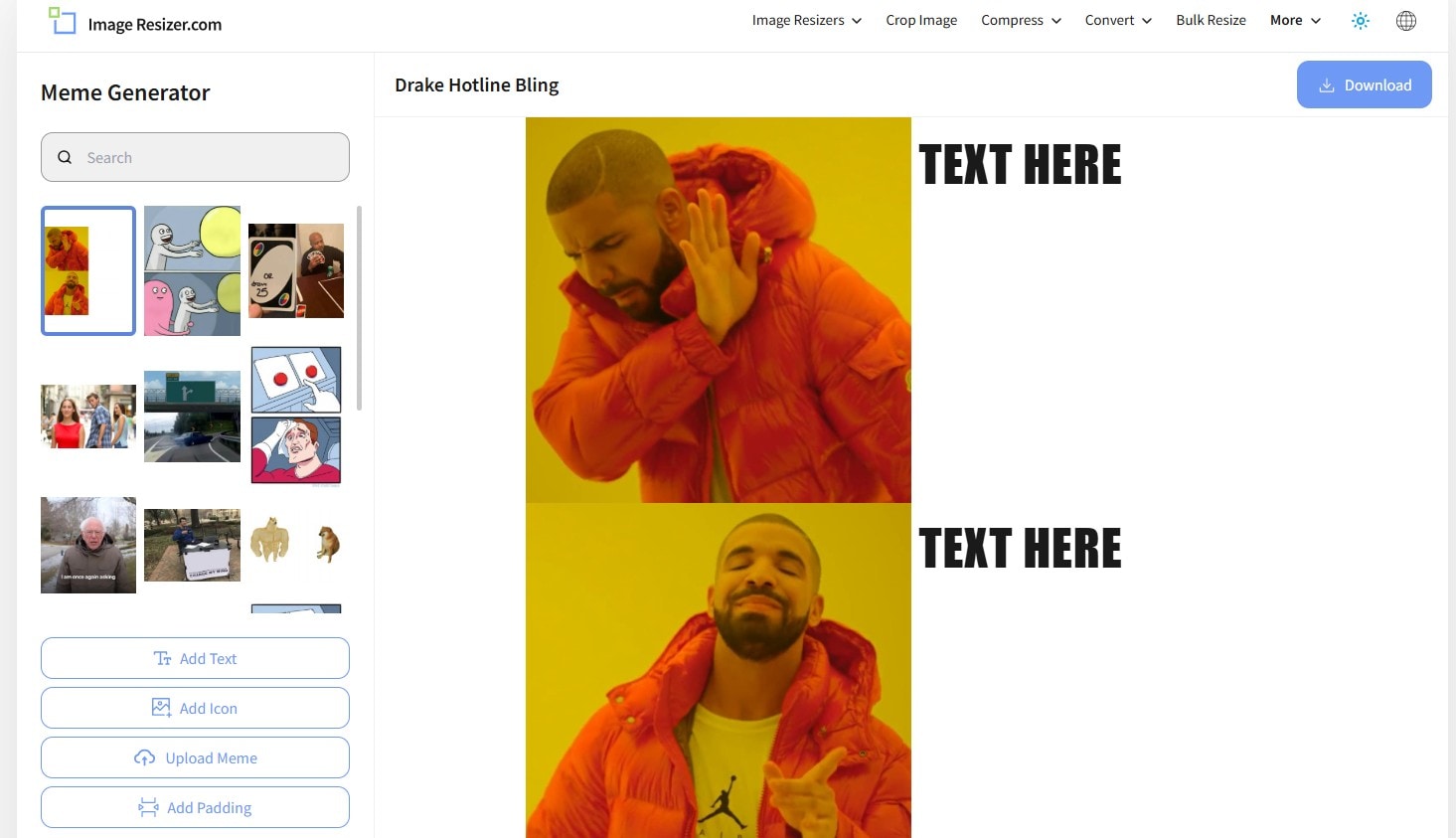
Image Resizer is a straightforward online tool primarily used for resizing images, but it also offers meme-making capabilities.
You may select any of those images to create your own meme, or upload your own image and add the relevant text. You can save the image on your computer and even share it through the site.
Key Highlights
- Includes nearly every popular meme as preselected images.
- Ability to create custom image memes.
- Easily share created memes.
### [Canva](https://www.canva.com/create/memes/)
Unlike other sites, Canva goes a step further and gives you professionally created templates that you can use for your memes. There are over a million stock photos available to you. It is a much larger selection than other sites.
But you can also upload your own image, add relevant text and then create the meme.
Key Highlights
- Large collection of stock images.
- Ability to create memes with your own images.
- Option to add filters to images for your memes.
- Option to change font and text color.
### [iLoveIMG](https://www.iloveimg.com/meme-generator)
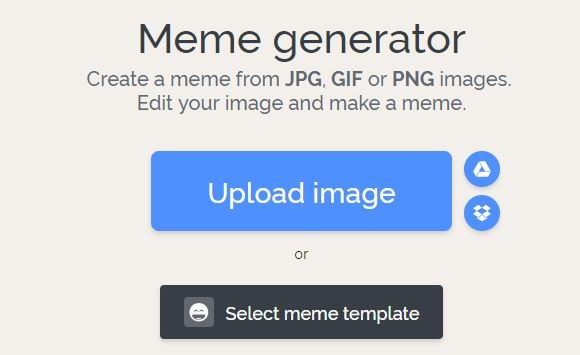
iLoveIMG is one of the easiest sites to use if you want to create a meme. The homepage will let you upload an image or select a meme template to get started.
Text boxes are already present, but you can edit them with your own text and see exactly how they would look. If you want to add more lines of text, you can do that as well.
It is even possible to add an image on top of one image to take your meme game to a whole new level\!
Key Highlights
- Easy meme creation with uploaded or custom images.
- Ability to add more than two lines of text.
- Option to add an image on top of the existing image.
### [Meme Creator](https://www.memecreator.com/)
With Meme Creator, you can recreate existing memes with the text of your choice, or upload images to make custom memes.
The site is very easy to use, which does not require you to create an account, and is completely free. It is possible to adjust the text size and color when you are using this meme generator, which is not always an option on these free tools.
Within a minute, you will have the custom meme that you can share with friends\!
Key Highlights
- Use preexisting and custom images for memes.
- Adjust the color and font size of both top and bottom text.
### [DIYLOL](https://www.diylol.com/)
Want to create a meme from images that have already become popular memes? Now you can do so with DIYLOL. All you need to do is pick the preexisting image that you like best, add your top and bottom text, and you are ready to go.
You can even adjust the font color and size for the top and bottom text. Then you can download the image to share with friends and family.
Key Highlights
- Easy tool to create memes from preexisting images.
- Ability to adjust font size and color.
## Conclusion
By using an online meme maker, you have the ability to create your own memes whenever you want. All you need is a source image and your idea for the text. Within minutes, the meme generator you are using will have your meme ready to download. Then you can share it with friends and save it on all your devices. And the best part is that you can do all of this with a meme maker online that is completely free\!

Filmora
AI Video Editing App & Software
[Try It Free](https://download.wondershare.com/filmora_full846.exe) [Try It Free](https://download.wondershare.com/filmora-mac_full14792.dmg)
Download the APP

Scan to get the Filmora App
Best tool for making videos anywhere for all creators\!
Simplify all your steps in video editing, from the pre-processing to finalizing, Filmora AI stays tuned.
[Install free Filmora App](https://app.adjust.com/w06dr6m_19za1f6) [Install free Filmora App](https://app.adjust.com/w06dr6m_19za1f6)
 Secure Download
## You May Also Like
[10 Best Free GIF Maker Apps on iPhone for Texting, Memes & Live Photos](https://filmora.wondershare.com/animated-gif/gif-apps-for-iphone-ipad.html)
Explore the top GIF apps for iPhone and iPad, from free GIF makers like ImgPlay and GIPHY to advanced editors like GifLab. Compare features, ease of use, and sharing options.
Posted by[James Hogan](https://filmora.wondershare.com/contributor/james-hogan.html)\|2025-12-03 09:24:27
[Best Drone Video Editing Software in 2026: Top Picks for Smooth, Cinematic Footage](https://filmora.wondershare.com/video-editing-tools/drone-video-editing-software.html)
Find the best drone video editing software for smooth and cinematic results. Compare the top tools, their features, and get tips to improve your video drone edits.
Posted by[James Hogan](https://filmora.wondershare.com/contributor/james-hogan.html)\|2026-01-06 11:09:22
[Top Image to Video Apps to Download in 2026](https://filmora.wondershare.com/video-editor/photo-into-video-app.html)
Looking for ways to convert your images into dynamic collages? Read this article to explore the top 10 image-to-video apps to download.
Posted by[James Hogan](https://filmora.wondershare.com/contributor/james-hogan.html)\|2026-01-06 11:09:19
[Stable Diffusion AI Video Generator Guide: Create and Edit Stunning AI Videos](https://filmora.wondershare.com/video-editing/stable-diffusion-ai-video-generator.html)
Learn how Stable Diffusion powers AI video generation and turn ideas into video clips. This guide also shows how to edit them easily with a video editing tool.
Posted by[James Hogan](https://filmora.wondershare.com/contributor/james-hogan.html)\|2025-11-12 10:00:55
[Top Best iPhone Apps for Editing Videos Like A Professional\!](https://filmora.wondershare.com/video-editing-app/10-best-free-video-editing-app-iphone.html)
What is the best free video editor for iPhone? Curious to know about the best iPhone apps for editing videos effortlessly? This article is here to fulfill your requirements\!
Posted by[James Hogan](https://filmora.wondershare.com/contributor/james-hogan.html)\|2025-11-12 10:14:39
[The Best Anniversary Video Maker and How to Use It](https://filmora.wondershare.com/family-n-personal/best-wedding-anniversary-video-maker.html)
If you are looking for the best anniversary video maker, look no further. Explore Filmora, the best tool on the market, and see how it can help you.
Posted by[Sumia Rafique](https://filmora.wondershare.com/)\|2026-01-08 14:22:50
[Complete Guide to Choose Movie Maker Android App](https://filmora.wondershare.com/choose-editor/movie-maker-android.html)
Choosing from a wide array of movie maker android applications can be a challenge for new video content creators. Here is a list of best movie maker android apps to create high-quality videos.
Posted by[Max Wales](https://filmora.wondershare.com/author/max-wales/)\|2025-11-18 17:47:36
[Try it free](https://download.wondershare.com/filmora_full846.exe) [Try it free](https://download.wondershare.com/filmora-mac_full14792.dmg) [Try it free](https://app.adjust.com/b0k9hf2_4bsu85t) [Try it free](https://app.adjust.com/b0k9hf2_4bsu85t)
[](https://www.wondershare.com/)
##### Hero Products
- [Filmora](https://filmora.wondershare.com/)
- [UniConverter](https://videoconverter.wondershare.com/)
- [Recoverit](https://recoverit.wondershare.com/)
- [Dr.Fone](https://drfone.wondershare.com/)
- [PDFelement](https://pdf.wondershare.com/)
- [All Products](https://www.wondershare.com/shop/individuals.html)
##### Wondershare
- [About Us](https://www.wondershare.com/about/)
- [Newsroom](https://www.wondershare.com/news/)
- [Global Presence](https://www.wondershare.com/about/global-presence.html)
- [Founder's Speech](https://www.wondershare.com/about/founders-speech.html)
- [Careers](https://www.wondershare.com/about/careers.html)
- [Education](https://www.wondershare.com/education.html)
##### Explore AI
- [AI Tools](https://www.wondershare.com/ai.html)
- [Marketing](https://www.wondershare.com/ai-solutions/marketing.html)
- [Social Media](https://www.wondershare.com/ai-solutions/social-media.html)
- [Education](https://www.wondershare.com/ai-solutions/education.html)
- [Business](https://www.wondershare.com/ai-solutions/business.html)
##### Help Center
- [Contact Us](https://www.wondershare.com/about/contact-us.html)
- [Video Community](https://www.wondershare.com/explore/inspiration.html)
- [Support Center](https://support.wondershare.com/)
- [Account](https://accounts.wondershare.com/web/login?f=sitefoot)
[Terms and Conditions](https://www.wondershare.com/company/terms_conditions.html) [Privacy](https://www.wondershare.com/privacy.html) [Terms of Use](https://www.wondershare.com/company/terms-of-use.html) [Do Not Sell or Share My Personal Information](https://www.wondershare.com/do-not-sell-or-share-my-personal-information.html) [Cookie Preferences](https://filmora.wondershare.com/meme/best-free-meme-maker-online.html#cmpscreencustom) [Refund Policy](https://www.wondershare.com/refund-policy.html) [Uninstall](https://www.wondershare.com/uninstall.html)
Copyright © 2026 Wondershare. All rights reserved.
English
[English](https://www.wondershare.com/) [Arabic - العربية](https://www.wondershare.ae/) [Chinese - 简体中文](https://www.wondershare.cn/) [Chinese Traditional - 繁體中文](https://www.wondershare.tw/) [French - Français](https://www.wondershare.fr/) [German - Deutsch](https://www.wondershare.de/) [Indonesian - Bahasa Indonesia](https://www.wondershare.co.id/) [Italian - Italiano](https://www.wondershare.it/) [Japanese - 日本語](https://www.wondershare.jp/) [Korean - 한국어](https://www.wondershare.kr/) [Portuguese - Português](https://www.wondershare.com.br/) [Spanish - Español](https://www.wondershare.es/) [Russian-Русский](https://www.wondershare.com.ru/)
Extend Your Story with AI
Extend your video forward or backward — Filmora’s AI Video Extender keeps every scene natural and connected.
Try Filmora Now \>

&site=20200) |
| Readable Markdown | Memes have become a central part of many online conversations. They pop up a lot on social media, especially platforms such as Twitter, Tumblr, and Facebook. People even converse with each other using meme keyboards.
With memes taking over popular culture, you may want to make a meme for yourself. By using a meme maker, you can do just that! Here is a look at the top 10+ best **meme maker online** options that you can use for free.
## Detailed Review: 10 Best Free Meme Creators & Generators
### [Supermeme](https://supermeme.ai/)
Supermeme can turn your thoughts into memes in just a few clicks! This AI-driven platform simplifies the meme-making process, making it easier than ever to bring your ideas to life.
Key Highlights
- Free and easy to use.
- Ability to create memes with your images.
- Option to add filters to images for your memes.
- Option to change font and text color.
### [Quickmeme](http://www.quickmeme.com/)
Quickmeme is the best meme maker option for anyone who wants a simple experience, without too many frills. You can check out featured memes, which show you the most popular ones right now.
All you need to do to create a meme is go on "upload a funny" to start from scratch. If you want to select a famous picture and add your own text, you can do so using the "caption a meme" option.
Key Highlights
- Create a meme with your own images or famous images.
- Login with Facebook to set up your account and save the memes you create.
### [MemeGenerator](https://imgflip.com/memegenerator)
One of the most popular tools for creating memes, MemeGenerator is the meme maker online that you can use when you want to add some funny captions to images. You can check out all the popular images that are being used to create memes by other people.
If you want to create a meme with one of those images, simply click on them or you can choose "create" to start making a meme with your own image or character.
Key Highlights
- Create memes with custom images or characters.
- Add your own text to famous meme images.
- Send and share memes through the site.
### [Imgur](https://imgur.com/meme-generator)
Imgur is mostly known as an image hosting platform. People will host images on Imgur so they can share them with friends or on social media. But there is also a meme creation tool that you can use on the site.
All you need to do is select one of the default images on the site, or use your own, and you can add the text that you want. Selecting the text to put at the top and bottom of the image is very easy with Imgur.
Key Highlights
- Takes under a minute to create a meme with your own image or pre-selected ones.
- Imgur also offers an image hosting service.
### [Make a Meme](https://makeameme.org/)
When you go on Make a Meme, you will immediately see images of all the most famous memes from around the world. You can click on those images, where you get an interface asking for the top text, bottom text, and your custom title. Then you click on "make a meme" and your image is ready.
You can even upload your own image and then add text to it in a similar way. You have the option to preview your memes before you create them as well.
Key Highlights
- Create memes from custom images or popular ones.
- Add top and bottom text easily.
- Create custom meme titles.
- Preview memes before making them.
### [Image Resizer](https://imageresizer.com/meme-generator)
Image Resizer is a straightforward online tool primarily used for resizing images, but it also offers meme-making capabilities.
You may select any of those images to create your own meme, or upload your own image and add the relevant text. You can save the image on your computer and even share it through the site.
Key Highlights
- Includes nearly every popular meme as preselected images.
- Ability to create custom image memes.
- Easily share created memes.

### [Canva](https://www.canva.com/create/memes/)
Unlike other sites, Canva goes a step further and gives you professionally created templates that you can use for your memes. There are over a million stock photos available to you. It is a much larger selection than other sites.
But you can also upload your own image, add relevant text and then create the meme.
Key Highlights
- Large collection of stock images.
- Ability to create memes with your own images.
- Option to add filters to images for your memes.
- Option to change font and text color.
### [iLoveIMG](https://www.iloveimg.com/meme-generator)
iLoveIMG is one of the easiest sites to use if you want to create a meme. The homepage will let you upload an image or select a meme template to get started.
Text boxes are already present, but you can edit them with your own text and see exactly how they would look. If you want to add more lines of text, you can do that as well.
It is even possible to add an image on top of one image to take your meme game to a whole new level\!
Key Highlights
- Easy meme creation with uploaded or custom images.
- Ability to add more than two lines of text.
- Option to add an image on top of the existing image.

### [Meme Creator](https://www.memecreator.com/)
With Meme Creator, you can recreate existing memes with the text of your choice, or upload images to make custom memes.
The site is very easy to use, which does not require you to create an account, and is completely free. It is possible to adjust the text size and color when you are using this meme generator, which is not always an option on these free tools.
Within a minute, you will have the custom meme that you can share with friends\!
Key Highlights
- Use preexisting and custom images for memes.
- Adjust the color and font size of both top and bottom text.
### [DIYLOL](https://www.diylol.com/)
Want to create a meme from images that have already become popular memes? Now you can do so with DIYLOL. All you need to do is pick the preexisting image that you like best, add your top and bottom text, and you are ready to go.
You can even adjust the font color and size for the top and bottom text. Then you can download the image to share with friends and family.
Key Highlights
- Easy tool to create memes from preexisting images.
- Ability to adjust font size and color.
## Conclusion
By using an online meme maker, you have the ability to create your own memes whenever you want. All you need is a source image and your idea for the text. Within minutes, the meme generator you are using will have your meme ready to download. Then you can share it with friends and save it on all your devices. And the best part is that you can do all of this with a meme maker online that is completely free\!

Filmora
AI Video Editing App & Software
Best tool for making videos anywhere for all creators\!
Simplify all your steps in video editing, from the pre-processing to finalizing, Filmora AI stays tuned. |
| Shard | 183 (laksa) |
| Root Hash | 17870713366563953783 |
| Unparsed URL | com,wondershare!filmora,/meme/best-free-meme-maker-online.html s443 |