ℹ️ Skipped - page is already crawled
| Filter | Status | Condition | Details |
|---|---|---|---|
| HTTP status | PASS | download_http_code = 200 | HTTP 200 |
| Age cutoff | PASS | download_stamp > now() - 6 MONTH | 0 months ago |
| History drop | PASS | isNull(history_drop_reason) | No drop reason |
| Spam/ban | PASS | fh_dont_index != 1 AND ml_spam_score = 0 | ml_spam_score=0 |
| Canonical | PASS | meta_canonical IS NULL OR = '' OR = src_unparsed | Not set |
| Property | Value |
|---|---|
| URL | https://dontkillmyapp.com/xiaomi |
| Last Crawled | 2026-04-10 01:48:17 (20 hours ago) |
| First Indexed | 2019-01-10 13:28:31 (7 years ago) |
| HTTP Status Code | 200 |
| Meta Title | Xiaomi | Don’t kill my app! |
| Meta Description | Hey Android vendors, don’t kill my app! |
| Meta Canonical | null |
| Boilerpipe Text | Story
Traditionally, Xiaomi and their Android customization called
MIUI
belongs in the most troubled group on the market with respect to non-standard background process limitations and non-standard permissions.
There are no APIs and no documentation for those extensions. In default settings, background processing simply does not work right and apps using them will break.
Note
: Android One devices by Xiaomi work much better than MIUI-based devices. So, if you like Xiaomi, we definitely recommend looking for their Android One offering.
“
App pinning / App locking
When you open the recent apps tray, drag your app downwards (it will be locked). Locked/pinned apps will gain further protection and not be cleared from the background, even if you clear recent apps. Drag downwards again to clear your app from the background.
On some phones, you need to long-press Your app and then choose the padlock icon from the menu:
Another method of app locking is hidden a little deeper:
Autostart permission
On MIUI 14, there is a new permission to start from the background for each app, in
Settings > Apps > Your app > App permissions > Background autostart
.
Boost speed
If the app is locked here in this “Boost speed” feature, it may be spared by
Ultra battery saver
.
MIUI Optimizations
MIUI Optimizations were reported on MIUI 12 so far, but this option may be present on older versions too (let us know, if you have found this option on your phone). It is hidden in the Developers settings, so you need to switch to developer mode first (10x tap on MIUI version in About phone). As with all “optimizations”, the MIUI optimizations can break the background tasks.
There were some reports, that the MIUI optimization was missing in the menu -
here is a workaround guide
.
MIUI 12
To let your app run in the background, make sure settings for your app look like the following:
MIUI 11
To let your app run in the background, make sure settings for your app look like the following:
MIUI 10
To let your app run in the background, make sure your settings look like the following (here for example is Sleep as Android):
Power management
Please enable:
Settings > Advanced Settings > Battery manager > Power plan
is set to Performance
Device Settings > Advanced Settings > Battery Manager > Protected apps
– your app needs to be Protected
Device Settings > Apps > your app > Battery > Power-intensive prompt
and
Keep running after screen off
Settings > Additional Settings > Battery & Performance > Manage apps’ battery usage
and here:
Switch Power Saving Modes to Off
Choose the next options:
Saving Power in The Background > Choose apps > select your app > Background Settings > No restrictions
App battery saver
Security > Battery > App Battery Saver > your app > No restriction
Autostart
(according to
Xiaomi
:
Open
Security app > Permissions > Auto-start
Enable “Autostart” for desired apps.
Hidden settings
On some XiaoMi phones, several settings options are hidden from you. Luckily, there are several apps on Play Store designed specifically for revealing these secret options and menus.
Hidden Settings For MIUI
from Yunus Ceyhan
MIUI Hidden Settings Activity Launcher, poco, note
from More by NetVor - Android Solutions
MQS - Quick Settings for MIUI
from Ruby Faick
Solution for devs
Check Autostart permission
There is a way to check if the Autostart has been enabled,
https://github.com/XomaDev/MIUI-autostart
This has been tested on devices:
- MIUI 10 (firebase)
- MIUI 11 (physical device 11.0.9)
- MIUI 12 (physical device 12.5)
- MIUI 13 (untested, but work)
- MIUI 14 (physical device 14.0.2)
Usage
// make sure device is MIUI device, else an
// exception will be thrown at initialization
Autostart
autostart
=
new
Autostart
(
applicationContext
);
State
state
=
autostart
.
getAutoStartState
();
if
(
state
==
State
.
DISABLED
)
{
// now we are sure that autostart is disabled
// ask user to enable it manually in the settings app
}
else
if
(
state
==
State
.
ENABLED
)
{
// now we are also sure that autostart is enabled
}
Badge
Copy embed code to clipboard |
| Markdown | [Don't kill my app\!](https://dontkillmyapp.com/) [](https://play.google.com/store/apps/details?id=com.urbandroid.dontkillmyapp&pcampaignid=pcampaignidMKT-Other-global-all-co-prtnr-py-PartBadge-Mar2515-1)
[Our mission](https://dontkillmyapp.com/problem)[API](https://dontkillmyapp.com/apidoc)[Press](https://dontkillmyapp.com/press)[Xiaomi 5 💩](https://dontkillmyapp.com/xiaomi)[Samsung 5 💩](https://dontkillmyapp.com/samsung)[OnePlus 5 💩](https://dontkillmyapp.com/oneplus)[Huawei 5 💩](https://dontkillmyapp.com/huawei)[Meizu 4 💩](https://dontkillmyapp.com/meizu)[Asus 4 💩](https://dontkillmyapp.com/asus)[Wiko 3 💩](https://dontkillmyapp.com/wiko)[Vivo 3 💩](https://dontkillmyapp.com/vivo)[Tecno 3 💩](https://dontkillmyapp.com/tecno)[realme 3 💩](https://dontkillmyapp.com/realme)[Oppo 3 💩](https://dontkillmyapp.com/oppo)[Motorola 3 💩](https://dontkillmyapp.com/motorola)[Lenovo 3 💩](https://dontkillmyapp.com/lenovo)[Blackview 3 💩](https://dontkillmyapp.com/blackview)[Unihertz 2 💩](https://dontkillmyapp.com/unihertz)[Sony 2 💩](https://dontkillmyapp.com/sony)[AOSP 0 💩](https://dontkillmyapp.com/stock_android)[Nokia 0 💩](https://dontkillmyapp.com/nokia)[HTC 0 💩](https://dontkillmyapp.com/htc)[Nokia 0 💩](https://dontkillmyapp.com/hmd-global)[AOSP 0 💩](https://dontkillmyapp.com/google)[Other vendors](https://dontkillmyapp.com/general)
[ Story](https://dontkillmyapp.com/xiaomi#explanation)
[ Solution for users](https://dontkillmyapp.com/xiaomi#user-solution)
[ Solution for devs](https://dontkillmyapp.com/xiaomi#dev-solution)
[ Badge](https://dontkillmyapp.com/xiaomi#badge)
# Xiaomi [    ](https://dontkillmyapp.com/about_score)
[Edit](https://github.com/urbandroid-team/dont-kill-my-app/edit/master/_vendors-content/xiaomi/user.md)
##  Story
Traditionally, Xiaomi and their Android customization called *MIUI* belongs in the most troubled group on the market with respect to non-standard background process limitations and non-standard permissions. There are no APIs and no documentation for those extensions. In default settings, background processing simply does not work right and apps using them will break.
> **Note**: Android One devices by Xiaomi work much better than MIUI-based devices. So, if you like Xiaomi, we definitely recommend looking for their Android One offering. “
##  Solution for users
[Feedback](https://github.com/urbandroid-team/dont-kill-my-app/issues/new?title=Feedback%20for%20Xiaomi%20page)
### App pinning / App locking
When you open the recent apps tray, drag your app downwards (it will be locked). Locked/pinned apps will gain further protection and not be cleared from the background, even if you clear recent apps. Drag downwards again to clear your app from the background.
On some phones, you need to long-press Your app and then choose the padlock icon from the menu:
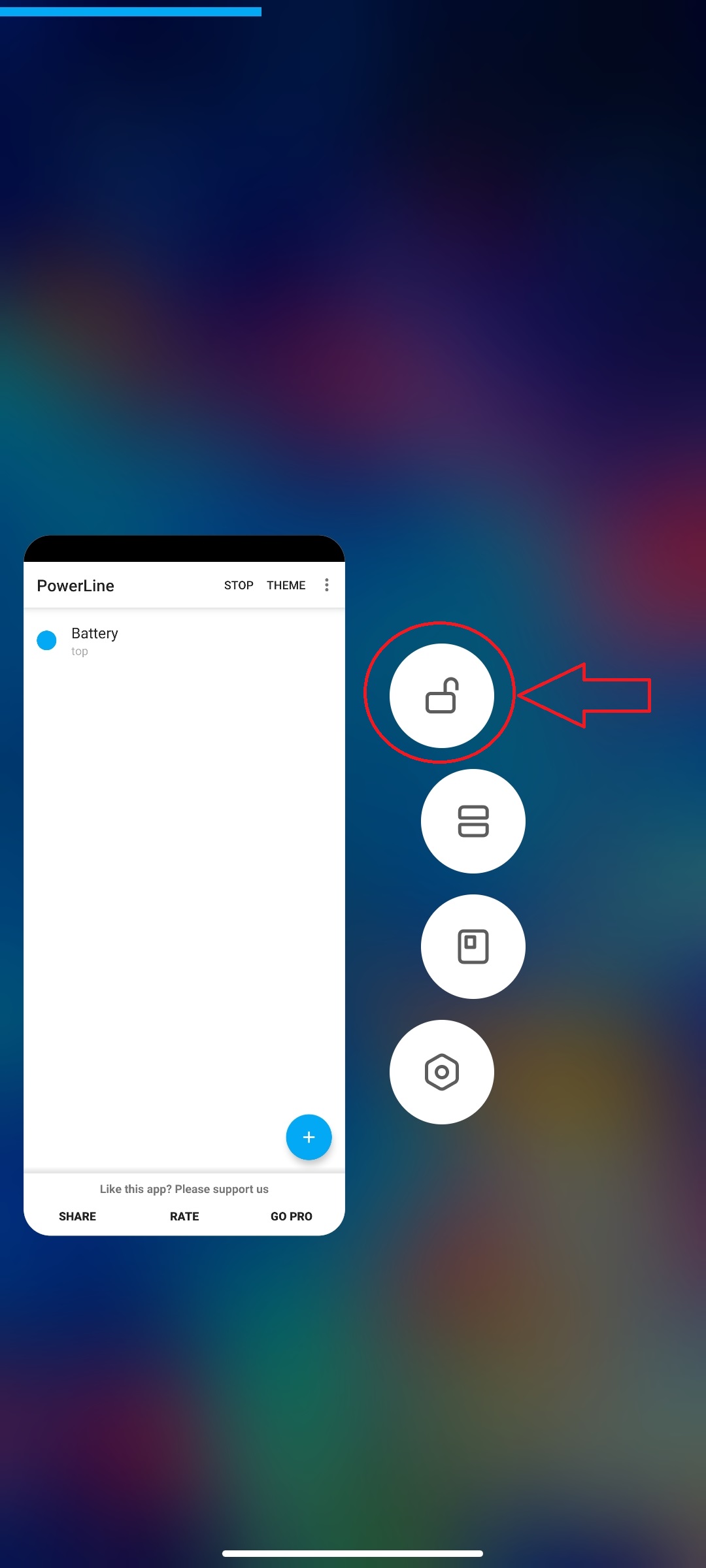
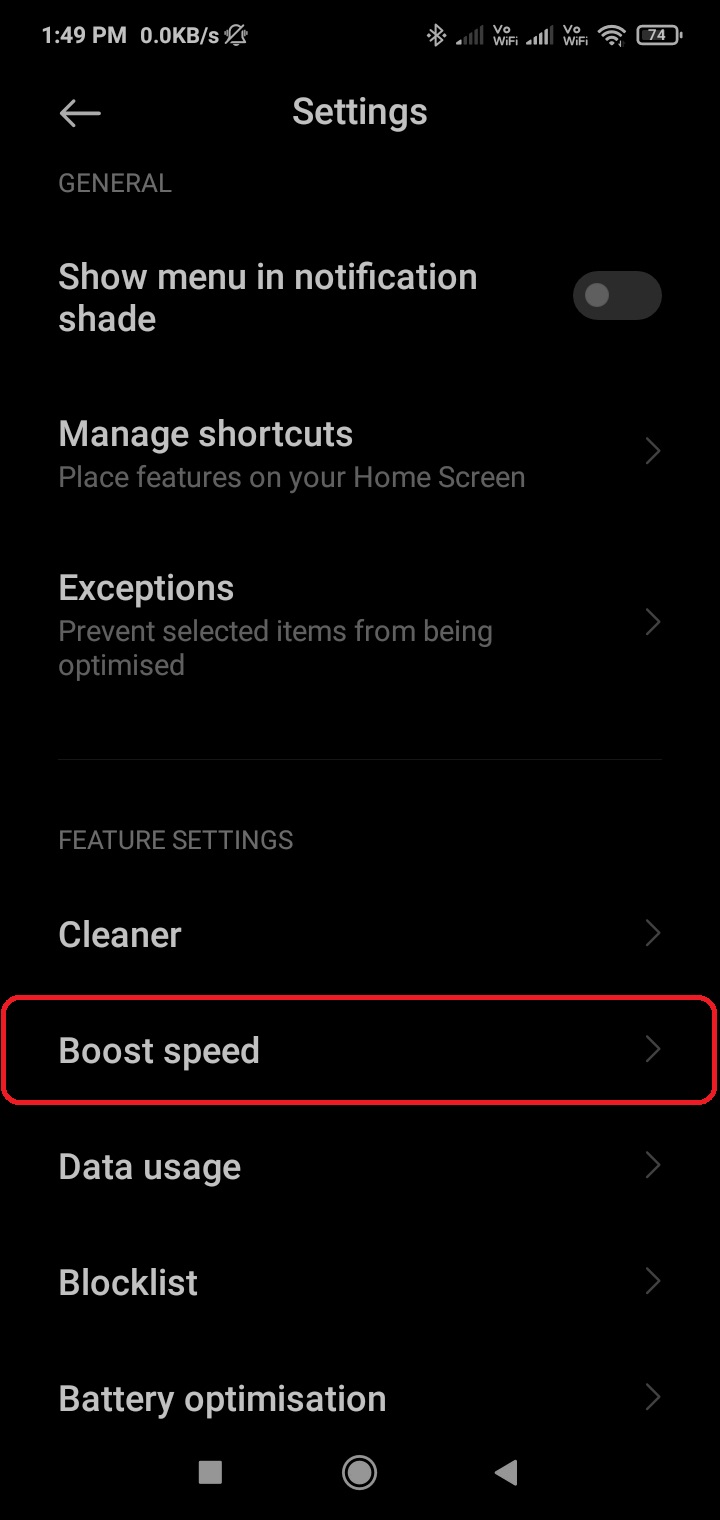
Another method of app locking is hidden a little deeper:
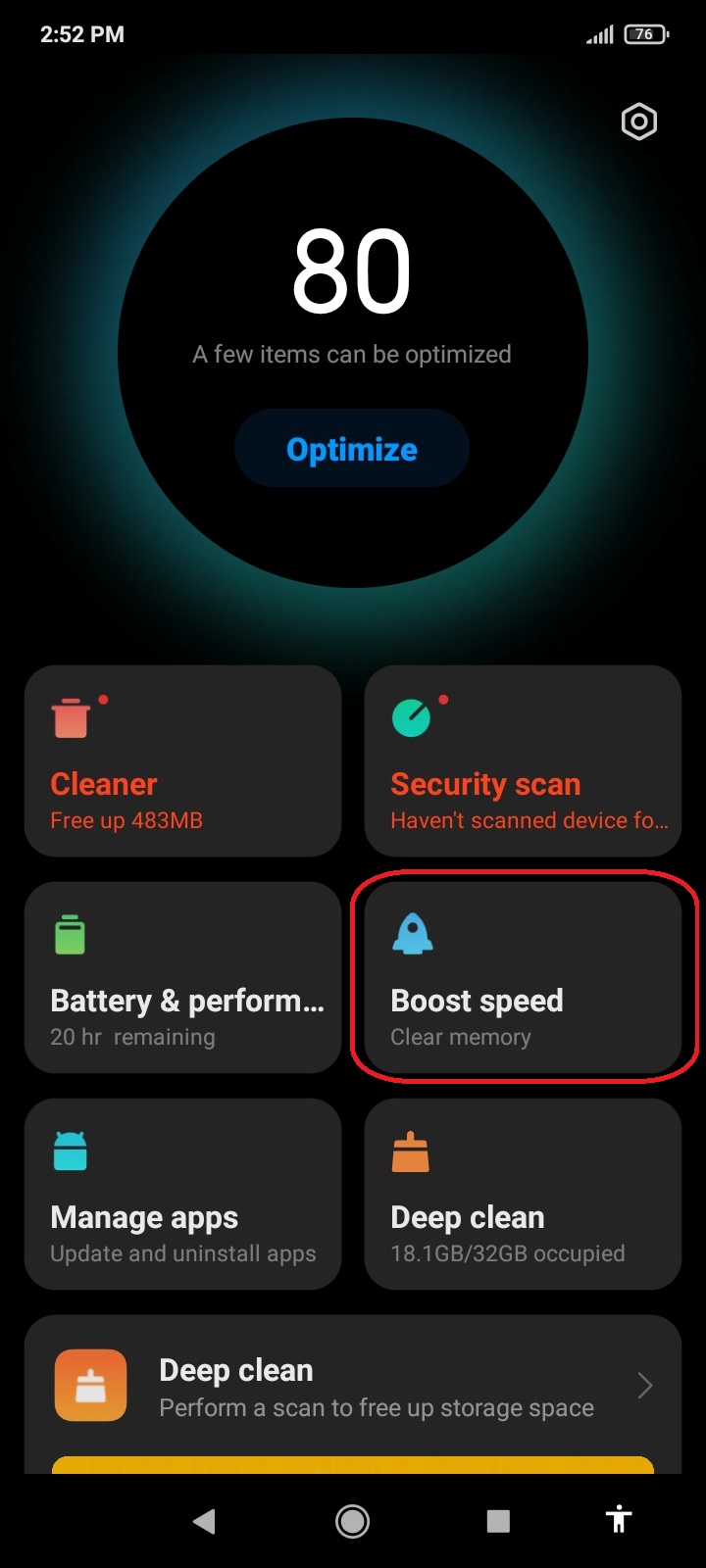
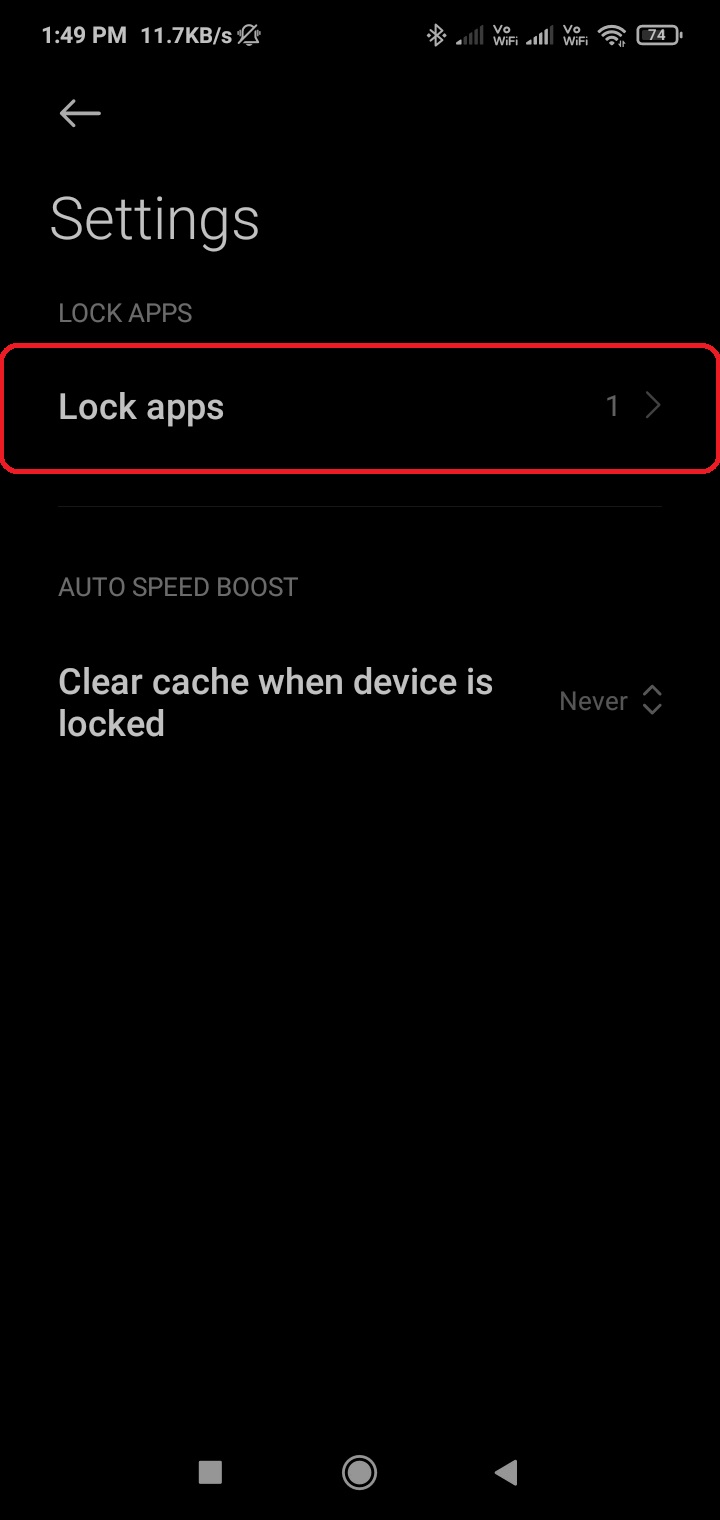
Open Security app → Boost speed
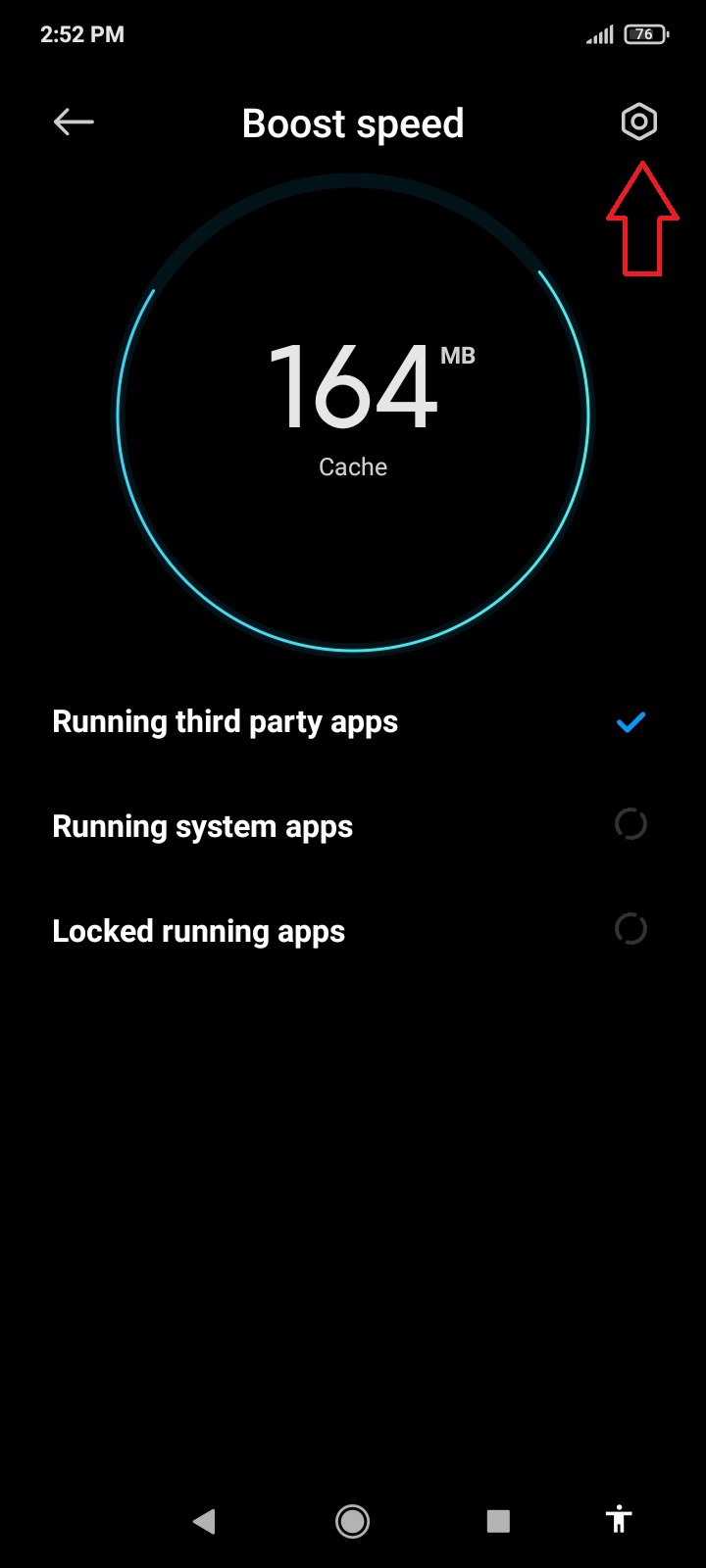
Open the Settings cog icon
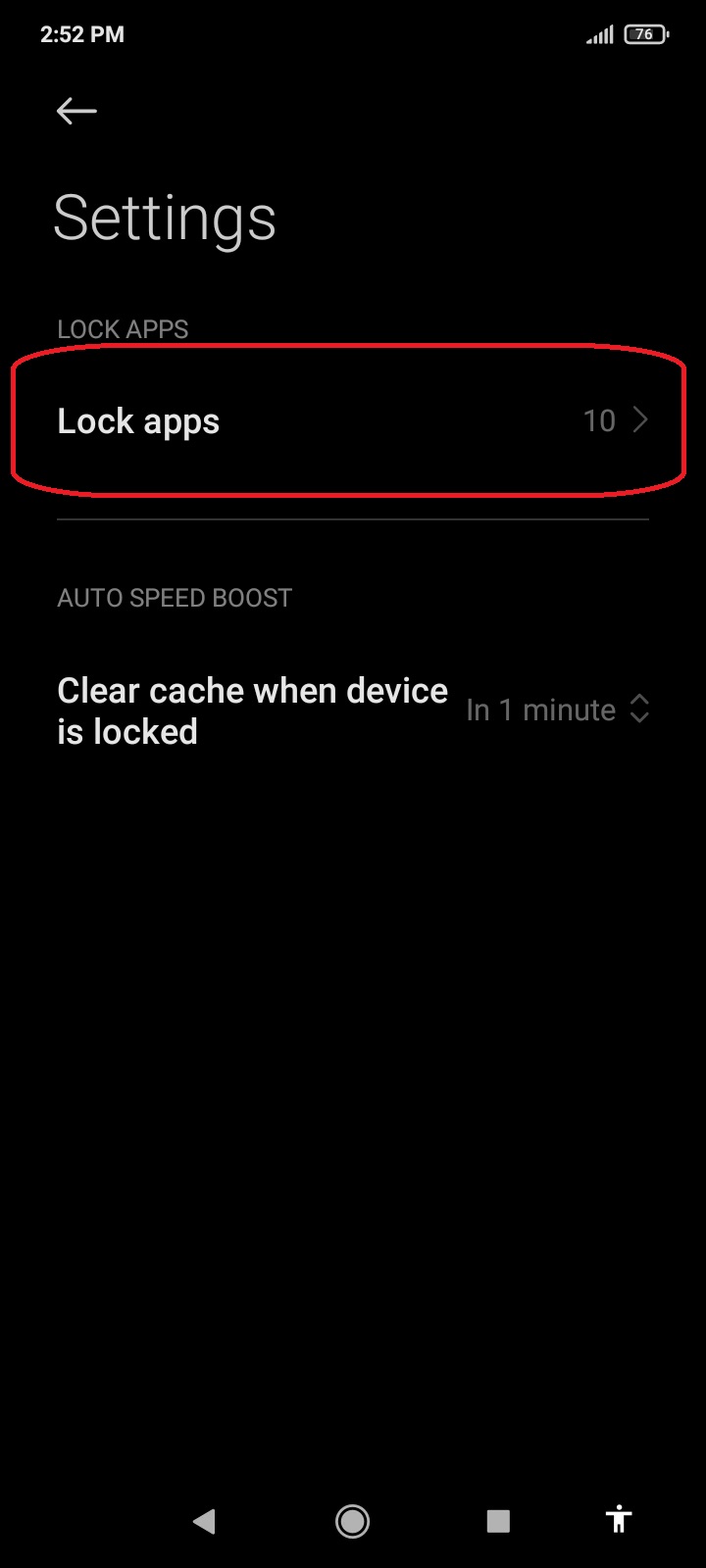
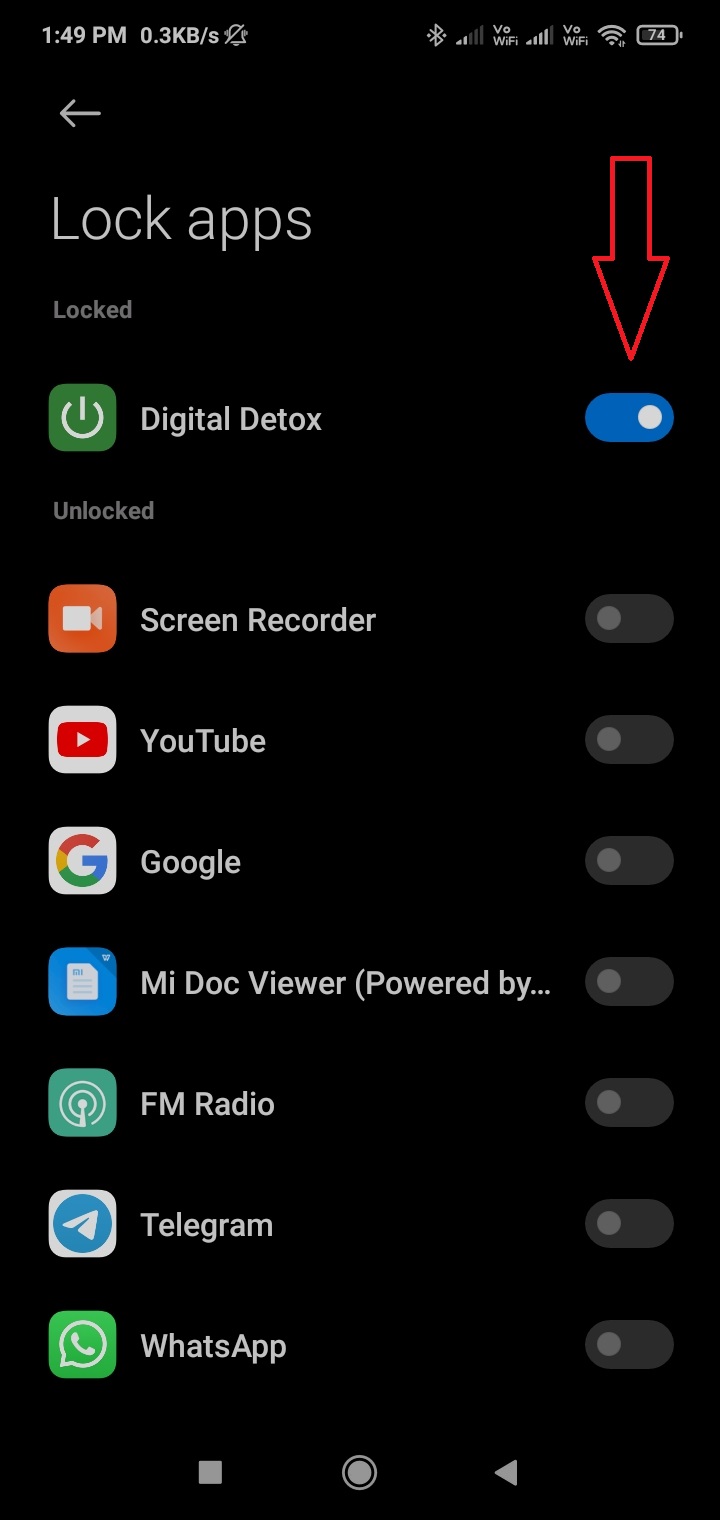
Go to Lock apps and pick your app
### Autostart permission
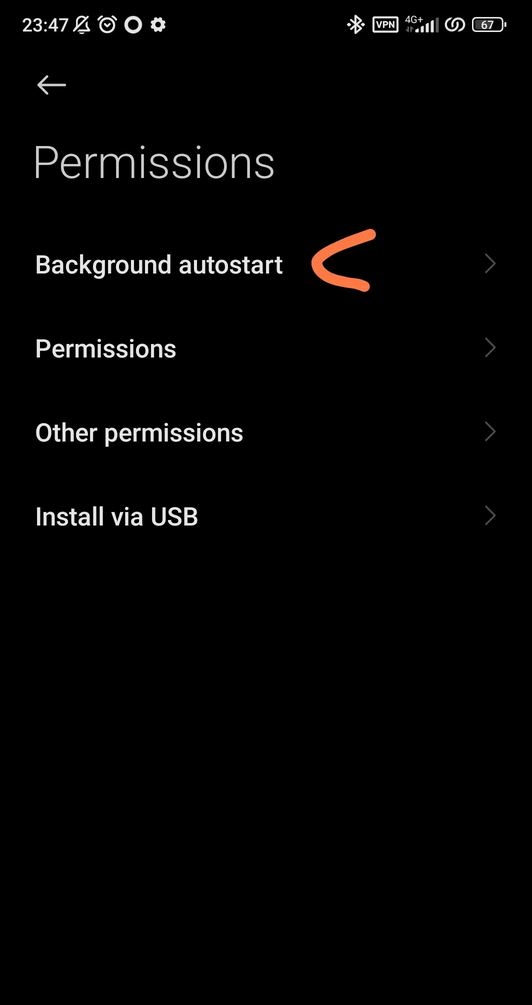
On MIUI 14, there is a new permission to start from the background for each app, in *Settings \> Apps \> Your app \> App permissions \> Background autostart*.
### Boost speed
If the app is locked here in this “Boost speed” feature, it may be spared by *Ultra battery saver*.
### MIUI Optimizations
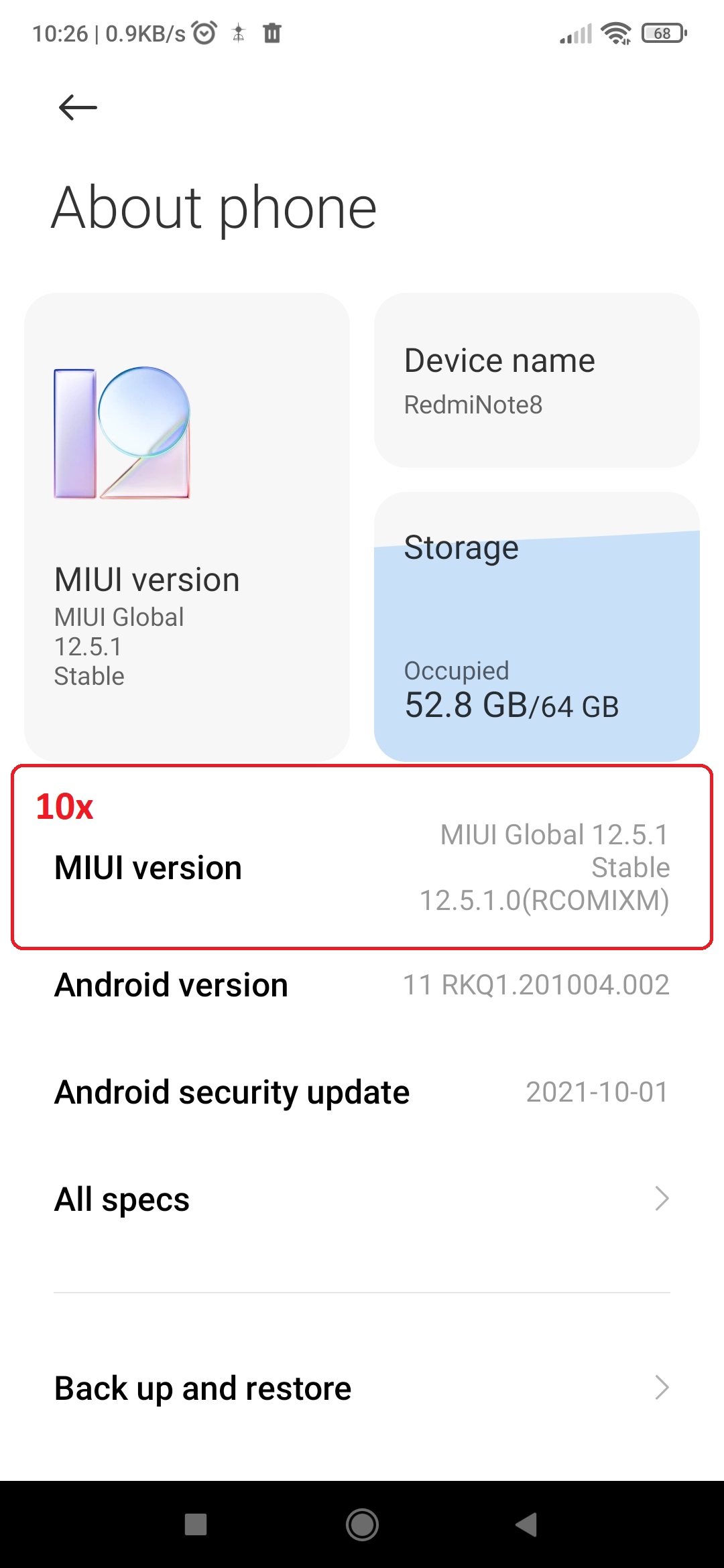
MIUI Optimizations were reported on MIUI 12 so far, but this option may be present on older versions too (let us know, if you have found this option on your phone). It is hidden in the Developers settings, so you need to switch to developer mode first (10x tap on MIUI version in About phone). As with all “optimizations”, the MIUI optimizations can break the background tasks.
 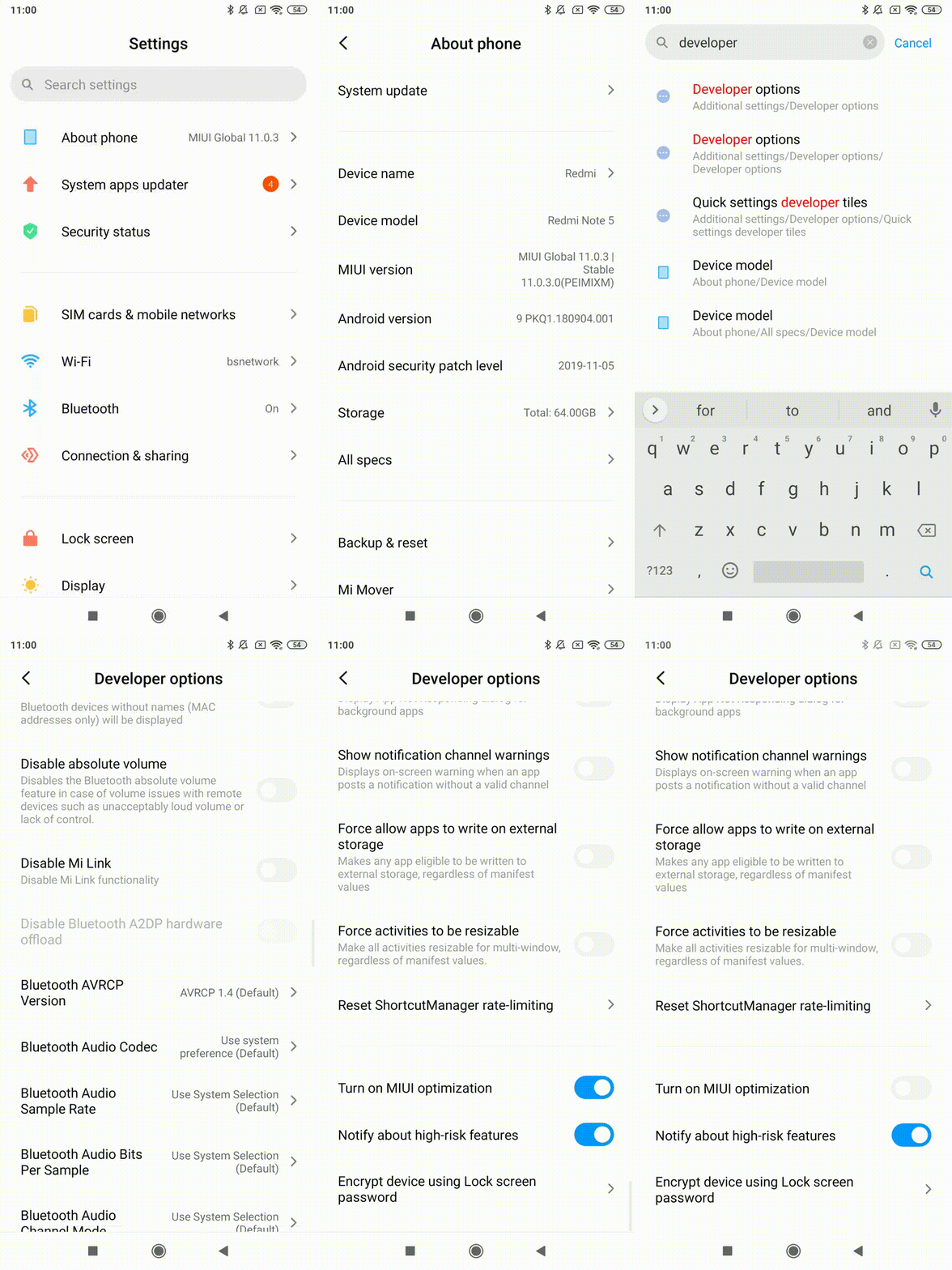
There were some reports, that the MIUI optimization was missing in the menu - [here is a workaround guide](https://piunikaweb.com/2021/04/19/miui-optimization-missing-in-developer-options-try-this-workaround/).
### MIUI 12
To let your app run in the background, make sure settings for your app look like the following:
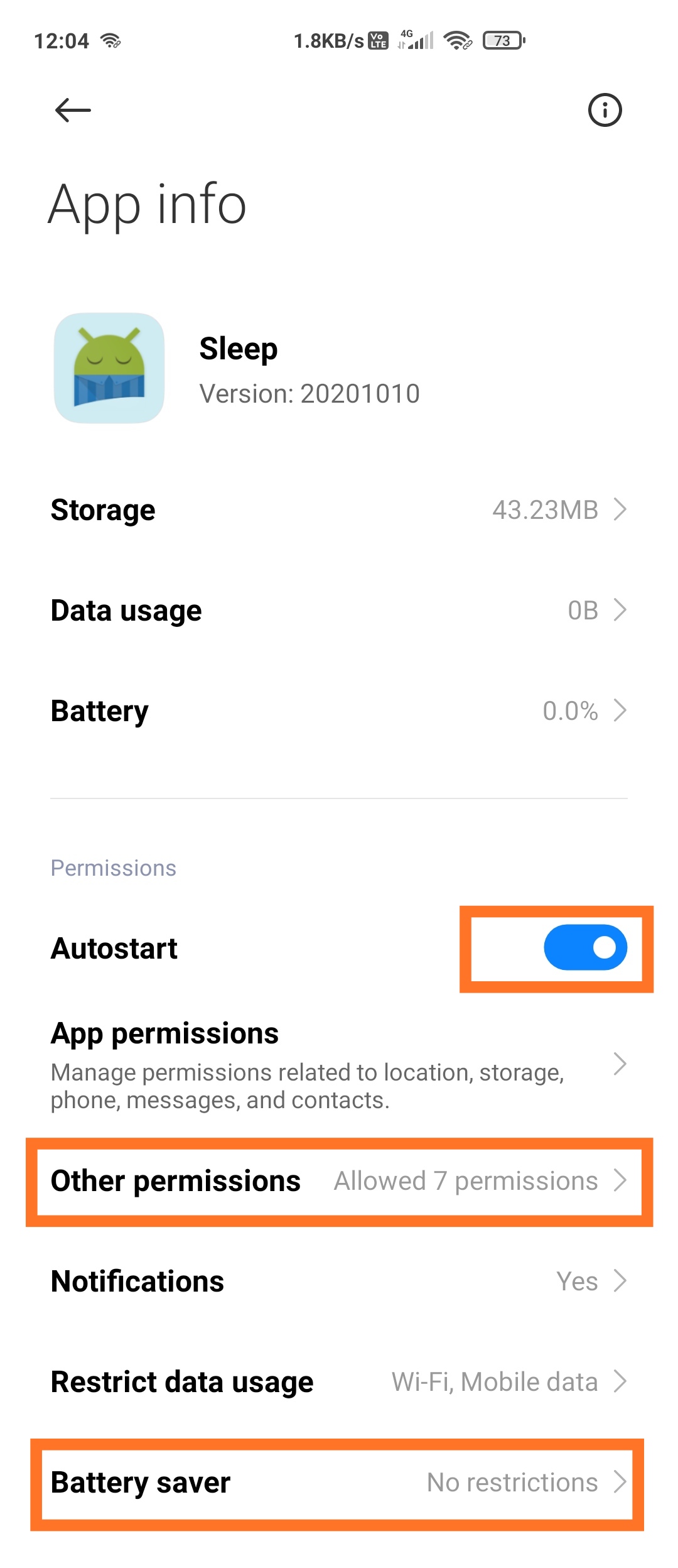 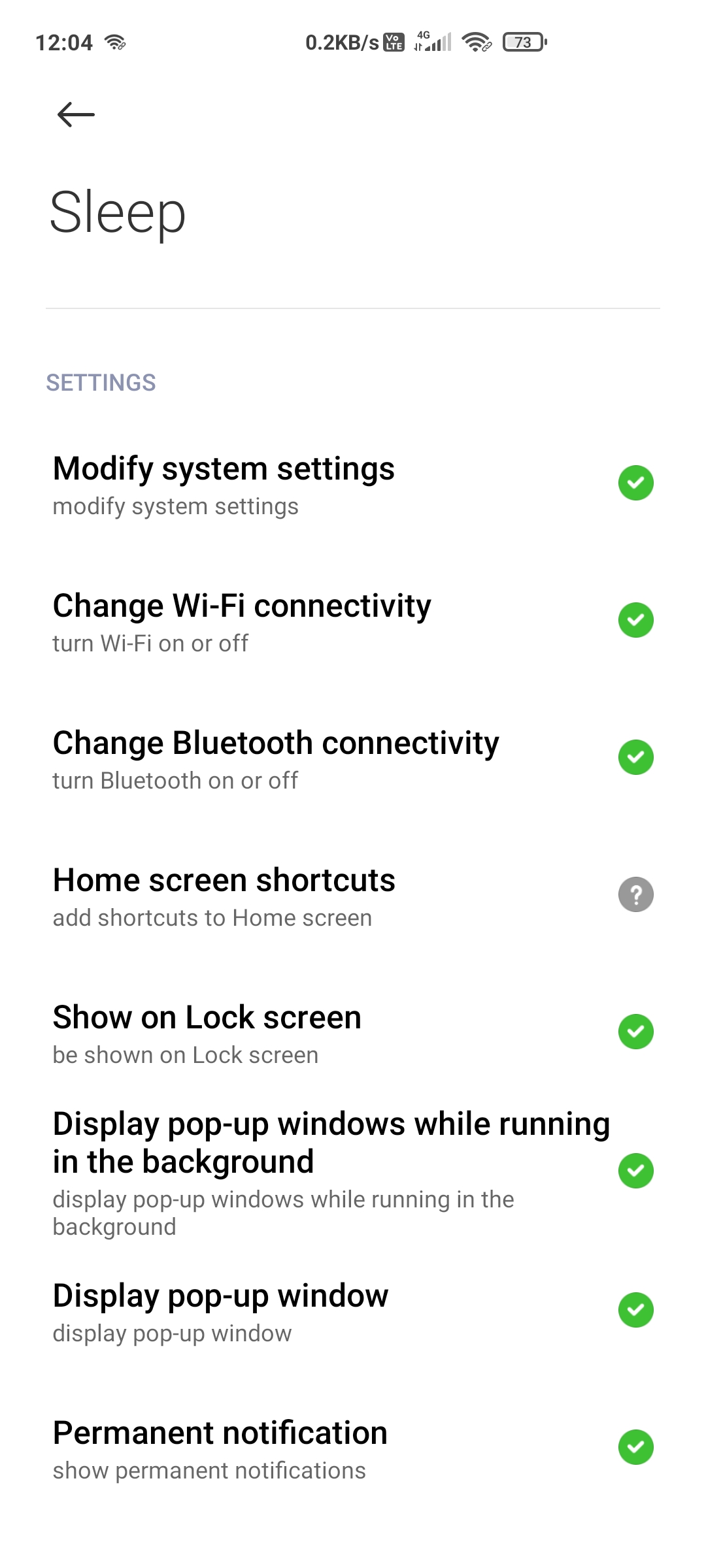 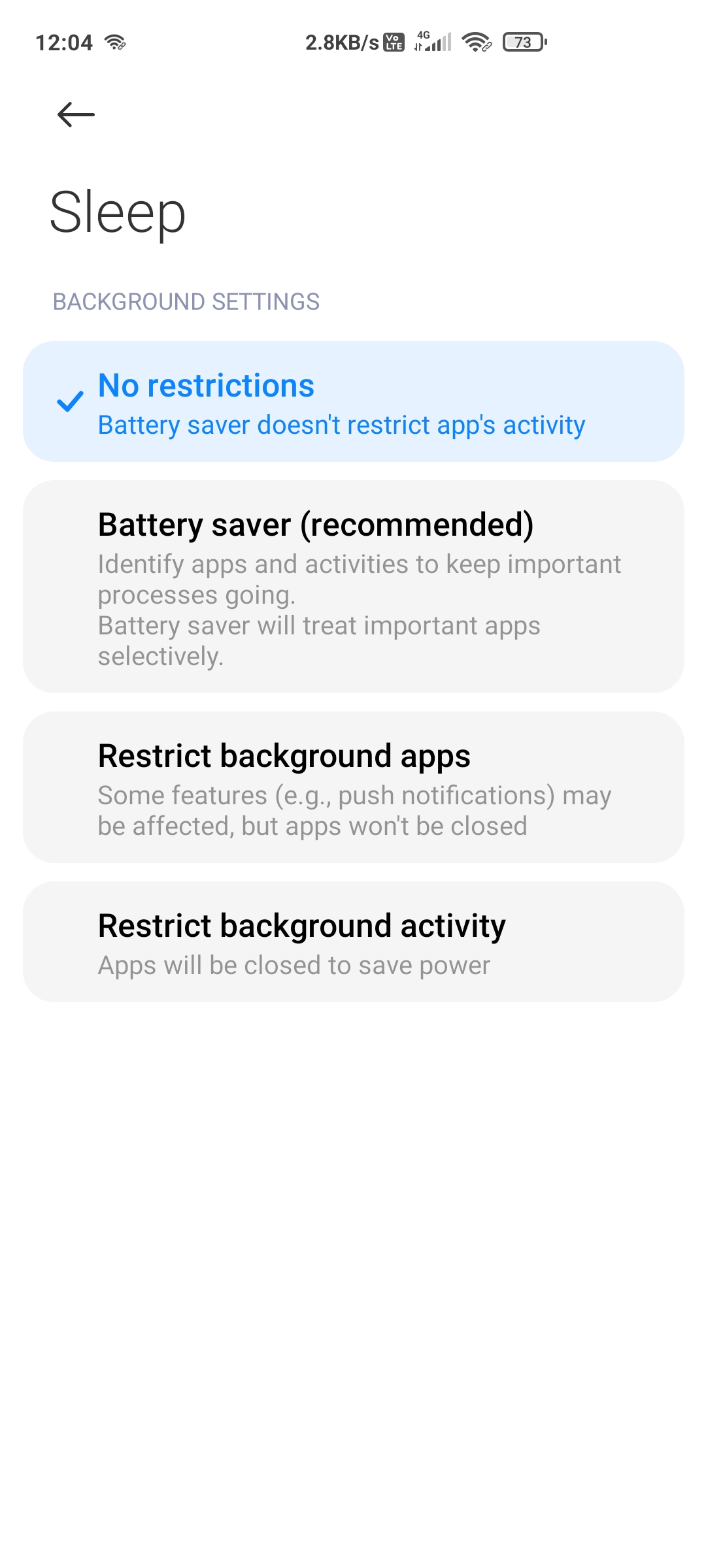
Some options might be missing for your app
(depends on the permissions the app needs).
### MIUI 11
To let your app run in the background, make sure settings for your app look like the following:
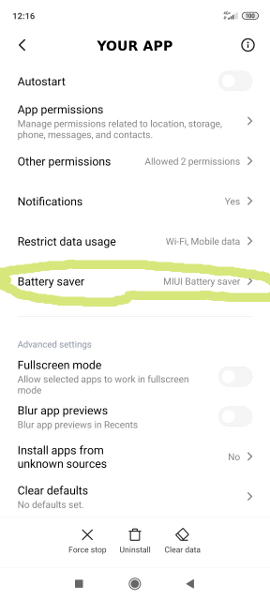 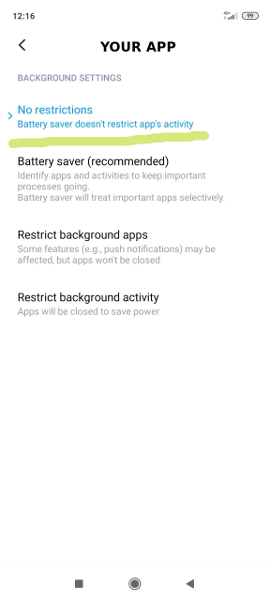
### MIUI 10
To let your app run in the background, make sure your settings look like the following (here for example is Sleep as Android):
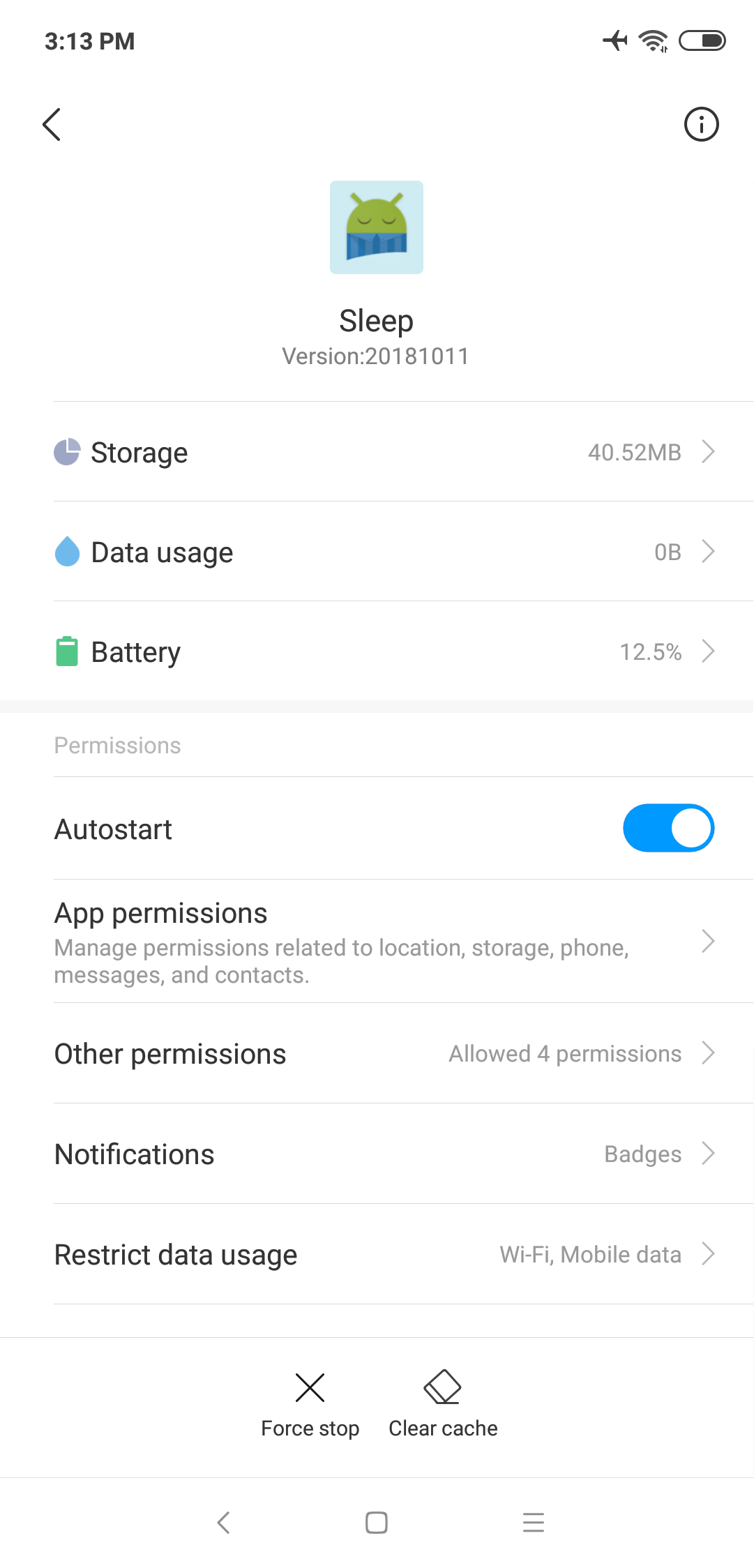 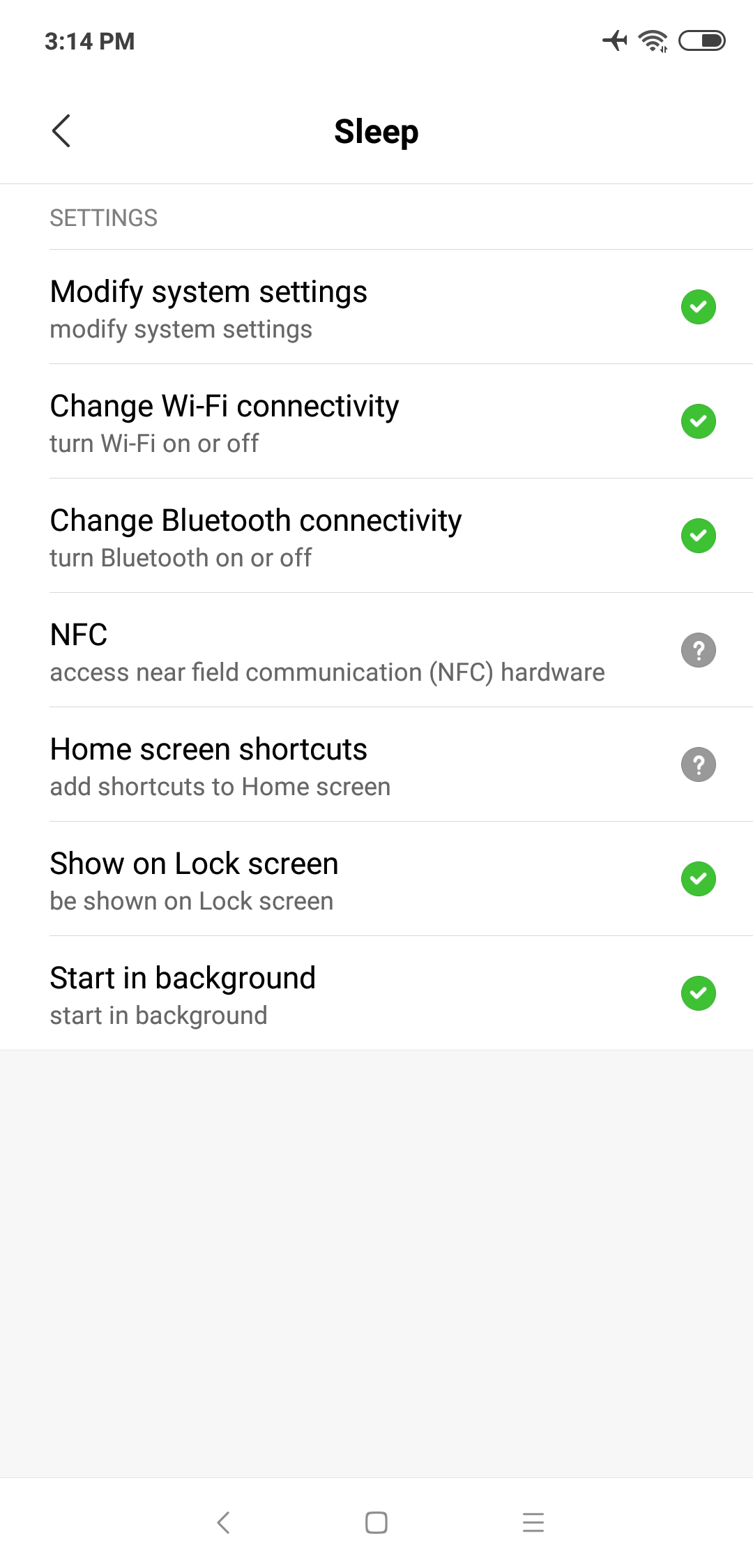 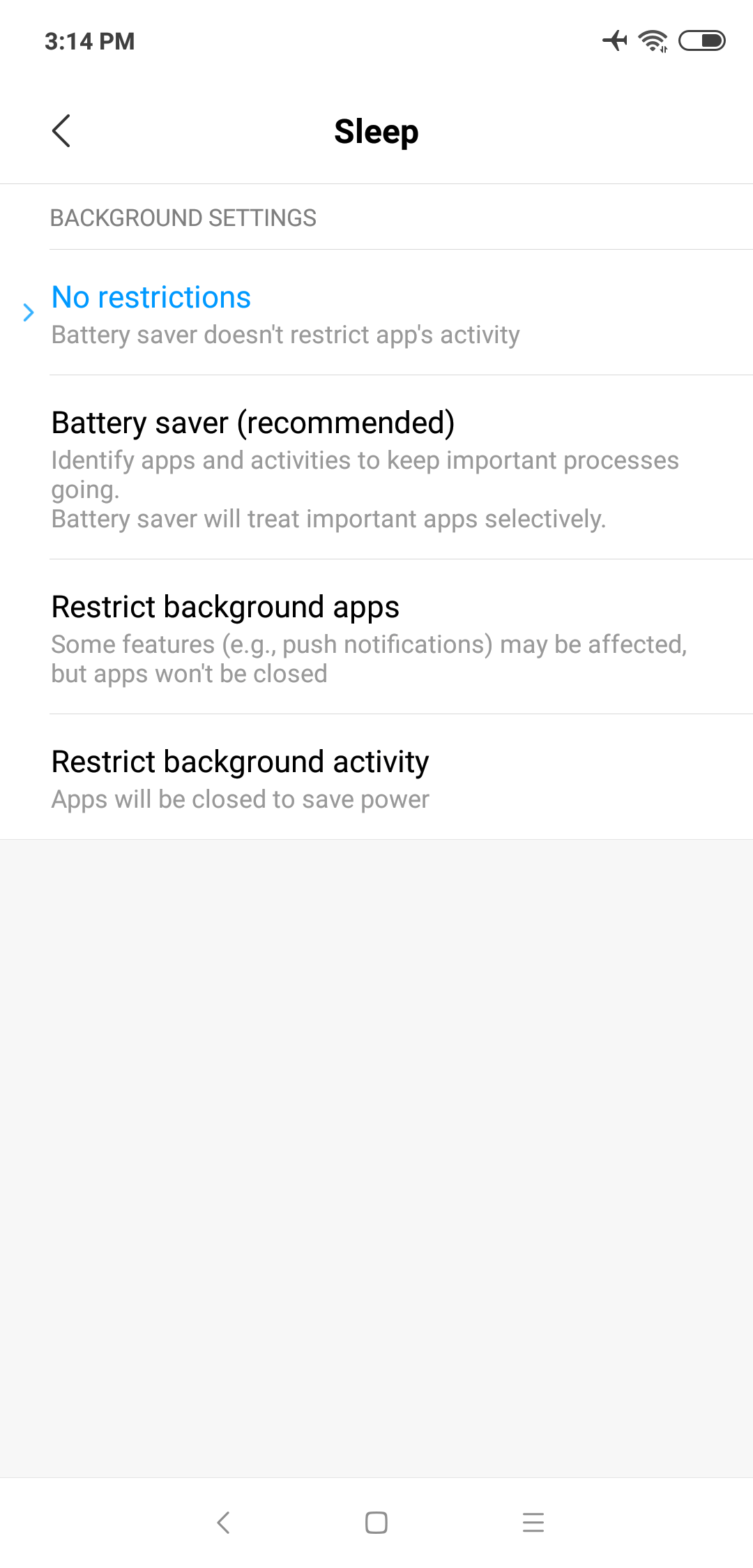
### Power management
Please enable:
- *Settings \> Advanced Settings \> Battery manager \> Power plan* is set to Performance
- *Device Settings \> Advanced Settings \> Battery Manager \> Protected apps* – your app needs to be Protected
- *Device Settings \> Apps \> your app \> Battery \> Power-intensive prompt* and *Keep running after screen off*
- *Settings \> Additional Settings \> Battery & Performance \> Manage apps’ battery usage* and here:
1. Switch Power Saving Modes to Off
2. Choose the next options: *Saving Power in The Background \> Choose apps \> select your app \> Background Settings \> No restrictions*
### App battery saver
*Security \> Battery \> App Battery Saver \> your app \> No restriction*
### Autostart
(according to [Xiaomi](https://in.c.mi.com/thread-253478-1-0.html):
Open *Security app \> Permissions \> Auto-start*
Enable “Autostart” for desired apps.
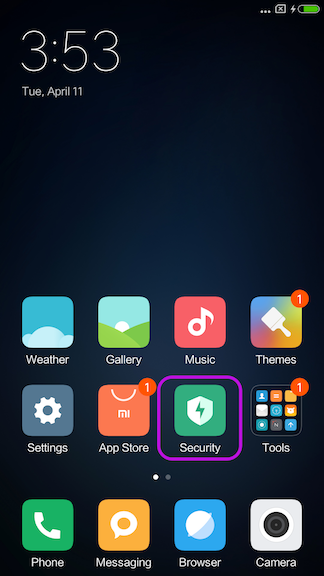 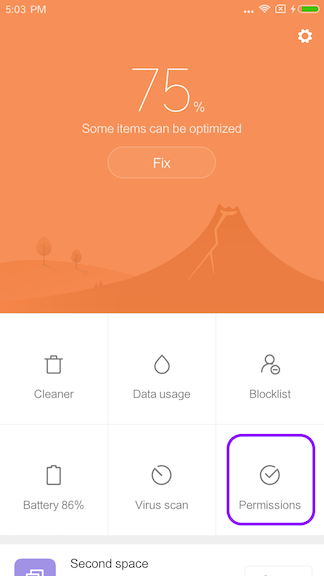
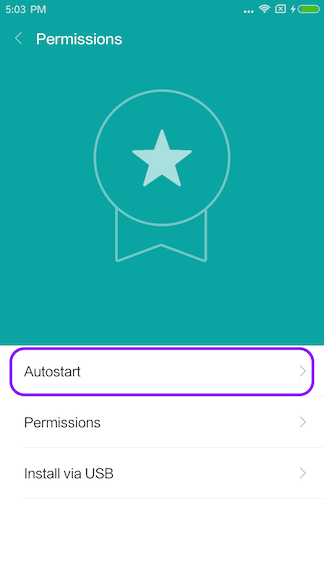
Search for Your app and tap to enable
### Hidden settings
On some XiaoMi phones, several settings options are hidden from you. Luckily, there are several apps on Play Store designed specifically for revealing these secret options and menus.
- [**Hidden Settings For MIUI** from Yunus Ceyhan](https://play.google.com/store/apps/details?id=com.ceyhan.sets)
- [**MIUI Hidden Settings Activity Launcher, poco, note** from More by NetVor - Android Solutions](https://play.google.com/store/apps/details?id=com.netvor.hiddensettings)
- [**MQS - Quick Settings for MIUI** from Ruby Faick](https://play.google.com/store/apps/details?id=com.zonarmr.miuiengineermode)
##  Solution for devs
### Check Autostart permission
There is a way to check if the Autostart has been enabled,
<https://github.com/XomaDev/MIUI-autostart>
This has been tested on devices:
```
- MIUI 10 (firebase)
- MIUI 11 (physical device 11.0.9)
- MIUI 12 (physical device 12.5)
- MIUI 13 (untested, but work)
- MIUI 14 (physical device 14.0.2)
```
### Usage
```
// make sure device is MIUI device, else an
// exception will be thrown at initialization
Autostart autostart = new Autostart(applicationContext);
State state = autostart.getAutoStartState();
if (state == State.DISABLED) {
// now we are sure that autostart is disabled
// ask user to enable it manually in the settings app
} else if (state == State.ENABLED) {
// now we are also sure that autostart is enabled
}
```
##  Badge
[](https://dontkillmyapp.com/xiaomi)
Copy embed code to clipboard
This site is libre software, the code is available on [GitHub](https://github.com/urbandroid-team/dont-kill-my-app).
Discussion and contributions welcomed\!
[](https://dontkillmyapp.com/xiaomi?0)[](https://dontkillmyapp.com/xiaomi?1)[](https://dontkillmyapp.com/xiaomi?2)[](https://dontkillmyapp.com/xiaomi?3)[](https://dontkillmyapp.com/xiaomi?4)[](https://dontkillmyapp.com/xiaomi?5)
[Free Counters](https://www.free-counters.org/) |
| Readable Markdown | ##  Story
Traditionally, Xiaomi and their Android customization called *MIUI* belongs in the most troubled group on the market with respect to non-standard background process limitations and non-standard permissions. There are no APIs and no documentation for those extensions. In default settings, background processing simply does not work right and apps using them will break.
> **Note**: Android One devices by Xiaomi work much better than MIUI-based devices. So, if you like Xiaomi, we definitely recommend looking for their Android One offering. “
### App pinning / App locking
When you open the recent apps tray, drag your app downwards (it will be locked). Locked/pinned apps will gain further protection and not be cleared from the background, even if you clear recent apps. Drag downwards again to clear your app from the background.
On some phones, you need to long-press Your app and then choose the padlock icon from the menu:

Another method of app locking is hidden a little deeper:
### Autostart permission
On MIUI 14, there is a new permission to start from the background for each app, in *Settings \> Apps \> Your app \> App permissions \> Background autostart*.

### Boost speed
If the app is locked here in this “Boost speed” feature, it may be spared by *Ultra battery saver*.
  
### MIUI Optimizations
MIUI Optimizations were reported on MIUI 12 so far, but this option may be present on older versions too (let us know, if you have found this option on your phone). It is hidden in the Developers settings, so you need to switch to developer mode first (10x tap on MIUI version in About phone). As with all “optimizations”, the MIUI optimizations can break the background tasks.
 
There were some reports, that the MIUI optimization was missing in the menu - [here is a workaround guide](https://piunikaweb.com/2021/04/19/miui-optimization-missing-in-developer-options-try-this-workaround/).
### MIUI 12
To let your app run in the background, make sure settings for your app look like the following:
### MIUI 11
To let your app run in the background, make sure settings for your app look like the following:
 
### MIUI 10
To let your app run in the background, make sure your settings look like the following (here for example is Sleep as Android):
  
### Power management
Please enable:
- *Settings \> Advanced Settings \> Battery manager \> Power plan* is set to Performance
- *Device Settings \> Advanced Settings \> Battery Manager \> Protected apps* – your app needs to be Protected
- *Device Settings \> Apps \> your app \> Battery \> Power-intensive prompt* and *Keep running after screen off*
- *Settings \> Additional Settings \> Battery & Performance \> Manage apps’ battery usage* and here:
1. Switch Power Saving Modes to Off
2. Choose the next options: *Saving Power in The Background \> Choose apps \> select your app \> Background Settings \> No restrictions*
### App battery saver
*Security \> Battery \> App Battery Saver \> your app \> No restriction*
### Autostart
(according to [Xiaomi](https://in.c.mi.com/thread-253478-1-0.html):
Open *Security app \> Permissions \> Auto-start*
Enable “Autostart” for desired apps.
### Hidden settings
On some XiaoMi phones, several settings options are hidden from you. Luckily, there are several apps on Play Store designed specifically for revealing these secret options and menus.
- [**Hidden Settings For MIUI** from Yunus Ceyhan](https://play.google.com/store/apps/details?id=com.ceyhan.sets)
- [**MIUI Hidden Settings Activity Launcher, poco, note** from More by NetVor - Android Solutions](https://play.google.com/store/apps/details?id=com.netvor.hiddensettings)
- [**MQS - Quick Settings for MIUI** from Ruby Faick](https://play.google.com/store/apps/details?id=com.zonarmr.miuiengineermode)
##  Solution for devs
### Check Autostart permission
There is a way to check if the Autostart has been enabled,
<https://github.com/XomaDev/MIUI-autostart>
This has been tested on devices:
```
- MIUI 10 (firebase)
- MIUI 11 (physical device 11.0.9)
- MIUI 12 (physical device 12.5)
- MIUI 13 (untested, but work)
- MIUI 14 (physical device 14.0.2)
```
### Usage
```
// make sure device is MIUI device, else an
// exception will be thrown at initialization
Autostart autostart = new Autostart(applicationContext);
State state = autostart.getAutoStartState();
if (state == State.DISABLED) {
// now we are sure that autostart is disabled
// ask user to enable it manually in the settings app
} else if (state == State.ENABLED) {
// now we are also sure that autostart is enabled
}
```
##  Badge
[](https://dontkillmyapp.com/xiaomi)
Copy embed code to clipboard |
| Shard | 95 (laksa) |
| Root Hash | 6316248295884847095 |
| Unparsed URL | com,dontkillmyapp!/xiaomi s443 |