ℹ️ Skipped - page is already crawled
| Filter | Status | Condition | Details |
|---|---|---|---|
| HTTP status | PASS | download_http_code = 200 | HTTP 200 |
| Age cutoff | PASS | download_stamp > now() - 6 MONTH | 0.7 months ago |
| History drop | PASS | isNull(history_drop_reason) | No drop reason |
| Spam/ban | PASS | fh_dont_index != 1 AND ml_spam_score = 0 | ml_spam_score=0 |
| Canonical | PASS | meta_canonical IS NULL OR = '' OR = src_unparsed | Not set |
| Property | Value | |||||||||
|---|---|---|---|---|---|---|---|---|---|---|
| URL | https://dm13450.github.io/2022/04/28/Volatility-methods.html | |||||||||
| Last Crawled | 2026-04-03 02:34:04 (19 days ago) | |||||||||
| First Indexed | 2022-04-28 20:22:08 (3 years ago) | |||||||||
| HTTP Status Code | 200 | |||||||||
| Content | ||||||||||
| Meta Title | How to Calculate Realised Volatility | Dean Markwick | |||||||||
| Meta Description | Volatility measures the scales of price changes and is an easy way to describe how busy markets are. High volatility means there are periods of large price changes and vice versa, low volatility means periods of small changes. In this post, I’ll show you how to calculate realised (realized) volatility and demonstrate how it can be used. If you just want a live view of crypto volatility, take a look at cryptoliquiditymetrics where I have added in a new card with the volatility over the last 24 hours. | |||||||||
| Meta Canonical | null | |||||||||
| Boilerpipe Text | Volatility measures the scales of price changes and is an easy way to
describe how busy markets are. High volatility means there are periods
of large price changes and vice versa, low volatility means periods of
small changes. In this post, I’ll show you how to calculate realised (realized)
volatility and demonstrate how it can be used. If you just want a live
view of crypto volatility, take a look at
cryptoliquiditymetrics
where I have added in a new card with the volatility over the last 24 hours.
Enjoy these types of posts? Then you should sign up for my newsletter.
To start with we will be looking at daily data. Using my
CoinbasePro.jl
package in a Julia we can get the last 300 days OHLC
prices.
I’m running Julia 1.7 and all the packages were updated using
Pkg.update()
at the time of this post.
using
CoinbasePro
using
Dates
using
Plots
,
StatsPlots
using
DataFrames
,
DataFramesMeta
using
RollingFunctions
From my
CoinbasePro.jl
package, we can pull in the daily candles of Bitcoin. 86400 is the
frequency for daily data. Coinbase restrict you to just 300 data
points so our period of time will be the previous 300 days.
dailydata
=
CoinbasePro
.
candles
(
"BTC-USD"
,
now
()
-
Day
(
300
),
now
(),
86400
);
sort!
(
dailydata
,
:
time
)
dailydata
=
@transform
(
dailydata
,
:
time
=
Date
.
(
:
time
))
first
(
dailydata
,
4
)
4 rows × 7 columns
close
high
low
open
unix_time
volume
time
Float64
Float64
Float64
Float64
Int64
Float64
Date
1
50978.6
51459.0
48909.8
48909.8
1615075200
13965.2
2021-03-07
2
52415.2
52425.0
49328.6
50976.2
1615161600
18856.3
2021-03-08
3
54916.4
54936.0
51845.0
52413.2
1615248000
21177.1
2021-03-09
4
55890.7
57402.1
53025.0
54921.6
1615334400
28326.1
2021-03-10
Plotting this gives you the typical price path of daily closing prices. Now realised
volatility is a measure of how varied this price was
over time. Was it stable or were there wild swings?
plot
(
dailydata
.
time
,
dailydata
.
close
,
label
=
:
none
,
ylabel
=
"Price"
,
title
=
"Bitcoin Price"
,
titleloc
=
:
left
,
linewidth
=
2
)
To calculate this variation, we need to add in the log-returns.
dailydata
=
@transform
(
dailydata
,
:
returns
=
[
NaN
;
diff
(
log
.
(
:
close
))]);
bar
(
dailydata
.
time
[
2
:
end
],
dailydata
.
returns
[
2
:
end
],
label
=:
none
,
ylabel
=
"Log Return"
,
title
=
"Bitcoin Log Return"
,
titleloc
=
:
left
)
We can start by looking at this from a distribution perspective. If we
assume the log-returns (\(r\)) are from a normal distribution, with
zero mean, the standard deviation of this distribution is the equivalent to the
volatility
\[r \sim N(0, \sigma ^2),\]
so \(\sigma\) is how we will refer to volatility. From this, you can
see how high volatility leads to wide variations in prices. Each
log-return sample has a wider range of values that it could be.
So by taking the running standard deviation of the log-returns we can
estimate the volatility and how it changes over time. Using the
RollingFunctions.jl
package this is a one-liner.
dailydata
=
@transform
(
dailydata
,
:
volatility
=
runstd
(
:
returns
,
30
))
plot
(
dailydata
.
time
,
dailydata
.
volatility
,
title
=
"Bitcoin Volatility"
,
titleloc
=
:
left
,
label
=:
none
,
linewidth
=
2
)
There was high volatility over June this year as the price of Bitcoin
crashed. It’s been fairly stable since then, hovering around 0.03
and 0.04. How does this compare though to the S&P 500 as a general
indicator of the stop market? We know Bitcoin is more volatile than
the stock market, but how much more?
I’ll load up the
AlphaVantage.jl
package to pull the daily prices of
the SPY ETF and repeat the calculation; adding the log-returns and
taking the rolling standard deviation.
using
AlphaVantage
,
CSV
stockPrices
=
AlphaVantage
.
time_series_daily
(
"SPY"
,
datatype
=
"csv"
,
outputsize
=
"full"
,
parser
=
x
->
CSV
.
File
(
IOBuffer
(
x
.
body
)))
|>
DataFrame
sort!
(
stockPrices
,
:
timestamp
)
stockPrices
=
@subset
(
stockPrices
,
:
timestamp
.>=
minimum
(
dailydata
.
time
));
Again, add in the log-returns and calculate the rolling standard
deviation to estimate the volatility.
stockPrices
=
@transform
(
stockPrices
,
:
returns
=
[
NaN
;
diff
(
log
.
(
:
close
))])
stockPrices
=
@transform
(
stockPrices
,
:
volatility
=
runstd
(
:
returns
,
30
));
volPlot
=
plot
(
dailydata
.
time
,
dailydata
.
volatility
,
label
=
"BTC"
,
ylabel
=
"Volatility"
,
title
=
"Volatility"
,
titleloc
=
:
left
,
linewidth
=
2
)
volPlot
=
plot!
(
volPlot
,
stockPrices
.
timestamp
,
stockPrices
.
volatility
,
label
=
"SPY"
,
linewidth
=
2
)
As expected, Bitcoin volatility is much higher. Let’s take the log of
the volatility to look zoom in on the detail.
volPlot
=
plot
(
dailydata
.
time
,
log
.
(
dailydata
.
volatility
),
label
=
"BTC"
,
ylabel
=
"Log Volatility"
,
title
=
"Log Volatility"
,
titleloc
=
:
left
,
linewidth
=
2
)
volPlot
=
plot!
(
volPlot
,
stockPrices
.
timestamp
,
log
.
(
stockPrices
.
volatility
),
label
=
"SPY"
,
linewidth
=
2
)
Interestingly the SPY has had a resurgence in volatility as we move
towards the end of the year. One thing to point out though is the
slight difference in look back periods for the two products. Bitcoin
does not observe weekends or holidays, so 30 rows previously are
always 30 days, but for SPY this is the case as there are weekends and
trading holidays. In this illustrative example, it isn’t too much of an
issue, but if you were to take it further and perhaps look at the
correlation between the volatilities, this is something you would need
to account for.
A Higher Frequency Volatility
So far it has all been on daily observations, your classic dataset to
practise on. But I am always banging on about
high-frequency finance
,
so let’s look at more frequent data and understand how the volatility
looks at finer timescales.
This time we will pull the 5-minute candle bar data of both Bitcoin
and SPY and repeat the calculation.
Calculate the log-returns of the close to close bars
Calculate the rolling standard deviation by looking back 20 rows.
minuteData_spy
=
AlphaVantage
.
time_series_intraday_extended
(
"SPY"
,
"5min"
,
"year1month1"
,
parser
=
x
->
CSV
.
File
(
IOBuffer
(
x
.
body
)))
|>
DataFrame
minuteData_spy
=
@transform
(
minuteData_spy
,
:
time
=
DateTime
.
(
:
time
,
dateformat
"yyyy-mm-dd HH:MM:SS"
))
minuteData_btc
=
CoinbasePro
.
candles
(
"BTC-USD"
,
maximum
(
minuteData_spy
.
time
)
-
Day
(
1
),
maximum
(
minuteData_spy
.
time
),
300
);
combData
=
leftjoin
(
minuteData_spy
[
!
,
[
:
time
,
:
close
]],
minuteData_btc
[
!
,
[
:
time
,
:
close
]],
on
=
[
:
time
],
makeunique
=
true
)
rename!
(
combData
,
[
"time"
,
"spy"
,
"btc"
])
combData
=
combData
[
2
:
end
,
:
]
dropmissing!
(
combData
)
sort!
(
combData
,
:
time
)
first
(
combData
,
3
)
3 rows × 3 columns
time
spy
btc
DateTime
Float64
Float64
1
2021-12-29T20:00:00
477.05
47163.9
2
2021-12-30T04:05:00
477.83
46676.3
3
2021-12-30T04:10:00
477.98
46768.8
For 5 minute data, we will use a look-back period of 20 rows, which gives us 100 minutes, so a little under 2 hours.
combData
=
@transform
(
combData
,
:
spy_returns
=
[
NaN
;
diff
(
log
.
(
:
spy
))],
:
btc_returns
=
[
NaN
;
diff
(
log
.
(
:
btc
))])
combData
=
@transform
(
combData
,
:
spy_vol
=
runstd
(
:
spy_returns
,
20
),
:
btc_vol
=
runstd
(
:
btc_returns
,
20
))
combData
=
combData
[
2
:
end
,
:
];
Plotting it all again!
vol_tks
=
minimum
(
combData
.
time
)
:
Hour
(
6
)
:
maximum
(
combData
.
time
)
vol_tkslbl
=
Dates
.
format
.
(
vol_tks
,
"e HH:MM"
)
returnPlot
=
plot
(
combData
.
time
[
2
:
end
],
cumsum
(
combData
.
btc_returns
[
2
:
end
]),
label
=
"BTC"
,
title
=
"Cumulative Returns"
,
xticks
=
(
vol_tks
,
vol_tkslbl
),
linewidth
=
2
,
legend
=:
topleft
)
returnPlot
=
plot!
(
returnPlot
,
combData
.
time
[
2
:
end
],
cumsum
(
combData
.
spy_returns
[
2
:
end
]),
label
=
"SPY"
,
xticks
=
(
vol_tks
,
vol_tkslbl
),
linewidth
=
2
)
volPlot
=
plot
(
combData
.
time
,
combData
.
btc_vol
*
sqrt
(
24
*
20
),
label
=
"BTC"
,
xticks
=
(
vol_tks
,
vol_tkslbl
),
titleloc
=
:
left
,
linewidth
=
2
)
volPlot
=
plot!
(
combData
.
time
,
combData
.
spy_vol
*
sqrt
(
24
*
20
),
label
=
"SPY"
,
title
=
"Volatility"
,
xticks
=
(
vol_tks
,
vol_tkslbl
),
titleloc
=
:
left
,
linewidth
=
2
)
plot
(
returnPlot
,
volPlot
)
On the left-hand side, we have the cumulative return of the two
assets on the 30th of December, and on the right the corresponding
volatility. Bitcoin still has higher volatility whereas SPY has been
relatively stable with just some jumps.
Simplifying the Calculation
Rolling the standard deviation isn’t the efficient way of calculating the volatility and can also be simplified down to a more efficient calculation.
The standard deviation is defined as:
\[\sigma ^2 = \mathbb{E} (r^2) + \mathbb{E} (r) ^2\]
if we assume there is no trend in the returns so that the average is zero:
\[\mathbb{E} (r) = 0\]
then we get just the first term
\[\sigma ^2 = \frac{1}{N} \sum _{i=1} ^N r^2\]
which is simply proportional to the sum of squares. Hence why you will
hear that the realised variance is referred to as the sum of squares.
Once again, let’s pull the data and repeat the previous calculations
but this time adding another column that is the rolling summation of
the square of the returns.
minutedata
=
CoinbasePro
.
candles
(
"BTC-USD"
,
now
()
-
Day
(
1
)
-
Hour
(
1
),
now
(),
5
*
60
)
sort!
(
minutedata
,
:
time
)
minutedata
=
@transform
(
minutedata
,
:
close_close_return
=
[
NaN
;
diff
(
log
.
(
:
close
))])
minutedata
=
minutedata
[
2
:
end
,
:
]
first
(
minutedata
,
4
)
minutedata
=
@transform
(
minutedata
,
:
new_vol_5
=
running
(
sum
,
:
close_close_return
.^
2
,
20
),
:
vol_5
=
runstd
(
:
close_close_return
,
20
))
minutedata
=
minutedata
[
2
:
end
,
:
]
minutedata
[
1
:
5
,
[
:
time
,
:
new_vol_5
,
:
vol_5
]]
5 rows × 3 columns
time
new_vol_5
vol_5
DateTime
Float64
Float64
1
2021-12-30T13:40:00
3.05319e-6
0.00171371
2
2021-12-30T13:45:00
5.11203e-6
0.00139403
3
2021-12-30T13:50:00
5.11472e-6
0.00118951
4
2021-12-30T13:55:00
6.40417e-6
0.00107273
5
2021-12-30T14:00:00
6.55196e-6
0.00104028
vol_tks
=
minimum
(
minutedata
.
time
)
:
Hour
(
8
)
:
maximum
(
minutedata
.
time
)
vol_tkslbl
=
Dates
.
format
.
(
vol_tks
,
"e HH:MM"
)
ss_vol
=
plot
(
minutedata
.
time
,
sqrt
.
(
288
*
minutedata
.
new_vol_5
),
titleloc
=
:
left
,
title
=
"Sum of Squares"
,
label
=:
none
,
xticks
=
(
vol_tks
,
vol_tkslbl
),
linewidth
=
2
)
std_vol
=
plot
(
minutedata
.
time
,
sqrt
.
(
288
*
minutedata
.
vol_5
),
titleloc
=
:
left
,
title
=
"Standard Deviation"
,
label
=:
none
,
xticks
=
(
vol_tks
,
vol_tkslbl
),
linewidth
=
2
)
plot
(
ss_vol
,
std_vol
)
Both methods show represent the relative changes equally. There are
some notable edge effects in the standard deviation method, but
overall, our assumptions look fine. The y-scales are different though
as there are some constant factor differences between the two methods.
Comparing Crypto Volatilities
Let’s see how the volatility changes across some different
currencies. We define a function that calculates the close to close
return and iterate through some different currencies.
function
calc_vol
(
ccy
)
minutedata
=
CoinbasePro
.
candles
(
ccy
,
now
()
-
Day
(
1
)
-
Hour
(
1
),
now
(),
5
*
60
)
sort!
(
minutedata
,
:
time
)
minutedata
=
@transform
(
minutedata
,
:
close_close_return
=
[
NaN
;
diff
(
log
.
(
:
close
))])
minutedata
=
minutedata
[
2
:
end
,
:
]
minutedata
=
@transform
(
minutedata
,
:
var
=
288
*
running
(
sum
,
:
close_close_return
.^
2
,
20
))
minutedata
minutedata
[
21
:
end
,
:
]
end
Let’s choose the classics BTC and ETH, the meme that is SHIB and
finally EURUSD (the crypto version).
p
=
plot
(
legend
=:
topleft
,
ylabel
=
"Realised Volatility"
)
for
ccy
in
[
"BTC-USD"
,
"ETH-USD"
,
"USDC-EUR"
,
"SHIB-USD"
]
voldata
=
calc_vol
(
ccy
)
vol_tks
=
minimum
(
voldata
.
time
)
:
Hour
(
4
)
:
maximum
(
voldata
.
time
)
vol_tkslbl
=
Dates
.
format
.
(
vol_tks
,
"e HH:MM"
)
plot!
(
voldata
.
time
,
sqrt
.
(
voldata
.
var
),
label
=
ccy
,
xticks
=
(
vol_tks
,
vol_tkslbl
),
linewidth
=
2
)
end
p
SHIB has higher overall volatility. ETH and BTC have very comparable
volatilities moving together. EURUSD has the lowest overall (as we
would expect), but interesting to see how it moved higher just as the
cryptos did at about 9 am.
An Update to CryptoLiquidityMetrics
So I’ve taken everything we’ve learnt here and implemented it into
cryptoliquiditymetrics.com
. It is a new panel (bottom right) and
calculated all through Javascript.
How does this help you?
Knowing the volatility helps you get an idea of how easy it is to trade
or what strategy to use. When volatility is high and the price is
moving about it might be better to be more aggressive and make sure your trade
happens. Whereas if it is a stable market without too much volatility
you could be more passive and just wait, trading slowly and picking
good prices.
Just another addition to my Javascript side project! | |||||||||
| Markdown | [Dean Markwick](https://dm13450.github.io/)
[About Me](https://dm13450.github.io/about/) [Blog](https://dm13450.github.io/blog/) [Research](https://dm13450.github.io/Research/) [Teaching](https://dm13450.github.io/teaching/) [Physics](https://dm13450.github.io/physics/)
# How to Calculate Realised Volatility
Apr 28, 2022
Volatility measures the scales of price changes and is an easy way to describe how busy markets are. High volatility means there are periods of large price changes and vice versa, low volatility means periods of small changes. In this post, I’ll show you how to calculate realised (realized) volatility and demonstrate how it can be used. If you just want a live view of crypto volatility, take a look at [cryptoliquiditymetrics](https://cryptoliquiditymetrics.com/) where I have added in a new card with the volatility over the last 24 hours.
***
Enjoy these types of posts? Then you should sign up for my newsletter.
***
To start with we will be looking at daily data. Using my [CoinbasePro.jl](https://github.com/dm13450/CoinbasePro.jl) package in a Julia we can get the last 300 days OHLC prices.
I’m running Julia 1.7 and all the packages were updated using `Pkg.update()` at the time of this post.
```
using CoinbasePro
using Dates
using Plots, StatsPlots
using DataFrames, DataFramesMeta
using RollingFunctions
```
From my [CoinbasePro.jl](https://github.com/dm13450/CoinbasePro.jl) package, we can pull in the daily candles of Bitcoin. 86400 is the frequency for daily data. Coinbase restrict you to just 300 data points so our period of time will be the previous 300 days.
```
dailydata = CoinbasePro.candles("BTC-USD", now()-Day(300), now(), 86400);
sort!(dailydata, :time)
dailydata = @transform(dailydata, :time = Date.(:time))
first(dailydata, 4)
```
4 rows × 7 columns
| | close | high | low | open | unix\_time | volume | time |
|---|---|---|---|---|---|---|---|
| | Float64 | Float64 | Float64 | Float64 | Int64 | Float64 | Date |
| 1 | 50978\.6 | 51459\.0 | 48909\.8 | 48909\.8 | 1615075200 | 13965\.2 | 2021-03-07 |
| 2 | 52415\.2 | 52425\.0 | 49328\.6 | 50976\.2 | 1615161600 | 18856\.3 | 2021-03-08 |
| 3 | 54916\.4 | 54936\.0 | 51845\.0 | 52413\.2 | 1615248000 | 21177\.1 | 2021-03-09 |
| 4 | 55890\.7 | 57402\.1 | 53025\.0 | 54921\.6 | 1615334400 | 28326\.1 | 2021-03-10 |
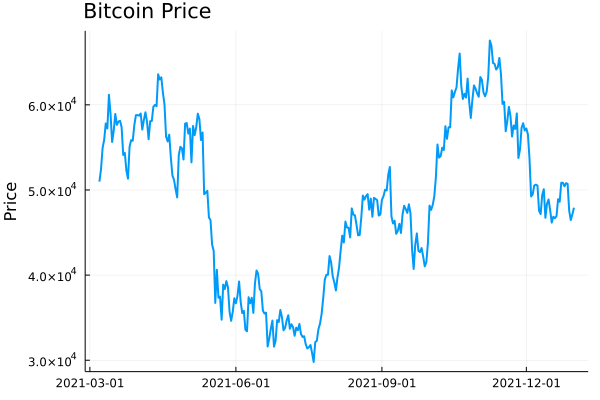
Plotting this gives you the typical price path of daily closing prices. Now realised volatility is a measure of how varied this price was over time. Was it stable or were there wild swings?
```
plot(dailydata.time, dailydata.close, label = :none,
ylabel = "Price", title = "Bitcoin Price", titleloc = :left, linewidth = 2)
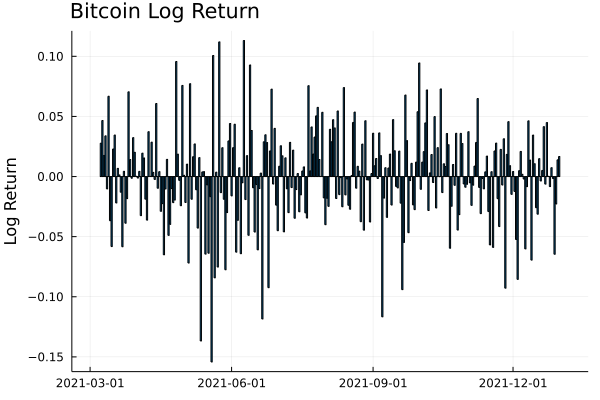
```
To calculate this variation, we need to add in the log-returns.
```
dailydata = @transform(dailydata, :returns = [NaN; diff(log.(:close))]);
bar(dailydata.time[2:end], dailydata.returns[2:end],
label=:none,
ylabel = "Log Return", title = "Bitcoin Log Return", titleloc = :left)
```
We can start by looking at this from a distribution perspective. If we assume the log-returns (\\(r\\)) are from a normal distribution, with zero mean, the standard deviation of this distribution is the equivalent to the volatility
\\\[r \\sim N(0, \\sigma ^2),\\\]
so \\(\\sigma\\) is how we will refer to volatility. From this, you can see how high volatility leads to wide variations in prices. Each log-return sample has a wider range of values that it could be.
So by taking the running standard deviation of the log-returns we can estimate the volatility and how it changes over time. Using the `RollingFunctions.jl` package this is a one-liner.
```
dailydata = @transform(dailydata, :volatility = runstd(:returns, 30))
plot(dailydata.time, dailydata.volatility, title = "Bitcoin Volatility", titleloc = :left, label=:none, linewidth = 2)
```
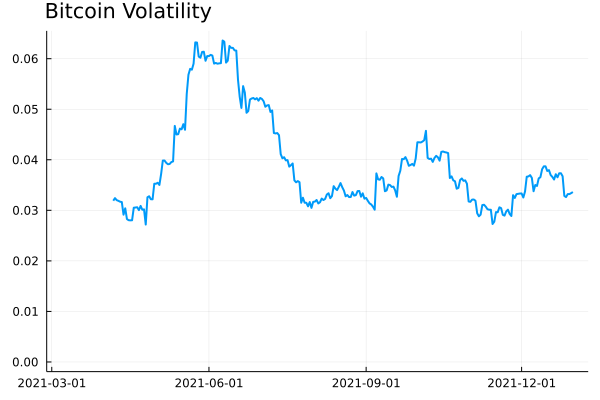
There was high volatility over June this year as the price of Bitcoin crashed. It’s been fairly stable since then, hovering around 0.03 and 0.04. How does this compare though to the S\&P 500 as a general indicator of the stop market? We know Bitcoin is more volatile than the stock market, but how much more?
I’ll load up the [AlphaVantage.jl](https://github.com/ellisvalentiner/AlphaVantage.jl) package to pull the daily prices of the SPY ETF and repeat the calculation; adding the log-returns and taking the rolling standard deviation.
```
using AlphaVantage, CSV
stockPrices = AlphaVantage.time_series_daily("SPY", datatype="csv", outputsize="full", parser = x -> CSV.File(IOBuffer(x.body))) |> DataFrame
sort!(stockPrices, :timestamp)
stockPrices = @subset(stockPrices, :timestamp .>= minimum(dailydata.time));
```
Again, add in the log-returns and calculate the rolling standard deviation to estimate the volatility.
```
stockPrices = @transform(stockPrices, :returns = [NaN; diff(log.(:close))])
stockPrices = @transform(stockPrices, :volatility = runstd(:returns, 30));
volPlot = plot(dailydata.time, dailydata.volatility, label="BTC",
ylabel = "Volatility", title = "Volatility", titleloc = :left, linewidth = 2)
volPlot = plot!(volPlot, stockPrices.timestamp, stockPrices.volatility, label = "SPY", linewidth = 2)
```
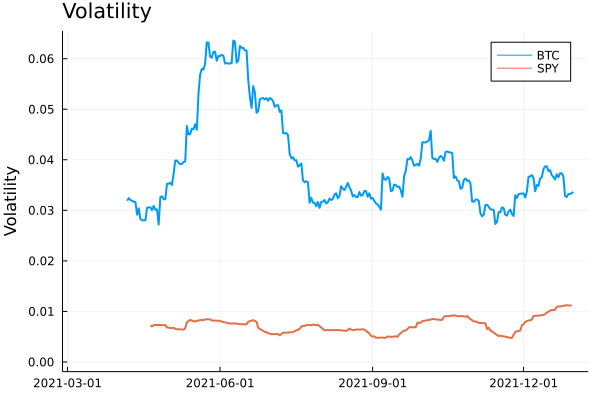
As expected, Bitcoin volatility is much higher. Let’s take the log of the volatility to look zoom in on the detail.
```
volPlot = plot(dailydata.time, log.(dailydata.volatility),
label="BTC", ylabel = "Log Volatility", title = "Log Volatility",
titleloc = :left, linewidth = 2)
volPlot = plot!(volPlot, stockPrices.timestamp, log.(stockPrices.volatility), label = "SPY", linewidth = 2)
```
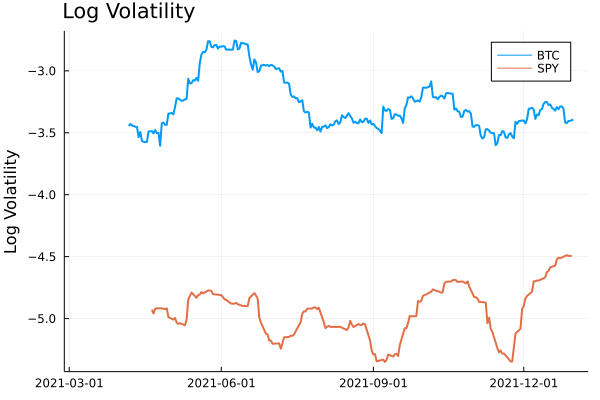
Interestingly the SPY has had a resurgence in volatility as we move towards the end of the year. One thing to point out though is the slight difference in look back periods for the two products. Bitcoin does not observe weekends or holidays, so 30 rows previously are always 30 days, but for SPY this is the case as there are weekends and trading holidays. In this illustrative example, it isn’t too much of an issue, but if you were to take it further and perhaps look at the correlation between the volatilities, this is something you would need to account for.
## A Higher Frequency Volatility
So far it has all been on daily observations, your classic dataset to practise on. But I am always banging on about [high-frequency finance](https://dm13450.github.io/2021/06/25/HighFreqCrypto.html), so let’s look at more frequent data and understand how the volatility looks at finer timescales.
This time we will pull the 5-minute candle bar data of both Bitcoin and SPY and repeat the calculation.
1. Calculate the log-returns of the close to close bars
2. Calculate the rolling standard deviation by looking back 20 rows.
```
minuteData_spy = AlphaVantage.time_series_intraday_extended("SPY", "5min", "year1month1", parser = x -> CSV.File(IOBuffer(x.body))) |> DataFrame
minuteData_spy = @transform(minuteData_spy, :time = DateTime.(:time, dateformat"yyyy-mm-dd HH:MM:SS"))
minuteData_btc = CoinbasePro.candles("BTC-USD", maximum(minuteData_spy.time)-Day(1), maximum(minuteData_spy.time),300);
combData = leftjoin(minuteData_spy[!, [:time, :close]], minuteData_btc[!, [:time, :close]], on=[:time], makeunique=true)
rename!(combData, ["time", "spy", "btc"])
combData = combData[2:end, :]
dropmissing!(combData)
sort!(combData, :time)
first(combData, 3)
```
3 rows × 3 columns
| | time | spy | btc |
|---|---|---|---|
| | DateTime | Float64 | Float64 |
| 1 | 2021-12-29T20:00:00 | 477\.05 | 47163\.9 |
| 2 | 2021-12-30T04:05:00 | 477\.83 | 46676\.3 |
| 3 | 2021-12-30T04:10:00 | 477\.98 | 46768\.8 |
For 5 minute data, we will use a look-back period of 20 rows, which gives us 100 minutes, so a little under 2 hours.
```
combData = @transform(combData, :spy_returns = [NaN; diff(log.(:spy))],
:btc_returns = [NaN; diff(log.(:btc))])
combData = @transform(combData, :spy_vol = runstd(:spy_returns, 20),
:btc_vol = runstd(:btc_returns, 20))
combData = combData[2:end, :];
```
Plotting it all again\!
```
vol_tks = minimum(combData.time):Hour(6):maximum(combData.time)
vol_tkslbl = Dates.format.(vol_tks, "e HH:MM")
returnPlot = plot(combData.time[2:end], cumsum(combData.btc_returns[2:end]),
label="BTC", title = "Cumulative Returns", xticks = (vol_tks, vol_tkslbl),
linewidth = 2, legend=:topleft)
returnPlot = plot!(returnPlot, combData.time[2:end], cumsum(combData.spy_returns[2:end]), label="SPY",
xticks = (vol_tks, vol_tkslbl),
linewidth = 2)
volPlot = plot(combData.time, combData.btc_vol * sqrt(24 * 20),
label="BTC", xticks = (vol_tks, vol_tkslbl), titleloc = :left, linewidth = 2)
volPlot = plot!(combData.time, combData.spy_vol * sqrt(24 * 20), label="SPY", title = "Volatility",
xticks = (vol_tks, vol_tkslbl), titleloc = :left, linewidth = 2)
plot(returnPlot, volPlot)
```
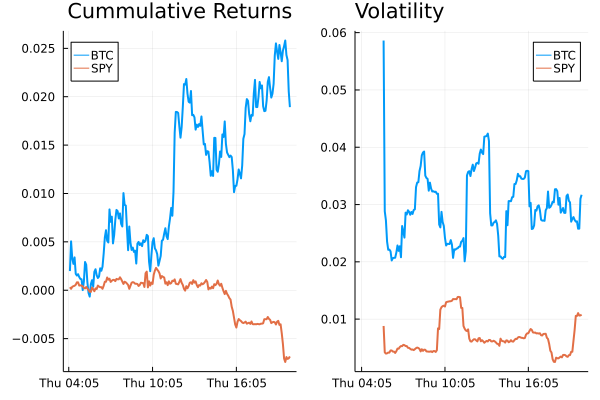
On the left-hand side, we have the cumulative return of the two assets on the 30th of December, and on the right the corresponding volatility. Bitcoin still has higher volatility whereas SPY has been relatively stable with just some jumps.
## Simplifying the Calculation
Rolling the standard deviation isn’t the efficient way of calculating the volatility and can also be simplified down to a more efficient calculation.
The standard deviation is defined as:
\\\[\\sigma ^2 = \\mathbb{E} (r^2) + \\mathbb{E} (r) ^2\\\]
if we assume there is no trend in the returns so that the average is zero:
\\\[\\mathbb{E} (r) = 0\\\]
then we get just the first term
\\\[\\sigma ^2 = \\frac{1}{N} \\sum \_{i=1} ^N r^2\\\]
which is simply proportional to the sum of squares. Hence why you will hear that the realised variance is referred to as the sum of squares.
Once again, let’s pull the data and repeat the previous calculations but this time adding another column that is the rolling summation of the square of the returns.
```
minutedata = CoinbasePro.candles("BTC-USD", now()-Day(1) - Hour(1), now(), 5*60)
sort!(minutedata, :time)
minutedata = @transform(minutedata, :close_close_return = [NaN; diff(log.(:close))])
minutedata = minutedata[2:end, :]
first(minutedata, 4)
minutedata = @transform(minutedata,
:new_vol_5 = running(sum, :close_close_return .^2, 20),
:vol_5 = runstd(:close_close_return, 20))
minutedata = minutedata[2:end, :]
minutedata[1:5, [:time, :new_vol_5, :vol_5]]
```
5 rows × 3 columns
| | time | new\_vol\_5 | vol\_5 |
|---|---|---|---|
| | DateTime | Float64 | Float64 |
| 1 | 2021-12-30T13:40:00 | 3\.05319e-6 | 0\.00171371 |
| 2 | 2021-12-30T13:45:00 | 5\.11203e-6 | 0\.00139403 |
| 3 | 2021-12-30T13:50:00 | 5\.11472e-6 | 0\.00118951 |
| 4 | 2021-12-30T13:55:00 | 6\.40417e-6 | 0\.00107273 |
| 5 | 2021-12-30T14:00:00 | 6\.55196e-6 | 0\.00104028 |
```
vol_tks = minimum(minutedata.time):Hour(8):maximum(minutedata.time)
vol_tkslbl = Dates.format.(vol_tks, "e HH:MM")
ss_vol = plot(minutedata.time, sqrt.(288 * minutedata.new_vol_5), titleloc = :left,
title = "Sum of Squares", label=:none, xticks = (vol_tks, vol_tkslbl), linewidth = 2)
std_vol = plot(minutedata.time, sqrt.(288 * minutedata.vol_5), titleloc = :left,
title = "Standard Deviation", label=:none, xticks = (vol_tks, vol_tkslbl), linewidth = 2)
plot(ss_vol, std_vol)
```
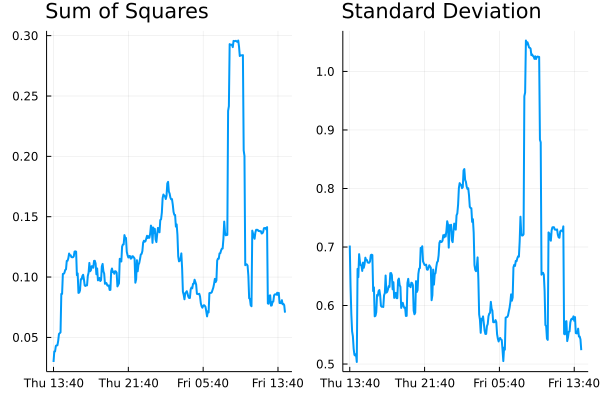
Both methods show represent the relative changes equally. There are some notable edge effects in the standard deviation method, but overall, our assumptions look fine. The y-scales are different though as there are some constant factor differences between the two methods.
## Comparing Crypto Volatilities
Let’s see how the volatility changes across some different currencies. We define a function that calculates the close to close return and iterate through some different currencies.
```
function calc_vol(ccy)
minutedata = CoinbasePro.candles(ccy, now()-Day(1) - Hour(1), now(), 5*60)
sort!(minutedata, :time)
minutedata = @transform(minutedata, :close_close_return = [NaN; diff(log.(:close))])
minutedata = minutedata[2:end, :]
minutedata = @transform(minutedata, :var = 288*running(sum, :close_close_return .^2, 20))
minutedata
minutedata[21:end, :]
end
```
Let’s choose the classics BTC and ETH, the meme that is SHIB and finally EURUSD (the crypto version).
```
p = plot(legend=:topleft, ylabel = "Realised Volatility")
for ccy in ["BTC-USD", "ETH-USD", "USDC-EUR", "SHIB-USD"]
voldata = calc_vol(ccy)
vol_tks = minimum(voldata.time):Hour(4):maximum(voldata.time)
vol_tkslbl = Dates.format.(vol_tks, "e HH:MM")
plot!(voldata.time, sqrt.(voldata.var), label = ccy,
xticks = (vol_tks, vol_tkslbl), linewidth = 2)
end
p
```
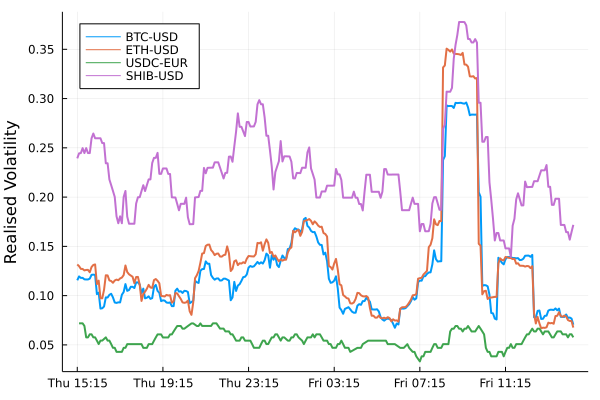
SHIB has higher overall volatility. ETH and BTC have very comparable volatilities moving together. EURUSD has the lowest overall (as we would expect), but interesting to see how it moved higher just as the cryptos did at about 9 am.
## An Update to CryptoLiquidityMetrics
So I’ve taken everything we’ve learnt here and implemented it into [cryptoliquiditymetrics.com](https://cryptoliquiditymetrics.com/). It is a new panel (bottom right) and calculated all through Javascript.
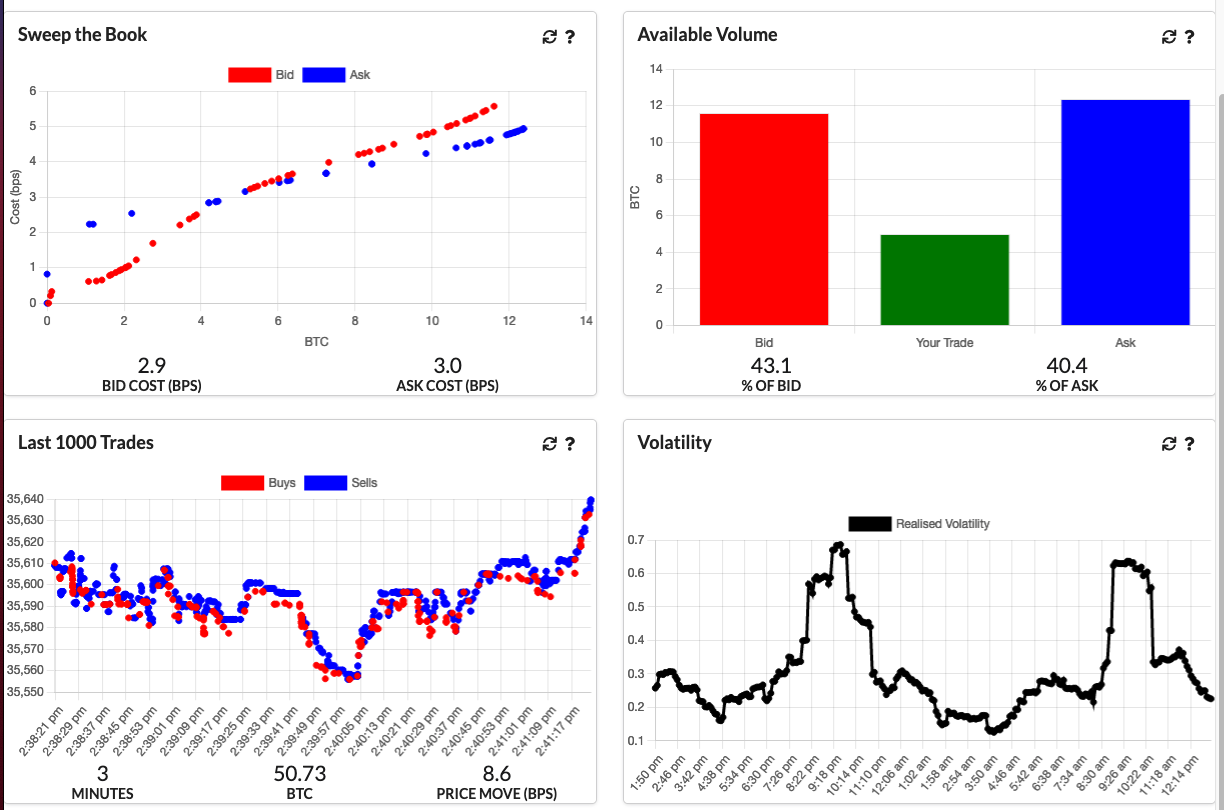
How does this help you?
Knowing the volatility helps you get an idea of how easy it is to trade or what strategy to use. When volatility is high and the price is moving about it might be better to be more aggressive and make sure your trade happens. Whereas if it is a stable market without too much volatility you could be more passive and just wait, trading slowly and picking good prices.
Just another addition to my Javascript side project\!
Please enable JavaScript to view the [comments powered by Disqus.](https://disqus.com/?ref_noscript)
## Dean Markwick
Personal website for Dean Markwick. If you like stats, sports and rambling, you've come to the right place. All rights reserved.
- [dm13450](https://github.com/dm13450)
- [deanmarkwick13450](https://www.linkedin.com/in/deanmarkwick13450)
- [deanmarkwick](https://www.twitter.com/deanmarkwick)
- [rss](https://dm13450.github.io/feed.xml) | |||||||||
| Readable Markdown | Volatility measures the scales of price changes and is an easy way to describe how busy markets are. High volatility means there are periods of large price changes and vice versa, low volatility means periods of small changes. In this post, I’ll show you how to calculate realised (realized) volatility and demonstrate how it can be used. If you just want a live view of crypto volatility, take a look at [cryptoliquiditymetrics](https://cryptoliquiditymetrics.com/) where I have added in a new card with the volatility over the last 24 hours.
***
Enjoy these types of posts? Then you should sign up for my newsletter.
***
To start with we will be looking at daily data. Using my [CoinbasePro.jl](https://github.com/dm13450/CoinbasePro.jl) package in a Julia we can get the last 300 days OHLC prices.
I’m running Julia 1.7 and all the packages were updated using `Pkg.update()` at the time of this post.
```
using CoinbasePro
using Dates
using Plots, StatsPlots
using DataFrames, DataFramesMeta
using RollingFunctions
```
From my [CoinbasePro.jl](https://github.com/dm13450/CoinbasePro.jl) package, we can pull in the daily candles of Bitcoin. 86400 is the frequency for daily data. Coinbase restrict you to just 300 data points so our period of time will be the previous 300 days.
```
dailydata = CoinbasePro.candles("BTC-USD", now()-Day(300), now(), 86400);
sort!(dailydata, :time)
dailydata = @transform(dailydata, :time = Date.(:time))
first(dailydata, 4)
```
4 rows × 7 columns
| | close | high | low | open | unix\_time | volume | time |
|---|---|---|---|---|---|---|---|
| | Float64 | Float64 | Float64 | Float64 | Int64 | Float64 | Date |
| 1 | 50978\.6 | 51459\.0 | 48909\.8 | 48909\.8 | 1615075200 | 13965\.2 | 2021-03-07 |
| 2 | 52415\.2 | 52425\.0 | 49328\.6 | 50976\.2 | 1615161600 | 18856\.3 | 2021-03-08 |
| 3 | 54916\.4 | 54936\.0 | 51845\.0 | 52413\.2 | 1615248000 | 21177\.1 | 2021-03-09 |
| 4 | 55890\.7 | 57402\.1 | 53025\.0 | 54921\.6 | 1615334400 | 28326\.1 | 2021-03-10 |
Plotting this gives you the typical price path of daily closing prices. Now realised volatility is a measure of how varied this price was over time. Was it stable or were there wild swings?
```
plot(dailydata.time, dailydata.close, label = :none,
ylabel = "Price", title = "Bitcoin Price", titleloc = :left, linewidth = 2)
```

To calculate this variation, we need to add in the log-returns.
```
dailydata = @transform(dailydata, :returns = [NaN; diff(log.(:close))]);
bar(dailydata.time[2:end], dailydata.returns[2:end],
label=:none,
ylabel = "Log Return", title = "Bitcoin Log Return", titleloc = :left)
```

We can start by looking at this from a distribution perspective. If we assume the log-returns (\\(r\\)) are from a normal distribution, with zero mean, the standard deviation of this distribution is the equivalent to the volatility
\\\[r \\sim N(0, \\sigma ^2),\\\]
so \\(\\sigma\\) is how we will refer to volatility. From this, you can see how high volatility leads to wide variations in prices. Each log-return sample has a wider range of values that it could be.
So by taking the running standard deviation of the log-returns we can estimate the volatility and how it changes over time. Using the `RollingFunctions.jl` package this is a one-liner.
```
dailydata = @transform(dailydata, :volatility = runstd(:returns, 30))
plot(dailydata.time, dailydata.volatility, title = "Bitcoin Volatility", titleloc = :left, label=:none, linewidth = 2)
```

There was high volatility over June this year as the price of Bitcoin crashed. It’s been fairly stable since then, hovering around 0.03 and 0.04. How does this compare though to the S\&P 500 as a general indicator of the stop market? We know Bitcoin is more volatile than the stock market, but how much more?
I’ll load up the [AlphaVantage.jl](https://github.com/ellisvalentiner/AlphaVantage.jl) package to pull the daily prices of the SPY ETF and repeat the calculation; adding the log-returns and taking the rolling standard deviation.
```
using AlphaVantage, CSV
stockPrices = AlphaVantage.time_series_daily("SPY", datatype="csv", outputsize="full", parser = x -> CSV.File(IOBuffer(x.body))) |> DataFrame
sort!(stockPrices, :timestamp)
stockPrices = @subset(stockPrices, :timestamp .>= minimum(dailydata.time));
```
Again, add in the log-returns and calculate the rolling standard deviation to estimate the volatility.
```
stockPrices = @transform(stockPrices, :returns = [NaN; diff(log.(:close))])
stockPrices = @transform(stockPrices, :volatility = runstd(:returns, 30));
volPlot = plot(dailydata.time, dailydata.volatility, label="BTC",
ylabel = "Volatility", title = "Volatility", titleloc = :left, linewidth = 2)
volPlot = plot!(volPlot, stockPrices.timestamp, stockPrices.volatility, label = "SPY", linewidth = 2)
```

As expected, Bitcoin volatility is much higher. Let’s take the log of the volatility to look zoom in on the detail.
```
volPlot = plot(dailydata.time, log.(dailydata.volatility),
label="BTC", ylabel = "Log Volatility", title = "Log Volatility",
titleloc = :left, linewidth = 2)
volPlot = plot!(volPlot, stockPrices.timestamp, log.(stockPrices.volatility), label = "SPY", linewidth = 2)
```

Interestingly the SPY has had a resurgence in volatility as we move towards the end of the year. One thing to point out though is the slight difference in look back periods for the two products. Bitcoin does not observe weekends or holidays, so 30 rows previously are always 30 days, but for SPY this is the case as there are weekends and trading holidays. In this illustrative example, it isn’t too much of an issue, but if you were to take it further and perhaps look at the correlation between the volatilities, this is something you would need to account for.
## A Higher Frequency Volatility
So far it has all been on daily observations, your classic dataset to practise on. But I am always banging on about [high-frequency finance](https://dm13450.github.io/2021/06/25/HighFreqCrypto.html), so let’s look at more frequent data and understand how the volatility looks at finer timescales.
This time we will pull the 5-minute candle bar data of both Bitcoin and SPY and repeat the calculation.
1. Calculate the log-returns of the close to close bars
2. Calculate the rolling standard deviation by looking back 20 rows.
```
minuteData_spy = AlphaVantage.time_series_intraday_extended("SPY", "5min", "year1month1", parser = x -> CSV.File(IOBuffer(x.body))) |> DataFrame
minuteData_spy = @transform(minuteData_spy, :time = DateTime.(:time, dateformat"yyyy-mm-dd HH:MM:SS"))
minuteData_btc = CoinbasePro.candles("BTC-USD", maximum(minuteData_spy.time)-Day(1), maximum(minuteData_spy.time),300);
combData = leftjoin(minuteData_spy[!, [:time, :close]], minuteData_btc[!, [:time, :close]], on=[:time], makeunique=true)
rename!(combData, ["time", "spy", "btc"])
combData = combData[2:end, :]
dropmissing!(combData)
sort!(combData, :time)
first(combData, 3)
```
3 rows × 3 columns
| | time | spy | btc |
|---|---|---|---|
| | DateTime | Float64 | Float64 |
| 1 | 2021-12-29T20:00:00 | 477\.05 | 47163\.9 |
| 2 | 2021-12-30T04:05:00 | 477\.83 | 46676\.3 |
| 3 | 2021-12-30T04:10:00 | 477\.98 | 46768\.8 |
For 5 minute data, we will use a look-back period of 20 rows, which gives us 100 minutes, so a little under 2 hours.
```
combData = @transform(combData, :spy_returns = [NaN; diff(log.(:spy))],
:btc_returns = [NaN; diff(log.(:btc))])
combData = @transform(combData, :spy_vol = runstd(:spy_returns, 20),
:btc_vol = runstd(:btc_returns, 20))
combData = combData[2:end, :];
```
Plotting it all again\!
```
vol_tks = minimum(combData.time):Hour(6):maximum(combData.time)
vol_tkslbl = Dates.format.(vol_tks, "e HH:MM")
returnPlot = plot(combData.time[2:end], cumsum(combData.btc_returns[2:end]),
label="BTC", title = "Cumulative Returns", xticks = (vol_tks, vol_tkslbl),
linewidth = 2, legend=:topleft)
returnPlot = plot!(returnPlot, combData.time[2:end], cumsum(combData.spy_returns[2:end]), label="SPY",
xticks = (vol_tks, vol_tkslbl),
linewidth = 2)
volPlot = plot(combData.time, combData.btc_vol * sqrt(24 * 20),
label="BTC", xticks = (vol_tks, vol_tkslbl), titleloc = :left, linewidth = 2)
volPlot = plot!(combData.time, combData.spy_vol * sqrt(24 * 20), label="SPY", title = "Volatility",
xticks = (vol_tks, vol_tkslbl), titleloc = :left, linewidth = 2)
plot(returnPlot, volPlot)
```

On the left-hand side, we have the cumulative return of the two assets on the 30th of December, and on the right the corresponding volatility. Bitcoin still has higher volatility whereas SPY has been relatively stable with just some jumps.
## Simplifying the Calculation
Rolling the standard deviation isn’t the efficient way of calculating the volatility and can also be simplified down to a more efficient calculation.
The standard deviation is defined as:
\\\[\\sigma ^2 = \\mathbb{E} (r^2) + \\mathbb{E} (r) ^2\\\]
if we assume there is no trend in the returns so that the average is zero:
\\\[\\mathbb{E} (r) = 0\\\]
then we get just the first term
\\\[\\sigma ^2 = \\frac{1}{N} \\sum \_{i=1} ^N r^2\\\]
which is simply proportional to the sum of squares. Hence why you will hear that the realised variance is referred to as the sum of squares.
Once again, let’s pull the data and repeat the previous calculations but this time adding another column that is the rolling summation of the square of the returns.
```
minutedata = CoinbasePro.candles("BTC-USD", now()-Day(1) - Hour(1), now(), 5*60)
sort!(minutedata, :time)
minutedata = @transform(minutedata, :close_close_return = [NaN; diff(log.(:close))])
minutedata = minutedata[2:end, :]
first(minutedata, 4)
minutedata = @transform(minutedata,
:new_vol_5 = running(sum, :close_close_return .^2, 20),
:vol_5 = runstd(:close_close_return, 20))
minutedata = minutedata[2:end, :]
minutedata[1:5, [:time, :new_vol_5, :vol_5]]
```
5 rows × 3 columns
| | time | new\_vol\_5 | vol\_5 |
|---|---|---|---|
| | DateTime | Float64 | Float64 |
| 1 | 2021-12-30T13:40:00 | 3\.05319e-6 | 0\.00171371 |
| 2 | 2021-12-30T13:45:00 | 5\.11203e-6 | 0\.00139403 |
| 3 | 2021-12-30T13:50:00 | 5\.11472e-6 | 0\.00118951 |
| 4 | 2021-12-30T13:55:00 | 6\.40417e-6 | 0\.00107273 |
| 5 | 2021-12-30T14:00:00 | 6\.55196e-6 | 0\.00104028 |
```
vol_tks = minimum(minutedata.time):Hour(8):maximum(minutedata.time)
vol_tkslbl = Dates.format.(vol_tks, "e HH:MM")
ss_vol = plot(minutedata.time, sqrt.(288 * minutedata.new_vol_5), titleloc = :left,
title = "Sum of Squares", label=:none, xticks = (vol_tks, vol_tkslbl), linewidth = 2)
std_vol = plot(minutedata.time, sqrt.(288 * minutedata.vol_5), titleloc = :left,
title = "Standard Deviation", label=:none, xticks = (vol_tks, vol_tkslbl), linewidth = 2)
plot(ss_vol, std_vol)
```

Both methods show represent the relative changes equally. There are some notable edge effects in the standard deviation method, but overall, our assumptions look fine. The y-scales are different though as there are some constant factor differences between the two methods.
## Comparing Crypto Volatilities
Let’s see how the volatility changes across some different currencies. We define a function that calculates the close to close return and iterate through some different currencies.
```
function calc_vol(ccy)
minutedata = CoinbasePro.candles(ccy, now()-Day(1) - Hour(1), now(), 5*60)
sort!(minutedata, :time)
minutedata = @transform(minutedata, :close_close_return = [NaN; diff(log.(:close))])
minutedata = minutedata[2:end, :]
minutedata = @transform(minutedata, :var = 288*running(sum, :close_close_return .^2, 20))
minutedata
minutedata[21:end, :]
end
```
Let’s choose the classics BTC and ETH, the meme that is SHIB and finally EURUSD (the crypto version).
```
p = plot(legend=:topleft, ylabel = "Realised Volatility")
for ccy in ["BTC-USD", "ETH-USD", "USDC-EUR", "SHIB-USD"]
voldata = calc_vol(ccy)
vol_tks = minimum(voldata.time):Hour(4):maximum(voldata.time)
vol_tkslbl = Dates.format.(vol_tks, "e HH:MM")
plot!(voldata.time, sqrt.(voldata.var), label = ccy,
xticks = (vol_tks, vol_tkslbl), linewidth = 2)
end
p
```

SHIB has higher overall volatility. ETH and BTC have very comparable volatilities moving together. EURUSD has the lowest overall (as we would expect), but interesting to see how it moved higher just as the cryptos did at about 9 am.
## An Update to CryptoLiquidityMetrics
So I’ve taken everything we’ve learnt here and implemented it into [cryptoliquiditymetrics.com](https://cryptoliquiditymetrics.com/). It is a new panel (bottom right) and calculated all through Javascript.

How does this help you?
Knowing the volatility helps you get an idea of how easy it is to trade or what strategy to use. When volatility is high and the price is moving about it might be better to be more aggressive and make sure your trade happens. Whereas if it is a stable market without too much volatility you could be more passive and just wait, trading slowly and picking good prices.
Just another addition to my Javascript side project\! | |||||||||
| ML Classification | ||||||||||
| ML Categories |
Raw JSON{
"/Finance": 994,
"/Finance/Investing": 978,
"/Finance/Investing/Currencies_and_Foreign_Exchange": 394
} | |||||||||
| ML Page Types |
Raw JSON{
"/Article": 999,
"/Article/How_to": 560
} | |||||||||
| ML Intent Types |
Raw JSON{
"Informational": 999
} | |||||||||
| Content Metadata | ||||||||||
| Language | en | |||||||||
| Author | Dean Markwick | |||||||||
| Publish Time | 2022-04-28 00:00:00 (3 years ago) | |||||||||
| Original Publish Time | 2022-04-28 00:00:00 (3 years ago) | |||||||||
| Republished | No | |||||||||
| Word Count (Total) | 2,515 | |||||||||
| Word Count (Content) | 2,454 | |||||||||
| Links | ||||||||||
| External Links | 8 | |||||||||
| Internal Links | 9 | |||||||||
| Technical SEO | ||||||||||
| Meta Nofollow | No | |||||||||
| Meta Noarchive | No | |||||||||
| JS Rendered | No | |||||||||
| Redirect Target | null | |||||||||
| Performance | ||||||||||
| Download Time (ms) | 52 | |||||||||
| TTFB (ms) | 51 | |||||||||
| Download Size (bytes) | 9,415 | |||||||||
| Shard | 143 (laksa) | |||||||||
| Root Hash | 2566890010099092343 | |||||||||
| Unparsed URL | io,github!dm13450,/2022/04/28/Volatility-methods.html s443 | |||||||||