ℹ️ Skipped - page is already crawled
| Filter | Status | Condition | Details |
|---|---|---|---|
| HTTP status | PASS | download_http_code = 200 | HTTP 200 |
| Age cutoff | PASS | download_stamp > now() - 6 MONTH | 0.7 months ago (distributed domain, exempt) |
| History drop | PASS | isNull(history_drop_reason) | No drop reason |
| Spam/ban | PASS | fh_dont_index != 1 AND ml_spam_score = 0 | ml_spam_score=0 |
| Canonical | PASS | meta_canonical IS NULL OR = '' OR = src_unparsed | Not set |
| Property | Value |
|---|---|
| URL | https://developer.spotify.com/documentation/web-api/concepts/apps |
| Last Crawled | 2026-03-24 01:03:21 (20 days ago) |
| First Indexed | 2023-04-04 06:40:08 (3 years ago) |
| HTTP Status Code | 200 |
| Meta Title | Apps | Spotify for Developers |
| Meta Description | null |
| Meta Canonical | null |
| Boilerpipe Text | Web API
Overview
Getting started
Building with AI
Access Token
API calls
Apps
Authorization
Redirect URIs
Playlists
Quota modes
Rate limits
Scopes
Spotify URIs and IDs
Track Relinking
Reference
The app provides, among others, the
Client ID
and
Client Secret
needed to
implement any of the authorization flows.
To do so, go to your
Dashboard
and click on the
Create an App
button to open the following dialog box:
Enter an
App Name
and
App Description
of your choice (they will be
displayed to the user on the grant screen), put a tick in the
Developer Terms
of Service
checkbox and finally click on
CREATE
. Your application is now
registered, and you'll be redirected to the app overview page.
The app overview page provides access to different elements:
App metrics, such as daily and monthly active users or number of users per country. Note that the metrics are initially empty.
App Status. By default, your app will be in
Development Mode
with limits on the number of users who can install it, and the number of API requests it can make. Note that you can request an extension of this quota if needed by clicking on the
Request Extension
link.
App settings.
Client ID, the unique identifier of your app.
Client Secret, the key you will use to authorize your Web API or SDK calls.
It is time to configure our app. Click on
Edit Settings
to view and update
your app settings. The following dialog will show up:
Add a web domain or URL to the
Website
field. This will help users to obtain more
information about your application.
In
Redirect URIs
enter one or more addresses that you want to allowlist with
Spotify. This URI enables the Spotify authentication service to automatically
invoke your app every time the user logs in (e.g.
http://127.0.0.1:8080
)
Note that on iOS apps, the redirect URI must follow these rules:
All the characters are lowercase.
The prefix
must
be unique to your application (It cannot be a general prefix like http).
The prefix must only be used by your application for authenticating Spotify. If you already have a URL scheme handled by your application for other uses, do not reuse it.
Include a path after the first pair of forward slashes.
For example: If your app name is
My Awesome App
, a good candidate for the redirect URI could be
my-awesome-app-login://callback
.
If you are developing an Android or iOS app, fill out the
Android Package
or
Bundle IDs
respectively.
Once you have finished updating the app settings, click on
SAVE
.
Finally, you can delete your app by clicking on the
DELETE
red button. |
| Markdown | [Skip to content](https://developer.spotify.com/documentation/web-api/concepts/apps#main)
- Documentation
Documentation
Products
- [Web API](https://developer.spotify.com/documentation/web-api)
- [Web Playback SDK](https://developer.spotify.com/documentation/web-playback-sdk)
- [Ads API](https://developer.spotify.com/documentation/ads-api)
- [iOS](https://developer.spotify.com/documentation/ios)
- [Android](https://developer.spotify.com/documentation/android)
- [Embeds](https://developer.spotify.com/documentation/embeds)
- [Commercial Hardware](https://developer.spotify.com/documentation/commercial-hardware)
- [Open Access](https://developer.spotify.com/documentation/open-access)
Guidelines
- [Design](https://developer.spotify.com/documentation/design)
- [Accessibility](https://developer.spotify.com/documentation/accessibility)
- [Legal](https://developer.spotify.com/terms)
- [Community](https://developer.spotify.com/community)
0
- Documentation
Documentation
Products
- [Web API](https://developer.spotify.com/documentation/web-api)
- [Web Playback SDK](https://developer.spotify.com/documentation/web-playback-sdk)
- [Ads API](https://developer.spotify.com/documentation/ads-api)
- [iOS](https://developer.spotify.com/documentation/ios)
- [Android](https://developer.spotify.com/documentation/android)
- [Embeds](https://developer.spotify.com/documentation/embeds)
- [Commercial Hardware](https://developer.spotify.com/documentation/commercial-hardware)
- [Open Access](https://developer.spotify.com/documentation/open-access)
Guidelines
- [Design](https://developer.spotify.com/documentation/design)
- [Accessibility](https://developer.spotify.com/documentation/accessibility)
- [Legal](https://developer.spotify.com/terms)
- [Community](https://developer.spotify.com/community)
Web API
- [Overview](https://developer.spotify.com/documentation/web-api)
- [Getting started](https://developer.spotify.com/documentation/web-api/tutorials/getting-started)
- [Building with AI](https://developer.spotify.com/documentation/web-api/tutorials/building-with-ai)
- Concepts
Concepts
- [Access Token](https://developer.spotify.com/documentation/web-api/concepts/access-token)
- [API calls](https://developer.spotify.com/documentation/web-api/concepts/api-calls)
- [Apps](https://developer.spotify.com/documentation/web-api/concepts/apps)
- [Authorization](https://developer.spotify.com/documentation/web-api/concepts/authorization)
- [Redirect URIs](https://developer.spotify.com/documentation/web-api/concepts/redirect_uri)
- [Playlists](https://developer.spotify.com/documentation/web-api/concepts/playlists)
- [Quota modes](https://developer.spotify.com/documentation/web-api/concepts/quota-modes)
- [Rate limits](https://developer.spotify.com/documentation/web-api/concepts/rate-limits)
- [Scopes](https://developer.spotify.com/documentation/web-api/concepts/scopes)
- [Spotify URIs and IDs](https://developer.spotify.com/documentation/web-api/concepts/spotify-uris-ids)
- [Track Relinking](https://developer.spotify.com/documentation/web-api/concepts/track-relinking)
- Tutorials
Tutorials
- [Authorization code](https://developer.spotify.com/documentation/web-api/tutorials/code-flow)
- [Authorization code PKCE](https://developer.spotify.com/documentation/web-api/tutorials/code-pkce-flow)
- [Client credentials](https://developer.spotify.com/documentation/web-api/tutorials/client-credentials-flow)
- [Implicit grant \[Deprecated\]](https://developer.spotify.com/documentation/web-api/tutorials/implicit-flow)
- [Refreshing tokens](https://developer.spotify.com/documentation/web-api/tutorials/refreshing-tokens)
- [Migration: Implicit grant to Authorization code](https://developer.spotify.com/documentation/web-api/tutorials/migration-implicit-auth-code)
- [Migration: Insecure redirect URI](https://developer.spotify.com/documentation/web-api/tutorials/migration-insecure-redirect-uri)
- [Migration: February 2026 Dev Mode Changes](https://developer.spotify.com/documentation/web-api/tutorials/february-2026-migration-guide)
- How-Tos
How-Tos
- [Display your Spotify profile data in a web app](https://developer.spotify.com/documentation/web-api/howtos/web-app-profile)
- Changelog
Changelog
- [March 2026](https://developer.spotify.com/documentation/web-api/references/changes/march-2026)
- [February 2026](https://developer.spotify.com/documentation/web-api/references/changes/february-2026)
Reference
- Albums
Albums
- [Get Album](https://developer.spotify.com/documentation/web-api/reference/get-an-album)
- [Get Several Albums](https://developer.spotify.com/documentation/web-api/reference/get-multiple-albums)
- [Get Album Tracks](https://developer.spotify.com/documentation/web-api/reference/get-an-albums-tracks)
- [Get User's Saved Albums](https://developer.spotify.com/documentation/web-api/reference/get-users-saved-albums)
- [Save Albums for Current User](https://developer.spotify.com/documentation/web-api/reference/save-albums-user)
- [Remove Users' Saved Albums](https://developer.spotify.com/documentation/web-api/reference/remove-albums-user)
- [Check User's Saved Albums](https://developer.spotify.com/documentation/web-api/reference/check-users-saved-albums)
- [Get New Releases](https://developer.spotify.com/documentation/web-api/reference/get-new-releases)
- Artists
Artists
- [Get Artist](https://developer.spotify.com/documentation/web-api/reference/get-an-artist)
- [Get Several Artists](https://developer.spotify.com/documentation/web-api/reference/get-multiple-artists)
- [Get Artist's Albums](https://developer.spotify.com/documentation/web-api/reference/get-an-artists-albums)
- [Get Artist's Top Tracks](https://developer.spotify.com/documentation/web-api/reference/get-an-artists-top-tracks)
- [Get Artist's Related Artists](https://developer.spotify.com/documentation/web-api/reference/get-an-artists-related-artists)
- Audiobooks
Audiobooks
- [Get an Audiobook](https://developer.spotify.com/documentation/web-api/reference/get-an-audiobook)
- [Get Several Audiobooks](https://developer.spotify.com/documentation/web-api/reference/get-multiple-audiobooks)
- [Get Audiobook Chapters](https://developer.spotify.com/documentation/web-api/reference/get-audiobook-chapters)
- [Get User's Saved Audiobooks](https://developer.spotify.com/documentation/web-api/reference/get-users-saved-audiobooks)
- [Save Audiobooks for Current User](https://developer.spotify.com/documentation/web-api/reference/save-audiobooks-user)
- [Remove User's Saved Audiobooks](https://developer.spotify.com/documentation/web-api/reference/remove-audiobooks-user)
- [Check User's Saved Audiobooks](https://developer.spotify.com/documentation/web-api/reference/check-users-saved-audiobooks)
- Categories
Categories
- [Get Several Browse Categories](https://developer.spotify.com/documentation/web-api/reference/get-categories)
- [Get Single Browse Category](https://developer.spotify.com/documentation/web-api/reference/get-a-category)
- Chapters
Chapters
- [Get a Chapter](https://developer.spotify.com/documentation/web-api/reference/get-a-chapter)
- [Get Several Chapters](https://developer.spotify.com/documentation/web-api/reference/get-several-chapters)
- Episodes
Episodes
- [Get Episode](https://developer.spotify.com/documentation/web-api/reference/get-an-episode)
- [Get Several Episodes](https://developer.spotify.com/documentation/web-api/reference/get-multiple-episodes)
- [Get User's Saved Episodes](https://developer.spotify.com/documentation/web-api/reference/get-users-saved-episodes)
- [Save Episodes for Current User](https://developer.spotify.com/documentation/web-api/reference/save-episodes-user)
- [Remove User's Saved Episodes](https://developer.spotify.com/documentation/web-api/reference/remove-episodes-user)
- [Check User's Saved Episodes](https://developer.spotify.com/documentation/web-api/reference/check-users-saved-episodes)
- Genres
Genres
- [Get Available Genre Seeds](https://developer.spotify.com/documentation/web-api/reference/get-recommendation-genres)
- Library
Library
- [Save Items to Library](https://developer.spotify.com/documentation/web-api/reference/save-library-items)
- [Remove Items from Library](https://developer.spotify.com/documentation/web-api/reference/remove-library-items)
- [Check User's Saved Items](https://developer.spotify.com/documentation/web-api/reference/check-library-contains)
- Markets
Markets
- [Get Available Markets](https://developer.spotify.com/documentation/web-api/reference/get-available-markets)
- Player
Player
- [Get Playback State](https://developer.spotify.com/documentation/web-api/reference/get-information-about-the-users-current-playback)
- [Transfer Playback](https://developer.spotify.com/documentation/web-api/reference/transfer-a-users-playback)
- [Get Available Devices](https://developer.spotify.com/documentation/web-api/reference/get-a-users-available-devices)
- [Get Currently Playing Track](https://developer.spotify.com/documentation/web-api/reference/get-the-users-currently-playing-track)
- [Start/Resume Playback](https://developer.spotify.com/documentation/web-api/reference/start-a-users-playback)
- [Pause Playback](https://developer.spotify.com/documentation/web-api/reference/pause-a-users-playback)
- [Skip To Next](https://developer.spotify.com/documentation/web-api/reference/skip-users-playback-to-next-track)
- [Skip To Previous](https://developer.spotify.com/documentation/web-api/reference/skip-users-playback-to-previous-track)
- [Seek To Position](https://developer.spotify.com/documentation/web-api/reference/seek-to-position-in-currently-playing-track)
- [Set Repeat Mode](https://developer.spotify.com/documentation/web-api/reference/set-repeat-mode-on-users-playback)
- [Set Playback Volume](https://developer.spotify.com/documentation/web-api/reference/set-volume-for-users-playback)
- [Toggle Playback Shuffle](https://developer.spotify.com/documentation/web-api/reference/toggle-shuffle-for-users-playback)
- [Get Recently Played Tracks](https://developer.spotify.com/documentation/web-api/reference/get-recently-played)
- [Get the User's Queue](https://developer.spotify.com/documentation/web-api/reference/get-queue)
- [Add Item to Playback Queue](https://developer.spotify.com/documentation/web-api/reference/add-to-queue)
- Playlists
Playlists
- [Get Playlist](https://developer.spotify.com/documentation/web-api/reference/get-playlist)
- [Change Playlist Details](https://developer.spotify.com/documentation/web-api/reference/change-playlist-details)
- [Get Playlist Items \[DEPRECATED\]](https://developer.spotify.com/documentation/web-api/reference/get-playlists-tracks)
- [Update Playlist Items \[DEPRECATED\]](https://developer.spotify.com/documentation/web-api/reference/reorder-or-replace-playlists-tracks)
- [Add Items to Playlist \[DEPRECATED\]](https://developer.spotify.com/documentation/web-api/reference/add-tracks-to-playlist)
- [Remove Playlist Items \[DEPRECATED\]](https://developer.spotify.com/documentation/web-api/reference/remove-tracks-playlist)
- [Get Playlist Items](https://developer.spotify.com/documentation/web-api/reference/get-playlists-items)
- [Update Playlist Items](https://developer.spotify.com/documentation/web-api/reference/reorder-or-replace-playlists-items)
- [Add Items to Playlist](https://developer.spotify.com/documentation/web-api/reference/add-items-to-playlist)
- [Remove Playlist Items](https://developer.spotify.com/documentation/web-api/reference/remove-items-playlist)
- [Get Current User's Playlists](https://developer.spotify.com/documentation/web-api/reference/get-a-list-of-current-users-playlists)
- [Create Playlist](https://developer.spotify.com/documentation/web-api/reference/create-playlist)
- [Get User's Playlists](https://developer.spotify.com/documentation/web-api/reference/get-list-users-playlists)
- [Create Playlist for user](https://developer.spotify.com/documentation/web-api/reference/create-playlist-for-user)
- [Get Featured Playlists](https://developer.spotify.com/documentation/web-api/reference/get-featured-playlists)
- [Get Category's Playlists](https://developer.spotify.com/documentation/web-api/reference/get-a-categories-playlists)
- [Get Playlist Cover Image](https://developer.spotify.com/documentation/web-api/reference/get-playlist-cover)
- [Add Custom Playlist Cover Image](https://developer.spotify.com/documentation/web-api/reference/upload-custom-playlist-cover)
- Search
Search
- [Search for Item](https://developer.spotify.com/documentation/web-api/reference/search)
- Shows
Shows
- [Get Show](https://developer.spotify.com/documentation/web-api/reference/get-a-show)
- [Get Several Shows](https://developer.spotify.com/documentation/web-api/reference/get-multiple-shows)
- [Get Show Episodes](https://developer.spotify.com/documentation/web-api/reference/get-a-shows-episodes)
- [Get User's Saved Shows](https://developer.spotify.com/documentation/web-api/reference/get-users-saved-shows)
- [Save Shows for Current User](https://developer.spotify.com/documentation/web-api/reference/save-shows-user)
- [Remove User's Saved Shows](https://developer.spotify.com/documentation/web-api/reference/remove-shows-user)
- [Check User's Saved Shows](https://developer.spotify.com/documentation/web-api/reference/check-users-saved-shows)
- Tracks
Tracks
- [Get Track](https://developer.spotify.com/documentation/web-api/reference/get-track)
- [Get Several Tracks](https://developer.spotify.com/documentation/web-api/reference/get-several-tracks)
- [Get User's Saved Tracks](https://developer.spotify.com/documentation/web-api/reference/get-users-saved-tracks)
- [Save Tracks for Current User](https://developer.spotify.com/documentation/web-api/reference/save-tracks-user)
- [Remove User's Saved Tracks](https://developer.spotify.com/documentation/web-api/reference/remove-tracks-user)
- [Check User's Saved Tracks](https://developer.spotify.com/documentation/web-api/reference/check-users-saved-tracks)
- [Get Several Tracks' Audio Features](https://developer.spotify.com/documentation/web-api/reference/get-several-audio-features)
- [Get Track's Audio Features](https://developer.spotify.com/documentation/web-api/reference/get-audio-features)
- [Get Track's Audio Analysis](https://developer.spotify.com/documentation/web-api/reference/get-audio-analysis)
- [Get Recommendations](https://developer.spotify.com/documentation/web-api/reference/get-recommendations)
- Users
Users
- [Get Current User's Profile](https://developer.spotify.com/documentation/web-api/reference/get-current-users-profile)
- [Get User's Top Items](https://developer.spotify.com/documentation/web-api/reference/get-users-top-artists-and-tracks)
- [Get User's Profile](https://developer.spotify.com/documentation/web-api/reference/get-users-profile)
- [Follow Playlist](https://developer.spotify.com/documentation/web-api/reference/follow-playlist)
- [Unfollow Playlist](https://developer.spotify.com/documentation/web-api/reference/unfollow-playlist)
- [Get Followed Artists](https://developer.spotify.com/documentation/web-api/reference/get-followed)
- [Follow Artists or Users](https://developer.spotify.com/documentation/web-api/reference/follow-artists-users)
- [Unfollow Artists or Users](https://developer.spotify.com/documentation/web-api/reference/unfollow-artists-users)
- [Check If User Follows Artists or Users](https://developer.spotify.com/documentation/web-api/reference/check-current-user-follows)
- [Check if Current User Follows Playlist](https://developer.spotify.com/documentation/web-api/reference/check-if-user-follows-playlist)
Web API
- [Overview](https://developer.spotify.com/documentation/web-api)
- [Getting started](https://developer.spotify.com/documentation/web-api/tutorials/getting-started)
- [Building with AI](https://developer.spotify.com/documentation/web-api/tutorials/building-with-ai)
- Concepts
Concepts
- [Access Token](https://developer.spotify.com/documentation/web-api/concepts/access-token)
- [API calls](https://developer.spotify.com/documentation/web-api/concepts/api-calls)
- [Apps](https://developer.spotify.com/documentation/web-api/concepts/apps)
- [Authorization](https://developer.spotify.com/documentation/web-api/concepts/authorization)
- [Redirect URIs](https://developer.spotify.com/documentation/web-api/concepts/redirect_uri)
- [Playlists](https://developer.spotify.com/documentation/web-api/concepts/playlists)
- [Quota modes](https://developer.spotify.com/documentation/web-api/concepts/quota-modes)
- [Rate limits](https://developer.spotify.com/documentation/web-api/concepts/rate-limits)
- [Scopes](https://developer.spotify.com/documentation/web-api/concepts/scopes)
- [Spotify URIs and IDs](https://developer.spotify.com/documentation/web-api/concepts/spotify-uris-ids)
- [Track Relinking](https://developer.spotify.com/documentation/web-api/concepts/track-relinking)
- Tutorials
Tutorials
- [Authorization code](https://developer.spotify.com/documentation/web-api/tutorials/code-flow)
- [Authorization code PKCE](https://developer.spotify.com/documentation/web-api/tutorials/code-pkce-flow)
- [Client credentials](https://developer.spotify.com/documentation/web-api/tutorials/client-credentials-flow)
- [Implicit grant \[Deprecated\]](https://developer.spotify.com/documentation/web-api/tutorials/implicit-flow)
- [Refreshing tokens](https://developer.spotify.com/documentation/web-api/tutorials/refreshing-tokens)
- [Migration: Implicit grant to Authorization code](https://developer.spotify.com/documentation/web-api/tutorials/migration-implicit-auth-code)
- [Migration: Insecure redirect URI](https://developer.spotify.com/documentation/web-api/tutorials/migration-insecure-redirect-uri)
- [Migration: February 2026 Dev Mode Changes](https://developer.spotify.com/documentation/web-api/tutorials/february-2026-migration-guide)
- How-Tos
How-Tos
- [Display your Spotify profile data in a web app](https://developer.spotify.com/documentation/web-api/howtos/web-app-profile)
- Changelog
Changelog
- [March 2026](https://developer.spotify.com/documentation/web-api/references/changes/march-2026)
- [February 2026](https://developer.spotify.com/documentation/web-api/references/changes/february-2026)
Reference
- Albums
Albums
- [Get Album](https://developer.spotify.com/documentation/web-api/reference/get-an-album)
- [Get Several Albums](https://developer.spotify.com/documentation/web-api/reference/get-multiple-albums)
- [Get Album Tracks](https://developer.spotify.com/documentation/web-api/reference/get-an-albums-tracks)
- [Get User's Saved Albums](https://developer.spotify.com/documentation/web-api/reference/get-users-saved-albums)
- [Save Albums for Current User](https://developer.spotify.com/documentation/web-api/reference/save-albums-user)
- [Remove Users' Saved Albums](https://developer.spotify.com/documentation/web-api/reference/remove-albums-user)
- [Check User's Saved Albums](https://developer.spotify.com/documentation/web-api/reference/check-users-saved-albums)
- [Get New Releases](https://developer.spotify.com/documentation/web-api/reference/get-new-releases)
- Artists
Artists
- [Get Artist](https://developer.spotify.com/documentation/web-api/reference/get-an-artist)
- [Get Several Artists](https://developer.spotify.com/documentation/web-api/reference/get-multiple-artists)
- [Get Artist's Albums](https://developer.spotify.com/documentation/web-api/reference/get-an-artists-albums)
- [Get Artist's Top Tracks](https://developer.spotify.com/documentation/web-api/reference/get-an-artists-top-tracks)
- [Get Artist's Related Artists](https://developer.spotify.com/documentation/web-api/reference/get-an-artists-related-artists)
- Audiobooks
Audiobooks
- [Get an Audiobook](https://developer.spotify.com/documentation/web-api/reference/get-an-audiobook)
- [Get Several Audiobooks](https://developer.spotify.com/documentation/web-api/reference/get-multiple-audiobooks)
- [Get Audiobook Chapters](https://developer.spotify.com/documentation/web-api/reference/get-audiobook-chapters)
- [Get User's Saved Audiobooks](https://developer.spotify.com/documentation/web-api/reference/get-users-saved-audiobooks)
- [Save Audiobooks for Current User](https://developer.spotify.com/documentation/web-api/reference/save-audiobooks-user)
- [Remove User's Saved Audiobooks](https://developer.spotify.com/documentation/web-api/reference/remove-audiobooks-user)
- [Check User's Saved Audiobooks](https://developer.spotify.com/documentation/web-api/reference/check-users-saved-audiobooks)
- Categories
Categories
- [Get Several Browse Categories](https://developer.spotify.com/documentation/web-api/reference/get-categories)
- [Get Single Browse Category](https://developer.spotify.com/documentation/web-api/reference/get-a-category)
- Chapters
Chapters
- [Get a Chapter](https://developer.spotify.com/documentation/web-api/reference/get-a-chapter)
- [Get Several Chapters](https://developer.spotify.com/documentation/web-api/reference/get-several-chapters)
- Episodes
Episodes
- [Get Episode](https://developer.spotify.com/documentation/web-api/reference/get-an-episode)
- [Get Several Episodes](https://developer.spotify.com/documentation/web-api/reference/get-multiple-episodes)
- [Get User's Saved Episodes](https://developer.spotify.com/documentation/web-api/reference/get-users-saved-episodes)
- [Save Episodes for Current User](https://developer.spotify.com/documentation/web-api/reference/save-episodes-user)
- [Remove User's Saved Episodes](https://developer.spotify.com/documentation/web-api/reference/remove-episodes-user)
- [Check User's Saved Episodes](https://developer.spotify.com/documentation/web-api/reference/check-users-saved-episodes)
- Genres
Genres
- [Get Available Genre Seeds](https://developer.spotify.com/documentation/web-api/reference/get-recommendation-genres)
- Library
Library
- [Save Items to Library](https://developer.spotify.com/documentation/web-api/reference/save-library-items)
- [Remove Items from Library](https://developer.spotify.com/documentation/web-api/reference/remove-library-items)
- [Check User's Saved Items](https://developer.spotify.com/documentation/web-api/reference/check-library-contains)
- Markets
Markets
- [Get Available Markets](https://developer.spotify.com/documentation/web-api/reference/get-available-markets)
- Player
Player
- [Get Playback State](https://developer.spotify.com/documentation/web-api/reference/get-information-about-the-users-current-playback)
- [Transfer Playback](https://developer.spotify.com/documentation/web-api/reference/transfer-a-users-playback)
- [Get Available Devices](https://developer.spotify.com/documentation/web-api/reference/get-a-users-available-devices)
- [Get Currently Playing Track](https://developer.spotify.com/documentation/web-api/reference/get-the-users-currently-playing-track)
- [Start/Resume Playback](https://developer.spotify.com/documentation/web-api/reference/start-a-users-playback)
- [Pause Playback](https://developer.spotify.com/documentation/web-api/reference/pause-a-users-playback)
- [Skip To Next](https://developer.spotify.com/documentation/web-api/reference/skip-users-playback-to-next-track)
- [Skip To Previous](https://developer.spotify.com/documentation/web-api/reference/skip-users-playback-to-previous-track)
- [Seek To Position](https://developer.spotify.com/documentation/web-api/reference/seek-to-position-in-currently-playing-track)
- [Set Repeat Mode](https://developer.spotify.com/documentation/web-api/reference/set-repeat-mode-on-users-playback)
- [Set Playback Volume](https://developer.spotify.com/documentation/web-api/reference/set-volume-for-users-playback)
- [Toggle Playback Shuffle](https://developer.spotify.com/documentation/web-api/reference/toggle-shuffle-for-users-playback)
- [Get Recently Played Tracks](https://developer.spotify.com/documentation/web-api/reference/get-recently-played)
- [Get the User's Queue](https://developer.spotify.com/documentation/web-api/reference/get-queue)
- [Add Item to Playback Queue](https://developer.spotify.com/documentation/web-api/reference/add-to-queue)
- Playlists
Playlists
- [Get Playlist](https://developer.spotify.com/documentation/web-api/reference/get-playlist)
- [Change Playlist Details](https://developer.spotify.com/documentation/web-api/reference/change-playlist-details)
- [Get Playlist Items \[DEPRECATED\]](https://developer.spotify.com/documentation/web-api/reference/get-playlists-tracks)
- [Update Playlist Items \[DEPRECATED\]](https://developer.spotify.com/documentation/web-api/reference/reorder-or-replace-playlists-tracks)
- [Add Items to Playlist \[DEPRECATED\]](https://developer.spotify.com/documentation/web-api/reference/add-tracks-to-playlist)
- [Remove Playlist Items \[DEPRECATED\]](https://developer.spotify.com/documentation/web-api/reference/remove-tracks-playlist)
- [Get Playlist Items](https://developer.spotify.com/documentation/web-api/reference/get-playlists-items)
- [Update Playlist Items](https://developer.spotify.com/documentation/web-api/reference/reorder-or-replace-playlists-items)
- [Add Items to Playlist](https://developer.spotify.com/documentation/web-api/reference/add-items-to-playlist)
- [Remove Playlist Items](https://developer.spotify.com/documentation/web-api/reference/remove-items-playlist)
- [Get Current User's Playlists](https://developer.spotify.com/documentation/web-api/reference/get-a-list-of-current-users-playlists)
- [Create Playlist](https://developer.spotify.com/documentation/web-api/reference/create-playlist)
- [Get User's Playlists](https://developer.spotify.com/documentation/web-api/reference/get-list-users-playlists)
- [Create Playlist for user](https://developer.spotify.com/documentation/web-api/reference/create-playlist-for-user)
- [Get Featured Playlists](https://developer.spotify.com/documentation/web-api/reference/get-featured-playlists)
- [Get Category's Playlists](https://developer.spotify.com/documentation/web-api/reference/get-a-categories-playlists)
- [Get Playlist Cover Image](https://developer.spotify.com/documentation/web-api/reference/get-playlist-cover)
- [Add Custom Playlist Cover Image](https://developer.spotify.com/documentation/web-api/reference/upload-custom-playlist-cover)
- Search
Search
- [Search for Item](https://developer.spotify.com/documentation/web-api/reference/search)
- Shows
Shows
- [Get Show](https://developer.spotify.com/documentation/web-api/reference/get-a-show)
- [Get Several Shows](https://developer.spotify.com/documentation/web-api/reference/get-multiple-shows)
- [Get Show Episodes](https://developer.spotify.com/documentation/web-api/reference/get-a-shows-episodes)
- [Get User's Saved Shows](https://developer.spotify.com/documentation/web-api/reference/get-users-saved-shows)
- [Save Shows for Current User](https://developer.spotify.com/documentation/web-api/reference/save-shows-user)
- [Remove User's Saved Shows](https://developer.spotify.com/documentation/web-api/reference/remove-shows-user)
- [Check User's Saved Shows](https://developer.spotify.com/documentation/web-api/reference/check-users-saved-shows)
- Tracks
Tracks
- [Get Track](https://developer.spotify.com/documentation/web-api/reference/get-track)
- [Get Several Tracks](https://developer.spotify.com/documentation/web-api/reference/get-several-tracks)
- [Get User's Saved Tracks](https://developer.spotify.com/documentation/web-api/reference/get-users-saved-tracks)
- [Save Tracks for Current User](https://developer.spotify.com/documentation/web-api/reference/save-tracks-user)
- [Remove User's Saved Tracks](https://developer.spotify.com/documentation/web-api/reference/remove-tracks-user)
- [Check User's Saved Tracks](https://developer.spotify.com/documentation/web-api/reference/check-users-saved-tracks)
- [Get Several Tracks' Audio Features](https://developer.spotify.com/documentation/web-api/reference/get-several-audio-features)
- [Get Track's Audio Features](https://developer.spotify.com/documentation/web-api/reference/get-audio-features)
- [Get Track's Audio Analysis](https://developer.spotify.com/documentation/web-api/reference/get-audio-analysis)
- [Get Recommendations](https://developer.spotify.com/documentation/web-api/reference/get-recommendations)
- Users
Users
- [Get Current User's Profile](https://developer.spotify.com/documentation/web-api/reference/get-current-users-profile)
- [Get User's Top Items](https://developer.spotify.com/documentation/web-api/reference/get-users-top-artists-and-tracks)
- [Get User's Profile](https://developer.spotify.com/documentation/web-api/reference/get-users-profile)
- [Follow Playlist](https://developer.spotify.com/documentation/web-api/reference/follow-playlist)
- [Unfollow Playlist](https://developer.spotify.com/documentation/web-api/reference/unfollow-playlist)
- [Get Followed Artists](https://developer.spotify.com/documentation/web-api/reference/get-followed)
- [Follow Artists or Users](https://developer.spotify.com/documentation/web-api/reference/follow-artists-users)
- [Unfollow Artists or Users](https://developer.spotify.com/documentation/web-api/reference/unfollow-artists-users)
- [Check If User Follows Artists or Users](https://developer.spotify.com/documentation/web-api/reference/check-current-user-follows)
- [Check if Current User Follows Playlist](https://developer.spotify.com/documentation/web-api/reference/check-if-user-follows-playlist)
# Apps
The app provides, among others, the *Client ID* and *Client Secret* needed to implement any of the authorization flows.
To do so, go to your [Dashboard](https://developer.spotify.com/dashboard) and click on the *Create an App* button to open the following dialog box:
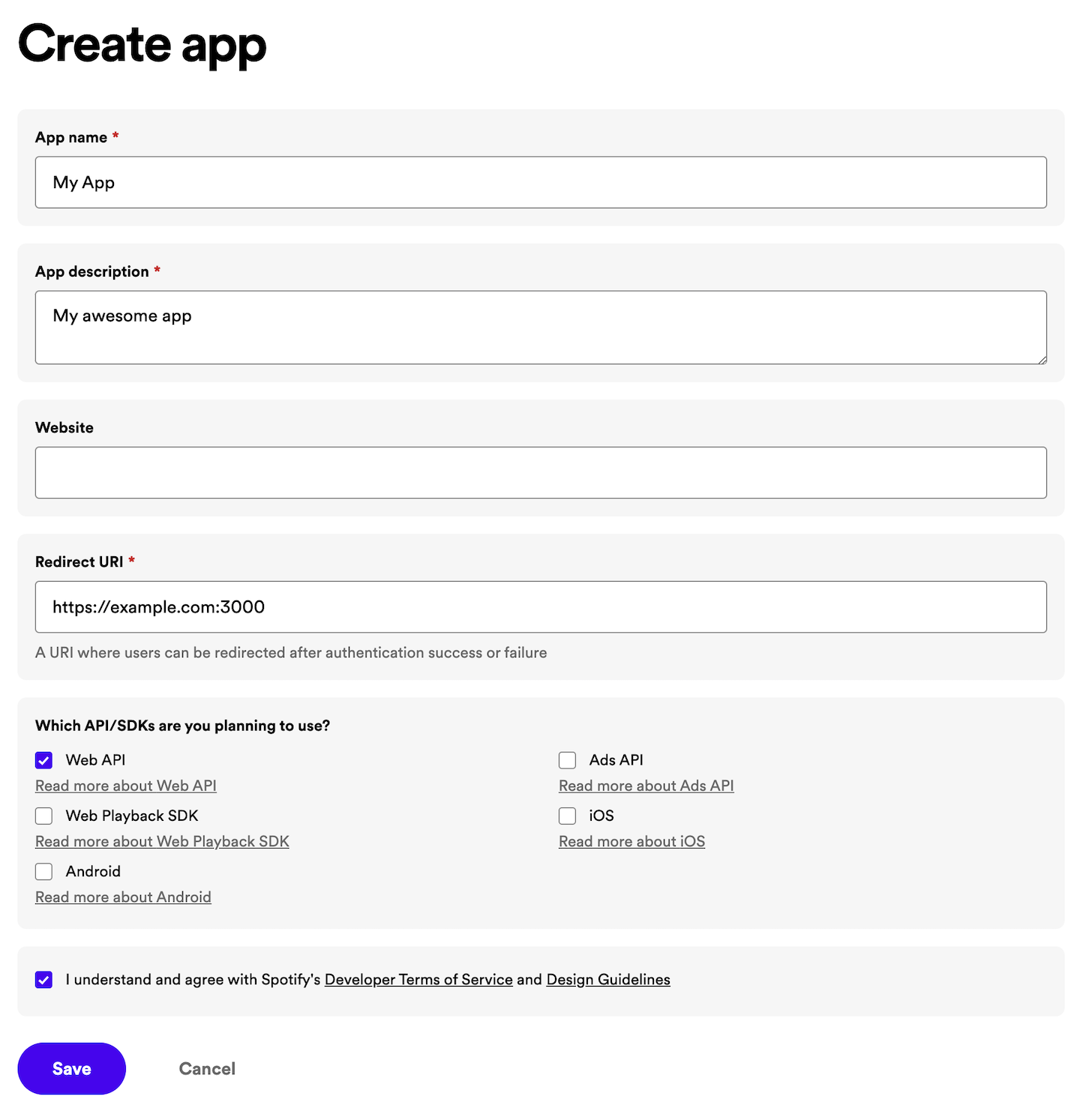
Enter an *App Name* and *App Description* of your choice (they will be displayed to the user on the grant screen), put a tick in the *Developer Terms of Service* checkbox and finally click on *CREATE*. Your application is now registered, and you'll be redirected to the app overview page.
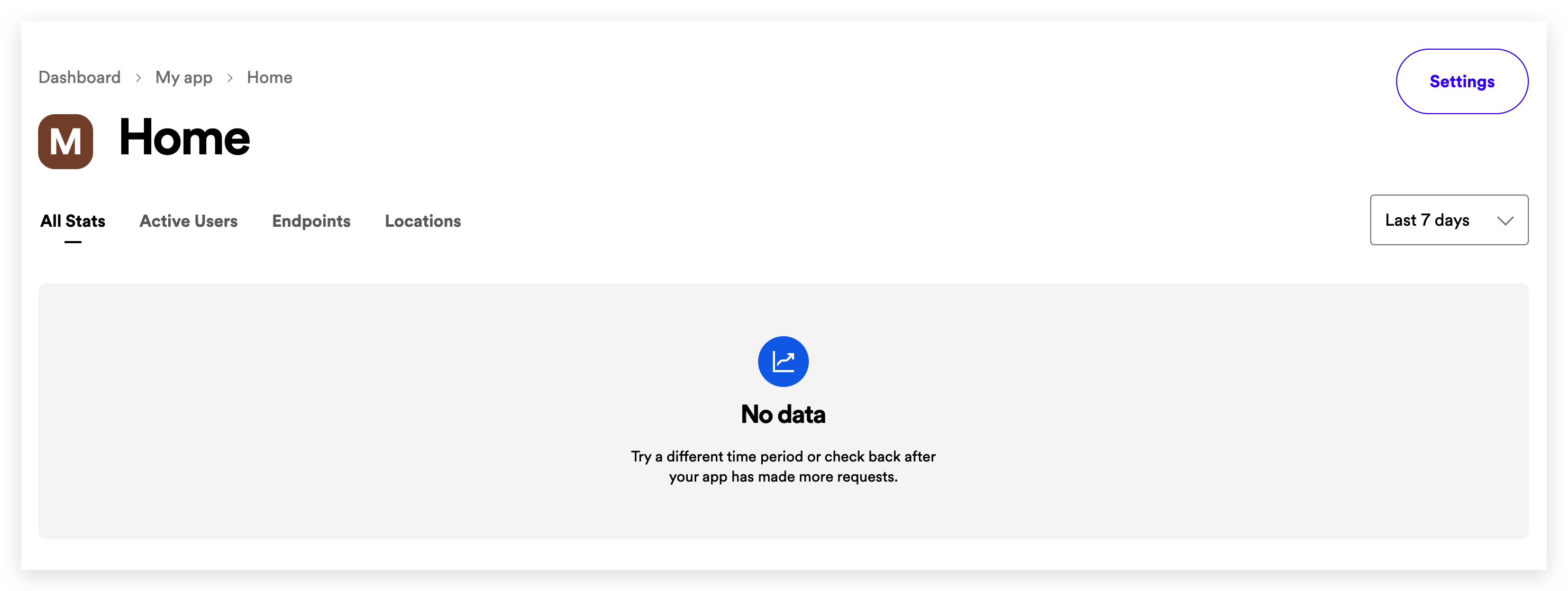
The app overview page provides access to different elements:
- App metrics, such as daily and monthly active users or number of users per country. Note that the metrics are initially empty.
- App Status. By default, your app will be in *Development Mode* with limits on the number of users who can install it, and the number of API requests it can make. Note that you can request an extension of this quota if needed by clicking on the *Request Extension* link.
- App settings.
- Client ID, the unique identifier of your app.
- Client Secret, the key you will use to authorize your Web API or SDK calls.
Always store the client secret key securely; never reveal it publicly! If you suspect that the secret key has been compromised, regenerate it immediately by clicking the *ROTATE* button on the app overview page.
It is time to configure our app. Click on *Edit Settings* to view and update your app settings. The following dialog will show up:
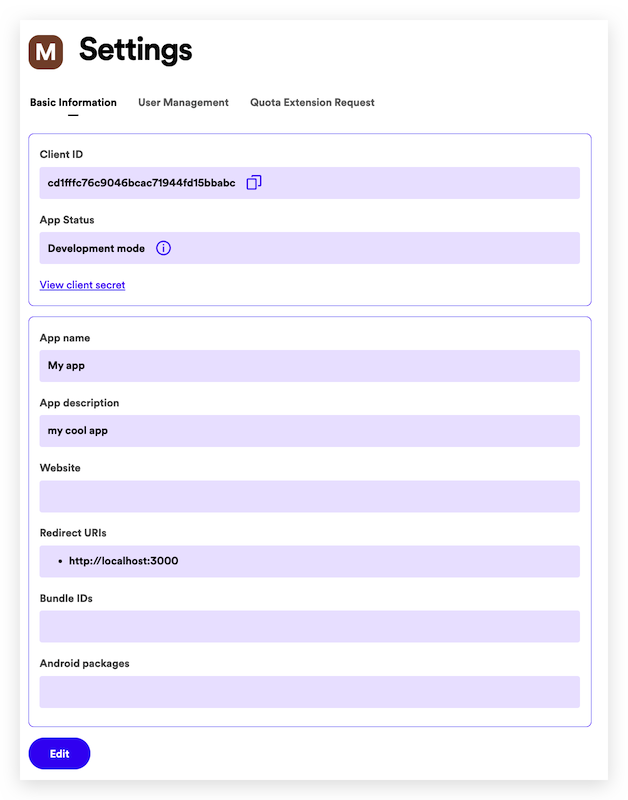
- Add a web domain or URL to the *Website* field. This will help users to obtain more information about your application.
- In *Redirect URIs* enter one or more addresses that you want to allowlist with Spotify. This URI enables the Spotify authentication service to automatically invoke your app every time the user logs in (e.g. <http://127.0.0.1:8080>)
Note that on iOS apps, the redirect URI must follow these rules:
- All the characters are lowercase.
- The prefix *must* be unique to your application (It cannot be a general prefix like http).
- The prefix must only be used by your application for authenticating Spotify. If you already have a URL scheme handled by your application for other uses, do not reuse it.
- Include a path after the first pair of forward slashes.
For example: If your app name is *My Awesome App*, a good candidate for the redirect URI could be `my-awesome-app-login://callback`.
- If you are developing an Android or iOS app, fill out the *Android Package* or *Bundle IDs* respectively.
Once you have finished updating the app settings, click on *SAVE*.
Finally, you can delete your app by clicking on the *DELETE* red button.
## Footer
### Documentation
- [Web API](https://developer.spotify.com/documentation/web-api)
- [Web Playback SDK](https://developer.spotify.com/documentation/web-playback-sdk)
- [Ads API](https://developer.spotify.com/documentation/ads-api)
- [iOS](https://developer.spotify.com/documentation/ios)
- [Android](https://developer.spotify.com/documentation/android)
- [Embeds](https://developer.spotify.com/documentation/embeds)
- [Commercial Hardware](https://developer.spotify.com/documentation/commercial-hardware)
### Guidelines
- [Design](https://developer.spotify.com/documentation/design)
- [Accessibility](https://developer.spotify.com/documentation/accessibility)
### Community
- [News](https://developer.spotify.com/community)
- [Forum](https://community.spotify.com/t5/Spotify-for-Developers/bd-p/Spotify_Developer)
### Legal
- [Developer Terms](https://developer.spotify.com/terms)
- [Developer Policy](https://developer.spotify.com/policy)
- [Compliance Tips](https://developer.spotify.com/compliance-tips)
- [Third Party Licenses](https://developer.spotify.com/third-party-licenses)
[Legal](https://www.spotify.com/legal/end-user-agreement/)[Cookies](https://www.spotify.com/legal/cookies-policy/)© 2026 Spotify AB |
| Readable Markdown | Web API
- [Overview](https://developer.spotify.com/documentation/web-api)
- [Getting started](https://developer.spotify.com/documentation/web-api/tutorials/getting-started)
- [Building with AI](https://developer.spotify.com/documentation/web-api/tutorials/building-with-ai)
- - [Access Token](https://developer.spotify.com/documentation/web-api/concepts/access-token)
- [API calls](https://developer.spotify.com/documentation/web-api/concepts/api-calls)
- [Apps](https://developer.spotify.com/documentation/web-api/concepts/apps)
- [Authorization](https://developer.spotify.com/documentation/web-api/concepts/authorization)
- [Redirect URIs](https://developer.spotify.com/documentation/web-api/concepts/redirect_uri)
- [Playlists](https://developer.spotify.com/documentation/web-api/concepts/playlists)
- [Quota modes](https://developer.spotify.com/documentation/web-api/concepts/quota-modes)
- [Rate limits](https://developer.spotify.com/documentation/web-api/concepts/rate-limits)
- [Scopes](https://developer.spotify.com/documentation/web-api/concepts/scopes)
- [Spotify URIs and IDs](https://developer.spotify.com/documentation/web-api/concepts/spotify-uris-ids)
- [Track Relinking](https://developer.spotify.com/documentation/web-api/concepts/track-relinking)
Reference
The app provides, among others, the *Client ID* and *Client Secret* needed to implement any of the authorization flows.
To do so, go to your [Dashboard](https://developer.spotify.com/dashboard) and click on the *Create an App* button to open the following dialog box:

Enter an *App Name* and *App Description* of your choice (they will be displayed to the user on the grant screen), put a tick in the *Developer Terms of Service* checkbox and finally click on *CREATE*. Your application is now registered, and you'll be redirected to the app overview page.

The app overview page provides access to different elements:
- App metrics, such as daily and monthly active users or number of users per country. Note that the metrics are initially empty.
- App Status. By default, your app will be in *Development Mode* with limits on the number of users who can install it, and the number of API requests it can make. Note that you can request an extension of this quota if needed by clicking on the *Request Extension* link.
- App settings.
- Client ID, the unique identifier of your app.
- Client Secret, the key you will use to authorize your Web API or SDK calls.
It is time to configure our app. Click on *Edit Settings* to view and update your app settings. The following dialog will show up:

- Add a web domain or URL to the *Website* field. This will help users to obtain more information about your application.
- In *Redirect URIs* enter one or more addresses that you want to allowlist with Spotify. This URI enables the Spotify authentication service to automatically invoke your app every time the user logs in (e.g. [http://127.0.0.1:8080](http://127.0.0.1:8080/))
Note that on iOS apps, the redirect URI must follow these rules:
- All the characters are lowercase.
- The prefix *must* be unique to your application (It cannot be a general prefix like http).
- The prefix must only be used by your application for authenticating Spotify. If you already have a URL scheme handled by your application for other uses, do not reuse it.
- Include a path after the first pair of forward slashes.
For example: If your app name is *My Awesome App*, a good candidate for the redirect URI could be `my-awesome-app-login://callback`.
- If you are developing an Android or iOS app, fill out the *Android Package* or *Bundle IDs* respectively.
Once you have finished updating the app settings, click on *SAVE*.
Finally, you can delete your app by clicking on the *DELETE* red button. |
| Shard | 52 (laksa) |
| Root Hash | 791381928507889852 |
| Unparsed URL | com,spotify!developer,/documentation/web-api/concepts/apps s443 |