ℹ️ Skipped - page is already crawled
| Filter | Status | Condition | Details |
|---|---|---|---|
| HTTP status | PASS | download_http_code = 200 | HTTP 200 |
| Age cutoff | PASS | download_stamp > now() - 6 MONTH | 1 months ago |
| History drop | PASS | isNull(history_drop_reason) | No drop reason |
| Spam/ban | PASS | fh_dont_index != 1 AND ml_spam_score = 0 | ml_spam_score=0 |
| Canonical | PASS | meta_canonical IS NULL OR = '' OR = src_unparsed | Not set |
| Property | Value |
|---|---|
| URL | https://developer.android.com/studio/write/create-java-class |
| Last Crawled | 2026-03-23 03:54:02 (28 days ago) |
| First Indexed | 2018-05-09 07:45:36 (7 years ago) |
| HTTP Status Code | 200 |
| Meta Title | Create a Java class or type | Android Studio | Android Developers |
| Meta Description | With the Create New Class dialog and file templates, Android Studio helps you to quickly create new classes and types. |
| Meta Canonical | null |
| Boilerpipe Text | Create a Java class or type
Stay organized with collections
Save and categorize content based on your preferences.
On this page
Viewing and customizing file templates
Creating a Java class or type
Android Studio file templates
AnnotationType file template
Class file template
Enum file template
Interface file template
Singleton file template
File template variables
With the
Create New Class
dialog and file templates, Android
Studio helps you to quickly create the following new classes and types:
Java classes
Enumeration and singleton classes
Interface and annotation types
After you fill in the
Create New Class
dialog fields and click
OK
, Android Studio creates a
.java
file containing
skeleton code, including a package statement, any necessary imports, a header,
and a class or type declaration. Next, you can add your code to this file.
File templates specify how Android Studio generates the skeleton code. You can
use the file templates provided with Android Studio as is, or customize them to
suit your development process.
Viewing and customizing file templates
Android Studio provides file templates that determine how new Java classes and
types are created with the
Create New Class
dialog. You can
customize these templates.
Figure 1
. The
Create New Class
dialog.
The Android Studio file templates include Velocity Template Language (
VTL
) code
and variables that handle these additional options.
The
Create New Class
dialog uses the
AnnotationType
,
Class
,
Enum
,
Interface
, and
Singleton
file templates.
To view the templates, find customizations, and modify the templates, follow
these steps:
Do one of the following:
For Windows or Linux, select
File > Settings > Editor > File and Code
Templates > Files
.
For macOS, select
Android Studio > Preferences > Editor > File and Code
Templates > Files
.
In the
template list
,
internal template names are in bold font. Customized template names are
displayed in a highlight color, such as blue.
Customize the file templates as needed.
If you want to use the
Create New Class
dialog fields, make sure your
changes comply with the
Android Studio file template code
.
For more information about file templates, including VTL, see
File
and Code Templates
and
File
and Code Templates Dialog
.
Creating a Java class or type
Android Studio helps you to create new Java classes; enumeration and singleton
classes; and interface and annotation types based on
file templates
.
To create a new Java class or type, follow these steps:
In the
Project
window, right-click a Java file or folder,
and select
New
>
Java Class
.
Alternatively, select a Java file or folder in the
Project
window, or click in a Java file in the Code Editor. Then select
File
>
New
>
Java Class
.
The item you select determines the default package for the new class or type.
In the
Create New Class
dialog, fill in the fields:
Name
- The name of the new class or type. It must comply
with Java name requirements. Don’t type a file name extension.
Kind
- Select the category of class or type.
Superclass
- The class that your new class inherits from.
You can type the package and class name, or just the class name and then
double-click an item in the drop-down list to autocomplete it.
Interface(s)
- One or more interfaces that the new class or
type implements. Multiple interfaces should be separated by a comma followed by an
optional space. You can type the package and interface name, or just the
interface name and then double-click an item in the drop-down list to
autocomplete it.
Autocomplete works for the first interface name only. Note that while
the comma and the following interface name can bring up a tooltip error, you can
ignore the error because it doesn’t affect the generated code.
Package
- The package that the class or type will reside
in. The default automatically appears in the field. If you type a package name
in the field, any portions of the package identifier that don’t exist are
highlighted red; in this case, Android Studio creates the package after you
click
OK
. This field must contain a value; otherwise, the Java
file won’t contain a
package
statement, and the class or type won’t
be placed within a package in the project.
The default depends on how you
launched the
Create New Class
dialog. If you first selected a
Java file or folder in the
Project
window, the default is the
package for the item you selected. If you first clicked in a Java file in the Code Editor, the
default is the package that contains this file.
Visibility
- Select whether the class or type is visible to
all classes, or just to those in its own package.
Modifiers
- Select the
Abstract
or
Final
modifier for a
Class
, or neither.
Show Select Overrides Dialog
- For a
Kind
of
Class
, check this option to open the
Select
Methods to Override/Implement dialog
after you click
OK
. In
this dialog, you can select methods that you would like to override or
implement, and Android Studio will generate skeleton code for these methods.
Any fields that don’t apply to the
Kind
are hidden.
Click
OK
.
Android Studio creates a Java file with skeleton code that you can modify. It
opens the file in the Code Editor.
Note:
You can create a singleton class by selecting
File
>
New
>
Singleton
or
File
>
New
>
Java Class
; the
latter technique offers more options.
Android Studio file templates
This section lists the Android Studio file template code written in the
VTL
scripting language, followed
by definitions of the variables. The values that you provide in the
Create New Class
dialog become the variable values in the template.
Note that the lines that begin with
#if (${VISIBILITY}
extend all the way to the open brace (
{
).
Annotation
Type file template
#if (${PACKAGE_NAME} != "")package ${PACKAGE_NAME};#end
#if (${IMPORT_BLOCK} != "")${IMPORT_BLOCK}
#end
#parse("File Header.java")
#if (${VISIBILITY} == "PUBLIC")public #end @interface ${NAME} #if (${INTERFACES} != "")extends ${INTERFACES} #end {
}
Class file template
#if (${PACKAGE_NAME} != "")package ${PACKAGE_NAME};#end
#if (${IMPORT_BLOCK} != "")${IMPORT_BLOCK}
#end
#parse("File Header.java")
#if (${VISIBILITY} == "PUBLIC")public #end #if (${ABSTRACT} == "TRUE")abstract #end #if (${FINAL} == "TRUE")final #end class ${NAME} #if (${SUPERCLASS} != "")extends ${SUPERCLASS} #end #if (${INTERFACES} != "")implements ${INTERFACES} #end {
}
Enum file template
#if (${PACKAGE_NAME} != "")package ${PACKAGE_NAME};#end
#if (${IMPORT_BLOCK} != "")${IMPORT_BLOCK}
#end
#parse("File Header.java")
#if (${VISIBILITY} == "PUBLIC")public #end enum ${NAME} #if (${INTERFACES} != "")implements ${INTERFACES} #end {
}
Interface file template
#if (${PACKAGE_NAME} != "")package ${PACKAGE_NAME};#end
#if (${IMPORT_BLOCK} != "")${IMPORT_BLOCK}
#end
#parse("File Header.java")
#if (${VISIBILITY} == "PUBLIC")public #end enum ${NAME} #if (${INTERFACES} != "")implements ${INTERFACES} #end {
#end {
}
Singleton file template
#if (${PACKAGE_NAME} != "")package ${PACKAGE_NAME};#end
#if (${IMPORT_BLOCK} != "")${IMPORT_BLOCK}
#end
#parse("File Header.java")
#if (${VISIBILITY} == "PUBLIC")public #end class ${NAME} #if (${SUPERCLASS} != "")extends ${SUPERCLASS} #end #if (${INTERFACES} != "")implements ${INTERFACES} #end {
private static final ${NAME} ourInstance = new ${NAME}();
#if (${VISIBILITY} == "PUBLIC")public #end static ${NAME} getInstance() {
return ourInstance;
}
private ${NAME}() {
}
}
File template variables
Android Studio replaces file template variables with values in the generated
Java file. You enter the values in the
Create New Class
dialog.
The template has the following variables that you can use:
IMPORT_BLOCK
- A newline-delimited list of Java
import
statements necessary to support any superclass or
interfaces, or an empty string (
""
). For example, If you only
implement the
Runnable
interface and extend nothing, this variable
will be
"import java.lang.Runnable;\n"
. If you implement the
Runnable
interface and extend the
Activity
class, it will be
"import android.app.Activity;\nimportjava.lang.Runnable;\n"
.
VISIBILITY
- Whether the class will have public access or not.
It can have a value of
PUBLIC
or
PACKAGE_PRIVATE
.
SUPERCLASS
- A single class name, or empty. If present, there
will be an
extends ${SUPERCLASS}
clause after the new class name.
INTERFACES
- A comma-separated list of interfaces, or empty. If
present, there will be an
implements ${INTERFACES}
clause after the
superclass, or after the class name if there’s no superclass. For interfaces and
annotation types, the interfaces have the
extends
keyword.
ABSTRACT
- Whether the class should be abstract or not. It can
have a value of
TRUE
or
FALSE
.
FINAL
- Whether the class should be final or not. It can have a
value of
TRUE
or
FALSE
.
Content and code samples on this page are subject to the licenses described in the
Content License
. Java and OpenJDK are trademarks or registered trademarks of Oracle and/or its affiliates.
Last updated 2026-03-18 UTC.
[[["Easy to understand","easyToUnderstand","thumb-up"],["Solved my problem","solvedMyProblem","thumb-up"],["Other","otherUp","thumb-up"]],[["Missing the information I need","missingTheInformationINeed","thumb-down"],["Too complicated / too many steps","tooComplicatedTooManySteps","thumb-down"],["Out of date","outOfDate","thumb-down"],["Samples / code issue","samplesCodeIssue","thumb-down"],["Other","otherDown","thumb-down"]],["Last updated 2026-03-18 UTC."],[],[]] |
| Markdown | [Skip to main content](https://developer.android.com/studio/write/create-java-class#main-content)
[](https://developer.android.com/)
More
[Essentials](https://developer.android.com/get-started)
- Build AI experiences
- Build AI-powered Android apps with Gemini APIs and more.
- [Get started](https://developer.android.com/ai)
- Get started
- Start by creating your first app. Go deeper with our training courses or explore app development on your own.
- [Hello world](https://developer.android.com/get-started/overview)
- [Training courses](https://developer.android.com/courses)
- [Tutorials](https://developer.android.com/get-started/codelabs)
- [Compose for teams](https://developer.android.com/develop/ui/compose/adopt)
- [Kotlin for Android](https://developer.android.com/kotlin)
- [Monetization with Play ↗️](https://play.google.com/console/about/guides/play-commerce/)
- [Android Developer Verification](https://developer.android.com/developer-verification)
- Extend by device
- Build apps that give your users seamless experiences from phones to tablets, watches, headsets, and more.
- [Adaptive apps](https://developer.android.com/adaptive-apps)
- [Android XR](https://developer.android.com/xr)
- [Wear OS](https://developer.android.com/wear)
- [Android for Cars](https://developer.android.com/cars)
- [Android TV](https://developer.android.com/tv)
- [ChromeOS](https://developer.android.com/chrome-os)
- Build by category
- Learn to build for your use case by following Google's prescriptive and opinionated guidance.
- [Games](https://developer.android.com/games)
- [Camera & media](https://developer.android.com/media)
- [Social & messaging](https://developer.android.com/social-and-messaging)
- [Health & fitness](https://developer.android.com/health-and-fitness)
- [Productivity](https://developer.android.com/productivity)
- [Enterprise apps](https://developer.android.com/work/overview)
- Get the latest
- Stay in touch with the latest releases throughout the year, join our preview programs, and give us your feedback.
- [Latest updates](https://developer.android.com/latest-updates)
- [Experimental updates](https://developer.android.com/latest-updates/experimental)
- [Android Studio preview](https://developer.android.com/studio/preview)
- [Jetpack & Compose libraries](https://developer.android.com/jetpack/androidx/versions)
- [Wear OS releases](https://developer.android.com/training/wearables/versions/latest)
- [Privacy Sandbox ↗️](https://developer.android.com/design-for-safety/privacy-sandbox)
[Design & Plan](https://developer.android.com/design)
- Excellent Experiences
- Build the best experiences for your best users.
- [Learn more](https://developer.android.com/quality/excellent)
- UI Design
- Design a beautiful user interface using Android best practices.
- [Design for Android](https://developer.android.com/design/ui)
- [Mobile](https://developer.android.com/design/ui/mobile)
- [Desktop experiences](https://developer.android.com/design/ui/desktop)
- [XR Headsets & XR Glasses](https://developer.android.com/design/ui/xr)
- [AI Glasses](https://developer.android.com/design/ui/ai-glasses)
- [Widgets](https://developer.android.com/design/ui/widget)
- [Wear OS](https://developer.android.com/design/ui/wear)
- [Android TV](https://developer.android.com/design/ui/tv)
- [Android for Cars](https://developer.android.com/design/ui/cars)
- Architecture
- Design robust, testable, and maintainable app logic and services.
- [Introduction](https://developer.android.com/topic/architecture/intro)
- [Libraries](https://developer.android.com/topic/libraries/view-binding)
- [Navigation](https://developer.android.com/guide/navigation/navigation-principles)
- [Modularization](https://developer.android.com/topic/modularization)
- [Testing](https://developer.android.com/training/testing/fundamentals)
- [Kotlin Multiplatform](https://developer.android.com/kotlin/multiplatform)
- Quality
- Plan for app quality and align with Play store guidelines.
- [Overview](https://developer.android.com/quality)
- [Core value](https://developer.android.com/quality/core-value)
- [User experience](https://developer.android.com/quality/user-experience)
- [Accessibility](https://developer.android.com/guide/topics/ui/accessibility)
- [Technical quality](https://developer.android.com/quality/technical)
- [Excellent Experiences](https://developer.android.com/quality/excellent)
- Security
- Safeguard users against threats and ensure a secure Android experience.
- [Overview](https://developer.android.com/security)
- [Privacy](https://developer.android.com/privacy)
- [Permissions](https://developer.android.com/privacy#app-permissions)
- [Identity](https://developer.android.com/identity)
- [Fraud prevention](https://developer.android.com/security/fraud-prevention)
[Develop](https://developer.android.com/develop)
- Gemini in Android Studio
- Your AI development companion for Android development.
- [Learn more](https://developer.android.com/gemini-in-android)
- [Get Android Studio](https://developer.android.com/studio)
- Core areas
- Get the samples and docs for the features you need.
- [Samples](https://developer.android.com/samples)
- [User interfaces](https://developer.android.com/develop/ui)
- [Background work](https://developer.android.com/develop/background-work)
- [Data and files](https://developer.android.com/guide/topics/data)
- [Connectivity](https://developer.android.com/develop/connectivity)
- [All core areas ⤵️](https://developer.android.com/develop#core-areas)
- Tools and workflow
- Use the IDE to write and build your app, or create your own pipeline.
- [Write and debug code](https://developer.android.com/studio/write)
- [Build projects](https://developer.android.com/build/gradle-build-overview)
- [Test your app](https://developer.android.com/training/testing)
- [Performance](https://developer.android.com/topic/performance/overview)
- [Command-line tools](https://developer.android.com/tools)
- [Gradle plugin API](https://developer.android.com/reference/tools/gradle-api)
- [Android Bench](https://developer.android.com/bench)
- Device tech
- Write code for form factors. Connect devices and share data.
- [Adaptive UI](https://developer.android.com/guide/topics/large-screens/get-started-with-large-screens)
- [Wear OS](https://developer.android.com/training/wearables)
- [Android XR](https://developer.android.com/develop/xr)
- [Android Health](https://developer.android.com/health-and-fitness/guides)
- [Android for Cars](https://developer.android.com/training/cars)
- [Android TV](https://developer.android.com/training/tv)
- [All devices ⤵️](https://developer.android.com/develop#devices)
- Libraries
- Browse API reference documentation with all the details.
- [Android platform](https://developer.android.com/reference/packages)
- [Jetpack libraries](https://developer.android.com/jetpack/androidx/explorer)
- [Compose libraries](https://developer.android.com/jetpack/androidx/releases/compose)
- [Google Play services ↗️](https://developers.google.com/android/reference/packages)
- [Google Play SDK index ↗️](https://play.google.com/sdks)
[Google Play](https://developer.android.com/distribute)
- Play Console
- Publish your app or game and grow your business on Google Play.
- [Go to Play Console](https://play.google.com/console)
- [Learn more ↗️](https://play.google.com/console/about/)
- Fundamentals
- Learn how to engage users, monitize, and secure your app.
- [Play Monetization](https://developer.android.com/distribute/play-billing)
- [Play Integrity](https://developer.android.com/google/play/integrity)
- [Play Policies](https://developer.android.com/distribute/play-policies)
- [Play Programs ↗️](https://play.google.com/console/about/programs)
- Games Dev Center
- Develop and deliver games. Get tools, downloads, and samples.
- [Overview](https://developer.android.com/games)
- [Play Asset Delivery](https://developer.android.com/guide/playcore/asset-delivery)
- [Play Games Services](https://developer.android.com/games/pgs/overview)
- [Play Games on PC](https://developer.android.com/games/playgames/overview)
- [All Play guides ⤵️](https://developer.android.com/distribute)
- Libraries
- Browse API reference documentation with all the details.
- [Play Feature Delivery](https://developer.android.com/guide/playcore/feature-delivery)
- [Play In-app Updates](https://developer.android.com/guide/playcore/in-app-updates)
- [Play In-app Reviews](https://developer.android.com/guide/playcore/in-app-review)
- [Play Install Referrer](https://developer.android.com/google/play/installreferrer)
- [Google Play services ↗️](https://developers.google.com/android/reference/packages)
- [Google Play SDK index ↗️](https://play.google.com/sdks)
- [All Play libraries ⤵️](https://developer.android.com/distribute)
- Tools & resources
- Tools for publishing, promoting, and managing your app.
- [Android App Bundles](https://developer.android.com/guide/app-bundle)
- [Brand & marketing](https://developer.android.com/distribute/marketing-tools)
- [Play Console APIs ↗️](https://developers.google.com/android-publisher/api-ref/rest)
[Community](https://developer.android.com/community)
- [English](https://developer.android.com/studio/write/create-java-class)
- [Deutsch](https://developer.android.com/studio/write/create-java-class?hl=de)
- [Español – América Latina](https://developer.android.com/studio/write/create-java-class?hl=es-419)
- [Français](https://developer.android.com/studio/write/create-java-class?hl=fr)
- [Indonesia](https://developer.android.com/studio/write/create-java-class?hl=id)
- [Italiano](https://developer.android.com/studio/write/create-java-class?hl=it)
- [Polski](https://developer.android.com/studio/write/create-java-class?hl=pl)
- [Português – Brasil](https://developer.android.com/studio/write/create-java-class?hl=pt-br)
- [Tiếng Việt](https://developer.android.com/studio/write/create-java-class?hl=vi)
- [Türkçe](https://developer.android.com/studio/write/create-java-class?hl=tr)
- [Русский](https://developer.android.com/studio/write/create-java-class?hl=ru)
- [עברית](https://developer.android.com/studio/write/create-java-class?hl=he)
- [العربيّة](https://developer.android.com/studio/write/create-java-class?hl=ar)
- [فارسی](https://developer.android.com/studio/write/create-java-class?hl=fa)
- [हिंदी](https://developer.android.com/studio/write/create-java-class?hl=hi)
- [বাংলা](https://developer.android.com/studio/write/create-java-class?hl=bn)
- [ภาษาไทย](https://developer.android.com/studio/write/create-java-class?hl=th)
- [中文 – 简体](https://developer.android.com/studio/write/create-java-class?hl=zh-cn)
- [中文 – 繁體](https://developer.android.com/studio/write/create-java-class?hl=zh-tw)
- [日本語](https://developer.android.com/studio/write/create-java-class?hl=ja)
- [한국어](https://developer.android.com/studio/write/create-java-class?hl=ko)
[Android Studio](https://developer.android.com/studio)
[Sign in](https://developer.android.com/_d/signin?continue=https%3A%2F%2Fdeveloper.android.com%2Fstudio%2Fwrite%2Fcreate-java-class&prompt=select_account)
- [Android Studio](https://developer.android.com/studio)
[Download](https://developer.android.com/studio)
[IDE guides](https://developer.android.com/studio/intro)
[Gemini in Android Studio](https://developer.android.com/gemini-in-android)
[Android Studio preview](https://developer.android.com/studio/preview)
[Gradle build guides](https://developer.android.com/build/gradle-build-overview)
More
[SDK tools guides](https://developer.android.com/tools)
[](https://developer.android.com/)
- [Essentials](https://developer.android.com/get-started)
- More
- [Design & Plan](https://developer.android.com/design)
- More
- [Develop](https://developer.android.com/develop)
- More
- [Download](https://developer.android.com/studio)
- [IDE guides](https://developer.android.com/studio/intro)
- [Gemini in Android Studio](https://developer.android.com/gemini-in-android)
- [Android Studio preview](https://developer.android.com/studio/preview)
- [Gradle build guides](https://developer.android.com/build/gradle-build-overview)
- [SDK tools guides](https://developer.android.com/tools)
- [Google Play](https://developer.android.com/distribute)
- More
- [Community](https://developer.android.com/community)
- [Android Studio](https://developer.android.com/studio)
- What's new in Android Studio
- [Android Studio Panda 2 release notes](https://developer.android.com/studio/releases)
- [Android Emulator release notes](https://developer.android.com/studio/releases/emulator)
- [Past Android Studio releases](https://developer.android.com/studio/releases/past-releases)
- [Android Studio release names](https://developer.android.com/studio/releases/studio-release-names)
- Service integrations
- [Overview](https://developer.android.com/studio/services)
- [Deprecated service integrations](https://developer.android.com/studio/services/deprecated)
- Get started with Android Studio
- [Overview](https://developer.android.com/studio/intro)
- [Install Android Studio](https://developer.android.com/studio/install)
- [New UI in Android Studio](https://developer.android.com/studio/intro/new-ui)
- Get to know the UI
- [Overview](https://developer.android.com/studio/intro/user-interface)
- [Accessibility features](https://developer.android.com/studio/intro/accessibility)
- [Keyboard shortcuts](https://developer.android.com/studio/intro/keyboard-shortcuts)
- [Workflow basics](https://developer.android.com/studio/workflow)
- Manage your project
- [Overview](https://developer.android.com/studio/projects)
- [Create a project](https://developer.android.com/studio/projects/create-project)
- [Migrate to Android Studio](https://developer.android.com/studio/intro/migrate)
- [Version control basics](https://developer.android.com/studio/projects/version-control)
- [Configure the IDE](https://developer.android.com/studio/intro/studio-config)
- [Update the IDE and tools](https://developer.android.com/studio/intro/update)
- [About Play Feature Delivery](https://developer.android.com/guide/app-bundle/dynamic-delivery)
- Add C and C++ code
- [Overview](https://developer.android.com/studio/projects/add-native-code)
- [Install NDK and CMake](https://developer.android.com/studio/projects/install-ndk)
- [Configure the NDK for AGP](https://developer.android.com/studio/projects/configure-agp-ndk)
- [Configure CMake](https://developer.android.com/studio/projects/configure-cmake)
- [Link Gradle](https://developer.android.com/studio/projects/gradle-external-native-builds)
- [Create an Android library](https://developer.android.com/studio/projects/android-library)
- [Set up continuous integration](https://developer.android.com/studio/projects/continuous-integration)
- Write your code
- [Write your code quicker and more efficiently](https://developer.android.com/studio/write)
- Work with templates
- [Add code from a template](https://developer.android.com/studio/projects/templates)
- [Find sample code](https://developer.android.com/studio/write/sample-code)
- [Create a Java class or type](https://developer.android.com/studio/write/create-java-class)
- [Add a module for a new device](https://developer.android.com/studio/projects/add-app-module)
- [Use Java 8 language features](https://developer.android.com/studio/write/java8-support)
- [Java 8 language support table](https://developer.android.com/studio/write/java8-support-table)
- [Add app resources](https://developer.android.com/studio/write/add-resources)
- Use tools to develop UI
- [Develop a layout with Compose ⍈](https://developer.android.com/jetpack/compose/tooling/previews)
- [Develop a layout with Views](https://developer.android.com/studio/write/layout-editor)
- [Create animations with Compose ⍈](https://developer.android.com/develop/ui/compose/animation/introduction)
- [Manage UI resources](https://developer.android.com/studio/write/resource-manager)
- [Add multi-density vector graphics](https://developer.android.com/studio/write/vector-asset-studio)
- [Create app icons](https://developer.android.com/studio/write/create-app-icons)
- [Create resizable bitmaps (9-patch)](https://developer.android.com/studio/write/draw9patch)
- [Create WebP images](https://developer.android.com/studio/write/convert-webp)
- [Localize the UI](https://developer.android.com/studio/write/translations-editor)
- [Add Android app links](https://developer.android.com/studio/write/app-link-indexing)
- [Connect to Firebase](https://developer.android.com/studio/write/firebase)
- [Improve your code with lint checks](https://developer.android.com/studio/write/lint)
- [Improve code inspection with annotations](https://developer.android.com/studio/write/annotations)
- [Tools attributes reference](https://developer.android.com/studio/write/tool-attributes)
- Run and debug your app
- [Overview](https://developer.android.com/studio/run)
- Run your app on virtual devices
- [Create and manage virtual devices](https://developer.android.com/studio/run/managing-avds)
- Run your app with Android Emulator
- [Overview](https://developer.android.com/studio/run/emulator)
- [Test on multiple screen sizes](https://developer.android.com/studio/run/resizable-emulator)
- [Take screenshots](https://developer.android.com/studio/run/emulator-take-screenshots)
- [Record the screen](https://developer.android.com/studio/run/emulator-record-screen)
- [Use the camera](https://developer.android.com/studio/run/emulator-use-camera)
- [Launch in a separate window](https://developer.android.com/studio/run/emulator-launch-separate-window)
- [Launch without running an app](https://developer.android.com/studio/run/emulator-launch-without-app)
- [Install and add files](https://developer.android.com/studio/run/emulator-install-add-files)
- Use advanced Android Emulator features
- [Use extended controls](https://developer.android.com/studio/run/emulator-extended-controls)
- [Use snapshots](https://developer.android.com/studio/run/emulator-snapshots)
- [Use the emulator from the command line](https://developer.android.com/studio/run/emulator-commandline)
- [Send console commands](https://developer.android.com/studio/run/emulator-console)
- [Configure hardware acceleration](https://developer.android.com/studio/run/emulator-acceleration)
- [Emulator feature comparison](https://developer.android.com/studio/run/emulator-comparison)
- Use emulator networking
- [Overview](https://developer.android.com/studio/run/emulator-networking)
- [Interconnect emulators](https://developer.android.com/studio/run/emulator-networking-interconnect)
- [Network addresses](https://developer.android.com/studio/run/emulator-networking-address)
- [Set up proxy](https://developer.android.com/studio/run/emulator-networking-proxy)
- [Set up DNS](https://developer.android.com/studio/run/emulator-networking-dns)
- [Set up voice/SMS](https://developer.android.com/studio/run/emulator-networking-voice)
- [Advanced networking](https://developer.android.com/studio/run/emulator-networking-advanced)
- [Troubleshoot emulator](https://developer.android.com/studio/run/emulator-troubleshooting)
- [Android Device Streaming](https://developer.android.com/studio/run/android-device-streaming)
- Run your app on a local device
- [Get started](https://developer.android.com/studio/run/device)
- [Install OEM USB drivers](https://developer.android.com/studio/run/oem-usb)
- [Get the Google USB driver](https://developer.android.com/studio/run/win-usb)
- Debug your code
- [Get started debugging your code](https://developer.android.com/studio/debug)
- [Configure developer options](https://developer.android.com/studio/debug/dev-options)
- [Write and view logs](https://developer.android.com/studio/debug/logcat)
- Analyze and address crash issues
- [Analyze a stack trace](https://developer.android.com/studio/debug/stacktraces)
- [Analyze Crashlytics and Vitals reports](https://developer.android.com/studio/debug/app-quality-insights)
- [Debug your layout](https://developer.android.com/studio/debug/layout-inspector)
- [View design issues](https://developer.android.com/studio/debug/universal-problems-panel)
- [Inspect network traffic](https://developer.android.com/studio/debug/network-profiler)
- [Debug your database](https://developer.android.com/studio/inspect/database)
- [Debug your WorkManager Workers](https://developer.android.com/studio/inspect/task)
- [View on-device files](https://developer.android.com/studio/debug/device-file-explorer)
- [Debug pre-built APKs](https://developer.android.com/studio/debug/apk-debugger)
- [Take a screenshot](https://developer.android.com/studio/debug/am-screenshot)
- [Record a video](https://developer.android.com/studio/debug/am-video)
- [Capture and read bug reports](https://developer.android.com/studio/debug/bug-report)
- [Analyze your APK or AAB](https://developer.android.com/studio/debug/apk-analyzer)
- [Customize run/debug configurations](https://developer.android.com/studio/run/rundebugconfig)
- Test your code
- [Choose a testing method](https://developer.android.com/studio/test)
- [Test in Android Studio](https://developer.android.com/studio/test/test-in-android-studio)
- [Test with build-managed devices](https://developer.android.com/studio/test/managed-devices)
- [Test against screen changes](https://developer.android.com/studio/test/espresso-api)
- [Test from the command line](https://developer.android.com/studio/test/command-line)
- [Set up advanced test configurations](https://developer.android.com/studio/test/advanced-test-setup)
- Use specialized testing tools
- [Create UI tests](https://developer.android.com/studio/test/other-testing-tools/espresso-test-recorder)
- [Set up automatic testing of your code](https://developer.android.com/studio/test/other-testing-tools/app-crawler)
- [Stress-test your code with user events](https://developer.android.com/studio/test/other-testing-tools/monkey)
- Inspect performance issues
- [Overview](https://developer.android.com/studio/profile)
- Record a system trace
- [Overview](https://developer.android.com/studio/profile/cpu-profiler)
- [Inspect traces](https://developer.android.com/studio/profile/inspect-traces)
- [Detect UI jank](https://developer.android.com/studio/profile/jank-detection)
- [Inspect power usage](https://developer.android.com/studio/profile/power-profiler)
- [Generate trace logs](https://developer.android.com/studio/profile/generate-trace-logs)
- [Capture a heap dump](https://developer.android.com/studio/profile/capture-heap-dump)
- [Sample the callstack](https://developer.android.com/studio/profile/sample-callstack)
- [Record Java/Kotlin allocations](https://developer.android.com/studio/profile/record-java-kotlin-allocations)
- [Record Java/Kotlin methods](https://developer.android.com/studio/profile/record-java-kotlin-methods)
- [Record native allocations](https://developer.android.com/studio/profile/record-native-allocations)
- [Inspect your app live](https://developer.android.com/studio/profile/inspect-app-live)
- [Inspect pre-built APKs](https://developer.android.com/studio/profile/apk-profiler)
- [Run the standalone profiler](https://developer.android.com/studio/profile/standalone-profiler)
- [Build and run a profileable app manually](https://developer.android.com/studio/profile/build-run-manually)
- Chart glossary
- [Call chart](https://developer.android.com/studio/profile/chart-glossary/call-chart)
- [Events table](https://developer.android.com/studio/profile/chart-glossary/events-table)
- [Flame chart](https://developer.android.com/studio/profile/chart-glossary/flame-chart)
- [Process memory (RSS)](https://developer.android.com/studio/profile/chart-glossary/process-memory)
- [Top down and bottom up charts](https://developer.android.com/studio/profile/chart-glossary/top-bottom-charts)
- Publish your app
- [Overview](https://developer.android.com/studio/publish)
- [Play Policy Insights](https://developer.android.com/studio/publish/insights)
- [Prepare for release](https://developer.android.com/studio/publish/preparing)
- [Version your app](https://developer.android.com/studio/publish/versioning)
- [Sign your app](https://developer.android.com/studio/publish/app-signing)
- [Upload your app](https://developer.android.com/studio/publish/upload-bundle)
- [Troubleshoot](https://developer.android.com/studio/troubleshoot)
- [Known issues](https://developer.android.com/studio/known-issues)
- [Report a bug](https://developer.android.com/studio/report-bugs)
- Build AI experiences
- [Get started](https://developer.android.com/ai)
- Get started
- [Hello world](https://developer.android.com/get-started/overview)
- [Training courses](https://developer.android.com/courses)
- [Tutorials](https://developer.android.com/get-started/codelabs)
- [Compose for teams](https://developer.android.com/develop/ui/compose/adopt)
- [Kotlin for Android](https://developer.android.com/kotlin)
- [Monetization with Play ↗️](https://play.google.com/console/about/guides/play-commerce/)
- [Android Developer Verification](https://developer.android.com/developer-verification)
- Extend by device
- [Adaptive apps](https://developer.android.com/adaptive-apps)
- [Android XR](https://developer.android.com/xr)
- [Wear OS](https://developer.android.com/wear)
- [Android for Cars](https://developer.android.com/cars)
- [Android TV](https://developer.android.com/tv)
- [ChromeOS](https://developer.android.com/chrome-os)
- Build by category
- [Games](https://developer.android.com/games)
- [Camera & media](https://developer.android.com/media)
- [Social & messaging](https://developer.android.com/social-and-messaging)
- [Health & fitness](https://developer.android.com/health-and-fitness)
- [Productivity](https://developer.android.com/productivity)
- [Enterprise apps](https://developer.android.com/work/overview)
- Get the latest
- [Latest updates](https://developer.android.com/latest-updates)
- [Experimental updates](https://developer.android.com/latest-updates/experimental)
- [Android Studio preview](https://developer.android.com/studio/preview)
- [Jetpack & Compose libraries](https://developer.android.com/jetpack/androidx/versions)
- [Wear OS releases](https://developer.android.com/training/wearables/versions/latest)
- [Privacy Sandbox ↗️](https://developer.android.com/design-for-safety/privacy-sandbox)
- Excellent Experiences
- [Learn more](https://developer.android.com/quality/excellent)
- UI Design
- [Design for Android](https://developer.android.com/design/ui)
- [Mobile](https://developer.android.com/design/ui/mobile)
- [Desktop experiences](https://developer.android.com/design/ui/desktop)
- [XR Headsets & XR Glasses](https://developer.android.com/design/ui/xr)
- [AI Glasses](https://developer.android.com/design/ui/ai-glasses)
- [Widgets](https://developer.android.com/design/ui/widget)
- [Wear OS](https://developer.android.com/design/ui/wear)
- [Android TV](https://developer.android.com/design/ui/tv)
- [Android for Cars](https://developer.android.com/design/ui/cars)
- Architecture
- [Introduction](https://developer.android.com/topic/architecture/intro)
- [Libraries](https://developer.android.com/topic/libraries/view-binding)
- [Navigation](https://developer.android.com/guide/navigation/navigation-principles)
- [Modularization](https://developer.android.com/topic/modularization)
- [Testing](https://developer.android.com/training/testing/fundamentals)
- [Kotlin Multiplatform](https://developer.android.com/kotlin/multiplatform)
- Quality
- [Overview](https://developer.android.com/quality)
- [Core value](https://developer.android.com/quality/core-value)
- [User experience](https://developer.android.com/quality/user-experience)
- [Accessibility](https://developer.android.com/guide/topics/ui/accessibility)
- [Technical quality](https://developer.android.com/quality/technical)
- [Excellent Experiences](https://developer.android.com/quality/excellent)
- Security
- [Overview](https://developer.android.com/security)
- [Privacy](https://developer.android.com/privacy)
- [Permissions](https://developer.android.com/privacy#app-permissions)
- [Identity](https://developer.android.com/identity)
- [Fraud prevention](https://developer.android.com/security/fraud-prevention)
- Gemini in Android Studio
- [Learn more](https://developer.android.com/gemini-in-android)
- [Get Android Studio](https://developer.android.com/studio)
- Core areas
- [Samples](https://developer.android.com/samples)
- [User interfaces](https://developer.android.com/develop/ui)
- [Background work](https://developer.android.com/develop/background-work)
- [Data and files](https://developer.android.com/guide/topics/data)
- [Connectivity](https://developer.android.com/develop/connectivity)
- [All core areas ⤵️](https://developer.android.com/develop#core-areas)
- Tools and workflow
- [Write and debug code](https://developer.android.com/studio/write)
- [Build projects](https://developer.android.com/build/gradle-build-overview)
- [Test your app](https://developer.android.com/training/testing)
- [Performance](https://developer.android.com/topic/performance/overview)
- [Command-line tools](https://developer.android.com/tools)
- [Gradle plugin API](https://developer.android.com/reference/tools/gradle-api)
- [Android Bench](https://developer.android.com/bench)
- Device tech
- [Adaptive UI](https://developer.android.com/guide/topics/large-screens/get-started-with-large-screens)
- [Wear OS](https://developer.android.com/training/wearables)
- [Android XR](https://developer.android.com/develop/xr)
- [Android Health](https://developer.android.com/health-and-fitness/guides)
- [Android for Cars](https://developer.android.com/training/cars)
- [Android TV](https://developer.android.com/training/tv)
- [All devices ⤵️](https://developer.android.com/develop#devices)
- Libraries
- [Android platform](https://developer.android.com/reference/packages)
- [Jetpack libraries](https://developer.android.com/jetpack/androidx/explorer)
- [Compose libraries](https://developer.android.com/jetpack/androidx/releases/compose)
- [Google Play services ↗️](https://developers.google.com/android/reference/packages)
- [Google Play SDK index ↗️](https://play.google.com/sdks)
- Play Console
- [Go to Play Console](https://play.google.com/console)
- [Learn more ↗️](https://play.google.com/console/about/)
- Fundamentals
- [Play Monetization](https://developer.android.com/distribute/play-billing)
- [Play Integrity](https://developer.android.com/google/play/integrity)
- [Play Policies](https://developer.android.com/distribute/play-policies)
- [Play Programs ↗️](https://play.google.com/console/about/programs)
- Games Dev Center
- [Overview](https://developer.android.com/games)
- [Play Asset Delivery](https://developer.android.com/guide/playcore/asset-delivery)
- [Play Games Services](https://developer.android.com/games/pgs/overview)
- [Play Games on PC](https://developer.android.com/games/playgames/overview)
- [All Play guides ⤵️](https://developer.android.com/distribute)
- Libraries
- [Play Feature Delivery](https://developer.android.com/guide/playcore/feature-delivery)
- [Play In-app Updates](https://developer.android.com/guide/playcore/in-app-updates)
- [Play In-app Reviews](https://developer.android.com/guide/playcore/in-app-review)
- [Play Install Referrer](https://developer.android.com/google/play/installreferrer)
- [Google Play services ↗️](https://developers.google.com/android/reference/packages)
- [Google Play SDK index ↗️](https://play.google.com/sdks)
- [All Play libraries ⤵️](https://developer.android.com/distribute)
- Tools & resources
- [Android App Bundles](https://developer.android.com/guide/app-bundle)
- [Brand & marketing](https://developer.android.com/distribute/marketing-tools)
- [Play Console APIs ↗️](https://developers.google.com/android-publisher/api-ref/rest)
- On this page
- [Viewing and customizing file templates](https://developer.android.com/studio/write/create-java-class#viewing-templates)
- [Creating a Java class or type](https://developer.android.com/studio/write/create-java-class#creating-class)
- [Android Studio file templates](https://developer.android.com/studio/write/create-java-class#templates)
- [AnnotationType file template](https://developer.android.com/studio/write/create-java-class#annotation)
- [Class file template](https://developer.android.com/studio/write/create-java-class#class)
- [Enum file template](https://developer.android.com/studio/write/create-java-class#enum)
- [Interface file template](https://developer.android.com/studio/write/create-java-class#interface)
- [Singleton file template](https://developer.android.com/studio/write/create-java-class#singleton)
- [File template variables](https://developer.android.com/studio/write/create-java-class#variables)
- [Android Developers](https://developer.android.com/)
- [Develop](https://developer.android.com/develop)
- [Android Studio](https://developer.android.com/studio)
- [IDE guides](https://developer.android.com/studio/intro)
Was this helpful?
# Create a Java class or typeStay organized with collections Save and categorize content based on your preferences.
- On this page
- [Viewing and customizing file templates](https://developer.android.com/studio/write/create-java-class#viewing-templates)
- [Creating a Java class or type](https://developer.android.com/studio/write/create-java-class#creating-class)
- [Android Studio file templates](https://developer.android.com/studio/write/create-java-class#templates)
- [AnnotationType file template](https://developer.android.com/studio/write/create-java-class#annotation)
- [Class file template](https://developer.android.com/studio/write/create-java-class#class)
- [Enum file template](https://developer.android.com/studio/write/create-java-class#enum)
- [Interface file template](https://developer.android.com/studio/write/create-java-class#interface)
- [Singleton file template](https://developer.android.com/studio/write/create-java-class#singleton)
- [File template variables](https://developer.android.com/studio/write/create-java-class#variables)
With the **Create New Class** dialog and file templates, Android Studio helps you to quickly create the following new classes and types:
- Java classes
- Enumeration and singleton classes
- Interface and annotation types
After you fill in the **Create New Class** dialog fields and click **OK**, Android Studio creates a `.java` file containing skeleton code, including a package statement, any necessary imports, a header, and a class or type declaration. Next, you can add your code to this file.
File templates specify how Android Studio generates the skeleton code. You can use the file templates provided with Android Studio as is, or customize them to suit your development process.
## Viewing and customizing file templates
Android Studio provides file templates that determine how new Java classes and types are created with the **Create New Class** dialog. You can customize these templates.
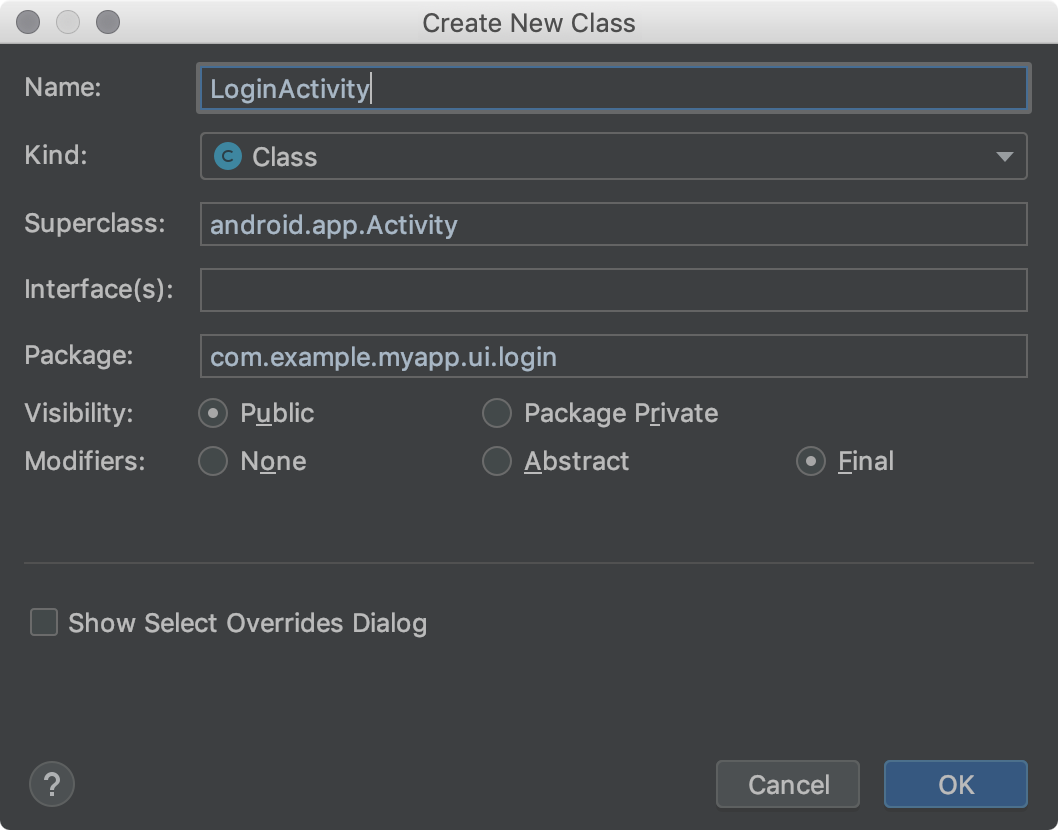
**Figure 1**. The **Create New Class** dialog.
The Android Studio file templates include Velocity Template Language ([VTL](https://velocity.apache.org/engine/)) code and variables that handle these additional options. The **Create New Class** dialog uses the **AnnotationType**, **Class**, **Enum**, **Interface**, and **Singleton** file templates.
To view the templates, find customizations, and modify the templates, follow these steps:
1. Do one of the following:
- For Windows or Linux, select **File \> Settings \> Editor \> File and Code Templates \> Files**.
- For macOS, select **Android Studio \> Preferences \> Editor \> File and Code Templates \> Files**.
In the [template list](https://www.jetbrains.com/help/idea/2025.3/settings-file-and-code-templates.html), internal template names are in bold font. Customized template names are displayed in a highlight color, such as blue.
2. Customize the file templates as needed.
If you want to use the **Create New Class** dialog fields, make sure your changes comply with the [Android Studio file template code](https://developer.android.com/studio/write/create-java-class#templates).
For more information about file templates, including VTL, see [File and Code Templates](https://www.jetbrains.com/help/idea/2025.3/file-and-code-templates.html) and [File and Code Templates Dialog](https://www.jetbrains.com/help/idea/2025.3/settings-file-and-code-templates.html).
## Creating a Java class or type
Android Studio helps you to create new Java classes; enumeration and singleton classes; and interface and annotation types based on [file templates](https://developer.android.com/studio/write/create-java-class#templates).
To create a new Java class or type, follow these steps:
1. In the **Project** window, right-click a Java file or folder, and select **New** \> **Java Class**.
2. In the **Create New Class** dialog, fill in the fields:
- **Name** - The name of the new class or type. It must comply with Java name requirements. Don’t type a file name extension.
- **Kind** - Select the category of class or type.
- **Superclass** - The class that your new class inherits from. You can type the package and class name, or just the class name and then double-click an item in the drop-down list to autocomplete it.
- **Interface(s)** - One or more interfaces that the new class or type implements. Multiple interfaces should be separated by a comma followed by an optional space. You can type the package and interface name, or just the interface name and then double-click an item in the drop-down list to autocomplete it.
- **Package** - The package that the class or type will reside in. The default automatically appears in the field. If you type a package name in the field, any portions of the package identifier that don’t exist are highlighted red; in this case, Android Studio creates the package after you click **OK**. This field must contain a value; otherwise, the Java file won’t contain a `package` statement, and the class or type won’t be placed within a package in the project.
- **Visibility** - Select whether the class or type is visible to all classes, or just to those in its own package.
- **Modifiers** - Select the **Abstract** or **Final** modifier for a **Class**, or neither.
- **Show Select Overrides Dialog** - For a **Kind** of **Class**, check this option to open the [Select Methods to Override/Implement dialog](https://www.jetbrains.com/help/idea/2025.3/overriding-methods-of-a-superclass.html) after you click **OK**. In this dialog, you can select methods that you would like to override or implement, and Android Studio will generate skeleton code for these methods.
3. Click **OK**.
**Note:** You can create a singleton class by selecting **File** \> **New** \> **Singleton** or **File** \> **New** \> **Java Class**; the latter technique offers more options.
## Android Studio file templates
This section lists the Android Studio file template code written in the [VTL](https://velocity.apache.org/engine/) scripting language, followed by definitions of the variables. The values that you provide in the **Create New Class** dialog become the variable values in the template. Note that the lines that begin with `#if (${VISIBILITY}` extend all the way to the open brace ( `{` ).
### Annotation Type file template
```
#if (${PACKAGE_NAME} != "")package ${PACKAGE_NAME};#end
#if (${IMPORT_BLOCK} != "")${IMPORT_BLOCK}
#end
#parse("File Header.java")
#if (${VISIBILITY} == "PUBLIC")public #end @interface ${NAME} #if (${INTERFACES} != "")extends ${INTERFACES} #end {
}
```
### Class file template
```
#if (${PACKAGE_NAME} != "")package ${PACKAGE_NAME};#end
#if (${IMPORT_BLOCK} != "")${IMPORT_BLOCK}
#end
#parse("File Header.java")
#if (${VISIBILITY} == "PUBLIC")public #end #if (${ABSTRACT} == "TRUE")abstract #end #if (${FINAL} == "TRUE")final #end class ${NAME} #if (${SUPERCLASS} != "")extends ${SUPERCLASS} #end #if (${INTERFACES} != "")implements ${INTERFACES} #end {
}
```
### Enum file template
```
#if (${PACKAGE_NAME} != "")package ${PACKAGE_NAME};#end
#if (${IMPORT_BLOCK} != "")${IMPORT_BLOCK}
#end
#parse("File Header.java")
#if (${VISIBILITY} == "PUBLIC")public #end enum ${NAME} #if (${INTERFACES} != "")implements ${INTERFACES} #end {
}
```
### Interface file template
```
#if (${PACKAGE_NAME} != "")package ${PACKAGE_NAME};#end
#if (${IMPORT_BLOCK} != "")${IMPORT_BLOCK}
#end
#parse("File Header.java")
#if (${VISIBILITY} == "PUBLIC")public #end enum ${NAME} #if (${INTERFACES} != "")implements ${INTERFACES} #end {
#end {
}
```
### Singleton file template
```
#if (${PACKAGE_NAME} != "")package ${PACKAGE_NAME};#end
#if (${IMPORT_BLOCK} != "")${IMPORT_BLOCK}
#end
#parse("File Header.java")
#if (${VISIBILITY} == "PUBLIC")public #end class ${NAME} #if (${SUPERCLASS} != "")extends ${SUPERCLASS} #end #if (${INTERFACES} != "")implements ${INTERFACES} #end {
private static final ${NAME} ourInstance = new ${NAME}();
#if (${VISIBILITY} == "PUBLIC")public #end static ${NAME} getInstance() {
return ourInstance;
}
private ${NAME}() {
}
}
```
### File template variables
Android Studio replaces file template variables with values in the generated Java file. You enter the values in the **Create New Class** dialog. The template has the following variables that you can use:
- `IMPORT_BLOCK` - A newline-delimited list of Java `import` statements necessary to support any superclass or interfaces, or an empty string (`""`). For example, If you only implement the `Runnable` interface and extend nothing, this variable will be `"import java.lang.Runnable;\n"`. If you implement the `Runnable` interface and extend the `Activity` class, it will be `"import android.app.Activity;\nimportjava.lang.Runnable;\n"`.
- `VISIBILITY` - Whether the class will have public access or not. It can have a value of `PUBLIC` or `PACKAGE_PRIVATE`.
- `SUPERCLASS` - A single class name, or empty. If present, there will be an `extends ${SUPERCLASS}` clause after the new class name.
- `INTERFACES` - A comma-separated list of interfaces, or empty. If present, there will be an `implements ${INTERFACES}` clause after the superclass, or after the class name if there’s no superclass. For interfaces and annotation types, the interfaces have the `extends` keyword.
- `ABSTRACT` - Whether the class should be abstract or not. It can have a value of `TRUE` or `FALSE`.
- `FINAL` - Whether the class should be final or not. It can have a value of `TRUE` or `FALSE`.
Was this helpful?
Content and code samples on this page are subject to the licenses described in the [Content License](https://developer.android.com/license). Java and OpenJDK are trademarks or registered trademarks of Oracle and/or its affiliates.
Last updated 2026-03-18 UTC.
\[\[\["Easy to understand","easyToUnderstand","thumb-up"\],\["Solved my problem","solvedMyProblem","thumb-up"\],\["Other","otherUp","thumb-up"\]\],\[\["Missing the information I need","missingTheInformationINeed","thumb-down"\],\["Too complicated / too many steps","tooComplicatedTooManySteps","thumb-down"\],\["Out of date","outOfDate","thumb-down"\],\["Samples / code issue","samplesCodeIssue","thumb-down"\],\["Other","otherDown","thumb-down"\]\],\["Last updated 2026-03-18 UTC."\],\[\],\[\]\]
- [ X](https://x.com/AndroidDev)
Follow @AndroidDev on X
- [ YouTube](https://www.youtube.com/user/androiddevelopers)
Check out Android Developers on YouTube
- [ LinkedIn](https://www.linkedin.com/showcase/androiddev)
Connect with the Android Developers community on LinkedIn
- ### More Android
- [Android](https://www.android.com/)
- [Android for Enterprise](https://www.android.com/enterprise/)
- [Security](https://www.android.com/security-center/)
- [Source](https://source.android.com/)
- [News](https://developer.android.com/news)
- [Blog](https://android-developers.googleblog.com/)
- [Podcasts](https://developer.android.com/podcasts)
- ### Discover
- [Gaming](https://developer.android.com/games)
- [Machine Learning](https://developer.android.com/ml)
- [Health & Fitness](https://developer.android.com/health-and-fitness)
- [Camera & Media](https://developer.android.com/media)
- [Privacy](https://developer.android.com/privacy)
- [5G](https://developer.android.com/training/connectivity/5g)
- ### Android Devices
- [Large screens](https://developer.android.com/large-screens)
- [Wear OS](https://developer.android.com/wear)
- [ChromeOS devices](https://developer.android.com/chrome-os)
- [Android for cars](https://developer.android.com/cars)
- [Android TV](https://developer.android.com/tv)
- ### Releases
- [Android 15](https://developer.android.com/about/versions/15)
- [Android 14](https://developer.android.com/about/versions/14)
- [Android 13](https://developer.android.com/about/versions/13)
- [Android 12](https://developer.android.com/about/versions/12)
- [Android 11](https://developer.android.com/about/versions/11)
- [Android 10](https://developer.android.com/about/versions/10)
- [Pie](https://developer.android.com/about/versions/pie)
- ### Documentation and Downloads
- [Android Studio guide](https://developer.android.com/studio/intro)
- [Developers guides](https://developer.android.com/guide)
- [API reference](https://developer.android.com/reference)
- [Download Studio](https://developer.android.com/studio)
- [Android NDK](https://developer.android.com/ndk)
- ### Support
- [Report platform bug](https://issuetracker.google.com/issues/new?component=190923&template=841312)
- [Report documentation bug](https://issuetracker.google.com/issues/new?component=192697)
- [Google Play support](https://support.google.com/googleplay/android-developer)
- [Join research studies](https://g.co/userresearch/androiddeveloperfooter)
[](https://developers.google.com/)
- [Android](https://developer.android.com/)
- [Chrome](https://developer.chrome.com/home)
- [Firebase](https://firebase.google.com/)
- [Google Cloud Platform](https://cloud.google.com/)
- [All products](https://developers.google.com/products/)
- [Privacy](https://policies.google.com/privacy)
- [License](https://developer.android.com/license)
- [Brand guidelines](https://developer.android.com/distribute/marketing-tools/brand-guidelines)
- [Manage cookies](https://developer.android.com/studio/write/create-java-class)
- Get news and tips by email [Subscribe](https://developer.android.com/updates)
- [English](https://developer.android.com/studio/write/create-java-class)
- [Deutsch](https://developer.android.com/studio/write/create-java-class?hl=de)
- [Español – América Latina](https://developer.android.com/studio/write/create-java-class?hl=es-419)
- [Français](https://developer.android.com/studio/write/create-java-class?hl=fr)
- [Indonesia](https://developer.android.com/studio/write/create-java-class?hl=id)
- [Italiano](https://developer.android.com/studio/write/create-java-class?hl=it)
- [Polski](https://developer.android.com/studio/write/create-java-class?hl=pl)
- [Português – Brasil](https://developer.android.com/studio/write/create-java-class?hl=pt-br)
- [Tiếng Việt](https://developer.android.com/studio/write/create-java-class?hl=vi)
- [Türkçe](https://developer.android.com/studio/write/create-java-class?hl=tr)
- [Русский](https://developer.android.com/studio/write/create-java-class?hl=ru)
- [עברית](https://developer.android.com/studio/write/create-java-class?hl=he)
- [العربيّة](https://developer.android.com/studio/write/create-java-class?hl=ar)
- [فارسی](https://developer.android.com/studio/write/create-java-class?hl=fa)
- [हिंदी](https://developer.android.com/studio/write/create-java-class?hl=hi)
- [বাংলা](https://developer.android.com/studio/write/create-java-class?hl=bn)
- [ภาษาไทย](https://developer.android.com/studio/write/create-java-class?hl=th)
- [中文 – 简体](https://developer.android.com/studio/write/create-java-class?hl=zh-cn)
- [中文 – 繁體](https://developer.android.com/studio/write/create-java-class?hl=zh-tw)
- [日本語](https://developer.android.com/studio/write/create-java-class?hl=ja)
- [한국어](https://developer.android.com/studio/write/create-java-class?hl=ko) |
| Readable Markdown | ## Create a Java class or typeStay organized with collections Save and categorize content based on your preferences.
- On this page
- [Viewing and customizing file templates](https://developer.android.com/studio/write/create-java-class#viewing-templates)
- [Creating a Java class or type](https://developer.android.com/studio/write/create-java-class#creating-class)
- [Android Studio file templates](https://developer.android.com/studio/write/create-java-class#templates)
- [AnnotationType file template](https://developer.android.com/studio/write/create-java-class#annotation)
- [Class file template](https://developer.android.com/studio/write/create-java-class#class)
- [Enum file template](https://developer.android.com/studio/write/create-java-class#enum)
- [Interface file template](https://developer.android.com/studio/write/create-java-class#interface)
- [Singleton file template](https://developer.android.com/studio/write/create-java-class#singleton)
- [File template variables](https://developer.android.com/studio/write/create-java-class#variables)
With the **Create New Class** dialog and file templates, Android Studio helps you to quickly create the following new classes and types:
- Java classes
- Enumeration and singleton classes
- Interface and annotation types
After you fill in the **Create New Class** dialog fields and click **OK**, Android Studio creates a `.java` file containing skeleton code, including a package statement, any necessary imports, a header, and a class or type declaration. Next, you can add your code to this file.
File templates specify how Android Studio generates the skeleton code. You can use the file templates provided with Android Studio as is, or customize them to suit your development process.
## Viewing and customizing file templates
Android Studio provides file templates that determine how new Java classes and types are created with the **Create New Class** dialog. You can customize these templates.

**Figure 1**. The **Create New Class** dialog.
The Android Studio file templates include Velocity Template Language ([VTL](https://velocity.apache.org/engine/)) code and variables that handle these additional options. The **Create New Class** dialog uses the **AnnotationType**, **Class**, **Enum**, **Interface**, and **Singleton** file templates.
To view the templates, find customizations, and modify the templates, follow these steps:
1. Do one of the following:
- For Windows or Linux, select **File \> Settings \> Editor \> File and Code Templates \> Files**.
- For macOS, select **Android Studio \> Preferences \> Editor \> File and Code Templates \> Files**.
In the [template list](https://www.jetbrains.com/help/idea/2025.3/settings-file-and-code-templates.html), internal template names are in bold font. Customized template names are displayed in a highlight color, such as blue.
2. Customize the file templates as needed.
If you want to use the **Create New Class** dialog fields, make sure your changes comply with the [Android Studio file template code](https://developer.android.com/studio/write/create-java-class#templates).
For more information about file templates, including VTL, see [File and Code Templates](https://www.jetbrains.com/help/idea/2025.3/file-and-code-templates.html) and [File and Code Templates Dialog](https://www.jetbrains.com/help/idea/2025.3/settings-file-and-code-templates.html).
## Creating a Java class or type
Android Studio helps you to create new Java classes; enumeration and singleton classes; and interface and annotation types based on [file templates](https://developer.android.com/studio/write/create-java-class#templates).
To create a new Java class or type, follow these steps:
1. In the **Project** window, right-click a Java file or folder, and select **New** \> **Java Class**.
2. In the **Create New Class** dialog, fill in the fields:
- **Name** - The name of the new class or type. It must comply with Java name requirements. Don’t type a file name extension.
- **Kind** - Select the category of class or type.
- **Superclass** - The class that your new class inherits from. You can type the package and class name, or just the class name and then double-click an item in the drop-down list to autocomplete it.
- **Interface(s)** - One or more interfaces that the new class or type implements. Multiple interfaces should be separated by a comma followed by an optional space. You can type the package and interface name, or just the interface name and then double-click an item in the drop-down list to autocomplete it.
- **Package** - The package that the class or type will reside in. The default automatically appears in the field. If you type a package name in the field, any portions of the package identifier that don’t exist are highlighted red; in this case, Android Studio creates the package after you click **OK**. This field must contain a value; otherwise, the Java file won’t contain a `package` statement, and the class or type won’t be placed within a package in the project.
- **Visibility** - Select whether the class or type is visible to all classes, or just to those in its own package.
- **Modifiers** - Select the **Abstract** or **Final** modifier for a **Class**, or neither.
- **Show Select Overrides Dialog** - For a **Kind** of **Class**, check this option to open the [Select Methods to Override/Implement dialog](https://www.jetbrains.com/help/idea/2025.3/overriding-methods-of-a-superclass.html) after you click **OK**. In this dialog, you can select methods that you would like to override or implement, and Android Studio will generate skeleton code for these methods.
3. Click **OK**.
**Note:** You can create a singleton class by selecting **File** \> **New** \> **Singleton** or **File** \> **New** \> **Java Class**; the latter technique offers more options.
## Android Studio file templates
This section lists the Android Studio file template code written in the [VTL](https://velocity.apache.org/engine/) scripting language, followed by definitions of the variables. The values that you provide in the **Create New Class** dialog become the variable values in the template. Note that the lines that begin with `#if (${VISIBILITY}` extend all the way to the open brace ( `{` ).
### Annotation Type file template
```
#if (${PACKAGE_NAME} != "")package ${PACKAGE_NAME};#end
#if (${IMPORT_BLOCK} != "")${IMPORT_BLOCK}
#end
#parse("File Header.java")
#if (${VISIBILITY} == "PUBLIC")public #end @interface ${NAME} #if (${INTERFACES} != "")extends ${INTERFACES} #end {
}
```
### Class file template
```
#if (${PACKAGE_NAME} != "")package ${PACKAGE_NAME};#end
#if (${IMPORT_BLOCK} != "")${IMPORT_BLOCK}
#end
#parse("File Header.java")
#if (${VISIBILITY} == "PUBLIC")public #end #if (${ABSTRACT} == "TRUE")abstract #end #if (${FINAL} == "TRUE")final #end class ${NAME} #if (${SUPERCLASS} != "")extends ${SUPERCLASS} #end #if (${INTERFACES} != "")implements ${INTERFACES} #end {
}
```
### Enum file template
```
#if (${PACKAGE_NAME} != "")package ${PACKAGE_NAME};#end
#if (${IMPORT_BLOCK} != "")${IMPORT_BLOCK}
#end
#parse("File Header.java")
#if (${VISIBILITY} == "PUBLIC")public #end enum ${NAME} #if (${INTERFACES} != "")implements ${INTERFACES} #end {
}
```
### Interface file template
```
#if (${PACKAGE_NAME} != "")package ${PACKAGE_NAME};#end
#if (${IMPORT_BLOCK} != "")${IMPORT_BLOCK}
#end
#parse("File Header.java")
#if (${VISIBILITY} == "PUBLIC")public #end enum ${NAME} #if (${INTERFACES} != "")implements ${INTERFACES} #end {
#end {
}
```
### Singleton file template
```
#if (${PACKAGE_NAME} != "")package ${PACKAGE_NAME};#end
#if (${IMPORT_BLOCK} != "")${IMPORT_BLOCK}
#end
#parse("File Header.java")
#if (${VISIBILITY} == "PUBLIC")public #end class ${NAME} #if (${SUPERCLASS} != "")extends ${SUPERCLASS} #end #if (${INTERFACES} != "")implements ${INTERFACES} #end {
private static final ${NAME} ourInstance = new ${NAME}();
#if (${VISIBILITY} == "PUBLIC")public #end static ${NAME} getInstance() {
return ourInstance;
}
private ${NAME}() {
}
}
```
### File template variables
Android Studio replaces file template variables with values in the generated Java file. You enter the values in the **Create New Class** dialog. The template has the following variables that you can use:
- `IMPORT_BLOCK` - A newline-delimited list of Java `import` statements necessary to support any superclass or interfaces, or an empty string (`""`). For example, If you only implement the `Runnable` interface and extend nothing, this variable will be `"import java.lang.Runnable;\n"`. If you implement the `Runnable` interface and extend the `Activity` class, it will be `"import android.app.Activity;\nimportjava.lang.Runnable;\n"`.
- `VISIBILITY` - Whether the class will have public access or not. It can have a value of `PUBLIC` or `PACKAGE_PRIVATE`.
- `SUPERCLASS` - A single class name, or empty. If present, there will be an `extends ${SUPERCLASS}` clause after the new class name.
- `INTERFACES` - A comma-separated list of interfaces, or empty. If present, there will be an `implements ${INTERFACES}` clause after the superclass, or after the class name if there’s no superclass. For interfaces and annotation types, the interfaces have the `extends` keyword.
- `ABSTRACT` - Whether the class should be abstract or not. It can have a value of `TRUE` or `FALSE`.
- `FINAL` - Whether the class should be final or not. It can have a value of `TRUE` or `FALSE`.
Content and code samples on this page are subject to the licenses described in the [Content License](https://developer.android.com/license). Java and OpenJDK are trademarks or registered trademarks of Oracle and/or its affiliates.
Last updated 2026-03-18 UTC.
\[\[\["Easy to understand","easyToUnderstand","thumb-up"\],\["Solved my problem","solvedMyProblem","thumb-up"\],\["Other","otherUp","thumb-up"\]\],\[\["Missing the information I need","missingTheInformationINeed","thumb-down"\],\["Too complicated / too many steps","tooComplicatedTooManySteps","thumb-down"\],\["Out of date","outOfDate","thumb-down"\],\["Samples / code issue","samplesCodeIssue","thumb-down"\],\["Other","otherDown","thumb-down"\]\],\["Last updated 2026-03-18 UTC."\],\[\],\[\]\] |
| Shard | 127 (laksa) |
| Root Hash | 18420266955115890527 |
| Unparsed URL | com,android!developer,/studio/write/create-java-class s443 |