ℹ️ Skipped - page is already crawled
| Filter | Status | Condition | Details |
|---|---|---|---|
| HTTP status | PASS | download_http_code = 200 | HTTP 200 |
| Age cutoff | PASS | download_stamp > now() - 6 MONTH | 0.8 months ago |
| History drop | PASS | isNull(history_drop_reason) | No drop reason |
| Spam/ban | PASS | fh_dont_index != 1 AND ml_spam_score = 0 | ml_spam_score=0 |
| Canonical | PASS | meta_canonical IS NULL OR = '' OR = src_unparsed | Not set |
| Property | Value |
|---|---|
| URL | https://developer.aliyun.com/article/1207741 |
| Last Crawled | 2026-03-21 08:06:57 (23 days ago) |
| First Indexed | 2023-05-09 19:16:52 (2 years ago) |
| HTTP Status Code | 200 |
| Meta Title | Fairseq NLP框架从安装使用到模型构建与问题排查-开发者社区-阿里云 |
| Meta Description | 还在为Fairseq的安装和报错烦恼?本教程通过详尽步骤与LSTM模型代码,带您走通从环境配置到训练的全流程,并深度剖析常见错误,助您高效避坑,一次成功。 |
| Meta Canonical | null |
| Boilerpipe Text | 2023-05-09
4059
版权
版权声明:
本文内容由阿里云实名注册用户自发贡献,版权归原作者所有,阿里云开发者社区不拥有其著作权,亦不承担相应法律责任。具体规则请查看《
阿里云开发者社区用户服务协议
》和
《
阿里云开发者社区知识产权保护指引
》。如果您发现本社区中有涉嫌抄袭的内容,填写
侵权投诉表单
进行举报,一经查实,本社区将立刻删除涉嫌侵权内容。
前言
时间过的飞快,一眨眼就已经到年底了。(年前写的文章了)
一、Fairseq介绍&安装&使用
Fairseq
:
Fairseq是由Facebook AI Research开发的一个序列到序列模型工具包,用于自然语言处理和语音识别任务。它支持各种模型架构,包括卷积神经网络(CNNs)、循环神经网络(RNNs)和Transformer模型。
Fairseq的设计理念是提供灵活、可扩展和高效的工具,以便研究人员和开发人员能够快速构建、训练和部署各种序列到序列模型。Fairseq支持多种训练和推理技术,例如自监督学习、多任务学习、知识蒸馏和模型融合等。
Fairseq已经被广泛应用于自然语言处理和语音识别领域,包括机器翻译、语言建模、语音识别、文本生成、文本分类等任务。同时,Fairseq的源代码也是公开可用的,并且拥有一个活跃的社区,用户可以通过官方文档和GitHub等平台获取相关的支持和资源。
安装:这里选择本地安装,但是要先保证有pytorch和python!
# 先克隆仓库代码
git clone https://github.com/pytorch/fairseq
# 进入文件夹里
cd fairseq
# 执行命令,这个命令我不太清楚什么意思,不过必须要执行,否则之后使用的时候会报错。
# 猜测:安装Fairseq项目到python
pip install --editable ./ -i https://pypi.mirrors.ustc.edu.cn/simple/
使用
:可以采用以下两种方法进行开发
1、直接在fairseq项目中修改,添加模块。
2、在自定义文件夹中添加文件,并且使用-user-dir引用。
错误
:
OSerror:权限问题,我这里使用的是pycharm,关闭pycharm,以管理员身份再次运行pycharm即可
下载速度太慢:增加镜像源可以解决这个问题。 pip install --editable ./ -i
https://mirror.baidu.com/pypi/simple
上边那个链接可能装不上,试试这个
https://github.com/facebookresearch/fairseq
(我是用这个的,上边那个死活装不上)
其他:有GPU的可以看看这里
#
git clone https://github.com/NVIDIA/apex
cd apex
pip install -v --no-cache-dir --global-option="--cpp_ext" --global-option="--cuda_ext" \
--global-option="--deprecated_fused_adam" --global-option="--xentropy" \
--global-option="--fast_multihead_attn" ./
# 查看显卡信息
nvidia-smi
二、基础操作
2-0、命令函数
fairseq-preprocess: 将文本数据转换为二进制文件,预处理命令首先会从训练文本数据中构建词表,默认情况下将所有出现过的单词根据词频排序。并将排序后的单词列表作为最终的词标。构建的词表是一个单词和序号之间的一对一的映射,这个序号是单词在词表中的下标位置。二进制化的文件会默认保存在data-bin目录下,包括生成的词表,训练数据、验证数据和测试数据,也可以通过destdir参数,将生成的数据保存在其他目录。
参数列表:
# --destdir: 预处理后的二进制文件会默认保存在data-bin目录下,可以通过destdir参数将生成的数据存放在其他位置。
# --thresholdsrc/--thresholdtgt: 分别对应源端(source)和目标端(target)的词表的最低词频,词频低于这个阈值的单词将不会出现在词表中,而是统一使用一个unknown标签来代替。
# --nwordssrc/--nwordstgt,源端和目标端词表的大小,在对单词根据词频排序后,取前n个词来构建词表,剩余的单词使用一个统一的unknown标签代替。
# --source-lang: 源
# --target-lang:目标
# --trainpref:训练文件前缀(也用于建立词典),即路径和文件名的前缀。
# --validpref:验证文件前缀。
# --testpref: 测试文件前缀。
# --joined-dictionary: 源端和目标端使用同一个词表,对于相似语言(如英语和西班牙语)来说,有很多的单词是相同的,使用同一个词表可以降低词表和参数的总规模。
# --tgtdict: 重用给定的目标词典
# --srcdict:重用给定的源词典,参数为文件名,即使用已有的词典,而不去根据文本数据中单词的词频去构建词表
# --workers: 并行进程数。
eg: TEXT=iwslt14.tokenized.de-en
fairseq-preprocess --source-lang de --target-lang en \
--trainpref $TEXT/train --validpref $TEXT/valid --testpref $TEXT/test \
--destdir data-bin/iwslt14.tokenized.de-en \
--joined-dictionary --workers 20
fairseq-train:
训练新模型, 默认情况下不会使用GPU的,在参数中需要指定训练数据、模型、优化器等参数。
参数列表:
# --arch:所使用的模型结构
# --optimizer: 可以选择的优化器:adadelta, adafactor, adagrad, adam, adamax, composite, cpu_adam, lamb, nag, sgd
# --clip-norm: 梯度减少阈值,默认为0
# --lr: 前N个批次的学习率,默认为0.25
# --lr-scheduler: 学习率缩减的方式,可选: cosine, fixed, inverse_sqrt, manual, pass_through, polynomial_decay, reduce_lr_on_plateau, step, tri_stage, triangular,默认为fixed。
# --criterion: 指定使用的损失函数,选择:adaptive_loss, composite_loss, cross_entropy, ctc, fastspeech2, hubert, label_smoothed_cross_entropy, latency_augmented_label_smoothed_cross_entropy, label_smoothed_cross_entropy_with_alignment, label_smoothed_cross_entropy_with_ctc, legacy_masked_lm_loss, masked_lm, model, nat_loss, sentence_prediction, sentence_prediction_adapters, sentence_ranking, tacotron2, speech_to_unit, speech_to_spectrogram, speech_unit_lm_criterion, wav2vec, vocab_parallel_cross_entropy
# --max-tokens: 按照词的数量来分batch,每个batch包含多少个词。
# --fp 16: 若使用的GPU支持半精度,可以通过--fp16来进行混合精度训练,可以极大提高模型训练的速度。通过torch.cuda.get_device_capablity(0)[0]可以确定GPU是否支持半精度(值小于7则不支持,大于7则支持。)
# --no-epoch-checkpoints: 只储存最后和最好的检查点
# --save-dir: 训练过程中保存中间模型,默认为checkpoints。
# --label-smoothing 0.1:将label_smoothed_cross_entropy损失默认为0的label-smoothing值改为0.1
# --reset-dataloader: 如果已设置,则不从检查点重新加载数据加载器状态, 默认值:False
# --reset-meters: 如果设置,则不从检查点加载仪表,默认值:False
# --reset-optimizer:如果设置,则不从检查点加载优化器状态,默认值:False
# --no-progress-bar参数可以改为逐行打印日志,方便保存。默认情况下,每训练100步之后会打印一次
fairseq-generate:
用训练过的模型翻译预处理数据,即解码,用来解码之前经过预处理的数据。
参数列表:
# --gen-subset train:翻译整个训练数据
# --gen-subset: 默认解码测试部分。
# --beam: 设置beam search中的beam size
# --lenpen: 设置beam search中的长度惩罚
# --remove-bpe: 指定对翻译结果后处理,由于在准备数据时,使用了BPE切分,该参数会把BPE切分的词合并为完整的单词。如果不添加该参数,那么输出的翻译结果和BLEU打分都是按照未合并BPE进行的。
# --unkpen: unk惩罚。
2-1、数据预处理
数据预处理
:Fairseq 包含多个翻译的预处理脚本示例 数据集:IWSLT 2014(德语-英语)、WMT 2014(英语-法语)和WMT 2014年(英语-德语)。要对 IWSLT 数据集进行预处理和二值化,请执行以下操作:
> cd examples/translation/
# 在机器翻译中,需要双语平行数据来进行模型的训练,在这里使用fairseq中提供的数据,这个脚本会下载IWSLT 14 英语和德语的平行数据,并进行分词、BPE等操作。
> bash prepare-iwslt14.sh
>
> cd ../..
> TEXT=examples/translation/iwslt14.tokenized.de-en
# 设置训练文件前缀、验证文件前缀、测试文件前缀等
# data-bin:预处理后的文件保存再哪里
# joined dictionary: 源和目标使用同一个词典,对于相似语言来说,有很多的单词是相同的,使用同一个词表可以降低词表和参数的总规模。
# fairseq-preprocess:将文本数据转化为二进制文件。
> fairseq-preprocess --source-lang de --target-lang en \
--trainpref $TEXT/train --validpref $TEXT/valid --testpref $TEXT/test \
--destdir data-bin/iwslt14.tokenized.de-en
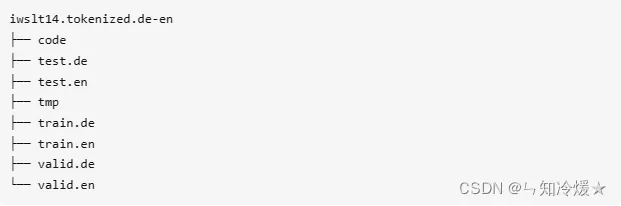
bash prepare-iwslt14.sh 下载IWSLT 14 英语和德语的平行数据,并进行分词、BPE等操作,处理的结果为:
2-2、数据训练
训练
:使用fairseq-train来训练一个新模型。以下是一些有效的示例设置 对于 IWSLT 2014 数据集来说:
# arch: 所使用的模型结构
# optimizer:可以选择的优化器
# --clip-norm:梯度减少阈值
# lr:前N个批次的学习率。
# --lr-scheduler:学习率缩减的方式
# criterion:指定使用的损失函数。
# --max--tokens:按照词的数量来分batch,每个batch包含多少个词。
# 训练之后会生成pt后缀的文件,这个文件可以用于后续生成翻译结果。
> mkdir -p checkpoints/fconv
> CUDA_VISIBLE_DEVICES=0 fairseq-train data-bin/iwslt14.tokenized.de-en \
--optimizer nag --lr 0.25 --clip-norm 0.1 --dropout 0.2 --max-tokens 4000 \
--arch fconv_iwslt_de_en --save-dir checkpoints/fconv
2-3、数据生成
生成:
一旦模型经过训练之后,我们就可以使用fairseq-generate方法,即使用训练过的数据来翻译预处理数据。
# --gen-subset
# --beam: 设置beam search中的beam size
# --lenpen: 设置beam search中的长度惩罚
# --remove-bpe: 指定对翻译结果进行后处理,该参数会把BPE切分的词合并起来。
# --path:模型路径
> fairseq-generate data-bin/iwslt14.tokenized.de-en \
--path checkpoints/fconv/checkpoint_best.pt \
--batch-size 128 --beam 5
| [de] dictionary: 35475 types
| [en] dictionary: 24739 types
| data-bin/iwslt14.tokenized.de-en test 6750 examples
| model fconv
| loaded checkpoint trainings/fconv/checkpoint_best.pt
S-721 danke .
T-721 thank you .
...
三、案例分析
3-1、简单的LSTM
3-1-1、创建编码器、解码器、注册模型类。
编码器:所有编码器 应该实现 FairseqEncoder 接口和 解码器应实现 FairseqDecoder 接口。 这些接口本身扩展了torch.nn.Module
解码器:预测下一个单词。
注册模型:我们必须注册我们的模型 使用register_model()函数装饰器的Fairseq。 注册模型后,我们将能够将其与现有的命令行工具一起使用。
将以下代码保存在名为 的新文件中:fairseq/models/simple_lstm.py(在安装的fairseq的文件夹里)
注意:在Linux下,建立好simple_lstm.py文件并将代码复制后,需要给与执行权限chomd +x simple_lstm.py, 之后再执行一下该文件(python simple_lstm.py)才算注册模型完成。
import torch.nn as nn
from fairseq import utils
from fairseq.models import FairseqEncoder
import torch
from fairseq.models import FairseqDecoder
from fairseq.models import FairseqEncoderDecoderModel, register_model
# Note: the register_model "decorator" should immediately precede the
# definition of the Model class.
class SimpleLSTMEncoder(FairseqEncoder):
def __init__(
self, args, dictionary, embed_dim=128, hidden_dim=128, dropout=0.1,
):
super().__init__(dictionary)
self.args = args
# Our encoder will embed the inputs before feeding them to the LSTM.
self.embed_tokens = nn.Embedding(
num_embeddings=len(dictionary),
embedding_dim=embed_dim,
padding_idx=dictionary.pad(),
)
self.dropout = nn.Dropout(p=dropout)
# We'll use a single-layer, unidirectional LSTM for simplicity.
self.lstm = nn.LSTM(
input_size=embed_dim,
hidden_size=hidden_dim,
num_layers=1,
bidirectional=False,
batch_first=True,
)
def forward(self, src_tokens, src_lengths):
# The inputs to the ``forward()`` function are determined by the
# Task, and in particular the ``'net_input'`` key in each
# mini-batch. We discuss Tasks in the next tutorial, but for now just
# know that *src_tokens* has shape `(batch, src_len)` and *src_lengths*
# has shape `(batch)`.
# Note that the source is typically padded on the left. This can be
# configured by adding the `--left-pad-source "False"` command-line
# argument, but here we'll make the Encoder handle either kind of
# padding by converting everything to be right-padded.
if self.args.left_pad_source:
# Convert left-padding to right-padding.
src_tokens = utils.convert_padding_direction(
src_tokens,
padding_idx=self.dictionary.pad(),
left_to_right=True
)
# Embed the source.
x = self.embed_tokens(src_tokens)
# Apply dropout.
x = self.dropout(x)
# Pack the sequence into a PackedSequence object to feed to the LSTM.
x = nn.utils.rnn.pack_padded_sequence(x, src_lengths, batch_first=True)
# Get the output from the LSTM.
_outputs, (final_hidden, _final_cell) = self.lstm(x)
# Return the Encoder's output. This can be any object and will be
# passed directly to the Decoder.
return {
# this will have shape `(bsz, hidden_dim)`
'final_hidden': final_hidden.squeeze(0),
}
# Encoders are required to implement this method so that we can rearrange
# the order of the batch elements during inference (e.g., beam search).
def reorder_encoder_out(self, encoder_out, new_order):
"""
Reorder encoder output according to `new_order`.
Args:
encoder_out: output from the ``forward()`` method
new_order (LongTensor): desired order
Returns:
`encoder_out` rearranged according to `new_order`
"""
final_hidden = encoder_out['final_hidden']
return {
'final_hidden': final_hidden.index_select(0, new_order),
}
class SimpleLSTMDecoder(FairseqDecoder):
def __init__(
self, dictionary, encoder_hidden_dim=128, embed_dim=128, hidden_dim=128,
dropout=0.1,
):
super().__init__(dictionary)
# Our decoder will embed the inputs before feeding them to the LSTM.
self.embed_tokens = nn.Embedding(
num_embeddings=len(dictionary),
embedding_dim=embed_dim,
padding_idx=dictionary.pad(),
)
self.dropout = nn.Dropout(p=dropout)
# We'll use a single-layer, unidirectional LSTM for simplicity.
self.lstm = nn.LSTM(
# For the first layer we'll concatenate the Encoder's final hidden
# state with the embedded target tokens.
input_size=encoder_hidden_dim + embed_dim,
hidden_size=hidden_dim,
num_layers=1,
bidirectional=False,
)
# Define the output projection.
self.output_projection = nn.Linear(hidden_dim, len(dictionary))
# During training Decoders are expected to take the entire target sequence
# (shifted right by one position) and produce logits over the vocabulary.
# The *prev_output_tokens* tensor begins with the end-of-sentence symbol,
# ``dictionary.eos()``, followed by the target sequence.
def forward(self, prev_output_tokens, encoder_out):
"""
Args:
prev_output_tokens (LongTensor): previous decoder outputs of shape
`(batch, tgt_len)`, for teacher forcing
encoder_out (Tensor, optional): output from the encoder, used for
encoder-side attention
Returns:
tuple:
- the last decoder layer's output of shape
`(batch, tgt_len, vocab)`
- the last decoder layer's attention weights of shape
`(batch, tgt_len, src_len)`
"""
bsz, tgt_len = prev_output_tokens.size()
# Extract the final hidden state from the Encoder.
final_encoder_hidden = encoder_out['final_hidden']
# Embed the target sequence, which has been shifted right by one
# position and now starts with the end-of-sentence symbol.
x = self.embed_tokens(prev_output_tokens)
# Apply dropout.
x = self.dropout(x)
# Concatenate the Encoder's final hidden state to *every* embedded
# target token.
x = torch.cat(
[x, final_encoder_hidden.unsqueeze(1).expand(bsz, tgt_len, -1)],
dim=2,
)
# Using PackedSequence objects in the Decoder is harder than in the
# Encoder, since the targets are not sorted in descending length order,
# which is a requirement of ``pack_padded_sequence()``. Instead we'll
# feed nn.LSTM directly.
initial_state = (
final_encoder_hidden.unsqueeze(0), # hidden
torch.zeros_like(final_encoder_hidden).unsqueeze(0), # cell
)
output, _ = self.lstm(
x.transpose(0, 1), # convert to shape `(tgt_len, bsz, dim)`
initial_state,
)
x = output.transpose(0, 1) # convert to shape `(bsz, tgt_len, hidden)`
# Project the outputs to the size of the vocabulary.
x = self.output_projection(x)
# Return the logits and ``None`` for the attention weights
return x, None
# 注册模型
@register_model('simple_lstm')
class SimpleLSTMModel(FairseqEncoderDecoderModel):
@staticmethod
def add_args(parser):
# Models can override this method to add new command-line arguments.
# Here we'll add some new command-line arguments to configure dropout
# and the dimensionality of the embeddings and hidden states.
parser.add_argument(
'--encoder-embed-dim', type=int, metavar='N',
help='dimensionality of the encoder embeddings',
)
parser.add_argument(
'--encoder-hidden-dim', type=int, metavar='N',
help='dimensionality of the encoder hidden state',
)
parser.add_argument(
'--encoder-dropout', type=float, default=0.1,
help='encoder dropout probability',
)
parser.add_argument(
'--decoder-embed-dim', type=int, metavar='N',
help='dimensionality of the decoder embeddings',
)
parser.add_argument(
'--decoder-hidden-dim', type=int, metavar='N',
help='dimensionality of the decoder hidden state',
)
parser.add_argument(
'--decoder-dropout', type=float, default=0.1,
help='decoder dropout probability',
)
@classmethod
def build_model(cls, args, task):
# Fairseq initializes models by calling the ``build_model()``
# function. This provides more flexibility, since the returned model
# instance can be of a different type than the one that was called.
# In this case we'll just return a SimpleLSTMModel instance.
# Initialize our Encoder and Decoder.
encoder = SimpleLSTMEncoder(
args=args,
dictionary=task.source_dictionary,
embed_dim=args.encoder_embed_dim,
hidden_dim=args.encoder_hidden_dim,
dropout=args.encoder_dropout,
)
decoder = SimpleLSTMDecoder(
dictionary=task.target_dictionary,
encoder_hidden_dim=args.encoder_hidden_dim,
embed_dim=args.decoder_embed_dim,
hidden_dim=args.decoder_hidden_dim,
dropout=args.decoder_dropout,
)
model = SimpleLSTMModel(encoder, decoder)
# Print the model architecture.
print(model)
return model
# We could override the ``forward()`` if we wanted more control over how
# the encoder and decoder interact, but it's not necessary for this
# tutorial since we can inherit the default implementation provided by
# the FairseqEncoderDecoderModel base class, which looks like:
#
# def forward(self, src_tokens, src_lengths, prev_output_tokens):
# encoder_out = self.encoder(src_tokens, src_lengths)
# decoder_out = self.decoder(prev_output_tokens, encoder_out)
# return decoder_out
3-1-2、训练模型、测试模型
训练模型前要先下载并且预处理数据:
# Download and prepare the unidirectional data
bash prepare-iwslt14.sh
# Preprocess/binarize the unidirectional data
TEXT=iwslt14.tokenized.de-en
fairseq-preprocess --source-lang de --target-lang en \
--trainpref $TEXT/train --validpref $TEXT/valid --testpref $TEXT/test \
--destdir data-bin/iwslt14.tokenized.de-en \
--joined-dictionary --workers 20
训练模型
:训练时间稍微有些久,建议后台运行!
fairseq-train data-bin/iwslt14.tokenized.de-en \
--arch tutorial_simple_lstm \
--encoder-dropout 0.2 --decoder-dropout 0.2 \
--optimizer adam --lr 0.005 --lr-shrink 0.5 \
--max-tokens 12000
生成翻译并且计算在测试集上的分数
:
fairseq-generate data-bin/iwslt14.tokenized.de-en \
--path checkpoints/checkpoint_best.pt \
--beam 5 \
--remove-bpe
3-1-3、加快训练速度
原decoder的坏处:对于每一个输出token,它计算了解码器隐藏状态的整个序列,我们可以通过缓存之前的隐藏状态来提高训练速度。
增量解码:修改模型以实现 FairseqIncrementalDecoder 接口,增量式 解码器接口允许方法采用额外的关键字参数 (incremental_state) 可用于跨时间步缓存状态。
总结:Fairseq通过增量解码(incremental decoding)提供了更快的推理速度。所谓的增量解码,就是在解码时,将之前tokens处于激活beam状态下的模型状态(model states)缓存起来,以备后用,这样每一个新的token进来,只需要计算新的状态即可。也就是说,如果使用FairseqDecoder接口实现普通的解码器,对于每一个输出,都需要重新整个解码器隐状态,计算复杂度O(n^2)。而使用FairseqIncrementalDecoder接口实现增量解码,就可以实现O(n)的解码速度。
替换掉SimpleLSTMDecoder:结果表明,在测试阶段,时间缩短到原来的3分之1。
import torch
from fairseq.models import FairseqIncrementalDecoder
class SimpleLSTMDecoder(FairseqIncrementalDecoder):
def __init__(
self, dictionary, encoder_hidden_dim=128, embed_dim=128, hidden_dim=128,
dropout=0.1,
):
# This remains the same as before.
super().__init__(dictionary)
self.embed_tokens = nn.Embedding(
num_embeddings=len(dictionary),
embedding_dim=embed_dim,
padding_idx=dictionary.pad(),
)
self.dropout = nn.Dropout(p=dropout)
self.lstm = nn.LSTM(
input_size=encoder_hidden_dim + embed_dim,
hidden_size=hidden_dim,
num_layers=1,
bidirectional=False,
)
self.output_projection = nn.Linear(hidden_dim, len(dictionary))
# We now take an additional kwarg (*incremental_state*) for caching the
# previous hidden and cell states.
def forward(self, prev_output_tokens, encoder_out, incremental_state=None):
if incremental_state is not None:
# If the *incremental_state* argument is not ``None`` then we are
# in incremental inference mode. While *prev_output_tokens* will
# still contain the entire decoded prefix, we will only use the
# last step and assume that the rest of the state is cached.
prev_output_tokens = prev_output_tokens[:, -1:]
# This remains the same as before.
bsz, tgt_len = prev_output_tokens.size()
final_encoder_hidden = encoder_out['final_hidden']
x = self.embed_tokens(prev_output_tokens)
x = self.dropout(x)
x = torch.cat(
[x, final_encoder_hidden.unsqueeze(1).expand(bsz, tgt_len, -1)],
dim=2,
)
# We will now check the cache and load the cached previous hidden and
# cell states, if they exist, otherwise we will initialize them to
# zeros (as before). We will use the ``utils.get_incremental_state()``
# and ``utils.set_incremental_state()`` helpers.
initial_state = utils.get_incremental_state(
self, incremental_state, 'prev_state',
)
if initial_state is None:
# first time initialization, same as the original version
initial_state = (
final_encoder_hidden.unsqueeze(0), # hidden
torch.zeros_like(final_encoder_hidden).unsqueeze(0), # cell
)
# Run one step of our LSTM.
output, latest_state = self.lstm(x.transpose(0, 1), initial_state)
# Update the cache with the latest hidden and cell states.
utils.set_incremental_state(
self, incremental_state, 'prev_state', latest_state,
)
# This remains the same as before
x = output.transpose(0, 1)
x = self.output_projection(x)
return x, None
# The ``FairseqIncrementalDecoder`` interface also requires implementing a
# ``reorder_incremental_state()`` method, which is used during beam search
# to select and reorder the incremental state.
def reorder_incremental_state(self, incremental_state, new_order):
# Load the cached state.
prev_state = utils.get_incremental_state(
self, incremental_state, 'prev_state',
)
# Reorder batches according to *new_order*.
reordered_state = (
prev_state[0].index_select(1, new_order), # hidden
prev_state[1].index_select(1, new_order), # cell
)
# Update the cached state.
utils.set_incremental_state(
self, incremental_state, 'prev_state', reordered_state,
)
# 下一个案例有时间再分析吧,有些许疲惫。
四、使用过程中的错误
4-1、importlib_metadata.PackageNotFoundError: No package metadata was found for fairseq
该错误是在谷歌的colab上使用fairseq工具包时产生的。
错误原因是在执行了下列命令后产生的:
!git clone https://github.com/pytorch/fairseq
%cd /content/fairseq
!pip install --editable ./
%cd /content
由于是本地安装的,所以在安装之后并未识别到fairseq,所以需要手动设置路径
! echo $PYTHONPATH
import os
os.environ['PYTHONPATH'] += ":/content/fairseq/"
! echo $PYTHONPATH
🆗,错误解决!
注意:如果不是在线平台,需要手动配置环境变量!这一点不展开说。
4-2、注册模型后无法使用?
在Linux下,建立好simple_lstm.py文件并将代码复制后,需要给与执行权限chomd +x simple_lstm.py, 之后再执行一下该文件(python simple_lstm.py)才算注册模型完成。
4-3、Fairseq: FloatingPointError: Minimum loss scale reached (0.0001).
损失反复溢出,导致batch被丢弃,Fairseq最终会停止训练。
解决方案选择如下
:
4-3-1、降低学习率
降低学习率
:尝试减小学习率,以更小的步长进行参数更新,减缓训练过程中的梯度变化。可以在训练配置中调整 --lr 参数,例如将其从默认值0.25减小到0.1。(–lr 1e-1)(注意:训练速度可能会大大降低)
4-3-2、使用梯度裁剪
使用梯度裁剪:将梯度值限制在一个固定范围内,以避免其过大或过小。可以在训练配置中调整 --clip-norm 参数,例如将其从默认值0.1增加到1.0。即监控梯度的范数(norm),如果它超过了一个阈值,则将梯度缩小到阈值以下。这可以避免梯度爆炸的情况。(–clip-norm 1)(极有可能导致结果不精准)
4-3-3、增加批大小
增加批大小
:扩大批量大小可以减小梯度变化的影响,并加快训练过程。可以在训练配置中调整 --max-tokens 参数,例如将其从默认值4096增加到8192。(–max-tokens 8192)
4-3-4、参数:–fp16-scale-tolerance
–fp16-scale-tolerance
=0.25:在降低损耗标度之前留出一定的容差。此设置将允许每四个更新中的一个在降低损失规模之前溢出。
4-3-5、禁用使用c10d后端
禁用使用c10d后端:使用c10d后端是为了支持分布式训练,它可以在多个GPU或者多个机器之间同步参数和梯度。在使用c10d后端时,每个进程会处理一部分数据和梯度,然后将它们合并,更新模型参数。但是,当在单个GPU上进行训练时,使用c10d后端可能会导致梯度溢出的问题。这是因为c10d在计算平均梯度时使用了除法操作,而除数可能非常小,这可能导致梯度的放大,从而导致梯度溢出的问题。
禁用使用c10d后端可以避免这个问题,因为禁用后端后,fairseq将在单个GPU上直接计算并更新梯度,而不涉及分布式计算和参数同步。这样做可以避免除数过小导致的梯度放大问题。但需要注意的是,禁用后端可能会导致训练速度变慢,因为它不能利用多个GPU或者多台机器的计算资源。(–ddp-backend=no_c10d)
4-3-6、权重衰减
权重衰减
:权重衰减是一种正则化技术,可以限制模型参数的值,从而减少过拟合的风险。在训练过程中,使用权重衰减可以将模型参数的值限制在一个较小的范围内,从而避免浮点数下溢的情况。
在使用权重衰减时,需要注意以下几点
:
权重衰减系数的值应该适当。如果系数太小,权重衰减的效果会减弱,而如果系数太大,权重衰减会导致模型的性能下降。通常情况下,权重衰减系数的值应该在0.0001到0.01之间。(对应参数:–weight-decay)
权重衰减应该仅应用于可训练的参数。对于一些不需要更新的参数,例如batch normalization中的参数,应该将它们从权重衰减中排除。
权重衰减可以与其他正则化技术一起使用,例如dropout或数据增强,以进一步提高模型的泛化能力。
4-3-7、动态调整浮点数精度
动态调整浮点数精度
:可以通过在训练命令中添加 --fp16-no-flush-to-zero 参数来禁止将非规格化浮点数(denormalized numbers)设置为零,从而避免出现 FloatingPointError 错误。
4-3-8、总结
总结
:对于损失溢出这个问题,没办法去准确判断到底是哪里出了问题,我的解决办法是依次去尝试,后来发现根本没什么用,所以索性就都加进去了,目前来看是可行的,Fairseq还在训练,已经跑了6个小时了,真不容易,对于满世界找错误的我来说简直是喜极而泣。
4-4、使用命令pip install --editable ./安装时报错。
错误如下:
ERROR: Command errored out with exit status 1:
command: /usr/bin/python3 -c 'import sys, setuptools, tokenize; sys.argv[0] = '"'"'/home/ubuntu/Bi-SimCut/fairseq/setup.py'"'"'; __file__='"'"'/home/ubuntu/Bi-SimCut/fairseq/setup.py'"'"';f=getattr(tokenize, '"'"'open'"'"', open)(__file__);code=f.read().replace('"'"'\r\n'"'"', '"'"'\n'"'"');f.close();exec(compile(code, __file__, '"'"'exec'"'"'))' develop --no-deps --user --prefix=
cwd: /home/ubuntu/Bi-SimCut/fairseq/
Complete output (36 lines):
running develop
/tmp/pip-build-env-o1nw9uet/overlay/lib/python3.8/site-packages/setuptools/dist.py:788: UserWarning: Usage of dash-separated 'index-url' will not be supported in future versions. Please use the underscore name 'index_url' instead
warnings.warn(
/tmp/pip-build-env-o1nw9uet/overlay/lib/python3.8/site-packages/setuptools/__init__.py:85: _DeprecatedInstaller: setuptools.installer and fetch_build_eggs are deprecated. Requirements should be satisfied by a PEP 517 installer. If you are using pip, you can try `pip install --use-pep517`.
dist.fetch_build_eggs(dist.setup_requires)
/tmp/pip-build-env-o1nw9uet/overlay/lib/python3.8/site-packages/setuptools/dist.py:788: UserWarning: Usage of dash-separated 'index-url' will not be supported in future versions. Please use the underscore name 'index_url' instead
warnings.warn(
/tmp/pip-build-env-o1nw9uet/overlay/lib/python3.8/site-packages/setuptools/command/easy_install.py:144: EasyInstallDeprecationWarning: easy_install command is deprecated. Use build and pip and other standards-based tools.
warnings.warn(
WARNING: The user site-packages directory is disabled.
Checking .pth file support in /home/ubuntu/.local/lib/python3.8/site-packages
/usr/bin/python3 -E -c pass
TEST PASSED: /home/ubuntu/.local/lib/python3.8/site-packages appears to support .pth files
running egg_info
writing fairseq.egg-info/PKG-INFO
writing dependency_links to fairseq.egg-info/dependency_links.txt
writing entry points to fairseq.egg-info/entry_points.txt
writing requirements to fairseq.egg-info/requires.txt
writing top-level names to fairseq.egg-info/top_level.txt
reading manifest file 'fairseq.egg-info/SOURCES.txt'
reading manifest template 'MANIFEST.in'
adding license file 'LICENSE'
writing manifest file 'fairseq.egg-info/SOURCES.txt'
running build_ext
skipping 'fairseq/data/data_utils_fast.cpp' Cython extension (up-to-date)
skipping 'fairseq/data/token_block_utils_fast.cpp' Cython extension (up-to-date)
building 'fairseq.libbleu' extension
x86_64-linux-gnu-gcc -pthread -Wno-unused-result -Wsign-compare -DNDEBUG -g -fwrapv -O2 -Wall -g -fstack-protector-strong -Wformat -Werror=format-security -g -fwrapv -O2 -fPIC -I/usr/include/python3.8 -c fairseq/clib/libbleu/libbleu.cpp -o build/temp.linux-x86_64-cpython-38/fairseq/clib/libbleu/libbleu.o -std=c++11 -O3
x86_64-linux-gnu-gcc -pthread -Wno-unused-result -Wsign-compare -DNDEBUG -g -fwrapv -O2 -Wall -g -fstack-protector-strong -Wformat -Werror=format-security -g -fwrapv -O2 -fPIC -I/usr/include/python3.8 -c fairseq/clib/libbleu/module.cpp -o build/temp.linux-x86_64-cpython-38/fairseq/clib/libbleu/module.o -std=c++11 -O3
fairseq/clib/libbleu/module.cpp:9:10: fatal error: Python.h: No such file or directory
9 | #include <Python.h>
| ^~~~~~~~~~
compilation terminated.
/tmp/pip-build-env-o1nw9uet/overlay/lib/python3.8/site-packages/setuptools/command/install.py:34: SetuptoolsDeprecationWarning: setup.py install is deprecated. Use build and pip and other standards-based tools.
warnings.warn(
error: command '/usr/bin/x86_64-linux-gnu-gcc' failed with exit code 1
----------------------------------------
背景
:找了一个虚拟机来安装fairseq报错,看样子是缺少环境
解决
:
# 这个错误发生在安装fairseq时,看起来是缺少Python.h头文件,这通常是由于缺少Python开发包导致的。您可以尝试通过以下命令来安装Python开发包:
# 对于Debian/Ubuntu系统:
sudo apt-get install python3-dev
对于Red Hat/CentOS系统:
sudo yum install python3-devel
参考文章:
FaceBook-NLP工具Fairseq漫游指南(1)—命令行工具
.
fairseq官方文档
.
fairseq官方文档——命令函数详细介绍篇
.
fairseq源码分析(一)——fairseq简介与安装
fairseq源码分析(二)——fairseq注册机制
fairseq源码分析(三)——fairseq的task
Fairseq框架学习:官方文档注解
Fairseq-快速可扩展的序列建模工具包
Fairseq框架学习(一)Fairseq 安装与使用
使用Fairseq进行Bart预训练
视频:【FairSeq 自然语言库 】 要不要看看这个,Facebook开源的Pytorch 自然语言模型库
fairseq的使用
.
torch官网教程
.
fireseq上手——英德机器翻译|使用colab
.
NLP加速引擎:lightSeq
训练加速3倍!字节跳动推出业界首个NLP模型全流程加速引擎
.
最全攻略:利用LightSeq加速你的深度学习模型
.
只用两行代码,我让Transformer推理加速了50倍
.
官方github项目
.
其他加快模型训练方法
:
32分钟训练神经机器翻译,速度提升45倍
.
huggingface社区
.
总结
总算完结啦,这篇文章几个月前就在写了,断断续续的。写文章的速度也是起起落落落落。😭 |
| Markdown | [大模型](https://www.aliyun.com/product/tongyi)[产品](https://www.aliyun.com/product/list)[解决方案](https://www.aliyun.com/solution/tech-solution/)[权益](https://www.aliyun.com/benefit)[定价](https://www.aliyun.com/price)[云市场](https://market.aliyun.com/)[伙伴](https://partner.aliyun.com/management/v2)[服务](https://www.aliyun.com/service)[了解阿里云](https://www.aliyun.com/about)
查看 “
” 全部搜索结果
[ AI 助理](https://www.aliyun.com/ai-assistant?displayMode=side)
[文档](https://help.aliyun.com/)[备案](https://beian.aliyun.com/)[控制台](https://home.console.aliyun.com/home/dashboard/ProductAndService)
[开发者社区](https://developer.aliyun.com/)
[首页](https://developer.aliyun.com/ "开发者社区")
探索云世界
### 探索云世界
#### 热门
[百炼大模型](https://developer.aliyun.com/modelstudio/)[Modelscope模型即服务](https://developer.aliyun.com/modelscope/)[弹性计算](https://developer.aliyun.com/ecs/)[通义灵码](https://developer.aliyun.com/lingma/)[云原生](https://developer.aliyun.com/cloudnative/)[数据库](https://developer.aliyun.com/database/)[云效DevOps](https://developer.aliyun.com/group/yunxiao/)[龙蜥操作系统](https://developer.aliyun.com/group/aliyun_linux/)
#### [云计算](https://developer.aliyun.com/ecs/)
[弹性计算](https://developer.aliyun.com/ecs/)[无影](https://developer.aliyun.com/group/wuying/)[存储](https://developer.aliyun.com/storage/)[网络](https://developer.aliyun.com/group/networking/)[倚天](https://developer.aliyun.com/yitian/)
#### [大数据](https://developer.aliyun.com/bigdata/)
[大数据计算](https://developer.aliyun.com/group/maxcompute/)[实时数仓Hologres](https://developer.aliyun.com/group/hologres/)[实时计算Flink](https://developer.aliyun.com/group/sc/)[E-MapReduce](https://developer.aliyun.com/group/aliyunemr/)[DataWorks](https://developer.aliyun.com/group/dataworks/)[Elasticsearch](https://developer.aliyun.com/group/es/)[机器学习平台PAI](https://developer.aliyun.com/group/pai/)[智能搜索推荐](https://developer.aliyun.com/group/aios/)[数据可视化DataV](https://developer.aliyun.com/group/datav/)
#### [云原生](https://developer.aliyun.com/cloudnative/)
[容器](https://developer.aliyun.com/group/kubernetes/)[serverless](https://developer.aliyun.com/group/serverless/)[中间件](https://developer.aliyun.com/group/aliware/)[微服务](https://developer.aliyun.com/group/mse/)[可观测](https://developer.aliyun.com/group/arms/)[消息队列](https://developer.aliyun.com/group/rocketmq/)
#### [人工智能](https://developer.aliyun.com/modelscope/)
[机器学习平台PAI](https://developer.aliyun.com/group/pai/)[视觉智能开放平台](https://developer.aliyun.com/group/viapi/)[智能语音交互](https://developer.aliyun.com/group/speech/)[自然语言处理](https://developer.aliyun.com/group/nlp/)[多模态模型](https://developer.aliyun.com/group/multimodel/)[pythonsdk](https://developer.aliyun.com/group/pythonsdk/)[通用模型](https://developer.aliyun.com/group/others/)
#### [数据库](https://developer.aliyun.com/database/)
[关系型数据库](https://developer.aliyun.com/group/polardb/)[NoSQL数据库](https://developer.aliyun.com/group/hbasespark/)[数据仓库](https://developer.aliyun.com/group/analyticdb/)[数据管理工具](https://developer.aliyun.com/database/dm)[PolarDB开源](https://developer.aliyun.com/polardb/)[向量数据库](https://developer.aliyun.com/database/vectordatabase)
#### [开发与运维](https://developer.aliyun.com/group/othertech/)
[云效DevOps](https://developer.aliyun.com/group/yunxiao/)[钉钉宜搭](https://developer.aliyun.com/group/yida/)[镜像站](https://developer.aliyun.com/group/mirror/)
[问产品](https://developer.aliyun.com/ask/hottestQuestionsWithProduct)
[动手实践](https://developer.aliyun.com/adc/)
[官方博客](https://developer.aliyun.com/blog/)
[考认证](https://edu.aliyun.com/)
[TIANCHI大赛](https://tianchi.aliyun.com/)
活动广场
### 活动广场
丰富的线上&线下活动,深入探索云世界
[任务中心做任务,得社区积分和周边](https://developer.aliyun.com/mission)
[训练营资深技术专家手把手带教](https://edu.aliyun.com/trainingcamp/)
[直播技术交流,直击现场](https://developer.aliyun.com/live/)
[乘风者计划让创作激发创新](https://developer.aliyun.com/topic/bloggers)
下载
### 下载
海量开发者使用工具、手册,免费下载
[镜像站极速、全面、稳定、安全的开源镜像](https://developer.aliyun.com/mirror)
[技术资料开发手册、白皮书、案例集等实战精华](https://developer.aliyun.com/ebook/)
探索云世界
热门
[百炼大模型](https://developer.aliyun.com/modelstudio/)[Modelscope模型即服务](https://developer.aliyun.com/modelscope/)[弹性计算](https://developer.aliyun.com/ecs/)[通义灵码](https://developer.aliyun.com/lingma/)[云原生](https://developer.aliyun.com/cloudnative/)[数据库](https://developer.aliyun.com/database/)[云效DevOps](https://developer.aliyun.com/group/yunxiao/)[龙蜥操作系统](https://developer.aliyun.com/group/aliyun_linux/)
[云计算](https://developer.aliyun.com/ecs/)[弹性计算](https://developer.aliyun.com/ecs/)[无影](https://developer.aliyun.com/group/wuying/)[存储](https://developer.aliyun.com/storage/)[网络](https://developer.aliyun.com/group/networking/)[倚天](https://developer.aliyun.com/yitian/)
[云原生](https://developer.aliyun.com/cloudnative/)[容器](https://developer.aliyun.com/group/kubernetes/)[serverless](https://developer.aliyun.com/group/serverless/)[中间件](https://developer.aliyun.com/group/aliware/)[微服务](https://developer.aliyun.com/group/mse/)[可观测](https://developer.aliyun.com/group/arms/)[消息队列](https://developer.aliyun.com/group/rocketmq/)
[数据库](https://developer.aliyun.com/database/)[关系型数据库](https://developer.aliyun.com/group/polardb/)[NoSQL数据库](https://developer.aliyun.com/group/hbasespark/)[数据仓库](https://developer.aliyun.com/group/analyticdb/)[数据管理工具](https://developer.aliyun.com/database/dm)[PolarDB开源](https://developer.aliyun.com/polardb/)[向量数据库](https://developer.aliyun.com/database/vectordatabase)
[大数据](https://developer.aliyun.com/bigdata/)[大数据计算](https://developer.aliyun.com/group/maxcompute/)[实时数仓Hologres](https://developer.aliyun.com/group/hologres/)[实时计算Flink](https://developer.aliyun.com/group/sc/)[E-MapReduce](https://developer.aliyun.com/group/aliyunemr/)[DataWorks](https://developer.aliyun.com/group/dataworks/)[Elasticsearch](https://developer.aliyun.com/group/es/)[机器学习平台PAI](https://developer.aliyun.com/group/pai/)[智能搜索推荐](https://developer.aliyun.com/group/aios/)[数据可视化DataV](https://developer.aliyun.com/group/datav/)
[人工智能](https://developer.aliyun.com/modelscope/)[机器学习平台PAI](https://developer.aliyun.com/group/pai/)[视觉智能开放平台](https://developer.aliyun.com/group/viapi/)[智能语音交互](https://developer.aliyun.com/group/speech/)[自然语言处理](https://developer.aliyun.com/group/nlp/)[多模态模型](https://developer.aliyun.com/group/multimodel/)[pythonsdk](https://developer.aliyun.com/group/pythonsdk/)[通用模型](https://developer.aliyun.com/group/others/)
[开发与运维](https://developer.aliyun.com/group/othertech/)[云效DevOps](https://developer.aliyun.com/group/yunxiao/)[钉钉宜搭](https://developer.aliyun.com/group/yida/)[镜像站](https://developer.aliyun.com/group/mirror/)
[开发者社区](https://developer.aliyun.com/) [人工智能](https://developer.aliyun.com/group/ai/) [文章](https://developer.aliyun.com/group/ai/article/) 正文
# 探索Facebook NLP框架Fairseq的强大功能
2023-05-09 4059
版权
版权声明:
本文内容由阿里云实名注册用户自发贡献,版权归原作者所有,阿里云开发者社区不拥有其著作权,亦不承担相应法律责任。具体规则请查看《 [阿里云开发者社区用户服务协议](https://developer.aliyun.com/article/768092)》和 《[阿里云开发者社区知识产权保护指引](https://developer.aliyun.com/article/768093)》。如果您发现本社区中有涉嫌抄袭的内容,填写 [侵权投诉表单](https://yida.alibaba-inc.com/o/right)进行举报,一经查实,本社区将立刻删除涉嫌侵权内容。
**简介:** 探索Facebook NLP框架Fairseq的强大功能
# 前言
时间过的飞快,一眨眼就已经到年底了。(年前写的文章了)
# 一、Fairseq介绍&安装&使用
**Fairseq**:
Fairseq是由Facebook AI Research开发的一个序列到序列模型工具包,用于自然语言处理和语音识别任务。它支持各种模型架构,包括卷积神经网络(CNNs)、循环神经网络(RNNs)和Transformer模型。
Fairseq的设计理念是提供灵活、可扩展和高效的工具,以便研究人员和开发人员能够快速构建、训练和部署各种序列到序列模型。Fairseq支持多种训练和推理技术,例如自监督学习、多任务学习、知识蒸馏和模型融合等。
Fairseq已经被广泛应用于自然语言处理和语音识别领域,包括机器翻译、语言建模、语音识别、文本生成、文本分类等任务。同时,Fairseq的源代码也是公开可用的,并且拥有一个活跃的社区,用户可以通过官方文档和GitHub等平台获取相关的支持和资源。
安装:这里选择本地安装,但是要先保证有pytorch和python!
```
# 先克隆仓库代码
git clone https://github.com/pytorch/fairseq
# 进入文件夹里
cd fairseq
# 执行命令,这个命令我不太清楚什么意思,不过必须要执行,否则之后使用的时候会报错。
# 猜测:安装Fairseq项目到python
pip install --editable ./ -i https://pypi.mirrors.ustc.edu.cn/simple/
```
**使用**:可以采用以下两种方法进行开发
1、直接在fairseq项目中修改,添加模块。
2、在自定义文件夹中添加文件,并且使用-user-dir引用。
**错误**:
OSerror:权限问题,我这里使用的是pycharm,关闭pycharm,以管理员身份再次运行pycharm即可
下载速度太慢:增加镜像源可以解决这个问题。 pip install --editable ./ -i <https://mirror.baidu.com/pypi/simple>
上边那个链接可能装不上,试试这个<https://github.com/facebookresearch/fairseq>(我是用这个的,上边那个死活装不上)
其他:有GPU的可以看看这里
```
#
git clone https://github.com/NVIDIA/apex
cd apex
pip install -v --no-cache-dir --global-option="--cpp_ext" --global-option="--cuda_ext" \
--global-option="--deprecated_fused_adam" --global-option="--xentropy" \
--global-option="--fast_multihead_attn" ./
# 查看显卡信息
nvidia-smi
```
# 二、基础操作
## 2-0、命令函数
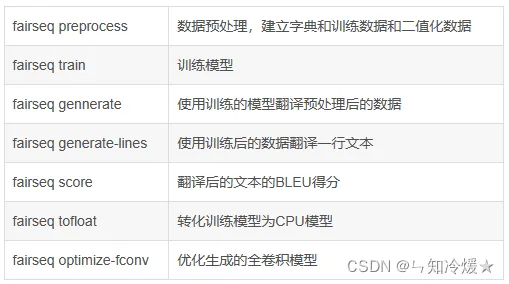
fairseq-preprocess: 将文本数据转换为二进制文件,预处理命令首先会从训练文本数据中构建词表,默认情况下将所有出现过的单词根据词频排序。并将排序后的单词列表作为最终的词标。构建的词表是一个单词和序号之间的一对一的映射,这个序号是单词在词表中的下标位置。二进制化的文件会默认保存在data-bin目录下,包括生成的词表,训练数据、验证数据和测试数据,也可以通过destdir参数,将生成的数据保存在其他目录。
参数列表:
```
# --destdir: 预处理后的二进制文件会默认保存在data-bin目录下,可以通过destdir参数将生成的数据存放在其他位置。
# --thresholdsrc/--thresholdtgt: 分别对应源端(source)和目标端(target)的词表的最低词频,词频低于这个阈值的单词将不会出现在词表中,而是统一使用一个unknown标签来代替。
# --nwordssrc/--nwordstgt,源端和目标端词表的大小,在对单词根据词频排序后,取前n个词来构建词表,剩余的单词使用一个统一的unknown标签代替。
# --source-lang: 源
# --target-lang:目标
# --trainpref:训练文件前缀(也用于建立词典),即路径和文件名的前缀。
# --validpref:验证文件前缀。
# --testpref: 测试文件前缀。
# --joined-dictionary: 源端和目标端使用同一个词表,对于相似语言(如英语和西班牙语)来说,有很多的单词是相同的,使用同一个词表可以降低词表和参数的总规模。
# --tgtdict: 重用给定的目标词典
# --srcdict:重用给定的源词典,参数为文件名,即使用已有的词典,而不去根据文本数据中单词的词频去构建词表
# --workers: 并行进程数。
eg: TEXT=iwslt14.tokenized.de-en
fairseq-preprocess --source-lang de --target-lang en \
--trainpref $TEXT/train --validpref $TEXT/valid --testpref $TEXT/test \
--destdir data-bin/iwslt14.tokenized.de-en \
--joined-dictionary --workers 20
```
- **fairseq-train:** 训练新模型, 默认情况下不会使用GPU的,在参数中需要指定训练数据、模型、优化器等参数。
**参数列表:**
```
# --arch:所使用的模型结构
# --optimizer: 可以选择的优化器:adadelta, adafactor, adagrad, adam, adamax, composite, cpu_adam, lamb, nag, sgd
# --clip-norm: 梯度减少阈值,默认为0
# --lr: 前N个批次的学习率,默认为0.25
# --lr-scheduler: 学习率缩减的方式,可选: cosine, fixed, inverse_sqrt, manual, pass_through, polynomial_decay, reduce_lr_on_plateau, step, tri_stage, triangular,默认为fixed。
# --criterion: 指定使用的损失函数,选择:adaptive_loss, composite_loss, cross_entropy, ctc, fastspeech2, hubert, label_smoothed_cross_entropy, latency_augmented_label_smoothed_cross_entropy, label_smoothed_cross_entropy_with_alignment, label_smoothed_cross_entropy_with_ctc, legacy_masked_lm_loss, masked_lm, model, nat_loss, sentence_prediction, sentence_prediction_adapters, sentence_ranking, tacotron2, speech_to_unit, speech_to_spectrogram, speech_unit_lm_criterion, wav2vec, vocab_parallel_cross_entropy
# --max-tokens: 按照词的数量来分batch,每个batch包含多少个词。
# --fp 16: 若使用的GPU支持半精度,可以通过--fp16来进行混合精度训练,可以极大提高模型训练的速度。通过torch.cuda.get_device_capablity(0)[0]可以确定GPU是否支持半精度(值小于7则不支持,大于7则支持。)
# --no-epoch-checkpoints: 只储存最后和最好的检查点
# --save-dir: 训练过程中保存中间模型,默认为checkpoints。
# --label-smoothing 0.1:将label_smoothed_cross_entropy损失默认为0的label-smoothing值改为0.1
# --reset-dataloader: 如果已设置,则不从检查点重新加载数据加载器状态, 默认值:False
# --reset-meters: 如果设置,则不从检查点加载仪表,默认值:False
# --reset-optimizer:如果设置,则不从检查点加载优化器状态,默认值:False
# --no-progress-bar参数可以改为逐行打印日志,方便保存。默认情况下,每训练100步之后会打印一次
```
- **fairseq-generate:** 用训练过的模型翻译预处理数据,即解码,用来解码之前经过预处理的数据。
**参数列表:**
```
# --gen-subset train:翻译整个训练数据
# --gen-subset: 默认解码测试部分。
# --beam: 设置beam search中的beam size
# --lenpen: 设置beam search中的长度惩罚
# --remove-bpe: 指定对翻译结果后处理,由于在准备数据时,使用了BPE切分,该参数会把BPE切分的词合并为完整的单词。如果不添加该参数,那么输出的翻译结果和BLEU打分都是按照未合并BPE进行的。
# --unkpen: unk惩罚。
```
## 2-1、数据预处理
**数据预处理**:Fairseq 包含多个翻译的预处理脚本示例 数据集:IWSLT 2014(德语-英语)、WMT 2014(英语-法语)和WMT 2014年(英语-德语)。要对 IWSLT 数据集进行预处理和二值化,请执行以下操作:
```
> cd examples/translation/
# 在机器翻译中,需要双语平行数据来进行模型的训练,在这里使用fairseq中提供的数据,这个脚本会下载IWSLT 14 英语和德语的平行数据,并进行分词、BPE等操作。
> bash prepare-iwslt14.sh
>
> cd ../..
> TEXT=examples/translation/iwslt14.tokenized.de-en
# 设置训练文件前缀、验证文件前缀、测试文件前缀等
# data-bin:预处理后的文件保存再哪里
# joined dictionary: 源和目标使用同一个词典,对于相似语言来说,有很多的单词是相同的,使用同一个词表可以降低词表和参数的总规模。
# fairseq-preprocess:将文本数据转化为二进制文件。
> fairseq-preprocess --source-lang de --target-lang en \
--trainpref $TEXT/train --validpref $TEXT/valid --testpref $TEXT/test \
--destdir data-bin/iwslt14.tokenized.de-en
```
**bash prepare-iwslt14.sh 下载IWSLT 14 英语和德语的平行数据,并进行分词、BPE等操作,处理的结果为:**
****
## 2-2、数据训练
**训练**:使用fairseq-train来训练一个新模型。以下是一些有效的示例设置 对于 IWSLT 2014 数据集来说:
```
# arch: 所使用的模型结构
# optimizer:可以选择的优化器
# --clip-norm:梯度减少阈值
# lr:前N个批次的学习率。
# --lr-scheduler:学习率缩减的方式
# criterion:指定使用的损失函数。
# --max--tokens:按照词的数量来分batch,每个batch包含多少个词。
# 训练之后会生成pt后缀的文件,这个文件可以用于后续生成翻译结果。
> mkdir -p checkpoints/fconv
> CUDA_VISIBLE_DEVICES=0 fairseq-train data-bin/iwslt14.tokenized.de-en \
--optimizer nag --lr 0.25 --clip-norm 0.1 --dropout 0.2 --max-tokens 4000 \
--arch fconv_iwslt_de_en --save-dir checkpoints/fconv
```
## 2-3、数据生成
**生成:** 一旦模型经过训练之后,我们就可以使用fairseq-generate方法,即使用训练过的数据来翻译预处理数据。
```
# --gen-subset
# --beam: 设置beam search中的beam size
# --lenpen: 设置beam search中的长度惩罚
# --remove-bpe: 指定对翻译结果进行后处理,该参数会把BPE切分的词合并起来。
# --path:模型路径
> fairseq-generate data-bin/iwslt14.tokenized.de-en \
--path checkpoints/fconv/checkpoint_best.pt \
--batch-size 128 --beam 5
| [de] dictionary: 35475 types
| [en] dictionary: 24739 types
| data-bin/iwslt14.tokenized.de-en test 6750 examples
| model fconv
| loaded checkpoint trainings/fconv/checkpoint_best.pt
S-721 danke .
T-721 thank you .
...
```
# 三、案例分析
## 3-1、简单的LSTM
### 3-1-1、创建编码器、解码器、注册模型类。
编码器:所有编码器 应该实现 FairseqEncoder 接口和 解码器应实现 FairseqDecoder 接口。 这些接口本身扩展了torch.nn.Module
解码器:预测下一个单词。
注册模型:我们必须注册我们的模型 使用register\_model()函数装饰器的Fairseq。 注册模型后,我们将能够将其与现有的命令行工具一起使用。
将以下代码保存在名为 的新文件中:fairseq/models/simple\_lstm.py(在安装的fairseq的文件夹里)
注意:在Linux下,建立好simple\_lstm.py文件并将代码复制后,需要给与执行权限chomd +x simple\_lstm.py, 之后再执行一下该文件(python simple\_lstm.py)才算注册模型完成。
```
import torch.nn as nn
from fairseq import utils
from fairseq.models import FairseqEncoder
import torch
from fairseq.models import FairseqDecoder
from fairseq.models import FairseqEncoderDecoderModel, register_model
# Note: the register_model "decorator" should immediately precede the
# definition of the Model class.
class SimpleLSTMEncoder(FairseqEncoder):
def __init__(
self, args, dictionary, embed_dim=128, hidden_dim=128, dropout=0.1,
):
super().__init__(dictionary)
self.args = args
# Our encoder will embed the inputs before feeding them to the LSTM.
self.embed_tokens = nn.Embedding(
num_embeddings=len(dictionary),
embedding_dim=embed_dim,
padding_idx=dictionary.pad(),
)
self.dropout = nn.Dropout(p=dropout)
# We'll use a single-layer, unidirectional LSTM for simplicity.
self.lstm = nn.LSTM(
input_size=embed_dim,
hidden_size=hidden_dim,
num_layers=1,
bidirectional=False,
batch_first=True,
)
def forward(self, src_tokens, src_lengths):
# The inputs to the ``forward()`` function are determined by the
# Task, and in particular the ``'net_input'`` key in each
# mini-batch. We discuss Tasks in the next tutorial, but for now just
# know that *src_tokens* has shape `(batch, src_len)` and *src_lengths*
# has shape `(batch)`.
# Note that the source is typically padded on the left. This can be
# configured by adding the `--left-pad-source "False"` command-line
# argument, but here we'll make the Encoder handle either kind of
# padding by converting everything to be right-padded.
if self.args.left_pad_source:
# Convert left-padding to right-padding.
src_tokens = utils.convert_padding_direction(
src_tokens,
padding_idx=self.dictionary.pad(),
left_to_right=True
)
# Embed the source.
x = self.embed_tokens(src_tokens)
# Apply dropout.
x = self.dropout(x)
# Pack the sequence into a PackedSequence object to feed to the LSTM.
x = nn.utils.rnn.pack_padded_sequence(x, src_lengths, batch_first=True)
# Get the output from the LSTM.
_outputs, (final_hidden, _final_cell) = self.lstm(x)
# Return the Encoder's output. This can be any object and will be
# passed directly to the Decoder.
return {
# this will have shape `(bsz, hidden_dim)`
'final_hidden': final_hidden.squeeze(0),
}
# Encoders are required to implement this method so that we can rearrange
# the order of the batch elements during inference (e.g., beam search).
def reorder_encoder_out(self, encoder_out, new_order):
"""
Reorder encoder output according to `new_order`.
Args:
encoder_out: output from the ``forward()`` method
new_order (LongTensor): desired order
Returns:
`encoder_out` rearranged according to `new_order`
"""
final_hidden = encoder_out['final_hidden']
return {
'final_hidden': final_hidden.index_select(0, new_order),
}
class SimpleLSTMDecoder(FairseqDecoder):
def __init__(
self, dictionary, encoder_hidden_dim=128, embed_dim=128, hidden_dim=128,
dropout=0.1,
):
super().__init__(dictionary)
# Our decoder will embed the inputs before feeding them to the LSTM.
self.embed_tokens = nn.Embedding(
num_embeddings=len(dictionary),
embedding_dim=embed_dim,
padding_idx=dictionary.pad(),
)
self.dropout = nn.Dropout(p=dropout)
# We'll use a single-layer, unidirectional LSTM for simplicity.
self.lstm = nn.LSTM(
# For the first layer we'll concatenate the Encoder's final hidden
# state with the embedded target tokens.
input_size=encoder_hidden_dim + embed_dim,
hidden_size=hidden_dim,
num_layers=1,
bidirectional=False,
)
# Define the output projection.
self.output_projection = nn.Linear(hidden_dim, len(dictionary))
# During training Decoders are expected to take the entire target sequence
# (shifted right by one position) and produce logits over the vocabulary.
# The *prev_output_tokens* tensor begins with the end-of-sentence symbol,
# ``dictionary.eos()``, followed by the target sequence.
def forward(self, prev_output_tokens, encoder_out):
"""
Args:
prev_output_tokens (LongTensor): previous decoder outputs of shape
`(batch, tgt_len)`, for teacher forcing
encoder_out (Tensor, optional): output from the encoder, used for
encoder-side attention
Returns:
tuple:
- the last decoder layer's output of shape
`(batch, tgt_len, vocab)`
- the last decoder layer's attention weights of shape
`(batch, tgt_len, src_len)`
"""
bsz, tgt_len = prev_output_tokens.size()
# Extract the final hidden state from the Encoder.
final_encoder_hidden = encoder_out['final_hidden']
# Embed the target sequence, which has been shifted right by one
# position and now starts with the end-of-sentence symbol.
x = self.embed_tokens(prev_output_tokens)
# Apply dropout.
x = self.dropout(x)
# Concatenate the Encoder's final hidden state to *every* embedded
# target token.
x = torch.cat(
[x, final_encoder_hidden.unsqueeze(1).expand(bsz, tgt_len, -1)],
dim=2,
)
# Using PackedSequence objects in the Decoder is harder than in the
# Encoder, since the targets are not sorted in descending length order,
# which is a requirement of ``pack_padded_sequence()``. Instead we'll
# feed nn.LSTM directly.
initial_state = (
final_encoder_hidden.unsqueeze(0), # hidden
torch.zeros_like(final_encoder_hidden).unsqueeze(0), # cell
)
output, _ = self.lstm(
x.transpose(0, 1), # convert to shape `(tgt_len, bsz, dim)`
initial_state,
)
x = output.transpose(0, 1) # convert to shape `(bsz, tgt_len, hidden)`
# Project the outputs to the size of the vocabulary.
x = self.output_projection(x)
# Return the logits and ``None`` for the attention weights
return x, None
# 注册模型
@register_model('simple_lstm')
class SimpleLSTMModel(FairseqEncoderDecoderModel):
@staticmethod
def add_args(parser):
# Models can override this method to add new command-line arguments.
# Here we'll add some new command-line arguments to configure dropout
# and the dimensionality of the embeddings and hidden states.
parser.add_argument(
'--encoder-embed-dim', type=int, metavar='N',
help='dimensionality of the encoder embeddings',
)
parser.add_argument(
'--encoder-hidden-dim', type=int, metavar='N',
help='dimensionality of the encoder hidden state',
)
parser.add_argument(
'--encoder-dropout', type=float, default=0.1,
help='encoder dropout probability',
)
parser.add_argument(
'--decoder-embed-dim', type=int, metavar='N',
help='dimensionality of the decoder embeddings',
)
parser.add_argument(
'--decoder-hidden-dim', type=int, metavar='N',
help='dimensionality of the decoder hidden state',
)
parser.add_argument(
'--decoder-dropout', type=float, default=0.1,
help='decoder dropout probability',
)
@classmethod
def build_model(cls, args, task):
# Fairseq initializes models by calling the ``build_model()``
# function. This provides more flexibility, since the returned model
# instance can be of a different type than the one that was called.
# In this case we'll just return a SimpleLSTMModel instance.
# Initialize our Encoder and Decoder.
encoder = SimpleLSTMEncoder(
args=args,
dictionary=task.source_dictionary,
embed_dim=args.encoder_embed_dim,
hidden_dim=args.encoder_hidden_dim,
dropout=args.encoder_dropout,
)
decoder = SimpleLSTMDecoder(
dictionary=task.target_dictionary,
encoder_hidden_dim=args.encoder_hidden_dim,
embed_dim=args.decoder_embed_dim,
hidden_dim=args.decoder_hidden_dim,
dropout=args.decoder_dropout,
)
model = SimpleLSTMModel(encoder, decoder)
# Print the model architecture.
print(model)
return model
# We could override the ``forward()`` if we wanted more control over how
# the encoder and decoder interact, but it's not necessary for this
# tutorial since we can inherit the default implementation provided by
# the FairseqEncoderDecoderModel base class, which looks like:
#
# def forward(self, src_tokens, src_lengths, prev_output_tokens):
# encoder_out = self.encoder(src_tokens, src_lengths)
# decoder_out = self.decoder(prev_output_tokens, encoder_out)
# return decoder_out
```
### 3-1-2、训练模型、测试模型
**训练模型前要先下载并且预处理数据:**
```
# Download and prepare the unidirectional data
bash prepare-iwslt14.sh
# Preprocess/binarize the unidirectional data
TEXT=iwslt14.tokenized.de-en
fairseq-preprocess --source-lang de --target-lang en \
--trainpref $TEXT/train --validpref $TEXT/valid --testpref $TEXT/test \
--destdir data-bin/iwslt14.tokenized.de-en \
--joined-dictionary --workers 20
```
**训练模型**:训练时间稍微有些久,建议后台运行!
```
fairseq-train data-bin/iwslt14.tokenized.de-en \
--arch tutorial_simple_lstm \
--encoder-dropout 0.2 --decoder-dropout 0.2 \
--optimizer adam --lr 0.005 --lr-shrink 0.5 \
--max-tokens 12000
```
**生成翻译并且计算在测试集上的分数**:
```
fairseq-generate data-bin/iwslt14.tokenized.de-en \
--path checkpoints/checkpoint_best.pt \
--beam 5 \
--remove-bpe
```
### 3-1-3、加快训练速度
原decoder的坏处:对于每一个输出token,它计算了解码器隐藏状态的整个序列,我们可以通过缓存之前的隐藏状态来提高训练速度。
增量解码:修改模型以实现 FairseqIncrementalDecoder 接口,增量式 解码器接口允许方法采用额外的关键字参数 (incremental\_state) 可用于跨时间步缓存状态。
总结:Fairseq通过增量解码(incremental decoding)提供了更快的推理速度。所谓的增量解码,就是在解码时,将之前tokens处于激活beam状态下的模型状态(model states)缓存起来,以备后用,这样每一个新的token进来,只需要计算新的状态即可。也就是说,如果使用FairseqDecoder接口实现普通的解码器,对于每一个输出,都需要重新整个解码器隐状态,计算复杂度O(n^2)。而使用FairseqIncrementalDecoder接口实现增量解码,就可以实现O(n)的解码速度。
替换掉SimpleLSTMDecoder:结果表明,在测试阶段,时间缩短到原来的3分之1。
```
import torch
from fairseq.models import FairseqIncrementalDecoder
class SimpleLSTMDecoder(FairseqIncrementalDecoder):
def __init__(
self, dictionary, encoder_hidden_dim=128, embed_dim=128, hidden_dim=128,
dropout=0.1,
):
# This remains the same as before.
super().__init__(dictionary)
self.embed_tokens = nn.Embedding(
num_embeddings=len(dictionary),
embedding_dim=embed_dim,
padding_idx=dictionary.pad(),
)
self.dropout = nn.Dropout(p=dropout)
self.lstm = nn.LSTM(
input_size=encoder_hidden_dim + embed_dim,
hidden_size=hidden_dim,
num_layers=1,
bidirectional=False,
)
self.output_projection = nn.Linear(hidden_dim, len(dictionary))
# We now take an additional kwarg (*incremental_state*) for caching the
# previous hidden and cell states.
def forward(self, prev_output_tokens, encoder_out, incremental_state=None):
if incremental_state is not None:
# If the *incremental_state* argument is not ``None`` then we are
# in incremental inference mode. While *prev_output_tokens* will
# still contain the entire decoded prefix, we will only use the
# last step and assume that the rest of the state is cached.
prev_output_tokens = prev_output_tokens[:, -1:]
# This remains the same as before.
bsz, tgt_len = prev_output_tokens.size()
final_encoder_hidden = encoder_out['final_hidden']
x = self.embed_tokens(prev_output_tokens)
x = self.dropout(x)
x = torch.cat(
[x, final_encoder_hidden.unsqueeze(1).expand(bsz, tgt_len, -1)],
dim=2,
)
# We will now check the cache and load the cached previous hidden and
# cell states, if they exist, otherwise we will initialize them to
# zeros (as before). We will use the ``utils.get_incremental_state()``
# and ``utils.set_incremental_state()`` helpers.
initial_state = utils.get_incremental_state(
self, incremental_state, 'prev_state',
)
if initial_state is None:
# first time initialization, same as the original version
initial_state = (
final_encoder_hidden.unsqueeze(0), # hidden
torch.zeros_like(final_encoder_hidden).unsqueeze(0), # cell
)
# Run one step of our LSTM.
output, latest_state = self.lstm(x.transpose(0, 1), initial_state)
# Update the cache with the latest hidden and cell states.
utils.set_incremental_state(
self, incremental_state, 'prev_state', latest_state,
)
# This remains the same as before
x = output.transpose(0, 1)
x = self.output_projection(x)
return x, None
# The ``FairseqIncrementalDecoder`` interface also requires implementing a
# ``reorder_incremental_state()`` method, which is used during beam search
# to select and reorder the incremental state.
def reorder_incremental_state(self, incremental_state, new_order):
# Load the cached state.
prev_state = utils.get_incremental_state(
self, incremental_state, 'prev_state',
)
# Reorder batches according to *new_order*.
reordered_state = (
prev_state[0].index_select(1, new_order), # hidden
prev_state[1].index_select(1, new_order), # cell
)
# Update the cached state.
utils.set_incremental_state(
self, incremental_state, 'prev_state', reordered_state,
)
# 下一个案例有时间再分析吧,有些许疲惫。
```
# 四、使用过程中的错误
## 4-1、importlib\_metadata.PackageNotFoundError: No package metadata was found for fairseq
- 该错误是在谷歌的colab上使用fairseq工具包时产生的。
- 错误原因是在执行了下列命令后产生的:
```
!git clone https://github.com/pytorch/fairseq
%cd /content/fairseq
!pip install --editable ./
%cd /content
```
- 由于是本地安装的,所以在安装之后并未识别到fairseq,所以需要手动设置路径
```
! echo $PYTHONPATH
import os
os.environ['PYTHONPATH'] += ":/content/fairseq/"
! echo $PYTHONPATH
```
- 🆗,错误解决!
- 注意:如果不是在线平台,需要手动配置环境变量!这一点不展开说。
## 4-2、注册模型后无法使用?
```
在Linux下,建立好simple_lstm.py文件并将代码复制后,需要给与执行权限chomd +x simple_lstm.py, 之后再执行一下该文件(python simple_lstm.py)才算注册模型完成。
```
## 4-3、Fairseq: FloatingPointError: Minimum loss scale reached (0.0001).
损失反复溢出,导致batch被丢弃,Fairseq最终会停止训练。**解决方案选择如下**:
### 4-3-1、降低学习率
**降低学习率**:尝试减小学习率,以更小的步长进行参数更新,减缓训练过程中的梯度变化。可以在训练配置中调整 --lr 参数,例如将其从默认值0.25减小到0.1。(–lr 1e-1)(注意:训练速度可能会大大降低)
### 4-3-2、使用梯度裁剪
使用梯度裁剪:将梯度值限制在一个固定范围内,以避免其过大或过小。可以在训练配置中调整 --clip-norm 参数,例如将其从默认值0.1增加到1.0。即监控梯度的范数(norm),如果它超过了一个阈值,则将梯度缩小到阈值以下。这可以避免梯度爆炸的情况。(–clip-norm 1)(极有可能导致结果不精准)
### 4-3-3、增加批大小
**增加批大小**:扩大批量大小可以减小梯度变化的影响,并加快训练过程。可以在训练配置中调整 --max-tokens 参数,例如将其从默认值4096增加到8192。(–max-tokens 8192)
### 4-3-4、参数:–fp16-scale-tolerance
**–fp16-scale-tolerance**\=0.25:在降低损耗标度之前留出一定的容差。此设置将允许每四个更新中的一个在降低损失规模之前溢出。
### 4-3-5、禁用使用c10d后端
禁用使用c10d后端:使用c10d后端是为了支持分布式训练,它可以在多个GPU或者多个机器之间同步参数和梯度。在使用c10d后端时,每个进程会处理一部分数据和梯度,然后将它们合并,更新模型参数。但是,当在单个GPU上进行训练时,使用c10d后端可能会导致梯度溢出的问题。这是因为c10d在计算平均梯度时使用了除法操作,而除数可能非常小,这可能导致梯度的放大,从而导致梯度溢出的问题。
禁用使用c10d后端可以避免这个问题,因为禁用后端后,fairseq将在单个GPU上直接计算并更新梯度,而不涉及分布式计算和参数同步。这样做可以避免除数过小导致的梯度放大问题。但需要注意的是,禁用后端可能会导致训练速度变慢,因为它不能利用多个GPU或者多台机器的计算资源。(–ddp-backend=no\_c10d)
### 4-3-6、权重衰减
**权重衰减**:权重衰减是一种正则化技术,可以限制模型参数的值,从而减少过拟合的风险。在训练过程中,使用权重衰减可以将模型参数的值限制在一个较小的范围内,从而避免浮点数下溢的情况。
**在使用权重衰减时,需要注意以下几点**:
权重衰减系数的值应该适当。如果系数太小,权重衰减的效果会减弱,而如果系数太大,权重衰减会导致模型的性能下降。通常情况下,权重衰减系数的值应该在0.0001到0.01之间。(对应参数:–weight-decay)
权重衰减应该仅应用于可训练的参数。对于一些不需要更新的参数,例如batch normalization中的参数,应该将它们从权重衰减中排除。
权重衰减可以与其他正则化技术一起使用,例如dropout或数据增强,以进一步提高模型的泛化能力。
### 4-3-7、动态调整浮点数精度
**动态调整浮点数精度**:可以通过在训练命令中添加 --fp16-no-flush-to-zero 参数来禁止将非规格化浮点数(denormalized numbers)设置为零,从而避免出现 FloatingPointError 错误。
### 4-3-8、总结
**总结**:对于损失溢出这个问题,没办法去准确判断到底是哪里出了问题,我的解决办法是依次去尝试,后来发现根本没什么用,所以索性就都加进去了,目前来看是可行的,Fairseq还在训练,已经跑了6个小时了,真不容易,对于满世界找错误的我来说简直是喜极而泣。

## 4-4、使用命令pip install --editable ./安装时报错。
**错误如下:**
```
ERROR: Command errored out with exit status 1:
command: /usr/bin/python3 -c 'import sys, setuptools, tokenize; sys.argv[0] = '"'"'/home/ubuntu/Bi-SimCut/fairseq/setup.py'"'"'; __file__='"'"'/home/ubuntu/Bi-SimCut/fairseq/setup.py'"'"';f=getattr(tokenize, '"'"'open'"'"', open)(__file__);code=f.read().replace('"'"'\r\n'"'"', '"'"'\n'"'"');f.close();exec(compile(code, __file__, '"'"'exec'"'"'))' develop --no-deps --user --prefix=
cwd: /home/ubuntu/Bi-SimCut/fairseq/
Complete output (36 lines):
running develop
/tmp/pip-build-env-o1nw9uet/overlay/lib/python3.8/site-packages/setuptools/dist.py:788: UserWarning: Usage of dash-separated 'index-url' will not be supported in future versions. Please use the underscore name 'index_url' instead
warnings.warn(
/tmp/pip-build-env-o1nw9uet/overlay/lib/python3.8/site-packages/setuptools/__init__.py:85: _DeprecatedInstaller: setuptools.installer and fetch_build_eggs are deprecated. Requirements should be satisfied by a PEP 517 installer. If you are using pip, you can try `pip install --use-pep517`.
dist.fetch_build_eggs(dist.setup_requires)
/tmp/pip-build-env-o1nw9uet/overlay/lib/python3.8/site-packages/setuptools/dist.py:788: UserWarning: Usage of dash-separated 'index-url' will not be supported in future versions. Please use the underscore name 'index_url' instead
warnings.warn(
/tmp/pip-build-env-o1nw9uet/overlay/lib/python3.8/site-packages/setuptools/command/easy_install.py:144: EasyInstallDeprecationWarning: easy_install command is deprecated. Use build and pip and other standards-based tools.
warnings.warn(
WARNING: The user site-packages directory is disabled.
Checking .pth file support in /home/ubuntu/.local/lib/python3.8/site-packages
/usr/bin/python3 -E -c pass
TEST PASSED: /home/ubuntu/.local/lib/python3.8/site-packages appears to support .pth files
running egg_info
writing fairseq.egg-info/PKG-INFO
writing dependency_links to fairseq.egg-info/dependency_links.txt
writing entry points to fairseq.egg-info/entry_points.txt
writing requirements to fairseq.egg-info/requires.txt
writing top-level names to fairseq.egg-info/top_level.txt
reading manifest file 'fairseq.egg-info/SOURCES.txt'
reading manifest template 'MANIFEST.in'
adding license file 'LICENSE'
writing manifest file 'fairseq.egg-info/SOURCES.txt'
running build_ext
skipping 'fairseq/data/data_utils_fast.cpp' Cython extension (up-to-date)
skipping 'fairseq/data/token_block_utils_fast.cpp' Cython extension (up-to-date)
building 'fairseq.libbleu' extension
x86_64-linux-gnu-gcc -pthread -Wno-unused-result -Wsign-compare -DNDEBUG -g -fwrapv -O2 -Wall -g -fstack-protector-strong -Wformat -Werror=format-security -g -fwrapv -O2 -fPIC -I/usr/include/python3.8 -c fairseq/clib/libbleu/libbleu.cpp -o build/temp.linux-x86_64-cpython-38/fairseq/clib/libbleu/libbleu.o -std=c++11 -O3
x86_64-linux-gnu-gcc -pthread -Wno-unused-result -Wsign-compare -DNDEBUG -g -fwrapv -O2 -Wall -g -fstack-protector-strong -Wformat -Werror=format-security -g -fwrapv -O2 -fPIC -I/usr/include/python3.8 -c fairseq/clib/libbleu/module.cpp -o build/temp.linux-x86_64-cpython-38/fairseq/clib/libbleu/module.o -std=c++11 -O3
fairseq/clib/libbleu/module.cpp:9:10: fatal error: Python.h: No such file or directory
9 | #include <Python.h>
| ^~~~~~~~~~
compilation terminated.
/tmp/pip-build-env-o1nw9uet/overlay/lib/python3.8/site-packages/setuptools/command/install.py:34: SetuptoolsDeprecationWarning: setup.py install is deprecated. Use build and pip and other standards-based tools.
warnings.warn(
error: command '/usr/bin/x86_64-linux-gnu-gcc' failed with exit code 1
----------------------------------------
```
**背景**:找了一个虚拟机来安装fairseq报错,看样子是缺少环境
**解决**:
```
# 这个错误发生在安装fairseq时,看起来是缺少Python.h头文件,这通常是由于缺少Python开发包导致的。您可以尝试通过以下命令来安装Python开发包:
# 对于Debian/Ubuntu系统:
sudo apt-get install python3-dev
对于Red Hat/CentOS系统:
sudo yum install python3-devel
```
参考文章:
[FaceBook-NLP工具Fairseq漫游指南(1)—命令行工具](https://zhuanlan.zhihu.com/p/194176917).
[fairseq官方文档](https://fairseq.readthedocs.io/en/latest/index.html).
[fairseq官方文档——命令函数详细介绍篇](https://fairseq.readthedocs.io/en/latest/command_line_tools.html#fairseq-preprocess).
[fairseq源码分析(一)——fairseq简介与安装](https://zhuanlan.zhihu.com/p/361835267)
[fairseq源码分析(二)——fairseq注册机制](https://zhuanlan.zhihu.com/p/361837010)
[fairseq源码分析(三)——fairseq的task](https://zhuanlan.zhihu.com/p/361837377)
[Fairseq框架学习:官方文档注解](https://zhuanlan.zhihu.com/p/401911300)
[Fairseq-快速可扩展的序列建模工具包](https://www.cnblogs.com/mengnan/p/13546663.html)
[Fairseq框架学习(一)Fairseq 安装与使用](https://www.jianshu.com/p/d2d478f2fc3a)
[使用Fairseq进行Bart预训练](https://blog.csdn.net/qq_52852138/article/details/129111484)
[视频:【FairSeq 自然语言库 】 要不要看看这个,Facebook开源的Pytorch 自然语言模型库](https://www.bilibili.com/video/BV1ii4y1P7Ek/?vd_source=2fb638751797274bd22bea982387a179)
[fairseq的使用](https://blog.csdn.net/weixin_45903371/article/details/108861803).
[torch官网教程](https://pytorch.org/tutorials/intermediate/char_rnn_classification_tutorial.html).
[fireseq上手——英德机器翻译|使用colab](https://blog.csdn.net/qq_42420920/article/details/125918636).
**NLP加速引擎:lightSeq**
[训练加速3倍!字节跳动推出业界首个NLP模型全流程加速引擎](https://zhuanlan.zhihu.com/p/383657837).
[最全攻略:利用LightSeq加速你的深度学习模型](https://blog.csdn.net/God_WeiYang/article/details/120284455?utm_medium=distribute.pc_relevant.none-task-blog-2~default~baidujs_utm_term~default-1-120284455-blog-119028825.235%5Ev27%5Epc_relevant_multi_platform_whitelistv3&spm=1001.2101.3001.4242.1&utm_relevant_index=4).
[只用两行代码,我让Transformer推理加速了50倍](https://developer.aliyun.com/article/978294?spm=a2c6h.12873639.article-detail.47.419b74bdMlhoNd&scm=20140722.ID_community@@article@@978294._.ID_community@@article@@978294-OR_rec-V_1-RL_community@@article@@978296).
[官方github项目](https://github.com/bytedance/lightseq).
**其他加快模型训练方法**:
[32分钟训练神经机器翻译,速度提升45倍](https://cloud.tencent.com/developer/article/1345178).
[huggingface社区](https://huggingface.co/docs/transformers/model_doc/bart?spm=a2c6h.12873639.article-detail.3.589b6bbcdja2c8).
# 总结
总算完结啦,这篇文章几个月前就在写了,断断续续的。写文章的速度也是起起落落落落。😭
文章标签:
[自然语言处理](https://developer.aliyun.com/label/article_de-product-3-nlp)
[机器翻译](https://developer.aliyun.com/label/article_de-product-3-alimt)
[GPU云服务器](https://developer.aliyun.com/label/article_de-product-3-ecsgpu)
[Python](https://developer.aliyun.com/label/article_de-3-100008)
[语音技术](https://developer.aliyun.com/label/article_de-3-100039)
[自然语言处理](https://developer.aliyun.com/label/article_de-3-100040)
[机器学习/深度学习](https://developer.aliyun.com/label/article_de-3-100042)
[算法框架/工具](https://developer.aliyun.com/label/article_de-3-100049)
[数据采集](https://developer.aliyun.com/label/article_de-3-100053)
[异构计算](https://developer.aliyun.com/label/article_de-3-100060)
[分布式计算](https://developer.aliyun.com/label/article_de-3-100062)
[PyTorch](https://developer.aliyun.com/label/article_de-3-100231)
[缓存](https://developer.aliyun.com/label/article_de-3-100261)
关键词:
[自然语言处理框架](https://www.aliyun.com/sswb/580086.html)
[自然语言处理功能](https://www.aliyun.com/sswb/904711.html)
[Facebook nlp](https://www.aliyun.com/sswb/1424613.html)
[Facebook框架](https://www.aliyun.com/sswb/569552.html)
[Facebook功能](https://www.aliyun.com/sswb/1143554.html)
[](https://developer.aliyun.com/profile/gddchk4d4hnia)
[半颗糖也甜入人心](https://developer.aliyun.com/profile/gddchk4d4hnia)
目录
相关文章
[aliyun9861394983-11302](https://developer.aliyun.com/profile/p4bao63q5u6iq)
\|
机器学习/深度学习 自然语言处理 PyTorch
[【NLP】深入了解PyTorch:功能与基本元素操作](https://developer.aliyun.com/article/1332511)
【NLP】深入了解PyTorch:功能与基本元素操作
[aliyun9861394983-11302](https://developer.aliyun.com/profile/p4bao63q5u6iq)
243 0 0
[蚝油菜花](https://developer.aliyun.com/profile/y4hwontyfrwnu)
\|
人工智能 自然语言处理 PyTorch
[BrushEdit:腾讯和北京大学联合推出的图像编辑框架,通过自然语言指令实现对图像的编辑和修复](https://developer.aliyun.com/article/1645758)
BrushEdit是由腾讯、北京大学等机构联合推出的先进图像编辑框架,结合多模态大型语言模型和双分支图像修复模型,支持基于指令引导的图像编辑和修复。
[蚝油菜花](https://developer.aliyun.com/profile/y4hwontyfrwnu)
319 12 12
[](https://developer.aliyun.com/article/1645758)
[蚝油菜花](https://developer.aliyun.com/profile/y4hwontyfrwnu)
\|
人工智能 自然语言处理 前端开发
[Director:构建视频智能体的 AI 框架,用自然语言执行搜索、编辑、合成和生成等复杂视频任务](https://developer.aliyun.com/article/1644981)
Director 是一个构建视频智能体的 AI 框架,用户可以通过自然语言命令执行复杂的视频任务,如搜索、编辑、合成和生成视频内容。该框架基于 VideoDB 的“视频即数据”基础设施,集成了多个预构建的视频代理和 AI API,支持高度定制化,适用于开发者和创作者。
[蚝油菜花](https://developer.aliyun.com/profile/y4hwontyfrwnu)
906 9 10
[](https://developer.aliyun.com/article/1644981)
[蚝油菜花](https://developer.aliyun.com/profile/y4hwontyfrwnu)
\|
数据采集 人工智能 自然语言处理
[Midscene.js:AI 驱动的 UI 自动化测试框架,支持自然语言交互,生成可视化报告](https://developer.aliyun.com/article/1646956)
Midscene.js 是一款基于 AI 技术的 UI 自动化测试框架,通过自然语言交互简化测试流程,支持动作执行、数据查询和页面断言,提供可视化报告,适用于多种应用场景。
[蚝油菜花](https://developer.aliyun.com/profile/y4hwontyfrwnu)
3886 1 1
[](https://developer.aliyun.com/article/1646956)
[蚝油菜花](https://developer.aliyun.com/profile/y4hwontyfrwnu)
\|
人工智能 自然语言处理 PyTorch
[AutoVFX:自然语言驱动的视频特效编辑框架](https://developer.aliyun.com/article/1642011)
AutoVFX是一个先进的自然语言驱动的视频特效编辑框架,由伊利诺伊大学香槟分校的研究团队开发。该框架能够根据自然语言指令自动创建真实感和动态的视觉特效(VFX)视频,集成了神经场景建模、基于大型语言模型(LLM)的代码生成和物理模拟技术。本文详细介绍了AutoVFX的主要功能、技术原理以及如何运行该框架。
[蚝油菜花](https://developer.aliyun.com/profile/y4hwontyfrwnu)
381 1 1
[](https://developer.aliyun.com/article/1642011)
[汀丶人工智能](https://developer.aliyun.com/profile/fnj5anauszhew)
\|
人工智能 自然语言处理 机器人
[Prompt learning 教学\[进阶篇\]:简介Prompt框架并给出自然语言处理技术:Few-Shot Prompting、Self-Consistency等;项目实战搭建知识库内容机器人](https://developer.aliyun.com/article/1209600)
Prompt learning 教学\[进阶篇\]:简介Prompt框架并给出自然语言处理技术:Few-Shot Prompting、Self-Consistency等;项目实战搭建知识库内容机器人
[汀丶人工智能](https://developer.aliyun.com/profile/fnj5anauszhew)
5359 1 1
[![Prompt learning 教学\[进阶篇\]:简介Prompt框架并给出自然语言处理技术:Few-Shot Prompting、Self-Consistency等;项目实战搭建知识库内容机器人](https://ucc.alicdn.com/pic/developer-ecology/74ccccc5a9254b9b88b2de5148a6dfa0.jpg?x-oss-process=image/format,webp/resize,h_160,m_lfit)](https://developer.aliyun.com/article/1209600)
[嘟嘟嘟嘟嘟嘟](https://developer.aliyun.com/profile/u5so6liyt7tqw)
\|
存储 分布式计算 MaxCompute
[构建NLP 开发问题之如何支持其他存储介质(如 HDFS、ODPS Volumn)在 transformers 框架中](https://developer.aliyun.com/article/1571664)
构建NLP 开发问题之如何支持其他存储介质(如 HDFS、ODPS Volumn)在 transformers 框架中
[嘟嘟嘟嘟嘟嘟](https://developer.aliyun.com/profile/u5so6liyt7tqw)
273 2 2
[楠竹11](https://developer.aliyun.com/profile/y2pojzuxyeeum)
\|
存储 人工智能 文字识别
[极空间 NAS 上线“AI 实验室”功能:自然语言搜图、以图搜图、文字识别](https://developer.aliyun.com/article/1455219)
【2月更文挑战第17天】极空间 NAS 上线“AI 实验室”功能:自然语言搜图、以图搜图、文字识别
[楠竹11](https://developer.aliyun.com/profile/y2pojzuxyeeum)
930 5 5
[](https://developer.aliyun.com/article/1455219)
[嘟嘟嘟嘟嘟嘟](https://developer.aliyun.com/profile/u5so6liyt7tqw)
\|
分布式计算 自然语言处理 MaxCompute
[构建NLP 开发问题之如何在数据加载框架中实现从两个ODPS表中分别读取正样本和负样本,并在batch内以1:1的方式混合](https://developer.aliyun.com/article/1571663)
构建NLP 开发问题之如何在数据加载框架中实现从两个ODPS表中分别读取正样本和负样本,并在batch内以1:1的方式混合
[嘟嘟嘟嘟嘟嘟](https://developer.aliyun.com/profile/u5so6liyt7tqw)
172 0 0
[vohelon](https://developer.aliyun.com/profile/qjdn6ii4nizke)
\|
人工智能 自然语言处理 机器人
[NLP自学习平台中的文本摘要功能并不仅限于电商版](https://developer.aliyun.com/article/1425942)
【1月更文挑战第20天】【1月更文挑战第100篇】NLP自学习平台中的文本摘要功能并不仅限于电商版
[vohelon](https://developer.aliyun.com/profile/qjdn6ii4nizke)
263 2 3
## 热门文章
## 最新文章
[1 2017年度最值得读的AI论文 \| NLP篇 · 评选结果公布](https://developer.aliyun.com/article/415559)
[2 自然语言处理技术及行业应用案例](https://developer.aliyun.com/article/603652)
[3 【NLP学习笔记】(一)Gensim基本使用方法](https://developer.aliyun.com/article/676032)
[4 hanlp自然语言处理包的基本使用--python](https://developer.aliyun.com/article/645969)
[5 解析广泛应用于NLP的自注意力机制(附论文、源码)](https://developer.aliyun.com/article/576116)
[6 阿里云自然语言处理--智能文本分类(基础版-新闻领域)Quick Start](https://developer.aliyun.com/article/866433)
[7 百度发布NLP模型ERNIE,基于知识增强,在多个中文NLP任务中表现超越BERT](https://developer.aliyun.com/article/693962)
[8 深度学习应用篇-自然语言处理\[10\]:N-Gram、SimCSE介绍,更多技术:数据增强、智能标注、多分类算法、文本信息抽取、多模态信息抽取、模型压缩算法等](https://developer.aliyun.com/article/1246773)
[9 自然语言智能:为商业搭建语言桥梁](https://developer.aliyun.com/article/757886)
[10 阿里云自然语言处理--中心词提取(中文)Java SDK 调用示例](https://developer.aliyun.com/article/875116)
[1 【重磅开源】Facebook开源 Nevergrad:一种用于无梯度优化的开源工具 493](https://developer.aliyun.com/article/1293770)
[2 深度学习入门笔记5 Facebook营销组合分类预测 380](https://developer.aliyun.com/article/1245370)
[3 超越 Swin、ConvNeXt \| Facebook提出Neighborhood Attention Transformer 382](https://developer.aliyun.com/article/1226412)
[4 迟到的 HRViT \| Facebook提出多尺度高分辨率ViT,这才是原汁原味的HRNet思想(二) 490](https://developer.aliyun.com/article/1224992)
[5 迟到的 HRViT \| Facebook提出多尺度高分辨率ViT,这才是原汁原味的HRNet思想(一) 534](https://developer.aliyun.com/article/1224991)
[6 最快ViT \| FaceBook提出LeViT,0.077ms的单图处理速度却拥有ResNet50的精度(文末附论文与源码)(二) 329](https://developer.aliyun.com/article/1222189)
[7 最快ViT \| FaceBook提出LeViT,0.077ms的单图处理速度却拥有ResNet50的精度(文末附论文与源码)(一) 367](https://developer.aliyun.com/article/1222186)
[8 Facebook提出FP-NAS:搜索速度是EfficientNet的132倍且精度更高(文末获取论文)(二) 308](https://developer.aliyun.com/article/1219465)
[9 Facebook提出FP-NAS:搜索速度是EfficientNet的132倍且精度更高(文末获取论文)(一) 406](https://developer.aliyun.com/article/1219463)
[10 开源多年后,Facebook这个调试工具,再登Github热门榜 381](https://developer.aliyun.com/article/1202339)
## 相关课程
[更多](https://edu.aliyun.com/explore/)
[达摩院NLP(自然语言处理)技术和应用](https://tianchi.aliyun.com/course/280)
[达摩院自然语言处理NLP技术和应用](https://edu.aliyun.com/course/312414)
## 相关电子书
[更多](https://developer.aliyun.com/ebook/)
[自然语言处理得十个发展趋势](https://developer.aliyun.com/ebook/2483)
[自然语言处理的十个发展趋势](https://developer.aliyun.com/ebook/6097)
[深度学习与自然语言处理](https://developer.aliyun.com/ebook/6098)
下一篇
[5月安全新品播课(1)\|混合云下割裂的Web安全管理挑战如何破?](https://developer.aliyun.com/article/759837)
### 为什么选择阿里云
[什么是云计算](https://www.aliyun.com/about/what-is-cloud-computing)[全球基础设施](https://infrastructure.aliyun.com/)[技术领先](https://www.aliyun.com/why-us/leading-technology)[稳定可靠](https://www.aliyun.com/why-us/reliability)[安全合规](https://www.aliyun.com/why-us/security-compliance)[分析师报告](https://www.aliyun.com/analyst-reports)
### 大模型
[千问大模型](https://www.aliyun.com/product/tongyi)[大模型服务](https://bailian.console.aliyun.com/?tab=model#/model-market)[AI应用构建](https://bailian.console.aliyun.com/app-center?tab=app#/app-center)
### 产品和定价
[全部产品](https://www.aliyun.com/product/list)[免费试用](https://free.aliyun.com/)[产品动态](https://www.aliyun.com/product/news/)[产品定价](https://www.aliyun.com/price/detail)[配置报价器](https://www.aliyun.com/price/cpq/list)[云上成本管理](https://www.aliyun.com/price/cost-management)
### 技术内容
[技术解决方案](https://www.aliyun.com/solution/tech-solution)[帮助文档](https://help.aliyun.com/)[开发者社区](https://developer.aliyun.com/)[天池大赛](https://tianchi.aliyun.com/)[阿里云认证](https://edu.aliyun.com/)
### 权益
[免费试用](https://free.aliyun.com/)[解决方案免费试用](https://www.aliyun.com/solution/free)[高校计划](https://university.aliyun.com/)[5亿算力补贴](https://www.aliyun.com/benefit/form/index)[推荐返现计划](https://dashi.aliyun.com/?ambRef=shouYeDaoHang2&pageCode=yunparterIndex)
### 服务
[基础服务](https://www.aliyun.com/service)[企业增值服务](https://www.aliyun.com/service/supportplans)[迁云服务](https://www.aliyun.com/service/devopsimpl/devopsimpl_cloudmigration_public_cn)[官网公告](https://www.aliyun.com/notice/)[健康看板](https://status.aliyun.com/)[信任中心](https://security.aliyun.com/trust-center)
### 关注阿里云
关注阿里云公众号或下载阿里云APP,关注云资讯,随时随地运维管控云服务

联系我们:4008013260
[法律声明](https://help.aliyun.com/product/67275.html)[Cookies政策](https://terms.alicdn.com/legal-agreement/terms/platform_service/20220906101446934/20220906101446934.html)[廉正举报](https://aliyun.jubao.alibaba.com/)[安全举报](https://report.aliyun.com/)[联系我们](https://www.aliyun.com/contact)[加入我们](https://careers.aliyun.com/)
### 友情链接
[阿里巴巴集团](https://www.alibabagroup.com/cn/global/home)[淘宝网](https://www.taobao.com/)[天猫](https://www.tmall.com/)[全球速卖通](https://www.aliexpress.com/)[阿里巴巴国际交易市场](https://www.alibaba.com/)[1688](https://www.1688.com/)[阿里妈妈](https://www.alimama.com/index.htm)[飞猪](https://www.fliggy.com/)[阿里云计算](https://www.aliyun.com/)[万网](https://wanwang.aliyun.com/)[高德](https://mobile.amap.com/)[UC](https://www.uc.cn/)[友盟](https://www.umeng.com/)[优酷](https://www.youku.com/)[钉钉](https://www.dingtalk.com/)[支付宝](https://www.alipay.com/)[达摩院](https://damo.alibaba.com/)[淘宝海外](https://world.taobao.com/)[阿里云盘](https://www.aliyundrive.com/)[淘宝闪购](https://www.ele.me/)
© 2009-现在 Aliyun.com 版权所有 增值电信业务经营许可证: [浙B2-20080101](http://beian.miit.gov.cn/) 域名注册服务机构许可: [浙D3-20210002](https://domain.miit.gov.cn/%E5%9F%9F%E5%90%8D%E6%B3%A8%E5%86%8C%E6%9C%8D%E5%8A%A1%E6%9C%BA%E6%9E%84/%E4%BA%92%E8%81%94%E7%BD%91%E5%9F%9F%E5%90%8D/%E9%98%BF%E9%87%8C%E4%BA%91%E8%AE%A1%E7%AE%97%E6%9C%89%E9%99%90%E5%85%AC%E5%8F%B8%20)
[](https://zzlz.gsxt.gov.cn/businessCheck/verifKey.do?showType=p&serial=91330106673959654P-SAIC_SHOW_10000091330106673959654P1710919400712&signData=MEUCIQDEkCd8cK7%2Fyqe6BNMWvoMPtAnsgKa7FZetfPkjZMsvhAIgOX1G9YC6FKyndE7o7hL0KaBVn4f%20V%2Fiof3iAgpsV09o%3D)[浙公网安备 33010602009975号](http://www.beian.gov.cn/portal/registerSystemInfo)[浙B2-20080101-4](https://beian.miit.gov.cn/) |
| Readable Markdown | 2023-05-09 4059
版权
版权声明:
本文内容由阿里云实名注册用户自发贡献,版权归原作者所有,阿里云开发者社区不拥有其著作权,亦不承担相应法律责任。具体规则请查看《 [阿里云开发者社区用户服务协议](https://developer.aliyun.com/article/768092)》和 《[阿里云开发者社区知识产权保护指引](https://developer.aliyun.com/article/768093)》。如果您发现本社区中有涉嫌抄袭的内容,填写 [侵权投诉表单](https://yida.alibaba-inc.com/o/right)进行举报,一经查实,本社区将立刻删除涉嫌侵权内容。
## 前言
时间过的飞快,一眨眼就已经到年底了。(年前写的文章了)
## 一、Fairseq介绍&安装&使用
**Fairseq**:
Fairseq是由Facebook AI Research开发的一个序列到序列模型工具包,用于自然语言处理和语音识别任务。它支持各种模型架构,包括卷积神经网络(CNNs)、循环神经网络(RNNs)和Transformer模型。
Fairseq的设计理念是提供灵活、可扩展和高效的工具,以便研究人员和开发人员能够快速构建、训练和部署各种序列到序列模型。Fairseq支持多种训练和推理技术,例如自监督学习、多任务学习、知识蒸馏和模型融合等。
Fairseq已经被广泛应用于自然语言处理和语音识别领域,包括机器翻译、语言建模、语音识别、文本生成、文本分类等任务。同时,Fairseq的源代码也是公开可用的,并且拥有一个活跃的社区,用户可以通过官方文档和GitHub等平台获取相关的支持和资源。
安装:这里选择本地安装,但是要先保证有pytorch和python!
```
# 先克隆仓库代码
git clone https://github.com/pytorch/fairseq
# 进入文件夹里
cd fairseq
# 执行命令,这个命令我不太清楚什么意思,不过必须要执行,否则之后使用的时候会报错。
# 猜测:安装Fairseq项目到python
pip install --editable ./ -i https://pypi.mirrors.ustc.edu.cn/simple/
```
**使用**:可以采用以下两种方法进行开发
1、直接在fairseq项目中修改,添加模块。
2、在自定义文件夹中添加文件,并且使用-user-dir引用。
**错误**:
OSerror:权限问题,我这里使用的是pycharm,关闭pycharm,以管理员身份再次运行pycharm即可
下载速度太慢:增加镜像源可以解决这个问题。 pip install --editable ./ -i <https://mirror.baidu.com/pypi/simple>
上边那个链接可能装不上,试试这个<https://github.com/facebookresearch/fairseq>(我是用这个的,上边那个死活装不上)
其他:有GPU的可以看看这里
```
#
git clone https://github.com/NVIDIA/apex
cd apex
pip install -v --no-cache-dir --global-option="--cpp_ext" --global-option="--cuda_ext" \
--global-option="--deprecated_fused_adam" --global-option="--xentropy" \
--global-option="--fast_multihead_attn" ./
# 查看显卡信息
nvidia-smi
```
## 二、基础操作
## 2-0、命令函数

fairseq-preprocess: 将文本数据转换为二进制文件,预处理命令首先会从训练文本数据中构建词表,默认情况下将所有出现过的单词根据词频排序。并将排序后的单词列表作为最终的词标。构建的词表是一个单词和序号之间的一对一的映射,这个序号是单词在词表中的下标位置。二进制化的文件会默认保存在data-bin目录下,包括生成的词表,训练数据、验证数据和测试数据,也可以通过destdir参数,将生成的数据保存在其他目录。
参数列表:
```
# --destdir: 预处理后的二进制文件会默认保存在data-bin目录下,可以通过destdir参数将生成的数据存放在其他位置。
# --thresholdsrc/--thresholdtgt: 分别对应源端(source)和目标端(target)的词表的最低词频,词频低于这个阈值的单词将不会出现在词表中,而是统一使用一个unknown标签来代替。
# --nwordssrc/--nwordstgt,源端和目标端词表的大小,在对单词根据词频排序后,取前n个词来构建词表,剩余的单词使用一个统一的unknown标签代替。
# --source-lang: 源
# --target-lang:目标
# --trainpref:训练文件前缀(也用于建立词典),即路径和文件名的前缀。
# --validpref:验证文件前缀。
# --testpref: 测试文件前缀。
# --joined-dictionary: 源端和目标端使用同一个词表,对于相似语言(如英语和西班牙语)来说,有很多的单词是相同的,使用同一个词表可以降低词表和参数的总规模。
# --tgtdict: 重用给定的目标词典
# --srcdict:重用给定的源词典,参数为文件名,即使用已有的词典,而不去根据文本数据中单词的词频去构建词表
# --workers: 并行进程数。
eg: TEXT=iwslt14.tokenized.de-en
fairseq-preprocess --source-lang de --target-lang en \
--trainpref $TEXT/train --validpref $TEXT/valid --testpref $TEXT/test \
--destdir data-bin/iwslt14.tokenized.de-en \
--joined-dictionary --workers 20
```
- **fairseq-train:** 训练新模型, 默认情况下不会使用GPU的,在参数中需要指定训练数据、模型、优化器等参数。
**参数列表:**
```
# --arch:所使用的模型结构
# --optimizer: 可以选择的优化器:adadelta, adafactor, adagrad, adam, adamax, composite, cpu_adam, lamb, nag, sgd
# --clip-norm: 梯度减少阈值,默认为0
# --lr: 前N个批次的学习率,默认为0.25
# --lr-scheduler: 学习率缩减的方式,可选: cosine, fixed, inverse_sqrt, manual, pass_through, polynomial_decay, reduce_lr_on_plateau, step, tri_stage, triangular,默认为fixed。
# --criterion: 指定使用的损失函数,选择:adaptive_loss, composite_loss, cross_entropy, ctc, fastspeech2, hubert, label_smoothed_cross_entropy, latency_augmented_label_smoothed_cross_entropy, label_smoothed_cross_entropy_with_alignment, label_smoothed_cross_entropy_with_ctc, legacy_masked_lm_loss, masked_lm, model, nat_loss, sentence_prediction, sentence_prediction_adapters, sentence_ranking, tacotron2, speech_to_unit, speech_to_spectrogram, speech_unit_lm_criterion, wav2vec, vocab_parallel_cross_entropy
# --max-tokens: 按照词的数量来分batch,每个batch包含多少个词。
# --fp 16: 若使用的GPU支持半精度,可以通过--fp16来进行混合精度训练,可以极大提高模型训练的速度。通过torch.cuda.get_device_capablity(0)[0]可以确定GPU是否支持半精度(值小于7则不支持,大于7则支持。)
# --no-epoch-checkpoints: 只储存最后和最好的检查点
# --save-dir: 训练过程中保存中间模型,默认为checkpoints。
# --label-smoothing 0.1:将label_smoothed_cross_entropy损失默认为0的label-smoothing值改为0.1
# --reset-dataloader: 如果已设置,则不从检查点重新加载数据加载器状态, 默认值:False
# --reset-meters: 如果设置,则不从检查点加载仪表,默认值:False
# --reset-optimizer:如果设置,则不从检查点加载优化器状态,默认值:False
# --no-progress-bar参数可以改为逐行打印日志,方便保存。默认情况下,每训练100步之后会打印一次
```
- **fairseq-generate:** 用训练过的模型翻译预处理数据,即解码,用来解码之前经过预处理的数据。
**参数列表:**
```
# --gen-subset train:翻译整个训练数据
# --gen-subset: 默认解码测试部分。
# --beam: 设置beam search中的beam size
# --lenpen: 设置beam search中的长度惩罚
# --remove-bpe: 指定对翻译结果后处理,由于在准备数据时,使用了BPE切分,该参数会把BPE切分的词合并为完整的单词。如果不添加该参数,那么输出的翻译结果和BLEU打分都是按照未合并BPE进行的。
# --unkpen: unk惩罚。
```
## 2-1、数据预处理
**数据预处理**:Fairseq 包含多个翻译的预处理脚本示例 数据集:IWSLT 2014(德语-英语)、WMT 2014(英语-法语)和WMT 2014年(英语-德语)。要对 IWSLT 数据集进行预处理和二值化,请执行以下操作:
```
> cd examples/translation/
# 在机器翻译中,需要双语平行数据来进行模型的训练,在这里使用fairseq中提供的数据,这个脚本会下载IWSLT 14 英语和德语的平行数据,并进行分词、BPE等操作。
> bash prepare-iwslt14.sh
>
> cd ../..
> TEXT=examples/translation/iwslt14.tokenized.de-en
# 设置训练文件前缀、验证文件前缀、测试文件前缀等
# data-bin:预处理后的文件保存再哪里
# joined dictionary: 源和目标使用同一个词典,对于相似语言来说,有很多的单词是相同的,使用同一个词表可以降低词表和参数的总规模。
# fairseq-preprocess:将文本数据转化为二进制文件。
> fairseq-preprocess --source-lang de --target-lang en \
--trainpref $TEXT/train --validpref $TEXT/valid --testpref $TEXT/test \
--destdir data-bin/iwslt14.tokenized.de-en
```
**bash prepare-iwslt14.sh 下载IWSLT 14 英语和德语的平行数据,并进行分词、BPE等操作,处理的结果为:**
****
## 2-2、数据训练
**训练**:使用fairseq-train来训练一个新模型。以下是一些有效的示例设置 对于 IWSLT 2014 数据集来说:
```
# arch: 所使用的模型结构
# optimizer:可以选择的优化器
# --clip-norm:梯度减少阈值
# lr:前N个批次的学习率。
# --lr-scheduler:学习率缩减的方式
# criterion:指定使用的损失函数。
# --max--tokens:按照词的数量来分batch,每个batch包含多少个词。
# 训练之后会生成pt后缀的文件,这个文件可以用于后续生成翻译结果。
> mkdir -p checkpoints/fconv
> CUDA_VISIBLE_DEVICES=0 fairseq-train data-bin/iwslt14.tokenized.de-en \
--optimizer nag --lr 0.25 --clip-norm 0.1 --dropout 0.2 --max-tokens 4000 \
--arch fconv_iwslt_de_en --save-dir checkpoints/fconv
```
## 2-3、数据生成
**生成:** 一旦模型经过训练之后,我们就可以使用fairseq-generate方法,即使用训练过的数据来翻译预处理数据。
```
# --gen-subset
# --beam: 设置beam search中的beam size
# --lenpen: 设置beam search中的长度惩罚
# --remove-bpe: 指定对翻译结果进行后处理,该参数会把BPE切分的词合并起来。
# --path:模型路径
> fairseq-generate data-bin/iwslt14.tokenized.de-en \
--path checkpoints/fconv/checkpoint_best.pt \
--batch-size 128 --beam 5
| [de] dictionary: 35475 types
| [en] dictionary: 24739 types
| data-bin/iwslt14.tokenized.de-en test 6750 examples
| model fconv
| loaded checkpoint trainings/fconv/checkpoint_best.pt
S-721 danke .
T-721 thank you .
...
```
## 三、案例分析
## 3-1、简单的LSTM
### 3-1-1、创建编码器、解码器、注册模型类。
编码器:所有编码器 应该实现 FairseqEncoder 接口和 解码器应实现 FairseqDecoder 接口。 这些接口本身扩展了torch.nn.Module
解码器:预测下一个单词。
注册模型:我们必须注册我们的模型 使用register\_model()函数装饰器的Fairseq。 注册模型后,我们将能够将其与现有的命令行工具一起使用。
将以下代码保存在名为 的新文件中:fairseq/models/simple\_lstm.py(在安装的fairseq的文件夹里)
注意:在Linux下,建立好simple\_lstm.py文件并将代码复制后,需要给与执行权限chomd +x simple\_lstm.py, 之后再执行一下该文件(python simple\_lstm.py)才算注册模型完成。
```
import torch.nn as nn
from fairseq import utils
from fairseq.models import FairseqEncoder
import torch
from fairseq.models import FairseqDecoder
from fairseq.models import FairseqEncoderDecoderModel, register_model
# Note: the register_model "decorator" should immediately precede the
# definition of the Model class.
class SimpleLSTMEncoder(FairseqEncoder):
def __init__(
self, args, dictionary, embed_dim=128, hidden_dim=128, dropout=0.1,
):
super().__init__(dictionary)
self.args = args
# Our encoder will embed the inputs before feeding them to the LSTM.
self.embed_tokens = nn.Embedding(
num_embeddings=len(dictionary),
embedding_dim=embed_dim,
padding_idx=dictionary.pad(),
)
self.dropout = nn.Dropout(p=dropout)
# We'll use a single-layer, unidirectional LSTM for simplicity.
self.lstm = nn.LSTM(
input_size=embed_dim,
hidden_size=hidden_dim,
num_layers=1,
bidirectional=False,
batch_first=True,
)
def forward(self, src_tokens, src_lengths):
# The inputs to the ``forward()`` function are determined by the
# Task, and in particular the ``'net_input'`` key in each
# mini-batch. We discuss Tasks in the next tutorial, but for now just
# know that *src_tokens* has shape `(batch, src_len)` and *src_lengths*
# has shape `(batch)`.
# Note that the source is typically padded on the left. This can be
# configured by adding the `--left-pad-source "False"` command-line
# argument, but here we'll make the Encoder handle either kind of
# padding by converting everything to be right-padded.
if self.args.left_pad_source:
# Convert left-padding to right-padding.
src_tokens = utils.convert_padding_direction(
src_tokens,
padding_idx=self.dictionary.pad(),
left_to_right=True
)
# Embed the source.
x = self.embed_tokens(src_tokens)
# Apply dropout.
x = self.dropout(x)
# Pack the sequence into a PackedSequence object to feed to the LSTM.
x = nn.utils.rnn.pack_padded_sequence(x, src_lengths, batch_first=True)
# Get the output from the LSTM.
_outputs, (final_hidden, _final_cell) = self.lstm(x)
# Return the Encoder's output. This can be any object and will be
# passed directly to the Decoder.
return {
# this will have shape `(bsz, hidden_dim)`
'final_hidden': final_hidden.squeeze(0),
}
# Encoders are required to implement this method so that we can rearrange
# the order of the batch elements during inference (e.g., beam search).
def reorder_encoder_out(self, encoder_out, new_order):
"""
Reorder encoder output according to `new_order`.
Args:
encoder_out: output from the ``forward()`` method
new_order (LongTensor): desired order
Returns:
`encoder_out` rearranged according to `new_order`
"""
final_hidden = encoder_out['final_hidden']
return {
'final_hidden': final_hidden.index_select(0, new_order),
}
class SimpleLSTMDecoder(FairseqDecoder):
def __init__(
self, dictionary, encoder_hidden_dim=128, embed_dim=128, hidden_dim=128,
dropout=0.1,
):
super().__init__(dictionary)
# Our decoder will embed the inputs before feeding them to the LSTM.
self.embed_tokens = nn.Embedding(
num_embeddings=len(dictionary),
embedding_dim=embed_dim,
padding_idx=dictionary.pad(),
)
self.dropout = nn.Dropout(p=dropout)
# We'll use a single-layer, unidirectional LSTM for simplicity.
self.lstm = nn.LSTM(
# For the first layer we'll concatenate the Encoder's final hidden
# state with the embedded target tokens.
input_size=encoder_hidden_dim + embed_dim,
hidden_size=hidden_dim,
num_layers=1,
bidirectional=False,
)
# Define the output projection.
self.output_projection = nn.Linear(hidden_dim, len(dictionary))
# During training Decoders are expected to take the entire target sequence
# (shifted right by one position) and produce logits over the vocabulary.
# The *prev_output_tokens* tensor begins with the end-of-sentence symbol,
# ``dictionary.eos()``, followed by the target sequence.
def forward(self, prev_output_tokens, encoder_out):
"""
Args:
prev_output_tokens (LongTensor): previous decoder outputs of shape
`(batch, tgt_len)`, for teacher forcing
encoder_out (Tensor, optional): output from the encoder, used for
encoder-side attention
Returns:
tuple:
- the last decoder layer's output of shape
`(batch, tgt_len, vocab)`
- the last decoder layer's attention weights of shape
`(batch, tgt_len, src_len)`
"""
bsz, tgt_len = prev_output_tokens.size()
# Extract the final hidden state from the Encoder.
final_encoder_hidden = encoder_out['final_hidden']
# Embed the target sequence, which has been shifted right by one
# position and now starts with the end-of-sentence symbol.
x = self.embed_tokens(prev_output_tokens)
# Apply dropout.
x = self.dropout(x)
# Concatenate the Encoder's final hidden state to *every* embedded
# target token.
x = torch.cat(
[x, final_encoder_hidden.unsqueeze(1).expand(bsz, tgt_len, -1)],
dim=2,
)
# Using PackedSequence objects in the Decoder is harder than in the
# Encoder, since the targets are not sorted in descending length order,
# which is a requirement of ``pack_padded_sequence()``. Instead we'll
# feed nn.LSTM directly.
initial_state = (
final_encoder_hidden.unsqueeze(0), # hidden
torch.zeros_like(final_encoder_hidden).unsqueeze(0), # cell
)
output, _ = self.lstm(
x.transpose(0, 1), # convert to shape `(tgt_len, bsz, dim)`
initial_state,
)
x = output.transpose(0, 1) # convert to shape `(bsz, tgt_len, hidden)`
# Project the outputs to the size of the vocabulary.
x = self.output_projection(x)
# Return the logits and ``None`` for the attention weights
return x, None
# 注册模型
@register_model('simple_lstm')
class SimpleLSTMModel(FairseqEncoderDecoderModel):
@staticmethod
def add_args(parser):
# Models can override this method to add new command-line arguments.
# Here we'll add some new command-line arguments to configure dropout
# and the dimensionality of the embeddings and hidden states.
parser.add_argument(
'--encoder-embed-dim', type=int, metavar='N',
help='dimensionality of the encoder embeddings',
)
parser.add_argument(
'--encoder-hidden-dim', type=int, metavar='N',
help='dimensionality of the encoder hidden state',
)
parser.add_argument(
'--encoder-dropout', type=float, default=0.1,
help='encoder dropout probability',
)
parser.add_argument(
'--decoder-embed-dim', type=int, metavar='N',
help='dimensionality of the decoder embeddings',
)
parser.add_argument(
'--decoder-hidden-dim', type=int, metavar='N',
help='dimensionality of the decoder hidden state',
)
parser.add_argument(
'--decoder-dropout', type=float, default=0.1,
help='decoder dropout probability',
)
@classmethod
def build_model(cls, args, task):
# Fairseq initializes models by calling the ``build_model()``
# function. This provides more flexibility, since the returned model
# instance can be of a different type than the one that was called.
# In this case we'll just return a SimpleLSTMModel instance.
# Initialize our Encoder and Decoder.
encoder = SimpleLSTMEncoder(
args=args,
dictionary=task.source_dictionary,
embed_dim=args.encoder_embed_dim,
hidden_dim=args.encoder_hidden_dim,
dropout=args.encoder_dropout,
)
decoder = SimpleLSTMDecoder(
dictionary=task.target_dictionary,
encoder_hidden_dim=args.encoder_hidden_dim,
embed_dim=args.decoder_embed_dim,
hidden_dim=args.decoder_hidden_dim,
dropout=args.decoder_dropout,
)
model = SimpleLSTMModel(encoder, decoder)
# Print the model architecture.
print(model)
return model
# We could override the ``forward()`` if we wanted more control over how
# the encoder and decoder interact, but it's not necessary for this
# tutorial since we can inherit the default implementation provided by
# the FairseqEncoderDecoderModel base class, which looks like:
#
# def forward(self, src_tokens, src_lengths, prev_output_tokens):
# encoder_out = self.encoder(src_tokens, src_lengths)
# decoder_out = self.decoder(prev_output_tokens, encoder_out)
# return decoder_out
```
### 3-1-2、训练模型、测试模型
**训练模型前要先下载并且预处理数据:**
```
# Download and prepare the unidirectional data
bash prepare-iwslt14.sh
# Preprocess/binarize the unidirectional data
TEXT=iwslt14.tokenized.de-en
fairseq-preprocess --source-lang de --target-lang en \
--trainpref $TEXT/train --validpref $TEXT/valid --testpref $TEXT/test \
--destdir data-bin/iwslt14.tokenized.de-en \
--joined-dictionary --workers 20
```
**训练模型**:训练时间稍微有些久,建议后台运行!
```
fairseq-train data-bin/iwslt14.tokenized.de-en \
--arch tutorial_simple_lstm \
--encoder-dropout 0.2 --decoder-dropout 0.2 \
--optimizer adam --lr 0.005 --lr-shrink 0.5 \
--max-tokens 12000
```
**生成翻译并且计算在测试集上的分数**:
```
fairseq-generate data-bin/iwslt14.tokenized.de-en \
--path checkpoints/checkpoint_best.pt \
--beam 5 \
--remove-bpe
```
### 3-1-3、加快训练速度
原decoder的坏处:对于每一个输出token,它计算了解码器隐藏状态的整个序列,我们可以通过缓存之前的隐藏状态来提高训练速度。
增量解码:修改模型以实现 FairseqIncrementalDecoder 接口,增量式 解码器接口允许方法采用额外的关键字参数 (incremental\_state) 可用于跨时间步缓存状态。
总结:Fairseq通过增量解码(incremental decoding)提供了更快的推理速度。所谓的增量解码,就是在解码时,将之前tokens处于激活beam状态下的模型状态(model states)缓存起来,以备后用,这样每一个新的token进来,只需要计算新的状态即可。也就是说,如果使用FairseqDecoder接口实现普通的解码器,对于每一个输出,都需要重新整个解码器隐状态,计算复杂度O(n^2)。而使用FairseqIncrementalDecoder接口实现增量解码,就可以实现O(n)的解码速度。
替换掉SimpleLSTMDecoder:结果表明,在测试阶段,时间缩短到原来的3分之1。
```
import torch
from fairseq.models import FairseqIncrementalDecoder
class SimpleLSTMDecoder(FairseqIncrementalDecoder):
def __init__(
self, dictionary, encoder_hidden_dim=128, embed_dim=128, hidden_dim=128,
dropout=0.1,
):
# This remains the same as before.
super().__init__(dictionary)
self.embed_tokens = nn.Embedding(
num_embeddings=len(dictionary),
embedding_dim=embed_dim,
padding_idx=dictionary.pad(),
)
self.dropout = nn.Dropout(p=dropout)
self.lstm = nn.LSTM(
input_size=encoder_hidden_dim + embed_dim,
hidden_size=hidden_dim,
num_layers=1,
bidirectional=False,
)
self.output_projection = nn.Linear(hidden_dim, len(dictionary))
# We now take an additional kwarg (*incremental_state*) for caching the
# previous hidden and cell states.
def forward(self, prev_output_tokens, encoder_out, incremental_state=None):
if incremental_state is not None:
# If the *incremental_state* argument is not ``None`` then we are
# in incremental inference mode. While *prev_output_tokens* will
# still contain the entire decoded prefix, we will only use the
# last step and assume that the rest of the state is cached.
prev_output_tokens = prev_output_tokens[:, -1:]
# This remains the same as before.
bsz, tgt_len = prev_output_tokens.size()
final_encoder_hidden = encoder_out['final_hidden']
x = self.embed_tokens(prev_output_tokens)
x = self.dropout(x)
x = torch.cat(
[x, final_encoder_hidden.unsqueeze(1).expand(bsz, tgt_len, -1)],
dim=2,
)
# We will now check the cache and load the cached previous hidden and
# cell states, if they exist, otherwise we will initialize them to
# zeros (as before). We will use the ``utils.get_incremental_state()``
# and ``utils.set_incremental_state()`` helpers.
initial_state = utils.get_incremental_state(
self, incremental_state, 'prev_state',
)
if initial_state is None:
# first time initialization, same as the original version
initial_state = (
final_encoder_hidden.unsqueeze(0), # hidden
torch.zeros_like(final_encoder_hidden).unsqueeze(0), # cell
)
# Run one step of our LSTM.
output, latest_state = self.lstm(x.transpose(0, 1), initial_state)
# Update the cache with the latest hidden and cell states.
utils.set_incremental_state(
self, incremental_state, 'prev_state', latest_state,
)
# This remains the same as before
x = output.transpose(0, 1)
x = self.output_projection(x)
return x, None
# The ``FairseqIncrementalDecoder`` interface also requires implementing a
# ``reorder_incremental_state()`` method, which is used during beam search
# to select and reorder the incremental state.
def reorder_incremental_state(self, incremental_state, new_order):
# Load the cached state.
prev_state = utils.get_incremental_state(
self, incremental_state, 'prev_state',
)
# Reorder batches according to *new_order*.
reordered_state = (
prev_state[0].index_select(1, new_order), # hidden
prev_state[1].index_select(1, new_order), # cell
)
# Update the cached state.
utils.set_incremental_state(
self, incremental_state, 'prev_state', reordered_state,
)
# 下一个案例有时间再分析吧,有些许疲惫。
```
## 四、使用过程中的错误
## 4-1、importlib\_metadata.PackageNotFoundError: No package metadata was found for fairseq
- 该错误是在谷歌的colab上使用fairseq工具包时产生的。
- 错误原因是在执行了下列命令后产生的:
```
!git clone https://github.com/pytorch/fairseq
%cd /content/fairseq
!pip install --editable ./
%cd /content
```
- 由于是本地安装的,所以在安装之后并未识别到fairseq,所以需要手动设置路径
```
! echo $PYTHONPATH
import os
os.environ['PYTHONPATH'] += ":/content/fairseq/"
! echo $PYTHONPATH
```
- 🆗,错误解决!
- 注意:如果不是在线平台,需要手动配置环境变量!这一点不展开说。
## 4-2、注册模型后无法使用?
```
在Linux下,建立好simple_lstm.py文件并将代码复制后,需要给与执行权限chomd +x simple_lstm.py, 之后再执行一下该文件(python simple_lstm.py)才算注册模型完成。
```
## 4-3、Fairseq: FloatingPointError: Minimum loss scale reached (0.0001).
损失反复溢出,导致batch被丢弃,Fairseq最终会停止训练。**解决方案选择如下**:
### 4-3-1、降低学习率
**降低学习率**:尝试减小学习率,以更小的步长进行参数更新,减缓训练过程中的梯度变化。可以在训练配置中调整 --lr 参数,例如将其从默认值0.25减小到0.1。(–lr 1e-1)(注意:训练速度可能会大大降低)
### 4-3-2、使用梯度裁剪
使用梯度裁剪:将梯度值限制在一个固定范围内,以避免其过大或过小。可以在训练配置中调整 --clip-norm 参数,例如将其从默认值0.1增加到1.0。即监控梯度的范数(norm),如果它超过了一个阈值,则将梯度缩小到阈值以下。这可以避免梯度爆炸的情况。(–clip-norm 1)(极有可能导致结果不精准)
### 4-3-3、增加批大小
**增加批大小**:扩大批量大小可以减小梯度变化的影响,并加快训练过程。可以在训练配置中调整 --max-tokens 参数,例如将其从默认值4096增加到8192。(–max-tokens 8192)
### 4-3-4、参数:–fp16-scale-tolerance
**–fp16-scale-tolerance**\=0.25:在降低损耗标度之前留出一定的容差。此设置将允许每四个更新中的一个在降低损失规模之前溢出。
### 4-3-5、禁用使用c10d后端
禁用使用c10d后端:使用c10d后端是为了支持分布式训练,它可以在多个GPU或者多个机器之间同步参数和梯度。在使用c10d后端时,每个进程会处理一部分数据和梯度,然后将它们合并,更新模型参数。但是,当在单个GPU上进行训练时,使用c10d后端可能会导致梯度溢出的问题。这是因为c10d在计算平均梯度时使用了除法操作,而除数可能非常小,这可能导致梯度的放大,从而导致梯度溢出的问题。
禁用使用c10d后端可以避免这个问题,因为禁用后端后,fairseq将在单个GPU上直接计算并更新梯度,而不涉及分布式计算和参数同步。这样做可以避免除数过小导致的梯度放大问题。但需要注意的是,禁用后端可能会导致训练速度变慢,因为它不能利用多个GPU或者多台机器的计算资源。(–ddp-backend=no\_c10d)
### 4-3-6、权重衰减
**权重衰减**:权重衰减是一种正则化技术,可以限制模型参数的值,从而减少过拟合的风险。在训练过程中,使用权重衰减可以将模型参数的值限制在一个较小的范围内,从而避免浮点数下溢的情况。
**在使用权重衰减时,需要注意以下几点**:
权重衰减系数的值应该适当。如果系数太小,权重衰减的效果会减弱,而如果系数太大,权重衰减会导致模型的性能下降。通常情况下,权重衰减系数的值应该在0.0001到0.01之间。(对应参数:–weight-decay)
权重衰减应该仅应用于可训练的参数。对于一些不需要更新的参数,例如batch normalization中的参数,应该将它们从权重衰减中排除。
权重衰减可以与其他正则化技术一起使用,例如dropout或数据增强,以进一步提高模型的泛化能力。
### 4-3-7、动态调整浮点数精度
**动态调整浮点数精度**:可以通过在训练命令中添加 --fp16-no-flush-to-zero 参数来禁止将非规格化浮点数(denormalized numbers)设置为零,从而避免出现 FloatingPointError 错误。
### 4-3-8、总结
**总结**:对于损失溢出这个问题,没办法去准确判断到底是哪里出了问题,我的解决办法是依次去尝试,后来发现根本没什么用,所以索性就都加进去了,目前来看是可行的,Fairseq还在训练,已经跑了6个小时了,真不容易,对于满世界找错误的我来说简直是喜极而泣。

## 4-4、使用命令pip install --editable ./安装时报错。
**错误如下:**
```
ERROR: Command errored out with exit status 1:
command: /usr/bin/python3 -c 'import sys, setuptools, tokenize; sys.argv[0] = '"'"'/home/ubuntu/Bi-SimCut/fairseq/setup.py'"'"'; __file__='"'"'/home/ubuntu/Bi-SimCut/fairseq/setup.py'"'"';f=getattr(tokenize, '"'"'open'"'"', open)(__file__);code=f.read().replace('"'"'\r\n'"'"', '"'"'\n'"'"');f.close();exec(compile(code, __file__, '"'"'exec'"'"'))' develop --no-deps --user --prefix=
cwd: /home/ubuntu/Bi-SimCut/fairseq/
Complete output (36 lines):
running develop
/tmp/pip-build-env-o1nw9uet/overlay/lib/python3.8/site-packages/setuptools/dist.py:788: UserWarning: Usage of dash-separated 'index-url' will not be supported in future versions. Please use the underscore name 'index_url' instead
warnings.warn(
/tmp/pip-build-env-o1nw9uet/overlay/lib/python3.8/site-packages/setuptools/__init__.py:85: _DeprecatedInstaller: setuptools.installer and fetch_build_eggs are deprecated. Requirements should be satisfied by a PEP 517 installer. If you are using pip, you can try `pip install --use-pep517`.
dist.fetch_build_eggs(dist.setup_requires)
/tmp/pip-build-env-o1nw9uet/overlay/lib/python3.8/site-packages/setuptools/dist.py:788: UserWarning: Usage of dash-separated 'index-url' will not be supported in future versions. Please use the underscore name 'index_url' instead
warnings.warn(
/tmp/pip-build-env-o1nw9uet/overlay/lib/python3.8/site-packages/setuptools/command/easy_install.py:144: EasyInstallDeprecationWarning: easy_install command is deprecated. Use build and pip and other standards-based tools.
warnings.warn(
WARNING: The user site-packages directory is disabled.
Checking .pth file support in /home/ubuntu/.local/lib/python3.8/site-packages
/usr/bin/python3 -E -c pass
TEST PASSED: /home/ubuntu/.local/lib/python3.8/site-packages appears to support .pth files
running egg_info
writing fairseq.egg-info/PKG-INFO
writing dependency_links to fairseq.egg-info/dependency_links.txt
writing entry points to fairseq.egg-info/entry_points.txt
writing requirements to fairseq.egg-info/requires.txt
writing top-level names to fairseq.egg-info/top_level.txt
reading manifest file 'fairseq.egg-info/SOURCES.txt'
reading manifest template 'MANIFEST.in'
adding license file 'LICENSE'
writing manifest file 'fairseq.egg-info/SOURCES.txt'
running build_ext
skipping 'fairseq/data/data_utils_fast.cpp' Cython extension (up-to-date)
skipping 'fairseq/data/token_block_utils_fast.cpp' Cython extension (up-to-date)
building 'fairseq.libbleu' extension
x86_64-linux-gnu-gcc -pthread -Wno-unused-result -Wsign-compare -DNDEBUG -g -fwrapv -O2 -Wall -g -fstack-protector-strong -Wformat -Werror=format-security -g -fwrapv -O2 -fPIC -I/usr/include/python3.8 -c fairseq/clib/libbleu/libbleu.cpp -o build/temp.linux-x86_64-cpython-38/fairseq/clib/libbleu/libbleu.o -std=c++11 -O3
x86_64-linux-gnu-gcc -pthread -Wno-unused-result -Wsign-compare -DNDEBUG -g -fwrapv -O2 -Wall -g -fstack-protector-strong -Wformat -Werror=format-security -g -fwrapv -O2 -fPIC -I/usr/include/python3.8 -c fairseq/clib/libbleu/module.cpp -o build/temp.linux-x86_64-cpython-38/fairseq/clib/libbleu/module.o -std=c++11 -O3
fairseq/clib/libbleu/module.cpp:9:10: fatal error: Python.h: No such file or directory
9 | #include <Python.h>
| ^~~~~~~~~~
compilation terminated.
/tmp/pip-build-env-o1nw9uet/overlay/lib/python3.8/site-packages/setuptools/command/install.py:34: SetuptoolsDeprecationWarning: setup.py install is deprecated. Use build and pip and other standards-based tools.
warnings.warn(
error: command '/usr/bin/x86_64-linux-gnu-gcc' failed with exit code 1
----------------------------------------
```
**背景**:找了一个虚拟机来安装fairseq报错,看样子是缺少环境
**解决**:
```
# 这个错误发生在安装fairseq时,看起来是缺少Python.h头文件,这通常是由于缺少Python开发包导致的。您可以尝试通过以下命令来安装Python开发包:
# 对于Debian/Ubuntu系统:
sudo apt-get install python3-dev
对于Red Hat/CentOS系统:
sudo yum install python3-devel
```
参考文章:
[FaceBook-NLP工具Fairseq漫游指南(1)—命令行工具](https://zhuanlan.zhihu.com/p/194176917).
[fairseq官方文档](https://fairseq.readthedocs.io/en/latest/index.html).
[fairseq官方文档——命令函数详细介绍篇](https://fairseq.readthedocs.io/en/latest/command_line_tools.html#fairseq-preprocess).
[fairseq源码分析(一)——fairseq简介与安装](https://zhuanlan.zhihu.com/p/361835267)
[fairseq源码分析(二)——fairseq注册机制](https://zhuanlan.zhihu.com/p/361837010)
[fairseq源码分析(三)——fairseq的task](https://zhuanlan.zhihu.com/p/361837377)
[Fairseq框架学习:官方文档注解](https://zhuanlan.zhihu.com/p/401911300)
[Fairseq-快速可扩展的序列建模工具包](https://www.cnblogs.com/mengnan/p/13546663.html)
[Fairseq框架学习(一)Fairseq 安装与使用](https://www.jianshu.com/p/d2d478f2fc3a)
[使用Fairseq进行Bart预训练](https://blog.csdn.net/qq_52852138/article/details/129111484)
[视频:【FairSeq 自然语言库 】 要不要看看这个,Facebook开源的Pytorch 自然语言模型库](https://www.bilibili.com/video/BV1ii4y1P7Ek/?vd_source=2fb638751797274bd22bea982387a179)
[fairseq的使用](https://blog.csdn.net/weixin_45903371/article/details/108861803).
[torch官网教程](https://pytorch.org/tutorials/intermediate/char_rnn_classification_tutorial.html).
[fireseq上手——英德机器翻译|使用colab](https://blog.csdn.net/qq_42420920/article/details/125918636).
**NLP加速引擎:lightSeq**
[训练加速3倍!字节跳动推出业界首个NLP模型全流程加速引擎](https://zhuanlan.zhihu.com/p/383657837).
[最全攻略:利用LightSeq加速你的深度学习模型](https://blog.csdn.net/God_WeiYang/article/details/120284455?utm_medium=distribute.pc_relevant.none-task-blog-2~default~baidujs_utm_term~default-1-120284455-blog-119028825.235%5Ev27%5Epc_relevant_multi_platform_whitelistv3&spm=1001.2101.3001.4242.1&utm_relevant_index=4).
[只用两行代码,我让Transformer推理加速了50倍](https://developer.aliyun.com/article/978294?spm=a2c6h.12873639.article-detail.47.419b74bdMlhoNd&scm=20140722.ID_community@@article@@978294._.ID_community@@article@@978294-OR_rec-V_1-RL_community@@article@@978296).
[官方github项目](https://github.com/bytedance/lightseq).
**其他加快模型训练方法**:
[32分钟训练神经机器翻译,速度提升45倍](https://cloud.tencent.com/developer/article/1345178).
[huggingface社区](https://huggingface.co/docs/transformers/model_doc/bart?spm=a2c6h.12873639.article-detail.3.589b6bbcdja2c8).
## 总结
总算完结啦,这篇文章几个月前就在写了,断断续续的。写文章的速度也是起起落落落落。😭 |
| Shard | 149 (laksa) |
| Root Hash | 892221456919234349 |
| Unparsed URL | com,aliyun!developer,/article/1207741 s443 |