ℹ️ Skipped - page is already crawled
| Filter | Status | Condition | Details |
|---|---|---|---|
| HTTP status | PASS | download_http_code = 200 | HTTP 200 |
| Age cutoff | PASS | download_stamp > now() - 6 MONTH | 0 months ago |
| History drop | PASS | isNull(history_drop_reason) | No drop reason |
| Spam/ban | PASS | fh_dont_index != 1 AND ml_spam_score = 0 | ml_spam_score=0 |
| Canonical | PASS | meta_canonical IS NULL OR = '' OR = src_unparsed | Not set |
| Property | Value |
|---|---|
| URL | https://create-react-app.dev/docs/getting-started/ |
| Last Crawled | 2026-04-11 08:50:11 (5 hours ago) |
| First Indexed | 2019-10-25 08:24:58 (6 years ago) |
| HTTP Status Code | 200 |
| Meta Title | Getting Started | Create React App |
| Meta Description | Create React App is an officially supported way to create single-page React |
| Meta Canonical | null |
| Boilerpipe Text | Create React App is an officially supported way to create single-page React
applications. It offers a modern build setup with no configuration.
Quick Start
npx create-react-app my-app
cd my-app
npm start
If you've previously installed
create-react-app
globally via
npm install -g create-react-app
, we recommend you uninstall the package using
npm uninstall -g create-react-app
or
yarn global remove create-react-app
to ensure that
npx
always uses the latest version.
(
npx
comes with npm 5.2+ and higher, see
instructions for older npm versions
)
Then open
http://localhost:3000/
to see your app.
When you’re ready to deploy to production, create a minified bundle with
npm run build
.
Get Started Immediately
You
don’t
need to install or configure tools like webpack or Babel. They are preconfigured and hidden so that you can focus on the code.
Create a project, and you’re good to go.
Creating an App
You’ll need to have Node >= 14 on your local development machine
(but it’s not required on the server). You can use
nvm
(macOS/Linux) or
nvm-windows
to switch Node versions between different projects.
To create a new app, you may choose one of the following methods:
npx
npx create-react-app@latest my-app
(
npx
comes with npm 5.2+ and higher, see
instructions for older npm versions
)
npm
npm init react-app my-app
npm init <initializer>
is available in npm 6+
Yarn
yarn create react-app my-app
yarn create
is available in Yarn 0.25+
Selecting a template
You can now optionally start a new app from a template by appending
--template [template-name]
to the creation command.
If you don't select a template, we'll create your project with our base template.
Templates are always named in the format
cra-template-[template-name]
, however you only need to provide the
[template-name]
to the creation command.
npx create-react-app my-app --template [template-name]
You can find a list of available templates by searching for
"cra-template-*"
on npm.
Our
Custom Templates
documentation describes how you can build your own template.
Creating a TypeScript app
You can start a new TypeScript app using templates. To use our provided TypeScript template, append
--template typescript
to the creation command.
npx create-react-app my-app --template typescript
If you already have a project and would like to add TypeScript, see our
Adding TypeScript
documentation.
Selecting a package manager
When you create a new app, the CLI will use
npm
or
Yarn
to install dependencies, depending on which tool you use to run
create-react-app
. For example:
# Run this to use npm
npx create-react-app my-app
# Or run this to use yarn
yarn create react-app my-app
Output
Running any of these commands will create a directory called
my-app
inside the current folder. Inside that directory, it will generate the initial project structure and install the transitive dependencies:
my-app
├── README.md
├── node_modules
├── package.json
├── .gitignore
├── public
│ ├── favicon.ico
│ ├── index.html
│ ├── logo192.png
│ ├── logo512.png
│ ├── manifest.json
│ └── robots.txt
└── src
├── App.css
├── App.js
├── App.test.js
├── index.css
├── index.js
├── logo.svg
├── serviceWorker.js
└── setupTests.js
No configuration or complicated folder structures, only the files you need to build your app. Once the installation is done, you can open your project folder:
cd my-app
Scripts
Inside the newly created project, you can run some built-in commands:
npm start
or
yarn start
Runs the app in development mode. Open
http://localhost:3000
to view it in the browser.
The page will automatically reload if you make changes to the code. You will see the build errors and lint warnings in the console.
npm test
or
yarn test
Runs the test watcher in an interactive mode. By default, runs tests related to files changed since the last commit.
Read more about testing
.
npm run build
or
yarn build
Builds the app for production to the
build
folder. It correctly bundles React in production mode and optimizes the build for the best performance.
The build is minified and the filenames include the hashes.
Your app is ready to be deployed. |
| Markdown | [Skip to main content](https://create-react-app.dev/docs/getting-started/)
Create React App is deprecated. [Read more here](https://react.dev/link/cra).
[**Create React App**](https://create-react-app.dev/)
[Docs](https://create-react-app.dev/docs/getting-started)
[Help](https://reactjs.org/community/support.html)
[GitHub](https://www.github.com/facebook/create-react-app)
🌜
🌞
Search
K
- [Welcome](https://create-react-app.dev/docs/getting-started/)
- [Getting Started](https://create-react-app.dev/docs/getting-started/)
- [Getting Started](https://create-react-app.dev/docs/getting-started)
- [Folder Structure](https://create-react-app.dev/docs/folder-structure)
- [Available Scripts](https://create-react-app.dev/docs/available-scripts)
- [Supported Browsers and Features](https://create-react-app.dev/docs/supported-browsers-features)
- [Updating to New Releases](https://create-react-app.dev/docs/updating-to-new-releases)
- [Development](https://create-react-app.dev/docs/getting-started/)
- [Styles and Assets](https://create-react-app.dev/docs/getting-started/)
- [Building your App](https://create-react-app.dev/docs/getting-started/)
- [Testing](https://create-react-app.dev/docs/getting-started/)
- [Back-End Integration](https://create-react-app.dev/docs/getting-started/)
- [Deployment](https://create-react-app.dev/docs/getting-started/)
- [Advanced Usage](https://create-react-app.dev/docs/getting-started/)
- [Support](https://create-react-app.dev/docs/getting-started/)
On this page
# Getting Started
Create React App is an officially supported way to create single-page React applications. It offers a modern build setup with no configuration.
## Quick Start[](https://create-react-app.dev/docs/getting-started/#quick-start "Direct link to heading")
```
npx create-react-app my-app
cd my-app
npm start
```
Copy
> If you've previously installed `create-react-app` globally via `npm install -g create-react-app`, we recommend you uninstall the package using `npm uninstall -g create-react-app` or `yarn global remove create-react-app` to ensure that `npx` always uses the latest version.
*([npx](https://medium.com/@maybekatz/introducing-npx-an-npm-package-runner-55f7d4bd282b) comes with npm 5.2+ and higher, see [instructions for older npm versions](https://gist.github.com/gaearon/4064d3c23a77c74a3614c498a8bb1c5f))*
Then open <http://localhost:3000/> to see your app.
When you’re ready to deploy to production, create a minified bundle with `npm run build`.
### Get Started Immediately[](https://create-react-app.dev/docs/getting-started/#get-started-immediately "Direct link to heading")
You **don’t** need to install or configure tools like webpack or Babel. They are preconfigured and hidden so that you can focus on the code.
Create a project, and you’re good to go.
## Creating an App[](https://create-react-app.dev/docs/getting-started/#creating-an-app "Direct link to heading")
**You’ll need to have Node \>= 14 on your local development machine** (but it’s not required on the server). You can use [nvm](https://github.com/creationix/nvm#installation) (macOS/Linux) or [nvm-windows](https://github.com/coreybutler/nvm-windows#node-version-manager-nvm-for-windows) to switch Node versions between different projects.
To create a new app, you may choose one of the following methods:
### npx[](https://create-react-app.dev/docs/getting-started/#npx "Direct link to heading")
```
npx create-react-app@latest my-app
```
Copy
*([npx](https://medium.com/@maybekatz/introducing-npx-an-npm-package-runner-55f7d4bd282b) comes with npm 5.2+ and higher, see [instructions for older npm versions](https://gist.github.com/gaearon/4064d3c23a77c74a3614c498a8bb1c5f))*
### npm[](https://create-react-app.dev/docs/getting-started/#npm "Direct link to heading")
```
npm init react-app my-app
```
Copy
*`npm init <initializer>` is available in npm 6+*
### Yarn[](https://create-react-app.dev/docs/getting-started/#yarn "Direct link to heading")
```
yarn create react-app my-app
```
Copy
*`yarn create` is available in Yarn 0.25+*
### Selecting a template[](https://create-react-app.dev/docs/getting-started/#selecting-a-template "Direct link to heading")
You can now optionally start a new app from a template by appending `--template [template-name]` to the creation command.
If you don't select a template, we'll create your project with our base template.
Templates are always named in the format `cra-template-[template-name]`, however you only need to provide the `[template-name]` to the creation command.
```
npx create-react-app my-app --template [template-name]
```
Copy
> You can find a list of available templates by searching for ["cra-template-\*"](https://www.npmjs.com/search?q=cra-template-*) on npm.
Our [Custom Templates](https://create-react-app.dev/docs/custom-templates) documentation describes how you can build your own template.
#### Creating a TypeScript app[](https://create-react-app.dev/docs/getting-started/#creating-a-typescript-app "Direct link to heading")
You can start a new TypeScript app using templates. To use our provided TypeScript template, append `--template typescript` to the creation command.
```
npx create-react-app my-app --template typescript
```
Copy
If you already have a project and would like to add TypeScript, see our [Adding TypeScript](https://create-react-app.dev/docs/adding-typescript) documentation.
### Selecting a package manager[](https://create-react-app.dev/docs/getting-started/#selecting-a-package-manager "Direct link to heading")
When you create a new app, the CLI will use [npm](https://docs.npmjs.com/) or [Yarn](https://yarnpkg.com/) to install dependencies, depending on which tool you use to run `create-react-app`. For example:
```
# Run this to use npm
npx create-react-app my-app
# Or run this to use yarn
yarn create react-app my-app
```
Copy
## Output[](https://create-react-app.dev/docs/getting-started/#output "Direct link to heading")
Running any of these commands will create a directory called `my-app` inside the current folder. Inside that directory, it will generate the initial project structure and install the transitive dependencies:
```
my-app
├── README.md
├── node_modules
├── package.json
├── .gitignore
├── public
│ ├── favicon.ico
│ ├── index.html
│ ├── logo192.png
│ ├── logo512.png
│ ├── manifest.json
│ └── robots.txt
└── src
├── App.css
├── App.js
├── App.test.js
├── index.css
├── index.js
├── logo.svg
├── serviceWorker.js
└── setupTests.js
```
Copy
No configuration or complicated folder structures, only the files you need to build your app. Once the installation is done, you can open your project folder:
```
cd my-app
```
Copy
## Scripts[](https://create-react-app.dev/docs/getting-started/#scripts "Direct link to heading")
Inside the newly created project, you can run some built-in commands:
### `npm start` or `yarn start`[](https://create-react-app.dev/docs/getting-started/#npm-start-or-yarn-start "Direct link to heading")
Runs the app in development mode. Open <http://localhost:3000> to view it in the browser.
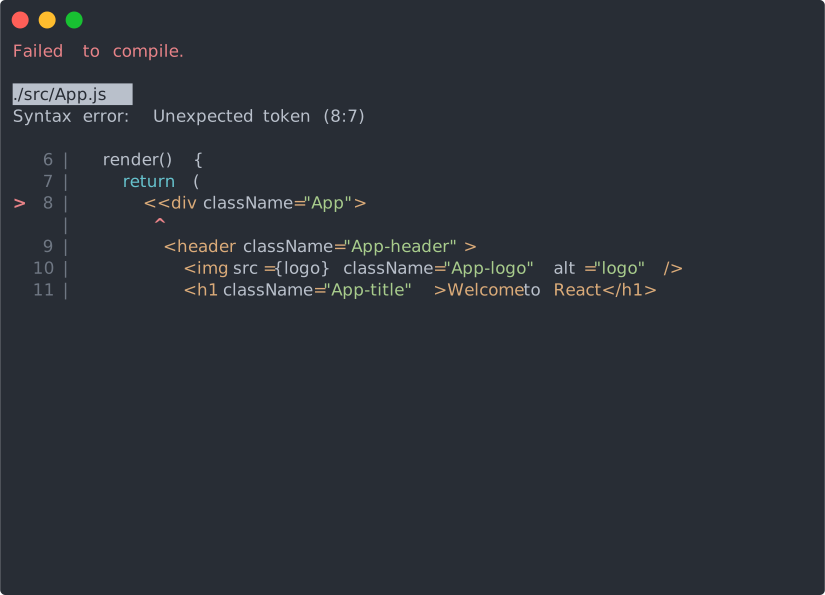
The page will automatically reload if you make changes to the code. You will see the build errors and lint warnings in the console.
### `npm test` or `yarn test`[](https://create-react-app.dev/docs/getting-started/#npm-test-or-yarn-test "Direct link to heading")
Runs the test watcher in an interactive mode. By default, runs tests related to files changed since the last commit.
[Read more about testing](https://create-react-app.dev/docs/running-tests).
### `npm run build` or `yarn build`[](https://create-react-app.dev/docs/getting-started/#npm-run-build-or-yarn-build "Direct link to heading")
Builds the app for production to the `build` folder. It correctly bundles React in production mode and optimizes the build for the best performance.
The build is minified and the filenames include the hashes.
Your app is ready to be deployed.
[Edit this page](https://github.com/facebook/create-react-app/edit/main/docusaurus/docs/getting-started.md)
Last updated on **4/28/2022** by **Toromo Adegboyega**
[PreviousAbout Docs](https://create-react-app.dev/docs/documentation-intro)
[NextFolder Structure](https://create-react-app.dev/docs/folder-structure)
- [Quick Start](https://create-react-app.dev/docs/getting-started/#quick-start)
- [Get Started Immediately](https://create-react-app.dev/docs/getting-started/#get-started-immediately)
- [Creating an App](https://create-react-app.dev/docs/getting-started/#creating-an-app)
- [npx](https://create-react-app.dev/docs/getting-started/#npx)
- [npm](https://create-react-app.dev/docs/getting-started/#npm)
- [Yarn](https://create-react-app.dev/docs/getting-started/#yarn)
- [Selecting a template](https://create-react-app.dev/docs/getting-started/#selecting-a-template)
- [Selecting a package manager](https://create-react-app.dev/docs/getting-started/#selecting-a-package-manager)
- [Output](https://create-react-app.dev/docs/getting-started/#output)
- [Scripts](https://create-react-app.dev/docs/getting-started/#scripts)
- [`npm start` or `yarn start`](https://create-react-app.dev/docs/getting-started/#npm-start-or-yarn-start)
- [`npm test` or `yarn test`](https://create-react-app.dev/docs/getting-started/#npm-test-or-yarn-test)
- [`npm run build` or `yarn build`](https://create-react-app.dev/docs/getting-started/#npm-run-build-or-yarn-build)
Docs
- [Get Started](https://create-react-app.dev/docs/getting-started)
- [Learn React](https://reactjs.org/)
Community
- [Stack Overflow](https://stackoverflow.com/questions/tagged/create-react-app)
- [GitHub Discussions](https://github.com/facebook/create-react-app/discussions)
- [Twitter](https://twitter.com/reactjs)
- [Contributor Covenant](https://www.contributor-covenant.org/version/1/4/code-of-conduct)
Social
- [GitHub](https://www.github.com/facebook/create-react-app)

Copyright © 2025 Facebook, Inc. |
| Readable Markdown | Create React App is an officially supported way to create single-page React applications. It offers a modern build setup with no configuration.
## Quick Start[](https://create-react-app.dev/docs/getting-started/#quick-start "Direct link to heading")
```
npx create-react-app my-app
cd my-app
npm start
```
> If you've previously installed `create-react-app` globally via `npm install -g create-react-app`, we recommend you uninstall the package using `npm uninstall -g create-react-app` or `yarn global remove create-react-app` to ensure that `npx` always uses the latest version.
*([npx](https://medium.com/@maybekatz/introducing-npx-an-npm-package-runner-55f7d4bd282b) comes with npm 5.2+ and higher, see [instructions for older npm versions](https://gist.github.com/gaearon/4064d3c23a77c74a3614c498a8bb1c5f))*
Then open <http://localhost:3000/> to see your app.
When you’re ready to deploy to production, create a minified bundle with `npm run build`.

### Get Started Immediately[](https://create-react-app.dev/docs/getting-started/#get-started-immediately "Direct link to heading")
You **don’t** need to install or configure tools like webpack or Babel. They are preconfigured and hidden so that you can focus on the code.
Create a project, and you’re good to go.
## Creating an App[](https://create-react-app.dev/docs/getting-started/#creating-an-app "Direct link to heading")
**You’ll need to have Node \>= 14 on your local development machine** (but it’s not required on the server). You can use [nvm](https://github.com/creationix/nvm#installation) (macOS/Linux) or [nvm-windows](https://github.com/coreybutler/nvm-windows#node-version-manager-nvm-for-windows) to switch Node versions between different projects.
To create a new app, you may choose one of the following methods:
### npx[](https://create-react-app.dev/docs/getting-started/#npx "Direct link to heading")
```
npx create-react-app@latest my-app
```
*([npx](https://medium.com/@maybekatz/introducing-npx-an-npm-package-runner-55f7d4bd282b) comes with npm 5.2+ and higher, see [instructions for older npm versions](https://gist.github.com/gaearon/4064d3c23a77c74a3614c498a8bb1c5f))*
### npm[](https://create-react-app.dev/docs/getting-started/#npm "Direct link to heading")
```
npm init react-app my-app
```
*`npm init <initializer>` is available in npm 6+*
### Yarn[](https://create-react-app.dev/docs/getting-started/#yarn "Direct link to heading")
```
yarn create react-app my-app
```
*`yarn create` is available in Yarn 0.25+*
### Selecting a template[](https://create-react-app.dev/docs/getting-started/#selecting-a-template "Direct link to heading")
You can now optionally start a new app from a template by appending `--template [template-name]` to the creation command.
If you don't select a template, we'll create your project with our base template.
Templates are always named in the format `cra-template-[template-name]`, however you only need to provide the `[template-name]` to the creation command.
```
npx create-react-app my-app --template [template-name]
```
> You can find a list of available templates by searching for ["cra-template-\*"](https://www.npmjs.com/search?q=cra-template-*) on npm.
Our [Custom Templates](https://create-react-app.dev/docs/custom-templates) documentation describes how you can build your own template.
#### Creating a TypeScript app[](https://create-react-app.dev/docs/getting-started/#creating-a-typescript-app "Direct link to heading")
You can start a new TypeScript app using templates. To use our provided TypeScript template, append `--template typescript` to the creation command.
```
npx create-react-app my-app --template typescript
```
If you already have a project and would like to add TypeScript, see our [Adding TypeScript](https://create-react-app.dev/docs/adding-typescript) documentation.
### Selecting a package manager[](https://create-react-app.dev/docs/getting-started/#selecting-a-package-manager "Direct link to heading")
When you create a new app, the CLI will use [npm](https://docs.npmjs.com/) or [Yarn](https://yarnpkg.com/) to install dependencies, depending on which tool you use to run `create-react-app`. For example:
```
# Run this to use npm
npx create-react-app my-app
# Or run this to use yarn
yarn create react-app my-app
```
## Output[](https://create-react-app.dev/docs/getting-started/#output "Direct link to heading")
Running any of these commands will create a directory called `my-app` inside the current folder. Inside that directory, it will generate the initial project structure and install the transitive dependencies:
```
my-app
├── README.md
├── node_modules
├── package.json
├── .gitignore
├── public
│ ├── favicon.ico
│ ├── index.html
│ ├── logo192.png
│ ├── logo512.png
│ ├── manifest.json
│ └── robots.txt
└── src
├── App.css
├── App.js
├── App.test.js
├── index.css
├── index.js
├── logo.svg
├── serviceWorker.js
└── setupTests.js
```
No configuration or complicated folder structures, only the files you need to build your app. Once the installation is done, you can open your project folder:
```
cd my-app
```
## Scripts[](https://create-react-app.dev/docs/getting-started/#scripts "Direct link to heading")
Inside the newly created project, you can run some built-in commands:
### `npm start` or `yarn start`[](https://create-react-app.dev/docs/getting-started/#npm-start-or-yarn-start "Direct link to heading")
Runs the app in development mode. Open [http://localhost:3000](http://localhost:3000/) to view it in the browser.
The page will automatically reload if you make changes to the code. You will see the build errors and lint warnings in the console.

### `npm test` or `yarn test`[](https://create-react-app.dev/docs/getting-started/#npm-test-or-yarn-test "Direct link to heading")
Runs the test watcher in an interactive mode. By default, runs tests related to files changed since the last commit.
[Read more about testing](https://create-react-app.dev/docs/running-tests).
### `npm run build` or `yarn build`[](https://create-react-app.dev/docs/getting-started/#npm-run-build-or-yarn-build "Direct link to heading")
Builds the app for production to the `build` folder. It correctly bundles React in production mode and optimizes the build for the best performance.
The build is minified and the filenames include the hashes.
Your app is ready to be deployed. |
| Shard | 25 (laksa) |
| Root Hash | 15129598224442530625 |
| Unparsed URL | dev,create-react-app!/docs/getting-started/ s443 |