ℹ️ Skipped - page is already crawled
| Filter | Status | Condition | Details |
|---|---|---|---|
| HTTP status | PASS | download_http_code = 200 | HTTP 200 |
| Age cutoff | PASS | download_stamp > now() - 6 MONTH | 0 months ago |
| History drop | PASS | isNull(history_drop_reason) | No drop reason |
| Spam/ban | PASS | fh_dont_index != 1 AND ml_spam_score = 0 | ml_spam_score=0 |
| Canonical | PASS | meta_canonical IS NULL OR = '' OR = src_unparsed | Not set |
| Property | Value |
|---|---|
| URL | https://blog.google/products-and-platforms/products/chrome/chrome-productivity-improvements/ |
| Last Crawled | 2026-04-15 00:09:48 (2 hours ago) |
| First Indexed | 2026-02-19 17:21:54 (1 month ago) |
| HTTP Status Code | 200 |
| Meta Title | New features in Chrome for work, life and everything in between |
| Meta Description | Three new Chrome features designed to give you a productivity boost: Split view, Save to Google Drive and PDF annotations. |
| Meta Canonical | null |
| Boilerpipe Text | Your browser does not support the audio element.
Listen to article
This content is generated by Google AI. Generative AI is experimental
[[duration]] minutes
Whether you're looking for ways to move through your to-do list faster, working hard to get your side gig off the ground, or just spending most of your day in the browser, Chrome’s got your back. We’re constantly listening to your feedback and thinking about how we can make browsing more helpful and intuitive.
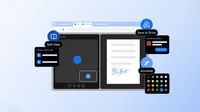
We also know your time is valuable, which is why we obsess about all the tiny details to make your Chrome experience as helpful as possible. Today, we're announcing three new Chrome features designed to give you a productivity boost: split view, PDF annotations and Save to Google Drive. These tools, developed for both everyday and enterprise users, are built to help you focus, collaborate and get things done more quickly.
Split view lets you multitask smarter
Have you ever found yourself juggling multiple windows or constantly switching between the same two tabs? It's a common frustration that can interrupt your flow and slow you down.
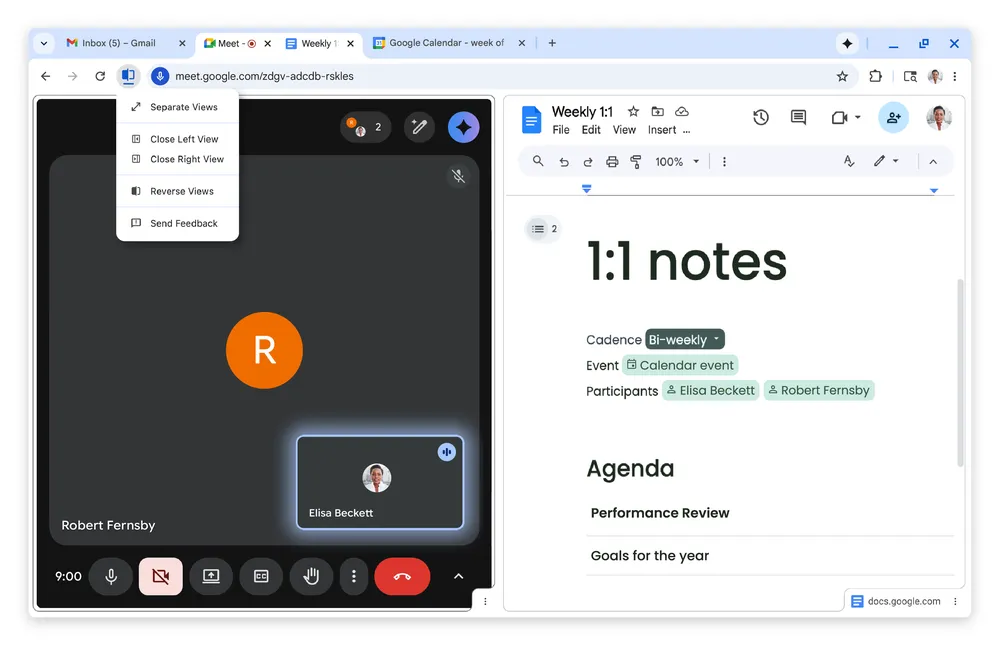
Split view is designed to help. It allows you to view two tabs at the same time, providing a more streamlined, flexible way to work. Split view is a built-in, intuitive tool that helps you create a single, organized space, saving you time and reducing some back-and-forth tab fatigue.
Our work with early testers has shown that split view is already helping people multitask and get more done on the web. One teacher told us they use split view to more easily grade papers in the classroom, others love using it to take notes on YouTube videos, and developers are even using it to reference documentation while they code.
PDF annotations let you annotate on the fly
The Chrome PDF Viewer is already a favorite for viewing documents, and now we're adding your most-requested feature: annotations!
You can now highlight text and add notes to a PDF right from your browser. This eliminates the need to download the file and open a separate application just to make a quick note. This feature is perfect for quick digital signatures, reviewing a work report, making notes on a class syllabus or simply highlighting a key section of a personal document.
Send downloads to one place
We’ve all been there. You find an important PDF, download it and then forget where it went.
With the new "Save to Google Drive" feature, we’re making it easy to know exactly where to find your downloads. You can now save PDFs directly to your Drive from Chrome without downloading and re-uploading them. It’s automatically organized into a dedicated “Saved from Chrome” folder in your Drive. This keeps your important documents backed up, organized and easy to search for later, from any of your devices.
These are just a few ways Chrome continues to help you work faster and stay more organized on the web. |
| Markdown | [Skip to main content](https://blog.google/products-and-platforms/products/chrome/chrome-productivity-improvements/#jump-content)
[The Keyword](https://blog.google/)
New features in Chrome for work, life and everything in between
[Share]()
[x.com](https://twitter.com/intent/tweet?text=New%20features%20in%20Chrome%20for%20work%2C%20life%20and%20everything%20in%20between%20%40google&url=https://blog.google/products-and-platforms/products/chrome/chrome-productivity-improvements/)
[Facebook](https://www.facebook.com/sharer/sharer.php?caption=New%20features%20in%20Chrome%20for%20work%2C%20life%20and%20everything%20in%20between&u=https://blog.google/products-and-platforms/products/chrome/chrome-productivity-improvements/)
[LinkedIn](https://www.linkedin.com/shareArticle?mini=true&url=https://blog.google/products-and-platforms/products/chrome/chrome-productivity-improvements/&title=New%20features%20in%20Chrome%20for%20work%2C%20life%20and%20everything%20in%20between)
[Mail](<mailto:?subject=New%20features%20in%20Chrome%20for%20work%2C%20life%20and%20everything%20in%20between&body=Check out this article on the Keyword:%0A%0ANew%20features%20in%20Chrome%20for%20work%2C%20life%20and%20everything%20in%20between%0A%0AThree new Chrome features designed to give you a productivity boost: Split view, Save to Google Drive and PDF annotations.%0A%0Ahttps://blog.google/products-and-platforms/products/chrome/chrome-productivity-improvements/>)
Copy link
- [Home](https://blog.google/)
- Innovation & AI
Innovation & AI
- Models & Research
- [Google DeepMind](https://blog.google/innovation-and-ai/models-and-research/google-deepmind/)
- [Google Research](https://blog.google/innovation-and-ai/models-and-research/google-research/)
- [Google Labs](https://blog.google/innovation-and-ai/models-and-research/google-labs/)
- [Gemini models](https://blog.google/innovation-and-ai/models-and-research/gemini-models/)
- [Quantum computing](https://blog.google/innovation-and-ai/models-and-research/quantum-computing/)
- [See all](https://blog.google/innovation-and-ai/models-and-research/)
- Products
- [Developer tools](https://blog.google/innovation-and-ai/technology/developers-tools/)
- [Gemini app](https://blog.google/innovation-and-ai/products/gemini-app/)
- [NotebookLM](https://blog.google/innovation-and-ai/products/notebooklm/)
- [See all](https://blog.google/innovation-and-ai/products/)
- Infrastructure & cloud
- [Global network](https://blog.google/innovation-and-ai/infrastructure-and-cloud/global-network/)
- [Google Cloud](https://blog.google/innovation-and-ai/infrastructure-and-cloud/google-cloud/)
- [See all](https://blog.google/innovation-and-ai/infrastructure-and-cloud/)
Learn more:
- [Google DeepMind blog](https://deepmind.google/blog/)
- [Google Research blog](https://research.google/blog/)
- [Google Developers blog](https://developers.googleblog.com/)
- [Google Cloud blog](https://cloud.google.com/blog)
[See all AI updates](https://blog.google/innovation-and-ai/)
- Models & Research
- [Google DeepMind](https://blog.google/innovation-and-ai/models-and-research/google-deepmind/)
- [Google Research](https://blog.google/innovation-and-ai/models-and-research/google-research/)
- [Google Labs](https://blog.google/innovation-and-ai/models-and-research/google-labs/)
- [Gemini models](https://blog.google/innovation-and-ai/models-and-research/gemini-models/)
- [Quantum computing](https://blog.google/innovation-and-ai/models-and-research/quantum-computing/)
[See all](https://blog.google/innovation-and-ai/models-and-research/ "See all Models & Research articles")
- Products
- [Developer tools](https://blog.google/innovation-and-ai/technology/developers-tools/)
- [Gemini app](https://blog.google/innovation-and-ai/products/gemini-app/)
- [NotebookLM](https://blog.google/innovation-and-ai/products/notebooklm/)
[See all](https://blog.google/innovation-and-ai/products/ "See all Products articles")
- Infrastructure & cloud
- [Global network](https://blog.google/innovation-and-ai/infrastructure-and-cloud/global-network/)
- [Google Cloud](https://blog.google/innovation-and-ai/infrastructure-and-cloud/google-cloud/)
[See all](https://blog.google/innovation-and-ai/infrastructure-and-cloud/ "See all Infrastructure & cloud articles")
Learn more:
[Google DeepMind blog](https://deepmind.google/blog/)
[Google Research blog](https://research.google/blog/)
[Google Developers blog](https://developers.googleblog.com/)
[Google Cloud blog](https://cloud.google.com/blog)
[See all AI updates](https://blog.google/innovation-and-ai/)
- Products & platforms
Products & platforms
- Products
- [Search](https://blog.google/products-and-platforms/products/search/)
- [Maps](https://blog.google/products-and-platforms/products/maps/)
- [Chrome](https://blog.google/products-and-platforms/products/chrome/)
- [Google Workspace](https://blog.google/products-and-platforms/products/workspace/)
- [Learning & Education](https://blog.google/products-and-platforms/products/education/)
- [Photos](https://blog.google/products-and-platforms/products/photos/)
- [Shopping](https://blog.google/products-and-platforms/products/shopping/)
- [See all](https://blog.google/products-and-platforms/products/)
- Platforms
- [Android](https://blog.google/products-and-platforms/platforms/android/)
- [Google Play](https://blog.google/products-and-platforms/platforms/google-play/)
- [Wear OS](https://blog.google/products-and-platforms/platforms/wear-os/)
- [See all](https://blog.google/products-and-platforms/platforms/)
- Devices
- [Pixel](https://blog.google/products-and-platforms/devices/pixel/)
- [Google Nest](https://blog.google/products-and-platforms/devices/google-nest/)
- [Fitbit](https://blog.google/products-and-platforms/devices/fitbit/)
- [Chromebooks](https://blog.google/products-and-platforms/devices/chromebooks/)
- [See all](https://blog.google/products-and-platforms/devices/)
Learn more:
- [Google Ads & Commerce blog](https://blog.google/products/ads-commerce/)
- [Waze blog](https://blog.google/waze/)
[See all product updates](https://blog.google/products-and-platforms/)
- Products
- [Search](https://blog.google/products-and-platforms/products/search/)
- [Maps](https://blog.google/products-and-platforms/products/maps/)
- [Chrome](https://blog.google/products-and-platforms/products/chrome/)
- [Google Workspace](https://blog.google/products-and-platforms/products/workspace/)
- [Learning & Education](https://blog.google/products-and-platforms/products/education/)
- [Photos](https://blog.google/products-and-platforms/products/photos/)
- [Shopping](https://blog.google/products-and-platforms/products/shopping/)
[See all](https://blog.google/products-and-platforms/products/ "See all Products articles")
- Platforms
- [Android](https://blog.google/products-and-platforms/platforms/android/)
- [Google Play](https://blog.google/products-and-platforms/platforms/google-play/)
- [Wear OS](https://blog.google/products-and-platforms/platforms/wear-os/)
[See all](https://blog.google/products-and-platforms/platforms/ "See all Platforms articles")
- Devices
- [Pixel](https://blog.google/products-and-platforms/devices/pixel/)
- [Google Nest](https://blog.google/products-and-platforms/devices/google-nest/)
- [Fitbit](https://blog.google/products-and-platforms/devices/fitbit/)
- [Chromebooks](https://blog.google/products-and-platforms/devices/chromebooks/)
[See all](https://blog.google/products-and-platforms/devices/ "See all Devices articles")
Learn more:
[Google Ads & Commerce blog](https://blog.google/products/ads-commerce/)
[Waze blog](https://blog.google/waze/)
[See all product updates](https://blog.google/products-and-platforms/)
- Company news
Company news
- Outreach & initiatives
- [Creating opportunity](https://blog.google/company-news/outreach-and-initiatives/creating-opportunity/)
- [Safety & security](https://blog.google/innovation-and-ai/technology/safety-security/)
- [Google.org](https://blog.google/company-news/outreach-and-initiatives/google-org/)
- [Public policy](https://blog.google/company-news/outreach-and-initiatives/public-policy/)
- [Sustainability](https://blog.google/company-news/outreach-and-initiatives/sustainability/)
- [Health](https://blog.google/innovation-and-ai/technology/health/)
- [See all](https://blog.google/company-news/outreach-and-initiatives/)
- Leadership
- [Sundar Pichai, CEO](https://blog.google/authors/sundar-pichai/)
- [More authors](https://blog.google/authors/)
- [See all](https://blog.google/authors/)
- Inside Google
- [Around the globe](https://blog.google/company-news/inside-google/around-the-globe/)
- [Life at Google](https://blog.google/company-news/inside-google/life-at-google/)
- [See all](https://blog.google/company-news/inside-google/)
- Outreach & initiatives
- [Creating opportunity](https://blog.google/company-news/outreach-and-initiatives/creating-opportunity/)
- [Safety & security](https://blog.google/innovation-and-ai/technology/safety-security/)
- [Google.org](https://blog.google/company-news/outreach-and-initiatives/google-org/)
- [Public policy](https://blog.google/company-news/outreach-and-initiatives/public-policy/)
- [Sustainability](https://blog.google/company-news/outreach-and-initiatives/sustainability/)
- [Health](https://blog.google/innovation-and-ai/technology/health/)
[See all](https://blog.google/company-news/outreach-and-initiatives/ "See all Outreach & initiatives articles")
- Leadership
- [Sundar Pichai, CEO](https://blog.google/authors/sundar-pichai/)
- [More authors](https://blog.google/authors/)
[See all](https://blog.google/authors/ "See all Leadership articles")
- Inside Google
- [Around the globe](https://blog.google/company-news/inside-google/around-the-globe/)
- [Life at Google](https://blog.google/company-news/inside-google/life-at-google/)
[See all](https://blog.google/company-news/inside-google/ "See all Inside Google articles")
- [Feed](https://blog.google/feed)
[Subscribe](https://blog.google/newsletter-subscribe/)
\["How is Gemini changing Maps?", "What is \\"vibe design?\\"", "How can I learn new AI skills?"\]
Search freely using keywords, or by asking a question
Suggested searches
- [How is Gemini changing Maps?](https://blog.google/products-and-platforms/products/chrome/chrome-productivity-improvements/)
- [What is "vibe design?"](https://blog.google/products-and-platforms/products/chrome/chrome-productivity-improvements/)
- [How can I learn new AI skills?](https://blog.google/products-and-platforms/products/chrome/chrome-productivity-improvements/)
[Subscribe](https://blog.google/newsletter-subscribe/)
[The Keyword](https://blog.google/)
- [Home](https://blog.google/)
- Innovation & AI
Innovation & AI
- Models & Research
- [Google DeepMind](https://blog.google/innovation-and-ai/models-and-research/google-deepmind/)
- [Google Research](https://blog.google/innovation-and-ai/models-and-research/google-research/)
- [Google Labs](https://blog.google/innovation-and-ai/models-and-research/google-labs/)
- [Gemini models](https://blog.google/innovation-and-ai/models-and-research/gemini-models/)
- [Quantum computing](https://blog.google/innovation-and-ai/models-and-research/quantum-computing/)
- [See all](https://blog.google/innovation-and-ai/models-and-research/)
- Products
- [Developer tools](https://blog.google/innovation-and-ai/technology/developers-tools/)
- [Gemini app](https://blog.google/innovation-and-ai/products/gemini-app/)
- [NotebookLM](https://blog.google/innovation-and-ai/products/notebooklm/)
- [See all](https://blog.google/innovation-and-ai/products/)
- Infrastructure & cloud
- [Global network](https://blog.google/innovation-and-ai/infrastructure-and-cloud/global-network/)
- [Google Cloud](https://blog.google/innovation-and-ai/infrastructure-and-cloud/google-cloud/)
- [See all](https://blog.google/innovation-and-ai/infrastructure-and-cloud/)
Learn more:
- [Google DeepMind blog](https://deepmind.google/blog/)
- [Google Research blog](https://research.google/blog/)
- [Google Developers blog](https://developers.googleblog.com/)
- [Google Cloud blog](https://cloud.google.com/blog)
[See all AI updates](https://blog.google/innovation-and-ai/)
- Products & platforms
Products & platforms
- Products
- [Search](https://blog.google/products-and-platforms/products/search/)
- [Maps](https://blog.google/products-and-platforms/products/maps/)
- [Chrome](https://blog.google/products-and-platforms/products/chrome/)
- [Google Workspace](https://blog.google/products-and-platforms/products/workspace/)
- [Learning & Education](https://blog.google/products-and-platforms/products/education/)
- [Photos](https://blog.google/products-and-platforms/products/photos/)
- [Shopping](https://blog.google/products-and-platforms/products/shopping/)
- [See all](https://blog.google/products-and-platforms/products/)
- Platforms
- [Android](https://blog.google/products-and-platforms/platforms/android/)
- [Google Play](https://blog.google/products-and-platforms/platforms/google-play/)
- [Wear OS](https://blog.google/products-and-platforms/platforms/wear-os/)
- [See all](https://blog.google/products-and-platforms/platforms/)
- Devices
- [Pixel](https://blog.google/products-and-platforms/devices/pixel/)
- [Google Nest](https://blog.google/products-and-platforms/devices/google-nest/)
- [Fitbit](https://blog.google/products-and-platforms/devices/fitbit/)
- [Chromebooks](https://blog.google/products-and-platforms/devices/chromebooks/)
- [See all](https://blog.google/products-and-platforms/devices/)
Learn more:
- [Google Ads & Commerce blog](https://blog.google/products/ads-commerce/)
- [Waze blog](https://blog.google/waze/)
[See all product updates](https://blog.google/products-and-platforms/)
- Company news
Company news
- Outreach & initiatives
- [Creating opportunity](https://blog.google/company-news/outreach-and-initiatives/creating-opportunity/)
- [Safety & security](https://blog.google/innovation-and-ai/technology/safety-security/)
- [Google.org](https://blog.google/company-news/outreach-and-initiatives/google-org/)
- [Public policy](https://blog.google/company-news/outreach-and-initiatives/public-policy/)
- [Sustainability](https://blog.google/company-news/outreach-and-initiatives/sustainability/)
- [Health](https://blog.google/innovation-and-ai/technology/health/)
- [See all](https://blog.google/company-news/outreach-and-initiatives/)
- Leadership
- [Sundar Pichai, CEO](https://blog.google/authors/sundar-pichai/)
- [More authors](https://blog.google/authors/)
- [See all](https://blog.google/authors/)
- Inside Google
- [Around the globe](https://blog.google/company-news/inside-google/around-the-globe/)
- [Life at Google](https://blog.google/company-news/inside-google/life-at-google/)
- [See all](https://blog.google/company-news/inside-google/)
- [Feed](https://blog.google/feed)
- [Images](https://blog.google/image-library/ "Images")
- [RSS feed](https://blog.google/rss/ "RSS feed")
[Subscribe](https://blog.google/newsletter-subscribe/)
Breadcrumb
1. [Products & Platforms](https://blog.google/products-and-platforms/)
2. [Products](https://blog.google/products-and-platforms/products/)
3. [Google Chrome](https://blog.google/products-and-platforms/products/chrome/)
# New features in Chrome for work, life and everything in between
Feb 19, 2026
·
3 min read
[Share]()
[x.com](https://twitter.com/intent/tweet?text=New%20features%20in%20Chrome%20for%20work%2C%20life%20and%20everything%20in%20between%20%40google&url=https://blog.google/products-and-platforms/products/chrome/chrome-productivity-improvements/)
[Facebook](https://www.facebook.com/sharer/sharer.php?caption=New%20features%20in%20Chrome%20for%20work%2C%20life%20and%20everything%20in%20between&u=https://blog.google/products-and-platforms/products/chrome/chrome-productivity-improvements/)
[LinkedIn](https://www.linkedin.com/shareArticle?mini=true&url=https://blog.google/products-and-platforms/products/chrome/chrome-productivity-improvements/&title=New%20features%20in%20Chrome%20for%20work%2C%20life%20and%20everything%20in%20between)
[Mail](<mailto:?subject=New%20features%20in%20Chrome%20for%20work%2C%20life%20and%20everything%20in%20between&body=Check out this article on the Keyword:%0A%0ANew%20features%20in%20Chrome%20for%20work%2C%20life%20and%20everything%20in%20between%0A%0AThree new Chrome features designed to give you a productivity boost: Split view, Save to Google Drive and PDF annotations.%0A%0Ahttps://blog.google/products-and-platforms/products/chrome/chrome-productivity-improvements/>)
Copy link
From split view to new PDF annotation capabilities, see how we’re making Chrome more helpful than ever.
A
Alex Tsu
Product Manager, Chrome
[Share]()
[x.com](https://twitter.com/intent/tweet?text=New%20features%20in%20Chrome%20for%20work%2C%20life%20and%20everything%20in%20between%20%40google&url=https://blog.google/products-and-platforms/products/chrome/chrome-productivity-improvements/)
[Facebook](https://www.facebook.com/sharer/sharer.php?caption=New%20features%20in%20Chrome%20for%20work%2C%20life%20and%20everything%20in%20between&u=https://blog.google/products-and-platforms/products/chrome/chrome-productivity-improvements/)
[LinkedIn](https://www.linkedin.com/shareArticle?mini=true&url=https://blog.google/products-and-platforms/products/chrome/chrome-productivity-improvements/&title=New%20features%20in%20Chrome%20for%20work%2C%20life%20and%20everything%20in%20between)
[Mail](<mailto:?subject=New%20features%20in%20Chrome%20for%20work%2C%20life%20and%20everything%20in%20between&body=Check out this article on the Keyword:%0A%0ANew%20features%20in%20Chrome%20for%20work%2C%20life%20and%20everything%20in%20between%0A%0AThree new Chrome features designed to give you a productivity boost: Split view, Save to Google Drive and PDF annotations.%0A%0Ahttps://blog.google/products-and-platforms/products/chrome/chrome-productivity-improvements/>)
Copy link
Your browser does not support the audio element.
Listen to article
This content is generated by Google AI. Generative AI is experimental
\[\[duration\]\] minutes
Voice
Umbriel
Speed
1X
Voice
Umbriel
Gacrux
Speed
0\.75X
1X
1\.5X
2X
Whether you're looking for ways to move through your to-do list faster, working hard to get your side gig off the ground, or just spending most of your day in the browser, Chrome’s got your back. We’re constantly listening to your feedback and thinking about how we can make browsing more helpful and intuitive.
We also know your time is valuable, which is why we obsess about all the tiny details to make your Chrome experience as helpful as possible. Today, we're announcing three new Chrome features designed to give you a productivity boost: split view, PDF annotations and Save to Google Drive. These tools, developed for both everyday and enterprise users, are built to help you focus, collaborate and get things done more quickly.
### Split view lets you multitask smarter
Have you ever found yourself juggling multiple windows or constantly switching between the same two tabs? It's a common frustration that can interrupt your flow and slow you down.
Split view is designed to help. It allows you to view two tabs at the same time, providing a more streamlined, flexible way to work. Split view is a built-in, intuitive tool that helps you create a single, organized space, saving you time and reducing some back-and-forth tab fatigue.
Our work with early testers has shown that split view is already helping people multitask and get more done on the web. One teacher told us they use split view to more easily grade papers in the classroom, others love using it to take notes on YouTube videos, and developers are even using it to reference documentation while they code.
### PDF annotations let you annotate on the fly
The Chrome PDF Viewer is already a favorite for viewing documents, and now we're adding your most-requested feature: annotations\!
You can now highlight text and add notes to a PDF right from your browser. This eliminates the need to download the file and open a separate application just to make a quick note. This feature is perfect for quick digital signatures, reviewing a work report, making notes on a class syllabus or simply highlighting a key section of a personal document.
Sorry, your browser doesn't support embedded videos, but don't worry, you can [download it](https://storage.googleapis.com/gweb-uniblog-publish-prod/original_videos/Chrome_Productivity_Blog_PDF_Annotations_V4.mp4) and watch it with your favorite video player\!
### Send downloads to one place
We’ve all been there. You find an important PDF, download it and then forget where it went.
With the new "Save to Google Drive" feature, we’re making it easy to know exactly where to find your downloads. You can now save PDFs directly to your Drive from Chrome without downloading and re-uploading them. It’s automatically organized into a dedicated “Saved from Chrome” folder in your Drive. This keeps your important documents backed up, organized and easy to search for later, from any of your devices.
Sorry, your browser doesn't support embedded videos, but don't worry, you can [download it](https://storage.googleapis.com/gweb-uniblog-publish-prod/original_videos/Chrome_Productivity_Blog_Save_to_Google_Drive_V3.mp4) and watch it with your favorite video player\!
These are just a few ways Chrome continues to help you work faster and stay more organized on the web.
POSTED IN:
- [Chrome](https://blog.google/products-and-platforms/products/chrome/chrome-productivity-improvements/%20https://blog.google/products-and-platforms/products/chrome/%20)
### Related stories
[ Chrome Turn your best AI prompts into one-click tools in Chrome By Hafsah Ismail Apr 14, 2026](https://blog.google/products-and-platforms/products/chrome/skills-in-chrome/)
[ Chrome Get more done with new vertical tabs and immersive reading mode in Chrome By Alex Tsu & Jess Carpenter Apr 07, 2026](https://blog.google/products-and-platforms/products/chrome/new-chrome-productivity-features/)
[ Chrome Expanding Chrome’s AI experiences to India, New Zealand and Canada By Charmaine D'Silva Mar 11, 2026](https://blog.google/products-and-platforms/products/chrome/chrome-expands-india-new-zealand-canada/)
[ AI The latest AI news we announced in January By Keyword Team Feb 04, 2026](https://blog.google/innovation-and-ai/products/google-ai-updates-january-2026/)
[ Chrome The new era of browsing: Putting Gemini to work in Chrome By Parisa Tabriz](https://blog.google/products-and-platforms/products/chrome/gemini-3-auto-browse/)
[ AI Products 60 of our biggest AI announcements in 2025 By Zahra Thompson Dec 22, 2025](https://blog.google/innovation-and-ai/products/google-ai-news-recap-2025/)
.
Jump to position 1
Jump to position 2
Jump to position 3
Jump to position 4
Jump to position 5
Jump to position 6

Let’s stay in touch. Get the latest news from Google in your inbox.
[Subscribe](https://blog.google/newsletter-subscribe/)
No thanks
Follow Us
- [Privacy](https://policies.google.com/privacy)
- [Terms](https://policies.google.com/terms)
- [About Google](https://about.google/)
- [Google Products](https://about.google/products/)
- [About the Keyword](https://blog.google/about/)
- [Help](https://support.google.com/) |
| Readable Markdown | Your browser does not support the audio element.
Listen to article This content is generated by Google AI. Generative AI is experimental
\[\[duration\]\] minutes
Whether you're looking for ways to move through your to-do list faster, working hard to get your side gig off the ground, or just spending most of your day in the browser, Chrome’s got your back. We’re constantly listening to your feedback and thinking about how we can make browsing more helpful and intuitive.
We also know your time is valuable, which is why we obsess about all the tiny details to make your Chrome experience as helpful as possible. Today, we're announcing three new Chrome features designed to give you a productivity boost: split view, PDF annotations and Save to Google Drive. These tools, developed for both everyday and enterprise users, are built to help you focus, collaborate and get things done more quickly.
### Split view lets you multitask smarter
Have you ever found yourself juggling multiple windows or constantly switching between the same two tabs? It's a common frustration that can interrupt your flow and slow you down.
Split view is designed to help. It allows you to view two tabs at the same time, providing a more streamlined, flexible way to work. Split view is a built-in, intuitive tool that helps you create a single, organized space, saving you time and reducing some back-and-forth tab fatigue.
Our work with early testers has shown that split view is already helping people multitask and get more done on the web. One teacher told us they use split view to more easily grade papers in the classroom, others love using it to take notes on YouTube videos, and developers are even using it to reference documentation while they code.
### PDF annotations let you annotate on the fly
The Chrome PDF Viewer is already a favorite for viewing documents, and now we're adding your most-requested feature: annotations\!
You can now highlight text and add notes to a PDF right from your browser. This eliminates the need to download the file and open a separate application just to make a quick note. This feature is perfect for quick digital signatures, reviewing a work report, making notes on a class syllabus or simply highlighting a key section of a personal document.
### Send downloads to one place
We’ve all been there. You find an important PDF, download it and then forget where it went.
With the new "Save to Google Drive" feature, we’re making it easy to know exactly where to find your downloads. You can now save PDFs directly to your Drive from Chrome without downloading and re-uploading them. It’s automatically organized into a dedicated “Saved from Chrome” folder in your Drive. This keeps your important documents backed up, organized and easy to search for later, from any of your devices.
These are just a few ways Chrome continues to help you work faster and stay more organized on the web. |
| Shard | 183 (laksa) |
| Root Hash | 12406242299499054583 |
| Unparsed URL | google,blog!/products-and-platforms/products/chrome/chrome-productivity-improvements/ s443 |